#user-interfaces
1 messages · Page 46 of 1
 sour prism
 sand violet
'button1 pressed' is a lot more general
But I do have an idea of using selectors
@window('#button1').on('press')
def callback(button):
  ...
@window('.cool_button').on('press')
def callback(button):
  ... #works for any "cool button"
Does this seem good, @sour prism
sour prism
Perfect!
If you can have decorators like that.
In fact, something like flask.
It does it quite well.
sand violet
You can
sand violet
Maybe
It reminds me of jquery
$('#button1').on('press', function (button) {
  ...
})
$('.cool-button').on('press', function (button) {
  ...
})
Yeah, that too.
sour prism
Yeah, definitely, but moreso everyone else!
Would be great if you did it, and, though I can't spare much time, I might chip in.
sand violet
It's (partially) working already
Not everything is done but a few things are
You can add buttons, text, columns, rows, etc
sour prism
Nice! On GH?
sand violet
Not yet, I could put it there
 brave nest
hey everyone 😅 so I'm trying to get into basic UI creation and I'm trying to create a dynamic visual tic tac toe using tkinter, but I'm having a bit of a problem gridding out the buttons. I'm trying to take user input i.e., 4 and then create a 4x4 grid on a window.
def board():
    newWindow = Toplevel(root)
    game_size = int(gamesize.get())
    buttonlist  = []
    for i in range(game_size):
        for j in range(game_size):
            (buttonlist.append(Button(newWindow, text="button "+str(i+1),command=lambda: checker(Button))))
                buttonlist[i].grid(row=i, column=j, sticky=N+S+E+W)
This is my current code
 upbeat nexus
Bluh. Multithreading is hard.
Making an uploading UI and I'd like the main UI to be responsive while uploads happen, but after making a thread and using pubsub, it still ties up the current thread.
I'm using wxPython with pubsub. I made a class UploadThread that's a sub-class of Thread and it accepts a list of dicts containing items it needs to upload and various information to achieve it. It uses wx.CallAfter to advance to the next item in the list and communicates with Publisher.sendMessage to report on progress.
class UploadThread(Thread):
  def __init__(self, photos):
    Thread.__init__(self)
    self.photos = photos
    self.index = 0
    self.start()

  def run(self):
    wx.CallAfter(self.upload_photo)

  def upload_photo(self):
    # Do some work, advance the index
    Publisher.sendMessage("upload.progress", arg1=some_progress)
    wx.CallAfter(self.upload_photo)
And there's a subscription somewhere that's supposed to update some UI (progess bar) but since the thread is tied up, it doesn't update and the system thinks it's become unresponsive.
And, yeah, I've coded in a path when it finishes processing the list
I'm gonna pack up my stuff. Last I checked it was 4PM and now it's 8PM, and I think it's time for me to head home. I'll be AFK for 30-40 mins and I'll check back.
upbeat nexus
Back
sand violet
layout = [
    [
        1,
        2
    ],
    UnsizedRow([
        'A',
        Entry('B'),
        'C'
    ]),
    [
        'A',
        'B'
    ]
]
This divides it into three rows
[1, 2] is a row with a '1' text widget and a '2' text widget
and both of them are columns that take up 50% of the row
UnsizedRow(['A', Entry('B'), 'C']) makes a row where all of the elements are right next to each other
it doesn't work as intended yet
['A', 'B'] is another row where 'A' and 'B' are equally spread apart
Tomorrow I'm going to fix UnsizedRow and add the ability to style widgets
Actually, before styling, I'll add events
@window('button#identity').on('click')
def callback(button):
  pass
@window('button').on('click')
def callback(button):
  if button.id == 'identity': #OR button.match('#identity')
    pass
Still don't have a clue from last night's question: https://discordapp.com/channels/267624335836053506/338993628049571840/715366785297154121
Perhaps it's how I'm using the functions? I might need to look at some examples. Maybe even run a seperate process entirely and try to concieve a way to communicate effectively. The dict I'm giving to the thread already is not doing any strange referals so it could be given to the process.
Well, communication shouldn't be hard. Just 'Do this and give me progress'
Actually this might be nicer. Instead of multiple uploads at the same time, it'll be a pool so I don't cause timeouts if too many uploads are happening.
Actually it seems like some are getting wxPython to play nice with await and I could look at that.
Async/await for wxPython by Andy Bulka
https://medium.com/@abulka/async-await-for-wxpython-c78c667e0872
 full comet
Hello all, I'm pretty new with coding. Sorry for my broken terminology. Is there a favored way of packaging a python file into MacOS executable calls PyQt5 function (mainly QtWebEngine)? I used pyinstaller and used --window, everything works except anything that uses functions within QtWebEngine. I tried py2app, but it gives me a lot of errors that just seems like it doesn't like PyQt5.
When I try with --onefile, the app doesn't work. I can only get it "somewhat" working with --windowed.
 wraith horizon
i dont know if it works on mac but try auto py to exe
you can install it with pip install auto-py-to-exe
or whatever the pip is called on mac
from a quick search i found this article:
i think this can help you out.
 harsh bane
Hello friends! How are you? I have a little lack of time and I needed someone's help.
I need a program with a simple Python interface with two views (user and operator), being an application for electric car charging machines, compatible with mobile phones or tablets.
The context is as follows: Electric car users need to charge their car. This application will handle the loading of all these users (which would not be many) in a small charging station in a building, so that there are no overload or low spikes. With a graphically constant curve of electrical energy. Also, the energy consumption of the building is linked to the consumption of cars on this curve.
The user arrives at the station (or in the application when he is already at the station) and enters the desired time of departure, the type of car, the desired level of charge in the car, name, mobile phone number, identification number and a function to pay (form of payment by debit or credit card). The program must make the best optimization so that all users have what they have requested of loading in the best possible way.
The system would have to save the customer's data in a database and present data specific to each car and its battery for better charging.
The building may also contain aid in the production of energy from renewable sources, such as solar panels, which would aid consumption.
The charge for charging afterwards is XX per KW / h. (Where XX must be changeable from time to time).
Can anybody help me? I would be very grateful..
 gray jackal
Hey,
i need to make a project for my college where i have to use python or linux shell scripts.
The program shall be a slim file browser for command line. Similar to Midnight Commander. Therefor i can use termbox (python) or Whiptail (shell).
Users can interact with the keyboard to switch directorys.
The User can see important attributes like (Filename, Filesize, User Rights, Date of last time used).
Functions: Copying files, moving files, delete files and see their content.
I thank you really much for service and hope you can help me.
Where do i start?
upbeat nexus
For a moment I thought you needed a GUI. And I guess Curses might be where you wanna go.
However I can't say I know much of Curses. I'm working in wxPython and I want death.
 rocky dragon
There's eel
 tight silo
thx @rocky dragon
sand violet
layout = [
  ['Col 1 Row 1', 'Col 2 Row 1'],
  Entry(),
  'Col 1 Row 3',
  Button('Press Me!'),
  UnsizedRow(['Enter Username', Entry()]) #This is a widget where everything in the list inside of it is right next to each other, instead of spaced like normal columns
]
finally, this works
 unique spade
is there anything I need to add to function while using PyQT so executed function doesn't kill whole application window when running functions with self.threadpool.start(add_new()) ?
I have issue with window closing when function finishes execution after pressing button
 compact flame
Which UI is best for developing an android app?
compact flame
Is Kivy difficult to learn?(For someone that hasn't made any serious apps etc)
rocky dragon
Shouldn't be too difficult, you'll want some oop knowledge etc.
unique spade
I find it a bit weird, but totally can get used to it
rocky dragon
You'll definitely want to use its kv language to get the most from it
compact flame
Ah okay, thanks all :)
unique spade
you can also try pyQT5
heard it's supported on android
and has QTdesigner
that you create UI in visual app and translate it to code
rocky dragon
Qt on android is going to be QtQuick
Which is basically like the kv language but with a js like syntax
unique spade
ah I see
rocky dragon
From what I tried the widgets they have are also very similiar, so I'd just stick to kivy as it's directly for python instead of a wrapper that needs to use some somewhat strange (in python) design patterns to communicate with the ui part
 digital rose
I have put off UI for almost 6 years because I'm scared of picking the wrong horse.
What is the 2020+ roadmap and projections looking like?
sand violet
layout = [
  [
      'A',
      'B'
  ],
  Button('Not Hovering', groups = 'identity'),
  Button('Not Hovering', groups = 'identity')
]

w = Window('GUI Test', layout = layout)

@w('.identity', on = 'release')
def callback(widget, clicktype):
    widget.text = f'Released {clicktype.capitalize()}'

@w('.identity', on = 'click')
def callback(widget, clicktype):
    widget.text = f'Pressed {clicktype.capitalize()}'

w.mainloop()
My GUI library is coming together fast.
You can already create functional, simple GUIs
sour prism
@sand violet Very cool - have you put it on GH yet? Also, it would be awesome if it worked in async - have you considered adding support for that?
sand violet
@sour prism It doesn't work async yet, but you could create a function that schedules a task
And I'll put it on github
digital rose
I need help with pyqt. I need to set the background color to red. This is what i have:
class ErrorWidget(QWidget):
    def __init__(self, *args, **kwargs):
        super(ErrorWidget, self).__init__(*args, **kwargs)
        vbox = QVBoxLayout()
        err_label = QLabel()
        err_label.setText('Hello World')
        p = self.palette()
        p.setColor(self.backgroundRole(), Qt.red)
        self.setPalette(p)
        vbox.addWidget(err_label)
        self.setLayout(vbox)
I figured it out. I forgot to add self.setAutoFilleBackground(True)
 noble hawk
Quick question, I’m new to this whole thing but, what channel would I refer to, to talk about VMs?
If there’s not one here, anyone know a discord where someone can go to for VM help and configuration?
Please ping me if you answer, I’m about to fall asleep unfortunately.
Thanks.
digital rose
linuxserver.io if it's about dockers: https://blog.linuxserver.io/2017/09/15/linuxserver-io-discord-server/
Generic VM's not that I know of.

LinuxServer.io
We would like to announce that we now have a Discord Server! Please come and join us at: https://discord.gg/YWrKVTn Over the years we've tried various forms of community building from forums to comment sections to IRC. We'd like to invite you to our new Discord server which
 steep bluff
I have a question about tkinter window size.
After I put new Labels and Button into the grid the window is too small. Is there a way to change the window geometry to the size where everything is visible?
sand violet
!codeblocks
 proven basinBOT
Discord has support for Markdown, which allows you to post code with full syntax highlighting. Please use these whenever you paste code, as this helps improve the legibility and makes it easier for us to help you.
To do this, use the following method:
```python
print('Hello world!')
```
Note:
• These are backticks, not quotes. Backticks can usually be found on the tilde key.
• You can also use py as the language instead of python
• The language must be on the first line next to the backticks with no space between them
This will result in the following:
print('Hello world!')
@digital rose can you put your code in code blocks?
digital rose
code block ?
from tkinter import *

from tkinter import messagebox
from tkinter.messagebox import *
fenetre = Tk()

import webbrowser

# ouverture du navigateur
def open_site():
    webbrowser.open_new("https://www.sengager.fr/ou-nous-rencontrer?ds_rl=1211765&xtor=SEC-229-GOO-%5B24018641327%5D-%5B353506847%5D-g-%5Barmee%5D")

# fenetre de comfirmation pop up
def go():
    reponse = askokcancel("comfirmation", "êtes vous sûr de vouloir aller sur le site ?")
    print(reponse)
    if reponse:
        open_site()

#programe principal
fenetre.title("racourcie pour le site officiel de l'armee")

fenetre.geometry("700x600")

fenetre.minsize(600, 500)

fenetre.config(background='#7A9843')
frame = Frame(fenetre, bg='#7A9843', bd=1, relief=SUNKEN)

texte=Label(fenetre, text="voici le lien du site officiel de l'armee", bg='#7A9843', fg='black')
texte.pack(expand=YES)


boutondd = Button(fenetre, bg='white', fg='#7A9843', font=("Courrier", 25), text="aller au site de l'armee francaise", command = go())

boutondd.pack()
i have a proble with my button :
Pls @ mention me when you reply
digital rose
https://stackoverflow.com/questions/62108677/how-do-i-remove-selection-color-from-qlistwidget i have placed my question here since ppl can find it if they google search and it looks nicer on discord

Stack Overflow
I am trying to make an app withthe help of qt designer and pyqt5. For some reason, when I try adding this stylesheet:
QListWidget::item:hover
{
background: #22000000;
}
QListWidget::item:sele...
 fossil egret
Anyone know any nice and easy user interface for pythong that can display images rapidly and handle basic input like clicking buttons and keyboard inputs and such? Not looking for anything super fancy just a quick and easy ui to play around with. Must work on windows (although I suppose as long as it is available for anaconda it will also work)
 fathom crypt
PySimpleGUI is about as easy as it gets, not too sure about 'display images rapidly' but it runs off whatever library you specify (Qt/Tk etc)
fossil egret
Thanks, I will check it out! :)
The display images rapidly is because in the application today I got an video stream incoming from the network and this stream is coded as a bunch of jpeg images. Current impl is written in java but I want to rewrite using python because I hate working with java
digital rose
what does tkinter do?
 eager oxide
Tkinter is an API for drawing graphical user interfaces within Python
 restive prism
I'm writing a program in pyqt5 where a certain button should open up another window
The code is below is someone could help me figure out why the window opens for a few seconds and then closes.
        self.viewButton.clicked.connect(self.show_view_popup)

    def show_view_popup(self):
        ViewWindow = QtWidgets.QWidget()
        ui = Ui_ViewWindow()
        ui.setupUi(ViewWindow)
        ViewWindow.show()
        ViewWindow.execute()
use time.sleep()
import time at first
@restive prism
but for ease u can use tkinter for it
restive prism
Do I just do time.sleep() and then just set the amount of time to be rediculously long and then when I close it, it will stop that timer?
digital rose
yes it like that
import time
def fun():
# window.open()
time.sleep(2000) # miliseconds
window.close()
no neccessary you close, after 2 sec your window closes automatic.
rocky dragon
your window closes because the variables keeping it alive are dereferenced in python when the function exits
nothing linked to the window -> window gets garbage collected
digital rose
yes @rocky dragon says best 😄
 vale gulch
Can I use both .grid() and .pack() in a Tkinter window?
digital rose
maybe but i suggest .pack()
@vale gulch
but you want neat window, u can user grid()
 open sleet
digital rose
open sleet
digital rose
at basis your website based on a 1 html file
@open sleet write it to #web-development for better help
 analog imp
 placid stratus
Hi
Is there a way to display the evaluation measures (classification_report for example which contains precision, recall, etc.) in tkinter ?
Thank you in advance for your help.
 steep cliff
What is best for developing gui apps?
 drifting canyon
i think tkinter
 autumn badge
depends on what you are trying to do with you app
if you want to run it in a browser, flask/flexx/remi
if you want desktop, tkinter/pyqt/pyside/flexx
my 2c
 stark cairn
Im trying to recreate this calculator GUI in QT Designer
Im not sure what to use for the dark grey, background thing of the calculator
What do I use for the background of the calculator (dark grey)
stark cairn
no but I want a seprate object for the back of the calculator and the background
 odd bear
Hi guys, I need some help with kivy, if there's anyone familiar please do dm me thank you!
 pearl totem
Probably no one is going to DM with you - your best bet is to just ask here
 sullen lynx
is tkinter good for gui's???
 river steeple
 sudden coral
It's OK for basic GUIs if you're just getting started with the world of GUI programming
But as you start to improve your skills and reach for higher goals, you'll be left wanting more than what tkinter can feasibly offer
steep cliff
why kivy wont register what i placed it the folder
/storage/emulated/0/kivy
i placed it there and it wont register
that something is there
 warped glade
is it better to learn something like qt designer where you can just drag and drop widgets and transform them to code OR learn to do the code instead like in tkinter??
digital rose
@warped glade With programming you have much more freedom
But it depends on if you need that freedom, maybe qt designer does the job really well for what you want to do
warped glade
well i guess atm i need that freedom, and im not in a rush so perhaps coding by hand would be the best for now
thanks
odd bear
hello, can anyone help me with kivy in #help-lollipop thank you!
 stoic dirge
Hi, does anybody know a GUI library that can help me make something like this?
Example:
https://www.e-tinkers.com/projects/smrt
odd bear
in Kivy, if I declared a class for example
class template(BoxLayout)
how would I change the design of the boxlayout itself? any idea?
@stoic dirge you mean like make the train tracks?
stoic dirge
yeah, making the train tracks and the clickable dots
It'll be a hassle to create it manually (making lines and dots that are clickable), so I'd prefer if the library allows me to use an image instead
odd bear
not sure but I think some modern ones are possible like electronJS maybe
 tribal path
What do you mean by design here?
 plucky night
I haven't seen any decent gui made with python yet
placid stratus
Hi
odd bear
What do you mean by design here?
@tribal path such as changing the color, size, font etc. cause id I try to type for example orientation, it gives me a syntax error
tribal path
missing a :?
placid stratus
Hi. I design a button in tkinter like this
When i click on the button, a new window appear with the treeView like this
tribal path
that would be kv syntax in python you'd need self.orientation = 'vertical' in an __init__
placid stratus
I defined a style for the treeview but it doesn't apply
import tkinter as tk
from tkinter import ttk
import pandas as pd
root = tk.Tk()
style1 = ttk.Style()
style1.configure("mystyle1.Treeview", highlightthickness=0, bd=0, font=('Calibri', 11, 'bold')) # Modify the font of the body
style1.configure("mystyle1.Treeview.Heading", font=('Calibri', 10,'bold'),foreground="white", background="blue") # Modify the font of the headings
style1.layout("mystyle1.Treeview", [('mystyle1.Treeview.treearea', {'sticky': 'nswe'})]) # Remove the borders
def displaytree():
app = tk.Tk()
sample = {"File Name":[f"file_{i}" for i in range(5)],
'Sheet Name': [f"sheet_{i}" for i in range(5)],
'Number Of Rows': [f"row_{i}" for i in range(5)],
'Number Of Columns': [f"col_{i}" for i in range(5)]
}
df = pd.DataFrame(sample)
cols = list(df.columns)
treeV = ttk.Treeview(app, style="mystyle1.Treeview")
treeV.pack()
treeV["columns"] = cols
for i in cols:
treeV.column(i, anchor="w")
treeV.heading(i, text=i, anchor='w')
for index, row in df.iterrows():
treeV.insert("","end",text=index,values=list(row))
app.mainloop()
bt1 = tk.Button(root, text="DISPLAY TREE VIEW", font="Times 12 bold", activebackground="white",
activeforeground="green",width=16,height=1,bg="green",fg="white", command=displaytree)
bt1.pack()
root.mainloop()
###The full code
odd bear
that would be kv syntax in python you'd need self.orientation = 'vertical' in an
__init__
@tribal path shouldnt this be only done if I did it directly in the py file? If I did it on the kv file if should be jusf '''orientation: 'vertical' '''
tribal path
in kv it would be that yea.
odd bear
in kv it would be that yea.
@tribal path yea my issue was that gave me a syntax error when I did that in kv file, do u suggest me to do all the design in the python file instead, or do u have a different approach for solving this issue?
tribal path
the class line you gave is not kv syntax, can you post the code you have atm to see?
odd bear
class ThirdWindow(Screen):
    class categories(Spinner):
        def __init__(self,**kwargs):
            super().__init__(**kwargs)


            conn = sqlite3.connect("expenditure.db")
            cur = conn.cursor()
            sql = ("SELECT DISTINCT category FROM expenses;")
            cur.execute(sql)
            rows = cur.fetchall()
            cats =[]
            spinvals = []
            for i in rows:
                cats.append(i)
            for x in cats:
                temp = str(x)
                temp = temp[2:-3]
                spinvals.append(str(temp))
            self.values = spinvals
            print(self.text)
python file
<ThirdWindow>:
    name:"third"
    GridLayout:
        cols:1
        BoxLayout:
        categories:
            text:"Choose Category"

        Button:
            id: submit_analysis
            text:"View Stats"
            on_release: root.view_stats()

        BoxLayout:
            id: analysis_res


        Button:
            text: "Go Back"
            on_release:
                app.root.current = "second"
                root.manager.transition.direction = "right"
kv file
@tribal path apologies for the late reply as I was out at that moment
 wanton vessel
can anyone suggest a good resource for learning tk?
tribal path
which part is the issue here?@odd bear
odd bear
@tribal path in the scenario I put orientation in categories
it gives me syntax error
orientation: 'vertical'
tribal path
shouldn't be defining a class within a class & add a rule for Categories- which should be titlecase in the kv
odd bear
got it thank you
class ThirdWindow(Screen):
    class categories(Spinner):
        def __init__(self,**kwargs):
            super().__init__(**kwargs)


            conn = sqlite3.connect("expenditure.db")
            cur = conn.cursor()
            sql = ("SELECT DISTINCT category FROM expenses;")
            cur.execute(sql)
            rows = cur.fetchall()
            cats =[]
            spinvals = []
            for i in rows:
                cats.append(i)
            for x in cats:
                temp = str(x)
                temp = temp[2:-3]
                spinvals.append(str(temp))
            self.values = spinvals
            print(self.text)

    def view_stats(self,text):
        plt.cla()
        self.ids.analysis_res.clear_widgets()
        target_category=text
        print(target_category)
        conn = sqlite3.connect("expenditure.db")
        cur = conn.cursor()
        cur.execute('SELECT amount,date FROM expenses WHERE category=?', (target_category,))
        rows = cur.fetchall()
        purchases = []
        dates = []
        for amt,dt in rows:
            purchases.append(amt)
            dates.append(dt)
        print(purchases)
        print(dates)
        plt.bar(dates,purchases,color='teal',label="Expenditures")
        plt.ylabel('Total Purchases')
        plt.xlabel('day')

        self.ids.analysis_res.add_widget(FCK(plt.gcf()))
<ThirdWindow>:
    name:"third"
    GridLayout:
        cols:1
        BoxLayout:
            id: analysis_res
        categories:
            text:"Choose Category"

        Button:
            id: submit_analysis
            text:"View Stats"
            on_release: root.view_stats(self.parent.categories.text)

        Button:
            text: "Go Back"
            on_release:
                app.root.current = "second"
                root.manager.transition.direction = "right"
so I'm trying to take the text of categories class when button is clicked
how do I do that?
tribal path
give categories an id
odd bear
and I reference it by self.parent.(id).text?
odd bear
        Button:
            id: submit_analysis
            text:"View Stats"
            on_release: root.view_stats(self.parent.ids.cat.text)
I've change it to this but now it gives me AttributeError: 'super' object has no attribute '__getattr__'
cat is the id of categories
placid stratus
I want to simply change the background color of "Select a day" to blue for example
import tkinter as tk
from tkinter import ttk
root=tk.Tk()
day = [i for i in range(1,8)]
day.insert(0, "Select a day")
clicked_day = tk.StringVar()
clicked_day.set(day[0])
day_menu = ttk.OptionMenu(root, clicked_day, *day)
day_menu.grid(row=2, column=1, pady=25)
root.mainloop()
###The source code
tribal path
just cat.text in the kv
odd bear
got it ty
 amber roost
@placid stratus Did you figure it out by now?
odd bear
class MainWindow(Screen):
    amount=ObjectProperty(None)
    category=ObjectProperty(None)
    message=ObjectProperty(None)


    def add_expense(self):
        date = str(datetime.now())
        date = date[0:10]

        tempcat = self.category.text
        tempamt = self.amount.text

        if tempcat =='' or tempamt == '':
            self.error()
        else:
            conn = sqlite3.connect("expenditure.db")
            cur = conn.cursor()
            cur.execute(""" INSERT INTO expenses (amount,category,message,date) VALUES (?,?,?,?)""", (self.amount.text,self.category.text,self.message.text,date))
            conn.commit()
            conn.close()
            self.amount.text=""
            self.category.text=""
            self.success()
class SecondWindow(Screen):
    class categorysearch(Spinner):
        def __init__(self,**kwargs):
            super().__init__(**kwargs)


            conn = sqlite3.connect("expenditure.db")
            cur = conn.cursor()
            sql = ("SELECT DISTINCT category FROM expenses;")
            cur.execute(sql)
            rows = cur.fetchall()
            cats =[]
            spinvals = []
            for i in rows:
                cats.append(i)
            for x in cats:
                temp = str(x)
                temp = temp[2:-3]
                spinvals.append(str(temp))
            self.values = spinvals
            print(self.text)

    class itemlist(BoxLayout):
        def __init__(self,**kwargs):
            super().__init__(**kwargs)

            entry = self.get_items()
            entrytable = DataTable(table=entry)
            self.add_widget(entrytable)
so I'm trying to rerun the function in the class itemlist when I add a new expense, how would I approach that?
placid stratus
@amber roost not yet
amber roost
give me a few minutes, I'll see whether I can figure out this ttk stuff
amber roost
I'm guessing you also run into the problem of not being able to figure out what style the OptionMenu uses? @placid stratus
placid stratus
Exactly. that's the real problem.
 shell night
Can anyone help me with some PyQt5? I was doing QFileDialog.getOpenFileName and it was working fine, but I switched to getOpenFileNames and now nothing else in the function works until I close the entire program.
My code:
def open_file_dialog(self):
file_names, _ = QFileDialog.getOpenFileNames(self, 'Open file', config.input_directory)
print("TEST TEST TEST")
print(file_names)
print("done testing I guess, should be a list of files")
for file_name in file_names:
print("test test test " + file_name)
model = QtGui.QStandardItemModel()
self.file_list.setModel(model)
model.appendRow(QtGui.QStandardItem(file_name))
Nothing prints until I close the entire program.
I've only been doing Python for a few days so I suspect I've done something silly.
I fixed the overall problem which was it not adding to the QListView (something silly, knew it), although I'm still confused why it doesn't print as it goes?
shell night
I figured that out too. Needed to flush on the print statements.
 regal grove
Does Kivy use any sort of connection?
For some reason when I ran Kivy at first it worked like a charm then after couple min later. I got errors saying firewall blocking connections and etc.
And then now it works.
The only thing I remember is installing Npcap yesterday that is able to interfere with the connection but im not sure :/
 median turtle
hello everyone I want to ask I installed PyQt5 and Qt Designer on Linux but for some reason when I created a new file in Qt Designer there was a text like this
how to handle it? I use the Kali Linux OS
regal grove
Why use Kali Linux?
That's a penetration OS even though you can do python coding in there. I would recommend doing it on anything than Linux and then put it in a USB and transfer it into Linux.
median turtle
@regal grove I have no choice because my laptop is broken and I installed Kali linux on my smartphone
regal grove
Hu? since when does Iphone/smartphone use Linux? SSH?
median turtle
I use Android and I use the Andronix application
regal grove
Oh
Well im not really sure because linux using wine is really complicated as it does not perform correctly as expected.
median turtle
yes, I know....
sudden coral
What does this have to do with wine?
Qt Creator natively supports linux as far as I can tell
median turtle
@sudden coral So what happened to the error above? and how to overcome it?
sudden coral
I don't know, sorry.
median turtle
no problem
 gloomy cairn
who needs help
 quaint plover
pyqt5-tools doesn’t install for qt designer
odd bear
@gloomy cairn are u familiar with kivy?
unique spade
I'm trying to make pyqt UI not close after I execute the script but it always closes even if it's with code 1 : / here's my code: https://paste.ofcode.org/gN7TzfZdZ3XencXkunmxfE
running function from lines 203-224:
        def get_tab():
            # 0: Change translations
            # 1: Summernote
            # 2: Add new
            tab = self.tabWidget.currentIndex()
            domain = self.comboBox.currentText()

            if domain == "--Domain--":
                wrong_domain()

            else:
                if tab == 0:
                    self.threadpool.start(change_translation())
                    print("Script execution finished")

                if tab == 1:
                    self.threadpool.start(summernote())
                    print("Script execution finished")

                if tab == 2:
                    self.threadpool.start(add_new())
                    print("Script execution finished")
it executes that script with
runpy.run_path(Paths.Translations_new_keys) but it finishes and UI is closed :c
unique spade
turns out that not running script with threading solved the issue
which is.... weird, cuz threading should be used so that doesn't happen 
 wild holly
Hello friends may I ask if I can come here for help on programming? I am a beginner and I really hope to be able to get some help on the understanding of tkinter
Thank you so much
I want to be able to understand how do I make a simple application where I can navigate to different pages and the way to insert information into the app for users to see(text or images or videos ).
 static cove
There are a couple of tkinter tutorials you can start with.
It shouldn't be too bad to google some of the more popular ones
 keen terrace
Hello,
So my app is a timer that counts down from X to zero, then resets to Y and then counts down to zero again, and then it becomes X again. So generally it reminds me to do something for a few seconds, every few minutes. I'd like to toast notifications to do the same.
So if the first timer runs out, I'd like it to say "it's time to do that thing for a few seconds". When the timer runs out, it should say "ok, times up, you can get back to doing whatever you were doing". For the sake of testing, I've just written "test1" and "test2" to see when each notification appears.
It seems like I'm only able to show the first notification because I'm not sure how to place the second one inside the code.
Here is the code.
This is the app.
After 10 seconds, the next time that will appear will be of 5 seconds. When the 10 seconds timer is up, it shows the first notification test1. I want to add the test2 notification to the end of the second timer. I tried using itertools cycle and have each parameter just be a different toast notification, but as soon as I run the app, the notification appears, even though I'm not calling it yet.
Any help would be great 🙂
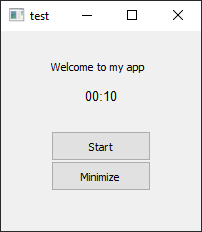 static cove
@keen terrace Do you still need help with this?
keen terrace
yes, please
static cove
So I don't think the itertools will get you what you want with functions. At least from my (limited) experience and with messing with it for a bit.
That initial iterToast = itertools.cycle("your toast notifications here") was bringing up the first notification. Even though you were cycling through that iterable object, I don't think it allows you to access the objects/functions that you're trying to iter through.
I was able to get it to work with a much simpler solution. I added a new variable: self.current_timer = 1
and then under the def timerTimeout(self): I added an if and elif that would execute the show_toast() based on the value of the self.current_timer and then immediately after show_toast() I updated the value of current_timer to the next one.
I've had it running for a few minutes and it seems fine. Let me know if the above isn't clear. I can just snippet my code if it's not.
keen terrace
If you could send the code that would be amazing
I understood that I can give up on itertools, I can accept any other solution really, I just didn't know any.
static cove
def timerTimeout(self):
        self.time_left_int -= 1
        if self.time_left_int == 0:
            if self.current_timer == 1:
                toaster.show_toast("test1", "test1", duration=3, threaded=True)
                self.current_timer = 2
            elif self.current_timer == 2:
                toaster.show_toast("test2", "test2", duration=3, threaded=True)
                self.current_timer = 1
            self.time_left_int = next(TIME_CYCLER)

        self.update_gui()
And then I just had to add self.current_timer = 1 under self_time_left_int = DURATION_INT way up when you're initializing the App Window
keen terrace
Looks like it actually works
even changing the variables seems stable
This is awesome! Thank you, but can you please try to explain to me what is changed?
so once self.time_left_int reach 0, if have another if self.current_timer = 1 why?
oh now that I wrote it I kinda understand, but wouldn't have thought about it myself
static cove
So all current_timer is doing is keeping track of which toast_notification you want to send.
keen terrace
it's as if I'd place a counter and just zero it out every 3rd loop?
like, if the counter is 1, show the first notification, but if it's 2, show the second one
and then change it to 1 again and then to 2 again
static cove
It just flips back and forth between two values, because I told it to. Yup!
keen terrace
this is smart! awesome, much appreciated!
static cove
Yeah no problem! I like the app and might implement it myself for a reminder to stretch
keen terrace
I'm now only left with learning how to minimize it
then I can add some cosmetics, icons and stuff and just publish it on Reddit or something 🙂
static cove
Yeah, you can show it in here in the #303934982764625920 channel in this server once you're done
keen terrace
awesome, much appreciated!
I wasted my whole day on this sole thing, already 1AM lol, gonna hit the bed and continue this tomorrow
thanks again
wanton vessel
Anyone here familiar with the game bookworm or hangaroo? I wanna know if the way they let you tap the letters and bring the letters to the blank spot is possible to do in tkinter
I wanna do it in tk for learning purposes
keen terrace
!paste
Hello
Trying to make my minimize to tray and show app menu items work in PyQt. For some reason they are not behaving as they're supposed to. Would love if anyone would take a look: https://paste.pythondiscord.com/yemixozalo.py
static cove
@keen terrace for the show_action.triggered.connect(self.show) and self.hide and app.quit, what functions are those calling? I'm struggling to find the specific documentation for those.
Instead of calling those (presumably) built-in functions, you could instead call your own functions that do the self.win.show() or the self.win.hide() in their own function code.
digital rose
what features does tkinter lack that PyQT5 have
keen terrace

DEV Community
Both Tkinter and PyQt are useful for designing acceptable GUI’s, but at the same time, they differ in...
 edgy mauve
I am new-ish to python , what would you guys recommend for GUIs for a person like me
steep cliff
Tkinter is easy
but it looks old
Kivy is good you can make a gui that can run on every device
but its a pain to set up an app to work on phone
to test it
static cove
If you want to do anything more modern looking (without a lot of work) or easily re-sizeable and configurable in terms of placement, I would not recommend tkinter.
steep cliff
yeah thats what i said it look old
edgy mauve
Kivy is good you can make a gui that can run on every device
ok I will look into it
but its a pain to set up an app to work on phone
this might be a dumb question but can i use python to make mobile apps ?
edgy mauve
oh ok thanks I will look into it 😄
keen terrace
hey guys, so I'm trying to set an icon for my pyqt window but it won't work self.setWindowIcon(QtGui.QIcon("icon.png"))
The icon is shows inside of the app but not on the windows taskbar
steep cliff
for kivy is using .kv easier or using python?
@keen terrace idk about pyqt but isnt icon suposed to be .ico extension?
keen terrace
Supposed to work as png as well, i'll try a ico one
steep cliff
does it work with ico?
keen terrace
same
tribal path
kv for structure, py for logic/anything complex
tribal path
no, personally I run on device tests as well as code/adjustments with pydroid3, removes the need to compile an apk unless needed. There'd be minimal differences between pydroid3 & compiled apk in term of usage
wanton vessel
On tk, is it possible to determine a button’s position?
 young raptor
yes you can use .grid
let me show you a example
part_label = Label(frame5, text='Part Name')
part_label.grid(row=0, column=0)
or you can do .pack()
wanton vessel
But what if you used place?
young raptor
Button(frame4, text="text", command=hg_soft).pack()
wanton vessel
Like lets say I did
Button1 = Button(root, command=something)
Button1.place(x=10,y=10)
young raptor
.place
wanton vessel
Yea, like how would we fetch its position?
Like I wanna get button1’s position value of x and y
Cause I’m trying to do something that will make my button move after being clicked
young raptor
oh intresting
wanton vessel
And move back to its original position after being clicked again
You know, like how letters in bookworm game moves after being clicked
young raptor
ya
I understand what your saying but I never attempted that if I find something online about it I see if I can use it to help you
wanton vessel
Thanks @young raptor that would really help me alot
Heres the code that ive started btw
from tkinter import *
import string
import random

root = Tk()
root.geometry('400x400')


buttons = {}

def Enter(Value):
    a=20
    print(Value)
    buttons[Value].place(x=a,y=150)
    a+=20

upper = 0
lower = 0
values = ['',1,2,3,4,5,6,7,8,9,10,11,12]
letters = string.ascii_lowercase

a=100
b=300

for i in range(1,13):
    x = random.randint(0,25)
    if i > 6:
        buttons[letters[x]] = Button(root, text = letters[x],command=lambda val=letters[x]:Enter(val))
        buttons[letters[x]].place(x=a,y=b)
        upper+=1
    else:
        buttons[letters[x]] = Button(root, text = letters[x],command=lambda val=letters[x]:Enter(val))
        buttons[letters[x]].place(x=a,y=b)
        lower+=1
    a+=20

mainloop()
still not functioning well tho
young raptor
ok
wanton vessel
I've only managed to put them in one place after being clicked 😂
young raptor
oh ya I see
I just ran it
maybe on click it can give a value to the system and depending on the value it can go to a certain location if thats possible but I dont know alot about how to make it random
im not to sure about this but you can try
oh wait I just looked into the code are you already doing that
wanton vessel
yes
young raptor
dang it
hmm
its kind of moving when I test it but not much
maybe you do have it down but its not moving far enough
wanton vessel
its going at the top right when clicked
wanton vessel
the problem why its staying on the same position when clicked is because of how a is always declared 20 when being clicked
wanton vessel
I want it to be 40 on the next click
number = 20

def Enter(Value):
    global number
    print(Value)
    buttons[Value].place(x=a,y=150)
    number+=20
Ugghhh i dont even know how to change that global variable's value permanently
young raptor
what do you mean by you cant change it?
I think it only randomizes one value and aplies it to everything
wanton vessel
no matter how many times Enter function gets called, its x position will always be 20
young raptor
you can to set 1 deffrent value per letter
and call randit more then once
per letter maybe
becasue it selects 1 random value and applies it to eveything
so you need to have more then one letter and if like for example x is less then like 6 go to this spot
wanton vessel
this actually worked
from tkinter import *
import string
import random

root = Tk()
root.geometry('400x400')


buttons = {}
m=20
def Enter(Value):
    global m
    print(Value)
    buttons[Value].place(x=m,y=150)
    m+=20

upper = 0
lower = 0
values = ['',1,2,3,4,5,6,7,8,9,10,11,12]
letters = string.ascii_lowercase

a=100
b=300

for i in range(1,13):
    x = random.randint(0,25)
    if i > 6:
        buttons[letters[x]] = Button(root, text = letters[x],command=lambda val=letters[x]:Enter(val))
        buttons[letters[x]].place(x=a,y=b)
        upper+=1
    else:
        buttons[letters[x]] = Button(root, text = letters[x],command=lambda val=letters[x]:Enter(val))
        buttons[letters[x]].place(x=a,y=b)
        lower+=1
    a+=20

mainloop()
in a weird way
young raptor
oof ill be back
young raptor
im back
hey
I did a thing
I dont think it was what you were looking for but it is random
wanton vessel
what is it?
young raptor
uh
ill show you a video
its a random order it starts in but not what you were looking for
young raptor
oh nice
wanton vessel
winfo_rootx()
it returns the value of whatever widget u set it to
I'll try to apply this to my code and show u how it does
would be a big relief it gets back to its original position after being clicked
the only problem left would be the identical letters 😂
young raptor
oof
wanton vessel
yea, cause identical letters = same values
young raptor
just do like z1 and f3 or something
dont need to be just letters
unles yu mean
x and y cords
wanton vessel
no I mean the letters themselves
young raptor
ok well I think you can do like r3 and it will work
wanton vessel
if you try to press z and theres 2 other z below, the other 2 wont be affected, the only z at the top would move
young raptor
oh
wanton vessel
cause they all have the same values which is z
young raptor
never give up its not how you learn even though i do have a simple project im working on im suck on
wanton vessel
are you done with your project?
young raptor
no its not really one you finish
you kinda add to it
with stuff you make
I can show you
young raptor
ya
wanton vessel
and why didnt u use class?
wanton vessel
ohh me neither
young raptor
you know more then I do im still guessing
wanton vessel
young raptor
oh
young raptor
putting my work to shame smh but nice I like it
wanton vessel
thanks but it doesnt have that much frames like yours lol, mines just a simple add and delete thing
young raptor
I have a add and delete thing too but its more simple
its also inside my login system
anyday now
it will be done
but thats it that I have so far
im trying to fix that notes thing
says i typed nothing and not getting what I typed in the entry
wanton vessel
I knew you were hiding something cool like this
young raptor
ya but thats it
ill work on more if I just decide to delete these notes or fix it
im leaning to just deleting them
young raptor
yes
wanton vessel
thought u were talking about the latest part
wanton vessel
Why dont u try to create the file at the first part?
young raptor
I had it working before I recoded it with frames
I dont know what went wrong
but ya I cant find the problem so im probs gonna remove it to work on something else
been using up to much of my time
wanton vessel
thats the right thing to do if u cant learn from it. Its best to work on something else for now to increase our skills then we can get back on our problems that we couldn't fix later
young raptor
ya your right
ill keep the code but ill just work one something else and remove it for now
young raptor
bye
keen terrace
how should I properly be using icon paths in PyQt if later I want the app to not be dependent on that icon file? currently I'm using self.tray_icon = QSystemTrayIcon(QIcon('icon\icon.png')) for example
keen terrace
I tried changing it to use the path icon_path = ".icon/icon.png" and then self.tray_icon = QSystemTrayIcon(QIcon(os.path.abspath(icon_path))) for example
 frosty jackal
Hello, is this channel where I can ask questions with regards to making a GUI in tkinter for a project of mine?
 brisk arrow
digital rose
brisk arrow
digital rose
@young raptor autoclicker @_@
young raptor
autoclicker what
vale gulch
I get how OOP is important for UI development, but I just can't wrap my head around using classes for making programs
sudden coral
To be clear, UI is not inherently tied to OOP but many UI frameworks use that paradigm.
If you're having trouble with it, you can try to find some resources online on OOP.
Or maybe follow a UI tutorial for a particular library
If you prefer to learn by example
vale gulch
Yeah, I just got into learning PyQt5 using TechWithTim's tutorials, but he dives straight into using classes
I'm not too good at using them, but I think I need to know more about them before tackling UI
static cove
I know for me, at least to get comfortable with how most Python GUI frameworks tend to work, it was helpful for me to start with some basic tkinter tutorials. It helped me get my head around GUI classes and how they interact. It made PyQt easier to understand after looking at tkinter.
sudden coral
Tim has a playlist on classes https://www.youtube.com/watch?v=v_Jp11xqCzg&list=PLzMcBGfZo4-l1MqB1zoYfqzlj_HH-ZzXt

Welcome to my python oop tutorials! Learn Intermediate/Advanced object orientated programming in python.
Everything in python is an object , strs, int, floats... You name it, it's probably and object. When you create variables of certain types you are essential creating an ob...
vale gulch
@static cove Yeah that sounds like a good idea, tkinter is really basic and seems like a great introduction to the world of Python UI development
As for the playlist, I've seen the first few videos, I think Ill finish the tutorial tomorrow or day after
keen terrace
I have a PyQt app that is reliant on the app's icon. Currently it's being shared as the app.py and a folder that contains the icon.png file. I call it like this:
dirname = os.path.dirname(__file__)
iconFile = os.path.join(dirname, 'icon/icon.png')
What are my alternatives? What if someone moves or deleted the icon by accident? I'd love to have it run regardless. It would also probably fix the py2exe issues I'm having with it but that's another subject.
sudden coral
It's an internal file so there'd be no reason for users to interact with it under normal circumstances
If they delete it then it's their fault if the program doesn't work.
Just like if you go through your system files and manually delete an .so or .dll file, something will break
One workaround is to encode the icon as base64 and keep the base64 in a variable in your script, but that's ugly (especially if it's a large file) and seems unnecessary
If you're making an exe than maybe you can embed the resource into the exe, but I don't know how that works out with python
keen terrace
@sudden coral for some reaosn, creating an exe breaks the app because the icon won't be embedded
sudden coral
I'm not familiar with exe creation tools so I can't be of much help there, sorry.
keen terrace
thanks anyway for the input
you're right, maybe there's no reason for users to remove the icon
stoic dirge
Does anybody know how I can make a column in a grid to be fixed in height and width (would not change)? I'm using Tkinter btw.
this is the current code for my button (pretty straightforward):
traverse_btn.grid(row=4, column=0, sticky=N)
and for the results part:
results_text.grid(row=4 ,sticky=W, column=1, columnspan=2, rowspan=1)
@stoic dirge You'd need to call the grid_columnconfigure method of whatever is the master of these buttons is in some way
Strangely enough, they don't resize on their own (only when weight is set to something non-zero like the message above), so what you want should be the default behavior
 mint ivy
any way to embed bokeh plots in a ui window ?
or any plotting library with fancy features like that other than marplotlib ?
 wintry crescent
hi everyone
mint ivy
@static cove well i need the interactive options which are available in bokeh plots but marplotlib is kinda static and i just checked out the plotly and it seemed great ... are you sure it can be used in a ui file?
static cove
What kind of UI are you dealing with?
wintry crescent
I wanna put numbers on tkinter and
and all i write is just a print, idk how to use it
static cove
Hmmmm... so plotly doesn't have a render for tkinter. So it's not a great solution for tkinter
What kind of interactivity are you looking for? Clicking on the graph itself, or clicking buttons to then change the graph?
mint ivy
@static cove its used to show streamlines in a duct and on every point on the plot there is a velocity and Temperature and pressure parameters which i love that mouse over ability of bokeh that had floating window besides the cursor
that would be clicking on the graph interactiveity kind i guess
static cove
Ah, okay. Are you tied to using tkinter? You could potentially do what you want in tkinter but it would take a lot
mint ivy
no
would love to find easier ways
i used to make a .ui file with Qt creator and import that into my main script but that also doesn't support bokeh plots
static cove
So I haven't used this, but I know other people who have. I tend to immediately go the html/webpage route when doing more complicated UI or graphing.
Could you use PyQtGraph? That should work with PyQt UI.
It specifically has a HoverEvent which I think is what you're after.
https://pyqtgraph.readthedocs.io/en/latest/graphicsscene/hoverevent.html
mint ivy
thanks I'll check it out !
wintry crescent
im using tkinter and idk how to fill "inputs"
static cove
What are the inputs?
keen terrace
My PyQt app opens fine on my PC, but on my laptop it looks like this
I set a bigger window size but it didn't matter, the text and buttons are still kinda messed up
 dark basalt
@keen terrace I'd guess it has something to do with your DPI settings. PC is probably set to 100% while your laptop is set to something higher, 125% for example.
it's a windows setting
dark basalt
yeah, there should be a way to make it work, but I don't know it off the top of my head
you should check if that is actually the issue though
in windows display settings you can change the scale, which is the dpi scaling
keen terrace
yep, indeed the issue
managed to fix it
LeoMoon Studios -
Ultra HD screens are getting more popular these days. They...
thanks a lotl!
wanton vessel
in tkinter, is there a way to change the button's value after being placed/packed/grid?
 grizzled osprey
button = ttk.Button(root, text="Hello", command="buttonpressed")
button['text'] = 'goodbye'
Another way is button.configure(text='goodbye') @wanton vessel
wanton vessel
thanks @grizzled osprey !
 mortal sequoia
I've learnt tkinter what should I learn next kivy or pyqt5?
keen terrace
My PyQt app, I think, activates Windows 10 Focus Assist when minimized to tray... I'm not sure how to fix this
grizzled osprey
@hollow fiber You can try to ask in a specific channel, i'm gonna invite you
wanton vessel
Can someone help me with this one pls? Been stuck on it for 4 days
https://discordapp.com/channels/267624335836053506/696354453724594176/719180844438388787
 rough yarrow
@wanton vessel can you elaborate your problem?
wanton vessel
Wait
Basically I wanna move the buttons pressed to its original position when tapped twice, but tbh idk what to do or what function to use to achieve that
 odd spruce
is this a good place to ask dash questions?
static cove
You can post here or in #data-science-and-ml depending on what the question is~ Happy to try to help either way
odd spruce
ok thanks I've been having a hard time figuring things out
so I'm trying to recreate this dashboard

!paste
this is currently what I have
I realized I was going to need to use an iframe
but I'm having a hard time formatting everything, specifically how and if I'm supposed to place things inside of the iframe
I have all the data I need, in a separate .py file
im using the dash library
static cove
Well, an iFrame (from what I understand) is a way to embed independent HTML into a webpage. So you still have to write the HTML/CSS/JS for that iFrame and then you would import that using the <iframe></iframe> tag
odd spruce
I see you have not used the dash library then >.<
I don't mean to be rude
but do you know if that's how it's supposed to be used, because I looked at the documentation, and I can't seem to actually find examples
static cove
I used it for a bit awhile back, I'm looking at the docs again now to re-acquaint myself. I didn't really end up needing to use iFrames. But you're welcome to wait for someone else to help that's up to your standard of familiarization with the dash library.
odd spruce
i wasn't trying to be rude
it's not about my standards
im actually trrying to place html divs inside of the frame as you suggested
maybe you need to define the divs outside of the iframe, then call them by the tag ID?
 bold briar
you can't place html inside the iframe
that's the point of an iframe
you're embedding another website inside your own, that, for security reasons, you can't control
and judging by dash's tagline on their website:
Build beautiful, web-based analytic apps.
No JavaScript required.
they don't intend on you trying to mess with injecting anything into your client iframes
bold briar
if you're just trying to embed the JHU dashboard into your website you can just copy the iframe they have there
odd spruce
no no
trying to replicate it
and I see that they use an iframe, and within the frame are other divs containing different data points
I have all of those points, my goal is to recreate the dashboard
i thought i might be able to do so using dash
bold briar
oh you just want to copy the html, css and JS?
odd spruce
i want to use dash
to replicate the dashboard
dash is a wrapper for html css and js
so yes i guess
bold briar
all of them or a single one?
odd spruce
all of them
bold briar
also it looks like they're using a provider to make those charts https://developers.arcgis.com/javascript/
Get the SDK that lets you build location-aware apps for the Web. Integrate a wide range of mapping and GIS capabilities online or offline, including editing, geocoding, routing, 2D, 3D, and data visualization.
odd spruce
*most of them lol
welp
so basically it can't be done
unless i use the tools they did
bold briar
yeah, not without a lot of work
bold briar
if you want to dive into JS, you can use highcharts, they have a great and free API for making beautiful charts
(API -> SDK)
odd spruce
no thanks
I will just try to mess with dash until I get something similar, or complimentary
bold briar
best of luck 👍
bold briar
I went to the JHU official website (https://coronavirus.jhu.edu/map.html) and inspected the JS and found the libraries they import in JS and started googling, one of them led me to the same link as the bare iframed dashboard
 agile thunder
I'm trying to resize this image because it kinda covers my entire window, anyway I can change my code to change it to another size? Or atleast resize it?
from tkinter import *
from PIL import Image, ImageTk

window = Tk()
window.title("Tkinter Test")
window.geometry('500x400')
window.resizable(False, False)

mainIMG = ImageTk.PhotoImage(Image.open("images/logo.png"))
mainPanel = Label(window, image = mainIMG)

titleLabel = Label(window, text="Hello from Tkinter", font=("Gill Sans", 24, "bold")).pack()
mainPanel.pack(side = "bottom", fill = "both", expand = "yes")

window.mainloop()
 opal pier
Not sure if this will work but instead of pack use grid then vary the widget sizes (width, height)
agile thunder
TypeError: grid_configure() takes from 1 to 2 positional arguments but 3 were given
Nope.
wait, i might'e done it in the wrong area-
woops, hold on.
Still doesn't work.
Shows the exact same error I specified above.
agile thunder
Wait, which one was I supposed to do it on?
opal pier
It says you've given it one-too-many
opal pier
yep should be mainPanel
opal pier
Try and run it 😁
 opal pier
share your code on .configure()?
agile thunder
.configure?
opal pier
My bad. I see your code above for mainPanel.grid()
agile thunder
Oh.
opal pier
Use mainPanel.configure() before you do grid
What you did above was set the widget to Row=200 , Column=200 😆
agile thunder
Can you give me an example?
opal pier
mainPanel.configure(height=200, width=200)
mainPanel.grid(row=0, column=0)
agile thunder
im dumb
opal pier
Although I have a feeling this would crop your image to fit the widget height and width 😟
agile thunder
_tkinter.TclError: cannot use geometry manager grid inside . which already has slaves managed by pack
Change titleLabel to also use grid()
Because you can either use grid() or pack() but not both
 opal pier
Did it really resize? Huh I'm surprised. I had a feeling it was gonna crop your image.
agile thunder
it kinda did.
opal pier
Yeah I guess play around with it.
agile thunder
mk, thank you!
opal pier
👍 glhf
rough yarrow
Is there anybody who needs help with starting out with gui? dm me
specificly tkinter
 ember trellis
Anyone know what the operation is called when you have a scroll mode and you load data within a certain range that will be visible for the user and unload that data when when the user has scrolled far away from that data similar to how https://photos.google.com/ works or how the/a reddit app works on your phone. It's like a dynamic load and unload system based on a fixed range (to save memory by not loading everything) and based on the users current position when scrolled to some position on a page or a list.

Google Photos is the home for all your photos and videos, automatically organized and easy to share.
@median turtle it doesn't matter, it's the same operation being called twice. You can disable either one and the program will still work
median turtle
@ember trellis ohhh like that ... thanks a lot
bold briar
@ember trellis "infinite scroll"
 hollow fiber
hello i have a gui question on hellp magnesium can someone help me
wanton vessel
in tkinter, theres a way to create widgets using for loop. The problem I have is idk how to access each of them later on. Like, lets say I used a loop to create 6 Entries and placed them in different positions. How will I be able to access each of these 6 later? Is there a doc that discuss these things? Thanks in advance
I tried to append each of the entries to the list, but it gives me None value
 steady cliff
e1_value=StringVar()
e1=Entry(window,textvariable=e1_value)

print(e1_value.get())```
@wanton vessel pallid current
make it into an excecutable
@digital rose here's a nice library, unfortunately it only works for windows https://build-system.fman.io/pyqt-exe-creation/

Build a stand-alone executable for your PyQt application on Windows.
 north quail
i think pyinstaller can package pyqt5 apps for just about any platform
digital rose
if if there are any config files?
north quail
what kind of config files?
digital rose
yaml
north quail
im not sure what config files youre talking about
just general config for the app?
or do you mean does PyInstaller require config files?
if the former, yes, there's a way to include external files in the package,
full comet
Any PyQt5 masters here? I got an issue with QWebEngineView, where the function never works using pyinstaller. All my buttons work except anything that calls that function. I'm just using it as a web viewer, so when user clicks this button, it loads the URL in a frame. Is there another way in PyQt5 I can load URL pages like that?
I also found this for py2app. https://stackoverflow.com/questions/1346297/py2app-cant-find-standard-modules Because I'm running in that exact same issue. Is there a way to make a standalone? I'm a little confused with the MacPorts
Right now it looks like
web = QWebEngineView(win)

SOME BUTTON FUNCTION
        web.raise_()
        web.load(QUrl('SOME WEBSITE))
 analog bison
Hey boys, after a post on reddit it pointed me here so I figure I'll try in this channel since it's closest to my problem: Here's just a copy-pasta from reddit: ```Question about how I should setup my program (thread/multiprocess/other?)
Help
Hey guys, so I'm setting up my main class (runner) to open up multiple client processes (client) and then each client calls a popen to a jar (jarFile). Right now I'm making (runner) open up ThreadPool.async to (client,args) and then each of those another ThreadPool.async (Popen(jarFile, args)). Is this an efficient way to do this? It seems like I'm just gluing things together however they fit...
edit: Also, the (runner/client) both will have tkinter gui elements that I'll need to show/hide on the fly, and they both need a main loop running continuously, how would I do that also?```
hollow fiber
hello i have this code global rgraph rgraph = ImageTk.PhotoImage(Image.open("risinggrap.jpg")) rgraph = rgraph.resize((200,250),Image.ANTIALIAS) photoLabe = Label(x, image=rgraph) photoLabe.grid(row=3, column=4,rowspan=3)
and i get this error:'PhotoImage' object has no attribute 'resize'
analog bison
Stack Overflow
I need to resize an image, but I want to avoid PIL, since I cannot make it work under OS X - don't ask me why...
Anyway since I am satisfied with gif/pgm/ppm, the PhotoImage class is ok for me:
Says to either use subsample or zoome with scale factors for width/height
hollow fiber
i think that's for older version of python
but i'll try
    rgraph = ImageTk.PhotoImage(image)
    image = rgraph.zoom(300,200)
    photoLabe = Label(x, image=rgraph)
photoLabe.grid(row=3, column=4,rowspan=3)```i tried this still go an error
analog bison
Are you using mainly tk or pil
hollow fiber
i found it
    global image
    image = Image.open("risinggrap.jpg")
    image=image.resize((600,300),Image.ANTIALIAS)
    rgrpah = ImageTk.PhotoImage(image)
    photoLabe = Label(x,image = rgrpah)
photoLabe.grid(row=3, column=4,rowspan=3)```Oh nice
hollow fiber
thank you
analog bison
No prob, glad you got it working
wanton vessel
can someone pls recommend me a good docs that would explain the connection of OOP (Classes) to tkinter?
 jade plinth
How can I get tkinter to output only a hex code when i choose a color from the color chooser?
 errant hearth
i think this question will go unanswered as prev 2 here but still
in pysimplegui, how do i make an inputtext only accept numbers
i don't want someone to type "h" in a int(...) function and raise a ValueError
 hardy moss
i'm not exactly sure if this fits here, but i'm trying trying to make a curses app constantly refresh, and i'm not quite sure how to do it properly without the flickering.
right now i have a loop which continously renders a display buffer then sleeps for the duration of a frame cycle, and a fake processor thread that modifies the buffer every now and then
sleeping like this makes inputs feels really unresponsive and i can only go up to around 10 fps before it starts flickering
i suppose for starters i should use the time delta to handle framerate and not sleep in between frames.
i also considered comparing the buffer to the current screen on every refresh, and then only render if the buffer has actually been changed
but this itself would take a bit of time, so i'm not sure if i would gain anything from this
here's the bit of code i've been experimenting with
 upper knoll
hello, can I ask a question related to tkinter here, the problem is not realted to tkinter but basic python?
 pallid vapor
If the problem is basic python then you should post in a general help channel (see #❓|how-to-get-help) @upper knoll
upper knoll
Okay
 azure venture
I'm pretty new with Tkinter, I don't know how to dynamically create Labels, for example I want to make that if x variable has 2 as value, Tkinter will create 6 labels (basically number of labels is x*3), but I don't have idea how to make that...
I don't want to manually create a label for the expected number of x, because I don't know when it can be higher.
 celest monolith
@digital rose this is for ui problems hihi
How to center 2 widgets in a TTkinter Notebook tab?
I want it to look similar to this. (Tabs not shown in the XD screenshot.)
ill be over at #help-croissant if anyone can give some help
static cove
#web-development is probably the better place to ask for website stuff
 lusty slate
ok thanks
 half rover
is it possible to get a fully working website with python alone?
i have gotten a simple cgi project to work only reading and print from another file
but is it possible to expand it and get it to run code like tkinter and stuff?
sudden coral
To the first question: yes. There are plenty of web frameworks written purely in Python that have achieved this.
It's not clear what you mean by running tkinter. If you want tkinter to be used by clients in their browsers, then that is not possible AFAIK. I imagine you'd need to map every tkinter widget to web technologies like HTML/css.
I don't know why you'd want to do that.
vale gulch
Can I use .grid() on a widget such that it occupies no rows or columns?
 keen laurel
Best library for ui?
 sage crown
HI guys
Whats up
so i need a kind of help with editors for programming and coding in different languages
so which one would you guys reccommend?
Pycharm or Atom?
restive prism
@sage crown not the right place to ask because this is about building GUI's. I prefer Pycharm but either will work
celest monolith
Hello, I particularly need help using .trace in a tkcalendar. Does anyone know how to go about that?
analog bison
I'm having trouble with tkinter check boxes updating after enabled/disable:
boxes = []
for x in range(0,5,1):
  boxes.append(Button(self.root, state=disabled))
  boxes[x].place(x=50, y=25*x)
and then later I enable via:
for x in range(3,5,1):
boxes[x].configure(state="normal")```
however it doesn't update until I click on it, any ideas? sour rune
I'm attempting to overide the texture colorfmt in kivy framework. I'm successful other than the colorfmt is being set by something other than
self._camera_texture = Texture(width=width, height=height,
                                       target=GL_TEXTURE_EXTERNAL_OES,
                                       colorfmt='bgr')  # Changed 'rgb' to 'bgr'
Wondering if there is something in here that is changing the colorfmt back from bgr to rgba
        self._fbo.shader.fs = '''
            #extension GL_OES_EGL_image_external : require
            #ifdef GL_ES
                precision highp float;
            #endif

            /* Outputs from the vertex shader */
            varying vec4 frag_color;
            varying vec2 tex_coord0;

            /* uniform texture samplers */
            uniform sampler2D texture0;
            uniform samplerExternalOES texture1;
            uniform vec2 resolution;

            void main()
            {
                vec2 coord = vec2(tex_coord0.y * (
                    resolution.y / resolution.x), 1. -tex_coord0.x);
                gl_FragColor = texture2D(texture1, tex_coord0);
            }

        '''
The fbo is using https://developer.android.com/reference/android/opengl/GLES11Ext
 celest vigil
does anyone here have recommendations for a desktop app framework/stack i could use to easily package up a gui wrapper to some of my data science scripts (so it would have to be able to support things like numpy and pandas)?
sour rune
@celest vigil Have you looked into kivy?
celest vigil
i know of it, but i will look into it now
my main concern is whether it'll support native extensions for things like numpy
when i try to look up things with kivy and numpy it mostly discusses it wrt android support, but i assume that means that kivy natively supports it
sour rune
Kivy supports python, so in turn supports numpy. There are some difficulties with numpy support with android, but otherwise it supports everything python.
 inland karma
what are some good programs I can use to get started with python?
 zealous abyss
How can I display error messages that come from a pyqt5 app? for example, lets say I bind a method to a button, but that method has a runtime error. When I press the button, the program closes with no error message / output. Any way I can fix that?
wanton vessel
Try and except
zealous abyss
is that the only way?
static cove
Does anyone have experience with plotting real-time data with a python plotting library? I'm not really satisfied with matplotlib and before I go down the rabbit hole of dealing with blit I'm curious if anyone has other recommendations. I'm curious about PyQtGraph, but not sure if I can implement what I'd like.
I specifically need to implement something similar to matplotlib's quiver function.
static cove
How often do you pull new data?
 brazen burrow
Yo people who can do code i'm trying to make a simple calculator in a website im going to make (for taxes) and it ain't working only the first two lines are executing in the terminal Item_Cost = input("How much does your item cost? ")
Amount_Item_need = input("How much of said item is needed? ")
Caclualtion_1 = float(Item_Cost) * float(Amount_Item_need)
Calculation_2 = float(Caclualtion_1) * .13
print = Calculation_2 but if i use int it only does whole numbers and glitches out with decimals @peoplewhoknowhowtocode
nevermind the big space it in no spaces inbetween lines
digital rose
how did you get the theme for u qt app @tribal pier
pls @unborn coral/
Do u guys have any other themes for pyqt5 that I can integrate into any application?
a qss file would be nice
but whatever works
digital rose
hi guys, i can't find how get value from my optionMenu
```tkinter.Label(window2, text="Nombre d'article : ").grid(row=8, column=1, columnspan=2)
OptionList = ["0", "1", "2", "3", "4", "5", "6", "7", "8", "9", "10"]
var = StringVar(window2)
var.set(OptionList[0])
nb_article = var.trace_add('write', lambda *args: var.get())
drop = tkinter.OptionMenu(window2, var, *OptionList).grid(row=9, column=1, columnspan=2)
row = 10
nb = 1
if len(nb_article) > 10:
nb_article = 0
else:
while nb_article != 0:
tkinter.Label(window2, text="Article ").grid(row=row, column=1, columnspan=2)
row += 1
article = tkinter.Entry(window2).grid(row=row, column=1, columnspan=2)
row += 1
nb_article -= 1```
zealous abyss
quick question, I don't mean to ignore the person above, but how would I add my own keyPressEvent method to a pushbutton in pyqt5? I have:```python
def on_window_click_event(e):
print(e)
stuff
ui.push_button.keyPressEvent = on_window_click_event
 tribal pier
How often do you pull new data?
@static cove
Only once per click.
Unfortunately I can't tell if the performance will fit your requirements.
static cove
Hmmmm. I'll still check out PyQt graph. Curious how well it'll handle every second or half second calls.
tribal pier
Now I'm curious too. I'm just trying it out.
how did you get the theme for u qt app @tribal pier
@digital rose I use Qt Designer to design the GUI and I customize the look of the widgets individually in its Stylesheet.
Here you should find what you need to get started:
https://doc.qt.io/qt-5/stylesheet-reference.html#list-of-properties
 lament mantle
Hi! I have a problem that is probably fairly simple to solve. I made a new git repository and made a GitHub repository to go with it. I initialized the GitHub repository with a license and then connected it to the git repository. After doing that I tried to push to the GitHub repository but got this error:
I'm assuming the "work that you do not have locally" is the license.
How should I go about fixing this? I'm mostly familiar with all of the commands that commit/push changes; so, I don't know as much about pulling.
sudden coral
I think you meant to ask in #tools-and-devops
sudden coral
Sure
lament mantle
👍
 onyx drum
hey, i'm trying to create a button for each line in a txt file, the line is seperated to button name and a file root, the names do apply to the buttons but the buttons dont function, instead they open the files when i run the ui app, not sure if i explained this properly but i basically am trying to make a button that opens files for each iteration(using tkinter)
wanton vessel
wdym for each iteration?
like for every tap of the button or for every initialization?
onyx drum
i have a txt file where each line contains a files name(which will be the buttons name) and the files location(which i want to use to open the file) which are separated by a | so i can read each part individually. so for each line i want a button added named after first element of the line and the button to open a file using the file location in the second element of the line. so for each iteration(line) i need it to add a button
what i've got so far is the buttons actually being added, they dont work, but the files that they are supposed to open are instead being opened when i launch the app
 lofty pebble
Hey guys I'm new to python and only know the basics.
Do guys know any place to learn gui making in python?
Kinda like a tut or a website or something?
 rigid cloak
 arctic shale
 brisk sparrow
why python not work correctly with me or my friends. Any atuallization? So what? (os, tkinter, panda3d, etc.)
 vague gale
why is the scrollbar not assigned to the listbox?
sbar = Scrollbar(app, bg='red')
sbar.pack(side=RIGHT, fill=Y)
console = Listbox(app, font=('Consolas', 18), bg = '#5E5E5E', fg='black', highlightthickness=0, yscrollcommand=sbar.set)
console.place(x=10,y=180,width=680,height=210)
sbar.config(command=console.yview)
 deep bay
How can i link directly my file with tkinter rather den browsing it
mortal sequoia
Guys I need help with Kivy
dl2 - ImportError: DLL load failed: The specified module could not be found.
  File "C:\Users\name removed\PycharmProjects\Graphical User Interfaces\venv\lib\site-packages\kivy\core\__init__.py", line 63, in core_select_lib
    fromlist=[modulename], level=0)
  File "C:\Users\name removed\PycharmProjects\Graphical User Interfaces\venv\lib\site-packages\kivy\core\text\text_sdl2.py", line 13, in <module>
    from kivy.core.text._text_sdl2 import (_SurfaceContainer, _get_extents,

pil - ModuleNotFoundError: No module named 'PIL'
  File "C:\Users\name removed\PycharmProjects\Graphical User Interfaces\venv\lib\site-packages\kivy\core\__init__.py", line 63, in core_select_lib
    fromlist=[modulename], level=0)
  File "C:\Users\name removed\PycharmProjects\Graphical User Interfaces\venv\lib\site-packages\kivy\core\text\text_pil.py", line 7, in <module>
    from PIL import Image, ImageFont, ImageDraw

[CRITICAL] [App         ] Unable to get a Text provider, abort.
__
Thats the Error I got
Whats Pil?
import kivy
from kivy.app import App
from kivy.uix.label import Label

class MyApp(App):
    def build(self):
        return Label(text="Athenaeum")

if __name__ == "__main__":
    MyApp().run()
Thats my code
static cove
PIL is an image processing library. The current version for Python 3.x can be grabbed via pip install pillow
(If you want to use the module directly you would then do import PIL)
Odd that it didn't try to download it when you installed kivy. You can try installing pillow directly or re-installing kivy
azure venture
How can I avoid this happening? I would like a little space after the Entry, because colliding with the LabelFrame doesn't look good
static cove
If that's tkinter, can you do a padx on the Entry?
digital rose
but i want to send a discord message
If its pressed
And the command function. How can i await it
Button(windows, text="SUBMIT", width=6, command=click).grid(row=3, column=0, sticky=W)
i need to await the click function
wanton vessel
How can I avoid this happening? I would like a little space after the Entry, because colliding with the LabelFrame doesn't look good
or u could try to decrease the width of the entry widget
tribal pier
I just turned my PyQt5 application into a standalone (linux binary) with fbs, and the generated package has over 160 Mb. That's insane. Is there a way to reduce that?
digital rose
Take out any dependencies that don't need to be there
Or if u have any folders or files that the program uses, delete them and instead autogenerate them inside ur program
Maybe clean up ur code
If nothing works, compress ur executable for end users
sudden coral
Not sure about python specifically, but in general, qt can have some of its modules disabled. This can drastically reduce its footprint.
Maybe this has to be done when qt is built. However, I had read a long time ago about people exlcuding certain qt so/DLL files when packing their python app
tribal pier
@sudden coral
That's what I thought, too. But how would I determine which .so files are needed and which not?
sudden coral
I'm not sure, sorry. It was just something I saw some other user discussing.
Maybe these links will help you https://doc.qt.io/qt-5/qtmodules.html
tribal pier
Thx, I already read that, but couldn't find what I need.
I wonder, if there's a way to tell fbs what to include or what to exclcude befrore freezeing the app.
I'll investigate ... thank you for that hint.
sudden coral
The deployment page gives you an idea of the naming scheme for the so's
I think you can just look at which modules you import and then remove other ones. Just experiment and see what works and what crashes your app
tribal pier
Well, there aren't any unused imports in the project. I'm importing every class as needed.
from PyQt5.QtWidgets import (
    QApplication,
    QLabel,
    QLineEdit,
    ...
)
Or did you mean something else?
sudden coral
I mean you import QWidgets, so you know you want to keep that so file
But, for example, you don't use Qt Multimedia so you don't need that so file
tribal pier
Aah, got it. Thank you very much, you pointed me to the right direction!
I found 'em and started removing some of the unused .so files and
that first attempt reduced weight from 160 Mb to 94 Mb.
I'll now remove the rest ... 👍
static cove
@digital rose I'm still playing with this to see what's up, but your search.get() doesn't seem to be pulling from the Entry widget correctly. It seems to be pulling a letter input late. I need to type in a second letter for it to correctly pull the first letter.
I wonder if the .bind() is somehow messing up Entry's .get() function
Maybe .bind() is being processed before Entry can update it's text field, so when you call .get() it simply hasn't recorded the new Entry value
That's definitely what it seems like with me messing around with what key triggers the bind()
Well, you could possibly pull together a workaround by pulling event.char to see what letter they actually pressed and putting that together with search.get()
It gets a bit tricky with the backspace button though
Looks like the char for backspace is \x08
You can check for event.keysym instead though, since that's BackSpace for pressing the backspace
oh hey! It's an Entry widget. You can use a StringVar and then attach a trace on it
Yay and it works like it should!
It's not too bad. Give me a minute to grab some example code of how that would work
from tkinter import Tk, Entry, StringVar

var = StringVar()

def your_function():
  print("Whatever you want it do")

entry1 = Entry(textvariable=var)
var.trace("w", your_function)
A trace will track whenever your StringVar changes. Your StringVar in this case is whatever text is in the Entry widget
This should be much simpler for you if the user does something weird like select the text and type something to replace it wholesale.
So the first argument I give for trace is what operation triggered the callback: w, r, or u. W = write operation, r = read operation, u = if variable is deleted
We're specifically checking is something has changed/written something to the variable, in this case the user. But if you programmatically change it later, it'll also trigger for this method if I remember correctly.
Oooh and this is a good explanation on how tkinter executes it's bindings. Something I didn't know.
https://stackoverflow.com/questions/11541262/basic-query-regarding-bindtags-in-tkinter
Stack Overflow
In the given example from this post, it was mentioned that if default bindtags are used then event value will not be visible inside definition (there will be lag by one).
There was some explanation
when you define update_listbox, you want update_listbox(*args) to accept the arguments that the .trace will give
It gives a list of 3 I believe
or just 3
You don't really need any of them, you can capture them all with *args
To be a bit clearer: def update_listbox(event) should be: def update_listbox(*args)
!args-kwargs
proven basinBOT
*args and **kwargs
These special parameters allow functions to take arbitrary amounts of positional and keyword arguments. The names args and kwargs are purely convention, and could be named any other valid variable name. The special functionality comes from the single and double asterisks (*). If both are used in a function signature, *args must appear before **kwargs.
Single asterisk
*args will ingest an arbitrary amount of positional arguments, and store it in a tuple. If there are parameters after *args in the parameter list with no default value, they will become required keyword arguments by default.
Double asterisk
**kwargs will ingest an arbitrary amount of keyword arguments, and store it in a dictionary. There can be no additional parameters after **kwargs in the parameter list.
Use cases
• Decorators (see !tags decorators)
• Inheritance (overriding methods)
• Future proofing (in the case of the first two bullet points, if the parameters change, your code won't break)
• Flexibility (writing functions that behave like dict() or print())
See !tags positional-keyword for information about positional and keyword arguments
static cove
What the discordbot just posted is a better explanation of the *args that I put in
It's a REALLY nice feature with python, to just capture an arbitrary amount of positional arguments
oh! in your if option.startswith() I still used search.get(), I did not use the current_text variable.
but you can also do current_text.get()
No worries~ Good luck with coding
 pallid nova
Anyone know how to make really simple local web interfaces for small scripts?
I want to avoid using a framework
Just basic js,html,css and somehow link it to my python script
but I'm not sure where to even start
fathom crypt
Well it doesn't get simpler than https://docs.python.org/3/library/http.server.html#module-http.server. From a quick glance you can subclass BaseHTTPRequestHandler and add do_GET, do_POST etc to do whatever you want. Even has a threaded version. As it says, not for production use of course.
@pallid nova
 dusky siren
anyone here experienced with tkinter??
pallid nova
@fathom crypt Thank you man, i'll see if it's any easier than just base flask 🙂
Oooh, this is like web servers
dusky siren
anyone here experienced with tkinter??
digital rose
Why does .grid method in tkinter skip over some places when using row
static cove
When you say "skip over some places" what does that mean/look like?
digital rose
static cove
what's the related code with that?
digital rose
?
static cove
What's the code for the image you just posted?
digital rose
.grid(row=7, column=0, sticky=W)
extentry1 = Entry(windows, width=20, bg="grey")
extentry1.grid(row=6, column=0, sticky=W)
Button(windows, text="Add command", width=11, command=click).grid(row=7, column=0, sticky=W)
static cove
That's all you have placed on your window? Are there other elements?
digital rose
there are
there is 1 at row 0 and second at 3 but theyre still next to each other
whole code:
windows = Tk()
windows.title("MrStretch Bot Maker")
windows.configure(background="#949291")
windows.resizable(0,0)
windows.iconbitmap('OP.ico')
windows.geometry("1080x720")
Label(windows, text="Response commands", bg="#89898B", fg="white", font="none 12 bold").grid(row=0, column=0, sticky=W)
Label(windows, text="Type your command name!", bg="#949291", fg="white", font="none 12 bold").grid(row=3, column=0, sticky=W)

extentry = Entry(windows, width=20, bg="grey")
extentry.grid(row=4, column=0, sticky=W)
Label(windows, text="Type your command answer!", bg="#949291", fg="white", font="none 12 bold").grid(row=5, column=0, sticky=W)
extentry1 = Entry(windows, width=20, bg="grey")
extentry1.grid(row=6, column=0, sticky=W)

Button(windows, text="Add command", width=11, command=click).grid(row=7, column=0, sticky=W)
Button(windows, text="SUBMIT TOKEN", width=12, command=token1).grid(row=6, column=5, sticky=W)
extentry2 = Entry(windows, width=20, bg="grey")
extentry2.grid(row=6, column=6, sticky=W)
Label(windows, text="\n Prefix", bg="#949291", fg="white", font="none 12 bold").grid(row=5, rowspan=2, column=0, pady=0, sticky=W)
extentry3 = Entry(windows, width=20, bg="grey")
extentry3.grid(row=6, column=0, sticky=W)

output = Text(windows, width=50, height=20, wrap=WORD, background="grey", foreground="white")
output.grid(row=7, column=6, columnspan=2, sticky=W)
output.insert(END, currentcode + f"\n\nclient.run('{token}')")
windows.mainloop()
half code
static cove
Okay, well there's a lot going on with your labels. I would take a second look at what's going on with the "\n Prefix" Label and the second "Type your command answer" Label.
But it's putting the "Add Command" button in the same row as the "output" Text widget (because you specified them to be in the same row). The output text widget is much bigger and makes the row very big. By default, tkinter will place items in the center of the row unless specified elsewhere. So it placed "Add Command" button in the center of row 7. If you want it at the top of the row, you could add "sticky=NW"
digital rose
wait idk why i used new line there tho
I could fix this by actually making the output row more down
So
But it still stays in the same row tho
idk
static cove
Changing the output to be placed in row=8 fixes it for me.
static cove
Changing the output to start in row 8 should definitely change what you're seeing. How are you running the code?
static cove
Okay, so you're using VSC. Can you screenshot what you're seeing or paste what you're putting for the output.grid() command?
digital rose
static cove
Okay, so comparing that to your original screen shot it does seem like we got rid of the button floating way far away from the input boxes.
Tkinter won't display rows that have nothing in it. So if you put it in row 8 or row 20 but don't have anything placed after row 7, it'll look the same.
static cove
If you want it to take up multiple rows you can use rowspan. If you just want some extra space around the widget you can use the padx or pady parameters. That'll place either horizontal or vertical padding around the widget in a cell.
digital rose
but if i use rowspawn should i continue in the next row or
skip the rows that rowspawn
span
static cove
If you have a button that's taking up row 0 and 1. Then try to place a Label starting at row 1, either the label will cover up the button or the button will hide the label. So you need to make sure you skip the rows that an element is spanning over
static cove
in what case isn't it doing anything?
digital rose
Idk how to use it still
😄
So if i have a label at row 0
And put rowspan to 2
And next laber to row 3
It doesnt have spaces
static cove
So if it starts at row 0 and takes up 2 rows, it'll take up rows 0 and 1. You can put a label in row 3. But if row 2 doesn't have anything in it it won't display so the labels will still look like they're close to each other.
But if you'd like space between widgets I'd recommend using padx and pady. It'll add padding around the widget and give it space.
button.grid(row=0, column=0, pady=10)
digital rose
these are still next to eachother Label(windows, text="Response commands", bg="#89898B", fg="white", font="none 12 bold").grid(row=0, column=0, rowspan=2, sticky=W)
Label(windows, text="Type your command name!", bg="#949291", fg="white", font="none 12 bold").grid(row=2, column=0, sticky=W)
Label(windows, text="Response commands", bg="#89898B", fg="white", font="none 12 bold").grid(row=0, column=0, rowspan=2, sticky=W)
Label(windows, text="Type your command name!", bg="#949291", fg="white", font="none 12 bold").grid(row=2, column=0, sticky=W)
 pearl glade
Check out my project in #303934982764625920
 steep narwhal
what gui package you recommend using?
static cove
Tkinter is nice because it comes packaged with the standard python.
PyQt has some nice features and has some pretty good resources out there for it.
You can read more about other GUI options on this page: https://docs.python.org/3/library/othergui.html
I'm currently using PyQt and it's nice, although I wish more of the documentation was python oriented and not c++ oriented.
There's also Kivy with lets you make GUIs for mobile phone usage. https://kivy.org/#home
lofty pebble
Is there a way to make a .exe file with a pygtk?
I made a programme with pygtk and want to port that to windows without writing a seperate code for it in any other cross-platform gui frameworks
 grave moon
im pretty sure you can just use the popular frameworks
i know one claims to pack all your imports with the program
not sure if that's the standard
 mighty rock
Python 3.8.3 tkinter, can't focus on entry..
 tawdry lion
I'm really confused about something on tkinter
Why is it that when you press a button and the function is invoked, it doesn't continue with the rest of the code?
static cove
What do you mean it "doesn't continue with the rest of the code"?
tawdry lion
I'll send a hastebin to the part of my code


I've done some testing and I found that when you click the button, the while loop never happens again
@static cove
static cove
It does finish the while loop completely once? or no?
tawdry lion
Yeah it runs through it initially
And then once I press the button
it's function gets called, and the while loop stops
static cove
Is it specifically when the button gets clicked or just when that function executes? I'm trying to figure out if it's an odd tkinter behavior or something wacky with just the function
tawdry lion
I'll test it out
 full elbow
what's people's opinion here? tkinter? pyqt/pyside? .. if i the focus of the GUI is to draw similar to bar charts.. tkinter sadly seems like the most efficient code?
(without using matplot/pyqtgraph cuz it was slower)
 night pond
hey currently i'm using pyautogui for a project that asks the user for input in a new window, however once you make the window I can't find a way to edit it. Is there a way, or is there a better gui tool I should be using?
static cove
@full elbow Tkinter is nice because it comes packaged with python, but I'm not sure what you mean by "without using matplotlib/pyqtgraph cuz it was slower." Matplotlib is definitely the go-to for a lot of plotting needs because of its backend support.
It also depends on what metric you're saying something is efficient.
full elbow
yeah i think im doing it wrong with matplot
and matplot provides way more than i need
problem with tkinter is man do i like that qtdesigner lol..
gotta try pygubu, see if it works in 3.8
but i wish pygubu would just have a converter to straight python, not xml
 hearty solar
im having a really confusing error.
Im using Tkinter with Subprocess and Pyinstaller.
If i run it in VS Code or any other shell, it works perfectly fine.
if i use pyinstaller on it and keep the console, it works perfectly fine.
if i used --windowed to hide the console, it does nothing anymore.
i found out that there is a problem with using subprocess and --windowed and also there is some kind of a workaround. But i dont know how..
i dont even know whats the issue is.. without a console, debugging is pretty.. impossible..? (as far i know)
thats the workaround i heard about, that is to complex and abstract to understand for me:
https://github.com/pyinstaller/pyinstaller/wiki/Recipe-subprocess
And here is my code:
https://pastebin.com/5KDezzbA

GitHub
Freeze (package) Python programs into stand-alone executables - pyinstaller/pyinstaller
 frosty nest
pyinstaller sucks when you want to convert pygame to exe
hearty solar
its not a pygame
frosty nest
sorry
you misunderstood
i was just saying that
but sorry i cant solve your problem
hearty solar
:/
frosty nest
ok
wanton vessel
Would it still be relevant to use classes with tkinter even tho I’m just gonna use place method? No grid or pack
 silver maple
What causes that weird part parentheses around queued: 6
My program creates a queue of functions with key presses and I want to track the length of the queue.
This is the relevant code
silver maple
It is tkinter
That weird this only happens when it goes from a two digit number to a one digit number.
These are all the widgets I have, so I don't think there is any overlap
static cove
Would you mind sharing your code? I'd like to run it and see what's up with the length StringVar and what exactly is impacting it
proven basinBOT
Hey @silver maple!
It looks like you tried to attach a Python file - please use a code-pasting service such as https://paste.pythondiscord.com
silver maple
The program is meant for a certain game so if you just run it without changing the micro function it might mess with your computer.
Also, sorry the code is probably written poorly
static cove
Huh. I am not seeing what you're seeing.
Changes I made to get your code to run with minimal effort from my end:
- changed micro() to just sleep for 1 second
- commented out all keyboard functions/items
- used a bind on root to capture keypresses to add to the queue
silver maple
Does bind work if the tk window isn't focused