#user-interfaces
1 messages · Page 45 of 1
 twilit widget
class DBApp(App):
    def build(self):
        #Main layout
        bl=BoxLayout(orientation='vertical', padding=30, spacing=10, size=[500,500])
        #Folder treeView
        Tree_Box=BoxLayout(orientation='vertical', spacing=10)
        tv = TreeView(root_options=dict(text='Tree One'), hide_root=True, indent_level=4)
        tv.size_hint = 1, None
        tv.bind(minimum_height=tv.setter('height'))
        for x in range(20):
            lvl_1=tv.add_node(TreeViewLabel(text=str(x), is_open=False))
            for n in range(5):
                nn=str(x)+'-'+str(n)
                tv.add_node(TreeViewLabel(text=nn), lvl_1)
        sv = ScrollView(pos=(0, 0), bar_width=15, scroll_type=['bars', 'content'], scroll_wheel_distance=50)
        sv.add_widget(tv)
        Tree_Box.add_widget(sv)
        Tree_Box.add_widget(Label(text='*Please select destination folder', size_hint=[1, None], size=[100,40]))
        tv.bind(on_press=self.select_node)
        #Uploading file local path
        Upload_Box=BoxLayout(size_hint=[1, None], size=[100, 40], spacing=10)
        Upload_Box.add_widget(TextInput())
        btn=Button(text='Upload', size_hint=[None, 1], size=[100,40])
        Upload_Box.add_widget(btn)
        bl.add_widget(Tree_Box)
        bl.add_widget(Upload_Box)
        return bl

    def select_node(self, node):
        '''Select a node in the tree.
                '''
        if node.no_selection:
            return
        if self._selected_node:
            self._selected_node.is_selected = False
        node.is_selected = True
        self._selected_node = node
        print(node)


if __name__ == "__main__":
    DBApp().run()
How can I make sure that the name of the selected node in TreeView is written in the console or TextInput?
 digital rose
Hm.
 snow harness
Hello friends
I'm trying to do this thing where people use discord chat to play a game (specifically portal 2). For the keyboard presses, I'm using pyautogui, but it doesn't seem to work inside portal 2. It works in any other place (I tested it inside a browser game (krunker.io) ), but just not inside portal 2
So do y'all know any API that you think doesn't encounter this problem or the reason why it can't be done?
please ping me in your response
 kindred dome
Hey, how would I go about adding new items to a Listbox at runtime? Since I normally have to do list = Listbox() which I don't believe I add at runtime.
Never mind figured it out, I use the .insert thingy.
digital rose
Tkinter + discord.py
 zealous schooner
is it possible to do the entry bit of this gui?
using tkinter
with grid() if possible
 clear nexus
yes
        -Make button-
       button2 = tk.Button(self, text= "Click to calculate", command = godfunc)
       button2.grid(row=1, column=0)

-Make entry box-
        Area_entry = tk.Entry(self, width = 5 )
        Area_entry.grid(row=0,  column=1 )

-disaply image-
    load = Image.open(pic) # set in file directory
    render = ImageTk.PhotoImage(load)


    img = tk.Label(self, image=render)

    img.image = render
    img.place(x=0, y=0)
    img.pack()
```som examples @zealous schoonerto get the value of the entry box. you can do something like
a = Area_entry.get()
remeber to convert it to what value you need it if it be a string,int, float etc.
clear nexus
where i have "self", you need to put your root to your window for what you have called it. You should have somthing like root = tk.Tk() so this would be button2 = tk.Button(root , text= "Click to calculate", command = godfunc)
for image you need ```from PIL import Image
@clear nexus it looks like the image overlaps the button and the entry, i commented out the img.place() line and the button and entry are not positioned the way i asked how..
clear nexus
show me your code
if you see on the bottom it says pack() you need to change it to grid
zealous schooner
@clear nexus
# -Make button-
button2 = Button(root, text="TEMP")
button2.grid(row=1, column=0)

# -Make entry box-
Area_entry = Entry(root, width=5)
Area_entry.grid(row=0, column=1)

# -display image-

url = # THE URL #
load = url_to_image(url)
render = ImageTk.PhotoImage(load)

img = Label(root, image=render)

img.image = render
img.place(x=0, y=0)
img.grid()

root.mainloop()
idc about the image rn
the entry and the button doesn't look like the image i sent
clear nexus
no you have to do that yourself
i just gave you an example
on how you set it up
im not doing that for you sorry
zealous schooner
the example is wrong
clear nexus
no that is how you do it. You need to set it up where you want it
zealous schooner
the example does not show me how i put two elements on the same column
like that
clear nexus
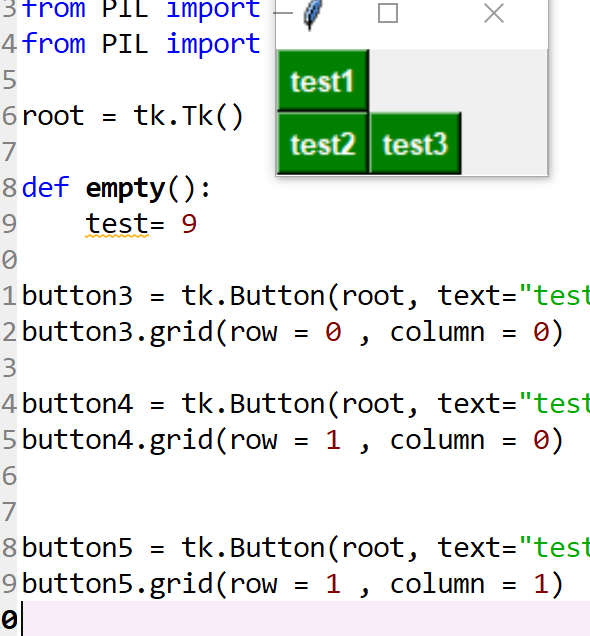
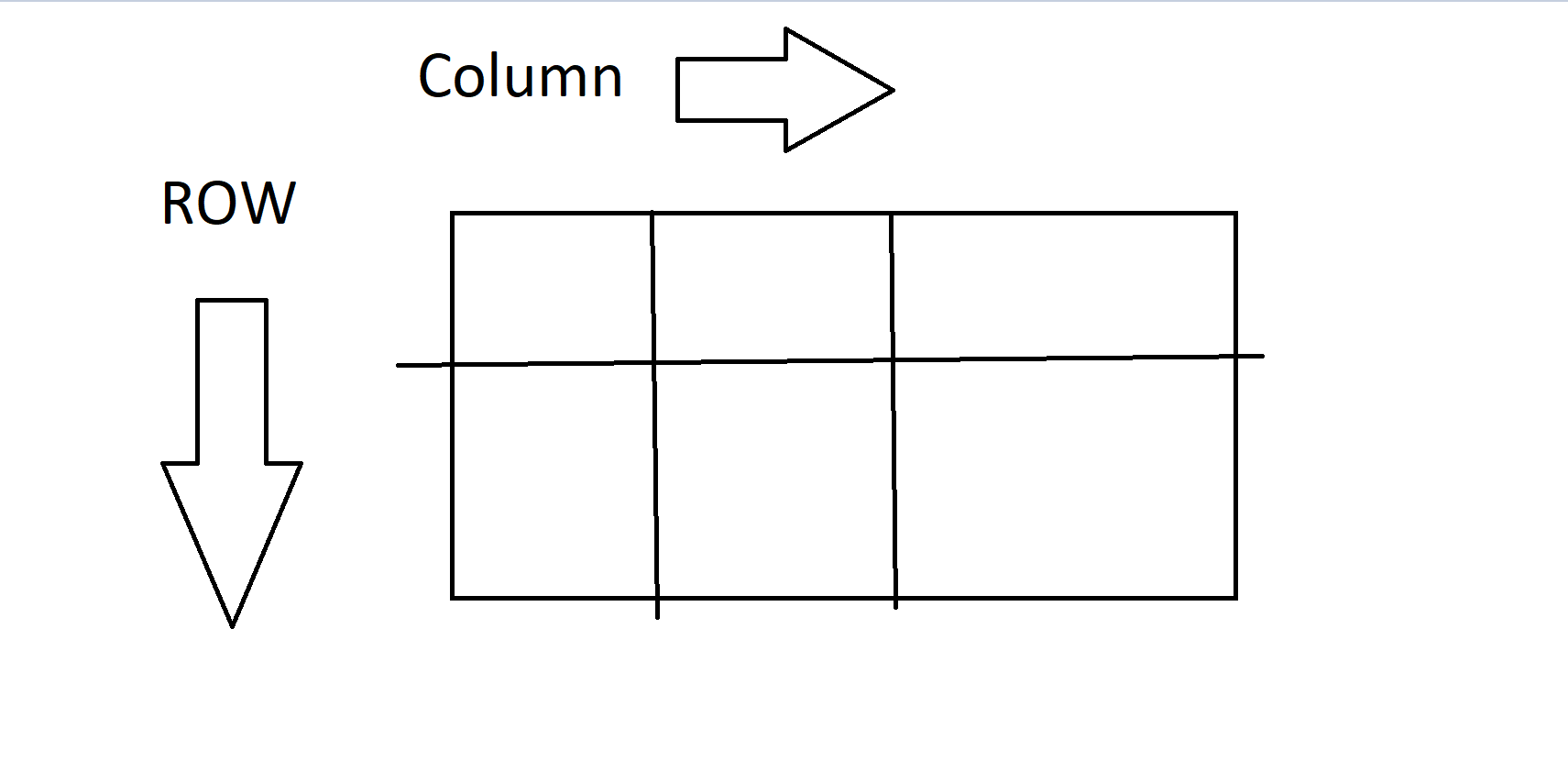
you should read up how tkinter work and watch some youtube tutorials, you clearly have done no research if you cant figure that out. and no you dont want it on the same column you want it on the same row.... do to so you have one that is row=1, column = 0 and the other row =1 , column = 1
zealous schooner
what the fuck are you talking about
clear nexus
what are you not understanding?
zealous schooner
clear nexus
thats now how tkinter grid works... you'd know if youd google it
zealous schooner
bruh
if you wanna prove your point google it yourself and find me a solution
you really think the first thing i do is ask a fucking discord server?
i come here the get solutions not to get stupid example which doesn't even work
if you cant help don't even bother
clear nexus
 zealous schooner
huh?
clear nexus
the image you sendt is wrong
im trying to tell you that your setting it up wrong
and no you come here to get help to find a solution, i gave you the means to figure it out for yourself. No one here is doing your work for you
 lucid wraith
@zealous schooner when you grid button3, add the keyword argument columnspan=2
zealous schooner
oh right
lucid wraith
Alternatively, you can put button4 and button5 inside a Frame, which you grid into a single row/column.
 ionic iris
i need help with kivy
 eternal lake
hello, I started with tkinter and manage to stuff for my needs, but damn it's ugly :D
Is there a way to beautify things without too much effort?
clear nexus
@eternal lake not really, the best you can do is change background color i think to make it look a little better on some of the figures. But stylewise there's not much to do with tkinter.
you can add background color to the buttons and lables for me it made it look a little nicer
i like my buttons with green and white text
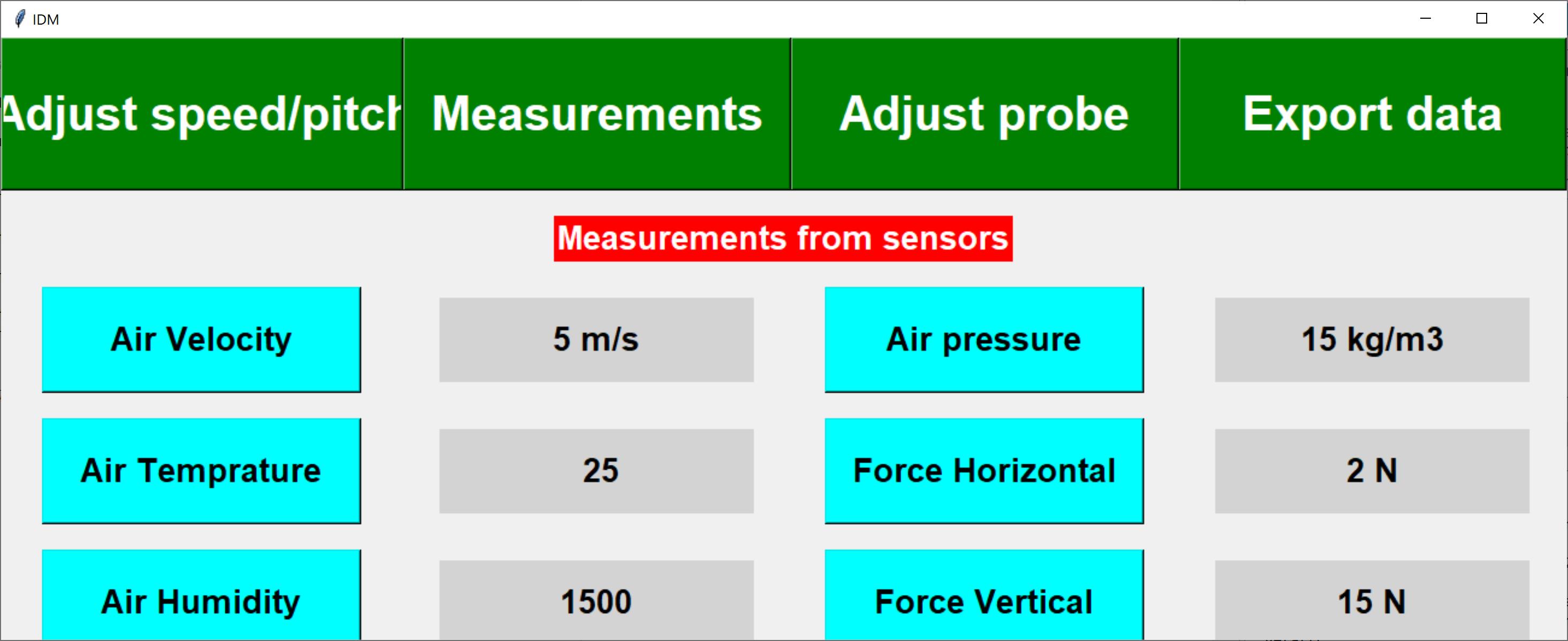
can mix match like speedAndPitch = tk.Button(self, text="Adjust speed/pitch",height = 2, width = 15,command=empty, bg='green', fg='white', font=('helvetica', 30, 'bold'))
 tribal path
there is ttk for some themed/style stuff - but beyond that not much movement. tcl is a pretty old ui framework
clear nexus
this is how i did one of my older projects to spice it up https://i.imgur.com/GZhNW0l.png
 eternal lake
Thanks for the tips @clear nexus @tribal path
So nowadays people don't use tkinter to make pretty things?
clear nexus
i would like to know a graphicly nice GUI lib for python but i've not heard of one yet
tribal path
theres kivy which is pure python, styling there is pretty unrestrictive & then theres the various qt wrappers
digital rose
import sys
import time

def increment(i):
    return i+1

def multiply(i):
    return i*2

for i in range(5):
    sys.stdout.write(
    "candies eaten {candies}\r\n"
    "chocolates eaten {chocolate}\r\n".format(
        candies=increment(i),
        chocolate=multiply(i)
    ))

    time.sleep(0.5)
How do u multi-line flush on windows
please somebody help, i'm begging
Can't figure this out for 2 days straight
Help channels gets ignored
Cuz it's a very annoying issue
I tried out PDcurses
I get Redirection is not supported
cuz its on console in pycharm
I can't get WConio installed for some reason
So those are almost exclusively the only tools to do this with windows
there's also another possiblity with:
GitHub
a Python 2/3 module for binding variables and refreshing multi-line output in terminal. - Yinzo/reprint
but i can't get that working for some reason
The only last possibility is to basically use the Windows Console API
but i don't know how to make that work with python
tribal path
afaik the issue here is not just windows & curses, but that pycharms console doesnt really handle ansi codes.
is just running cls not an option?
digital rose
how do i run cls?
 hollow pewter
Are there free to use video players api to embed into a qt program?
vlc is making problems when converting to exe...
tribal path
os.system('cls')
 autumn badge
anyone ever write an app with flexx? https://github.com/flexxui/flexx

GitHub
Write desktop and web apps in pure Python. Contribute to flexxui/flexx development by creating an account on GitHub.
 sturdy reef
regarding tkinter does anyone know how to assign say a label with a tag and then edit the label based on the find_withtag? I'm struggling to figure it out
 thorny spruce
Is that with a Canvas?
sturdy reef
yeah
@thorny spruce so I tried label.bindtags(tagID)
then canvas.itemconfigure(canvas.find_withtag(tagID), bg='red')
thorny spruce
I believe those are two different sets of tags
sturdy reef
hmm I see
thorny spruce
@sturdy reef So if you wanted the actual label object you can do
import tkinter as tk

def on_click(event):
    canvas: tk.Canvas = event.widget
    item_id = canvas.find_withtag('my_label')
    widget_name = canvas.itemcget(item_id, 'window')
    label = canvas.nametowidget(widget_name)
    label.config(text=(event.x, event.y))

def main():
    root = tk.Tk()
    canvas = tk.Canvas()
    canvas.pack()

    lbl = tk.Label(root, text=(0, 0))
    canvas.create_window((100, 100), window=lbl, tag='my_label')
    canvas.bind('<Button-1>', on_click)

    root.mainloop()

main()```If you just wanted to configure the options that create_window provides then just
def on_click(event):
    canvas: tk.Canvas = event.widget
    item_id = canvas.find_withtag('my_label')
canvas.itemconfigure(item_id, width=100)```Is this what you were after?
sturdy reef
thank you. I'm still trying to break it down in my head I'm still a little new to python but this is very helpful
thorny spruce
Yea, I would have thought there was an easier way to get the label that was added through the canvas but either there isn't or I can't see it
If you are able to just store your label objects it would be must easier than having to go through the canvas
sturdy reef
yeah problem is there is a dynamic amount so I'm trying to create a function for it. so when you are adding via the canvas I see you are doing canvas.create_window but when I create a label i do:
label = tk.Label(root, text="testing", bg='blue') label.place(relx=0, rely=0, relwidth=1, relheight=1) label.update()
so this in a function obviously just creates a bunch of widgets called label I tried passing a name through the function but it didnt work. so my idea was to pass an id and then set it with an id
thorny spruce
place would just put it on top of the canvas, it wouldn't actually add it to the canvas
If you are creating multiple dynamically then try keeping track of them either in a list or dictionary
sturdy reef
so if I have them in a list how would I then edit attributes like say the text
thorny spruce
You'd index it out of you list and then configure it
my_label = list_of_labels[index_of_label_you_want]
my_label.config(bg='yellow')```okay I see I will give it a try thanks for your help.
wow okay thanks for that it works like a charm! I didn't realize it was just .item list .config as I tried a list before too. I think I'm too used to c# showing all available functions aha
thorny spruce
Depending on your IDE it should show what you can do
digital rose
os.system('cls') does not work
it just gives some sort of character
import os
import sys
import time


def increment(i):
    return i+1

def multiply(i):
    return i*2

for i in range(5):
    sys.stdout.write(
    "candies eaten {candies}\r\n"
    "chocolates eaten {chocolate}\r\n".format(
        candies=increment(i),
        chocolate=multiply(i)
    ))

    os.system('cls')
    time.sleep(0.5)
 south cargo
 wary birch
Hi, I am having a bit of trouble with some gui with PyQt5. Everything is explained in this stackoverflow post (https://stackoverflow.com/questions/61534377/pyqt5-buttons-become-extremelly-irresponsive-when-pressed-with-large-data-sets) could anyone lend a hand? This error goes way beyond my knowledge of pyqt5 so I could really use some help

Stack Overflow
I am trying to develop a small data acquisition GUI that is depicted below and everything works as intended for small data sets. This is how it is supposed to work: click "start/stop" to initiate o...
basically it sums up to this: I want to have a button to say when to start (or continue) updating plots and when to stop (or interrupt). I was able to do so, but with around 10k points the program simply stops responding when such button is pressed
 slender mica
!ჰელპ
 rain rock
Hey anyone know this issue with kivy [CRITICAL] [Clock ] Warning, too much iteration done before the next frame. Check your code, or increase the Clock.max_iteration attribute
Tried turning up the max_iteration but still no difference
 sharp plover
@rain rock I've run into this, myself, but I can't remember off the top of my head what you need to do to fix it. It'll be more on your end than kivy's.
You might have Properties in your kv that are bound to each other. One looks at the other, which looks back and so on.
    id: foo
    text: bar.text
Label:
    id: bar
text: foo.text```Something like that.
Maybe.
 scarlet ibex
Hey, I have a frame in a tkinter window that i pack some widgets in it. i have a button that pack_forgets the widgets that in that frame. the problem is that when the widgets disappear there is a big space between the widgets above the frame and the widgets below the frame. what can i do to fix that?
^Please @ me so i could see your reply immediatelly. thanks.
 last gulch
@scarlet ibex Well you just made it be like that so what if when teh widget dissapers it moves the textbox and the days whatever you are doing up to the rest of them? (No tkinter expert)
last gulch
Not sure what tkinter uses but tried using .place() instead of .pack()? you can freely lay them aroudn the frame like with kivy
scarlet ibex
if anyone gets this problem i spent hours on a solution so here you go:
tmp = tk.Frame(self.parent, width=1, height=1, borderwidth=0, highlightthickness=0)
tmp.pack()
self.controller.update_idletasks()
tmp.destroy()
Where self.parent is the frame you want to hide, and self.controller is the root/master
this will put a little frame and update the first frame to match the size of the frame inside it, then deletes the little frame.
put this code after you delete the widgets in the frame.
rain rock
@sharp plover thanks, i think that fixed it 👍
 tight cedar
how can I set a label's background color to a custom color (don't want to be limited to the color strings such as "red") in AppJar?
digital rose
@digital rose ask your question here
digital rose
how can i create self adjusting button widget using frames not windows?
i meant to say i am able to create button widget using frames but it is not shifting to left and not able to self adjust too in x or y axis
 slow smelt
i need help
hello
hello
i need help
@haughty sail i need help
sooryfor mentioning
i am beginner i am making a Minecraft Launcher so i want to make a program who can download minecraft files from google drive .i did this.Please help me to make system for downloading
 remote ravine
??
@slow smelt
if u need to download a file u first download link for the file
and then use urllib.urlopen(download_link) to download the file
also this is not the right channel to asl help about that stuff
clear nexus
anyone know how to make a tkinter start/stop button function for graph matplot animation?
 thin wind
idk but you can prob find it on the internet
 empty needle
Hi, can I ask what would you use for serious desktop application with modern & clear look? I have tried Kivy, but it's super problematic to setup and package final project and also documentation isn't good. Qt is commercial and other frameworks seems abandoded.
 knotty heart
@empty needle Alot of apps now use electron
it basically allows you to take websites and make them into applications
Discord is an example of an electron app
its the same on the app as the website because electron is essentially a browser just a lil diffrent
empty needle
Is it then possible to get an exe in the finals? For example What if I would want to make music player... ?
 hollow mist
Python isn't a very good fit for that and using Electron for that is overkill
in that case you're better off using C# or Go
Or just concede to the fact that most people use streaming these days
empty needle
in that case you're better off using C# or Go
I hoped there would be any good option to stay with Python, but I think I will try the C# with .net core that should be multiplatform
Thanks for answers @hollow mist , @knotty heart
digital rose
Can a Tkinter expert help me please, I am having a non-code-related issue, I have two buttons in my program, start, and quit. If I press start, the quit button becomes non-functional, as the program hangs. It works again when the process triggered with start, ends.
thorny spruce
If your application hangs then you have a blocking operation going on
Basically the gui can't update because it is still doing work
digital rose
So whats the solution
thorny spruce
Don't block is the short answer
Hard to say really without seeing what you're trying to do
digital rose
For example, if i have a series like 2,4,6,8,10...
i want to stop it in middle
So let me open a channel
You can help me in Copper, in about 30sec
 zealous abyss
im new to pyqt, how could I go about making an async function that occurs on button press?
i know the syntax of ui.add_account.clicked.connect(function) but how do I go about making that function async?
 spiral crescent
PyQt5
zealous abyss
yes
spiral crescent
What do you mean by async button function?
zealous abyss
as in I press the button, some function does stuff in the background and eventually finishes
unless I was mistaken, it looked like when I ran it, the program froze while it waited for the function to execute
it crashed about 5 seconds later
spiral crescent
That function is a callback function which is executed when you press the button, I'd assume if your call isn't a blocking call then you can listen to an event your process, started by the function, emits.
Signals and Slots
zealous abyss
well, I dont necessarily need to listen for an event from the function, it just needs to run without blocking the program
spiral crescent
Like say button press starts a process named X
Do something like X.finished.connect(function)
I'd assume you're using qprocess
zealous abyss
im not
I must be missing something
when you click a button that has an attached method, it executes the method, no?
does that method block the program, or does it execute it asynchronously
if it blocks I can just work around that
spiral crescent
It blocks
zealous abyss
so, if I had a method that printed a million things, it would just stop the gui?
spiral crescent
If the function is written in a blocking way, Yes it'll freeze the GUI.
spiral crescent
Spawns a process separate from main thread
zealous abyss
and I can use it as if it was any other multithreading api?
spiral crescent
You use it mostly with signals, which it emits. Like when it's ready for reading stdin, when it starts, when it ends etc.
spiral crescent
You're welcome.
zealous abyss
well, Im having some more issues with my code:
I created this QThread class
class AddAccountThread(QThread):
def __init__(self):
QThread.__init__(self)
def __del__(self):
self.wait()
def run(self):
print("here3")
driver = webdriver.Firefox(executable_path = r'driver\geckodriver.exe')
# driver.maximize_window()
#
# fill_in_info(driver, next_account_num)
print("here4")
def on_account_add():
global next_account_num
# print("here")
# btn.setText("hello?")
# print("here1")
new_thread = AddAccountThread()
new_thread.start()
```where on_account_add() is mapped to a button
however, when I click the button, despite the method on_account_add() finishing, the AddAccountThread().start() still blocks the gui and freezes it barren elm
In Pyside2 can Signals and Slots only pass int and str? I am trying to emit a list and dict but it doesn't seem to like that idea.
barren elm
Either that or the QThreading tutorial I used is bunk.
 lusty slate
hello guys 🙂
can you help me with this error please
RuntimeError: The Session graph is empty. Add operations to the graph before calling run().```i try to create an interface in anvil
and i get this error
 sage merlin
Hello,
Does someone know a python ide that has a shortcut when you click on a function it goes to the place where the function was created ?
digital rose
how can i replace old entry boxes with new like in windows 10 in tk?
 rigid blade
def animate(i):
a.clear()
a.plot(xList,y1List)
style.use("ggplot")
f = plt.Figure(figsize=(3,3),dpi=100)
a = f.add_subplot(111)
canvas = FigureCanvasTkAgg(f, windo)
canvas.get_tk_widget().grid(column = 3, row = 0, rowspan = 6, columnspan = 4)
ani = animation.FuncAnimation(f,animate,interval=30)```
This works fine but how do you clear the chart ? I saw about .cla and .clf but neither works sinful night
Can anyone tell me what approach I should take to get the live output from terminal into my PyQt5 QTableWidget?
I have managed to export the output to the table widget but the problem is that it waits for me to terminate the process in the terminal for it to display the output. I want it to display while the program is running.
barren elm
You need to use QThread. If you stop the event loop to process something the program will freeze. Threading the work behind the scenes will keep your GUI running smoothly.
Multi-processing can work as well. Just depends on what you are doing.
I could be wrong here as I am not entirely sure what you are trying to do now that i think of it.
 full comet
Hey All, I'm pretty new to programming. Is there anyone that could help explain what I'm doing wrong? I just want the function to load a webpage contained within the "browserBox" object. I commented which line crashes it. Code compiles fine. I know the function works fine, the button can load google in a separate browser.
from PyQt5.QtWidgets import QApplication, QMainWindow
from PyQt5.QtWebEngineWidgets import *
from PyQt5.QtCore import *
from PyQt5.QtGui import *
from PyQt5.QtWidgets import *
import sys
import webbrowser

def buttonAction():
    webbrowser.open('https://google.com') #WORKK
    #web.load(QUrl('https://google.com')) #CRASH

def window():
    app = QApplication(sys.argv)
    win = QMainWindow()
    win.setGeometry(200, 200, 774, 555)
    win.setWindowTitle("Test")

    #HTML Content Box

    browserBox = QtWidgets.QTextBrowser(win)
    browserBox.setGeometry(QtCore.QRect(150, 40, 601, 451))
    web = QWebEngineView(browserBox)
    web.setGeometry(QtCore.QRect(0, 0, 601, 451))

    #Button Widget
    testButton = QtWidgets.QPushButton(win)
    testButton.setGeometry(QtCore.QRect(0, 20, 113, 32))
    testButton.setText("Click Me")
    testButton.clicked.connect(buttonAction)

    win.show()
    sys.exit(app.exec_())

window()```also if I take web.load out of the buttonAction() function... and just placed it inside the window function. It works fine. Which is nice because it loads google inside my browserBox. However I want to click a button to have it load into the box
barren elm
What is the error code?
full comet
Hmm one second, sorry.
  File "/Users/akphung/Desktop/Screwing Around Python/testing.py", line 12, in buttonAction
    web.load(QUrl('https://google.com')) #CRASH
NameError: name 'web' is not defined
[Finished in 4.8s with exit code -6]
[cmd: ['/usr/local/bin/python3', '-u', '/Users/akphung/Desktop/Screwing Around Python/testing.py']]
[dir: /Users/akphung/Desktop/Screwing Around Python]
[path: /Library/Frameworks/Python.framework/Versions/3.7/bin:/usr/local/bin:/usr/bin:/bin:/usr/sbin:/sbin]```but I just tried putting
web.setGeometry(QtCore.QRect(0, 0, 601, 451))
in the function still crashes
barren elm
put your buttonAction function inside your window funciton
full comet
ahh
barren elm
Technically the way you have it set up you don't even need the window function
you need the contents it just doesn't have to be in the form of a function.
full comet
AYYY! It works 😄
barren elm
👍
barren elm
No problem. PyQT5 only gets more and more complicated. One step at a time 🙂
As a side note your imports are redundant as well. You can delete lines 1 and 2 as you import literally everything you could possibly need in the next 4 lines.
 proper glade
there's a little trick in pyqt5 for condensing everything into one import:
from PyQt5.Qt import *
for the less patient :p
or you can put your imports into a separate file called qt.py then do import qt and access the members like qt.QApplication(...)
most pythonic imo
and if at any point you wanna switch to pyside you can just change the imports in qt.py to match
barren elm
Anyone familiar with QThread in PyQt5 or Pyside2?
barren elm
Are signals and Slots able to pass lists and dicts to a worker in a thread?
proper glade
think so. primitive objects shouldnt pose any problem
whats inside the lists and dicts?
proper glade
that should be fine
barren elm
Weird. I have a thread with a simple function and when I emit to the worker it does absolutely nothing. The thread and gui do start.
proper glade
let's see the code
 proper glade
could you distill it down a bit
specifically to: the thread the worker is running in, the worker and maybe the part where the emission is occurring
or some line numbers so i know where to look for those
barren elm
one sec
threading starts at 339
methods start at 444 for the GUI.
make that 425 for the methods. AddAlarm (line 444) adds some static info to my table and the runs MakeQuoteList( line 425)
MakeQuoteList is the method than emits the signal to the worker (line 13)
proper glade
hmm
think that should be self.quotes.emit, no?
not sure how it works in pyside, but in pyqt i dont recall being able to emit from unbound signals
unbound as in not bound to an instance
is print(quotedict) being executed?
proper glade
not that i can see so far
just in the worker's slot, that quotes.emit at the end should be self.quotes.emit i believe
barren elm
Yeah, I fixed that since making the pastebin. Still doesn't run for some reason.
proper glade
are you sure MakeQuoteList is being called?
the threading and signal/slot setup seems ok to me
so the problem would seem to be elsewhere
proper glade
is there a repo version i could run to test stuff out
looks like TD_Login is the only module missing
or i could try removing the bits using TD_Login
barren elm
It is a stock alert app for ameritrade. The TD_Login module just grabs my OAUTH2 tokens
currently it should run without the module. Just have to comment out line 494.
proper glade
well it seems to be working
the problem might be the request
i put a print('hello') at the top of GetQuotes and it runs
but i dont see print(quotedict) running
barren elm
ooo, interesting.
proper glade
oh i found the problem
i think
symlist.join(',') this is incorrect. it should be ','.join(symlist)
for some reason the exception isnt being printed out
barren elm
ugh. You got it
Thanks!
I literally spent 2 days trying to figure this out and because the exception didn't print I had no idea i messed that up.
proper glade
this is actually really bad
barren elm
Oh i know. I am leanring this stuff so it is probably a giant mess
proper glade
sys.excepthook = sys.__excepthook__ doesnt even fix it. looks like pyside (and maybe pyqt) silence all exceptions in slots
barren elm
oh. Weird
proper glade
oh an no worries
barren elm
Thank you very much for the help!
proper glade
it's all good. now im curious how to fix this
man they've really gotta avoid stuff like this
lots of knockback effects. e.g. i could imagine entire testing suites being broken by this issue
barren elm
It might just be pyside. I believe they may have implemented signals and slots slightly differently
hence the code difference pyqtSignal() vs Signal()
proper glade
huh interesting
it does seem to be just a pyside issue
i converted the imports to pyqt5 and exceptions print fine
and the program exits
does pyside have some extra exception handling machinery youre supposed to hook up maybe?
barren elm
pyside docs are terrible on this particular subject of slots and signals.
Not sure about the exception issues. First time running into this problem
zealous abyss
sorry to interrupt, but do you guys know anything about qthreads in pyqt?
my gui keeps freezing up even though my task appears to be in a different thread
barren elm
Is this a joke or are you serious? I have to ask because that is what we just dealt with essentially 😆
post up a hastebin of your code
proper glade
iirc there is an error signal for threads that you have to use in c++ qt
could be that?
yea go for it @zealous abyss
barren elm
I bet it is.
zealous abyss
k, lemme put that up
proper glade
oh nah nothing about it in the docs, probably misremembering. or it couldve been someone's custom signal
wonder if a try/except would work to just emit the exception out
but then it would be very cumbersome doing that for each slot
so maybe a custom slot subclass
and it wouldnt propagate properly
barren elm
I could probably form my code and run it on its own before using it with a thread.
zealous abyss
thats not the full project, but just the stuff thats giving me an issue
when I run the program, it prints 1, then 2, then 3 and then freezes
but is qthreading not a seperate process?
proper glade
    def __del__(self):
        self.wait()
this doesnt look kosher
proper glade
i would strongly suggest against doing it like that, rather keep the thread alive for as long as needed using a reference
proper glade
as for the freeze my guess would be webdriver might not be playing nice with qt's event loop. there could be some kind of multiprocessing conflict.
proper glade
i mean at the moment the lifetime of your QThread is within on_account_add
after which it will try to get garbage collected, and that's when __del__ will be called
zealous abyss
oooooh
proper glade
and blocked due to your wait call
so rather than doing it that way, keep the QThread object stored somewhere, e.g. in an instance variable
zealous abyss
let me try that right now
proper glade
that could actually be the freezing issue too, __del__ is probably called on the main thread
zealous abyss
should I just get rid of __del__ and have it be its default?
proper glade
yes
zealous abyss
ok
now it just crashes
which is better id say
on that note, is there a way I can view errors that occur within the ui? right now almost everything that I pass off to it gives no feedback when it crashes
proper glade
try adding sys.excepthook = sys.__excepthook__ before you run your program. sometimes certain terminals/ides dont play nice with how qt handles error output
actually now that i think about it some more, of course the issue would be the __del__. it's definitely being run in the main thread.
zealous abyss
the excepthook line didn't work
it still closes as soon as I press the button this time
and it doesn't matter if I have the webdriver code running
proper glade
try commenting out the webdrive rline
ah
whats the code for whatever happens when the button is clicked
zealous abyss
its the on_account_add method
so all it should do is print 1, 2, 3, 4
but it stops at 2 then closes
proper glade
is that it? just button.clicked.connect(on_account_add)?
zealous abyss
yes
proper glade
and you're keeping a reference to the thread now?
zealous abyss
yeah
proper glade
how're you doing that
zealous abyss
there we go
it was because I didn't add it as a global variable
I believe it works now
zealous abyss
thanks!
proper glade
👍
barren elm
True. 😛 I just decided to try pyside due to the licensing issues. In the end I wont be selling my software sooooo yeah. Licensing doesnt matter lol
Time for bed, thanks for the help once again @proper glade !
proper glade
no worries, gn
barren elm
So I get "QThread: Destroyed while thread is still running" every time I close my app. I am trying to use this to close out the thread.
        def closeEvent(self, event):
            self.stop_func_signal.emit()
            self.worker_thread.quit()
            if can_exit:
                event.accept()
            else:
                event.ignore()
 wary bramble
 quaint orchid
in pyqt5, is there a way to connect to a function when an item in the treeWidget is selected
 dark basalt
@quaint orchid yes, you can connect to its itemSelectionChanged signal
quaint orchid
ok, thank you
 fossil gyro
Hi,
I have to call an API every 30 seconds and update the result in table in my PyQt5 TableWidget.
Now I know I cannot just wrap my API call in while loop because it will make my UI unresponsive.
I have tried running my while loop with QApplication.processEvents(), it solves my problem upto an extent but my UI is responsive only when program is asleep (time.sleep(30)).
Then I tried QRunnable. It is not advisable to update UI elements apart from main thread and while updating table it shows some <Vector(int)> error.
What should I do in this scenario? Is there a way to mix both (may sound absurd) QApplication.processEvents() and QRunnable?
dark basalt
you should make use of signals+slots for this
the QRunnable (or QThread or whatever) emits a signal in its own thread. You make a connection to a slot in the main thread which updates the UI when the signal is emitted
there are some nice basic examples here: https://stackoverflow.com/questions/6783194/background-thread-with-qthread-in-pyqt

Stack Overflow
I have a program which interfaces with a radio I am using via a gui I wrote in PyQt. Obviously one of the main functions of the radio is to transmit data, but to do this continuously, I have to lo...
fossil gyro
My thread will return a signal after completion (for ex. complete), and after my main thread receives this, it will update the table?
dark basalt
yes
the two main things are 1) your QRunnable needs to run in its own separate thread so as to not block the main gui thread, and 2) your QRunnable needs a way to notify the GUI thread when it's done with its work
signals and slots work well for the second point
fossil gyro
Thank you. I'll try to implement this.
fossil gyro
Hi @dark basalt,
Where should I use while loop?
Before calling my Call API function or before calling the Worker class function?
fossil gyro
Figured that out.
New question, how can I safely kill a thread by pressing stop button and restart it after pressing start button.
barren elm
I have a button that deletes a row out of a QTableWidget (pyqt5/pyside2). the idea is to select the row you want to delete then hit the button.
Unfortunately if you keep hitting the button it will just delete other rows after the fact with no actual selections being made.
    def DeleteAlarm(self):
        selected = []

        selected = self.tableWidget.selectedItems()

        if selected != []:
            row = selected[0].row()
            print(row)
            self.tableWidget.removeRow(row)
            row = None

        else:
            pass
        self.MakeQuoteList()
NVM figured it out
I messed up something with .clearSelection() when i tried it earlier 🤷
 hearty solar
Hi fellow Humans.. I hope you can help me, cause the people on Stackoverflow give an answer like:"learn it"
I really dont understand what the problem is.. Everytime i used threads, i achieved that my code is going on while the thread does it own things, but in this case it doesnt. Maybe some of you can give me a more useful answer than 3 links that lead to nothing specific. I want to learn, thats not the problem.. but reading a big wikipedia article doesnt help me understand the problem.
https://stackoverflow.com/questions/61687529/how-do-i-open-multiple-tk-windows-at-the-same-time
Stack Overflow
My problem is simple, but i really don't know what the issue is.
I'm trying to open more than one window almost at the same time, but if i do it like that:
from tkinter import *
import threading
...
 cedar idol
So I made text editor, but I want to be able to click "run" button and then execute the text in say python for example
How do I go about this?
lucid wraith
@cedar idol the "exec" builtin function can be used to execute a string as if it were python code. Create a function that grabs the text from the editor, makes sure it's safe to run, then uses the exec function on it.
cedar idol
can you expand on the "make sure its safe to run" part? Like what in particular would I need to do
 rocky dragon
the make sure its safe to run part doesn't seem very relevant here
if it's a text editor then it should run anything
quaint orchid
is there a way to get the currentrow selected in a pyqt5 tree widget? on a normal listWidget its currentRow(), but what is it for treeWidgets?
lucid wraith
It's a bad idea to execute arbitrary code. Perhaps it's true that's an acceptable risk for a text editor.
rocky dragon
if my ide didn't run arbitrary code then I'd throw it away
lucid wraith
Yeah, my IDE will let me run anything, and I've done some bad things as a result 😄
 worthy monolith
Hello everyone! I am using Qt Designer and some custom code to make a GUI and was wondering if something like this color wheel would be feasible in Python or make sense to make with Python.
https://color.adobe.com/create/color-wheel
I don't like the way QColorDialog looks
proper glade
it should be doable if youre up for writing your own widget drawing logic
uh oh
<@&267629731250176001>
 young timber
!ban 258568289746288641 selfbot
 proven basinBOT
:incoming_envelope: :ok_hand: applied ban to @kindred sun permanently.
young timber
thanks
proper glade
cheers
@worthy monolith https://doc.qt.io/qt-5/qconicalgradient.html this will help with painting the color gradient
there might be examples of a color wheel widget on github you could look at
https://github.com/ixds/Qt-Color-Picker looks like there's a color wheel widget in here
worthy monolith
@proper glade Hey thanks! Yeah I saw that one on Github as well and its pretty cool. I just really liked the way the adobe one allows you to create varying colors all within the same hue and saturation at the same time
digital rose
So I am trying to make simple pong game as my first project. Where "paddle a" is like left paddle.
I made a function
def pad paddle_a_up(): y = paddle_a.ycor() y += 20 paddle_a_sety(y)
Then I tried to bind it with keyboard by
wn.listen() #wn is wn=turtle.Screen() en.onkeypress(paddle_a_up(), "w")
So that my left paddle will move up. But it is not working.
Ah I tried my best to explain with minimum information. Can anyone help me?
digital rose
hello anyone here?
 swift oak
hello, with tkinter is there a way to have a button execute 2 functions at the same time? I have tried many methods but they both involve having the 2 functions being run one at a time when i want them both to run at the same time, anyone got an idea of what i could do?
 azure carbon
Hey, does anyone know why a tray icon with PyQt5 is so long ? Like when you right click on a random icon and click somewhere on your screen, it close the menu instantly, but with PyQt5, when i right click, it take like 1 sec to open the contextual menu, and then if i click randomly on my screen, it take like 3 seconds instead of some ms to close the tray icon list
Don't know if i'm understandable, tell me if you need me to explain more
(copy paste from #491524019825278977 we told me to come here)
azure carbon
Just to be clear, I have no error, it's just very slow like 3/4 sec. delay is abused for a very small code (just an icon, setToolTip, and a button)
 zealous goblet
does anyone know how i can put images onto my pycharm project
so i can access them when using tkinter
sharp plover
@swift oak The closest you're going to get is something like async, threading, or multiprocessing.
But it depends on what you're doing, precisely, that requires simultaneous action.
Perhaps there's a sneaky way around your problem that doesn't involve using paralellism.
swift oak
ok thanks i'll take a look at them
 mossy bison
Hey all,
I have designed a main window and a form layout in QT designer. I am trying to open the form layout when a button in Main Window is clicked.
Here is my code
def scanswitch():
    mdi = QtWidgets.QMdiArea()
    Form = QtWidgets.QMdiSubWindow()
    mdi.addSubWindow(Form)
    formui = Ui_Form()
    formui.setupUi(Form)
    Form.show()


if __name__ == "__main__":

    app = QtWidgets.QApplication(sys.argv)
    MainWindow = QtWidgets.QMainWindow()
    ui = Ui_MainWindow()
    ui.setupUi(MainWindow)
    MainWindow.show()
    sys.exit(app.exec_())
I have added connection to the button in the main window class by doing
self.open_form.clicked.connect(scanswitch)
But when I execute the code, the main window opens as it should, when I click on the button, the sub-window popups and closes immediately how do I fix this?
wary birch
Guys I can I plot a 2D matrix (an image) in pyqtgraph embeded in an app?
I have looked but with no luck
I created a PlotWidget, but that doesn't work
how can I turn it into something like the matplotlib's imshow()?
@mossy bison honestly it could be a lot of things. If you are using PyCharm emulate the terminal in the console so as to see what is going on
mossy bison
No, I am using VSCode.
Another user suggested to try running them in a separate thread.... I'm yet to try that
 simple marlin
Hey everyone. I am using Pyside2 to create a UI. After creating a signal and slot for my button the signal is triggered without me clicking the button
anyone have any idea?
rocky dragon
you need to link it to the method itself (self.menu1)
when you do self.menu1() you call the method and then tell the button to execute what that returns
simple marlin
@rocky dragon Im new to this sorry. but what do you mean link it to the method itself?
rocky dragon
In [1]: def connect(callable):
   ...:     print("What you're connecting to:", callable)
   ...:

In [2]: def func(): pass

In [3]: connect(func())
What you''re connecting to: None

In [4]: connect(func)
What you''re connecting to: <function func at 0x0000000004FB9708>
consider this
when you do self.menu() it's as if you replaced it by None because you execute the method and get what it returned
you want to connect to the actual method object, so you do that by not calling it
digital rose
Is there a way to sort a tkinter treeview based on a column with integers in it?
simple marlin
@rocky dragon Okay i understand it now. it works thank you very much !
digital rose
Nvm guys. Got it sorted 👍
 pliant owl
I don't know if this would fit into this category but I'm wondering how do you speed up a turtle in a canvas inside a tkinter window?
Normally, I would just do
import turtle
turtle.speed(0)
turtle.tracer(0,0)
However, when I am putting the turtle on a canvas inside a tkinter window, I'm not sure how do do this.
root = tk.Tk()
canvas = tk.Canvas(root,width=500,height=500) canvas.pack() t = turtle.RawTurtle(canvas)
t.ht()
It seems strange that doing t.ht() works but t.speed() doesn't. Anyone have a solution?
quaint orchid
Does anyone know how to set the current row selected in pyqt5?
mossy bison
@wary birch I have fixed it with help from this answer : https://stackoverflow.com/a/42249038/5296466
Stack Overflow
I have a main window and I want to open a another window (not a dialog) on button press. My problem is that the new window closes almost immediately after it opens. I have read the available articl...
 foggy pulsar
I need help. I don't know why this adds tags to 20 of them and then the 21st it doesnt and the code doesn't work?
i mean it isnt always the 21st, sometimes it goes all the way through to the 45th
its random and i cant figure it out
does randrange sometimes just not make a number?
I figured it out! When it matches a tag that is already in the tags it doesn't add it
in the pic above there was already a 10 and he tried to add another
foggy pulsar
Can someone teach me how to make scrollbars?
i have a customisable canvas that can be inf large, and i want to add a scroll bar so i can see it whole
how do you sticky it on the side of the window so it doesnt go away?
foggy pulsar
How to pad on one side with grid?
like window.grid_rowconfigure(0, pad=10)
that makes pad up and down
how do i make just up?
foggy pulsar
how do i fit a whole Frame object in to one column
so when i do bg color it colors the whole column?
foggy pulsar
how do i move this all the way down?
with tkinter
is this server completely dead?
i asked like 7 questions
foggy pulsar
nvm, i figured it out, tnx guys
 loud sapphire
Hello everyone. I'm stuck with Kivy.
How do I refer to the id of another class, which is not the root or main class?
I have a timepicker in .kv
<CircularTimePicker>:
id: timepicker
...
..
And I have a popup
<AlarmDialog>:
...
..
          Button:
            on_release: somefunction(app.ids.timepicker.time) #to take the time value of the time picker and put it into a list outside.
I have ran into similar issues in the past and I managed to eventually find workarounds, but I would rather keep these two classes separate in this case.
So how would I form that app.ids.timepicker.time part? App refers to the
class GUIapp(App):

    def build(self):
        Window.clearcolor = kivy.utils.get_color_from_hex("#bab86c")
        return representation
which has no timepicker
autumn badge
@foggy pulsar you would use sticky
foggy pulsar
thanks, i figured it out, its kinda janky but cool
autumn badge
@loud sapphire i wont claim to be a kivy person (too many desktop limitations for my usage), but in alarmdialog, maybe set the on_release as a variable.
then in guiapp, def build(self, val)
@foggy pulsar yea, thats what i dont like about tkinter. i mean, it works and works well, but who knew you needed 100+ lines of code to make a box
i have been looking/playing around with "flexx". dont know if it will suit my needs or not, but figure i would try and recreate an app i already did with it
loud sapphire
@autumn badge Hm, mind explaining that a bit further?
autumn badge
you want this value:
            on_release: somefunction(app.ids.timepicker.time) #to take the time value of the time picker and put it into a list outside.```
to be present here right:
```class GUIapp(App):

    def build(self):
        Window.clearcolor = kivy.utils.get_color_from_hex("#bab86c")
return representation```oh.........kv files............yea, ignore me. i am an idiot with those
dark basalt
Why is my Qt application not closing when all my windows are closed? When I just have a main window, if I close it everything closes. But if I create a new widget during runtime and show it as a window, closing all the windows doesn't close the application anymore.
hollow pewter
What at version are you using?
dark basalt
Qt5
 hard cloud
Hey guys, getting an error when I try to open QT designer.
I googled and can't find a solution that works 😦
Could it be something to do with the fact that when i try to pip install qt5-tools i get this message:
nevermind, I installed qt designer separately and it works now
digital rose
Open a CMD with Admin and type this
python -m pip install --upgrade wheel
hard cloud
i see thanks
hollow pewter
How can I make a side panel like this in qt?
like the "toolbox" panel
Oh I think it is a "Dock" widget
proper glade
there's a qtoolbox widget
doesnt really look like that though
@dark basalt would you mind posting the code of this particular window? also when you create the other widget do you still have a mainwindow?
also you could try qApp.setQuitOnLastWindowClosed(True)
though this should be the default behaviour
@hollow pewter
proper glade
oh i thought you were talking about 'dock' widgets in general, not qdockwidget. though qdockwidget doesnt do anything for the buttons and such.
there's also this: https://doc.qt.io/qt-5/qtoolbar.html with the option to make it automatically floatable and vertically oriented
dark basalt
@proper glade I create the new widget window like so: py widget = QtWidgets.QWidget(self._main_window, QtCore.Qt.Window) ui = widget_simulation_controller.Ui_SimControlWidget() # designer pyuic5 code ui.setupUi(widget) widget.show()
creating the widget without a parent doesn't fix the problem either
mossy bison
Is this a proper way to open sub-windows in pyqt5?
class MainWindow(QtWidgets.QMainWindow):
    def __init__(self):
        super(MainWindow, self).__init__()
        loadUi('tabbed.ui', self)
        self.createscan.clicked.connect(self.open_scan_form)
    def open_scan_form(self):
        #self.hide()
        scan_form = ScanForm(self)
        scan_form.show()
class ScanForm(QtWidgets.QDialog):
    def __init__(self, parent=None):
        super(ScanForm, self).__init__(parent)
        loadUi('scan_form.ui', self)
app = QtWidgets.QApplication(sys.argv)
main = MainWindow()
main.show()
sys.exit(app.exec_())
C:\Users\ALEX-PC>python -m pip install kivy
Collecting kivy
  Downloading Kivy-1.11.1.tar.gz (23.6 MB)
     |████████████████████████████████| 23.6 MB 6.4 MB/s
    ERROR: Command errored out with exit status 1:
     command: 'C:\Users\ALEX-PC\AppData\Local\Programs\Python\Python38-32\python.exe' -c 'import sys, setuptools, tokenize; sys.argv[0] = '"'"'C:\\Users\\ALEX-PC\\AppData\\Local\\Temp\\pip-install-sjw_oj67\\kivy\\setup.py'"'"'; __file__='"'"'C:\\Users\\ALEX-PC\\AppData\\Local\\Temp\\pip-install-sjw_oj67\\kivy\\setup.py'"'"';f=getattr(tokenize, '"'"'open'"'"', open)(__file__);code=f.read().replace('"'"'\r\n'"'"', '"'"'\n'"'"');f.close();exec(compile(code, __file__, '"'"'exec'"'"'))' egg_info --egg-base 'C:\Users\ALEX-PC\AppData\Local\Temp\pip-pip-egg-info-2zd6861v'
         cwd: C:\Users\ALEX-PC\AppData\Local\Temp\pip-install-sjw_oj67\kivy\
    Complete output (388 lines):
      ERROR: Command errored out with exit status 1:
       command: 'C:\Users\ALEX-PC\AppData\Local\Programs\Python\Python38-32\python.exe' -u -c 'import sys, setuptools, tokenize; sys.argv[0] = '"'"'C:\\Users\\ALEX-PC\\AppData\\Local\\Temp\\pip-wheel-9zr47jei\\cython\\setup.py'"'"'; __file__='"'"'C:\\Users\\ALEX-PC\\AppData\\Local\\Temp\\pip-wheel-9zr47jei\\cython\\setup.py'"'"';f=getattr(tokenize, '"'"'open'"'"', open)(__file__);code=f.read().replace('"'"'\r\n'"'"', '"'"'\n'"'"');f.close();exec(compile(code, __file__, '"'"'exec'"'"'))' bdist_wheel -d 'C:\Users\ALEX-PC\AppData\Local\Temp\pip-wheel-_73seoie'
           cwd: C:\Users\ALEX-PC\AppData\Local\Temp\pip-wheel-9zr47jei\cython\
I am getting this error when installing kivy
young timber
kivy doesn't support python 3.8, you'd have to use the pre-release
if you're using python 3.8, you'll have to install kivy like so:
pip install --pre --extra-index-url=https://kivy.org/downloads/simple kivy[base]
people have asked this too many times for me to count, so i'll just pin it here
@quaint orchid
mossy bison
I am using the .ui files created with PyQt5 designer by using the loadUi() method. How can I use the compiled .py files instead of the .ui file?
Can I just import the files and create an instance of the class? Will that work?
mossy bison
I was able to find the answer here : https://doc.qt.io/qtforpython/tutorials/basictutorial/uifiles.html
from ui_mainwindow import Ui_MainWindow

class MainWindow(QMainWindow):
    def __init__(self):
        super(MainWindow, self).__init__()
        self.ui = Ui_MainWindow()
        self.ui.setupUi(self)
 obtuse thistle
i've combined my projects, introducing wobbly python console:
barren elm
So I completed an app. I converted it into a exe with pyinstaller. When I exit the app the process remains running. Any ideas?
barren elm
I am using pyside2 and sys.exit(app.exec_()) No idea why the background process does not end on exit.
worthy monolith
Alright guys im struggling. I have tried to google it many many times and still cant figure it out. I want to install some plugins for Qt from github and I cant get it to work.
I am using Qt designer not creator.
I am using qmake command to get a makefile.
I installed mingw64.
I try to to use mingw command but I am getting a missing separator error
Am I even on the right track here? Is there supposed to be a much simpler way?
 lament zodiac
py2exe or pyinstaller
 rough kraken
Hey 👋 Would anyone know if I could tie Chocolatey to a python UI?
zealous goblet
when i disable labels that are binded to buttons in tkinter, they appear disabled visually but they still work. any ideas?
 ancient python
Hello,
Is there a way to make a over screen interface, like adding element on the screen you can still clic on the screen as usual, just a overprint ?
barren elm
Anyone know why my .exe processes wont close completely when exiting my app? The app closes but the process remains open in the background for some reason. i am using PySide2 for my GUI. I have it stop the extra thread I am using prior to shutting down and I am using sys.exit(app.exec_()).
 mossy tusk
urgh, I've faced that in the past. Not sure what's the right solution for it at the moment thought....
maybe you need to kill the subprocesses that you might be calling in your GUI before invoking sys.exit()?
digital rose
hey can someone answer my question
 boreal dome
Guys I'm trying to learn to make a GUI any recommendations or courses?!
barren elm
@mossy tusk Unfortunately I haven't made any sub-processes. I do have a thread but I use
qApp.aboutToQuit.connect(self.shut_down)

def shut_down(self):
        self.stop_func_signal.emit()
        self.worker_thread.quit()
        self.worker_thread.wait()
This worked to get the "Thread Destroyed" thing that occurs when exiting to disappear.
rocky dragon
do you use an event loop in the thread?
mossy tusk
kind of a random question
do you have any sort of mutex to allow only a single instance of your app to be executed?
barren elm
do you use an event loop in the thread?
@rocky dragon I am pretty sure it does start its own event loop in QThread automatically. Could be wrong. I do use a "While True:" in the thread but I have a way to end the loop. That is that stop_func_signal in my code
I don't have anything that would prevent more than one instance of my app.
rocky dragon
There shouldn't be an event loop running if you don't call exec in the thread; just that quit does nothing without one
How are you running the app, just as a python script?
barren elm
I converted it to an exe and that is where it gives me problems
rocky dragon
What did you use for that? Pyinstaller?
barren elm
Yup!
rocky dragon
enable the console in there if you've got it turned off
mossy tusk
damn, I don't really miss working on these annoying aspects of Python desktop apps.
barren elm
Haha, trying to learn. I need to make another exe. I deleted the last one. I will keep the console on.
rocky dragon
I'd recommend you use spec files if you're just invoking it with commandline args
barren elm
I was having issues getting a new exe made. I did it with no arguments at all.
got it running
rocky dragon
console remains up with the process?
barren elm
No, it all closed out this time
Maybe it was doing that because I used --onefile the last time.
rocky dragon
shouldn't affect it that much
barren elm
Just realized, I had a crap ton of Python processes running.
rocky dragon
but worth a try
rocky dragon
well if we have the console then we can also use it for some debug prints
if qt didn't complain about anything then try putting a few of those around your program - and after the sys.exit
barren elm
interesting. The console does not print anything.
Everything closes just fine prior to me using my login. I cheated and used selenium to log in to a stock sight.
I get this error after.
DevTools listening on ws://127.0.0.1:61260/devtools/browser/5cad39ac-11d0-4082-8fdf-79c59fc47d68
[22336:12352:0515/220506.205:ERROR:browser_switcher_service.cc(238)] XXX Init()
I think it may have been a .wait() that I used on a thread.
worthy monolith
I want to install some plugins for Qt from github and I cant get it to work.
I am using Qt designer not creator.
I am using qmake command to get a makefile.
I installed mingw64.
I try to to use mingw command but I am getting a missing separator error
Am I even on the right track here? Is there supposed to be a much simpler way?
I need a dll but everyhting is pro files
barren elm
Yup, the .wait causes the hang up. I commented out that line and it works just fine. I guess the thread wasn't closing out as a result.
EDIT: Nope. I was wrong. I think I may be using Qthread improperly... The program works but the thread doesn't allow the process to close completely.
EDIT2: It appears my While Loop in the thread was not terminating, that is now fixed.
 nocturne kindle
Error:
https://paste.pythondiscord.com/enujileviy.py
Code:
https://paste.pythondiscord.com/yitubesijo.py
The code is an example of Kivy, but it doesen't work xD
sharp plover
Your code looks okay enough. Which leaves something to do with your system somehow. Like the kivy installation or some files in the wrong place or something configured incorrectly.
Did you recently install kivy?
sharp plover
What method did you use?
nocturne kindle
About 1h ago
like at examples
python -m pip install.....
did i need to uninstall it?
sharp plover
I'm wondering if you ought to be using python 3.6 or something.
sharp plover
Hm.
nocturne kindle
This is the best version for me.
sharp plover
Yep. I've found later versions make kivy grumpy.
nocturne kindle
What i need to do now?
sharp plover
I'm not exactly certain. You've searched the error with kivy included as a term?
sharp plover
Might knock something loose. Yeah.
nocturne kindle
need i to uninstall this?
nocturne kindle
how
sharp plover
I'm not as familiar with how to do it in Windows. There'll be instructions on the kivy website.
thorny spruce
Did you install all the dependencies?
thorny spruce
python -m pip install docutils pygments pypiwin32 kivy_deps.sdl2==0.1.* kivy_deps.glew==0.1.*
python -m pip install kivy_deps.gstreamer==0.1.*
python -m pip install kivy==1.11.1```wait...
thorny spruce
sharp plover
I'd have thought pip would handle the dependency tree.
sharp plover
I usually use the ppa, so...
thorny spruce
Nah, kivy has them split
nocturne kindle
Yeah
thorny spruce
Alternatively you can download a wheel and install that
thorny spruce
Basically a pre-compiled file that you can download and install through pip the same way
Sometimes it helps
But if you make sure to install everything it should be fine. Worked for me on 3.7 haven't tried 3.6
sharp plover
Yay. The red Pip text of doooom.
thorny spruce
Might just have to wait for a response on the kivy server
nocturne kindle
sharp plover
Shirt'll know what's up.
thorny spruce
Make sure to provide the full error message and code as well. As much information matters.
digital rose
Hi, what is the easiest way to make a browser-based file management interface (like jupyter) in python?
 cobalt jacinth


 nocturne kindle
How can i set an background in kivy?
(behind all widgets)
quaint orchid
How can I create a web browser in a pyqt5 gui? i tried the webkit and webengine things but it fails to import.
 fickle anchor
what do you think about inno installer? are there any more good installers for py?
 lean crow
What's the best GUI library to use (I'm making a Connect4 game with buttons for counter placement)? I'm fairly proficient with python, but have no experience with GUIs.
hollow pewter
when running a PyQt5 script from PyCharm it runs fine, but when using the cmd I get the error "AttributeError: 'QComboBox' object has no attribute 'textActivated'"
Quick look at the docu says that QComboBox does have a "textActivated" signal
so what is the problem?
I reinstalled pyqt and the problem has been solved
probably pycharm was using a virtual environment with an updated version of pyqt when I had an older one on my regular python path
 vapid pelican
Hey all, what are the best console front ends? There's curses, but it feels kinda archaic to me
 lament mantle
@vapid pelican I can reccomend some, what do you want the library to be able to do?
vapid pelican
I'm trying to make a FakeRobot Display. My app will just show the location of the robot on an arbitrary x/y axis. I'd like it if the robot could animate to its position. I'm fine with handling the animations myself, as I don't think it'll be hard, but curses syntax does not seem logical / intuitive to me
lament mantle
For animations, I found this: https://pypi.org/project/asciimatics/

PyPI
A cross-platform package to replace curses (mouse/keyboard input & text colours/positioning) and create ASCII animations
lament mantle
@vapid pelican
vapid pelican
saw that. thanks. I'll give it a look in the morning
Can I @ you if I have questions?
lament mantle
Sure, I haven't used the library personally, but I should be able to help.
vapid pelican
👍🏻
azure carbon
Does anyone know how can i better separate the 2 settings cause i think we can't really see that they are 2 different ones ? And also how can i better reformulate the sentence "Open the app with the layout (size and position) as you left" in better english ? Thanks 😄
 sterile rose
"Open the app with the layout (size and position) as you left"
@azure carbon
how about "Continue with the last session"?
azure carbon
Idk if session is the good word ? Cause it's a utility app
 shell zodiac
I’m trying to display and image to my window in Tkinter and it’s making the window the dimensions of the image but no image is showing up
Please @ me if you have suggestions
digital rose
Anyone available to help me out with classes and functions with tkinter?
 violet bolt
i want to link up two check boxes link up to button
eg.
Navigraph [ ]
ChartFox [x]
Your Chart Provider is ChartFox
PyQt5^^^
 eager vigil
I'm making a GUI with Gtk. When I set a custom titlebar, the app icon disappears. Is there a method which would put it back?
 dense moat
I want to use Electron as a GUI tool with python, but when I look up videos. I never see them using Python but only HTML and JS. What role does Python have in a electron GUI?
Pls @ mention me when you reply
autumn badge
@dense moat python has no role in electron. Electron is HTML/JS/CSS
If you want a HTML/CSS/Python gui similar, look at PyWebView
if you want pure python, you could look at flexx
dense moat
Thanks!
 spice dock
You -can- use Electron as a GUI though. You can package up a python backend either as a stand-alone exe or you could bundle your scripts with it and rely on the host system to have python.
You can fire up your backend from js, then call rest endpoints in it for example on local host.
Here’s a simple example: https://www.techiediaries.com/python-electron-tutorial/
But I doubt many are doing it so it’ll be hard to find videos or tutorials like you mentioned @dense moat
In this tutorial, you'll learn to build GUIs for your Python applications using Electron and web technologies i.e HTML, CSS and JavaScript
dense moat
That’s some useful information. I appreciate it
mossy bison
Do PyQt5 threads automatically quit on completion or should I manually quit them?
 dry coral
Hi all, does anyone have any recommendations for what's a good starter library I should use to make an android app using Python?
 floral ice
from tkinter import *

tk = Tk()
tk.title("Calculo")
button=[0,1,2,3,4,5,6,7,8,9]

def hitButton(number):
    inp.insert(0,number)
    return

#-----------------Input Field-------------#
inp = Entry(tk)
inp.grid(row=0,column=1)
inp.insert(0,"Enter Numbers to start calculating")

#Numbers
for i in button:
    z = str(i)
    button[i] = Button(tk,text=z, command=lambda:hitButton(i))
    button[i].grid(row=i, column=0)

#---------------Operations and Clear------------#
sub = Button(tk,text="-")
sub.grid(row=1,column=1)

add = Button(tk,text="+")
add.grid(row=2,column=1)

mult = Button(tk,text="X")
mult.grid(row=3,column=1)

div = Button(tk,text="%")
div.grid(row=4,column=1)

clear = Button(tk,text="C")
clear.grid(row=5,column=1)

#myButton = Button(tk, text="Click Me!", command=myClick, padx=50,pady=50)
#myButton.pack()

tk.mainloop()
i thought i was being smart by not hard coding numbers but now every number hit just inserts 9
is there a way to fix this or should i hard code them
obtuse thistle
for i in button:
    z = str(i)
    button[i] = Button(tk,text=z, command=(lambda: lambda: hitButton(i))())
does that work
floral ice
i cant anyways
obtuse thistle
for i in button:
    z = str(i)
    button[i] = Button(tk,text=z, command=(lambda x: lambda: hitButton(x))(i))
np
autumn badge
@dense moat only issues i am having with flexx right now it changing the size of the app and setting up and executable with pyinstaller
 upbeat magnet
Hello guys.
I am trying to use the win10toast module, but it doesn't provide nay on_click event or so.
So I thought I would implement that myself.
But I am stuck and don't know what to do.
I am using this file.

GitHub
Python library to display Windows 10 Toast Notifications - jithurjacob/Windows-10-Toast-Notifications
and I thought adding WM_ACTIVATE to the message_map would do the trick.
but apparently it does not.
Anyone here with some experience with the win32gui module here>
mossy bison
Thanks @rocky dragon .
I am quit it manually by connecting the finished to a function. Should I remove it and let PyQT5 take care of the thread by itself?
swift oak
how do i remove the status bar in qt designer?
mossy bison
@swift oak try statusBar.setEnabled(False)
How do I run a async function inside a pyQT thread?
 wind current
Helllo
I have a doubt
import keyboard
import turtle

turtle_1 = turtle.Turtle()
screen = turtle.Screen()


def on_press_reaction(event):
    if event.name == 'up':
        turtle_1.forward(6)
    if event.name == 'down':
        turtle_1.back(6)
    if event.name == 'right':
        turtle_1.right(6)
    if event.name == 'left':
        turtle_1.left(6)
    if event.name == 'u':
        turtle_1.penup()
    if event.name == 'y':
        turtle_1.pendown()


keyboard.on_press(on_press_reaction)
turtle.done()

while True:
    pass
This is my turtle program.
How can I implement the below idea?
When the y is kept pressing it must be it must keep the pendown else it must keep the pen up
How can I do that
???
 dusky moth
@wind current
import keyboard
import turtle

turtle_1 = turtle.Turtle()
screen = turtle.Screen()

while True:
    if keyboard.is_pressed('up') == True:
        turtle_1.forward(6)
    if keyboard.is_pressed('down') == True:
        turtle_1.back(6)
    if keyboard.is_pressed('right') == True:
        turtle_1.right(6)
    if keyboard.is_pressed('left') == True:
        turtle_1.left(6)
    if keyboard.is_pressed('y') == True:
        turtle_1.pendown()
    else:
        turtle_1.penup()
Instead of waiting for a key to be pressed and then checking what key it is and acting on that, it'll constantly check if a key is pressed. This basically allows for multiple keys to be registered at once. Now the program will check if the Y key is being pressed. If it is, it'll put the pen down, otherwise it will penup().
wind current
oh
thank you
Can I just implement y here and move others into the func? @dusky moth
dusky moth
If you wanted to, yes, but keep in mind it won't allow you to press other multiple keys at once
wind current
import keyboard
import turtle

turtle_1 = turtle.Turtle()
screen = turtle.Screen()


# def on_press_reaction(event):
#     if event.name == 'up':
#         turtle_1.forward(6)
#     if event.name == 'down':
#         turtle_1.back(6)
#     if event.name == 'right':
#         turtle_1.right(6)
#     if event.name == 'left':
#         turtle_1.left(6)


# keyboard.on_press(on_press_reaction)

turtle.done()
while True:
    if keyboard.is_pressed('up'):
        turtle_1.forward(6)
    if keyboard.is_pressed('down'):
        turtle_1.back(6)
    if keyboard.is_pressed('right'):
        turtle_1.right(6)
    if keyboard.is_pressed('left'):
        turtle_1.left(6)
    if keyboard.is_pressed('c'):
        screen.reset()
    if keyboard.is_pressed('y'):
        turtle_1.pendown()
    else:
        turtle_1.penup()
This doesn't works!
Please help! @dusky moth
Please help
dusky moth
turtle.done() shouldn't be used until the last line in the program as it starts the 'event loop' which basically means that it'll go into an infinite loop
So just remove that and it runs
wind current
And also it crashes when I press the key which is not there
How can I fix it?
@dusky moth
dusky moth
It's not doing that for me. Can you send me your code? Preferably via private messages so we don't clog up this channel too much
 pearl birch
@swift oak you can just right click on it in your object view, the section in the top right of your screen and click remove
 iron relic
I'm trying to find a GUI framework that actually looks good in 4K. Or at least, uses vector fonts.
I've been looking at tkinter, and it just magnifies the text so it looks all pixelated
iron relic
So... is this not something that exists?
swift oak
thanks lol im literally blind didnt see it
is there a way to get custom push buttons in qt designer? i hate how the default ones look
 opal marsh
hi!
I need help applying a vscode theme ...
so there is this things I found on github ... https://github.com/microsoft/vscode/pull/52707

GitHub
This pull request adds support for window transparency on all 3 platforms. (Arch) Linux and Windows 10 has been personally tested, but I couldn't test macOS or Windows 7 (but they should wo...
how can I get mine to look like that? I have no clue on - where to start.
 glacial gust
@opal marsh This isn't really a theme. It's pull request, so a request for them to include said feature by modifying the code.
You can see it's been closed, so it was "denied". If you trawl through the comments, you can see this:
https://github.com/microsoft/vscode/pull/52707#issuecomment-507532140
Basically it requires upgrading their Electron version, which has a high chance of introducing new unknown bugs.
You'll basically need to build your own version of VS Code with this feature.
opal marsh
ohhh. then how come the other guy was like "I can confirm it work blah blah blah ..."
would he have rebuilt it?
thanks for the info btw ...
glacial gust
He wrote the code, and compiled his own copy.
That repository contains all the source code for the program, so you can do anything with it.
digital rose
is kivy better than tkinter?
digital rose
can someone help me integrate an image on tkinter with python?
Pls @ mention me when you reply
Speed please
sharp plover
@digital rose Kivy is sexier than tkinter.
But I guess it's about what you need your application to do.
 inner parrot
PySimpleGui is the best
autumn badge
Kivy is good if you don’t need mouse scroll ability. It is more of a click/drag method like phones.
PSG is good too
I really like flexx but compiling it is a pain. Haven’t gotten one to compile yet. Outside of that, it is probably my fav
Gonna try remi again though. I don’t think I have it a fair shake when I tried it the first time
autumn badge
ok, for anyone trying out remi. if you are using pylint3 (or VSC for that matter), when you do your onclick.do command, you will get an error. you will get an error like Method 'onlick' has no 'do' member. just ignore this and give it a shot. 95% of the time, it is the linter, not your code
 formal wharf
hey GUI people, I need a super simple GUI for a python program I am making, it literally just needs to open a window with some info and a couple of buttons. Any ideas
I can draw you a diagram of what I need if you want?
 full elbow
i made simple gui windows by picking up a tutorial on pyside2 (or pyqt5) ... fairly simple with the included designer and converters
formal wharf
pyside2?
full elbow
long story.. open source free software typical thing
i followed "tech with tim pyqt5" playlist on youtube
(then just use the pyqt5 online manual for reference)
formal wharf
Excuse my MS paint diagram
I need to make sure the pop up message appears over all programs that are running, it is paramount that I have it pop up over all other programs
full elbow
yeah that looks simple enough for a basic pyqt5/pyside2 tutorial.. the included tools will do the heavy lifting, you'll just have to code whatever happens with the buttons/textboxes and showing/hiding windows ebtween actions
full elbow
pretty much.. its one big package.. see if i get banned for posting a link here.. (not my channel) https://www.youtube.com/watch?v=Vde5SH8e1OQ&list=PLzMcBGfZo4-lB8MZfHPLTEHO9zJDDLpYj
 cloud cove
I've never used tkinter before, but I want to create a simple program that keeps track of and calculates data, then displays it with tkinter's gui. I used the example on the documentation but im not sure how to update displayed text, can anyone show me how? I looked at a few things but it just looks overly complicated and confusing and I can't quite figure it out.
cloud cove
I was just using a label
full elbow
something like this seems simple enough..
self.text = tk.StringVar()
self.text.set("This is my text")
self.label = tk.Label(self.root, textvariable=self.text)
then you use self.text.set("Updated my text") and tk will update it
(adapt to your code)
cloud cove
thanks!
full elbow
👍
digital rose
can someone help me integrate an image on tkinter with python?
Pls @ mention me when you reply
cloud cove
so i got my code here and its looking good except the label text STILL doesn't update even though the variable does, can anyone help me find my mistake?
from tkinter import Tk, Label, Button, StringVar

n = 0

class Main():
    def __init__(self, master):
        global n

        self.master = master
        master.title("EMS")

        self.var = StringVar()
        self.var.set(n)

        self.l = Label(master, textvariable = self.var)
        self.l.pack()

        self.b = Button(master, text = "add", command = self.add)
        self.b.pack()

    def add(self):
        global n

        n += 1
        print(n)
        print("success!")

root = Tk()
my_gui = Main(root)
root.mainloop()
@cloud cove you have to use self.var.set() to update the variable assigned to the label
digital rose
Thanks ems
cloud cove
on my 13th line i have self.var.set(n)
full elbow
yes, but you want your label to update after your add() call right?
full elbow
yep
cloud cove
and should I remove it from _init_ or no
full elbow
no
cloud cove
ok, thanks
ill try that
ahhh yes it works
its so simple but i feel so proud lol
it counts
full elbow
gui programming isn't easy, another notch on your belt 😉
cloud cove
yeah haha
i've always just stayed away from tk and stuck with command line because it was too intimidating
its a big leap but im feeling good about what I have so far
 digital pollen
Yeah I'm trying to do a simple GUI with Tkinter and godamn it feels like it's harder than it should be
digital pollen
I'm so used to VS and just dragging stuff from the toolbox
full elbow
code runs when code runs.. shouldn't be affected by the fps..
cloud cove
alright, i have no idea how this works
my knowledge is from game development where (from most of what ive seen) code runs 60 times a second
digital pollen
If it's on the update method (Usually, not always the case)
cloud cove
so how does it work with stuff like this then?
digital pollen
I think mainloop() does something similar
But again, I only just learned tkinter lmao
full elbow
yeah mainloop() makes your program enter an event loop managed by TkInter
cloud cove
alright
so another thing
if im having it pull data to put as a text label, it is more efficient to just have it pull from a text file every time it runs or to store it to a variable that only pulls from a text file a few times
reworded it because i realized my original wording made very little sense
full elbow
if your text file isn't changed during runtime.. def limit your file read to a single one at initialization
cloud cove
ok, thanks
cloud cove
so im trying to make my program create a text file with its name based on the StringVar "name", but when i try to print that StringVar or concatenate it as a string it just shows up as "PY_VAR0". is there any way to get the actual value of this variable?
got my answer, i needed to use self.name.get() rather than just using self.name
 small cairn
@cloud cove you mean you want to get an input from a user ?
cloud cove
yeah thats what I mean with the former messages I sent, and that's also somewhat what I meant with the latter messages
but i got it all figured out
cloud cove
so i have an optionmenu with a few options and I have it set so every time its changed it will run the crawl() function but it doesn't initially and I want to know how to get it to run just once at the very start after the default is selected. here's my code:
        self.var = StringVar(master)
        self.var.set(profiles[0])
        o = OptionMenu(master, self.var, *profiles)
        o.pack()
        self.var.trace("w", self.crawl)
all of that is contained within _init_ in my Main() class
lusty slate
hello
so i want to create an ui for my project and i need to transform my image to rgb i use
but i have this error
TypeError: Expected Ptr<cv::UMat> for argument 'src'
from what i understand i have to put a path in the argument
how i can export the path of the image after i input in the application
cloud cove
got my answer, needed to put var.trace between the initialization and assignment of the variable
cloud cove
I'm trying to place a background image into my program using this code that many other said worked. its not throwing errors but its not showing any images and I'm not quite sure why. here's the relevant code:
class Main():
    def __init__(self, master):
        global profiles

        self.master = master
        master.title("Anime Tracker")

        topFrame = Frame(master)
        topFrame.grid()
        bottomFrame = Frame(master)
        bottomFrame.grid()

        background_image=PhotoImage("miku.jpg")
        background_label = Label(master, image=background_image)
        background_label.place(x=0,y=0,relwidth=1,relheight=1)

root = Tk()
my_gui = Main(root)
root.mainloop()
 blissful narwhal
Can I make the buttons in my gui affect variables in my python code?
cloud cove
you can link them to functions, so yes
blissful narwhal
any good tutorial or documentation for that?
cloud cove
b = Button(root, text = "My Button Text", command = MyFunction)
obviously you will have to change that to adapt to your code
but you use the command= argument
blissful narwhal
I see
blissful narwhal
Is there an easy way for me to see the code that is being written in the pyQt Designer?
 ancient mirage
hey i want to make a python programm that detects pokemon and reply its name im a complete noob plz help
 shy robin
@ancient mirage what do you mean by detect pokemon? How?
digital rose
import kivy
from kivy.app import App
from kivy.uix.label import Label
from kivy.uix.button import Button
from kivy.uix.textinput import TextInput
from kivy.uix.gridlayout import GridLayout
from kivy.uix.widget import Widget

class Layout(Widget):
	pass

class MyApp(App):
	def build(self):
		return Layout()

if __name__ == "__main__":
	MyApp().run()
Could anybody tell me if there's something wrong with my code?
tribal path
other than unused imports, nothing wrong persay
tribal path
if you want, (they are still unused though), whats the issue you're seeing?
digital rose
<Layout>:
	GridLayout:
		cols:1
		size:root.width,root.height

	     GridLayout:
			cols:2

			Label:
				text:"Name: "

			TextInput:
				multiline:False

			Label:
				text:"Email: "

			TextInput:
				multiline:False

		Button:
			text="submit"
Here's my Kv file
 snow canyon
so... i can print a tkinter variable.get() from an entry, but i cant have it as a variable.... variablefromentry = variable.get(), the variablefromentry comes out blank while the print variable.get() prints the correct value
Tkinter
if i try to print the variable where i save the entry, the variable is just "", completely blank
snow canyon
anyone?
 grave hound
no
snow canyon
Ok 😭
 steep cliff
from tkinter import *

def get_entry():
    entry_input = entry.get()
    return entry_input

master = Tk()

entry = Entry(master)
entry.pack()

entry_button = Button(master,text='get', command=get_entry)
entry_button.pack()

mainloop()``` How do i make a get_entry into a value?Why cant i install kivy normally in python 3.8
dark basalt
@digital rose read the latest pin here, has info
digital rose
oh thanks
 hard vale
hey is there anyone who can help me with tkinter code ?
i get this error:
TypeError: 'Tk' object is not callable
basically its a class and im trying to open a new window
Nevermind i fixed it
digital rose
I have another Tkinter problem
I'm trying to change the bg of a button and I'm 90% sure I'm inputting everything correctly, yet the background is not changing.
Anyone experienced this issue or am I doing something wrong?
(tag me if you do end up responding please :D)
 sick forge
has anybody ever used html and css for gui of python application?
I don't want to use pyqt I am not a fan of it's licencing model
any suggestions?
rocky dragon
there's eel for electron
But there should be no problems with the licenses with PySide2 (or pyqt too if you're not doing proprietary apps)
or run a local flask/bottle/django or other backend framework server that you connect to with the browser
sick forge
Awesome
I also had the flask idea
might go with that
or use electron
thanks a lot
 sand violet
I'm displeased with the existing GUI creation tools
pysimplegui is close to what I want but it isn't PEP8 and the source code is all in ONE file
16k lines
[
    gui.Heading('Heading'),
    'Regular Text',
    gui.style(
        [
          'Normal Sized Column',
          gui.column('Column which is Double Sized', size = 2),
          'Regular Sized Column Again'
        ],
        text_color = 'red'
    )
]
something like this is what I want
 wraith horizon
what are you making the gui for @sand violet
sand violet
a multi-page application for me
just to help me automate boring stuff
@wraith horizon also because I want a convenient way to make good GUIs
and making this will provide the same to others
wraith horizon
did you try tkinter ?
sand violet
@wraith horizon yes I did
and the other GUIs too
my GUI system is a wrapper that makes them much easier
wraith horizon
idk bro im pretty tired rn i'll think about it in the morning
 sour prism
@sand violet PyQt5 - https://pythonspot.com/pyqt5-tabs/
pythonspot
sand violet
@sour prism sorry, what I meant wasn't tabs
i meant basically a way to change layouts
pysimplegui is close but still
sour prism
Change layouts?
sand violet
change the current list of widgets to a completely new set
pyqt5 is interesting but I think making my own will be better
sour prism
Yes, PyQt5 allows you to do that - each tab has it's own layout.
sand violet
I don't want tabs at all
I want layouts that I can switch between at the click of a button
sour prism
You can also dynamically change the layout.
sour prism
Hmm.
sand violet
but I think making my own option will be much easier
[
    gui.Heading('Heading'),
    'Regular Text',
    gui.style(
        [
          'Normal Sized Column',
          gui.column('Column which is Double Sized', size = 2),
          'Regular Sized Column Again'
        ],
        text_color = 'red'
    )
]
Why not HTML?
sand violet
this is much cleaner, requires no classes, and is easy to understand
It's a local application
HTML requires plenty of socket communications
sour prism

GitHub
Build GUI for your Python program with JavaScript, HTML, and CSS - r0x0r/pywebview
sand violet
I'm aware of it
Problem is, using pywebview means I need plenty of socket communications between the server and client
And that's not simple when the client and server are the same
sour prism
Right.
sand violet
I'm planning to make my own option more like bootstrap
sour prism
I'm planning to make my own option more like bootstrap
Send me a link when you do!
sand violet
thanks
but question, do you think this is readable
[
    gui.Heading('Heading'),
    'Regular Text',
    gui.style(
        [
          'Normal Sized Column',
          gui.column('Column which is Double Sized', size = 2),
          'Regular Sized Column Again'
        ],
        text_color = 'red'
    )
]
Far more readable that PyQT5 or other GUI libraries.
A bit unusal in the top-down structure
For example - what if you wanted an object horizontal to another?
sand violet
If you wanted two objects next to each other use columns
sour prism
BTW I'm not familiar with PySimpleGui.
sand violet
Don't get familiar with it, it's a mess
@sour prism You'd use columns for two objects next to each other
[
  [
    'First Object', 'Second Object to the right of the First'
  ]
]```That's two objects next to each other
[
  'First Object',
  'Second Object below the First'
]
That's one object below another
sand violet
What about this
@gui.on('button press')
def button_press(button):
  print(f'You pressed the button {button}')
@sour prism is that intuitive?
sour prism
Yup. How do you specify the correct button to connect it to?
Oh right.
The button is passed in, instead.
That's simpler than connecting individually, but then you have to have large if-statements for routing the correct result (if you see what I mean).
sand violet
@sour prism Well, it's easier then tkinter
sand violet
it's a lot easier then tkinter and much more readable
sand violet
@gui.on('button press')
def button_press(button):
  if button.id == 'button1':
    print('button1')
  elif button.has_class('cool_button'):
    print('its a cool button")
VS
button1 = tk.Button(root, label = 'text')
def callback():
  print('button1')
button1.bind(callback)
def cool_button_call():
  print('its a cool button')
for button in cool_button_list:
  button.bind(cool_button_call)
@sour prism which do you prefer?
sour prism
Honestly the latter simply due to the extra complexity of having to route the events.
sand violet
Why would you like complexity?
The goal is simplicity, for it to be easy
@sour prism Why would you want complexity?
Doesn't complexity make it less readable and harder to use?
sour prism
No I think the former may end up becoming more complex
Once you add in a few more buttons.
I think something nicer would be:
Button(..., on_press=func)
Actually, mine is less complex and won't become more complex
And @sour prism , decorators are better syntax
Also, note that my syntax means that it is extremely easy to group buttons together
You can check if they have a specific class, have a specific ID, you can easily classify them, all without a hassle