#user-interfaces
1 messages · Page 30 of 1
 digital rose
Ok, well you only have to modify and update within the select event:
    """ Units in Combobox during ChangeEvent """
    def convert(self, event):
        """ Automatic Unit Conversion """
        print("convert!")
        # Point of Impact
        trajectory = ProjectileMotion.Vacuum(np.float64(self.entry_velocity.get()), np.float64(self.entry_angle.get()), np.float64(self.entry_height.get()))
        if self.scroll_point_of_impact.get() in UNIT_DICTIONARY:
            # test prints
            print("old", UNIT_DICTIONARY[self.previous_unit])
            print("new", UNIT_DICTIONARY[self.scroll_point_of_impact.get()])

            width = np.float64(u.convert_to(trajectory.point_of_impact()[0]*meter, UNIT_DICTIONARY[self.scroll_point_of_impact.get()]).as_ordered_factors()[0])
            height =  np.float64(u.convert_to(trajectory.point_of_impact()[1]*meter, UNIT_DICTIONARY[self.scroll_point_of_impact.get()]).as_ordered_factors()[0])

            Application.set_entry(self.entry_point_of_impact, f"({np.round(width, decimals=PRECISION)} | {np.round(height, decimals=PRECISION)})")

            self.previous_unit = self.scroll_point_of_impact.get()
this looks because complicated there is much more
but only the last line is important
digital rose
so yeah, after you're done with the main function, don't forget to update self.previous_unit by setting it to a new value
digital rose
if the problem is easy to explain, than the solution shouldn't be complicated either
that's not true every time but it works out most often than not exactly like that
 gentle rain
Words to live by 😄
digital rose
but I think we both learned a lot, that's awesome haha
 astral lintel
lol
 past palm
guys
i need help

GitHub
Repository using python 3.7 tkinter library. Contribute to isakal/tkinter-minesweeper development by creating an account on GitHub.
i am making a minesweeper
and i want to collapse a button which is pressed
i made a fucntion
def CollapseButton():
    gridButton.config(relief=SUNKEN)
but i cant specify the exact button
it just collapses the bottom right one
 thorny spruce
What do you mean collapse?
past palm
in this case just change a relief
but i cant specify which button
it just collapses bottom right one
thorny spruce
I'm going to assume you are dynamically creating your buttons
thorny spruce
Ah I see you have a dictionary for them
past palm
we thought of that idea but cant realise it
thorny spruce
So the issue is that when the CollapseButton functions gets called your gridButton will always be the last one that was created
past palm
yeah i see that by the fact only bottom right button collapses
thorny spruce
What you'll want to do is maintain a reference and make each CollapseButton unique to each button
past palm
and how do i do that
thorny spruce
Is there a reason all the buttonsDiff1 functions are the same?
past palm
i just wanted to change ranges in for loops
but he wanted 3 functions for each difficulty
how would you solve that problem
thorny spruce
I see, well what I would suggest is first you don't need to generate a string for the key
gridButton = Button(frame, relief=RAISED,command=CollapseButton)
gridButton.place(...)
buttonsDict[(row, column)] = gridButton
Now are you familiar with lambda functions?
past palm
sorta
thorny spruce
Well what we can do is change the CollapseButton to accept a row, column and use that to get the active button
def CollapseButton(row, column):
buttonsDict[(row, column)].config(relief=SUNKEN)```and we also need to change command in button arguments?
thorny spruce
What we then have to do is change the command part to account for this
past palm
yeah
thorny spruce
Which looks like
gridButton = Button(frame, relief=RAISED,command=lambda r=row,c=column: CollapseButton(r, c))```Do you understand what this is doing lambda r=row,c=column?
past palm
making it global?
 fervent sluice
well that was the problem, we didnt know how to pass row and column
past palm
arguments
thorny spruce
Specifically keyword arguments. If they are unspecified when the function is called they will default to the given value.
func() # x = 0, y = 1
func(5) # x = 5, y = 1
func(5, 6) # x = 5, y = 6```We are taking advantage of this in the lambda function
past palm
and lambda passes row and column into CollapseButton(row,column) ?
thorny spruce
lambda r=row,c=column: CollapseButton(r, c)
Because no arguments are provided when the lambda function is called r and c will default to what row and column were at the time the lambda was created
thorny spruce
Yea
A cleaner way than using the lambda is to use functools.partial
from functools import partial
gridButton = Button(frame, relief=RAISED,command=partial(CollapseButton, row, column))
Experience, I've done a fair bit with tkinter and ran into the same problems you did.
thorny spruce
Nothing really on it
past palm
Wattle
how to put image on button without error: raise RuntimeError('Too early to create image')
Anyone?
 agile moss
Did you declare your root before you try to pack your image?
agile moss
You first need to create your Tk() before using the PhotoImage
past palm
okay
so do i put it in class?
or what
GitHub
Repository using python 3.7 tkinter library. Contribute to isakal/tkinter-minesweeper development by creating an account on GitHub.
did you figure it out ves?
agile moss
Sorry, no. What's the full traceback? Which line is triggering it?
past palm
guys
what does this error mean
File "C:\Users\KORISNIK\Desktop\tkinter-minesweeper\buttons.py", line 19, in <lambda>
    buttonsDict[(row,column)].bind('<Button-3>',lambda  row=row,column=column :flag(row,column) )
  File "C:\Users\KORISNIK\Desktop\tkinter-minesweeper\buttons.py", line 26, in flag
    buttonsDict[(row, column)].config(bg="red")
KeyError: (<ButtonPress event state=Mod1 num=3 x=16 y=16>, 3)
i want to change button color on right click
ping me when answer
thorny spruce
Are you using .bind?
past palm
yes
from tkinter import *
from configparser import *

config = ConfigParser()
config.read_file(open(r"config.txt"))
buttonSize = int(config.get("Buttons", "buttonSize"))
buttonsDict = {}


def buttonsDiff1(frame, rows, columns):
    buttonsDict.clear()
    print(rows, columns)
    for row in range(0, rows):
        for column in range(0, columns):
            gridButton = Button(frame, bg="grey75", command=lambda row=row, column=column: sink(row, column))
            buttonsDict[(row, column)] = gridButton
            buttonsDict[(row, column)].place(height=buttonSize, width=buttonSize, x=column * buttonSize,
                                             y=row * buttonSize)
            buttonsDict[(row, column)].bind('<Button-3>',
                                            lambda row=row, column=column: flag(row, column))


def sink(row, column):
    buttonsDict[(row, column)].config(relief=SUNKEN, bg="white", state=DISABLED)


def flag(row, column):
    buttonsDict[(row, column)].config(bg="red")
how do i solve this
thorny spruce
So with .bind what happens is it will give you an event object when the bound event occurs
You need to do
buttonsDict[(row, column)].bind('<Button-3>',
                                            lambda event, row=row, column=column: flag(row, column))
Have the lambda take the event and just not pass it in, or modify your flag function to use the event if you need it
past palm
and event needs to be last argument of flag function?
or first
oh i figured it out
thank you
but im curious
i dont take an event in flag arguments, but however it recognizes the right button
thorny spruce
You do .bind('<Button-3>', ...)
So whenever button 3 is pressed for this widget it fires the event
Calling any function bound to this event passing it an event object
past palm
aaaaaah
got it
but now we have one more problem
i dont want opened buttons to become red
past palm
how do i do that?
thorny spruce
Depends on your structure and approach really
Maybe another dictionary tracking the state of each button, or switch it to an object instead. It's up to you at this point
past palm
hmm
past palm
from tkinter import *
from configparser import *

config = ConfigParser()
config.read_file(open(r"config.txt"))
buttonSize = int(config.get("Buttons", "buttonSize"))
buttons = {}
revealedButtons = []
flaggedButtons=[]


def buttonsDiff1(frame, rows, columns):
    buttons.clear()
    print(rows, columns)
    for row in range(0, rows):
        for column in range(0, columns):
            gridButton = Button(frame, bg="grey75", command=lambda row=row, column=column: sink(row, column))
            buttons[(row, column)] = gridButton
            buttons[(row, column)].place(height=buttonSize, width=buttonSize, x=column * buttonSize,
                                             y=row * buttonSize)
            buttons[(row, column)].bind('<Button-3>',
                                            lambda event, row=row, column=column: flag(row, column))


def sink(row, column):
    buttons[(row, column)].config(relief=SUNKEN, bg="white", state=DISABLED)
    revealedButtons.append(buttons[row, column])


def flag(row, column):
    nothing=0
    flaggedButtons.append(buttons[row,column])

    buttons[(row, column)].config(bg="red")
we can print both lists, but we cant compare
we tried with if statement
but it would flag anyways
nevermind
we got it
fervent sluice
I got it you didnt :p
past palm
WE
 thorny lichen
How do you link a variable between the main .py file and the .kv file? I've tried app.variable, className.variable, MainApp.variable...I'm not understanding what the SO posts are referring to exactly when they use all these terms. Here's what I've got :
class MainWindow(FloatLayout):
    # All the init stuff
    self.my_variable = ""

class MainApp(App):
    def build(self):
        return MainWindow()

if __name__ == "__main__":
    myWindow = MainApp()
    myWindow.run()
What would I use in my .kv file in this case to access self.my_variable from the MainWindow class?
thorny lichen
I've also tried making a variable in my .kv file like this, but still not working
<MainWindow>:
    my_variable: my_variable_kv

    <Label>:
        id: my_variable_kv
This isn't working either.
thorny lichen
And also this:
<MainWindow>:
    <Label>:
        text: root.my_variable
This returns an error saying that MainWindow has no attribute "my_variable"
I also tried this:
class MainWindow(FloatLayout):
    # Init stuff
    self.my_variable = StringProperty()

class MainApp(App):
    def build(self):
        return MainWindow()
myWindow = MainWindow()
myWindow.run()
<MainWindow>:
    <Label>:
        text: root.my_variable
i am not familiar with .kv files sorry
fervent sluice
So, I put an image on a button. When I disable the button, the image appears pixelated. How to get around that? (using tkinter)
fervent sluice
Example code: ```from tkinter import *
root = Tk()
image=PhotoImage(file="image3.gif")
button=Button(root,image=image)
button.pack()
button.config(state=DISABLED) #After adding this line the image appears pixelated
root.mainloop()```
 crude sparrow
@fervent sluice Perhaps set the image again onto the button? When you set a button to disabled, tkinter messes with the colors to show it being "grayed out". Perhaps that's also modifying your image.
fervent sluice
Unfortunately, didn't help
crude sparrow
Yea, I think tkinter is modifying the text color
Perhaps see if you can turn that off?
I see what you mean
fervent sluice
Yeah that's it
I googled in hope I'll find out if I can get around that, couldn't find it anywhere
crude sparrow
I seem to have the same problem with my package

Stack Overflow
for my board game, I need to press a certain button and after that, disable it (to prevent the user or the computer to place a "peace" in the same place). The problem I have with this is basically ...
fervent sluice
I was just looking at that!
crude sparrow
It's a pain in the ass if that's true
fervent sluice
The guy suggests to fix the button's relief and remove its command
crude sparrow
You can always ignore the button click
fervent sluice
Gonna try
crude sparrow
how about leaving it all setup as enabled, but you ignore the click?
I mean, that's essentially what you want
fervent sluice
How do you mean ignore the click?
crude sparrow
if button_disabled: return
 icy cobalt
Hi yall, would tkinter be appropriate for an interactive AI model building app?
crude sparrow
@icy cobalt Sure, why wouldn't it be?
icy cobalt
TY @crude sparrow , just curious, I've only ever used tkinter for minor projects
 tawny jasper
hey everyone
I have the same question as above but relating to PyQT5
Trying to make a clickable image label
 rich raptor
hello 👋
this question has been asked everywhere since 2010, but I didn't find a proper way to scroll the content of a window in Curses, without moving the border
https://media.discordapp.net/attachments/278257082237714432/530136106935517204/unknown.png?width=1248&height=663
I would like to be able to scroll up and forth (with the limits of the actual messages) in the history of the "chat", the overflow in both ways just not being shown.
I've seen about window.scrollok(True) which doesn't raise errors on overflow, and using a pad to only show a part of it, but I still do not get how to preserve the border (which doesn't actually have to be one, it may be a curses.textpad.rectangle)
In fact It seems I can only show one window at a time. I think it's because they all cover the whole screen but I don't know why.

 hollow aspen
In tkinter you can set window size with window.geometry('widthxheight') where you replace width and height by their respective values
past palm
and also offset
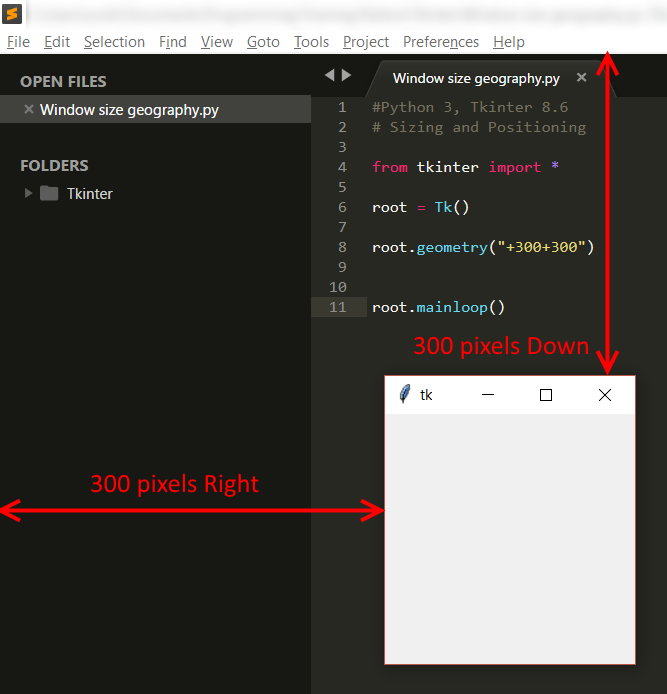
Python 3, Tkinter 8.6. GUI examples in Windows 10 When you create your first window in Tkinter, you can set it’s starting size and position on the screen by using the geometry method. When us…
hollow aspen
I'm not sure if it applies to curses
rich raptor
you're talking to me?
hollow aspen
Never used thqt before
rich raptor
because it's not the case here 
 past palm
This is an extension to the curses library. It provides callers with a hook into the ncurses data to resize windows, primarily for use by programs running ...
hollow aspen
Hey, does anyone know how I can display the selected file path in a filedialog?
Using tkinter
Let me show you what I've got going on here
I would like for the file path to show up in this little text box when I select a file using the 'browse' button
Right now, when I select a file there's no feedback that shows which one I selected, or even if I selected one at qll
thorny spruce
You could use the filedialogs
import tkinter.filedialog as fd
filename = fd.askopenfilename()```I've actually got that here, but it doesn't show the filename
thorny spruce
What's the code?
hollow aspen
def clicked():
    file = filedialog.askopenfilename()
    res = filename
btn = Button(window, text="Browse", command=clicked)```Okay I'm getting there hold on
There we go
This makes it so I can browse for a file when I press the button
But when I select a file, the browser window closes and I'm left with no feedback as to what I selected
thorny spruce
file is the selected filename, this is just a string. You'll want to insert this string into your entry widget
hollow aspen
How do I go about that?
thorny spruce
Exactly that. You have your entry widget, delete any content and then insert the filename into it
thorny spruce
Can you provide more of your code?
hollow aspen
Sure, I'll post the whole thing
from tkinter import *

from tkinter import filedialog

#Window geometry and title

window = Tk()
window.title("File splitter")
window.geometry('350x200')

#Functionality of 'Browse' button and text thingie

txt = Entry(window,width=45)
txt.grid(column=1, row=0)

def clicked():
    file = filedialog.askopenfilename()
btn = Button(window, text="Browse", command=clicked)
btn.grid(column=2, row=0)

window.mainloop()```That's all of it
thorny spruce
Okay so txt is your entry widget
Inside your clicked function you want to delete everything from txt
After prompting for the filename
hollow aspen
I'll have a look, thanks
thorny spruce
That site has some code examples, they are just in Python 2. This one is a bit more comprehensive http://infohost.nmt.edu/tcc/help/pubs/tkinter/web/entry.html
crude sparrow
In order to "fill in" the input field, you'll want to use a StringVar. When you create the Entry widget pass in your StringVar by setting the parameter textvariable. Then when you wan to change it, you change the StringVar
thorny spruce
You don't need a textvariable for any widget other than a Listbox
crude sparrow
I stand corrected?
thorny spruce
import tkinter as tk
import tkinter.filedialog as fd

def browse():
    filename = fd.askopenfilename()
    if filename:
        entry.delete(0, tk.END)
        entry.insert(0, filename)

root = tk.Tk()
entry = tk.Entry(root)
btn = tk.Button(root, text='Browse', command=browse)

entry.pack(side=tk.LEFT, expand=True, fill=tk.X)
btn.pack(side=tk.LEFT)

root.mainloop()```Just telling you how I've done it
thorny spruce
That's understandable, I just don't see the merit in creating another object
thorny spruce
They aren't the best usage examples and they're pretty old as well. It's from Python 2
That's also mentioned as another way you can do it, not as a better way. It still just comes down to preference though so to each their own.
crude sparrow
http://infohost.nmt.edu/tcc/help/pubs/tkinter/web/control-variables.html discusses using variables for other widgets as well
"Normally the text displayed in an Entry widget is linked to a control variable. "
Radio buttons need them as well
 pearl birch
hey i have an issue with tkinter, i am only two days into learning it forgive my probably ignorant mistake
i am trying to get a line of text and then a table underneath it in a window
i am using a grif
grid*
and i want to know if there is a way to get one label to stretch over two columns
here u can see that the first column is really wide
if the top label could go in both columns it would be nice and neat
how could i do this here is my code:
❤ thanks in advance
the data in the labels that make the table is irrelevant to the top label
 bleak smelt
Trying to convert my PyQt5 ui to .py, and I have a QKeySequenceEdit in the ui, but pyuic5 doesn't recognize the widget??
PS C:\py-dev\anote> pyuic5 app.ui > appui.py
Unknown Qt widget: QKeySequenceEdit
Anyone see this?
pearl birch
srry thought u were responding to me
bleak smelt
I built the ui with Qt Designer 5.11.1
crude sparrow
@pearl birch You can span multiple columns by using columnspan as discussed here http://www.effbot.org/tkinterbook/grid.htm
pearl birch
thanks
digital rose
aksing this question again because I'm really desperate xD
So I have this tkinter application I haven been working on the last couple of weeks, and inside my Application class which initialize the GUI I am only using the grid geometry manager.
But in my main() function when I execute
if __name__ == '__main__':
    gui = Application()
    # gui.pack()
    gui.mainloop()
the GUI only shows up not as a blank canvas when I uncomment the gui.pack() line. I heard that there are good reasons not to mix grid() and pack(), and I didn't use pack() anywhere else in my code except on this one line because; sadly that's the only way I can get my application to run and I don't have to clue which could have caused this. In my barebones.py application this doesn't happen so I am bit worried that there's something inherently wrong with my project... in fact, it's the complete opposite on my minimalistic example code: using gui.pack() would produce the same error as in my main application.
here's the full code: https://paste.pydis.com/yejaforezu.py
Note that only def ui(self) is in charge of initializing the tkinter widgets, the rest seems to be unrelated to the problem since it has nothing to do with it. In ui(self) I really only added a lot of labels, entry and combobox widgets (as well as label frames and buttons) which I positioned with grid() but this can't be the root of the problem, right? So what else could have gone wrong which I should be looking for?
digital rose
Update:
Here's the same application with much less could. It still produces the same error:
#!/usr/bin/env python
# -*- coding: utf-8 -*-

import tkinter as tk
import tkinter.font as font
from tkinter import ttk

class Application(tk.Frame):
    def __init__(self, master=None):
        tk.Frame.__init__(self, master)
        self.master.title("Test Application")
        self.master.resizable(0,0)
        self.ui()

    def ui(self):
            system = font.Font(family="System", size=12)

            # Matplotlib Figures
            labelmatplotlib = tk.Label(self, text="matplotlib figure", bg="yellow", relief=tk.RIDGE, bd=2)
            labelmatplotlib.grid(row=0, column=0, padx=2, pady=2)

            # Parameter Groupbox
            self.groupbox = tk.LabelFrame(self, text="Parameters", font=system)
            self.groupbox.grid(row=0, column=1, padx=5, pady=5)

            # Velocity
            self.label_velocity = tk.Label(self.groupbox, text="Velocity [m/s]", font=system)
            self.label_velocity.grid(row=0, column=0, sticky="W")
            self.entry_velocity = tk.Entry(self.groupbox, font=system, width=22)
            self.entry_velocity.insert(0, "default")
            self.entry_velocity.grid(row = 0, column=1, padx=5)

            # Navigation
            labelnavigation = tk.Label(self, text="matplotlib navigationbar", bg="blue", relief=tk.RIDGE, bd=2)
            labelnavigation.grid(row=1, column=0, columnspan=2, padx=2, pady=2)


if __name__ == '__main__':
    figure = Application()
    figure.pack()
    figure.mainloop()
I ran your code snippet and it does not produce an error @digital rose
You can mix grid and pack just not for for child widgets of the same direct parent. For example we have a Frame and 2 Labels,
f = tk.Frame(...)
l1 = tk.Label(f, ..)
l2 = tk.Label(f, ..)
Now it doesn't matter if you use .pack or .grid, what matters here is that because both labels share the same direct parent they must both be .pack or both .grid you can't have one label with .pack and the other with .grid
digital rose
@thorny spruce it produces the error when you remove the figure.pack() line below main: but that shouldn’t be the case because mainloop() alone should also be able to run the app?
thorny spruce
So if I comment out figure.pack() I still don't get an error. Can you post the full error message you are getting?
I'm still referring to the code snippet you posted
digital rose
So am I; I’m actually writing this from my cell phone so I don’t have the exact error log here right now but it had something to do with grid/pack being in conflict if i recall right. When I’m back home I can give you more details but this will take some time
thorny spruce
That's fine, just post it when you can
digital rose
Okay! 😉
digital rose
@thorny spruce in this example the tkinter app remains blank with gui.pack()
thorny spruce
That's not an error. Widgets don't get rendered unless you pack, grid or place them
Even if you pack the child widgets you still need to pack the parent
digital rose
ok, but I have a very similar application which kinda does produce error I'll show you in a moment
the code:
#!/usr/bin/env python
# -*- coding: utf-8 -*-

import tkinter as tk

class Application(tk.Frame):
    def __init__(self, master=None):
        tk.Frame.__init__(self, master)
        self.master.title("Barebones Application")
        self.master.geometry("600x500")
        self.ui()

    def ui(self):
            self.label_plot = tk.Label(text="Labels!", relief=tk.RIDGE, width=20)
            self.label_plot.grid(row=0, column=0, sticky="W")

            self.label_plot2 = tk.Label(text="Labels2!", relief=tk.RIDGE, width=20)
            self.label_plot2.grid(row=0, column=1, sticky="E", columnspan=3)

            self.label_plot3 = tk.Label(text="Labels3!", relief=tk.RIDGE, width=20)
            self.label_plot3.grid(row=1, column=1, sticky="E", columnspan=3)

            self.label_plot4 = tk.Label(text="Labels4!", relief=tk.RIDGE, width=20)
            self.label_plot4.grid(row=2, column=1, sticky="E", columnspan=3)

            self.button1 = tk.Button(text="Button 1", command=lambda: print("test button1!"))
            self.button1.grid(row=3, column=2, sticky="E", padx=(0,0))

            self.button2 = tk.Button(text="Button 2", command=lambda: print("test button2!"))
            self.button2.grid(row=3, column=3, sticky="E")


if __name__ == '__main__':
    gui = Application()
    gui.pack()
    gui.mainloop()
Traceback (most recent call last):
  File "D:\git source\website\py\barebone.py", line 35, in <module>
    gui.pack()
  File "C:\Program Files\Python37\lib\tkinter\__init__.py", line 2140, in pack_configure
    + self._options(cnf, kw))
_tkinter.TclError: cannot use geometry manager pack inside . which already has slaves managed by grid
that's why I am confused!
because the error disappears when you don't pack this code snippet
thorny spruce
You didn't specify self for any of the widgets in ui, if a parent widget is not provided it will default to None, if None is given then the parent widget becomes the root widget
Because of this the parent widget for gui is the root window and you've use .pack(), then in ui the parent is the root window and you've use .grid
digital rose
ok I think I understand, thank you for your explanation
 modest linden
-reposting because it's been moved up, removed old post-
Hello! (PyQt5)
This is my code: https://paste.pydis.com/inecezaset.py
What I'm having struggles with is creating a second window when the button ("armBtn")/(label: "MyTools").
The window isn't "active" or available until the first window is closed. I believe this has to do with them both being "QMainWindow"'s.
(Setting variables to None in main code to keep the window alive after the button is clicked (not cleaned by garbage collector).
Does anyone know how I can solve my issue? >_< (also I've tried QDialog but not managed to get it to work)
Thanks. 😃
pearl birch
after helping Bams ^^^^^ I have a tkinter issue
if anyone could help that would be great
i am trying to show an info box to give the user information
and a random
wait
sorry having typed this i think i have realised my issue
if i am not back in ten i have fixed it
modest linden
yeah I still haven't solved it >_<
 cold urchin
Hi guys I have pretty much finished the code for this project
I want to add a GUI that has a login page and play videos like when a user hits a certain score etc.
Im not sure if Tkinter is capable of doing this
Can someone guide me down the right lines
crude sparrow
@cold urchin Does the video have sound?
modest linden
[PyQt5] [Python 3]
Hello again!
How can I get rid of this warning / solve it? It pops up in a console window when I launch my application.
   QT_AUTO_SCREEN_SCALE_FACTOR to enable platform plugin controlled per-screen factors.
   QT_SCREEN_SCALE_FACTORS to set per-screen factors.
QT_SCALE_FACTOR to set the application global scale factor.```All I can find is this: https://stackoverflow.com/questions/41331201/pyqt-5-and-4k-screen
Which didn't change anything
Stack Overflow
I'm trying to migrate an existing PyQt5 app to high-dpi for window 10.
The documentation of Qt5 itself speak about high-dpi scaling here:
http://doc.qt.io/qt-5/highdpi.html
QT_AUTO_SCREEN_SCALE_F...
Ok so, os.environ["QT_SCALE_FACTOR"] = "1"
Ugh, it still opens an empty console...
crude sparrow
@modest linden How are you launching your program? If you run it via pythonw then you won't get a console window.
modest linden
Compiling it with PyInstaller and running it as .exe also launches a console >_<
crude sparrow
@modest linden I use the flags -wF with PyInstaller which will produce an EXE that doesn't show a console.
modest linden
😮 thx ❤ will try that
❤ worked
hmm does not seem to work for Mac though, rather 2 files are created, a unix executable and a .app, the unix one is basically the same as compiling without -wF, and the .app launches and closes itself, nothing happens
                        Windows and Mac OS X: do not provide a console window
                        for standard i/o. On Mac OS X this also triggers
                        building an OS X .app bundle. This option is ignored
in *NIX systems.```Well... it still shows the console on mac <_< thats a shame
and the .app does nothing
crude sparrow
Sorry to hear you've got a Mac
😩
I dunno why, but it seems like Macs struggle with Python GUIs. It's so backwards
Someone recently shared info on how to create an App file for PySimpleGUI.... maybe it'll work for you on this
It's for tkinter though, so you'll have to change a couple of things.
pyinstaller --onefile --add-binary='/System/Library/Frameworks/Tk.framework/Tk':'tk' --add-binary='/System/Library/Frameworks/Tcl.framework/Tcl':'tcl' your_program.py
modest linden
Sorry to hear you've got a Mac 😂
Thank you ❤ I'll look in to it
modest linden
Alright!...
Do you know if it is possible to retrieve the itemText from a QComboBox item through its itemData and not index?
self.cb.addItem("text", "data")
#self.cb.addItem(itemText, itemData)
I know itemText and want itemData through it
PyQt5
Otherwise I'll just create a dictionary from the list!
https://i.imgur.com/du4uiUj.png works too
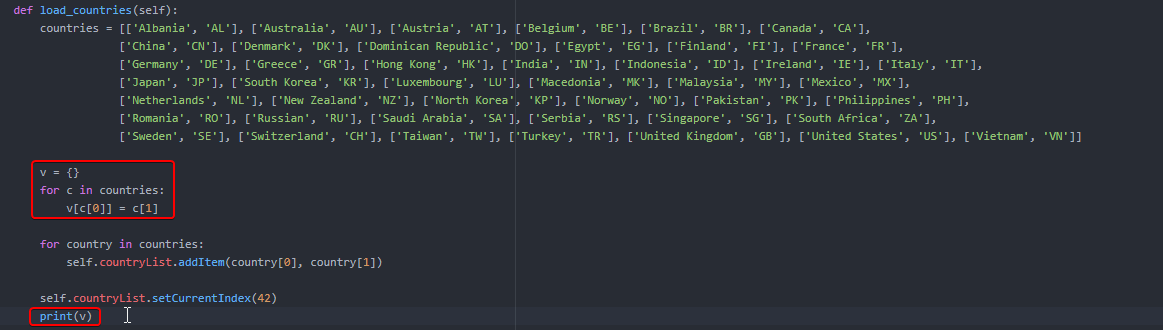
ignore the stupid variable names, they're temporary, I just tested the code ^_^
oh and I can just add it to the loop below.
Sorry for the spam...
I'm going with this if the feature I asked about in the first message I sent here today (itemData, itemText) isn't something that exists.
https://i.imgur.com/wBtI0Hn.png
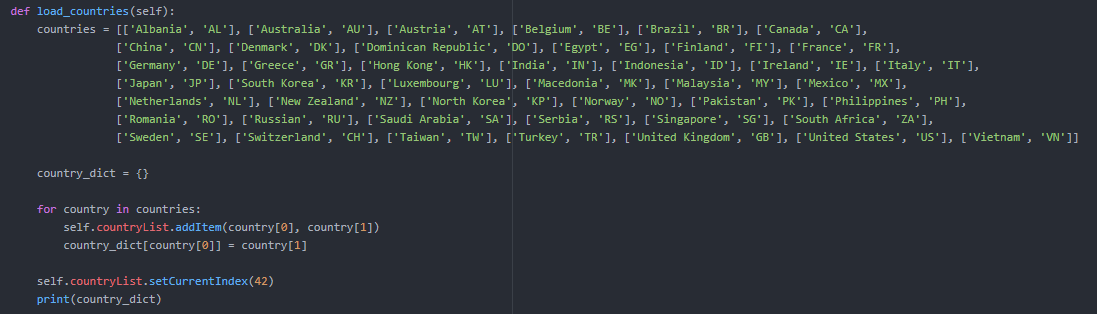


That way I can retrieve it using the itemData through a dict
crude sparrow
You could create it using a dictionary and you wouldn't need to do the conversion.
countries = { 'Make believe' : 'MB', 'Australie': 'AU'}
 rocky flint
(PyQt5)
I don't have a problem with my code, I just can't find how to manage something.
self.colorText = 0
self.colorBg = 0
self.pal = QPalette()
pal2 = QPalette()
self.pal.setColor(QPalette.WindowText, Qt.black)
self.pal.setBrush(QPalette.Window, Qt.white)
self.dbWindow.setPalette(self.pal)
def textChange(self):
if self.colorText == 0:
self.colorText = 1
self.pal.setColor(QPalette.WindowText, Qt.blue)
elif self.colorText == 1:
self.colorText = 2
self.pal.setColor(QPalette.WindowText, Qt.red)
elif self.colorText == 2:
self.colorText = 0
self.pal.setColor(QPalette.WindowText, Qt.black)
self.dbWindow.setPalette(self.pal)
def bgChange(self):
if self.colorBg == 0:
self.colorBg = 1
self.pal.setBrush(QPalette.Window, Qt.lightGray)
elif self.colorBg ==1:
self.colorBg = 0
self.pal.setBrush(QPalette.Window, Qt.white)
self.dbWindow.setPalette(self.pal)```
Basically, I have two buttons that change either the text's or the bg's color respectively when clicked. What I want, however, is for the bg (the one controlled with the Brush class) to either not have a color or be light gray. Since I can't find a way to do this, I use white color as a filler.
So how can I simply turn a color on/off instead or relying to colors? pallid thunder
Hi, sorry to hijack the thread, but could someone recommend a GUI module that works on both android and windows? I've found "Kivy", but can anyone recomend any others?
 proper glade
@rocky flint i believe what you're looking for might be setData(0, QtCore.Qt.BackgroundRole, None) to reset the bg color
according to https://stackoverflow.com/questions/37761002/pyqt-reset-or-remove-the-background-color-from-qtreewidgetitem
Stack Overflow
How do I remove the background color of a QTreeWidgetItem, or reset it to the default?
treeWidgetItem.setBackgroundColor(0, QtGui.QColor('green'))
that is if ive understood your question correctly
@pallid thunder unfortunately i think you might be out of luck
Kivy is the only one on this list that runs on both Android and Windows
pallid thunder
Kivy it is then I guess. thanks @proper glade
digital rose
hello can u help me
i'm making simple calculator in tkinter
when I press button with "3", number 3 appears in entry box
but when I press it again, it still shows 3 in the box because I use simple delete and insert (so it inserts again) function
how to do it if I want "33" after pressing 3 button twice
digital rose
nvm i got it
digital rose
I'm trying to make a button, that inserts his text value when clicked on, but it does not work for some reason :/ can u help me
def number(x):
window.insert(END,x)
one = Button(root, text="1")
one.bind("<Button-1>", number(1))
one.pack(side=LEFT)
 sullen thunder
Hey, I am having some difficulty in PyQt5 in regards to MdiArea subwindows. Attempting to add (or open/close) subwindows via file menu buttons.
Is there an existing function I should be using because the
self.ui.mdiArea.addSunwindow()
Doesn't appear to work outside of the initial QMainWindow set up.
Thanks for any help.
past palm
why does everyone use pyqt instead of tkinter
sullen thunder
I think like anything else it's a pick what you think will work best for your objectives. Also, it may have to do with PyQt building off Qt.
 wind birch
And QtCreator is a big help too; I imagine.
 timid elbow
@sullen thunder have you considered declaring the subwindow in the initial QMainWindow setup but using .hide() to make it not visible and and .show() when you're ready to have it appear?
sullen thunder
@timid elbow I think I may have tested it this morning. However, it is always worth a second attempt with fresh eyes.
I want to say
self.ui.subwindow.hide() did not work, however I may have tried self.ui.mdiArea.subwindow.hide().
timid elbow
I've been able to .hide() groupboxes, buttons, labels, and lineEdits, tree/tableViews. However, it didn't work when I tried to .hide() a layout. I haven't worked with subwindows and I'm still learning PyQt but I thought I might throw it out there as an idea.
sullen thunder
@timid elbow I just attempted the .hide(). It doesn't appear to work at all.
The code
Self.ui.mdiArea.closeActiveSubWindow() will close an active window. However, I think it deletes it.
There may be something regarding Parent Child with the mdiArea but I can't seem to really locate much information regarding this. All I know is it appears possible just missing something
 muted marsh
Hey is there a good resource on how to redirect output of a console into a python gui window. It's a basic project in it's infancy so i'm willing to use any gui libraries
timid elbow
@sullen thunder I took a look at the docs so I'd have a better idea of the specifics of what you're looking at. Per your original question I don't see anything here http://doc.qt.io/qt-5/qmdiarea.html#addSubWindow that would prevent you from adding a subwindow via a menu action. There is some info about a flag you can set such that when close is called it does not delete the subwindow. Based on what I see here http://doc.qt.io/qt-5/qmdisubwindow-members.html there are QMdiSubWindow.show() and .hide() members. Did you remember to make an instance of QWidget or QMdiSubWindow to pass to self.ui.midArea.addSubWindow(mynewsubwindow)?
sullen thunder
@@timid elbow I have been combing through some of the same documentation, and I am wondering some of the same thoughts.
The answer your question about QWidget or QMdiSubWindow. I believe your referring to my imports.
In the main doc (not the QDesigner converted file.) I do not import QMdiArea, or QMdiSubWindow from the PyQt5.QtWidgets module.
That may be worth an initial exploration that could explain why the functionality isn't working. As outside of the def init I don't call on the GUI design code.
As for the flags. I was wondering if adding in the code
self.ui.mdiArea.addSubWindow( sunwindowX, QtWidgets.QDialog)
This might flag the subwindows as a dialog and allow me to use a .show() / .hide() function. Which I could just make the file menus toggle based.
@muted marsh what kind of output do you want to direct into a GUI?
I would imagine that if your running a console based code. The result should be saved to a .txt(or other file) that could be opened by the GUI.
But if your running them concurrently, I am unsure how to have one trigger another.
cold urchin
@sullen thunder Can I implete the things I make in pyqt designer into my program that I have written>
muted marsh
Yeah the big issue is im building something for non technical people and it requires command line output in real time rather than from a file.
cold urchin
All my variable are in .txt files
sullen thunder
@Marlin I am not 100% sure I know what you are asking. You can import/read information from a .txt file in PyQt program. Much like any other Python program. So .txt can be used inside/outside the PyQt gui. I believe this is referred to as front end backend but I am not exactly well versed in that.
Keep in mind It will still depend how the file is written and how your program is reading it.
 atomic socket
Speaking of PyQt
sullen thunder
@muted marsh I haven't really explored that much. It sounds like you have a command line program that needs to be run and you would like to run it from a GUI.
Kind of like a pushbutton that opens and runs a script then shoots back the result? Or do they need to see the command line? That you might need to program in the ability to open command line and then visually run the script
atomic socket
Gonna be working on a project I want to use Qt in, it's going to be open source, but not for financial gain. Would the GPL have any impact on that specifically?
I know I've wrestled between PyQt and PySide due to licensing in the past, but since I won't be charging for anything I don't think it'll be a problem.
muted marsh
Yeah Kind of a like a push button that opens , runs the bash script. Right now I have a seperate terminal window that things are output to. Ideally I wanted to run that output in the same window instead of having two windows open
From my understanding , It's hard to do in the Tkinter because of how tinkter's Main loop works. I was wondering if another GUI library handled it diffrently.
sullen thunder
@atomic socket I am not well versed in licensing for Qt and PyQt. It appears your fair game with Qt to share and use commercially. pyQt doesn't appear as lax. Sorry I can't be of more help there. If you have a finished product. Might not hurt to discuss with a professional to be safe.
atomic socket
@sullen thunder No worries mate, thanks for the advice, I may discuss with a professional once I get further on into the project. 
sullen thunder
@muted marsh I admit I haven't really done anything with command line and GUI yet. sry I can't be of more help.
It does seems possible, I found an example on Google that appears to do what you are looking for.
It appears to import os
Then can get the stdout via
stdouterr = os.open4(cmd)[1].read()
Then sets a Qtextedit to display the output. That might be a start for you.
cold urchin
@sullen thunder I use the the w+ and r functions when reading and writing files
with open("Example.txt","w+") as f:
     f.write(A variable)
This is normally how I write my txt grabs
sullen thunder
@Marlin I see no reason you can't import variables from the .txt file.
cold urchin
@sullen thunder Alright sounds great. Do you know any good resource that teaches me how to use pyqt?
sullen thunder
@Marlin personally I used packtpub.com's book called Qt5 Python GUI Programming Cookbook.
Warning though: book is far from perfect. It does a good job walking you through most of the basics. It has typos and errors in the code examples.
If your patient and use Google then you can learn a lot. It took me three months to work through it. But I only did about an hour or two at a time.
cold urchin
Alright sounds great
 long folio
hey all. I was explaining a problem ive been having #help-kiwi, I was advised to post it here. I have a tkinter project which is effectively two slideshows. The first loops between 10 images and serves as a gif background. the second loops all images in a file and displays them as a foreground image for about 1 second each. I load all of my background images into PhotoImage at the start of my loop, and load each new foreground image as it is needed. This works almost perfectly, save for when the foreground image is large enough to cause a delay in my background 'gif'. I am searching for a solution which allows me to iterate over any number of foreground images without slowing down the rate at which my background images refresh. Ive uploaded sample code here: https://stackoverflow.com/questions/53772520/tkinter-photoimage-halts-self-after
Stack Overflow
My objective is to have a looping background image set, functioning exactly the way a .gif does, and on top of that, to have a slideshow of images loop concurrently with a delay of about 1 second.
As the name in the link suggests, I believe that the .after function which allows me to loop my background update is somehow halted when i load the foreground image into memory
Originally, when my foreground image list was under 200, i could use the tkinter PhotoImage function on the whole list and keep it in memory, which caused no delay. I was perfectly happy with this solution until my list of foreground images became too long to store in memory.
I then experimented with loading small lists of 5 images each into PhotoImage, which I hoped would function in the five seconds it took to loop the previous group of 5, but was met with an exaggerated version of the same problem I am having now.
In regards to the after function, the tkinter docs say "Tkinter only guarantees that the callback will not be called earlier than that; if the system is busy, the actual delay may be much longer." So i believe I am looking for a solution to either specify the callback time, or do some sort of multiprocess/threading operation to get around the system being busy part.
sullen thunder
@timid elbow I think I figured it out. Will shameless admit, it was just throwing everything at the code until something stuck the way I wanted it to.
@timid elbow okay so, the way i ended up doing it is as follows.
I created 2 functions
def closeWindow(self):
self.ui.mdiArea.removeSubWindow(self.ui.subwindowX)
self.ui.mdiArea.closeActiveSubWindow()
def openWindow(self):
subWindow = self.ui.mdiArea.addSubWindow(self.ui.subwindowX)
subWindow.show()
This appears to work for me. I will need to conduct some furthur testing to make sure I can make the functions multipurpose to multiple different subwindows.
In short, the way I think this works is that the closeWindow() is outright deleting the subwindow and the openWindow is just inserting a new instance of it altogether.
 sage umbra
yo ive made this in pyqt designer - i was wondering if anyone had an idea to create these duplicate boxes (which eventually will have the names etc changed) through like a class or something?
or would i have to manually write code for each one
sullen thunder
@sage umbra I want to answer your question properly, so correct me if I missinterpt your goal.
In QDesigner you have generated an initial template and you would like to have the ability to generate these widgets with instance specific data.
You can definitely create a class with the widget design in it. Then a function that calls that class to place it on to the screen and populate it with the desired data.
Now, I haven't attempted to do anything like that yet. So maybe someone else can chime in with more detail.
sage umbra
yea i got that far
shit its hard to explain
i wanna make a class with the name, pic and user type in so that everytime i need one of those on screen i can just use the class. any ideas on how i could do that
rocky flint
Is there a way to make a QTextEdit widget not expand, but w/o shrinking the area around it or adding more widgets to make it "collapse" by force?
Using addStretch() does the trick, but it drags the widget at the bottom (even if I include Qt.AlignTop to my layout) and I want it to stay on top instead. The same happens when set its maximum height.
digital rose
Hi there I am creating a to do list app in python using tkinter and I was wondering if there was a way (and how to do it) to make it where, you click a button, a new window pops up with a textbox where the user can enter a string and then confirm it (then closing the window).
thorny spruce
tkinter.simpledialog.askstring is what you're after
If you want a custom new window then use atkinter.Toplevel widget
 celest shale
Hey im trying to get my tkinter background to change colour, but window.configure(background='black') wont change it
window.configure(background='black')
tkinter btw
digital rose
@celest shale try bg=''
 pallid vapor
!t no-dm
 proven basinBOT
no-dm
Can I send you a private message?
No. We do not provide one-on-one tutoring - you can hire someone locally if you really need that. We also prefer that questions are answered in a public channel as it means that everyone else present is able to learn from them. If you're working with code that you are unable to disclose for any reason, you should try to make your question more general and write a separate, small piece of code to illustrate your problem.
pallid vapor
@celest shale
digital rose
Ok so I am in my schools TSA (technology-student-association). My event is software development and I have some ok understanding of python. The goal of the event was to make a software that has an educational and or social value. So, I built basically a python script that uses input() statements and if statments that walks the user through a couple of challenges and so far its pretty good. Now, I need a way to display it other than just using command prompt and or MAC terminal. So I am trying to use Tkinter which I am unfamiliar with. Can someone here tell me how I can make a Tkinter window that can print, take user input, and based on that input produce output to that specific window? Thank you.
Reminder: The input/output stuff is done I just need help putting that into my tkinter
Please @ me if you can when anyone responds
 dark lava
hi
i'm making a tkinter app
with a background image
code:
from tkinter import *
import winsound
from winsound import *

#creamos la ventana
raiz=Tk()
raiz.title("MYRIAD ALLIANCE: ORIGINS")
raiz.geometry("790x590")
raiz.resizable(0,0)
raiz.iconbitmap(r'C:\Users\shado\Downloads\pygame\MY\descarga.ico')

class menuPrincipal():
    def __init__(self):
        #ponemos la imagen de fondo
        self.fondo = PhotoImage(file= r'C:\Users\shado\Desktop\Myadorigins\background.png')
        self.background_label = Label(raiz, image=self.fondo)
        self.background_label.place(x=0, y=0, relwidth=1, relheight=1)


#ejecutamos la ventana
menuPrincipal()
raiz.mainloop()```

but it doesn't work
https://cdn.discordapp.com/attachments/439702951246692352/533737082238271509/unknown.png
 uneven echo
@dark lava Tkinter image support is a pain. usually GIFs always work
 worldly plume
could someone help me with Pygame?
# ---IMPORTS---
import pygame
import sys

pygame.init()

# ---VARIABLES---

# COLOURS
ENEMY_COLOUR = (0,0,255)
PLAYER_COLOUR = (255,0,0)
BACKGROUND_COLOUR = (0,0,0)

# DIMENSIONS
WIDTH = 800
HEIGHT = 600

# PLAYER INFO
PLAYER_SIZE = 50
PLAYER_POSITION = [WIDTH/2, HEIGHT-2*PLAYER_SIZE]

# ENEMY INFO
ENEMY_SIZE = 50
ENEMY_POSITION = [100, 0]

# GAME INFO
screen = pygame.display.set_mode((WIDTH,HEIGHT))
game_over = False

while not game_over:
    for event in pygame.event.get():
        if event.type == pygame.QUIT:
            sys.exit()

        if event.type == pygame.KEYDOWN:
            x = PLAYER_POSITION[0]
            y = PLAYER_POSITION[1]
            if event.key == pygame.K_LEFT:
                x -= PLAYER_SIZE
            elif event.key == pygame.K_RIGHT:
                x += PLAYER_SIZE

            PLAYER_POSITION = [x,y]

    screen.fill((BACKGROUND_COLOUR))
    pygame.draw.rect(screen, ENEMY_COLOUR, (ENEMY_POSITION[0], ENEMY_POSITION[1]), ENEMY_SIZE, ENEMY_SIZE)
    pygame.draw.rect(screen, PLAYER_COLOUR, (PLAYER_POSITION[0], PLAYER_POSITION[1], PLAYER_SIZE, PLAYER_SIZE))

    pygame.display.update()```


```Hello from the pygame community. https://www.pygame.org/contribute.html
Traceback (most recent call last):
  File "c:\Users\adromnia\Desktop\Python\DodgeTheBlocks\game.py", line 46, in <module>
    pygame.draw.rect(screen, ENEMY_COLOUR, (ENEMY_POSITION[0], ENEMY_POSITION[1]), ENEMY_SIZE, ENEMY_SIZE)
TypeError: function takes at most 4 arguments (5 given)```TypeError: function takes at most 4 arguments (5 given)
I know it says this
but
if i comment out that line - line 46 - i don't get the same error with line 47 - which basically is the same thing.
omfg
im an idiot
i just noticed it
digital rose
haha
crude sparrow
@dark lava I have seen tkinter code where you save the photo image in the label:
self.background_label.image = self.fondo
it's how I've done it in the past
dark lava
well i've solved this problem but
in a label
how can i change the style of a font?
like this
dfdf
i have this:
texto = Label(raiz, text="JUGAR" ,bd=0, bg="#302e2e", font=("COMIC SANS MS", 40))```but i don't know how to made it how i want
dark lava
yeah thanks
 obsidian lance
can anyone show my simple short testing code for eel , which not working with error
    at Object._mock_py_functions (eel.js:27)
    at Object._init (eel.js:99)
    at eel.js:143``` looks like all python function is lost or not added etc. As result i can't even start develop my app
https://github.com/3dformortals/data/tree/master/python/DASprogress/eel
any help will be good
GitHub
Contribute to 3dformortals/data development by creating an account on GitHub.
this string raise error
for(let i = 0; i < eel._py_functions.length; i++) {``` this is eel source code... and looks like `eel._py_functions` not definedhave you figured that bit out or do you still need an answer
Maybe if you show me the full code
i could be able to help
obsidian lance
@digital rose i am still not solve the problem
this is full code link on github(with file system structure)...or you need it inside discord?
https://github.com/3dformortals/data/tree/master/python/DASprogress/eel
GitHub
Contribute to 3dformortals/data development by creating an account on GitHub.
it have only one python file, eel.js and script.js
and simple html
it can't even print("hello world") python called from javascript. Because testpythonfromjs function is not a function every time
digital rose
Being honest im not sure
 minor barn
Qt Quick Controls 2 can be used with python right?
 spare leaf
Can someone help me with python tkinter please
proven basinBOT
ask
Asking good questions will yield a much higher chance of a quick response:
• Don't ask to ask your question, just go ahead and tell us your problem.
• Try to solve the problem on your own first, we're not going to write code for you.
• Show us the code you've tried and any errors or unexpected results it's giving
• Keep your patience while we're helping you.
You can find a much more detailed explanation on our website.
spare leaf
ok so i'm making a accuracy test game in which every time you click the square it updates your score for clicks, however every time you miss the square and click on the outside the misclick score updates. I'm having a problem on making it so every time you miss the square the score updates.
this is on python tkinter btw.
ive tried making another window and I just cant get it..
I was told to use: frame.bind('<Button-1>', misclick)
but again im kinda new so I was having trouble applying it to the code
digital rose
Hello, I have alittle problem with my tkinter gui. I'm trying to make my own checkbox using a canvas 2 images and a bind function that connects the left mouse button to a function that is supposed to take the flag variable for the specific element check its state create the new image and then negate the state. Is it ok if I just paste the important code here? I don't want to just spam the chat. I would be very happy if anyone could help me.
pallid vapor
!ask
proven basinBOT
ask
Asking good questions will yield a much higher chance of a quick response:
• Don't ask to ask your question, just go ahead and tell us your problem.
• Try to solve the problem on your own first, we're not going to write code for you.
• Show us the code you've tried and any errors or unexpected results it's giving
• Keep your patience while we're helping you.
You can find a much more detailed explanation on our website.
pallid vapor
Show us the code you've tried and any errors or unexpected results it's giving @digital rose
!codeblock
proven basinBOT
codeblock
Discord has support for Markdown, which allows you to post code with full syntax highlighting. Please use these whenever you paste code, as this helps improve the legibility and makes it easier for us to help you.
To do this, use the following method:
```python
print("Hello world!")
```
This will result in the following:
print("Hello world!")
ah thx
^^
    def __init__(self, master):
        tkinter.Tk.__init__(self, master)
        self.master = master
        self.item_state = True
        self.variation_state = True
        self.active_state = True
        self.barcode_state = True
self.initialize()``` , bd=0, highlightthickness=0)
self.itemup_check.bind("<Button-1>", lambda event, item = self.itemup_check, check = self.item_state, image1 = self.uncheckedimg, image2 = self.checkedimg : self.switchImage(item, check, image1, image2))
self.itemup_check.create_image(0,0,image=self.uncheckedimg,anchor="nw")
self.itemup_check.grid(column=0, row=4,sticky="EW")``` for state in [self.item_state, self.variation_state, self.active_state, self.barcode_state]:
if(id(check) == id(state)):
if(state):
element.create_image(0,0,image=image1,anchor="nw")
else:
element.create_image(0,0,image=image2,anchor="nw")
state = not check```I tried to use a global variable befor but I couldn't get the specific variable that I need
I think the best way would be to return the value that I want and assign it but that is not possible due to the event handling, according to what I read
So what I'm trying to do is check for the memory location and if it matches, check it and then negate it
but when i use print(hex(id())) on the variable I notice that after negating the variable the memory location changes....
I would love to see how the built in function checkbox handles this problem but I couldn't get access to that code
Ah and the 2nd code block is within the initialize function but I don't wanted to add 15 unnecessary lines to the message
obsidian lance
@spare leaf just for case... python is not good for game creation... server - yes, cli - yes, gui - not yes), games- no (do you know any not bad games written uses python + tkinter.... i am too don't detect even one)
spare leaf
its a school assignment
obsidian lance
@spare leaf at least look at this... i am not sure about details... but your click manager must take event...
this is my programm and it work done
https://github.com/3dformortals/data/blob/master/python/DASprogress/DASprogress_tk_Comfortaa_16_day.py#L306
GitHub
Contribute to 3dformortals/data development by creating an account on GitHub.
last version tested on kubuntu only
spare leaf
damn whats the purpose of it?
obsidian lance
get the widget which was clicked
i mean def click(event): event allow get the widget
and programm is for note anime and series that not forget episode number etc
spare leaf
yea thats sickk, im not really good with this stuff yet
obsidian lance
obsidian lance
@spare leaf ah, do you want def click(event, otherfunctionparameter) additional parameter?
spare leaf
its ok what language do u speak?
obsidian lance
usual i am not speak... or rus)
obsidian lance
i am have no mic)
spare leaf
its ok i just want to show u what im trying to do if u have time 😃
i'm going to share screens
obsidian lance
i understand what you need
presson button = +score button
pressaround button = +score to other var
 finite eagle
I need help
so
I am trying to use curses
but when I type backspace I get 8
but curses.KEY_BACKSPACE is 268
help?
 wet patio
Is their a way to have Inspect Element available on PyQt5 WebEngineView
 marble viper
def write_slogan():
    print("Tkinter is easy to use!")

root = tk.Tk()
root.title('TechEvent Level-2')

root.geometry("1080x1147")

frame = tk.Frame(root)
frame.grid()


grid = tk.Frame(frame)
grid.grid(sticky=tk.N+tk.S+tk.E+tk.W, column=15, row=4, columnspan=2)

labelEnterTeamID = tk.Label(root, height=2,width=30,text="Please enter your Team ID:")
labelEnterTeamID.place(relx=0.5, rely=0.45, anchor=tk.CENTER)

textBoxTeamID = tk.Text(root, height=2,width=30)
textBoxTeamID.place(relx=0.5, rely=0.5, anchor=tk.CENTER)

goButton = tk.Button(frame,
                   text="Go!",
                   command=write_slogan)
goButton.place(relx=0.5, rely=0.5, anchor=tk.CENTER)
goButton.grid(row=3, column=4)
root.mainloop()``` is my codeI want to place Go button below the textbox
 kind kraken
@marble viper you can't mix place and grid
and it's also unclear why your grid is so many rows and columns
also shouldn't mix root parent and frame parent like that
try this ```py
import tkinter as tk
def write_slogan():
print("Tkinter is easy to use!")
root = tk.Tk()
root.title('TechEvent Level-2')
#root.geometry("1080x1147")
frame = tk.Frame(root)
frame.pack()
labelEnterTeamID = tk.Label(frame, height=2,width=30,text="Please enter your Team ID:")
labelEnterTeamID.grid(row=0, column=0)
textBoxTeamID = tk.Text(frame,height=2,width=30)
textBoxTeamID.grid(row=1, column=0)
goButton = tk.Button(frame,
text="Go!",
command=write_slogan)
goButton.grid(row=2, column=0)
root.mainloop()
wait you also have two frames
thorny spruce
You need to use .after and pass the destroy method of the button
spare leaf
ok thank you I will try that
spare leaf
Im trying to make another window and I dont know why it isnt working, it isnt giving me an error message either. Im trying to make it so you click on the Start button for the game to start, im confused can someone please help me out!
thorny spruce
What about it exactly isn't working?
spare leaf
like when I run the program a blank window shows up
I want it so the start button is there on the first page and then as soon as I click the start button it starts the game on a another page
thorny spruce
All of your code to add widgets is inside a function that you don't call
spare leaf
what does that mean. sorry Im getting of new to this stuff
thorny spruce
Okay so let's say when have a function
def func():
    print('Hello World!)
All this does is define a function, nothing inside the function is actually run until you tell it to
spare leaf
ok
thorny spruce
To run the function you need to call it by doing
func()
ohhh righht right
thorny spruce
Your case is the same, you have defined a function but it isn't used
spare leaf
so every function that ive made ur saying needs to be called?
thorny spruce
Pretty much, it's slightly different with tkinter though for buttons, when you add a function to a command for the button
my_button = tk.Button(master, command=func)```
You only provided the name, you do not call it like normal. This function will be called for you when the button is pressedAnd not just buttons but anything that takes a command or if you use .bind, only provide the function name. When an event happens it will call the function for you
spare leaf
but it still didnt work?
thorny spruce
In what way didn't it work?
thorny spruce
Did you call the function?
spare leaf
Well. I dont think thats the probelm since I havent binded anything to those windows
thorny spruce
Well if I do the following
win()
window.mainloop()
I get the start button
thorny spruce
Nw
spare leaf
@thorny spruce sorry to bother you again
but for some reason now when I click the start button 2 of the same pages open instead of 1
thorny spruce
You have given your start button command =win, so when you press it it will give you another window
I'd suggest breaking your code up into sections so you don't get this mix or functionality
digital rose
whats the best gui library? tkinter?
marble viper
@kind kraken thank you!
I am using the following code to display in the fullscreen:
    def __init__(self, master, **kwargs):
        self.master=master
        pad=3
        self._geom='200x200+0+0'
        master.geometry("{0}x{1}+0+0".format(
            master.winfo_screenwidth()-pad, master.winfo_screenheight()-pad))
        master.bind('<Escape>',self.toggle_geom)
    def toggle_geom(self,event):
        geom=self.master.winfo_geometry()
        print(geom,self._geom)
        self.master.geometry(self._geom)
        self._geom=geom

root = tk.Tk()
root.title('TechEvent Level-2')
app=FullScreenApp(root)```Is it possible to place these three blocks in the center
thorny spruce
If all 3 are inside a frame then include expand=True to the .pack, if they are all on the root window apply that to the first and last widget
marble viper
def write_slogan():
    print("Tkinter is easy to use!")

class FullScreenApp(object):
    def __init__(self, master, **kwargs):
        self.master=master
        pad=3
        self._geom='200x200+0+0'
        master.geometry("{0}x{1}+0+0".format(
            master.winfo_screenwidth()-pad, master.winfo_screenheight()-pad))
        master.bind('<Escape>',self.toggle_geom)
    def toggle_geom(self,event):
        geom=self.master.winfo_geometry()
        print(geom,self._geom)
        self.master.geometry(self._geom)
        self._geom=geom

root = tk.Tk()
root.title('TechEvent Level-2')
app=FullScreenApp(root)

#root.geometry("1080x1147")

frame = tk.Frame(root)
frame.pack()

labelEnterTeamID = tk.Label(frame, height=2,width=30,text="Please enter your Team ID:")
labelEnterTeamID.grid(row=0, column=0)

textBoxTeamID = tk.Text(frame,height=2,width=30)
textBoxTeamID.grid(row=1, column=0)

goButton = tk.Button(frame,
                   text="Go!",
                   command=write_slogan)
goButton.grid(row=2, column=0)
root.mainloop()```they're inside a frame
thorny spruce
Yep so you can just do frame.pack(expand=True)
marble viper
Thanks a lot!
marble viper
@thorny spruce Is switching frames possible?
thorny spruce
You can use .destroy to remove the widgets then create and pack/grid your new widgets
marble viper
I have store the team ID
thorny spruce
I'd probably add that as part of your class instead of being a global variable and separate function
marble viper
the teamID?
spare leaf
Im trying to make it so when I run my code only the page with the start button opens not both the start button page and the game. I want the game to start after I click the start button
marble viper
So, you should link the command of the button with a function
a function that opens another page
spare leaf
I want to close a page that opens at the start but then reopen it later would I use frame.withdraw()?
 serene spoke
It's cool seeing more people using tk. Really powerful framework
I managed to create this. Simple text editor, but the end goal is to be capable of reliably working on a number of languages with an awesome plugin API
Made with tk, and you can't even tell
digital rose
Wow that looks awesome @serene spoke !
crude sparrow
@serene spoke Is each line a Label widget followed by an Entry widget? Do the arrow keys advance you up and down a line?
serene spoke
@crude sparrow the line gutter is a single label widget. Arrow keys do advance you up and down lines.
The project is available at https://github.com/Aareon/Codingg
New contributors are always welcome and I'd really love to get this project to a point where it's a viable replacement for many other text editors.
It's super easy to play with it, and it should he compatible with Python 3.6+

GitHub
A code editor written in pure Python. Contribute to Aareon/Codingg development by creating an account on GitHub.
Simply clone the repository and do python3.6 main.py. In the future I'll make distribution a lot nicer.
obsidian lance
@digital rose best gui lib for what?
- for simple app, you can use tkinter, but it looks ancient
- for good looking app , may be pyside2 (if i right remember)
- if you need crossplatform app packed to exemonofile then tkinter, wxpython, can do this, but both need "hack's" for crossplatforming, becuase mouse work different, and wxpython addon z-index of widgets opposite direction linux vs windows.
python is good for serverside and cli(command line interface/console inputs)...
serene spoke
@obsidian lance @digital rose if you look at the image I posted a few messages up, you can see a sample of what tkinter is capable of. That app was made with zero external dependencies, created with everything available in the standard library. Tkinter doesn't have to look ancient if you take the time to understand how it works and to style it as you see fit.
tkk is a module within the tkinter library that allows you to skin your UI to look more native, as well as gives you more control as to how each widget looks.
@obsidian lance Python has a plethora of uses, not limited to server-side and cli applications.
obsidian lance
i mean serverside and cli is comfort, but gui is always headpain and limited functionality
gui must have behavior close to html+js ... that not kill the coder in time of create and remaster something
serene spoke
Perhaps it is for you, but that doesn't mean it may be for anyone else. Python is a perfectly acceptable language to write a user interface in. JS desktop applications typically use things like Electron, but that adds log(O(N^2)) bloat to your application.
obsidian lance
sounds like you want say python tkinter gui more comfort for using in comparing with html + css + js? 🙂
even visual basic for excel 2003 more comfort than tkinter... The reason when i few times use tkinter is because i like how python language work, tkinter is prebuilded(on windows/linux need sometimes installing uses apt) and tkinter can be compressed to monofile exe uses pyinstaller ... that's all. Not comfort , but prebuilded , and can be packed to exe
I trying use eel python , but without success... even simple example just can't read functions from python to js object... and i can't fix it, and noone answer me on this server , what i do wrong
digital rose
I was playing around with the noteboook widget but somehow I cannot get it to work, the main window remains a blank canvas when I try to compile the following:
#!/usr/bin/env python
# -*- coding: utf-8 -*-

import tkinter as tk
from tkinter import ttk

class Application(tk.Frame):
    def __init__(self, master=None):
        tk.Frame.__init__(self, master)
        self.master.title("Barebones Application")
        self.ui()

    def ui(self):
            """ Tabbed Pages """
            self.notebook = ttk.Notebook(self)
            self.tab1 = tk.Frame(self.notebook)
            self.tab2 = tk.Frame(self.notebook)
            self.notebook.add(self.tab1, text="One")
            self.notebook.add(self.tab2, text="Two")
            self.notebook.grid(row=0, column=0)

            self.label3 = tk.Label(self.tab1, text="Label3!", width=20)
            self.label3.grid(row=0, column=0, sticky="W")

            self.label4 = tk.Label(self.tab2, text="Label4!", width=20)
            self.label4.grid(row=0, column=0, sticky="W")

if __name__ == '__main__':
    gui = Application()
    gui.mainloop()
Any ideas?
nvm I missed a gui.pack() below main
case closed 😃
digital rose
Another question: consider the code snippet
            """ Menubar """
            self.menubar = tk.Menu(self)
            menu = tk.Menu(self.menubar, tearoff=0)
            # File
            self.menubar.add_cascade(label="File", menu=menu)
            menu.add_command(label="Open")
            menu.add_command(label="Save")
            menu.add_command(label="Save As")
            menu.add_separator()
            menu.add_command(label="Exit")
I know that I can change the font/size of a command with menu.add_command(label="Open", font=system) where system = font.Font(family="System", size=12) (imported from import tkinter.font as font) but when I try to apply the same logic to self.menubar.add_cascade(label="File", menu=menu) by manipulating the -font parameter nothing changes.
According to (http://effbot.org/tkinterbook/menu.htm), .config(**options) allows to set a new font but I cannot access this option because my code doesn't want to adhere to this option and yields an _tkinter.TclError: unknown option "-font" error
digital rose
this site (https://www.tutorialspoint.com/python3/tk_menu.htm) also suggests that it should be possible to manipulate the options of menu methods but apparently its not that easy
I suppose it has something to do with the operating system; if a unix user could run
from tkinter import *

class TestMenu:
    def __init__(self, master):
        self.master = master
        self.menubar = Menu(self.master)

        self.cmdmenu = Menu(self.menubar)
        self.cmdmenu.add_command(label='Wild Font', underline=0, font=('Tempus Sans ITC', 14))
        self.cmdmenu.add('separator')
        self.cmdmenu.add_command(label='Quit', underline=0, background='white', activebackground='green', command=self.master.quit)

        self.unused = Menu(self.menubar)

        self.menubar.add_cascade(label="Button Command", menu=self.cmdmenu, font=('System', 14))

        self.top = Toplevel(menu=self.menubar, width=500, relief=RAISED, borderwidth=2)

def main():
    root = Tk()
    root.withdraw()
    app = TestMenu(root)
    root.mainloop()

if __name__ == '__main__':
    main()
and report whether or not the font/size off add_cascade(**options) changed that would be really great
digital rose
i believe it's possible to use something like self.menubar.option_add("*font", system) I am not entirely sure what goes into the string; drawing from my experience with tkinter's combobox it looked like self.labelframe.option_add('*TCombobox*Listbox.font', system)
Edit: self.menubar.option_add('*Menu.font', 'System 12') doesn't work either
sullen thunder
Does anyone have any suggestions on how I can fix this so that when the loginDialog.userLogin == True I can switch between the objects?
marble viper
I am trying to wrap up everything I have written in a class
my code is following:
class FullScreenApp(object):
    def __init__(self, master, **kwargs):
        self.master=master
        pad=3
        self._geom='200x200+0+0'
        master.geometry("{0}x{1}+0+0".format(
            master.winfo_screenwidth()-pad, master.winfo_screenheight()-pad))
        master.bind('<Escape>',self.toggle_geom)
    def toggle_geom(self,event):
        geom=self.master.winfo_geometry()
        print(geom,self._geom)
        self.master.geometry(self._geom)
        self._geom=geom

class HomePage:
    def createFrame(self):
        frame = tk.Frame(rootWindow)
        frame.pack(expand=True)
        createWidgets(frame)

    def createWidgets(self):
        labelEnterTeamID = tk.Label(frame, height=2, width=30, text="Please enter your Team ID: ")
        labelEnterTeamID.config(font=("Courier", 44))
        labelEnterTeamID.grid(row=0, column=0)

        textBoxTeamID = tk.Entry(frame,justify='center')
        textBoxTeamID.grid(row=1, column=0)
        textBoxTeamID.config(width=50)

        goButton = tk.Button(frame,
                   text="Go!",
                   command=storeTeamID)
        goButton.grid(row=3, column=0,pady=20)
        goButton.config(width=25,bg='green')

        root.mainloop()

    def __init__(self):
        rootWindow = tk.Tk()
        rootWindow.title('TechEvent Level-2')
        app=FullScreenApp(rootWindow)
        createFrame(rootWindow)

createHomePage = HomePage()```I am getting this error:
marble viper
Worked!
agile moss
The same goes for createWidgets
marble viper
Thank you! so, it is same as this. of C++
agile moss
Kindof. this is the self pointer right?
In Python, every class method gets an instance of itself as the first argument
The convention is to give it the name self
(see, e.g., def __init__(self) <- self is the first parameter)
marble viper
Oh, got it!
agile moss
You can call it something else, but people reading your code will go mad
marble viper
Thank you!
I usually code interface in C# but, currently the team I am working with is coding in Python..
So, I am learning Python and as well as designing the interface.
agile moss
Yeah, that's quite a change, I guess
I need to start working with c++ in two weeks again
marble viper
Yes, it is. WPS+XAML is what we use there.
agile moss
Luckily it's in academics, so it's one big hack
marble viper
I guess, mostly in every university they teach C++
agile moss
Nah, we don't
But we use it for our research
It's not exactly, uh, well structured or anything
agile moss
We're developing statistical models
But, we're getting a bit off-topic here and the other mods will get mad at me
marble viper
@agile moss omg, tag me wherever you can tell me about it
the def challengeOne(self,teamIDPassed,frame, rootWindow):
is creating problem
as when I am commenting it then the error goe
digital rose
could anyone point me to some good explanation about how to utilize columnconfigure and rowconfigure?
dark lava
TutoProgramasXhoy a las 18:45
hi, need help
i wanted to convert a py file to an exe file
in my computer work perfectly
but when i send the exe file to a friend
gives this error
https://cdn.discordapp.com/attachments/440234848729300993/534425998012448777/unknown.png

 obsidian lance
@dark lava pyinstaller?
first windows created exe , work only on windows. Linux created executable work only on same linux version... ubuntu,kubuntu,lubuntu can need have original version of executable... and 16.04 vs 18.04 too can have dependencies from os libs
and if your app read something from file system you need universal detector of executable file place code...
or your code will work with guarantee only on same os as os which you use for creation of executable
dark lava
yep is pyinstaller
i made it on windows and my friend also has the same version of windows
obsidian lance
@dark lava then all should work ok. At least look at code which detect script place...
i use this code, but i am on linux
if getattr(sys, 'frozen', False):
    mydir = os.path.dirname(sys.executable)
elif __file__:
mydir = os.path.dirname(os.path.abspath(__file__))```Attempting to pass information from a QDialog to a MainWindow through a login verification function. to accomplish the widget switch I end the login verification function with a self.accept(). Is there a way to also return a dictionary?
The goal is to set up the profile in the Mainwindow without the user having to reinput their profile information again.
Alternatively, I could have the login verification create/check for a different database specific to that user to call the data.
Thoughts?
marble viper
textBoxTeamID.bind('<Return>',self.storeTeamID(textBoxTeamID, frame,rootWindow)) the self.storeTeamID function automatically executes
Stackoverflow says remove the parentheses
But, then how do I pass these parameters?
www.paste.org - allows users to paste snippets of text, usually samples of source code, for public viewing.
What I am trying to do is to bind the Entry box to enter button
If entered is pressed inside Entry then storeTeamID is executed
thorny spruce
You can use a lambda in this case
textBoxTeamID.bind('<Return>', lambda e: self.storeTeamID(textBoxTeamID, frame,rootWindow))```
Or if you want you can look at `functools.partial`@thorny spruce Beautiful.
I tried textBoxTeamID.bind('<Return>', lambda: self.storeTeamID(textBoxTeamID, frame,rootWindow))but it didn't work
where as goButton = tk.Button(frame, text="Go!", command=lambda: self.storeTeamID(textBoxTeamID, frame,rootWindow)) button works without x in lambda x:
Is there any specific reason?
thorny spruce
Yea because your example used bind where that one uses command=
marble viper
So, when we use bind we use lambda e: because?
thorny spruce
.bind passes a tkinter.Eventobject when triggered so your function needs to accept that parameter
marble viper
Oh! Just like C#
Thank you!
Do you think I should make frame, rootwindow, and widgets member of the class?
Is it a good practice?
thorny spruce
In this case you probably want to instead of just passing them around as parameters
marble viper
Thank you very much!
serene spoke
@sullen thunder its always easier to help if you include whatever code you have.
sullen thunder
@Aareon in the past I have included screenshots. I am willing to share if people can help. I don't always get a response.
serene spoke
Screenshots are not as helpful as a paste of your code or a hastebin link. Also, sometimes it be like that.
 tidal spruce
are there any good tutorials for glade + python?
i can only find small confrance/workshop videos with 500 views or blogs 6 years out of date :/
obsidian lance
why glade?@tidal spruce
serene spoke
Updated screenshot of progress for my editor written with Tkinter
serene spoke
@crude sparrow very nice! Perhaps I'll give PSG a look over ;)
I really think that a text widget with the option of having line numbers is a feature too often overlooked.
Right now I'm handeling it using a tk.Canvas, but I'm sure there are more performant and/or memory efficient solutions
Especially considering that all I'm doing with it is using create_text
@crude sparrow You've probably already seen it, but I think that perhaps making PSG work like https://github.com/pybee/toga might be a cool idea.

GitHub
A Python native, OS native GUI toolkit. Contribute to pybee/toga development by creating an account on GitHub.
crude sparrow
pybee is really nice looking stuff.
My focus is on turning the different GUI framework interfaces into a simple, straightforward, linear interface.
I think that's how PSG adds value, transforming the interfaces into a simpler set of APIs.
marble viper
I have tried the columnspans, changing columns
But, the program gets more complex
I want to place go and help button next to each other
 trail forum
import tkinter as tk

root = tk.Tk()

topFrame = tk.Frame(root)
topFrame.pack()
bottomFrame = tk.Frame(root)
bottomFrame.pack(tk.BOTTOM)

button1 = tk.Button(topFrame, text="Button 1", fg="red")
button2 = tk.Button(topFrame, text="Button 2", fg="blue")
button3 = tk.Button(topFrame, text="Button 3", fg="yellow")
button4 = tk.Button(bottomFrame, text="Button 4", fg="green")

button1.pack(side=tk.LEFT)
button2.pack(side=tk.LEFT)
button3.pack(side=tk.LEFT)
button4.pack(side=tk.LEFT)

root.tk.mainloop()
Why is button 4 in the center and not on the left?
marble viper
The label is not moving left in popup
        toplevel = Toplevel()
        toplevel.geometry("%dx%d%+d%+d" % (150,350, 250, 125))
        label = Label(toplevel,text="RULES:\n\t1. Enter your team id.\n2.Press Go!",height=0, width=20)
        label.focus()
        label.pack()
label.place(x=0,y=0)``` is the specific code-.- why is it that I always find solutions after I post here
obsidian lance
may be because you villain inside 😬 and you like use other peoples sources? 🙂 or just weak
dark lava
hi, need help
i'm trying to make a tkinter window
and when i create labels
they have white background
and i don't want this
i'm having this issue more than two weeks
code:
https://pastebin.com/uBrTpM8x
issue:
https://cdn.discordapp.com/attachments/303906576991780866/536125062550519818/unknown.png


Pastebin
 marble viper
What if you set label's color same as background color? @dark lava
dark lava
yeah but as you can see, there are multiple colours in the background xD
crude sparrow
@dark lava With tkinter you won't be able to have the text alaph-blended onto the background. You could place text onto a graphic using a Canvas and a Canvas.create_text method call.
Qt will allow you to place widgets directly onto a background image
I am unsure about WxPython as I have not yet been able to get text composited onto an image.
dark lava
i changed first label
and i put this
canvas = Canvas(raiz)
canvas.create_text(100, 10, fill="#00deff",font=("COMIC SANS MS", 30, "italic"), text="Jugar")
canvas.place(x=100, y=196)```still doesn't work :(
crude sparrow
You need to place your image in the same canvas as your text
To do that, call create_image
canvas.create_image
If you place the image and the text onto the same canvas, the result is this:
dark lava
i'll try it
dark lava
now i put it like this...
fondo = PhotoImage(file="background.png")
canvas = Canvas(raiz)
canvas.create_image(900, 550, image=fondo)
canvas.create_text(10, 10, fill="#00deff",font=("COMIC SANS MS", 30, "italic"), text="Jugar")
canvas.bind("<Button-1>", clickDerecho)
canvas.place(x=100, y=196)```
https://cdn.discordapp.com/attachments/536206201340428299/536209193510633483/unknown.png crude sparrow
You'll need to save a copy of the image (fondo) if you're in a function. I created a list that was in my class and appended images to it as I created them.
sullen thunder
I asked this before, and I am going to attempt again. In short, I have programmed a QDialog login form that checks a set user database prior to opening the main application. I found using the self.accept() function to work best. However, it only seems to return "Accepted".
What I am attempting to accomplish is returning at the very least a user profile so that the main application can access it to load up the user specific database. Currently, I have the login dialog and main window activated through a main application.
The code to follow will be snippets from both. the login script and the executing parent script.
First: the User Login function
def userLogin(self):
        lookupStatement = "SELECT Profile, Password FROM Users WHERE Profile like '" + self.ui.lineEditUserProfile.text() .lower() + "' and Password like '" + self.ui.lineEditPassword.text() + "'"
        # SELECT X, Y FROM Tablename WHERE X like 'X.data' + and Y like 'Y.data'
        conn = sqlite3.connect("UAInformation.db")
        cur = conn.cursor()
        cur.execute(lookupStatement)
        row = cur.fetchone()
        if row is None:
            self.ui.labelResponse.setText("User Does Not Exist.\n Create New User?")
            conn.close()
        else:
            self.ui.labelResponse.setText("Welcome!")
            conn.close()
            self.accept()
Second the script that I am using to bridge the login dialog and mainwindow.
import sys
import sqlite3
from PyQt5.QtWidgets import *
from UserLogin import *
from Alchemical_Finances import *

if __name__ == "__main__":
    app = QApplication(sys.argv)
    porcelainoffering = LoginForm()
    if porcelainoffering.exec_() == QDialog.Accepted:
        porcelaingod = AFBackbone()
        porcelaingod.show()
        sys.exit(app.exec_())
Thoughts on how i can get any data between the login and the mainwindow?
sullen thunder
gotch
sullen thunder
i think i got it. Let me know if i need to refine it further
 fallen oxide
What does LoginForm inherit?
sullen thunder
import sys
import sqlite3

from PyQt5.QtWidgets import *
from Login import *
from UPK import *


class LoginForm(QDialog):
    def __init__(self):
        super().__init__()
        # Initial Appearance
        self.ui = Ui_Dialog()
        self.ui.setupUi(self)
        self.ui.labelConfirmPassword.hide()
        self.ui.pushButtonSubmitProfile.hide()
        self.ui.pushButtonCancelProfile.hide()
        self.ui.lineEditConfirmPassword.hide()
        # Button Functionality
        self.ui.pushButtonLogin.clicked.connect(self.userLogin)
        self.ui.pushButtonQuit.clicked.connect(self.quitApp)
        self.ui.pushButtonNewProfile.clicked.connect(self.newProfile)
        self.ui.pushButtonSubmitProfile.clicked.connect(self.submitProfile)
        self.ui.pushButtonCancelProfile.clicked.connect(self.cancelProfile)
        self.show()
ah, QDialog
one minute
OK, yeah, QDialog's result can't be arbitrary
but there's no reason you can't set an attribute yourself
literally, store it on self and then access it outside of the class with porcelainoffering.whatever
in the __init__, remember to set it to None first
and don't reuse LoginForms, make a new one every time you need it
sullen thunder
I hate to be a bother, could you provide me a little bit of an explicit example. Not 100% sure i follow how to use the __init__
fallen oxide
Well basically if you've got an expected attribute for your class, you don't ever want it to not actually exist
so in your __init__ you might set self.data to None
and then when you get that data, store it under self.data later
then when you need it, you can check porcelainoffering.data
from outside of the class
since that's where you store your LoginForm instance
sullen thunder
so I would have something along the lines of def __init__(self.data) or you referring to the super().__init__(self.data)
sullen thunder
Oh, then if i understand you correctly, I can set the self.data later via another function and call that
fallen oxide
Yeah
eg in your userLogin I guess
whatever it is you're using
small note btw, but don't use * imports
it makes it hard to figure out where something is coming from, and it fills the module scope with a bunch of things you're not actually using
sullen thunder
even for the self written code? Like for instance the login import is a qdesigner output
fallen oxide
What editor do you use?
sullen thunder
I am using Qt Designer and convert the ui to py
fallen oxide
Yeah, but to edit the python
sullen thunder
oh i just use the native python IDLE
fallen oxide
oh, yeah, you should get out of there asap
you've definitely outgrown it
I recommend VS Code if you like something more lightweight, or PyCharm for the full blown heavy IDE
sullen thunder
i have been considering PyCharm
fallen oxide
I highly recommend it
if you were using it, what I was going to say
is that you can remove all those imports, find all the stuff that now has a red underline, go to it and hit alt+enter
and you can have it write the correct import for you
sullen thunder
ahhh, thats a nice little feature
fallen oxide
it does a lot more than that, but I do recommend it
fallen oxide
If you need help with it, #tools-and-devops
By the way
I'm not sure if you know much about pyside, but I've been learning Qt and PySide does not require you to compile your UI files
sullen thunder
no, i have seen people talk about pyside but i haven't really looked into it
fallen oxide
it's basically the official "qt for python"
sullen thunder
i really only just started with this back in october
fallen oxide
the API is compatible with pyqt5's, so you can just switch it out
I wrote this little UI file loader for my project https://github.com/gdude2002/PyBalance/blob/master/balance/ui.py

GitHub
Simply PySide app for tracking finances. Contribute to gdude2002/PyBalance development by creating an account on GitHub.
And this is how you might use it https://github.com/gdude2002/PyBalance/blob/master/balance/__main__.py
although I haven't actually started implementing the functionality yet
fallen oxide
It should be
I'm glad to get rid of the uic tool
It does include one if you want it, but
I don't
sullen thunder
i haven't had much of an issue so far to be honest. But my project is technically still in it's infancy.
fallen oxide
Yeah, that's fair
sullen thunder
pyCharm looks so different going to take some getting used to
fallen oxide
Yeah, it will, but you'll manage it
sullen thunder
True i have gotten this far
@fallen oxide Thanks a bunch man. I just tested your recommendation. I was able to import a piece of data into my main application.
fallen oxide
No problem
fallen oxide
Quite enjoying PySide2 now that I've figured out how it's meant to be used
and it is not what I was expecting, not quite at least
but by setting up some stub classes I can actually have some really nice code
the only tricky part is the setup method really
 dapper orbit
any one available to help me !!
fallen oxide
!ask
proven basinBOT
ask
Asking good questions will yield a much higher chance of a quick response:
• Don't ask to ask your question, just go ahead and tell us your problem.
• Try to solve the problem on your own first, we're not going to write code for you.
• Show us the code you've tried and any errors or unexpected results it's giving
• Keep your patience while we're helping you.
You can find a much more detailed explanation on our website.
dapper orbit
we are writing a program that will run on multiple screen resolutions (4k, 1080p, and lower than 1080p) and we can't scale the interface to run on all screens with the same scale
dapper orbit
@fallen oxide
fallen oxide
You'll need to provide a lot more information than that
Like, for example, the technologies you're using, what you've tried..
dapper orbit
we are using pyqt5
fallen oxide
And what do you mean by scaling?
dapper orbit
the opjects sizes can't fit all resolutions
fallen oxide
You're talking about user interface elements like buttons and labels?
Are they too big or too small?
dapper orbit
yes thats it
fallen oxide
Which one
dapper orbit
all elements maybe look too big in a resolution or too small in another resolutions
fallen oxide
Start with the lowest resolution you intend to support and use that as your baseline
Your options after that are a little limited, but that's kind of intentional
The OS is what should be deciding how things should be scaled
You can also try to make your design responsive - collapsing menus and such
Another option might be to use different forms entirely for different resolutions
dapper orbit
that what we have done a different forms but we was looking for more advanced ways
crude sparrow
You are specifying these sizes in pixels? One way to do it would be to compute the size of the widget based on the size of a character. I use this technique, specifying sizes in characters, and it seems to work pretty well.
I do this when working with tkinter
fallen oxide
I don't think that's possible with Qt
usually you set a minimum size or maximum size for something and let the layout handle the resizing
crude sparrow
If you want an input field to be 30 characters wide, how is that specified in Qt?
QFont myFont(fontName, fontSize);;
QString str("I wonder how wide this is?");

QFontMetrics fm(myFont);
int width=fm.width(str);
I dunno, just a thought
proper glade
QFontMetrics has a 'maxWidth' method that returns the width of the widest character in the font
so setFixedWidth(font_metrics.maxWidth()*n) where n is max number of characters
fallen oxide
Most people are designing their UIs in the designer though
proper glade
is that really the case?
i havent used designer so idk if there's some built-in way to override methods with your own code. but i do know you can use pyqt5/pyside2's uic tool to generate code from .ui files.
fallen oxide
pyside2 does not require the uic tool anymore
you can straight up load the .ui files
proper glade
i dont think pyqt5 does either, according to http://pyqt.sourceforge.net/Docs/PyQt5/designer.html
you need the pyuic5 module to load the ui file and code generation is provided as an option
crude sparrow
I thought the problem being solved was the size of a widget in 2 different resolutions.
dapper orbit
Is tkinter better than pyqt?
crude sparrow
At what?
dapper orbit
Generally
crude sparrow
They're generally similar
If you want a small footprint .EXE file from PyInstaller, tkinter is the answer
If you want a "dial widget", Qt is what you want
If you want to run on a Raspberry Pi, tkinter is likely the "better" of the two
I dunno, I don't think it's possible to sum up something so complex into a single phrase
Is the snow more fun than the beach?
 slow kelp
I have the same problem with my project
So, what is the best way to handel this case
To use tkinter to size controls with pixels
Or use pyqt5 with more than one form for each resolution
crude sparrow
The way I do it is to specify all my sizes in "characters". If a widget takes pixels instead of characters for a size, then I computer the pixels based on the size in characters multiplied by the size of a single character
slow kelp
I'll try thanks
 final flicker
hey @crude sparrow what low-level tech is your lib based on? is it something like OpenGL?
fallen oxide
I think it works with several UI libraries (eg, tkinter)
final flicker
oh
sage umbra
yo im having a bit of struggles with pyqt - when i setpixmap the picture updates fine - however if i do a second setpixmap it wont change - is there any way i can update it?
sage umbra
self.pic.setPixmap(QtGui.QPixmap(_fromUtf8(pic)))
 sudden coral
Is there a cross platform way of sending desktop notifcations?
Or at the least, a single way of doing it that covers most, if not all, linux distros
I don't mind handling osx and windows separately
obsidian lance
@dapper orbit tkinter can be packed as mono executable file uses pyinstaller script.py --onefile --noconsole command... pyqt can't.
tkinter can't show unicode symbols with number greater than 65535 or close(forget neat).
Tkinter and pyqt are not similar, because tkinter is ancient and does not evolve , but native. Pyqt evolve to pyside2 etc, but not native/can be easy packed to exe and looks not so crossplatform(not so many targeted platforms as tkinter)
and tkinter widgets haven't id parameter inside default constructor... you need extend it manually... it looks really weird
 echo coral
@sudden coral have you seen ntfy? https://ntfy.readthedocs.io/en/latest/
covers not only native os notications but also various apis and web services
@sudden coral on linux it's pretty easy as you just run notify-send in a subprocess. on osx trickier, but thankfully apple made that objective-c to python bridge and thus native api access can be had. but ntfy does all that for you
sudden coral
Sounds awesome. I'll check it out, thank you
echo coral
works like a charm. i use it for tons of stuff across platforms
desktop notifications, slack bots, server alerts, etc
sudden coral
Does it have an API or is it just supposed to be invoked via subprocess or something
echo coral
installing it gets you the ntfy cli app, but it's also a library
you can do: ```import ntfy
ntfy.notify('some message', 'some title')```
and that'll send a native desktop notification
sudden coral
Alright. The documentation must be sparse or I am just not looking in the right places then
echo coral
there are no docs for the use as a library as far as i know
sudden coral
I'll probably be able to figure it out anyway
echo coral
but using it for at least a couple years for the same purposes i figured it out
but just that command is pretty much all you need. if you want to use the different api backends, that's all just a flat file config
 gritty echo
Using tkinter, is it possible to see if there's a module in a specified column and row in a grid?
obsidian lance
@gritty echo module? may be you mean widget?
gritty echo
I'm not sure the proper term: label, button, etc
obsidian lance
not sure. My knowledge is weak, but i can imagine only next way:
1 - extend widget (add parameters myrow, mycol)
2 - in time of adding widget to container set the myrow,mycol
3 - when need check the cell empty or not, loop all widgets inside container and compare if myrow==1 and mycol==1 , then cell 1,1 is not empty
... but this not look comfort@gritty echo
gritty echo
The reason I want to do this is so I can make it so a function avtivates every timr except the first time
I don't want to paste a widget over an over, I want to delete it each time it passes through so there's only one
I'll send code in a min
I want to delete the old output each time the function happens
I figured I could check to see if a widget was there and if there wasn't, don't destroy it
otherwise do
gritty echo
btw this is the call btnCalculate = Button(root, text="Calculate", command=calculate, font="Arial")
obsidian lance
@slow kelp yes, i mean exe... but exe is only windows... linux is just executable but have no .exe at the name end, but work similar if double click
@gritty echo looks like you need only
- create
Label(mydisplay) once as python variable - every time you need change text on the label you need
mydisplay.configure(text="my new text or empty string")```Thanks :)
obsidian lance
no need delete or check in this case... just change text
 zealous wedge
Hello! I'm new developing a simple interface with tkinter and I'd like to know if exists some library/module with extended functionality widgets
May be some Text widget with copy+paste capability already implemented, for example
crude sparrow
copy / paste already works for all of the GUI frameworks as far as I know. You should be able to paste into a text entry widget.
serene spoke
@zealous wedge the Text widget in tkinter already supports copy/paste/undo/redo/select all.
zealous wedge
@serene spoke @crude sparrow thank you, I see, I've tested now that I can't copy/paste once I set the state disabled
serene spoke
yep, thats intended behavior
serene spoke
Do you perhaps know how to listen for events?
zealous wedge
not yet, what should I listen?
it's a "copy content" event or should I capture the key stroke ?
serene spoke
Capture the keystroke inside the widget.
zealous wedge
ok, I'll find the docs
serene spoke
Then when you've done that, simply enable the widget, do widget.edit_copy() or widget.event_generate("<<Copy>>") and then disable again
zealous wedge
mmm....
is there a function to just copy de content ? To place a button to copy the entire Text content is enough for the purpose
serene spoke
You can try widget.edit_copy() without re-enabling the Text area.
Can't guarantee that it will work.
Not while it's disabled, anyways.
zealous wedge
thank you for the hints, I'll do some test, I wanna do the minor change in this code
zealous wedge
master.bind('<Control-c>', lambda e: e.widget.event_generate("<<Copy>>"))```it's called but does not copy the selected text
this works on Linux?
(master is the Tk() instance)
obsidian lance
linux can have difference... i know only about mouse scrolling inside tkinter notebook... this need difference code for linux/windows... but include both variants of code without conflicts is possible@zealous wedge
serene spoke
@zealous wedge py widget.bind("<Control-c>", widget.edit_copy())
 rain quarry
trying to get the qualifier done, but stuck on this:
        self.password_label = tk.Label(
            self,
            text="Password: ",
            show="*",  # Docs and SO say this should work, but it doesn't work for me:
                       # `_tkinter.TclError: unknown option "-show"`
            textvariable=self.password_value
        )
```anyone have a clue why? barren void
I am creating a UI to edit 3 values with in my source. Im unsure how to instruct the program to modify those sections of code based on which text box is filled. Please help I can post the code as well
from tkinter import messagebox
from tkinter import *

from pathlib import Path
import re
import shutil
import os

master = Tk()
master.title("DFR")
#Prior to this opening have a window pop up with previous enter values. If blank pass
#If values exist offer a confirm change cancel
#confirm execute script
#change run GUI
#Cancel destroy

master.geometry("300x150")

Label(master, text="Enter Source Directory:").grid(row=0, column=1)
Label(master, text="Enter TV Shows Directory:").grid(row=1, column=1)
Label(master, text="Enter Movies Directory:").grid(row=2, column=1)

e1 = Entry(master)
e2 = Entry(master)
e3 = Entry(master)


e1.grid(row=0, column=2)
e2.grid(row=1, column=2)
e3.grid(row=2, column=2)

Button(master, text='Quit', command=master.destroy).grid(row=3, column=1, sticky=W, pady=4)
    #if yes then destroy
    #if no return to app
Button(master, text='Confirm', command=master.destroy).grid(row=3, column=2, sticky=W, pady=4)
    #if yes print user entered value
    #Offer yes/no confirm these are correct
    #if yes write to code
    #if no return

mainloop()

src_dir = r"C:\A"
dst_dir = r"C:\B"
dst1_dir = r"C:\C"
don't mind the comments as im researching those 1by 1
 shy robin
My labels and buttons wont move around my GUI despite me using row and column values via .grid
digital rose
really quick quesiton... is there a newbie recommended library for GUI dev in python?
obsidian lance
what is your target?
if just for fun, then think about html + javascript + css. It will less painfull
digital rose
it's a DB app for work, but partly as a hobby exersize.
 sand warren
people tend to use Tkinter as their first gui project. not because it is easy or good, but because it comes with python and have alot of documentation online
obsidian lance
what is benefit of using your app? sqliteman not enough?@digital rose
digital rose
I've got the DB all set up on a machine already. I need an interface for it, and rather than hacking together a PHP/CSS/HTML page... I thought i'd give a 'proper' GUI a try.
obsidian lance
html css django sounds not bad too
django is python framework
digital rose
i looked at that, and wasn't interested.
obsidian lance
do you planned popup window inside your app?
digital rose
it's going to display information to the user, based on what item they are looking for.
obsidian lance
sounds like web site based, but you want make it with python gui... you are the boss... but it 99% will be harder than django or php way
digital rose
Meh. Learning to do something different is far more useful.
sand warren
if you are looking for a fast web based UI, then go for Flask
digital rose
no, specifically not web based... otherwise i'd be in #web-development 😉
sand warren
still, tkinter and you would have an ok looking application that works an all oses
if you are concerned about look, you would have to spend more time learning other GUI frameworks
digital rose
Fair enough. i'll start with Tkinter.
obsidian lance
do you have an sketch of gui?
digital rose
the last GUI i did was in Java with Jpanel.
@obsidian lance : not yet, but it's simple enough.
obsidian lance
if simple then tkinter is possibly not bad variant
and prepare for original solutions... for example tkinter widgets have no id parameters default... and you need extend base classes... but if you no need hard gui then just use python variables as widgets keepers
and if your database include for example email data standards ... then you will fail with all unicode character with numbers greater then 65535, but you can use little hacks(cut wrong symbols from text before displaying or switch to abrakadabra), or just can't show this text uses tkinter
this is tcl ancient lags... which still crush tkinter
shy robin
So in this code i keep getting the output of all of diction with the {} included. Anybody tell me why?
digital rose
I need some help. I installed wxPython on windows via pip install -U wxPython and downloaded the wxFormDesigner and created a simple dialog with 2 textboxes and one button. when I run the code it doesn't do anything. Any idea what would be wrong?
# -*- coding: utf-8 -*-

import wx
import wx.xrc
import wx.aui

###########################################################################
## Class MyDialog1
###########################################################################

class MyDialog1 ( wx.Dialog ):

    def __init__( self, parent ):
        wx.Dialog.__init__ ( self, parent, id = wx.ID_ANY, title = wx.EmptyString, pos = wx.DefaultPosition, size = wx.Size( 288,155 ), style = wx.DEFAULT_DIALOG_STYLE )

        self.SetSizeHints( wx.DefaultSize, wx.DefaultSize )
        self.m_mgr = wx.aui.AuiManager()
        self.m_mgr.SetManagedWindow( self )

        self.btn1 = wx.Button( self, wx.ID_ANY, u"Calculate Sum", wx.DefaultPosition, wx.DefaultSize, 0 )
        self.m_mgr.AddPane( self.btn1, wx.aui.AuiPaneInfo() .Bottom() .Float().FloatingPosition( wx.Point( 322,261 ) ).Resizable().FloatingSize( wx.Size( 104,65 ) ).BottomDockable( False ).TopDockable( False ).LeftDockable( False ).RightDockable( False ) )

        self.txt2 = wx.TextCtrl( self, wx.ID_ANY, wx.EmptyString, wx.DefaultPosition, wx.DefaultSize, 0 )
        self.m_mgr.AddPane( self.txt2, wx.aui.AuiPaneInfo() .Left() .PinButton( True ).Float().FloatingPosition( wx.Point( 420,302 ) ).Resizable().FloatingSize( wx.Size( 158,58 ) ) )

        self.txt1 = wx.TextCtrl( self, wx.ID_ANY, wx.EmptyString, wx.DefaultPosition, wx.DefaultSize, 0 )
        self.m_mgr.AddPane( self.txt1, wx.aui.AuiPaneInfo() .Left() .PinButton( True ).Float().FloatingPosition( wx.Point( 420,245 ) ).Resizable().FloatingSize( wx.Size( 158,58 ) ) )


        self.m_mgr.Update()
        self.Centre( wx.BOTH )

    def __del__( self ):
        self.m_mgr.UnInit()
Well it seems like you're not making use of your class at all
digital rose
parent property?
digital rose
alrighty I will check out the documentation and see what I am doing. Thanks for the help, I should have checked there first lol
digital rose
if __name__ == '__main__':
    app = wx.App()
    frm = MyDialog1(None)
    frm.Show()
    app.MainLoop()
``` added that and it works but its all over the place, I should probably watch some videos before playing with thisany easy to use GUI designer? seriously thinking of just using any of the visual studios languages for apps instead of python
obsidian lance
python + gui is worst part of python using... even python + django web local server better then python + any python gui. @digital rose
crude sparrow
@digital rose I'm kinda partial to PySimpleGUI
barren void
Oooh web serv seems like a good idea I’ll need to look into that
obsidian lance
@barren void some times ago (two years or close) python eel(python bridge to connect with javascript uses bottle python web micro framework) looks interesting, more lightweight than elektron (80mb vs 5mb hello world app), but few weeks ago i trying to use python eel , but it can't read functions from python that use it inside javascript side. As result not all web serv based ways can be good. Need testing
eel created for desktop app uses python + html js css
django is heavy but working
echo coral
it's always been a difficult area if you wanted true cross-platform, but there are a lot of better , easier tools than there used to be. fbs (https://github.com/mherrmann/fbs), toga (https://github.com/pybee/toga), PySimpleGui as mentioned above
obsidian lance
@echo coral i really like the eel way for this... it looks enough comfort... but sadly not work as expected 😐 . And i can't fix situation
echo coral
also, a project that i really hope picks up even more -- libui (https://github.com/andlabs/libui). truly amazing because it's easy, it's truly native on every platform, and it has bindings for like 20 languages. python, js, lua, whatever you want. extremely promising, just can't do everything yet
obsidian lance
power and flexible of python + flexible configurable html css js gui... but ... fail
echo coral
i mean, it would be nice if eel were the way to go
but even electron can't do electron well
obsidian lance
80mb hello world is bad way...anyways)
echo coral
and that's a minor problem
obsidian lance
electron not variant... they are do something wrong in beginning point , and looks like it can't be changed now
echo coral
slack had a great blog post last year that was essentially 'we admit to, and apologize, for slack using 100% of all of your cpus for several months'
echo coral
haha no
just lots of subprocesses and poor IPC
but there are definitely ways like mentioned above that do work decently
and to be quite honest i think that's mostly good enough. most things do get used on the web
and js is likely the better approach in the end purely because react-native is making its way into desktop libs and when that picks up the performance will suck much much less
obsidian lance
i tried use slack few times... when was kicked from some server , because create politic /religion hate discussion, but slack was terrible... so much lag's ... i was little bit shocked... and now trying be more accuracy, that not be kicked from discord... i don't like slack)
echo coral
(libui though, if it gets more comprehensive, would be ideal and solve this for basically every language)
slack and discord are both js-based but slack is definitely much worse performance-wise
obsidian lance
is libui can be used with python at this moment ?
and can i create mono exe file from libui app, uses pyinstaller my.py --onefile --noconsole?@echo coral
echo coral
libui can be theoretically be written with these language bindings: https://github.com/andlabs/libui#language-bindings

GitHub
Simple and portable (but not inflexible) GUI library in C that uses the native GUI technologies of each platform it supports. - andlabs/libui
...but, like i said, it's not too adanced yet. it varies, based on how the core dev is going, between 'easy and amazing' to sometimes 'it does not compile at all'
it isnt something i would jump into now for something super important that needs to be comprehensive, but it's the project to keep an eye on
obsidian lance
yep, i look around time to time... don't like toga elektron pyqt(because i want solid exe file for code, not interested make simple app as folder...)... need wait and observe to libui too
shy robin
So I want to make a program that has a button move each time you click it and i cant come up with any code that works
heres my current code
obsidian lance
boring... another school tutorials for fun, without benefit... just copy project of member with nickname Loading... @shy robin
fallen oxide
Are you suggesting someone copy someone else's schoolwork?
obsidian lance
he complete same project few week's ago
shy robin
What are you on about?
obsidian lance
few weeks ago memeber with nickname "Loading..." ask same questions and had good result... for school... click the button and button jump to another position + every click's increase label text to 1.... 1 2 3 4 5 6 etc
shy robin
Id rather have help cos id learn that way tbh
agile moss
Yes, don't copy other people's work
@obsidian lance Please don't encourage people to plagiarize
Most people come here to actually learn something themselves
@shy robin I'm not that familiar with tkinter, so I can't really help you with the correct solution, but I do notice some things about your code
First of all, you declare global bt in the main scope of you module/file; that doesn't do anything.