#user-interfaces
1 messages · Page 28 of 1
 kind kraken
so maybe think about redesigning your layout
what does your real use case look like
 proper glade
no weighting happening yet, im just packing everything for testing atm.
it was quite sluggish. feels better now after the reboot though.
kind kraken
i think the key issue is how many widgets it has to move
and/or resize
so maybe make sure your overall layout is anchored to the top left corner and not, like, centered
proper glade
will keep that in mind, ty
kind kraken
though if your layout really is a grid of buttons like that, your choices might just be not make it resizable or deal with slowness
proper glade
yeah. im thinking i wont make it freely resizable but i do intend on adding/removing entire columns of buttons later on
proper glade
another thing i was considering was switching to a canvas for each row and drawing them manually.
kind kraken
and you have something that lets you control the amount of rows and columns
canvas for the whole thing maybe
and maybe also a way for the user to directly control the size of the cells
so if they want them to be bigger (or smaller, fit more) they can
proper glade
good idea
kind kraken
you'll want a canvas for the whole thing anyway, even if you do use buttons
canvas is iirc the only way you can make something containing widgets scrollable
proper glade
hm i see. was just thinking of hiding/showing whole rows instead of scrolling by pixel.
kind kraken
that could work
looks like scrollbar commands aren't particularly hard, see http://effbot.org/tkinterbook/scrollbar.htm
proper glade
unfortunately not much in the way of customizing how it looks though
so yet another canvas... 😛
holy crap i just made a huge discovery
pyqt4 works in reaper
albeit with one issue
after the first run, this happens for all subsequent runs:
Traceback (most recent call last):
  File "pyqt_test.py", line 3, in <module>
    from PyQt4 import QtGui
RuntimeError: the sip module has already registered a module called PyQt4.QtCore
easy enough to sidestep by wrapping the imports in a try/except
oh nevermind... if you do that this happens
Traceback (most recent call last):
  File "defer", line 1, in <module>
  File "pyqt_test.py", line 11, in main
    app = QtGui.QApplication(sys.argv)
NameError: name 'QtGui' is not defined
 grizzled creek
if tkinter sucks at everything, what should one use?
 bleak smelt
PyQt
 wraith forge
tkinter doesn't really suck. If you're just looking for a small project thing, it's perfect.
Right tool for the right job
 weak sapphire
Each problem has the best package to work with
grizzled creek
thanks
I think given how pretty qt is i'll use pyqt
I wished they called it qtpy though.
Missed opportunity
proper glade
is there a way in PyQt5 to make one window always appear on top of another?
 urban ravine
yes
proper glade
both have the always on top flag set. but the active one always moves to the top of the other
oh cool
how do i make that happen?
urban ravine
some slightly lower level methods that you pass some flag stuff to. it's definitely around on the web
proper glade
ive looked around
the only ones ive found are for setting the basic always on top flag
not for ordering two always on top windows
urban ravine
so you gotta code that out right
where it swaps around flags between the two windows or something
proper glade
swap around flags?
they're both on top i dont want either of them to not be on top
i just want one to be on top of the other
regardless of focus
urban ravine
so the two windows are basically glued?
proper glade
is that a pyqt term?
what do you mean by glued?
see that window at the bottom?
i want that to always be on top
urban ravine
yeah
proper glade
comes to the top when you click it
urban ravine
i think i get you but i recall doing this before
what does your current attempt do wrong?
proper glade
when the top window is focused the bottom window moves behind it again
urban ravine
why not have an if statement
if focus is toggled onto the bigger window, just always bring the small window into the top most layer with that flag or low level qt call in python
proper glade
the issues i can see with that are 1. i dont want to turn off the always on top flag of the top window at any point and 2. if done with a manual call, the bottom window is likely gonna flicker behind first before moving to the top
i was just hoping for some kind of z-level setting or parent-child setting that'll sort it out automatically
urban ravine
hey i get you
and actually you'd be surprised how clean this kind of fix is
i did something even more complicated with this window management in my pyqt project from years ago
and the flash/buffer or whatever is basically instant, it's nothing computation heavy to sit on a resting loop
i mean in this context - you should have no problems with the fix mentioned above. but of course i agree with you in that i wish someone else coded it for me instead 😉
proper glade
im not asking you or anyone else to write the code for me. i was wondering if pyqt had the functionality built in.
and it's not the computational heaviness of it im worried about. i just think it'll look ugly.
urban ravine
no i understand, i wasn't intending on that coming off cheeky
well it's a pretty bizarre way of handing your gui, right? how many programs actually do something like that. you should bring it all into one gui and have that be resizeable etc
or "dock" it to the side of the window with a toggle button, like you see in IDEs for example
proper glade
added a bottom_window._raise() to the top window's move event
seems to be doing the job
just wondering why it's movement in particular that needs the raise called over and over. the ordering doesnt change if the top window is resized.
huh. that's weird. the focus in/out events aren't being activated at all. for both windows.
ah solved, you gotta do setFocusPolicy first
 charred coral
In tkinter Is there any widget that can popup with a message when you hover over another widget?
Can you @mention me if you reply?
charred coral
Can someone please help me out? I am still having trouble.. I know to detect if the mouse is hovering over a widget but how do I make it show a tooltip.. I googled this but all I am getting is stack overflow and I don't understand how they did it..
 dapper breach
Website of Michael Foord. Python programming articles, projects and technical blog.
@charred coral Not experienced in Tkinter, but this seemed pretty styraight forward

 weak sapphire
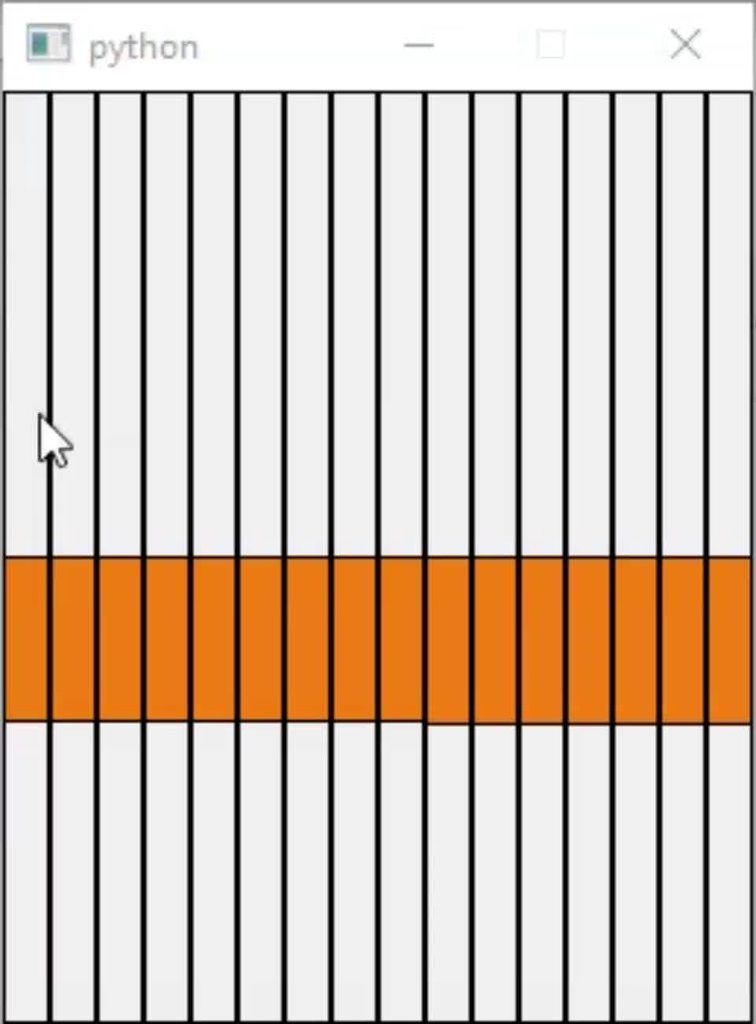
I can't even make a grid of buttons scrolling in a bidimensional array of text
 dense whale
Hey. How can I edit a label in PySide2?
dense whale
AttributeError: 'NoneType' object has no attribute 'setText'``` I get this error everytime. ```py
self.loggedin.setText("DONE")```And I've already defined it : py self.loggedin = self.window.findChild(QLabel, 'loggedin')
dense whale
^^fixed it
dense whale
hey again. 😄
I'm making a dashboard for my bot.
def ok_handler(self):
# token = self.line.text()
self.workerThread.start()
return self.loggedin.setText("Logged in")
return self.cname.setText(f"Logged In as: {client.user.name}")
def threadDone(self):
token = self.line.text()
botrun(token)
print("running")```
SO it logs in, but it doesnt print ("running") and it doesnt change the tag to the bots username. Anyone know what I'm doing wrong? wet patio
anyone know if cefpython or flexx is better than one another?
 charred thunder
i don't, but flexx looks interesting
proper glade
@digital rose didnt have the line drawing algo worked out yet there
switched the whole thing over from tkinter to pyqt5
here's what it looks like now
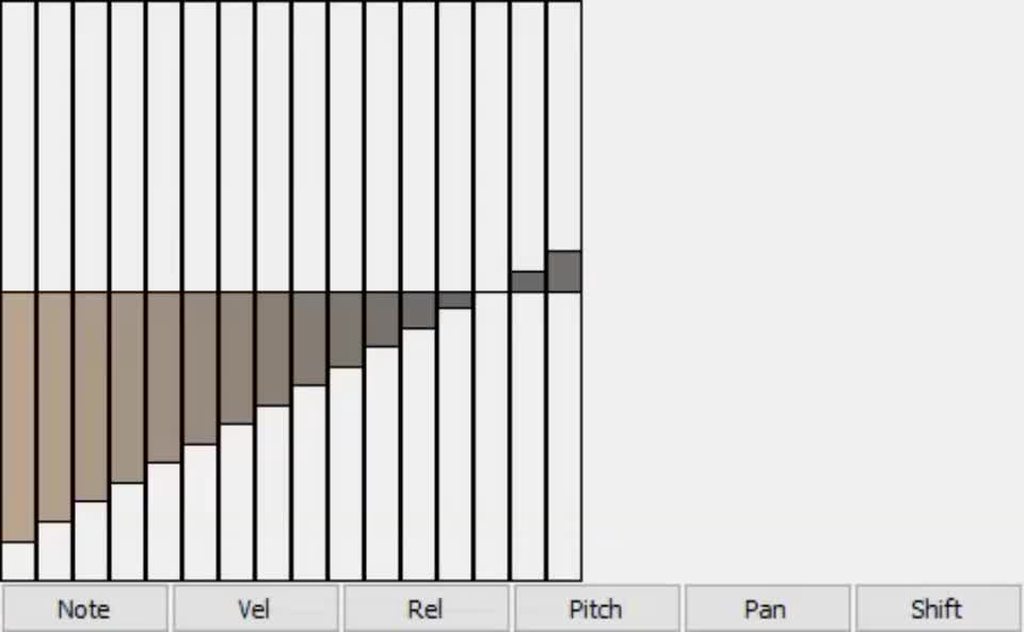
these damn buttons man, they just dont wanna shrink
i didnt do any tutorials personally. just googled random examples and dived into it. stackoverflow and the pyqt reference have been getting me through it so far.
there's a lot of scattering of stuff among different submodules without really explaining why stuff goes where
@digital rose https://github.com/baoboa/pyqt5/tree/master/examples http://zetcode.com/gui/pyqt5/firstprograms/

GitHub
PyQt5 from riverbank. Contribute to baoboa/pyqt5 development by creating an account on GitHub.
First programs in PyQt5 creates simple PyQt5 examples.
The examples show a tooltip and an icon, close a window, show a message box and center
a window on the desktop.
these might help
https://pythonspot.com/pyqt5/ this looks good too
 bright knoll
hey all
does anyone know of a debugger that can debug PyQT qthreads ?
So far using ipdb and sublime text ... going to try Pycharm next. After some googling it seems like debugging qthreads is problematic 
 wind birch
PyCharm has the best AFAIK so I'm assuming it can, might be a #tools-and-devops question too
bright knoll
OK thanks
bright knoll
yeah Pycharm works great, phew such a time saver
 hollow hamlet
I am going to give PyQt5 a try for GUI
hollow hamlet
With PyQt5 could I firstly write the code of the file then design the GUI and implement it on it or is there a special way of doing things?
 tawny gust
both
 winter gazelle
How do I go about transforming an image and updating the UI with the new image without everything freezing?
(in PyQt5)
Also, why are all of the PyQt multithreading tutorials awful? The example code doesn't even run
proper glade
@winter gazelle how are you doing it at the moment?
 sick basin
@winter gazelle Unsure if this would work in pyqt5 as well, but it should..
import threading

class CLASSNAMEHERE(threading.Thread):

    def __init__(self):
        # threading.Thread.__init__(self, *args, **kwargs)
        super(CLASSNAMEHERE, self).__init__()
        self.daemon = True
        self.start()

    def run(self):
Which works perfectly in tkinter
tawny gust
use a QThread
proper glade
is there a way in pyqt5 to override what dragging the edges of a window (i.e. to resize it) does?
 digital rose
is it possible to append a list of full pathnames to a tkinter listbox, but only show basename in the box? can I make it so the full path is tied to like, index 0 in listbox?
until now have used two lists, and using output from listbox onto the full path list to get the file, but now when I have added a filter entry with trace to update the shown items, the index is all thrown off
 final flicker
@tawny gust you ever worked with toga/beeware
tawny gust
no
proper glade
@final flicker i tried it once. didnt work at all. got the set up all done and completed the first tutorial. app didnt open. no erros, nothing. just silently failed.
and i was ignored when i asked for help on their gitter room
@digital rose would you mind showing the code for how youre doing it at the moment?
final flicker
@proper glade hm weird
its working perfectly for me
you sure your code isnt wrong?
proper glade
i literally copy/pasted the tutorial code
final flicker
can you post code?
proper glade
import toga
from toga.style import Pack
from toga.style.pack import COLUMN, ROW


class HelloWorld(toga.App):
    def startup(self):
        # Create a main window with a name matching the app
        self.main_window = toga.MainWindow(title=self.name)

        # Create a main content box
        main_box = toga.Box()

        # Add the content on the main window
        self.main_window.content = main_box

        # Show the main window
        self.main_window.show()


def main():
    return HelloWorld('Hello World', 'com.example.helloworld')
word for word from https://briefcase.readthedocs.io/en/latest/tutorial/tutorial-0.html
tried it with 3.7, 3.6 and 3.5
final flicker
do you ever call main().main_loop()?
proper glade
no. that's all the code. that's it.
proper glade
you'd think theyd mention something so important as, oh, idk, how to actually run the app, in the tutorial
proper glade
wait though, will this work for briefcase or just running in python?
i thought the whole point of returning the Toga app was to let briefcase work its magic with it or something?
final flicker
both
briefcase makes it a exe/app/whatever unix uses these days
but to use it with only python
you use:
python -m my_file_without_the_py_ending```unix uses anything
final flicker
lul
 lethal bobcat
how would you guys name a multiplatform article reader app?
lethal bobcat
@proper glade nice one
lethal bobcat
lol
wish i would have seen the name
or ARAM
Raam reader
how about 50% @proper glade
 clever socket
how do i make a ui for python? can i use VS for that
tawny gust
vs? visual studio?
pygame, tkinter, pyqt5, pyside2, kivy
those are all "good" libraries
final flicker
@tawny gust hey ive switched to pyqt simply because it has more
but i dont remember how to use the .py file generated by the designer
tawny gust
designer shouldnt generate a py file
use pyuic5 <uic_file> -o <py_file> to convert it to a python module
grizzled creek
there seems to be an issue with jedi intellisense and pyqt5 on VSCode and maybe other editors.
intellisense for me doesn't quite work with pyqt5
final flicker
@tawny gust yeah i have that
import sys
from PyQt5.QtWidgets import QDialog, QApplication
from ui_untitled import Ui_Dialog

class AppWindow(QDialog):
    def __init__(self):
        super().__init__()
        self.ui = MyDialog()
        self.ui.setupUi(self)
        self.show()

app = QApplication(sys.argv)
w = AppWindow()
w.show()
sys.exit(app.exec_())```It seems to be because pyQT is a compiled library so ...there's no information about return types in them
tawny gust
oh i couldnt tell you right now
grizzled creek
is the error you get No name?
final flicker
C++ docs say its there
ok seems i dont have pqt5 installed
???
but i can import PyQt
tawny gust
pyqt is v4 i think
digital rose
@proper glade I got some help from Reddit with my problem, but here's how I did it before
def checkdir(self, event):
        del self.second_list[:]
        del self.my_list[:]

        # choose folder
        self.value = self.selector.get()

        [self.my_list.append(os.path.join(r, fi)) for r, d, f in os.walk(self.path + "/" + self.value) for fi in
         f if fi.endswith('.xlsx')]

        self.second_list = self.my_list
        self.filer.delete(0, tk.END)

        [self.filer.insert(tk.END, os.path.basename(n)) for n in self.my_list]

    def write_selected(self):

        del self.chosen_files[:]

        self.items = map(int, self.filer.curselection())
        self.items = self.filer.curselection()

        self.selected_list_of_items = list(self.items)

        [self.chosen_files.append(self.second_list[i]) for i in self.selected_list_of_items]
and here's how I do it now:
# init dict to for searching files
file_dict = {}

# for full path of file, in my_list, add the full path to file_dict with the key of "basename"

for fullpath in self.my_list:
    file_dict[os.path.basename(fullpath)] = fullpath

# for every item chosen in self.itemstrings,
# if the key exists in file_dict, append its value(fullpath) to self.chosen_files list.

for item in self.itemstrings:
    if item in file_dict:
self.chosen_files.append(file_dict[item])```hm, missing a piece on the last bit, but basically I'm searching in a dict
 digital rose
I think kivy is more in that neighborhood
grizzled creek
well i guess another gui to learn
i'm hoping that the more guis i learn
the better i get
 fallen blaze
you can use kivy on desktop as well afaik
 sinful ingot
Could someone help with making this layout in tkinter?
digital rose
@final flicker from the website: Kivy runs on Linux, Windows, OS X, Android, iOS, and Raspberry Pi. You can run the same code on all supported platforms.
@sinful ingot doing that in tkinter will take some serious amount of code. You're better off with something like kivy
but if youre serious about doing it in tkinter, a good start would be here: https://tkdocs.com/tutorial/styles.html
Styles and Themes: Part of a Modern Tk Tutorial for Tcl, Ruby, Python and Perl
grizzled creek
@sinful ingot i think you can probably do that with frames.
three columns, a frame in each, then two or three columns in the middle frame.
make the top label span the 2 columns
make the bottom button span the three columns.
digital rose
Is it possible to share a tkinter.StringVar() through classes? I have set up my frames in separate classes, and i have one entry that i would like to share on all entries.
 summer storm
What's the easier one to use VS or Tkiner? Just feel like Tkinter has issues in terms of its difficult to work with as you need to continuously run the program. With VS you can just simply design it an then code beneath it right?
Had a go at tkinter but it just feels a bit... How do I put it? ’shit’
Maybe it's just me?
summer storm
Visual studio
sinful ingot
@digital rose Thanks for the advice
I'm going to try to create it using kivy
Do you know if you can embed matplotlib into kivy
digital rose
@sinful ingot First answer here: https://stackoverflow.com/questions/44905416/how-to-get-started-use-matplotlib-in-kivy/44922317

Stack Overflow
I have recently learned a bit of matplotlib and would like to use it within kivy. I have read a little documentation on the garden here and there but don't really understand it.
I have installed kivy
But what do you mean make layout and code beneath it in VS? Do you mean like in C# ? Wysiwyg ?
grizzled creek
i'm failing at kivy
I'm trying to make a bezier line with points attached to two different widget's positions
but it's not working
grizzled creek
does anyone here have experience with Kivy?
grizzled creek
I've managed to drawable beziers now to the next step how to connect it to a widget: https://cdn.discordapp.com/attachments/283631895273537546/501023829360115722/unknown.png

gotta get a widget by reference
grizzled creek
I'm gonna figure this out but i need more information. I should do more tutorials.
grizzled creek
or i guess we don't share discord links to other places.
I found a kivy discord that helped solve my problem and i got nodes working. links here:
reddit
 subtle slate
slowly getting the hang of GTK
its a weird beast but there's some things about it I rather like
some things are
really not straightfoward
but I can generally figure out how to get them done
packaging a pygi program on windows tho is beyond me
 quick jewel
im making a game thatll mostly be using GUIs than player movement n such as its a pet game, yall think i should use kivy or pygame? i dont know which is better for guis but both have been recommended to me
grizzled creek
@quick jewel i'm not sure. kivy is great for my purposes, but I've found it rudimentary in that it's highly customizeable. you'll need to customize a lot when you get it out of the box...which is prolly fair of any library.
 sage umbra
does anyone know any good thorough pyqt tutorials? completed watching sentdex's tutorials and still not confident enough
proper glade
that looks neat @grizzled creek
what you making?
https://github.com/baoboa/pyqt5/tree/master/examples
http://zetcode.com/gui/pyqt5/firstprograms/
https://pythonspot.com/pyqt5/
@sage umbra
GitHub
PyQt5 from riverbank. Contribute to baoboa/pyqt5 development by creating an account on GitHub.
First programs in PyQt5 creates simple PyQt5 examples.
The examples show a tooltip and an icon, close a window, show a message box and center
a window on the desktop.
havent tried these myself but they might help
grizzled creek
@proper glade I'm making a nodal editor
grizzled creek
it's a mission editor.
And it represents steps and conditions at each step as nodes.
grizzled creek
I figured it would be easier for who doesn't want to write long multi parameter statement that might be confusing
digital rose
is it much work to plug a progressbar into my existing code? like, can I write a class that gets called before every time consuming task? Working with tkinter. was hoping to use ttk
grizzled creek
this is where i'm at with my application.
grizzled creek
Python Kivy and Kivymd
grizzled creek
I have to kitbash a bit
kivyMD still works.
but it's not a library i want to use right out of the box... except for the theme stuff.
i have to customize a fair few bits.
 twilit wind
I liked that it is inspired by Material
And has a few bits in it but I can see how you need to kitbash a bit
grizzled creek
it's good to load the kitchensink demo to see what's in it
this is my chain of widgets
WindowLayout: (FloatLayout)
    WindowMover: (Label)
        BoxLayout:
            MainLayout: (BoxLayout)
                BoxLayout:
                    ImageButton:
                        Image:
                    '''
                ScreenManager:
                    Screen:
                        NavigationLayout:
                            MDNavigationDrawer:
                                NavigationDrawerToolbar:
                                NavigationDrawerIconButton:
                                '''
                            ScrollView:
                                MissionDetails:
                                    Toolbar:
                                    Image:
                                    loads of Label widgets:
                                    BoxLayout:
                                        MDRaisedButton:
                    '''
StatusBar```I'm hoping this is normal...
but i reckon i'm not doing things as well as i could.
twilit wind
Thanks, I've been looking for a new UI framework for cross platform apps and this looks good
grizzled creek
Which Ui frameworks have you used?
What can you tell me about how the ones you've used handles?
I should mention kivy only supports one window.
You can have pop ups but that exist in the kivy app.
twilit wind
I have not really used that many, I'm a Web dev so tried electrum but the whole Chromium deal is not my jam
Then I did some dipping the toes into Qt but I want something a bit more lightweight for the project I have in mind
digital rose
ugh.. I'm having such a hard time understanding how to tie a ttk progressbar to the duration of my functions.. for cleanliness I want a class that I just run right after I call my function wich pops up a ttk progressbar, is something like that available? I've seen some examples using tqdm_gui but then I would have to know the time the operations take, and that is not really set since I can choose the amount of files to do the operation on.
grizzled creek
can't you tie a float for the progress bar to a variable that's set to accept float
digital rose
I think I'm just going to migrate to pyqt 😑
sage umbra
good choice
 stiff elm
Where can I find an easy to understand guide for creating interfaces in the terminal?
I've been trying to search around for guides and I can't find anything that does anything close to explaining how to learn.
grizzled creek
Building a terminal interface from scratch?
 fallen oxide
5
digital rose
and that is free to use ? I heard there were some licensing stuff with 5
fallen oxide
They're both free to use for non-commercial purposes
digital rose
well.. it's for an internal use app at my work place. grey area? 😅
digital rose
hehe, ok
anyway, i think ill go for 5 then. But if i want to use the designer. How hard is it to design, convert and then import my design to my project and then tie stuff up from there? I mean, it would be great if i could never touch my design file in case i want to change it later on?
are there any good tutorials that take the designer in to account?
 desert sapphire
on PyPi it says PyQt5 is gpl v3, that allows commercial use
But you'll have to license your app with a gpl v3 compatible license
If it's only internal that's not really a problem
digital rose
Ok, thanks for clarifying
fallen oxide
PyQt5 is gpl, yeah
the official implementation, pyside2, is under the usual Qt license though
digital rose
ok
So.. installing pyqt5 in a venv did not go so well
i did pip install pyqt5 and also the pyqt5-tools
but when i try to pyuic5 -x file.ui -o output.ui i only get a dll error.
from PyQt5 import QtCore
import error: DLL Load failed```my python3.dll is inside Scripts in the venv
fallen oxide
Sounds like it was compiled for the wrong architecture or something
I have no idea how to help with it unfortunately
digital rose
is it possible to install pyqt5 in a virtual environment? or does that require tinkering?
hm.. worked fine on windows 10, but not on windows 7. oh well :p
digital rose
if i want to get the current text from my combobox, i am told to do combobox.currentText().. but that does not get anything. Do i have to store the combobox stuff in a variable? like in tkinter? I populate the combobox with a py combobox.addItems(next(os.walk(self.path))[1])
nevermind, was using the wrong combobox value.. >.<
digital rose
is it possible to make a tracing filter for a QListWidget?
digital rose
ha!
    def filterClicked(self):
        filter_text = str(self.ui.filter_box.text()).lower()
        for index in range(self.ui.list_box.count()):
            if filter_text in str(self.ui.list_box.item(index).text()).lower():
                self.ui.list_box.setRowHidden(index, False)
            else:
                self.ui.list_box.setRowHidden(index, True)
\o/
stiff elm
The interface I want to create would use something like ncurses or urwid. I can't find anything that has a sane explanation. Good explanation for a lot of things is hard to come by.
digital rose
trying to use a QThread on my progressbar. But it does not seem to work. My task gets done, and then the progressbar fires off
wrote it like this:
class TaskThread(QtCore.QThread):
    notifyProgress = QtCore.pyqtSignal(int)

    def run(self):
        for i in range(101):
            self.notifyProgress.emit(i)
            time.sleep(0.001)

        self.notifyProgress.emit(0)

class MyWindow(QtWidgets.QMainWindow, Ui_MainWindow):
    def __init__(self, parent=None):
        super().__init__()
        self.ui = Ui_MainWindow()
        self.ui.setupUi(self)

        # progress bar
        self.ui.progressBar.setValue(0)
        self.ui.progressBar.setRange(0, 100)
        self.task = TaskThread()
        self.task.notifyProgress.connect(self.onProgress)

        def onProgress(self, i):
            self.ui.progressBar.setValue(i)

    def task_iterate(self):
self.task.start()```hm.. should I switch things around perhaps? run the task in a thread?
 sinful finch
So, I need to make a borderless frame, it has to look like Discord loading widget.
The one with the updates and stuff.
I was using Kivy, but I realized I can't make it borderless.
Well, I can, but it becomes undraggable so it's not a good idea.
desert sapphire
why must it look like discords loading widget
sinful finch
That's what I want it to look like.
sinful finch
hmm I'm using window.top/window.left
 umbral plinth
hallo
someone can pls helpings with tkinter?
how do i make the key presses more smooth
like atm. it looks like this
https://gyazo.com/2b1a6aa425ca2ee40957635b75f63a67
when i hold it for more than a second. its smooth
but it suddenly pauses at 1 second of holding it

canvas.move(circle,10,0)
thats what im moving atm to move 10pxls to the right
digital rose
is there any GUI builders out there for Python 3?
 pure cypress
@digital rose there’s pyqt which has qtdesigner
digital rose
so you can design a form and add stuff to it?
pure cypress
Yeah you can layout all the components and then all you need to do is hook it up to your code. It’s very similar to JavaFX
digital rose
thanks
pure cypress
No worries 👍🏻
sage umbra
I’m trying to make a social media program in pyqt - and I’m not sure if there’s a way to upload pictures using pyqt?
fallen oxide
I mean... sure? You're still writing Python
sage umbra
Yea but like how discord has the upload image when you add a profile picture - is there a way I could do that?
fallen oxide
well sure, you make the UI elements and then you write some python to do it
and tie it togther
Maybe you need to ask a better question :P
dense whale
I'm using PySide2 and QTDesigner,
I saved my ui as a .ui file.
class Form(QObject):

    def __init__(self, ui_file, parent=None):
        super(Form, self).__init__(parent)
        ui_file = QFile(ui_file)
        ui_file.open(QFile.ReadOnly)

        loader = QUiLoader()
        self.window = loader.load(ui_file)
        ui_file.close()```
```py
if __name__ == '__main__':

    app = QApplication(sys.argv)
    form = Form('main.ui')
    sys.exit(app.exec_())
```How can I edit the stylesheet considering that I'm using a form class.idk if that even makes sense. ^ .But whenever I try to edit the stylesheet by doing self.setStylesheet ,it gives me this error : 'Form' object has no attribute 'setStyleSheet'
tawny gust
you know, you can just use pyuic5 to convert your ui file to a python module
and, I don't believe that Qobject implements setStyleSheet, it may be a more specific class
dense whale
Oh. K. Thanks!!! @tawny gust
dense whale
just found out for pyside, you can use pyside2-uic.exe
 shy herald
Hello, any ideas on how to make a tkinter app be only in the system tray and not in the task bar when running?
final flicker
im using qt and if i remember you cant realy use normal threads with qt. is this true and if so how can i work around this?
 unique lodge
hey there ! Do you guys know out of the bat how i could access an item from a tree model ? Like getting the text from selected item?
unique lodge
yes exactly that @digital rose
attributes = ["Translate", "Rotate"]
attribute_axis = ["X","Y","Z"]
   for attr in attributes:
       self.label =QtWidgets.QLabel(attr + ":" )
       self.hbox_mirror_attr.addWidget(self.label)
       spacer = QtWidgets.QSpacerItem(100,0)
       self.hbox_mirror_attr.addSpacerItem(spacer)
       for axis in attribute_axis:
            self.checkbox = QtWidgets.QCheckBox(axis)
            self.hbox_mirror_attr.addWidget(self.checkbox)
If iam doing it like this - how could i acces the created checkbox later on? Since only the last checkbox will be saved in the variable?
final flicker
@digital rose i can use a qthread to run normal threads?
 patent palm
hi, could anyone help me figure out why i can't properly install the pyqt4 .whl? my problem is that i can't run my python code for the ui because there is no pyqt4 module.
i copied the whl file in my python directory and then tried to pip install it and it says it's not suitable. i got the right whl file but it's still not working for me
final flicker
you might need Qt4
patent palm
i downloaded winpython basically and i assumed it would have everything i need
patent palm
no, i've been using c/c++ but i have a project for this year where i have to build a software in python
i tried doing my research beforehand but i can't wrap my head around this
final flicker
ok try just learning python first, because uis in python are VERY complex
unless its due next week. then just start copy pasting form stack overflow
patent palm
haha it's due like next year
i've been starting to learn simpler things but i wanted to have everything i need downloaded
final flicker
what os are you on
patent palm
i'm on win10 but good news: deleted a bunch of stuff and it now runs perfectly
thanks for trying to help me
final flicker
Np
 tender spruce
Can matplotlib be done differently somehow?
I'm not asking for alternatives that exist.
Just thinking there has to be a better way
 odd hamlet
tender spruce
odd hamlet
tender spruce
Nothing I guess. Functionally does everything. I liken it to some sort of analog audio apparatus with several dozen knobs to fine-tune things
Minus my ability to see all the knobs at once,
Or speed with which fine-tuning these knobs gets me the results I need
Maybe some higher abstraction or design principle can either reduce the amount of knobs or make the process of inferring which knobs exists easier
 boreal loom
@tender spruce seaborn
Seaborn is a Python data visualization library based on matplotlib. It provides a high-level interface for drawing attractive and informative statistical graphics.
its pretty much exactly what you are asking for 😄
tawny gust
seaborn is it
tender spruce
This is an mpl wrapper?
desert sapphire
Probably a python wrapper for boosts metaprogramming library
tender spruce
Metaprogramming sounds really cool what is it?
That is to say can you provide an incredibly short answer or analogy that Google can't
tawny gust
programming the programming language with the programming language
tender spruce
I think you responded in less than a second
Thanks for the quick and otherwise use full response
Wait I'm now trying to imagine a compelling reason anyone would want to program the programming language they're programming with
boreal loom
Metaprogramming = code as data
parsing code, analysing it and generating new code
can be used to save time by generating code you would want to write by hand
can be used to extend syntax as Jack said
can be used to create a DSL (Domain-Specific Language)
tender spruce
In what case does generating code help you?
digital rose
what is the proper way to execute stuff on load in pyqt? just call a function in the mainui? or in object.exec() ?
grizzled creek
does anyone here know how to do zoom in on point?
digital rose
zoom in on a what now?
grizzled creek
on mouse position
i've been trying to write the code for it for a kivy app but i'm failing
 short walrus
Hi there! I'm having trouble displaying a cv2 image in a QWidget continuously. I managed to display it for some time using setPixmap on a QImage generated from my cv2 image, but after a while the interface stops getting updated. I'm using the threading module to get new camera frames. Does someone have an idea why this is happening?
 raven hedge
Hey, what would your guys suggestion be for creating a GUI for a desktop application for trading and managing a stock portfolio. I want to utilize material design but I'm not sure where to start since it's my first time creating any sort of GUI
 drifting sundial
A web gui might be easiest if you're looking for material design
Pywebview is a good host for that sort of thing
raven hedge
I was hoping to just keep it limited to a desktop application but would that not be feasiblem
sinful finch
Anyone knows how to package kivy properly?
I package my app and it works only in my PC
dapper breach
I see your issue
openFile needs to be indented just like __init__ AND you need the call back to be self.openFile
@meager heart
 meager heart
What do you mean callback to the self.openFile?
dapper breach
Button(frame2, text = "Browse", command = self.openFile).pack(side = LEFT)
the command.
it works like a callback.
meager heart
Okay. I see.
dapper breach
Whenver a Class accesses its own fields and/or methods they need to be prefaced with self.
meager heart
I need help with getting it to open the file manager so one can actually "browse."
dapper breach
did it run your function?
meager heart
What do you mean? After I changed the code?
meager heart
Yes, it did run it
dapper breach
its just not doing what you want, which is browse.
I'm less help there, unfortunatly.
meager heart
Yeah. It's throwing me an error, but that's related to askopenfilename(), which doesn't even have a definition as of yet
meager heart
Man. I don't understand why this is so difficult. I can't seam to find an answer anywhere.
You'd think if the book is going to give you a problem like this, it'd at least define something like that.
meager heart
Hmm. It's not running for me.
dapper breach
you on windows?
meager heart
yeah
meager heart
3
dapper breach
oops
from tkinter import filedialog
from tkinter import *

root = Tk()
root.filename =  filedialog.askopenfilename(initialdir = "/",title = "Select file",filetypes = (("jpeg files","*.jpg"),("all files","*.*")))
print (root.filename)
pasted the wrong code. here is the py3 one
still linux.
meager heart
Yeah. That's exactly what I wanted!
dapper breach
Yay!
meager heart
I'll work that into what I've got. Thank-you so much!
dapper breach
you are welcome
meager heart
Easy enough to put in. Now to finish this bad boy up.
sage umbra
PyQt4 Ive got one program that users sign in and then a main script for the main profile area. The thing i cant find anything on is how do I pass variables from one window to another
ie username
final flicker
@sage umbra save the username or whatever to a file if you need to save something cross process
Or if you are calling one window from the other pass it as an arg
final flicker
Yay
digital rose
How do i make a popup window class in PyQt5 ? i cannot get it to show when i call it.
class PopupResult(object):
    def __init__(self, master, sheet_type, name):
        self.sheettype = sheet_type
        self.name = name

    def run(self):

        if self.sheettype == "Helium":
            text, result = QtWidgets.QInputDialog.getText(self, f"Result for {self.name}", "Enter result:")
            if result:
                return text
I am trying to replicate what i have previously done in tkinter
and then i call it with: ```py
self.popup(self.file_dict[item], sheet_type="Helium")
ofcourse i forgot to paste something:
    def popup(self, file, sheet_type):
        sheetval = sheet_type
        self.w = PopupResult(self, file, sheetval)
    self.popup(self.file_dict[item], sheet_type="Helium")
 tidal spruce
flexx or wx or tkinter?
dense whale
So, I was testing out this example: https://github.com/pyside/pyside2-examples/blob/dev/examples/designer/calculatorform/calculatorform.py .
But when I tried it for my app, it doesn't work and gives me an error: Traceback (most recent call last): File "C:\Users\avib\Desktop\Python - Programming\disrp\mainmain.py", line 9, in <module> class MyApplication(QtGui.QWidget): AttributeError: module 'PySide2.QtGui' has no attribute 'QWidget'.```py
import sys
##################
from PySide2 import QtCore, QtGui
##################
from main_ui import *
#################
class MyApplication(QtGui.QWidget):
def init(self, parent=None):
QtGui.QWidget.init(self, parent)
    self.ui = Ui_MainWindow()

    self.ui.setupUi(self)
if name == "main":
app = QtGui.QApplication(sys.argv)
Formm = MyApplication()
Formm.show()
sys.exit(app.exec_())
GitHub
2016-06-23 Attention: This repository is no longer writable, because all development was transferred into -- origin https://code.qt.io/pyside/pyside-setup (public read) -- gerri...
Anyone know what I'm doing wrong?
digital rose
is pyside using pyqt4 or 5 ?
because QtWidget is moved to just QtWidgets i think, in pyqt5
dense whale
pyside2 @digital rose
 frigid reef
Hey all, I'm using PyQt5 for this:
https://i.imgur.com/q3TB7FT.png
So as you can see I am making a simple IM application as a personal project - each message is it's own widget as I will want the ability to delete, edit etc. The problem I am having is that I want the three dot icon (a skinned push button) to expand to be at the edge of the ScrollArea rather than sit next to the message like it currently does. This confuses me, as in the designer, it expands to the edge of the window:
https://i.imgur.com/CnzG8ZB.png
Is there a setting in the FormLayout/ScrollArea of the main UI that I should change to allow it to expand properly? I attempted to set the width in code to match the ScrollArea width but that didn't seem to work - I've been fiddling with various settings in the designer and have run out of options to try. Thanks!
 frigid reef
If there's a more niche qt/pyqt place I can ask please point me there!
bleak smelt
@frigid reef Have you tried a horizontal spacer?
frigid reef
How would you recommend I use it in this regard?
I attempted to set the width of it but not much seemed to happen
 placid swallow
Hi everyone! I'm new with pyhton and i would like to create a GUI app for raspberry.
Wich GUI library could you recomend me? I found kivy very interesting
bleak smelt
@frigid reef Depends on how your window structure honestly. are you using a layout for the window where the text is being displayed?
@placid swallow Depends what you're wanting to do. Tkinter is quick and easy, very basic, or you have PyQt which is very expansive
placid swallow
I just need 4 windows, with not so much buttons... and it will only be for raspberry not cross-platform
@bleak smelt
bleak smelt
@placid swallow You may want to explore tkinter then.
placid swallow
Perfect! Thank you very much!
frigid reef
@bleak smelt They're being loaded into a QScrollArea with a QFormLayout inside of it
bleak smelt
What does your code look like when adding to the scoll area?
frigid reef
newWidget = MessageWidget() # Create a new message widget
      newWidget.timeLabel.setText(message.timeSent)
      newWidget.usernameLabel.setText(message.senderName)
      newWidget.messageLabel.setText(message.contents)
      rowCount = self.messageLayout.rowCount() # Get the amount of rows in the message container
      self.messageLayout.setWidget(rowCount, QFormLayout.LabelRole, newWidget) # Append the new message widget to the end of the container
So are you creating each message as its own widget and appending it to the scroll area?
frigid reef
That is correct yes
bleak smelt
Where does the button get tossed into the mix?
frigid reef
The button is part of the widget, loaded from XML, let me get you the class
bleak smelt
You could try setting the alignment for the button , instead of using a spacer
frigid reef
class MessageWidget(QWidget):
  def __init__(self, parent=None):
      super(MessageWidget, self).__init__(parent)
      loadUi("message.ui", self)
are you using python 3?
frigid reef
yes
frigid reef
ah ok
bleak smelt
also, see if you're able to set the alignment for the button to the right, let me know how that goes
frigid reef
The button doesn't seem to have an alignment property
bleak smelt
are you adding the button to a layout?
bleak smelt
so the layout of the scrollarea is a form layout.. but, what is the layout of the message widget you're adding each time?
bleak smelt
and if you're tacking the button to that widget, you'll want to add a layout to that widget so you can use alignment.
Maybe grid isn't the best option?
frigid reef
changed to horizontal, doesn't seem to have effected it
bleak smelt
maybe you're adding it all to one cell of the layout
frigid reef
In the designer, as I scale up the widget size, the button sticks to the right fine
bleak smelt
ok.. but does it not when you first open?
frigid reef
Not when loaded as a widget rather than a window, no
bleak smelt
hmm.. without seeing all of the code, I can't say for sure
bleak smelt
maybe an update() or repaint() is in order..
frigid reef
what do I call the update() on, the main window?
bleak smelt
depends on how the button is getting added.. maybe the entire widget, maybe the widgets your adding..
frigid reef
Attempted to repaint/update on the entire window, the widget and the scroll area
no dice
bleak smelt
hmm
frigid reef
https://github.com/darthmorf/Photon/blob/27484c7f43ba08e58e0a979d19e125bc0ce3efcf/Client/main.py#L86

GitHub
A-level Computer Science (7517) Non Exam Assessment - Sam Poirier - darthmorf/Photon
That's the source btw
bleak smelt
let give it a look'
frigid reef
thank you!
 tropic ferry
hey i was asking a q in help-0
about using tkinters entry func to then grab the inputs and use them in a function like they were defined
frigid reef
It may be easier to delete the button and start again with more info on how to align/add it properly
digital rose
how would I connect up a signal to a pop-up class I am creating in pyqt5? I have a main UI Wich starts a threaded loop operation/iteration, and in that operation I need to spawn a pop-up Wich I can input some text Wich then will get stored in a variable I use later in the same operation.
digital rose
self.trigger.connect(QtCore.Qt.DirectConnection, self.popup, self.threadDone)
TypeError: Qt.ConnectionType expected, not 'ConnectionType'
Seriously this is confusing as heck
 craggy hollow
what are some fast python GUIs to use
bleak smelt
Anyone know how to use PyQt QTimer for hours, not milliseconds?
bleak smelt
yikes.. thanks
final flicker
hahaha
sry do you mean if you can pass it a arg that specifies hours or min or whatever? @bleak smelt
bleak smelt
@final flicker I was looking for a better option. After some research, I think the module sched is what I want to use, instead of a QTimer. I think the QTimer usage in PyQt is more for timing widget elements.. and I want to do is call a function after an amount of time lapses, in the background, not affecting any widget element, in that manner.. sched has an option for hours, so I'm going to go with that instead.
final flicker
Sure
dense whale
Anyone know how to package a PySide2 app.
 small compass
if you're on linux and you need to package your app into .deb or .rpm, package it as you would do and add qt (or whatever they are using) and python to deps
on mac I think you need to add a python and qt frameworks
on windows I think you need to add qt libs alongside your python interpreter?
 rain quarry
Is anyone here familiar with making prompt_toolkit interfaces? I'm having issues comprehending how to use it
Also @fallen oxide it's fine to ask about CUIs here too despite the channel description saying it's only GUIs, right?
rain quarry
I see what you did there 😉
 tall reef
For some reason when I run my tkinter program the entry fields are not t lining up properly with their assigned grid placements. I have marked the issue under the Engineers class. Would any one be willing to help me and take a look please 😃
This is my output
sage umbra
Is there a way to close the main window and then open it again? Ie ive made a login window and when you login you get the main program - is there a way to get back to the login screen?
kind kraken
@bronze tusk you didn't pass self when you created the Entry objects, so it assigns the parent to be the Tk root instead of the Frame.
Also, I would suggest creating the navigation buttons outside the Frame, and possibly using a tab control [ttk.Notebook], but that's a mroe general design thing
@sage umbra would have to know more about the structure of your program
you could just create another login screen
Oh, here - you can hide without destroying by doing withdraw() - https://stackoverflow.com/questions/1406145/how-do-i-get-rid-of-python-tkinter-root-window
Stack Overflow
Do you know a smart way to hide or in any other way get rid of the root window that appears, opened by Tk()? I would like just to use a normal dialog.
Should I skip the dialog and put all my comp...
(Some parts of that answer also explain how to not use the root window at all, or at least not show it at program startup)
 abstract ice
Has anyone here worked with kivy?
 near lagoon
@abstract ice I'm working on my first kivy project atm
bleak smelt
Anyone know if its possible to enable and disable the console from a compile pyinstaller app? I have a spec file that disables it on compiling, but I'm looking for a way to enable it when I need it without having to recompile again..
dense whale
I'm using PySide2. Any one know how I can get a drop shadow on my QFrame?
bleak smelt
With PyQt5, anyone know if there is a way to detected when the mainwindow is moved by dragging the windows frame title bar?
frigid reef
@bleak smelt there's a widget move event, which might help: http://doc.qt.io/qt-5/qwidget.html#moveEvent
bleak smelt
@frigid reef Yeah, i was looking more for when the window is moved by the titlebar that WDM creates...
frigid reef
ah
bleak smelt
I just decided to implement a timer that grabs the x and y on interval
dense whale
hey. how can i add a drop shadow using QT Styling. im using pyside2.
I want a shadow on the white boxes.
raven hedge
could anyone help with a grid layout im trying to do? Im following a PyQt tutorial and im trying to do a grid layout for a calculator and I have the exact same code as the tutorial but nothing is showing up
grid = QGridLayout()
self.setLayout(grid)
    names = ['Cls', 'Bck', '', 'Close',
             '7', '8', '9', '/',
             '4', '5', '6', '*',
             '1', '2', '3', '-',
             '0', '.', '=', '+']
    positions = [(i,j) for i in range(5) for j in range(4)]

    for position, name in zip(positions, names):

        if name == '':
            continue
        button = QPushButton(name)
        grid.addWidget(button, *position)
 delicate wharf
Hello people! I want to make an application that has a window icon and a file icon and I want to be able to compile it into an exe
what should I use?
I tried tkinter but I couldn't really figure out how to do it
winter gazelle
I'd like some advice. I've been making a small program involving some photo editing using Python GUIs. I got started by using Pygame, and because of that, I had to do a lot of work manually. The good thing is that most of that work is already done, and finishing the project in Pygame wouldn't take too long.
However, I've been wanting to switch over the PyQt5, not only because it's more professional, but also because it has some really useful widgets. However, I don't understand it at all, and I've gotten stuck very early into the rewrite. If I finish it in Pygame, it'll be done faster, but if I finish it in PyQt, it'll function better. But I'm not sure if the time I'll take fully learning PyQt5 will be worth it. Thoughts?
 sudden coral
Using pygame solely to create a GUI application is strange. I would advocate to switching to something more proper like PyQt5. "Is it worth it" is tough for someone else to answer. In terms of improving your coding skills, yes it's a good opportunity and worth it. However, if you have some sort of deadline then that complicates the answer.
I imagine using PyQt5 will make your project more maintainable and extendable as well
 tight bear
Pygame only really provides help with basic graphics and user input. You would have to build quite the foundation yourself, although it depends on how advanced of a GUI you want.
winter gazelle
I'm not on a time limit. The nice thing about Pygame is that I can use a simple while loop to control everything, while PyQt's events are forcing me to learn stuff like multithreading on such a simple project
Plus I'm just having a much harder time finding good PyQt tutorials
tight bear
So what kind of GUI are you making?
winter gazelle
It's kind of complicated to explain, but it involves replacing colors from the image(s) with other colors
I need to cycle through a few images and make transformations to each before displaying them.
In Pygame, this is simple. You just do the transformation, and the rest of the GUI responds instantly after the image is displayed. But in PyQt, I think you have to move the image editing to a separate thread, which is just turning out to be insanely complicated for some reason
tight bear
Do you want the application to be interactive, pressing buttons and such live?
winter gazelle
Yup. Keeping the rest of the GUI responsive is the problem I'm facing in PyQt
tight bear
I'm thinking it could be worth investing in PyQt because it seems more appropriate for the task, but it's up to you. In Pygame you're going to have to create a lot of things from scratch.
Well, as in generic GUI elements such as buttons, sliders, check boxes, what have you.
winter gazelle
I guess I'll keep pressing on in my attempts to implement the multithreading, then.
tight bear
Might be worth mastering something new! Multithreading is found everywhere.
winter gazelle
Thanks for the advice.
 wind locust
Label(win, text='AccountManager').pack()
how would I color the text? i tried bg='red' but it doesnt work
this is tkinter
nevermind
winter gazelle
How would I run a QColorDialog window while still having the QMainWindow run?
raven hedge
If anyone could help me that would be great, Im trying to just make so that in one window, theres a search bar and a open space to information. The user would type something into the search bar and if what they entered is a predetermined set of items, than that item will appear just below the search bar
 serene spoke
@raven hedge its easier to help if you share what code you have. Preferably on github, or hastebin
bleak smelt
Anyone know of a working spell checker module? Looking to implement it into a PyQt plain text field, not to auto correct, but to find misspelled words and offer a list of acceptable replacements via right click.
grizzled creek
does anyone here know kivy?
 fluid stump
Guys. What would you use for a GUI that is both nice to see and easy to use. Tkinter ? PyQT ? other idea ?
I'm a total noob in term of GUI dev
dense whale
Hmm... I would say PyQT/Pyside2. It's quite simple to use and you can make some really good looking GUI's with the help of QT Designer.
It doesn't look that great at the moment but this was made on QT Designer (I'm trying to create a screenshot software just for practice). @fluid stump
dense whale
np
fluid stump
@dense whale do you have any link to QT Designer ?
fluid stump
okay
is pyQT free ?
i'm reading that you need to buy a licence
for closed source projects
dense whale
PyQT is free, but yes, there is a licence.. I don't think PySide2 has a licence tho.
@fluid stump
 wide shuttle
Hey, if I send it here, can somebody help me with my tkinter code?
I'm coding a game called 'Mastermind', based off of the board game, but I can't get the GUI to work.
frigid reef
Certainly can't help without the code/error!
frigid reef
Sent you a link in #python-discussion 😃
wide shuttle
Here's the code I sent earlier in a pastebin: https://paste.pydis.com/azalezasox.py
Any help would be appreciated 😄
bleak smelt
I need a way to have my PyQt app ignore windows dpi scaling. Google searching isn't providing me good results.
sinful ingot
Does anyone here have experience with wxpython?
 half vapor
How can I make a label that's text repeatedly updates every couple of seconds with an api call? (in tkinter) window.mainloop doesn't seem to work
 storm latch
What did you use for concurrency?
kind kraken
@half vapor set a timer in tkinter
half vapor
how do I do that?
kind kraken
def my_callback():
   ...do api stuff
   root.after(2000, my_callback) # call again after 2000 milliseconds
root.after(0, my_callback) # set up to call first time```or you could use threading
but once you've started mainloop, nothing else happens on the main thread but tkinter related stuff [including timer execution]
half vapor
label1 = Label(window, text="")
label1.pack()
label2 = Label(window, text="")
label2.pack()

while True:
    data1 = api request
    data2 = 2nd api request
    label1.text = data1
    label2.text = data2

    sleep(3)
I still don't understand how I'd get this to work?
 swift merlin
where random put ... do api stuff you can put your
    data1 = api request
    data2 = 2nd api request
    label1.text = data1
    label2.text = data2
however if api request takes more than like 100ms the user will notice
thats why he suggested threading
 wraith sparrow
hi
I'm quite new to this GUI thing, I'm using appJar for now and I can't figure out how it works ```py
app = gui("Crossroads")
app.setSize(1920, 1080)
photo = ImageTk.PhotoImage(Image.open("feed_output.jpg"))
app.addImageData("Feed", photo, fmt="PhotoImage")
app.go()
print("after gui")``` that print doesn't fire? does app.go() interrupt the code execution?
because I have a loop after that code that basically would replace the image at every second, but that code never executes because app.go() somehow stops the code from going forward
how would I solve that?
frigid reef
I'm not familiar with that framework, but most GUI frameworks have a blocking function call that waits until the GUI is closed before continuing
I would guess that app.go() is the same
you may want to investigate multithreading - it's often good practice to have the gui in a seperate thread to the main workings of the program, which avoids this problem
@wraith sparrow (tagging as I'm late to answer)
kind kraken
@wraith sparrow you could also consider using a timer (after in tkinter) to replace the image instead of a loop
wraith sparrow
yeah the reason I moved to appJar because I couldn't figure out tkinter, but now I kinda realized I had the same problem there
kind kraken
wraith sparrow
oh that's convenient
kind kraken
I wish they'd make an asyncio version of tkinter, but the fact that tkinter doesn't support file events on windows makes it complicated to implement one
kind kraken
does pyqt support asyncio
frigid reef
There's a module for it: https://github.com/harvimt/quamash

GitHub
Implementation of the PEP 3156 event-loop (asyncio) api using the Qt Event-Loop - harvimt/quamash
kind kraken
Like in theory you could write a hybrid half-asyncio loop that does asyncio I/O on one thread and the GUI on another thread
digital rose
Eclipse is a good GUI for Java/Python to get the perfect GUI(99$).
final flicker
@kind kraken im working with something like that atm.
what exactly are you trying to do?
kind kraken
I wasn't the one with a problem really
just it's a pretty common mistake to try to write procedural code with loops sleep etc after starting the gui and i was thinking asyncio might be an alternate solution for that instead of teaching everyone to make all their stuff event-driven with timers
final flicker
event driven is the way. That and threads
lots of threads
or QObjects
whatever they are called
kind kraken
of course, if any of your stuff hits the network you've got to use asyncio anyway if you want your app to be responsive
final flicker
hmm lol i built a chat application (not really but it can work as that) without asnycio cus im just to lazy to learn that hah
@kind kraken do you happen to know how to create pop up dialogs?
 wanton tangle
Did someone ping me?
kind kraken
@final flicker in what, tkinter?
kind kraken
i've never used pyqt, sorry
bleak smelt
final flicker
thanks @bleak smelt !
proper glade
I have a QMainWindow. Inside its __init__ i've got:
self.setMenuBar(MenuBar())
This is MenuBar:
class MenuBar(QMenuBar):
    def __init__(self):
        super().__init__()

        self.file_menu = self.addMenu(FileMenu())
        self.view_menu = self.addMenu(ViewMenu())
And these are FileMenu and ViewMenu:
class FileMenu(QMenu):
    def __init__(self):
        super().__init__()

        self.setTitle('File')
        self.addAction('Open')
        self.addAction('Save')

class ViewMenu(QMenu):
    def __init__(self):
        super().__init__()

        self.setTitle('View')
the problem: the menu bar doesn't show up at all.
idk what i've done wrong
proper glade
solved
you gotta create separate references to the menus first
class MenuBar(QMenuBar):
    def __init__(self):
        super().__init__()

        self.file_menu = FileMenu()
        self.view_menu = ViewMenu()

        self.addMenu(self.file_menu)
        self.addMenu(self.view_menu)
Just post your question 😃
wraith forge
Okay, Hemlock's dumb question for the day. If you were to pick a GUI library to try and learn, which would be your pick? I'm looking at tkinter wxPython and PySide. I wasn't overly impressed with tkinter when I tried it before, I couldn't find very many tutorials for PySide, and wxPython has been an interesting option to me after a user came in needing help with it the other day. Didn't know if anyone had any strong opinions one way or another.
Ah, sorry, didn't see that question was so recent
storm latch
I'm really only familiar with tkinter, it's definitely not the most elegant library, but you can get stuff up and running pretty fast. I would suggest either wxPython or PyQt. I've heard Pyside is good too, haven't really looked at it though.
wraith forge
Noted. Thanks Zer0. Any other thoughts out there? Just trying to get a feel for what people have liked using
wraith forge
So many options it makes your head spin, you know?
 twin warren
Been using PySide2 for the past few days. I prefer it over Tkinter, even though there's a lot more that goes into PySide2.
frigid reef
@wraith forge I would choose pyqt, has lots of features and you can get a really nice looking app with it
Though it can be a little tricky to get used to at first
I wrote a getting started guide recently if you're interested I'll share the link
Tkinter was painful to use to make a complicated gui, for me at least
wraith forge
Eh, I'm less worried about lots of features and more wanting something just fun and easy to use. This is more for just tinkering around than building a big thing
frigid reef
How experienced are you with event driven programming and async programming?
Because if you're not used to that style pyqt is probably overkill
wraith forge
I mean I did a fair bit of that with discord.py but other than that not terribly
I know the basics and could figure it out
 cinder prairie
Oh well i posted my question in stack overflow and I'm waiting but if anyone can help here it is https://stackoverflow.com/questions/53363940/how-do-i-include-my-standings-sprites-after-my-character-stops-running
Stack Overflow
So I've started doing a game for school that is a sort of RPG. I can't figure out how to make my character go from running left to standing animation left and from running right to standing animation
if needed i can provide all my files 😃 i just need help figuring out how to do that thing ^^^
cinder prairie
if someone needs more detail i can text in private :))
final flicker
@wraith forge I would go with PyQt5. if you download the whole QT suite you get the QT Designer. That lets you whip up ui fast af with simple drag n drop. most questions you will find answered on stackoverflow. since its just a port of Qt to python you can always look at the QT docs to find something because it will be very similar to the python bindings
only problem is if you end up wanting to make money of your apps
pyqt has some weird lisences...
feel free to @ me with any more questions about QT and other frameworks. ive tried quite a lot of them
wraith forge
@final flicker Is it possible to use the QT Designer with PySide?
final flicker
not as far as i know
QT designer itself just creates c++ code
in pyqt5s case you have pyuic that then converts that to python code
maybe there is a tool that converts the c++ code to pyside code
@wraith forge
wraith forge
Appreciate the follow up. I'll look into my options
final flicker
np
twin warren
@final flicker This might interest you.
I have an image I want to lay as a background to my QMainWindow, but when I do so using self.setStyleSheet() in my class, the function will style everything and not just the background of the Application. Is there another way to do what I would want?
final flicker
hmmmmmm. im kinda scared of stylesheets and anything that looks like css so ive never styled anything lol
twin warren
 That's fine.
Just wanted to poke your brain a bit (and make a public inquisition) about it.
final flicker
ok @twin warren check this out!
MainWindow::MainWindow(QWidget *parent) :
    QMainWindow(parent),
    ui(new Ui::MainWindow)
{
    ui->setupUi(this);
    QPixmap bkgnd("/home/user/Pictures/background.png");
    bkgnd = bkgnd.scaled(this->size(), Qt::IgnoreAspectRatio);
    QPalette palette;
    palette.setBrush(QPalette::Background, bkgnd);
    this->setPalette(palette);
}```this is how you do it in c++ so now all you need to do is google the equivalent steps in python
like how to initialize a qpixmap
proper glade
holy cow
stay away from QWebEngineView
it is severely bugged
opened one to go to google as a test and later on my pc started acting wierdly. screens shutting off, programs closing
opened up task manager and there's a qtwebengineprocess.exe using 18 GB of RAM and maxing the CPU
all i did with it was literally go to the google homepage. as a test. and then I closed the app.
the memory leaks are real
frigid reef
@wraith forge the pyqt designer creates an XML file that is then loaded via a function within pyqt, which is implemented as QUiLoader().
Essentially, yes, you can use the qt designer for pyside
proper glade
anyone have experience working with QFileSystemModel?
I want to make a proxy model that can combine multiple QFileSystemModels into one but i have no idea how to and the Qt docs are really quite unhelpful
something like this:
class ProxyModel:
    def __init__(self):
        super().__init__()
        self.models = {}

    def add_model(self, path):
        model = QFileSystemModel()
        model.setRootPath(path)
        self.models[path] = model

    def remove_model(self, path):
        self.models.pop(path)
and then with all the various overrides to handle accessing items from multiple models in sequence
the motivation: i want to create a QTreeView and add any directory/file into it as a root node
but unfortunately QTreeView only allows one model
wraith forge
@frigid reef Oh sick, I'll keep that in mind. I appreciate the heads up
frigid reef
No worries, give me a shout if you need anything, I have moderate pyqt experiment
cinder prairie
can anyone help me ?
Traceback (most recent call last):
File "H:\Game 3\main.py", line 102, in <module>
g = Game()
TypeError: init() missing 4 required positional arguments: 'game', 'x', 'y', and 'dir'
it's pygame
final flicker
you need to call Game like this:
g = Game(game,x,y,dir)
Game requires those args
if you post more code i can help you
also please post it like this:
```py
my code here
```
cinder prairie
ah thanks well imma tell you in a second if i need more help :3 thanks
final flicker
np
twin warren
How do I move a QPushButton within a PySide2 app?
I found a QPushButton.move() function while digging around, but I haven't been able to find any information about it, nor have I been able to find any information about moving buttons otherwise.
My example (that I didn't steal from somewhere):
removed code to save space
And the outcome:
And it seems like I have already found my answer: https://stackoverflow.com/questions/45100018/increase-height-of-qpushbutton-in-pyqt
bleak smelt
Anyone know why this is emitted twice?
def wheelEvent(self, event):

    y = event.angleDelta().y()
    print(y)
using pyqt5
this crashes when on_context_menu is called:
    def open_in_explorer(self):
        subprocess.Popen(['explorer', '/select', self.path_object.absolute()])

    def on_context_menu(self):
        if not self.context_menu:
            self.context_menu = Qt.QMenu()
            self.explorer_action = Qt.QAction('Show in Explorer')
            self.explorer_action.triggered.connect(self.open_in_explorer)
            self.context_menu.addAction(self.explorer_action)
        self.context_menu.popup(Qt.QCursor.pos())
but this doesn't:
    def on_context_menu(self):
        if not self.context_menu:
            self.context_menu = Qt.QMenu()
            self.explorer_action = Qt.QAction('Show in Explorer')

            def open_in_explorer():
                subprocess.Popen(['explorer', '/select,', str(self.path_object.absolute())])

            self.explorer_action.triggered.connect(open_in_explorer)
            self.context_menu.addAction(self.explorer_action)

        self.context_menu.popup(Qt.QCursor.pos())
anyone have any idea why?
 sand void
Why does the placement of the .addStretch() method matter in adjusting the window size?
Why do I have to .addStretch, then add widget to UI and then .addStretch() again?(lines 15-18)
https://pastebin.com/GN1xGqzk
 twin warren
@sand void Have you tried removing the first one and finding the result?
I would assume that you adding the widget to the layout is causing you to have to stretch it twice.
 orchid prawn
Hi, so what would be best practice to make parser for command line cisco, junos style ?
for start I used shlex and do some manual parsing regarding position and similar...
 hoary panther
Does anyone know how to get a Material style background color for a frame using qt quick? Ive got a Rectangle as background but idk how to get the material color applied to it
desert sapphire
https://doc.qt.io/qt-5.11/qtquickcontrols2-material.html here they set the Material.background value to do that
 limber zenith
@hoary panther also interested, please tag me when you get the answer
@desert sapphire oh, great
hoary panther
Okay so for some reason I was not able to set the background color when I was using a Pane, in the end I ended up setting a Pane as the Background from the frame
I would still like to know if there is any way to set the color of a rectangle to a material color tho
 red furnace
Hello! I am a lost on how to do what I want to do, make a Python app somewhat like reddit including:
-Crossplataform
-Nice interface
-P2P connections
So after long research I think using Electron would be the way to go, but I am not sure since after seeing this: https://www.fyears.org/2017/02/electron-as-gui-of-python-apps-updated.html I don't know if using zerorpc (Since it uses host-client communication) it will conflict the communications between different users.
Thank you in advance!
swift merlin
you need to start over with a p2p tech demo before you do anything else
write a regular python console app that can connect to your p2p network and send messages
the ui, crossplatform etc wont matter until then
i would look into existing open source decentralized social media things like gnu social, federated will likely be much easier than true p2p and give you most of what you want
red furnace
@swift merlin Thanks for the tips, I guess the main code will be what it will need to be independently of whether it is crossplatform or not? I am not sure if GNU Social would be good enough, It i want it to be resistant to censorship, anonymous, and with no single point of failure
swift merlin
yeah the main code will be the same as long as you are using python so you should get that working first. there are several protocols like that but If you really dont like federated you will have to look at stuff like freenet, which has no real servers at all. its a huge pain to build up a network on a system like this. who are your peers? where do you find them? does everyone need to learn to open ports? what if my ip changes? etc @red furnace
you almost certainly dont want to be like freenet which is like a distributed hash table, but i know they have to solve the problem of 'who are my peers'
i think modern bitttorent also has a way to do this
but iirc they all have a basic starting seed of peers
and that means you are getting close to being federated anyway since you have to trust those first peers
here by federated i mean "a main server that users log in to but that anyone can run and connects to other servers'
that way your peers are people on your server and ones its connected to
but you can make your own if you want
red furnace
I am (Hope fully) aware of the problem and pain it is to make it. I have been thinking of ways to solve it, my thoughts on this are: Direct Connections, and Broadcast. To discover peers, the IP changes would be "announced" to other peers
Direct Connections in the way, that since this would be a social net of sorts you could possibly have friends to invite you, joining "his" net, while his net could potentially be merged into other nets
I want to create something like https://peerdium.com, but with comments, subs, and reactions like Reddit
Whilst being 100% P2P so it would be incensurable
@swift merlin
swift merlin
how do you plan to establish trust in those updates? if you have no authority for a user other than themself youll have to make it all based on pub key crypto, like i am the same user because i signed it with the same key. but if you do that wont the network be susceptible to broadcast floods?
and ofc you still need your initial seed of peers since you cant do actual broadcasts over the internet
which will have to be pretty hefty since every single user will connect to them at least once
the direct connects becomes federation, and people would almost certainly just choose a trusted friend and all connect through his
at least once
imo
but you also run in to the issue with no censorship, that also means no antispam
freenet has a chat system and they tried to make it censorship free, but it got spammed to hell and since its also anonymous there is nothing they can do about it
they tried stuff like forcing you to post proof that you solved captchas etc but it ended up just annoying regular users
swift merlin
oh if you want to chat more about this we should prob swap over to a diff channel
limber zenith
@red furnace So let me get this straight
You're using neo-nazi imaginery in your avatar and arguebly in your name

The black sun (German Schwarze Sonne) is a symbol employed by the SS during the Nazi era, and in a post-Third Reich context by neo-Nazis and some occult subcultures, such as Satanism. The first known occurrence of the symbol is on a green and white mosaic on a floor in Wewels...
And you want to make a censorship-resistant platform
proper glade
can someone with pyqt5 help me test something?
import PyQt5.Qt as Qt

class MusicPlayerWidget(Qt.QWidget):
    def __init__(self):
        super().__init__()

        self.media_player = Qt.QMediaPlayer()
        self.media_player_playlist = Qt.QMediaPlaylist()
        self.media_player.setPlaylist(self.media_player_playlist)

        self.play_pause_button = None
        self.stop_button = None
        self.loop_button = None

        self.seek_bar = None
        self.volume_slider = None

        self.cache = {}


    def play_url(self, path):
        buffered_data = self.cache.get(path)
        if not buffered_data:
            with open(path, 'rb') as file:
                buffered_data.setData(file.read())
            self.cache[path] = buffered_data

        buffered_data.open(Qt.QIODevice.ReadOnly)
        buffered_data.seek(0)

        url: Qt.QUrl = Qt.QUrl()
        url.setScheme('file')
        url.setPath(path)
        self.media_player.setMedia(Qt.QMediaContent(url), buffered_data)
        self.media_player.play()

if __name__ == '__main__':

    app = Qt.QApplication([])

    url = r'T:\__SORTED\__KITS\20-Wavy_Neon\20-Wavy_Neon\lp_110_am_c_guitar_chord_delay.wav'
    music_widget = MusicPlayerWidget()

    button = Qt.QPushButton()
    button.clicked.connect(lambda: music_widget.play_url(url))

    window = Qt.QWidget()
    window.setLayout(Qt.QVBoxLayout())
    window.layout().addWidget(button)
    window.show()

    app.exec()
replace the url variable under if __name__ == '__main__': with a path to an audio file somewhere on disk
and then run the script and click the button
on my pc it just freezes
red furnace
@swift merlin I have thought on this problems, the updates on posts (If that is what you meant with updates) would be much like freenet works IIRC, the way of seeding the posts would be with something like faving a post, (Since you faved it you support it seeding the post), the net mapping I understand might be an issue, (The central server could be used for bootstrapping but in any case it wouldn't be much different from a direct connect to a "friend", what i mean by this is, anyone could publish their direct connection link and join "his" net)
Regarding anticensorship and spam, I have thought on this, and my solution is: Direct Block, and Black Lists. The Direct Block blocks any and all communication with that user, bydirectionally, and blacklists would be community created, anyone could (Using a built-in function) create a black list, name it, and describe it; like Spammer BlackList by Marques (I have collected this users which have been spammers), you could adhere to such blacklist and the app would block all users for you. To prevent spammers creating multiple accounts my intention is that you only have one user linked directly to your device.
@limber zenith The black sun yes, but my nickname has nothing to do with that or anything similar.
I have a strong belief that making something like this is essential for our societies, liberties and destiny.
Free speech is what i look for, free speech to be able to share my political views, be them communists or fascists, or whatever. I really think that the standard way of social networks, like facebook, or twitter are toxic, hiding "incorrect political views" doesn't change the fact that those views exist, and the impotence it creates is dangerous. I really wish we could all share everything and anything freely, and if anyone is too unconfortable sharing this common space with others they can block them/selves from them, but no one could be banned for this, and thus censored.
 haughty birch
That’s nice. You’ll want to change your avatar to continue using this server. This isn’t a safe space for Nazis
limber zenith
@red furnace give me a break
@red furnace and yes, you could be banned according to the TOS. You very well know that half your groups and users are banned
red furnace
Sorry but reading the rules didn't see anything relating avatars, what did I miss?
@haughty birch @limber zenith
limber zenith
Discord TOS
haughty birch
And rule 3 of this server
red furnace
@haughty birch 3: Don't intentionally make other people uncomfortable - if someone asks you to stop discussing something, you should stop ?
haughty birch
This isn’t a discussion
haughty birch
Last chance to change your avatar
red furnace
I comply
Give me a sec
There
Could you please tell me which rule 3 I was breaking now?
haughty birch
I would advise you to keep your commentary strictly related to Python
limber zenith
@red furnace let's go to a help channel
digital rose
come someone hep me add up and down to this script
import pygame

pygame.init()
screen = pygame.display.set_mode((640, 480))
pygame.display.set_caption('Paddle Movement')


PADDLE_WIDTH = 50
PADDLE_HEIGHT = 10
paddleSpeedX = 0
p1Paddle = pygame.Rect(10, 430, PADDLE_WIDTH, PADDLE_HEIGHT)
PADDLE_COLOR = pygame.color.Color("red")

# clock object that will be used to make the game
# have the same speed on all machines regardless
# of the actual machine speed.
clock = pygame.time.Clock()

while True:
    # limit the demo to 50 frames per second
    clock.tick( 50 );

    # clear screen with black color
    screen.fill( (0,0,0) )

    for event in pygame.event.get():
        if event.type == QUIT:
            pygame.quit()
            sys.exit()
            pygame.display.update()

    keys = pygame.key.get_pressed()
    if keys[K_LEFT]:
        p1Paddle.left = p1Paddle.left + paddleSpeedX - 5

    if keys[K_RIGHT]:
        p1Paddle.left = p1Paddle.left + paddleSpeedX + 5

    # draw the paddle
    screen.fill( PADDLE_COLOR, p1Paddle );

    pygame.display.update()
 kindred iris
@digital rose
tight bear
He moved to a help channel.
kindred iris
got it, sorry
half vapor
In tkinter, how can I make something that looks like an entry box, that takes a hotkey when you click on it (eg: 'Ctrl + Alt + X')
 supple kayak
proper glade
supple kayak
proper glade
@half vapor
scroll down to 'capturing keyboard events'
basically what you gotta do is call .bind for your entry box to bind a key event to a callback
proper glade
im still having some strange issues with connecting pyqt signals to bound methods.
in some cases it just completely crashes
no errors at all
if i replace the bound method with a local method that does the same thing it works though
i.e. ```python
def init(self):
super().init()
self.test_signal.connect(self.test_callback)
vs ```python
def init(self):
super().init()
    def test_callback():
            pass

    self.test_signal.connect(test_callback)
first one causes a crash, second one works
but not for all signals. it just happens for random ones.
idk what the common factor is
 mighty frigate
@proper glade is the class of the sender and receiver QObject ? did you declare the signal ? did you decorate the slot func ?
@proper glade here's an example for custom signals/slots: (PyQt5)
class TestWidget(QWidget):

    test_signal = pyqtSignal()

    def __init__(self):
        super().__init__()
        self.test_signal.connect(self.test_callback)

    @pyqtSlot()
    def test_callback(self):
        print("here")

if __name__ == "__main__":
    app = QApplication(sys.argv)

    widget = TestWidget()
    for i in range(10):
        widget.test_signal.emit()

    app.exec_()
@mighty frigate they're all qwidget, which if im not mistaken are derived from qobject
as for declaring the signals, it has happens for some declared ones, but also some built in ones. for example, a QAction's triggered signal
i havent found that decorating the slots solves the problem, in the case of the built-in signals.
the weird thing is, it works for one qaction's triggered being connected to a bound method and then crashes for another one
the behaviour just seems kind of arbitrary
mighty frigate
@proper glade can you give some minimal code so I can take look ?
proper glade
sure, ill try to distill it down to a couple examples
proper glade
@mighty frigate in trying to breakdown the code into examples i think i found the issue and solved it
i had a class that QTreeWidgetItem class whose signature was this:
class CustomTreeWidgetItem(QTreeWidgetItem, QObject):
i think i'd added the QObject for testing .connect for some signals or something
either way I took it out and everything seems to work ok now
😅
mighty frigate
@proper glade which is a bit weird since QTreeWidgetItem is not a QObject
proper glade
basically i have a QAction whose triggered signal im connecting to a QTreeWidgetItem bound method
mighty frigate
that I created yourself I suppose
proper glade
yep
mighty frigate
usually - in c++ at least - one would connect to the QTreeWidget, retrieve the wanted QTreeWidgetItem and do things on it there
but if it's working, it's all good
proper glade
class FileTreeWidgetItem(Qt.QTreeWidgetItem):
# ...

    def show_in_explorer(self):
        subprocess.Popen(['explorer', '/select,', str(self.path_object.absolute())])

# ...

    def on_context_menu(self):
        context_menu = ContextMenu()
        context_menu.add_action('Show in Explorer', self.show_in_explorer)
        context_menu.add_action('Expand All', self.expand_all)
        context_menu.show()
and this is ContextMenu:
from PyQt5.Qt import QMenu, QAction, QCursor, QPoint

open_context_menu = None

class ContextMenu:
    def __init__(self):
        global open_context_menu
        self.menu = QMenu()
        self.actions = []
        open_context_menu = self

    def add_action(self, name, callback):
        action = QAction()
        action.setText(name)
        action.triggered.connect(callback)
        self.menu.addAction(action)
        self.actions.append(action)

    def show(self, point: QPoint = None):
        point = point or QCursor.pos()
        self.menu.popup(point)
QTreeWidget calls on_context_menu for the item when it's received
that's done manually, no signals
mighty frigate
ooh !
proper glade
oh and the code in ContextMenu was all handled inside FileTreeWidgetItem before. The refactoring happened just now after I fixed the issue.
proper glade
me neither
mighty frigate
mb some PyQt black magic
proper glade
QObject + multiple inheritance is a dumb idea. lesson learned. 😃
mighty frigate
also the slots are not decorated
proper glade
didnt make a difference when they were
mighty frigate
I need to take a look to all this
proper glade
in pyqt you dont have to decorate them unless you have your own custom slots and want to send objects through the signal i think
mighty frigate
for now I don't get howw it is working
proper glade
or maybe it was across threads.
mighty frigate
yeah maybe
proper glade
Stack Overflow
I'm using pyqt5, and I have several methods connected using code similar to the following:
self.progress.canceled.connect(self.cancel)
Where, for example, self.cancel is:
def cancel(self):
s...
mighty frigate
thanks
I wanted to ask you, the PyQt import line
it's the first time I saw it like this, does it allow you to import stuff without specifying the actual lib ?
because I was stuck with things like
from PyQt.QtCore import (things, other_things)
proper glade
yeah, i think it's an amalgamation of all of them
mighty frigate
soooo nice
proper glade
haven't encountered anything that couldnt be imported through PyQt5.Qt yet
mighty frigate
it was getting so old so fast to import things like this
proper glade
though you do get the awkward Qt.Qt.something now and then to access Qt class' constants
mighty frigate
ah :/
proper glade
other than that, smooth sailing
mighty frigate
nice
proper glade
Qt class is literally just this:
class Qt(__sip.simplewrapper):
    # no doc
    def __init__(self, *args, **kwargs): # real signature unknown
        pass

    __weakref__ = property(lambda self: object(), lambda self, v: None, lambda self: None)  # default
    """list of weak references to the object (if defined)"""


    AA_CompressHighFrequencyEvents = 25
    AA_CompressTabletEvents = 29
    AA_DisableHighDpiScaling = 21
    AA_DisableShaderDiskCache = 27
    AA_DisableWindowContextHelpButton = 30
    AA_DontCheckOpenGLContextThreadAffinity = 26
    AA_DontCreateNativeWidgetSiblings = 4
    AA_DontShowIconsInMenus = 2
    AA_DontShowShortcutsInContextMenus = 28
    AA_DontUseNativeDialogs = 23
    AA_DontUseNativeMenuBar = 6
    AA_EnableHighDpiScaling = 20
    AA_ForceRasterWidgets = 14
    AA_ImmediateWidgetCreation = 0
    AA_MacDontSwapCtrlAndMeta = 7
    AA_MacPluginApplication = 5
# ...
constants til the end of the page
would be nice if they renamed it to Constants instead
mighty frigate
maybe one could trick the thing a bit, like QtCon = Qt.Qt or something
proper glade
ooh good idea. a simple monkey patch
mighty frigate
y
proper glade
well according to pycharm...
all the modules get imported through Qt.pyd
and since you cant really edit the pyd directly the best you can do is edit this stub file
either that or having to add QtCon = Qt.Qt at the top of every file you want to use Qt.Qt in
mighty frigate
sorry I don't know python very well, I'm kind of new :/ what's pycharm
proper glade
(imo best) python ide
mighty frigate
oh alright
proper glade
it generates these stubs i think of code completion purposes
for*
not sure if the actual import PyQt5.Qt happens through the stub too
ah i see, it's a namespace. that expains the awkward translation to python
 young marten
Hello, I'm trying to add a custom widget into a QStackedWidget, although it's not being shown when I'm in the stack
# The Custom Widget

times_font_18 = QFont('Times', 18)

class InstancesPage(QWidget):

    def __init__(self, parent):
        super().__init__(parent)
        self.setStyleSheet('color: white')
        self.initUI()

    def initUI(self):
        self.instanceLbl = QLabel('Available Instances')
        self.instanceLbl.setFont(times_font_18)
        self.show()
# Inside initUI method of Main Window

def initUI(self):
    self.stack = QStackedWidget(self)
    self.stack.setGeometry(widgetStackY,
                           widgetStackX,
                           widgetStackWidth,
                           widgetStackHeight)
    self.stack.setStyleSheet('')

    instancesPage = InstancesPage(self)
    self.stack.addWidget(instancesPage)
the other widget I added to the stack displays fine, so I don't know what the problem is, I couldn't find any good resources about creating custom widgets or any good resources/references for PyQt5 honestly, I did search before I asked though
proper glade
@young marten make sure you keep a reference to instancesPage alive
so self.instancesPage rather than just instancesPage
pyqt doesnt play well with python's scope rules all the time




 proper glade
unfortunately it's not a consistent behaviour which sucks
some functions like setLayout will keep the QLayout alive without an additional reference
other stuff doesnt
it's a matter of trial and error to find out which ones
and if keeping a reference doesn't solve it then at least you can cross that possibility off the list 😛
oh @young marten taking another look at your code
just noticed, you're not adding the child labels to the widget itself
for qwidgets you have to set a layout first, then add widgets to the layout
class CustomWidget(QWidget):
    def __init__(self, parent):
        super().__init__(parent)

        layout = QVBoxLayout()
        self.setLayout(layout)
        layout.addWidget(some_widget)
list of different layout classes here
young marten
Oh so all widgets use layouts, but in the main window I don't have to? I just use setGeometry for my buttons and stuff
proper glade
they serve two different functions
setGeometry sets the size/position of a widget, layouts describe how child widgets should be arranged
young marten
Ah alright, at the moment I have this window, the red box is the stackedwidget, and the buttons on the left, red and blue, switch between pages, I guess I will want to use a layout in the custom widget since I will be generating arbitrary number of widgets I want to add to it
proper glade
right right
young marten
If there is a better way to achieve what I'm trying I'd love to know lol, but my searches and scarce examples got me here
proper glade
not that im aware of
proper glade
👍
young marten
nice avatar too aha
proper glade
thanks i spent a gruelling 10 secodns in ms paint creating this masterpiece
young marten

young marten
Heyy, I'm back for something more complex than I can do/understand about widgets at the moment
I want to create a widget to sort of mimic the user profile with a circular image, status indicator, and a second half where I can just have some information, I have no clue how to create a widget like this though, thanks for any references/help in advance
proper glade
looks like what you might want for the circular image https://stackoverflow.com/a/12734881
Stack Overflow
I'm trying to create a round button in Qt. A simple form with a single button QPushButton was created in designer. I'm attempting to turn this into a round button using setMask(). As soon as set...
the other stuff can be done easily enough with a bunch of widgets inside widgets
you can set the height of the top area to a fixed value and let the bottom part stretch out
using QWidget setFixedHeight
@young marten
young marten
Cheers, I'll try some stuff out
mighty frigate
you could also work with the border-radius prop using qss I believe