#user-interfaces
1 messages · Page 19 of 1
 oak hearth
 magic ridge
Is it the okay button inside the error_win() function?
oak hearth
yes
magic ridge
oak hearth
yes
The back button is implemented slightly differently than then "OK" button. The back button uses TopLevel(), which is the correct thing to do. The "Ok" button uses Tk() which you do not want. You only want one Tk() instance running per application.
oak hearth
hello guys its me again.
can I use tkinters scrollbar while using place method. if there is can you guys recommend me a good tutorial on that. Help would be appreciated!
 sleek arrow
oak hearth
hello guys its me again.
can I use tkinters `scrollbar` while using `place` meth...
sleek arrow
oak hearth
hello guys its me again.
can I use tkinters `scrollbar` while using `place` meth...
aint nah way bro
just put the scrollbar shit in a frame in then just use place on the frame
 heady citrus
@odd glacier


 odd glacier
of?
heady citrus
the code
 heady citrus
this is fucken up is crazy 😭✋
heady citrus
that's good
odd glacier
Well I have set_active_tab
And open_tab_set_window
I was calling open_tab then set active
But open tab set calls set active
heady citrus
i see
odd glacier
But yeah everything is customizable so far
heady citrus
i know very little bout coding for uis but keep me updated man
odd glacier
 heady citrus
UIs*

 heady citrus
odd glacier
heady citrus
odd glacier
also btw if you're looking for a good font for the ui, choose SF Pro Display
heady citrus
segoe ui
odd glacier
The vs code one
odd glacier
Ofc I will there's so much shit to do
heady citrus
some apps/launchers dont give that option and istg its so annoying man 😭
odd glacier
Doing plug in support
heady citrus
odd glacier
Ofc I will there's so much shit to do
just hmu if you're looking for the font list
i will give you the best hand picked fonts' list
odd glacier
Well for adding to menu
editor.add_menu_item( "BMT Options", self.run_bmt_options )
I even have started work on a syntax checker
Runs through code in the open window
And says this looks wrong to me, are you sure?
heady citrus
sounds cool
heady citrus
odd glacier
And says this looks wrong to me, are you sure?
make it something more unhinged
smth like "quit programming already your code is wrong"
💀
💀
💀 _ _
-# 💀
odd glacier
Well I so far have stored all while loops
And the lines in them
If while loop does not have waittill or wait notify
It's been rough
Next is if line ends with ; but starts with if function while for else
heady citrus
continue
odd glacier
Continue ends in ;
heady citrus
no bruh i said "continue" as in go on 😭
odd glacier
if( value == value2 ) {
continue;
}
odd glacier
heady citrus
no bruh i said "continue" as in go on 😭
Ohhhhhh lol
heady citrus
😭
odd glacier
But yeah there's fuck loads of syntaxing things to check
heady citrus
average programmer experience lmao
heady citrus
odd glacier
But yeah there's fuck loads of syntaxing things to check
is that you in your pfp?
heady citrus
who's that
odd glacier
Bad boy chiller crew
heady citrus
why did his eyes getting pulled together while wearing the mask?
heady citrus
odd glacier
if function is defined but not called
i could never man 😭
sounds like a LOTTA work
but dont give up
you're doing great now
odd glacier
heady citrus
sounds like a LOTTA work
problem is how do i release it
with a batch?
@echo off

echo Installing customtkinter...
pip install customtkinter

if errorlevel 1 (
    echo Failed to install customtkinter. Exiting...
    pause
    exit /b
)
echo Running main.py...
python "%USERPROFILE%\main.py"

pause
i had this for somet else
heady citrus
odd glacier
```bat
@echo off
echo Installing customtkinter...
pip install customtkinter
if...
i got no idea brother
odd glacier
heady citrus
i got no idea brother
well that install custom tkinter then runs the script
odd glacier

so this works anyways
so the treeview is simple
whats shown in the treeview is self.workingpath
it populates the tree by either if the item selected starts with u"\u00AC" we remove suffix and add that to self.workingpath
if the user clicks go back
we take that away
could i have done cascading file tree, yes, will i down the line, maybe, right now its made to be working in a specific folder
.csc and .gsc files
^ no
 frank cedar
This video demonstrates how a Python User Interface can be designed using a simple application like Microsoft Paint and GIMPy-Widget-UI library

The video demonstrates how to create a User Interface for a Python application in Paint. The video uses GIMPy-Widget-UI library.
pip install GIMPy-Widget-UI
github.com/GIMPyWidgetUI/GIMPyWidgetUI-Demo
odd glacier
frank cedar

The video demonstrates how to create a Home Automation User Interface for a Python application on Raspberry Pi in Paint. The video uses GIMPy-Widget-UI library.
pip install GIMPy-Widget-UI
github.com/GIMPyWidgetUI/GIMPyWidgetUI-Demo
 clear orbit
Hey guys, I’ve developed a Python program in Spyder for the company I work for and now they want to use it. They’ve asked me to create a basic user interface for the program. I don’t have any experience with UI development, so I’m looking for some advice on where to start. I’ve heard that integrating the program with Excel could be an option.
 sleek hollow
clear orbit
Hey guys, I’ve developed a Python program in Spyder for the company I work for a...
sleek hollow
clear orbit
Hey guys, I’ve developed a Python program in Spyder for the company I work for a...
I'd say it largely depends on your current experience with python and how much time you're willing to dedicate to learning UI
odd glacier
odd glacier
@snow folio
 mossy forge
So, I have a question. When using PySide, is there an easy option to create a shortcut that would listen for specific key combination even when window would have been out of focus?
 cosmic dove
Want one a shopping menu look like for tkinter?
 heady cave
mossy forge
So, I have a question. When using PySide, is there an easy option to create a sh...
heady cave
mossy forge
So, I have a question. When using PySide, is there an easy option to create a sh...
you can use qhotkey i think
qhotkey.register_hotkey(self, qhotkey.HotKey(0, "Ctrl+Shift+S"), self.whatever_function
That doesn't look like it's a thing at all
Or at the very least I'm not able to find any documentation about it
 royal gull
mossy forge
Or at the very least I'm not able to find any documentation about it
royal gull
mossy forge
Or at the very least I'm not able to find any documentation about it
The thing is that it's not a feature in Qt afaik. So you'd need to use another library.
QHotkey is one of a few Qt-idiomatic utilities for it. But it's primarily used in C++, I'm not sure if there's a Python binding. There's one called PyQxtGlobalShortcut but it hasn't been maintained in a while (only seems to be for Qt 5, for one).
mossy forge
royal gull
QHotkey is one of a few Qt-idiomatic utilities for it. But it's primarily used i...
Yea, I've found the C++ one, but I haven't seen anything for python
royal gull
mossy forge
Yea, I've found the C++ one, but I haven't seen anything for python
Of course, you can always just use a traditional keyboard module like pynput. Looks like it has global hotkeys.
mossy forge
royal gull
Of course, you can always just use a traditional keyboard module like pynput. Lo...
It doesn't seem to be working well with PySide
royal gull
mossy forge
It doesn't seem to be working well with PySide
!paste Can you share a small example of how you're setting it up?
 proven basinBOT
Pasting large amounts of code
If your code is too long to fit in a codeblock in Discord, you can paste your code here:
https://paste.pythondiscord.com/
After pasting your code, save it by clicking the Paste! button in the bottom left, or by pressing CTRL + S. After doing that, you will be navigated to the new paste's page. Copy the URL and post it here so others can see it.
mossy forge
royal gull
!paste Can you share a small example of how you're setting it up?
well, for now I just added it like it was shown in the link you've posted, but here's most of my main.py file:
if __name__ == "__main__":
    app, overlay, setup, master, worker = setup_application(path=os.path.dirname(os.path.abspath(__file__)), cuda=cuda.is_available())
    with keyboard.GlobalHotKeys({
        '<ctrl>+<shift>+t': setup.toggle_overlay}) as t:
        t.join()
    sys.exit(app.exec())
for context, setup_application handles (among few other things) creating QWidgets that would display the app
royal gull
mossy forge
well, for now I just added it like it was shown in the link you've posted, but h...
Seems like keyboard creates its own thread with threading. join() effectively waits for the thread to terminate. So yeah, you probably want to set the hotkeys inside the main widget itself and manually start and stop the thread.
mossy forge
royal gull
Seems like keyboard creates its own thread with `threading`. `join()` effectivel...
Makes sense. Anyway I to do it as you said and now it almost works
But for some reason something works differently when calling the method via the hotkey rather than via QPushButton
And I'm not sure why
royal gull
mossy forge
But for some reason something works differently when calling the method via the ...
I'll assume they're calling the same thing? Can you share what it's calling?
mossy forge
royal gull
I'll assume they're calling the same thing? Can you share what it's calling?
That's gonna be a bit hard, because it's not just a method. It's a method that calls a different method that emits a signal that activates a method on a different thread and starts a timer to periodically emit a different signal
If you want I can post a link to my GitHub repo with it
royal gull
Sure.
mossy forge
It's probably quite a bit messy, so I'm gonna apologize in advance, but here
https://github.com/Lemiru/jp-to-en-translation-overlay/blob/main/app/QT.py
GitHub
Contribute to Lemiru/jp-to-en-translation-overlay development by creating an account on GitHub.
anyway, the method in question is toggle_overlay of the class SetupWindow
and I tried implementing hotkey by adding this
self.hotkey = keyboard.GlobalHotKeys({'<ctrl>+<shift>+t': self.toggle_overlay})
self.hotkey.start()
at the end of the __init__ method and this
self.hotkey.stop()
at the start of closeEvent method
royal gull
mossy forge
and I tried implementing hotkey by adding this
```
self.hotkey = keyboard.Global...
What happens when using the hotkey as opposed to pressing the push button?
mossy forge
royal gull
What happens when using the hotkey as opposed to pressing the push button?
Well, normally, the TranslationWorker should run verify_and_load_models and then periodically run translate
When using hotkey though, it only runs verify_and_load_models
royal gull
mossy forge
When using hotkey though, it only runs `verify_and_load_models`
Have you checked if exclusively using the hotkey works (as in not interacting with the push button at all)? I'm suspecting this might have to do with how QTimers work with threads.
mossy forge
royal gull
Have you checked if exclusively using the hotkey works (as in not interacting wi...
It doesn't
Also, if that changes anything, the QTimer is not running on that thread with the TranslationWorker
Ah
"Because of this, you must start and stop the timer in its thread; it is not possible to start a timer from another thread."
That's possibly the issue
As the method is probably called from the thread the pynput uses
royal gull
Yeah, I recently helped someone with a similar issue where they wanted to set a timer interval while it was running but from a different thread to where that was happening. I suggested as a workaround to use a singleshot timer and simply call timer.start in the timeout slot as if it were a typical timer (since that should hopefully take care of the thread affinity thing mentioned in the page). In this case, yeah, you can also try moving the timer to the translation worker and using signals to interact with it from the GUI (which would probably work better).
mossy forge
royal gull
Yeah, I recently helped someone with a similar issue where they wanted to set a ...
Moving it to the translation worker isn't really an ideal solution as I first need do few things in the OverlayWindow before I can run the method on the worker
And I'm not even sure if that would have even solved that
I guess an alternative would have been to have the timer always ticking and innstead just having a boolean that would have told the method to do nothing when it is set
 zealous hatch
Even though its a private tool, I was hoping to get some feedback as I'm new to front end UI development being a data scientist. I still want to improve in all areas I try.
in order; main window, CSV file options popup, source options dropdown, format options dropdown, analysis dropdown.
(if Im using the word dropdown correctly to describe an integrated window that loads when you click a tab?)
I haven't looked at any graphic design stuff and this is only like my third UI.


 royal gull
zealous hatch
Even though its a private tool, I was hoping to get some feedback as I'm new to ...
royal gull
zealous hatch
Even though its a private tool, I was hoping to get some feedback as I'm new to ...
Looks okay, probably wouldn't change too much. Maybe choose a darker blue or make the text color darker, that should contrast better.
royal gull
mossy forge
I guess an alternative would have been to have the timer always ticking and inns...
Fair enough.
zealous hatch
royal gull
Looks okay, probably wouldn't change too much. Maybe choose a darker blue or mak...
Thank you, you're right I should make the text something other than white for readability and a bit darker blue would be easier on the eyes!
 hearty matrix
Could anyone help me convert a Kivy project (its just a simple hello world; I want to test) into an apk file? I'm on Windows, and I've tried multiple online resources like using WSL or using google colab, but none of them seem to work.
 wheat pawn
hi, I'm using pyqt with pyside2 and I'm trying to add a toolbar corner widget to a tabwidget, but the text in the buttons gets cut off. does anyone happen to know how to fix this? Do I have to edit some css somewhere? Edit: Think I figured it out, changed the padding css so there's no padding on the top and bottom, doesn't clip text anymore
 cosmic dove
How can I make a shopping gui?
 candid fern
is there a way of changing the size of the font on tabs?
 dapper mirage
@static cove im trying to update it with main.py so i can treat it like an api after, then use it as a better console for print statements with tooling
 static cove
!paste use the pastebin pls
proven basinBOT
Pasting large amounts of code
If your code is too long to fit in a codeblock in Discord, you can paste your code here:
https://paste.pythondiscord.com/
After pasting your code, save it by clicking the Paste! button in the bottom left, or by pressing CTRL + S. After doing that, you will be navigated to the new paste's page. Copy the URL and post it here so others can see it.
dapper mirage
so far tried queues, and delays for sending messgaes
ah sure let me remove the wall
static cove
I can take a look tomorrow and let you know
dapper mirage
i still need to clean it up its gotten a bit messy from trying out ai solutions since original attempts didnt work
dapper mirage
static cove
I can take a look tomorrow and let you know
legend i usually just do command line stuff so unsure where i've gone wrong
dapper mirage
static cove
I can take a look tomorrow and let you know
got rid of all the ai suggestions and redid it and cleaned it up a bit since, trying to dynamically update a class variable to use the app loop to update the message now, definitely making more progress, ai was giving me alot of bad suggestions reading through it
dapper mirage
static cove
I can take a look tomorrow and let you know
i've got it working now, ended up having to add multithreading, it wasn't being updated cause i was using the same thread for the loop
 pine arrow
I keep hearing that about AI ( crap code ) , Mmm I made a typing text to speech interface , its locked into one process ( GUI loop OR speech , NOT both ) , need to do asyncio thingy @dapper mirage
dapper mirage
pine arrow
I keep hearing that about AI ( crap code ) , Mmm I made a typing text to speech ...
Yeah the ai part was a mistake just gave me a load of crap tbh, Ive got it working now ,just needed the gui loop on a seperate thread
Havnt used tk a lot prior so thought it’d push me in the right direction originally but just sent me on a wild goose chase so not touching that again anytime soon
It even broke my creation pattern
With recommendations it gave
pine arrow
Tkinter is good for prototyping - and Im just flipping bits on a breadboard so Im all good with it - can add Tkinter and Pygame into same GUI , check Pygame room on discord thats where I saw that
@dapper mirage
dapper mirage
pine arrow
Tkinter is good for prototyping - and Im just flipping bits on a breadboard so ...
Yeah I’ve used pygame before this was just for a project for a better terminal organisation tbh basically making an endpoint where I could put different prints messages to different tabs for debugging
pine arrow
I do all my testing on W10 PC but also run it on Ubuntu 32 bit OS for RPI3B+ , the CPU runs very hot , added a tiny fan @dapper mirage
that is for Tkinter and pygame experiments
dapper mirage
Yeah that was my big issue with using pygame since it’s a constant buffer, tbh originally I wanted to just update the ui by calling events but Aparently it still needs to run a loop
pine arrow
so if no GUI loop , runs lower CPU loading ?? @dapper mirage
ohhh ok just figure it out - pygame a power pig , not Tkinter
dapper mirage
pine arrow
so if no GUI loop , runs lower CPU loading ?? <@315441946816675843>
Yeah pygame basically keeps refreshing what is on the screen, it’s the way most game setups do it
But yeah usually it’s a bit of a hog
pine arrow
what if draw line data with CANVAS in Tkinter - to draw waterfall maybe ? @dapper mirage
dapper mirage
pine arrow
what if draw line data with CANVAS in Tkinter - to draw waterfall maybe ? <@3154...
Probably be less demanding but not used to tkinter most my dev stuff is console/cmnd line
Atleast with python
pine arrow
ya i have to learn SSH , headless remote of a PI , make some LEDs toggle @dapper mirage
dapper mirage
pine arrow
ya i have to learn SSH , headless remote of a PI , make some LEDs toggle <@3154...
Nothing to tricky there, have fun it’s a good starting project and ssh is used quite alot
pine arrow
I will set up a RPI ( raspian lite ) and give it a good poke @dapper mirage
 junior rampart
How would I run a GUI that previews images in real-time from the I/O point of view? Multiprocessing or asyncio streams? And how would I share the images between the GUI and the processing thread/process? gRPC and base64 data?
I want to capture a webcam as input, do some transformation, and preview the result inside a GUI widget if it is visible while not damaging the GUI's performance nor taking to long to render such that the next processing operation wouldn't happen after the next frame. From the I/O point of view.
I read about the per-interpreter GIL in the 3.12 change notes, could that help?
Has anyone tested those multi-core Trio libraries for parallel cpu-bound tasks?
GitHub
CPU parallelism for Trio. Contribute to richardsheridan/trio-parallel development by creating an account on GitHub.
GitHub
A distributed, structured concurrent runtime for Python (and friends) - goodboy/tractor
GitHub
Trio-based API for running code in other processes - ethereum/trio-run-in-process
 spiral apex
junior rampart
How would I run a GUI that previews images in real-time from the I/O point of vi...
spiral apex
junior rampart
How would I run a GUI that previews images in real-time from the I/O point of vi...
qtrio and trio.to_thread.run_sync
junior rampart
spiral apex
qtrio and trio.to_thread.run_sync
could this work with tkinter or pysimplegui?
not qtrio, but through trio
spiral apex
Yes you can use trio guest mode with tkinter
junior rampart
spiral apex
Yes you can use trio guest mode with tkinter
thank you
proven basinBOT
:incoming_envelope: :ok_hand: applied timeout to @scarlet tangle until <t:1736681977:f> (10 minutes) (reason: duplicates spam - sent 4 duplicate messages).
The <@&831776746206265384> have been alerted for review.
proven basinBOT
:incoming_envelope: :ok_hand: applied timeout to @digital rose until <t:1736692962:f> (10 minutes) (reason: duplicates spam - sent 4 duplicate messages).
The <@&831776746206265384> have been alerted for review.

 lone minnow
I have data in 1 column but I'm having a hard time getting it to show 2 columns so that the whole 100 lines will fit.
https://paste.pythondiscord.com/NWYA
 odd glacier
 odd glacier
lone minnow
I have data in 1 column but I'm having a hard time getting it to show 2 columns ...
odd glacier
lone minnow
I have data in 1 column but I'm having a hard time getting it to show 2 columns ...
Create a listbox to display the top 100 coins
listbox = tk.Listbox(root, width=100, height=20, font=("Arial", 12))
listbox.pack(pady=20, fill=tk.BOTH, expand=True)
change to treeview
two columns
0 + 2 goes in text
1 + 2 goes in value
could be somet like
treeview.insert("", "end", text=self.whatever[i] values=(self.whatever[1 + i)
missed a comma, you get it
proven basinBOT
:incoming_envelope: :ok_hand: applied timeout to @lethal ferry until <t:1736807692:f> (10 minutes) (reason: duplicates spam - sent 4 duplicate messages).
The <@&831776746206265384> have been alerted for review.
 main summit
Hello! I need to create a small IDE in Python, but I don't know any lib for the user interface other than Tkinter... Do you have any recommendations?
 shell crystal
main summit
Hello! I need to create a small IDE in Python, but I don't know any lib for the ...
shell crystal
main summit
Hello! I need to create a small IDE in Python, but I don't know any lib for the ...
How small does the program need to be?
main summit
shell crystal
How small does the program need to be?
Does not really matter; it just needs to be easy to improve. I have someone who wants to work on it with me but doesn't really dev things.
shell crystal
main summit
Does not really matter; it just needs to be easy to improve. I have someone who ...
Kind of a basic option here, VSCode. It has a live collaboration plugin so you can work together with others. It also has a nice feature set and feels pretty snappy
 green pelican
I'm trying to load icon files from exe files on my compter into a pyqt5 table
but it no work :(
and it hurts my soul
 frosty fiber
could someone with experience in DearPyGui chime in with a first guess as to why this is happening...

one moment, i'll paste a link to the relevant code...
this is the callback: https://paste.pythondiscord.com/5ACQ for the mouse-drag handler
this is the window creation: https://paste.pythondiscord.com/OJBQ
this is the entire file: https://paste.pythondiscord.com/ZVDA
I suspect that this has something to do with clipping and I'm not handling it properly. I've never setup mouse-drag-panning before within a UI toolkit so I'm a lil bit lost...
I also think that the map-viewer-window isn't setup properly with the draw-list inside it?
oh and probably don't need to say this, but in that posted GIF above the drawlist shouldn't be disappearing just because the window is being resized...
and the drawlist only disappears when dragging the window to certain places which is why I think this pertains to clipping....
and mouse-drag-panning within the window is even worse, lol. it flickers and jitters and resets.....
the mouse-drag-panning only works within certain areas of the window and it's SUPER sensitive...
frosty fiber

 quaint cape
Yo any ideas for how the ui should look (i suck at designing)
 frosty fiber
quaint cape
Yo any ideas for how the ui should look (i suck at designing)
frosty fiber
quaint cape
Yo any ideas for how the ui should look (i suck at designing)
Look at existing application guis for examples
quaint cape
frosty fiber
Look at existing application guis for examples
K
 ruby crystal
hi
which library do you recommend for TUIs?
textual, textualize or pytermgui?
or something else?
shell crystal
ruby crystal
hi
which library do you recommend for TUIs?
textual, textualize or pytermgui?
or...
what kind of app are you trying to make?
shell crystal
quaint cape
Yo any ideas for how the ui should look (i suck at designing)
what kind of style are you going for?
 regal lily
Im developing an application and have just migrated from PyGTK3 to GTK4, I was using an icon application pystray which made creating a tray icon simple, It seems to call GTK3, what, if any, is the best way to get both to work? File "/home/user1/.local/lib/python3.13/site-packages/pystray/_appindicator.py", line 20, in <module> gi.require_version('Gtk', '3.0') ~~~~~~~~~~~~~~~~~~^^^^^^^^^^^^^^ File "/usr/lib/python3.13/site-packages/gi/__init__.py", line 117, in require_version raise ValueError('Namespace %s already requires version %s' % (namespace, _versions[namespace])) ValueError: Namespace Gtk already requires version 4.0
regal lily
Maybe too early, seems wx, pystray, everything still uses gtk3... damn
ruby crystal
shell crystal
what kind of app are you trying to make?
something similar to harlequin
the user can see the available tasks and run the one he wants
quaint cape
shell crystal
what kind of style are you going for?
no specific style just for them to look good
reposition / rescale only
shell crystal
quaint cape
no specific style just for them to look good
Looks fine to me in that case
quaint cape
alr good then
odd glacier
quaint cape
Yo any ideas for how the ui should look (i suck at designing)
Padding
quaint cape
odd glacier
Padding
padding in which elements exactly
odd glacier
all of em
 vital delta
hiya

customtkinter
thinking of dividing parts of the app into their own small window or smth like that
and a tab bar at the bottom of the window to access those other windows
what do you think about this idea? how can i execute it well?
 icy iron
Are there any good UI frameworks that have good GUI design tools?
I'm on the fence about PySide6 and PyQT6 because of their licenses, and I haven't yet found any drag and drop tools for GTK4 yet
My main goal is to write an app that can run on all three major desktop OSes (Win, MacOS, Linux)
Kivy may be an option
royal gull
icy iron
I'm on the fence about PySide6 and PyQT6 because of their licenses, and I haven'...
While I would consult each license for details (Choose A License has a neat overview), PySide6 provides a more lenient license (the LGPL) which means that you only need to provide the source code of the modifications you've done to PySide itself to whomever asks for it (the GPL used by PyQt is a bit more strict in this regard). Both packages provide commercial licenses in case you are not able to meet those requirements.
Similarly to Qt (which has Qt Designer), GTK also has a few design tools. The one particular of note here is Cambalache which exports your UI as an XML file that can then be loaded with GTK. Here's a small guide on it. Kivy previously had designing tools, but they're unmaintained afaik.
If your UI not being "native" isn't a requirement, another option could be shipping a web app wrapped as a standalone package. A popular Python package for this is pywebview. pywebview uses the "native" web engine on the platform allowing for smaller bundles and less resource consumption (but with the drawback of having to support multiple web engines).
Some people may even tell you to forgo these designing tools completely as they aren't as flexible as writing code and may be harmful if you're trying to learn a particular UI. My opinion on this is to feel free to choose either option (UI via code or via design tool) but to be very careful about the way you go about it.
 somber hemlock
tekgar explains it well. i personally would go with the web ui approach. learning a ui framework is a huge task and in most cases it isn't worth it at all. most of the times it would just lead you to using a poor man's version of css, react etc. and eventually causing frustration. whereas with web dev, you literally have the best of all worlds.
@icy iron
icy iron
I see. How well do web ui's perform with python?
Are they good for cross platform apps too?
somber hemlock
icy iron
I see. How well do web ui's perform with python?
you can make them perform as well as instagram which runs on django.
somber hemlock
icy iron
Are they good for cross platform apps too?
web is probably the most cross platform compatible thing right now. your ui will work wherever your browser runs. where does it run? everywhere. much better than any ui library
icy iron
Ooh that's pretty nice, if I can figure out how to get python apps running on mobile I can make it work across 5 or 6 platforms instead of 3 or 4
 tight laurel
you can make them perform as well as instagram which runs on django.
 reef shale
I'm looking to make a rather complex GUI
There will be a text output field on the right side and a table on the center and left side [this table can preferably be edited by the user, nothing major just small data correction, in addition it can be filtered ; this table can in theory take a few thousand lines]
In addition there will be the need of quite some buttons, a file selector, and a few menu's.
I basically only know python, which will be enough for my backend. I was considering nice GUI for the frontend as i can do most everything in python. However it is unclear to me if nicegui allows the complexity needed. Does anyone here know? if it is not feasible, what is a good (and well documented) alternative with as few non python things as possible? It needs to be free (for non commercial / open source use)
I am not a great programmer by any measure so having to learn a new language for the frontend feels painfull, on the opposite side, discovering near the end of my project that i have to redo the whole GUI also souunds not optimal.
 sharp sequoia
Hello Everyone
royal gull
reef shale
I'm looking to make a rather complex GUI
There will be a text output field on th...
That can probably be done in all of the major Python GUI frameworks. NiceGUI itself relies on the Quasar Framework for components which itself uses Vue. Here are some examples of that. If the components provided by Vue do not allow for that kind of complexity, you can basically insert your own. But, at that point, you might want to consider just using Vue directly for frontend.
PySide6 (one of the major GUI frameworks in Python) probably makes this easier as it has support for the sort of thing you're asking (a layout with buttons and editable tables that can handle a few hundred elements). But again, most frameworks have facilities for this sort of thing (PyGObject, PySide, even Tkinter - albeit with plugins, etc).
 solemn jay
guys, why is Qt mirrorlist not opening for me, and the default one shows a network error during the installing (qt online installer)
for the solutions for my problem on their site, the suggested changing the mirror through the terminal

heres's the link:
https://download.qt.io/online/qtsdkrepository/windows_x86/root/qt/Updates.xml.mirrorlist


 rigid bone
wrong channel, this is for discussing development of user interfaces.
 stone violet
rigid bone
wrong channel, this is for discussing development of user interfaces.
stone violet
rigid bone
wrong channel, this is for discussing development of user interfaces.
yeah
solemn jay
solemn jay
guys, why is Qt mirrorlist not opening for me, and the default one shows a netwo...
..
 golden lintel
Hello,
I am the founder of cvresumenest and I came here with a problem, a huge one .
I started this website a year back , it’s a free resume maker webiste. The thing where I faced the issue is that the design is very bad.
I am trying very hard to fix this but i cannot visualize what needs to be fixed.
Could anyone please advise me what can be improved? What’s bad ?
Would be so grateful ❤️
 echo token
 dusk crater
Fr
dusk crater
Fr
im sry
@dusk crater i was looking if we could colaborate
and can any1 rate my ui?
echo token
golden lintel
Hello,
I am the founder of cvresumenest and I came here with a problem, a huge...
me to the rescue ig
 nocturne epoch
i got a question so i made an gui with figma now i want it in python is there anyway to get the code for it ? i mean i got figma dev mode so i can get the code in css or just the Proparties of everyframe
 errant parcel
nocturne epoch
i got a question so i made an gui with figma now i want it in python is there an...
errant parcel
nocturne epoch
i got a question so i made an gui with figma now i want it in python is there an...
As far as I am aware, there isn't anything you can use for UIs in Python that use CSS so you'd need to use flask or Eel

GitHub
A little Python library for making simple Electron-like HTML/JS GUI apps - samuelhwilliams/Eel

GitHub
The Python micro framework for building web applications. - pallets/flask
heady cave
hi, in tkinter, how can you make a frame scrollable using a macos trackpad? like if i drag two fingers up, the frame goes down, and vice versa. also for horizontal. i dont want scrollbars
cosmic dove
Has anyone tried to make their own type of discord?
 regal cedar
anyone with pyqt5 experience could help me out at #1035199133436354600 please?
cosmic dove
heady cave
hi, in tkinter, how can you make a frame scrollable using a macos trackpad? like...
Mabey try show= false
heady cave
cosmic dove
Mabey try show= false
?
cosmic dove
heady cave
?
If you want to hide the scroll bars but one to still use them you have to use a show command to configure it to not show or to show
proven basinBOT
:incoming_envelope: :ok_hand: applied timeout to @meager bolt until <t:1737765271:f> (10 minutes) (reason: duplicates spam - sent 4 duplicate messages).
The <@&831776746206265384> have been alerted for review.
heady cave
cosmic dove
If you want to hide the scroll bars but one to still use them you have to use a ...
No I mean I want to swipe up or down and then the frame moves I don’t want a scrollbar
cosmic dove
heady cave
No I mean I want to swipe up or down and then the frame moves I don’t want a scr...
Show much do you know about TKinter?
heady cave
cosmic dove
Show much do you know about TKinter?
Well I’ve made a fairly decent GUI
I just want to make it scrollable
Like with a trackpad
Without scrollbars
cosmic dove
Do you know about the show configuration?
 tawdry abyss
Hi, I am using pyside6 and qt designer. I have a blank disabled QAction widget on a vertical toolbar. Can that widget be set to use up all available vertical space and push the DB icon to the bottom?

 atomic portal
I know this is not ui but I don't know where to post this
why do I get this error?
 errant parcel
Should've gone in #1035199133436354600
But you're not opening it in a folder, so that means that you're running your code in a separate location to your words.txt file
I'd recommend that you create a new folder and put everything you need into that folder
Alternatively, you can always copy the path of words.txt into the with open('... part
cosmic dove
How can I make it worse somebody has to put in a birth date?
errant parcel
atomic portal
ty
np :D
 patent mauve
yo
 mighty yoke
how do i limit the number of window generated when window1 function is called
 cosmic dove
How can I make limit for allowing a person to view something?
 tribal canyon
What library does everyone use for GUI applications? Not a big fan of PyQT
mighty yoke
cosmic dove
How can I make limit for allowing a person to view something?
i mean whenever i press the button it generates a new window named control panel , and if i press it again it will create another same window total 2 windows to limit this to 1 what shall i do
 supple otter
tribal canyon
What library does everyone use for GUI applications? Not a big fan of PyQT
supple otter
tribal canyon
What library does everyone use for GUI applications? Not a big fan of PyQT
tkinter for desktop apps. pygame for desktop drawing
supple otter
mighty yoke
i mean whenever i press the button it generates a new window named control panel...
remember the open window in a global state and don't open one if one already exists
sleek hollow
tribal canyon
What library does everyone use for GUI applications? Not a big fan of PyQT
what don't you like about pyqt?
tribal canyon
sorry. my brain wanted to type tkinter but my hands typed pyqt.
I have not used any other libraries and wanted suggestions. I come from a c#/Visual studio winforms background and slowly transitioning to python and it's libraries cause it is kickass
supple otter
Figma might be too modern and cloud-based, but Tkinter Designer looks like it can quickly build a modern application from it: https://www.youtube.com/watch?v=Qd-jJjduWeQ

Tkinter Designer was created to speed up the GUI-development process in Python. It uses the well-known design software Figma to make creating beautiful Tkinter GUIs in Python a piece of cake.
Link to Tkinter-Designer - https://github.com/ParthJadhav/Tkinter-Designer
Hello I'm ...
there are plenty of classic GUI tools though: https://stackoverflow.com/questions/53378400/visual-basic-like-gui-for-python-with-arrays-of-text-boxes-and-labels

Stack Overflow
There are lots of GUI environments for Python like Qt, tKinter, wx, PySimpleGUI, etc. so I have not been able to go through very many of them. I would like to know if there is one which is
somewhat
judging by the code, it looks like Qt likes to overcomplicate things: https://www.pythonguis.com/faq/pyqt6-vs-pyside6/

Python GUIs
What's the difference between the two Python Qt libraries? ...and what's exactly the same (most of it). There is a new version of Qt (version 6) and with it new versions of PyQt and PySide -- now named PyQt6 & PySide6 respectively.
mighty yoke
supple otter
remember the open window in a global state and don't open one if one already exi...
Ok, what if I press the button it generates the window and places the button on like(x=700,y=700) so the button disappears on the screen and generates the new window
I am not that good in python i don't know about global stuff or anything
supple otter
i see global and scope aren't covered well in https://openbookproject.net/thinkcs/python/english3e/ so use Google: https://www.w3schools.com/python/python_variables_global.asp

W3Schools offers free online tutorials, references and exercises in all the major languages of the web. Covering popular subjects like HTML, CSS, JavaScript, Python, SQL, Java, and many, many more.
you could disable the button instead
mighty yoke
supple otter
you could disable the button instead
Yea
icy iron
So I've been trying to get a python application with DearPyGUI to compile with both Pyinstaller and Nuitka, but things aren't quite working right. Everything compiles fine, but both produced executables throw the following error:
/home/runner/work/DearPyGui/DearPyGui/thirdparty/glfw/src/window.c:479: glfwWindowShouldClose: Assertion 'window != NULL' failed. Aborted (core dumped)
I've tried including the glfw and dearpygui libraries as hidden imports, but it hasn't really helped. I also tried disabling --onefile but no dice. Here's my build commands:
PyInstaller:
[sys.executable, "-m", "PyInstaller", "--onefile", f"--workpath={BuildDirPath}", f"--distpath={DistDirPath}", "--hidden-import", "'dearpygui.dearpygui'", "--hidden-import", "'dearpygui.core'", "--hidden-import", "'glfw'", "--hidden-import", "'dearpygui'", "--name=Shockfish", "--clean", f"--add-binary={sys.argv[1]}:.", f"--add-binary={sys.argv[2]}:.", "--noconsole", "Main.py"]
Nuitka:
[PythonEXEPath, "-m", "nuitka", os.path.join(CurrentCWDPath, "Main.py"), f"--output-dir={BuildDirPath}", f"--output-filename={EXEFilename}", "--standalone", "--onefile", "--include-module=dearpygui", "--assume-yes-for-downloads", "--remove-output"]
These errors show even with the most basic DearPyGUI example.
I'm running these commands inside of a venv (all packages are installed), and on Kubuntu 24.04. What else could I try to fix this?
I've also noticed that the app doesn't even run without a console on Wayland, but when I run the script through the terminal, everything works just fine
I don't know if it runs fine because there's a terminal though
icy iron
After some more debugging, I've found "14019 ERROR: Hidden import "'dearpygui'" not found"
icy iron
I tried cx_freeze as well but it throws the same error asd pyinstaller and nuitka
 mighty rock
Maybe you need to name the Python file with a .pyw extension
Or use the pythonw.exe executable rather than the python.exe one
icy iron
mighty rock
Maybe you need to name the Python file with a .pyw extension
I figured it out. Turns out that the viewport needs to be shown before you draw to it, but this somehow only affected my compiled executable and not my python script
 regal sky
Hey guys, Python newb here, I spent over 10 hours just making these, the buttons are functional and I learnt how to do screen overlays and requests
How can I format the UI better? I really dont like how it looks atm
 regal sky
i like how it looks now

 cunning kettle
what would be the python equivalent of EGui
royal gull
cunning kettle
what would be the python equivalent of EGui
egui seems to be immediate mode. The two major inmediate GUIs in Python right now are DearPyGUI and pyimgui. They're basically both bindings of the same thing, dear imgui, but they follow different philosophies, so to speak (dearpy aims to be more complete while pyimgui is more of a direct binding).
cunning kettle
royal gull
egui seems to be immediate mode. The two major inmediate GUIs in Python right no...
im looking at pyimgui which looks really good, better then dearpygui in my opinion, I just dont really like it's documentation
 vagrant brook
regal sky
i like how it looks now
vagrant brook
regal sky
i like how it looks now
add me
 gloomy ferry
?
 tidal ocean
JavaScript-based ripple effect library powered by Three.js https://github.com/SanshruthR/ripple3js
GitHub
JavaScript-based ripple effect library powered by Three.js - SanshruthR/ripple3js
 flat dew
i know you want help. use #❓|how-to-get-help, not random channels.
 gray quest
ok should I delete it?
icy iron
I'm using DearPyGUI, and I'm having some trouble getting callbacks to change values in a class properly. The OkButtonPressed variable is changed with this function:
def SetOkButton(self, Sender, AppData, UserData):
        print(id(self))
        self.OkButtonPressed = True

        if self is UserData:
            print("They're the same object")
And this is the button that calls this function (FD is an instance of my FileDialog class):
IMGUI.add_button(label="Save" if FD.SaveFile == True else "Open", tag="FDOkButton", pos=(WinSize[0] - 148, WinSize[1] - 128), callback=FD.SetOkButton, user_data=FD)
SetOkButton correctly changes the value, but I can only see these changes inside of the callback, everywhere else I check returns False instead of True. I've ensured that FD and self are the same object, and that there is nothing that overwrites OkButtonPressed, what could be the issue here?
Also, here's how my FileDialog class is defined:
class FileDialog:
    ## FUNCTIONS ##
    def __init__(self, Title="Shockfish - File Dialog", StartingDirectory=Globals.MainProgramPath, ValidExstensions=[], SaveDialog=False):
        self.DisplayAllFiles = False
        self.IsMouseReleased = True
        self.OkButtonPressed = False
        self.ExtensionFilter = ValidExstensions
        self.DGDisplayed = False
        self.Directory = StartingDirectory + "/"
        self.DGWindow = None
        self.DGClosed = False
        self.SaveFile = False
        self.Filename = None
        self.FSItems = []
        self.Title = Title

    def SetOkButton(self, Sender, AppData, UserData):
        print(id(self))
        self.OkButtonPressed = True

        if self is UserData:
            print("They're the same object, why isn't ts working :(")

    def Show(self):
        GUI.FileDialogs.append(self)
So turns out the value only changes after the file dialog is closed?
 autumn idol
I'm making a game for my school project any tips/suggestions for UI?
 gloomy ferry
Damn that looks cool
 turbid rune
i will give 1 billion dollars to make windows 11 clone using only python
spiral apex
turbid rune
i will give 1 billion dollars to make windows 11 clone using only python
!rule 6 9
proven basinBOT
6. Do not post unapproved advertising.
9. Do not offer or ask for paid work of any kind.
 shut yarrow
heya yall, working with Tkinter for the first time. Was curious if someone could help me get these columns looking neater 🙂

 royal cape
shut yarrow
heya yall, working with Tkinter for the first time. Was curious if someone could...
royal cape
shut yarrow
heya yall, working with Tkinter for the first time. Was curious if someone could...
did you create frames for each row? every frame has its own grid layout and won't naturally line up with each other, so by putting every widget inside individual frames, they don't consider the alignment of widgets from other frames - if you were to visualize their grids, it would look something like:

you want to put your widgets inside a single frame so they all share the same grid, that way tkinter can pad them out to line up with each other
shut yarrow
royal cape
did you create frames for each row? every frame has its own grid layout and won'...
I did yes
royal cape
royal cape
you want to put your widgets inside a single frame so they all share the same gr...
something like: ```py
app = Tk()
Label(app, text="Hello" ).grid(row=0, column=0)
Label(app, text="world!").grid(row=0, column=2)
Separator(app) .grid(row=1, columnspan=3, sticky="ew")
Label(app, text="Hello" ).grid(row=2, column=0)
Label(app, text="world!").grid(row=2, column=1)
Separator(app) .grid(row=3, columnspan=3, sticky="ew")
Label(app, text="Hello" ).grid(row=4, column=1)
Label(app, text="world!").grid(row=4, column=2)
allow columns 0-2 to stretch horizontally:
app.grid_columnconfigure([0, 1, 2], weight=1)```
 shut yarrow
My issue is, I am generating the info from a Dict that is loaded from a CSV
ohhhh
wait
I know how I can do this, thanks for the info
royal cape
shut yarrow
I know how I can do this, thanks for the info
you can also try making more complex layouts, if you have the time for it - here's one to whet your appetite: https://paste.pythondiscord.com/P3LQ
(revised gist: https://gist.github.com/thegamecracks/ee37fe60a559a609f6ee666bb1ca4e1c)
 shut yarrow
This is what I am going for, very nice
royal cape
TkDocs is also a good learning resource, you should have a read through it if you haven't already:
https://tkdocs.com/tutorial/intro.html
these pages in particular about geometry managers and grid might interest you:
https://tkdocs.com/tutorial/concepts.html#geometry
https://tkdocs.com/tutorial/grid.html
shut yarrow
Interesting, man making it as a class object is massive
Idk why I didn’t think of that
 valid quiver
in the display stuff, you can see 4 button like add1 to add 4
when i click any of those i should get a new pop up window, it should have to entry, one should be preset name and another should be its brightness value, a number field
then a button for submitting (usially apply button), if applied the preset icon and text should be replaced by the name field which the user has typed and when click a popup menu having
3 button, edit, apply, delete
delete button will remove it a put the present name like at the begginging
edit button will give the name and value field which we can use to edit
finally delete apply button will apply the current preset's brightness to the screen (this is the chatGPT entry that i gave but that shit sucks)

this is made in customtkinter BTW
could anyone help me
?
If anyone can help me, please ping me
here
shut yarrow
royal cape
TkDocs is also a good learning resource, you should have a read through it if yo...
thanks cracks, this is super helpful
 hexed owl
autumn idol
I'm making a game for my school project any tips/suggestions for UI?
hexed owl
autumn idol
I'm making a game for my school project any tips/suggestions for UI?
Damn that UI looks sick
 brazen heart
Hey everyone, may be an elementary question, but how do I fix my margins?
Is it a pagesize problem?
```def generate_pdf_report(self):
    data = [["Employee"] + self.days_of_week]
    for employee in self.employees.values():
        row = [employee.name]
        for day in self.days_of_week:
            if day in employee.shifts:
                shift = employee.shifts[day]
                row.append(f"{shift.start_time} - {shift.end_time}")
            else:
                row.append("")
        data.append(row)
    # Create the document with custom margins to ensure the schedule is not cut off.
    doc = SimpleDocTemplate(
        "schedule.pdf",
        pagesize=letter,
        leftMargin=40,
        rightMargin=40,
        topMargin=40,
        bottomMargin=40
    )
    table = Table(data)
    style = TableStyle([
        ('BACKGROUND', (0, 0), (-1, 0), '#CCCCCC'),
        ('TEXTCOLOR', (0, 0), (-1, 0), '#000000'),
        ('ALIGN', (0, 0), (-1, -1), 'CENTER'),
        ('FONTNAME', (0, 0), (-1, 0), 'Helvetica-Bold'),
        ('FONTSIZE', (0, 0), (-1, 0), 12),
        ('BOTTOMPADDING', (0, 0), (-1, 0), 12),
        ('GRID', (0, 0), (-1, -1), 1, '#000000')
    ])
    table.setStyle(style)
    doc.build([table])```

 leaden sequoia
autumn idol
I'm making a game for my school project any tips/suggestions for UI?
leaden sequoia
autumn idol
I'm making a game for my school project any tips/suggestions for UI?
Woahhh
 modest dove
valid quiver
in the display stuff, you can see 4 button like add1 to add 4
when i click any ...
modest dove
valid quiver
in the display stuff, you can see 4 button like add1 to add 4
when i click any ...
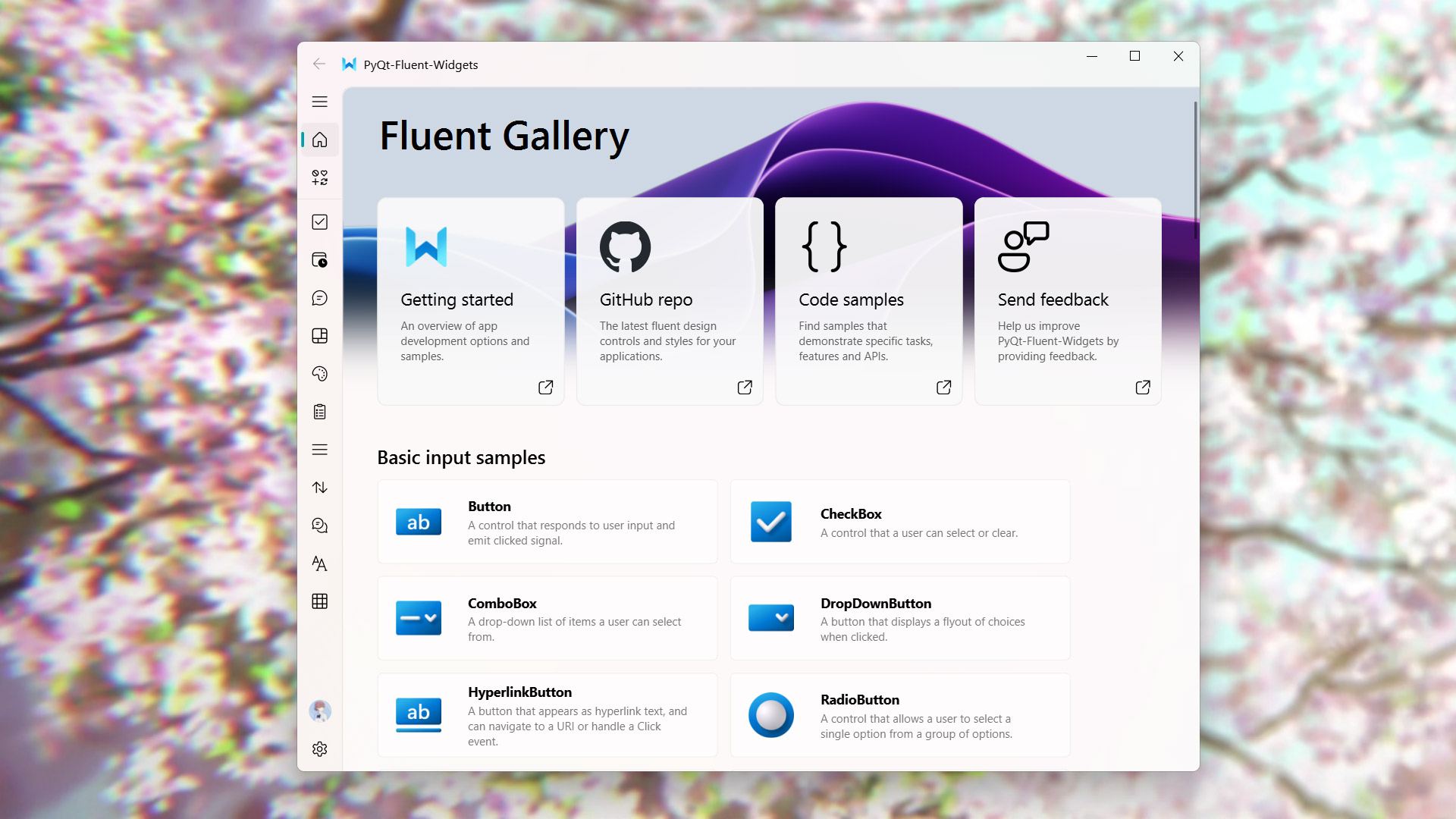
Ever considered using PyQt Fluent Widgets? Would def make this ui look dope!
valid quiver
@modest dove So are you recommending me to learn PyQt ?
Also is it free or does the free version have any limitation ?
valid quiver
Or should i stick with the CustomTkinter (Note that i am using GUI for basic purposes not professionally)
modest dove
valid quiver
<@932374022631616554> So are you recommending me to learn PyQt ?
Also is it fre...
Sorry about late response, but yeah PyQt Fluent Widgets is a addonfor PyQt that allows you to make UI's that kinda look like WIN 11 applications
GitHub
A fluent design widgets library based on C++ Qt/PyQt/PySide. Make Qt Great Again. - zhiyiYo/PyQt-Fluent-Widgets
You can check it out here
valid quiver
i felt like its syntax are a bit complicated
Any way thank you @modest dove for your kind response, I will try PyQt soon
modest dove
No worries man!
 burnt gull
This the right place to ask for some help with PyQt5?
 tepid osprey
burnt gull
This the right place to ask for some help with PyQt5?
tepid osprey
burnt gull
This the right place to ask for some help with PyQt5?
- For help relating to Python User Interface libraries (e.g. PyQT, Tkinter, Rich, Curses, PySide, DearPyGui)
should be yeah
burnt gull
Sweet! Basically, I'm refactoring an application I created a couple of months ago in PyQt5, just trying to improve / clean it up a bit. I'm creating a custom class for QScrollArea to act as a container for other containers and widgets. But for some reason, there seems to be a minimum size set that i can't change. Doesn't seem to matter what i change, it just won't go away. Feel like I'm obviously missing something.
    def __init__(self, parent=None, name=None, hor_policy=None, ver_policy=None, warn=False):
        if not isinstance(self, QWidget):
            raise TypeError("BaseWidget must be used with QWidget subclasses")

        if name:
            self.setObjectName(name)

        self.hor_policy = hor_policy if hor_policy is not None else G.PREFERRED
        self.ver_policy = ver_policy if ver_policy is not None else G.PREFERRED
        self.setSizePolicy(self.hor_policy, self.ver_policy)

        self.warn(warn)
        self.setContentsMargins(0, 0, 0, 0)

        if isinstance(parent, Container):
            parent.add(self)

    def warn(self, warn):
        self.setProperty("theme", "warn" if warn else None)

    def hide(self):
        self.setVisible(False)

    def show(self):
        self.setVisible(True)


class Container(QScrollArea, BaseWidget):
    def __init__(self, parent=None, name=None, vertical=True, hor_policy=None, ver_policy=None):
        QScrollArea.__init__(self, parent)
        BaseWidget.__init__(self, parent, name, hor_policy, ver_policy)
        self.setWidgetResizable(True)

        self.container = QFrame(parent)
        if vertical:
            self.setVerticalScrollBarPolicy(Qt.ScrollBarAsNeeded)
            self.setHorizontalScrollBarPolicy(Qt.ScrollBarAlwaysOff)
            self.layout = QVBoxLayout(self.container)
        else:
            self.setVerticalScrollBarPolicy(Qt.ScrollBarAlwaysOff)
            self.setHorizontalScrollBarPolicy(Qt.ScrollBarAsNeeded)
            self.layout = QHBoxLayout(self.container)

        self.container.setLayout(self.layout)
        self.setWidget(self.container)
self.setMargins(*G.DEFAULT_MARGINS)```@burnt gull You should put code in code block with 3 of these signs `
 hidden pine
Please what is PyQt, I'm new to python
 dawn briar
hidden pine
Please what is PyQt, I'm new to python
dawn briar
hidden pine
Please what is PyQt, I'm new to python
python bindings for the Qt framework for making GUIs
 meager wharf
how can i align the center and modify that button style to rounded button?
stone violet
hidden pine
Please what is PyQt, I'm new to python
its a stream used for gui.
 obtuse remnant
Anyone using console UI? I'm interested in something like curses, but Windows-compatible. I've tried Urwid for now, it looks nice, but I'm having problems as soon as I try to do anything beside the tutorial, and the documentation seems not to be complete.
Are there other console-friendly widget libraries?
shell crystal
obtuse remnant
Are there other console-friendly widget libraries?
My favorite console widget library is called print() and msvcrt for keyboard input
Unless you're planning to do a super complex thing, you don't really need a TUI library
sleek arrow
autumn idol
I'm making a game for my school project any tips/suggestions for UI?
How did u make this
autumn idol
sleek arrow
How did u make this
Canvas
autumn idol
yeah
 humble cape
autumn idol
I'm making a game for my school project any tips/suggestions for UI?
humble cape
autumn idol
I'm making a game for my school project any tips/suggestions for UI?
jus use a game engine at this point
autumn idol
humble cape
jus use a game engine at this point
its a quiz game
 topaz parcel
why am i muted
 lost pike
i'm trying to make a game engine with a cute and purple ui in this style

so can anyone help me
candid fern
How can I make it so that I can append buttons to notebook so in essence I can close those pages
spiral apex
candid fern
How can I make it so that I can append buttons to notebook so in essence I can c...
Could you elaborate?
candid fern
spiral apex
Could you elaborate?
Like a browser
spiral apex
candid fern
How can I make it so that I can append buttons to notebook so in essence I can c...
Can you show your code?
candid fern
spiral apex
Can you show your code?
I haven't coded it yet I just wanted to know if it's possible to append both of those objects together
spiral apex
candid fern
I haven't coded it yet I just wanted to know if it's possible to append both of ...
What do you mean by notebook
regal cedar
Im trying to animate something on python using pyqt5 but my animation keeps being cut off. If anyone has experience with this or might know how to fix this please respond to this message so i can provide more assets
(ping me)
 glossy kelp
can same one help me
I want install pyqt3d using pip
pip install PyQt3D i get this error can be some one help plz
`
error: subprocess-exited-with-error
× Preparing metadata (pyproject.toml) did not run successfully.
│ exit code: 1
╰─> [5 lines of output]
Querying qmake about your Qt installation...
These bindings will be built: Qt3DCore, Qt3DInput, Qt3DLogic, Qt3DRender, Qt3DAnimation, Qt3DExtras.
Generating the Qt3DCore bindings...
_in_process.py: /tmp/pip-install-a5joxwql/pyqt3d_f7eeba296e2f4207af7dafc8e008a7a2/sip/Qt3DCore/Qt3DCoremod.sip: line 25: column 9: 'QtCore/QtCoremod.sip' could not be found
/tmp/pip-install-a5joxwql/pyqt3d_f7eeba296e2f4207af7dafc8e008a7a2/sip/Qt3DCore/Qt3DCoremod.sip: line 26: column 9: 'QtGui/QtGuimod.sip' could not be found
[end of output]
note: This error originates from a subprocess, and is likely not a problem with pip.
error: metadata-generation-failed
× Encountered error while generating package metadata.
╰─> See above for output.
note: This is an issue with the package mentioned above, not pip.
hint: See above for details`
 gray owl
glossy kelp
can same one help me
I want install pyqt3d using pip
`pip install PyQt3D` i get...
gray owl
glossy kelp
can same one help me
I want install pyqt3d using pip
`pip install PyQt3D` i get...
Me too when installing sketchpy and numpy
 wispy breach
glossy kelp
can same one help me
I want install pyqt3d using pip
`pip install PyQt3D` i get...
wispy breach
glossy kelp
can same one help me
I want install pyqt3d using pip
`pip install PyQt3D` i get...
what editor are you using?
glossy kelp
I use vscode
wispy breach
can you maybe access the packages?
maybe you can install it manually theire
it also says something with subprocess so it could be that your environment can’t access the libary for some reason
 loud sail
glossy kelp
I use vscode
loud sail
glossy kelp
I use vscode
Can help but i charge
glossy kelp
loud sail
Can help but i charge
help for what ?
glossy kelp
gray owl
Me too when installing sketchpy and numpy
this lib is cool I want it and it's not installed and for c++ is not working it
 digital rose
glossy kelp
can same one help me
I want install pyqt3d using pip
`pip install PyQt3D` i get...
digital rose
glossy kelp
can same one help me
I want install pyqt3d using pip
`pip install PyQt3D` i get...
You’re missing Qtgui/QtGuimod.sip
Are these available on your os package manager?
glossy kelp
How to fix any cammand ? can help me
glossy kelp
digital rose
You’re missing Qtgui/QtGuimod.sip
qtgui it's part of qt5
digital rose
glossy kelp
qtgui it's part of qt5
Are you installing into a venv or uv venv?
glossy kelp
yeah
 desert igloo
has anyone used python to login to network devices, for example cienas, via ZOC terminal?
 brisk light
desert igloo
has anyone used python to login to network devices, for example cienas, via ZOC ...
brisk light
desert igloo
has anyone used python to login to network devices, for example cienas, via ZOC ...
Like SSH into a device?
I used a library (I think it was called paramiko) for that before
desert igloo
brisk light
I used a library (I think it was called paramiko) for that before
It has to go through ZOC though bc there’s a proxy there u have to use in order to login to the devices
tawdry abyss
Hi, using Pyside 6 and making a custom title bar for a frameless window. Here in the image, the top is in QT designer, the middle is ctrl-r in qt designer, and the bottom is in the actual app.
You can see the buttons have moved to the left as if there is some padding or margin on the right. But I can't work out why this is happening. Any tips or clues?

 haughty musk
Hey everyone, I'm actually trying to dig into project management ( for a project using PyQt ) and I was wondering if there was a way ( i've been looking onnline for the whole day ) to make Modern gantt and calendar ( a bit as with google or notion ) interfaces ! Thanks a lot !
wispy breach
haughty musk
Hey everyone, I'm actually trying to dig into project management ( for a project...
since you are working with Py Qt i don’t really know but with tkinter their is the possibility using themes, look out if their is maybe some kind of style sheets or so for py qt
 left mist
anyone good with figma?
 opal hull
Guys I need ideas for the header not sure what to do
 solid thistle
autumn idol
I'm making a game for my school project any tips/suggestions for UI?
solid thistle
autumn idol
I'm making a game for my school project any tips/suggestions for UI?
yapıyon bu işi arda
 mellow meadow
solid thistle
yapıyon bu işi arda
mellow meadow
solid thistle
yapıyon bu işi arda
hey, this is an english only speaking server :)
solid thistle
sorry soory
 reef holly
Hi guys, I got a little question, I'm realitve new with user-interfaces with python.
which is the most lightweight user interface python library?
 glass rampart
reef holly
which is the most lightweight user interface python library?
glass rampart
reef holly
which is the most lightweight user interface python library?
Hi, I would say Tkinter
reef holly
glass rampart
Hi, I would say Tkinter
Well, I think I will use it, thanks Sherk.
glass rampart
reef holly
Well, I think I will use it, thanks Sherk.
I made this software used tkinter.
 reef holly
glass rampart
I made this software used tkinter.
reef holly
glass rampart
I made this software used tkinter.
Nice, what is about?
glass rampart
reef holly
Nice, what is about?
Its a Shipping Report App. If you import CSV or Excel file, which contains the data, you can create daily, weekly, monthly reports,
 south vine
How can I make a good modern looking UI? I dont want to use Tkinter or Customtkinter
 pallid birch
lost pike
i'm trying to make a game engine with a cute and purple ui in this style
pallid birch
lost pike
i'm trying to make a game engine with a cute and purple ui in this style
i feel like theres something that will happen with this one
glass rampart
south vine
How can I make a good modern looking UI? I dont want to use Tkinter or Customtki...
PyQt , Kivy.
south vine
glass rampart
PyQt , Kivy.
What abt PySite6?
glass rampart
south vine
What abt PySite6?
You mean pyside?
south vine
glass rampart
You mean pyside?
yea
glass rampart
south vine
yea
I have no experience with pyside, but they say its awesome. You can find videos on youtube.
south vine
glass rampart
I have no experience with pyside, but they say its awesome. You can find videos ...
Okay ty
Just hoped for someone who maybe worked with it
candid fern
Does anyone know how to append buttons to notebook tabs
sleek hollow
south vine
Just hoped for someone who maybe worked with it
+1 for pyside. I use it pretty much daily.
south vine
sleek hollow
+1 for pyside. I use it pretty much daily.
👍
 silver stump
Outside of tkinter, how can I make a GUI in python?
 light vigil
silver stump
Outside of tkinter, how can I make a GUI in python?
light vigil
silver stump
Outside of tkinter, how can I make a GUI in python?
I've also used Pyside, wxPython, and Flet for user interfaces.
silver stump
light vigil
I've also used Pyside, wxPython, and Flet for user interfaces.
Ok thx
 muted willow
south vine
What abt PySite6?
muted willow
south vine
What abt PySite6?
PySide/PyQt both are essentially the same thing - Python wrappers around the Qt framework. Qt itself is one of the most mature framework so I would recommend that as well. There is nothing that comes close at least as far as I know in Python.
Also, if you are planning on using it, I highly recommend you look into the C++ documentation of Qt. It is one of the most descriptive and beautifully documented framework I have seen in my career.
The python documentation is automatically generated and hence, is not the best place to start.
It's very easy to understand how you would write the same thing in Python, just a matter of Syntax 🙂
muted willow
tawdry abyss
Hi, using Pyside 6 and making a custom title bar for a frameless window. Here in...
Were you able to figure this out? I am not sure which screenshot you are referring to? Do you mean the empty boxes in the middle or the windows controls in the title bar?
tawdry abyss
muted willow
Were you able to figure this out? I am not sure which screenshot you are referri...
I have not gone back to it since, but if you look at the position of the empty boxes in the middle image, then the location of a - and X in the bottom picture, they are offset toward the left by several pixels
 eternal kestrel
Hi, everybody. Do you know streamlit?
I have not well understood when to use st.cache_data or st.cache_ressources . I guess, I should not save larger items in session_state.
I am trying to build a GUI, where people can select files from a folder, user can make a selection of files. They get processed and plotted.
The data of the (all?) files is a lazy dataframe. Should something like this be in st.cache_data ?
If you know a nice example, with nice classes for the streamlit gui and the files selection, processing, I would be happy to see it. Would be nice to see how it is done with proper OOP.
lost pike
pallid birch
i feel like theres something that will happen with this one
the only thing that is happening is a real python game engine
pallid birch
lost pike
the only thing that is happening is a real python game engine
well atleast im right about something will happen
 rare cloak
what do you guys think about holoviz panel?
 rigid latch
lost pike
the only thing that is happening is a real python game engine
rigid latch
lost pike
the only thing that is happening is a real python game engine
Really a python game engine?
shell crystal
lost pike
i'm trying to make a game engine with a cute and purple ui in this style
Good luck making a game engine in Python
 fierce cloak
 south knoll
lost pike
the only thing that is happening is a real python game engine
south knoll
lost pike
the only thing that is happening is a real python game engine
what is a "real python game engine"?
digital rose
civ4
proven basinBOT
:incoming_envelope: :ok_hand: applied timeout to @quasi dock until <t:1741459043:f> (10 minutes) (reason: duplicates spam - sent 4 duplicate messages).
The <@&831776746206265384> have been alerted for review.
 frail snow
Hi! Do you recommend using kivy type for a simple application?
 crude umbra
frail snow
Hi! Do you recommend using **kivy** type for a simple application?
crude umbra
frail snow
Hi! Do you recommend using **kivy** type for a simple application?
Yes, why not. In fact, using Kivy you can create apps for multi-platform with single code base
frail snow
crude umbra
Yes, why not. In fact, using Kivy you can create apps for multi-platform with si...
Come on, thank you very much brother, have a nice day
 zealous lagoon
Idk if this is the right channel but I don't know why my python looks different from everybody's?

 stuck marten
zealous lagoon
stuck marten
zealous lagoon
that's not python, that's powershell. How exactly did you expect it to look like?
modest dove
How do I make a gui that looks like this? (Doesn't matter which library)

Please ping me on resposne :)
crude umbra
modest dove
How do I make a gui that looks like this? (Doesn't matter which library)
Well as per the screenshot, I can see the "PyQT" mentioned in the title bar of the window, so that means you can use PyQT to build such a GUI. You can use other libraries as well such as tkinter, kivy, etc.
modest dove
crude umbra
Well as per the screenshot, I can see the "PyQT" mentioned in the title bar of t...
I looked into that, but couldnt find any styles or eays to do it? Do you have more information regarding the topic?
crude umbra
If you are looking for exactly same then I don't think it is possible but it is platform specific. And looking at it, it looks like windows 7 or 8 but still you may try this solution: https://stackoverflow.com/questions/73918178/pyqt5-windowsvista-style-instead-of-win10-style#answer-73920981
Stack Overflow
When I design a UI with PyQt5, in Qt Designer it looks like win10 app. But when I start a program in VS Code or just run a file, it looks like in Windows Vista or 7. How to fix that? I haven't chan...
modest dove
I’ll look into it. Thank you for your help 😁
digital rose
modest dove
How do I make a gui that looks like this? (Doesn't matter which library)
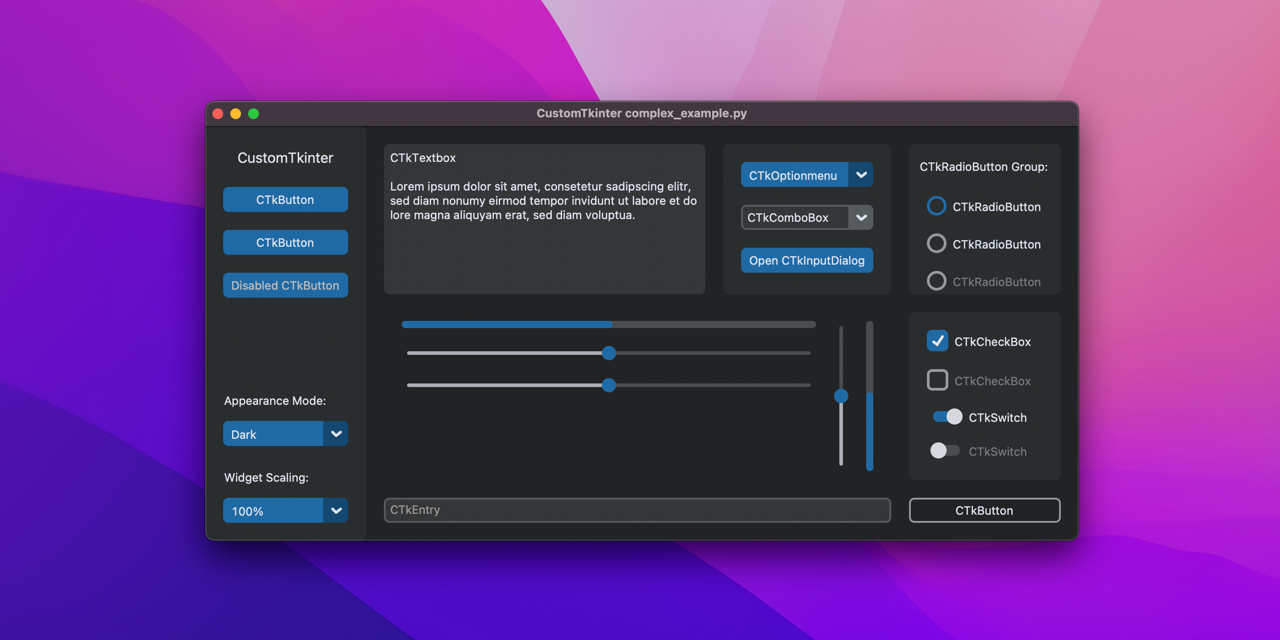
This one looks kind of like a win 7 gui(but dark mode):
https://github.com/TomSchimansky/CustomTkinter
And this one looks like the win 11 winui3 gui:
https://github.com/zhiyiYo/PyQt-Fluent-Widgets
GitHub
A modern and customizable python UI-library based on Tkinter - TomSchimansky/CustomTkinter
GitHub
A fluent design widgets library based on C++ Qt/PyQt/PySide. Make Qt Great Again. - zhiyiYo/PyQt-Fluent-Widgets
modest dove
digital rose
This one looks kind of like a win 7 gui(but dark mode):
https://github.com/TomSc...
are you geekin?
digital rose
modest dove
are you geekin?
wym?
modest dove
I'm sorry if this comes off disrespectful. But i was asking if anyone knew any old windows GUI's & you send a win11 library & a modern windows 10 gui
digital rose
ok wasnt sure if you just wanted a windows aesthetic in general
modest dove
No no, but thank you
digital rose
@modest dove "For the app to look exactly like Windows 7, it needs to be run on a Windows 7 system or one that has the Aero theme enabled in the first place. Modern Windows versions (Windows 10/11) handle window decorations differently"
heres something close
proven basinBOT
digital rose
heres something close
Click here to see this code in our pastebin.

 wanton apex
guys qtawesome icons aren't working on windows 11 why ?
wanton apex
wanton apex
guys qtawesome icons aren't working on windows 11 why ?
solved by reinstalling everything
pip install --upgrade qtawesome PyQt6 PyQt6-Qt6``` stiff valve
my first tkinter app be like
 warm mason

 uneven crystal
Good morning, I've been trying to find reference on setting up Vulkan inside tkinter but have not found any relevant information. Does anyone know if there has been any discussion about this?
 violet fiber
Hey all, I need help choosing which library to use for a project, more info in this thread: https://discord.com/channels/267624335836053506/1350229943098937344
any suggestions appreciated
sleek hollow
violet fiber
Hey all, I need help choosing which library to use for a project, more info in t...
Pygame is probably your best bet here, but realistically Python isn't the best at this. Do you have to use python?
violet fiber
sleek hollow
Pygame is probably your best bet here, but realistically Python isn't the best a...
not necessarily but im not sure...
I want to run the program on a raspberry pi and I know how to code in python the best
sleek hollow
violet fiber
not necessarily but im not sure...
I want to run the program on a raspberry pi ...
My suggestion would be something like Godot
the coding language is similar to python
but you'll have way more tools at your disposal to create all the visuals that you want
 brazen shard
Hey, had my first time using QT for a basic Deezer RPC ui,
I want a system tray hide feature and i made it, it works normally until I want to compile my python file (code)
But the tray system doesnt work while app is compiled, just hides the app but keeps it working (still works in Task Manager)
Compile Command Used :
```bash
pyinstaller --onefile --noconsole --icon=icon.ico --name=rpc-ui --add-data "icon.png:." --add-data "icon.ico:." rpc-ui.py
Project Structure :
    icon.ico
    icon.png
    rpc-ui.py
    settings.toml

A free Python-oriented pastebin service for sharing Python code snippets with anyone
 steady island
I have a python project in kivy(for Android) it's a simple quizz app but I just can't get it to my phone i tried everything it seems the only thing I didn't try was using a Linux system so please can I get help from anyone
 worthy fox
made an epg app out of boredom 🙂 still wip
 worthy fox
gotta limit the amount of channels it loads at startup, load rest that are needed in background
 tired raft
digital rose
tired raft
digital rose
hey

this is my app
would anybody like to collab with me?

GitHub
Contribute to aaravmalooking/Finder_CLI development by creating an account on GitHub.
View the code here
shell crystal
digital rose
Looks pretty cool, but it seems to be extremely flickery on Linux
Also why is there rust for this that only launches the app?
At that point just use something like pyinstaller or nuitka
 noble wyvern
shell crystal
Looks pretty cool, but it seems to be extremely flickery on Linux
noble wyvern
shell crystal
Looks pretty cool, but it seems to be extremely flickery on Linux
Maybe you should consider only modifying the parts that are updated and not erasing and loading everything, it's a lot of work for the CPU.
but you are on the right track
 fallen osprey
I was wondering if anyone who wants to could do this in a cleaner way than I did.
Given a list of glass stained blocks in mc i.e ['red', 'blue ', 'lime'] it generates
 shell crystal
fallen osprey
I was wondering if anyone who wants to could do this in a cleaner way than I did...
shell crystal
fallen osprey
I was wondering if anyone who wants to could do this in a cleaner way than I did...
Maybe put the beacon and glass to the right of the controls
 wheat ether
south vine
Just hoped for someone who maybe worked with it
wheat ether
south vine
Just hoped for someone who maybe worked with it
Coming late to this but I absolutely love PySide6 - I've been using it to build an AI-powered dev environment and it has been great to work with (https://github.com/m6r-ai/humbug). I've also found that Claude has a very strong understanding of how to use it if you need help
 hardy lynx
wheat ether
Coming late to this but I absolutely love PySide6 - I've been using it to build ...
hardy lynx
wheat ether
Coming late to this but I absolutely love PySide6 - I've been using it to build ...
thanks
 weak plaza
hey fellers. can anyone look into https://discord.com/channels/267624335836053506/1353309844765147146 if u got time. got some trouble here and maybe u guys can help me out.
 stone sleet
No lounge?
 steady trench
stone sleet
No lounge?
steady trench
stone sleet
No lounge?
discussion channels are similar
 cunning tangle
Slightly off topic, but I am looking for a cross platform UI framework that can support both Python and Java apps. Do you know if Qt works with Java as well as Python? Thanks.
steady trench
did you use any tool for this ?
 pallid timber
Hey guys, i just started learning tkinter using the lesson provided by pycharm but there seems to be a problem with the color. This is my code:
`from tkinter import *
window = Tk()
window.title("Exercise 2")
topFrame = Frame(window)
secondFrame = Frame(window)
thirdFrame= Frame(window)
lastFrame = Frame(window)
topFrame.pack()
secondFrame.pack()
thirdFrame.pack()
lastFrame.pack()
text1 = Label(topFrame, text="This application demonstrates frame layout")
button1 = Button(secondFrame, text="Button 1", fg="green")
button2 = Button(secondFrame, text="Button 2", fg="red")
button3 = Button(secondFrame, text="Button 3", fg="blue")
button4 = Button(thirdFrame, text="Button 4", fg="green")
button5 = Button(thirdFrame, text="Button 5", fg="green")
button6 = Button(thirdFrame, text="Button 6", fg="red")
button7 = Button(lastFrame, text="Button 7", fg="blue")
button8 = Button(lastFrame, text="Button 8", fg="blue")
button9 = Button(lastFrame, text="Button 9", fg="blue")
text1.pack()
button1.pack(side=LEFT)
button2.pack(side=LEFT)
button3.pack(side=LEFT)
button4.pack(side=LEFT)
button5.pack(side=LEFT)
button6.pack(side=LEFT)
button7.pack(side=LEFT)
button8.pack(side=LEFT)
button9.pack(side=LEFT)
window.mainloop()`
The first pic is what it is supposed to look like and the left is what it looks like after I run my code (also the second one is black cuz i have dark mode on rn)
Thx guys!

 modest dove
steady trench
did you use any tool for this ?
modest dove
steady trench
did you use any tool for this ?
Rich text library
 north steeple
shell crystal
Looks pretty cool, but it seems to be extremely flickery on Linux
north steeple
shell crystal
Looks pretty cool, but it seems to be extremely flickery on Linux
beautiful music
please teach me how to make this
modest dove
north steeple
please teach me how to make this
modest dove
north steeple
please teach me how to make this
This is how I made the informations tab:
    text = Text.from_markup(
        "[bold green]Sleep Client[/]\n"
        "[magenta]Brought to you by Fundet & Geoloage[/]\n"
        "[yellow]// // ver 1.0.0 // //[/]\n"
        "[green]True: On[/]\n"
        "[red]False: Off[/]",
        justify="center"
    )
    console.print(Panel(text, border_style="blue", title="Information", title_align="center"))
That looks amazing! I will definitely check out Rich. Thanks!
 feral light
I've been trying to create a PyQt app where I have a custom header, but windows is showing 5 pixels of whitespace at the top which is ruining my design.
I have tried using Frameless flags but that disables the feauture where windows helps me resize my window
I am trying to achieve the same windows setting that (spotify, vsc, and discord) have on windows,
If anyone knows how to achive this even if its not PyQt, such as (Electron, tkinter) etc please let me know how its done, I cant find anything online
Heres my code:
from PyQt6.QtWidgets import QApplication, QWidget
from PyQt6.QtCore import Qt
import sys
class DummyWindow(QWidget):
def init(self):
super().init()
self.setGeometry(100, 100, 500, 500)
self.setStyleSheet("background-color: red;")
self.setWindowFlags(Qt.WindowType.CustomizeWindowHint)
app = QApplication(sys.argv)
window = DummyWindow()
window.show()
sys.exit(app.exec())
 modest dove
feral light
I've been trying to create a PyQt app where I have a custom header, but windows ...
modest dove
feral light
I've been trying to create a PyQt app where I have a custom header, but windows ...
Found this on stackoverflow, works well for me.
proven basinBOT
modest dove
Found this on stackoverflow, works well for me.
Click here to see this code in our pastebin.
 versed vessel
Do you know any good libary with good-looking interfaces without using tkinter?
 vast kestrel
versed vessel
Do you know any good libary with good-looking interfaces without using tkinter?
vast kestrel
versed vessel
Do you know any good libary with good-looking interfaces without using tkinter?
I just used this for the first time yesterday and it seems pretty nice https://github.com/hoffstadt/DearPyGui
 hollow matrix
versed vessel
Do you know any good libary with good-looking interfaces without using tkinter?
hollow matrix
versed vessel
Do you know any good libary with good-looking interfaces without using tkinter?
yea pyqt5 qtwidgets
depends what the guis for
pyqtgraph is good for graphs
versed vessel
Need something to pop-up and do changes then save in file, lot of buttons configure
violet fiber
i agree with pyqt and qtwidgets
 unborn canyon
How did you create the blue boxes, this looks sick btw
 weary valley

 digital rose
did a little silly game where you talk with ai generated souls freshly dead and decide their afterlife, you can see their past, chat with them, see their hobbies and a lot more, check it out, totally free https://pyoneerc1.itch.io/spu done with kivy

 digital rose
Long
Add different like shades for every two colums
So one would be light green one would be dark etc it's easier to read
modest dove
modest dove
This is how I made the informations tab:
```py
text = Text.from_markup(
...
@unborn canyon
 celest python
@digital rose That gui that i sent is only 262 lines of code
gotta love PyQt6
its got really nice styling options
very customizable
digital rose
celest python
because the columns have line separators yhk
Oh ik it just looks cool with colors
Loke how excel does it
unborn canyon
modest dove
<@1329190409276100630>
?
What's that gotta do w me
Ion even do ui
Oh
Nvm
I'm dumb
I'm like 90% sure that doesn't make a blue border but idk
Like it's assigning the border colour but doesn't actually show how you made the border
Is it panel in the console.print func ?
modest dove
unborn canyon
Like it's assigning the border colour but doesn't actually show how you made the...
This prints the border
console.print(Panel(text, border_style="blue", title="Information", title_align="center"))
And the other is the contents inside of it 🤦
unborn canyon
Right
But how does it print the boarder?
Is it the panel in the console.print func
modest dove
unborn canyon
Is it the panel in the console.print func
I believe so
unborn canyon
How do you not know 😭
modest dove
unborn canyon
How do you not know 😭
I didn't read any of the documentation I just got grok to do it for me lmfao
 warped quail
Can someone help me ? Im using tkinter, and i dont know why but when i click on the button, afterwards it suddenly becomes reactive to hovering (color change and border "inverted) till another button is pressed, how do i get rid of this weird behavior
    self.convert_type_menu = tk.Menu(button_frame, tearoff=0, bg="#444444", fg="white")
    for mode_name in ["Raw", "Hex"]:
        self.convert_type_menu.add_command(label=mode_name, command=lambda m=mode_name: self.file_writer.set_mode(m.lower()))


    def show_menu(event):
        print("show_menu")
        self.dropdown_btn.config(relief="sunken", bg="#2196F3", fg="black")
        self.convert_type_menu.post(event.x_root, event.y_root)
        self.after(1, reset_button)

    def reset_button():
        print("reset_button")
        self.dropdown_btn.config(relief="raised", bg="#2196F3", fg="white")


    self.dropdown_btn = tk.Button(button_frame, text="▼", bg="#2196F3", fg="white")
    self.dropdown_btn.pack(padx=(0, 5),side=tk.LEFT)
    self.dropdown_btn.bind("<Button-1>", show_menu)
 errant bone
EasyCard+, A simple flashcard editor/viewer
I made a flashcard program using pygame to study for exams. It also has audio-hints that you can record in the
audio recorder that I built into it. I also made it easy and somewhat fun to create, and edit flashcards. I used tkinker
& easygui for popups btw. It was really annoying but I did add support for exporting to PDF, however I couldn't get
the in PDF audio working so I just made it an embedded file. I also put it on my itch.io: https://vmanisherenow.itch.io/easy


 clear willow
how do you fix these gap when the mouse move too fast
 def start_drawing(event):
    global drawing
    drawing = True
    x = event.x
    y = event.y

    if drawing:
        canvas.create_oval((x - brush_size / 2, y - brush_size / 2, x + brush_size / 2, y + brush_size / 2), fill=selected_colour, outline=selected_colour)


def stop_drawing():
    global drawing
    drawing = False


canvas.bind('<B1-Motion>', start_drawing)
canvas.bind('<ButtonRelease-1>', stop_drawing)``` sinful pendant
clear willow
how do you fix these gap when the mouse move too fast
```py
def start_drawing(e...
sinful pendant
clear willow
how do you fix these gap when the mouse move too fast
```py
def start_drawing(e...
One fix is to track the last point and draw staring line to that.
Another fix which may or may not help is trying to modify setting for high dpi (I had only used for windows)
sinful pendant
warped quail
Can someone help me ? Im using tkinter, and i dont know why but when i click on ...
Use activeforeground and activebackground atrribute values.
candid fern
Is it possible to make an interface that can add or make a database?
 glossy burrow
candid fern
Is it possible to make an interface that can add or make a database?
glossy burrow
candid fern
Is it possible to make an interface that can add or make a database?
yes but going to need a lot more information on what you mean and are trying to do
candid fern
Well I wanted to make a medical program and so I don't have to find a database online after getting everything done I want to make it so that it makes the database
I like for example
Ex.
Name: iron fox
Age: 118
Gender: n/a
Contact_info: ggggf
candid fern
glossy burrow
yes but going to need a lot more information on what you mean and are trying to ...
For example
glossy burrow
Well I mean its a lot more complicated than just 'making a database' as I assume you plan to read from it, add new patients, update information, etc. But yes it is all possible to do and something I am actively working on myself for a different type of program
vast kestrel
candid fern
For example
So, you'll need more than just this bare skeleton, but one way you could go would be to have your 'things' (like the patient record you showed for Iron Fox) be Pydantic (JSON) models, and then having that automatically get mapped to your database schema: https://docs.pydantic.dev/latest/examples/orms/
Here's somebody basically doing the thing https://github.com/litestar-org/polyfactory/issues/504#issuecomment-1966027097

GitHub
Summary Hi, I use FastAPI with a 'typical' structure: Pydantic schemas are converted to SQLAlchemy models. For tests, currently, SQLAlchemy models are created in fixtures. Obviously, as the...
If your 'things' have a more well-known structure in advance, just defining them directly as database 'models' would be easier.
candid fern
vast kestrel
So, you'll need more than just this bare skeleton, but one way you could go woul...
I found a tutorial
candid fern
vast kestrel
So, you'll need more than just this bare skeleton, but one way you could go woul...
Do I have to install the package or is it already pre-installed with python
vast kestrel
candid fern
Do I have to install the package or is it already pre-installed with python
Separately, for both pydantic and sqlalchemy, yeah.
candid fern
I tried to follow myseqel as perfect tutorial haven't been able to find an import for Windows terminal
candid fern
vast kestrel
Separately, for both pydantic and sqlalchemy, yeah.
Is that okay cuz I can't find any pip for any of those including the myseqel
vast kestrel
candid fern
Is that okay cuz I can't find any pip for any of those including the myseqel
Maybe it's case-sensitive? I just did pip install SQLAlchemy and it worked
pip install pydantic works fine too. Make sure your pip is set up reasonably I guess?
candid fern
Which one would you recommend?
candid fern
vast kestrel
Maybe it's case-sensitive? I just did `pip install SQLAlchemy` and it worked
...
vast kestrel
Sorry, what are you asking exactly?
candid fern
Which one do you prefer and I got to run now turns out it was using the wrong
vast kestrel
I don't know your exact situation, but..
I personally would prefer to use 'just' SQLAlchemy, and pre-define what all my models looked like.
If you need something where the user is deciding on the attributes of things each time at runtime, you might want to get Pydantic involved.
So it really depends on your goal. SQLAlchemy on its own is a simple great way to store your objects in a database.
If that feels like "grr, this isn't enough like JSON", then that's when Pydantic would come in.
candid fern
import mysql.connector
    "resource": "/c:/Users/iorn/databaser.py",
    "owner": "python",
    "code": {
        "value": "reportMissingImports",
        "target": {
            "$mid": 1,
            "path": "/microsoft/pyright/blob/main/docs/configuration.md",
            "scheme": "https",
            "authority": "github.com",
            "fragment": "reportMissingImports"
        }
    },
    "severity": 4,
    "message": "Import \"mysql.connector\" could not be resolved",
    "source": "Pylance",
    "startLineNumber": 7,
    "startColumn": 8,
    "endLineNumber": 7,
    "endColumn": 23
}]
Did you pip install this? https://pypi.org/project/mysql-connector-python/
candid fern
Yes
candid fern
vast kestrel
Did you `pip install` this? https://pypi.org/project/mysql-connector-python/
Yes it's still won't work
vast kestrel
candid fern
Yes it's still won't work
If you are still getting that same import error after installing that package, check your environment's Python config, because it's not seeing the right packages. Double-check how the Python 'profile' etc is set up.
candid fern
vast kestrel
If you are still getting that same import error after installing that package, c...
Got to get it to work
candid fern
I had to install the connector separately from mysql
junior rampart
I'm making a nice wrapper around tkinter. What's the lowest python version I should try supporting? 3.7?
Probably every 3.x that isn't EOL
so 3.9 as of today
 astral spindle
are you sure about this
 oak dock
I am having the hardest time. I've scoured docs and used several resources online, but I can't figure out how to add a light blue background to tabs in my gui. How are we supposed to make this look good?

 royal cape
oak dock
I am having the hardest time. I've scoured docs and used several resources onlin...
royal cape
oak dock
I am having the hardest time. I've scoured docs and used several resources onlin...
ttk widgets are more difficult to style, and at least on windows, several appearance options have no effect, but at least for widgets that support it, you can configure the root style with a background for all of them at once: ```py
from tkinter import Tk
from tkinter.ttk import Style
app = Tk()
style = Style(app)
style.configure(".", background="azure")
... ``` example: https://paste.pythondiscord.com/7LVQ
 royal cape
hmm, apparently you can also manipulate the layout of the treeview to replace its background element, but it seems somewhat annoying to do that manually
celest python
 vale temple
looks nice what did you use for the gui?
shell crystal
celest python
looks nice what did you use for the gui?
Looks like something web based
celest python
yeah it looks like an electron app
 fleet otter
i would like a user interface that populates the entire wall in my room please 😌
vast kestrel
Little projectors are super cheap now, and way better than they should be
fleet otter
vast kestrel
Little projectors are super cheap now, and way better than they should be
I didn’t think about that. But who uses projectors for computing 
shell crystal
Working on a music player, does the UI look decent so far?

feel free to suggest things
 chilly escarp
shell crystal
Working on a music player, does the UI look decent so far?
chilly escarp
shell crystal
Working on a music player, does the UI look decent so far?
It looks good, I would change the seconds display to a minutes and seconds display. That would look alot better
wispy breach
oak dock
I am having the hardest time. I've scoured docs and used several resources onlin...
have you tried using custom tkinter
great for styling
 buoyant fulcrum
I really need to learn that
I use regular tkinter for quick and easy GUI’d but custom would just make my work look so much nicer
 candid fern
Am I having a problem with this frame label even though it's just a normal label within the frame I'm following the video I typed the with the modification of it being smaller
vast kestrel
Man why didn't anybody tell me about asciimatics, this seems neat.
 merry compass
what yall think of my server monitioring ui for my website id say its got some work but its almost there
 hard lintel
need to create a cli using click module in pyhon
object is to create a automl pipline that will preprocess the data with help of ai
 south token
My first app :
this application coded with tkinter
please give me your opinion or the review in the application
I am fourteen (14) years old
I am from Morocco ❤❤❤❤❤
 fleet hollow
south token
My first app :
fleet hollow
south token
My first app :
hi; I've deleted your messages containing links to exe files, since we can't validate the safety of those;
next time, consider sending a GitHub (or alternative) link to source instead
(also please don't spam the same text across random channels)
 hazy breach
shell crystal
Working on a music player, does the UI look decent so far?
hazy breach
shell crystal
Working on a music player, does the UI look decent so far?
i like the colors
shell crystal
hazy breach
i like the colors
That's just my terminal's color scheme lol
but thanks
hazy breach
shell crystal
That's just my terminal's color scheme lol
oh
 amber agate
Hi all! I was looking through the pinned messages in this channel and just wanted to say that Gooey https://github.com/chriskiehl/Gooey/tree/master?tab=readme-ov-file#examples is worth mentioning. It is super easy to use and fun for little side projects
GitHub
Turn (almost) any Python command line program into a full GUI application with one line - chriskiehl/Gooey
 crystal violet
amber agate
Hi all! I was looking through the pinned messages in this channel and just wante...
crystal violet
amber agate
Hi all! I was looking through the pinned messages in this channel and just wante...
I personally prefer Google's Fire cause it recognizes function/method parameters and auto generates the CLI from that, so there's no use for argparse
GitHub
Python Fire is a library for automatically generating command line interfaces (CLIs) from absolutely any Python object. - google/python-fire
amber agate
crystal violet
I personally prefer [Google's Fire](https://github.com/google/python-fire) cause...
Ohhh very cool! I will give python fire a try. I guess the best use case for gooey is if you already had a terminal app that uses argparse and want to make it more user friendly. But I did not know about this. Thanks!
clear willow
so i want to make a fuction that allow you to change the canvas size and i need help to make it work
c_width = 900
c_height = 500

window.title('draiwing app')
window.geometry("%dx%d" % (width, height))
window.minsize(m_width, m_height)

canvas = Canvas(window, width=c_width, height=c_height, bg='white')
canvas.pack()

def change_canvas_size():
    global c_height, c_width, entry, entry2

    c_height = int(entry.get())

def canvas_size():
    global c_height, c_width, entry, entry2

    Size_window = Toplevel(window)
    Size_window.title('canvas size')
    Size_window.geometry('400x100')

    entry = Entry(Size_window, width=10)
    entry.pack()

    entry2 = Entry(Size_window, width=10)
    entry2.pack()

    button = Button(Size_window, text="button", width=10, command=change_canvas_size)
    button.pack()
 wise path
!cleanban 1137082364628058193 "3 days" Asking for jobs and direct copy/pasting from ChatGPT are not allowed.
proven basinBOT
:incoming_envelope: :ok_hand: applied ban to @woeful mason until <t:1745692249:f> (3 days).
 gleaming quail
clear willow
so i want to make a fuction that allow you to change the canvas size and i need ...
gleaming quail
clear willow
so i want to make a fuction that allow you to change the canvas size and i need ...
def change_canvas_size():
    global c_height, c_width # no need for global entry or entry2 here

    try:
        # Update canvas width and height from entry fields
        c_width = int(entry.get())
    except ValueError:
        # Handle invalid input (non-integer values)
        print(f"Invalid width was entered defaulting to current c_width: {c_width}.")

    try:
        c_height = int(entry2.get())
        print("c_height:",c_height,"\nc_width:",c_width)
    except ValueError:
        # Handle invalid input (non-integer values)
        print(f"Invalid height was entered defaulting to current c_height: {c_height}.")

    # Resize the canvas
    canvas.config(width=c_width, height=c_height)


def canvas_size():
    global entry, entry2 # no need for global c_height or c_width here

    Size_window = Toplevel(window)
    Size_window.title('canvas size')
    Size_window.geometry('400x100')

    entry = Entry(Size_window, width=10)
    entry.pack()

    entry2 = Entry(Size_window, width=10)
    entry2.pack()

    button = Button(Size_window, text="button", width=10, command=change_canvas_size)
    button.pack()
 edgy echo
What is a good way to make css like animations in pyqt6
edgy echo
What is a good way to make css like animations in pyqt6
Qt provides an animation framework that should allow you to do some animations.
Here's an example with QPropertyAnimation which is probably the simplest out of these: https://www.pythonguis.com/tutorials/pyqt6-animated-widgets/
edgy echo
royal gull
Qt provides an [animation framework](<https://doc.qt.io/qt-6/animation-overview....
Thank you so much it works!
 brisk crescent
I made a custom module for tkinter from boredom```py
from tkinter import *
from q import *
mainWindow(Tk(),PACK_DISPLAY).title("Hello, World!").setDimension(480,360).setPosition([400,200]).s(q(Label(text="I am a text!"))).appendTo(getMainWindow()).s(q(Button(text="Click me!",command=lambda: getMainWindow().children[0].attr("text","My contents have changed!")))).appendTo(getMainWindow()).show()```

 glossy burrow
So first time using tkinter and I am trying to make dynamic text boxes (purpose being to populate them later much like a spreadsheet) What I am confused about is how one of these methods works but the other does not.
textBoxArray = [dateBox, chargeBox, amountBox, tagBox, noteBox]

# This loop creates them correctly
i = 0
while 0 <= i < len(textBoxArray):
    textBoxArray[i].grid(column=i+1, row=1, sticky=N, padx=5)
    print(i)
    i = i +1

# This loop dumps them on top of each other
for boxes in textBoxArray:
    gridOffset = 1
    boxes.grid(column=gridOffset, row =1, sticky=N, padx=5)
gridOffset = gridOffset + 1```You're assigning gridOffset = 1 inside the loop, not before it
You may enjoy enumerate here with a starting index of 1
glossy burrow
hmm ok I need to not try and do classes with this first real attempt lol. just overcomplicating it for myself. But it is functionally getting there
candid fern
How can I create a closeble tab similar to this
 glossy burrow
candid fern
How can I create a closeble tab similar to this
glossy burrow
candid fern
How can I create a closeble tab similar to this
in what library/app/etc?
and like what parts of it are you trying to mimic primarily?
candid fern
TKinter
candid fern
glossy burrow
in what library/app/etc?
and like what parts of it are you trying to mimic prima...
Tk
 boreal pier
candid fern
Tk
boreal pier
candid fern
Tk
You could try DearPyGUI
candid fern
?
candid fern
boreal pier
You could try DearPyGUI
What is that
 silent bramble
brisk crescent
I made a custom module for tkinter from boredom```py
from tkinter import *
from ...
silent bramble
brisk crescent
I made a custom module for tkinter from boredom```py
from tkinter import *
from ...
man i thought this was javascript for a second
cuz who tf uses camelCase in python Pain
 glossy burrow
I made a class to basically create 5 text boxes dynamically. So when I import csv data it will create how ever many rows of them it needs.
The reason for this is I'll be doing a db on the backend(which I already have Im just building a GUI from the ground up, previously CLI only).
The class:
class TextBoxBuilder:
    # original test moved to TextBoxBuilder_test.py
    instance_count = 0

    def __init__(self, mainframe):
        self.mainframe = mainframe
        TextBoxBuilder.instance_count += 1

    def createTextBoxRow(self, expenses):
        # print(dir(self.mainframe))
        print(expenses)
        # self.mainframe = mainframe
        dateBox = Text(self.mainframe, width=12, height=1)
        chargeBox = Text(self.mainframe, width=30, height=1)
        amountBox = Text(self.mainframe, width=5, height=1)
        tagBox = Text(self.mainframe, width=15, height=1)
        noteBox = Text(self.mainframe, width=60, height=1)

        textBoxArray = [dateBox, chargeBox, amountBox, tagBox, noteBox]

        i = 0
        while 0 <= i < len(textBoxArray):
            textBoxArray[i].grid(column=i+1, row=self.instance_count, sticky=N, padx=1)
            print(i)
            i = i +1

        self.populateBoxes(expenses, textBoxArray)

    def populateBoxes(self, expenses, boxes):
        #this relies on one single entry, need to change its comprehension to handle multiple entries
        date = expenses[0].strip("'")
        charge_name = expenses[1].strip("'").strip()
        charge_amount = expenses[2].strip("'")
        boxes[0].insert("1.0", date)
        boxes[1].insert("1.0", charge_name)
        boxes[2].insert("1.0", charge_amount)

def main():

    def file_import():
        importfile.set(filedialog.askopenfilename(title="Select Expenses to Import"))

        expenses = parse_imports(importfile.get())
        update_TextBox(expenses)
        if not importfile:
            return

    def update_TextBox(expenses):
        displayExpenses = TextBoxBuilder(mainframe)
        displayExpenses.createTextBoxRow(expenses)```
And my questions is if this is a good way to do this as I'll have several views that are like this as well as taking user input etcI'll add that I know instance count isn't sustainable longer term but it worked as a POC for dynamic row numbers via the class. But that will be easy to handle later but just counting results from queries or imports and get counts from there.
sleek hollow
glossy burrow
I made a class to basically create 5 text boxes dynamically. So when I import c...
If you just need simple rows that hold one line of text each, use Entry instead of Text
that being said, I'd consider using a different GUI library that actually has proper spreadsheet widgets
PySide6 has QTableWidget
glossy burrow
sleek hollow
that being said, I'd consider using a different GUI library that actually has pr...
Hmm I guess I'll take a look at entry instead and also pyside6
royal cape
glossy burrow
Hmm I guess I'll take a look at entry instead and also pyside6
FWIW you might also be interested in tksheet if you want to stay with tkinter, it seems like a fairly comprehensive library for this:
https://ragardner.github.io/tksheet/DOCUMENTATION.html ```py
from tksheet import Sheet
data = ...
headers = ...
app = Tk()
sheet = Sheet(app, data=data, headers=headers)
sheet.enable_bindings("all", "edit_cell")
sheet.pack(expand=True, fill="both")
app.mainloop()```
 glossy burrow
royal cape
FWIW you might also be interested in tksheet if you want to stay with tkinter, i...
glossy burrow
royal cape
FWIW you might also be interested in tksheet if you want to stay with tkinter, i...
ah thanks I will look at that. I did kinda of want to stick with tkinter since I decided to use and learn it. Maybe this library will make this easier. I am going to try and make Entry boxes work as well for the sake of learning. Fundamentally only a small component of all of this is actually csv, the rest will be from db queries which I know is functionally similar though technically different.
royal cape
ahh, that sounds fair
glossy burrow
Yea to add more information the purpose of this view is basically a check/edit opportunity before data from the csv is put into the database. After which all interaction with the data will be handled via the db. Though I was hoping I could create a module that I could use for any time I needed to display the data in an editable format.
glossy burrow
hmm well I guess I have no funcitonal reason I need to stay with tkinter in general. I plan to make a web app version of this anyways maybe ill take a look at pyside6 after all, seems to have more capabilities and a more modern look which would be nice
eh screw it, not going to change libraries Ill just try and make tkinter do what I want.
glossy burrow
hmm ok I think I need to change the structure from a list to a dictionary of lists so I can more reliably iterate through it
 high pendant
shell crystal
Working on a music player, does the UI look decent so far?
high pendant
shell crystal
Working on a music player, does the UI look decent so far?
I like it!
 fallow geyser
im trying to use pyside now and can't get it to do async properly
QAsyncioEventLoop.create_connection() is not implemented yet
royal gull
The usual way I see async stuff done within Qt in Python is with trio (they have an example in the docs). QtAsyncio is currently in technical preview so it's not there yet.
 cloud moat
Hi, everyone! I'm new to Python and to programming, and kinda want to have an interface because I think it would get me something palpable, a sense of "this is getting done, finally", that just the lines of code do not do for me... That said, which free "GUI maker" do you recommend? Also, if I want to someday sell an app, there's any option to do code and interface entirely free?
fallow geyser
royal gull
The usual way I see async stuff done within Qt in Python is with `trio` (they ha...
i think it's easier to do the async stuff with a different class just for pulling data, and that class can be passed labels for the gui so it can write to them
I've got the data being collected, just no gui right now
 proven basinBOT
fallow geyser
proven basinBOT
fallow geyser
Click here to see this code in our pastebin.
 idle palm

Reddit
An inclusive subreddit for all Pagans regardless of theistic views or paths. We are a stronger community through diversity and inclusion.
Paganism is a term to describe the modern religions that have been revived, reconstructed, or inspired by the pre-Christian religions of mainly the European and Near East regions.
vast kestrel
?
wheat ether
fallow geyser
im trying to use pyside now and can't get it to do async properly
Yes, I use async code inside my pyside6 app extensively! I'm using qasync. You can see it in use at https://github.com/m6r-ai/humbug - the entry point that sets things running is here: https://github.com/m6r-ai/humbug/blob/main/src/humbug/__main__.py

GitHub
A GUI-based AI development tool with integrated Metaphor support - m6r-ai/humbug
GitHub
A GUI-based AI development tool with integrated Metaphor support - m6r-ai/humbug
fallow geyser
wheat ether
Yes, I use async code inside my pyside6 app extensively! I'm using qasync. You c...
i gave up and did it another way
do you use sockets?
i think pyside6 async shit the bed once i tried networking
(this is a modbus project)

this is where im at
wheat ether
fallow geyser
i gave up and did it another way
I'm using aiohttp to make REST requests to AI backends. The AIs all stream their responses back as a series of server-sent events which could run for several minutes, and there could be quite a few such streams running at any one time
fallow geyser
i think the issue was i could not use sockets within the qt async thread
it was not implemnted apparnetly
wheat ether
I've not tried socket-level access but the docs do talk about QTcpSocket and using non-blocking sockets - I've used similar approaches with other network stacks in the past, but not sure how well they work here
fallow geyser
yeah im not making qpymodbus
i just send the data over a signal
seems to work just fine
 naive otter
Ngl tkinter canvas are hard to draw (especially coordinates system)
Can anyone explain to me??? I
brisk crescent
silent bramble
cuz who tf uses camelCase in python [Pain](https://cdn.discordapp.com/emojis/103...
i do
you got a problem with that?
edgy echo
https://github.com/GyanOp900/TheBiller I'm a beginner started about 9 months ago this is my first big project ya'll please give an honest rating bout it.
GitHub
'TheBiller' is a sleek, modern desktop billing application tailored for small retail stores, kiosks, and general shops. Built with Python and PyQt6, it offers an intuitive and user-...
 unborn plover
edgy echo
https://github.com/GyanOp900/TheBiller I'm a beginner started about 9 months ago...
unborn plover
edgy echo
https://github.com/GyanOp900/TheBiller I'm a beginner started about 9 months ago...
Why no screenshots


 glossy burrow
@bronze iron success!
 vast kestrel
Card transactions still have the WORST metadata/formatting, it's amazing to me circa 2025
candid fern
How what would you recommend for hey out of the way interface that uses mysql?
vast kestrel
What does "hey out of the way" mean here exactly?
You mean like an existing UI for MySQL?
candid fern
Yes sorry it's currently 10:28 pm for me
I'm very tired but my ADHD is reminding me of everything
vast kestrel
This one is pretty cool but only just has started to do Linux support; historically has been Windows https://www.heidisql.com/
HeidiSQL is a free and powerful client for MariaDB, MySQL, Microsoft SQL Server, PostgreSQL, SQLite and Interbase/Firebird
A lot of people use https://dbeaver.io/ at my company, unless they've recently switched..
I've still never really been as productive in anything again as I was in TOAD for Oracle 🫗
glossy burrow
vast kestrel
Card transactions still have the WORST metadata/formatting, it's amazing to me c...
Agree, and that is ligtly sanitized for test data. the original is even worse and the formatting is worse too
developing a good importer for these formats is going to take much longer and so simplifying it to CSV for now was the only way to keep moving forward 

 dire barn
modest dove
Any other cool ways to do UI in terminal?
dire barn
modest dove
Any other cool ways to do UI in terminal?
!pypi batgrl
proven basinBOT

badass terminal graphics library
Released on <t:1740720984:D>.
modest dove
dire barn
!pypi batgrl
Appreciate you
 quick nimbus
anyone know how to make the custom title bars w rounded corners and icons as the X etc?
 mild haven
its general package but it provides nice and easy setup tui functions: https://github.com/EliaOndacs/corelib

GitHub
the only package you need to develop simple apps in python - EliaOndacs/corelib
quick nimbus
quick nimbus
anyone know how to make the custom title bars w rounded corners and icons as the...
figured it out
candid fern
I work hard today
candid fern
I'm the same one know how to use the function for a radio buttons

This is why I have so far I wanted to make it smaller but having it fell on the x-aix
glossy burrow
candid fern
not quite sure what you are asking but it sounds like you want the two radio buttons closer together? Can you provide the code for them so we can analyze it. without seeing the code we cant really help
 turbid iris
merry compass
what yall think of my server monitioring ui for my website id say its got some w...
turbid iris
merry compass
what yall think of my server monitioring ui for my website id say its got some w...
Bro, that design is great 👍
glossy burrow
merry compass
what yall think of my server monitioring ui for my website id say its got some w...
thats slick, love the color choices too
 tulip edge
Anyone here know urwid?
glossy burrow
tulip edge
Anyone here know urwid?
looks like a neat library but sorry, none at all
tulip edge
glossy burrow
looks like a neat library but sorry, none at all
Thanks. I have some pretty basic questions, but no one has used it here, it seems.
glossy burrow
tulip edge
Thanks. I have some pretty basic questions, but no one has used it here, it see...
might be someone around to show up that has but if its basic have you tried the docs or similar? or I guess just ask your question directly and see if you get something
tulip edge
Yeah Ive spent a bunch of time looking at the docs. Its a conceptual thing, I think. Like I want to start super basic, and create an empty box, and I cant figure it out.
modest dove
tulip edge
Yeah Ive spent a bunch of time looking at the docs. Its a conceptual thing, I t...
I no it's frowned upon by some people, but have you tried asking Ai like grok or gemini to get a better understanding?
tulip edge
modest dove
I no it's frowned upon by some people, but have you tried asking Ai like grok or...
No.
modest dove
tulip edge
No.
I've had some issues with documentation before. Maybe try to use Grok's Deepsearch function, has helped me before
tulip edge
Someone suggested another tool, Textual. Im going to look at that.
modest dove
tulip edge
Someone suggested another tool, Textual. Im going to look at that.
Goodluck!
candid fern
Do you think I need to change from grid to place to get radio buttons closer to each other
proven basinBOT
:incoming_envelope: :ok_hand: applied timeout to @quartz hound until <t:1746841062:f> (10 minutes) (reason: duplicates spam - sent 4 duplicate messages).
The <@&831776746206265384> have been alerted for review.
 inland portal
Hi all, I'm looking for a little help with a issue I'm having with Kivy in Python
Full context and issue is here:
https://stackoverflow.com/questions/79615076/image-not-reloading-kivy-python
crude umbra
inland portal
Hi all, I'm looking for a little help with a issue I'm having with Kivy in Pytho...
https://discord.gg/HCpRYpdm discord link to official kivy group
 grand olive
Im going to make an interface IDE like thing for python and call it TkinterFace
anyone wanna help me out
 pliant dagger

i work for this like 2 weeks
 zealous thistle
i want to create a app for pc, something that is flexabile and has lots of customabilty to design and im not sure what langauge, anyone got any ideas (not python)
glossy burrow
zealous thistle
i want to create a app for pc, something that is flexabile and has lots of custo...
I mean this is a python server so if you dont want to use python then wrong place to ask
glossy burrow
modest dove
I no it's frowned upon by some people, but have you tried asking Ai like grok or...
realstically this is the best use of AI when it comes to programming cause you actually could learn something instead of having it do it for you so its fine imo
 feral spire
I'm making a pyqt app for a node-based editor (which will be made into a plugin for another Qt application). I have a problem where the node's input widgets within a QGraphicItem don't get updated/repainted when interacted with (i.e. QLineEdit widgets don't show the cursor, nor what is being typed). The widgets get updated when I click away from the node, then select it again; or when interacting with a QComboBox, for some reason that works just fine).
This is my class which contains the widgets:
from PyQt5.QtWidgets import QWidget, QVBoxLayout
from PyQt5.QtGui import QColor

from QpnSettings import QpnSettings

class QpnNodeContentWidget(QWidget):
    def __init__(self, parent=None):
        super().__init__(parent)
        self.layout = QVBoxLayout()
        self.layout.setContentsMargins(0, 0, 0, 0)
        self.layout.setSpacing(0)
        self.setLayout(self.layout)
        palette = self.palette()
        palette.setColor(self.backgroundRole(), QColor(QpnSettings.NodeContentBackgroundColor))
        self.setPalette(palette)
        self._count = 0
        self.setFixedSize(0, 0)

    def AddWidget(self, widget: QWidget, newWidth: int):
        widget.setUpdatesEnabled(True)
        self.layout.addWidget(widget)
        self.setFixedSize(int(newWidth), int(self.height() + widget.sizeHint().height()))
        self._count += 1
        return self.height() - (widget.sizeHint().height()/2)
Well, I found a solution, but it's probably not the best solution. Doing this, absolutely slams a CPU core to 100% (but it fixes the issue). This is the node class which holds the proxy widget for the node content widgets. I added a line in the graphic items's paint() function to update the widget proxy.
class QpnNode(QGraphicsItem):
    def __init__(self, title="Undefined Node", parent=None):
        super().__init__(parent)
        self._title = title
        self.inputs = []
        self.outputs = []
        self.inputWidgets = []

        # UI Elements
        self._titleBar = QGraphicsSimpleTextItem(self._title)
        self._nodeContent = QpnNodeContentWidget()
        self._nodeContentProxy = QGraphicsProxyWidget(self)
        self._nodeContentProxy.setWidget(self._nodeContent)

        self.InitUI()

    def paint(self, painter: QPainter, option: QStyleOptionGraphicsItem, widget=None):
        # Node paint code hidden for brevity
        ...
        # Force update the content widgets
        self._nodeContentProxy.update()
There's gotta be a better way to do this.
digital rose
Guys
I am working on an interesting open source project, back-end is almost done, but I was hoping if anyone would like to contribute to build the ui
I hate designing
wheat ether
feral spire
Well, I found a solution, but it's probably not the best solution. Doing this, a...
without knowing what your proxy widget does, is the 100% load problem that in updating the proxy you also retrigger the paint? I've had that sort of thing happen in the past. Your original problem sounds like there's probably one or more events you need to listen to and that may need you to and that need to trigger some form of update that will in turn repaint your widget? I had a few weird problems that sound similar to what you've described a few months ago when I built a terminal emulator widget but found I wasn't updating a viewport correctly sometimes
glossy burrow
digital rose
I am working on an interesting open source project, back-end is almost done, but...
You could just share the repo link and people could look but this isnt like a recruitment board or anything
feral spire
feral spire
This is my class which contains the widgets:
```py
from PyQt5.QtWidgets import Q...
@wheat ether This is the class that the proxy widget holds.
 frank linden
Hi Guys, I’m a Product Designer with 5 years of experience and a strong passion for solving real-world problems through thoughtful, intuitive design, whether it’s helping users interact with immersive XR environments, navigate complex government systems, or engage with AI tools that enhance daily life. I’m excited to bring my skills to a team where design drives impact and innovation.
Let's connect and discuss your project..
glossy burrow
frank linden
Hi Guys, I’m a Product Designer with 5 years of experience and a strong passion ...
!rule 9
feral spire
glossy burrow
!rule 9
That's probably a bot account
glossy burrow
feral spire
That's probably a bot account
Yea probably
digital rose
glossy burrow
You could just share the repo link and people could look but this isnt like a re...
It's not completely Open source, 😅
digital rose
feral spire
That's probably a bot account
Why are bot accounts allowed?
glossy burrow
digital rose
Why are bot accounts allowed?
"allowed" is not what that is
they arent but its not like there is some simple way of auto deleting bots. especially when they dont post certain things like forbidden urls, etc
digital rose
Oo
glossy burrow
digital rose
It's not completely Open source, 😅
I mean you could share the part that is but if you are looking for like an actual dev partner you should try a different site for like contract work or similar.
digital rose
Thx for advice
candid fern
Do I need to use a button to key behind information?
 candid fern
digital rose
candid fern
digital rose
What does the GUI do?
digital rose
🥲 hard to explain back
It helps user to convert lectures video into notes
So the youtube button, opens youtube within it
And notes button open notes
(in very short)
candid fern
How about a timer and a point system
candid fern
digital rose
🥲 hard to explain back
I'm sorry that I didn't understand it at first but maybe something underneath just so people who don't use a pad in paper and then average or an area lines when they're not on the computer can understand and if you put an appoint system and assign points to if it's the video is a lecture and you spend time on it instead of having them be able to open YouTube and then do whatever you were paying retention because people don't want people points to be going down and what if you added a quiz button that quiz you on the lecture that you're currently doing you know you paste in the URL and it generates a quiz and it giving you points that can be used to make their notes Fancy ect
digital rose
Thats a Great idea
But I thought copy pasting url might break the momentum, won't it look like an extra burden like external
Extra task
Btw it has the quiz things
candid fern
I know it might seem odd to have him paste in then you are out but think about it so that they don't have to look for the same video 100 times by using the same keywords and it popping up different it just seems people time in essence
candid fern
digital rose
Thats a Great idea
Well it's an idea
 lofty pond
digital rose
lofty pond
digital rose
Is there hover effects? I think it be a nice addition to add a on hover to show the title of the buttons and cool animations :O
candid fern
!e```py
Geometry_1 ("!x!")
Geometry_2("?x?")
Root.geometry(Geometry_1)
If con_1 == "" and con_2 =="" :
Root.geometry(Geometry_1)
Is this how I can change the screen size in my programs
Hover effect on button
dire barn
No ads, please.
candid fern
Is it possible to change the geometry using an if statement
digital rose
Which gui library u are using
I changed the geometry of the main window with the press of the button
(looka like u are using tk ?)
 languid pollen
digital rose
languid pollen
digital rose
yo looks cool what is this
digital rose
languid pollen
yo looks cool what is this
I am making ai /llm powered learning tool
Like video lecture into detailed notes
Gives you flashcards
Quiz
languid pollen
oh damn nice
digital rose
you can always cross question
digital rose
languid pollen
oh damn nice
But I don't know much about ui design
glossy burrow
 worn marten
How would ygs go abt designing it
worn marten
How would ygs go abt designing it
honestly at the question of designing a UI a good place to start would be to look for examples that you like and would want to use and incorporate inspiration from those into your own.
candid fern
https://paste.pythondiscord.com/EPUQ @agile cargo
Is this okay for my root?
proven basinBOT
:incoming_envelope: :ok_hand: applied timeout to @light vigil until <t:1747429107:f> (10 minutes) (reason: newlines spam - sent 125 newlines).
The <@&831776746206265384> have been alerted for review.
light vigil
Can someone can help me figure out why I am unable to get the scrollbar to show up in this test code using tkinter? https://pastebin.com/SqG6mGda
Pastebin
Pastebin.com is the number one paste tool since 2002. Pastebin is a website where you can store text online for a set period of time.
it looks like it's being covered up, but I thought the whole point of a grid layout was that the widget in column 0 wouldn't cover the widget in column 1
light vigil
I got it to work by changing the master of the widgets in ScrollableFileList to None, though I don't know why that works. It was just something I found after hours of searching the internet.
also, by doing this the position of the individual components in ScrollableFileList belong to, and are placed in the grid of the root window, which doesn't seem to me like it's in the spirit of grouping widgets together into custom ones.
royal cape
light vigil
I got it to work by changing the master of the widgets in ScrollableFileList to ...
master=None just means to use the root widget as the parent, that being Tk(), but your original code was on the right track - i believe the issue was on line 29, you forgot to pass the parent widget to the Listbox superclass, so it became a child of the root widget and not ScrollableFileList, then by calling file_list.grid(row=0, column=0, ...) with the same grid coordinates as the scrollable file list, the listbox completely drew over your frame and obscured it
you can tell by setting sticky="W" on just the file_list, it draws the listbox on the side and you can see that the scrollbar was hiding under it

and just adding super().__init__(master, ...) in your FileList class fixes your code snippet:
 light vigil
royal cape
master=None just means to use the root widget as the parent, that being `Tk()`, ...
light vigil
royal cape
master=None just means to use the root widget as the parent, that being `Tk()`, ...
Thank you.
 normal dust
I made a prototype game i tkinter and someone suggested to convert it into pyside6 but I've never used pyside6 before and I'm having problem converting it into pyside6 do you guys think it's worth it to convert into pyside6?
this is the game in tkinter
modest dove
Your in #user-interfaces on a python server?
normal dust
i talked about this on #game-development and someone recommended I talk about this in userinterface
nevermind I don't think you're talking to me
modest dove
normal dust
nevermind I don't think you're talking to me
Sorry for the confusion. I was talking to @humble agate
normal dust
cute penguin
modest dove
Appreciate it
sleek hollow
normal dust
I made a prototype game i tkinter and someone suggested to convert it into pysid...
Are there features you're struggling to implement in tkinter for this game?
normal dust
so I haven't came up with a lot of features yet but I will and it possible that some things I want to do I won't be able to do in tkinter but i could just come up with something else that works with tkinter
it's also just nicer to have a more up to date version
sleek hollow
normal dust
so I haven't came up with a lot of features yet but I will and it possible that ...
It's probably worth it if you're interested in learning more about GUI
What you have so far wouldn't be too hard to recreate in PySide with a bit of know-how
 light vault
Has anyone tried to use the native asyncio support in PyGObject lately?
Basically importing the GLibEventLoopPolicy class from gi.events??
Asking because I can't just make that import
Despite having the latest version of PyGObject installed
digital rose
I have a issue up here
I have a markdown text
I want to render it
I am using pyside6
Can anyone help me out in how to render the markdown text format
royal gull
digital rose
Can anyone help me out in how to render the markdown text format
You could use QTextEdit which supports setting text as Github-flavored Markdown (via QTextEdit.setMarkdown()). If you need more features though, then you could get a Markdown-to-HTML converter such as mistune and render to HTML using the Qt web engine.
digital rose
My text output response comes out as stream, just like chatgpt, so when I used this it was only showing single letter at a time
candid fern
How do I make it so as soon as the text something in the interface it changes the geometry of the room and then replaces everything on the widget
candid fern
!e```py
Geometry_1 ("200x200")
Geometry_2("400x400")
Root.geometry(Geometry_1)
con_1 = 'x'
Con_2= 1
If con_1 == "x" and con_2 =="1" :Root.geometry(Geometry_1)
:x: Your 3.13 free threaded eval job has completed with return code 1.
001 | File [35m"/home/main.py"[0m, line [35m9[0m
002 | If [1;31mcon_1[0m == "x" and con_2 =="1" :
003 | [1;31m^^^^^[0m
004 | [1;35mSyntaxError[0m: [35minvalid syntax[0m
!e```py
Geometry_1 ("200x200")
Geometry_2("400x400")
Root.geometry(Geometry_1)
con_1 = 'x'
Con_2= 1
If con_1 == "x" and con_2 =="1" :Root.geometry(Geometry_1)
:x: Your 3.12 eval job has completed with return code 1.
001 |   File "/home/main.py", line 9
002 |     If con_1 == "x" and con_2 =="1" :Root.geometry(Geometry_1)
003 |        ^^^^^
004 | SyntaxError: invalid syntax
I've literally just been building something that sounds very similar to this - something that takes AI streams and renders the markdown from the chat conversation into a QTextEdit. There are couple of minor things not yet supported (blockquotes being the main one). The project is open source so if helpful you can read through the markdown parser and the markdown renderer - https://github.com/m6r-ai/humbug

GitHub
A GUI-based AI development tool with integrated Metaphor support - m6r-ai/humbug
digital rose
wheat ether
I've literally just been building something that sounds very similar to this - s...
Dude thanks for your insight I will surely take a look on this
digital rose
Btw I figured out using markdown library and bs4
 neat fog
(in pyside6) is there a way to set a the font of 12 QLabels without having to do it for each one (I want to avoid: 12 Lines of code setting the font for each one)?
digital rose
Yes mate
There are two ways
You can loop through the list
Or set-up custom stylesheet
from PySide6.QtWidgets import QLabel, QApplication, QWidget, QVBoxLayout
from PySide6.QtGui import QFont

app = QApplication([])

window = QWidget()
layout = QVBoxLayout(window)

# Create labels and store them in a list
labels = [QLabel(f"Label {i+1}") for i in range(12)]

# Set a common font
common_font = QFont("Arial", 14)

# Apply the font in a loop
for label in labels:
    label.setFont(common_font)
    layout.addWidget(label)

window.show()
app.exec()
Or you can directly setup the stylesheet
neat fog
Ok thanks
digital rose
neat fog
Ok thanks
Did it really work for u ?
neat fog
I haven't implemented it yet,
 restive barn
hii!! is it better to use pyqt6 to just stick to pyqt5? for gui apps
wheat ether
restive barn
hii!! is it better to use pyqt6 to just stick to pyqt5? for gui apps
qt5 is pretty-much completely out of support now (even for people who paid for support) - unless there's a good reason not to then qt6 is a good bet (I've been using it for the last few years and very happy with it)
royal gull
Difference also shouldn't be too drastic, apart from some deprecations and rearrangements, but the code should remain mostly the same.
candid fern
# import
import time
import random
import datetime
from lists import *
from tkinter import *
import mysql.connector
from tkinter import ttk
from tkinter import messagebox


class registration_sys():
    def __init__(self,root):

        self.root = root #sets up main window

        self.root.title("log in")

        self.root.geometry(log_in_geometry)

        # user log in
        UserName_entry  = ttk.Entry(self.root,
                                  font= standerd_font,
                                width=20)

        Password_entry = ttk.Entry(self.root,
                                  font= standerd_font,
                                width=20)


        UserName = UserName_entry.get()
        Password = Password_entry.get()

        # entry boxes
        UserName_entry.place(x=100,
                             y=270)

        Password_entry.place(x=100,
                             y=320)

        #button
        sign_in_button = Button(root,
                                font= standerd_font,
                                text="sign in")

        sign_in_button.place(x=159,
                             y=390)

#window sizes
        if UserName == "silvercross" and  Password == "17":
            print("jj")


root = Tk()
ob = registration_sys(root)
root.mainloop()```Anyone else find the tkinter documentation pretty painful to read? -_-
royal cape
glossy burrow
Anyone else find the tkinter documentation pretty painful to read? -_-
the one in the python docs? i cant recall the last time i looked at that page after i found out about TkDocs and tcl/tk's API reference
glossy burrow
Like these
https://www.tcl-lang.org/man/tcl8.6/TkCmd/ttk_frame.htm
I find their formatting to be very hard to read or confusing much of the time
Maybe I'll try the python docs one
royal cape
ah, i think their API reference isn't great for learning since it lacks any form of tutorials/guides, but it's at least a decent reference and has some useful explanations scattered around there (e.g. pack -> the packer algorithm)
for learning tkinter and Tk's concepts, i find TkDocs substantially nicer in that regard
https://tkdocs.com/tutorial/intro.html
Introduction: Part of a Modern Tk Tutorial for Python, Tcl, Ruby, and Perl
glossy burrow
royal cape
ah, i think their API reference isn't great for learning since it lacks any form...
yea I like that site but the info on it is extremely limited which is where I struggle. I find it enough of a hassle I am strongly considering changing my project over to PySide or PyQT.
like trying to do combo boxes just now and for one the tutorial image shows like 5x what the 'sample code' is so there is just no explanation there nor is there a coerrelary between that page and the full docs.

 tacit cape
please how to correct this problem
 glossy burrow
tacit cape
please how to correct this problem
glossy burrow
tacit cape
please how to correct this problem
!paste
proven basinBOT
Pasting large amounts of code
If your code is too long to fit in a codeblock in Discord, you can paste your code here:
https://paste.pythondiscord.com/
After pasting your code, save it by clicking the Paste! button in the bottom left, or by pressing CTRL + S. After doing that, you will be navigated to the new paste's page. Copy the URL and post it here so others can see it.
glossy burrow
post code and errors as text not screenshots.
tacit cape
ok
proven basinBOT
tacit cape
ok
There was an error uploading your paste.
tacit cape
the erreur is ichiers sélectionnés : ['C:/Users/p131242/OneDrive - Alliance/Outils_MTM/MTM_Dev/Code_MTM/All_Acquis/27_11_2024_Flexivan_SV159_91X7_Test2_Part15_UC60.dat']
📥 Chargement : C:/Users/p131242/OneDrive - Alliance/Outils_MTM/MTM_Dev/Code_MTM/All_Acquis/27_11_2024_Flexivan_SV159_91X7_Test2_Part15_UC60.dat
collecting_data: 0.94s
metadata_extraction: 0.00s
🚨 Erreur dans test2 : The future belongs to a different loop than the one specified as the loop argument
glossy burrow
 austere trout
that looks great, also lol "pirated games".... 
austere trout
glossy burrow
that looks great, also lol "pirated games".... <:hmmhd:1046547931651645581>
haha
glossy burrow
tacit cape
the erreur is ichiers sélectionnés : ['C:/Users/p131242/OneDrive - Alliance/Out...
can you provide the full traceback of the error. as that text doesnt match the error message
tacit cape
📥 Chargement : C:/Users/p131242/OneDrive - Alliance/Outils_MTM/MTM_Dev/Code_MTM/All_Acquis/27_11_2024_Flexivan_SV159_91X7_Test2_Part15_UC60.dat
collecting_data: 0.91s
metadata_extraction: 0.00s
🚨 Erreur dans test2 : The future belongs to a different loop than the one specified as the loop argument
 glossy burrow
austere trout
glossy burrow
austere trout
much more readable, and the amount of pirated games increased a good bit ;D
austere trout
glossy burrow
much more readable, and the amount of pirated games increased a good bit ;D
okay bad news
I added a robocopy feature
where u can mirror drives
and I forgot to add like 4 step verification
so I managed to mirror my D drive to my C drive
my 2 tb ssd to my 1tb ssd in other words
glossy burrow

 austere trout
glossy burrow
https://tenor.com/view/south-park-its-gone-gif-4104229
austere trout
glossy burrow
https://tenor.com/view/south-park-its-gone-gif-4104229

that’s how that went
I managed to save everything and quit it before it took my whole system but it managed to delete all my steamfiles and put them somewhere random
and some other files
so im not sure what it fucked up
so I took all my save files and the project and reset the pc
I was practicing very bad programming
that’s like fucking with the electrical grid but not turning off the power
oh well
It’s been half a year
it was time for a reset anyways
glossy burrow
"teaching moment" as they are called
austere trout
glossy burrow
"teaching moment" as they are called
now I get to reinstall all my apps tho
Should be fun
glossy burrow
indeed, recently upgraded to win11 so I feel that
austere trout
glossy burrow
indeed, recently upgraded to win11 so I feel that
upgrade…
glossy burrow
well microsoft's version of 'upgrade'
Where technically we didnt 'delete' anything, but still broke over 70% of your apps
austere trout
glossy burrow
well microsoft's version of 'upgrade'
I like windows 11, but its still a bit buggy
austere trout
glossy burrow
Where technically we didnt 'delete' anything, but still broke over 70% of your a...
yeah bc my windows was luckily on the drive I didnt mutilate
glossy burrow
that is lucky, otherwise you probably would have just hard crashed and not been able to stop it
austere trout
so it all just transferred over to that but then something must’ve messed up alobg the way
austere trout
glossy burrow
that is lucky, otherwise you probably would have just hard crashed and not been ...
woulda lost all my files lol
robocopy is dangerous business
glossy burrow
yup, that aisde I really like your ui though. impressed its Tkinter personally. Been having a lot of headaches with it myself lately, mostly documentation related
austere trout
glossy burrow
yup, that aisde I really like your ui though. impressed its Tkinter personally. ...
chatgpt knows a lot about it
I was struggling myself
its surprisingly good with ui