#user-interfaces
1 messages · Page 8 of 1
 sleek hollow
 mellow hemlock
ooh
sleek hollow
class MyWindow(QMainWindow):

    def __init__(self):
        super().__init__()

window = MyWindow()
window = QMainWindow()
with this super call, that original functionality has been restored
and now these 2 are identical again (not including any arguments)
sleek hollow
np!
mellow hemlock
Sorry for the ping 😅 but in the tutorial he used _ in front of the attributes like self._evaluate. Is there a specifc reason for that?

 somber hemlock
mellow hemlock
Sorry for the ping 😅 but in the tutorial he used _ in front of the attributes l...
somber hemlock
mellow hemlock
Sorry for the ping 😅 but in the tutorial he used _ in front of the attributes l...
nope
mellow hemlock
so is that like a convention like using args and kwargs?
somber hemlock
Nope
In python its just a convention for private variables. Its purely semantic as no such restriction exists in python
mellow hemlock
what does private variable mean
a var for only the method?
Also all the tutorials i watched were using pyqt5 and it seems that there is pyqt6 now. Are there many changes between the versions? Or do i need to relearen pyqt6
somber hemlock
private is a keyword in many OOP languages, which is used to make attributes inaccessible from a class instancs
somber hemlock
mellow hemlock
Also all the tutorials i watched were using pyqt5 and it seems that there is pyq...
No there's not many changes API wise. You should surely prefer PyQt6 over 5
mellow hemlock
so just changing import pyqt5 to pyqt6 should not break the program?
somber hemlock
It depends on what you are using
There's some changes like shifting over to longer enum names only. If your pyqt5 code uses the shorter names you'd need to change them to longer ones
mellow hemlock
Is there any documentation that lists the changes between the versions?
somber hemlock
Yea
mellow hemlock
wait ig that would be too much stuff to read XD
somber hemlock
There's a comparison of the two on pythongui.com
mellow hemlock
Also using the pixmap,
self.photo.setPixmap(QtGui.QPixmap("img\example.jpg"))
This did not open the image while the one below worked
self.photo.setPixmap(QtGui.QPixmap(r"C:\Users\ABC\Downloads\Pyqt\img\example.jpg"))
Is there any specific reason for that?
the guy in the video was using the above syntax and it was working fine for him
somber hemlock
Beware while using relative paths
somber hemlock
mellow hemlock
Also using the pixmap,
`self.photo.setPixmap(QtGui.QPixmap("img\example.jpg"))...
Every python file exposes a __file__ attribute. Use it with pathlib.Path to provide a location of your image
mellow hemlock
could you show me an example? 😅
somber hemlock
I'm on my phone. you could begin by printing __file__ in your code to know what I mean
mellow hemlock
alright
one last thing
what is a good way to play videos
QMovies is not working for me for some reason
            movie = QtGui.QMovie(r"C:\Users\thapa\Downloads\Pyqt\img\example2.mp4")
movie.start()```this is what i did
somber hemlock
mellow hemlock
```
movie = QtGui.QMovie(r"C:\Users\thapa\Downloads\Pyqt\img\example...
Error?
mellow hemlock
it isnt throwing one
how do i make it throw one?
wait i just made one and it says
Error: Invalid Video file
its just a .mp4 file tho? It works fine when i open it
somber hemlock
dunno haven't use qmovie
mellow hemlock
somber hemlock
dunno haven't use qmovie
what would you recommend i use?
 long cosmos
( Repost didn't get ans in help channel )
Hi I'm trying to create cols ans sub-cols but i cant figure out how to add sub cols to this
cols = ('1', '2', '3')
main_col = ttk.Treeview(output_frame, columns=cols, show='headings')
main_col.heading('# 1', text=' ')
main_col.heading('# 2', text='FA1')
main_col.heading('# 3', text='FA2')
main_col.pack()
Expected format 1st img


 silent river
somber hemlock
mellow hemlock
what would you recommend i use?
silent river
somber hemlock
mellow hemlock
what would you recommend i use?
Just open the video in the system media player ig
 vivid trout
hey guys
what gui's you guys using thats free...need to do some stuff with opencv...
sleek hollow
mellow hemlock
Sorry for the ping 😅 but in the tutorial he used _ in front of the attributes l...
Looks like it's already been cleared up that _ in front of a name indicates that its private, but what that means is that this attribute should not be accessed from outside this class
 lone fog
i have a concept that i need help developing, been tinkering for a few hours and can't get it.
The concept: I need to display OpenCV video stream over a server, and on the client where the server, it needs to display the video with PyQT. ALSO, the frame data must be bundled in a dictionary with 8 or 9 other values. The format: [0,0,0,0,0,0,videoFrame]. here's where it gets really complicated. The videoFrame is going: server-->client, while the other data points are going client-->server. This is for controlling a drone btw
Any ideas?
 weary grove
Hey, I'm new to PySide2 (and UI libraries in general), i have this widget but it is not executing after a specific line, and no error is being raised so i am super confused, if anyone can provide me with a hint, then that would be wonderful..
The line
legend.setMarkerShape(QtCharts.QLegend.MarkerShapeFromSeries) is silently crashing and i cannot figure out why, i have added two print statements, one above and below, the one below this never executes, and because of this, my window immediately closes if i try to run it.
P.S when i comment out the offending line then the window executes properly
source:
https://privatebin.net/?3809ffdee3def527#CJ6QxBiwYQciedxpvsxQosp58BWsutHBnmHGP2FUggGr
sleek hollow
weary grove
Hey, I'm new to PySide2 (and UI libraries in general), i have this widget but it...
Haven't used QChart before, but the docs seem to indicate that you're not supposed to manually instantiate the QLegend. You should access the existing one from your QChartView
chart_view = QtCharts.QChartView()
legend = chart_view.chart().legend()
legend.setMarkerShape(QtCharts.QLegend.MarkerShapeFromSeries)
No errors when trying this (except for your setLegend line later which isn't a valid method)
 covert rock
@sleek hollow in how many different files do you split your GUI logic. because I'm with only one right now, and I'm already at 200 lines lol
sleek hollow
covert rock
<@143878644169834496> in how many different files do you split your GUI logic. b...
Depends on the overall complexity of what I'm doing really
We have like 30 or so files in the project I'm on now for our main GUI, but having multiple files also really allows for multiple people to work on it seamlessly
It has a lot of different features though. 200 lines is not a lot 😬
covert rock
sleek hollow
It has a lot of different features though. 200 lines is not a lot 😬
damn. I just look at that number and think of how cumbersome would it be for someone else or future-me to figure it out
sleek hollow
covert rock
damn. I just look at that number and think of how cumbersome would it be for som...
It's a struggle for sure, but you really only need to look at what currently is of interest to you. I can quickly jump from file to file in pycharm by ctrl+clicking a module if I need to know more about it
or I don't even really need to know how a certain class works. I just know I have to instantiate it and the rest will work correctly. For example, the functionality I'm working on now exists in a separate tab so I don't really need to interact with other features other than using a few custom widgets
covert rock
sleek hollow
It's a struggle for sure, but you really only need to look at what currently is ...
the way I'm thinking is to divide the logic in two files for better organization. one for the main window, and another for the dialogues
also, I use VSCode. I wish I'd started with PyCharm but by now, my workflow is so integrated into VSCode structure, keybindings and custom themes that I can't transition lol
somber hemlock
covert rock
also, I use VSCode. I wish I'd started with PyCharm but by now, my workflow is s...
You can view a module's code by ctrl+click in vscode too
 crude estuary

 frank drum
I'm at decision-point when it comes to the choice of UI for Python. Basically there are 3 realistic routes: 1) tkinter, 2) webapp (py websocket+JS app), 3) pyside/Qt. - I've done large py apps in tkinter before and I've promised myself not to do it again. I've done webapps, very flexible and standard, but for py devs, doing CSS and JS can be daunting. Doing Qt is yet another programmed UI as tkinter and one I have only glanced at. -- Anyone here that would share their preference here and why?
somber hemlock
frank drum
I'm at decision-point when it comes to the choice of UI for Python. Basically th...
Tkinter is out of question for anything better than ultra simple utilities. If you are comfortable with webapps, that option is the best imo. There's also a host of libraries like Pynecone, streamlit, plotly dash, nicegui that relieve you from all the JS mess. As for Qt, use it only if you can stick to Qt Widgets. I had some pretty bad experiences with QML. You also got to think about licensing with Qt.
 coral dawn
mellow hemlock
coral dawn
mellow hemlock
matplotlib 😆
covert rock
matplotlib, for 90% of things is too much
it's too cumbersome and complex to use
Plotly is better for basically all non-academic use cases
 wide gorge
customtkinter.CTkButton(
    root,
    text="START",
    command=threading.Thread(target=run).start,
    width=20,
    corner_radius=180,
    font=customtkinter.CTkFont("DOGMA.ttf", 25)).place(x=430, y=250)```
why the font doesn't change ?thanks a lot !
covert rock
@sleek hollow can you help me understand a reply I got on stackoverflow?
somber hemlock
wide gorge
```py
customtkinter.CTkButton(
root,
text="START",
command=threading...
where is your run method?
sleek hollow
covert rock
<@143878644169834496> can you help me understand a reply I got on stackoverflow?
Depends what it says
covert rock
sleek hollow
Depends what it says
oh, sorry. I kind of got it already. wanted to pull my hair out but managed to understand it
basically this is what I posted
I have this code in which I create a number of QCheckBoxes through a loop:
class MainWindow(QMainWindow):
    def __init__(self):
        super().__init__()

        self.setWindowTitle("My App")
        self.dbutton = QPushButton("Press ME")
        self.dbutton.setEnabled(False)
        self.button_state = 0

        self.checkbox_layout = QFormLayout()
        for i in range(5):
            self.checkbox = QCheckBox()
            self.checkbox.toggled.connect(self.enable_button)
            self.series_info = QLabel(str(i))
            self.checkbox_layout.addRow(self.checkbox, self.series_info)

        layout = QVBoxLayout()
        layout.addWidget(self.dbutton)
        layout.addLayout(self.checkbox_layout)

        widget = QWidget()
        widget.setLayout(layout)
        self.setCentralWidget(widget)

    def enable_button(self):
        print(self.checkbox.isChecked())
What I'm trying to do is to get the state of the specific QCheckBox that is triggering the signal to the
enable_buttonslot, but I'm getting this weird behavior, where The state is show asFalseuntil all buttons are enable, but then it immediately flips toFalseas soon as just one of them is unmarked, as shown in the gif below. How can I fix this?
the gif

their reply

I got it that the only checkbox that is called "self.checkbox" is the last one, so only the last one changes the state
using self.sender or a lambda function worked
one thing though
his lambda function is wrong
doing exactly as he did gives me this error>
NameError: name 'chk' is not defined. Did you mean: 'chr'?
 sleek hollow
I don't think they were writing exact code to match your question, they were just giving an example
but that example (and the explanation) also indicates that it shouldn't be an instance attribute
you shouldn't be naming your checkbox self.checkbox
covert rock
that was one thing I was wondering: why? I the last examples you gave and that I've seen in the PySide book I'm using, they use self.checkbox. why that isn't appropriate? and it's not appropriate only here on in general?
sleek hollow
because of the looping nature of creating them
there's no reason to hold onto those references outside init
in fact looking at my previous example here, I had the same thing. The widget being created in a loop is not an attribute
sleek hollow
covert rock
it is inside the subclass, but not inside the MainWindow class
No it's in the main window class
for i in range(10):
    new_label_check = LabelCheck(f"Label {i}")
    self.label_layout.addWidget(new_label_check)
I'm talking about this
new_label_check is my widget
it's not self.new_label_check
covert rock
yeah, that was what I meant
in the main window class, you don't use self.
only in the init of the subclass
sleek hollow
do you understand what self. indicates?
covert rock
it's an attribute of the class instance
covert rock
as in, outside the class inner workings, right?
sleek hollow
or elsewhere inside the class
you don't use self outside a class, you would use the instance name
but you also typically shouldn't refer to attributes directly
they should usually be controlled through methods
since you were creating self.checkbox in a loop, that meant that after the loop, self.checkbox only referred to the last created checkbox, which is kind of pointless
so instead, the solution was to pass the checkbox widget as an argument to the method that gets called
but in doing this, there's zero reason to also use an instance attribute, so a local variable was used instead
covert rock
I see
out of curiosity
even if I didn't put the self, the only widget called checkbox would still be the last one made right
sleek hollow
yes, but that's ok because local variables are cleaned up after the function call
covert rock
ahhhhh
sleek hollow
if you used self.checkbox, you'd have an attribute floating around that never really needs to be used
covert rock
okay okay
got it
another hypothetical. if i needed to keep track of which of those checkbox is which, I would append them to a list, and then look them up with a loop, right? in that case, should I still not use self. ?
sleek hollow
the list would be self.whatever_list, but the created checkboxes can still be local
covert rock
alright
sleek hollow
also when I have a lot of checkboxes, I usually end up using a checkable combo box
see if that maybe fits what you need

it's a dropdown with toggleable items

or even a checkable list
which nicely handles scrolling for you too
covert rock
oh yeah, in the main program, it's a QScrollBar
this is a another file in another venv that I use to test and mess around to see what work without having to worry about hundreds of lines of code
like
small problems first, then the big problems
sleek hollow
Yeah I usually work on my custom widgets separately and then integrate them into my main ui
unless it absolutely needs a data feed from the main ui
I also really like using keyPressEvents for debugging if I want to test things that would normally take a lot of clicks
covert rock
that question on SO was worth alone to learn about the sender() method
Qt is so freaking expansive it's mind boggling
covert rock
tbh, I still don't know a lot of Python. I knew about lambdas in theory but never used them
never felt the need to
sleek hollow
they're pretty niche
great for giving arguments to button clicks like in pyqt
great for sorting keys
that's about all I use them for
sleek hollow
np!
covert rock
you make this insane stuff so much easier to understand
sleek hollow
I still have a ton to learn too
covert rock
rather than having to stare at the docs for hours until I get it lol
sleek hollow
I've been using pyqt for maybe a year and a half?
 sleek hollow
very nice 🙂
covert rock
something that forces at leas one checkbox to be checked for you to be able press the button
sleek hollow
yeah I use that a lot when I need certain things filled out before a certain button can be pressed 🙂
covert rock
I could just proof the method that responds to the button out of that
but it's better to enforce this kind of compliance imo
sleek hollow
Yeah, it's up to you. I've also done it in the past where if you click the button and it's still missing information, it can display a little warning about why it didn't work
covert rock
yeah. btw, I think I asked you this before, but do you like moomins? because you avatar reminds me a lot of them
sleek hollow
Haha I had no idea what they were until you mentioned them before
covert rock
they are one of the most adorable and wholesome stuff ever

 sleek junco
I see the pins in here, but I'm new to shit area so asking here anyways. I have a ton of data for a game I am aggregating. I'd like to have a web interface where I can select items in the interface to use as variables in the code I am running. What do y'all recommend to accomplish this?
Oh, I also have some charts and graphs I'd like to display based on user input as well.
somber hemlock
covert rock
how can I make this QPlainTextEdit ***not*** be this stupidly large?
do you want it to be multiline? If not, use QLineEdit
covert rock
somber hemlock
do you want it to be multiline? If not, use QLineEdit
I do want it to be multiline.
somber hemlock
covert rock
I do want it to be multiline.
what layout are you using?
probably QFormLayout?
covert rock
somber hemlock
probably QFormLayout?
yep
somber hemlock
try setting the stretch factor to the same values probably
covert rock
I have no clue how stretch works
I tried messing with it but nothing seemed to change and I couldn't make heads or tails from it
also, stretch factor of what? the layout or the text editor?
@somber hemlock
somber hemlock
covert rock
also, stretch factor of what? the layout or the text editor?
The layout
i only have a really rough idea, since i use the designer to get the layout right (+ xml for UIs is like a blessing)
covert rock
QFormLayout doesn't have stretch attributes lol

 vague parcel
https://doc.qt.io/qt-6/qformlayout.html#insertRow-3 add row accepts a layout as well. Wrap your line edit widget in a QVBoxLayout, you can then add the stretch to the nested layout
covert rock
okay
covert rock
vague parcel
https://doc.qt.io/qt-6/qformlayout.html#insertRow-3 add row accepts a layout as ...
now how does stretch works?
I have no clue
vague parcel
It fills the space between the textbox and your next field
Layout = QVBoxLayout()
Layout.addWidget(your textbox)
Layout.addStretch()
YourFormLayout.addRow(1, label, Layout)
covert rock
addRow only takes 2 arguments
vague parcel
Sorry I meant inserRow
covert rock
vague parcel
Sorry I meant inserRow
now there's this massive unused space here lol
 vague parcel
You can control the stretch https://doc.qt.io/qt-6/qboxlayout.html#addStretch
covert rock
vague parcel
You can control the stretch https://doc.qt.io/qt-6/qboxlayout.html#addStretch
this is the part that I never understand
I try to put numbers inside the parenthesis but nothing changes
vague parcel
Or add a https://doc.qt.io/qt-6/qspaceritem.html using addStretch
Or set a max or min height to the input widget
covert rock
addStretch=10, addStretch=20 and addStretch=50 respectively


no changes to the unused space
adding stretch is not the way to fix this issue
vague parcel
That’s not how the factor works https://doc.qt.io/qt-6/layout.html otherwise add the stretch object so that you can control how it expands
covert rock
well, these are the C++ docs, and I don't know anything about C++, so that link really is all Greek to me 😅
alright
using setFixedHeight(), on the QPlainTextEdit object solved it
sucks that now, there's these massive empty spaces between everything, even though the layout alignment is set to AlignTop and AlignLeft
 sleek hollow
covert rock
sucks that now, there's these massive empty spaces between everything, even thou...
sleek hollow
covert rock
sucks that now, there's these massive empty spaces between everything, even thou...
You don't need the stretch to fix this if you're also using set fixed height on the text edit
covert rock
I removed the stretch
it only has the set fixed height
but there's still this huge spaces of nothing
sleek hollow
Either set the qformlayout's alignment to aligntop, or add a stretch to the end of the form
covert rock
sleek hollow
Either set the qformlayout's alignment to aligntop, or add a stretch to the end ...
the alignment is set to aligntop. this is why I'm so stumped about it
I mean, it should work
there's literally no reason for it not to
class Baixador(QMainWindow):
    def __init__(self):
        super().__init__()

        self.setWindowTitle("Baixador de Vídeos")
        #self.setGeometry(100, 100, 800, 600)

        self.step_1 = QLabel("1o Passo:\nCole o link do vídeo no espaço ao lado. Para vários links, ponha um por linha")
        self.step_1.setWordWrap(True)
        self.url_box = QPlainTextEdit()
        self.url_box.setMaximumHeight(50)
        self.step_2 = QLabel("2o Passo:\nClique no botão ao lado e escolha a pasta onde salvar o vídeo.")
        self.step_2.setWordWrap(True)
        self.folder_button = QPushButton("Abrir...")
        self.folder_button.clicked.connect(self.folder_dialog)
        self.step_3 = QLabel("3o Passo:\nClique no botão ao lado para iniciar o download.")
        self.step_3.setWordWrap(True)
        self.download_button = QPushButton("Iniciar Download")

        main_layout = QFormLayout()
        main_layout.setVerticalSpacing(0)
        main_layout.addRow(self.step_1, self.url_box)
        main_layout.addRow(self.step_2, self.folder_button)
        main_layout.addRow(self.step_3, self.download_button)
        main_layout.setAlignment(Qt.AlignTop | Qt.AlignLeft)

        container = QWidget()
        container.setLayout(main_layout)
        self.setCentralWidget(container)
        data = f"""
        {self.step_1.contentsMargins()}
        {self.step_2.contentsMargins()}
        {self.step_3.contentsMargins()}
        {self.url_box.contentsMargins()}
        {self.folder_button.contentsMargins()}
        {self.download_button.contentsMargins()}
        {main_layout.verticalSpacing()}
        """
        print(data)

    def folder_dialog(self):
        fdialog = SelectDict()
        fdialog.exec()
I'll be back at my pc in about 30 min and then I can have a look
sleek hollow
covert rock
```py
class Baixador(QMainWindow):
def __init__(self):
super().__ini...
It's puzzling the alignment isn't actually having any effect on this....
the solution that does seem to work though (and I'm honestly not certain why this works), is to simply add a new empty widget as the last row
I would expect the new widget to share the stretch with the other rows, not completely overtake it
main_layout.addRow(self.step_1, self.url_box)
main_layout.addRow(self.step_2, self.folder_button)
main_layout.addRow(self.step_3, self.download_button)
main_layout.addRow('', QWidget())
it nuts lol
I'm almost posting this on SO so the psychotic nerds over there can help me figure it out
sleek hollow
at that point I'd probably just do a vbox layout with my own custom "row" widgets
covert rock
yeah
sleek hollow
Even though I pointed out the usefulness of QFormLayout, I've honestly never used it in any of my UI
sleek hollow
covert rock
so vbox with a bunch of hbox stacked
Yeah. If you need to dynamically add/remove any of those rows though, I would make sure to wrap each row in a widget first
I've run into some weird bugs in the past trying to add/remove layouts dynamically from another layout
covert rock
nah, this is something I doing quick for my mom
she isn't the most tech savvy person
even navigating simple GUIs is hard for her
so I'm making things as explicit and obvious a spossible
sleek hollow
It's nice to be able to help in this way then 🙂
covert rock
it's basically a GUI for yt-dlp
there are plenty
but they are all too complex for her
 proven basinBOT
Our youtube-dl, or equivalents, policy
Per Python Discord's Rule 5, we are unable to assist with questions related to youtube-dl, pytube, or other YouTube video downloaders, as their usage violates YouTube's Terms of Service.
For reference, this usage is covered by the following clauses in YouTube's TOS, as of 2021-03-17:
The following restrictions apply to your use of the Service. You are not allowed to:

1. access, reproduce, download, distribute, transmit, broadcast, display, sell, license, alter, modify or otherwise use any part of the Service or any Content except: (a) as specifically permitted by the Service;  (b) with prior written permission from YouTube and, if applicable, the respective rights holders; or (c) as permitted by applicable law;

3. access the Service using any automated means (such as robots, botnets or scrapers) except: (a) in the case of public search engines, in accordance with YouTube’s robots.txt file; (b) with YouTube’s prior written permission; or (c) as permitted by applicable law;

9. use the Service to view or listen to Content other than for personal, non-commercial use (for example, you may not publicly screen videos or stream music from the Service)
thanks
well then, I won't ask about it anymore then. I'll return when I need help if my own app lol
the pinger
 tribal robin
hello
I have a problem with my Word Contents page
is anyone experienced in that dept
covert rock
tribal robin
is anyone experienced in that dept
do not ask to ask a quesiton
just straight up ask it
it's faster that way, because then we will understand what you mean
tribal robin
yeah so basically the page numbers stop working after a section and i'm not sure why

and yes i have updated table and page numbers
 full marlin
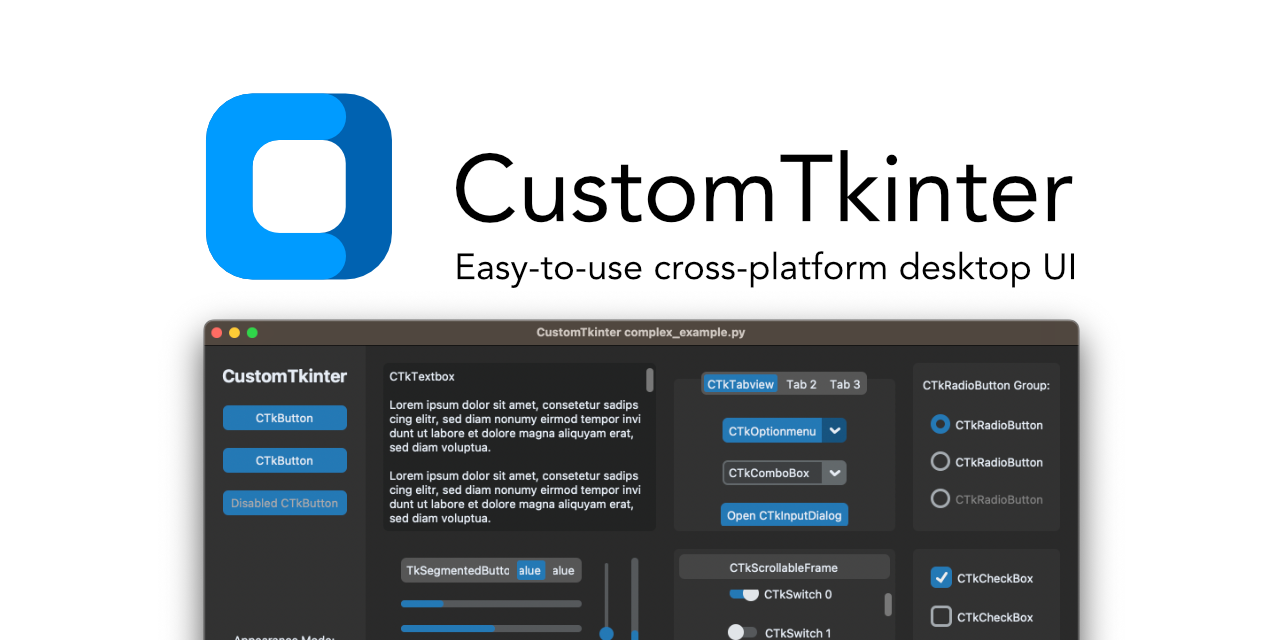
CustomTkinter is a python desktop UI-library based on Tkinter, which provides modern looking and fully customizable widgets.
somber hemlock
full marlin
https://www.customtkinter.tomschimansky.com
Cool, you made a website
 velvet perch
finally finished my prompting library 😊
 covert rock
full marlin
https://www.customtkinter.tomschimansky.com
covert rock
full marlin
https://www.customtkinter.tomschimansky.com
why use this instead of PyQt or PySide?
 quartz dust
I'm trying to use pynput in a game to move the mouse cursor then press with the mouse, when I use the actual mouse it works, but with pynput it doesn't click when it's moved at all. The thing is I have an auto clicker with the same module that works fine. So, what could the issue be for this, any help would be appreciated.
somber hemlock
covert rock
why use this instead of PyQt or PySide?
Licensing (+ familiarity with tkinter)
PyQt is GPL, PySide is LGPL (partly). CustomTkinter is CC0-1.0
Qt as a whole, is moving to closed source since v6
covert rock
somber hemlock
Qt as a whole, is moving to closed source since v6
how so?
covert rock
not what I'm asking
in what way is it moving to closed source?
what has changed and is changing that shows that
somber hemlock
it has stopped providing patches to KDE
Which is a violation of the Qt's agreement with KDE
covert rock
what's KDE?
somber hemlock
Look it up
covert rock
I did. still don't get the relevance
somber hemlock
Its not relevant unless you understand its implications 😄
Which matter a lot unless you wanna get wrapped in legal battles
covert rock
does that matter to a schmuk like me who makes programs for personal use?
somber hemlock
Nope, its more of a distribution thing
But not everyone make programs for personal use, right?
covert rock
yeah, of course
I just thought that, when you said they were moving to close source, they would literally close off access to all libraries to everyone that didn't pay
somber hemlock
covert rock
I just thought that, when you said they were moving to close source, they would ...
They could do that, and it seems they are on the path to do so
Kliment
Qt's corporate owners have been openly hostile to the community for a while, and have been trying to get away with shady stuff. The license terms for commercial use are terrible, you need an active license to distribute existing software, not only develop new software, the prices are excessive and keep increasing, and once you get a commercial u...
 Hacker News
·
Hacker News
·

 timber yacht
 honest shoal
It looks good, but try using different color palettes to check which one works perfectly
honest shoal
 honest shoal
@timber yacht Btw. THis is my first design. I mean...its Okay i guess. Not really anything too crazy or even really appealing at least imo.
honest shoal
somber hemlock
Nice
i mean like
how good is it
from a scale of 1-10
i would say a 6~7
idrk how i would neccesarily imprv it
timber yacht
honest shoal
Looks awesome
mellow hemlock
https://github.com/baoboa/pyqt5/tree/master/examples
I found this pyqt5 examples github page but im not really sure how to download these files
GitHub
PyQt5 from riverbank. Contribute to baoboa/pyqt5 development by creating an account on GitHub.
does anyone know how to?
somber hemlock
mellow hemlock
https://github.com/baoboa/pyqt5/tree/master/examples
I found this pyqt5 examples...
you can download a zip from github's web ui, or clone the repo locally with git. tons of options available
proven basinBOT
:incoming_envelope: :ok_hand: applied timeout to @lament yoke until <t:1682278160:f> (10 minutes) (reason: duplicates spam - sent 4 duplicate messages).
The <@&831776746206265384> have been alerted for review.
somber hemlock
<@&831776746206265384>
 robust pagoda
is this ok to post code examples with questions in this channel?
somber hemlock
robust pagoda
is this ok to post code examples with questions in this channel?
yes
proven basinBOT
:incoming_envelope: :ok_hand: applied timeout to @rich hare until <t:1682438651:f> (10 minutes) (reason: duplicates spam - sent 4 duplicate messages).
The <@&831776746206265384> have been alerted for review.
 unborn mirage
Anyone use tk
 acoustic breach
is qt c++ good to make GUI apps in c++ or there is a better platform to do that thanks a lot
 digital rose
Is there any good (and free) WYSIWYG Gui editor, preferably for CustomTk or simple Tkinter?
Like winforms editor of C#
somber hemlock
digital rose
Is there any good (and free) WYSIWYG Gui editor, preferably for CustomTk or simp...
!pypi pygubu
proven basinBOT

A simple GUI builder for the python tkinter module
somber hemlock
GitHub
A simple GUI designer for the python tkinter module - GitHub - alejandroautalan/pygubu-designer: A simple GUI designer for the python tkinter module
 warped shuttle
how would yall create a gui that can swtich between pages? im getting different answer when i search for it
sleek hollow
warped shuttle
how would yall create a gui that can swtich between pages? im getting different ...
Depends on the library. Generally you build a "page" using some sort of frame or empty widget, then add/remove the frames from the layout as needed
warped shuttle
sleek hollow
Depends on the library. Generally you build a "page" using some sort of frame or...
tkinter
sleek hollow
warped shuttle
tkinter
Yeah, so you put everything you want as a page into a Frame, and then add it when you want to display it, and remove it when you don't
There isn't really a "nice and easy" way to handle many pages, you'll have to code up some sort of page manager yourself
most UI is just a form of trickery
 granite acorn
Is there anybody who use a kivymd?
 toxic bridge
Does anybody have experience using the PyQt fluent widgets? Am I supposed to be promoting every individual widget I add to a layout in Qt Creator or is there a simpler way of doing things? https://pypi.org/project/PyQt-Fluent-Widgets/
 toxic bridge
Also, what's the proper name for this Windows 11 interface panel? For the life of me I can't figure out where it's referenced on the Win11 elements site, or how I can replicate this layout style in Qt Creator
 somber hemlock
toxic bridge
Also, what's the proper name for this Windows 11 interface panel? For the life o...
somber hemlock
toxic bridge
Also, what's the proper name for this Windows 11 interface panel? For the life o...
Qt Widgets has a command link widget, which looks nothing like this, but has the same behaviour
You can just use a HBoxLayout instead
 rocky lintel
If I make a simple script for example. What Is a good way to make someone else be able to use it?
somber hemlock
rocky lintel
If I make a simple script for example. What Is a good way to make someone else b...
1st step is installing python runtime on their device. then you can distribute your script as-is
 steel depot
hello everyone is anyone able to help us
PLEASE
Help us
or we will have extreme depression
 deft perch
are you using tk for this?
 ruby crystal
import tkinter as tk
root = tk.Tk()


def keypress(event):
    if event.state == 12 and event.keycode == 88:
        print("save")


text = tk.Text(root)
text.pack()
text.focus()
text.bind("<KeyPress>", keypress)
how can i have a button which commands the same function?
ruby crystal
What do you have so far?
Do you know python?
one sec
This Tkinter tutorial introduces you to the exciting world of GUI programming in Python. And you'll learn how to develop GUI application from scratch.
See section 1
But skip the event binding part
deft perch
im learning QT
ruby crystal
Also look at grid and frame
import tkinter as tk
root = tk.Tk()


def keypress(event):
    if event.state == 12 and event.keycode == 88:
        print("save")


text = tk.Text(root)
text.pack()
text.focus()
text.bind("<KeyPress>", keypress)
how can i have a button which commands the same function?
There's a section for them in the site
sleek hollow
ruby crystal
```py
import tkinter as tk
root = tk.Tk()
def keypress(event):
if event.st...
I wouldn't recommend it. Handle the inputs separately and then those functions can call the same function
def key_press(event):
    if event.state == 12 and event.keycode == 88:
        save()

def button_press():
    save()
save would be the function that both those input functions handle calling
robust pagoda
Is there any visual editor for layouts for tkinter?
ruby crystal
Thanks 🙏
toxic bridge
somber hemlock
You can just use a HBoxLayout instead
Yeah it seems like the PyQt Fluent Widgets guy is just adding custom styles to a frame. Weird to not also make those stylesheets easily accessible as part of the package supposed to make Qt look like a modern Windows 11 app but TBH there's a lot of stuff missing from it in general 🙁
I wonder if Qt will ever release an update to give widgets a modern appearance out of the box
somber hemlock
toxic bridge
I wonder if Qt will ever release an update to give widgets a modern appearance o...
That's never gonna happen.
 tropic cave
so I want to get number of same input of combobox in tkinter can anyone please help?
covert rock
how do I change the language of a Qt application?
I checked the localed with QLocale, and it is being automatically set to the one being used on my computer, in this case, Brazilian Portuguese
yet the context menu, I think it's called, the one with copy, paste, cut, delete, select all, etc is still using english
nvm figured it out
 late turtle
can someone help me with matplotlib?
 lapis orchid
I can't figure out how to deselect a radio button
self.radio_status_student = Radiobutton(self.frame_status, text="Student", variable=self.status, value=1)
self.radio_status_staff = Radiobutton(self.frame_status, text="Staff", variable=self.status, value=2)
self.radio_status_both = Radiobutton(self.frame_status, text="Both", variable=self.status, value=3)
# this is the code from the function that's supposed to deselect them
self.radio_status_both.deselect()
self.radio_status_student.deselect()
self.radio_status_staff.deselect()
ok nvm found a solution, i just made a new radio button in the same group that couldn't be selected by the user and set that to selected. kind of a crappy solution, but apparently that works.
sleek hollow
lapis orchid
```
self.radio_status_student = Radiobutton(self.frame_status, text="Student", v...
You can set the string var's value to None to deselect the radio buttons. The value of the stringvar controls which radio button is displayed
 quaint walrus
Hello, I'm currently trying to make a flask application program that emulates MongoDB in python with mysql as the database. I am using pymysql to connect my python code with my sql server which is through amazon Ec2 Ubuntu. For some reason every time I run the flask program, the link either states the connection is refused or it takes too long to load and times out. I have tried changing the host to 0.0.0.0 and 127.0.0.1, and I have tried changing the port to 3306, 5000 but nothing seems to work. I would greatly appreciate some help thank you!
 naive karma
i am trying to convert a single thread routine (right) to a multithread ones (left) in pyqt. the routine is supposed to update the progress bar via signals but in the multi threaded version the ui hangs. any idea why
 ruby crystal
in tkinter
can i use root.title() to get the title of the app?
sleek hollow
ruby crystal
in tkinter
can i use `root.title()` to get the title of the app?
What happens if you try it?
ruby crystal
sleek hollow
What happens if you try it?
it did what i wanted😅
forgot to delete the message
 pure cloak
Hi, I have python code that i built from a pyqt designer file. I made multiple windows, theyre all working seperately in this format:
class Ui_HomePage(object):
    def setupUi(self, HomePage):
      #some code here
    def retranslateUi(self, HomePage):
      #some code here

   if __name__ == "__main__":
    import sys
    app = QtWidgets.QApplication(sys.argv)
    HomePage = QtWidgets.QMainWindow()
    ui = Ui_HomePage()
    ui.setupUi(HomePage)
    HomePage.show()
    sys.exit(app.exec_())
but i have multiple objects of this format, how would i go about switching between the different screens?
somber hemlock
pure cloak
Hi, I have python code that i built from a pyqt designer file. I made multiple w...
Qt Widgets has no notion of page navigation (unlike QML). However a QStackedWidget should do the job
pure cloak
somber hemlock
Qt Widgets has no notion of page navigation (unlike QML). However a QStackedWidg...
tysm! How would i implement that?
somber hemlock
pure cloak
tysm! How would i implement that?
you have a navigation menu on the left, say a listview of "links". you bind the signal of the listview item index getting changed with the appropriate slot of the QStackedWidget to change the page shown in it.
For example, a settings dialog would have categories on the left, layed out in a list widget. On the right their would be a formlayout showing the settings for that category
 rapid harness
Hello guys . Am from Malaysia need someone help me understand tkinter ,please
 royal nimbus
im such a pure gangsta
 somber hemlock
rapid harness
Hello guys . Am from Malaysia need someone help me understand tkinter ,please
rapid harness
somber hemlock
<#704250143020417084>
somber hemlock
rapid harness
Hello guys . Am from Malaysia need someone help me understand tkinter ,please
rapid harness
somber hemlock
<#704250143020417084>
Learn it from scratch . As I have this month to do it
sleek hollow
rapid harness
Learn it from scratch . As I have this month to do it
There's a great article on realpython for getting started with it
.rp tkinter gui
 buoyant cometBOT
Here are the top 5 results:
Python GUI Programming With Tkinter
Build a Tic-Tac-Toe Game With Python and Tkinter
Python import: Advanced Techniques and Tips
Arduino With Python: How to Get Started
Python Community Interview With Russell Keith-Magee
Click the links to go to the articles.
sleek hollow
This first link here 
 uneven hound
I'll pretend like this is just a hardware issue... xd

 azure swallow
Hi, i'm working with Qt and i have a class with multiple methods inside. The code of the method is kinda getting larger due to the nature of the gui, is there a way i can outsource the code of the methods into another file? (But i still need to call it with the properties of the class)
somber hemlock
azure swallow
Hi, i'm working with Qt and i have a class with multiple methods inside. The cod...
I split the UI into a separate .ui file, to get rid of all the jank I can into the ui file.
proven basinBOT
:incoming_envelope: :ok_hand: applied timeout to @young robin until <t:1682939806:f> (10 minutes) (reason: duplicates spam - sent 4 duplicate messages).
The <@&831776746206265384> have been alerted for review.
azure swallow
somber hemlock
I split the UI into a separate .ui file, to get rid of all the jank I can into t...
I tried that too, wasn’t working for me. I have 1 class, 3-4 methods. First method is building UI, the others are calculation that I want to outsource. I think smartest would be to just pass an instance of the class with its attributes, but can I pass an instance of the class to its own method?
somber hemlock
azure swallow
I tried that too, wasn’t working for me. I have 1 class, 3-4 methods. First meth...
did you try model/view approach?
 stoic bloom
hello. i have problem. i have my interface and i need function to get output to my MCC field from keyboard. i have output in my terminal in pycharm, but i need it in interface . check photos please .


 azure swallow
Another question: the GUI tool i made was back when Gnome was running on Xorg, now that it's running on Wayland, what are my best options to port it? I used PyQt5
rapid harness
sleek hollow
There's a great article on realpython for getting started with it
thank you
somber hemlock
azure swallow
Another question: the GUI tool i made was back when Gnome was running on Xorg, n...
Qt does support Wayland, doesn't it?
 torn cliff
Anyone have any resources on how to make UI not look like ass?
design wise, my code will always be spaghetti
For example, this was one of my projects, an external program to read shared memory values of this game and create dynamically generated analogue dials for information display (for use in a driving simulator)
https://streamable.com/cwyc69 it just looks like dookie...
 azure swallow
somber hemlock
Qt does support Wayland, doesn't it?
azure swallow
somber hemlock
Qt does support Wayland, doesn't it?
Normally it does, but on wayland Sessions it keeps giving me strange options
 lean orbit
robust pagoda
Is there any visual editor for layouts for tkinter?
lean orbit
robust pagoda
Is there any visual editor for layouts for tkinter?
Yes and its called \pygubu
proven basinBOT
:incoming_envelope: :ok_hand: applied timeout to @digital rose until <t:1683079394:f> (10 minutes) (reason: duplicates spam - sent 4 duplicate messages).
The <@&831776746206265384> have been alerted for review.
 vast urchin
i am making a hotel booking application with pyqt6 with the use of qt designer. i do not understand how can i make a hotel rooms display page which adds new widgets when a new hotel room is listed to the database. basically, i wanna make an infinite hotel rooms display page.
somber hemlock
vast urchin
i am making a hotel booking application with pyqt6 with the use of qt designer. ...
you need a model/view solution
Write a model in Python and use it to populate whatever view you are using
 last terrace
Could someone with knowledge of textual help me figure out what i'm apparently doing wrong. I'm attempting to center an Input and a Button within a grid, but for some reason they just won't center. My css for them is:
#wikipedia_label {
content-align: center middle;
height: 1fr;
width: 1fr;
}
#wikipedia_input {
width: 60;
column-span: 2;
align: center middle;
}
#wikipedia_button {
column-span: 2;
align: center middle;
}``` proven basinBOT
:incoming_envelope: :ok_hand: applied timeout to @digital rose until <t:1683177893:f> (10 minutes) (reason: duplicates spam - sent 4 duplicate messages).
The <@&831776746206265384> have been alerted for review.
warped shuttle
i made this but dont know what to put inside it

 karmic nest
Hello everyone, I have an error
Here are the lines of my code where it exists:

def login_pass():
read_username = username_entry.get()
with open(f"{read_username}.txt") as user1 :
print(user1.read())
 tribal path
You wrote an open function elsewhere...
covert rock
is there an easy way to make clickin the QLabel checks the check box in the same row? I'm using a QFormLayout?
I tried looking for it, and QLabel doesn't seem to have a "clicked" signal
 ebon cairn
covert rock
I tried looking for it, and QLabel doesn't seem to have a "clicked" signal
ebon cairn
covert rock
I tried looking for it, and QLabel doesn't seem to have a "clicked" signal
it works with mousePressEvent
covert rock
ebon cairn
it works with mousePressEvent
okay but how?
like, from what I'm seeing in the docs, theres no property that tells you what widget was clicked
and how do I implement it?
I have no idea how to do this -_-
vague parcel
You need to create a new class that inherits from QLabel. Then add the mousePressEvent or release method https://doc.qt.io/qt-6/qlabel.html#mouseReleaseEvent. When the label is clicked in the method you can toggle the checkbox. You can pass the checkbox name or instance in the label class constructor
ebon cairn
covert rock
okay but how?
from PyQt5.QtWidgets import QApplication, QWidget, QFormLayout, QLabel, QCheckBox
from PyQt5.QtCore import Qt

class Example(QWidget):
    def __init__(self):
        super().__init__()

        layout = QFormLayout()

        for i in range(5):
            label = QLabel(f"Label {i}")
            checkbox = QCheckBox()

            label.setCursor(Qt.PointingHandCursor)
            label.mousePressEvent = lambda event, cb=checkbox: cb.setChecked(not cb.isChecked())

            layout.addRow(label, checkbox)

        self.setLayout(layout)
        self.show()


if __name__ == '__main__':
    app = QApplication([])
    ex = Example()
    app.exec_()
ah, the widget itself has the event, so I just needed to method it. thank you!
also, using the inverse of the current state of the checkbox as the argument is proper brilliant. very nice!
covert rock
how, after pressing the OK button of a QDialog, can I make my QMainWindow to be completely reinitialized?
ie, basically run the __init__(self) again
sleek hollow
covert rock
how, after pressing the OK button of a QDialog, can I make my QMainWindow to be ...
create a method other than __init__ that "initializes" your instance and call that instead
class MainWindow(QMainWindow):

    def __init__(self):
        super().__init__()
        self.setup()

    def setup(self):
        #Put all the other stuff you had in init before
and how do I call that from the dialog as it closes?
like this?

manga_init_state is the slot for the OK button
it seems like it's working for what's worth
sleek hollow
covert rock
and how do I call that from the dialog as it closes?
yes, you can connect to the close signal of the qdialog
depending on how the dialog is meant to close, you can also create "Accept" or "Reject" buttons for the dialog and get the result
covert rock
because like
and this is a context just so I can get your opinion on something
the idea is, since this program reads from a json, if it's the first time running it, there won't be json
so I'm excepting a json associated error and initializing one of the dialogs, that adds the manga subscriptions and settings jsons. then after closing the dialog, I need the qmainwindow to reload to properly initialize
it's like a "first time use gimmick"
sleek hollow
Use a separate check then. Don't even show the window until the json has been validated
sleek hollow
sleek hollow
```py
class MainWindow(QMainWindow):
def __init__(self):
super().__...
but either way, this should work
covert rock
sleek hollow
Use a separate check then. Don't even show the window until the json has been va...
how?
this is how I'm doing it
 sleek hollow
then put the json checking stuff in a separate method
don't do it all in 1 massive method. Separate out your logic
from PyQt5.QtWidgets import *
from PyQt5.QtCore import Qt

class MainWindow(QMainWindow):

    def __init__(self, json_path):
        super().__init__()
        self.load_json(json_path)
        self.setup()
have a method used for handling json loading
and the self.setup can't be reached until the json is fully loaded
covert rock
the thing is
settings = Settings() is what is loading the JSON
it's part of the class
and I need the main window to read from that, because every time the user adds or removes a subscription, it will add or delete one to or from the JSON
so it display proper information
at most
the load_json method would just be there to check if there's a JSON present
sleek hollow
I don't see what's stopping you from doing that with my solution?
covert rock
instead of initializing the class proper
sleek hollow
it's up to you where and when you validate the jsons existence
it could be part of load_json
it could be it's own separate method
covert rock
is there some way to check for the json existence other than excepting a bad open()?
sleek hollow
from PyQt5.QtWidgets import *
from PyQt5.QtCore import Qt

class MainWindow(QMainWindow):

    def __init__(self, json_path):
        super().__init__()
        self.initialize_json(json_path)  # Handles creating new json if json does not already exist
        self.load_json()  # Loads in json data
        self.setup()  # Populates rest of UI with json data
!d os.path.exists
proven basinBOT
os.path.exists(path)```
Return `True` if *path* refers to an existing path or an open file descriptor. Returns `False` for broken symbolic links. On some platforms, this function may return `False` if permission is not granted to execute [`os.stat()`](https://docs.python.org/3/library/os.html#os.stat "os.stat") on the requested file, even if the *path* physically exists.

Changed in version 3.3: *path* can now be an integer: `True` is returned if it is an open file descriptor, `False` otherwise.

Changed in version 3.6: Accepts a [path-like object](https://docs.python.org/3/glossary.html#term-path-like-object).ah okay
in my mind, from my admittedly limited understanding, self.load_json() is unnecessary, since the Settings() class instance will already do that
it's part of the class initialization
sleek hollow
sure, it's up to your specific needs
but this is just an example of how to split up the tasks
covert rock
so something like
sleek hollow
in general, avoid large multi-task methods
especially with UI tasks that you think will need to be repeated at any point
because then you can easily assemble a "reinitialize" method
covert rock
def __init__(self, path):
  super().__init__()
  json_exist = self.json_check(path)
  if not json_exist:
    self.first_time() # a QDialog
  else:
    self.setup()
what happens if the json file doesn't exist? Does it have to go fetch data from somewhere else?
covert rock
if the JSON doesn't exist, it will run self.first_time()
sleek hollow
but what exactly does that do?
covert rock
which is a QDialog that creates the two jsons, one for subs and one for settings. it also adds at least one sub to the subs json, and the basic "metadata" dictionary to the settings json
covert rock
so both the Settings() and Mangas() classes initialize properly the next time around
sleek hollow
Check if files exist
If it doesn't, do first-time setup
Load json and populate UI
Show UI
sleek hollow
np 🙂
warped shuttle
yall know how i can make something like that i already made the gui i just wanna how i can output the movie poster with the name bonus if its live update im also working with tkinter

 unkempt summit
warped shuttle
yall know how i can make something like that i already made the gui i just wann...
unkempt summit
warped shuttle
yall know how i can make something like that i already made the gui i just wann...
start with extending your UI to show it as a fixed element, then you just need to start changing out things so it can be updated in 1 go
 humble agate
What's the best GUI framework you guys think I should invest in learning ?
proven basinBOT
:incoming_envelope: :ok_hand: applied timeout to @vale sleet until <t:1683481348:f> (10 minutes) (reason: duplicates spam - sent 4 duplicate messages).
The <@&831776746206265384> have been alerted for review.
covert rock
hey @sleek hollow that thing we came up with to reload the main window isn't working
here
number 1 is the json that is populating the subs, number 2 is the subs management, showing it is populated

now, as you see, I cleared the JSON

now, if I click Go, even with an empty textbox, it should run set as show by number 1

but even so, they the objects continue
 sleek hollow
There's likely some other flaw in your logic
take some time to debug with prints
there's likely a value that isn't what you think it is
covert rock
this is the first thing in setup

so, by calling self.parent().setup it should read from the json again and populate the subs with it
sleek hollow
you're saying that's what it does but thinking your code does a certain thing and it actually doing that thing are different
that's why I'm saying to debug with prints
covert rock
yeah, I'm looking into it
at least I've comfirmed that the self.parent().setup() does reinitialize the main window
alright figured it out
basically, the already loaded subs from the og JSON never gets cleared
so, I had to change some functionalities
but now it works
sleek hollow
ahh well there you go 🙂
covert rock
yeah because like
I'm not storing the class instances, aka the subs, in a list inside the window logic
but rather inside a class variable inside Mangas itself
sleek hollow
yeah, it's smart to manage the actual performance of the UI from another class
the UI just lets you drive things
covert rock
and since that never gets touched when the window reloads, it's just kept in memory even when setup() is run again
so, I had to add an actual list inside the main window logic
covert rock
covert rock
from this 👆
sleek hollow
you could add a method in the Manga class for clearing
covert rock
to this

or that
yeah
that actually sounds smarter
so I won't have to rewrite code
sleek hollow
yeah, sounds like a useful method regardless of UI
anything specific to manga should be in the manga class
covert rock
so
a method that just clears out the whole registry?
this has to be a staticmethod
yep, perfect
clears the old registry on reinialization


with this, the program is basically done
now I just need how to properly use QListView lol
sleek hollow
covert rock
now I just need how to properly use QListView lol
Model/View took me quite a bit to wrap my head around
covert rock
yeah
I mean, I could just make a grid layout and do it like that
but I want it to look nice lol
sleek hollow
@covert rock This was the tutorial that really helped me understand model/view

Python GUIs
Qt's MVC-like interface for displaying data in views. As you start to build more complex applications with PyQt5 you'll likely come across issues keeping widgets in sync with your data.
This has you write your own custom model class, but there's a lot you can do just with the QStandardItemModel
 sleek hollow
haha perfect then
covert rock
sleek hollow
haha perfect then
next step after that is fixing this

splitting this file
271 lines
gonna split between main window and dialogues

 wary goblet
 bitter minnow
can anyone show me a good user interface with python ?
 lament flame
pyqt5 vs tkinter which is better?
 analog shale
lament flame
pyqt5 vs tkinter which is better?
analog shale
lament flame
pyqt5 vs tkinter which is better?
nice question. I need in answer too
 sinful pendant
lament flame
pyqt5 vs tkinter which is better?
sinful pendant
lament flame
pyqt5 vs tkinter which is better?
Here are my experiences:
(Mostly have used tkinter and less of pyqt6)
-
Tkinter has limited widgets pyqt provides a vast amount of widgets
-
Styling tkinter widgets is limited, it can be extended though with ttk but the interface will be more like the classic window gui style. Pyqt provides much more styling to the widget
-
Getting familiar with tkinter is easy for pyqt it takes a bit more time.
-
Variety of modules are there to extende the style of tkinter widgets but they might cost the performance of the app.
-
Learning tkinter is easy than pyqt
-
If you want to go ahead with it for advance i will suggest pyqt
Here, pyqt = PyQt6
 unreal copper
how would you add animations to a label in tkinter(eg-pressing a button cause a animation to play on a label)
ebon cairn
lament flame
pyqt5 vs tkinter which is better?
tkinter is good because it comes with python
that's all the good things I can say about tkinter
proven basinBOT
:incoming_envelope: :ok_hand: applied timeout to @minor kite until <t:1683566490:f> (10 minutes) (reason: duplicates spam - sent 4 duplicate messages).
The <@&831776746206265384> have been alerted for review.
covert rock
ebon cairn
that's all the good things I can say about tkinter
tkinter is and always will be free and open
Qt is getting very iffy
do you guys use Qt designer?
sleek hollow
When I started with PyQt I thought designer would save me time. Didn't end up being the case. I'm way more productive creating all my widgets from scratch
analog shale
hello guys! Maybe u know haw i can do GUI. I have next requirements:
- I have many clients
- i need to show for every client UI
- now i'm trying to show video when button is clicked (on client i have command which should will send on server data to start video)
Now questions:
Should I create instance of UI on client? How it should communicate with each other?
I'm using PyQt
proven basinBOT
 :ok_hand: applied timeout to @tight lark until <t:1683643723:f> (10 minutes) (reason: duplicates spam - sent 4 duplicate messages).
The <@&831776746206265384> have been alerted for review.
ruby crystal
import tkinter as tk
from tkinter import ttk, Tk

root = Tk()

def main():
  root.geometry("300x300")
  frame = ttk.Frame(root)
  frmae.pack()

  next_page():
    frame.destroy()
    new_page()

  ttk.Label(frame, text=1).pack()
  ttk.Label(frame, text=1).pack()

  ttk.Button(frame, text=1, command=next_page).pack()


main()


def new_page():
  root.geometry("200x200")
  new_frame = ttk.Frame(root)
  new_frame.pack()

  def first_page():
    new_frame.destroy()
    main()

  ttk.Label(new_frame, text=2)

  back = ttk.Button(new_frame, text="back", command = first_page)
  back.pack()

root.mainloop()
.
.
.
is this how you would change pages ?
and go back to the first page?
warped shuttle
ruby crystal
.
.
.
is this how you would change pages ?
and go back to the first page?

Stack Overflow
So I'm trying to make a login app and want to add register option to it...
I made a register button and I want it to switch from the login page to the register page without opening any new window (...
ruby crystal
that looks like my code only oop
 digital quartz
If you want to implement this into another larger program then OOP is definitely recommended
 worthy lotus
can someone help me with my code?
digital quartz
Um sure
 torn shadow
 hidden wadi
Been working on this for about 3 hours.
A command-line operating system thing.
Already fixed sys.ver it was a syntax error I missed
Also only 147 lines
 untold marsh
I’m really liking Customtkinter. Making a stable diffusion prompt generator that’s integrated with open Ai chat gpt. https://designanddevelopblog.vercel.app/apps/32
Having trouble making it a standalone app for Mac though.
 chrome burrow
have you done much FreeCAD since your post?
 glossy fiber
any ui advice?
 chrome burrow
glossy fiber
any ui advice?
chrome burrow
glossy fiber
any ui advice?
SELL SELL SELL
glossy fiber
LMAO
chrome burrow
what algorithm/data are you using? just the price points from the time series?
it seems that the model isn't trained or that's some bad gaussian extrapolation
glossy fiber
ive got historical prices of common foods and then 3 predictions, 2 are just based on rates and then simple linear regression on the whole thing

meant to change that number to 6.6
chrome burrow
glossy fiber
ive got historical prices of common foods and then 3 predictions, 2 are just bas...
i don't really know, but IMO pricing of securities needs to use exponential methods. then the continued average would be a little closer.
have you seen this? https://python.quantecon.org/intro.html
also, time series would be more appropriate, but i'm not sure what you're working on
ruby crystal
record_text = tk.Text(text_frame, height=25, state="normal", border=5)
record_text.pack()

for index, i in enumerate(file):
    insert_index = float(index + 2)
    record_text.insert(insert_index, i[0])
why isn't this inserting right?
everything is on line one
worthy lotus
folks i need help with my sccipt
print('hello')
ok just testing
while True:
    event, values = layout.read()
    if event == 'Assign New Action':
        event, values = layout1.read()
        if event == 'Enter':
            button = values['button']
            layout1.close()

#           Button 1

            if button == 'Button 1':
                event, values = apple.read()
                if event == 'Spotify':
                    with open('sip1.txt', 'w') as f:
                        f.write(str(spot))
                    sg.popup('Saved!')
                    layout['button1'].update(spot)
                    apple.close()

                if event == 'OperaGX':
                    with open('sip1.txt', 'w') as f:
                        f.write(str(op))
                    sg.popup('Saved!')
                    layout['button1'].update(op)
                    apple.close()
                if event == 'Steam':
                    with open('sip1.txt', 'w') as f:
                        f.write(str(stem))
                    sg.popup('Saved!')
                    layout['button1'].update(stem)
                    apple.close()
Im using pysimplegui and i have multiple layouts and windows
yes there is a break statement its just at the bottom
this is my problem
 hidden cairn
chrome burrow
have you done much FreeCAD since your post?
hidden cairn
chrome burrow
have you done much FreeCAD since your post?
Not much aside from continuing work on the macro. Got it to work with rotated keyclusters, further refined the UI, added support for several different kinds of cutouts.
Trying to get it to render slanted and elliptical corners atm
ruby crystal
record_text = tk.Text(text_frame, height=25, state="normal", border=5)
record_text.pack()

for index, i in enumerate(file):
    insert_index = float(index + 2)
    record_text.insert(insert_index, i[0])
why isn't this inserting right?
everything is going to line one
sleek hollow
ruby crystal
```py
record_text = tk.Text(text_frame, height=25, state="normal", border=5)
rec...
what is file?
Also using the names index and i in your enumerate loop is quite confusing
for i, content in enumerate(file) would make way more sense
also the insertion index has to be a string
insert_index = f'{i}.0' (if using my example of i)
ruby crystal
mm sorry my bad
ruby crystal
sleek hollow
what is `file`?
file is a list of tuples that i got from a database
i in the enumerate loop is each of those tuples
ruby crystal
sleek hollow
`insert_index = f'{i}.0'` (if using my example of `i`)
record_text.insert(1.0, f"name: {file_name}, age: {file_age}\nconditions:")
    for i, names in enumerate(file):
        record_text.insert(f"{i+3}.0", f"{names[0]}")
now i have this
but it's still broken
all the data from the loop is inserting on the same line
proven basinBOT
:incoming_envelope: :ok_hand: applied timeout to @inner salmon until <t:1683969809:f> (10 minutes) (reason: duplicates spam - sent 4 duplicate messages).
The <@&831776746206265384> have been alerted for review.
 dreamy gyro
# =============
# COLORS
# =============
#
# This file shows the colors.. EDIT THIS VALUES AT THE OWN RISK

bg="grey10"
hoveredbg="grey15"
fg = "antiquewhite"
colorsred = ["firebrick1" , "firebrick4"]
colorsorange = ["chocolate1" , "chocolate2"]
colorsyellow = ["yellow1" , "yellow4"]
colorsgreen = ["green1" , "green4"]
colorsblue = ["dodgerblue1" , "dodgerblue4"]
colorspurple = ["mediumorchid" , "mediumorchid4"]
i tried to pack some buttons using for loop
i failed
digital rose
how to remove titlebar in tkinter, but make the program appear in the taskbar. Now I don't have a titlebar and the program is not displayed in the taskbar:
root = tk.Tk()
root.overrideredirect(1)``` covert shore
Can someone please help me getting data from this
 proven basinBOT
Python USB access module
sleek hollow
ruby crystal
```py
record_text.insert(1.0, f"name: {file_name}, age: {file_age}\nconditions:"...
You would manually need to create the new lines first. You can't insert something on line 3 if your textbox doesn't already have a line 3
ruby crystal
mm
\n seems a better way at this point
sleek hollow
yes, that's how you'd create the new lines
 neat granite
i want to display a label on gui. The GUI that I made is a platform which is one of the functions for adjusting the windows volume. I separated the script for the GUI and the script for volume control. Incidentally the Slider on the GUI can adjust the volume. My problem is that the label that displays the percentage of volume value doesn't appear. Here I show the two files.
gui.py
import customtkinter

class Myapp():
    def __init__(self):
        self.root = customtkinter.CTk()
        self.root.geometry('1050x600')

        self.label = customtkinter.CTkLabel(self.root, text="Volume Setting", font=("Nunito",15))
        self.label.grid(row=10, column=1)
        self.var = customtkinter.IntVar(value=getCurrentMasterVolume())
        self.scale = customtkinter.CTkSlider(self.root, from_=0, to=100, variable=self.var, command=setMasterVolume, orientation="horizontal", button_corner_radius=3, button_length=20)
        self.scale.grid(row=11, column=1)

app = Myapp()
app.root.mainloop()
from ctypes import cast, POINTER
from comtypes import CLSCTX_ALL
from pycaw.pycaw import AudioUtilities, IAudioEndpointVolume, ISimpleAudioVolume
import customtkinter

devices = AudioUtilities.GetSpeakers()
interface = devices.Activate(IAudioEndpointVolume._iid_, CLSCTX_ALL, None)
volume = cast(interface, POINTER(IAudioEndpointVolume))

root = customtkinter.CTk()
def getCurrentMasterVolume():
    return round(volume.GetMasterVolumeLevelScalar() * 100)

def displayCurrentVolume():
    selection = str(getCurrentMasterVolume()) + "%"
    vol_label = customtkinter.CTkLabel(root, font=("Nunito",15))
    vol_label.configure(text=selection)
    vol_label.grid(row=12, column=1)

def setMasterVolume(value):
    scalarVolume = value / 100
    volume.SetMasterVolumeLevelScalar(scalarVolume, None)
    displayCurrentVolume()
The method for displaying a percentage of the volume is found in displayCurrentVolume(). I really need help. Please help me.
 mighty spoke
can someone help in https://discord.com/channels/267624335836053506/1107261015940419664 im not sure whats wrong
 split ridge
does anyone have a good tk documentation pls
split ridge
 tight ice
<https://docs.python.org/3/library/tkinter.html>
tight ice
<https://docs.python.org/3/library/tkinter.html>
tysm!
that one is alright
digital rose
qt is better than tkinter. just as easy to learn too. & its widget positioning is hella better.
digital rose
please tell me, is it possible to make the text background transparent in tkinter?
 stray jackal
great idea
DuckDuckGo. Privacy, Simplified.
yes it works .. never thought of that
hidden wadi
added a password hint system to my operating system
neat granite
i have made a GUI which one of GUI fuctions is to adjust the windows volume. The volume is running as expected. but for the label to show precent of the volume it doesnt work well. is there any solution for this problem. Here is the repository link for the code.
https://github.com/emfauzan/APx-platform
GitHub
Contribute to emfauzan/APx-platform development by creating an account on GitHub.
 shut blaze
Is it possible to change a global variable within a method in tkinter?
neat granite
shut blaze
Is it possible to change a global variable within a method in tkinter?
Can you give an example? please
shut blaze
neat granite
Can you give an example? please
Pleases bear with me, I'm not that familiar with discord
shut blaze
neat granite
Can you give an example? please
sleek hollow
shut blaze
Is it possible to change a global variable within a method in tkinter?
Yes. Does your example code not work as expected?
shut blaze
sleek hollow
Yes. Does your example code not work as expected?
I keep getting an error messages. One of these is ‘Shadow name from outer scope’ and the other is ‘Local variable value is not used.
shut blaze
sleek hollow
the example you showed looks fine. Is that your exact code?
It is, but it’s a sample
 torn forum
Could anyone advise on using PySide6 at all please? I'm trying to load a UI from file. This is working okay, but I wanted the signal/slot connections in the file ot map to the class I've got in the Python source code. I.e. I have a MainWindow with some functions decorated with @Slot(), I'd like the buttons e.g. in the form to be connetced to these functions, without doing it all in code. I get no warnings when I load the file, but my slot doesn;t seem to fire. Is there any documentation on how to od this? Thakns
digital rose
best to convert .ui to .py
torn forum
I was feeling lazy, but can give it a try; would that be able to stub slots on the main window class if they are in the UI file?
digital rose
i always convert my ui files so not sure
neat granite
guys, how do you run multiple method from a class in GUI button? (including the init method to the execution method)
sleek hollow
neat granite
guys, how do you run multiple method from a class in GUI button? (including the ...
there's no limit to how much you can connect to a signal
which GUI library?
neat granite
costumtkinter
neat granite
sleek hollow
there's no limit to how much you can connect to a signal
can you give example?
sleek hollow
sorry that example was specific to pyqt
but you could have 1 main method that triggers other method calls
def send_clicked_signal():
    func1()
    func2()
    func3()

button = tk.Button(command=send_clicked_signal)
class test:

    def __init__(self):
        ....

    def func1(self):
        ...

    def func2(self):
        ...
what id i want to run all the method as above on one button?
sleek hollow
you would never call init from a button press
class Test:

    def send_clicked_signal(self):
        self.func1()
        self.func2()
        self.func3()

    button = tk.Button(command=self.send_clicked_signal)
it's not really much different from a class though
you'll just need self to access the inner method calls
neat granite
sleek hollow
you would never call init from a button press
so init cant be called from button?
neat granite
class Test:

    def send_clicked_signal(self):
        self.func1()
        self.func2()
        self.func3()
    def method2(self):
        self.func4()
        self.func5()

    button = tk.Button(command=self.send_clicked_signal)
how about this? if i want to call both function in one button.
sleek hollow
call self.method2() from send_clicked_signal
class Test:

    def send_clicked_signal(self):
        self.func1()
        self.func2()
        self.func3()
        self.method2()

    def method2(self):
        self.func4()
        self.func5()

    button = tk.Button(command=self.send_clicked_signal)
Okey thanks
ohh, one more thing
class Test:

    def send_clicked_signal(self):
        self.func1()
        self.func2()
        self.func3()
        self.method2()

    def method2(self):
        self.func4()
        self.func5()

class gui:

    def __init__(self):
        button = tk.Button(command=self.send_clicked_signal)
how about this?
sleek hollow
You need to instantiate Test as part of the gui class to access it
it's a pretty vague example though
it really depends on what you're actually trying to do and your code structure
class Test:

    def send_clicked_signal(self):
        self.func1()
        self.func2()
        self.func3()
        self.method2()

    def method2(self):
        self.func4()
        self.func5()

class gui:

    def __init__(self):
        test = Test()
        button = tk.Button(command=test.send_clicked_signal)
it would look roughly like this, but again, it depends on your exact structure
but even better would be this
class Test:

    def send_clicked_signal(self):
        self.func1()
        self.func2()
        self.func3()
        self.method2()

    def method2(self):
        self.func4()
        self.func5()

class gui:

    def __init__(self):
        self.test = Test()
        button = tk.Button(command=self.on_btn_clicked)

    def on_button_clicked(self):
        self.test.send_clicked_signal()
okeyy, thanks for explanation
ruby crystal
Tkinter Combobox messes up words that have space (" ") in them ?
It's adding {} around it
like if a word is "test one"
It shows {test one}
sleek hollow
ruby crystal
It's adding {} around it
can you share a reproducible example?
ruby crystal
sleek hollow
can you share a reproducible example?
import tkinter as tk
from tkinter import ttk
import sqlite3

con = sqlite3.connect("test.db")
cur = con.cursor

names = cur.execute("SELECT name FROM Person").fetchall()

selected_name = tk.StringVar()

chose_name = ttk.Combobox(opening_frame, textvariable=selected_name, state="readonly", values=names_list)

chose_name.pack()

con.close()
cur.close()
cur.execute("INSERT INTO Person(name, age) VALUES(?, ?)", (name, age))
con.commit()
this is how i insert data
sleek hollow
I'm not really sure about sql, but just testing with adding names to the combobox definitely doesn't insert any {}
try using some print statements as you fetch the names from the db and before you add them to the combobox
Sounds like you might have an unprocessed f-string or some other weird string manipulation going on
that's definitely not an expected behaviour of the combo box though
ruby crystal
i've printed everything 🙂
data is without {} when i'm adding it to combobox
sleek hollow
where do you update the combobox?
ruby crystal
name_var = tk.StringVar()
name_combo = ttk.Combobox(adding_frame, textvariable=name_var, values=names_list)
i get my names from this
cur.execute("INSERT INTO Person(name, age) VALUES(?, ?)", (name, age))
con.commit()
this gets them into database
names = cur.execute("SELECT name FROM Person").fetchall()
this get the names from database
names_list = sql_funcs.get_all_names()
this calls the sql function which is in sql_funcs file
and gets the name
print(names_list)
and i printed it
it's without {}
sleek hollow
can you show a screenshot of the combobox displaying the issue?
 sleek hollow
can you show the print of names_list?
ruby crystal
sleek hollow
can you show the print of `names_list`?
[('amir reza',)]
ruby crystal
sleek hollow
can you show the print of `names_list`?
[('amir reza',), ('amirreza',)]
this is how it gets without space too
sleek hollow
it's because you have a list of tuple
It is actually peculiar that it adds the {} around words with spaces. I'm not sure the cause, but the fix is to flatten your list of tuples
sleek hollow
np! 🙂
neat granite
neat granite
i have made a GUI which one of GUI fuctions is to adjust the windows volume. The...
guys, anyone can fix this issue?
digital rose
neat granite
guys, anyone can fix this issue?
i dont use tk anymore but here uve got a dupe line
 neat granite
I actually changed the script like this.
        self.label = customtkinter.CTkLabel(self.root, text="Volume Setting", font=("Nunito",15))
        self.label.grid(row=10, column=1)
        self.toggleBtn = customtkinter.CTkButton(self.root, border_width=2.5, border_color="red", text_color="red" , text="Mute Off", font=("Ubuntu", 12), command=self.toggle_mute)
        self.toggleBtn.grid(row=11, column=3)
        get = GetSound()
        self.var = customtkinter.IntVar(value=get.getCurrentMasterVolume())
        self.scale = customtkinter.CTkSlider(self.root, from_=0, to=100, variable=self.var, command=get.setMasterVolume, orientation="horizontal", button_corner_radius=3, button_length=20)
        self.scale.grid(row=11, column=1)
        self.vol_label = customtkinter.CTkLabel(self.root, font=("Nunito",15))
        self.vol_label.configure(text=get.displayCurrentVolume())
        self.vol_label.grid(row=12, column=1)
the problem remains the same
digital rose
what actual problem are you experiencing
neat granite
digital rose
what actual problem are you experiencing
it should when i adjust the volume on the slider, it should show the sound proportion value label below the slider.
in the code i shared the label is not working properly.
digital rose
i think for the label to actively display the volumes current value you need to connect the label to the slider.
Kinda like that.
# SOUND CONTROL
self.label = customtkinter.CTkLabel(self.root, text="Volume Setting", font=("Nunito",15))
self.label.grid(row=10, column=1)
self.toggleBtn = customtkinter.CTkButton(self.root, border_width=2.5, border_color="red", text_color="red" , text="Mute Off", font=("Ubuntu", 12), command=self.toggle_mute)
self.toggleBtn.grid(row=11, column=3)
get = GetSound()
self.var = customtkinter.IntVar(value=get.getCurrentMasterVolume())
self.scale = customtkinter.CTkSlider(self.root, from_=0, to=100, variable=self.var, command=self.update_label, orientation="horizontal", button_corner_radius=3, button_length=20)
self.scale.grid(row=11, column=1)
self.vol_label = customtkinter.CTkLabel(self.root, font=("Nunito",15))
self.vol_label.grid(row=12, column=1)
self.vol_label.configure(text=get.displayCurrentVolume())

def update_label(self):
    get = GetSound()
    get.setMasterVolume()
    self.vol_label.configure(text=get.displayCurrentVolume())
you could probs use a lambda to pass 'get' instead of instantiating it again as well.
sound = Sound() would be better too.
neat granite
okey i'll try
digital rose
I believe the sliders command gets executed every time its value changes. this is why ud need to connect the label to the slider. or as i did, connect a method and have verious things happen in said method, if needed ofc.
The other way would be to thread the label and have it in a loop where it continuously checks for the vol value, if not same as stored one, update label... but this is ofc not necessary since the other approach will suffice.
but anyways. best of luck.
 digital rose
show code
neat granite
# SOUND CONTROL
        self.label = customtkinter.CTkLabel(self.root, text="Volume Setting", font=("Nunito",15))
        self.label.grid(row=10, column=1)
        self.toggleBtn = customtkinter.CTkButton(self.root, border_width=2.5, border_color="red", text_color="red" , text="Mute Off", font=("Ubuntu", 12), command=self.toggle_mute)
        self.toggleBtn.grid(row=11, column=3)
        get = GetSound()
        self.var = customtkinter.IntVar(value=get.getCurrentMasterVolume())
        self.scale = customtkinter.CTkSlider(self.root, from_=0, to=100, variable=self.var, command=self.update_label, orientation="horizontal", button_corner_radius=3, button_length=20)
        self.scale.grid(row=11, column=1)
        self.vol_label = customtkinter.CTkLabel(self.root, font=("Nunito",15))
        self.vol_label.grid(row=12, column=1)
        self.vol_label.configure(text=get.displayCurrentVolume())
def update_label(self):
        get = GetSound()
        get.setMasterVolume()
        self.vol_label.configure(text=get.displayCurrentVolume())
this is coming from a different file named sound_control.py
from ctypes import cast, POINTER
from comtypes import CLSCTX_ALL
from pycaw.pycaw import AudioUtilities, IAudioEndpointVolume, ISimpleAudioVolume

devices = AudioUtilities.GetSpeakers()
interface = devices.Activate(IAudioEndpointVolume._iid_, CLSCTX_ALL, None)
volume = cast(interface, POINTER(IAudioEndpointVolume))

class GetSound:

    def getCurrentMasterVolume(self):
        return round(volume.GetMasterVolumeLevelScalar() * 100)

    def displayCurrentVolume(self):
        selection = str(self.getCurrentMasterVolume()) + "%"
        return selection

    def setMasterVolume(self, value):
        scalarVolume = value / 100
        volume.SetMasterVolumeLevelScalar(scalarVolume, None)
        self.displayCurrentVolume()

    @staticmethod
    def mute(boolMute):
       sessions = AudioUtilities.GetAllSessions()
       for session in sessions:
           volume = session._ctl.QueryInterface(ISimpleAudioVolume)
           print("volume.GetMute(): %s" % volume.GetMute())
           volume.SetMute(boolMute, None)
change: def update_label(self):
to: def update_label(self, value):
neat granite
TypeError: GetSound.setMasterVolume() missing 1 required positional argument: 'value'
such an error appears
neat granite
 digital rose
ye ik that. im asking if u can see what the issue is?
neat granite
digital rose
do u know what that simple error means?
No. Please explain for me
i think the issue in get.setMasterVolume()
missing 1 argument
done dude
Problem solved. thank you very much
digital rose
ok so the first error was update_label was missing an arg. this arg was being passed by the slider by default. said arg being the value of the slider.
so we fixed that by adding an additional arg to the update_label method. hence error went away.
but by doing so and no longer directly having the slider call on get.setMasterVolume, the sliders default arg(its value), is no longer being passed to setMasterVolume
so in the update_label method, you need to add the value arg to get.setMasterVolume(), like get.setMasterVolume(value)
digital rose
neat granite
Problem solved. thank you very much
good stuff.
neat granite
digital rose
ok so the first error was update_label was missing an arg. this arg was being pa...
thanks for explain
digital rose
np
ruby crystal
hi
i have made an app that records your medical conditions
it's for my cs50p course
it's a little long
but i would appreciate if you would give some feedback on style of my code and if there is something wrong

GitHub
cs50p project. Contribute to amirreza8002/medical_recoed development by creating an account on GitHub.
i'm rather new so it might be not pretty
it'd be very helpful if you have some tips on that
 silver idol
Hello there. I need to create GUI for the software that modifies specific text-containing files. However, the files also have description of 3D models that I would like to visualize. What would be the best pick for that? What framework pick? For the explanation: I need to be able to modify the 3D model and it ought to be reflected in the file
somber hemlock
silver idol
Hello there. I need to create GUI for the software that modifies specific text-c...
PyQt / PySide has a 3D module. If you have a parser which can serialise / deserialise into the model Qt expects, you are good to go.
silver idol
somber hemlock
PyQt / PySide has a 3D module. If you have a parser which can serialise / deseri...
Okey, I picked PySide. The raw data are just xyz coordinates, e.g.
x      y       z
1.23  2.23   1.48
0.53  3.11   2.48
and I would like to read them and generate 3D spheres at these centers
somber hemlock
I am not familiar with Qt 3D
silver idol
(other thing) - Why I get:
Traceback (most recent call last):
  File "/widget.py", line 43, in button_clicked_hard
    message.setStandardButtons(QMessageBox.Ok | QMessageBox.Cancel)
TypeError: 'PySide2.QtWidgets.QMessageBox.StandardButton' object cannot be interpreted as an integer
in that part of the code:
def button_clicked_hard(self):
  message = QMessageBox()
  message.setMinimumSize(700,200)
  message.setWindowTitle("Msg Title")
  message.setText("Something happened")
  message.setInformativeText("Do you want?")
  message.setIcon(QMessageBox.Critical)
  message.setStandardButtons(QMessageBox.Ok | QMessageBox.Cancel)
  message.setDefaultButton(QMessageBox.Ok)
Oh, ok
split ridge
does tk suck?
ruby crystal
split ridge
does tk suck?
no
it has it's uses
if you want to go over the limit, then it won't work
digital rose
limited imo
 quartz mural
Context: #python-discussion message
 silver idol
Hey, need your advice. I use PyQt and need to make separate window apart from the QMainWindow that is a 3D canvas. Upon clicking in it, a 3D sphere shall be created at the point of click. How could I do that? There are literally no tutorials or I just cannot find it ! Appreciate help
 deep python
 mighty rock
Not notepad
Preferably has syntax highlighting and welcomingly suggests auto completions
tribal path
notepad++ it is then
ebon cairn
it is https://thonny.org the best ide for beginners
 tiny eagle
+1 for Thonny for novice programmers.
For experienced programmers, PyCharm is fantastic.
 gilded raven
Hello, I want yo create a GUI for a software that I need but I see we can do with different framework like tkinter or Pyside, is It worth it to learn them all or I need to stick just with one? Thanks
mighty rock
Stick with the one you want to work with
gilded raven
mighty rock
Stick with the one you want to work with
Yes but I don't really know what's the difference like there is a better framework?
mighty rock
tkinter has a reputation for having ugly graphical elements but there's tkinter.ttk which provides modern versions for some elements and some new elements
I don't know much about the rest besides PyQt using Qt and hence lets you use everything you can use in Qt
ebon cairn
gilded raven
Yes but I don't really know what's the difference like there is a better framewo...
each framework has pros and cons, depending on the project
 topaz depot
I am making a duplicate file deleter, does this UI look good ( I will style it later).
This program is not ment to be user friendly but I don't want it to be a pain to work with.

I am using PyQt6
Btw you have to scan first, then execute deleter
Any suggestion for improvement? (make sure to ping me in the replys)
glossy fiber
i have a couple models running, i interact with local apis to get audio data that i render in this front-end streamlit app.
Right now i have to click to play audio, is there any good and/or easy ui tool that would play audio automatically?
 digital rose
topaz depot
I am making a duplicate file deleter, does this UI look good ( I will style it l...
digital rose
topaz depot
I am making a duplicate file deleter, does this UI look good ( I will style it l...
I think it looks pretty clean! It looks straightforward and clear so I think it’s pretty good 👍
topaz depot
digital rose
I think it looks pretty clean! It looks straightforward and clear so I think it’...
Thanks for you feedback 🤠
 prime pier
can anyone suggest me a way to improve this layout. Its made using tkinter and ttkbootstrap

I want to set the layout like this

 spiral apex
Can you show your code? You should probably communicate using Futures and not trying to call back to your app
 brazen imp
!warn 1089253927297482895 please don't spam.
proven basinBOT
:incoming_envelope: :ok_hand: applied warning to @novel ginkgo.
 void sable
spiral apex
Can you show your code? You should probably communicate using Futures and not tr...
void sable
spiral apex
Can you show your code? You should probably communicate using Futures and not tr...
was fixed yesterday
sorry xD
 tardy plank
Which property I have to change to make the buttons centered? Using customtkinter

 hardy island
tribal path
`notepad++` it is then
hardy island
tribal path
`notepad++` it is then
no.
prime pier
I want to change my tkinkter layout to place arrangement. currently it uses grid layout. the number of layouts generated differs on the number of players. can anyone help
for 2 players and 6 players the layout is presented.

 proven basinBOT
:incoming_envelope: :ok_hand: applied timeout to @winged wolf until <t:1685204670:f> (10 minutes) (reason: duplicates spam - sent 4 duplicate messages).
The <@&831776746206265384> have been alerted for review.
 ocean sand
How would i fix this code? I asked chat gpt but the unblock button does not have permissions even though I gave it my password
 fathom skiff
Does this button have a name ?
 proven basinBOT
:incoming_envelope: :ok_hand: applied timeout to @queen temple until <t:1685280655:f> (10 minutes) (reason: duplicates spam - sent 4 duplicate messages).
The <@&831776746206265384> have been alerted for review.
 cloud scroll
fathom skiff
Does this button have a name ?
cloud scroll
fathom skiff
Does this button have a name ?
biometric?
Looks like a calendar + clock + fingerprint all rolled into one widget
Does it need a name?
hidden wadi
ignore the background. Windows terminal has a translucent background, so you can see my wallpaper through it
 drifting edge
hello
 wise gulch
fathom skiff
Does this button have a name ?
wise gulch
fathom skiff
Does this button have a name ?
נראה כמו 5 פונקציות שונות עם עיצוב מינימליסטי זה לא כפתור אחד
wise gulch
prime pier
I want to change my tkinkter layout to place arrangement. currently it uses grid...
What languages are you using
ocean sand
How would i fix this code? I asked chat gpt but the unblock button does not have permissions even though I gave it my password
https://paste.pythondiscord.com/alafocegat
prime pier
wise gulch
What languages are you using
Python only
wise gulch
prime pier
Python only
What is the frontend tho?🤔
tribal path
Its tkinter tcl/tk
 mighty frigate
@ocean sand elaborate please. Also what does this have to do with UI ?
ocean sand
mighty frigate
<@1040838414121050213> elaborate please. Also what does this have to do with UI ...
idk
mighty frigate
one question answered, one question left 🙂
 ebon pasture
hi, i just want to know how i could display colored emojis in combobox tkinter please, it shows just colorless ones,
and if it's possible to display images instead, i tried but it only shows 'pyimage2' or stuff like this,
Here's my code for emojis
loade= [emoji.emojize(':yellow_circle:'), emoji.emojize(':red_circle:'), emoji.emojize(':green_circle:')]
priority_combobox = Combobox(root, values=loade, state='readonly', width=8, height=8)
priority_combobox.current(0)  # Set the initial index to 0 (first element)
priority_combobox['justify'] = 'center'  # Center-align the text
priority_combobox.place(x=350, y=630)```
Heres my code for images:
```python
red_photo   =  ImageTk.PhotoImage(file='img/Red.png')
yellow_photo=  ImageTk.PhotoImage(file='img/yellow.png')
green_photo =  ImageTk.PhotoImage(file='img/green.png')
loaded = [red_photo, yellow_photo, green_photo]
priority_combobox = Combobox(root, values=loaded, state='readonly', width=8, height=8)
priority_combobox.current(0)  # Set the initial index to 0 (first element)
priority_combobox['justify'] = 'center' # Center-align the text```I don't think tkinter combobox supports this 😦
ebon pasture
ohhh
ebon pasture
sleek hollow
I don't think tkinter combobox supports this 😦
can optionmenu support it tho?
ebon pasture
hi, is it possible to display colored emojis in a listbox item tkinter?
somber hemlock
ebon pasture
hi, is it possible to display colored emojis in a listbox item tkinter?
Functionality wise tkinter widgets are the same as their native equivalents. The native ones on Windows are particularly crap.
Its best to use icons or iconfonts for a consistent look
sleek hollow
ebon pasture
can optionmenu support it tho?
I don't believe so either. Your options are trying to build a custom widget that simulates what a combobox can do, or use a more full-featured GUI library like pyqt5
neat granite
I have code like this.
from tkinter import filedialog as fd
import pandas as pd

class AcousticResponse():
    def __init__(self):
        super().__init__()

    def open_file(self):
        """
        This function is to load the JSON file which is the values that will be used when
        making measurements
        """
        filetypes = [("Json File", "*.json")]
        filenames = fd.askopenfilename(title="Open File", filetypes=filetypes)
        df = pd.read_json(filenames)

    def SignalPath(self):
        APx = APx500_Application()
        APx.Visible = True
        APx.SignalPathSetup.OutputConnector.Type = OutputConnectorType.AnalogBalanced
        APx.SignalPathSetup.InputConnector.Type = InputConnectorType.AnalogBalanced
        APx.SignalPathSetup.Measure = MeasurandType.Acoustic
        input1 = APx.SignalPathSetup.InputSettings(APxInputSelection.Input1)
        input1.Channels[0].Name = "Mic"
        input1.Channels[0].Sensitivity.Value = float(df["sensitivity_value_mic"][0])
if I run the code above, the error name 'df' not defined appears. I need the df variable to be used in multiple methods. How can the df variable be stored as an attribute so it can be used in other methods?
tribal path
self.df = for use in other methods that share the same self ie the same instance
 quaint orchid

cant describe how grateful i am they went ahead and made the return value to ignore an event true and to handle it false (ive been awake for 2.5 days straight debugging this)
sleek hollow
oh yeah eventFilters messed with my head too when I first used them. So many broken events
 cunning bolt
hello everyone !
I am hayd...
a Python professional programmer
and I hope to be useful
more than 3 year programming in Python
and I created a programming language that called strike I as extension for my frame work
that is morsaFM now you can get morsaFM beta 1.2 from this link:
https://haydarali0980.wixsite.com/fpu-group
Fpu Group
I use tkinter Python's GUI libary to make all of GUI in morsaFM beta 1.2
 dire carbon
prime pier
I want to change my tkinkter layout to place arrangement. currently it uses grid...
dire carbon
prime pier
I want to change my tkinkter layout to place arrangement. currently it uses grid...
Have you posted this on Github or is private project??
Just think it is brilliant
prime pier
Private project
unborn mirage
from tkinter import *
class List(Tk):
    def __init__(self):
        button = Button(self, text="Hello world!")
        self.geometry("200x100")
l = List()
I kept getting an error on this and idk why and also, I forgot to call the pack method ;-;
I think I know now
Nvm
 wise plaza
can anybody help in #1114507134848213002 ?
hidden wadi
unborn mirage
```py
from tkinter import *
class List(Tk):
def __init__(self):
butt...
Maybe this is simpler to read?
from tkinter import *
root = Tk()
root.geometry('200x100')
button = Button(root, text="Hello world!")
button.pack()
root.mainloop()
Classes improve readability I heard
hidden wadi
In my opinion using a class here is more annoying to read
But that's just my opinion
It doesn't have to mean anything to you
somber hemlock
@sleek hollow hey sorry for the ping, https://forum.qt.io/topic/145558

Qt Forum
This is a snippet taken out of my QAbstractItemModel: class EventItemModel(QAbstractItemModel): def init(self, events): super().init() self.events = events def index(self, row, column, parent=QModelIndex()): if not...
sleek hollow
somber hemlock
<@143878644169834496> hey sorry for the ping, https://forum.qt.io/topic/145558
what about it?
somber hemlock
sleek hollow
what about it?
I cant make Qt use the correct overload,
sleek hollow
somber hemlock
I cant make Qt use the correct overload,
Not too sure. I'm inexperienced with QAbstractItemModel
sleek hollow
but I don't know what the correct overload is for it
somber hemlock
can I do something in the SIP / whatever PySide uses to bind?
sleek hollow
the overload signatures should be in the class documentation
somber hemlock
sleek hollow
but I don't know what the correct overload is for it
As I have mention in my question, the correct overload is the one using void* ptr = nullptr
sleek hollow
so would it not just be self?
value = self.events[row].value
also should this be .value()
with ()
somber hemlock
no. it is a property and part of my model
sleek hollow
kk, just checking
Really not sure then. It seems like a specific question to abstract item model which I don't really know enough about 😦
somber hemlock
sleek hollow
Really not sure then. It seems like a specific question to abstract item model w...
its actually about Qt selecting the wrong overload
because I guess it cannot differentiate between a pointer and a reference type passed over from Python
so when I pass 1377 as a value, it actually thinks its an address
 modest dagger
Hello, I have installed pysimple gui demos: https://pypi.org/project/psgdemos/ and been exploring, now some of it doesn't work, I want to uninstall and start fresh, but I uninstall and reinstall but my chainges have remained. How do I remove the config/cache that is left behind so I can return the demos back to default?
sleek hollow
@digital rose Here's a rough outline of what that would look like
class Window:

    def __init__(self):
        ...
        self.config_win = None

    def show_win(self):
        if self.config is None:
            self.config = CustomTopLevel()
        else:
            self.config.deiconify()
I can't remember if deiconify is correct or if there's a better way to re-display an instance
it might be destroyed on close
shut blaze
Does custom tkinter have an equivalent to a Listbox widget?
 serene badge
Dear Python experts,
I need some assistance in creating a movie theatre booking system in tkinter. If anyone can assist with this please dm me!
sleek hollow
serene badge
Dear Python experts,
I need some assistance in creating a movie theatre booking...
If you have any specific questions, feel free to ask them here or open a help thread
serene badge
get ready for these paragraphs
serene badge
sleek hollow
Might want to do a help thread then
great idea
digital rose
how do i switch the focused widget in thinter by the call of a command? i know it's possible with the keyboard module but maybe there's a better way
i know i'm asking this the third or fourth time but nobody answered so
ping if answer because i'm going to sleep
somber hemlock
digital rose
how do i switch the focused widget in thinter by the call of a command? i know i...
One of the focus_ methods
 wary flare
Hi! I am new here , but i wanted to write, maybe i can understand better. I have created an .ui with QtDesigner and i want to make a plot inside of it. I have found about pyqtgraph that can be used inside, but i am not sure how can i integrate it in my ui because i have to code it. Can anyone help me with this one?
At the same time, i would like to ask about how could i integrate a plot with matpotlib. So that would be 2 questions.
 tepid condor
wary flare
At the same time, i would like to ask about how could i integrate a plot with ma...
tepid condor
wary flare
At the same time, i would like to ask about how could i integrate a plot with ma...
Ello! If we're talking a picture plot then it's pretty easy I think, i don't know exactly but there should be some kind of picture container. I wanted to say about something more interesting - inserting an interactive plotly / bokeh chart. I recently did some projects with 'em and was surprised how easy it was. It's done by using QWebView container. Tell me if you're interested - I can provide more detail. If you want the picture format then it should be even easier.
wary flare
tepid condor
Ello! If we're talking a picture plot then it's pretty easy I think, i don't kno...
sounds fun! would i be too greedy to ask about both?
tepid condor
Okay, actually took 3 secs to google. You can insert a pic into a label using pixmap property to select the file.
sleek hollow
yup, label and pixmap to display an image in pyqt 🙂
label.setPixmap(QtGui.QPixmap('path/to/image'))
tepid condor
For inserting an interactive graph the steps I did are: 1. Create html plotly graph with parameter include plotly js = 'directory' 2. Place plotly.min.js library into folder that will be your output folder for html file (QWebView takes 2mbs max, if you include js lib into hmtl it is guaranteed > 3mbs) 2. your_web_view_widget.load(QUrl.fromLocalFile(path_to_html_file)
bokeh is even easier obviously because it doesn't use js
I actually got a question too. I wanna know if there are some GUI python libraries that are as big and stable as Qt (or at least close to it) but as good looking out of the box and as modern as flet. Flet is really cool but it's just too young to rely on it in every project.
Also I heard some things on the interwebz about Qt / PySide not having a bright future ahead of them.
 magic dome
I have been asked to build a Dashboard for the company I work for. After doing some googling I see a common theme for Python is using Dash. Just wanted to get multiple opinions and suggestions on what I should invest my time and effort into and why.
Thanks!
 wintry oriole
If I want to make a desktop Python app, is tkinter what I want for the GUI? Any other libraries?
tribal path
Can pick any, there's a few mentioned in this channels description
 bold mica
is there a way i can make an tk.Entry read only?
 rich temple
wintry oriole
If I want to make a desktop Python app, is tkinter what I want for the GUI? Any ...
rich temple
wintry oriole
If I want to make a desktop Python app, is tkinter what I want for the GUI? Any ...
I have recently been using custom tkinter and it is amazing. They have great documentation on their github.
wintry oriole
rich temple
I have recently been using custom tkinter and it is amazing. They have great doc...
that’s good to hear! i’ll check it out for sure then.
 uneven panther
wintry oriole
If I want to make a desktop Python app, is tkinter what I want for the GUI? Any ...
uneven panther
wintry oriole
If I want to make a desktop Python app, is tkinter what I want for the GUI? Any ...
Kivy is a good library offers you a way to develop highly portable applications. Also it is free to use.
uneven panther
bold mica
is there a way i can make an tk.Entry read only?
try setting it as disabled, and then change default colors to make it not look disabled. Also put text in there before disabling it.
sleek hollow
yeah if you want to still be able to provide text to it, create a function that enables it, adds the text, then disables it again
 young surge
Does Tk.Button give any return values or does the event loop receive the return value but does nothing to it? I need one of the input values to be used in another extensive system of functions in another module and the only way for me seems to be making the variable saved by the button global
somber hemlock
young surge
Does ``Tk.Button`` give any return values or does the event loop receive the ret...
what return value would a button give you?
young surge
somber hemlock
what return value would a button give you?
I'd say using get it would give me a sort of value I can save into a variable
but I can't actually return it
say for instance I add in command that it runs get_value function
somber hemlock
You can do whatever you want in the button callback code
young surge
yes but here's the thing
the function is being called by the button itself
and the function returns the value
but the button doesn't actually use it
and so the return is basically useless
somber hemlock
can u show some code
just a small snippet of it
you are doing something wrong, because those two actions are completely different
young surge

I want to get Intensity
I need it to be sent as an input to an entirely different module
somber hemlock
young surge
And how do you think your code will return anything?
somber hemlock
Well you should really look into using classes
but for now you could just use a lambda for the command parameter
A lambda which assigns to some variable
young surge
hmm alright thanks
sleek hollow
bold mica
how can i add padding to only one side of a widget?
I believe instead of an int, representing both sides, you can give a tuple
padx=(10, 0) would pad only the left

top one is padx=10, bottom one is padx=(0, 10)
bold mica
oh okay
bold mica
sleek hollow
I believe instead of an int, representing both sides, you can give a tuple
thanks so much!
 wise spindle
Hello
I want to make a grid in tkinter that displays a list of books
I'd want the thumbnails to have a fixed size and the grid to be centered and wrapping, so basically dynamic depending on the window size
how can I achieve that? I've seen that some people recommend using Text because of the wrapping, but that makes the tumbnails not centered and a bit ugly
any ideas?
stray jackal
auto scaling grids - did you consider using pygame to test layout patterns , scaling ... bla bla
 twin mirage
how do i make an image background in tkinter?
stray jackal
google - how do i make an image background in tkinter?
this works better than any answer i could give
 winter solstice
 earnest knoll
who here likes tkinter
earnest knoll
who here likes tkinter
i like the look of customtkinter alot better than tkinter
tribal path
I'm a kivy shill
 ebon wedge
Brah just use chat gpt
Y’all just don’t gotta even ask anything in here
Unless it has to do with something subjective
tribal path
For something ancient and feature locked like tkinter, sure might get away with that.
 keen junco
anyone bored an wanna help me with my interface? my initial display is the issue? anyone?
 raven topaz
Hi, I am using tkinter and I want to reduce the height of the options of the option menu. I mean, I have 100+ options in my optionmenu, so it covers the whole screen to show the options. So is there any way, I can reduce that size?
sleek hollow
raven topaz
Hi, I am using tkinter and I want to reduce the height of the options of the opt...
Use ttk.Combobox instead of Option menu
It has a built in scrollbar
 tardy estuary
tribal path
I'm a kivy shill
tardy estuary
tribal path
I'm a kivy shill
I always struggled to get it to install.
tardy estuary
Well.... I got it to install, but it doesn't give me a blank window in the repl
Oh well
somber hemlock
kivy is a pain to use
and worse is its not type hinted
on top of that, by default it looks like shit
raven topaz
sleek hollow
Use ttk.Combobox instead of Option menu
Ok, thank u
digital rose
If a widget does not provide a signal that sends the current state, you will need to retrieve the value from the widget directly in your handler. For example, here we're checking the checked state in a pressed handler.
What is the meaning of "handler"?
Source: https://www.pythonguis.com/tutorials/pyqt6-signals-slots-events/
class MainWindow(QMainWindow):
    def __init__(self):
        super().__init__()

        self.button_is_checked = True

        self.setWindowTitle("My App")

        self.button = QPushButton("Press Me!")
        self.button.setCheckable(True)
        self.button.released.connect(self.the_button_was_released)
        self.button.setChecked(self.button_is_checked)

        self.setCentralWidget(self.button)

    def the_button_was_released(self):
        self.button_is_checked = self.button.isChecked()

        print(self.button_is_checked)
the handler is the receiver of the signal
digital rose
sleek hollow
the handler is the receiver of the signal
ah, so its slot?
sleek hollow
pretty much
digital rose
right thank you
sleek hollow
you can use self.sender if multiple widgets signal to the same slot
digital rose
right
 spice pecan
hello people
who want to help me create simple python gui
    def __init__(self, parent):
        tk.Menu.__init__(self, parent)

        fileMenu = tk.Menu(self, tearoff=False)
        self.add_cascade(label="File",underline=0, menu=fileMenu)
        fileMenu.add_command(label="Exit", underline=1, command=self.quit)

    def quit(self):
        sys.exit(0)

    def onExit():
        import sys
        sys.exit()
``` this do not workhttps://pythonbasics.org/tkinter-menu/ try to make this work

 spice pecan
 spice pecan
 spice pecan
no image in image button

        click_btn1 = PhotoImage(file=r"C:\Dashboard\Workspace\python\services\first.png")
        photoimage1 = click_btn1.subsample(3, 3)
        self.button1 = tk.Button(
            self,
            width = 32,
            height = 32,
            image = photoimage1, command=self.button_one)

        #self.button1.place(x=100, y=50,width=100,height=50)

        click_btn2 = PhotoImage(file=r"C:\Dashboard\Workspace\python\services\second.png")
        photoimage2= click_btn2.subsample(3, 3)
        self.button2 = tk.Button(
            self,
            width = 32,
            height = 32,
            image = photoimage2, command=self.button_two)
PhotoImages created in functions have to be attributes or stored globally or the image reference gets destroyed when garbage collected
spice pecan
sleek hollow
PhotoImages created in functions have to be attributes or stored globally or the...
Any other way to create image button?
sleek hollow
spice pecan
Any other way to create image button?
No, they will get destroyed
just name it self.click_btn1 instead of click_btn1. That creates it as an attribute
spice pecan
why not class variables keep the value
sleek hollow
you could do that too