#user-interfaces
1 messages · Page 2 of 1
 mighty frigate
with your own thing
basicaly having a QListView that you size and position yourself, you feed its model whenever you need and you show it whenever you want
this might actually be the cleaner solution
Qt works very well for a lot of things but when you go out of the intended usecases it might get hard to achieve exactly what you want sometimes
 quartz dust
Yeah, so it will worked with a hard coded value so x to the power of 2 or x to the power of 3, but when I tried to make is x to the power of y where you could choose your own number the Interface didn't show it and it didn't let me choose the power or show me what the answer would've been for this.
 past herald
quartz dust
Yeah, so it will worked with a hard coded value so x to the power of 2 or x to t...
past herald
quartz dust
Yeah, so it will worked with a hard coded value so x to the power of 2 or x to t...
My idea was
You press this x**y button
And the next number of inputs
Instead of going to the screen
normally, they get passed in to a function that takes
currentexpression ^ y (y is a normal digit button being pressed while a bool is true)
Not sure how easy it would be to implement in your current code, but thats pretty much the simpliest way i could think off to do it
quartz dust
past herald
My idea was
You press this x**y button
And the next number of inputs
Instead ...
Okay then ty
 digital rose
need some good tkinter librarys/frameworks that could help me with a better grid and setting buttons as a image
digital rose
does qt need to be installed
in order to use pyqt?
 worthy ridge
no
 kindred minnow
why is this

 craggy lily
hi i made an app python with pyqt5: there is a button in my application, the voice assistant works when I click it, if I try to close my program without closing the assistant, I get an error like not responding.
 hasty sequoia
Question about tkinter and formatting text inside labels: Is it possible to put a black outline around text in tkinter somehow? Lets say I have a blue back-ground with white lettering and i want the letters to pop a little bit more so i want a black outline around all the letters, is there a way to go about that? (Is this specifically called something so I don't have to explain it?) If posting in wrong channel plz direct me to proper one learning to use this disc
 heavy ingot
I want to build a gui app for medical image analysis. Which framework would be a good choice. It is tkinter, pyqt , kivy or pygame. ?
 somber hemlock
heavy ingot
I want to build a gui app for medical image analysis. Which framework would be a...
somber hemlock
heavy ingot
I want to build a gui app for medical image analysis. Which framework would be a...
pyqt ig
somber hemlock
hasty sequoia
Question about tkinter and formatting text inside labels: Is it possible to put ...
Idk if this thing specifically is available but if you are using themed widgets you need to configure the styles
Customising ttk is actually more complicated than getting tk customised
 strange pendant
A Tkinter doubt.
So I have a text widget from which I want to delete exactly two characters, I tried doing
my_text.delete('index - 2c', index) but it gives error
 rocky dragon
Try giving the label the window as a parent
kindred minnow
kindred minnow
why is this
.
 summer vigil

 smoky finch
Hey guys, i was playing with this program called OpenBB, it's a terminal based financial tool. I'd like to try and build a similar terminal interface with custom commands like in the picture

is there a right way of doing it? where do i start?
 rough holly
Not sure if there is a right way.
curses,windows-cursesfor making from scratch.richto print.textualorasciimaticsfor interactivity.
 cobalt idol
how can i load a ui file using a Qthread in PyQt5
smoky finch
rough holly
Not sure if there is a right way.
* `curses`, `windows-curses` for making from s...
I was thinking of using textual, thank you for the input
digital rose
smoky finch
is there a right way of doing it? where do i start?
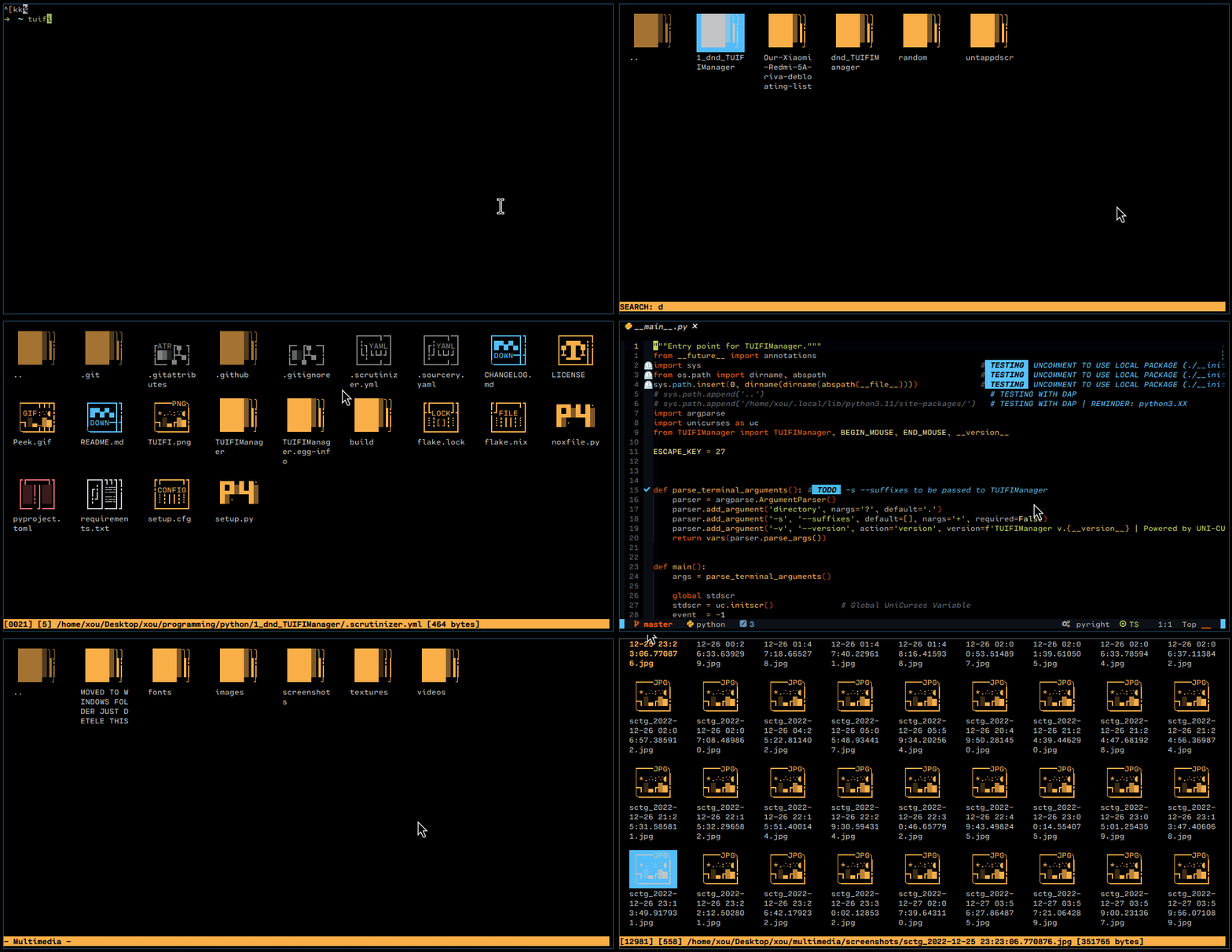
Try pip3 install uni-curses, here's something i made with it:
https://github.com/GiorgosXou/TUIFIManager
https://raw.githubusercontent.com/GiorgosXou/TUIFIManager/master/Peek.gif

GitHub
A cross-platform terminal-based termux-oriented file manager (and component), meant to be used with a Uni-Curses project or as is. - GitHub - GiorgosXou/TUIFIManager: A cross-platform terminal-bas...
 digital rose
rough holly
Not sure if there is a right way.
* `curses`, `windows-curses` for making from s...
digital rose
rough holly
Not sure if there is a right way.
* `curses`, `windows-curses` for making from s...
the right way i think is uni-curses https://github.com/unicurses/unicurses

GitHub
Github fork for unicurses. Contribute to unicurses/unicurses development by creating an account on GitHub.
^ I had once made a crappy terminal based editor wiith it too
https://media.discordapp.net/attachments/871785715833389126/893430318198030346/curses2.gif.gif

pretty powerful
and fast
digital rose
What do i need only for pyqt?


is that enough?
or something missing
I guess i can add anything later
if i miss anything
 jagged ferry
can anyone review my code? i'm a qt newbie, so 😅
https://github.com/watchYourCache/instalocka/blob/main/instalocka_gui.py
rocky dragon
digital rose
What do i need only for pyqt?
pyqt should come with what it needs from qt
smoky finch
digital rose
Try `pip3 install uni-curses`, here's something i made with it:
https://github....
awesome, thank you
digital rose
rocky dragon
pyqt should come with what it needs from qt
nope
it just gave me errors
when i tried to do a pip install
all good
i needed qt designer anyways
 swift halo
Any recommendation on a curses tutorial? The tutorial in the docs seems quite... minimalistic.
I know a bit of C, so maybe this thing linked in the official tutorial might help?
https://invisible-island.net/ncurses/ncurses-intro.html
ah yes mvwaddch 😩
somber hemlock
Rich text like rtf?
digital rose
swift halo
Any recommendation on a `curses` tutorial? The tutorial in the docs seems quite....
https://books.google.gr/books?id=Htff8VRO-UEC&printsec=frontcover&hl=el&source=gbs_ge_summary_r&cad=0#v=onepage&q&f=false
https://linux.die.net/

Google Books
somber hemlock
swift halo
Any recommendation on a `curses` tutorial? The tutorial in the docs seems quite....
Why not try a modern alternative?
!pypi rich
 proven basinBOT

Render rich text, tables, progress bars, syntax highlighting, markdown and more to the terminal
somber hemlock
!pypi textual
proven basinBOT
Text User Interface using Rich
swift halo
somber hemlock
Why not try a modern alternative?
curses sounds fun, and doesn't require any dependencies 🙂
somber hemlock
Yea curses do in fact sound fun
swift halo
well, the no-deps is what is need
digital rose
Guys
You can make websites entirely with python
With qt and web assembly
Kinda good
 timber plank
Need help with pyQt , I'm just so frustrated :/
swift halo
timber plank
Need help with pyQt , I'm just so frustrated :/
If you have a question, just ask it 🙂
you don't need permission to ask a question, and people will be more likely to help you
(for the record I have no idea about PyQT)
 dense minnow
Hi, I use tkinter but my window goes very weird when resizing, is there a way to make it look good when resizing the window? Idk how it's called but basically make it adjust itself to the width and height of the window
 shut yacht
timber plank
Need help with pyQt , I'm just so frustrated :/
shut yacht
timber plank
Need help with pyQt , I'm just so frustrated :/
I use PyQt what’s going on? Also Qt has it’s own Discord which may or may not be more responsive.
 fresh pelican
i have a problem binding a keyboard key to a function in my program, it does bind but the function messes up a number conversion
the function changes a string obtained from a tkinter entry box into a float
whenever it is called i get the error "Could not convert string to float"
worthy ridge
craggy lily
hi i made an app python with pyqt5: there is a button in my application, the voi...
yea pyqt application garbage collects and ends the runtime loop
@worn viper when u create a QWidget type class u need to reference it to the parent class or widget otherwise Qt internally delets it after the function is done executing
worthy ridge
digital rose
all good
i needed qt designer anyways
its inside the Scripts folder in python
worthy ridge
yes
digital rose
where is python folder?
worthy ridge
where did u install python
digital rose
worthy ridge
where did u install python
 worthy ridge
no go a level up
digital rose
 worthy ridge
where the python.exe resides
digital rose
worthy ridge
where the python.exe resides
there is no exe
digital rose
 worthy ridge
digital rose
worthy ridge
digital rose
did u install this
worthy ridge
ok go in the tools directory of design studio
digital rose
oh i can open designer
worthy ridge
yeah but ur better off with the LW version that only does QT and not QML
that in the \qt6_design_studio_reduced_version\bin
digital rose
prob then i need to install pyqt using homebrew
afaik you cant install applications with pip
atleast in macos
worthy ridge
worthy ridge
that in the `\qt6_design_studio_reduced_version\bin`
dont u have this directory
cause thats where designer is stored
 digital rose
how do i unistall qt5
digital rose
digital rose
how do i unistall qt5
qt5 design studio reduced version
might just throw it into bin
somber hemlock
RTF is pretty much a windows only thing, if whatever you're making is Windows only take a look at MSFTEdit control https://docs.microsoft.com/en-us/windows/win32/controls/create-rich-edit-controls

To create a rich edit control, call the CreateWindowEx function, specifying the rich edit window class.
You need to know win32 to use this however
Note that RTF is a very outdated format. I would recommend you to just use some HTML renderer control, pretty sure GTK has one built in
"rich" text is a very generic term, I am still not sure you want rtf
mighty frigate
@worn viperhttps://doc.qt.io/qt-6/gallery.html
qt's textview has this but it's not very good with gnome looks wise
What I mean is : you can customize it. There's multiple default styles, if none suits your needs you can look for one or create your own.
idk what you mean by that because gnome already handles the window controls.
anyway Idk the first thing about rtf nor gtk, if you have quetsions about Qt you can ask me tho
sure, take a look at QWidget::setStylesheet.
paddings and margins are usually handle in the contentMargins of layouts
give me an example pls
"changing the colors for instance of qt's ui will break integration"
it's a little too abstract for me
give me something solid
I see
if plasma does it it means it's doable
i don't know that particular topic tho sorry
you sure there's isn't a gtk3 defaut theme ?
I don't have any linux to find out rn
no I mean
Qt has some built-in theme, "styles"
gtk might be one of them
try to run QStyleFactory.keys()
it should gives you the list of default styles available
yes
you can see a few default styles available
if you're lucky, there's already a gtk default theme that will handle everything for you
QStyleFactory.keys() will tell you that
QRadioButton ?
oof
uuuuh
isn't that supposed to be handled by the font ?
this is a very good questio nto which I don't have the answer, sorry
I've never played with texts that deeply
(but ff is opensource so technically you could investigate and find out how they are doing it)
there's a good chance there's actually a default gtk3 theme
it's pretty much the same for Qt
but as you can see, there's a file in the Qt source that talks about styles for gtk3
so there's def something done specificaly for gtk3 in Qt
 raw spoke
guys I'm trying to understand in Tkinter if you use grid() on widgets inside a frame, does that mean that grid() interacts exclusively inside the frame?
 sharp reef
im using gtk4's picture widget, how would i be able to make it "zoomable" using the mousewheel?
 sleek hollow
raw spoke
guys I'm trying to understand in Tkinter if you use grid() on widgets inside a f...
sleek hollow
raw spoke
guys I'm trying to understand in Tkinter if you use grid() on widgets inside a f...
Yes, the frame itself has a grid that's separate from its parent
raw spoke
sleek hollow
Yes, the frame itself has a grid that's separate from its parent
thanks 🙂
 delicate wharf
hey uh, is it normal in tkinter for a widget to not update its children? I have a Frame that I can delete elements from, but when I add an element in runtime and then try to delete it without restarting (it saves), I get an index out of range error
I checked and the index seems correct...
delicate wharf
nvm I was adding to the index twice instead of once
mighty frigate
@worn viperIdk. I can take a closer look but I would need a small working a example to work with and reproduce the problem
raw spoke
guys can anyone explain why importing **tkinter.tkk **changes the default style of buttons?
mighty frigate
@worn viperI'm on vacation in something like 5min, I'll try to take a loot but I honnestly don't know when
 pliant pike
(PyQt6) I've got a QMainWindow with a stacked widget as its central widget, I change the selected widget within the stacked widget to move between the different parts of the order. However, when I move from my flavor selection widget to my order confirmation widget, the main window resizes itself, but the window doesn't resize back when I change the stacked widget again.
How can I make the QMainWindow resize itself when I select a different widget from its central widget (a QStackedWidget)


 bitter nacelle
Guys , while making an app , like a simple calculator
We can do back end and all the processing with python
What can I use ( by use i mean I'll learn then use the req lang /skill) , i want something that is highly optimisable , something that i can use for user interface of which ever app i want to make not just simple 1s
 icy trench
trying to recreate winui but with python qt
 icy trench
 quick acorn
whats a good online free resource to learn pyqt5?
quick acorn
whats a good online free resource to learn pyqt5?
tech with tims videos on it are pretty good imo
somber hemlock
raw spoke
guys can anyone explain why importing **tkinter.tkk **changes the default style ...
ttk has themed widgets. It lets you configure the look and feel of widgets using styles and themes. The default themes are shit, but you can find good ones on Github
quick acorn
ModuleNotFoundError: No module named 'PyQt5'
it shows me this, despite me downloading pyqt5 using pip install pyqt5
and thing is, everything imports correctly and stuff when i do it from vscode
but if i do it from any other text editor or ide it doesnt import correctly
ok so i tried a fix that works when pymysql shows a similar error, by copypasting the module on to the same directory as my main file
but now it shows this ModuleNotFoundError: No module named 'PyQt5.sip'
quick acorn
wait wtf, if i run the code in python 3.9 it doesnt work but when i run it in python 3.8 it works ?!?!  my head is exploding
 mighty rock
What does py -0 show you
Or python3 -0 if you are on Linux
You might have simply installed the library into a different version of Python in which you are trying to run the script
quick acorn
mighty rock
What does `py -0` show you
Installed Pythons found by py Launcher for Windows
-3.9-64 *
-3.8-64
yeah i figured that might be the issue, i have pyqt5 installed for python3.8 but i run my code in python 3.9
now how do i install pyqt5 for python 3.9?
somber hemlock
quick acorn
yeah i figured that might be the issue, i have pyqt5 installed for python3.8 but...
pip3.9 install pyqt5
mighty rock
quick acorn
now how do i install pyqt5 for python 3.9?
py -3.9 -m pip install PyQt5
Or is it in lowercase
quick acorn
mighty rock
```
py -3.9 -m pip install PyQt5
```
thanks, you're a life saver
btw do you know how to permanently use pip for 3.9 python? or do i just have to use the same command for other versions/packages now? (that is also doable)
 rare aspen
@quick acorn like:
python3.10 -m pip install package # python3.10
python3.9 -m pip install package # python3.9
ah ok
 hot crest
proven basinBOT
hot crest
proven basinBOT
:incoming_envelope: :ok_hand: applied mute to @unborn estuary until <t:1662324099:f> (10 minutes) (reason: duplicates rule: sent 4 duplicated messages in 10s).
The <@&831776746206265384> have been alerted for review.
 restive oracle
people what TUI package will yall suggest to create a dynamic screen (something like rich) but also take inputs from the user at the same time
in inputs atleast textbox is needed.. other types of inputs can be helpful too yes
 obtuse thistle
it supports keyboard input, but there's no text input widgets yet, i don't think
so you'd have to roll your own
restive oracle
obtuse thistle
it supports keyboard input, but there's no text input widgets yet, i don't think
uhoh that kinda defeats the purpose 
i dont want to reinvent the wheel with this project
any suggestions salt?
obtuse thistle
prompt-toolkit maybe
but not really
blessings i think has some text input widgets
restive oracle
ah hm ill look into it thankyou
obtuse thistle
restive oracle
ah hm ill look into it thankyou
wait, not blessings, try urwid
restive oracle
obtuse thistle
wait, not blessings, try urwid
this seems like exactly what i need :D
 gritty apex
I can't find any gtk 2 inspector for linux, parasite doesn't seem to work, maybe install instructions are unclear. Then, gtk inspector is for 3+
 rugged dagger
how to display transparent button in tkinter?
 midnight pecan
For all of those working with QML, ping me whenever you have a question, I'm still learning but maybe I can help
midnight pecan
rugged dagger
how to display transparent button in tkinter?
changing color opacity or using a transparent PNG
 stray river
Hello Python Discord,
I am looking to create a shell-like management/configuration interface for an Arduino micro controller as part of a school project. I am asynchronously communicating with the Arduino over serial using a custom binary protocol.
I've already got the communications part working, but I am unsure how to create the user interface.
My intention is for the user to type commands into a shell like this:
> config get speed
100
> show-logs on
> config set speed 25
[Arduino] speed set to 25
[Arduino] This is another log message
> show-logs off


$ config get ...
There are a few requirements:
- Must be possible to run an async function when a command is entered (shell input should be blocked until this returns)
- Must be possible to print log messages at any time without interrupting user input (even when input is blocked due to running command)
- Should work on both Windows and Linux/macOS
Is there a library that implements this functionality (or some of it) or at least makes it easier to implement it myself?
Thanks a lot in advance!
 tawdry mulch
midnight pecan
changing color opacity or using a transparent PNG
tawdry mulch
midnight pecan
changing color opacity or using a transparent PNG
color opacity?
tawdry mulch
rugged dagger
how to display transparent button in tkinter?
You cannot, you will have to use an image inside a canvas that acts like a button
midnight pecan
tawdry mulch
You cannot, you will have to use an image inside a canvas that acts like a butto...
yes you can
button has an attributed named bg
if you set bg to a transparent color then the button wont be shown but will be there
canvas is the other option, yes.
tawdry mulch
midnight pecan
if you set bg to a transparent color then the button wont be shown but will be t...
then what is the example of a transparent color?
midnight pecan
any rbga as long as its transparent mate
tawdry mulch
midnight pecan
any rbga as long as its transparent mate
No tkinter widgets supports RGBA other than canvas...?
and plus, I don't know how one could pass RGBA onto tkinter as I think it jus accepts hex codes and some predefined color names and the alpha channel does not reflect on the hex code either, AFAIK
midnight pecan
00FFFFFF is a transparent hexcode
 thorn trench
I'm working with PySide, I have a QListWidget with some custom widgets as elements. I want to re-order/sort the list based on a parameter only present in the QWidgets I made. How can I achieve that? The object only seems to be able to sort itself based on the item's text.
tawdry mulch
midnight pecan
00FFFFFF is a transparent hexcode
Maybe it is, but tkinter will not recognize it
_tkinter.TclError: invalid color name "#00FFFFFF"
midnight pecan
tawdry mulch
`_tkinter.TclError: invalid color name "#00FFFFFF"`
👍
midnight pecan
thorn trench
I'm working with PySide, I have a QListWidget with some custom widgets as elemen...
Never tried to do that, but if there is a PySide function that lets you change index's of items, just create a function in python that sorts the items in the list
I think there was a thing in pyside to change items index's
gritty apex
Anyone has experience with Gtk?
I'm using Glade, but I wanna know how to do things with code, set_padding is depracated, but the suggested alignment and margin do something else so 🤷♂️
 gritty juniper
restive oracle
uhoh that kinda defeats the purpose <:lemon_pensive:754441880246419486>
i dont ...
gritty juniper
restive oracle
uhoh that kinda defeats the purpose <:lemon_pensive:754441880246419486>
i dont ...
He's not talking about the regular terminal keyboard input. He's talking about keypress events, I think.
 hybrid minnow
Hi all, I'm looking for a code snippet or something that gets me on the right path for this: I'm trying to have a GUI run along side a script I am running so that I can monitor variable values as the script runs. I did this many years ago with cv2 but at this point I don't remember any of it. I was going to try and do it with tkinter but any help I find is generally updating a label on a button click which doesn't work either. I need to display live updating values. Any snippets advice or direction is appreciated.
I essentially just want to see
var 1 - x
var 2 - y
var 3 - z
all updated from the main loop
rugged dagger
midnight pecan
changing color opacity or using a transparent PNG
there is no opacity option in tk
and tkinter doesnt support png transparency
restive oracle
gritty juniper
He's not talking about the regular terminal keyboard input. He's talking about k...
yeah so was i
i on the contrary wanted something like regular terminal input
proven basinBOT
@sullen bramble Per Rule 6, your invite link has been removed. If you believe this was a mistake, please let staff know!
Our server rules can be found here: https://pythondiscord.com/pages/rules
somber hemlock
rugged dagger
there is no opacity option in tk
and tkinter doesnt support png transparency
It does
I have used transparent png icons from flaticon a lot in tkijter
tawdry mulch
rugged dagger
there is no opacity option in tk
and tkinter doesnt support png transparency
It does, only for canvas tho
tawdry mulch
somber hemlock
I have used transparent png icons from flaticon a lot in tkijter
Icons?
somber hemlock
tawdry mulch
Icons?
yes
quartz dust
Hey guys I'm using the Notification capability in the Plyer module in Python, is there a way to run a certain piece of code when you click or interact with the Notification.
 ripe shuttle
hybrid minnow
Hi all, I'm looking for a code snippet or something that gets me on the right pa...
ripe shuttle
hybrid minnow
Hi all, I'm looking for a code snippet or something that gets me on the right pa...
You can execute a daemon thread with a while loop to keep updating the gui.
from threading import Thread

# declare your vars and code
Thread(target = update, daemon = True).start()

def update():
  while True:
    Tk.update(root)
Note: This may or may not work. I have not tried it before myself. You would have to change the values of the labels and all in the while loop before updating the window.
rugged dagger
somber hemlock
I have used transparent png icons from flaticon a lot in tkijter
Ok thanks
rugged dagger
tawdry mulch
It does, only for canvas tho
I will try later
Thanks
tawdry mulch
ripe shuttle
Note: This may or may not work. I have not tried it before myself. You would hav...
It does not
hybrid minnow
ripe shuttle
Note: This may or may not work. I have not tried it before myself. You would hav...
Did update break if the values are unchanged?
ripe shuttle
hybrid minnow
Did update break if the values are unchanged?
Let me see if I am understanding your problem correctly. You have a program that is altering the values of certain variables and you want to see the current value of those variables in a tkinter window?
# Declared window
# Example code
x, y, z = 0, 0, 0
while True:
  x+= 1
  y += 2
  z += 3
  Label_x.text = x
  Label_y.text = y
  Label_z.text = z
  Tk.update(root)
  if x == 10:
    break
Do also note that I have not worked with tkinter for quite some time so some of the specifics of the framework might be wrong but overall this should be about right.
 wary grotto
ripe shuttle
```py
# Declared window
# Example code
x, y, z = 0, 0, 0
while True:
x+= 1
y...
wary grotto
ripe shuttle
```py
# Declared window
# Example code
x, y, z = 0, 0, 0
while True:
x+= 1
y...
where's root and the mainloop()?
ripe shuttle
Those would be up to you to declare
This is just a snippet of the functionality from my side
wary grotto
ok
ripe shuttle
stray river
Hello Python Discord,
I am looking to create a shell-like management/configurat...
I am not aware of any library that implements those features directly but libraries like threading and multiprocessing may be useful to you.
digital rose
what is curses.LINES and curses.COLS?

i have seen them referenced in the documentation of curses library as well
but i can't find them on the documentation or via help(curses.LINES)
rocky dragon
size of the terminal window iirc
digital rose
oh thanks
gritty apex
how do I use a style provider in gtk?
gritty apex
self.provider = Gtk.CssProvider()
self.context = Gtk.StyleContext()
self.provider.load_from_path('style.css')

# Apply to widgets
self.button.get_style_context().add_provider(self.provider, 1)
self.label.get_style_context().add_provider(self.provider, 1)


 thick gulch
 high portal
I'm getting in to a PyQt project that needs to do some stuff on a separate thread. Am I on the right track with this? https://gitlab.com/keturn/kikifusion/-/blob/main/qittnz6Lz/qengine.py as used by the app.py in that package.
are there other concurrency primitives people use with PyQt? any Futures or something like that?
 sharp badger
Hi
I have this GUI with 4 frames

but when I try to put a widget inside the cyan one
(a text)

this happens, the frame increases its size
but I want it to keep it
and the Text widget to decrease its size, to fit inside the frame
class App():
    def __init__(self, master):
        self.master = master
        self.master.title('GUI')

        #FRAMES
        self.left_frame        = Frame(self.master, bg = 'yellow', width = 550, height = 300)
        self.chat_text_frame   = Frame(self.left_frame, bg = 'cyan', width = 550, height = 270)
        self.chat_bar_frame    = Frame(self.left_frame, bg = 'magenta', width = 550, height = 30)

        self.right_frame       = Frame(self.master,      bg = 'green',  width = 340, height = 300)
        self.user_config_frame = Frame(self.right_frame, bg = 'red',  width = 340, height = 100)
        self.friends_frame     = Frame(self.right_frame, bg = 'blue', width = 340, height = 200)

        #FRAMES GRID
        self.left_frame.grid(row = 0, column = 0)
        self.chat_text_frame.grid(row = 0, column = 0)
        self.chat_bar_frame.grid(row = 1, column = 0)

        self.right_frame.grid(row = 0, column = 1)
        self.user_config_frame.grid(row = 0, column = 0)
        self.friends_frame.grid(row = 1, column = 0)

        self.chat_management()

    def chat_management(self):
        #CHAT
        self.chat_text   = Text(self.chat_text_frame)
        # self.chat_bar    = Entry(self.chat_bar_frame, font = 'Consolas', bg = '#010409', fg = 'white', width = 54)
        # self.file_dialog = Button(self.chat_bar_frame, font = 'Consolas', text = 'Send file', command = file_dialog_command, width = 10, height = 0)

        #CHAT GRID
        self.chat_text.grid(row = 0, column = 0, padx = 1, pady = 1)
        # self.chat_bar.grid(row = 0, column = 0)
# self.file_dialog.grid(row = 0, column = 1)```there's the code
somber hemlock
high portal
are there other concurrency primitives people use with PyQt? any Futures or some...
I used threading.Thread + queues for inter thread communication in tkinter, but I guess you can use async with Qt?
 bleak coral
Are there any good resources to learn Kivy? The tutorial within the api documentation isn't super helpful
I don't have any prior experience with making guis
digital rose
bleak coral
Are there any good resources to learn Kivy? The tutorial within the api document...
If you are an intermediate developer, you just need to go to .py files and read the comments
Often you just need to copy and paste, then observe the behavior and the result
bleak coral
digital rose
Often you just need to copy and paste, then observe the behavior and the result
Well i’d say i’m slightly above intermediate
It’s just that i haven’t done any programming in a really long time
And i kinda got unfamiliar with learning new libraries
But thank you for your feedback
digital rose
I recommend you just learn
Labels, button, screens and layouts then jump to kivymd directly.
bleak coral
Ah i see
Well i want to do is like an app with multiple pages
I like already coded it as a web app
It just turned out really buggy since i’m not really good with html and css
That’s why i wanted something more simple since it’s gonna be used on mobile only
It’s just as i told you I haven’t coded much in the last like 2-3 years
Apart from this
And i really want to get back into programming
digital rose
Did you install kivymd + kivy or just kivy?
bleak coral
Just kivy
digital rose
Install kivymd because it is the same as kivy just that better theme
bleak coral
Oh okay
digital rose
It does have some extra functionalities but it is built on the top of kivy
bleak coral
Okay then thank you
digital rose
Directly inherits from kivy and adds some tweaks
Wait
I will send you a good example application
bleak coral
Oh i see
digital rose
I think i have it somewhere
bleak coral
Oh ok i’d really appreciate it
digital rose
from kivy.lang import Builder
from kivy.core.window import Window

from kivymd.app import MDApp

Window.size= (350,550)

KV = '''
MDNavigationLayout:

    MDScreenManager:
        MDScreen:
            MDBoxLayout:
                orientation:'vertical'

                MDTopAppBar:
                    title: 'TestApp'
                    left_action_items: [['menu', lambda x: nav_drawer.set_state("open")]]


                MDBottomNavigation:

                    MDBottomNavigationItem:
                        name: 'screen 1'
                        text: 'Python'
                        icon: 'language-python'

                        MDLabel:
                            text: 'Python'
                            halign: 'center'

                    MDBottomNavigationItem:
                        name: 'screen 2'
                        text: 'C++'
                        icon: 'language-cpp'


                        MDLabel:
                            text: 'I programming of C++'
                            halign: 'center'

                    MDBottomNavigationItem:
                        name: 'screen 3'
                        text: 'JS'
                        icon: 'language-javascript'

                        MDLabel:
                            text: 'JS'
                            halign: 'center'
    MDNavigationDrawer:
        id: nav_drawer
        MDLabel:
            text: "Hello, drawer is here"

'''


class TestDemo(MDApp):
    def build(self):
        self.theme_cls.primary_palette = "Indigo"
        return Builder.load_string(KV)


TestDemo().run()
this is a very simple working app demo
i created it just by looking at the .py files
I hope you can learn a lot just by playing with this 60 lines code
quartz dust
Hey guys I'm using the Notification capability in the Plyer module in Python, is there a way to run a certain piece of code when you click or interact with the Notification.
bleak coral
digital rose
I hope you can learn a lot just by playing with this 60 lines code
Alright thank you very much
 raven zinc
I'm struggling with my googling skills. I'm trying to figure out what the best way is to accomplish a task:
I want a grid-based canvas where users can draw lines to connect attachment points on rectangles. the grid should have snapping ability. is there somewhere you guys can point me for an example or toolkit or something?
 velvet ruin
Hi I have a question regarding Tkinter. I've asked the question about 4 times in help channels, with no response. Is it alright to ask here or should I open up another help channel?
velvet ruin
Seriously @crisp timber thanks a lot.
 crisp timber
!paste
proven basinBOT
Pasting large amounts of code
If your code is too long to fit in a codeblock in Discord, you can paste your code here:
https://paste.pythondiscord.com/
After pasting your code, save it by clicking the floppy disk icon in the top right, or by typing ctrl + S. After doing that, the URL should change. Copy the URL and post it here so others can see it.
crisp timber
@velvet ruin I spent too long to not post this lol
https://paste.pythondiscord.com/tayofomuje
velvet ruin
crisp timber
<@161541761586561024> I spent too long to not post this lol
https://paste.python...
You definitely have a better grasp on advanced programming than I do
I just put code together lol
crisp timber
not really lol, I just code things out in variousu ways
But basically that's an example of random images with random text
There's a lot of weird stuff going on with Tkinter
Like I can't really place the image generation just anywhere, it has to be within main scope
somber hemlock
crisp timber
Like I can't really place the image generation just anywhere, it has to be withi...
If you load images in a class, you need to save them as instance variables, else the get garbage collected after they are out of scope. Known bug.
crisp timber
somber hemlock
If you load images in a class, you need to save them as instance variables, else...
ah, I don't regularly work with tkinter, but I see, a common gotcha has got me
 sturdy echo
can someone please help me understand why everything inside this window just starts without any input, for example:
 self.switch = customtkinter.CTkSwitch(master=self.window,
                                                    text=SelectedLanguage["Theme Switch"],
                                                    command=self.theme_change,)
            self.switch.toggle(1)
            self.switch.place(relx=0.12, rely=0.65)
The switch.toggle here is supposed to put the switch "on" but it doesn't do anything

And here:
self.Optionmenu = customtkinter.CTkOptionMenu(self.window,
                                                        values=["Português-pt", "English"],
                                                        command=self.change_language,
                                                        hover=True)
            self.Optionmenu.place(relx=0.95, rely=0.16, anchor="e")
            self.Optionmenu.set(Option_lg_df)
the function starts without any user input at all
 errant flax
Hi guys I'm a newbie with python, i'm trying to create a program (with tkinter ) all works correctly. But i' don't know how to add a background image on my secondary windows. When i start my program, i have my main window which has a background image, there are two buttons, button 1 | 2 which redirect on secondary windows. But i don't know how to set an image background on these windows, can someone help me ? (sorry for my english i'm not native)
mighty rock
errant flax
Hi guys I'm a newbie with python, i'm trying to create a program (with tkinter )...
!rule 5
proven basinBOT
5. Do not provide or request help on projects that may break laws, breach terms of services, or are malicious or inappropriate.
errant flax
errant flax
Hi guys I'm a newbie with python, i'm trying to create a program (with tkinter )...
i edited it.
mighty rock
Hiding it by editing still doesn't make it okay
errant flax
i'm not hiding it, this is for personal use and it is not your business, my question is only how to set image as background on secondary windows with tkinter it's all. This project is an example, i just want to know how to set my image as background that's all
mighty rock
I won't be helping
errant flax
that's why i edited it, to rectify my question
errant flax
mighty rock
I won't be helping
so don't message me and let another person who want to help a newbie answer my question
 pallid knoll
 azure rover
hey can I ask for some streamlit help here?
ripe shuttle
This is to everyone asking to ask. Just ask your problem and someone will help. Don't ask to ask. Just ask.
 thorny igloo
hello! one question. what is the best distro to use python?
 bitter marsh
thorny igloo
hello! one question. what is the best distro to use python?
bitter marsh
thorny igloo
hello! one question. what is the best distro to use python?
Doesn't matter. Just use anything that can support installing Python and its modules
thorny igloo
bitter marsh
Doesn't matter. Just use anything that can support installing Python and its mod...
It usually happens to me that when using linux (I'm a beginner), when I want to install a program, I usually lack others programs to be able to use it
bitter marsh
thorny igloo
It usually happens to me that when using linux (I'm a beginner), when I want to ...
I don't understand
thorny igloo
bitter marsh
I don't understand
In general, programs depend on other programs in order to function and if the distro that I use does not have those programs, errors arise
bitter marsh
thorny igloo
In general, programs depend on other programs in order to function and if the di...
Then I guess use a distro that have those "programs" whatever that is.
Python generally works on most up to date OS
thorny igloo
that is the point, what distro ?
bitter marsh
thorny igloo
that is the point, what distro ?
Just pick one. Any distro. Except kali. Don't start with kali. Or ParrotOS. Not suited for dev. But most OS should work.
Some popular favorites: Ubuntu, Fedora, Manjaro, Arch, PopOS, Alpine, etc etc
But I don't know what "program" is supposed to be installed on any of these OS for you to start using Python. So I can't really recommend any as that's an unknown requirement for your case.
thorny igloo
bitter marsh
Some popular favorites: Ubuntu, Fedora, Manjaro, Arch, PopOS, Alpine, etc etc
Ok thanks for info and patience!!
digital rose
thorny igloo
hello! one question. what is the best distro to use python?
I recommend you just use WSL to ease the learning curve of linux first
Then, go forth for a clean install with a proper linux desktop
Since this is a user interface channel, we can discuss about which GUI and desktop environment are good for you
 paper phoenix
Hello Friends
I am trying to develope some tool as my learning excercise
- which allow upload ETL CSV file online
- which read my CSV file
- which provide mapping help
- Example:
System A : Column Name is "YourName"
System B : Column Name is "Name"
- Example:
Want online GUI interface which allow me to select "YourName" = "Name"
based on that ETL template got created and which I can use in system B as import.
I am just aware about pandas but what for GUI online?
Please provide your views
Many thanks in advance
bitter marsh
paper phoenix
Hello Friends
I am trying to develope some tool as my learning excercise
1. wh...
!pypi streamlit is probably what you're looking for
proven basinBOT
The fastest way to build data apps in Python
paper phoenix
bitter marsh
!pypi streamlit is probably what you're looking for
Sir, I checked that too. Is it possible to create GUI based column mapping in streamlit?
bitter marsh
paper phoenix
Sir, I checked that too. Is it possible to create GUI based column mapping in st...
I don't know what that means "GUI based column mapping". Explain a bit more pls.
paper phoenix
E.g System A: Column name "YourName"
System B : Column name "Name"
GUI based column mapping would provide list of all column in System A against which it should provide drop-down list
based on it ETL template should generate
bitter marsh
paper phoenix
E.g System A: Column name "YourName"
System B : Column name "Name"
GUI based c...
I still don't know what that means. Try reading up on https://streamlit.io yourself and see if it fits your requirements

Streamlit is an open-source app framework for Machine Learning and Data Science teams. Create beautiful web apps in minutes.
 weak folio
I got a simple app, that controls my charger, when the electricity price, goes below a certain number.
Today the target prices, is an env variable in the deployment.
Any good ideas, on how to create a super simple ui, to accept a new price ?
I have played with both streamlit and flask, but maybe there is some other option, i'm missing.
All communication is internal, so security is not an issue.
 desert mirage
Hi, I created a little application with pySimpleGUI. My issue is that I have to call the asynchronious functions when clicking on buttons. So when I call those functions which will loop sometimes, then my window simply freezes. I searched about an hour for suitable help and found out that threading can help me here, but I dont know how to combine asynchronious programming (await keyword) with the threading module. Any help/fix?
thorn trench
I have a QListWidget with a bunch of custom widgets on it. I want to be able to reorder them, so I need the functionality of swapping either the items or the widgets. At the moment when I try to set the widget of an item to another item's widget, the program crashes. I understand this is probably because of how Qt handles ownership of widgets, but how can I work around this?
 lone axle
Is there a way when using pyqt formlayout have 2 rows and 2 columns?
thorn trench
lone axle
Is there a way when using pyqt formlayout have 2 rows and 2 columns?
I'm pretty sure qformlayout have 2 columns by default, so you can just insert 2 rows to achieve that
lone axle
thorn trench
I'm pretty sure qformlayout have 2 columns by default, so you can just insert 2 ...
no i want like
label: input box label2: input box2
label3: input box3 label4: input box 4
thorn trench
why not just use a qgridlayout then?
sleek hollow
thorn trench
I have a QListWidget with a bunch of custom widgets on it. I want to be able to ...
How are you adding the custom widgets? Are you using setItemWidget?
sleek hollow
It gets a lot more complicated when the item has a widget attached. This stack overflow comment covers it well

Stack Overflow
In a application I create lines of widgets like this (there is a button to create the line and another to remove the widget):
Code for creation of the widgets lines :
def ajouter_ref_artistique(s...
lone axle
thorn trench
why not just use a qgridlayout then?
cause i want input boxes as well
sleek hollow
lone axle
cause i want input boxes as well
You can use input boxes with grid layout
your other option is an hbox layout with 2 side by side form layouts
sleek hollow
thorn trench
yes
Give that link above a read.
thorn trench
sleek hollow
Give that link above a read.
thank you so much!
thorn trench
sleek hollow
Give that link above a read.
So I went through that article and tried implementing a custom sorting function to reorder all of the elements, but for some reason they turn invisible once reordered
 smoky needle
Hello guys so I am trying to code package, that can create Tkinter app from XML file (design like html) i wanted to know thoughts about my project and maybe give me some feedback to it
https://github.com/KrazyManJ/XMLTK
GitHub
Contribute to KrazyManJ/XMLTK development by creating an account on GitHub.
 supple egret
guys how can i get images dominant color
somber hemlock
smoky needle
Hello guys so I am trying to code package, that can create Tkinter app from XML ...
Nice, so this is like pygubu
!pypi pygubu
proven basinBOT
A simple GUI builder for the python tkinter module
somber hemlock
But with a simpler schema
A custom layout manager for tkinter would make for a very interesting project
Or page based navigation
ripe shuttle
supple egret
guys how can i get images dominant color
Try asking in #media-processing maybe?
 warm sonnet
what should i use for creating a cli? I saw that typer works niceley
 lyric schooner
go is pretty trendy these days, but python is fine too
smoky needle
somber hemlock
Nice, so this is like pygubu
Yes but mine seems to have shorter syntax + i've made XML Schema file to make it easier via IDE like Pycharm or VSCode
For example trying to create new element looks like this in PyCharm:
 somber hemlock
smoky needle
For example trying to create new element looks like this in PyCharm:
somber hemlock
smoky needle
For example trying to create new element looks like this in PyCharm:
Wow! This is nice
If you need help to package this project you can ping me :))
smoky needle
Or another example, configuration of button looks like this:
 somber hemlock
smoky needle
Or another example, configuration of button looks like this:
somber hemlock
smoky needle
Or another example, configuration of button looks like this:
najce
smoky needle
somber hemlock
If you need help to package this project you can ping me :))
If you looked on Github, you've already seen list of supported elements, but it supports only half of it, when I add support to all of them, i will package it, but thank you i appreciate it ❤️
somber hemlock
smoky needle
Or another example, configuration of button looks like this:
with some work you might even show some docs for each option
Elements like canvas will benefit a lot from this
Also how do you plan to integrate textvariables into this system?
smoky needle
somber hemlock
Also how do you plan to integrate textvariables into this system?
I've already did, you will declare it at the start of document and then reference on it by its name
Example of calculator:
<Tk xmlns="Tkinter" title="Calculator" geometry="300x400" bg="#343845" resizable="false false">
  <Variable name="display"/>
  <Label textvariable="display" ... >
        ...
  </Label>
</Tk>
Then after parsing you can get it via list of variables:
app = XMLTK.parse("calculator.xml")
display = app.Variables["display"] # this is the display variable
ohh nice
you can maybe use better syntax for this, like <Label textvariable="{Binding display}">
smoky needle
somber hemlock
you can maybe use better syntax for this, like `<Label textvariable="{Binding di...
i wanted to make it linked by it's identificator = name
These are all of the features it currently has:

Everything on github, also i've included calculator example in examples folder
I will do more later but this example includes all abilities of XMLTK
somber hemlock
Good luck for your future endeavours :))
smoky needle
Thank you 😄 ❤️ Hope you like my project
smoky needle
proven basin
BTW i did not know about Pygubu, i started it on my own
i tried to make one of my apps in TK but i was not satisfied with amount of design code (exactly 100+ lines) and it was kinda painful to navigate through it... thats why i started... after making my app in XMLTK i've made it in XML in like 50-60 lines of Markup Code
smoky needle
somber hemlock
Good luck for your future endeavours :))
pinging for your reply
somber hemlock
smoky needle
i tried to make one of my apps in TK but i was not satisfied with amount of desi...
Using XML for UI is the way to go. XML based UI frameworks have been around since atleast 2006 now
I recommend you to take a look at WPF XAML for ideas on how to improve, its a tried and tested framework
I would also focus on data binding first once you add all the widgets in the schema
smoky needle
somber hemlock
I would also focus on data binding first once you add all the widgets in the sch...
data binding? I have no clue what is that 😄
somber hemlock
smoky needle
data binding? I have no clue what is that 😄
#user-interfaces message this is the idea basically
tkinter textvariables themselves are a form of data binding
When you update a textvariable, all the widgets linked to its value, also update
smoky needle
somber hemlock
When you update a textvariable, all the widgets linked to its value, also update
Yea thats what it can do rn
somber hemlock
smoky needle
Yea thats what it can do rn
Well textvariables don't work for all items and are definitely only for simple types, you can't bind a list
Imagine binding a list to a tkinter listbox
Everytime a list element changes, the listbox items get updated automatically
Easy to achieve this with callbacks and creating a collections.UserListsubclass
 sleek beacon
Hello guys who would mind helping me. I'm stuck (as a beginner) at spyder ide it's getting issues I tried downloading n installing again but it shows the same as it's what I further can take action to continue learning python
 smoky needle
sleek beacon
Hello guys who would mind helping me. I'm stuck (as a beginner) at spyder ide it...
smoky needle
sleek beacon
Hello guys who would mind helping me. I'm stuck (as a beginner) at spyder ide it...
I think this is not room for helping with IDEs
Read topic
sleek beacon
No actually I even tried simple like a=1, b=2, c=a+b but it has been showing something else as I'm a beginner I wasn't keen to understand I think I'm learning two year old syntax course. Is this the problem. Yes?
sleek beacon
smoky needle
I think this is not room for helping with IDEs
Okay
smoky needle
sleek beacon
Okay
But just little help: I Recommend PyCharm for developing python... Easy and really helpful, community version is for free, give it a try
rugged dagger
Is tkinter-designer https://github.com/ParthJadhav/Tkinter-Designer that use figma really works?
I had tried many times but the outcome does bot similar to the design in figma

GitHub
An easy and fast way to create a Python GUI 🐍. Contribute to ParthJadhav/Tkinter-Designer development by creating an account on GitHub.
tawdry mulch
rugged dagger
Is tkinter-designer https://github.com/ParthJadhav/Tkinter-Designer that use fig...
avoid using such tools, its not worth it
 frigid trellis
rugged dagger
Is tkinter-designer https://github.com/ParthJadhav/Tkinter-Designer that use fig...
frigid trellis
rugged dagger
Is tkinter-designer https://github.com/ParthJadhav/Tkinter-Designer that use fig...
I have tried it but it didnt work
I think i didnt do it correctly
Also it wont be exactly the same
frigid trellis
rugged dagger
Is tkinter-designer https://github.com/ParthJadhav/Tkinter-Designer that use fig...
Can yiu show the result ?
digital rose
Hi, I am making a GUI using pyside 6. Here I want to unselect all the boxes whenever I press the reset button. I cannot figure out how to do so. So, please help me out in this problem .

did someone tag me
hey do you have worked with pyside 6?
frigid trellis
Does anyone know how to remove this focus in this notebook widget ?

 vague parcel
digital rose
Hi, I am making a GUI using pyside 6. Here I want to unselect all the boxes when...
vague parcel
digital rose
Hi, I am making a GUI using pyside 6. Here I want to unselect all the boxes when...
Make a loop using the checkbox objects in Widget.findChildren(QCheckBox) where widget is the checkbox parent widget
digital rose
@vague parcel I declared my checkboxes in a constructor and placed inside a Qwidget in box layout. But how do I connect the socket (which is outside the constructor ) to the checkboxes?
rugged dagger
tawdry mulch
avoid using such tools, its not worth it
ya i agree
digital rose
vague parcel
Make a loop using the checkbox objects in Widget.findChildren(QCheckBox) where w...
you can check my code now :
https://github.com/ShandilyaSolutions/Attendance-manager/blob/main/attendance_manager_app.py
vague parcel
Add button_clicked the @wet flint decorator and in there you can get all the checkboxes as self.findChildren(QCheckBox). This gives you a list
digital rose
hey @vague parcel I couldn't find any proper documentation for pyside6. Can you help me with that did you go through my code?
 latent gust
I am building a project with PyQt5.
In one window, I ask the user to input data in respective text boxes. Some are combo boxes, etc.
I want to transfer this data into another window.
In my project, each window has a new class with QDialog attribute. I load the ui using the loadui function. So when I edit the GUI interface in the QT designer, the screens get updated in my VS Code logic automatically.
This is an example of one window which I have:
class Payment_Info(QDialog):
    def __init__(self):
        super(Payment_Info, self).__init__()
        Relative Path - loadUi(r"Project_Source_Code\Payment_Info_Screen.ui", self")

        self.Confirm_Payment.clicked.connect(self.confirm)


    def confirm(self):
        Customer_ID = self.Customer_ID.text()
        Customer_Card_Type = self.Customer_Card_Type.currentText()
        Customer_Number = self.Customer_Number.text()
Say I want to transfer the Customer ID, Card Type and Customer Number into another class:
class Confirm_Payment(QDialog):
    def __init__(self):
        super(Confirm_Payment, self).__init__()
        Relative Path - loadUi(r"Project_Source_Code\Payment_Confirm_Screen.ui", self")

        self.Confirm_Payment.clicked.connect(self.confirm)


    def confirm(self):
        # Use the Details from the above class
How would I go about doing this? When I try passing the Payment_Info class in Confirm Payment class as a parameter alongside QDialolog -
class Confirm_Payment(QDialog, Payment_Info),
I get an error saying
TypeError: Cannot create a consistent method resolution order (MRO).
latent gust
digital rose
Called Qt Designer
I use that. I make the whole window with widgets and buttons that I need. But my issue is more towards the logic than the GUI itself.
vague parcel
@digital rose https://doc.qt.io/qt-6/qobject.html#findChildren you can use this to find the checkboxes contained in your window. I’m not from my pc atm so I can’t help more
digital rose
Thanks for all.
Just one simple question, is there anything to style our ui in pyside 6? Something like css to transform the looks of the ui.
 shy torrent
digital rose
Just one simple question, is there anything to style our ui in pyside 6? Somethi...
shy torrent
digital rose
Just one simple question, is there anything to style our ui in pyside 6? Somethi...
 vapid bear
Hi, I'm not so good at python, and I want to make a game with pygame. Does anyone know any good templates for games?
digital rose
Thanks a lot man @shy torrent
digital rose
hi
azure rover
hey there
any one has a clue why it give me this error on streamlit
### **Actual behavior (error):**

Traceback (most recent call last):

  File "/home/appuser/venv/lib/python3.9/site-packages/streamlit/runtime/scriptrunner/script_runner.py", line 556, in _run_script

    exec(code, module.__dict__)

  File "/app/streamlit/app.py", line 282, in <module>

    st.dataframe(hcc)

  File "/home/appuser/venv/lib/python3.9/site-packages/streamlit/elements/dataframe_selector.py", line 95, in dataframe

    return self.dg._arrow_dataframe(data, width, height)

  File "/home/appuser/venv/lib/python3.9/site-packages/streamlit/elements/arrow.py", line 83, in _arrow_dataframe

    marshall(proto, data, default_uuid)

  File "/home/appuser/venv/lib/python3.9/site-packages/streamlit/elements/arrow.py", line 156, in marshall

    proto.data = type_util.data_frame_to_bytes(df)

  File "/home/appuser/venv/lib/python3.9/site-packages/streamlit/type_util.py", line 554, in data_frame_to_bytes

    raise errors.StreamlitAPIException(e)

Here's the main error: **streamlit.errors.StreamlitAPIException: ("Could not convert '13.0 | 319.0' with type str: tried to convert to double", 'Conversion failed for column Earth with type object')
https://github.com/streamlit/streamlit/issues/5379 here's full issue

GitHub
Summary I try to implement my custom dataframe on streamlit (working on my .py file) but I keep having this "streamlit.errors.StreamlitAPIException" error... Code snippet with h1:...
might be easier
 vale wadi
Hi guys anyone can help me in pyqt5, qfiledialog stay opening many windows
 obtuse acorn
Is there a way to defer the resize event of the tkinter widget generated by
plot_canvas = FigureCanvasTkAgg(...)  # A tk.DrawingArea.
wid = plot_canvas.get_tk_widget()
wid.pack()
I'd like to limit its resize event to only after about 300 ms after the last resize, normally I would do this using .after and .aftercancel
I should add, the default resize event happen any time the "<Configure>" event is generated
 honest bloom
im looking for python UI framework without PythonNet.
been using EEL and Pywebview (neutron-web also based on pywebview) but Both use pythonnet (very old and will not work above 3.8)
i only need html dom interaction and js api.
framework must be able you have "load html" from local or remote.
testing tuari at the moment but it seem they are far from python binding or sidecar
 loud rivet
I'm using the Qt designer to create an user interface and I want to create a seocond UI to configure settings. Can I create a second window in the same project in Qt designer or do I have to start a second project and load it into the main one once it is done?
vale wadi
loud rivet
I'm using the Qt designer to create an user interface and I want to create a seo...
you can create a second windows in same project
loud rivet
but doesn't that create a new .ui file?
ideally, I'd have everything in the same .ui file
vale wadi
you can copy the file e edit after the same
then you can open the second window and make changes
loud rivet
okay, I'll do that, thanks for the help
vale wadi
You're welcome
 granite crater
So I've been using PyQt for a while and there's one thing I haven't wrapped my head around yet
It seems that all Qt tutorials involve a lot of reliance on the framework. Is this actually bad or is my brain overexagerratimg it? I read somewhere that you should code in a way that it makes switch between frameworks and libraries easy, but it seems to me that with Qt it'd be quite difficult as it's recommended to use Qt models wherever you can
vale wadi
yes, agree
has much problems in qt in my experience with this framework
anyone can help me in pyqt5 i need urgent fix this problem
 blazing pine
Hi @vale wadi you should specify a bit about your issue, people here will be hesitant to say they can help w/o knowing more about what you're having trouble with.
vale wadi
blazing pine
Hi <@901859028852940831> you should specify a bit about your issue, people here ...
Okay, so in my program there are 2 functions, one that opens the file explorer and selects a file and another that saves the file, when I click 2 times on open file, and then I will save my file it opens 2 windows instead of 1, how can i fix this?
blazing pine
from the description, I would guess that you may have a signal connected to the dialog open call, and the signal is firing twice. Without seeing your code that shows how the dialog opens, it's going to be impossible to say.
I have done plenty of dialog stuff, and haven't encountered a case where dialogs open twice

 blazing pine
any chance you're connecting the signal twice?
I would try using the UniqueConnection argument in the .connect() call https://doc.qt.io/qt-6/qt.html#ConnectionType-enum
if it's not a unique connection, you will get an exception
vale wadi
maybe my last line
because my functione salvartabela inside of my fuction main
and i click sistema for open my function, i guess that is it
this problem is that i will calling 2 times
thanks for your help i will test for fix this
blazing pine
generally when things are happening twice (or more) which you think should be happening once, it's often because a signal was connected twice, so you'll get the slot being called twice ... the easiest way to debug is to throw the UniqueConnection enum into the connect method, and see if you get an exception raised when you run your code
vale wadi
thanks for everything
vale wadi
guys how do i inherit class inheritance with pyqt5, because i'm creating a class for each window and i need to change windows i need to put a function inside the new class or can i inherit the functionality of the previous class?
vale wadi
na verdade eu tenho 6 janelas, e cada janela tem 6 botões que fazem as mesmas funções nas 6 janelas, como eu faço para fazer isso da melhor forma sem repetir with OO?
i create each file for each class or i create every class in the same file?
somber hemlock
Does Kivy support top menu bars?
somber hemlock
vale wadi
na verdade eu tenho 6 janelas, e cada janela tem 6 botões que fazem as mesmas fu...
!rule 4
proven basinBOT
4. Use English to the best of your ability. Be polite if someone speaks English imperfectly.
somber hemlock
vale wadi
i create each file for each class or i create every class in the same file?
Don't create a file for each class. Put all related classes in the same file
If you tell me what your classes do, I can tell better
proven basinBOT
@oak lark Per Rule 6, your invite link has been removed. If you believe this was a mistake, please let staff know!
Our server rules can be found here: https://pythondiscord.com/pages/rules
vale wadi
somber hemlock
If you tell me what your classes do, I can tell better
So I created my UI with qtdesigner and basically the functions are how open the window 1, close the window , but don't stay repeat code, I don't to know do.
somber hemlock
vale wadi
So I created my UI with qtdesigner and basically the functions are how open the ...
i understood none of it please use google translate
vale wadi
so i'll show you how i'm doing

this is the main class
and the other classes using the same functions
is there any way I can inherit the functions from the main class, or is there a better way to do this?
paper phoenix
where else we can deploy streamlit quickly for free?
I already checked heroku and streamlit cloud do we have any other options ?
worthy ridge
@vale wadi u can pass the UI as a dependency to all the classes that u require it in, u can see how i use it on my project
https://github.com/OmmarShaikh01/Apollo

GitHub
Apollo is a Open-Source music player for playback and organization of audio files on Microsoft Windows, built using Python. - GitHub - OmmarShaikh01/Apollo: Apollo is a Open-Source music player for...
vale wadi
worthy ridge
<@901859028852940831> u can pass the UI as a dependency to all the classes that ...
thanks for your help
digital rose
Hi I want to make a second screen for a tkinter application. here is my code :
from tkinter import *
from tkinter import ttk

# from tkinter import messagebox

root = Tk()


def screen2():
    frm = ttk.Frame(root, padding=10, height=300, width=300)
    frm.grid()

    Label(frm, text='Screen 2 ').place(x=110, y=100)


def screen1():
    frm = ttk.Frame(root, padding=10, height=300, width=300)
    frm.grid()

    Label(frm, text='Select Routine : ').place(x=10, y=0)

    cnBtn = ttk.Checkbutton(frm, text='Computer Networks')
    osBtn = ttk.Checkbutton(frm, text='Operating Systems')
    caBtn = ttk.Checkbutton(frm, text='Computer Architecture')
    pyBtn = ttk.Checkbutton(frm, text='Python')
    hinBtn = ttk.Checkbutton(frm, text='Hindi')
    engBtn = ttk.Checkbutton(frm, text='English')
    ssBtn = ttk.Checkbutton(frm, text='Soft Skills')
    cnLabBtn = ttk.Checkbutton(frm, text='Computer Network Lab')
    pyLabBtn = ttk.Checkbutton(frm, text='Python Lab')
    cnBtn.place(x=30, y=25)
    osBtn.place(x=30, y=45)
    caBtn.place(x=30, y=65)
    pyBtn.place(x=30, y=85)
    hinBtn.place(x=30, y=105)
    engBtn.place(x=30, y=125)
    ssBtn.place(x=30, y=145)
    cnLabBtn.place(x=30, y=165)
    pyLabBtn.place(x=30, y=185)
    done_button = Button(frm, height=1, width=5, text='Done', command=screen2())
    done_button.place(x=120, y=225)

    root.mainloop()


screen1()
I want the second screen window to replace the first one whenever the button is clicked. Currently it looks like this:
 somber hemlock
digital rose
Hi I want to make a second screen for a tkinter application. here is my code :
`...
somber hemlock
digital rose
Hi I want to make a second screen for a tkinter application. here is my code :
`...
I recommend you use OOP and create a Frame subclass for each screen. When the Submit is pressed you just forget the placement of first frame and pack the second one
Plus the place is a very bad manager, use pack, much better
somber hemlock
somber hemlock
I recommend you use OOP and create a `Frame` subclass for each screen. When the ...
You can implement some sort of basic page navigation using this
digital rose
Will try it thanks
 shy swallow
Something like this (mainly talking about the except parts) should work, right?
try:
     #ban code
except Exception as e:
     if "Unknown ban" in str(e):
           await ctx.reply("That user is not banned.")
anyone good with streamlit here? I need help on a small error i got
proven basinBOT
Hey @azure rover!
You either uploaded a .txt file or entered a message that was too long. Please use our paste bin instead.
azure rover
here's the full error: https://paste.pythondiscord.com/figeponeze
error: metadata-generation-failed


× Encountered error while generating package metadata.

╰─> See above for output.
any one has a clue how to fix?
proven basinBOT
Hey @azure rover!
You either uploaded a .txt file or entered a message that was too long. Please use our paste bin instead.
digital rose
sorry ping, if you notice a mention it was me tagging you for a problem but I fixed it. 😃
somber hemlock
ripe shuttle
Possible in KivyMD
I am talking about desktop style menus, like File, Help, etc.
quartz dust
Hey guys, I was just wondering if I could make a terminal game where you can move the player's position based off of the input that you put in. I have tried many things but they haven't worked, so here is the base I have so far. ```py
board = [
".", ".", ".", ".", ".", ".", ".", ".", ".", ".",
".", ".", ".", ".", ".", ".", ".", ".", ".", ".",
".", ".", ".", ".", ".", ".", ".", ".", ".", ".",
".", ".", ".", ".", ".", ".", ".", ".", ".", ".",
".", ".", ".", ".", ".", ".", ".", ".", ".", ".",
".", ".", ".", ".", ".", ".", ".", ".", ".", ".",
".", ".", ".", ".", ".", ".", ".", ".", ".", ".",
".", ".", ".", ".", ".", ".", ".", ".", ".", ".",
".", ".", ".", ".", ".", ".", ".", ".", ".", ".",
".", ".", ".", ".", ".", ".", ".", ".", ".", "."
]
player = "O"
board[0] = player
run = True
while run:
print(f"\n\n{board}")
movement = input("\nEnter In Either W A S D To Move Your Character Or Enter In E To Exit This Program:  ")

movement.lower()

if movement == "w":
    pass
elif movement == "a":
    pass
elif movement == "s":
    pass
elif movement == "d":
    pass
elif movement == "e":
    run = False
else:
    continue```
I think that python is not suitable for this as it would be slow to handle such matrices. You could try numpy as it can make matrix work little fast. But, if you insist on making it using python, there is a keyboard library available.
here is a reference article link :
https://www.pythonforbeginners.com/basics/how-to-detect-keypress-in-python#:~:text=To detect keypress%2C we will,is pressed on the keyboard.
Happy Coding!
How to Detect Keypress in Python will help you improve your python skills with easy to follow examples and tutorials.
ripe shuttle
somber hemlock
I am talking about desktop style menus, like File, Help, etc.
You can probably make some adjustments to the toolbar to suit your needs.
somber hemlock
ripe shuttle
You can probably make some adjustments to the toolbar to suit your needs.
Its literally a mobile toolbar, how can I "make some adjustments" to make it look something completely different
ripe shuttle
If you prefer then you can make a custom widget inheriting the MDBoxlayout class to create what you desire. You might get better responses in the kivy and kivymd discord groups.
proven basinBOT
 :ok_hand: applied mute to @humble matrix until <t:1664100426:f> (10 minutes) (reason:
 duplicates rule: sent 4 duplicated messages in 10s).
The <@&831776746206265384> have been alerted for review.
 quick moon
does anyone know why the Curses Module is named Curses, is it just a name or something else?
digital rose
please have a look on my project : https://github.com/ShandilyaSolutions/Attendance-manager/blob/main/gui.py
I need to show only those checkboxes on screen 2 which were selected on screen 1. But I cannot do that. I tried to implement this using a global list but the list method doesn't work out. please tell me why the screen2 can't read the updated list. it shows the 0, 0 ,0, .... only

 wintry carbon
is it homework?

 digital rose
wintry carbon
replace this with a # TODO
digital rose
wintry carbon
replace this with a # TODO
removed it completely
wintry carbon
im not good with tkinter
digital rose
new code is here :
wintry carbon
just load it to github
digital rose
Pastebin
Pastebin.com is the number one paste tool since 2002. Pastebin is a website where you can store text online for a set period of time.
will load once problem is removed
just tell me why are the functions linked with checkboxes are executed even when the checkbuttons are not clicked
swift halo
In curses how can I read the current value of the attribute?
Like, I can turn them on and off with attron and attroff, but how do I know if it's on or not?
I wanted to make a context manager like this:
with attr_ctx(screen, color_pair(PAIR_ERROR)):
    # show error somehow, in red
but the problem is, if I set the given attribute to off at the end, nested colourings will break:
with attr_ctx(screen, color_pair(PAIR_ERROR)):
    # show error somehow, in red...
    with attr_ctx(screen, color_pair(PAIR_ERROR)):
        # something else that happens to be red
    # oops, we're not red anymore
So I'd like to remember the attribute state before changing it
swift halo
I guess one solution would be to keep some kind of global tracker of the attribute stack...
 solar bridge
hello everyone 🙂 noob here
i am interested in qt. do you guys think it's better to learn c++ for it, or is python good enough?
 sudden coral
solar bridge
hello everyone 🙂 noob here
i am interested in qt. do you guys think it's better...
sudden coral
solar bridge
hello everyone 🙂 noob here
i am interested in qt. do you guys think it's better...
Qt for Python is already quite powerful.
 tight ice
solar bridge
hello everyone 🙂 noob here
i am interested in qt. do you guys think it's better...
tight ice
solar bridge
hello everyone 🙂 noob here
i am interested in qt. do you guys think it's better...
Personally, I would recommend learning C++ for qt as its much easier to create deployable executables, and you can always have a python backend
 pliant yarrow
Learning curve for C++ is pretty steep. If you already know some Python start with that and if you get stuck you can learn some C++. At the very least you'll not be attempting to learn both C++ and a UI framework all at once.
 eager viper
Best practice for large scale PyGame projects?
As a simple starting place — if I have multiple screens, I should obviously implement each screen as a class. Should each element on that screen be a class as well? Put another way, should I implement a large and complex UI as an object model, or, should each element on each screen be implemented as a semantically named method on the screen's class
lone axle
hi i was trying to make a library mangement app using pyqt, and i want something in a place where that i can show information about the books, but i don't know what i should use?
current state of the ap
 eager viper
Question about using a model-view-controller type setup
The model is an object of, in this case, the gameworld. The view is an objective representation of the interface (not quite an object model — a set of classes for each screen, with methods for drawing the individual elements)
Should the controller consume events, normalize them, and pass them off to the model and view to be consumed
Or, should it consume the model and view, and directly modify them as input is registered?
vague parcel
lone axle
hi i was trying to make a library mangement app using pyqt, and i want something...
You can try QTableView to store the book information in a model and display a table widget. You can then connect your action buttons to manipulate the model and update the table
lone axle
vague parcel
You can try QTableView to store the book information in a model and display a ta...
dude how can i row span that ?
mighty frigate
@lone axledo you have an example of what you want ?
lone axle
i already know how to do column span but not row span
lone axle
mighty frigate
<@494496285676535811>do you have an example of what you want ?
yes wait

this is with tkinter but i'm using pyqt cause i think it's much easier and better
lone axle
at first that part is clear and there is nothing in it, but after clicking one of the button, based on that button there will be info in that part
mighty frigate
give me a few examples of that.
lone axle
if the user uses view all it will show info about all books, but if the user searches or adds a book it would only one book
lone axle
mighty frigate
give me a few examples of that.
wdym ?
mighty frigate
give me at least 2 example of what you expected to see on button click
in that view
ok got it
can this be anything other than a list of books ?
lone axle
view all = gets all of the books from database and it will show them in that part
search entry = it will get the value of those LineEdits and search the database based on those and will show book(s) in that part
mighty frigate
alga is right
lone axle
maybe other than the book info it would say removed book or added book
mighty frigate
QTableView for the view, QAbstractTableModel for the model, QSortFilterProxyModel for the filtering
mighty frigate
why would you have row span
you have 4 fields to display, so 4 columns
I don't see why you would need row span
anyway, row count, col count and how to serve each (row, col) is decided by the model (here QAbstractTableModel )
lone axle
i'm not using any model in my app, and i don't even know model is... 🤦♂️
lone axle
it's fine, i'm not really trying to make a app for other people, it's just what my teacher wants
btw how do you insert or like put text into the tableview ?
mighty frigate
with the model
view/model in Qt is fairly advanced, you absolutly need to read about it if you're going to use it
going in without doing it won't go well
QTableView and QTableWidget have a setSpan function
@lone axleif you're going to use model/view -> https://doc.qt.io/qt-6/modelview.html
it's in cpp but it doesn't matter too much
Qt api is pretty much the same in cpp and python
lone axle
i read the second link you sent to me, cause i fixed the row span without the setSpan,
but now my problem is how you put stuff in the TableView
mighty frigate
as I said, datas in views are handled in the model
as opposed to widget, in which you can add things a lot more easily
lone axle
but i'm not using the/a model 🤔...
mighty frigate
than you do'nt have data, and there's nothing in the view
if you don't want to look into model/view, use QTableWidget
lone axle
mighty frigate
if you don't want to look into model/view, use QTableWidget
for the box part or the window ?
lone axle
i did read it, i didn't see any code that is why i was confused
mighty frigate
look at the link I just gave you, there's code
cpp code that is
but the principle is the same in python
lone axle
oh hmmm
ok so i think everything is correct but no item will be added to the table
books = cl.find()
books = list(books)
if len(books) <= 0:
    print("There are no book")
    box.setItem(box.rowCount(), box.columnCount(), QTableWidgetItem("There are no books"))
else:
    for book in books:
        print(book)
        box.setItem(box.rowCount(), box.columnCount(), QTableWidgetItem(F"{book['title']} ~ {book['author']} ({book['year']}) [{book['isbn']}]"))
``` i'm doing it this wayyou might when to use QTableWidgetItem::setData with a custom role (for example with the isbn) to be able to identify your rows later one
swift halo
Is there a way to get raw keyboard events in curses? I want to check when a key goes up or down
That doesn't really work because by default there's a big delay between the first and the second key, otherwise typing would be very hard
 left kraken
Hi im kinda new to python in general, just looking for a hint to a problem ive been facing.. When using tkinter to connect a button to a function do i need to make the function its own class? I apologise if this is in the wrong spot.
mighty rock
Button commands are functions (callbacks) to be run
What problem have you faced with setting button commands
left kraken
the function is coming back as not defined
mighty rock
You mean a NameError exception
left kraken
yes
mighty rock
!paste provide your code, I will be available later
proven basinBOT
Pasting large amounts of code
If your code is too long to fit in a codeblock in Discord, you can paste your code here:
https://paste.pythondiscord.com/
After pasting your code, save it by clicking the floppy disk icon in the top right, or by typing ctrl + S. After doing that, the URL should change. Copy the URL and post it here so others can see it.
left kraken
id just like to say before you look at it
im about 4-5 days deep into learning python. Its probably gonna hurt your eyes.
 opaque ferry
left kraken
https://paste.pythondiscord.com/ojatowuzah
opaque ferry
left kraken
https://paste.pythondiscord.com/ojatowuzah
hey bro i'm new and want to make a medicine reminder for myself in python too. i'm glad i saw your post, I wish I could help you but I've yet to make GUIs yet. best of luck!
 gentle osprey
hello guys
trying to connect to sql server
every time i try to execute a query i got this
QSqlQuery::exec: database not open
also a lot of unload dll files
what can i do ?
digital rose
so I am pretty new to using Kivy and I want to make a alarm thing for a competition at my school and I have been trying to figure this out but I don't understand how to change my background color or my text's color. I am using KivyMD can anyone help me out? This is the code. ```py
from kivymd.app import MDApp
from kivy.core.window import Window
from kivy.lang import Builder
from kivy.clock import Clock
from kivymd.uix.pickers import MDTimePicker
import datetime
'''
note: I think the bg color has something to do with the "md_bg_color" but when I change it nothing happens help :(
'''
KV = '''
MDFloatLayout:
md_bg_color: 1, 1, 1, 1
MDLabel:
text: "ALARM"
font_size: "28sp"
specific_text_color: 100, 1, 1, 1
pos_hint: {"center_y": .935}
halign: "center"
bold: True
'''
class Alarm(MDApp):
def build(self):
return Builder.load_string(KV)
if name == "main":
Alarm().run()```
pls ping or preferably dm if you find anything im really stuck on this
 tribal path
@digital rose the rgb values should be in the 0 - 1 range
 gentle holly
Hello there - Im new to PyQT and currently I'm trying to make a Wordle app 🙂
How could I approach the keyboard input so you globally listen to input, not just when an area has focus?
How does it work compared to Javascripts Listener's mechanics?
tight ice
You can use onpress
 swift flax
Hi !
Im looking for a bit of guidance for a user interactive python script im writing for LDAP.
print("Welcome to LDAP")
print("What do you want to do?")

user_task = input(" 1) List Users \n 2) Add New User \n 3) Delete Current User \n 4) Edit Current User")

if user_task == 1:
    list_users()
elif user_task == 2:
    add_users()
#Etc

def list_users():
    os.system(.........)
What i am planning is to have 3 functions that will be called based on which option the user picks (list_users.... etc) and then within the function, do whatever is needed (if they want to add a new user, within that function there will be more prompts to enter their details and then write to the server from there.)
Is this the best way to go? Or is there a better solution to this ? ive read about argparse as a possible solution but the example i had seen was to write everything within one main script and make the user to pick the option based on the choice they picked when running the script
For example
python3 ldap.py -h list_users
 raw sedge
hello
smoky needle
swift flax
Hi !
Im looking for a bit of guidance for a user interactive python script im ...
First, you need to get argument of that command
import sys
print(sys.argv[1]) #should print "list_users"
Then you need to get function, you need to use. For that, use dictionary of keytype string (identifier) and function (actual function to run), something like this:
def list_users(): pass # just defined them for example, use what you want
def add_users(): pass # this to lol :D

FCMAP = {
    "list_users": list_users, # parsing function as variable == function without brackets
    "add_users": add_users
}
For running specific function from map use this syntax:
FCMAP["list_users"]()
Then you just combine these things and result is this:
import sys

FCMAP = {
    "list_users": list_users,
    "add_users": add_users
}
FCMAP[sys.argv[1]]()
👋
 rare girder
hey folks
some help, im using tkinter, after select a file and change the label value
it has the focus
i dont want that, want the window have the focus
im using the window object with window.focus
but it isnt working
smoky needle
use window.focus_set()
proven basinBOT
:incoming_envelope: :ok_hand: applied mute to @zealous harness until <t:1664634712:f> (10 minutes) (reason: duplicates rule: sent 4 duplicated messages in 10s).
The <@&831776746206265384> have been alerted for review.
proven basinBOT
:incoming_envelope: :ok_hand: applied mute to @gloomy bronze until <t:1664647009:f> (10 minutes) (reason: duplicates rule: sent 4 duplicated messages in 10s).
The <@&831776746206265384> have been alerted for review.
 north lark
Hello! I have a Tkinter question. How can I code a label that it is changing its x position while the program is running?
somber hemlock
north lark
Hello! I have a Tkinter question. How can I code a label that it is changing its...
when does it change its position? or is it like animated?
animating a label would look foolish btw
somber hemlock
why would u want a label to keep moving?
is it like a game?
anyways, you can use .after(delay, callback) to place the label at its next position after every delay milliseconds, without blocking
north lark
nah it a simulation app and i have solved my problem
 robust jungle
@static cove can we speak in the other languages here?
swift halo
!rule 4
proven basinBOT
4. Use English to the best of your ability. Be polite if someone speaks English imperfectly.
 static cove
The server is still English only. It's also the only language I speak fluently enough for coding purposes
swift halo
I am also fluent in spooky english
robust jungle
static cove
The server is still English only. It's also the only language I speak fluently e...
ok. I thought you knew Russian or Ukrainian..
static cove
haha, nooope. I'm pretty beginner in Russian
swift halo
that can be fixed
robust jungle
@static cove bc your name sounds Russian)
swift halo
oh I can't unsee it now
robust jungle
@static cove Have you done yet?)
robust jungle
@static cove do u remember me?)
somber hemlock
Bruh
static cove
@robust jungle So, this is a stripped down example of how I would incorporate a QRunnable/QThread example:
class Worker(QObject):
    def run(self):
        for _ in range(10):
            print("hi, this is where your long running function would go")

class MainWindow(QMainWindow):
    def __init__(self):
        super(MainWindow, self).__init__()

        self.button = QPushButton(self)
        self.button.clicked.connect(self.button_action)

        self.threadpool = QThreadPool()

    def button_action(self):
        worker = Worker()
        self.threadpool.start(worker)
So the Worker will run in a new thread thanks to the QThreadPool we add it to. Your button_action() will create a worker and kick off the thread.
I find this is the simplest way to get something threaded with pyqt.
I find this is a really good guide for how to get started with it: https://www.pythonguis.com/tutorials/multithreading-pyqt-applications-qthreadpool/
robust jungle
static cove
<@956675538360090694> So, this is a stripped down example of how I would incorpo...
Thank you so much. however, Is it possible to put the button on another thread so that it is displayed on the screen? Because there is still a delay, and your method don’t fix this delay.
I pressed the button several times and the messages were sent with a delay. I need it to work exactly the same way but without the delay
mighty frigate
@robust junglecould you explain your problem again pls ?
what are you trying to achieve
robust jungle
I have a problem with pyqt, actually with a timer there. My code includes the timer (it's updating every 100 milliseconds) and a button. It's is one thread. However when I try to press the button , I have a delay and it freezes. A code which is connected to the button starts working in a second. As far i understand i need to make two threads i made test-class for this but i don’t understand how do this right.
robust jungle
mighty frigate
also, why do you need threads again ?
bc I have a delay, mate. I know that threads can help me to fix it
static cove
robust jungle
Thank you so much. however, Is it possible to put the button on another thread s...
Can you share your code with my recommended fix?
mighty frigate
it depends on how it's implemented
pleaes show a minimal sample to reproduce the issue
I'll take a look if you want
static cove
So that's not using my recommendation
mighty frigate
@robust jungle can't access the url, corporate firewall isn't happy with it
oops wrong person my bad
robust jungle
I used Qobject instead Qthread
 robust jungle
mighty frigate
<@956675538360090694> can't access the url, corporate firewall isn't happy with ...
robust jungle
mighty frigate
<@956675538360090694> can't access the url, corporate firewall isn't happy with ...
I can send a txt file, if you want
mighty frigate
with
class TestClass(QRunnable):
    def __init__(self):
        super().__init__()
    def run(self):
        print('hello')
no delay
my guess is request is taking some time to fetch whatever ressources you're pulling
and that's what's freezing your main thread
and not the click on the button
btw updating the prices every 100ms is overkill and you'll probably get blocked by whatever API you're using
if anything, it's the price request you need to thread
or at least that's what I'll try first if I were you
robust jungle
mighty frigate
btw updating the prices every 100ms is overkill and you'll probably get blocked ...
no
it is all right
Don’t worry
mighty frigate
I mean that's not a question. whatever man.
that's not the point
do have questions about the rest of my answer ? Does that make sense to you ?
robust jungle
mighty frigate
do have questions about the rest of my answer ? Does that make sense to you ?
Is it possible to put the button on another thread so that it is displayed on the screen?
mighty frigate
no, UI have to be handled in the main thread
as I said, try to fetch your ressources in another thread.
robust jungle
ok, just a second
robust jungle
@mighty frigate@static cove I output the price to another thread, but I don't know how to connect it to the label

 mighty frigate
create your own signal, emit it in the worker after the fecthing, and catch it in the main thread
 cloud path
how to make a label update every frame in tkinter
or every loop tick
robust jungle
mighty frigate
create your own signal, emit it in the worker after the fecthing, and catch it i...
I couldn’t do this.. How should I do it?
@static cove@mighty frigate
digital rose
anyone have some decent tutorial about tk / oop? ._.
mighty frigate
@robust junglesomething like this
class Worker(QThread):
    resultReady = pyqtSignal(int, name='resultReady')

    def __init__(self):
        super().__init__()

    def run(self):
        print('hello')
        self.resultReady.emit(42)

class MainWindow(QMainWindow):
    def updatePrice(self, price):
        self.price.setText(str(price))

    def buttonAction(self):
        self.worker = Worker()
        self.worker.resultReady.connect(self.updatePrice)
        self.worker.start()
@robust jungledon't pm people without asking them first
that's just rude.
robust jungle
mighty frigate
<@956675538360090694>don't pm people without asking them first
oh
sorry
I don’t know it..
@mighty frigate take my apologies
cloud path
how do i make tkinter entries align to right
and make them read only
robust jungle
@mighty frigate Thank you so much. It works))))))
proven basinBOT
:incoming_envelope: :ok_hand: applied mute to @digital rose until <t:1664814497:f> (10 minutes) (reason: duplicates rule: sent 4 duplicated messages in 10s).
The <@&831776746206265384> have been alerted for review.
 teal shale
Hey folks! I'm an UX researcher and I'm looking for resources in Python. I have just started with Python.
loud rivet
I am writing an application in Qt and wanted to add QThread and QRunnable to the application, as I require a second window which can't be launched using os.system but I am unable to import QThread and QRunnable from QtCore.
Is there anything I have to change?
Currently I am importing like this:
from PyQt6 import QtCore, QtGui, QWidgets
 past cradle
Hi,
can you recommend some good tutorials on how to combine large and dynamic gui with functions from other classes / modules used with cli?
I would like to keep the code in order and I am already making a mess and I have the impression that I am going in the wrong direction 🙂
I use pyqt5 if that helps 😛
 marsh plaza
Hi i need some help with the turtle graphics library. None of the commands that alter the turtle itself work for me. Is there someway i can reinstall it?
PyCharm
Python 3.10.7 32bit
i specificly would like to hide the turtle but the turtle.ht() and turtle.hideturtle
ripe shuttle
marsh plaza
Hi i need some help with the turtle graphics library. None of the commands that ...
I am not familiar with your library but if you wish to reinstall it then in pycharm you will see an option of packages. Open it and search for your library. Click on it an then click on uninstall. Alternatively, you can open a terminal window and type pip uninstall <package-name>.
Afterwards you can install using whichever method you used previously.
 earnest dagger
guys i have a question i was using kivy to develop an app and i am making a request to an url which is ofc blocking and i want response from this request to display in my gui so i understand i need to use threading to thread the requested but how do i wait for the result and obtain the response
tribal path
there is a built in UrlRequest which is threaded; othwrwise you don't wait if you want to thread you act on the response
 dire zenith
How can I make a QMessagebox return the Dialog or Main app that spawned it rather than it minimising the whole app?
I'm using PyQt5
earnest dagger
tribal path
there is a built in UrlRequest which is threaded; othwrwise you don't *wait* if ...
then how to use say someother blocking function or lib like say for example a translation of a word from a third party lib its bound to be blocking so how to thread and get the result so that ui is not blocked
tribal path
at the end of the function assign the returned obj to a property or call a mainthread decorated method (/ call a method with the Clock)
earnest dagger
tribal path
at the end of the function assign the returned obj to a property or call a maint...
can u show an example with just a basic one like say requests.get
that would be pretty helpful
tribal path
from kivy.clock import mainthread
from kivy.uix.widget import Widget
from kivy.properties import StringProperty

class T(Widget):
    text = StringProperty()

    def _thread(self):
        Thread(target=self.run_thread).start()

    def run_thread(self):
        response = request.get(...)
        self.set_text(response.text)

    @mainthread
    def set_text(self, text):
        self.text = text

...
hmm ic 👌 thanks a lot 🙏
mighty frigate
@dire zenithcan you rephrase this ? what are you trying to achieve
digital rose
How do we connect front and back end (in collab)??
quartz dust
Hey guys! I'm working on a little cli project where you move a character around and also push a box around as well, but in this cli project when the box hits a wall or a corner and you try to go to it's position then it over rides the player, I instead want it to not be pushed any more and act as a wall if it can't be moved any more. Any help would be appreciated! Here is the script: https://pastebin.com/nawrQsK7.
 sharp pasture
digital rose
How do we connect front and back end (in collab)??
sharp pasture
digital rose
How do we connect front and back end (in collab)??

It's very simple...
sleek hollow
Does anyone know of a way to hide the text of a QListWidgetItem? I'm using setItemWidget in my list to show custom elements, but I still want to be able to sort. It sorts correctly when I provide text to the QListWidgetItem, but then I get extra text showing up. Looking for a way to either hide that text, or provide an alternative sort method to the sortItems method
sleek hollow
sleek hollow
Does anyone know of a way to hide the text of a QListWidgetItem? I'm using setIt...
Ended up inheriting from QListWidgetItem and overriding __lt__ to get access to the custom widget
mighty frigate
@sleek hollowAs soon as you want to do something a bit more complex than the default behavior with those kind of container, you need to implement a model/view. Here, a QAbstractListModel as model, a QSortFilterProxyModel for sorting and a QListView for the view.
and if you need it a QStyledItemDelegate for customizing items in your view
ping me if you need more infos
sleek hollow
mighty frigate
<@143878644169834496>As soon as you want to do something a bit more complex than...
Yeah I was on the fence about going model view for this one. I'm not very experienced with that approach and haven't found too many good examples/tutorials/writeups of good implementation
mighty frigate
@sleek hollowit's... a lot to unpack tbh. The learning curve is kind of steep. I can give you some of the things i've done with it as example but it will be in cpp
sleek hollow
I played around with it a bit a few weeks ago and didn't really get much farther than a basic list of strings displaying in a listview and combobox
but coupling that with itemWidgets being displayed on top was a big leap
mighty frigate
itemWidgets doesn't exists in view/model
sleek hollow
 mighty frigate
in short, the model represents your data,
the sortproxy model allow you to implement sorting and filters for the data in that model,
delegate allow you to customize the painting of the item itself in the view
and the view is - well - the view
sleek hollow
this was what I ended up doing
and it worked out great, but yeah, it's a bit more work to manage overall state of things
sleek hollow
I have a ton to learn about qt when it comes to drawing events
I'm not even entirely sure what a delegate is
mighty frigate
you have to draw those radiobutton and that spinbox by hand
and it's annoying to do
sleek hollow
It wasn't too bad. It all got built into a QWidget with a simple hbox layout
and then assigned to the listwidgetitem
mighty frigate
yep because you used the itemwidget impl
it doesn't exist in mocel/view you have to manage your own custom roles and your own drawing of items
sleek hollow
so is there no model view solution that allows me to implement radio buttons/spinbox like that in a listwidget?
mighty frigate
there is, but it's a bit heavy to write
sleek hollow
I'm happy with what I have for now since that list won't ever be longer than like...50 items max
but yeah, I'm curious to learn more about model view
mighty frigate
yeah
the only real downside to your solution is it's way heavier on runtime
because of all the widgets you had to create
mighty frigate
for a list of 50 items it should be fine
sleek hollow
I just need it to spit out a quick json
mighty frigate
I started having problems with big fat treeWidget, that's when I started to learn about model/view myself
sleek hollow
how do you create the data stored for the model? I was only doing it with strings
but how do you go beyond that?
Do you create a custom class for the data being displayed?
mighty frigate
as member of the subclass of your model
sleek hollow
I'm going to have to look more into this later, I actually need to head out now 😦
But this has already been super informative!
I appreciate it!
mighty frigate
struct BenchmarkEntry
{
    QString name;
    QString exe_path;
    QStringList args;
    time_t elapsed_time;
};

struct BenchmarkEntryModel : public QAbstractListModel
{
    QVector<benchmark::BenchmarkEntry> benchmarks;

    BenchmarkEntryModel() : QAbstractListModel() {
        this->load("C:/work/temp/benchmark.json");
    }

    ~BenchmarkEntryModel()
    {
        this->save("C:/work/temp/benchmark.json");
    }

    void add(benchmark::BenchmarkEntry const& e)
    {
          // .... code is too ldiscord
    }

    bool removeRow(int row, const QModelIndex& /*parent*/ = QModelIndex())
    {
          // .... code is too ldiscord
    }

    int rowCount(const QModelIndex& /*parent*/ = QModelIndex()) const {
        return (int)benchmarks.size();
    }

    QVariant data(const QModelIndex &index, int role = Qt::DisplayRole) const {
        if (index.row() >= this->rowCount())
            return {};

        auto&& entry = benchmarks.at(index.row());
        if (role == Qt::DisplayRole)
            return entry.name;
        return {};
    }

    void save(QString const& filepath)
    {
          // .... code is too long for discord
    }

    void load(QString const& filepath)
    {
          // .... code is too long for discord
    }
};
I'll see if I can make sense of this later, haha
mighty frigate
yeah sry
sleek hollow
I don't know c++ at all (other than reading the qt docs)
mighty frigate
I don't think I have an example ready in python
sleek hollow
c++ qt docs are so much better than the pyqt ones
mighty frigate
but Qt use the exact same APi for python and C++
sleek hollow
yes as long as I can follow what's being instanced and methods called I should hopefully be able to follow
alright gotta run!
ty
mighty frigate
yes. and as you said if you manage to vaguely understand Cpp, the official Qt doc is a treat
somber hemlock
Qt API is fairly easy to understand (like JUCE) it doesn't use a lot of fancy C++ mumbo-jumbo
mighty frigate
that's true, it uses its own fancy mumbo jumbo, but it's the same on all platform and languages :p
 shadow mural
my youtube converter is finally done :D

first project in pyQT5
- Playlist support
- resolves the video IDs
- uses yt dlp to convert them
- is probably illegal
 unkempt quail
question... does a text based interface count too?
digital rose
shadow mural
my youtube converter is finally done :D
do you accept critics
shadow mural
digital rose
do you accept critics
yes ofc
digital rose
Alright
so there's a huge empty space on the interface and it feels kinda uncomfortable

and also this pink'ish red in my opnion doesn't combines with the background color very well, i may be wrong
this one is 10/10
 shadow mural
yes, youre not the only one who said that, the gap used to be even bigger, however im very uncreative so i dont know how to lay it out properly. the pink looks red in my eyes red=youtube xD
digital rose
oh
 digital rose
ohh i see
shadow mural
oh now isee what you mean
digital rose
also the textbox itself has a good design, but the pink text is sometimes not readable for me

if i move my eyes a little bit the text disappears
by the way what is these buttons for

like, in which context
shadow mural
remove = removes selected element from the list
clear = clears the list
 digital rose
cuz theres 2 CLEAR buttons so for me its unclear
 shadow mural
youre right. im so used to the app that i didnt notice that :D
digital rose
;)
shadow mural
but when i change the text i have to change the button size. im so lazy xd. its not for the public anyway even though its on git
shadow mural
there are enough good youtube downloader guis out there. i used this project to educate myself on the use of pyqt5
digital rose
is it working 100%?
shadow mural
yes, except mp4
shadow mural
i can send you the link to my git in dm, then you can build it yourself
 crystal igloo
shadow mural
- Playlist support
- resolves the video IDs
- uses yt dlp to convert them
- is ...
crystal igloo
shadow mural
- Playlist support
- resolves the video IDs
- uses yt dlp to convert them
- is ...
If IDM is allowed to download videos AND music from YouTube, that's definetly not illegal
digital rose
should i put a firewall on a kali linux server?
mighty frigate
@digital rosesir this is the UX channel
 thick apex
how take screenshot of rectangular mouse selected area, python, PyQt5? (I found a controversial solution https://stackoverflow.com/a/61603758, but it's not exactly the same because tk)
I want to implement a program like MS Snipping Tool, and this is probably part of it, I have no idea about it
north lark
Hello, I am in tkinter and i want to place a label above another label and it doesn't work, how do I do it?
 maiden pike
:o
 tribal python
Anyone know where I can find someone to contract for python-back end apps?
Fiverr is not doing me any good
somber hemlock
thick apex
how take screenshot of rectangular mouse selected area, python, PyQt5? (I found ...
You need to make use of UI automation library. It is available in C++ and C#.
thick apex
somber hemlock
You need to make use of UI automation library. It is available in C++ and C#.
can i do it programm due python?
thick apex
thick apex
can i do it programm due python?
?
 gaunt thunder
tribal python
Fiverr is not doing me any good
gaunt thunder
tribal python
Fiverr is not doing me any good
Upwork is an option.
shadow mural
 kindred mist
i got a weird problem ^^
kindred mist
i got a weird problem ^^
If you'd describe your problem one might be able to help. Don't ask to ask...
 warm compass
btn = tk.Button(App.screen, text='hi', width=10, height=10)```
That button seems to use scaling of the screensize to make the size of the button is there anyway to make it go off pixels instead of scaling off the screensize?
 unborn sandal
hi guys!
 dark hedge
yo
mighty frigate
@kindred mistdon't ask to ask, just ask.
 grand moss
Good GUI framework for python?
 steel shell
!d tkinter
proven basinBOT
Source code: Lib/tkinter/__init__.py
The tkinter package (“Tk interface”) is the standard Python interface to the Tcl/Tk GUI toolkit. Both Tk and tkinter are available on most Unix platforms, including macOS, as well as on Windows systems.
Running python -m tkinter from the command line should open a window demonstrating a simple Tk interface, letting you know that tkinter is properly installed on your system, and also showing what version of Tcl/Tk is installed, so you can read the Tcl/Tk documentation specific to that version.
Similar names: label.tkinter
 crisp rivet
I would not call tkinter "good", but if you want to do something quick like then it's acceptable.
proven basinBOT
@spiral skiff Per Rule 6, your invite link has been removed. If you believe this was a mistake, please let staff know!
Our server rules can be found here: https://pythondiscord.com/pages/rules
 cinder bay
Is this a channel to talk about Kivy? If not direct me to right channel please.
somber hemlock
cinder bay
Is this a channel to talk about Kivy? If not direct me to right channel please.
yes
 karmic swift
where do i learn how to make python gui's? (also pls tag me if you decide to respond)
 barren lodge
import pyautogui
import keyboard
import cv2 as cv
import time
pyautogui.FAILSAFE = False
while keyboard.is_pressed('q') == False:
target = pyautogui.locateCenterOnScreen('nur_eine_sache.png',confidence=0.91,grayscale=False)
print(target.x/2,target.y/2)
pyautogui.click(target.x/2,target.y/2)
if target == None:
  print('don't see')
  time.sleep(0.02)
else:
  pyautogui.click(target)
  time.sleep(0.02)
why dose it just wiggle in the to left corner of my screen ?
 open pagoda
@karmic swift i would recommend starting with tkinter as its very easy to learn. Then you can move onto pyqt5 for more complex gui designs with css. You can find tutorials for them on youtube
karmic swift
open pagoda
<@413379534318993418> i would recommend starting with tkinter as its very easy t...
ty!
open pagoda
np
 faint smelt
Good evening/morning all, hoping I can get some help. My TextInput widget on kivy does not respect me! The pos/pos_hint parameters do not work... (not like i know the difference anyway)
I am trying to ove the textinput box up a little bit...
move*
 grim crystal
faint smelt
Good evening/morning all, hoping I can get some help. My TextInput widget on kiv...
grim crystal
faint smelt
Good evening/morning all, hoping I can get some help. My TextInput widget on kiv...
can you show me your code on how did you try to do it
faint smelt
@grim crystal here it is. Thank you! https://pastebin.com/nVkKBtG4
Pastebin
Pastebin.com is the number one paste tool since 2002. Pastebin is a website where you can store text online for a set period of time.
 frail furnace
👋 I created a Streamlit UI for OpenAI's Whisper and added some basic scaffolding for transcript summarization. Please let me know if it helps/what features you might want!
https://github.com/hayabhay/whisper-ui
proven basinBOT
:incoming_envelope: :ok_hand: applied mute to @bright wigeon until <t:1666058081:f> (10 minutes) (reason: duplicates rule: sent 4 duplicated messages in 10s).
The <@&831776746206265384> have been alerted for review.
 rancid dagger
crisp rivet
I would not call tkinter "good", but if you want to do something quick like then...
rancid dagger
crisp rivet
I would not call tkinter "good", but if you want to do something quick like then...
Can you suggest a versatile alternative
 true wolf
is there any way to write clean code for tkiner? or some classes?
writing button after button and assigining variables is soooo messy
somber hemlock
true wolf
is there any way to write clean code for tkiner? or some classes?
https://stackoverflow.com/a/17470842
This is the best advice till date I got about structuring tkinter applications.
Tkinter has obviously no design patterns like MVC or MVVM used by real GUI frameworks, so you need to emulate the ideas used by them
Stack Overflow
The following is the overall structure of my typical python tkinter program.
def funA():
def funA1():
def funA12():
# stuff
def funA2():
    # stuff
def funB():
...
true wolf
somber hemlock
https://stackoverflow.com/a/17470842
This is the best advice till date I got abo...
i was there, disliked the answer
somber hemlock
Why?
true wolf
cause its not using oop for anything
its same as he would use functions
duh
I did wrote myselft some gui builder, but honestly its hard to write clean code for tkinter
it was ok, till I had to make new window and end up just writing element by element
mighty frigate
@true wolfnot saying you're wrong, but more and more recognized people are saying that oop was a fade and isn't a good practice after all
true wolf
mighty frigate
<@147795752943353856>not saying you're wrong, but more and more recognized peopl...
All I was able to do with OP is to define some basic behaviour and expand it a bit in my gui. But all I go tis saving app params and loading them :d. Other good reason for oop is to keep all field and methods in class name space, thats just easier typing
crisp rivet
IMO if you want a GUI for a serious application then you might as well go all in and use a web based frontend with FastAPI as glue.
 still ember
Hello, I want to make a tkinter button, that goes DISABLED after pressed, and when the function it runs ends, the button would get back to NORMAL, how could I do that?
somber hemlock
mighty frigate
<@147795752943353856>not saying you're wrong, but more and more recognized peopl...
There's no better pattern than OOP for GUI
somber hemlock
true wolf
cause its not using oop for anything
How is it not? What else would you want?
mighty frigate
@somber hemlockbold statement
personnaly, idk. I'm not good enough to be sure of it.
 proper jetty
still ember
Hello, I want to make a tkinter button, that goes DISABLED after pressed, and wh...
proper jetty
still ember
Hello, I want to make a tkinter button, that goes DISABLED after pressed, and wh...
I use customtkinter, I hope this is similar. You can try
def button_pressed():
    button.configure(state='disabled')
    # your function
    button.configure(state='normal')
GUIs with FP would be no better than what beginner tkinter tutorials look like
mighty frigate
questionnable, but also FP and OOP aren't the only 2 paradygms out there
somber hemlock
However I think inheritance can be replaced more and more with composition which is what frameworks like React do
mighty frigate
now I say that but tbh I've learn with Java, meaning to me programming has been mostly OO for most of my carrier. So most of the things I write is OO
somber hemlock
Make code modular instead of building a huge chain of abstractions
proper jetty
I am writing an app to extract PDF data to later store in excel files. Code is "done", now just implementing the UI.
I want to add checkboxes or a list to select from the table headers. These should filter which data will be stored to the .xlsx.
How can I write this? Some files will have 5 columns, some have 6, so hard coding the checkboxes seems wrong.
Also, currently I have not used classes for the app, I have to implement this down the line
still ember
proper jetty
I use customtkinter, I hope this is similar. You can try
```py
def button_presse...
Thanks, got the problem solved earlier, I use custom tkinter too.
somber hemlock
proper jetty
I am writing an app to extract PDF data to later store in excel files. Code is "...
You should take a look at tksheet
Not sure if that's what you need but its like a miniature excel in itself
!pip tksheet
proven basinBOT
Tkinter table / sheet widget
proper jetty
somber hemlock
You should take a look at tksheet
Thanks, that looks like it could work. I had a terminal showing all data, probably looks better to have it actually as tabular data
proper jetty
Displaying data kinda works. My problem now is how do I increase the columns shown? As seen in the terminal 2 columns are missing, even though I set
total_columns=len(tHead)```
Which should set it to 6
The original Sheet(...)bis Set so column 0 and columnspan=3, should I just increase that?
 charred oracle
Can Python be used to facilitate eye tracking with an eye tracking device such as Tobii?
true wolf
somber hemlock
How is it not? What else would you want?
why do you even inherit from tk ? ;d
somber hemlock
wdym
I don't generally inherit from buttons and checkboxes
only for frames
one solid reason is lifetimes are better maintained in python than in tk
when you make self.btn1 instead of just adding one in root space, the button gets a lifetime
somber hemlock
how else would you divide your gui into multiple frames?
sure you can just do it all in a single space
but that means a ton of locals, which again is bad
somber hemlock
when you inherit you get to use the Frame or whatever widget directly
the container widget doesn't require a separate instance variable
true wolf
and you flood your class scope with other names, and you dont want flood local with names :LUL:
somber hemlock
bindings become simpler, extending becomes possible
true wolf
whats extending?
somber hemlock
also control variables have a scope which they auto inherit if you are inherit from a Frame or whatever
somber hemlock
true wolf
whats extending?
adding your own methods to a Frame
somber hemlock
which can be callbacks as well
its upon you at the end of day what to choose, composition or inheritance
 gaunt root
tkinter help plz
 eager abyss
gaunt root
tkinter help plz
eager abyss
gaunt root
tkinter help plz
What do you need help with?
eager abyss
@gaunt root You can create a function that will select and display a random background from a list and then use the tk.after() method to call that function every 15 seconds
true wolf
somber hemlock
its upon you at the end of day what to choose, composition or inheritance
oh wait, that could be actually handy for storing and reading varaibles ;D
I just wrote functions to edit state, cause I want to see results in preview
 bright mulch
I make ui in Windows paint app
 feral plinth