#support
1 messages · Page 665 of 1
 undone quest
 misty wedge
I can't make a ticket, it only says "captcha verification failed, try again!" even though I am 100000% sure that every captcha I answered was correct
 shell inlet
misty wedge
I can't make a ticket, it only says "captcha verification failed, try again!" ev...
shell inlet
misty wedge
I can't make a ticket, it only says "captcha verification failed, try again!" ev...
this happens with us too, retry.
misty wedge
I got it to work, just created an account
 scarlet kernel
help ?

 long ferry
try a different browser than operagx/brave
 night bridge

When I use the command, the command does not work and gives a voting condition.
should not use the command without voting how do I do
 fluid birch
night bridge
When I use the command, the command does not work and gives a voting condition.
fluid birch
night bridge
When I use the command, the command does not work and gives a voting condition.
Ask in #development / #topgg-api. Also just a heads up that the screenshot you sent shows part of your topgg access token
 sturdy pasture
I submitted a bot, but it requires adminstrator perms to add it, is it ok?
 sturdy swan
why doesnt bot avatar appear on site
 stoic socket
sturdy swan
why doesnt bot avatar appear on site
stoic socket
sturdy swan
why doesnt bot avatar appear on site
You need to refresh your bots data
 cerulean ember
-refreshdata
 wild stoneBOT
 Fetching Your New Bot Data
To fetch your bot's new name or avatar, please follow these steps:
 Click the Refresh Data button in the sidebar on the right.
Click Edit on your bot page and then Save.
💡 Please note: If it still doesn't seem to change, make sure you actually changed the bot avatar / name on your Discord Developer Portal and not the application icon or make sure you have changed the bot name and not the application name.
 stoic socket
ty sunil 
cerulean ember
Nvm read incorrectly.
long ferry
sturdy pasture
I submitted a bot, but it requires adminstrator perms to add it, is it ok?
no bot requires administrator to work
 agile ember
Is open source bot can get approve?
long ferry
You mean a bot made by someone else?
 atomic socket
how can i reply a comment in my bot page? mention please
long ferry
you cant right now, known issue no eta
atomic socket
when will it be fixed?
long ferry
no eta
agile ember
long ferry
You mean a bot made by someone else?
Like free to use source code
long ferry
Nope, if it is not modified, it will get declined
agile ember
Modified like change how it looks or something?
long ferry
new features that are not present on the original clone
agile ember
Okay thank you for info
 primal star
@long ferry Can we boost our discord server with credits?
wild stoneBOT
Auction Credits
What are credits?
- If enough people vote for your bot or server per month, you have the ability to earn vote credits that you can then use for auctions.
- Don’t know what auctions is? See here to learn more and here to participate.
- These auction credits can be used to pay for any winning bids you may make.
- You CANNOT “withdraw” them for real money.
How does the system work?
- Each month, bot monthly votes reset (midnight UTC).
- If you get 100 votes on your bot in the month, you can redeem $15 worth of voting credits (note: you can’t redeem till you actually get 101 votes).
- Any vote after 100 will be worth $1 per 1000 votes (or $.001 per 1 vote).
How do I redeem them?
- At the end of the month, you will be eligible to redeem your credits (you redeem them on your bot or server's Votes page). You will have 30 days to redeem them before they expire.
- After you redeem them, you have 31 days to use them before they expire.
How do I use vote credits to pay for Auctions?
-When you pay for your winning bid, you can "Pay with Credits".
-If your payment cost is more than the amount of credits you have, make sure to apply the credits first and then pay the rest with the supported payment providers.
You can read more about using your vote credits in our vote credit support article.
You can read more about Auctions in our Auctions support articles.
primal star
long ferry
Voting credits cannot be used outside of auctions
What can we do with auctions?
long ferry
-auctions
wild stoneBOT
Top.gg Auctions
Current Auctions Stage
We’re currently in the stage of Auctions Bidding. This stage runs from <t:1650999600:F> (<t:1650999600:R>) to <t:1651518000:F> (<t:1651518000:R>). During this stage, you will be able to bid. At the end of the auction, you will be given 12 hours to pay.
Auctions Timing Update
Next Ads Go Live / Next Auctions Starting: <t:1650999600:F> (<t:1650999600:R>)
Next Auctions Ending: <t:1651518000:F> (<t:1651518000:R>)
on the site promoted yes
 wheat zenith
Hi so I was doing some thing with vote tracker bot but when I made it I opened top.gg and it said 404 server was not found ?
 ocean lily
https://media.discordapp.net/attachments/381889648827301889/970049843793895464/IMG_3750.png
discord love us
 stoic socket
ocean lily
https://media.discordapp.net/attachments/381889648827301889/970049843793895464/I...
ocean lily
stoic socket
ocean lily
https://media.discordapp.net/attachments/381889648827301889/970049843793895464/I...
ocean lily
im stupid
 storm galleon
atomic socket
how can i reply a comment in my bot page? mention please
storm galleon
atomic socket
how can i reply a comment in my bot page? mention please
You can't. As far as I know this is a known issue and idk an eta
 keen skiff
<@&817055174613794826> Our server is not being listed on the website under the keywords any help with this?
 dapper spoke
storm galleon
keen skiff
<@&817055174613794826> Our server is not being listed on the website under the k...
dapper spoke
storm galleon
keen skiff
<@&817055174613794826> Our server is not being listed on the website under the k...
Don't ping the staff team 😘

 supple mica
Pinging Support is fine as long as it's not excessive 🙂
@keen skiff What's your server ID?
keen skiff
supple mica
<@488627412930920468> What's your server ID?
594568757326774273
supple mica
When was your server submitted?
keen skiff
i think it was submitted a few years ago, we paid for auction about 2 weeks ago, not to sure what happened with that and made some changes to the profile today
supple mica
It looks like it's been up since around April 3rd. It also looks like your server was edited a couple times today, if that's when you added the categories/tags then it may take a couple days to update the indexing.
keen skiff
ah got you that sounds right
supple mica
Sometimes those changes don't happen instantly 😛 But rest assured it will pop up there over the coming days 
keen skiff
thanks for that, we have $6 in the auction wallet, im still a little confused as to how to apply it and use it are there any docs that can explain this further?
supple mica
-credits
wild stoneBOT
Auction Credits
What are credits?
- If enough people vote for your bot or server per month, you have the ability to earn vote credits that you can then use for auctions.
- Don’t know what auctions is? See here to learn more and here to participate.
- These auction credits can be used to pay for any winning bids you may make.
- You CANNOT “withdraw” them for real money.
How does the system work?
- Each month, bot monthly votes reset (midnight UTC).
- If you get 100 votes on your bot in the month, you can redeem $15 worth of voting credits (note: you can’t redeem till you actually get 101 votes).
- Any vote after 100 will be worth $1 per 1000 votes (or $.001 per 1 vote).
How do I redeem them?
- At the end of the month, you will be eligible to redeem your credits (you redeem them on your bot or server's Votes page). You will have 30 days to redeem them before they expire.
- After you redeem them, you have 31 days to use them before they expire.
How do I use vote credits to pay for Auctions?
-When you pay for your winning bid, you can "Pay with Credits".
-If your payment cost is more than the amount of credits you have, make sure to apply the credits first and then pay the rest with the supported payment providers.
You can read more about using your vote credits in our vote credit support article.
You can read more about Auctions in our Auctions support articles.

 elfin kernel
why cant i reply to comments on my bots page? (anymore)
storm galleon
 tranquil zephyr
what's this?
tranquil zephyr
what's this?
log into your account
stoic socket
elfin kernel
why cant i reply to comments on my bots page? (anymore)
Known issue
storm galleon
But I can?
stoic socket
tranquil zephyr
what's this?
Try a different browser, that usually works
tranquil zephyr
thanks
stoic socket
storm galleon
But I can?
But they can’t, that’s why they’re asking for help.
storm galleon
i know
storm galleon
tranquil zephyr
thanks
Duck Duck Go works fine for me
elfin kernel
stoic socket
Known issue
wheres a list of known issues, log out buttons doesnt work too
(it logs you out but only after a reload)
stoic socket
There’s not a list of known issues unfortunately
https://top.gg/logout is the easiest way to logout

Top.gg
Spice up your Discord experience with our diverse range of Discord Bots and Servers as well as other spaces to discover DAOs.
sturdy swan
anyone knows what this means?

i resubmitted recently idk what the bot was promoting or operating
 coral reef
Contact the reviewer that declined it
 vapid dragon
why is the kittens server above kpop empire even though they have less votes? also, kittens server isn’t even a kpop server yet it shows up when searching for kpop servers.

 young fractal
How can I grow my bot?
sry for asking too many questions, what is #promoted and how to get it?
 waxen gale
young fractal
sry for asking too many questions, what is #promoted and how to get it?
waxen gale
young fractal
sry for asking too many questions, what is #promoted and how to get it?
Top.gg
Spice up your Discord experience with our diverse range of Discord Bots and Servers as well as other spaces to discover DAOs.
young fractal
waxen gale
https://top.gg/advertise
Okay
 median hedge
 stark owl
-upto
wild stoneBOT
The average up-to-date approval times are stated [here](#support message).
This does not mean it will take the same amount of time someone else's bot took to be reviewed and does not mean your bot is guaranteed to be reviewed within that time frame.
There is no exact time for how long bot approval will take.
There is a queue and you're not first, nor are you last.
Read more about our reviewal process here
 brazen wadi
<@&817055174613794826> my bot page get raided
long ferry
Handled
sturdy pasture
long ferry
no bot requires administrator to work
ok I made a better permission list, do I need to change anything in my application?
 viral pawn
tried plenty of times, still not working
long ferry
Different browser?
 mossy perch
We regret that your order could not be accepted. We value your business and would like to help you complete this order. Please contact us for assistance.
When i make payment sees this prompt
long ferry
Please refer to the pinned messages within #auctions-support
brazen wadi
long ferry
Handled
you cant help?
long ferry
No, I handled it
 buoyant trellis
where do i find docs for vote tracking etc.
long ferry
 buoyant trellis
thanks.
 mellow wolf
I cannot reply to any Reviews on my Bot for some reason
sturdy swan
<@&817055174613794826>
mellow wolf
It is in a Team but even the owner account cant
U may wanna DM the Tester that tested the bot
sturdy swan
mellow wolf
U may wanna DM the Tester that tested the bot
Ok
stoic socket
mellow wolf
I cannot reply to any Reviews on my Bot for some reason
Known issue
 pulsar saffron
<@&817055174613794826> im having trouble voting on the page plss help
long ferry
Please state what issue you're facing
pulsar saffron
long ferry
Please state what issue you're facing
my vote cool down has already ended but when i go to the page to vote it says that i already voted
long ferry
try again later, it likely did not end yet
pulsar saffron
long ferry
try again later, it likely did not end yet
i havent vote for one day
and the cool down is of 12 hours
long ferry
as I mentioned, try again later
pulsar saffron
if the problem persist what should o do?
 marble pewter
Hey why cant I see my server when I go to add discord server?
 slow jacinth
do you have permission to manage server, or do you own the server?
marble pewter
I own it
slow jacinth
marble pewter
I own it
I already had this problem, just clear your cache
marble pewter
Do you happen to know how on mobile…?
slow jacinth
this happened on mobile
for me
@long ferry that command moment
-clearcache
or something
vapid dragon
vapid dragon
why is the kittens server above kpop empire even though they have less votes? al...
<@&817055174613794826>
marble pewter
slow jacinth
-clearcache
Wait what? You just enter a command? Where
I thought you meant in your settings
stoic socket
You don't, theres a command moderators use here which shows you how to clear cache
stoic socket
vapid dragon
<@&817055174613794826>
Search results aren't necessarily filtered by votes
vapid dragon
i see ty
stoic socket
vapid dragon
why is the kittens server above kpop empire even though they have less votes? al...
And to answer your question about Kittens appearing even tho its not kpop - it has the Kpop tag https://omg-its.blahaj.wtf/qKKgGJey.png

 somber flicker
What does this exactly mean? Cuz I need to ask for users data (like username, discriminator and email) for my bot dashboard. Isn't it allowed?
stoic socket
It means like the bot asking for them to send their user token for example
long ferry
what that rule is referring to is stuff like you requiring users to provide credentials from a site for example, such as a username and login to then gather the token to interact with their account
stoic socket
 Dashboards etc
 the bot asking for a Roblox/Discord login credentials etc
long ferry
so for example if I'd want to get your current inventory on a certain game (lets say fortnite) and the only way is to do that through the username and password, that is what we do not consider fine
if epicgames would provide you with an API-Token to use, that would be fine
if you get the user to provide their authentication token for example (something that is not provided by epicgames, merely something within cookies for example), thats not fine
so that basically excludes anything that is done through oauth (aka official means by the site) as that technically falls under an api token
So you should be fine with your dashboard if you're using the oauth from discord, not ask the user for their usertoken
slow jacinth
marble pewter
Wait what? You just enter a command? Where
-cacheclear
damn
clear your cache @marble pewter
marble pewter
slow jacinth
clear your cache <@861567554455339009>
Hey um turns out I had to add the bot to my server. I’ve set it all up now, Im just waiting for it to be approved…
Thank you though!
slow jacinth
oke
sturdy swan
<@&817055174613794826>
 sterile lily
What is bid
 fallen lynx
is the tables extension of markdown supported in Long Description?
long ferry
Yup
fallen lynx
awesome thanks
sturdy swan
How do I change my bot name and pfp? Bc I changed it and I need to change it on top.gg
long ferry
-refreshdata
wild stoneBOT
Fetching Your New Bot Data
To fetch your bot's new name or avatar, please follow these steps:
Click the Refresh Data button in the sidebar on the right.
Click Edit on your bot page and then Save.
💡 Please note: If it still doesn't seem to change, make sure you actually changed the bot avatar / name on your Discord Developer Portal and not the application icon or make sure you have changed the bot name and not the application name.
 orchid wagon
sturdy swan
long ferry
-refreshdata
orchid wagon
sturdy swan
long ferry
-refreshdata
How do I do that on mobile?
sturdy swan
long ferry
should then show your creator controls
I don’t see creator controls
long ferry
go to it through the info tab
orchid wagon
Ok so i added my server, edited it, and clicked on save edit. however the server just shows me a 404 error when i try to view it on top.gg, and all the edits i have done are gone, except for the invite link. Does it just take time before it updates on the page?
long ferry
are you the owner of the server you're trying to add? or just an admin?
orchid wagon
owner
sturdy swan
long ferry
go to it through the info tab
Ok I found it now what
long ferry
do the steps mentioned above
sturdy swan
long ferry
do the steps mentioned above
Thanks!
orchid wagon
it says my server application has not been approved yet, but the link for reading more is not possible to click
long ferry
servers do not go through approval
orchid wagon
huh, its gone now. it said your submission hasnt been approved yet or something similar. but i think the server should be up and running now
 rigid valley
orchid wagon
huh, its gone now. it said your submission hasnt been approved yet or something ...
rigid valley
orchid wagon
huh, its gone now. it said your submission hasnt been approved yet or something ...
Must’ve been some glitch. Like Hope said, servers don’t go through an approval process
shell inlet
you can
 storm galleon
well what are you trying too do?
its no where in the docs, and honestly Im not sure if you can see who did it. @pastel arrow would you know?
 jaunty kiln
Bruuh the time where i just put my bot offline is the time they get reviewed 

storm galleon
it happens bud
jaunty kiln
they should add a warning saying like your bot is next in queue or something
shell inlet
you should create a webhook and use top.gg's api
https://docs.top.gg/resources/webhooks/ read this and head to #topgg-api for more depth support
 shell inlet
storm galleon
its no where in the docs, and honestly Im not sure if you can see who did it. <@...
shell inlet
storm galleon
its no where in the docs, and honestly Im not sure if you can see who did it. <@...
we can
storm galleon
Sweet ok thank you for correcting me Fell
 tulip solar
Hi, so I changed my Discord Username but it still has not updated on Top.gg. Its been a week and I have cleared my cache. How do i fix this?
stoic socket
tulip solar
It worked! Thanks
stoic socket
No problemo
rigid valley
jaunty kiln
Bruuh the time where i just put my bot offline is the time they get reviewed <:t...
We recommend putting any planned maintenance in the Notes for Reviewers tab that way we know not to decline it for that
 hollow hare
my bot just says pending
 steady finch
it is pending for reviewal
 upbeat oyster
How would I make it so that when people vote they get a specific role?
<@&817055174613794826>
sturdy swan
long ferry
> U may wanna DM the Tester that tested the bot
I've tried talking since this morning, but he doesn't respond. And I didn't understand why he said that to lock a channel, he needs permission from MANAGE_ROLES and not from MANAGE_CHANNELS 
long ferry
Please refer to the discord docs, aswell as whats mentioned within a role's permission settings
https://i.imgur.com/Dwoayz3.png
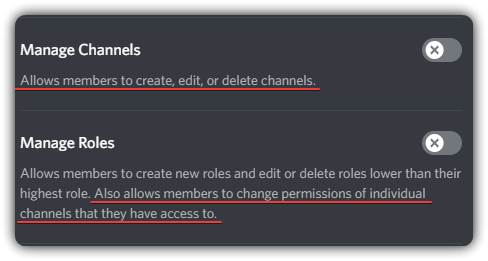
Manage_Channels is not required for the bot to lock a channel, it only needs Manage_Roles to change the channel overrides
sturdy swan
long ferry
Please refer to the discord docs, aswell as whats mentioned within a role's perm...
I get it. I will change it. Thanks for your attention and sorry about that
Can I send the bot again?
long ferry
Yup, feel free to resubmit and wait again once you have fixed what it was declined for
sturdy swan
long ferry
Yup, feel free to resubmit and wait again once you have fixed what it was declin...
Okay, I'll send it here. Have a great afternoon
 tall nacelle
for the server info how do I enlarge the server name text and add dark gray dividers (below the white text) just like this server did?
 long ferry
css is supported within the description, dont hide essential site features though
tall nacelle
oh ok
 compact veldt
@fluid birch
 long ferry
That's fine
As long as it isn't public though and doesn't for example create an invite
 shut grotto
alright thanks
 kindred mountain
Tengo un duda
Me rechazaron el bot
Por que el comando lock requiere manage_channels
Pero dice que le pongo los permisos requeridos
A que se refiere ?


 delicate basin
Well that's a bug that slipped in there. However in the info for the reviewer the find command was described precisely
And it is there and working perfectly
 real laurel
and yet if the bot was approved and shipped to be used with normal users, they would never know because it's not in the long description or anywhere in the bot
and would promptly be reported for us to re-review
delicate basin
real laurel
I've updated the command today and that's literally just a false where a true should be

It is actively being used in the bfee discord
 real laurel
that won't change the fact that it wasn't working during review
you will still have to re-submit
that's all
 hollow folio
my server isnt on the list
hollow folio

 stoic socket
hollow folio
my server isnt on the list
stoic socket
hollow folio
my server isnt on the list
we already know
you send the same thing here daily
one of the mods (i think?) said they would ping you when its fixed
hollow folio
yeah that was 2 weeks ago
stoic socket

Constantly asking won't fix it any quicker, so I'd advise you just wait until its fixed
kindred mountain
Why the declain?

 honest lynx
my man it says right there
 peak nymph
Guys I have the same problem
I cant sumbit my bot in the page
 marsh ledge
 wild stoneBOT
In order to clear your cache for the site, press CTRL+F5.
If this does not work, try one of these resources below:
Instructions on Microsoft Edge
Instructions on Google Chrome
Instructions on Mozilla Firefox
Instructions on Safari
Instructions on Opera
Instructions on Brave
 magic sundial
Hi!
My bot had like 70 Votes till like yesterday and now today it has only 4
Why ?
stoic socket
Votes reset on the first vote of the month
kindred mountain
honest lynx
my man it says right there
the problem is that I don't understand it, because the command has MANAGE_CHANNELS permissions.
 cobalt sleet
kindred mountain
the problem is that I don't understand it, because the command has MANAGE_CHANNE...
cobalt sleet
kindred mountain
the problem is that I don't understand it, because the command has MANAGE_CHANNE...
DM @toxic zephyr
 echo lava
kindred mountain
Why the declain?
echo lava
kindred mountain
Why the declain?
this reason is so dumb
how do u replace a bot on top.gg like the client id, and the name
cause my new bot got declined cuz seems like i “used” botghost
<@&817055174613794826>
i already sent proof that its not botghost
sturdy swan
Hello, does anyone know if it is normal that the votes that my server receives are reset yesterday I had 34 votes today I see and it has 2 votes
 winter walrus
echo lava
how do u replace a bot on top.gg like the client id, and the name
winter walrus
echo lava
how do u replace a bot on top.gg like the client id, and the name
If you think the decline is wrong, please DM the reviewer who declined your bot. If you have fixed the issue resubmit the bot again
winter walrus
sturdy swan
Hello, does anyone know if it is normal that the votes that my server receives a...
Yes, all votes reset every month
sturdy swan
winter walrus
Yes, all votes reset every month
wtf then what is the use of giving it votes if in the end they are going to reset it
 still flare
how do I reply to users who Reviewed bot? There is no option!
 vague mango
it's a bug, should be fixed soon™️
still flare
vague mango
it's a bug, should be fixed soon™️
Ok
 viscid spoke
Hello, can i re-apply to my bot? I need to get notified when you will start to test it, because it's currently on test, and i am hosting it locally. I will notify you when i will host it on heroku or other service, so you can publish it.
My bot: @atomic swan
winter walrus
viscid spoke
Hello, can i re-apply to my bot? I need to get notified when you will start to t...
All bots have to go through the queue, and the queue is no public. consider hosting your bot before submitting it.
winter walrus
peak nymph
Guys I have the same problem
I cant sumbit my bot in the page
Try clearing your browser cache, and then try again
peak nymph
winter walrus
Try clearing your browser cache, and then try again
How can I do that?
wild stoneBOT
@peak nymph
In order to clear your cache for the site, press CTRL+F5.
If this does not work, try one of these resources below:
Instructions on Microsoft Edge
Instructions on Google Chrome
Instructions on Mozilla Firefox
Instructions on Safari
Instructions on Opera
Instructions on Brave
 winter walrus
Yes
echo lava
winter walrus
If you think the decline is wrong, please DM the reviewer who declined your bot....
THERE WAS NO ISSUES IN THE FIRST PLACE
winter walrus
echo lava
THERE WAS NO ISSUES IN THE FIRST PLACE
If you think the decline is wrong, please DM the reviewer who declined your bot
echo lava
winter walrus
> If you think the decline is wrong, please DM the reviewer who declined your bo...
I did
winter walrus
then please wait for their reply
 lone ether
Where
 tranquil adder
So I recently lost access to my discord account and had to start a new one. Now am I unable to vote. It asks me to login but won't allow me to when I try. I get this screen:

When I click to login, I get this screen:

But I am on mobile so I can't download the desktop app or anything
lone ether
Open the page in desktop mode
 crystal marlin
lone ether
Where
crystal marlin
lone ether
Where
Basically uh I'm meaning to ask how do I add a pfp to the bot
lone ether
In the developer portal lol
crystal marlin
lone ether
In the developer portal lol
Oh nono i mean in the top.gg site
tranquil adder
lone ether
Open the page in desktop mode
Thank you. Will I have to do that every time?
lone ether
crystal marlin
Oh nono i mean in the top.gg site
It should automatically use your bot's pfp
crystal marlin
lone ether
It should automatically use your bot's pfp
It isn't tho, it shows a blank pfp even though the bot has one
lone ether
tranquil adder
Thank you. Will I have to do that every time?
Open discord in a new tab in desktop mode and log in to the account you want, then you don't need to repeat this step every time
crystal marlin

Top.gg
An unofficial epic calculator to do the math so that you can continue this EPIC RPG journey.
(i will delete this after you verify it so it doesn't look like an ad-)
lone ether
Refresh the data
wild stoneBOT
Fetching Your New Bot Data
To fetch your bot's new name or avatar, please follow these steps:
Click the Refresh Data button in the sidebar on the right.
Click Edit on your bot page and then Save.
💡 Please note: If it still doesn't seem to change, make sure you actually changed the bot avatar / name on your Discord Developer Portal and not the application icon or make sure you have changed the bot name and not the application name.
crystal marlin
That'd be visible only on pc i suppose?
crystal marlin
Only edit and report
lone ether
If you have a pc, do it there
If not, open the page in desktop mode
@crystal marlin oh wait
You have to click on "info"
And scroll down
lone ether
Sorry 
crystal marlin
nono-
@lone ether does it take some time to implement the details after the refresh data? Apparently its not updated
lone ether
Np

 subtle bolt
does votes get reset? (like regularly)
subtle bolt
ahh alr thanks
shell inlet
you can't for now
 hoary oyster
really? i remember i could use to do that
hoary oyster
ohh i see, thank you very much!
shell inlet
np
 severe scaffold
hello, My Bot Was Not Offline That Time It Just Was A Glitch You Guys Can See The Bot Was Online Like For 1 Day 7 Hrs Pls Anyone Help

 long ferry
Contact the reviewer, the bot was offline when they tried to review the bot
severe scaffold
ok
severe scaffold
long ferry
Contact the reviewer, the bot was offline when they tried to review the bot
can i know how many time he need for respond?
severe scaffold
ok sir
 nova grotto
When i click ''add to server'' it takes me to a 404 page but other servers that i try to add to works <@&817055174613794826>
long ferry
Clear your cache
wild stoneBOT
In order to clear your cache for the site, press CTRL+F5.
If this does not work, try one of these resources below:
Instructions on Microsoft Edge
Instructions on Google Chrome
Instructions on Mozilla Firefox
Instructions on Safari
Instructions on Opera
Instructions on Brave
long ferry
-cacheclear
cobalt sleet
-refreshdata
wild stoneBOT
Fetching Your New Bot Data
To fetch your bot's new name or avatar, please follow these steps:
Click the Refresh Data button in the sidebar on the right.
Click Edit on your bot page and then Save.
💡 Please note: If it still doesn't seem to change, make sure you actually changed the bot avatar / name on your Discord Developer Portal and not the application icon or make sure you have changed the bot name and not the application name.
long ferry
Staff only
 sacred charm
Can you remove the "Turkish" tag from my bot and add it again?
904055548050300939 id
long ferry
You should be able to do that on your end through editing it
sacred charm
long ferry
You should be able to do that on your end through editing it
I'm trying but I think it's automatically converted to a different tag
sacred charm
Türkçe
it was automatically converted to this tag before, I told odin and he fixed it
sacred charm
long ferry
Has the Turkish tag on my end, not sure what you're referring to
Although it has enough votes in the "Turkish" tag, it is not listed. There was also this problem last month.
long ferry
Türkçe is the translated version of that tag, it should say Türkçe when setting your language to turkish
long ferry
-upto @spiral trout
wild stoneBOT
@spiral trout
The average up-to-date approval times are stated [here](#support message).
This does not mean it will take the same amount of time someone else's bot took to be reviewed and does not mean your bot is guaranteed to be reviewed within that time frame.
There is no exact time for how long bot approval will take.
There is a queue and you're not first, nor are you last.
Read more about our reviewal process here
severe scaffold
what is this?

 candid mica
your server url that was associated with your bot that is listed on top.gg
if you dont have one just leave it blank
severe scaffold
o thanks
 halcyon vault
Is there a way to remove troll comments and review from my bot's page? Theres been people making outright false claims and damaging the bots reputation

 long ferry
That falls under our review guidelines, even if true or not
Id? Since reporting reviews does not work right now
halcyon vault

Top.gg
Add pomodoro timers in server voice channels for group studying.
long ferry
Removed for violating review guidelines 
halcyon vault
thanks!
 twilit kraken
 obsidian locust
When will sorting be fixed???....
obsidian locust
When will sorting be fixed???....
I'm wondering the same, so giving it a little bump 🙂
obsidian locust
long ferry
Removed for violating review guidelines <:topggThumbsUp:849316718102970409>
Does it respect the review guideline?

Because i reported this comment alot of times and nothing
What he says isn't true and there's a "Shit ass bot"
 potent rapids
long ferry
Removed for violating review guidelines <:topggThumbsUp:849316718102970409>
potent rapids
long ferry
Removed for violating review guidelines <:topggThumbsUp:849316718102970409>
What about "bot doesnt work" when it was on mainteance, had status that is on mainteance and also replied to all commands that its on mainteance?
 fallow hemlock
anyone knows how to do vote detector?
like sample codes
stoic socket
fallow hemlock
anyone knows how to do vote detector?
like sample codes
Check https://docs.top.gg
fallow hemlock
stoic socket
Check https://docs.top.gg
i read this and got no clue
thats why i ask here
stoic socket
Lets move to #topgg-api
 neon zealot
hello, can any one remove my nickname?
cobalt sleet
done!
neon zealot
cobalt sleet
done!
thanks.
 crystal zephyr
cobalt sleet
sturdy swan
crystal zephyr
cobalt sleet
sturdy swan
man whenever i tried to add my bot in top.gg it never shows the bot logo, can any of you help me?
 rigid valley
sturdy swan
man whenever i tried to add my bot in top.gg it never shows the bot logo, can an...
rigid valley
sturdy swan
man whenever i tried to add my bot in top.gg it never shows the bot logo, can an...
-refreshdata
wild stoneBOT
@sturdy swan
Fetching Your New Bot Data
To fetch your bot's new name or avatar, please follow these steps:
Click the Refresh Data button in the sidebar on the right.
Click Edit on your bot page and then Save.
💡 Please note: If it still doesn't seem to change, make sure you actually changed the bot avatar / name on your Discord Developer Portal and not the application icon or make sure you have changed the bot name and not the application name.
rigid valley
No problem!
 shrewd current
Hey I'm unable to reply to the reviews under my own bot. I'm logged in as the bot owner itself into top.gg. Can someone help me?
shell inlet
you can't for now there's currently an issue with that
no ETA
shrewd current
Oh alright, thank you!
shell inlet
np
 misty trench
I'm unable to update my bot to update the url to include the applications commands scope, so people keep getting confused why they're not showing. I've tried refreshing data before editing, no dice.
long ferry
You don't seem to have made any edits to any of your bots since 2021, what error are you seeing?
Make sure all fields are meeting the requirements
misty trench
long ferry
You don't seem to have made any edits to any of your bots since 2021, what error...
no errors, nothing showing required
i've been trying to make updates since 2021
closest is an error in the debug console of
 misty trench
nope
there's a solitary embed in the long description which has been there since i started on the site...
 feral echo
Bot "Froggy [BETA]" (818706168671240232) created an invite in our server and a user "Jayyy" (691222873330810891) joined it. This is privacy breach.

dont leak invite link atleast :/
@shut grotto
shut grotto
ok lol
feral echo
Jayyy is just arguing and being toxic in chat
stoic socket
feral echo
Bot "Froggy [BETA]" (818706168671240232) created an invite in our server and a u...
You should DM a moderator with this proof, as they can take action

 obsidian locust
oh fuck sorry 😆
stoic socket
You can't enable it, as it is automatically added when a server using the Top.gg bot has your bot in their server
 weak elbow
oh
weak elbow
stoic socket
You can't enable it, as it is automatically added when a server using the Top.gg...
but my bot is added in some top.gg servers
stoic socket
Ah - not sure then. From what I've seen (and heard), it is automatically enabled and isn't something that can manually be done
 shell inlet
-servercount
wild stoneBOT
To have your bot's server count displayed on Top.gg, please read the documentation on server/shard posting.
weak elbow
alr
shell inlet
-ask2ask
wild stoneBOT
Don't ask to ask!
Just ask your question, it wastes time if you say "i need help" or "can someone help me?" instead of just saying what the problem is. Save your time and other people's time and just ask the question.
Please read https://dontasktoask.com/ for an explanation on why this is an issue.
 dawn rain
@shell inlet can you so my -upto @dawn rain ?
shell inlet
-upto
wild stoneBOT
The average up-to-date approval times are stated [here](#support message).
This does not mean it will take the same amount of time someone else's bot took to be reviewed and does not mean your bot is guaranteed to be reviewed within that time frame.
There is no exact time for how long bot approval will take.
There is a queue and you're not first, nor are you last.
Read more about our reviewal process here
 odd latch
shell inlet
-upto
odd latch
shell inlet
-upto
?
shell inlet
odd latch
Here my bot if
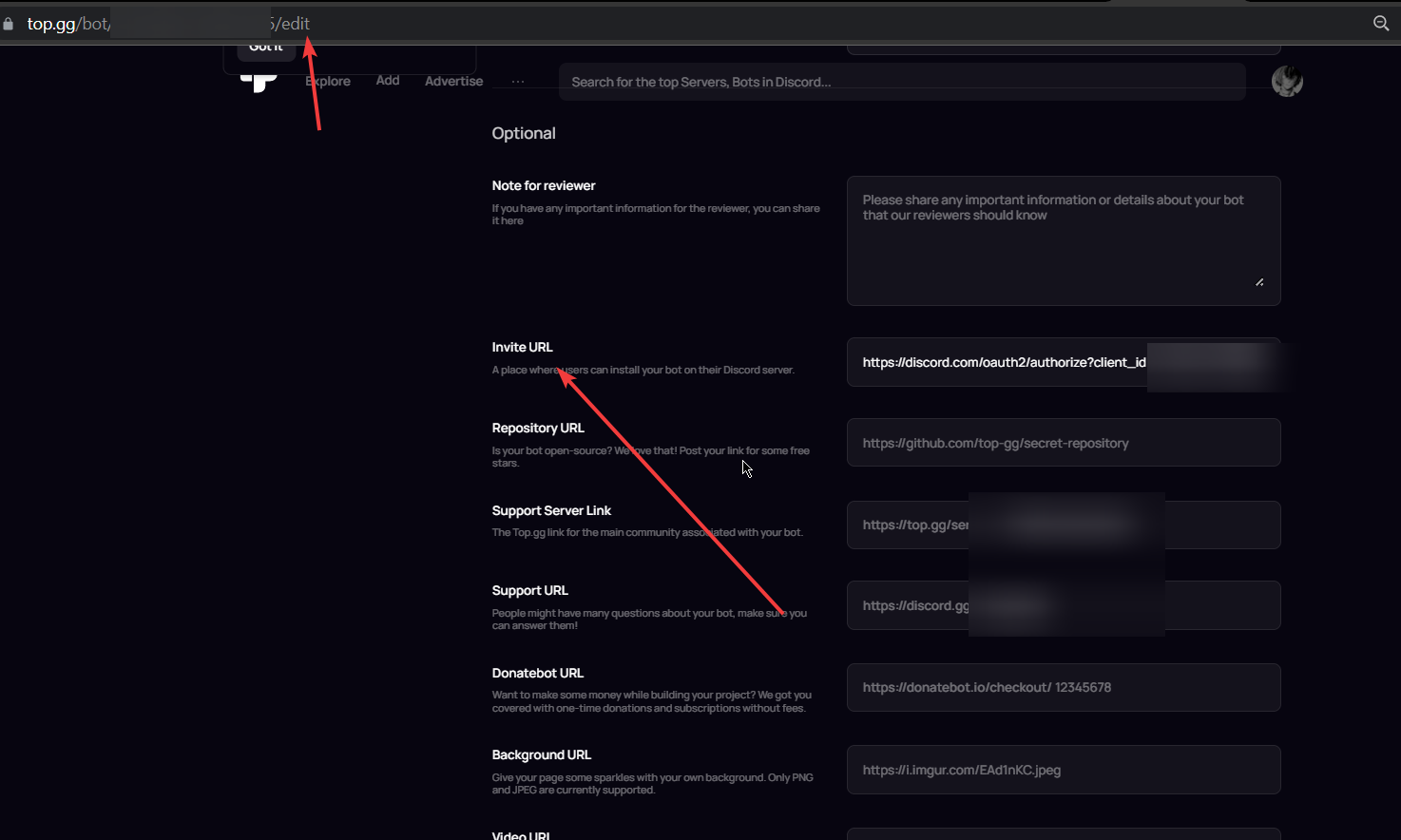
https://imgur.com/wZVjDQB replace the link there

you have added your server's link instead of bot's link
go to edit page
odd latch
Oh

Top.gg
Kiwi! The Most Powerfull Bird That Can Moderate, Music, Do Search, Welcome members using nitro animated stickers
With a Eco+lvl system
 drifting tinsel
If my prefix is slash commands do I put it as /?
long ferry
Yup
drifting tinsel
long ferry
Yup
Thanks
 odd latch
Can anyone send the authorize link?
shell inlet
it's your bot-
odd latch
shell inlet
it's your bot-
Just need the general one like https://authorise:i paste bot id .....
Ill try to search in google
shell inlet
shell inlet
odd latch
Just need the general one like https://authorise:i paste bot id .....
take it
odd latch
Ok ty
 north forum
<@&817055174613794826> yall can someone please tell me why my bot keeps getting 404ed
 gloomy shell
What do you mean by your bot getting 404'd ?
Do you mean your bot getting declined from our website?
north forum
gloomy shell
Do you mean your bot getting declined from our website?
I don’t know if its getting declined but everything that I know for sure that my bot got 404ed twice
First time
gloomy shell
Yeah, its been declined twice. Your bot has to follow our rules to be approved.
north forum
Oh dayum
north forum
gloomy shell
Yeah, its been declined twice. Your bot has to follow our rules to be approved.
Can you send me the rules rq i’ll tune it
north forum
gloomy shell
You can search in <#325648177178869760> your bot's ID for the decline reasons.
Aight thx bro
gloomy shell
Its linked when you submit a bot - https://support.top.gg/support/solutions/articles/73000502502-bot-guidelines

Top.gg
On your bot page, you are not allowed to: Include spam/junk, or completely irrelevant/nonsensical characters or phrases in your bot description or intentionally use up characters to reach the 200 character limit Mention NSFW or include any NSF...
north forum
gloomy shell
Its linked when you submit a bot - https://support.top.gg/support/solutions/arti...
Thanks a mil
Alright so the search command somehow sends nsfw
 young echo
If you redeem vote credits, does it stay permanently in your vote credit for auctions?
gloomy shell
vote credits last 31 days after you claim them
gloomy shell
you get 15 dollars for the first 100 votes - if you received more than 100 votes you'll get more than 15 dollars
young echo
how much is it per vote after
young echo
I see, ty
 coarse bough
why did my server votes not reset from last week
shell inlet
it resets every month
odd latch
Top.gg
Spice up your Discord experience with our diverse range of Discord Bots and Servers as well as other spaces to discover DAOs.
 sturdy swan
gloomy shell
he's in charge of events <a:b_nod:878208079940947988>
sturdy swan
gloomy shell
he's in charge of events <a:b_nod:878208079940947988>
Oukay, gonna text him right now, thanks !
 proper shard
just trying to remember how to code bots
whats the format for prefix and token config.js
gloomy shell
hi! please ask in #development :)
proper shard
ok
 trail marten
probably going to sound really stupid but how would i go about adding/removing a co-owner to a discord bot that is already on top.gg?
long ferry
Co-owners is a deprecated feature and can no longer be used. If you wish to add/remove users to your bot, create a team and add them to it. If your bot has existing co-owners (such as being set pre-deprecation), transferring your bot to a team will remove that.
-team
wild stoneBOT
How do I create a team?
This article describes the process of creating a team, customizing your team and adding members to it:
Teams Overview
 raven epoch
Heya, i need a currency bot where i can manually distribute currency to who i choose and they cant obtain any from anywhere else. I would also like to be able to make a shop with custom items as well as a inventory i can remove said item from at will, does anyone know any bots that could work for this?
cobalt sleet
Maybe Tatsu? Not sure about the currency though. You can search our site.
-how2search
wild stoneBOT
To find a bot that you need, please try searching the main feature you need on our website. You may have to refine your search term, but with just a little effort, you can find the bot you need. If you still haven't found a bot that suits your needs, then try searching Google for it.
 raven epoch
cobalt sleet
Maybe Tatsu? Not sure about the currency though. You can search our site.
raven epoch
cobalt sleet
Maybe Tatsu? Not sure about the currency though. You can search our site.
Already, big thanks man
 waxen dune
@cobalt sleet hey need some help i am not able to claim my bot last month credit
 waxen dune
long ferry
Oh wait nvm
waxen dune
long ferry
Oh wait nvm
Haven't claimed of last month and i am unable to claim
My one bot vote credit claimed but not this bot
 bright musk
Question. It won't let me add funds to my account
I'm attempting to use PayPal and it doesn't even let me enter my information before I get rejected.
So I know it's not a card lock issue.
 marble pivot
I want to change my bot picture
 pseudo shale
Bothers, just a little advice: dont ping so many times about useless things. If i wanna check news ill do it alone, no need to ping, and for the podcast too. Maybe create a role that people can self-take to get pinged for news and podcats, because pinging everyone always is kinda annoying
winter walrus
marble pivot
I want to change my bot picture
Change your bot's pfp in the developer portal and press refresh data on your bot's page. It might take upto 15 minutes for the picture to be updated
winter walrus
 wise sierra
how do i add my server to the top.gg website?
wise sierra
winter walrus
<https://top.gg/servers/new>
wise sierra
how do i add my server to the top.gg website?
wise sierra
winter walrus
<https://top.gg/servers/new>
now what

@winter walrus im confuesed what to do next
candid mica
wise sierra
<@637194463185469467> im confuesed what to do next
https://top.gg/servers/add/YOUR_SERVER_ID
wise sierra
whats my server id?
wise sierra
Anyone?
candid mica
wise sierra
whats my server id?
right click your server icon and copy id
 spiral trout
Invite me i will get your id and give you
wise sierra
Nah I got it it’s good
 brazen marsh
Couldn't get help in auction support, topgg won't take my payments for some reason
 undone bough
 shell inlet
brazen marsh
Couldn't get help in auction support, topgg won't take my payments for some reas...
shell inlet
brazen marsh
Couldn't get help in auction support, topgg won't take my payments for some reas...
#auctions-support
shell inlet
undone bough
-cacheclear and retry
wild stoneBOT
@undone bough
In order to clear your cache for the site, press CTRL+F5.
If this does not work, try one of these resources below:
Instructions on Microsoft Edge
Instructions on Google Chrome
Instructions on Mozilla Firefox
Instructions on Safari
Instructions on Opera
Instructions on Brave
brazen marsh
shell inlet
<#829359458080784444>
Already did, nobody replied
shell inlet
brazen marsh
Already did, nobody replied
be patient until a support associate responds
or create a ticket
-ticket
wild stoneBOT
Need more advanced support?
Open a support ticket
shell inlet
undone bough
i get the same thing on my phone to and more than brouser
unsure why that's happening retry in an hour maybe
undone bough
ok thx
rigid valley
-addbot
wild stoneBOT
Adding Your Bot To Top.gg
So you want to list your bot on Top.gg? We have a support article to help guide you through the process! If you need more help please contact us in #support!
Click here to follow our guide!
rigid valley
@sturdy pasture
sturdy pasture
hmm thanks
 hasty zenith
Why does this happen every other day, it's getting legitimately annoying

 wanton drum
@hasty zenith would you be able to paste the bot's id here?
wanton drum
hasty zenith
Why does this happen every other day, it's getting legitimately annoying
I have identified a bug with adding a Donatebot URL to your bot, please check if removing this field solves the issue for you for now, and I will make a patch to fix this soon
 shell inlet
-refreshdata
wild stoneBOT
Fetching Your New Bot Data
To fetch your bot's new name or avatar, please follow these steps:
Click the Refresh Data button in the sidebar on the right.
Click Edit on your bot page and then Save.
💡 Please note: If it still doesn't seem to change, make sure you actually changed the bot avatar / name on your Discord Developer Portal and not the application icon or make sure you have changed the bot name and not the application name.
 exotic night
thanks
 midnight kernel
whats up with this?
 vague mango
midnight kernel
whats up with this?
vague mango
midnight kernel
whats up with this?
what page did you get this on / when did this happen?
midnight kernel
vague mango
what page did you get this on / when did this happen?
bots page
link is in top
 wanton drum
a fix for this is on it's way
 forest moat
How to reply a bot review?
 gentle garnet
Broken for me for weeks now
rigid valley
forest moat
How to reply a bot review?
Currently there is no way to reply to a bot review. Tho keep yours eyes out in #announcements as that is a feature that is in the works!
forest moat
Ohh okay thankyou ❤
rigid valley
forest moat
Ohh okay thankyou ❤
No problem!
forest moat
rigid valley
No problem!
Can i report someone who promote some links in my bot review..
 wide crane
My bot has been declined for a error (language) the support said I need to contact in dm with the reviewer but it have dm blocked.. I should wait for her or I can talk with another reviewer?
 cunning meadow
Hello! I got a question, I own 2 discord servers. What if both of them hits 100+ votes? I can claim 15-15 credits from both of them & I'll receive 30 credits total credits in my wallet?
rigid valley
wide crane
My bot has been declined for a error (language) the support said I need to conta...
-declined
?
wide crane

rigid valley
What happend to that command 😭 
wide crane
We can cry
rigid valley
Anyways, none of the Bot Reviewers/Mods should have their DMs off. @real laurel is the one who declined your bot, GlobalGoat. Read the decline reason here #mod-logs message
If that doesn't help then reach out to them via DMs
wide crane
I already send friend request
rigid valley
Also, I found my command LMAO
wild stoneBOT
Your bot was likely declined because it went against our bot guidelines.
To find out why your bot was declined and by who, use the search feature in #mod-logs :
 wide crane
And its a error the bot has been writing on Spanish XD so its ayuda not help
I will wait for her
Thanks :)
rigid valley
wide crane
Thanks :)
No problem!
rigid valley
sturdy swan
<@223593851577696256>
Give me 1 second to look into this
 sturdy swan
long ferry
When did it start happening
sturdy swan
long ferry
When did it start happening
idk exactly but I opened it rn
sturdy swan
long ferry
What changes have you made before
I updated description but that was done 2-3 days before and its working fine at that time
long ferry
What have you updated exactly
sturdy swan
long ferry
What have you updated exactly
Description only
made some changes to html code
and also tried to remove description but still didn't worked
long ferry
We'd need an engineer to look into, unless you want it to work right now, which we could possibly do by deleting the bot, having you resubmit it and us approving it right away
sturdy swan
long ferry
We'd need an engineer to look into, unless you want it to work right now, which ...
and what about bot data then ?
thats not a good idea
reviews, votes, credits and all
rigid valley
iirc that all will transfer over. But let's have Hope confirm that
long ferry
Then best is to wait for an engineer on that, can't give you any ETA on that
The reviews and credits stay, the votes may not. Though yeah best is to wait for an engineer
sturdy swan
long ferry
The reviews and credits stay, the votes may not. Though yeah best is to wait for...
okay sure but we don't have dashboard yet so bot invites are dependent on top gg only
so we need a fix as soon as possible
long ferry
As I mentioned, no eta
sturdy swan
long ferry
As I mentioned, no eta
umm okay and if I resubmit the bot then my credits, reviews and analysis will stay ?
cobalt sleet
sturdy swan
Our bot page is not visible. Encountered 500 error
500 error on bot pages
Do you have a Donatebot link configured in your bot page's settings? If so try removing it for now. The engineers are aware and will be pushing a fix for it soon.
sturdy swan
cobalt sleet
<:topggDotRed:921606879107502130> **500 error on bot pages**
Do you have a Donat...
okay removing
sturdy swan
cobalt sleet
<:topggDotRed:921606879107502130> **500 error on bot pages**
Do you have a Donat...
done
donate bot is causing issue
cobalt sleet
So it works now?
sturdy swan
cobalt sleet
So it works now?
yes working now
cobalt sleet

sturdy swan
@cobalt sleetAny plan for dark and light mode option like before ?
because most of the people use dark mode
and default is light mode
cobalt sleet
You mean enforcing it on your bot page for other users?
cobalt sleet
The only way is to use custom CSS
sturdy swan
cobalt sleet
The only way is to use custom CSS
I tried but when users turn light mode on from top gg then all text becomes black which gets invisible
cobalt sleet
You can override this using custom CSS
sturdy swan
 cobalt sleet
You can ask for help in #development if you need it
sturdy swan
cobalt sleet
You can override this using custom CSS
top gg text color not bot description
sturdy swan
cobalt sleet
You're allowed to modify it
oh lemme see
cobalt sleet
It's probably in the body style
cobalt sleet
cobalt sleet
<:topggDotRed:921606879107502130> **500 error on bot pages**
Do you have a Donat...
 mystic jacinth
Hello,
It's been more than 2 weeks since my bot (https://top.gg/bot/933749474931638372) changed its avatar and the avatar is still not displayed on the site. Is this normal?
Top.gg
embed13 est un bot qui vous permet de créer des embeds facilement avec une commande slash
cobalt sleet
-refreshdata
wild stoneBOT
Fetching Your New Bot Data
To fetch your bot's new name or avatar, please follow these steps:
Click the Refresh Data button in the sidebar on the right.
Click Edit on your bot page and then Save.
💡 Please note: If it still doesn't seem to change, make sure you actually changed the bot avatar / name on your Discord Developer Portal and not the application icon or make sure you have changed the bot name and not the application name.
mystic jacinth
Thank you
 fair mortar
hello, just wanted to ask why whenever i vote for a bot it doesnt count? for example the dank memer and taco shack bot both say i havent voted, which i have, and i am using the correct account so idk
 split osprey
 long ferry
Temporary fix for the 500 Error
if you're actively experiencing getting a 500 Internal Error within your bot page or server page, try the following:
 If you're using donatebot, temporarily remove your donatebot settings within your bot/server page by going to
 https://top.gg/bot/YOURBOTID/edit or in a server to https://top.gg/servers/YOURSERVERID/edit and clear out the id on the donatebot field.
This issue will be fixed soon, thanks for understanding.
long ferry
long ferry
**Temporary fix for the 500 Error**
<:topggDotRed:921606879107502130> if you're...
cc @split osprey
 brittle marten
long ferry
**Temporary fix for the 500 Error**
<:topggDotRed:921606879107502130> if you're...
brittle marten
long ferry
**Temporary fix for the 500 Error**
<:topggDotRed:921606879107502130> if you're...
look to pins pls (mac alr pinned one)
split osprey
long ferry
cc <@755297485328482356>
But isn't for me bot 😂
long ferry
split osprey
But isn't for me bot 😂
Where exactly are you seeing it?
split osprey
long ferry
brittle marten
look to pins pls (mac alr pinned one)
For more clarity, since some users may not know how to access their bot page settings without going through the bot page itself
 velvet vortex
Hi was wondering if anyone could help whenever I try add my server onto the advertisement page it doesn't show any servers to add even though I got many servers

I click refresh servers and it doesn't do anything
long ferry
Refresh servers, then logout and back in and clear cache
candid mica
or add it by url https://top.gg/servers/add/YOUR_SERVER_ID
sturdy swan
sir i need help
 gray kernel
sturdy swan
sir i need help
gray kernel
sturdy swan
sir i need help
please state your question, so we can help you easier and faster
sturdy swan
I want to set up top.gg bot In my server I have added the server to the site and the only thing I want to ask is that how I can vote through my discord rather than visiting the website.
And can get notified for votes as well.
Hello?
sturdy swan
velvet vortex
Hi was wondering if anyone could help whenever I try add my server onto the adve...
I am facing this issue as well
@gray kernel
So much for faster
gray kernel
i'm also working on otherthings at the same time
there's no way to vote via discord
you have to do it on the website
for vote reminders, you can set up browser ones, but for discord, you'd have to use a bot to do this
velvet vortex
candid mica
or add it by url `https://top.gg/servers/add/YOUR_SERVER_ID`
Ty, I should’ve known this 
sturdy swan
candid mica
or add it by url `https://top.gg/servers/add/YOUR_SERVER_ID`
I understand so then can u please state that how I should do this?
velvet vortex
Doesn’t work just tried it 😐
velvet vortex
long ferry
Refresh servers, then logout and back in and clear cache
Neither does this 😐
sturdy swan
Topp is crazy
gray kernel
velvet vortex
Doesn’t work just tried it 😐
what's your server ID?
sturdy swan
Doesn't work properly man
velvet vortex
969486142049239050
gray kernel
velvet vortex
Neither does this 😐
are you the server owner / admin?
velvet vortex
I own it yes
gray kernel
hmm
you can try adding the top.gg bot to your server
by inviting it from here
in the member list
velvet vortex
Ye gimme a min
gray kernel
sturdy swan
I understand so then can u please state that how I should do this?
which part? setting up discord vote reminders or enabling browser notifications for voting?
sturdy swan
The part where the page doesn't show up my servers.
velvet vortex
gray kernel
in the member list
Done
sturdy swan
Same problem as ganja
gray kernel
velvet vortex
Done
is it showing now?
velvet vortex
Let’s have a look
long ferry
It should normally be resolved by refreshing servers, logging out and back in, then clearing cache
sturdy swan
long ferry
It should normally be resolved by refreshing servers, logging out and back in, t...
I have done all of those nonetheless
gray kernel
sturdy swan
I have done all of those nonetheless
have you also done the other things suggested to ganja?
 sturdy swan
gray kernel
have you also done the other things suggested to ganja?
sturdy swan
gray kernel
have you also done the other things suggested to ganja?
I don't know how to
gray kernel
sturdy swan
I don't know how to
what's your server ID?
sturdy swan
I would like to ask that where I can copy it from?
gray kernel
thanks, let me have a look
sturdy swan
yes.
gray kernel
sturdy swan
yes.

Top.gg
Join Us And We Assure To Make You The "Master Of Unite".
is that it?
sturdy swan
yes
gray kernel
are you able to access the Edit page?
if so, make sure all the info is correct and hit Save
see if it shows up then
sturdy swan
i am not able to sometimes
gray kernel
sometimes? in which cases are you able to edit your page then?
 inner shore
hi
sturdy swan
Sometimes it doesn't show the creator option and I can see the edit option as well
sturdy swan
And when I somehow get to the settings and tap on edit it only show the 2 settings then other like,webhook,etc
gray kernel
sturdy swan
Sometimes it doesn't show the creator option and I can see the edit option as we...
can you please send some screenshots for better context
sturdy swan
Help
gray kernel
velvet vortex
Now I wait for my server to be approved
your server doesn't need approval - just press edit and ensure all the relevant info is in there. once you save it, it should be public!
gray kernel
sturdy swan
Help
please state your question instead, so people with relevant knowledge can help you
sturdy swan
 inner shore
hello," Top. gg Server URL" where do we get it for the bot?
sturdy swan
Ok
gray kernel
sturdy swan
okay, well can you press edit onthis page: https://top.gg/servers/909975816635551785?
Top.gg
Join Us And We Assure To Make You The "Master Of Unite".
sturdy swan
As you can see that it shows to add it again rather then showing me the edit option cuz i already have made it
 gray kernel
inner shore
hello," Top. gg Server URL" where do we get it for the bot?
gray kernel
inner shore
hello," Top. gg Server URL" where do we get it for the bot?
i believe this is for the support server URL
gray kernel
sturdy swan
As you can see that it shows to add it again rather then showing me the edit opt...
okay, then add it
sturdy swan
how can i get a bot
sturdy swan
gray kernel
okay, then add it
Again?
inner shore
gray kernel
i believe this is for the support server URL
numbers?

 clear goblet
hello
sturdy swan
@gray kernel
sturdy swan
gray kernel
okay, well can you press edit onthis page: https://top.gg/servers/90997581663555...
I cant
shell inlet
-addserver
wild stoneBOT
Adding Your Server To Top.gg
So you want to list your server on Top.gg? We have a support article to help guide you through the process! If you need more help please contact us in #support!
Click here to follow our guide!
sturdy swan
how can i get a bot@gray kernel
shell inlet
inner shore
numbers?
numbers are just an example. copy server id and paste
shell inlet
clear goblet
can i get invite link?
of what?
clear goblet
shell inlet
of what?
the bot
as i tried many times
but i am not getting any link or smthng like that
shell inlet
sturdy swan
how can i get a bot<@198923713242988545>
i don't understand what you're trying to do, can you be precise?
clear goblet
to invite bot in server
shell inlet
clear goblet
as i tried many times
which bot?
inner shore
shell inlet
numbers are just an example. copy server id and paste
I got it,thanks
clear goblet
wild stone
this link says to add top.gg bot to your server and then you can add your server on the site
gray kernel
if there's an option to add your bot, perhaps it wasn't correctly added to the site
clear goblet
but i am not getting any option from where i can add @small lantern this bot to my server
gray kernel
clear goblet
this link says to add top.gg bot to your server and then you can add your server...
the first step of adding a server is adding the bot
clear goblet
 gray kernel
after selecting which server you want to add
shell inlet
clear goblet
this link says to add top.gg bot to your server and then you can add your server...
you can see add to server button on bot's profile
just click it
sturdy swan
how can i watch my bot on that site@Fellintron#0001
clear goblet
gray kernel
the first step of adding a server is adding the bot
ik that man
clear goblet
shell inlet
you can see add to server button on bot's profile
i am not able to see it
🥲
 shell inlet
sturdy swan
how can i watch my bot on that site@Fellintron#0001
shell inlet
sturdy swan
how can i watch my bot on that site@Fellintron#0001
search your bot's name in the search bar
shell inlet
clear goblet
i am not able to see it
you want to invite @small lantern bot right?
clear goblet
 clear goblet
shell inlet
you want to invite <@422087909634736160> bot right?
clear goblet
shell inlet
you want to invite <@422087909634736160> bot right?
yeah just that
oh wait sorry
i can just
shell inlet
click on bot's profile
shell inlet
yes
sturdy swan
What
shell inlet
sturdy swan
What
what, what?
gray kernel
sturdy swan
What
sorry, i think i'm getting a bit confused here. what are you trying to do and what is the problem you're experiencing at the moment?
clear goblet

i added bot
gave all perms
then too i am not able to see my server her
here*
why so
gray kernel
have you tried clearing your cache or checking in incognito?
please also make sure that you try this on googlechrome
clear goblet
gray kernel
have you tried clearing your cache or checking in incognito?
na i didnt
shell inlet
-cacheclear for more info
wild stoneBOT
In order to clear your cache for the site, press CTRL+F5.
If this does not work, try one of these resources below:
Instructions on Microsoft Edge
Instructions on Google Chrome
Instructions on Mozilla Firefox
Instructions on Safari
Instructions on Opera
Instructions on Brave
 gray kernel
sturdy swan
gray kernel
sturdy swan
on which page are you experiencing this?
 gray kernel
are your servers still not showing up on incognito?
clear goblet
 gray kernel
okay, what is your server ID?
clear goblet
gray kernel
are your servers still not showing up on incognito?
didnt tried on icnigto
clear goblet
gray kernel
okay, what is your server ID?
924534991759761410
sturdy swan
Add discord bot
shell inlet
sturdy swan
Add discord bot
be precise please
gray kernel
clear goblet
924534991759761410
i can't seem to find your server by inserting the ID into the URL (https://top.gg/servers/924534991759761410). are you the owner / admin of the server?
sturdy swan
there is
clear goblet
gray kernel
i can't seem to find your server by inserting the ID into the URL (https://top.g...
i am admin of server
wild stoneBOT
@sturdy swan
İngilizceden başka dillerde sohbet etmek için #general-int kanalını, top.gg hakkında (Türkçe olarak da) destek almak için #support kanalını kullanın.
Bu kanalda Türkçe konuşmayın.
gray kernel
clear goblet
i am admin of server
could you please check if the owner is able to add the server?
clear goblet
gray kernel
could you please check if the owner is able to add the server?
owner would do that
i am admin so i wanted to do it
gray kernel
i'm trying to see whether there's an issue with admins adding server
so please could you check if the owner is able to
sturdy swan
Ok
wild stoneBOT
Türkçe bilmiyorum. Lütfen Türkçe bilen moderatör olan @cyan palm (Odin#1000)'e ulaşın.
sturdy swan
gray kernel
yes, try it
I did and after for the 5th time it vanishes again
gray kernel
sturdy swan
I did and after for the 5th time it vanishes again
what do you mean it vanishes? does it redirect you back to your profile and then the server is no longer there or?
sturdy swan
The question I asked about voting through server. Was becuz there is a 10 month old video in YouTube where they have shown by adding a bot that can do voting through servers and but I couldn't find that bot wheneven I clicked on the link
sturdy swan
gray kernel
what do you mean it vanishes? does it redirect you back to your profile and then...
Yes I don't see any options
Of editing and that I have any projects
 severe ginkgo
Where's my Nitro?
gray kernel
sturdy swan
Yes I don't see any options
and when you scroll, it's not listing any existing servers that you can edit either?
sturdy swan
Yes
gray kernel
and even accessing https://top.gg/servers/909975816635551785? doesn't let you edit anything?
Top.gg
Join Us And We Assure To Make You The "Master Of Unite".
i want to make sure we've gone through all the troubleshooting
sturdy swan
Before coming here
I tried to log out and login again it fixed it once and I had to add the server again and after that it started not showing any server and started saying that I don't have any projects so I couldn't do anything I tried to refresh the page so many times but it didn't worked
wild stoneBOT
In order to clear your cache for the site, press CTRL+F5.
If this does not work, try one of these resources below:
Instructions on Microsoft Edge
Instructions on Google Chrome
Instructions on Mozilla Firefox
Instructions on Safari
Instructions on Opera
Instructions on Brave
sturdy swan
I have to do that through PC right?
gray kernel
you can do it on mobile too
sturdy swan
Oh yes through settings
Now lemmi explain something please listen.
I know that I am not getting those options and I cant see the servers.
But when I was adding the server 1st time I gave the info it needed and then after that I went to edit it again and it showed an option about webhook then I first created one in the server and then went to a site there by watching a tutorial I set up the webhook and now whenever the members vote the server through the site it sends a notification that they have done the vote and give them a specific role for 12h
After doing all that
I saw a video where they set a bot name Vote Tracker and it got my attention cuz after they set that bot in there channel by typing !vote it just voted there server through discord and notified them that the vote has been done by {user}.
shell inlet
what's the issue?
clear goblet
gray kernel
so please could you check if the owner is able to
i would have told him but he big guy 🥲
but then too i have administrator perms
and he has assigned me to do that
sturdy swan
So I thought that I should try it and I went and searched for that bot through the link they gave in the description but it didn't showed up on the site it said 404 not found.
So I searched for that bot directly and I got that bot invited into my server after that I thought that I should try setting this bot up but it didn't let me and then I came here
clear goblet
i have given @small lantern bot administrator perms
gray kernel
clear goblet
i would have told him but he big guy 🥲
but then too i have administrator perms
i understand, but there could be an issue with admins adding servers, which is why i need to see if the owner can confirm whether they're able to add a server
the bot doesn't need admin perms
sturdy swan
Please read all that I have explained everything@gray kernel
candid mica
i thought only owner can add their server
clear goblet
gray kernel
i understand, but there could be an issue with admins adding servers, which is w...
lemme try in my private server
gray kernel
clear goblet
lemme try in my private server
thank you
shell inlet
sturdy swan
So I thought that I should try it and I went and searched for that bot through t...
we don't provide support for vote trackers, all you need to do while setting it up is take the token of your bot from https://top.gg/bot/<bot's id>/webhooks and paste it while setting up vote trackers
sturdy swan
shell inlet
we don't provide support for vote trackers, all you need to do while setting it ...
I don't understand sorry I am not English speaking
shell inlet
sturdy swan
I don't understand sorry I am not English speaking
what language do you speak?
sturdy swan
shell inlet
we don't provide support for vote trackers, all you need to do while setting it ...
What u mean by token?
sturdy swan
shell inlet
what language do you speak?
Urdu
shell inlet
sturdy swan
What u mean by token?
 shell inlet
sturdy swan
Urdu
shell inlet
sturdy swan
Urdu
i can speak hindi if you understand it?
sturdy swan
I can understand Hindi as well
sturdy swan
shell inlet
we don't provide support for vote trackers, all you need to do while setting it ...
And where do I have to paste it?
shell inlet
sturdy swan
And where do I have to paste it?
try following the vote tracker's guideline
we don't provide support for that as i said
sturdy swan
The way I set it up before it shows like this when u vote
 shell inlet
we don't provide support for that as i said
gray kernel
you'd need to get in touch with the devs via their bot support server. you should be able to find this under "Socials" on their top.gg page
sturdy swan
It's okay but its not good that I can't see my servers
gray kernel
yes, i've flagged the issue internally and we are doing some testing to try and see what could be oging wrong
clear goblet
hello
sturdy swan
Hello! How Are You
clear goblet
i checked
right now
that server can only be added by owner on the site
why it cant be added by admin?
if a guy have administrator perms he must be able to add server on site
@gray kernel @shell inlet
gray kernel
clear goblet
if a guy have administrator perms he must be able to add server on site
it must be the "Administrator" perm that you have rather than the "Manage Server" perm
clear goblet
gray kernel
it must be the "Administrator" perm that you have rather than the "Manage Server...
wait lemme show u
@gray kernel

 clear goblet
gray kernel
yeah, so we're testing this rn
clear goblet
gray kernel
yeah, so we're testing this rn
yeah sure
 stable basin
can i change my application for the bot?
gray kernel
clear goblet
yeah sure
does anything change when you press this?
 stable basin
i want to use a different discord application for my bot
as apparently the default top.gg invite url does not has slash command scope
long ferry
stable basin
i want to use a different discord application for my bot
to note: you are not allowed to link a different bot on your invite url
if you wish to submit a new bot, submit it and remove the old one if no longer in use
stable basin
yea that is what ill do
clear goblet
gray kernel
does anything change when you press this?
nah
it didnt worked
i have been doing that since last 2 hours
refreshing
🥲
@shell inlet
omg wait
you spy dankers fellintron?
gray kernel
-addserver
wild stoneBOT
Adding Your Server To Top.gg
So you want to list your server on Top.gg? We have a support article to help guide you through the process! If you need more help please contact us in #support!
Click here to follow our guide!
sturdy swan
https://uploadi.ng/FAX0zHsE
how can i fix it
i have form and i want from form user details and form data to mongodb
 cobalt sleet
 tulip jungle
Is there any code public, that gives a voter for a bot a specific role and removes it after 12 hours?
cobalt sleet
No but you can try and code it yourself and ask for help in #development if you're having trouble.
 old wyvern
gray kernel
-addserver
old wyvern
gray kernel
-addserver
Tnx
young echo
Why does the website not show my profile even though I have one?
 cobalt sleet
 true hazel
Does Top.gg update a Bot's new profile picture of username?
true hazel
Does Top.gg update a Bot's new profile picture of username?
-refreshdata
wild stoneBOT
@true hazel
Fetching Your New Bot Data
To fetch your bot's new name or avatar, please follow these steps:
Click the Refresh Data button in the sidebar on the right.
Click Edit on your bot page and then Save.
💡 Please note: If it still doesn't seem to change, make sure you actually changed the bot avatar / name on your Discord Developer Portal and not the application icon or make sure you have changed the bot name and not the application name.
cobalt sleet
young echo
Why does the website not show my profile even though I have one?
Try logging out and back in again
young echo
Already tried it, nothing changed
 light forge
how do i change my application?
cobalt sleet
light forge
how do i change my application?
What kind of application are you referring to? A bot submission?
cobalt sleet
 native sigil
Hi, is it free to add a server on top.gg? And what’s the prefix for the top.gg b...
native sigil
Hi, is it free to add a server on top.gg? And what’s the prefix for the top.gg b...
Yes it's free. The Top.gg bot doesn't have any commands except -ping. Its purpose is to keep your server page updated with your server's data and give and remove voter roles.
native sigil
Ok thank you, also for future references is it possible for me if I own a server to remove a review from it?
wild stoneBOT
native sigil
Alright thank you
cobalt sleet
No you can't. You have to delete your previous one and re-submit with the new ID

 light forge
cobalt sleet
No you can't. You have to delete your previous one and re-submit with the new ID
light forge
cobalt sleet
No you can't. You have to delete your previous one and re-submit with the new ID
oh kk
 torpid ridge
the number in the () was over 100 the other day, now it's 16? does it reset at the end of each month?

@ me
 thin basin
I don't understand why it doesn't work?

 gloomy shell
torpid ridge
the number in the () was over 100 the other day, now it's 16? does it reset at t...
gloomy shell
torpid ridge
the number in the () was over 100 the other day, now it's 16? does it reset at t...
yes it resets at the end of each month
torpid ridge
gloomy shell
yes it resets at the end of each month
and do the votes work just like Disboard bumps? or there's a different mechanic?
gloomy shell
the more upvotes your server has, the higher it appears in search results yes

 indigo ibex


 long ferry
That is a webhook you create yourself, which allows you to program what behaviour should be done within your bot once someone votes
 wooden igloo
so it's not a webhook from discord?
long ferry
correct
wooden igloo
ohhh i see, alright thank you
waxen dune
its a new month and i am not able to claim my last month credits pls helpme with this

 rigid valley
waxen dune
its a new month and i am not able to claim my last month credits pls helpme with...
rigid valley
waxen dune
its a new month and i am not able to claim my last month credits pls helpme with...
-credits
wild stoneBOT
@waxen dune
Auction Credits
What are credits?
- If enough people vote for your bot or server per month, you have the ability to earn vote credits that you can then use for auctions.
- Don’t know what auctions is? See here to learn more and here to participate.
- These auction credits can be used to pay for any winning bids you may make.
- You CANNOT “withdraw” them for real money.
How does the system work?
- Each month, bot monthly votes reset (midnight UTC).
- If you get 100 votes on your bot in the month, you can redeem $15 worth of voting credits (note: you can’t redeem till you actually get 101 votes).
- Any vote after 100 will be worth $1 per 1000 votes (or $.001 per 1 vote).
How do I redeem them?
- At the end of the month, you will be eligible to redeem your credits (you redeem them on your bot or server's Votes page). You will have 30 days to redeem them before they expire.
- After you redeem them, you have 31 days to use them before they expire.
How do I use vote credits to pay for Auctions?
-When you pay for your winning bid, you can "Pay with Credits".
-If your payment cost is more than the amount of credits you have, make sure to apply the credits first and then pay the rest with the supported payment providers.
You can read more about using your vote credits in our vote credit support article.
You can read more about Auctions in our Auctions support articles.
waxen dune
rigid valley
-credits
i am not able to claim they are credit of april which can be claim on 1 may and its 3 may and still i am not able to claim
rigid valley
waxen dune
i am not able to claim they are credit of april which can be claim on 1 may and ...
Try clearing your cache
waxen dune
rigid valley
Try clearing your cache
tried everything
waxen dune
rigid valley
Can I get the bot's ID
919888005785853953
rigid valley
waxen dune
919888005785853953
There is nothing on this page to claim them?
https://top.gg/bot/919888005785853953/vote
Top.gg
Spice up your Discord experience with our diverse range of Discord Bots and Servers as well as other spaces to discover DAOs.
waxen dune
rigid valley
There is nothing on this page to claim them?
https://top.gg/bot/9198880057858539...
last month credits like redeem option is not coming
rigid valley
waxen dune
last month credits like redeem option is not coming
Weird. Let me ask around
rigid valley
waxen dune
last month credits like redeem option is not coming
Can you send a screenshot of the vote page
 fringe zinc
hello I wanted to add my discord server but the web page does not let me I do not know why I only get those 2
 waxen dune
rigid valley
Can you send a screenshot of the vote page
waxen dune
rigid valley
Can you send a screenshot of the vote page
and vote even not got reset
 rigid valley
waxen dune
and vote even not got reset
rigid valley
waxen dune
and vote even not got reset
- Verify you're logged in
- Try logging in and back out
LMK if either worked
waxen dune
rigid valley
1) Verify you're logged in
2) Try logging in and back out
LMK if either worked
tried everything and i tried from my phone too
rigid valley
fringe zinc
hello I wanted to add my discord server but the web page does not let me I do no...
-addserver
wild stoneBOT
@fringe zinc
Adding Your Server To Top.gg
So you want to list your server on Top.gg? We have a support article to help guide you through the process! If you need more help please contact us in #support!
Click here to follow our guide!
 wise sierra
guys how do i make a thing so people can vote for my server
long ferry
they should be able to once you have added your server
there's a button on the top right of your server page that allows them to vote
long ferry
-refreshdata
wild stoneBOT
Fetching Your New Bot Data
To fetch your bot's new name or avatar, please follow these steps:
Click the Refresh Data button in the sidebar on the right.
Click Edit on your bot page and then Save.
💡 Please note: If it still doesn't seem to change, make sure you actually changed the bot avatar / name on your Discord Developer Portal and not the application icon or make sure you have changed the bot name and not the application name.
 fleet kindle
long ferry
-refreshdata
fleet kindle
long ferry
-refreshdata
thanks, didn't know that.
 gloomy prairie
why is it stuck like this
 supple mica
Hey @gloomy prairie - Are you the main owner of the bot?
gloomy prairie
supple mica
Hey <@767819210662740059> - Are you the main owner of the bot?
yes
the button is just stuck showing the loading
and when it is not loading it just jumps back to step 2 with no error
supple mica
Can I see the options you're filling in please?

 supple mica
Can I see your tags?


