#support
1 messages · Page 662 of 1

 cobalt sleet
Are you sure you changed the bot name and not the application?
 neat furnace
yes
neat furnace
edit then save?
cobalt sleet
Yeah
cobalt sleet
New bots aren't getting indexed in search. That's a known issue right now. The team is aware and working on it. There's no ETA for a fix.
neat furnace
okay thx!
 thin urchin
I want to report someone.
cobalt sleet
What's the issue?
thin urchin
cobalt sleet
What's the issue?
Can we talk via dms? I would like to report it privately.
cobalt sleet
Sure
 radiant edge
someone?
 toxic topaz
how can we show our bot web on topgg bot info
cobalt sleet
Open a private thread in #auctions-support, an auctions support member will help you soon.
toxic topaz
<iframe src="https://realcommunity.site/"></iframe>
It will work?
cobalt sleet
toxic topaz
how can we show our bot web on topgg bot info
Yes
toxic topaz
toxic topaz
`<iframe src="https://realcommunity.site/"></iframe>`
It will work?
sure
it will work
cobalt sleet
Yes
toxic topaz
i did but i didn't show the web thats why am here
cobalt sleet
Try <iframe src="https://realcommunity.site/" />

 cobalt sleet
Open a private thread in <#829359458080784444>, an auctions support member will ...
cobalt sleet
cobalt sleet
Open a private thread in <#829359458080784444>, an auctions support member will ...
@toxic topaz
radiant edge
cobalt sleet
Open a private thread in <#829359458080784444>, an auctions support member will ...
great thanks
 primal trench
Hi, I would like to report this bot: https://top.gg/bot/952652381491970078
the owner created an invite and nuked my server
proof:


Top.gg
DAOB38 - Fun, Misc, Auto-Mod, Moderation Bot
 paper nebula

 long ferry
primal trench
Hi, I would like to report this bot: https://top.gg/bot/952652381491970078
the ...
long ferry
primal trench
Hi, I would like to report this bot: https://top.gg/bot/952652381491970078
the ...
Please use the report button on Top.gg
primal trench
okay, thank you
 hexed vessel
are estimated impressions updated every week?
 knotty vigil
hexed vessel
are estimated impressions updated every week?
knotty vigil
hexed vessel
are estimated impressions updated every week?
I’m sure it’s either weekly
or day
And what’s with my nickname??????
I don’t remember changing it lol
cobalt sleet
Your username is using special characters to hoist yourself to the top of the online list. We can reset it if you change your username or you can change it yourself to something else by boosting the server.
 drifting turtle
Hello, what does this mean for a bot that was listed for years?
 cobalt sleet
-botlive
 wild stoneBOT
If your bot was recently approved, it may take 1 - 3 days to get indexed in search. Please try searching again later.
💡 If your bot was approved over 3 days ago, you can safely ignore this notification!
 drifting turtle
💚
radiant edge
scammer? or real manager?

 sturdy swan
my bot s icon doesn t show up
 cobalt sleet
radiant edge
scammer? or real manager?
cobalt sleet
radiant edge
scammer? or real manager?
Not here
ID please?
-b @pine carbon Top.gg support scam
wild stoneBOT
 i’m Avacado💀📛 MD#5891 was successfully banned.
cobalt sleet
Got them
radiant edge
cobalt sleet
ID please?
5891
cobalt sleet
Thanks for reporting!
radiant edge
thank you guys, you are doing an amazing job
sturdy swan
sturdy swan
my bot s icon doesn t show up
,
cobalt sleet
sturdy swan
my bot s icon doesn t show up
-refreshdata
wild stoneBOT
@sturdy swan
 Fetching Your New Bot Data
To fetch your bot's new name or avatar, please follow these steps:
 Click the Refresh Data button in the sidebar on the right.
Click Edit on your bot page and then Save.
💡 Please note: If it still doesn't seem to change, make sure you actually changed the bot avatar / name on your Discord Developer Portal and not the application icon or make sure you have changed the bot name and not the application name.
 sturdy swan
thx
 ornate remnant
It been almost a week and half since my got approved but its not in search results.
Last time i asked they said it was some issue? Any idea of how much longer?
hexed vessel
ornate remnant
It been almost a week and half since my got approved but its not in search resul...
mine took 2 weeks
 candid elm
Why am I not able to edit my server
it keeps asking me to "add it to top.gg" even though it is
 low sparrow
make sure that @small lantern is in there as well
candid elm
low sparrow
make sure that <@422087909634736160> is in there as well
It is.
 trim canyon
developers who make bots and who are rejected here should contact me at DM
low sparrow
no
trim canyon
Yes
low sparrow
there is no reason to
when they are rejected, they will have the reason on why they are rejected and the direct contact to the bot reviewer who rejected it
 stoic socket
trim canyon
developers who make bots and who are rejected here should contact me at DM
stoic socket
trim canyon
developers who make bots and who are rejected here should contact me at DM
@winter walrus
 winter walrus
-b 906925187549761607 Impersonating top.gg staff, and informing devs who get their bot declined to DM then
wild stoneBOT
Bobina#9537 was successfully banned.
winter walrus
them* im bad at spelling
low sparrow

stoic socket

 night bridge
commands look like this

 noble badge
winter walrus
them* *im bad at spelling*
noble badge
winter walrus
them* *im bad at spelling*
Just typing to fast I can understand that.
night bridge
night bridge
commands look like this
help me
 boreal hemlock
My bot was rejected for the wrong reason, how do we fix it?
cobalt sleet
Contact the bot reviewer in DMs
 plush talon
Hey i have a question.
While my bot has 3 votes and other bots has 1, my bot is at the very bottom and the bots with the 1 vote is at the start. Why is this happening?
cobalt sleet
There are issues with search
plush talon
Ok thank you!
cobalt sleet
Looks like you need help formatting your HTML description. Ask in #development.
cobalt sleet
boreal hemlock
My bot was rejected for the wrong reason, how do we fix it?
Contact @shell inlet
boreal hemlock
cobalt sleet
Contact <@786150805773746197>
Ok thank you.
 mighty heart
sorry, what?
stoic socket
mighty heart
sorry, what?

Top.gg
Spice up your Discord experience with our diverse range of Discord Bots and Servers as well as other spaces to discover DAOs.
thats the working link
you did https://top.gg/server/879346945611681823/votes which is incorrect
 thorny basalt
Wrong information.. the bot contains 3 shards and tells me that there is only 1

 strong fiber
hi my bot top.gg has been approved and it says wait 1-3 days for it to appear on the search page. It's been 6 days since the bot was approved but it still doesn't show up on the search page.
thorny basalt
How can I modify it?
 fluid birch
strong fiber
hi my bot top.gg has been approved and it says wait 1-3 days for it to appear on...
fluid birch
strong fiber
hi my bot top.gg has been approved and it says wait 1-3 days for it to appear on...
-botlive
wild stoneBOT
@strong fiber
If your bot was recently approved, it may take 1 - 3 days to get indexed in search. Please try searching again later.
💡 If your bot was approved over 3 days ago, you can safely ignore this notification!
strong fiber
@fluid birch What should I do?
 thorny basalt
No I didn't put it
strong fiber
My bot doesn't show up on the search page.
fluid birch
Oh wait sorry misread
That is a known issue unfortunately. The team is aware and are working on it
thorny basalt
ok
strong fiber
fluid birch
Oh wait sorry misread

How can I correct my username?
How should I do
I want it to be Tetra
Can't I just change my server name?
I did
Who can I ask for help?
 dreamy abyss
strong fiber
Who can I ask for help?
dreamy abyss
strong fiber
Who can I ask for help?
Any online moderator
strong fiber
Thanks
wild stoneBOT
The average up-to-date approval times are stated [here](#support message).
This does not mean it will take the same amount of time someone else's bot took to be reviewed and does not mean your bot is guaranteed to be reviewed within that time frame.
There is no exact time for how long bot approval will take.
There is a queue and you're not first, nor are you last.
Read more about our reviewal process here
boreal hemlock
@cobalt sleet Sorry for the tag @shell inlet When is it active?
cobalt sleet
Please wait up to 24h
sturdy swan
how i know if my bot is declined or aproved?
cobalt sleet
-notified
wild stoneBOT
If your bot is approved:
You'll get a DM from @wild stone and you'll be assigned the <@&265125253443878912> role here.
If your bot is declined:
You'll get a DM from @wild stone and you'll also get a ping in #mod-logs.
💡 Please make sure you have your DMs activated for this server.
dreamy abyss
 coarse relic
How to change my bot name on top.gg website 🤔
coarse relic
How to change my bot name on top.gg website 🤔
-refreshdata
wild stoneBOT
@coarse relic
Fetching Your New Bot Data
To fetch your bot's new name or avatar, please follow these steps:
Click the Refresh Data button in the sidebar on the right.
Click Edit on your bot page and then Save.
💡 Please note: If it still doesn't seem to change, make sure you actually changed the bot avatar / name on your Discord Developer Portal and not the application icon or make sure you have changed the bot name and not the application name.
dreamy abyss
Change it in the Discord dev portal first then follow the steps above
coarse relic
dreamy abyss
-refreshdata
How to refresh data can i get example
dreamy abyss
Look at the screenshot above
coarse relic
wild stone
<@868098748281155595>
Ok
 brazen marsh
WHY this error has popped up for close to a week now

(error pops up when trying to add a team member)
dreamy abyss
brazen marsh
WHY this error has popped up for close to a week now
Does the user you are trying to add have a top.gg account?
 brazen marsh
dreamy abyss
Does the user you are trying to add have a top.gg account?
brazen marsh
dreamy abyss
Does the user you are trying to add have a top.gg account?
yeah, he's new, but has signed in
dreamy abyss
brazen marsh
yeah, he's new, but has signed in
What is their top.gg profile URL?
dreamy abyss
coarse relic
Not shown it
Did you click the refresh data button, then click edit then save?
coarse relic
dreamy abyss
Did you click the refresh data button, then click edit then save?
Not shown refresh button i have been saw request data button
brazen marsh
dreamy abyss
What is their top.gg profile URL?
How do i search his profile? I Just assumed it was his discord name
MarkieeP#2197
dreamy abyss
brazen marsh
How do i search his profile? I Just assumed it was his discord name
Do you have their discord userid? I cant look up using username
dreamy abyss
coarse relic
Not shown refresh button i have been saw request data button
I don`t understand what you mean unfortunately. You need to click the refresh data button, then do a edit + save
wild stoneBOT
Fetching Your New Bot Data
To fetch your bot's new name or avatar, please follow these steps:
Click the Refresh Data button in the sidebar on the right.
Click Edit on your bot page and then Save.
💡 Please note: If it still doesn't seem to change, make sure you actually changed the bot avatar / name on your Discord Developer Portal and not the application icon or make sure you have changed the bot name and not the application name.
brazen marsh
brazen marsh
MarkieeP#2197
this is their discord user ID
dreamy abyss
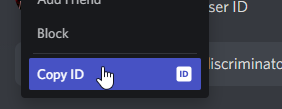
That is username + discriminator. A user ID will look something like; 356289005769326594
You can get it by right clicking them https://i.imgur.com/fQEMW3q.png
 brazen marsh
dreamy abyss
That is username + discriminator. A user ID will look something like; 3562890057...
brazen marsh
dreamy abyss
That is username + discriminator. A user ID will look something like; 3562890057...
386596693254209540
dreamy abyss
brazen marsh
386596693254209540
Humm.. Yeah I can see their account here
https://top.gg/user/386596693254209540
<@&817055174613794826> Anything issues you are aware of when trying to add a user to a team?
brazen marsh
dreamy abyss
Humm.. Yeah I can see their account here
https://top.gg/user/386596693254209540
...
do i add them with the discord username or should i add them using their code?
brazen marsh
ahhh I see let me try that! sorry!
dreamy abyss
No problem. Let me know if that works 🙂
The error message is a bit confusing. Should probably be a bit more descriptive
brazen marsh
Worked like a charm! Thank you for the quick response!
 lost portal
@sturdy swan Check my bot pls you declined my bot cause it was offline I solved the issue pls check my bot Ficy Music Your bot Ficy Music was declined by reviewer Krypton.
Reason: Your bot was offline when we tried to review it. For that reason, we are unable to test it. Please get your bot online and re-apply.
If you would like to dispute your decline, please DM Krypton.
04/12/2022. But you're DMS are off though.
stoic socket
lost portal
<@456226577798135808> Check my bot pls you declined my bot cause it was offline ...
Resubmit your bot - https://top.gg/bot/new
lost portal
I did
stoic socket
Also, Staff member's DMs are not shut. It is because your privacy settings will be set to not allow DMs from non friends
 dreamy abyss
 rose pine
Invite Bot Top.gg?
wild stoneBOT
rose pine
Invite Bot Top.gg?
wild stoneBOT
@lost portal
Almost every staff member has direct messages enabled. If you can't message one of the staff members, it may be an issue on your end. Please make sure you have direct messages enabled by checking your privacy settings in
Settings > Privacy & Safety > Allow direct messages from server members
as well as right-clicking on
Top.gg > Privacy Settings > Allow direct messages from server members.
If you're still not able to send a staff member a direct message despite having these settings enabled, feel free to ping them in this server!

 runic spruce
Yo ik this is the bot support channel, but is there an emotional support channel?
mighty heart
stoic socket
https://top.gg/servers/879346945611681823/vote
oh, okay thanks. where do i go from here then to see vote credits?
stoic socket
I believe when you click “Edit”, there’s a tab for vote credits
mighty heart
OH. thank you so much! I see it now
sturdy swan
Which is 1 top of bot self roles by reaction
 agile ember
Hi i have question how i can delete my bot page?
stoic socket
agile ember
Hi i have question how i can delete my bot page?
replace BOTID with your bot's ID of course
agile ember
Okay thank you
rose pine
dreamy abyss
https://top.gg/servers/invite
Thank you
 shell inlet
sturdy swan
Which is 1 top of bot self roles by reaction
shell inlet
sturdy swan
Which is 1 top of bot self roles by reaction
-wrongserver
wild stoneBOT
Hey! We think you have our server mistaken. We do not provide support, help, or advice for any bot. You need to click on the "Discord Support Server" button on the bot's page of the bot you need support for. If there isn't a button that says "Discord Support Server" or nothing else mentioned about a support server, the server invite is invalid or you were banned from the bot's support server, then we can't help you. Sorry :(
 sturdy swan
Hello good afternoon, I would like to buy the premium of the page but it does not let me

<@&817055174613794826>
 raven karma
I just got the gaming slot 1 and paid how long will it take to appear?
 desert cobalt
Normal that my bot has been deleted by Krypton?
brazen marsh
i've paid for my Ad's and the money has been pulled from my bank account. It is still saying these are open payments though...
 floral pagoda
raven karma
I just got the gaming slot 1 and paid how long will it take to appear?
floral pagoda
raven karma
I just got the gaming slot 1 and paid how long will it take to appear?
The ads will go live in one day
brazen marsh
raven karma
I just got the gaming slot 1 and paid how long will it take to appear?
How much did you pay? (If you don't mind my asking)
 zinc oracle
brazen marsh
i've paid for my Ad's and the money has been pulled from my bank account. It is ...
zinc oracle
brazen marsh
i've paid for my Ad's and the money has been pulled from my bank account. It is ...
#auctions-support
 onyx minnow
Hello i have changed my bots name and pfp still not showing in the top gg website
 misty sparrow
wild stone
misty sparrow
wild stone
^
onyx minnow
Ah i see thanks ^^
misty sparrow
np
 lapis maple
Good, why is my friend banned from the server?
 stoic socket
lapis maple
Good, why is my friend banned from the server?
stoic socket
lapis maple
Good, why is my friend banned from the server?
Search their user ID in #mod-logs, it will say there
or send their Id here, I can look for you 
 maiden plank
what do u mean by running 'multiple instances'?
long ferry
Having your bot running multiple times
maiden plank
so as in like, when you run one command, it sends the response back multiple times..?
misty sparrow
yes
maiden plank
apparently my bot got declined for that, however when i tested it out, that didnt happen
so im confused on how to fix it
raven karma
brazen marsh
How much did you pay? (If you don't mind my asking)
40$ for #gaming slot 1 it can be more or less depending on the # and slot 1 or 2
brazen marsh
raven karma
40$ for #gaming slot 1 it can be more or less depending on the # and slot 1 or 2
Did you do $40 for 1k views?
sturdy swan
i still can't see my server anywhere on the site even when i copy paste my server name but my friends adding topgg have their server viewable instantly


can't be a name length/symbols issue atp bc other servers with more complex names are searchable?
long ferry
We're still experiencing search issues
As well as your search results may get impacted by using unsearchable emojid
 rigid valley
Currently there is no ETA
 kindred zodiac
Hi. So I had a server that was a Collab server. Since I didn't need it anymore and I was at the max server limit, I decided to delete those channels and revamp it. Currently on my top.gg profile on the website, it shows the old icon, name and etc. I have tried fixing it many times but it still shows the old name/icon. When I try clicking on the view part for the server, it takes me to a 404 page saying "Oops! We can’t seem to find the page you’re looking for. Don’t worry, we will take you home."
can someone please help me im begging. if you can help @ me
long ferry
You'll likely need to re-add it through https://top.gg/servers/new
Discord
Discord is the easiest way to communicate over voice, video, and text. Chat, hang out, and stay close with your friends and communities.
 grand ravine
maiden plank
apparently my bot got declined for that, however when i tested it out, that didn...
grand ravine
maiden plank
apparently my bot got declined for that, however when i tested it out, that didn...
Maybe we could help in #development
grand ravine
 deft trail
heard i need to apply in this server
deft trail
heard i need to apply in this server
@long ferry the command please
deft trail
grand ravine
<@669452973755072524> the command please
huh
long ferry
-apply
deft trail
-apply
long ferry
-apps
wild stoneBOT
Volunteer Applications
Hey! It seems like you're interested on volunteering for Top.gg. We're glad for any help we can get regarding our server events, support articles, bot reviewing, moderation, and more!
 Contributors
Contributors are not considered staff and there is no age requirement. Contributors help out with server events and providing support.
 Bot Reviewers
Bot Reviewers are Top.gg staff and must be 18 or older. Bot Reviewers review the discord bots submitted to the site before they are listed to make sure they follow our rules.
 Moderators
Bot Reviewer is a stepping stone to Moderator - if you wish to be a Moderator you must first apply and be accepted as a Bot Reviewer.
Please read [this post](#announcements message) for more information and to apply!
grand ravine
Thx qt
deft trail
thanks
long ferry
There read
sturdy swan
long ferry
You'll likely need to re-add it through https://top.gg/servers/new
would this help my unsearchable issue
do ya think
sturdy swan
 noble talon
service down?
 long ferry
Yup already notified
noble talon
long ferry
Yup already notified
which channel? i just do mark as read lol
 west crest
How does the ranking system work? When sorting by 'Top' my server doesn't show up until Page 8 when I use the 'weed' tag.


If my server has 15 votes, it should be in position 2 no?
rigid valley
west crest
If my server has 15 votes, it should be in position 2 no?
Search is experiencing some issues. The devs are working on it
west crest
Man I've had discoverability issues since September. :c
rigid valley
west crest
Man I've had discoverability issues since September. :c
Don't take this the wrong way but maybe it's more because of the community, not everyone smokes weed, and the people who do might not pop on discord or top.gg with the aspiration of finding a server about weed. Niche communities like that take time to grow
west crest
Nah def not that, just talking about the bugs with the website. My server wasn't even searchable at one point on top.gg
I get around 100 joins a day from Disboard when I used them
You can see my message history here
 naive oracle
Can eneyone tell me how I Dm Krypton#7331
rigid valley
west crest
I get around 100 joins a day from Disboard when I used them
IDK man, I know I personally don't do that as I am in the military and the people I know who do don't look to top.gg to find servers that do.
rigid valley
naive oracle
Can eneyone tell me how I Dm Krypton#7331
Just click his name in this message and send him a message
@sturdy swan
naive oracle
Ok tysm
west crest
Alrighty then 💁 Still seems like poor code or bugs in the website versus my server being niche, but whatever you say.
rigid valley
If that's what you think then that's what you think. I am not here to change anyone's mind, I am only here to review bots and provide assistance as needed
 scenic bough
@long ferry Some people who havent even played the game have been reviewing. There isnt a space while reporting these reviews to send ss or reasons. I was wondering how will you handle those without sufficient info.
 cosmic orbit
hey guys, or tested my bot 4 days ago. How long does it take to give me an answer of the result?
dreamy abyss
cosmic orbit
hey guys, or tested my bot 4 days ago. How long does it take to give me an answe...
What’s the bot/application ID? I can’t seem to find a submitted bot from your username (Discord search on phone is really bad)
Normally it takes about 3 days or so, but in some cases it can take 1 week or more
 sinful girder
dreamy abyss
What’s the bot/application ID? I can’t seem to find a submitted bot from your us...
sinful girder
dreamy abyss
What’s the bot/application ID? I can’t seem to find a submitted bot from your us...
@cosmic orbit johegg asked what is ur bot's id
or u can say client id or application id whatever u want
cosmic orbit
dreamy abyss
What’s the bot/application ID? I can’t seem to find a submitted bot from your us...
dm
sinful girder
cosmic orbit
dm
no need u can say here
no one will hack ur bot if they have the bot id
sinful girder
ok wait till johegg get back bc im not a bot reviwer
cosmic orbit
okey
sinful girder
ty
cosmic orbit
what?
sinful girder
ty means thank you
cosmic orbit
ah okk!
sinful girder

 marble pivot
https://top.gg/bot/953006583401549874
why my bot can not see?
What are the reasons for not passing the audit?
sinful girder
marble pivot
https://top.gg/bot/953006583401549874
why my bot can not see?
its not been approved/tested by the staff team
sinful girder
marble pivot
What are the reasons for not passing the audit?
wdym?
marble pivot
sinful girder
its not been approved/tested by the staff team
What is the reason for not approved?
sinful girder
command not working or command giving error stuff like that
marble pivot
sinful girder
command not working or command giving error stuff like that
No, all command work
marble pivot
❓
marble pivot
marble pivot
What is the reason for not approved?
How can I know why?
sinful girder
marble pivot
How can I know why?
if it get tested and rejected the reviwer will say in an embed dmed by @wild stone
marble pivot
I am not here, so idk
cosmic orbit
if my bot is approved do they give me the bot developer role?
sinful girder
cosmic orbit
if my bot is approved do they give me the bot developer role?
yes
 candid mica
marble pivot
How can I know why?
dreamy abyss
cosmic orbit
`934115799877161010`
candid mica
marble pivot
How can I know why?
dreamy abyss
cosmic orbit
`934115799877161010`
Your bot was declined for being offline. When you have gotten your bot back online and fixed the issue you can submit it again
 marble pivot
candid mica
https://discord.com/channels/264445053596991498/325648177178869760/9657944679720...
marble pivot
candid mica
https://discord.com/channels/264445053596991498/325648177178869760/9657944679720...
Oh, thank you so much, because my bot help command is under construction, so to avoid unfinished functions appear, temporarily locked
OK, I know now
cosmic orbit
dreamy abyss
Your bot was declined for being offline. When you have gotten your bot back onli...
online my bot!!

it has always been online
dreamy abyss
cosmic orbit
it has always been online
The reviewer mentioned they where not able to test due to it being offline
DM the bot reviewer (Krypton) if you want to dispute
 brave sun
ping?
dreamy abyss
brave sun
ping?
Sorry. tagged wrong person
brave sun
kk
cosmic orbit
@brave sun
sorry, since you tested my bot (WildRP Bot) they told me it then went offline. Did the bot crash in some command?
sorry ping
cosmic orbit
ah sorry
sturdy swan
@real laurel Hey so when pressing "create invite" in the top.gg website it makes a invite to a wrong channel how can we change the channel that it opens the invite to
 cunning owl
By creating an invite code in the right channel and enter the invite URL on topgg
 surreal hawk
When my bot only accepts slash commands should i use "/" As my bot prefix on top.gg ?
candid mica
surreal hawk
When my bot only accepts slash commands should i use "/" As my bot prefix on top...
yes, you could also add (Slash Command) to avoid confusion
surreal hawk
candid mica
yes, you could also add `(Slash Command)` to avoid confusion
K thanks 👌
sturdy swan
Does anyone know how I make an administration bot work on servers that have 2-factor authentication enabled ?? My bot can't banish or kick members on servers with 2FA enabled
long ferry
By you enabling 2FA on your account
If you do not have 2FA enabled as the bot owner, you cannot have your bot do moderative actions on guilds
deft trail
-apply
long ferry
-apps
wild stoneBOT
Volunteer Applications
Hey! It seems like you're interested on volunteering for Top.gg. We're glad for any help we can get regarding our server events, support articles, bot reviewing, moderation, and more!
Contributors
Contributors are not considered staff and there is no age requirement. Contributors help out with server events and providing support.
Bot Reviewers
Bot Reviewers are Top.gg staff and must be 18 or older. Bot Reviewers review the discord bots submitted to the site before they are listed to make sure they follow our rules.
Moderators
Bot Reviewer is a stepping stone to Moderator - if you wish to be a Moderator you must first apply and be accepted as a Bot Reviewer.
Please read [this post](#announcements message) for more information and to apply!
 distant walrus
How long does it take to be able to search your server on the site?
 gloomy shell
Currently we are experiencing some issues with our search indexing. It may take a while, and we are currently working on fixing this to make it instant
distant walrus
gloomy shell
Currently we are experiencing some issues with our search indexing. It may take ...
So is it pointless to bump server atm
?
distant walrus
well up vote
gloomy shell
You can still upvote servers, the only thing that is affected is the bot showing in searches
distant walrus
So how will my users be able to find the sever on the site?
sturdy swan
965745430950449152
shell inlet
distant walrus
So how will my users be able to find the sever on the site?
give me your server id
https://top.gg/servers/<your_server_id_here>/vote
distant walrus
shell inlet
give me your server id
303626405068103680
shell inlet
distant walrus
thanks
shell inlet
distant walrus
thanks
wait it seems like your server isn't listed?
shell inlet
shell inlet
https://top.gg/servers/303626405068103680/vote
this link will be invalid since i don't see a server listed on the site
distant walrus
shell inlet
this link will be invalid since i don't see a server listed on the site
yeah I received an error 404
shell inlet
shell inlet
wait it seems like your server isn't listed?
^^
distant walrus
shell inlet
^^
any reason on why it wouldn't be listed?
shell inlet
distant walrus
any reason on why it wouldn't be listed?
because you should go and list it manually, adding top.gg bot into your server won't add it automatically
-addserver
wild stoneBOT
Adding Your Server To Top.gg
So you want to list your server on Top.gg? We have a support article to help guide you through the process! If you need more help please contact us in #support!
Click here to follow our guide!
distant walrus
shell inlet
because you should go and list it manually, adding top.gg bot into your server w...
Those are the steps that I used
shell inlet
distant walrus
Those are the steps that I used
maybe do it again
distant walrus
seems like there is another issue
might be buggy

Seems listed to me
I went to the vote page and copied the link maybe that will work.
distant walrus
shell inlet
maybe do it again
I figured it out
 hollow mountain

 glass plank
I get the same thing for mimu voting
stoic socket
Sites down ig
hollow mountain
f
long ferry
Yup devs were already informed, should be resolved shortly
hollow mountain
its back
long ferry
@atomic socket @sturdy swan
 atomic socket
okay thx
 dusky wolf
So can I get this type of banner for my bot?
 gloomy shell
You have to make it yourself
 digital peak
Not sure if this belongs here but. Can anyone tell me why on top.gg my discord bot doesn't show the bot avatar?

 gentle flame
why can't i submit bots?
 supple mica
-refreshdata
wild stoneBOT
Fetching Your New Bot Data
To fetch your bot's new name or avatar, please follow these steps:
Click the Refresh Data button in the sidebar on the right.
Click Edit on your bot page and then Save.
💡 Please note: If it still doesn't seem to change, make sure you actually changed the bot avatar / name on your Discord Developer Portal and not the application icon or make sure you have changed the bot name and not the application name.
digital peak
supple mica
-refreshdata
oh, alright. thanks 🙂
yup just tried it out. and it worked
long ferry
gentle flame
why can't i submit bots?
What issue are you seeing
gentle flame
i click on submit bot and it redirects me to step 2 again
even tho i filled everything
long ferry
When submitting a bot? Or adding a server
gentle flame
bot
long ferry
Try a different browser perhaps
gentle flame
ok, i will
is it requierd to put all 12 tags?
at Select the top 12 categories that best represent your bot.
 gray kernel
gentle flame
is it requierd to put all 12 tags?
gray kernel
gentle flame
is it requierd to put all 12 tags?
nope. are you able to add languages?
gentle flame
gray kernel
nope. are you able to add languages?
yes and i used it
gentle flame
long ferry
Try a different browser perhaps
it worked on brave, thank you!
gray kernel
gentle flame
yes and i used it
oh okay. i think there's like a bug where it requires you to add in languages even though it's supposed to be optional
 chrome pollen
Do @small lantern have commands?
neat furnace
 formal epoch
Hi, is it possible to automatically give a role to the bot after voting on top.g...
formal epoch
Hi, is it possible to automatically give a role to the bot after voting on top.g...
yea, you would just have to check if the member is in your server ( support server etc) and add them
long ferry
chrome pollen
Do <@422087909634736160> have commands?
It does not, no
formal epoch
neat furnace
yea, you would just have to check if the member is in your server ( support serv...
Can you tell me how it's done?
neat furnace
formal epoch
Can you tell me how it's done?
personally I don't have that setup yet, I would ask in #development to explain further how it is done
formal epoch
Thanks
 zinc holly
Hi, I can‘t update my bots tags… Can someone help me?
When I try to save it, it won‘t update in the public site
long ferry
might be caching, check back in 30 minutes - an hour
or you're not successfully saving the bot page
zinc holly
Okay 👍
sturdy swan
long ferry
If you do not have 2FA enabled as the bot owner, you cannot have your bot do mod...
ok thanks i will try that
 patent tundra
distant walrus
patent tundra
distant walrus
win shift s exists
kindred zodiac
long ferry
You'll likely need to re-add it through https://top.gg/servers/new
its not there, all that i see is the previous server
 fair silo
self promo id: 946473544756375602
 supple mica
-b 946473544756375602 Ads
wild stoneBOT
DH✓doudou#9954 was successfully banned.
sturdy swan
one quick question
my bot can have nsfw commands, but i cant speak about it in the bot page in top.gg right?
dreamy abyss
sturdy swan
my bot can have nsfw commands, but i cant speak about it in the bot page in top....
Yep. Also the bots main/only functionality can’t be NSFW. Also remember to lock down NSFW commands to age restricted channels
long ferry
kindred zodiac
its not there, all that i see is the previous server
What is the server id?
 lavish orchid
winter walrus
lavish orchid
a quick question please, i got a bot listed on top.gg but got denied from discor...
lavish orchid
winter walrus
lavish orchid
a quick question please, i got a bot listed on top.gg but got denied from discor...
Delete your old bot from the site and add the new bot through https://top.gg/bot/add
lavish orchid
winter walrus
Delete your old bot from the site and add the new bot through <https://top.gg/bo...
well, i guess i have to wait for the queue again
Thanks for help.
 shell inlet
-sitecache
wild stoneBOT
The issue you're experiencing is due to server-side caching. Please wait for up to 1 hour for site cache to clear before trying again. You may also need to clear your browser cache.
 glossy light
I had this pfp for 2d and still not updating
long ferry
Logout and back in, then wait for cache
 hollow igloo
where is the general chat?????
marble pivot
Notify bot reviewers:
My bot is AnonymousBot,
My bot is currently under review elsewhere, so temporarily disable the command /help, but you can still join my support server's help channel to use.
Or wait until I have time to add the "Reviewer Verification System", and you can use it after entering the password.
 celest chasm
Anyone know what causes this?
 long ferry
an issue on discords end, possibly resolved after a bit
long ferry
marble pivot
Notify `bot reviewers`:
My bot is `AnonymousBot`,
My bot is currently under revi...
or you can possibly finish your bots help command before submitting or include the help within the description/reviewer note
marble pivot
long ferry
or you can possibly finish your bots help command before submitting or include t...
The structure of my bot help message is complex and cannot be displayed in one message, and /help is also a function that needs to be reviewed
I set the identity restriction in the command part, but after sending the help message everyone can click the button, there is no restriction
long ferry
then consider putting the contents of that help command within the reviewers note
though I'd recommend submitting your bot once the help command is done instead
up to you
marble pivot
I temporarily disabled /help due to the review of another platform. It was originally expected to only take one day to review, but now it has been 3 days, which is beyond my expectations.
OK
I decided to release a password verification system in a few hours for reviewers to use unopened commands
 fluid rapids
One message removed from a suspended account.
 smoky cove
There is a problem when im trying to submit my bot after accepting all the TOS then I'm again come to the bot list(where i need to fill all the details about my bot)(I have tried 2 times)
I can't able to submit my bot can u pls help me in the same.
Thanks
shell inlet
smoky cove
There is a problem when im trying to submit my bot after accepting all the TOS t...
use a different browser and try to re-submit
smoky cove
Ok lemme try then thanks!
shell inlet
no problem
marble pivot
I can't press the "next" button while "translating the page language"
smoky cove
Application error: a client-side exception has occurred (see the browser console for more information).
I'm getting this in another browser
long ferry
try yet another browser
 wild stoneBOT
In order to clear your cache for the site, press CTRL+F5.
If this does not work, try one of these resources below:
Instructions on Microsoft Edge
Instructions on Google Chrome
Instructions on Mozilla Firefox
Instructions on Safari
Instructions on Opera
Instructions on Brave
long ferry
try a different browser then
 long ferry
oh yeah your server wasnt added seems like
Discord
Discord is the easiest way to communicate over voice, video, and text. Chat, hang out, and stay close with your friends and communities.
long ferry
follow the add flow, go to that page and follow the instructions
long ferry
make sure the bot has the correct permissions it needs
marble pivot
marble pivot
OK
I decided to release a password verification system in a few hours for review...
I add text in Note for reviewer
long ferry
 lofty parrot
I tried putting in my invite
lofty parrot
I tried putting in my invite
add the invite, do not press create invite after doing so
lofty parrot
long ferry
add the invite, do not press create invite after doing so
Doesn’t work I have wrote the short and long info
done with everything else
long ferry
redo the process, once you get to the point of creating an invite, create one yourself, paste it in and do not press create invite
make sure you're meeting all the other requirements
long ferry
servers do not require to be approved
they might not show up in search right now due to issues, no eta
lofty parrot
oh it said waiting for approval
nvm tysm 😊 ❤️
I still can't vote for the server

😳
 lofty parrot
do @ me when a staff replies
 merry dawn
Hi, my bot has been approved for about 1 or 2 weeks, but the page still shows that "If your bot was recently approved, please allow 1-3 days for your bot page...", yeah and OFC I can't search the bot, here's the bot ID: 900774876086956032
I will be appreciate if someone can help me or let me know what's going on, thanks.
 shell inlet
gloomy shell
Currently we are experiencing some issues with our search indexing. It may take ...
shell inlet
gloomy shell
Currently we are experiencing some issues with our search indexing. It may take ...
read this
 shell inlet
no problem
 undone quest
What's the different between posting stats from top-ggAutoposter and post it using Api class in topgg-sdk "Api.poststats"
long ferry
One does it automatically by just importing the Library, the other requires you to manually call it
You could technically do postStats yourself on a certain duration
 rustic root
Hi, It caught my eye while trying to configure my account. Maybe there was a mistake.
 gloomy shell
Lol thanks for the flag! I'll get it looked into
Where do you see that at specifically?
 worn lantern
Hi , can somone please tell me to how work with top.gg bot ?
How to get notification that a member voted for my server and how to give a member a role after voting ?
gloomy shell
Top.gg bot can give a role after voting, but cannot notify you when someone votes for your bot (other than giving the role). Read here for more info on role rewards: https://support.top.gg/support/solutions/articles/73000502499-setting-up-server-role-rewards-for-voting
To be notified when someone votes for your server, you need to set up your own webhook to deal with that. There are bots on our website that do that, (search vote tracker or something similar) or you can ask for help in #topgg-api

Top.gg
Pre-requisites Follow through the steps to publish your server. Once this step is done, follow the information below on how to use role rewards. What are role rewards? Role rewards are given to a user upon voting for a server. If you h...
worn lantern
gloomy shell
Top.gg bot can give a role after voting, but cannot notify you when someone vote...
Thanks for prompt reply 🙏🏼
gloomy shell
Youre welcome! Feel free to come back here if you have any further questions 
gloomy shell
rustic root
Hi, It caught my eye while trying to configure my account. Maybe there was a mis...
What page do you see this on? I cannot find it 👀
 gloomy shell
Thats strange, thats not what mine looks like. What language is your site in?
rustic root
turkish
gloomy shell
Ah, i see. It looks like it does that for every language except English. I'll flag this to get fixed!
rustic root
thanks ^^
sturdy swan
someone forced people to raid my bot's page and spam reviews with 1⭐. I don't want to report every review, but what should I do?
I had 4,8 average and now it's 3,6

I never got any of these reviews and I got 20 of them in few hours?
 fervent garden
sturdy swan
someone forced people to raid my bot's page and spam reviews with 1⭐. I don't w...
fervent garden
sturdy swan
someone forced people to raid my bot's page and spam reviews with 1⭐. I don't w...
Happened to my bot once too, nothing you can do other than reporting them really.
sturdy swan
😐
 edgy violet
Where can i see my submitted bot? In the support articles the last step in "how to submit a bot" there is some kind of a page at step 4 but i have never seen it. I submitted it a few days ago
gloomy shell
We don't have a log that you submitted a bot, so it probably did not go through (especially since you didn't see step 4, the confirmation screen)
I would try again
edgy violet
Ok thx
 hollow folio
My server is hidden?
 dim garnet
how can i remove a person as owner of my bot?
shell inlet
hollow folio
My server is hidden?
elaborate the issue please
shell inlet
dim garnet
how can i remove a person as owner of my bot?
on the team?
dim garnet
shell inlet
on the team?
no
shell inlet
dim garnet
no
-ticket create a ticket and elaborate the issue
wild stoneBOT
@dim garnet
Need more advanced support?
Open a support ticket
hollow folio
shell inlet
elaborate the issue please
I search for my server and it says [1] and I’m not getting any joins either
shell inlet
hollow folio
I search for my server and it says [1] and I’m not getting any joins either
give me your server's id
 ripe berry
Hi, I had a doubt that if I will reduce the permissions my bot requires right now, it will affect my future plans so is it actually necessary to reduce the permissions?
I think this goes in #development
dim garnet
how can i add my bot to a team?
hollow folio
shell inlet
give me your server's id
543268307692814337
shell inlet
dim garnet
how can i add my bot to a team?
-team
wild stoneBOT
@dim garnet
How do I create a team?
This article describes the process of creating a team, customizing your team and adding members to it:
Teams Overview
shell inlet
hollow folio
543268307692814337
i can see your server https://imgur.com/TtPJRdB
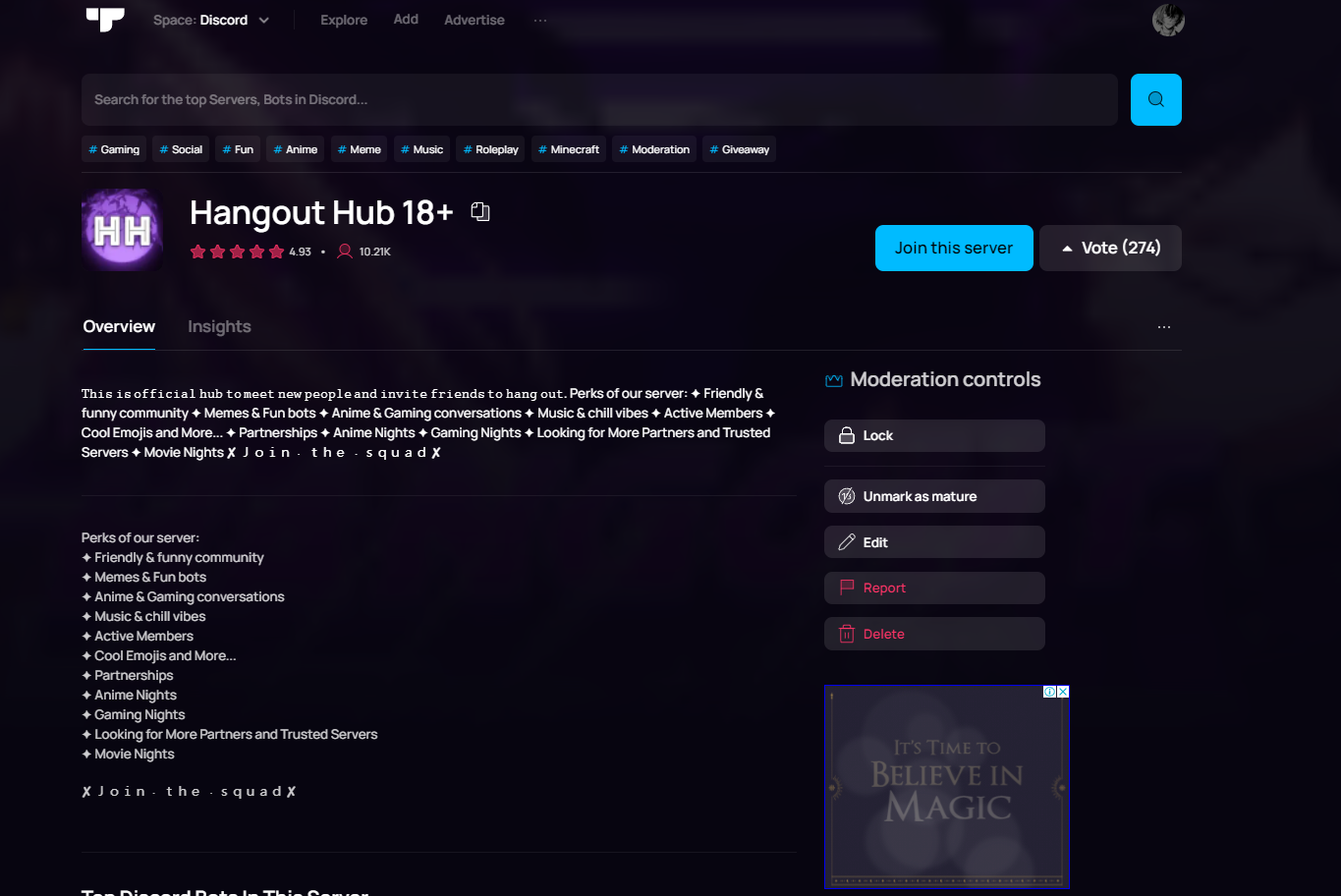
https://top.gg/servers/543268307692814337
dim garnet
shell inlet
-team
right
dim garnet
shell inlet
-team
but I wanted to put my other account as owner, and remove the old one from the team, is it possible?
shell inlet
dim garnet
but I wanted to put my other account as owner, and remove the old one from the t...
at the moment you cannot transfer a team's ownership
 mossy magnet
 edgy violet
When i put my commands in Long Description and then preview the prefix isn't shown the prefix is >
 shell inlet
mossy magnet
shell inlet
mossy magnet
user id
dim garnet
shell inlet
at the moment you cannot transfer a team's ownership
sad :(
shell inlet
edgy violet
When i put my commands in Long Description and then preview the prefix isn't sho...
add the prefix in quotes ">"
mossy magnet
shell inlet
user id
966330143691931658 oops sorry bad internet
shell inlet
mossy magnet
966330143691931658 oops sorry bad internet
i guess they aren't in this server oops
mossy magnet
They left ig
stoic socket
shell inlet
i guess they aren't in this server oops
the accounts auto leave the server
mossy magnet
 shell inlet
stoic socket
the accounts auto leave the server
shell inlet
stoic socket
the accounts auto leave the server
yeah i know but sometimes i've seen users reporting them here when they haven't even stepped into this server
stoic socket
Ah ok
shell inlet
mossy magnet
@deft python
user id: 966330143691931658
wild stoneBOT
 Something went wrong when trying to ban this member
gloomy shell
now they wont come back :)
edgy violet
how can i add links in long desc so that the link is a text
gloomy shell
-htmldesc
wild stoneBOT
You can achieve this using Markdown or HTML in your bot's description. You can ask in #development for help or use this HTML and Markdown cheatsheet for more resources.
 calm solar
hello! i wanna to remove this unnecessary promotion of a server on my bot's page. is it possible to do so?

and also I wanna shift the bot from a team I moved it to by mistake, back to myself. can I do that?
shell inlet
calm solar
hello! i wanna to remove this unnecessary promotion of a server on my bot's page...
i don't think that's possible, someone can correct me if im wrong
shell inlet
calm solar
and also I wanna shift the bot from a team I moved it to by mistake, back to mys...
-ticket
wild stoneBOT
@calm solar
Need more advanced support?
Open a support ticket
calm solar
shell inlet
i don't think that's possible, someone can correct me if im wrong
oh that's unfortunate. it'd be so much better with a small button to toggle it 😅
calm solar
shell inlet
-ticket
Thank you!
shell inlet
no problem!
edgy violet
When i try to confirm the bot when adding it. It throws me back to the bot details page
Well the issue was adblocker
 maiden lichen
If someone leaves a bad review on my bot cause it caused them to get banned from another server, can I report that review for removal?
fervent garden
You can report any review on your bot, the staff team will determine whether or not it'll be taken down though. 
maiden lichen
Ah cool
marble pivot
marble pivot
OK
I decided to release a password verification system in a few hours for review...
/help is now complete
marble pivot
marble pivot
Notify `bot reviewers`:
My bot is `AnonymousBot`,
My bot is currently under revi...
Notify bot reviewers:
You can use /help normally without password
 dim osprey
hopefully right spot to post.
When reading rules #13 seems to be missing a few words
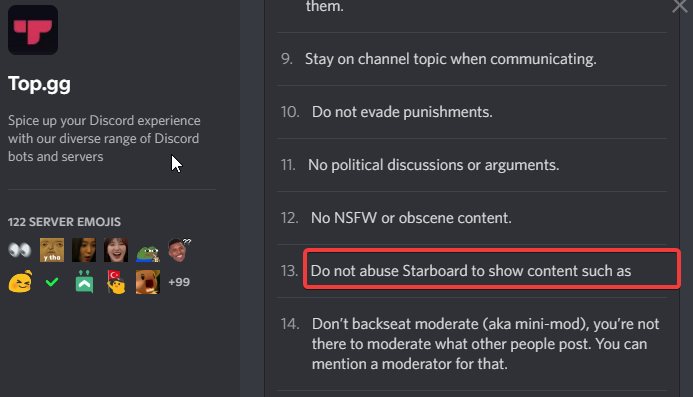 sturdy swan
Why my bot's pfp still not showing on the site ?
 gloomy shell
dim osprey
hopefully right spot to post.
When reading rules #13 seems to be missing a few...
gloomy shell
dim osprey
hopefully right spot to post.
When reading rules #13 seems to be missing a few...
thanks for flagging this! ill make sure it gets fixed
gloomy shell
sturdy swan
Why my bot's pfp still not showing on the site ?
-refreshdata
wild stoneBOT
@sturdy swan
Fetching Your New Bot Data
To fetch your bot's new name or avatar, please follow these steps:
Click the Refresh Data button in the sidebar on the right.
Click Edit on your bot page and then Save.
💡 Please note: If it still doesn't seem to change, make sure you actually changed the bot avatar / name on your Discord Developer Portal and not the application icon or make sure you have changed the bot name and not the application name.
sturdy swan
gloomy shell
-refreshdata
Thanks !
 hollow gyro
hi i can get the link i want to setup the vote ping message for discord bot and server were i put the webhook
hollow gyro
hollow gyro
hi i can get the link i want to setup the vote ping message for discord bot and ...
-ticket
gloomy shell
you can ask for assistance in #topgg-api
hollow folio
shell inlet
i can see your server https://imgur.com/TtPJRdB
I can’t and others too , I haven’t had one join for two months
 glacial depot
Hey hey! I was wondering how long it takes for your Discord bot's pfp to update on top.gg. It's been a bit and it's now changed to a blue circle with the bot's 2 letters.
Edit: Refresh data button didn't do the trick
dreamy abyss
glacial depot
Hey hey! I was wondering how long it takes for your Discord bot's pfp to update ...
-refreshdata
wild stoneBOT
@glacial depot
Fetching Your New Bot Data
To fetch your bot's new name or avatar, please follow these steps:
Click the Refresh Data button in the sidebar on the right.
Click Edit on your bot page and then Save.
💡 Please note: If it still doesn't seem to change, make sure you actually changed the bot avatar / name on your Discord Developer Portal and not the application icon or make sure you have changed the bot name and not the application name.
dreamy abyss
There is an issue that requires you to do an edit too, did you try that?
glacial depot
dreamy abyss
There is an issue that requires you to do an edit too, did you try that?
Ah nope..
dreamy abyss
Let me know how it goes 😊
dreamy abyss
Hey, nice! Enjoy the rest of your day/evening 
glacial depot
You too!
stoic socket
yes
dim garnet
stoic socket
yes
right, thanks
long ferry
whats the reason?
dim garnet
long ferry
whats the reason?
I wanted to transfer the owner to my new account, and remove an old sub-owner
long ferry
Yup yup, go ahead then
dim garnet
long ferry
Yup yup, go ahead then
right
 elfin summit
hello
const { Client, Intents, Message, MessageEmbed, MessageActionRow, MessageButton, Collection } = require('discord.js');
const config = require("../settings.json")
const Data = require("../models/taglıal")
exports.execute = async (client, message, args) => {
  if (!message.member.roles.cache.has(config.registery) && !message.member.permissions.has("ADMINISTRATOR")) return message.channel.send("Yetkiniz Yeterli Değil")
  let Db = await Data.findOne({ GuildId: message.guild.id })
  let tag = new RegExp(config.tag)
  let x = Db && Db.tagalanlar ? Db.tagalanlar : []
  if (tag.test(member.user.id)) {
    if (Db && Db.tagalanlar.includes(member.user.id)) {
      message.reply("Bu Kişi Zaten Biri Tarafidan Tag Almış").then(msg => {setTimeout(() => msg.delete(), 5000);});
    } else {
      await Data.findOneAndUpdate({ GuildId: message.guild.id, Member: message.member.id }, {
        $push: {
          tagalanlar:
            member.user.id,
        },
        $inc: { TotalTag: 1 }
      }, {
        upsert: true
      })
      message.reply(`${member} Başariyla Tag Aldi`).then(msg => {setTimeout(() => msg.delete(), 5000);});
    }
  } else {
    message.reply("Kullancıda Tag Yok").then(msg => {setTimeout(() => msg.delete(), 5000);});
  }
}
exports.conf = {
  command: "tagaldır",
  description: "",
  aliases: []
}


```how do I adapt this command to v13 long ferry
elfin summit
long ferry
<#272764566411149314>
long ferry
elfin summit
long ferry
<#272764566411149314>
i couldn't, can you help me?
wild stoneBOT
This channel is for support/help with top.gg. It is not for general conversation (move to #general) or development support (move to #development). Please keep this channel on topic!
 terse ice
Greetings! I hope you are all doing great. So I created my team for the first time in top.gg, and once created I was applying it to one of my servers. Got this pop-up. Does this mean I'll loose the ownership?
 long ferry
it means that you're transferring the ownership to the team, you cannot transfer it back to yourself
terse ice
long ferry
it means that you're transferring the ownership to the team, you cannot transfer...
And that is the transfer of what exactly? The control of server management or team
terse ice
Well there must be a solution tho. I'm the owner of the server, I'm expecting to give my team only the access on advertising section part. Not control the whole server setting within the site.
long ferry
That is only possible through transferring the server to a team
though you can invite your advertisers to it and only give them the viewers role
though not 100% sure how permissions are handled regarding auctions
terse ice
Let's say I transfer the server to my team in the site. If I delete the team, will the server be transferred back to me again?
long ferry
You cant delete the team while it contains an entity
thus why you're getting that warning before doing so
terse ice
long ferry
You cant delete the team while it contains an entity
Mind elaborating please?
long ferry
A team cannot be deleted why it has either a bot or a server in it
Due to the fact that deleting the team would make the server/bot get lost in the void without ownership
terse ice
So in the future if I don't want a team what I can do is remove everyone from the team and just keep myself in that team, I'll still have the ownership. Will that work?
long ferry
That should work as far as I'm aware
terse ice
Got it
And just to be aware, what roles do people in team have? What can they exactly do?
gloomy shell
You can read through this: https://support.top.gg/support/solutions/articles/73000510559-teams-overview and it'll tell you
Top.gg
What are Teams? Our Top.gg Teams feature enables multiple owners for communities and integrations on our site instead of a single owner. Today, these communities and integrations include Discord Servers, Discord Bots and DAOs. The Teams feature ...
 dawn bloom
I'm a admin in a server, I'm trying to setup vote reward with a 3rd party bot. Why do I not see the 'Webhooks' system in my edit tab?
All I see is Analytics
long ferry
Go to /webhooks on the url
dawn bloom
long ferry
Go to /webhooks on the url
it did not work, looks like only the owner can access the page since the server owner did it by himself
hollow folio
 shell inlet
hollow folio
My top.gg is broken still and it’s a been month
shell inlet
hollow folio
My top.gg is broken still and it’s a been month
can you provide screenshots ad elaborate which part is broken?
hollow folio
i havent got any joins from top.gg for 2 months and my server is not discoverable
all i get told is the search feature is broken
shell inlet
give me your server's name + not our issue that you didn't get joins sorry
hollow folio
hangout hub 18+
hollow folio
shell inlet
give me your server's name + not our issue that you didn't get joins sorry
im not saying it was but if my server isnt discoverable then its not my fault
shell inlet
gloomy shell
Currently we are experiencing some issues with our search indexing. It may take ...
read this ^
long ferry
No
sturdy swan
okay thx
sturdy swan
fervent garden
Happened to my bot once too, nothing you can do other than reporting them really...
Aand nothing happened
One person wrote a review:
"Nice bot"
And gave 1 star.
shell inlet
sturdy swan
someone forced people to raid my bot's page and spam reviews with 1⭐. I don't w...
personally the same thing happened with me, you can flag the review. you will find a report button
sturdy swan
shell inlet
personally the same thing happened with me, you can flag the review. you will fi...
I flagged All of them but none were accepted
shell inlet
 balmy herald
If my bot is verified by top.gg, will I get a dm?
balmy herald
If my bot is verified by top.gg, will I get a dm?
yes you get a dm
rigid valley
balmy herald
If my bot is verified by top.gg, will I get a dm?
-notified
wild stoneBOT
@balmy herald
If your bot is approved:
You'll get a DM from @wild stone and you'll be assigned the <@&265125253443878912> role here.
If your bot is declined:
You'll get a DM from @wild stone and you'll also get a ping in #mod-logs.
💡 Please make sure you have your DMs activated for this server.
shell inlet
sturdy swan
I flagged All of them but none were accepted
-ticket create a ticket for further support then
wild stoneBOT
@sturdy swan
Need more advanced support?
Open a support ticket
balmy herald
rigid valley
-notified
Thanks
balmy herald
shell inlet
yes you get a dm
K, thanks
long ferry
sturdy swan
someone forced people to raid my bot's page and spam reviews with 1⭐. I don't w...
Have any proof
 tidal pendant
how come my bot doesnt have a pfp on top.gg?
it has one on discord, but on top.gg it's just a default picture
discord

 shell inlet
tidal pendant
discord
shell inlet
tidal pendant
discord
-refreshdata
wild stoneBOT
@tidal pendant
Fetching Your New Bot Data
To fetch your bot's new name or avatar, please follow these steps:
Click the Refresh Data button in the sidebar on the right.
Click Edit on your bot page and then Save.
💡 Please note: If it still doesn't seem to change, make sure you actually changed the bot avatar / name on your Discord Developer Portal and not the application icon or make sure you have changed the bot name and not the application name.
tidal pendant
shell inlet
-refreshdata
it worked, thank you!
shell inlet
no problem!
 sick raven
Sa
Ben nasıl bug bildiricem
Arama yerine istediğim botu yazdığımda çıkmıyor
Ama top.gg de kayıtlı
@cyan palm
Odin dışında başka türk destek ekibi yok mu? En son karen managerson vardı
undone quest
Hey
What's the different between posting stats by "auto-poster"
And
Posting stats by topgg-sdk (api.postStats)???
dreamy abyss
undone quest
What's the different between posting stats by "auto-poster"
And
Posting stats b...
One does it on a schedule for you, the other you need to call yourself
undone quest
It's auto posting every amount of time?
undone quest
undone quest
It's auto posting every amount of time?
H
balmy herald
dreamy abyss
From logs:
> <@842620032960823327> submitted Aurous
<https://top.gg/bot/91854144...
When will it reviewed?
dreamy abyss
balmy herald
When will it reviewed?
-upto
wild stoneBOT
@balmy herald
The average up-to-date approval times are stated [here](#support message).
This does not mean it will take the same amount of time someone else's bot took to be reviewed and does not mean your bot is guaranteed to be reviewed within that time frame.
There is no exact time for how long bot approval will take.
There is a queue and you're not first, nor are you last.
Read more about our reviewal process here
dreamy abyss
undone quest
It's auto posting every amount of time?
https://www.npmjs.com/package/topgg-autoposter
The docs say every 30min

npm
Auto-Poster for Top.gg. Latest version: 2.0.1, last published: 5 months ago. Start using topgg-autoposter in your project by running npm i topgg-autoposter. There is 1 other project in the npm registry using topgg-autoposter.
undone quest
dreamy abyss
https://www.npmjs.com/package/topgg-autoposter
The docs say every 30min
Ok, ty <3
balmy herald
In the queue
undone quest
balmy herald
Of my bot
Just wait dude
dreamy abyss
balmy herald
Can I know the position?
We don’t have access to position unfortunately
balmy herald
dreamy abyss
We don’t have access to position unfortunately
Oh k
dreamy abyss
It will be reviewed in order of submission
balmy herald
dreamy abyss
It will be reviewed in order of submission
Any idea about how long it will take?
dreamy abyss
undone quest
Ok, ty <3
My pleasure 😇
dreamy abyss
balmy herald
Any idea about how long it will take?
Read the following message from Luca
wild stoneBOT
The average up-to-date approval times are stated [here](#support message).
This does not mean it will take the same amount of time someone else's bot took to be reviewed and does not mean your bot is guaranteed to be reviewed within that time frame.
There is no exact time for how long bot approval will take.
There is a queue and you're not first, nor are you last.
Read more about our reviewal process here
balmy herald
Hm
dreamy abyss
The first blue link will take you to an estimate. 1 week or more. But most bots are looked at faster than that
 sand lotus
@cerulean ember
I just used the command and it's working
 undone quest
sand lotus
<@840224507036696616>
I just used the command and it's working
undone quest
sand lotus
<@840224507036696616>
I just used the command and it's working
What code?
sand lotus
undone quest
What code?
I meant command for bot.
He rejected my bot approval because it's not working.
dreamy abyss
sand lotus
I meant command for bot.
He rejected my bot approval because it's not working.
To dispute the decline you would need to send him a private DM 👍
long ferry
undone quest
What's the different between posting stats from top-ggAutoposter and post it usi...
Mfw I already answered you here @undone quest 
 echo lake
Hello, how long does it take to handle a reported comment?
 rapid fog
why aint next step on 2 aint owrking
 candid mica
rapid fog
why aint next step on 2 aint owrking
candid mica
rapid fog
why aint next step on 2 aint owrking
try removing the long tags
edgy violet
rapid fog
why aint next step on 2 aint owrking
if you have adblocker on turn it off fixed it for me
 short flume
Hey <@&817055174613794826>,
I wanted to add my bot to top.gg but it says my bot has to be online to pass review.
Could you make an exception on this since my bot doesn't need to be online to work?
I submitted it now
Bot ID: 942858850850205717
balmy herald
I want to join bot review team
 candid mica
-apps
gray kernel

supple mica
-apps
wild stoneBOT
Volunteer Applications
Hey! It seems like you're interested on volunteering for Top.gg. We're glad for any help we can get regarding our server events, support articles, bot reviewing, moderation, and more!
Contributors
Contributors are not considered staff and there is no age requirement. Contributors help out with server events and providing support.
Bot Reviewers
Bot Reviewers are Top.gg staff and must be 18 or older. Bot Reviewers review the discord bots submitted to the site before they are listed to make sure they follow our rules.
Moderators
Bot Reviewer is a stepping stone to Moderator - if you wish to be a Moderator you must first apply and be accepted as a Bot Reviewer.
Please read [this post](#announcements message) for more information and to apply!
supple mica
Nice one 
candid mica
your welcome 
supple mica
short flume
Hey <@&817055174613794826>,
I wanted to add my bot to top.gg but it says my bot ...
Does your bot utilize an API and therefore doesn't need to be online?
Just looked at your bot, as you mentioned it in your description and notes it's good  Reviewers will review accordingly.
undone quest
long ferry
Mfw I already answered you here <@478968621432045580> <:Baabosad:888465722483830...
I can't see your reply, can u ping me with the msg?
Nvm
Ty @long ferry <333
short flume
supple mica
~~Does your bot utilize an API and therefore doesn't need to be online?~~
Just l...
Cool thanks 👍🏻
I asked here cause I thought you might auto deny bots that aren't online.
supple mica
It has to be mentioned in the bot description or else we wouldn't know, but you should be all good
balmy herald

balmy herald
supple mica
-apps
How to reapply
supple mica
Did you read the message  It links a message in #announcements at the end
balmy herald
supple mica
Did you read the message <:confusedsmudge:726830894245216299> It links a message...
Yes I have read
It shows that you have already responded
 quiet jewel
ok so my bot has some ||nsfw|| content, but it require age restricted channel to use, will my bot get decline?
supple mica
balmy herald
It shows that you have already responded
If you've already applied, then you need to wait until they are refreshed.
balmy herald
supple mica
If you've already applied, then you need to wait until they are refreshed.
Ok
supple mica
quiet jewel
ok so my bot has some ||nsfw|| content, but it require age restricted channel to...
If it requires a NSFW marked channel, then it's ok for approval.
quiet jewel
ok
ok so if my bot is down but the bot status is stated "its down", then does it gonna be decline? 
rigid valley
quiet jewel
ok so if my bot is down but the bot status is stated "its down", then does it go...
If it’s down for maintenance, put in the Notes for Reviewer box the maintenance period. Otherwise I’d we go to test it and nothing is working/it’s offline, it will be declined
dreamy abyss
quiet jewel
ok so my bot has some ||nsfw|| content, but it require age restricted channel to...
Also worth mentioning, do not advertise that your bot has NSFW commands in the Top.gg description
wild stoneBOT
quiet jewel
ok bois
 heavy pike
so i am owner of the server, top.gg bot has been added and given perm. I am setting it up with all the requirements filled, but when at the third stage and i press next step, it goes back to the 2nd stage with all the information still there. If i do next step again the button just keep loading. And this is not the first time.
supple mica
heavy pike
so i am owner of the server, top.gg bot has been added and given perm. I am sett...
would you mind showing me what information you've filled in?
supple mica
sturdy swan
i have changed my bot name how much time it would take to update in top.gg
-refreshdata
wild stoneBOT
@sturdy swan
Fetching Your New Bot Data
To fetch your bot's new name or avatar, please follow these steps:
Click the Refresh Data button in the sidebar on the right.
Click Edit on your bot page and then Save.
💡 Please note: If it still doesn't seem to change, make sure you actually changed the bot avatar / name on your Discord Developer Portal and not the application icon or make sure you have changed the bot name and not the application name.
heavy pike
supple mica
would you mind showing me what information you've filled in?
Invite
t75fAgBtYj
short description
A Partnering and Advertising Server that simple promotes your platforms, bots and servers, not only in our server, but to all servers around discord.
Long description
The best partnership and advertising server you will find. Because of low members at the moment, its purpose is slow. But once it grows big, I promise my statement. We are the best. The partnerships and advertising is done in and out the server. In other words, this isn't just post your server and hope people see it. We take your advertisement and promote it to other servers for free. No currency or deal breaker needed. It's that simple
Tags
Partnership, Giveaways, Promotion, Advertisement, sfw, Looking for staff, Staff needed, self promo
Language
English
again this is not the only server
i tried with 2 other where one was a bit on the nsfw side, so i figured it might have been the issue. I went ahead trying to upload another server, had the same issue, came for support i was told its bc im not the owner. Now i am the owner and its the same problem.
supple mica
Yeah we've had reports of this previously, trying to isolate where the issue lies.
How long ago did you have the issue with the other servers?
heavy pike
supple mica
Yeah we've had reports of this previously, trying to isolate where the issue lie...
within this week
supple mica
Noted, I'll pass this onto the team.
supple mica
Are you the owner or administrator of the server?
I know the issue persists for Admins, but haven't heard for server owners yet.
@heavy pike (excuse the ping but I'm curious to compile the report)
heavy pike
supple mica
<@658788452636164132> (excuse the ping but I'm curious to compile the report)
no np, thx for pinging
i am owner
i made it and currently own it
supple mica
Alrighty, that worrys me a touch.  I'm discussing with the team now
heavy pike
supple mica
Alrighty, that worrys me a touch. <a:criBoi:811243403392188416> I'm discussing w...
ok
supple mica
heavy pike
i made it and currently own it
Would you mind trying again, but when you get to the button loading page can you open dev tools console and see if there's any message in there? Let me know if you need a hand with this.
heavy pike
yes, what dev console?
 obsidian locust
Uh what?

 dreamy abyss
heavy pike
yes, what dev console?
dreamy abyss
heavy pike
yes, what dev console?
The browser developer tools
Right click on the page, then at the bottom click inspect
heavy pike
ok i figured lol was just making sure
supple mica
heavy pike
yes, what dev console?
Once you've hit inspect as Johand mentioned above, go into the console found here: https://i.imgur.com/zPwfC0Q.png
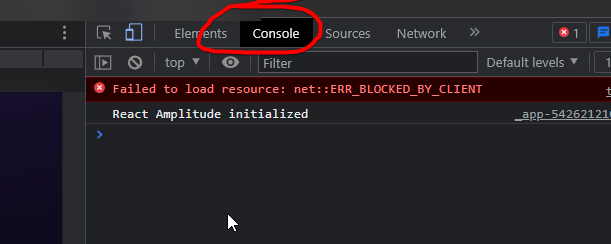
And can you show me if anything comes up in there please.
heavy pike
supple mica
Once you've hit inspect as Johand mentioned above, go into the console found her...
aiit
heavy pike
supple mica
Once you've hit inspect as Johand mentioned above, go into the console found her...
funny thing now, it said edit when i went there again, but the information wasnt there, but when i clicked edit and filled it in, it saved. Im going to try again with another server and give u a report
supple mica
heavy pike
funny thing now, it said edit when i went there again, but the information wasnt...
Mind giving me your server ID?
supple mica
You're a star. Thanks for the help, we've compiled all the information and will relay this to the engineers for a fix.
Apologies for the inconvenience.
heavy pike
supple mica
Apologies for the inconvenience.
all good
noble talon
Some user just drop 2 star review for reason which can't be single anything I mean -
My bot is applied to be verified it has joined 100 servers and cannot more. He just left review that I can't add you bot on my server and just gave 2 star. Can I do anything about it?
It nearly depends upon discord it might take upto 3 - 4 weeks
Can I report it?
He has just not even use my bot
shell inlet
-ticket
wild stoneBOT
Need more advanced support?
Open a support ticket
shell inlet
shell inlet
personally the same thing happened with me, you can flag the review. you will fi...
read this ^
you can flag the review
instead of opening ticket
noble talon
shell inlet
you can flag the review
Oh I reported, need not tomorrow a ticket right?
shell inlet
sturdy swan
how can i add bot photo in top.gg
-refreshdata
wild stoneBOT
@sturdy swan
Fetching Your New Bot Data
To fetch your bot's new name or avatar, please follow these steps:
Click the Refresh Data button in the sidebar on the right.
Click Edit on your bot page and then Save.
💡 Please note: If it still doesn't seem to change, make sure you actually changed the bot avatar / name on your Discord Developer Portal and not the application icon or make sure you have changed the bot name and not the application name.
shell inlet
noble talon
Oh I reported, need not tomorrow a ticket right?
nope, if you've reported there's no need of opening ticket
sturdy swan
shell inlet
-refreshdata
there is no category to change photo
sturdy swan
yes
sturdy swan
shell inlet
bot's pfp right?
this
 shell inlet
wild stone
<@456226577798135808>
shell inlet
wild stone
<@456226577798135808>
you can't change it. follow the guideline here ^
if you refresh the data it automatically uses the bot's pfp on the site
noble talon
shell inlet
nope, if you've reported there's no need of opening ticket
Ohk :)
Thanks
sturdy swan
shell inlet
if you refresh the data it automatically uses the bot's pfp on the site
i change it in Discord Developer Portal and there is any change
shell inlet
wild stone
<@456226577798135808>
go to your bot's page and you'll see a button "refresh data" press it
and just read the embed
toxic topaz
I have a suggestion to topgg
Please add an status page and give access to bot devs so that we can post our outages others they can add this feature in sdk too so page will get update automatically from ip 🤓
shell inlet
sturdy swan
and there is no change
wait for an hour and reload
shell inlet
toxic topaz
I have a suggestion to topgg
Please add an status page and give access to bot d...

Let us know how we can improve. Vote on existing ideas or suggest new ones. If you require support or would like to report a bug, please go to our Support Page · Make a suggestion · Top.gg
toxic topaz
shell inlet
https://feedback.top.gg/

 vague mango
toxic topaz
I have a suggestion to topgg
Please add an status page and give access to bot d...
vague mango
toxic topaz
I have a suggestion to topgg
Please add an status page and give access to bot d...
like for bot status?
sturdy swan
yayy, this is so fucking epic I love that guy
 supple mica
Make sure you've flagged all the reviews and the moderation team will sort it out.
sturdy swan
supple mica
Make sure you've flagged all the reviews and the moderation team will sort it ou...
I did
that guy also spammed my friend request list with the alts lol
 rigid valley
 odd sandal
Uhh how can i check whether my bot is declined or approved in top.gg
odd sandal
Uhh how can i check whether my bot is declined or approved in top.gg
-notified
wild stoneBOT
@odd sandal
If your bot is approved:
You'll get a DM from @wild stone and you'll be assigned the <@&265125253443878912> role here.
If your bot is declined:
You'll get a DM from @wild stone and you'll also get a ping in #mod-logs.
💡 Please make sure you have your DMs activated for this server.
odd sandal
rigid valley
-notified
I got Bot Developer role but didn't got any dm for luca

 toxic topaz
vague mango
like for bot status?
toxic topaz
vague mango
like for bot status?
Yeah
sturdy swan
how can I get bot developer role
i wasn't on this server when I added the bot to top.gg page
shell inlet
sturdy swan
how can I get bot developer role
you will get the bot dev role once your bot is verified/approved by us
 shell inlet
@fluid birch unsure if you should manually give the role ^
sturdy swan
also I found out that some people that rated my bot 1 ⭐ have rated 1⭐ on a other talking ben bot too
shell inlet
don't ping any staff unless it's urgent please
supple mica
shell inlet
https://top.gg/bot/<your bot's id>
odd sandal
supple mica
https://top.gg/bot/YOURBOTID
OK thank you
shell inlet
shell inlet
<@286224826170081290> unsure if you should manually give the role ^
dylan ^
supple mica
Done
sturdy swan
Thanks
 shell inlet
try using other browser
 lone anvil
 deep spindle
It is not loading
deep spindle
It is not loading
before you continue please read this
https://support.top.gg/support/solutions/articles/73000502503-server-guidelines
Top.gg
Must not show NSFW content (mentioning of NSFW in description, icons, announcements and emojis) Your server must not present any content on Top.gg that is against Discord's Terms of Service, this includes but not limited to: Discriminatory/Der...
deep spindle
shell inlet
try using other browser
What is the other browser
shell inlet
deep spindle
What is the other browser
like which browser are you using now?
if chrome, try adding the server using firefox
deep spindle
shell inlet
like which browser are you using now?
shell inlet
or brave
shell inlet
deep spindle
Google
google is a search engine, not a web browser
deep spindle
shell inlet
google is a search engine, not a web browser
I mean chrome
shell inlet
yeah try using brave then or firefox
rigid valley
deep spindle
What is the other browser
Some of the browsers are google Chrome, Microsoft Edge, FireFox, Brace, Opera, etc.
-cache
-refreshcache
rigid valley
WHAT IS THE TAG 😭 💔
shell inlet
-cacheclear
wild stoneBOT
In order to clear your cache for the site, press CTRL+F5.
If this does not work, try one of these resources below:
Instructions on Microsoft Edge
Instructions on Google Chrome
Instructions on Mozilla Firefox
Instructions on Safari
Instructions on Opera
Instructions on Brave
lone anvil
also try removing that long tag, i'm pretty sure those arent allowed anymore
deep spindle
Ty for your support
 timber orchid
 vernal veldt
Hi, I am a co owner of a server..earlier I was able to edit our server details on top gg but now I am not able to. I even tried adding my server again but top gg site becomes unresponsive, I tried this multiple times.
The server name is Groovin n Movin

 glad loom
Hey, I have updated my Bot’s profile image. It seems to be the same, old one I had, on the top.gg website, or it’s just not showing a profile image at all. I was wondering if there was an amount of time before the Bot’s profile image would take to update on your site?
stoic socket
glad loom
Hey, I have updated my Bot’s profile image. It seems to be the same, old one I h...
Click the "Refresh Data" button on your bot page
 glad loom
stoic socket
https://omg-its.blahaj.wtf/OjjeNXWn.png
glad loom
stoic socket
https://omg-its.blahaj.wtf/OjjeNXWn.png
Thank you!
It’s still showing the old profile image…
supple mica
glad loom
Hey, I have updated my Bot’s profile image. It seems to be the same, old one I h...
-refreshdata
wild stoneBOT
@glad loom
Fetching Your New Bot Data
To fetch your bot's new name or avatar, please follow these steps:
Click the Refresh Data button in the sidebar on the right.
Click Edit on your bot page and then Save.
💡 Please note: If it still doesn't seem to change, make sure you actually changed the bot avatar / name on your Discord Developer Portal and not the application icon or make sure you have changed the bot name and not the application name.
glad loom
Thanks!
vernal veldt
vernal veldt
Hi, I am a co owner of a server..earlier I was able to edit our server details o...
Any idea abt this?
 upbeat oyster
Hello, I’m trying to add my server to top.gg but my server isn’t showing up for some reason
<@&817055174613794826>
rigid valley
vernal veldt
Any idea abt this?
Are you the owner or is it a team?
rigid valley
upbeat oyster
Hello, I’m trying to add my server to top.gg but my server isn’t showing up for ...
When adding a server you need to ensure you have the Manage Server permission in the server
upbeat oyster
I’m the owner of the server
vernal veldt
Yeah co owner ...guess it's something in the team setting..jst saw the documentation probably the role needs to be updated in teams
stoic socket
rigid valley
When adding a server you need to ensure you have the `Manage Server` permission ...
Oh, has it changed now? It used to be only owner could add 
rigid valley
stoic socket
Oh, has it changed now? It used to be only owner could add <:sus:825311789457211...
Oh shit, you're right 
Was thinking of Helper since I was just messing around on thier Dashboard recently and all you need is the manage server role
stoic socket
Ah alr
upbeat oyster
stoic socket
Is the Top.gg bot in your server?
No does it need to be?
stoic socket
I believe so
upbeat oyster
Okay
rigid valley
upbeat oyster
No does it need to be?
That is step one. It should show up on https://top.gg/servers/add without the bot
stoic socket
I’ve found that it does usually fix it when the bot gets added
Ig that’s just trial and error lol
rigid valley
Maybe, I know I am experimenting with something rn when it comes to adding a server LMAO
stoic socket
Lol
upbeat oyster
It worked thank you for your time and help 😊💙
vernal veldt
Why can't thebot read server roles n jst let the owners access the edit server options
rigid valley
vernal veldt
Why can't thebot read server roles n jst let the owners access the edit server o...
Because not all Owner roles are called Owner and then we run the risk of abuse. That is why it is set up so the Server's owner is the only one who can edit it unless the server is listed as a team
vernal veldt
We have the bot in server..bt I am not able to edit our server on top gg..which is weird bcz I was able to do it from my previous co owner acc..
Teams isn't working ...that's the problem.. we gave admin rights bt still our Co owner wasn't able to edit...and topgg has become slow n unresponsive .
rigid valley
vernal veldt
We have the bot in server..bt I am not able to edit our server on top gg..which ...
Let me check up on this for you
kindred zodiac
long ferry
What is the server id?
872822492295733279
vernal veldt
rigid valley
Let me check up on this for you
Oki..so we again removed teams n created a new team with admin to our co owner..still the same..unable to edit server.. even while readding server to top gg..it doesn't respond..tried that multiple times.
832077208193204264 server id
rigid valley
vernal veldt
Oki..so we again removed teams n created a new team with admin to our co owner.....
Is the Co-Owner currently a part of the team?
vernal veldt
Yup
rigid valley
I'd double check that because it only shows GOD in a white suit. for me. No one else
https://i.imgur.com/FrX61bZ.png

 dense vector
yes
rigid valley
vernal veldt
Make sure it's the same team and not a duplicate
CC @dense vector
dense vector
rigid valley
Make sure it's the same team and not a duplicate
CC <@467679659555946506>
yeah its the same team. i given her admin. is it a different role i need to give her?
rigid valley
dense vector
yeah its the same team. i given her admin. is it a different role i need to give...
Can you send a Screenshot of your profile page?
i.e. https://i.imgur.com/PLNZUo9.png
 dense vector
rigid valley
Can you send a Screenshot of your profile page?
i.e. https://i.imgur.com/PLNZUo9...
dense vector
rigid valley
Can you send a Screenshot of your profile page?
i.e. https://i.imgur.com/PLNZUo9...
 rigid valley
dense vector
rigid valley
dense vector
Okay, now click the team and send me a SS of that page
 rigid valley
dense vector
rigid valley
dense vector
You're the only member of the team
dense vector
well that does not make sense as if i go into members sangs is in that
vernal veldt
Bt he sent me admin..I accepted the req..shouldn't it add me to the member list as well?..it reflects on my profile bt member number didn't change weird
rigid valley
dense vector
well that does not make sense as if i go into members sangs is in that
Send me a picture of that
dense vector
rigid valley
Send me a picture of that
 rigid valley
Hmm, that is weird. Let me see what i can find out and talk to other staff members
dense vector
allright take ur time and ping me when its ur time
vernal veldt
Ok thanks Jay
sturdy swan
<@&817055174613794826> Hi, I was wondering to see how I can know if we are approved for topgg advertisement. Also our owner account was disabled but staff has administrative abilities, we cannot modify the topgg account with the discord
 cinder crypt
 long ferry
That's the language section
you're looking at right now
Check the other fields if they contain errors etc
shell inlet
sturdy swan
<@&817055174613794826> Hi, I was wondering to see how I can know if we are appro...
-ticket
wild stoneBOT
@sturdy swan
Need more advanced support?
Open a support ticket
shell inlet
cinder crypt
Hey, I updated the photo for some of my bots quite some time ago, assumed it was...
-refreshdata
wild stoneBOT
@cinder crypt
Fetching Your New Bot Data
To fetch your bot's new name or avatar, please follow these steps:
Click the Refresh Data button in the sidebar on the right.
Click Edit on your bot page and then Save.
💡 Please note: If it still doesn't seem to change, make sure you actually changed the bot avatar / name on your Discord Developer Portal and not the application icon or make sure you have changed the bot name and not the application name.
sturdy swan
-ticket
 coarse kindle
Hey i have a question so i have my 'verified' bot and i try to post it on top.gg so that more users can come to know about it, but even after numerous attempts my bot disappears from my profile, i don't know why this is happening. Obvious reason would be that my bot is getting declined but i am having a hard time to know the reason why. I've mentioned all the details about the bot and its features, yet it keeps disappearing from my profile. May I know the reason as to why this keeps happening? It's really annoying because I constantly wait for days only to see that it disappeared from my profile.
My bot is in more than 75 servers and its verified
Help would be appreciated thanks
long ferry
yup was declined several times
wild stoneBOT
Your bot was likely declined because it went against our bot guidelines.
To find out why your bot was declined and by who, use the search feature in #mod-logs :
 long ferry
sturdy swan
yayy, this is so fucking epic I love that guy
long ferry
sturdy swan
yayy, this is so fucking epic I love that guy
was handled, though don't just decide to break review guidelines on competing bots that might not have anything to do with that
noble talon
Yo! Cant We See Review Report Logs?
 wind niche
Is it okay to send message on "guild join" ?
shell inlet
noble talon
Yo! Cant We See Review Report Logs?
report logs as in?
shell inlet
wind niche
Is it okay to send message on "guild join" ?
i strongly suggest not to
wind niche
okay!!
noble talon
shell inlet
report logs as in?
when we report a review of bot for false info or soemthin sus
shell inlet
no you cannot afaik
just it reaches to the moderation team and they will take it from there
noble talon
shell inlet
just it reaches to the moderation team and they will take it from there
can i contact mod in anyways?
shell inlet
noble talon
can i contact mod in anyways?
-ticket you can create a ticket and elaborate if there's an issue actually
wild stoneBOT
@noble talon
Need more advanced support?
Open a support ticket
noble talon
shell inlet
-ticket you can create a ticket and elaborate if there's an issue actually
ohk
long ferry
noble talon
can i contact mod in anyways?
I'm otherwise also available in like 8 hours or so
noble talon
long ferry
I'm otherwise also available in like 8 hours or so
umm....ok i will contact you but after 8 rights right i have opened ticket anyways you can claim it or we can talk in discord 
long ferry
Don't have access to the tickets then have it handled through the tickets
noble talon
long ferry
Don't have access to the tickets then have it handled through the tickets
so should i close the ticket?
long ferry
You already opened one, best is to do it through that then
noble talon
ohk
 cunning narwhal
So I visited my bot's page, it has no information about the guild count, has no pfp even if the bot has one
sturdy swan
long ferry
was handled, though don't just decide to break review guidelines on competing bo...
Thanks and I am sorry
long ferry
cunning narwhal
So I visited my bot's page, it has no information about the guild count, has no ...
-servercount
wild stoneBOT
@cunning narwhal
To have your bot's server count displayed on Top.gg, please read the documentation on server/shard posting.
long ferry
-refreshdata
wild stoneBOT
Fetching Your New Bot Data
To fetch your bot's new name or avatar, please follow these steps:
Click the Refresh Data button in the sidebar on the right.
Click Edit on your bot page and then Save.
💡 Please note: If it still doesn't seem to change, make sure you actually changed the bot avatar / name on your Discord Developer Portal and not the application icon or make sure you have changed the bot name and not the application name.
long ferry
Also what's the bot id
 late trench
Hello! I am @late trench owner of Shadow Bot, it's been few days but my bot isn't getting approved.
Can i get help
@supple mica
wild stoneBOT
The average up-to-date approval times are stated [here](#support message).
This does not mean it will take the same amount of time someone else's bot took to be reviewed and does not mean your bot is guaranteed to be reviewed within that time frame.
There is no exact time for how long bot approval will take.
There is a queue and you're not first, nor are you last.
Read more about our reviewal process here
late trench
supple mica
It looks like you only submitted your bot 4 days ago
I got dm from Moderator Vision of an issue, though i fixed the issue and resubmitted for approval
coarse kindle
late trench
Hello! I am <@893705256368750592> owner of Shadow Bot, it's been few days but my...
Same issue for me lol
supple mica
It doesn't look like your bot was reapproved yet so give it some time.
late trench
supple mica
It doesn't look like your bot was reapproved yet so give it some time.
Yea sure no problem!
supple mica
coarse kindle
Same issue for me lol
Your bot was declined yesterday
supple mica
coarse kindle

cunning narwhal
long ferry
Also what's the bot id
899899858981371935
cunning narwhal
long ferry
-refreshdata
Where is refresh data btn
long ferry
See the screenshot
cunning narwhal
I am not able to find creator control page
long ferry
Mobile?
long ferry
The bot you provided is also not owned by the account you're talking through


 eternal gorge
I would like an autogenerated server invite for the server listings on top.gg, but the bot picks a seemingly random channel to invite from. Why's that and is there any way to specify a channel to set the invite for? I'd just like it to be general or rules page or something. Not the end of the world though.
shell inlet
i don't think there is any way to specify a channel
eternal gorge
Darn
shell inlet
you can create your own invite from the spec channel and add it 
eternal gorge
I use an invite logger so having a generated link via top.gg bot is useful for that :p
But thank you :)
winter walrus
eternal gorge
I use an invite logger so having a generated link via top.gg bot is useful for t...
You can give access to create invite for the bot only in the channel u want it to create the invite
eternal gorge
winter walrus
You can give access to create invite for the bot only in the channel u want it t...
By default only a select couple channels are able to have invites generated. However, this caused an issue with the top.gg bot and I was given this error any time I tried to generate it. The only work around I found to this outside of individually changing all those channel's permissions was to give top.gg administrator privileges.

I was actually gonna ask why this was happening in here before I found the admin permission work around.
If you have any suggestions for what may be causing this I'd be happy to listen.
Also to specify, top.gg bot does have the create invite permission while this error occurs. If anyone has any ideas please feel free to ping me.
long ferry
If the bot does not have create invite permissions, it cannot create invites
This might also apply to the channels, not sure
 tranquil hill
why does it show 0 servers
 long ferry
-servercount