#support
1 messages · Page 85 of 1
 tulip musk
 cyan palm
Hi, you can change it on discord developer portal and use the refresh data button on your bot’s top.gg page
Also please avoid mentioning roles and users, just ask your question in here and we will help you 
tulip musk
cyan palm
Also please avoid mentioning roles and users, just ask your question in here and...
alr, thanks
 carmine plover
Hi
I have paid but it doesn't updates and shows me I still have to pay
Can someone help me with that? I can't enter auctions since I still have an open payment.
 supple mica
 lone ether
 ocean raft
How to remove my bot from top.gg
ocean raft
How to remove my bot from top.gg
Click delete under creator controls on your bot's main page
 mild trout
Hii guys i need help. Idk what to do or why it did this i am super untech savvy and have no idea how to even get in dbl verification server since it takes me to app store


I just went to discord.gg/dbl and it brought me here 🤦🏻♀️ i am trying to vote for the discordsbotlist on poketwo bot
lone ether
mild trout
Hii guys i need help. Idk what to do or why it did this i am super untech savvy ...
mild trout
lone ether
https://discord.gg/cc7Y4jX
Ty
lone ether

 wind quest
 knotty hamlet
is there a top.gg bot I can invite to my server so people can vote my bot throug...
knotty hamlet
is there a top.gg bot I can invite to my server so people can vote my bot throug...
No, voting can only be done via the page.
Semi-alternative version could be that your bot has a button that directs users to vote for your bot.
knotty hamlet
wind quest
No, voting can only be done via the page.
Semi-alternative version could be tha...
wind quest
We don't provide this kind of service yeah.
knotty hamlet
ya it's a shame... way more people would be able to vote
 lunar musk
Hey there, how can I report a staff member?
 shell inlet
lunar musk
Hey there, how can I report a staff member?
shell inlet
lunar musk
Hey there, how can I report a staff member?
DM a community manager possibly @supple mica
lunar musk
shell inlet
DM a community manager possibly <@282823077832687617>
He's angry with me rn
shell inlet
okay
lunar musk
shell inlet
any cm
Veld?
supple mica
no
lunar musk
supple mica
no
Ok
 glass gorge
hi i changed my bot information, what i need to do for update name and image on the site?
cyan palm
glass gorge
hi i changed my bot information, what i need to do for update name and image on ...
Hello, you can use the refresh data button on your bot's top.gg page
glass gorge
cyan palm
Hello, you can use the refresh data button on your bot's top.gg page
as he take much time?
supple mica
glass gorge
as he take much time?
-refreshdata
 wild stoneBOT
@glass gorge
 Fetching Your New Bot Data
To fetch your bot's new name or avatar, please follow these steps:
 Click the Refresh Data button in the sidebar on the right.
Click Edit on your bot page and then Save.
💡 Please note: If it still doesn't seem to change, make sure you actually changed the bot's avatar / name on your Discord Developer Portal and not the application's icon / name.
 supple mica
Make sure to edit > save too
glass gorge
worked ty all
 visual bough
how to fix it ?
 lone ether
visual bough
how to fix it ?
lone ether
visual bough
how to fix it ?
known issue, doesn't work atm
you can use css in your long description
<style>
body {
  background: url(linkhere);
}
</style>
here ?
 lone ether
no
when you click edit in your bot page
you can see a section where you write your bot's long description
visual bough
lone ether
```
<style>
body {
  background: url(linkhere);
}
</style>
```
oh so u mean just add this line
visual bough
alr ty
lone ether
 candid elk
how to make support server like this

 thick pelican

lone ether
candid elk
how to make support server like this
since servers have been removed you can't put that info anymore
you can fill out the "support url" instead to put your discord server there
candid elk
lone ether
since servers have been removed you can't put that info anymore
how to add photo in description
lone ether
-htmldesc
wild stoneBOT
You can achieve this using Markdown or HTML in your bot's description. You can ask in #development for help or use this HTML and Markdown cheatsheet for more resources.
 sullen skiff
Hey
ocean raft
My bot page is live, but when i search my bot It's showing 404 error


Can you refresh the page to the new one
This is the live one
top.gg/bot/1229438321395109929
ocean raft
ocean raft
My bot page is live, but when i search my bot It's showing 404 error
It's my old bot CattyPal that i deleted from top.gg and created again CattyPal
ocean raft
ocean raft
This is the live one
top.gg/bot/1229438321395109929
This is the new one
 soft star
ocean raft
My bot page is live, but when i search my bot It's showing 404 error
soft star
ocean raft
My bot page is live, but when i search my bot It's showing 404 error
we can’t do anything about google index
 soft star
ocean raft
soft star
ocean raft
That’s always gonna be there
 zinc harbor
~~I would like to request a bot be deleted from top.gg
https://top.gg/bot/1224338578096783391 ~~ Never mind, I did not realise there is a delete button
Top.gg
Discover radio stations all across the world!
 cunning helm
Hey I'm trying to put a png from imgur on my bots page but it keeps telling me it's not valid

 versed chasm
Hola. Cuando entro a la página me salta ese error. Y no me deja votar. Cómo puedo hacer?

 frigid bronze
 fluid birch
frigid bronze
hii, my brother has a discord bot on top.gg but his discord account got hacked a...
fluid birch
frigid bronze
hii, my brother has a discord bot on top.gg but his discord account got hacked a...
Could you link me the bot id and the user id?
frigid bronze
fluid birch
Could you link me the bot id and the user id?
the bot top.gg link?
fluid birch
frigid bronze
the bot top.gg link?
Yes and the user id of your brother
frigid bronze
fluid birch
Yes and the user id of your brother
okay one second
frigid bronze
fluid birch
Could you link me the bot id and the user id?
https://top.gg/bot/1213495446035628072 this is the bot link and this is his user id 667372536400445441
Top.gg
Fun, utility, and interaction in one bot! Meet Aimi, your Discord companion for joy and convenience.
but he can't log in discord
 left kindle
frigid bronze
if he go to the top.gg site he can still edit the bot cause he's still logged in...
left kindle
frigid bronze
if he go to the top.gg site he can still edit the bot cause he's still logged in...
Yep, until the hacker delete the bot
From top.gg
Fast transfer it
frigid bronze
left kindle
Yep, until the hacker delete the bot
that's why he wants me to be the bot page owner and then he will make the bot on my discord account
cause he still have the bot code, only need to change the token
left kindle
Better use 2fa on discord account, I have had discord for 6 years, but my discord has not been hacked yet 👍
My suggestion
Only you with authenticator app can login to the discord acc
frigid bronze
left kindle
Better use 2fa on discord account, I have had discord for 6 years, but my discor...
i have it on my account
left kindle
Great! that way you will be able to avoid a hacked account
Say this to ur brother too
frigid bronze
left kindle
Great! that way you will be able to avoid a hacked account
yup
lone ether
cunning helm
Hey I'm trying to put a png from imgur on my bots page but it keeps telling me i...
that's a known issue, you can use css in your long description instead
<style>
body {
background: url(linkhere);
}
</style>
Intenta borrar el caché y las cookies de tu navegador, eso debería funcionar
versed chasm
lone ether
Intenta borrar el caché y las cookies de tu navegador, eso debería funcionar
Ya lo hice y sigue igual
frigid bronze
frigid bronze
https://top.gg/bot/1213495446035628072 this is the bot link and this is his user...
@fluid birchi have a question, if he make the bot on an alt account, can it still have the same top.gg page?
fluid birch
frigid bronze
https://top.gg/bot/1213495446035628072 this is the bot link and this is his user...
He aint banned
frigid bronze
fluid birch
He aint banned
i know he isn't but he can't log in to his account
lone ether
frigid bronze
i know he isn't but he can't log in to his account
please dm an online moderator who can start the ownership transfer if you haven't done so already
frigid bronze
lone ether
please dm an online moderator who can start the ownership transfer if you haven'...
okay tysmm i will rn
 opaque hill
Hi i did an submit for an bot and idk if its accepted its not even on my account
 opaque wing
Hey guys, my bot has been getting bad reviews but the reviews are ridiculous. One guy gave it one star and complained about cooldown between commands, but that has been removed for over a year and that review was made a month ago? Also, there is another dude giving it 4 stars for not having the platforms he wants lol. We no longer support Twitter and Instagram was never added in the first place. Thank you guys for looking into this.
https://top.gg/bot/1027401268227997778?reviewPage=2
Top.gg
🔥 Notify your community in REAL-TIME, on YouTube and/or Twitch. The fast and easy way. That's Disping. 32 FREE channels & FREE WEBHOOKS.
I don't get some of these people, I reached out and they just ignore me lol
 grand prism
opaque wing
Hey guys, my bot has been getting bad reviews but the reviews are ridiculous. On...
grand prism
opaque wing
Hey guys, my bot has been getting bad reviews but the reviews are ridiculous. On...
Ah, yes

I would love to read these reviews
opaque wing
grand prism
Ah, yes
Thanks Top.gg
try turning off extensions that may be modifying your webpage
maybe a script was blocked idk
works on my end
 tepid kernel
Hey, i've tried to get my bot added to top.gg two times now. each time it joins the testing server for a few seconds, they kick it and then I hear nothing about it. Anyone know how to find out the reason why?
fluid birch
tepid kernel
Hey, i've tried to get my bot added to top.gg two times now. each time it joins ...
The last 2 times your bot was tested it was denied for being a [clone](#mod-logs message)
tepid kernel
fluid birch
The last 2 times your bot was tested it was denied for being a [clone](https://d...
thx
wild stoneBOT
@tepid kernel
Bot Review Notifications
If your bot is approved:
You'll get a DM from @wild stone, a ping in #logs and you'll be assigned the <@&265125253443878912> role here.
If your bot is declined:
You'll get a DM from @wild stone and you'll also get a ping in #mod-logs.
💡 Please make sure you have your DMs activated for this server.
tepid kernel
oh cool thx
left kindle
Hey!
I wanna ask
There is any way to change the bot name? Cuz i changed my bot name but in top.gg i see old name not new name
wild stoneBOT
@left kindle
Fetching Your New Bot Data
To fetch your bot's new name or avatar, please follow these steps:
Click the Refresh Data button in the sidebar on the right.
Click Edit on your bot page and then Save.
💡 Please note: If it still doesn't seem to change, make sure you actually changed the bot's avatar / name on your Discord Developer Portal and not the application's icon / name.
 still cairn
I have the HallowsTreat bot in my server but none of the commands are coming up anymore. I tried kicking the bot and reinviting to server but I’m still having the same issue. Any idea how to fix this?
wild stoneBOT
Hey! We think you have our server mistaken. We do not provide support, help, or advice for any bot. You need to click on the "Discord Support Server" button on the bot's page of the bot you need support for. If there isn't a button that says "Discord Support Server" or nothing else mentioned about a support server, the server invite is invalid or you were banned from the bot's support server, then we can't help you. Sorry :(

 mossy barn
Hello guys, wanted to know If I can extract to CSV or any other file the members list of my server?
wild stoneBOT
Hey! We think you have our server mistaken. We do not provide support, help, or advice for any bot. You need to click on the "Discord Support Server" button on the bot's page of the bot you need support for. If there isn't a button that says "Discord Support Server" or nothing else mentioned about a support server, the server invite is invalid or you were banned from the bot's support server, then we can't help you. Sorry :(
We do not represent Discord, nor are we affiliated with them. We merely use their service.
If you have any questions and/or suggestions regarding Discord itself, or wish to report any violations to the Terms of Service, you can use any of these links:
How to leave feedback/suggestions to Discord
How to report bugs/issues to Discord
How to report a violation of the Terms of Service to Discord
How to contact Discord for general inquiries
still cairn
wild stone
Gotcha thanks. I tried joining the support server from the bot’s page but it just kept opening discord to my own server, so not really sure what to do.
supple mica
still cairn
Gotcha thanks. I tried joining the support server from the bot’s page but it jus...
Can you link the topgg page for the bot?
still cairn
supple mica
Can you link the topgg page for the bot?
Top.gg
A Trick or Treat bot for your discord server!
grand prism
I think this is their support server https://discord.com/invite/ZNpCNyNubU
still cairn
grand prism
I think this is their support server https://discord.com/invite/ZNpCNyNubU
it is, thank you! just messaged there for further help :)
 lethal bolt
 spice compass
I changed name and image of my bot but the page top.gg doesn't update
spice compass
I changed name and image of my bot but the page top.gg doesn't update
-refreshdata
wild stoneBOT
@spice compass
Fetching Your New Bot Data
To fetch your bot's new name or avatar, please follow these steps:
Click the Refresh Data button in the sidebar on the right.
Click Edit on your bot page and then Save.
💡 Please note: If it still doesn't seem to change, make sure you actually changed the bot's avatar / name on your Discord Developer Portal and not the application's icon / name.
lethal bolt
You can follow these steps
spice compass
thanks
 manic sail
Why is Votes page on my discord bot edit page empty
 lone anvil
Vote credits were removed
manic sail
lone anvil
Vote credits were removed
Why
lone anvil
manic sail
But why is the Votes page still here
frigid bronze
lone anvil
Vote credits were removed
I have a question, you said voice credits were removed. is it normal I can still vote for discord bots?
lone anvil
yes
Voting itself hasn't been removed and it'll still affect homepage ranking
The credits that bot developers recieve to buy additional advertisements for free have been removed
Nothing changes for regular bot users
frigid bronze
lone anvil
Nothing changes for regular bot users
okay I got it now, tysmm
 fair hound
lone anvil
Vote credits were removed
fair hound
lone anvil
Vote credits were removed
Imagine
supple mica
fair hound
Imagine
Hey guys I got an idea!
 fair hound
💀
 lone ether
what issue?
 timber meteor
lone ether
what issue?
timber meteor
lone ether
what issue?
 lone ether
are you logged in the right account?
timber meteor
yep ofc
lone ether
@zinc oracle boop could u try editing their bot page, usually the dev can edit after a mod edits it
https://top.gg/bot/1179301065800306749/edit
timber meteor
i just go in my profile > Edit on the bot > error page
lone ether
try clicking on that link
timber meteor
lone ether
try clicking on that link
same

 zinc oracle
Edited, try again
lone ether
thank u 
timber meteor
fixed, ty guys 🙏
 gleaming sparrow
I can´t submit my bot.
3 requests
74 B transferred
4 B resources
Request URL:
https://ampltd.top.gg/
Request Method:
POST
Status Code:
521
can you try submitting it with just the required information
gleaming sparrow
It only highlighted categories as required, can you tell me which fields are required? Previously I filled out almost all
ampltd.top.gg is returning 521s while I fill out the form already
gleaming sparrow
That is the only request being sent on Submit Bot that is not google analytics or permutive.com metrics
Clearing network log and clicking submit again, those are the only requests being sent.
 lone ether
fill out headline, long desc, prefix and one category and try to submit
its usually something that you put in the long desc or tag that doesn't work
gleaming sparrow
I found the problem, the front end validation did not complain about the Prefix field being empty, it did however stop the submission. As it uses slash command I had left it blank
gleaming sparrow
Don´t know if validation broke, but this is the only highlighted field marked as required explicitly
 lone ether
i know it's tiny but it says this at the top https://i.imgur.com/OTw4D3F.png
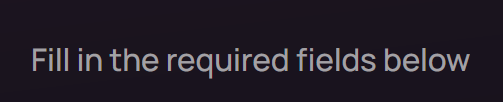
i mean this kind of makes it self explanatory everything above "optional" is required

but i will bring this up thank you, a lot of ppl had this issue tbh
gleaming sparrow
Ahh I see, it´d still be nice if it had been highlighted. It just blocked the submition without telling me why. I know it says it on top, just easy to miss
Thanks for helping me out!
lone ether
np sorry it took so long
lone ether
gleaming sparrow
Ahh I see, it´d still be nice if it had been highlighted. It just blocked the su...
i let veld know abt it
 rain turret
how to fix bot offline?
 lone ether
rain turret
how to fix bot offline?
lone ether
rain turret
how to fix bot offline?
Is it your bot?
 halcyon goblet

 lone ether
rain turret
lone ether
rain turret
-wrongserver
wild stoneBOT
@rain turret
Hey! We think you have our server mistaken. We do not provide support, help, or advice for any bot. You need to click on the "Discord Support Server" button on the bot's page of the bot you need support for. If there isn't a button that says "Discord Support Server" or nothing else mentioned about a support server, the server invite is invalid or you were banned from the bot's support server, then we can't help you. Sorry :(
rain turret
ok tks <3
 swift acorn
How can I add a picture to the long description?
swift acorn
grand prism
You can also add css to it to change its size, shape and so on
Is it possible to add code to this section
 swift acorn
ok thanks
 sturdy swan
I am not able to add any server when a clck to add discord server it returning into main page
grand prism
sturdy swan
I am not able to add any server when a clck to add discord server it returning i...
Servers have been discontinued
You can't add discord servers anymore
sturdy swan
grand prism
You can't add discord servers anymore
Oo ok ok
 tired marsh
#mod-logs message Hello, please tell me which commands are not working? It's just that everything works for me.
grand prism
tired marsh
https://discord.com/channels/264445053596991498/325648177178869760/1228694635673...
Write a DM to the person who checked your bot, they will answer all your questions
tired marsh
understood, thanks for the answer
 lilac torrent
Hey, my bot got declined twice. Reason: Your bot doesn't have a (working) help command or obvious point of entry. Please make sure your bot has a help command or has an explanation in the bot description.
But here is my help command, there is an explanation in the bot description too.

 lone ether
please reciprocate how we review bots, it should say in your decline reasons how to do so
lilac torrent
Hm, It's intresting because on any other servers the help command is working but alright, thanks
lone ether
we invite bots with 0 permissions and give them on a need by need basis, you'll have to see what's causing the issue that way as the slash cmds don't show up
lilac torrent
Okay 😅
 ashen crown
hi, i develop the safepeek bot. it was just rejected due to the commands not working. can i get some assistance on this so i can resolve the matter?
thanks!
 fluid birch
ashen crown
hi, i develop the safepeek bot. it was just rejected due to the commands not wor...
fluid birch
ashen crown
hi, i develop the safepeek bot. it was just rejected due to the commands not wor...
Feel free to DM the person who reviewed your bot
lone ether
-notified
wild stoneBOT
Bot Review Notifications
If your bot is approved:
You'll get a DM from @wild stone, a ping in #logs and you'll be assigned the <@&265125253443878912> role here.
If your bot is declined:
You'll get a DM from @wild stone and you'll also get a ping in #mod-logs.
💡 Please make sure you have your DMs activated for this server.
wild stoneBOT
When will my bot be reviewed?
Currently our average bot reviewal time is a few days or more.
Because of this — and because some bots take longer to review than others due to their features — we can't guarantee your bot will be reviewed as quickly as someone else's in the past and we also can't guarantee your bot will be reviewed within that timeframe. There is no exact time for how long bot approval can take. There is no way to check your bot's position in our reviewal queue, but remember you're not first and you're not last!
You may edit your bot's page as much as you like both before and after it's reviewed and this will have no impact on its place in queue.
You can read more about our bot reviewal process in this support article: How the Bot Reviewal Process Works.
 In the meantime, please make sure your bot follows all of our Bot Guidelines for a quick and smooth approval!
lone ether
Read both the embeds please
 empty burrow
lone ether
Read both the embeds please
empty burrow
lone ether
Read both the embeds please
okey thanks
 slow rapids
wild stoneBOT
slow rapids
wild stoneBOT
Fetching Your New Bot Data
To fetch your bot's new name or avatar, please follow these steps:
Click the Refresh Data button in the sidebar on the right.
Click Edit on your bot page and then Save.
💡 Please note: If it still doesn't seem to change, make sure you actually changed the bot's avatar / name on your Discord Developer Portal and not the application's icon / name.
ashen crown
fluid birch
Feel free to DM the person who reviewed your bot
i just re-enabled for this server which explains why i didnt get a message. can @wild stone resend it?
 fallow terrace
Hi, should I write here in french or in english ? (the bot is in french and for french users)
 fluid birch
ashen crown
i just re-enabled for this server which explains why i didnt get a message. can ...
ashen crown
fluid birch
ashen crown
i just re-enabled for this server which explains why i didnt get a message. can ...
ashen crown
1208283559799029760
lone ether
fallow terrace
Hi, should I write here in french or in english ? (the bot is in french and for ...
French is ok
ashen crown
fluid birch
just search your discord id in <#325648177178869760> or <#264889891039608874>
sent it above. anything else needed?
fallow terrace
lone ether
French is ok
thanks, I just submitted it
the note for reviewer is in english so you don't have to translate it
fluid birch
ashen crown
sent it above. anything else needed?
ashen crown
mkay. well i had dms disabled until now, so i never got the dm from luca
i just need a channel or some form of communication with the reviewer
i would dm the reviewer, but i dont believe thats the appropriate course of action
wild stoneBOT
@ashen crown
Almost every staff member has direct messages enabled. If you can't message one of the staff members, it may be an issue on your end. Please make sure you have direct messages enabled by checking your privacy settings in
Settings > Privacy & Safety > Allow direct messages from server members
as well as right-clicking on
Top.gg > Privacy Settings > Allow direct messages from server members.
If you're still not able to send a staff member a direct message despite having these settings enabled, feel free to ping them in this server!

 coral creek
You guys know hy my bot dosent show the avatar
wild stoneBOT
@coral creek
Fetching Your New Bot Data
To fetch your bot's new name or avatar, please follow these steps:
Click the Refresh Data button in the sidebar on the right.
Click Edit on your bot page and then Save.
💡 Please note: If it still doesn't seem to change, make sure you actually changed the bot's avatar / name on your Discord Developer Portal and not the application's icon / name.

 coral creek
ok
sturdy swan
Hey guys can you please tell me how can I add my server? I've been searching for 10 minutes and I can't find anything lol
sturdy swan
Thanks!
lone ether
nope you will have to wait 7d and then create a new account
 naive shell
Aight thanks for the notics
 severe kite
When I go to vote for Loritta through top.gg on Google, it says "Application Error" Does anyone know what it could be?
lone ether
severe kite
When I go to vote for Loritta through top.gg on Google, it says "Application Err...
Try the steps in the latest pinned message please
 covert furnace
@lone ether dm? I'm the one that made in these day a ticket because of my bot rejection
 lone ether
 smoky mist
Where do I report people
smoky mist
Where do I report people
you can send a ss here with their ID or you can DM an online moderator
lone ether
covert furnace
<@394594679221518336> dm? I'm the one that made in these day a ticket because of...
feel free to dm me
lone ether
 arctic plank
There is malicious verified bot on top.gg , how do I report it ?
arctic plank
There is malicious verified bot on top.gg , how do I report it ?
Click the report button on the bot page
arctic plank
Ok
severe kite
lone ether
Try the steps in the latest pinned message please
Sorry, but where specifically?
Shows this

 peak crypt
hello, any moderator i can talk with?

 hollow quarry

 severe kite
lone ether
The pinned message on this channel
severe kite
lone ether
The pinned message on this channel
Thank you very much, I managed to follow your tips and everything went well, I really appreciate it
lone ether
Np
covert furnace
@wind quest I mentioned the fact about classifica command in long description why my bot got rejected??
peak crypt
supple mica
ok thank you
supple mica
covert furnace
<@530067274766483487> I mentioned the fact about classifica command in long desc...
dm them.
Your bot was rejected for having it
covert furnace
supple mica
dm them.
Your bot was rejected for having it
my bot has the command yes but it says to mention in description, I did it.
Its like the fourth time that i need to do bot submission

 icy heron
Deleted an only Discord Bot I have on Top.gg due to failure to maintain the bot. May I have my 'Bot Developer' role removed, please?
shell inlet
sure thing
icy heron
Thank you! 
supple mica
covert furnace
my bot has the command yes but it says to mention in description, I did it.
Its ...
Please relist your bot and then dm me the url
covert furnace
supple mica
Please relist your bot and then dm me the url
now I can't, after I will do. Thanks anyway
supple mica
alright
 upbeat merlin
Anyone have an idea why my bot avatar isnt showing on TopGG since 2 years?
 safe chasm
Hello. I have a problem. So I currently have “reaction roles” assign a “member” role to new users when they react to roles, I have “mee6” add a verified role to that user once they have clicked the verification button.. users now have full access to the discord but also have both roles attached. Ideally once they have verified and become a verified member, I need the “member” role to be removed.. how do I best approach this without manually editing each members roles..
lone ether
safe chasm
Hello. I have a problem. So I currently have “reaction roles” assign a “member” ...
Please head over to #development for coding help
Oh nvm not a coding question
You can use carl bot to do a reverse reaction role, it removes the previous and adds the verified role ig
 plush sinew
I need help. I deleted my account because my subscription has not been working for months and when I tried to renew it said it couldn’t and to create a new account. However now I can’t vote and wanted to see if I could cancel the account deletion?
Please help.
covert furnace
supple mica
Please relist your bot and then dm me the url
made it
lone ether
plush sinew
I need help. I deleted my account because my subscription has not been working f...
You have to wait till the account is deleted and then create a new one
There's no other way unfortunately
upbeat merlin
Anyone have an idea why my bot avatar isnt showing on TopGG since 2 years?
 cerulean ember
-refreshdata
wild stoneBOT
Fetching Your New Bot Data
To fetch your bot's new name or avatar, please follow these steps:
Click the Refresh Data button in the sidebar on the right.
Click Edit on your bot page and then Save.
💡 Please note: If it still doesn't seem to change, make sure you actually changed the bot's avatar / name on your Discord Developer Portal and not the application's icon / name.
 final raven
bot isnt picking up my discord
final raven
hello?????
zinc oracle
final raven
bot isnt picking up my discord
👀 I think you might be in the wrong server
Are you looking for support for a bot?
upbeat merlin
cerulean ember
-refreshdata
Thank you
wild stoneBOT
@final raven
Hey! We think you have our server mistaken. We do not provide support, help, or advice for any bot. You need to click on the "Discord Support Server" button on the bot's page of the bot you need support for. If there isn't a button that says "Discord Support Server" or nothing else mentioned about a support server, the server invite is invalid or you were banned from the bot's support server, then we can't help you. Sorry :(
grand prism
wild stone
Read this embed
 south relic
I accidentally reported a positive comment under my bot and now “This review was reported and is being checked by our moderation team.” Is there any way I can cancel my report?
 feral dome
grand prism
Read this embed
feral dome
grand prism
Read this embed
How do I access that page? I couldn't find
grand prism
south relic
I accidentally reported a positive comment under my bot and now “This review was...
No, if top.gg doesn't find anything in it that could violate the guidelines, they will restore the comment
south relic
grand prism
No, if top.gg doesn't find anything in it that could violate the guidelines, the...
How soon will this be?
grand prism
feral dome
How do I access that page? I couldn't find
This panel is located on the main page of your bot, where the description and reviews are
grand prism
south relic
How soon will this be?
I have no idea how quickly they check reviews, so it's hard for me to say
south relic
Okay thank you.
feral dome
grand prism
This panel is located on the main page of your bot, where the description and re...
very thank you
sturdy swan
how do I know when my bot gets verified?
sturdy swan
 stoic socket
you'll be DMd by <@264811613708746752> and notified in <#264889891039608874>
stoic socket
you'll be DMd by <@264811613708746752> and notified in <#264889891039608874>
oh okay, thanks
wild stoneBOT
@sturdy swan
Bot Review Notifications
If your bot is approved:
You'll get a DM from @wild stone, a ping in #logs and you'll be assigned the <@&265125253443878912> role here.
If your bot is declined:
You'll get a DM from @wild stone and you'll also get a ping in #mod-logs.
💡 Please make sure you have your DMs activated for this server.
 grizzled latch
How i take my bot api key
grand prism
grizzled latch
How i take my bot api key
Try this link https://top.gg/bot/bot_id/webhooks
Remember to change the bot_id and that only approved bots have access to the API
grizzled latch
grand prism
Try this link https://top.gg/bot/bot_id/webhooks
dont work
grand prism
What do you mean by "don't work"?
grizzled latch
i cant acess
stoic socket
go to https://top.gg/bot/1221566217710735440/webhooks specifically
grand prism
Instead of bot_id, you should enter the id of your bot
stoic socket
stoic socket
go to https://top.gg/bot/1221566217710735440/webhooks specifically
which is this 
grizzled latch
stoic socket
go to https://top.gg/bot/1221566217710735440/webhooks specifically
bro i need my API no token.
grizzled latch
?
stoic socket
wait, disregard that
if you want to check if someone voted with the API, you need your API token from the link i sent previously
its this bit

if the field is empty, click "Click here"

then refresh the page
grizzled latch
but the token is the api
grand prism
Yes, token = api key
stoic socket
yes
grizzled latch
ok
 fringe fox
In order to post the server count, do we need to enable something in settings, I used the java api but it doesnt seem to show up
    public TopGGManager(BotMain main) {
        this.instance = main;
        if (instance.getConfiguration().isProduction()){
            setupJavalin();
            setupTopGGApi();
            instance.getThreadpool().scheduleAtFixedRate(this::postServerStats, 20, 300,   TimeUnit.SECONDS);
        }
    }
    private void setupTopGGApi() {
        api = new DiscordBotListAPI.Builder()
                .token(instance.getConfiguration().getTopGGToken())
                .botId(Constants.BOT_ID)
                .build();
    }

    private void postServerStats() {
        api.setStats(instance.getShardManager().getGuilds().size());
}```it takes a bit of time to show up
fringe fox
is 2 days enough?
stoic socket
try going to edit -> save changes (without making changes) to force refresh cache
oh
yeah that should have updated
if possible try logging the output if the POST request if you can, that might help debug any errors
fringe fox
ok
stoic socket
this will be better off in #topgg-api btw, since that is the channel for API help specifically
fringe fox
my bad
Well looks like the issue is me, I forgot to add the token to my vps i only put it locally in the properties..
grand prism

grand prism
You mean "how to change my bot name on top.gg"?
Just click the "refresh data" button first and then edit the page using the "edit" button and save everything
Both of these buttons are located on the main page of your bot
 young jasper
grand prism
You mean "how to change my bot name on top.gg"?
young jasper
grand prism
You mean "how to change my bot name on top.gg"?
Yes, the name is not changed
wild stoneBOT
@young jasper
Fetching Your New Bot Data
To fetch your bot's new name or avatar, please follow these steps:
Click the Refresh Data button in the sidebar on the right.
Click Edit on your bot page and then Save.
💡 Please note: If it still doesn't seem to change, make sure you actually changed the bot's avatar / name on your Discord Developer Portal and not the application's icon / name.
young jasper
I did it, but it still doesn't work, the old name is displayed
lone ether
have you done both steps?
grand prism
young jasper
I did it, but it still doesn't work, the old name is displayed
It's changed on my side
 soft star
covert furnace
soft star
covert furnace
known bug
covert furnace
uh
lone ether
covert furnace
you can use css in your long desc instead
<style>
body {
  background: url(linkhere);
}
</style>
 supple mica
covert furnace
nvm 😭😂
supple mica
covert furnace
nvm 😭😂
me when topgg ads
covert furnace
lone ether
you can change the size and stuff lol
yeah you're right
covert furnace
supple mica
me when topgg ads
HAHAH
covert furnace
lone ether
that's a good looking pizza ngl
ai generated
ai make delicious pizza 😋🍕
let ai cook
lone ether

sturdy swan
skid 🤡

 lone ether
 undone phoenix
-wrongserver
wild stoneBOT
@undone phoenix
Hey! We think you have our server mistaken. We do not provide support, help, or advice for any bot. You need to click on the "Discord Support Server" button on the bot's page of the bot you need support for. If there isn't a button that says "Discord Support Server" or nothing else mentioned about a support server, the server invite is invalid or you were banned from the bot's support server, then we can't help you. Sorry :(
 sly dock
The iframe in my bot's page has stopped showing for some reason. Anyone know why this could be?
sturdy swan
do i just send my server invite?
 lethal bolt
sturdy swan
do i just send my server invite?
lethal bolt
sturdy swan
do i just send my server invite?
First one is your bots invite link, other one you can leave blank and the last one is your bots support server’s invite link
 grand prism
You can choose one of the existing packages that make it easier/automate, or you can simply send a valid http post request according to the documentation
The channel I linked has the information you need in pinned messages, and if you need it, you can ask for help there and someone will definitely help you
 acoustic stream
lethal bolt
First one is your bots invite link, other one you can leave blank and the last o...
acoustic stream
lethal bolt
First one is your bots invite link, other one you can leave blank and the last o...
how can i add my custom discord activitity to top.gg
 patent needle
Hey, i just checked Votes tab and it's empty, just nothing is there, also i looked at the Analytics tab and... should it looks like this?
Of course, I checked it in other browsers and clearing cookies did not help, so I would like to ask what could have happened 😦

 grand prism
The Votes page will be empty because previously there was information on how to collect vote credits and a table with nicknames and dates of "claiming" vote credits
Since the vote credits have been removed, nothing is displayed there for now
As for the analytics tab, it has looked like this for several months and it is most likely due to the failure to load the icons of the flags of individual countries correctly
Apparently the website https://staticaly.com from which these icons came simply no longer exists
 rapid schooner
Hello there, I am having troubles with bot voting. Is this the correct place to ask for assistance?
patent needle
Hey Staff, im not sure if this user wanted to insult me or they're suggesting that my bot will be removed but could you check it?
ID: 1129748786130993194

 grand prism
We need to wait for any moderator
But no, this user has no power to delete your bot because you don't want to send him a link to add a bot
You might as well just block him and that's it
patent needle
done but I hope moderators will be available soon 😦
sturdy swan
When do vows reset?
 dusty apex
Does anyone know a free translator bot that would work well to translate English to Italian?
grand prism
fair hound
can i kick the top.gg bot as server lists are no longer available
Yes, this bot has no use at all and is offline anyway
 stuck rain
Was wondering if it was possible to change the name/pfp on the website? Or if I could do that here?
fluid birch
stuck rain
Was wondering if it was possible to change the name/pfp on the website? Or if I ...
-refreshdata
wild stoneBOT
@stuck rain
Fetching Your New Bot Data
To fetch your bot's new name or avatar, please follow these steps:
Click the Refresh Data button in the sidebar on the right.
Click Edit on your bot page and then Save.
💡 Please note: If it still doesn't seem to change, make sure you actually changed the bot's avatar / name on your Discord Developer Portal and not the application's icon / name.
stuck rain
It's still the same😢
grand prism
Step number two is very important
stuck rain
I clicked refresh then edit, but the save button was still grey
Oh wait nvm, I had to edit smth else then save for it to work
Ty🙏
 cunning meadow
Where am I supposed to add css to my bot's page to make it look fancier? I saw some other bots having it, do I just add it here https://prnt.sc/6iix1vLX9XYp

 cunning meadow
grand prism
Inside `<style>` tag
cunning meadow
grand prism
Inside `<style>` tag
yes yes but is long description the correct spot to put it 
cunning meadow
grand prism
I ofc know that much lmao
I just wrote style in there, but I'm unsure if that's where I'm supposed to write it
grand prism
The entire long description supports html and markdown, so also the <style> tag into which you can enter css
Or you can add a style value to each html tag and enter css there
cunning meadow
ah aright I was able to apply a bit of css to it https://prnt.sc/_aLPsHRZjXRP

 echo sphinx
Hi, someone else submitted my discord bot to top.gg and I have no way of editing it as it's all invalid information since I've last updated it. How do I claim ownership?
fluid birch
echo sphinx
Hi, someone else submitted my discord bot to top.gg and I have no way of editing...
Send a dm to any online mod to sort this out 
echo sphinx
fluid birch
Send a dm to any online mod to sort this out <:topggHappy:848591564975898664>
Are you available to assist me?
fluid birch
echo sphinx
Are you available to assist me?
Not currently available but I can deal with it in 2hours or so
echo sphinx
fluid birch
Not currently available but I can deal with it in 2hours or so
Ok. Thanks
lone ether
it can be any bot as long as it follows these https://bit.ly/botguidelines
Top.gg
On your bot page, you are not allowed to: Include spam/junk, or completely irrelevant/nonsensical characters or phrases in your bot description or intentionally use up characters to reach the 200 character limit Mention NSFW or include any NSF...
 plush plinth
I'm new here
echo sphinx
@fluid birch How about now?
Sorry to keep asking I just really want control over my page
supple mica
What's the issue
echo sphinx
someone else submitted my discord bot to top.gg and I have no way of editing it as it's all invalid information since I've last updated it. How do I claim ownership?
supple mica
echo sphinx
Sorry to keep asking I just really want control over my page
Feel free to dm me the relevant information/evidence
echo sphinx
supple mica
Feel free to dm me the relevant information/evidence
I sent you a bunch of photos in dms, hopefully it's enough to prove ownership
 foggy mango
-help
wild stoneBOT
Bot Commands
Commands for Your Role:
avatar
botinfo
help
ping
roleinfo
serverinfo
userinfo
foggy mango
-botinfo
wild stoneBOT
 You need to provide a bot to find
wild stoneBOT
 I couldn't find that bot listed on our site! It may not have been approved yet
foggy mango
-avatar
wild stoneBOT
 soft star

 obtuse whale
are bots allowed to have tags of features they down provide?
supple mica
no
stoic socket
also idk why you would do that? the point of tags is to promote your bot and get the right people seeing it
it would just give your bot a bad rep since people won't be able to do what they want to do
supple mica
stoic socket
it would just give your bot a bad rep since people won't be able to do what they...
literally this
but not a lot of people understand that
they just try to get more views, but it wont be the correct views. Which in turn (if you pay for adverts) you will be paying for dead views
obtuse whale
Bet, time to create a ticket about false ad slots
ocean raft
I changed my bot avatar but It's not changing in top.gg ( https://top.gg/bot/1229438321395109929 )
Top.gg
Meet CattyPal, the charming economy bot for Discord! 🐱 With cute features and fun games, it's the purrfect addition to any server!
I did Refresh Data
grand prism
Click "refresh data" button, edit and save
ocean raft
but still
grand prism
Editing and saving is very important
ocean raft
editing means? I have to edit anything ?
i did refresh data then go to edit option and there's save option disabled can't click it
grand prism
Yes, add a dot to the long bot description for example
ocean raft
oh ok
grand prism
No problem 
rapid schooner
Hello there, I am having troubles with bot voting. Is this the correct place to ask for assistance? I asked yesterday but nobody answered me.
 gloomy shell
rapid schooner
Hello there, I am having troubles with bot voting. Is this the correct place to ...
gloomy shell
rapid schooner
Hello there, I am having troubles with bot voting. Is this the correct place to ...
Hi there, what trouble are you having?
wild stoneBOT
Fetching Your New Bot Data
To fetch your bot's new name or avatar, please follow these steps:
Click the Refresh Data button in the sidebar on the right.
Click Edit on your bot page and then Save.
💡 Please note: If it still doesn't seem to change, make sure you actually changed the bot's avatar / name on your Discord Developer Portal and not the application's icon / name.
grand prism
No, it's usually faster. I would rather aim for an hour or two
 pliant mist
okay
 barren arch
hi im the owner of this bot, and this person has took over my account idk how, can i remove this person from my topgg bot listing somehow?

or what should i do
pliant mist

rapid schooner
gloomy shell
Hi there, what trouble are you having?
So Im trying to vote on a bot. The discord bot list timer voting link works fine and counts my vote. However when I vote using the top.gg bot voting link, it lets me do it and says thank you for voting however it does not count my vote. I have relogged into both discord and the top.gg website and its still happening.
Does that make sense?
gloomy shell
rapid schooner
So Im trying to vote on a bot. The discord bot list timer voting link works fine...
So you click vote, it says "thank you for voting!" but you don't get the rewards for voting? if you reload the page, does it let you vote again?
rapid schooner
gloomy shell
So you click vote, it says "thank you for voting!" but you don't get the rewards...
That is correct. And yes, when I reinput the bot vote command and click the top.gg link it does let me vote again. It never counts though.
gloomy shell
Gotcha. Does this issue still happen if you try using a different browser? you can copy and paste the vote link into a different browser than your normal one, such as Chrome, Firefox, microsoft edge.
rapid schooner
Let me give that a try and see if the issue persists.
rapid schooner
gloomy shell
Gotcha. Does this issue still happen if you try using a different browser? you c...
Yep looks like all I had to do was switch browsers, I never even thought to do that. Thank you very much for helping me and have an awesome day 😎👍
gloomy shell
Im glad to hear it worked for you! What you can do is clear your cache in your main browser and that should resolve the issue in the main browser for you as well.
rapid schooner
Understood! Thank you again.
sturdy swan
do discord bot need help command if its fully slash ?
grand prism
sturdy swan
do discord bot need help command if its fully slash ?
It would be nice because not all commands are as intuitive for the average Discord user as it might seem
grand prism
It is not required if the bot has an obvious point of entry, which may not always be so obvious. To be sure, it is better to have such a command
grand prism
I guess Xiuh changed her Discord username to crypto_trader4 (1231011747641692350) 
 soft star
grand prism
I guess Xiuh changed her Discord username to crypto_trader4 (1231011747641692350...
soft star
grand prism
I guess Xiuh changed her Discord username to crypto_trader4 (1231011747641692350...
Dm a mod
grand prism
Nah, I'll wait
lone ether
Idk why it took so long
Shoulda pinged someone
I tried copying their ID and I ended up calling them
Then I couldn't get out of the call cuz discord sucks
gloomy shell
grand prism
I guess Xiuh changed her Discord username to crypto_trader4 (1231011747641692350...
u know it 
patent needle
patent needle
Hey Staff, im not sure if this user wanted to insult me or they're suggesting th...
Hi mods, could you take a look at  case, please? 😦
lone ether
patent needle
Hey Staff, im not sure if this user wanted to insult me or they're suggesting th...
They are not staff they cannot do anything
Just block and ignore
I'll report internally tho bro is sus
patent needle
Thank you 
 gritty hinge
Am I doing something wrong?
 gritty hinge
Lol
supple mica
Unfortunately that background url is broken, we for now recommend setting it in css
-bgimage
wild stoneBOT
The bot page background link is currently broken. We suggest you use CSS for the time being!
Add the following code to your bot description:
body {
 background: url(INSERT_LINK_HERE);
}
</style>

 lone ether
supple mica
-bgimage
lone ether
supple mica
-bgimage
wtf sincr when is that a thing
lone ether
gritty hinge
I think I might have broken something
change the size of it
supple mica
lone ether
wtf sincr when is that a thing
i literally made it for you and told you about it
 rugged dew
@cyan palm Hello, I just saw that my bots were added to the verification server for no reason?
cyan palm
rugged dew
<@148403195004059648> Hello, I just saw that my bots were added to the verifica...
Hello, we do test the bots that are already verified time to time. Nothing to worry at the moment, I'll reach out to you if something comes up 
rugged dew
ok
barren arch
barren arch
hi im the owner of this bot, and this person has took over my account idk how, c...
@gloomy shell ?
gloomy shell
What do you mean by "took over your account" ?
like they hacked your discord account?
barren arch
yupp
gloomy shell
we cant help with that, no. youd need to contact discord support.
barren arch
i didnt had my 2fa on at that time
barren arch
gloomy shell
we cant help with that, no. youd need to contact discord support.
i dont need my acc back
i just want to know how can i remove that person from top gg bot team
coz my bot is in this account
gloomy shell
you wont be able to, because theyre the owner of it
barren arch
but they are not
gloomy shell
if you still own the bot/have access to it, then you can ask a moderator to transfer the page to your new account
-bottransfer
barren arch
im the owner of the bot
gloomy shell
oh whats the tag
barren arch
i have all access to it
gloomy shell
-ownershiptransfer
wild stoneBOT
I need to transfer ownership of my Top.gg Bot page to another account!
First, see if you are able to use our Teams Feature. This is preferred over any other method of page ownership transfer.
If you aren't able to use Teams because:
The account that owns the bot is inaccessible
The account that owns the bot is no longer part of the team for the bot and will not cooperate to transfer the page
Then you can follow the instructions in our Ownership Transfer Support Article.
gloomy shell
Read that support article and then follow the steps and you should be good 
barren arch
@fluid birch hey
i just read the ownership transfer support artice, and i have the details , when will you be able to get in touch with me
i saw i would have to invite you to my server and etc , so pls dm whenever you're free
fluid birch
barren arch
i saw i would have to invite you to my server and etc , so pls dm whenever you'r...
I'll send you a dm in an hour or so 
 median nacelle
are the review replies still not working? :/
its complicated to defend of the accusations users make, if i cant reply 😭
other users will see reviews about my bot that arent true
lone ether
Reviews are currently broken
lone ether
median nacelle
its complicated to defend of the accusations users make, if i cant reply 😭
oth...
You can dm an online moderator to help with removing reviews if they go against our guidelines
median nacelle
lone ether
Reviews are currently broken
ahh okk, thanks for the info :D
median nacelle
lone ether
You can dm an online moderator to help with removing reviews if they go against ...
Alright, sounds good!
 remote igloo
The site IS down ?
 distant aspen
yeh
remote igloo
K
 waxen lily
there is another scammer on this server:
@sturdy swan first asks for help with their discord bot, then want you to clone their github repo and install the maleware package they published
they deleted their messages instantly, should have known that, so I dont really have proof except my own messages.
I reported their github and npm accounts but it will take a while until they are deleted

 deep summit
Hi when ever i try and click discord server to add my server it just takes me to the discord bots page
Is this a bug that i need to report?
lone ether
-servers
wild stoneBOT
Servers have been removed as they were getting harder to moderate. For more info, please read: #announcements message
 stuck sequoia
@lone ether

 distant forge
Hello, I need to speak to a High Rank in private for confidential reason.
and preferably quickly
 odd hare
distant forge
and preferably quickly
odd hare
distant forge
and preferably quickly
So who can I talk to? Can you tag me?
distant forge
odd hare
So who can I talk to? Can you tag me?
I'm not the support, what are you pinging me?
 low holly
@distant forge can you help me
distant forge
low holly
<@1035263912691642418> can you help me
I'm not the support!
distant forge
It's not marked "support" on my profile
 blissful harbor
1231963194331889744
blissful harbor
blissful harbor
1231963194331889744
Scam guy
grand prism
He's banned
 grand prism

 supple mica
gloomy shell
oh this is support
supple mica
gloomy shell
oh this is support
would you like support with the internet being down 
 distant topaz
How can I apply to the bot review role?
fluid birch
distant topaz
How can I apply to the bot review role?
-apps
wild stoneBOT
@distant topaz
Volunteer Applications
Hey! It seems like you're interested on volunteering for Top.gg. We're glad for any help we can get regarding our server events, support articles, bot reviewing, moderation, and more!
 Bot Reviewers
Bot Reviewers are Top.gg staff and must be 18 or older. Bot Reviewers review the discord bots submitted to the site before they are listed to make sure they follow our rules
 Moderators
Bot Reviewer is a stepping stone to Moderator - if you wish to be a Moderator you must first apply and be accepted as a Bot Reviewer.
Please read [this post](#announcements message) for more information to apply!
 fringe tangle
What permission does the say command require?
fringe tangle
@supple mica
and should the author be mod or manager , he has a manage messages
supple mica
the author can be whoever you want, you set that in the bot
did you not create your own bot?
supple mica
yeah you dont need manage messages to be able to make the bot say something
if you want to restrict to roles, then you need to set that
but not permissions
supple mica

 clear garden
I'm trying to login to the top.gg website with my account, and every time I click authorize it says "You need to verify your account to perform this action." My account has been verified already. I'm lost here.
lone ether
clear garden
I'm trying to login to the top.gg website with my account, and every time I clic...
can you try on another browser?
lone ether
 drifting mural
Hi
How are you?
I uploaded a bot yesterday.. was pending and now dissapear
any clue?
wild stoneBOT
Bot Review Notifications
If your bot is approved:
You'll get a DM from @wild stone, a ping in #logs and you'll be assigned the <@&265125253443878912> role here.
If your bot is declined:
You'll get a DM from @wild stone and you'll also get a ping in #mod-logs.
💡 Please make sure you have your DMs activated for this server.
drifting mural
supple mica
https://discord.com/channels/264445053596991498/325648177178869760/1232203861335...
Your bot doesn't have a (working) help command or obvious point of entry. Please make sure your bot has a help command or has an explanation in the bot description.
Now I cant submit again
drifting mural
I can't
 supple mica
So our testers can re-rest and confirm
drifting mural
I press the button and nothing happens
supple mica
drifting mural
I can't
You may have errors in the information you filled out on that page
drifting mural
supple mica
You may have errors in the information you filled out on that page
Gonna check it. ANd for what you need a help command for a bot that only shows a online price of a token?
lone ether
drifting mural
Gonna check it. ANd for what you need a help command for a bot that only shows a...
No you do not
There was no indication anywhere in your bot page or on the bot about how the bot works
If you could include that information on your long description as well please
drifting mural
lone ether
If you could include that information on your long description as well please
I already put that the bot shows the online price. You dont have to do anything just add it and if you want show it at the right menu
Or I need to put an explanation of the code?
lone ether
On its status or where?
drifting mural
lone ether
On its status or where?
Oooooh!!!! I need to clarify that sorry
yes in the gaming status
lone ether
drifting mural
Well I just sent another submit... if you reject I can add that explanation
lone ether
 opal summit
not able to vote
 autumn perch
down?
 limpid sphinx
autumn perch
down?
limpid sphinx
autumn perch
down?
Looks like it, yes
grand prism
That's what it looks like
 neat burrow
autumn perch
limpid sphinx
Looks like it, yes
neat burrow
autumn perch
limpid sphinx
Looks like it, yes
rip
 quiet falcon
what the F is a wepler?
fluid birch
quiet falcon
what the F is a wepler?
one of our brs ( @light rain )
quiet falcon
fluid birch
one of our brs ( <@873368320756318229> )
well then please edit the message of declined bots, it says wepler, and many won't understand what it means
xD
 light rain

quiet falcon
light rain
<:EnnaShock:918168372372451449>
can i dm u for a sec?
light rain
quiet falcon
can i dm u for a sec?
Yeah Althou I wont reply atm (midnight going bed)
quiet falcon
light rain
Yeah Althou I wont reply atm (midnight going bed)
knows anyone that will reply quickly?
that im allowed to dm?
gloomy shell
If they declined the bot, only they will be able to help you.
They will respond to you when they can tomorrow 
quiet falcon
gloomy shell
If they declined the bot, only they will be able to help you.
yeah but it got declined even tho it got accepted months ago, my friend edited the bot and got a decline message short after
thats why its weird
i own DJ Karl
gloomy shell
Welper will help you look into the situation when they can
quiet falcon
gloomy shell
Welper will help you look into the situation when they can <:pog_thumbsup:868163...
u can see here

its accepted
anyways will contact a so called welper
supple mica
@light rain
gloomy shell
They were already pinged Roosa 🙂
supple mica
pinged again for dramatic effect (did not see that message)
lunar musk
where to give suggestions?
gloomy shell

Let us know how we can improve. Vote on existing ideas or suggest new ones. If you require support or would like to report a bug, please go to our Support Page
lunar musk
gloomy shell
https://feedback.top.gg
thanks
gloomy shell
yw!
quiet falcon
nice that DJ Karl have been declined 2 times now even tho its not a clone of lava music or wave music 🙂
zinc oracle
quiet falcon
nice that DJ Karl have been declined 2 times now even tho its not a clone of lav...
Have you reached out to the reviewer?
sturdy swan
hiya! I'd like to ask something
what happens if a vote for a bot isn't registering?
soft star
sturdy swan
hiya! I'd like to ask something
what happens if a vote for a bot isn't registeri...
like bot sends you a message you have voted on topgg ?
soft star
sturdy swan
top.gg keeps saying I havent voted for it when I refreshed it
try clear cache
sturdy swan
alr
sturdy swan
soft star
try clear cache
yeah, it still wont work
fringe tangle
#mod-logs message
?
@zinc oracle
The bot needs the permission not the author.
What is that
The photo he sent : https://imgur.com/aTj1dhO
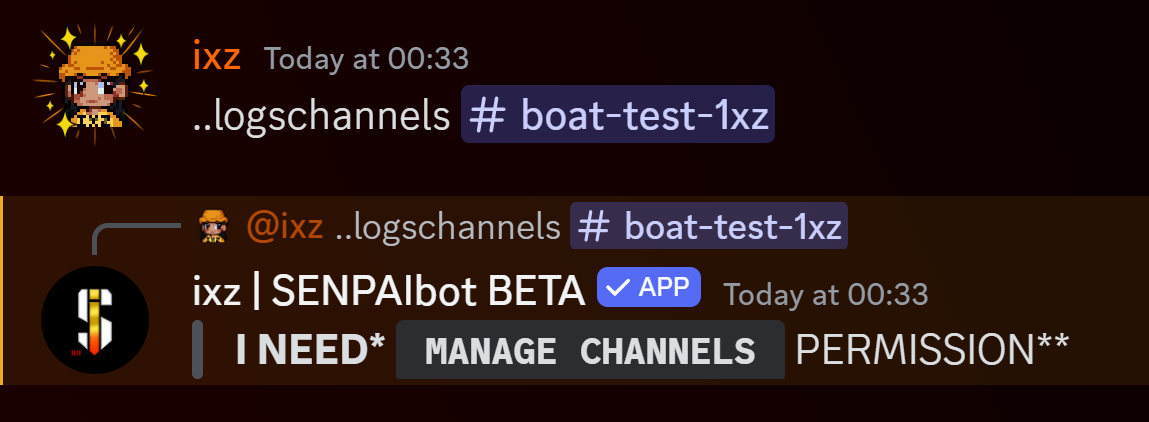
Bot writes : "i need"
lone ether
sturdy swan
yeah, it still wont work
Try the steps in the latest pinned message
fringe tangle
lone ether
Please DM me if you want to talk about the decline
Okey
sturdy swan
lone ether
Try the steps in the latest pinned message
oh, thanks!

 polar spruce
haloo  how do you transfer your nitro boost to other server?
 floral pagoda
 open elk
I can't edit
open elk
I can't edit
Make sure you’re logged in
floral pagoda
polar spruce
haloo <:zSenwave:813767480588894258> how do you transfer your nitro boost to ot...
This is the support channel for Top.gg, not Discord. However, check the “Server Boost” tab in your settings

 calm silo
my bot had a good speed of joining servers but from 3 days it is very slow almost stopped, Previously I saw it being added 10+ servers after every 12 hours but now hardly 1 server or 0 why?
supple mica
Relating to Top.gg, or?
If your bot was recently approved, it's probably because it was added to the "Newly added" bots section which more people see
sturdy swan
Have the votes been reset? If yes, when?
grand prism
sturdy swan
Have the votes been reset? If yes, when?
The first day of every month. After receiving the first vote in the new month, vote count will reset
lone ether
open elk
It’s still like that
Can you send your bot page link please
open elk
Top.gg
Discover a new bot for your Discord server
You also see the page quite normally

When I click on the 3 points, it no longer says „Edit“
supple mica
open elk
When I click on the 3 points, it no longer says „Edit“
Log out and log back in again
Or try another browser
 tacit crater
why is the icon not showing? https://top.gg/bot/886196406761693204
Top.gg
Share your VALORANT stats such as ranks, mmr, friends, and playtime with a NEW auto-roles feature based on in-game rank and/or region!
fluid birch
tacit crater
why is the icon not showing? https://top.gg/bot/886196406761693204
-refreshdata
wild stoneBOT
@tacit crater
Fetching Your New Bot Data
To fetch your bot's new name or avatar, please follow these steps:
Click the Refresh Data button in the sidebar on the right.
Click Edit on your bot page and then Save.
💡 Please note: If it still doesn't seem to change, make sure you actually changed the bot's avatar / name on your Discord Developer Portal and not the application's icon / name.
fluid birch
Is it a gif avatar? We currently do not support those
tacit crater
fluid birch
Is it a gif avatar? We currently do not support those
yep, I see
alright thanks
lone ether
open elk
https://top.gg/bot/1147636015213838388
@supple mica can u edit this and save, usually fixes the bug
supple mica
done
lone ether
@open elk try again mate, should work now
lone ether
supple mica
done
Thank u
tacit crater
will I ever be able to set the background image soon
 lone ether
tacit crater
will I ever be able to set the background image soon
lone ether
tacit crater
will I ever be able to set the background image soon
-bgimage
wild stoneBOT
@tacit crater
The bot page background link is currently broken. We suggest you use CSS for the time being!
Add the following code to your bot description:
body {
 background: url(INSERT_LINK_HERE);
}
</style>
oh I see, ty
 cyan imp
can anyone tell me how top.gg fetches the server count, some bot pages have it, some dont
 grand prism
cyan imp
can anyone tell me how top.gg fetches the server count, some bot pages have it, ...
grand prism
cyan imp
can anyone tell me how top.gg fetches the server count, some bot pages have it, ...
Top.gg does not fetch anything, developers send the number of servers via API
cyan imp
grand prism
Top.gg does not fetch anything, developers send the number of servers via API
oh thanks for clarifying, is there any page documented about sending the bot info through API?
grand prism
calm silo
supple mica
Relating to Top.gg, or?
Yeah ofcourse
calm silo
supple mica
If your bot was recently approved, it's probably because it was added to the "Ne...
And it it not anymore in that section? https://top.gg/bot/1019082814420963371/
Top.gg
A Multipurpose discord bot Make your Dream Community with Cool features! Such as AntiNuke, Welcomer, Giveaway, Auto Responder and more!
lone ether
calm silo
And it it not anymore in that section? https://top.gg/bot/1019082814420963371/
Probably not, since it gets removed from there after some time
calm silo
lone ether
Probably not, since it gets removed from there after some time
so what's the way to increase the speed of adding it? voting?
calm silo
can you give me the link of newly added bots?
calm silo
lone ether
Voting gets you higher on lists
Alr
lone ether
It's probably on the main page
calm silo

Top.gg
Spice up your Discord experience with our diverse range of Discord Bots and Servers as well as other spaces to discover DAOs.
 subtle rover
calm silo
my bot had a good speed of joining servers but from 3 days it is very slow almos...
subtle rover
calm silo
my bot had a good speed of joining servers but from 3 days it is very slow almos...
possible that you were listed on top of the "new bots" section, but now your bot has been removed now that it's not new
i think roosa answered already
grizzled latch
how i change my bot name in top gg
grand prism
wild stone
<@373379352764612617>
Like that
grizzled latch
grand prism
Like that
.where is the creator control?
grand prism
On the main page of your bot, where the description and reviews are
grizzled latch
grand prism
On the main page of your bot, where the description and reviews are
can u send a ss
grand prism
https://top.gg/bot/1221566217710735440 click here and there should be an option to refresh the date on this page
Top.gg
SafeSpend Bot, With him, you server gonna be with Maximum Protection !
calm silo
subtle rover
possible that you were listed on top of the "new bots" section, but now your bot...
Okay
grand prism
Unless you're on your phone, in this case creator controls are in the info tab iirc
 lone ether
 feral igloo
-refreshdata
wild stoneBOT
@feral igloo
Fetching Your New Bot Data
To fetch your bot's new name or avatar, please follow these steps:
Click the Refresh Data button in the sidebar on the right.
Click Edit on your bot page and then Save.
💡 Please note: If it still doesn't seem to change, make sure you actually changed the bot's avatar / name on your Discord Developer Portal and not the application's icon / name.
feral igloo
lone ether
-refreshdata
thanks you !
lone ether
Np
 hardy solstice
Hello, is it fixed actually? You told me to watch #954488568967995472, but it looks empty since years so..
lone ether
Nope reviews aren't fixed, other bugs are currently being worked on
Reviews have been added to the to-do list afaik
hardy solstice
Well thanks
lone ether
 woeful prairie
How do I become a bot tester
grand prism
wild stone
<@829082497576206377>
You can learn more about this here
grand prism
Then you have to wait a little longer
woeful prairie
Rip
 ornate flame
@lone ether hey i'm the owner of resist code
i'm arypton
want proofs?

this denial is false
lone ether
yeah i'll need proof of that lol
ornate flame
lone ether
yeah i'll need proof of that lol
wait
ornate flame
lone ether
yeah i'll need proof of that lol
i can even add a new readme.md file with your name to proof it belongs to me
lone ether
don't you already have a bot on the site with the same code
ornate flame
lone ether
don't you already have a bot on the site with the same code
i deleted the bot
and its not same code
lone ether
can you send the id of the old bot
ornate flame
it has major changes in design and commands
ornate flame
lone ether
can you send the id of the old bot
wait
lone ether
can you also link your github to your discord profile please
ornate flame
1060889652728442930
ornate flame
@lone ether check my connections
lone ether
im already in chat bro pls the pings
 lone ether
yes i saw, that's fine
ornate flame
resubmitted
 edgy jetty
Hallo
ornate flame
lone ether
yes i saw, that's fine
any update?
lone ether
nope
cyan imp
for some reason nothing is visible in auctions when using firefox, but visible in other browsers
 gloomy shell
Make sure javascript is enabled
soft star
gloomy shell
Make sure javascript is enabled
wait topgg is js now
gloomy shell
Auctions uses it
cyan imp
gloomy shell
Make sure javascript is enabled
Well I just got it figured out, it was the adblocker causing the problem
ornate flame
lone ether
nope
oh man
lone ether
be patient lol i have a life outside of discord 
sturdy swan
Hello. Is there a way to remove a bot from top.gg if the bot has already been deleted on Discord?
gloomy shell
The owner can delete it, or if its not invitable anymore, you can report it
sturdy swan
I am owner, but can't delete it in /delete page
gloomy shell
Do you get an error message or anything?
sturdy swan
Ig yes
gloomy shell
what does the error message say
sturdy swan
gloomy shell
what does the error message say
When I click on "trash" button, the modal window closes after 1 second
gloomy shell
Did you type the word "DELETE" into the box?
sturdy swan
gloomy shell
Did you type the word "DELETE" into the box?
Yes. I guess this request returns 404 and top.gg crashes on modal screen
 gloomy shell
Interesting. I'll report this internally for you
sturdy swan
I can show u in voice if u want
lone ether
gloomy shell
Interesting. I'll report this internally for you
thats adblocker usually
can u turn off any adblockers or vpns and try again @sturdy swan
sturdy swan
lone ether
thats adblocker usually
Probably, wait
 lone ether
i had to turn off my adblocker cuz the decline window disappears 😭
sturdy swan
lone ether
can u turn off any adblockers or vpns and try again <@456226577798135808>
Genius, thanks man
A lot
lone ether
sturdy swan
🙌🏻
sturdy swan
gloomy shell
Interesting. I'll report this internally for you
Thanks for the fast feedback 🙏🏻
stoic socket
gloomy shell
Adblocker blocking a delete <:HMM:1126310195199488040>
I had same issue a while back without an adblocker but it’s mostly because it considers it a pop up and removes it
ornate flame

sturdy swan
lone ether
sturdy swan
Second question. I added my dev server on top.gg, but I can't delete it. Any way...
send an email to support@top.gg
or you can make a ticket on the site
woeful prairie
How do i add colour to my description using html code
Like
Welcome to Nova

Commands
- Giveaways
Etc
fluid birch
woeful prairie
How do i add colour to my description using html code
-htmldesc
wild stoneBOT
@woeful prairie
You can achieve this using Markdown or HTML in your bot's description. You can ask in #development for help or use this HTML and Markdown cheatsheet for more resources.
fluid birch
You need to use a style tag
 brisk dagger
oh its via the api?
supple mica
-servercount
wild stoneBOT
To have your bot's server count displayed on Top.gg, please read the documentation on server/shard posting.
supple mica
(:
brisk dagger
I thought there is just some setting I couldn't find, lemme look into it
thanks
doesnt that mean I could put any amount of servers in it?
 brisk dagger
oh ok, was already puttin 1 billion in it
supple mica
soft star
supple mica
<:KEKW:1146893526509047928>
im gonna change it to 69
supple mica
-support
wild stoneBOT
This channel is for support/help with top.gg. It is not for general conversation (move to #general) or development support (move to #development). Please keep this channel on topic!
lone ether
 queen bramble
i can't find my server, when i want to invite bot from top.gg 😉
queen bramble
i can't find my server, when i want to invite bot from top.gg 😉
-servers
wild stoneBOT
@queen bramble
Servers have been removed as they were getting harder to moderate. For more info, please read: #announcements message
peak crypt
if i add a note for reviewer, where does it appear?
 peak crypt
lone ether
It will be showed to us only
peak crypt
lone ether
It will be showed to us only
ok thank you
knotty hamlet
if a person votes, can it be redirected somewhere?
 normal narwhal
knotty hamlet
if a person votes, can it be redirected somewhere?
normal narwhal
knotty hamlet
if a person votes, can it be redirected somewhere?
like they press the vote button -> redirects to another site ? 
 hardy lion
yeah i was hoping for a feature like that to be implemented tbh... would help with like vote reward flows...
a bot dashboard stating how many votes left until reward with button redirecting to vote page --> user votes and is redirected back to the original dashboard with the now updated information
hardy lion
hardy lion
yeah i was hoping for a feature like that to be implemented tbh... would help wi...
ik it's probably not desirable from top.gg's perspective because retention from visitors would be lower (less ad revenue) but
supple mica
While you cant do the redirect stuff. You could use webhooks to log who/how many votes are processed
zinc oracle
hardy lion
yeah i was hoping for a feature like that to be implemented tbh... would help wi...
If the user is on desktop you can open a new window entirely, set the size to be less than full screen.
Most users will hit the vote button on your dashboard, vote then close it.
At that point, when the user refocuses on your dashboard you can update it.
(it's pretty common these days to refresh dashboard data when focus is back on the page anyway)
 wide kindle
I never received a message saying my bot was denied, just doesnt exist anymore?
Ah maybe because the bot went offline while I was working on it?
shell inlet
wide kindle
I never received a message saying my bot was denied, just doesnt exist anymore?
you joined the server today and your bot was declined a while ago im guessing
if you were here already youd be pinged in #mod-logs and get a dm from @wild stone
 lapis portal
I'm trying to vote for the loritta bot and I can't, because it's giving an error on your website, I don't know if it's just me or other people, so I'd like to know what could be happening so I can't vote on the website.
fluid birch
-servers
wild stoneBOT
@sturdy swan
Servers have been removed as they were getting harder to moderate. For more info, please read: #announcements message
 toxic whale
Not sure if I should be in this channel or a different one, but has anyone at Top.gg started to fix the issue that happens when voting for a bot, it acts as though you voted, then you go back and it didn't even so much as register the vote? I gave up trying after going through the 6-step process mentioned in the pins, so please do not direct me to try that again as it did not work.
 fluid birch
You'd do that by looking in your servers member list via discord directly

 obsidian minnow
Hewo - someoe, Im making a bot (yes, I actually did it) so - qq, HOW DO I MAKE A BOT TOKEN, AND ADD IT TO MY SERVER. also - its a private bot, restricted to only my server/ppl I allow...
light rain
obsidian minnow
Hewo - someoe, Im making a bot (yes, I actually did it) so - qq, HOW DO I MAKE A...
#development is the right place for it
obsidian minnow
light rain
<#272764566411149314> is the right place for it
oK - thanks
lone ether
toxic whale
Not sure if I should be in this channel or a different one, but has anyone at To...
What shows up on your screen when you try to vote?
lone ether
lapis portal
I'm trying to vote for the loritta bot and I can't, because it's giving an error...
What error?
lone ether
 void surge
Try clearing your browser cache and try again
toxic whale
lone ether
What shows up on your screen when you try to vote?
It goes through the process as though it has properly voted- no error messages; I go to discord to check if it's gone through; it shows as having not gone through. I return to the top.gg site, to vote for the exact same bot, and unlike what it should be saying of "you've already voted try again in 12 hours" or the equivalent thereof, the process merely repeats until I give up and don't get a vote counted.
lone ether
That's weird
And you've tried all the steps on pinned msg right?
I'll ask internally bc never seen that issue before
 livid violet
hi i applied for my bot to be added a couple times now the most recent being last night and i don't see where it's pending status is on my account. i have no idea if it got declined or it just never got sent for approval
sturdy swan
my old account got terminated by discord and so the bot got deleted, but its still on the website, what can I do?
lone ether
sturdy swan
my old account got terminated by discord and so the bot got deleted, but its sti...
you can dm an online moderator if you want the bot removed
-ownershiptransfer
wild stoneBOT
I need to transfer ownership of my Top.gg Bot page to another account!
First, see if you are able to use our Teams Feature. This is preferred over any other method of page ownership transfer.
If you aren't able to use Teams because:
The account that owns the bot is inaccessible
The account that owns the bot is no longer part of the team for the bot and will not cooperate to transfer the page
Then you can follow the instructions in our Ownership Transfer Support Article.
lone ether
or if you want to do that^
sturdy swan
lone ether
you can dm an online moderator if you want the bot removed
Already did
lone ether
then wait for a reply
lone ether
lone ether
please wait in the queue
obsidian minnow
Can you pls help me with literally everything - its an SOS , code red, otherwisse Ill probs die...
 keen matrix
lone ether
please wait in the queue <:worryThumbsUp:467303591695089664>
keen matrix
lone ether
please wait in the queue <:worryThumbsUp:467303591695089664>
ok,np
obsidian minnow
obsidian minnow
Can you pls help me with literally everything - its an SOS , code red, otherwiss...
@lone ether ??^^^pweez
keen matrix

lone ether
obsidian minnow
Can you pls help me with literally everything - its an SOS , code red, otherwiss...
you can say what you need help with



 junior radish
I am not tech savy but I have the chaotic bot on my server it has shown offline for a few days am i doing something wrong it worked fine since last year
lapis portal
lone ether
What error?
this error
 lone ether
lapis portal
this error
lone ether
lapis portal
this error
Try clearing your browser cache
lone ether
junior radish
I am not tech savy but I have the chaotic bot on my server it has shown offline...
-wrongserver
wild stoneBOT
@junior radish
Hey! We think you have our server mistaken. We do not provide support, help, or advice for any bot. You need to click on the "Discord Support Server" button on the bot's page of the bot you need support for. If there isn't a button that says "Discord Support Server" or nothing else mentioned about a support server, the server invite is invalid or you were banned from the bot's support server, then we can't help you. Sorry :(
lapis portal
lone ether
Try clearing your browser cache
I've had this problem since my other cell phone, but I'll see if it can be fixed.
lone ether
Try the steps in the latest pinned message, one of them should work
lapis portal
lone ether
Try the steps in the latest pinned message, one of them should work
didn't decide to clear the cache
lapis portal
I just cleaned it and it didn't work
cyan imp
?
 lone ether
cyan imp
?
lone ether
cyan imp
?
-bgimage
wild stoneBOT
@cyan imp
The bot page background link is currently broken. We suggest you use CSS for the time being!
Add the following code to your bot description:
body {
 background: url(INSERT_LINK_HERE);
}
</style>
thanks
lone ether

obsidian minnow
lone ether
you can say what you need help with
My bto is not attaching into the token/they aren't linked
lone ether
That's not related to top.gg we can't help you
If you need help with developing your bot you can go to #development
 mortal marsh
ID: 1129748786130993194
 grand prism
mortal marsh
ID: 1129748786130993194
grand prism
mortal marsh
ID: 1129748786130993194
Wait a second 
mortal marsh
grand prism
Wait a second <a:sus:1110936506350190695>
?
grand prism
mortal marsh
?
Roblox isn't for kids by any chance? How come there are 400 people on such a server and no one has reported it yet?
mortal marsh
grand prism
Roblox isn't for kids by any chance? How come there are 400 people on such a ser...
Idk
 uncut iris
Soo hey! My bot got deleted from the page because it is very similar to another bot of mine, which is not true. I have already tried to write to dominik but he has now blocked me (you can see that customer satisfaction is the top priority here). Marco has deleted the bot. Is there anything you can do?
lone ether
You can submit the bot to the site again. If it is different like you say so, make sure to put all the features and commands that are different in the bot reviewer notes or long description.
We do not block people without a reason so if Dom blocked you, he had a completely valid reason for doing so
uncut iris
lone ether
You can submit the bot to the site again. If it is different like you say so, ma...
I wrote him again because I wanted to finish the discussion. And I no longer have the page code. My website was beautiful. Can someone give it to me