#support
1 messages · Page 23 of 1
 gloomy shell
 buoyant crown
cant because i take ban
 supple mica
We can't help you here
gloomy shell
You can try to see if they have another website or something where you can submit a ban appeal, but otherwise we can't help
buoyant crown
 supple mica
As it says at the top, you were rate limited.
You will need to be patient before the ban is lifted.
We can't do that manually
buoyant crown
The problem is that I did not use any account at all. When I used one account, I returned from the page. This happened, and I tried it from my friend. The same thing happened.
 uneven viper
How to authorise api?
 cerulean ember
buoyant crown
The problem is that I did not use any account at all. When I used one account, I...
cerulean ember
buoyant crown
The problem is that I did not use any account at all. When I used one account, I...
It's a temporary ban, please try against later, idk which browser you using but i would recommend you to use chrome.
uneven viper
Ye
When i try to use api
It returns error unauthorised
Just need to post to header
??
 sage monolith
You can check the pins of #topgg-api for a clear detailing
 sage monolith
You can freely dm the reviewer and ask him
supple mica
Feel free to reach out to Qwaizor if you disagree.
 fiery hinge
alr
sage monolith
Hm
supple mica
fiery hinge
even tho it isn’t <a:Abood_wana_mali:1037068160412684408>
the messages are identical 
fiery hinge
supple mica
the messages are identical <:sussy:998989683373646047>
i can show the source code
supple mica
Reach out to Qwaizor and let them know! 
fiery hinge
alr!
 dire sparrow
my bot was rejected for not a working help command but its a lie
 gloomy shell
if you want to dispute your decline you can reach out to the review that declined your bot in DMs 
sage monolith
Is your dm on?
dire sparrow
is that the problem?
sage monolith
It would be that, the reviewer's dm is on, but urs is off
 wild stoneBOT
Almost every staff member has direct messages enabled. If you can't message one of the staff members, it may be an issue on your end. Please make sure you have direct messages enabled by checking your privacy settings in
Settings > Privacy & Safety > Allow direct messages from server members
as well as right-clicking on
Top.gg > Privacy Settings > Allow direct messages from server members.
If you're still not able to send a staff member a direct message despite having these settings enabled, feel free to ping them in this server!

 dreamy abyss
You can follow those steps to turn DMs on :)
sage monolith
Hm
sage monolith
Hm the reviewer's dms are mostly open
sage monolith
 finite thorn
I need it quick
finite thorn
I need it quick
You need to pe patient for that, it mostly gets up between 1-2 weeks
sage monolith
dire sparrow
but its a 75% of not cuz i tried twice
that depends of what your bot does and how you made it. It's not necessary that it will be rejected only
dire sparrow
well i barely see bots get verified
sage monolith
it's not that the reviewer forcefully decline your bots. there are some valid reason for the declination. fixing those and applying that again will lead to the approval of your bot
dire sparrow
well the first time i tried i was restarting the bot for 1 min
btw when do they answer
sage monolith
the dm one?
dire sparrow
yes
sage monolith
24-48 hours
 lethal bolt
What is the issue
dire sparrow
do i need to include the bots invite cuz its page is deleted
sage monolith
lethal bolt
What is the issue
Purble's bot got declined so he dmed the reviewer that only he's saying
cerulean ember
Please wait 24-48h if you already dmed bot reviewer
sage monolith
Hm i said that to him
dire sparrow
dire sparrow
do i need to include the bots invite cuz its page is deleted
but do i need this
sage monolith
dire sparrow
but do i need this
Nope
cerulean ember
dire sparrow
do i need to include the bots invite cuz its page is deleted
Just include all the info in one message with bot id that would be enough
dire sparrow
well they told me to resubmit gotta wait 7 days now
 uneven saffron
hello i'd like to DM a mod if that's possible
i dont have an issue with the good functioning top.gg i'm a mod for Mudae bot and i have a small concern i'd like to share to a mod here
 tulip jungle
he's asking for a mod tho just saying
dreamy abyss
uneven saffron
i dont have an issue with the good functioning top.gg i'm a mod for Mudae bot an...
Hey there, feel free to DM any online CM :D
uneven saffron
ok ty ig ill dm you
tulip jungle
oh yea true discord was showing the ping not correctly it just showed some id
 stable orbit
I have 2 reviews on my bot that have 2 stars because my bot wasn't verified and they couldn't invite it. This is now fixed how do I reply to these reviews or get them deleted?
gloomy shell
You can contact an online moderator to ask them to be removed
stable orbit
What is the best way to contact them?
 sturdy swan
DMs
 maiden portal
@gloomy shell Sorry ping, you please ask mods dominxus or other try you need role "Channel Manager"

Role add: Channel Manager and Giveaway Manager
 zinc oracle
We give roles when they are asked for when the command is run.
maiden portal
you permission is okay work
maiden portal
zinc oracle
We give roles when they are asked for when the command is run.
exactly.
And moment forget check script add d"error no have permission"

 next kestrel
maiden portal
<@136583532972605440> done fix there recommends /help image:
next kestrel
maiden portal
<@136583532972605440> done fix there recommends /help image:
You will have to resubmit your bot and wait until it’s reviewed again
maiden portal
next kestrel
You will have to resubmit your bot and wait until it’s reviewed again
Already resubmit before
 lavish current
With the standard configuration is text a higher xp or vc, does it matter, trynna  understand it more without knowing what our owner set it up like
next kestrel
lavish current
With the standard configuration is text a higher xp or vc, does it matter, tryn...
-wrongserver
 cerulean fulcrumBOT
 Hey! We think you have our server mistaken. We do not provide support, help, or advice for any bot. You need to click on the "Discord Support Server" button on the bot's page of the bot you need support for. If there isn't a button that says "Discord Support Server" or nothing else mentioned about a support server, the server invite is invalid or you were banned from the bot's support server, then we can't help you. Sorry :(
 wild stoneBOT
@lavish current
Hey! We think you have our server mistaken. We do not provide support, help, or advice for any bot. You need to click on the "Discord Support Server" button on the bot's page of the bot you need support for. If there isn't a button that says "Discord Support Server" or nothing else mentioned about a support server, the server invite is invalid or you were banned from the bot's support server, then we can't help you. Sorry :(
lavish current
My bad I clicked the wrong link 
 storm matrix
This bot sends me 20 messages back to back reminding me to vote please help me stop this as it wakes me up every night
sage monolith
storm matrix
This bot sends me 20 messages back to back reminding me to vote please help me s...
Which bot?
storm matrix
Poketwo@sage monolith
sage monolith
storm matrix
Poketwo<@701643179212013568>
you could contact to the bot's support server
storm matrix
sage monolith
you could contact to the bot's support server
Howwww I thought this was that server
sage monolith
Nope, this is top.gg's server
but I can't suggest you to check the commands of that bot, I guess there would be some command to disable it
cerulean fulcrumBOT
Hey! We think you have our server mistaken. We do not provide support, help, or advice for any bot. You need to click on the "Discord Support Server" button on the bot's page of the bot you need support for. If there isn't a button that says "Discord Support Server" or nothing else mentioned about a support server, the server invite is invalid or you were banned from the bot's support server, then we can't help you. Sorry :(
 torn star
Is it a know issue that profile pictures are not round on mobile Safari iOS?

Sometimes it flickers to round and then back
torn star
Also clicking on More Like This will redirect to the bot but won’t change the reviews. So the reviews from the bot before will be shown 😅

 floral pagoda
Sounds like a cache problem?
dreamy abyss
Its a known issue and on our radar :)
Just not been a priority to fix, so we dont have an ETA of when it may be fixed
torn star
👍
And there might be a problem with the #Tags for a while which I and the developer of the Astro Bot noticed.
Wrong Bots are shown when searching for Temporary Voice Channels. The list will refresh when you scroll down bit until page 2 is loaded.
My guess is that this is caused by different #Tags. TempVoice and Astro have temporary-voice-channels while the Channel bot has Temporary Voice Channel as tag



Top.gg
Discover Temporary Voice Channels Discord bots on the biggest Discord Bot list on the planet.
 ashen trout
Is voting with multiple accounts against your guys tos

Idk who’s doing it on my bot but someone is
My admins reported it to me today. Ping me your response please. If it is against tos can I do anything on my end or is this something you’d have to deal with?
 cobalt sleet
torn star
And there might be a problem with the #Tags for a while which I and the develope...
cobalt sleet
torn star
And there might be a problem with the #Tags for a while which I and the develope...
This is also a known issue and has been passed on to the team.
torn star
Alright thanks 👍
 grand swan
how can i remove a bot from a team?
dreamy abyss
grand swan
how can i remove a bot from a team?
Hey, once a bot is transferred to a team it cant be moved back to a person
The only way would be for the team to delete the bot, then the user who then wants to own the bot to submit it again
You can also always transfer a bot between teams
https://support.top.gg/support/solutions/articles/73000510559-teams-overview
grand swan
then, how can i give permission to someone of the team to edit the bot info?
giving them admin doesn't work
dreamy abyss
grand swan
giving them admin doesn't work
Humm weird, are they seeing any errors?
The button may be hidden, so try having them add /edit at the end of the URL, so as an example: https://top.gg/bot/910965586622816326/edit
sage monolith
 fleet pasture
Hi i need support
fleet pasture
Hi i need support
Tell what support do you need
sturdy swan
fleet pasture
One of the community managers please
Go ahead and ask your question, it'll most likely not need a community manager to respond
gloomy shell
You can feel free to dm one of them, they all have their dms open
fleet pasture
sturdy swan
Go ahead and ask your question, it'll most likely not need a community manager t...
A reviewer told me to contact a community managers @sage monolith
fleet pasture
gloomy shell
You can feel free to dm one of them, they all have their dms open <:ThumbsUpSmil...
Sure thx
fleet pasture
gloomy shell
You can feel free to dm one of them, they all have their dms open <:ThumbsUpSmil...
Can i dm you ?
gloomy shell
I'm not available right now so i would dm one of the others 
fleet pasture
gloomy shell
I'm not available right now so i would dm one of the others <:onionpray:95438355...
Sorry
sage monolith
fleet pasture
A reviewer told me to contact a community managers <@701643179212013568>
Umm, ok, but if you wish you can say here too
gloomy shell
Not really A.J.
sage monolith
Oh ok, sowwy
 slate robin
BRO HELP I CANT VOTE IT JUST SAY U CAN VOTE AFTER AD BUT I ALREADY SAW AD 10X
dreamy abyss
slate robin
BRO HELP I CANT VOTE IT JUST SAY U CAN VOTE AFTER AD BUT I ALREADY SAW AD 10X
Try clearing cache and disable any adblockers :)
If that does not work, try in a different browser
slate robin
dreamy abyss
Try clearing cache and disable any adblockers :)
If that does not work, try in a...
it used to work why it wont work now bruh
BRO
i just cleared cache and stuck

NVM
sage monolith
 plush tide
<#714045415707770900>
plush tide
<#714045415707770900>
Do you need help ?
 placid knoll
Hey! I've been building a bot using discord.py, and I used to use topgg's python API wrapper to show bot stats on the website. But that doesn't seem to work anymore, now that I've updated discordpy to 2.0
I'm extremely novice at working with APIs, and usually just work with a wrapper, are there any good and updated python API wrappers for Topgg?
 shell inlet
placid knoll
Hey! I've been building a bot using discord.py, and I used to use topgg's python...
shell inlet
placid knoll
Hey! I've been building a bot using discord.py, and I used to use topgg's python...
hey you can head to #topgg-api and ask that question as many other bot devs can give their opinion on libraries ||however i suggest the javascript library||
placid knoll
I don't suppose I can use the js library with a python based bot
sage monolith
sturdy swan
bruh thise is a prodocast bot bro
report it to discord https://dis.gd/support
 fleet zealot
Yoo, so I can see that my server is on top.gg and you can vote for it. But in my server, the vote command that pulls up the link for it isn’t working. I added it to the channel I’m trying to use it in and it won’t work, tried all variations of it (vote, Vote, /vote etc.)
I know but in our old server if you just typed vote in chat, even in general, it would imbed a link to your discord server on top.gg so you could vote. But in our new server it doesn’t seem to be working
Did it get deleted or something? Cuz that’s how we used to remind people to vote, do @ everyone and then type vote and it’d pull up the link 🤔
 smoky dirge
I have some idiots still spamming 1 star reviews from alt accounts, i know whos doing it, and whos alts they are but nothing will actually hold them responsible for it. Can someone at least get rid of the fake 1 star reviews?
https://top.gg/bot/1000125868938633297
i dmd her-i just didnt wana bother her if someone else could.
sage monolith
😂
smoky dirge
This is the second time now they will be removed, by the same "alts" from the same main.

indeed
Have to love children and their stupid games, right
....
zinc oracle
On it
smoky dirge
Thank you very much.... very-very frustrating.
you may want to check another bot to.
@hasty zenith have you checked yours?
zinc oracle
Ill look into theirs too
Can you respond to my dm when you get a chance? @smoky dirge
(it might be in message requests?)
smoky dirge
Yep one moment
zinc oracle
their bot/server reviews seem clean
supple mica
Please keep it relevant to Topgg 🫶
 lone swift
What is the period of time in which the bots are reviewed on the site?
cerulean fulcrumBOT
 When will my bot be reviewed?
The average up-to-date approval times are stated [here](#support message).
Currently our average bot reviewal times are around one week or more. Because of this — and because some bots take longer to review than others due to their features — we can't guarantee your bot will be reviewed as quickly as someone else's in the past and we also can't guarantee your bot will be reviewed within that timeframe. There is no exact time for how long bot approval can take. There is no way to check your bot's position in our reviewal queue, but remember you're not first and you're not last!
You may edit your bot's page as much as you like both before and after it's reviewed and this will have no impact on its place in queue.
You can read more about our bot reviewal process in this support article: How the Bot Reviewal Process Works.
 In the meantime, please make sure your bot follows all of our Bot Guidelines for a quick and smooth approval!
sage monolith
sturdy swan
what is my top.gg server url?
your can get your all servers and bots list on top.gg profile page
sturdy swan
Im trying to add my bot
sage monolith
For instance you can do this if you have your server on top.gg
https://top.gg/servers/your server id
sturdy swan
ohh ok
sage monolith
sage monolith
For instance you can do this if you have your server on top.gg
`https://top.gg/...
then this is of no use
What are you trying to do, can tell me once more?
sturdy swan
 sage monolith
oh this isn't a necessary thing
sage monolith
if your server is linked with top.gg, the only you can put it there, else leave it blank
sturdy swan
Okay submitted, I shall wait now, Thanks bud.
sage monolith
No problem 
sage monolith
maiden portal
<@701643179212013568> think number server or name sk
what?
sage monolith
Ofcourse you need to put the server id there
Top.gg's server link pattern is like this only
https://top.gg/servers/server_id
maiden portal
Hmmm ok
 rain nest
how to get bot added to server?
 gritty bane
rain nest
how to get bot added to server?
gritty bane
rain nest
how to get bot added to server?
website
sage monolith
rain nest
how to get bot added to server?
which server?
 reef star
is replying to web-reviews still disabled?
dire sparrow
the reviewer said the bot didnt work or declined it, because he was using the prefix / as a message and not a slash command but he didnt approve it
 fluid birch
dire sparrow
the reviewer said the bot didnt work or declined it, because he was using the pr...
fluid birch
dire sparrow
the reviewer said the bot didnt work or declined it, because he was using the pr...
Contact the reviewer of your bot in dms to appeal
dire sparrow
i did
but the reviewer seems to have something cuz the response of him using it as a normal message was 2h ago
he still online
fluid birch
dire sparrow
but the reviewer seems to have something cuz the response of him using it as a n...
We’re volunteers and therefore response times can vary from time to time  send them another message to remind them if they haven’t answered within 48h
fluid birch
reef star
is replying to web-reviews still disabled?
That is still not functioning. The devs are aware of this issue
dire sparrow
ok
reef star
fluid birch
That is still not functioning. The devs are aware of this issue
No worries. I'll reach out to the errant reviewer on discord. Any ETA on a fix?
fluid birch
reef star
No worries. I'll reach out to the errant reviewer on discord. Any ETA on a fix?
I cannot give an ETA I’m afraid
 torn fog
I put my server on top.gg but when my friend voted, he did not recieve the voted role that i set it to... any idea why? (i recieved it when voting)
Edit: someone else tested and the roles worked again. Could it a hierarchy issue? I have a role higher than the top.gg bot and got the role but my friend who voted did not...
next kestrel
torn fog
I put my server on top.gg but when my friend voted, he did not recieve the voted...
Correct, it is because of the hierarchy issue
set the bot’s role higher than the role it is supposed to assign
torn fog
next kestrel
Correct, it is because of the hierarchy issue
set the bot’s role higher than th...
The top.gg role IS higher...
It's fine it seems like it works now...
Another question, if I manually add/remove the role, will the top.gg bot automatically add/remove it after a while?
sage monolith
torn fog
It's fine it seems like it works now...
Another question, if I manually add/remo...
i don't think so, whenever a bots adds a role, it puts it in their database or they do a timeout function which removes the role after a specific time. If the bot doesn't adds the role, then it will not remove it also
rain nest
sage monolith
which server?
This server
torn fog
sage monolith
i don't think so, whenever a bots adds a role, it puts it in their database or ...
What about if you manually add the role?
sage monolith
torn fog
What about if you manually add the role?
bot will not remove that role
if you do it
torn fog
Aight thanks.
sage monolith
no problem
sage monolith
Ok
 mystic sigil
N after tht i click save changes then like i gone to add server n it says server isn't published
sage monolith
Can you show some screenshots?
 sage monolith
@mystic sigil can you give the server id?
mystic sigil
sage monolith
<@779286675603062815> can you give the server id?
Huh server id means?
sage monolith
mystic sigil
this server's id?
sage monolith
Press hold on the server
Goto more options
Scroll down
And you will get copy id
sage monolith
Let me check
sage monolith
mystic sigil
Wdym?
Have you filled up all the details?
mystic sigil
Just save changes
sturdy swan
Go on your profile https://top.gg/user/me there you can finish editing and save it
Then if you've filled everything, send here a screenshot of what you've filled
mystic sigil
Hmm ok
mystic sigil
sturdy swan
Go on your profile <https://top.gg/user/me> there you can finish editing and sav...
Invite code is the invite link of the server ryt?
We hv to just copy the invitation link n paste?
sturdy swan
Just what's after the /
So if your link is https://discord.gg/123456789, just put 123456789
That's why it's called "Invite Code" and not "Invite Link" 
mystic sigil
This ? aQH8KrDd
mystic sigil
sturdy swan
So if your link is `https://discord.gg/123456789`, just put `123456789`
Ohk
sturdy swan
Yep, that would be a code
mystic sigil

mystic sigil
sturdy swan
Yep, that would be a code
What should I gib in team
sturdy swan
If you don't have a team, you can leave it empty
sturdy swan
Before saving
mystic sigil
K
mystic sigil
mystic sigil
This ? aQH8KrDd

@sturdy swan
I filled everything except tht team n optional part
maiden portal
No need okay try you save change
mystic sigil
maiden portal
No need okay try you save change
Bruh still it's showing this server is not published
What should I do??

sturdy swan
Well, you haven't showed what information you've filled as I've asked ¯_(ツ)_/¯
mystic sigil
sturdy swan
Well, you haven't showed what information you've filled as I've asked ¯\_(ツ)_/¯
Bro like 1st is invite code then short n long description
3rd category ig
sturdy swan
Short and long description matters, same for categories
mystic sigil
I filled
sturdy swan
If you don't do what I asked, I can't help; sorry
mystic sigil
U mean i should take a ss of what I done?
@sturdy swan
I should take the whole
Ss?
 jaunty edge
My bot Flavia ( 1035232043262554242 ) was declined by you , the reason was unmodified instance of lava music , but is not I can share all the proofs and code snippet . @sturdy swan
mystic sigil
sturdy swan
Short and long description matters, same for categories
Except them i should take ss of everything?
 strange cairn
hey. i would like for one of my reviews to be removed from the site. is it possible?
sturdy swan
strange cairn
hey. i would like for one of my reviews to be removed from the site. is it possi...
If it's against the review guidelines, DM a moderator
sturdy swan
mystic sigil
Except them i should take ss of everything?
Of everything you've filled
sturdy swan
jaunty edge
My bot Flavia ( 1035232043262554242 ) was declined by you , the reason was unmod...
As the bot said, DM if you want to dispute, though I can already tell you it's a clone and it won't change - it's really obvious.
And no need to ping me twice+
mystic sigil
sturdy swan
Of everything you've filled
I should click view ryt?
jaunty edge
sturdy swan
As the bot said, DM if you want to dispute, though I can already tell you it's a...
Can you tell me on what basis are you telling it is clone , it is based on poru and I the whole code .
sturdy swan
As I said, DM
mystic sigil
sturdy swan
And no need to ping me twice+
Me?
sturdy swan
No, the other person
mystic sigil
mystic sigil
I should click view ryt?
.
sturdy swan
Just go on your server's page as previously, fill the fields and send a screenshot of what you've filled 
mystic sigil
sturdy swan
Just go on your server's page as previously, fill the fields and send a screensh...
I should fill again??
Wai nvm
sturdy swan
Most likely yeah
 mystic sigil
mystic sigil
mystic sigil
I hv to take the other too?
Short description,long description n invite code?
@sturdy swan
 candid mica
mystic sigil
Short description,long description n invite code?
candid mica
mystic sigil
Short description,long description n invite code?
the short desc and long desc
mystic sigil
candid mica
the short desc and long desc
I need to take it too?
 hallow verge
GN Friends
candid mica
well, my guess is the long categories tag that you have is what causing it
mystic sigil
candid mica
well, my guess is the long categories tag that you have is what causing it
Wdym?
candid mica
try removing the tags with more than 1 word
mystic sigil
candid mica
try removing the tags with more than 1 word
I should remove all tags ?
With more than 1 word?
candid mica
yea just try
candid mica
the dank memer and owo bot tag
mystic sigil
K
mystic sigil
candid mica
the dank memer and owo bot tag
Still it's the same

Ugh how many times should i fill
candid mica
ah sry, show me the description then
mystic sigil
candid mica
ah sry, show me the description then
Short and long description?
I wrote like in short
Welcome to the server name
N in long server is about gaming n bots
That's solve

@candid mica ?
candid mica
mystic sigil
<@820569882860716072> ?
okay, just screen shot everything that you fill, because i dont know what the problem is if there isnt enough info
yea but this is support
sturdy swan
I hate Discord 
sturdy swan
I tried to submit my server but it wont load / wont show it in the website
lethal bolt
sturdy swan
I tried to submit my server but it wont load / wont show it in the website
can you wait for like 15-20 mins then try to check it please
sturdy swan
lethal bolt
can you wait for like 15-20 mins then try to check it please
alright
sturdy swan
Do we get a DM from a staff member in regards to claiming giveaways?
gloomy shell
Yes you will
sturdy swan
Danke xiuh
 craggy shale
could someone help me cuz i got mention at #logs , but i didn't find what this mention specific going
floral pagoda
craggy shale
could someone help me cuz i got mention at <#264889891039608874> , but i didn't ...
I guess you mean #mod-logs?
 craggy shale
floral pagoda
I guess you mean <#325648177178869760>?
craggy shale
floral pagoda
I guess you mean <#325648177178869760>?
yeah
 sand lance
Hey, can someone explain how that's 3 arguments?
TypeError: __init__() takes 2 positional arguments but 3 were given
You can tell them nicely as well as I
gloomy shell
sand lance
Hey, can someone explain how that's 3 arguments?
```client.topggpy = topgg.DBLC...
hey there! please ask in #topgg-api and someone will help you when available 
torn star
Why has this Bot a light blue page? ||(offline btw since a year xD)||
 dreamy abyss
torn star
Why has this Bot a light blue page? ||(offline btw since a year xD)||
dreamy abyss
torn star
Why has this Bot a light blue page? ||(offline btw since a year xD)||
Your able to set custom CSS to your overview page :)
cerulean fulcrumBOT
You can achieve this using Markdown or HTML in your bot's description. You can ask in #development for help or use this HTML and Markdown cheatsheet for more resources.
torn star
dreamy abyss
Your able to set custom CSS to your overview page :)
Ohh I just thought there is markdown support (psst can you give me an example how to inject css?)
I will go to #development ^^
 cyan halo
Sorry but how long does it take for a bot to get approved?
zinc oracle
-upto
cerulean fulcrumBOT
When will my bot be reviewed?
The average up-to-date approval times are stated [here](#support message).
Currently our average bot reviewal times are around one week or more. Because of this — and because some bots take longer to review than others due to their features — we can't guarantee your bot will be reviewed as quickly as someone else's in the past and we also can't guarantee your bot will be reviewed within that timeframe. There is no exact time for how long bot approval can take. There is no way to check your bot's position in our reviewal queue, but remember you're not first and you're not last!
You may edit your bot's page as much as you like both before and after it's reviewed and this will have no impact on its place in queue.
You can read more about our bot reviewal process in this support article: How the Bot Reviewal Process Works.
In the meantime, please make sure your bot follows all of our Bot Guidelines for a quick and smooth approval!
 cerulean fulcrumBOT
How do I create a team?
This article describes the process of creating a team, customizing your team and adding members to it: Teams Overview
 west sandal
cyan halo
floral pagoda
By creating a team
west sandal
cyan halo
floral pagoda
By creating a team
So if i have a bot that is approved i can just edit it right?
cerulean ember
sturdy swan
do you need to own a server to add it to top.gg?
Ownership is required
buoyant crown
heelo i need help
sturdy swan
cerulean ember
Ownership is required
is there a way to add without ownership and instead administrator?
 cerulean ember
buoyant crown
The voting button doesn't work for me every time I click on the word vote it say...
cerulean ember
buoyant crown
The voting button doesn't work for me every time I click on the word vote it say...
Login to site first
cerulean ember
sturdy swan
is there a way to add without ownership and instead administrator?
There is no way I'm sorry
cerulean ember
buoyant crown
im login all ready
Then i would suggest you to use different browser
 sullen dagger
@cerulean ember
cerulean ember
Yes?
 finite pier
I submitted my bot for review. The reviewers need to allow the bot to be able to delete messages. How can I edit my submission to inform them of this?
cobalt sleet
Explain your issue @sullen dagger and please stop pinging people without explaining why
sage monolith
finite pier
I submitted my bot for review. The reviewers need to allow the bot to be able to...
Haven't your bot has reply to missing permissions? I mean if the bot is lacking some permissions then it should reply to the user that I'm missing this this permissions..
finite pier
sage monolith
Haven't your bot has reply to missing permissions? I mean if the bot is lacking ...
The FAQ says the reviewers only use certain permissions when testing, not the ones that are used in the bot invite link and you have to specify any additional permissions your bot needs so they can test it. Deleting messages is one of the permissions they don't allow unless specified.

Top.gg
Why does my bot page say it's "not yet approved"? When you submit your bot, we have a team of volunteers who review your bot to ensure quality and coherence with our guidelines. This process typically takes 1 to 2 weeks or more, but could vary b...
sage monolith
finite pier
The FAQ says the reviewers only use certain permissions when testing, not the on...
but for which thing do you need delete messages permissions?
finite pier
which command?
finite pier
It's minigame bot that creates a new channel for games to minimize spamming in other channels. When the game is completed, the channel gets deleted
I meant to say delete channel perms
sage monolith
Wait i guess mac could help you better
cobalt sleet
finite pier
It's minigame bot that creates a new channel for games to minimize spamming in o...
You should check perms when people run the command to start the game and handle the error if the bot is missing manage channels permissions.
sage monolith
Hm that what I said, that it should have a missing permissions reply
finite pier
I get that but the "How the Bot Reviewal Process Works at Top.gg" says to include any permissions that the bot needs in the application that they don't have on @ everyone in their testing server because I guess they remove the bot role for some reason.
¯_(ツ)_/¯
cobalt sleet
We invite them with 0 permissions so they only use the default everyone permissions. If your bot requires extra permissions you need to handle missing permissions errors by posting a missing permissions message in the channel on a command-by-command basis.
sage monolith
But i guess if any of the command which needs a specific permissions and if it's really needed according to the reviewer, then they may provide the permissions if they want to test that module/command
@finite pier when did you applied your bot?
finite pier
few min ago
sage monolith
You can edit the command/module and restart it now only
Then everything will be okay I guess
Just check for the required permissions, and if it doesn't have then return a missing permissions reply
and clearly specify which permissions is it missing
finite pier
done thx
 upper siren
hello, when I add my bot, when will it be confirmed?
sturdy swan
2 weeks or longer
sage monolith
finite pier
done thx
No problem
 craggy vector
@real laurel how to delete pending bot
 weak oxide
Can anyone help with it the link is in jpg only
 sage monolith
weak oxide
Can anyone help with it the link is in jpg only
sage monolith
weak oxide
Can anyone help with it the link is in jpg only
Your Imgur must be like this-
https://i.imgur.com/..
Wait try this
https://i.imgur.com/yby24KT.jpg
this will work i guess
weak oxide
Ok i will try
weak oxide
sage monolith
Your Imgur must be like this-
`https://i.imgur.com/..`
Th.ks for the help
sturdy swan
craggy vector
<@150417106549211136> how to delete pending bot
You can go to your bot'e page and click the "Delete" button
sturdy swan
 gaunt dock
hello
does anyone know how can i reply to the reviews on my bot page on top.gg ?
gaunt dock
hello
does anyone know how can i reply to the reviews on my bot page on top.gg ?
You can't due to a bug that has no ETA for a fix
gaunt dock
sturdy swan
You can't due to a bug that has no ETA for a fix
Oh so it's a bug ?
i was wondering why some people have replied to some of their reviews 😄
sturdy swan
Yeah it is
gaunt dock
thank you for letting me know 👍
sage monolith
weak oxide
Th.ks for the help
No problem
 near gorge
On my Bot Page it says "Com Bot" and no Profile Picture...
But the name is "Vision" and I got an Logo... why?
cobalt sleet
-refreshdata
cerulean fulcrumBOT
Fetching Your New Bot Data
To fetch your bot's new name or avatar, please follow these steps:
Click the Refresh Data button in the sidebar on the right.
Click Edit on your bot page and then Save.
:bulb: Please note: If it still doesn't seem to change, make sure you actually changed the bot's avatar / name on your Discord Developer Portal and not the application's icon / name.
 near gorge
Lmao theres no refresh Data button
near gorge
cobalt sleet
-refreshdata
where do I find these?
Nvm, I found it and I did refresh but it still says Com Bot etc.
cerulean ember
Do the second step mentioned in above embedd
 marble halo
@cerulean ember
sage monolith
marble halo
<@840224507036696616>
Do you need any help?
marble halo
Yes
 gaunt venture
Hi
sage monolith
marble halo
Yes
Tell
gaunt venture
How can i join the giveaway?
sage monolith
gaunt venture
How can i join the giveaway?
Which one?
cerulean ember
Tap on the button in #1046797701850873866
gaunt venture
I click... but nothing happen..
marble halo
I'm trying to get in but it won't let me in
 cerulean ember
Click again ig
sage monolith
gaunt venture
I click... but nothing happen..
Click once more and see that it shows the leave giveaway msg
It would have been recorded
marble halo
cerulean ember
Click again ig
It does not work
gaunt venture
@sage monolith ah. Ohk thx u 🙂
sage monolith
Works fine
 cerulean ember
It'll work, maybe try again after some time
sage monolith
Just try it once more
sage monolith
cerulean ember
It'll work, maybe try again after some time
Actually if you enter the gway, then the bot will not reply
But if you click again
Then it will show leave gway msg
marble halo
Ok ok I was able to log in
sage monolith
Hm
cerulean ember
It's showing interaction failed error in ss might be different issue, just give it some time.
marble halo
Thanks for the support
sage monolith
No worries 
sage monolith
cerulean ember
It's showing interaction failed error in ss might be different issue, just give ...
It happens when many users interacts with the button at same time
But the bot records the entry though it shows interaction failed
cerulean ember

 split gull
I updated my bot's logo, I even clicked on refresh data, but still its not updated on the bot page
sturdy swan
-refreshdata
cerulean fulcrumBOT
Fetching Your New Bot Data
To fetch your bot's new name or avatar, please follow these steps:
Click the Refresh Data button in the sidebar on the right.
Click Edit on your bot page and then Save.
:bulb: Please note: If it still doesn't seem to change, make sure you actually changed the bot's avatar / name on your Discord Developer Portal and not the application's icon / name.
sturdy swan
See the step 2
 shell cobalt
not received this gift till now
#1046797701850873866 message
sturdy swan
Be patient
cobalt sleet
If you read my message below that one you linked you'd know why
sturdy swan
-support
cerulean fulcrumBOT
This channel is for support/help with Top.gg. It is not for general conversation (move to #general) or development support (move to #development). Please keep this channel on topic!
 light quiver
unable to vote
 sage monolith
Only invite tracker is facing this issue i guess, for rest bots it's working fine
light quiver
sage monolith
Only invite tracker is facing this issue i guess, for rest bots it's working fin...
no bro its happening to my bot
sage monolith
light quiver
no bro its happening to my bot
can you give your bot id?
light quiver
sage monolith
can you give your bot id?
891955985520939019
sage monolith
light quiver
891955985520939019
Seems like top.gg's site is having some issues
@cobalt sleet can you look after pls, some users are facing some issues..
cobalt sleet
light quiver
unable to vote
Can you please try again in 5 - 10 minutes and let me know if it works?
cc @wispy walrus
 wispy walrus
sure
light quiver
cobalt sleet
Can you please try again in 5 - 10 minutes and let me know if it works?
cc <@581...
ok
light quiver
sage monolith
Seems like top.gg's site is having some issues
hmm
wispy walrus
cobalt sleet
Can you please try again in 5 - 10 minutes and let me know if it works?
cc <@581...
works now, thanks
light quiver
cobalt sleet
Can you please try again in 5 - 10 minutes and let me know if it works?
cc <@581...
not working
@cobalt sleet
supple mica
light quiver
not working
Top.gg
Spice up your Discord experience with our diverse range of Discord Bots and Servers as well as other spaces to discover DAOs.
Loads fine for me
light quiver
supple mica
https://top.gg/bot/891955985520939019/vote
now it worked
 dim sentinel
sturdy swan
dim sentinel
sturdy swan
 austere turret
Hi! So I was about to vote for Dank Memer (https://top.gg/bot/270904126974590976/vote) but the link seems to be broken. I contacted their server support and they told me to come here instead!
zinc oracle
It should fix itself.
I'll make sure someone knows about it
 sly kraken
Getting 404 error again :(
 kindred eagle
austere turret
Hi! So I was about to vote for Dank Memer (<https://top.gg/bot/27090412697459097...
kindred eagle
austere turret
Hi! So I was about to vote for Dank Memer (<https://top.gg/bot/27090412697459097...
same issue, can vote for other bots
gloomy shell
Hey there! The issue should fix itself and allow you to vote within 10-15 minutes, but we are looking into why it is happening. Thank you for your patience
sturdy swan
Maybe stupid question, and probably not the place to ask it. But when submitting a bot, and filling out the part "message to reviewer", does it mean a person giving a review for your bot at the top.gg site, or for the person here making sure that it works etc?
gloomy shell
The person that will review your bot for approval on the site.
aka one of our volunteer staff with the "Bot Reviewer" role
sturdy swan
Ah
 ripe depot
I saw on top.gg's twitter that there was information about applying to be a bot tester in #announcements, but couldn't find it. Can you point me in the right direction please 🙂
gloomy shell
its pinned in the announcements channel! :)
sturdy swan
i am getting a 504 timeout error help
uneven viper
Timeout error 504
 sturdy swan
uneven viper
Timeout error 504
sturdy swan
uneven viper
Timeout error 504
yeah same
dreamy abyss
Thanks for reporting folks, I have sent it to the team <3
sturdy swan
dreamy abyss
Thanks for reporting folks, I have sent it to the team <3
ok ty
 robust shore
How do get the bot rudolph into your server
uneven viper
robust shore
How do get the bot rudolph into your server
They don't add bots to this server
robust shore
Into my server sorry
robust shore
Oh k thanks
 worn moth
is the website down
robust shore
Idk its telling me error
worn moth
its definitely down
 crude fractal
Tried opening the site a few mins ago this is what it said
 worn moth
theres no way its not
dreamy abyss
worn moth
is the website down
Yes, the team is debugging the issue atm :)
uneven viper
Thanks
The website is back
sturdy swan
send help
 dreamy abyss
sturdy swan
send help
dreamy abyss
sturdy swan
send help
The engineer is debugging and trying a possible fix for the issue as we speak :)
So the site may remain a bit unstable until they are able to get to the root cause
 formal granite
 real laurel
if you're trying to log into karuta and not top.gg, i can't help you there
real laurel
if you're trying to log into karuta and not top.gg, i can't help you there
I try to access top.gg to vote on karuta
floral pagoda
Works fine for me. Make sure to clear your cache or use a private tab
zinc oracle
On your bot page, click "delete"
 cyan wadi
how can i get my bot transferred to this discord account on top.gg? please ping when you answer
floral pagoda
Contact a moderator and they’ll handle it
 cerulean tide
Hello Guys 👋, what are the full conditions for accepting a bot?
cyan wadi
floral pagoda
Contact a moderator and they’ll handle it
can i just send them a dm?
floral pagoda
cerulean tide
**Hello Guys 👋, what are the full conditions for accepting a bot?**
-guidelines
cerulean fulcrumBOT



 floral pagoda
cyan wadi
can i just send them a dm?
floral pagoda
cyan wadi
can i just send them a dm?
Yes, feel free to do so
cerulean tide
floral pagoda
-guidelines
Okay Thank You Brother 🌹
cyan wadi
floral pagoda
Yes, feel free to do so
alright ty
cyan wadi
it seems like i am not able to leave a team 😅 any reason why that can be
 low fossil
why is this so
 cerulean ember
-botlive
cerulean fulcrumBOT
If your bot was recently approved, it may take 1 - 3 days to get indexed in search. Please try searching again later.
💡 If your bot was approved over 3 days ago, you can safely ignore this notification!

 dense scarab
@zinc oracle can you help me?
sage monolith
dense scarab
<@136583532972605440> can you help me?
Say what help do you need
sage monolith
 glass zinc
bruh
glass zinc
bruh
what are you trying to do?
dense scarab
sage monolith
Say what help do you need
r u mod?
sage monolith
dense scarab
r u mod?
No?
dense scarab
sage monolith
No?
okay
sage monolith
but i do know many of the things, and i guess I would help you out
sage monolith
once try it?
dense scarab
nope
sage monolith
damn
@real laurel help this guy out, he isn't interested to get help from normal members
real laurel
whats up
sage monolith
real laurel
whats up
Hey, help this guy @dense scarab, he isn't taking my help lol 😂
dense scarab
sage monolith
Hey, help this guy <@751708824796266558>, he isn't taking my help lol 😂
if you like to help people please apply mod
sage monolith
normal people in this server can help too bro, if they have idea about that
dense scarab
sage monolith
normal people in this server can help too bro, if they have idea about that
who say I say can't, your attitude that get rejected from me is so unwillingly
real laurel
ok well what do you need help with
instead of harassing our users, just ask your question please
sage monolith
dense scarab
who say I say can't, your attitude that get rejected from me is so unwillingly
ok bro, you continue 👍
dense scarab
real laurel
instead of harassing our users, just ask your question please
wow harassing? am I harassing? which part am I harassing?
wow
do you need a clap?
real laurel
do you require assistance or not?
dense scarab
real laurel
do you require assistance or not?
answer my question
real laurel
you would need to ask it first
dense scarab
real laurel
you would need to ask it first
yes I do need
but you aren't answering my answer
dense scarab
wow
but you are saying I'm harassing someone
and i need to know where and which part am I harassing
 rugged maple
Hi, I'm pretty sure my bot got review bombed, there are multiple 1 star reviews all during same day / couple days with very little content in the reviews:

Is there a way someone at top.gg could review this?
About 10 pages of reviews like this
rugged maple
real laurel
https://support.top.gg/support/tickets/new
Thank you! I'll submit a ticket
real laurel

rugged maple
Submitted! It said my ticket has been created but I don't see a ticket number to check the status or an account to login
If I try to register it says:

And if I try to reset my password on the login it says:

Nevermind, just got an email!
sage monolith
Hm
cyan halo
Jeffrey
low fossil
cerulean fulcrum
Oki
 distant egret
Why not open in a new page
 sage monolith
distant egret
Why not open in a new page
sage monolith
distant egret
Why not open in a new page
Umm can you elaborate what you mean to say
distant egret
If you click on a server, it should be opened new tab
sage monolith
No it's not suppose to open
You can right click and then there would be a option to open in a new tab
sage monolith
It's possible you would have pressed your Ctrl key on your keyboard
distant egret
If you search on test and then servers, does it show you like me, the first server called bot test 3 shows an error in it?
next kestrel
distant egret
Why not open in a new page
expected behavior, as per #954488568967995472 message
distant egret
distant egret
If you search on test and then servers, does it show you like me, the first serv...
please?

 rocky musk
Hello, how to get role Bot Developer ?
sturdy swan
Have a bot approved on the website
sturdy swan
distant egret
If you search on test and then servers, does it show you like me, the first serv...
This server has been deleted by the owner
sturdy swan
 raven slate
The Top.gg bot doesn't assign people the well-earned role after voting.
raven slate
The Top.gg bot doesn't assign people the well-earned role after voting.
Give the bot the appropriate permission
raven slate
sturdy swan
Give the bot the appropriate permission
Since I'm an OG user of this bot, I had to realize it's role name was not Top.gg, it was "Discord Server List"
I just had to move that role above

sturdy swan
Glad you got it fixed
sage monolith
I've a question lol, how are staff pick selected?
distant egret
sturdy swan
This server has been deleted by the owner
okay, but why didn’t removed in the site?
sturdy swan
¯_(ツ)_/¯
sturdy swan
sage monolith
I've a question lol, how are staff pick selected?
We're happy to announce a new initiative started by our Volunteer Staff, designed to show off the creativity and originality of some of the best bots on our site (in our opinion)!
This initiative is called Staff Picks and every quarter we'll be sharing our favourite bots we've discovered while reviewing bots submitted to our site, or browsing the bots that are already present!
sage monolith
Oh ok 👍
sage monolith
I guess yes
 latent crown
do we invest money
sage monolith
If you wish you can, but if your bot reaches 101 votes, then after the month ends, you will get 15$ as credit, and after every 1k votes, you get $1
More info in #auctions-faq
latent crown
I understand, thanks
sage monolith
No problem
 hollow shell
is it topgg listing only for verified bots? how many servers my bot should be in?
sage monolith
hollow shell
is it topgg listing only for verified bots? how many servers my bot should be in...
It's not necessary that your bot must be verified
As much i know
sturdy swan
hollow shell
is it topgg listing only for verified bots? how many servers my bot should be in...
Any bot can be listed as long as it follows the bot guidelines
-guidelines
cerulean fulcrumBOT
sturdy swan
Hello, a bot on your website is using fake account to get reviews/votes, it's unfair for other bots
DM a moderator to report reviews if they are against the review guidelines or if you suspect vote botting
Yeah it's vote botting the support server get 300k for 100 online
Okay thanks
 restive forge
Hello, we are having problems with Donation Bot, which occasionally does not send messages in Discord and does not give the roles, during certain transactions.
I noticed this morning that two of the messages that didn't work were for members who had spaces in their names, I don't know if this is related.
But on the other hand, I can't stop all our members from having a space in their name...
cerulean fulcrumBOT
Hey! We think you have our server mistaken. We do not provide support, help, or advice for any bot. You need to click on the "Discord Support Server" button on the bot's page of the bot you need support for. If there isn't a button that says "Discord Support Server" or nothing else mentioned about a support server, the server invite is invalid or you were banned from the bot's support server, then we can't help you. Sorry :(
wild stoneBOT
@restive forge
Hey! We think you have our server mistaken. We do not provide support, help, or advice for any bot. You need to click on the "Discord Support Server" button on the bot's page of the bot you need support for. If there isn't a button that says "Discord Support Server" or nothing else mentioned about a support server, the server invite is invalid or you were banned from the bot's support server, then we can't help you. Sorry :(
sturdy swan
When i try to add a server to top.gg it doesnt work.
"Doesn't work" is not helpful to isolate the issue.
Provide screenshots, inputs, etc.
sturdy swan
sturdy swan
"Doesn't work" is not helpful to isolate the issue.
Provide screenshots, inputs,...
When i am on the process of adding the server, i do everything as usual: added description, invite, socials etc. However at confirmation when i confirm, it takes me back to the previous page where i add server details. So i press next again but this time the confirm button does not load. attached below

I hope i have elaborated well enough to deepen your satisfaction.
I am waiting for a positive reply. 🙂
sturdy swan
@sturdy swan Anything?
 rocky trellis
sturdy swan
When i am on the process of adding the server, i do everything as usual: added d...
rocky trellis
sturdy swan
When i am on the process of adding the server, i do everything as usual: added d...
The same thing happens to me, I came here because I wonder how this problem can be solved
floral pagoda
Try to use a different browser or use a private tab
sturdy swan
floral pagoda
Try to use a different browser or use a private tab
Happened on phone will try what you said with private tab
sturdy swan
floral pagoda
Try to use a different browser or use a private tab
Still the same
Tried on diff browser, tried on private tab
 unborn viper
Hello, does anyone know if I can implement something that shows when someone votes on my server?
zinc oracle
unborn viper
Hello, does anyone know if I can implement something that shows when someone vot...
Hey! we allow developers to create webhooks(not discord webhooks) for things like that.
https://docs.top.gg/resources/webhooks/
If you're not a developer some online tools exist for using topgg webhooks that make it easier.
sturdy swan
sturdy swan
When i am on the process of adding the server, i do everything as usual: added d...
Anyone then? @floral pagoda
floral pagoda
That's the only solution I know
sturdy swan
What can i do now
 frail shoal
Hello! I have won a giveaway  What should I do to claim it? Thank you!
The OwO giveaway
 stoic socket
Based on previous giveaways, I'd recommend waiting for a community manager to contact you 
frail shoal
kay! Thank you both!
torn star
Pretty nice calendar idea in #1046797701850873866 to give all kind of Discord Bot Premium.
I wonder how the bots are selected or if you can apply for it to also giveaway something 
cobalt sleet
No we contacted the bots
Luca
Why?
None of your business then 
No can do kiddo
By the way we don't do giveaway requests
And we reached out to the bots in #1046797701850873866.
There's no way to get your giveaway on our server without us asking you to donate prizes.
torn star
cobalt sleet
No we contacted the bots
Alright I am open in future when the I meet any criteria 
torn star
cobalt sleet
There's no way to get your giveaway on our server without us asking you to donat...
Okay where should someone ask? Also in #support?
cobalt sleet
You can't ask anyone because we would be the ones reaching out to you. We don't do giveaway requests.
torn star
cobalt sleet
There's no way to get your giveaway on our server without us asking you to donat...
I am sorry I didn’t saw the „us“ here. Now I understand thank you.
zinc oracle
Youll receive a dm from one of our community managers
 trim temple
Ok thanx

 heady steppe
I won owo item pack... Is it automatically will be in my inventory or one of you will contact me first ??
I prefer DM first... Is it possible?
sturdy swan
You will be DMed as said multiple times above, be patient. 
sturdy swan
what are the guidelines on guild-based leaderboards.
cerulean fulcrumBOT
sturdy swan
that doesn't say anything about them, does that mean there's none
If the bot follows those guidelines, it's fine
@urban flicker Any questions or what's with the reaction?
 urban flicker
Nop
 brazen wolf
trim temple
What is perk ticket wrapped or unwrapped
brazen wolf
trim temple
What is perk ticket wrapped or unwrapped
It's the usual patreon tickets, wrapped can be used or trade while unwrapped ticket is for yourself or gift someone (do not sell for cowoncy)
 stone niche
Why didn't I get bot dev role?
 agile estuary
Any idea how much longer I won't be able to reply to reviews on my bot?
cerulean ember
agile estuary
Any idea how much longer I won't be able to reply to reviews on my bot?
no eta
cerulean ember
stone niche
Why didn't I get bot dev role?
given
agile estuary
cerulean ember
no eta

stone niche
cerulean ember
given
Thanks!
 robust sable
Hey guys!
I asked a few of my members to leave a review for my community, but they reported back to me the site wouldn't let them leave one.
So, I went and tried it myself and had the same issue. I tried it with AdBlock on & off, and across 2 different browsers.
The issue lies when you hit the button "Leave Review", it just doesn't do anything. Unfortunately, it seems like these reviews are keeping my server from being listed entirely, as all the keywords different discord server search sites use produce no results. My server ranks top 3 on all the other sites.
Let me know what I can do to get this resolved, and have a stellar day
sturdy swan
sturdy swan
You can DM a community manager about it
ohk
 balmy kiln
how can I update the avatar from my bot on it's page?
floral pagoda
-refreshdata
cerulean fulcrumBOT
Fetching Your New Bot Data
To fetch your bot's new name or avatar, please follow these steps:
Click the Refresh Data button in the sidebar on the right.
Click Edit on your bot page and then Save.
:bulb: Please note: If it still doesn't seem to change, make sure you actually changed the bot's avatar / name on your Discord Developer Portal and not the application's icon / name.
 wraith mirage
my bot just edited contents, and I want to get it up to dates, so can I have it reviewed by the team again?
cobalt sleet
Your bot doesn't need to undergo review if it's already been approved to the site. It just needs to continue following our guidelines.
-guidelines
cerulean fulcrumBOT
 tender rover
How do I react on a review? (I am the owner of the server)
sturdy swan
You cannot do that due to a bug that has no fix ETA
tender rover
oh
 willow oriole
Where are the reminders?
i have signed up for several reminder to vote for servers, but i have not received a single reminder?
do i have to enter a command or something?
sturdy swan
willow oriole
Where are the reminders?
i have signed up for several reminder to vote for serve...
On the website or via a bot?
sturdy swan
 fossil needle
Contact him and dm hil lol
fossil needle
Contact him and dm hil lol
Why would we do that?
cobalt sleet
-refreshdata
cerulean fulcrumBOT
Fetching Your New Bot Data
To fetch your bot's new name or avatar, please follow these steps:
Click the Refresh Data button in the sidebar on the right.
Click Edit on your bot page and then Save.
:bulb: Please note: If it still doesn't seem to change, make sure you actually changed the bot's avatar / name on your Discord Developer Portal and not the application's icon / name.
cobalt sleet
Make sure you're logged into the correct account
 formal berry
cobalt sleet
Make sure you're logged into the correct account
formal berry
cobalt sleet
Make sure you're logged into the correct account
Yes i loggeed
 cobalt sleet
Info tab
formal berry
Thanks
willow oriole
sturdy swan
On the website or via a bot?
i have not received any reminders. how am i supposed to receive the reminder to vote? i have asked on the website to be reminded but i have not received a single reminder. i don't know how it's supposed to work
 cobalt sleet
-refreshdata
cerulean fulcrumBOT
Fetching Your New Bot Data
To fetch your bot's new name or avatar, please follow these steps:
Click the Refresh Data button in the sidebar on the right.
Click Edit on your bot page and then Save.
:bulb: Please note: If it still doesn't seem to change, make sure you actually changed the bot's avatar / name on your Discord Developer Portal and not the application's icon / name.
 sturdy swan
 cobalt sleet
Read the embed ^
 cobalt sleet
click save
formal berry
Okay
cobalt sleet
i mean if you read the embed the first time you'd have seen that 15 minutes ago
sturdy swan
willow oriole
i have not received any reminders. how am i supposed to receive the reminder to ...
Normally simply clicking the remind me should work, though it reminds you via a browser notification not via Discord.
I personally wouldn't get reminded as there as been some issues in the past where you get tons of notifications, not sure if that has been fixed but I don't think so as it has not been logged in #954488568967995472
willow oriole
sturdy swan
Normally simply clicking the remind me should work, though it reminds you via a ...
that helps. i still have not had any web browser notifications
i will just set up a reminder a different way
sturdy swan
I do believe that if you close the browser it will never notify you, as side note
Though yeah as said, totally recommend to use a different way of getting reminded
willow oriole
so not the most helpful feature lol thats understandable now i know how it works i get why i have not been notified etc
 vague osprey
I have a bot listed on the site. How do I get the bot developer role?
sage monolith
vague osprey
I have a bot listed on the site. How do I get the bot developer role?
is your bot approved?
sage monolith
um okay, wait, @cerulean ember can you have a look onto this?
cerulean ember
given
sturdy swan
My bot is approved but i dont have the role thingy
sage monolith
@cerulean ember can you give him the role too, he has his bot approved
@sturdy swan done, he gave you
cerulean ember
cobalt sleet
Done
formal berry
Thanks
lethal bolt
He is fast
dreamy abyss
Mac too fast for me 😭
lethal bolt
Really fast
cobalt sleet

cobalt sleet
Who doesn't 
zinc oracle
Windows
sturdy swan
What's 'DAOs' 🤔
sage monolith
sturdy swan
What's 'DAOs' 🤔
 sturdy swan
lmao I clicked on the old link 🗿
sage monolith
That's okay too
sturdy swan
ik
sage monolith
sage monolith
https://top.gg/dao/resources
I got that link from here only
You can get full details there
 obsidian locust
Mhmm 🤔
 tulip jungle
obsidian locust
Mhmm 🤔
tulip jungle
obsidian locust
Mhmm 🤔
lmao this the settings page?
obsidian locust
yes
tulip jungle
what's wrong I didn't change the image or team name just the description

 prime depot
we have a weird review not even about our server and i guess it's more into top gg one
user is not in our server
for some reason i don't see who is online from support to dm
can i get a reply of who should i dm to report to remove that review
lethal bolt
prime depot
we have a weird review not even about our server and i guess it's more into top ...
You can dm an online moderator for that (idk if they can do something about it)
prime depot
lethal bolt
You can dm an online moderator for that (idk if they can do something about it)
discord glitching can't see who is online
can u tag any of them for me please
 lethal bolt
prime depot
discord glitching can't see who is online
can u tag any of them for me please
lethal bolt
prime depot
discord glitching can't see who is online
can u tag any of them for me please
Try to close it and open again
prime depot
 lethal bolt
Make sure that you close it from background too
prime depot
lethal bolt
Try to close it and open again
discord is glitching
not showing anything on the side bar
can u tag any of them for me please
prime depot
lethal bolt
Try to close it and open again
wow even my msg is not showing that it sent
lol
lethal bolt
@cyan palm (sorry for the ping but there is a situation)
prime depot
lethal bolt
Make sure that you close it from background too
i end task it to restart
that is weird
lethal bolt
Try to dm odin

 prime depot
supple mica
<@256818852946509839>feel free to shoot me a dm
prime depot
supple mica
<@256818852946509839>feel free to shoot me a dm
thanks a lot sry for the spam i didn't know my msgs was sent it didn't show it till i restarted
lethal bolt
 proper cedar
well , i am braindead or so it seems , i meant to remove my bot from a different botlist and i did not notice that i was actually removing it from topgg , dont know how , sigh
do i have to readd it manually or is there like a a qucker way to it , again sorry
sturdy swan
You have to manually re-add it
Also please state in the "Reviewer Notes" how/why that accidental delete occured, that will make your bot's reviewal smoother
proper cedar
sturdy swan
You have to manually re-add it
rip , do i also have to sit through the queue ( i do not mean to piss you off btw its a genuine question i aint in a hurry )
sturdy swan
Yep unfortunately you do
prime depot
lethal bolt
<:exit:812694399154782208>
i forgot to thank you
u are amazing ❤️
||smile hehe||
prime depot
lethal bolt
😳
torn star
How can I remove a Bot from a Team?
 hazy cliff
I don't think you can.
But don't delete the team.
I made that mistake once.
A mod has to delete ans re-verify my bot.
stoic socket
1011235932730560532


 maiden portal
stoic socket
<:sigh:765294775695310858>
maiden portal
stoic socket
<:sigh:765294775695310858>
yeah ping but attention read rules no link discord 
supple mica
@sturdy swan
 maiden portal
hazy cliff
stoic socket
i sent it here for mods to know, not to publicly lecture them
maiden portal
hazy cliff
stoic socket
i sent it here for mods to know, not to publicly lecture them
Mission Accomplished
 maiden portal
loll.
 heady wadi
Hello, i got this mention #mod-logs message without a reason, even i'm not in this server or the ownership
cerulean ember
heady wadi
Hello, i got this mention https://discord.com/channels/264445053596991498/325648...
You probably owned that server or had admin role there, server is probably deleted but it was still there on site so when we deleted it pinged you, you can just ignore ping.
sturdy swan
Someone know about this bot and how it works

 arctic olive
how can i change bot name in top.gg ?
arctic olive
arctic olive
how can i change bot name in top.gg ?
and avatar
sage monolith
arctic olive
how can i change bot name in top.gg ?
Goto discord's developer portal and change your bots name and avatar first
arctic olive
sage monolith
Goto discord's developer portal and change your bots name and avatar first
it is 🙂
sage monolith
Then follow this step
 arctic olive
sage monolith
Then follow this step
arctic olive
sage monolith
Then follow this step
oh okay i will try
arctic olive
sage monolith
Then follow this step
it worked thanks
sage monolith
sturdy swan
Someone know about this bot and how it works
You should ask this to the bots support server.
 sage monolith
arctic olive
it worked thanks
sage monolith
arctic olive
it worked thanks
No problem
sturdy swan
I am looking for a good war game for my server. Any suggestions? @sage monolith
sage monolith
sturdy swan
I am looking for a good war game for my server. Any suggestions? <@7016431792120...
you can search on top.gg, with the query "games"
sturdy swan
Ok thank you

 raven slate
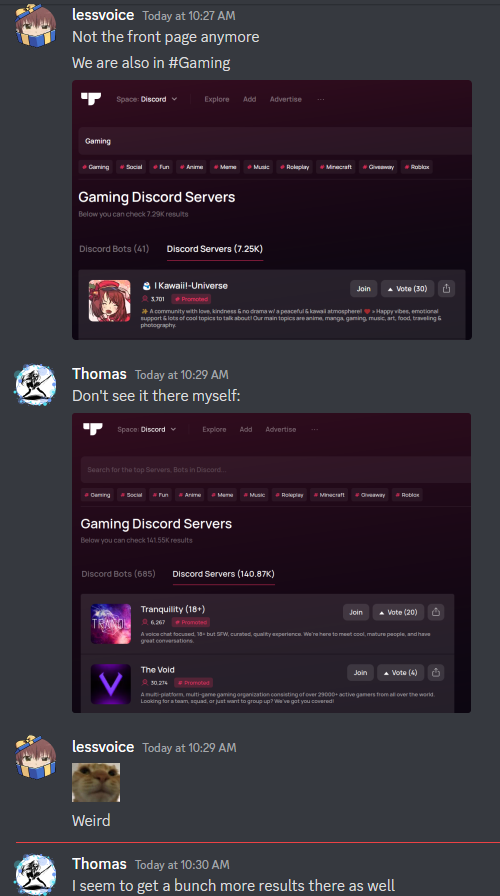
Is there an explanation?
He pressed on #Gaming, our server isn't showing.
But when you type in yourself #Gaming in the search bar, then our server appears.
lethal bolt
 sour tapir
why the application doesn't respond
sour tapir
why the application doesn't respond
-wrongserver
cerulean fulcrumBOT
Hey! We think you have our server mistaken. We do not provide support, help, or advice for any bot. You need to click on the "Discord Support Server" button on the bot's page of the bot you need support for. If there isn't a button that says "Discord Support Server" or nothing else mentioned about a support server, the server invite is invalid or you were banned from the bot's support server, then we can't help you. Sorry :(
lethal bolt
raven slate
Is there an explanation?
This is kinda known issue, our team is working on it. But you can feel free to DM an online moderator for that. Maybe there is something they can do about it
cyan halo
how do i add server count on the page
sturdy swan
cyan halo
how do i add server count on the page
-servercount
cerulean fulcrumBOT
To have your bot's server count displayed on Top.gg, please read the documentation on server/shard posting.
 oblique juniper
i press to delete me account from top.gg and now i cant loggin with this discord, got this error, we can fix it somehow?
 maiden portal
Excuse me, is my bot fine and there is little approval left? that when top.gg green notification right?
 neat sundial
Heyo so my bot got declined due to an issue which is fixed, do i need to re-create the entire bot application or is there a way to resend the old one?
maiden portal
neat sundial
Heyo so my bot got declined due to an issue which is fixed, do i need to re-crea...
You can fix it and try to resend it in the next 1 - 2 weeks
cobalt sleet
neat sundial
Heyo so my bot got declined due to an issue which is fixed, do i need to re-crea...
As soon as you've fixed the issue you can re-apply the same way you did first time around https://top.gg/bot/new
Discord
Discord is the easiest way to communicate over voice, video, and text. Chat, hang out, and stay close with your friends and communities.
cobalt sleet
maiden portal
Excuse me, is my bot fine and there is little approval left? that when top.gg gr...
-notified
wild stoneBOT
@maiden portal
Bot Review Notifications
If your bot is approved:
You'll get a DM from @wild stone, a ping in #logs and you'll be assigned the <@&265125253443878912> role here.
If your bot is declined:
You'll get a DM from @wild stone and you'll also get a ping in #mod-logs.
💡 Please make sure you have your DMs activated for this server.
maiden portal
I see.
neat sundial
cobalt sleet
As soon as you've fixed the issue you can re-apply the same way you did first ti...
Got it, thanks! Didn't know if i were supposed to make a new or re-apply the old one, didn't wanna screw something up here 
maiden portal
Think waiting little more lol, me dead :v
cobalt sleet
oblique juniper
i press to delete me account from top.gg and now i cant loggin with this discord...
Please clear your cache and use Chrome to log in. However, if you've deleted your Top.gg account you will have to wait for 7 days after the deletion date to be able to log in again due to the 7 day scheduled deletion period.
 tranquil geode
My bot is approved but i was not in this server when it happend so i didnt get the bot developer role
cobalt sleet
maiden portal
Think waiting little more lol, me dead :v
You re-submitted 6 days ago so there's still time
maiden portal
cobalt sleet
You re-submitted 6 days ago so there's still time
Yeah correct 6 days, maybe tomorrow or again 7 days ( 2 weeks)
cobalt sleet
tranquil geode
My bot is approved but i was not in this server when it happend so i didnt get t...
You're all set! 
maiden portal
tranquil geode
My bot is approved but i was not in this server when it happend so i didnt get t...
Congrats you rol
cobalt sleet
maiden portal
Yeah correct 6 days, maybe tomorrow or again 7 days ( 2 weeks)
It can take up to 7 more days
tranquil geode
thx
maiden portal
cobalt sleet
It can take up to 7 more days
Yep 😦 thx
 random barn
How do i delete my bot listing
sturdy swan
random barn
How do i delete my bot listing
 random barn
sturdy swan
random barn
sturdy swan
I can’t find that page
random barn
I can’t find it on my bot page but it might be because im on mobile?..
sturdy swan
Click on the "Info" tab and it's there
random barn
Thank you, found it now
 echo island
 sturdy swan
DM @supple mica about it
 paper flame
Owo vote
sturdy swan
paper flame
Owo vote
-support
cerulean fulcrumBOT
This channel is for support/help with Top.gg. It is not for general conversation (move to #general) or development support (move to #development). Please keep this channel on topic!
 static relic
 cerulean fulcrumBOT
Volunteer Applications
Hey! It seems like you're interested on volunteering for Top.gg. We're glad for any help we can get regarding our server events, support articles, bot reviewing, moderation, and more!
 Contributors
Contributors are not considered staff and there is no age requirement. Contributors help out with server events and providing support.
 Bot Reviewers
Bot Reviewers are Top.gg staff and must be 18 or older. Bot Reviewers review the discord bots submitted to the site before they are listed to make sure they follow our rules.
 Moderators
Bot Reviewer is a stepping stone to Moderator - if you wish to be a Moderator you must first apply and be accepted as a Bot Reviewer.
Please read [this post](#announcements message) for more information and to apply!
hollow shell
how long it takes for a bot to be review.
sturdy swan
hollow shell
how long it takes for a bot to be review.
Up to 2 weeks, written on your bot's page as well
 sage monolith
which role?
sturdy swan
One month of?
 remote wolf
i mean in my own discord
wild stoneBOT
This channel is for support/help with top.gg. It is not for general conversation (move to #general) or development support (move to #development). Please keep this channel on topic!
 steel tide
I do not really remember that I forgot to upload the image, but since it is not visible right now, I wanted to upload a new one but do not find the area to do so, where exactly must go?
 sturdy swan
-refreshdata
cerulean fulcrumBOT
Fetching Your New Bot Data
To fetch your bot's new name or avatar, please follow these steps:
Click the Refresh Data button in the sidebar on the right.
Click Edit on your bot page and then Save.
:bulb: Please note: If it still doesn't seem to change, make sure you actually changed the bot's avatar / name on your Discord Developer Portal and not the application's icon / name.
steel tide
thanks
 hollow breach
The bot review used incorrect bot commands and then rejected my bot
sturdy swan
DM the reviewer concerned -> @quasi yoke
hollow breach
I texted him but he is offline and does not answer
sturdy swan
We are volunteers and have a social life outside of Discord/Top.gg, give him up to 48 hours to respond
supple mica
-notdiscord
cerulean fulcrumBOT
We do not represent Discord, nor are we affiliated with them. We merely use their service.
If you have any questions and/or suggestions regarding Discord itself, or wish to report any violations to the Terms of Service, you can use any of these links:
How to leave feedback/suggestions to Discord
How to report bugs/issues to Discord
How to report a violation of the Terms of Service to Discord
How to contact Discord for general inquiries
cobalt sleet
jinx


 cyan halo
how do i add an image on the description
sturdy swan
-htmldesc
cerulean fulcrumBOT
You can achieve this using Markdown or HTML in your bot's description. You can ask in #development for help or use this HTML and Markdown cheatsheet for more resources.
sage monolith
quick question: how to set these types of color themes?
 sturdy swan
With custom CSS
sage monolith
sturdy swan
With custom CSS
can I get some docs link or something
sturdy swan
sage monolith
sturdy swan
https://developer.mozilla.org/en-US/docs/Web/CSS
https://www.w3schools.com/tags...
what's the api link, can you tell me?
ah i got it https://top.gg/api/
 quaint inlet
How long does it take to get my bot out of the pending thing so it can be published?
stoic socket
can take up to 1-2 weeks
stoic socket
Yes, it can be quicker than that, but the estimated time is 1-2 weeks
 frosty pond
quaint inlet
Weeks
frosty pond
quaint inlet
Weeks
Yes. As they also have a life outside of Top.gg.
All you can do now is be patient.
dreamy abyss
While you wait i recommend having a read of our guidelines to make sure the bot approval goes smoothly
-guidelines
cerulean fulcrumBOT
tranquil geode
what does this mean
 frosty pond
CTR is the number of clicks that your ad receives divided by the number of times your ad is shown. If I'm not wrong?
sturdy swan
#auctions-support would be more appropriate
frosty pond
Gotcha!
 azure copper
Hello, could we talk about the restriction of advertising the NSFW bot features on top.gg? The site's current policy forces bot developers who focus on adult content to "lie" in the description of their bots. Can't you do the same as with NSFW server advertisements, ordering developers to mark their bots as adult content and make it clear to website users that the bot they're going to invite to their server is only for adults?
In my opinion, the current policy hurts both the developers who cannot properly advertise their bots and users who invite NSFW bots by accident, because they can't determine from the description what the bot is about...
sturdy swan
azure copper
Hello, could we talk about the restriction of advertising the NSFW bot features ...
Feel free to submit that at https://feedback.top.gg

Let us know how we can improve. Vote on existing ideas or suggest new ones. If you require support or would like to report a bug, please go to our Support Page · Make a suggestion · Top.gg
azure copper
Alright, I will. Thanks!
ashen trout
is the reply button ever going to be fixed? it been broken for atleast 9 months.
raven slate
I wanted a specific amount of impressions, why did you guys give me more so I have to pay again?
zinc oracle
raven slate
I wanted a specific amount of impressions, why did you guys give me more so I ha...
#auctions-support
raven slate
Aight.
zinc oracle
ashen trout
is the reply button ever going to be fixed? it been broken for atleast 9 months.
Hopefully eventually, its just a very low priority.
sturdy swan
Hi! My server was locked in the past for violating tos due to branding. I've rebranded my server and was wondering if I can submit an appeal?
is my server
I've since rebranded to "Otaku Hangouts"
cobalt sleet
Please DM any online mod
 hazy sail
-refreshdata
 upbeat grove
Can I appeal for re-review another Bot? as it has same name as of my bot + it seems to not working at all now. Link to support server is also in valid and owner is unreachable.
sage monolith
You can report it i guess
maiden portal
@real laurel pls ban @summer coyote
yes, you spam "sjdsjaahdas" moment mods logs check 😉
sturdy swan
 hazy plover
i cant reply to reviews
hazy plover
i cant reply to reviews
You can't do that due to a bug that has no ETA, you'll need to wait
 sacred helm
Hello, would someone tell me why my bot no longer has its profile picture on top.gg please?
fluid birch
sacred helm
Hello, would someone tell me why my bot no longer has its profile picture on top...
-refreshdata
cerulean fulcrumBOT
Fetching Your New Bot Data
To fetch your bot's new name or avatar, please follow these steps:
Click the Refresh Data button in the sidebar on the right.
Click Edit on your bot page and then Save.
:bulb: Please note: If it still doesn't seem to change, make sure you actually changed the bot's avatar / name on your Discord Developer Portal and not the application's icon / name.
 cerulean orbit
Anyone know who I can talk to about buying a promoted slot for my server? <@&817055174613794826>
cerulean ember
-auctions
wild stoneBOT
Top.gg Auctions
Current Auctions Stage
We’re currently in the stage of Auctions Bidding. This stage runs from <t:1670958000:F> (<t:1670958000:R>) to <t:1671476400:F> (<t:1671476400:R>). During this stage, you will be able to bid. At the end of the auction, you will be given 24 hours to pay.
Auctions Timing Update
Next Ads Go Live / Next Auctions Starting: <t:1670958000:F> (<t:1670958000:R>)
Next Auctions Ending: <t:1671476400:F> (<t:1671476400:R>)
#auctions-support as well
cerulean orbit
Appreciate it, I'm guessing the auctions are live on here or is that the website?
sturdy swan
Website, as you buy slots on the website
cerulean orbit
Appreciate it, one last question. Does it matter if my server has only been on the website for maybe a month now?
sturdy swan
No
cerulean orbit
Awesome, I know discord.me does that crap so I was curious
Okay appreciate your time man!