#support
1 messages · Page 8 of 1
 fervent garden

 long ferry
we may not consider "no usage on bot" not a valid reason to remove reviews
as we cannot reliably confirm if that is the case or not
fervent garden
Both reviews are just calling the bot bad in Portuguese, both reviews were left on the same day too my bot didn't even have any negative reviews till now which sucks
 sudden dune
what are the payment methods used to place bids and stuff?
 warped kestrel
How long does it take to get accepted?

 dreamy abyss
warped kestrel
How long does it take to get accepted?
dreamy abyss
warped kestrel
How long does it take to get accepted?
-upto
 wild stoneBOT
@warped kestrel
The average up-to-date approval times are stated [here](#support message).
This does not mean it will take the same amount of time someone else's bot took to be reviewed and does not mean your bot is guaranteed to be reviewed within that time frame.
There is no exact time for how long bot approval will take.
There is a queue and you're not first, nor are you last.
Read more about our reviewal process here
 coarse pendant
warped kestrel
dreamy abyss
-upto
coarse pendant
warped kestrel
dreamy abyss
-upto
Someone else submitted my bot and I don't know what to do
dreamy abyss
warped kestrel
Someone else submitted my bot and I don't know what to do
Feel free to DM any of the online moderators that you see in the member list on the right
Send them your bot id and proof that you own the bot
warped kestrel
dreamy abyss
Feel free to DM any of the online moderators that you see in the member list on ...
could you explain more
dreamy abyss
warped kestrel
could you explain more
You look at the right hand side of your screen,
You should then see a list of members in sections based on their role
Look under the "moderator" section (as shown on the attached image)
Click any of the moderators that are online
Send them a private message
In that private message, send them your bot ID, proof that you own it (like you running a owner only command, or setting the bot status to "top.gg verification) and what you need help with
 warped kestrel
dreamy abyss
You look at the right hand side of your screen,
You should then see a list of me...
warped kestrel
dreamy abyss
You look at the right hand side of your screen,
You should then see a list of me...
How do I send them proof, I mean, I take a picture from disc developers?
dreamy abyss
warped kestrel
How do I send them proof, I mean, I take a picture from disc developers?
When you reach out to a moderator, they would most likely ask you to change the status of your bot to something like "Top.gg verification" or have you run a owner command
After you DM a online moderator they will work that out with you :)
warped kestrel
dreamy abyss
When you reach out to a moderator, they would most likely ask you to change the ...

You mean this bot status?
 steel sinew
Yes
dreamy abyss
Yes. But a moderator needs to be around when you change it
So contact any online moderator in a DM and they will help you out
warped kestrel
dreamy abyss
Yes. But a moderator needs to be around when you change it
So contact any online...
oh thank you so much
can you accept my friend request
dreamy abyss
I unfortunately dont accept friend requests of people I dont know and who arent close friends
warped kestrel
dreamy abyss
I unfortunately dont accept friend requests of people I dont know and who arent ...
ok
How do you know when I'm accepted?
@dreamy abyss
dreamy abyss
-notified
wild stoneBOT
 Bot Review Notifications
If your bot is approved:
You'll get a DM from @wild stone, a ping in #logs and you'll be assigned the <@&265125253443878912> role here.
If your bot is declined:
You'll get a DM from @wild stone and you'll also get a ping in #mod-logs.
💡 Please make sure you have your DMs activated for this server.
 sturdy swan
Why I can’t see invite to server on my bot

 floral pagoda
This is not related to Top.gg...
Head over to https://discord.com/developers/applications/YourBotID/oauth2/general and set the links
sturdy swan
What link?
floral pagoda
#development for further questions
sturdy swan
how long does it take for the bots pfp to switch on topgg?
 next kestrel
sturdy swan
how long does it take for the bots pfp to switch on topgg?
next kestrel
sturdy swan
how long does it take for the bots pfp to switch on topgg?
it should not take any time
-refreshdata
wild stoneBOT
Fetching Your New Bot Data
To fetch your bot's new name or avatar, please follow these steps:
 Click the Refresh Data button in the sidebar on the right.
Click Edit on your bot page and then Save.
💡 Please note: If it still doesn't seem to change, make sure you actually changed the bot's avatar / name on your Discord Developer Portal and not the application's icon / name.
 next kestrel
follow these steps to fetch your latest bot data
sturdy swan
okay thank you
 native wigeon
why hasn't my bot been displaying a correct image for a week?
next kestrel
native wigeon
why hasn't my bot been displaying a correct image for a week?
-refreshdata
wild stoneBOT
@native wigeon
Fetching Your New Bot Data
To fetch your bot's new name or avatar, please follow these steps:
Click the Refresh Data button in the sidebar on the right.
Click Edit on your bot page and then Save.
💡 Please note: If it still doesn't seem to change, make sure you actually changed the bot's avatar / name on your Discord Developer Portal and not the application's icon / name.
native wigeon
next kestrel
-refreshdata
i do it its dont work
next kestrel
make sure to press edit and then save!
native wigeon
ah ok thanks! a little more complete😉
next kestrel
no worries! 
 buoyant jay
Waiting for an 1andhalf week my bot go declined i apiled 1andhalf week ago again its not approved yet
next kestrel
buoyant jay
Waiting for an 1andhalf week my bot go declined i apiled 1andhalf week ago again...
you can DM the reviewer in order to dispute a decline. the decline reason in #mod-logs provides you why it was done.
next kestrel
you will have to wait for them to get back to you! please be patient
buoyant jay
next kestrel
you will have to wait for them to get back to you! please be patient
its written i top.gg that u have to wait 1-2 weeks i waited 1andhalf week no reply yet
next kestrel
buoyant jay
its written i top.gg that u have to wait 1-2 weeks i waited 1andhalf week no rep...
you re-submitted your bot 4 days ago
buoyant jay
itunes
next kestrel
-upto
wild stoneBOT
The average up-to-date approval times are stated [here](#support message).
This does not mean it will take the same amount of time someone else's bot took to be reviewed and does not mean your bot is guaranteed to be reviewed within that time frame.
There is no exact time for how long bot approval will take.
There is a queue and you're not first, nor are you last.
Read more about our reviewal process here
next kestrel
you will have to wait until it’s your turn to be reviewed again
bots are reviewed in the order in which they are added!
buoyant jay
my friends bot has been aprroved within 24hrs
next kestrel
please read the embed above
sturdy swan
hey
in my bot musico it got declined due to erela.js issue even though i mentioned in note but now my other bot called spi beatz that is on this list in queue @long hare has same issue nad i putted note
if they dont see the note again the bot will get declined
long ferry
if your bot is not functional entirely, it will be declined
resubmit it once that issue has been fixed
sturdy swan
long ferry
resubmit it once that issue has been fixed
bro
i mentioned
that the bot can play through only spotify links
isnt that enough?
sturdy swan
long ferry
resubmit it once that issue has been fixed
and i dont know when the ppl of erela.js will fix ti
they dont have any support , so i cant know
long ferry
sturdy swan
that the bot can play through only spotify links
if this was mentioned on either the bot page or reviewers note, then yes that is enough
granted if it does work with spotify then
sturdy swan
long ferry
if this was mentioned on either the bot page or reviewers note, then yes that is...
i did put in reviewers note
and they say didnt got the note
long ferry
Then reach out to the bot reviewer
sturdy swan
i asked the
them
and they said no note
i dont want this to happen to my otehr bot
long ferry
Put that note on your new bot, then screenshot the reviewers note if said bot reviewer claims it was not present. Since we have no way of recovering it, the reviewer should likely re-review the bot if you're 100% sure you've added that and have proof along that
sturdy swan
long ferry
Put that note on your new bot, then screenshot the reviewers note if said bot re...
ok
i will do that
thanks
 mighty salmon
why am I unable to respond to reviews about my server?
next kestrel
mighty salmon
why am I unable to respond to reviews about my server?
reviews are currently disabled due to a bug, there is no eta on when it would be fixed
next kestrel
mighty salmon
I thought I was the only one who missed this opportunity
you will be notified in #954488568967995472 once they’re fixed 
 steel salmon
cant find the link to invite topgg bot in the website, where i can find it? thanks
mighty salmon
thx, screenshot removed now
next kestrel
steel salmon
cant find the link to invite topgg bot in the website, where i can find it? than...
click on the bot’s profile and click add to server
@small lantern
mighty salmon
next kestrel
you will be notified in <#954488568967995472> once they’re fixed <:dblSmile:3768...
using the bot, you can prescribe bump or up server?
next kestrel
mighty salmon
using the bot, you can prescribe bump or up server?
i didn’t quite understand, what do you mean?
next kestrel
mighty salmon
what is the "Vote" on the server page?
bots are sorted based on the number of votes they receive. more the votes, more higher up it’s placed on a category/search. it also allows you to rewards the users who vote for your bot/server
mighty salmon
next kestrel
bots are sorted based on the number of votes they receive. more the votes, more ...
only bots?
next kestrel
bots and servers
mighty salmon

sturdy swan
how to delete a review and repost it/edit the review?
next kestrel
sturdy swan
how to delete a review and repost it/edit the review?
review controls are currently disabled due to a bug, feel free to dm an active moderator in case you wish to remove any review on your bot/server page
 lost jacinth
hi hii,
I was trying to set up server vote tracking using @high carbon and at one point during the setup it wanted me to visit top.gg to continue.
When I go to the link, it gives me a 403 error. I contacted support of @high carbon and explained my issue and I'm still getting 403 error even after trying their potential fixes.
A support staff member there asked me to seek help here to figure out what's wrong.
I am logged in on top.gg btw
long ferry
-addserver
wild stoneBOT
Adding Your Server To Top.gg
So you want to list your server on Top.gg? We have a support article to help guide you through the process! If you need more help please contact us in #support!
Click here to follow our guide!
long ferry
We cannot help with Vote tracker specific questions though
the 403 means that your server is likely not added or was locked
what is the server id
 foggy citrus
hmm
sturdy swan
-addserver
foggy citrus
@cyan palm
long ferry
staff only, read the text above if you need help with that
 cyan palm
foggy citrus
<@148403195004059648>
cyan palm
foggy citrus
<@148403195004059648>
Hi
 snow frost
Hello, how can I change the name of the bot even if it is submitted to top. gg
@cyan palm
lost jacinth
long ferry
what is the server id
1002122107519508593
snow frost
؟
long ferry
-refreshdata
wild stoneBOT
Fetching Your New Bot Data
To fetch your bot's new name or avatar, please follow these steps:
Click the Refresh Data button in the sidebar on the right.
Click Edit on your bot page and then Save.
💡 Please note: If it still doesn't seem to change, make sure you actually changed the bot's avatar / name on your Discord Developer Portal and not the application's icon / name.
snow frost
long ferry
-refreshdata
Enter here
long ferry
read above
change it on discords end
you cannot change it on top.gg
use refresh data
snow frost
ok thx
 half palm
Hello, if I'm looking for free bot, can I ask here?
next kestrel
half palm
Hello, if I'm looking for free bot, can I ask here?
-how2search
wild stoneBOT
@half palm
To find a bot that you need, please try searching for it on our website.
You may need to refine your search term, but with just a little effort you can find the bot that you need. Read our Quick Start Guide to Top.gg support article for more information on how to best use our search.
If you still haven't found a bot that suits your needs, then try searching on Google for it.
 snow frost
I have a question, can I delete my bot even if it is under submission? @next kestrel
half palm
next kestrel
-how2search
Economic News
next kestrel
half palm
Economic News
like the embed says, you can try looking for it on the website if it’s listed or a quick google search will find what you’re looking for 
next kestrel
snow frost
I have a question, can I delete my bot even if it is under submission? <@6202262...
i believe so, head over to your bot page -> edit -> delete
if you’re not able to, DM an online moderator, and they will do it for you!
half palm
next kestrel
like the embed says, you can try looking for it on the website if it’s listed or...
I tried that and couldn't find anything at all. 😦
next kestrel
half palm
I tried that and couldn't find anything at all. 😦
well, we cannot really help if that’s the case, sorry!
snow frost
Why can't I delete the bot? @next kestrel
steel sinew
snow frost
Why can't I delete the bot? <@620226249448488981>
Delete what bot? Give more context
steel sinew
snow frost
I want to delete my bot why can't I try it a lot but it didn't work
Is it approved or you just submitted it?
 pliant mauve
snow frost
I have a question, can I delete my bot even if it is under submission? <@6202262...
pliant mauve
snow frost
I have a question, can I delete my bot even if it is under submission? <@6202262...
its under submission, he said here
snow frost
steel sinew
Is it approved or you just submitted it?
No, it is under submission
pliant mauve
next kestrel
i believe so, head over to your bot page -> edit -> delete
if you’re not able t...
maybe try what jimmy said here
steel sinew
snow frost
No, it is under submission
Ok. Either contact an online moderator or wait for it to be done reviewing and delete if accepted.
 median hedge
Hi, a question if I change the name and photo of my bot in top.gg, does it change the same?
steel sinew
median hedge
Hi, a question if I change the name and photo of my bot in top.gg, does it chang...
No. Top.gg can't affect the Discord bot
If you change the Discord bot pfp and name it will change in Top.gg tho after a quick REFRESH DATA
median hedge
steel sinew
No. Top.gg can't affect the Discord bot
no but if i change it
steel sinew
median hedge
no but if i change it
On top.gg? You want it to change on Discord?
If you want to change the bot profile picture. Change it on https://discord.dev
sturdy swan
can i do vote to any bot with a new acc?
median hedge
steel sinew
If you change the Discord bot pfp and name it will change in Top.gg tho after a ...
and how do I do a REFRESH DATA ?
wild stoneBOT
@median hedge
Fetching Your New Bot Data
To fetch your bot's new name or avatar, please follow these steps:
Click the Refresh Data button in the sidebar on the right.
Click Edit on your bot page and then Save.
💡 Please note: If it still doesn't seem to change, make sure you actually changed the bot's avatar / name on your Discord Developer Portal and not the application's icon / name.
sturdy swan
sturdy swan
can i do vote to any bot with a new acc?
or must be like 1 week or how much>
median hedge
steel sinew
If you want to change the bot profile picture. Change it on https://discord.dev
ok, something else when I see the page of my bot in top.gg the photo of the bot is not seen
pliant mauve
sturdy swan
can i do vote to any bot with a new acc?
I believe you can
median hedge
it looks like this
 sturdy swan
pliant mauve
I believe you can
sturdy swan
pliant mauve
I believe you can
i dont think i try and i cant
pliant mauve
median hedge
ok, something else when I see the page of my bot in top.gg the photo of the bot ...
have you clicked refresh data
wild stoneBOT
@median hedge
Fetching Your New Bot Data
To fetch your bot's new name or avatar, please follow these steps:
Click the Refresh Data button in the sidebar on the right.
Click Edit on your bot page and then Save.
💡 Please note: If it still doesn't seem to change, make sure you actually changed the bot's avatar / name on your Discord Developer Portal and not the application's icon / name.
pliant mauve
sturdy swan
i dont think i try and i cant
well then you cant.
median hedge
pliant mauve
have you clicked refresh data
I already did and it still looks like this
pliant mauve
Not sure what account age it requires
pliant mauve
median hedge
I already did and it still looks like this
save?
median hedge
pliant mauve
save?
yes
 zinc oracle
sturdy swan
i dont think i try and i cant
zinc oracle
sturdy swan
i dont think i try and i cant
are you perhaps voting on multiple accounts?
wild stoneBOT
In order to clear your cache for the site, press CTRL+F5.
If this does not work, try one of these resources below:
Instructions on Microsoft Edge
Instructions on Google Chrome
Instructions on Mozilla Firefox
Instructions on Safari
Instructions on Opera
Instructions on Brave
sturdy swan
zinc oracle
are you perhaps voting on multiple accounts?
yes . there are bots give reward for the vote\
and the new acc i cant vote with it
i want to know how much must the acc user created
zinc oracle
you cannot vote on multiple accounts
zinc oracle
I dont think thats public information. I dont even know.
security is generally secret
median hedge
pliant mauve
try clearing your cache
ready it continues to be seen without the photo
sturdy swan
ok bro thx I apologize for bothering you
zinc oracle
median hedge
ready it continues to be seen without the photo
did you click "refresh data" on your bots page?
median hedge
zinc oracle
did you click "refresh data" on your bots page?
yes
wild stoneBOT
The issue you're experiencing is due to server-side caching. Please wait for up to 1 hour for site cache to clear before trying again. You may also need to clear your browser cache.
median hedge
zinc oracle
did you click "refresh data" on your bots page?
change the photo and the name of the bot as soon as the page of my top.gg bot is updated?
zinc oracle
you change it on discord first.
then you click "refresh data" for the site to fetch it.
then after about an hour the site cache should update.
 regal heath
I "accidentally" left a review on my own bot to test if it would work, and it seems like that I can't delete it, can someone delete it for me? Thanks!
https://top.gg/bot/609087387695316992

Top.gg
This bot can whitelist the usage of custom emojis to server roles, making them disappear from the emoji picker!
long ferry
removed
regal heath
thanks 😅
 scarlet plaza
Uh so, i cant log in to the site with my discord
 long ferry
operaGX is known to cause issues during login, please try a different browser such as google chrome or firefox
scarlet plaza
Ah ok, thanks
 pale silo
Stupid question, how do you embed images into the description? like this bot https://top.gg/bot/646937666251915264
I've tried <img />, direct linking to image, and [http://...``]() syntax but neither seems to work. Is there some funky markdown I don't know about?
 coarse vault
long ferry
operaGX is known to cause issues during login, please try a different browser su...
coarse vault
long ferry
operaGX is known to cause issues during login, please try a different browser su...
never had issues weird
long ferry
depends on your settings likely
coarse vault
I got it on default
long ferry
pale silo
Stupid question, how do you embed images into the description? like this bot htt...
markdown: , html <img src="imgurl"></img>
long ferry
coarse vault
I got it on default
guess you're one of the lucky fews, operagx causes issues along with brave
coarse vault
ayyy 🙂
pale silo
long ferry
markdown: ``, html `<img src="imgurl"></img>`
ty! Is there any links/pages to show which markdown features are supported?
pale silo
I meant more of the HTML tags, which ones are supported
snow frost
 zinc oracle
I think we support most things with html too. just not script tags and a few things rarely used in descriptions.
zinc oracle
try another browser.
sturdy swan
How do I access my bot project on top.gg so I can change something it says 404 page not found
zinc oracle
sturdy swan
How do I access my bot project on top.gg so I can change something it says 404 p...
has the bot you're trying to access been added to topgg?
sturdy swan
Not yet
wild stoneBOT
Adding Your Bot To Top.gg
So you want to list your bot on Top.gg? We have a support article to help guide you through the process! If you need more help please contact us in #support!
Click here to follow our guide!
sturdy swan
 sturdy swan
896415259177398357
sturdy swan
So should I do it again?
wild stoneBOT
Adding Your Bot To Top.gg
So you want to list your bot on Top.gg? We have a support article to help guide you through the process! If you need more help please contact us in #support!
Click here to follow our guide!
long ferry
then #development if it is not related to top.gg
 reef stump
I'm so sorry, thank you.
 wide kestrel
is there any reason why my bot doesnt have a profile picture on it
 floral pagoda
-refreshdata
wild stoneBOT
Fetching Your New Bot Data
To fetch your bot's new name or avatar, please follow these steps:
Click the Refresh Data button in the sidebar on the right.
Click Edit on your bot page and then Save.
💡 Please note: If it still doesn't seem to change, make sure you actually changed the bot's avatar / name on your Discord Developer Portal and not the application's icon / name.
wide kestrel
thanks
 autumn granite
Hello, so I was trying to vote a bot, but it said to me I haven't logged in so I did logged in but I cannot vote still what can I do?
next kestrel
autumn granite
Hello, so I was trying to vote a bot, but it said to me I haven't logged in so I...
try refreshing the page, if it still does not work, clear your browser cache by following the steps below
-cacheclear
wild stoneBOT
In order to clear your cache for the site, press CTRL+F5.
If this does not work, try one of these resources below:
Instructions on Microsoft Edge
Instructions on Google Chrome
Instructions on Mozilla Firefox
Instructions on Safari
Instructions on Opera
Instructions on Brave
autumn granite
next kestrel
try refreshing the page, if it still does not work, clear your browser cache by ...
Thank you very much it worked after clearing the cache
👍
next kestrel
autumn granite
Thank you very much it worked after clearing the cache
no worries!
 proper zealot
Hey guys so long story short i lost my main account and im not gonna take it back the acc it @ruby ridge can u kick it ?
next kestrel
proper zealot
Hey guys so long story short i lost my main account and im not gonna take it bac...
if you really want it gone from the server, feel free to DM an active moderator. however you also need to have some proof of ownership of the previous account!
proper zealot
I can provide any info about the acc like email or password
next kestrel
if you have the email and password for that account, you can feel free to login and leave the server from that account
proper zealot
Unfortunately its not that simple because i had enabled the two factor authentication and because i factory reset my phone i forgot to back it up and now i cant do anything to get my account back
next kestrel
well, if that’s the case, there’s nothing much we can do about it. you can just leave the account as is or you can dm a moderator with some evidence which shows that account was truly yours
proper zealot
Can u tell me what kind of info
next kestrel
not really sure regarding that, it’s something the moderators would know! they will guide you from there
proper zealot
Ohh okk thanks
 deft flicker
where can i find the refresh button :(
next kestrel
on your bot page under the “creator controls”
deft flicker
thanks for the assistance sir
 leaden basin
ask the question then..
i still have got no idea what you need help with, and you've sent 7 messages
 stray barn
can I please ask for a staff member for a question
sturdy swan
@stray barn idk why you deleted your messages but that decline reason was because your help command required permissions it didn’t need
stray barn
the permissions that we set with fine
sturdy swan
it doesn’t need manage channels and manage messages
sturdy swan
a help command does not need those, it should just be a command that displays available commands
stray barn
because I have to add it to the channel
sturdy swan
you can request special permissions for other commands that need it but a help command just needs the basic perms
stray barn
it's a ticket bot
sturdy swan
it doesn’t matter what type of bot it is
sturdy swan
sturdy swan
it doesn’t need manage channels and manage messages
according to the decline reason if you remove those perms from the help command you should be fine
stray barn
we've tried that and it doesn't work it breaks the bot
sturdy swan
if you somehow need that perm then you need to explain that to the reviewer which is @next kestrel
stray barn
we have the error log
next kestrel
feel free to DM me to dispute this decline
stray barn
next kestrel
feel free to DM me to dispute this decline
I can't message him
wild stoneBOT
@stray barn
Almost every staff member has direct messages enabled. If you can't message one of the staff members, it may be an issue on your end. Please make sure you have direct messages enabled by checking your privacy settings in
Settings > Privacy & Safety > Allow direct messages from server members
as well as right-clicking on
Top.gg > Privacy Settings > Allow direct messages from server members.
If you're still not able to send a staff member a direct message despite having these settings enabled, feel free to ping them in this server!
 stray barn
turned on
sturdy swan
How can I change the server's topic
next kestrel
sturdy swan
How can I change the server's topic
what do you mean by server topic, please elaborate

 sturdy swan

I need to change it in my server
In my server there is a one like that
And I wanna change that
Can you help me?
next kestrel
we do not provide support for discord related things, sorry
a quick google search should help you however
long ferry
Discord has a knowledgebase, use that https://support.discord.com
we again cannot help
sturdy swan
Oh,sorry I don't know that this server is top.gg I think that is the discord support I'm sorry
sturdy swan
long ferry
Discord has a knowledgebase, use that https://support.discord.com
Thanks
Hey i need a help
next kestrel
sturdy swan
Hey i need a help
you can feel free to ask your question
sturdy swan
next kestrel
you can feel free to ask your question
 long ferry
What is the server id?
sturdy swan
long ferry
What is the server id?
I was setting up vote tracker bot logs
i was following the instructions
But i got this error
sturdy swan
long ferry
or well, bot id
1010190080004075571
long ferry
and whats the url of the site you're on
sturdy swan
webhook type
long ferry
Seems like the user owning the bot is entirely different from your account you're talking through right now
make sure you're logged into the correct account
so you will not be able to access the webhook settings when not logged into the right account
 woven lance
how can i resubmit my bot?
 fluid coyote
 shell inlet
woven lance
how can i resubmit my bot?
shell inlet
woven lance
how can i resubmit my bot?
you just add it like you did before
-refreshdata
wild stoneBOT
@sturdy swan
Fetching Your New Bot Data
To fetch your bot's new name or avatar, please follow these steps:
Click the Refresh Data button in the sidebar on the right.
Click Edit on your bot page and then Save.
💡 Please note: If it still doesn't seem to change, make sure you actually changed the bot's avatar / name on your Discord Developer Portal and not the application's icon / name.
 next kestrel
it should be instant, make sure to press edit and then save
sturdy swan
My bot is denied because it has snipe command if I remove that command then can I re apply my bot
next kestrel
sturdy swan
My bot is denied because it has snipe command if I remove that command then can ...
have you submitted your bot from the same account you're using right now? i don't see any log in #mod-logs stating why your bot was declined
sturdy swan
next kestrel
have you submitted your bot from the same account you're using right now? i don'...
Nope I submitted using other account
next kestrel
sturdy swan
Nope I submitted using other account
you can feel free to reach out to the reviewer who declined your bot @brittle orbit
sturdy swan
next kestrel
you can feel free to reach out to the reviewer who declined your bot <@529995365...
Can I dm him/her
next kestrel
yes!
sturdy swan
Thanks.
 sick geyser
I want to delete my bot https://top.gg/bot/923535197260087296 from top.gg, how can I do that?
next kestrel
sick geyser
I want to delete my bot https://top.gg/bot/923535197260087296 from top.gg, how c...
click on edit and then you will see a delete button
sick geyser
next kestrel
click on edit and then you will see a delete button
I am afraid that I dont see it
I am on Firefox Desktop
next kestrel
sick geyser
I am afraid that I dont see it
try using a different browser, if you still cannot see it, feel free to DM a moderator and they’ll remove it for you
sick geyser
I am sure it isn't my browser nor any extensions (ublock and firefox protection are disabled)
next kestrel
sick geyser
I am sure it isn't my browser nor any extensions (ublock and firefox protection ...
my bad, just head over to your bot page and under “creator controls” you will see a delete button
sick geyser
next kestrel
my bad, just head over to your bot page and under “creator controls” you will se...
Thank you!
sturdy swan
How can I make a vote tracker?
next kestrel
sturdy swan
How can I make a vote tracker?
head over to #topgg-api and check the pins
 cunning meadow
is there any problem with top.gg server listing? I can't see the amount of votes each server got and it's like the site randomly placed the servers on top list instead of servers with most votes
or it's just me
zinc oracle
cunning meadow
is there any problem with top.gg server listing? I can't see the amount of votes...
its sorted more by member count right now.
cunning meadow
zinc oracle
its sorted more by member count right now.
Oh… I’m really sorry to directly say it but that’s really really rigged-
isn’t it supposed to be servers with more votes on higher place? That’s the whole point of it right 
zinc oracle
sorting by votes is still possible, its just not the default.
cunning meadow
zinc oracle
sorting by votes is still possible, its just not the default.
Can you please let me know why’s that?-
I mean, users won’t actually bother going through all of it right..
zinc oracle
sorting by votes wasn't that reliable, I think that's why we changed the default.
devs are currently working on improving sorting though
cunning meadow
zinc oracle
sorting by votes wasn't that reliable, I think that's why we changed the default...
Ouch, but then, isn’t it like servers with more members will keep gaining more members from the website?-
I’d say, the voting system was pretty fair and square as it gave small servers an opportunity to grow via the support of community voters
like, someone can type out on browser “chill discord servers” and join the top searches.
isn’t there a way to create a suggestion?
long ferry

Let us know how we can improve. Vote on existing ideas or suggest new ones. If you require support or would like to report a bug, please go to our Support Page · Make a suggestion · Top.gg
but I'm certain there had been a suggestion already
zinc oracle
cunning meadow
Ouch, but then, isn’t it like servers with more members will keep gaining more m...
I agree, and I think most of our team agrees.
I think the decision to move "top" to be top member count was a temporary solution to the sorting issue while the dev team works on it.
zinc oracle
long ferry
but I'm certain there had been a suggestion already
yeah there is
cunning meadow
zinc oracle
I agree, and I think most of our team agrees.
I think the decision to move "top"...
I’d say, I myself own a pretty decent discord server with a fair community. I owe the website a big time as it did help giving me a kick start. Previous month, we managed to gain an overall 5k smth votes which ended up bringing upto 1000 members or such. Coming back to present, We barely got 30-40 members with very similar amount of votes and it’s really strugglish now even with much greater amount of votes… It’s really absurd to see the growth rate falling this drastically over a change in list sorting- We do have voting rewards and everything coded with the custom bot which’s not helping us out that much-.. I really hope the staff team do look into it and come up with a neater decision.. as the current sorting system is surely not that fruitful for many small servers trying to grow on this platform
sturdy swan
how to make vote tracker for another bot?
zinc oracle
sturdy swan
how to make vote tracker for another bot?
I dont understand what you mean.
you want to track votes for a bot you dont own?
sturdy swan
zinc oracle
I dont understand what you mean.
you want to track votes for a bot you dont own...
yes
zinc oracle
You cant, only the bot owner can setup vote tracking
sturdy swan
zinc oracle
You cant, only the bot owner can setup vote tracking
How do bots do this?
How can i contact top.gg staff team
zinc oracle
sturdy swan
How do bots do this?
using webhooks https://docs.top.gg/resources/webhooks/
zinc oracle
sturdy swan
How can i contact top.gg staff team
Top.gg
sturdy swan
zinc oracle
using webhooks <https://docs.top.gg/resources/webhooks/>
thanks to this can i follow the votes of the bots i don't own
sturdy swan
So how does the Vote Tracker bot do this?
it says email is used, i try to reset password as i dont know it, it says not authorized
 zinc oracle
sturdy swan
So how does the Vote Tracker bot do this?
zinc oracle
sturdy swan
So how does the Vote Tracker bot do this?
the vote tracker bot sets up a vote url.
the owner adds it to their bot.
vote tracker needs the bot owner to add it still.
zinc oracle
sturdy swan
it says email is used, i try to reset password as i dont know it, it says not au...
dm @gloomy shell
sturdy swan
zinc oracle
using webhooks <https://docs.top.gg/resources/webhooks/>
when i vote i don't receive any webhook interactions.
zinc oracle
sturdy swan
when i vote i don't receive any webhook interactions.
I can help you with that in #topgg-api
 odd flume
how can i transfer my bot developer
 cerulean ember
What do you mean by "bot developer"? If you mean page permission then you can create team and transfer your bot to team and invite other developers in it. If you mean "bot developer role" then the one who submits it get it other developers don't get it.
 narrow hornet
Hey y'all, who's reviewing stuff right now? My bot just got added to your Discord for review, but for the 3rd time yours is the ONLY server where it's not activating. I keep saying there must be permission issues on your server but this is getting frustrating.
cerulean ember
What permission your bot require for executing any command? @narrow hornet
narrow hornet
cerulean ember
What permission your bot require for executing any command? <@182889735902068737...
It has the following permissions:
 sturdy swan
my bot isint showing up, i had one pending
 narrow hornet
That's all it needs. What's happening is your server keeps blocking channels from being created, for some reason. It needs to create the channels for it to work.
zinc oracle
narrow hornet
It has the following permissions:
seems related to our testing methods.
Check: https://support.top.gg/support/solutions/articles/73000502501-how-the-bot-reviewal-process-works
specifically read the "What permissions do you give bots in the Verification Center?" section
Top.gg
Why does my bot page say it's "not yet approved"? When you submit your bot, we have a team of volunteers who review your bot to ensure quality and coherence with our guidelines. This process typically takes 1 to 2 weeks or more, but could vary b...
sturdy swan
sturdy swan
my bot isint showing up, i had one pending
The bot was possibly declined
wild stoneBOT
Your bot was likely declined because it went against our bot guidelines.
To find out why your bot was declined and by who, use the search feature in #mod-logs:
 narrow hornet
zinc oracle
seems related to our testing methods.
Check: https://support.top.gg/support/solu...
narrow hornet
zinc oracle
seems related to our testing methods.
Check: https://support.top.gg/support/solu...
Right, so can you give it the Manage Server permissions and re-add it before you test it/decline it? It's been a month because it keeps getting denied, and this is the first time someone's let me know about that.
Sorry, Manage Channels.
zinc oracle
narrow hornet
Right, so can you give it the Manage Server permissions and re-add it before you...
We link to that in the bot submission process iirc.
narrow hornet
You must not because this happens every time. And I give the bot link with the proper permissions.

That's what it says in the docs. No 'Manage Channels'.
zinc oracle
🤔 what?
yeah, we link to the page that explains your bot wont get manage channels on invite in the bot submission process on step 3.
https://i.imgur.com/KZJjALp.png
 cerulean ember
Bot reviewer didn't mention that in decline reason because your bot never responded, there's no way of knowing if the bot req certain permission to operate, and I'm probably sure that bot didn't gave any error message saying "i need this permission to execute that command" also we only give bot external perm such as manage_message or manage_channel when it ask for it and it's necessary.
narrow hornet
zinc oracle
🤔 what?
People read that lol? Ok, well y'all haven't denied it this ring yet - can y'all just re-add it with that latest understanding?
zinc oracle
You're expected to understand how reviewing works before submitting yes.
youll need to contact the current person reviewing the bot. Its up to them.
narrow hornet
Fair enough, I figured someone would've let me know that specific detail when I talked to them about it specifically.
Gotcha.
zinc oracle
I think @winter walrus is reviewing your bot
narrow hornet
Ok - thanks. I'll DM them.
sturdy swan
Can you add a suggestion channel or a ticket channel both maybe? It would be very nice
 crude lion
trying to set it up so my team can reply to reviews. is this possible?
zinc oracle
sturdy swan
Can you add a suggestion channel or a ticket channel both maybe? It would be ver...
tickets: https://support.top.gg/support/tickets/new
suggestions: https://feedback.top.gg/
zinc oracle
crude lion
trying to set it up so my team can reply to reviews. is this possible?
I dont think replies are working at all anyway.
crude lion
zinc oracle
I dont think replies are working at all anyway.
oh 😭 ok maybe that’s why they can’t.
also, i can’t see a way to report a review either
sturdy swan
?
pliant mauve
crude lion
oh 😭 ok maybe that’s why they can’t.
also, i can’t see a way to report a revie...
Reporting a review is temporarily disabled due to a bug.
crude lion
pliant mauve
Reporting a review is temporarily disabled due to a bug.
oof okay thank you
floral pagoda
You can however send a direct message to a moderator and ask for a removal
crude lion
will do, ty!
floral pagoda
This is not gonna happen, as far as I know
sturdy swan
servers are crazy with public support
zinc oracle
you can get private support to Topgg staff using our web tickets.
If you need help with auctions you can create a private thread in #auctions-support.
If you need private moderation help you can dm an online mod.
sturdy swan
ok
 rocky sparrow
I can't see my bot's profile
 next kestrel
rocky sparrow
I can't see my bot's profile
next kestrel
rocky sparrow
I can't see my bot's profile
-refreshdata
wild stoneBOT
@rocky sparrow
Fetching Your New Bot Data
To fetch your bot's new name or avatar, please follow these steps:
Click the Refresh Data button in the sidebar on the right.
Click Edit on your bot page and then Save.
💡 Please note: If it still doesn't seem to change, make sure you actually changed the bot's avatar / name on your Discord Developer Portal and not the application's icon / name.
rocky sparrow
next kestrel
-refreshdata
Thank you!
@next kestrel Friend, a question and how do I add an image to the description of my bot?
 next kestrel
-htmldesc
wild stoneBOT
You can achieve this using Markdown or HTML in your bot's description. You can ask in #development for help or use this HTML and Markdown cheatsheet for more resources.
rocky sparrow
@next kestrel What is the promote option for?
 next kestrel
rocky sparrow
<@620226249448488981> What is the promote option for?
next kestrel
rocky sparrow
<@620226249448488981> What is the promote option for?
it’s for auctions, you can learn more by using these links below
-afaq
wild stoneBOT
- [What are Auctions?](#auctions-faq message)
- [How do I start bidding?](#auctions-faq message)
- [When will my advertisement go live?](#auctions-faq message)
- [What is an "extra" impressions charge? / What are retroactive payments?](#auctions-faq message)
- [When can I receive live Auctions support?](#auctions-faq message)
- [How do I request my bid(s) be removed?](#auctions-faq message)
- [What is a bid limit and how do I increase my bid limit?](#auctions-faq message)
- [What are vote credits and how do I redeem them?](#auctions-faq message)
- [Fastspring says "we regretfully cannot accept your payment", what do I do?](#auctions-faq message)
- [General Auctions Support Question](#auctions-faq message)
next kestrel
sturdy swan
Why is any bot not accepted in <#325648177178869760> ?
-upto
wild stoneBOT
@sturdy swan
The average up-to-date approval times are stated [here](#support message).
This does not mean it will take the same amount of time someone else's bot took to be reviewed and does not mean your bot is guaranteed to be reviewed within that time frame.
There is no exact time for how long bot approval will take.
There is a queue and you're not first, nor are you last.
Read more about our reviewal process here
sturdy swan
next kestrel
-upto
I mean, all bots are rejected
 lunar light
how can i check at what position at queue my bot is?
next kestrel
sturdy swan
I mean, all bots are rejected
oh, sorry, i read that wrong, could you provide the bot ID as it seems like there are no logs for your bot being rejected in #mod-logs
lunar light
lunar light
how can i check at what position at queue my bot is?
@long ferry@zinc oracle
next kestrel
lunar light
how can i check at what position at queue my bot is?
this information is not public, sorry. there is no way to check
sturdy swan
next kestrel
oh, sorry, i read that wrong, could you provide the bot ID as it seems like ther...
825983055717597185
lunar light
next kestrel
this information is not public, sorry. there is no way to check
ok, ty
sturdy swan
sturdy swan
825983055717597185
This is my bot id
next kestrel
sturdy swan
This is my bot id
your bot was declined last year, and you have re-submitted it yesterday, the message at #mod-logs message states why
sturdy swan
next kestrel
your bot was declined last year, and you have re-submitted it yesterday, the mes...
How can I request permissions
next kestrel
sturdy swan
How can I request permissions
require the permissions that your bot truly needs, unnecessary requirement of permissions results in a decline
 balmy herald
When will the results of the applications in #announcements about bot reviewer and else will be posted?
 cobalt sleet
balmy herald
When will the results of the applications in <#285458046006591499> about bot rev...
cobalt sleet
balmy herald
When will the results of the applications in <#285458046006591499> about bot rev...
-appresponse
wild stoneBOT
@balmy herald
Responses to Volunteer Staff Applications
Thanks for applying to join our volunteer staff!
A Community Manager will contact you via DMs for an interview if we're interested in your application. Usually this process can take 2 to 3 months.
If you don't hear from us after that length of time, your application was likely rejected. In this case, you can re-apply next time we refresh our applications (Summer 2022).
sturdy swan
My bot will need additional permissions. Where can I request to add permissions?
<@&817055174613794826>
zinc oracle
sturdy swan
My bot will need additional permissions. Where can I request to add permissions?
Your bot ideally should request those extra permissions when they are needed.
for example, if I run the ban command and the bot doesnt have the ban permission it should respond something like "I need the ban permission to do that!"
sturdy swan
zinc oracle
Your bot ideally should request those extra permissions when they are needed.
f...
thus

This feature is present in all commands
zinc oracle
yep! thats all you need to do
 proud coral
Hi, my bot has been declined for posting NSFW content in a non-NSFW channel (with the command /play) because the thumbnail of a youtube video is set as an image in my embed, I saw that is possible to just set the thumbnail of the video as a thumbnail in my embed to get around the problem, but I really want to keep this thumbnail as an image in my embed and so I was wondering if is it possible to get around the problem by just simply bluring the thumbnail? Thank you in advance for a reply!
long ferry
blurring the thumbnail if it is nsfw? you can also just remove it as it wouldn't have any use nonetheless
but if it is blurred enough, sure
sturdy swan
zinc oracle
yep! thats all you need to do
Ok but there is a problem
See the picture "delete trigger"
This option, if enabled, deletes the user's message when replying if the bot does not have permission "Manage Message"
The member's message has not been deleted and the bot will be rejected. Is there a solution?
(This is an auto reply command)
 zinc oracle
when the option is enabled the permission should be asked for.
If its enabled by default it should be disabled if the bot is invited without perms.
 fervent garden
warped kestrel
Yes, how do I add to my bot?
fervent garden
warped kestrel
Yes, how do I add to my bot?
using html and css
warped kestrel
fervent garden
using html and css
Yes, I have it, but how do I add it on request for submission?
warped kestrel
@fervent garden
fervent garden
warped kestrel
<@372786495867846656>
huh
oh
the html and css goes in the long description
sturdy swan
what???

 stoic socket
What were you doing prior to this error?
 vale pebble
cerulean ember
What do you mean by "bot developer"? If you mean page permission then you can cr...
vale pebble
cerulean ember
What do you mean by "bot developer"? If you mean page permission then you can cr...
well i moved my account so i want the role in @odd flume on this account
sturdy swan
vale pebble
well i moved my account so i want the role in <@582682150168690728> on this acco...
If you switched accounts and want the developer role back, you will have to transfer ownership of the bot to the new account
vale pebble
sturdy swan
If you switched accounts and want the developer role back, you will have to tran...
u mean from discord?
or top gg
crude lion
can team members post the server up for auctions as well? server owner added me to the team since i have $10 in credits but i can’t the see the server
sturdy swan
who is nekonami
who declined my bot
i wrote something as note and still they ignore wow
can someone ping me that person so i can dm coz i cant find
stoic socket
sturdy swan
who is nekonami
@real laurel
next kestrel
crude lion
can team members post the server up for auctions as well? server owner added me ...
answered in #auctions-support
sturdy swan
what permissons should the lock command have to use?
next kestrel
sturdy swan
what permissons should the lock command have to use?
manageRoles only
next kestrel
-support
wild stoneBOT
@mint lantern
This channel is for support/help with top.gg. It is not for general conversation (move to #general) or development support (move to #development). Please keep this channel on topic!
long ferry
-refreshdata
wild stoneBOT
Fetching Your New Bot Data
To fetch your bot's new name or avatar, please follow these steps:
Click the Refresh Data button in the sidebar on the right.
Click Edit on your bot page and then Save.
💡 Please note: If it still doesn't seem to change, make sure you actually changed the bot's avatar / name on your Discord Developer Portal and not the application's icon / name.
sturdy swan
I have tried that.
sturdy swan
👍 , thanks!
sturdy swan
Hey guys
how are you
How can I accelerate my approved step for my discord boot (listed on top.gg)?
wild stoneBOT
The average up-to-date approval times are stated [here](#support message).
This does not mean it will take the same amount of time someone else's bot took to be reviewed and does not mean your bot is guaranteed to be reviewed within that time frame.
There is no exact time for how long bot approval will take.
There is a queue and you're not first, nor are you last.
Read more about our reviewal process here
 thorny orchid
ive changed the name of my bot and refreshed the data, however it doesnt change at all? any help why?
cobalt sleet
-refreshdata
wild stoneBOT
Fetching Your New Bot Data
To fetch your bot's new name or avatar, please follow these steps:
Click the Refresh Data button in the sidebar on the right.
Click Edit on your bot page and then Save.
💡 Please note: If it still doesn't seem to change, make sure you actually changed the bot's avatar / name on your Discord Developer Portal and not the application's icon / name.
thorny orchid
also how can i get my nickname changed?
cobalt sleet
I have reset it
thorny orchid
ty
cobalt sleet
You had a character that was hoisting
cobalt sleet

thorny orchid
cobalt sleet
<:darkLike:711511102097195068>
btw sorry to bother but i remember with my old bot i could respond to other users comments as the bot as it self on top.gg is the feature still there if so how can i do it?
cobalt sleet
It's broken at the moment but that was a feature, yes
floral pagoda
You can make this yourself. There may also be bots out there who handle this for you
Create a concept and for further questions, you can go over to #development & #topgg-api
 lament zenith
Hello, I changed the profile picture of my bot but it does not change on the site
cobalt sleet
-refreshdata
wild stoneBOT
Fetching Your New Bot Data
To fetch your bot's new name or avatar, please follow these steps:
Click the Refresh Data button in the sidebar on the right.
Click Edit on your bot page and then Save.
💡 Please note: If it still doesn't seem to change, make sure you actually changed the bot's avatar / name on your Discord Developer Portal and not the application's icon / name.
lament zenith
okay thanks you
 wheat niche
Hi
Now what's your name on Who today is the Hungarian language and literature and the rest
F
long ferry
-support
wild stoneBOT
This channel is for support/help with top.gg. It is not for general conversation (move to #general) or development support (move to #development). Please keep this channel on topic!
cunning meadow
is there any ETA about new listing system?
cobalt sleet
I'm not sure what you mean? Could you please elaborate?
cunning meadow
cobalt sleet
I'm not sure what you mean? Could you please elaborate?
Is the server listing system getting worked on currently? As the web is simply listing servers with more members on top of servers with more votes (votes arent even effecting). Are there any plans on changing that/reverting it? If yes, how long it may take?
cobalt sleet
There are no plans to revert it. Users can still sort in order of votes if they want to.
cunning meadow
cobalt sleet
There are no plans to revert it. Users can still sort in order of votes if they ...
That’s true, but that’s obviously not happening. I did make a feedback about it asking for a reversal. Wouldn’t it be terribly unfair to just display servers on top for just existing on the website instead of servers which are actually putting efforts encouraging members to vote?
I/my server got drastically effected by it. Sorry if I’m acting impatient
cobalt sleet
The idea is to make server search more relevant for users searching our site. A lot of popular searches were returning totally irrelevant results purely because the owners set categories and short descriptions to catch traffic. I understand this changes the way the search sorting works substantially. if you've already left feedback on our feedback page then it will be reconsidered in the future if it gets enough upvotes.
cunning meadow
cobalt sleet
The idea is to make server search more relevant for users searching our site. A ...
I really wish you guys do look into it. I don’t really love bragging about things but, previous month, we managed to gain over a 1000 members & I owe top.gg a big time for that. However, ever since the system changed, We’ve only gained a total of 50 members (in span of 24 days or such) out of which close to no members are from top.gg.
When I try looking up for servers on the website, it displays servers such as roblox official or servers associated with content creators (youtuber’s discord server/twitch streamer’s). Even with 4000+ votes, there are barely 5-10 joins this month which used to be 900-1200 at an average. It obviously ticks me and a lot of people off as the change isn’t “minor”-
Anyway, thanks for helping out. I really hope for a favourable decision or at least something a little more fair
cobalt sleet
We can probably look into giving some weight to votes. We'll see. I can't make any promises. I'll make sure to pass on your feedback.
cunning meadow
cobalt sleet
We can probably look into giving some weight to votes. We'll see. I can't make a...
I can’t thank you enough if it works out because currently, I’ve lost hope about member count going up like it used to. I hope the thing that lies in future is much appealing.. Have a great day sir
wild stoneBOT
Top.gg Auctions
Current Auctions Stage
We’re currently in the stage of Auctions Bidding. This stage runs from <t:1661886000:F> (<t:1661886000:R>) to <t:1662404400:F> (<t:1662404400:R>). During this stage, you will be able to bid. At the end of the auction, you will be given 24 hours to pay.
Auctions Timing Update
Next Ads Go Live / Next Auctions Starting: <t:1661886000:F> (<t:1661886000:R>)
Next Auctions Ending: <t:1662404400:F> (<t:1662404400:R>)
I always do look into them but you know it better, vote credits don’t help out much against people who’re really down to invest their money on tags. All top tags get way higher bids than 15-18 credits & you barely manage to snatch some remaining impressions (incase you’re totally dependent on vote credits). I’ve tried it out twice, it does help bringing visitors but ofc nowhere near to your server getting displayed on top 3 ranks 24/7 whole months from just the amount of votes you get. 😔
 vast slate
cobalt sleet
If you have votes you can also try our auctions using your vote credits
vast slate
cobalt sleet
If you have votes you can also try our auctions using your vote credits
when you bid in auctions for a max number of views, if its full, then the second people under you will come to the ad ?
So you don't have to be the first one all of time who votes ? you can be the last ? but you will appear after on the ad ?
cobalt sleet
Any bids that are listed in white text on the bid list are winners and are guaranteed impressions.
Those in grey will only get impressions if the winners above them fail to pay for their winning bids when auctions end.
vast slate
cobalt sleet
Any bids that are listed in white text on the bid list are winners and are guara...
so the guy on the top will get 5K impressions and it's guaranteed, and mee6 will get 93k impressions and it's too guaranteed but mee6 pays 2.5 times less ?
But in that time somebody can come and bid more than mee6 but less than security+ and if he buy enough impressions mee6 can be kicked of ?
 wild stoneBOT
What is CPM bidding?
Top.gg Support Article
 vast slate
cobalt sleet
Mee6 didn't pay less there. They're just more clever with their budget.
vast slate
cobalt sleet
Mee6 didn't pay less there. They're just more clever with their budget.
i mean they pay less for 1000 views
they pay 8$ for 1k instead of 20$ for 1k
cobalt sleet
Correct
But their max budget is 7.5x more. So that's why they have more impressions.
(see example above)
vast slate
cobalt sleet
But their max budget is 7.5x more. So that's why they have more impressions.
yeah i see
so people are weird to pay 20$ ...
cobalt sleet
Paying 20 doesn't make sense
vast slate
lol true
cobalt sleet
You'd probably get a better return on your budget by bidding less per mille on a tag instead
vast slate
yeah
 brittle orbit
 round lynx
Hello, what should I do on top.gg to vote for my server?
round lynx
Hello, what should I do on top.gg to vote for my server?
Could you please elaborate on that for me?
round lynx
brittle orbit
Could you please elaborate on that for me?
I asked this too.
 vagrant mica
Well i know that i have to go to my profile and then click on edit for my server and then in server info
Then now i wanna know how to set the role reward? There are only 2 options, None and everyone where as I wanna set the reward role as voter
What to do?
pliant mauve
vagrant mica
Well i know that i have to go to my profile and then click on edit for my server...
Hi - kindly read this: https://support.top.gg/support/solutions/articles/73000502499-setting-up-server-role-rewards-for-voting
Top.gg
Pre-requisites Follow through the steps to publish your server. Once this step is done, follow the information below on how to use role rewards. What are role rewards? Role rewards are given to a user upon voting for a server. If you h...
vagrant mica
Ok...
 honest gate
Hey so i have 15$ vote credits, how do I claim it so i can use it in auctions? Like i bid in a auction and then how do I use the vote credit to pay it
pliant mauve
honest gate
Hey so i have 15$ vote credits, how do I claim it so i can use it in auctions? L...
-auctions
0-0
floral pagoda
-auctions
floral pagoda
Tag still does not work...
pliant mauve
doesnt it?
pliant mauve
cobalt sleet
-auctions
mac did
floral pagoda
-credits
wild stoneBOT
Auction Credits
What are credits?
- If enough people vote for your bot or server per month, you have the ability to earn vote credits that you can then use for auctions.
- Don’t know what auctions is? See here to learn more and here to participate.
- These auction credits can be used to pay for any winning bids you may make.
- You CANNOT “withdraw” them for real money.
How does the system work?
- Each month, bot monthly votes reset (midnight UTC).
- If you get 100 votes on your bot in the month, you can redeem $15 worth of voting credits (note: you can’t redeem till you actually get 101 votes).
- Any vote after 100 will be worth $1 per 1000 votes (or $.001 per 1 vote).
How do I redeem them?
- At the end of the month, you will be eligible to redeem your credits (you redeem them on your bot or server's Votes page). You will have 30 days to redeem them before they expire.
- After you redeem them, you have 31 days to use them before they expire.
How do I use vote credits to pay for Auctions?
-When you pay for your winning bid, you can "Pay with Credits".
-If your payment cost is more than the amount of credits you have, make sure to apply the credits first and then pay the rest with the supported payment providers.
You can read more about using your vote credits in our vote credit support article.
You can read more about Auctions in our Auctions support articles.
pliant mauve
wild stone
anyway just read this above @honest gate
honest gate
wild stone
In the How do i redeem them? Part, when is the "end of the month" like on the last day of the month?
pliant mauve
on your bot's/server's votes page
honest gate
that's not what I asked, i asked on the end of the month = last day of the month? And if the last day of the month then when?
honest gate
ok so like in any 24h of the last day, and 1 more thing.
If i bid in an auction right now and it's going to end in 3 hours, then can I pay using the vote credits? Today or gotta wait till i claim the credits or what's the process am kind of confused with the part of claiming and paying
pliant mauve
You can only pay once you've claimed it
honest gate
ok so if i bid right now, do i have to pay as soon as the auction ends ?
pliant mauve
Yes, you will have 12 hours to pay after it ends
honest gate
ok
pliant mauve
honest gate
ok so like in any 24h of the last day, and 1 more thing.
If i bid in an auctio...
Also, I may have said the wrong thing. Based of #auctions-faq You can redeem your month’s credits on the first day of each month
honest gate
So August's credits will be available on 1st September
pliant mauve
right
honest gate
ohk
pliant mauve
Hi @sturdy swan - Reporting a review is temporarily disabled due to a bug. However you can send a direct message to an online moderator and ask for a removal.
They will only have it removed if it breaks the guidelines
honest gate
pliant mauve
Yes, you will have 12 hours to pay after it ends
uff i did bid right now but didn't knew about paying time limit, so i have to remove my bid as the time limit to pay is 12 hours but it will take me atleast 3 days as I have to wait until I claim vote credits. So i have to remove the bid?
pliant mauve
You will have to request to get your bid removed.
honest gate
so i have to open a thread in #auctions-support and then give the bid details and ping auction support to get it removed?
deft flicker
how can i update server count on my bot's topgg page
cobalt sleet
-servercount
wild stoneBOT
To have your bot's server count displayed on Top.gg, please read the documentation on server/shard posting.
 long ferry
You need an approved bot to use webhooks
 keen vapor
Uh how i can be approved
pliant mauve
keen vapor
Uh how i can be approved
You’ll have to wait for it to be reviewed
keen vapor
My bot?
 rancid comet
yes
keen vapor
ok thx
next kestrel
 fleet pasture
there is any tuto how can i make a vote system in my bot ?
fleet pasture
there is any tuto how can i make a vote system in my bot ?
you can check the pinned messages in #topgg-api, it provides an overview of how it’s done
fleet pasture
next kestrel
you can check the pinned messages in <#412006692125933568>, it provides an overv...
this one ?
 sturdy swan
https://fat-lizard.that-is-my.life/ate_your_family/9vOFpRpk where is the my servers and bots?
 floral pagoda
sturdy swan
https://fat-lizard.that-is-my.life/ate_your_family/9vOFpRpk where is the my serv...
floral pagoda
sturdy swan
https://fat-lizard.that-is-my.life/ate_your_family/9vOFpRpk where is the my serv...
You recently deleted a server. There is no record of you submitting a bot or adding a new server
sturdy swan
Hello
I came for help
I been banned for nothing
I just try to sign in and it said I been banned
Is there a way around this ?
 boreal ice
You should not try to ban evade @sturdy swan. You will have to request an appeal here if there is any appeal.
sturdy swan
How do I do that
long ferry
-appeal
wild stoneBOT
If someone you know has been banned here, then direct them to open a support ticket (select Account/Login issues and then Ban Appeals).
Here's more resources to read through regarding appeals: Ban Appeals
long ferry
whats the user id of your main account?
sturdy swan
floral pagoda
You recently deleted a server. There is no record of you submitting a bot or add...
yes because i can't send
This is my first time signing up for this card thingy
long ferry
card thingy?
sturdy swan
sturdy swan
yes because i can't send
What I haven't added here before, etc. seemed
 long ferry
-wrongserver
wild stoneBOT
Hey! We think you have our server mistaken. We do not provide support, help, or advice for any bot. You need to click on the "Discord Support Server" button on the bot's page of the bot you need support for. If there isn't a button that says "Discord Support Server" or nothing else mentioned about a support server, the server invite is invalid or you were banned from the bot's support server, then we can't help you. Sorry :(

 gloomy shell
we arent karuta lol
zinc oracle
Your bot was removed for being a clone.
contact @long ferry for more info.

 robust sparrow
yeah but i have permissions to use that source
i know the owner and he also stopped with it
zinc oracle
Our guidelines dont allow the use of clones.
https://support.top.gg/support/solutions/articles/73000502502-bot-guidelines
zinc oracle
yeah, as long as they are significant features.
robust sparrow
in my files and in some commands there are standing powerd by dotwood
if you want i can place it in more commands
 robust sparrow
zinc oracle
Your bot was removed for being a clone.
contact <@669452973755072524> for more i...
robust sparrow
zinc oracle
Your bot was removed for being a clone.
contact <@669452973755072524> for more i...
and now you give more peoples the source so they can also try it
Nala
zinc oracle
I'm not sure what you're asking
robust sparrow
that if i still use the code but remake it a little bit and than doing a resubmit on the site. If it is than okay
long ferry
remake a little bit would not be considered fine, unless its sufficient features not already present on the original clone
robust sparrow
so i can never publisch the bot on top.gg
so the time i'm waising now is totaly usless if i wanne come with my bot on top.gg right now
so what you are saying now is that i need to start again from zero
but there are also a lot of members that are whatching videos en so they are also cloning than
because they have at the end all the same source and nobody is saying that they had support from an other user
I'm now busy with my third dat to update that intire bot to the last version that is possible of every packadge en trying putting new things in the bot and that you are saying that i never can come on the site.
Also
I have never received a notification, message (dm) or mail that my bot was taken offline
that is what i understood now
robust sparrow
no reaction
fervent garden
robust sparrow
no reaction
if you want your bot on top.gg I'd recommend not submitting an open sourced application unless you've changed it to the point where its not noticeably a clone of it 
robust sparrow
so now that is impossible
fervent garden
robust sparrow
so now that is impossible
its really not, there's thousands of other people which have done it so i dont see why you can't do it too.
zinc oracle
Changing the existing embeds are not what we look for anyway
we look for significant new features
robust sparrow
yes i added new things but they didn't saw them
fervent garden
robust sparrow
yes i added new things but they didn't saw them
if you've added new features since your bot got declined then you can re-submit it 
zinc oracle
youll need to contact the person who deleted the bot if you believe you added new major features(for example, adding a music feature to a clone that only has moderation features)
zinc oracle
zinc oracle
Your bot was removed for being a clone.
contact <@669452973755072524> for more i...
I pinged them for you to dm in the first message I sent
robust sparrow
sorry din't saw that ping
long ferry
robust sparrow
yes i added new things but they didn't saw them
the bot had no additional features that are not already present on the clone, feel free to resubmit once you have added a sufficient enough feature that is not already present there.
robust sparrow
there where two new commands
long ferry
from the point of checking before deleting, it had not. Note that sufficient features are not considered something like a support command that just sends the bots support server
You are again free to resubmit it once you consider you have added considerable features on it
robust sparrow
now i'm first updating the hole bot
but why you didn't sent me anything about it?
 spiral sundial

Keep getting “interaction failed” when pressing hit/stand/double down. Any known fixes?
I am currently the only one with this issue in my discord
sturdy swan
Could be a mobile issue?
wild stoneBOT
Hey! We think you have our server mistaken. We do not provide support, help, or advice for any bot. You need to click on the "Discord Support Server" button on the bot's page of the bot you need support for. If there isn't a button that says "Discord Support Server" or nothing else mentioned about a support server, the server invite is invalid or you were banned from the bot's support server, then we can't help you. Sorry :(
 glacial crown
Hey, I'm new to top and bot dev. I've submitted a request to post my bot twice now, and don't see it on my profile and didn't get a rejection email or anything of the sort. Upon further inspection, I saw that you guys use this server for inquiries related to rejection. How can I find out why my bot was rejected? I see that it says to DM my reviewer- but not sure how to know that either
zinc oracle
glacial crown
Hey, I'm new to top and bot dev. I've submitted a request to post my bot twice n...
the reason is dmed to you(if you're in this server when your bots denied), or in #mod-logs
https://i.imgur.com/x7ZaaEZ.png
The reviewer is @shell inlet
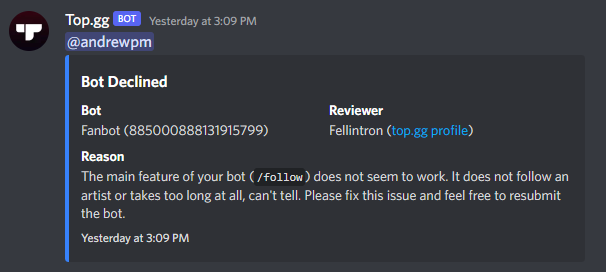
 echo hamlet
Hi, so I see that for servers the sorting changed by membercount but it puts all the verified or partnered servers on top first.
Will it be staying that way or is that temporary?
glacial crown
zinc oracle
the reason is dmed to you(if you're in this server when your bots denied), or in...
Thanks
shell inlet
echo hamlet
Hi, so I see that for servers the sorting changed by membercount but it puts all...
this will be permanent btw* not temporary, sorry for the misinformation
echo hamlet
shell inlet
this will be permanent btw* not temporary, sorry for the misinformation
Oh alright, thank you
 smoky dirge
How do I check on a report made via the website? I've heard nothing yet.
cobalt sleet
We don't contact you regarding reports you send unless the moderator who's investigating requires more details.
sturdy swan
anyone know how to use iframe for bot descriptions on topgg?
long ferry

W3Schools offers free online tutorials, references and exercises in all the major languages of the web. Covering popular subjects like HTML, CSS, JavaScript, Python, SQL, Java, and many, many more.
sturdy swan
but it says i need to fill out the description with 200 characters when i add that
long ferry
Correct, you still require a description along your iframe
sturdy swan
ohh okok
pliant mauve
 rancid summit
i cant add my discord server to top.gg
rancid summit
i cant add my discord server to top.gg
are there any errors?
rancid summit
pliant mauve
are there any errors?
i cant find where to add it
i click add discord server and this shows up
 pliant mauve
rancid summit
i click add discord server and this shows up
pliant mauve
rancid summit
i click add discord server and this shows up
-addserver
wild stoneBOT
@rancid summit
Adding Your Server To Top.gg
So you want to list your server on Top.gg? We have a support article to help guide you through the process! If you need more help please contact us in #support!
Click here to follow our guide!
wild stoneBOT
In order to clear your cache for the site, press CTRL+F5.
If this does not work, try one of these resources below:
Instructions on Microsoft Edge
Instructions on Google Chrome
Instructions on Mozilla Firefox
Instructions on Safari
Instructions on Opera
Instructions on Brave
rancid summit
k it worked Thanks cosmic.
pliant mauve
 brisk atlas
Can you write step by step?
brisk atlas
Can you write step by step?
-team
wild stoneBOT
@brisk atlas
How do I create a team?
This article describes the process of creating a team, customizing your team and adding members to it:
Teams Overview
pliant mauve
Kindly read the ”How to Transfer Ownership of a Discord Bot to a Team” part
brisk atlas
Thanks you
 shell star
Thank you
sturdy swan
Why is a reply, i left on a comment 1 year ago now counting as a comment with 0 stars?
Hello my problem is before 2 months ago i reset my phone and before the i add all my bots i team and give it to my new account then i reset my phone and when i want to enter my account again i remember i forgot the 2fac password but i give my all bots to my new account and now i enter to top.gg bit and it says the owner of the bot is the account that i forgot the 2fac password of him now how i enter to top.gg bot withe my new account
and the bot name is [ Syno Games ]
i have the bot in my devloper portal
in thise account
 steady ridge
Do you mean the 2fa password of your discord account?
sturdy swan

 cobalt sleet
sturdy swan
Why is a reply, i left on a comment 1 year ago now counting as a comment with 0 ...
cobalt sleet
sturdy swan
Why is a reply, i left on a comment 1 year ago now counting as a comment with 0 ...
Hey! Please link me to the bot page and I can remove it for you
sturdy swan
steady ridge
Do you mean the 2fa password of your discord account?
i mean i cant edit my top.gg bot
cobalt sleet
It was a site issue at the time
sturdy swan
bucos it says your not tge owner
cobalt sleet
sturdy swan
Hello my problem is before 2 months ago i reset my phone and before the i add al...
Do you have access to that bot's token?
And codebase?
sturdy swan
cobalt sleet
Do you have access to that bot's token?
yes
i can change bot token
and everything
but i cant edit in top.gg
bucos it says im not the owner
cobalt sleet
Ok please DM me to start an ownership verification process so I can transfer it to your new account
sturdy swan
ok
sturdy swan
cobalt sleet
Hey! Please link me to the bot page and I can remove it for you

Top.gg
Fully modular and adjustable multipurpose Bot, with it's focus on making your Discord Life more enjoyable. (ADVANCED SYSTEMS & -MUSIC)
sturdy swan
cobalt sleet
Hey! Please link me to the bot page and I can remove it for you
the ticket support said they are not allowed to remove this
cobalt sleet
sturdy swan
the ticket support said they are not allowed to remove this
Yeah I responded to your ticket. I can't remove reviews left by other users because they don't break our guidelines. But that 0 star review was a bug. I have removed it.
sturdy swan
cobalt sleet
Yeah I responded to your ticket. I can't remove reviews left by other users beca...
ah oki

 long ferry
no it wont, is a good thing
 balmy kiln
hey there, I renamed my bot and refreshed the bot pages data though nothing has changed
cobalt sleet
-apps @topaz aspen
wild stoneBOT
@topaz aspen
Volunteer Applications
Hey! It seems like you're interested on volunteering for Top.gg. We're glad for any help we can get regarding our server events, support articles, bot reviewing, moderation, and more!
 Contributors
Contributors are not considered staff and there is no age requirement. Contributors help out with server events and providing support.
 Bot Reviewers
Bot Reviewers are Top.gg staff and must be 18 or older. Bot Reviewers review the discord bots submitted to the site before they are listed to make sure they follow our rules.
 Moderators
Bot Reviewer is a stepping stone to Moderator - if you wish to be a Moderator you must first apply and be accepted as a Bot Reviewer.
Please read [this post](#announcements message) for more information and to apply!
 topaz aspen
Oh ty
balmy kiln
next kestrel
after clicking on refresh data
now I can't find the button again
next kestrel
balmy kiln
now I can't find the button again
it should be under “creator controls” on your bot page
wild stoneBOT
Fetching Your New Bot Data
To fetch your bot's new name or avatar, please follow these steps:
Click the Refresh Data button in the sidebar on the right.
Click Edit on your bot page and then Save.
💡 Please note: If it still doesn't seem to change, make sure you actually changed the bot's avatar / name on your Discord Developer Portal and not the application's icon / name.
balmy kiln
👍
topaz aspen
-help
wild stoneBOT
Bot Commands
Commands for Your Role:
avatar
botinfo
help
ping
roleinfo
serverinfo
userinfo
brittle orbit
topaz aspen
-help
#commands next time please
topaz aspen
Oh sorry
brittle orbit
np
topaz aspen
is it possible to see the queue position?
brittle orbit
No.
topaz aspen
oh alr
Bc my bot got denied because smth didnt work, I fixed it in 2 min and resubmitted it right away
ig its random
brittle orbit
-upto
wild stoneBOT
The average up-to-date approval times are stated [here](#support message).
This does not mean it will take the same amount of time someone else's bot took to be reviewed and does not mean your bot is guaranteed to be reviewed within that time frame.
There is no exact time for how long bot approval will take.
There is a queue and you're not first, nor are you last.
Read more about our reviewal process here
topaz aspen
ik ik it takes some time 🙂
balmy kiln
next kestrel
it should be under “creator controls” on your bot page
found it, though is it normal that this text stays even if it's 2 weeks ago that my bot got accepted?
 topaz aspen
There is no way to get Bot Reviewer without being 18+ right?
pliant mauve
yup
brittle orbit
topaz aspen
There is no way to get Bot Reviewer without being 18+ right?
Yes, you are required to be 18+ or else you may not be a Bot Reviewer due to legal stuff.
brittle orbit
Np :)
 pliant mauve
 vital herald
Cam anyone help me?
vital herald
Cam anyone help me?
-support
wild stoneBOT
@vital herald
This channel is for support/help with top.gg. It is not for general conversation (move to #general) or development support (move to #development). Please keep this channel on topic!
cobalt sleet
No one will help you in this channel anyway because it's for Top.gg support. For development questions go to #development as cosmic said above. Someone might help you if they know the answer and feel like helping out.
next kestrel
balmy kiln
found it, though is it normal that this text stays even if it's 2 weeks ago that...
yes this is completely normal!
 rose umbra
Hi, I have tried to add a table to the long description. But md like that
| Tables   |      Are      |  Cool |
|----------|:-------------:|------:|
| col 1    |  left-aligned | $1600 |
| col 2 is |    centered   |   $12 |
| col 3 is | right-aligned |    $1 |
Is somehow not supported. | and - are all removed, but nothing more happened. When I would randomly write stuff in a column, than the column wouldn't be aligned anymore. Is there a other way, to create tables? (Goal is, to put all commands in there)
pliant mauve
rose umbra
Hi, I have tried to add a table to the long description. But md like that
```
| ...
You can use table html tag, also..
-support
wild stoneBOT
This channel is for support/help with top.gg. It is not for general conversation (move to #general) or development support (move to #development). Please keep this channel on topic!
rose umbra
Ok, then I'll resume asking there. I just didn't saw md of top.gg as a development topic. And thanks for the answer
pliant mauve
oki
 next kestrel
 soft bronze
these links are to link any social media platforms that your bot has/uses. Click on Link type and choose what you wish to link and then you can paste it in
 frosty karma
Hello, are you punishing this? Personally I would say that it is advertising in private messages since he is selling his services. And then it's very unpleasant to receive regularly this kind of message in private message
 zinc oracle
frosty karma
Hello, are you punishing this? Personally I would say that it is advertising in ...
zinc oracle
frosty karma
Hello, are you punishing this? Personally I would say that it is advertising in ...
whats their user id?
frosty karma
zinc oracle
whats their user id?
860335858196807730
zinc oracle
thanks for the report
 brisk atlas
Nasıl böyle yapabilirim?
 shell inlet
brisk atlas
Nasıl böyle yapabilirim?
shell inlet
brisk atlas
Nasıl böyle yapabilirim?
Bu eski bir özelliktir, artık bot sayfasına veya sunucu sayfasına kullanıcı eklemek için ekipler özelliğini kullanabilirsiniz.
-team
wild stoneBOT
How do I create a team?
This article describes the process of creating a team, customizing your team and adding members to it:
Teams Overview
rocky sparrow
I have seen that some bots have a profile with movement on the web, how can I do that?
 floral pagoda
sturdy swan
floral pagoda
sturdy swan
The link to the server that you listed on Top.gg
pliant mauve
rocky sparrow
I have seen that some bots have a profile with movement on the web, how can I do...
With the use of css animation
-css
wild stoneBOT
You can change colors, set background images, style and animate elements within your long description using CSS. If you need help learning CSS, you can check out these resources and ask for help if you need it in #development.
💡Please note: It's against our guidelines to hide or modify the content of any Top.gg page elements such as reviews, bot or server information, ads etc. You may change colors and border colors of site elements, but you may not modify the text content within. You must also follow our bot guidelines when designing your entity page, this includes no NSFW content and no seizure-inducing CSS! Failure to follow these guidelines will result in your bot or server page being declined, removed from the site or locked.
rocky sparrow
pliant mauve
With the use of css animation
I mean on the top.gg website, not the website that creates one because I already know that
 pliant mauve
rocky sparrow
I mean on the top.gg website, not the website that creates one because I already...
pliant mauve
rocky sparrow
I mean on the top.gg website, not the website that creates one because I already...
Could you elaborate? or provide images
 pliant mauve
gif?
pliant mauve
 solar dune
**hello, how can I add my bot site on top.gg page ? like mee6**
solar dune
**hello, how can I add my bot site on top.gg page ? like mee6**
iframe html tag
also we can discuss further in #development
solar dune
pliant mauve
*iframe* html tag
here ?
 wild stoneBOT
This channel is for support/help with top.gg. It is not for general conversation (move to #general) or development support (move to #development). Please keep this channel on topic!
rocky sparrow
pliant mauve
gif?
yes
 tribal vigil
Hi guys.
Many months ago, my bot has been not accepted on top.gg as it had the @ everyone available. As my bot is a translator, I was wondering if this rule to not have @ everyone enabled has changed or it’s still a rule? Thank you
next kestrel
tribal vigil
Hi guys.
Many months ago, my bot has been not accepted on top.gg as it had the @...
that does not go against our guidelines and your bot was never declined for that specific reason in the past. you can look it up by pasting your bot ID in the search bar of the server
tribal vigil
Thank you. I am sure that’s what happened as I have contacted the reviewer and discussed about this. I will check my history and also the history here on the server. Thank you for your prompt response
 sand lance
Hey
If I made a Credit Card payment right now, would I receive the funds in time to make the payment for auction?
 craggy dagger
Hello. I'm trying to find all rules that I need to observe to be sure that my bot won't be declined. Where can I found them?
Also, I'm not the owner of the project (I'm doing it with my friend and he's come up with bot's idea). Can I add the bot to the top.gg? Or only he can do it?
next kestrel
craggy dagger
Hello. I'm trying to find all rules that I need to observe to be sure that my bo...
Top.gg
On your bot page, you are not allowed to: Include spam/junk, or completely irrelevant/nonsensical characters or phrases in your bot description or intentionally use up characters to reach the 200 character limit Mention NSFW or include any NSF...
craggy dagger
next kestrel
https://support.top.gg/support/solutions/articles/73000502502-bot-guidelines
Thank you!
next kestrel
craggy dagger
Also, I'm not the owner of the project (I'm doing it with my friend and he's com...
it does not matter who adds it, if you add the bot, you get the ownership, if your friend adds it, he will be the owner
both of you can manage the bot if its on a team, you can find more info below
wild stoneBOT
How do I create a team?
This article describes the process of creating a team, customizing your team and adding members to it:
Teams Overview
sand lance
sand lance
If I made a Credit Card payment right now, would I receive the funds in time to ...
@next kestrel 👋🏻
next kestrel
sand lance
If I made a Credit Card payment right now, would I receive the funds in time to ...
please move over to #auctions-support, someone will get back to you there!
craggy dagger
next kestrel
it does not matter who adds it, if you add the bot, you get the ownership, if yo...
Okey dokey! Thank you very much!
sand lance
next kestrel
please move over to <#829359458080784444>, someone will get back to you there!
I had posted there..
next kestrel
sand lance
I had posted there..
please be patient, someone will reply to you! this is not the place to ask for auctions related topics
sand lance
Gotcha
cobalt sleet
-notified
wild stoneBOT
Bot Review Notifications
If your bot is approved:
You'll get a DM from @wild stone, a ping in #logs and you'll be assigned the <@&265125253443878912> role here.
If your bot is declined:
You'll get a DM from @wild stone and you'll also get a ping in #mod-logs.
💡 Please make sure you have your DMs activated for this server.
vast slate
wild stone
i'm already fcking verryfied fffffffffffffffffffffak
cerulean ember
I can't see any bot submitted by your account, FYI you only get bot developer role if you submit bot to our site and it gets approved.
lament zenith
This morning I tried to check my email to access the auctions but I did not receive an email even after 3 sends
wild stoneBOT
Bot Commands
Commands for Your Role:
avatar
botinfo
help
ping
roleinfo
serverinfo
userinfo
 cobalt eagle
-avatar
wild stoneBOT
 cobalt eagle
-botinfo
wild stoneBOT
 You need to provide a bot to find
cobalt eagle
-botinfo 1008484343364206693
wild stoneBOT


The most useful server set-up bot avaliable
ID
1008484343364206693
Username
[CANARY] Dripcord
Prefix
,
Server Count
0 servers
Monthly Votes
3 monthly votes
Total Votes
3 total votes
Tags
tools, server-setup, automoderation
Owners
@cobalt eagle
lament zenith
lament zenith
This morning I tried to check my email to access the auctions but I did not rece...
Someone knows why it doesn't work ?
long ferry
-botcommands @cobalt eagle next time
wild stoneBOT
@cobalt eagle
Hey! Bots aren't given permissions to send responses in this channel. Please use #commands to run commands.
long ferry
lament zenith
Someone knows why it doesn't work ?
check your spam folder
lament zenith
long ferry
check your spam folder
Not in my spams
cobalt eagle
long ferry
-botcommands <@797501262659846144> next time
ok sorry
How can I get my topgg auth token?
sturdy swan
cobalt eagle
How can I get my topgg auth token?
-api
wild stoneBOT
This channel is for suggestions, help, and bugs related to our official API libraries and documentation found at https://docs.top.gg/
If you need help with other development, please use #development.
sturdy swan
@cobalt eagle :)
Why is the last message there #mod-logs seven hours ago?
<@&817055174613794826>
steady ridge
No clue to be honest
cobalt sleet
That's 2h ago not 7
sturdy swan
Why don't you check the bots? I want to speed up the wait
cobalt sleet
Because our bot reviewers are volunteers and will review the bots when they're free to do so
Please be patient
-upto
wild stoneBOT
The average up-to-date approval times are stated [here](#support message).
This does not mean it will take the same amount of time someone else's bot took to be reviewed and does not mean your bot is guaranteed to be reviewed within that time frame.
There is no exact time for how long bot approval will take.
There is a queue and you're not first, nor are you last.
Read more about our reviewal process here
solar dune
rocky sparrow
I have seen that some bots have a profile with movement on the web, how can I do...
send top.gg link please
steady ridge
rocky sparrow
I have seen that some bots have a profile with movement on the web, how can I do...
Hi, can you provide some examples of "movement" on the top.gg site, so I can further help you with support
rocky sparrow
steady ridge
Hi, can you provide some examples of "movement" on the top.gg site, so I can fur...

Top.gg
Collect from 40,000+ cards • Anime • Manga • Kpop • Webtoon • Vtuber • Genshin • Games • Guilds • Battles • Memes • Emotes • Art • Gacha
steady ridge
Do you mean the description and profile picture?
rocky sparrow
steady ridge
Do you mean the description and profile picture?
the profile photo that is animated, and that the part that could change its color better purple with pink
steady ridge
That's done with custom css in the description, some elements of the site can be edited with custom css
rocky sparrow
steady ridge
That's done with custom css in the description, some elements of the site can be...
would you have an example?
wild stoneBOT
You can achieve this using Markdown or HTML in your bot's description. You can ask in #development for help or use this HTML and Markdown cheatsheet for more resources.
steady ridge
rocky sparrow
would you have an example?
Not necessarily, but you cab ask for help with that in #development
 deft hearth
I would like to request a name change on a bot that I created. And to know why I no longer have his avatar. Here is how it is showing in top.gg, it is already registered, I made some changes and now it will be a bot of cities called Geo Quiz:

He currently:
 wild stoneBOT
@deft hearth
Fetching Your New Bot Data
To fetch your bot's new name or avatar, please follow these steps:
Click the Refresh Data button in the sidebar on the right.
Click Edit on your bot page and then Save.
💡 Please note: If it still doesn't seem to change, make sure you actually changed the bot's avatar / name on your Discord Developer Portal and not the application's icon / name.
sturdy swan
:)
deft hearth
sturdy swan
:)
Nothing has changed
sturdy swan
-cacheclear @deft hearth
wild stoneBOT
@deft hearth
In order to clear your cache for the site, press CTRL+F5.
If this does not work, try one of these resources below:
Instructions on Microsoft Edge
Instructions on Google Chrome
Instructions on Mozilla Firefox
Instructions on Safari
Instructions on Opera
Instructions on Brave
sturdy swan
try that
 near narwhal
Hi, in my previous account that was hacked, I had some bots uploaded to the platform and today they are still there and they are totally inactive, because they are bots from that account that no longer exists. Is it possible to remove them from the list?
https://top.gg/bot/596407704357044238
Since my bot just got approved a few minutes ago
deft hearth
sturdy swan
And it may take a hot second :)
I pressed CTRL + F5 and nothing came of it. Wouldn't it be better if I sent it again for you to check? Or change the bot invite link?
 sturdy swan
deft hearth
I pressed CTRL + F5 and nothing came of it. Wouldn't it be better if I sent it a...
sturdy swan
deft hearth
I pressed CTRL + F5 and nothing came of it. Wouldn't it be better if I sent it a...
I would wait 30mins-1hr and then look again
sometimes it can take a second
long ferry
deft hearth
I pressed CTRL + F5 and nothing came of it. Wouldn't it be better if I sent it a...
I'm not seeing any recent edits made on your bot
have you followed the steps within the embed above?
long ferry
near narwhal
Hi, in my previous account that was hacked, I had some bots uploaded to the plat...
yup done
since its an unknown application anyways
deft hearth
long ferry
have you followed the steps within the embed above?
Yes, I did. I edited the prefix and the bot description but I couldn't find the option to put the avatar or change its name. I wanted to do that.
deft hearth
sturdy swan
sometimes it can take a second
I will wait. It could be because of that.
deft hearth
long ferry
have you followed the steps within the embed above?
Some of the changes I made to it.
 long ferry
I mean using the refresh data button then edit and saving
deft hearth
I used "Refresh Data" and nothing changed, one user there said it takes a while to change.
long ferry
deft hearth
I used "Refresh Data" and nothing changed, one user there said it takes a while ...
have you then used edit -> save?
deft hearth
long ferry
have you then used edit -> save?
yeah
long ferry
I'm not seeing any edits made by you
from the point you were informed of the refresh data feature
deft hearth
I'm telling you, I made edits to the description. I changed the scope of the bot text and the prefix. If you see the prefix is also different: gq. and before it was or.
There. It worked.

One small question: when will this message go away? My bot has been registered on top.gg for over 3 days now
 long ferry
That message wont go away, its only visible for you though
deft hearth
Got it. Thank you.
sturdy swan
does topgg support user count?
brittle orbit
sturdy swan
does topgg support user count?
https://docs.top.gg we support server count
 zinc oracle
only servers have user counts, member counts for a bot isn't a useful measurement.
 elder warren
Is there anyway to hide or delete my bot from top.gg? i'm going to be away for almost a year and won't be able to manage it until i get back
sturdy swan
How to set up voting for my bot
 mint lodge
Does anyone know how to add an invite link to my app on the developer portal?
brittle orbit
-notdiscord
wild stoneBOT
We do not represent Discord, nor are we affiliated with them. We merely use their service.
If you have any questions and/or suggestions regarding Discord itself, or wish to report any violations to the Terms of Service, you can use any of these links:
How to leave feedback/suggestions to Discord
How to report bugs/issues to Discord
How to report a violation of the Terms of Service to Discord
How to contact Discord for general inquiries
 sonic raven
So is this still in effect or do tags get exempted from this? 

I see alot of suggested tag options when setting them, but it's kind of odd. and tbh it confuses me to the point, should I add my bot or not? It is mainly used for 18+ but with other commands i guess i could mention on the page, not many though since its just maybe two commands that doesn't include /invite or one feature/basic commands.
 cunning nexus
How do I set chatbot’s channel any time I try to it says I have to specify the channel
brittle orbit
sonic raven
So is this still in effect or do tags get exempted from this? <:ankha_think:8939...
You're only allowed to do a nsfw tag, nothing else mentioning nsfw though
sonic raven

cunning nexus
cunning nexus
How do I set chatbot’s channel any time I try to it says I have to specify the c...
Please help
brittle orbit
cunning nexus
How do I set chatbot’s channel any time I try to it says I have to specify the c...
-wrongserver
wild stoneBOT
@cunning nexus
Hey! We think you have our server mistaken. We do not provide support, help, or advice for any bot. You need to click on the "Discord Support Server" button on the bot's page of the bot you need support for. If there isn't a button that says "Discord Support Server" or nothing else mentioned about a support server, the server invite is invalid or you were banned from the bot's support server, then we can't help you. Sorry :(
sturdy swan
Something came up setting a reminder.
Why I can't set reminder for owo vote ?
next kestrel
sturdy swan
Something came up setting a reminder.
Why I can't set reminder for owo vote ?
voting reminders currently have an issue at the moment
sturdy swan
How to set up voting for my bot
next kestrel
sturdy swan
How to set up voting for my bot
head over to #topgg-api and check the pinned messages!
next kestrel
 harsh ore
From tip.cc
harsh ore
From tip.cc
-wrongserver
wild stoneBOT
@harsh ore
Hey! We think you have our server mistaken. We do not provide support, help, or advice for any bot. You need to click on the "Discord Support Server" button on the bot's page of the bot you need support for. If there isn't a button that says "Discord Support Server" or nothing else mentioned about a support server, the server invite is invalid or you were banned from the bot's support server, then we can't help you. Sorry :(
sturdy swan
bro can some one test my bot and add it in the site plese
==> https://top.gg/bot/952221563413995651
 next kestrel
sturdy swan
bro can some one test my bot and add it in the site plese
==> https://top.gg/bot...
next kestrel
sturdy swan
bro can some one test my bot and add it in the site plese
==> https://top.gg/bot...
-upto
wild stoneBOT
@sturdy swan
The average up-to-date approval times are stated [here](#support message).
This does not mean it will take the same amount of time someone else's bot took to be reviewed and does not mean your bot is guaranteed to be reviewed within that time frame.
There is no exact time for how long bot approval will take.
There is a queue and you're not first, nor are you last.
Read more about our reviewal process here
 sudden cipher
My bot got denied even tho I had the commands in the description
next kestrel
sudden cipher
My bot got denied even tho I had the commands in the description
feel free to DM the reviewer who declined your bot to dispute a decline
sudden cipher
Idk how discord
wild stoneBOT
Your bot was likely declined because it went against our bot guidelines.
To find out why your bot was declined and by who, use the search feature in #mod-logs:
 wild owl
Hey, if I boost this server can I get some vote credits?
next kestrel
wild owl
Hey, if I boost this server can I get some vote credits?
there are no such perks for boosting this server, sorry
@ancient phoenix try refreshing your page and try again, if you still cannot see it, it’s probably not listed on top.gg
 ancient phoenix
next kestrel
<@906847264616636446> try refreshing your page and try again, if you still canno...
ancient phoenix
next kestrel
<@906847264616636446> try refreshing your page and try again, if you still canno...
can't i add
next kestrel
ancient phoenix
can't i add
if you wish to add your bot to our website, you can follow the steps below
wild stoneBOT
Adding Your Bot To Top.gg
So you want to list your bot on Top.gg? We have a support article to help guide you through the process! If you need more help please contact us in #support!
Click here to follow our guide!
ancient phoenix
the bottom does not come
 ancient phoenix
next kestrel
if you wish to add your bot to our website, you can follow the steps below
ancient phoenix
next kestrel
if you wish to add your bot to our website, you can follow the steps below
It Stays Like This
 next kestrel
ancient phoenix
It Stays Like This
next kestrel
ancient phoenix
It Stays Like This
what does it say when you click on find bot?
ancient phoenix
Doesn't Say Nothing
next kestrel
ancient phoenix
Doesn't Say Nothing
log out and log back in, if it doesn’t fix it, try clearing your browser cache or try a different browser
wild stoneBOT
In order to clear your cache for the site, press CTRL+F5.
If this does not work, try one of these resources below:
Instructions on Microsoft Edge
Instructions on Google Chrome
Instructions on Mozilla Firefox
Instructions on Safari
Instructions on Opera
Instructions on Brave
 brave dagger


