#support
1 messages · Page 1 of 1 (latest)
 sturdy swan
 brittle orbit
-refresh data
 floral pagoda
-refreshdata
 wild stoneBOT
 Fetching Your New Bot Data
To fetch your bot's new name or avatar, please follow these steps:
 Click the Refresh Data button in the sidebar on the right.
Click Edit on your bot page and then Save.
💡 Please note: If it still doesn't seem to change, make sure you actually changed the bot avatar / name on your Discord Developer Portal and not the application icon / name.


 sturdy swan
refresh
 dreamy abyss
 acoustic sentinel
Are you the owner of the server?
acoustic sentinel
dreamy abyss
Are you the owner of the server?
Yes
dreamy abyss
acoustic sentinel
Yes
Is the top.gg bot on your server? https://top.gg/servers/invite
If it is, does it have CREATE_INVITE perms?
acoustic sentinel
dreamy abyss
Is the top.gg bot on your server? https://top.gg/servers/invite
If it is, does i...
 dreamy abyss
acoustic sentinel
dreamy abyss
acoustic sentinel
Ok, when you are on the add server flow, try clicking the regenerate invite button, then try saving
acoustic sentinel
dreamy abyss
Ok, when you are on the add server flow, try clicking the regenerate invite butt...
Using invite link top.gg?
 dreamy abyss
acoustic sentinel
Using invite link top.gg?
dreamy abyss
acoustic sentinel
Using invite link top.gg?
Click the blue "here" link to regenerate the invite

If that stil does not allow you to save, try on another browser
acoustic sentinel
Ok ok
 remote tapir
hello
wild stoneBOT
@remote tapir
This channel is for support/help with top.gg. It is not for general conversation (move to #general) or development support (move to #development). Please keep this channel on topic!
remote tapir
What is the problem with spam messages?
 zinc oracle
spam messages?
acoustic sentinel
dreamy abyss
If that stil does not allow you to save, try on another browser
Still
dreamy abyss
acoustic sentinel
Still
You also tried on a different browser?
If so, mind sending a screenshot of the data you filled in?
acoustic sentinel
dreamy abyss
You also tried on a different browser?
Already
acoustic sentinel
dreamy abyss
If so, mind sending a screenshot of the data you filled in?
Where will I send it?
dreamy abyss
you can send it here
acoustic sentinel
 long ferry
are you an owner trying to add the server?
long ferry
are you an owner trying to add the server?
Owner
long ferry
Owner referring to having ownership on the discord server, trying to submit it as that user
acoustic sentinel
long ferry
Owner referring to having ownership on the discord server, trying to submit it a...
I am the owner of the server
long ferry
and trying to add it using the account that has ownership of the server?
acoustic sentinel
long ferry
and trying to add it using the account that has ownership of the server?
Yes, same account
long ferry
Try again later then
acoustic sentinel
Humm okay
 shut grotto
How do i remove/change the review that I made
sturdy swan
Administrator privileges are required for our bot to run smoothly. If we apply, will we be rejected?
 cerulean ember
sturdy swan
Administrator privileges are required for our bot to run smoothly. If we apply, ...
cerulean ember
sturdy swan
Administrator privileges are required for our bot to run smoothly. If we apply, ...
No bot require administration permission to run, if perms are managed well then there's no requirement of admin. So yes we don't allow bot asking for admin
sturdy swan
hi i changed the name and picture of my team and it is still showing up under the old ones
sturdy swan
cerulean ember
No bot require administration permission to run, if perms are managed well then ...
ok, thanks
cerulean ember
sturdy swan
hi i changed the name and picture of my team and it is still showing up under ...
Try clearing cache and log out login
sturdy swan
cerulean ember
Try clearing cache and log out login
that worked thx
dreamy abyss
shut grotto
How do i remove/change the review that I made
Currently review deletions are broken, feel free to DM me with the link to the bot and a screenshot of the review you want deleted, and Ill help you getting it deleted :)
 edgy pumice
how can i make clored text?
dreamy abyss
edgy pumice
how can i make clored text?
In your bot description?
wild stoneBOT
You can achieve this using Markdown or HTML in your bot's description. You can ask in #development for help or use this HTML and Markdown cheatsheet for more resources.
 sand lance
Hey Team! I'd like to respond to reviews on my Bot, but I can't find an option to.
 supple mica
Unfortunately that's disabled at the moment whilst we fix some things behind the scenes
 primal breach
Can multiple people be owner of a bot?
long ferry
directly owner, no. You can add them to a team as admins
 cursive siren
long ferry
cursive siren
long ferry
Well, that would get you ratelimited at some point nonetheless
primal breach
long ferry
directly owner, no. You can add them to a team as admins
Alrighty, thanks
primal breach
Hi,
Does anyone know if it takes a while for the overview page to update at your team's page?
 shell inlet
primal breach
Hi,
Does anyone know if it takes a while for the overview page to update at you...
shell inlet
primal breach
Hi,
Does anyone know if it takes a while for the overview page to update at you...
hey yeah it takes a while to get updated
if after few minutes it doesn't, clear site cache and try again
primal breach
Okay, thanks :)
 digital parcel
noice
sand lance
supple mica
Unfortunately that's disabled at the moment whilst we fix some things behind the...
Aight, thank you
 crude loom
Hello, I am trying to add a team member to my bots page and I was wondering how to do that
shell inlet
-team
wild stoneBOT
How do I create a team?
This article describes the process of creating a team, customizing your team and adding members to it:
Teams Overview
 errant iron
When Do I get vote credits after reaching 100 votes
wild stoneBOT
Auction Credits
What are credits?
- If enough people vote for your bot or server per month, you have the ability to earn vote credits that you can then use for auctions.
- Don’t know what auctions is? See here to learn more and here to participate.
- These auction credits can be used to pay for any winning bids you may make.
- You CANNOT “withdraw” them for real money.
How does the system work?
- Each month, bot monthly votes reset (midnight UTC).
- If you get 100 votes on your bot in the month, you can redeem $15 worth of voting credits (note: you can’t redeem till you actually get 101 votes).
- Any vote after 100 will be worth $1 per 1000 votes (or $.001 per 1 vote).
How do I redeem them?
- At the end of the month, you will be eligible to redeem your credits (you redeem them on your bot or server's Votes page). You will have 30 days to redeem them before they expire.
- After you redeem them, you have 31 days to use them before they expire.
How do I use vote credits to pay for Auctions?
-When you pay for your winning bid, you can "Pay with Credits".
-If your payment cost is more than the amount of credits you have, make sure to apply the credits first and then pay the rest with the supported payment providers.
You can read more about using your vote credits in our vote credit support article.
You can read more about Auctions in our Auctions support articles.
 runic carbon
Huhhh?
 long ferry
yup that's not a proper direct image url
go on that Imgur page, right click copy image url
that's what you can use
 solid swallow
My bot Mortyn will be in maintenance, because we will update it to discord v14
For you dont remove it
 spring gyro
Top.gg is not letting me delete my server off the site I need to start over
It's bugged for me pls help
It keeps kicking me off the site
and bugging out
brittle orbit
spring gyro
and bugging out
Try clearing your cache
brittle orbit
spring gyro
Is it a cookie problem?
Yes, it could be
spring gyro
Should I clear cookies and site data?
brittle orbit
Yes
spring gyro
Ok
wild stoneBOT
@spring gyro
In order to clear your cache for the site, press CTRL+F5.
If this does not work, try one of these resources below:
Instructions on Microsoft Edge
Instructions on Google Chrome
Instructions on Mozilla Firefox
Instructions on Safari
Instructions on Opera
Instructions on Brave
brittle orbit
spring gyro
Why is the garbage can icon grayed out
You need to type "DELETE" in the box
brittle orbit
Great! Have a great day!
spring gyro
One more question how long will it take before my server gets put on the site?
It says my project is not approved yet
Sorry new to this top.gg thing
Nvm it's live and approved
 timber orchid
help pls. can someone pls remove this comment
 brittle orbit
timber orchid
help pls. can someone pls remove this comment
brittle orbit
timber orchid
help pls. can someone pls remove this comment
Hi, it’s a known issue at the moment that you can’t edit/remove comments. Could you please DM an online mod with the bots Top.gg URL and screenshot of the comment?
timber orchid
ok. sounds good! thanks

 next kestrel
sturdy swan
https://media.discordapp.net/attachments/989400485867945994/1000280919766204586/...
next kestrel
sturdy swan
https://media.discordapp.net/attachments/989400485867945994/1000280919766204586/...
its the server count of the bot (total number of servers the bot is in)
sturdy swan
okay
sturdy swan
next kestrel
its the server count of the bot (total number of servers the bot is in)
why it's not showing on my bot page
next kestrel
because you are probably not posting it, you will have to make an api request, please refer to https://docs.top.gg/api/bot/#post-stats and feel free to ask any questions in #topgg-api

 sour island
Can i get my bot vote count by url or API...?
sturdy swan
sour island
Can i get my bot vote count by url or API...?
Yes you can, see the documentation here https://docs.top.gg/api/bot/#find-one-bot and use the #topgg-api channel if you have further questions 
sour island
sturdy swan
Yes you can, see the documentation here <https://docs.top.gg/api/bot/#find-one-b...
I can't get it in docs, can you send a screenshot for it please?
sturdy swan
Make a request to https://top.gg/api/bots/:bot_id - replace :bot_id with your actual bot ID. If you need more help #topgg-api will be better
sour island
Ok ty
 true oyster
How can I use the credits I earn on the page with the votes?
shell inlet
-credits
wild stoneBOT
Auction Credits
What are credits?
- If enough people vote for your bot or server per month, you have the ability to earn vote credits that you can then use for auctions.
- Don’t know what auctions is? See here to learn more and here to participate.
- These auction credits can be used to pay for any winning bids you may make.
- You CANNOT “withdraw” them for real money.
How does the system work?
- Each month, bot monthly votes reset (midnight UTC).
- If you get 100 votes on your bot in the month, you can redeem $15 worth of voting credits (note: you can’t redeem till you actually get 101 votes).
- Any vote after 100 will be worth $1 per 1000 votes (or $.001 per 1 vote).
How do I redeem them?
- At the end of the month, you will be eligible to redeem your credits (you redeem them on your bot or server's Votes page). You will have 30 days to redeem them before they expire.
- After you redeem them, you have 31 days to use them before they expire.
How do I use vote credits to pay for Auctions?
-When you pay for your winning bid, you can "Pay with Credits".
-If your payment cost is more than the amount of credits you have, make sure to apply the credits first and then pay the rest with the supported payment providers.
You can read more about using your vote credits in our vote credit support article.
You can read more about Auctions in our Auctions support articles.
true oyster
Ty
shell inlet
np
 ember raft
bot name is not changing in topgg
brittle orbit
-refreshdata @ember raft e
wild stoneBOT
@ember raft
Fetching Your New Bot Data
To fetch your bot's new name or avatar, please follow these steps:
Click the Refresh Data button in the sidebar on the right.
Click Edit on your bot page and then Save.
💡 Please note: If it still doesn't seem to change, make sure you actually changed the bot avatar / name on your Discord Developer Portal and not the application icon / name.
 feral frost
brittle orbit
Hi, it’s a known issue at the moment that you can’t edit/remove comments. Could ...
feral frost
brittle orbit
Hi, it’s a known issue at the moment that you can’t edit/remove comments. Could ...
That's planned?
Is there an ETA for it?
long ferry
it is an issue to be fixed, not something planned to be added.
Removing reviews not made by you cannot be removed. If you encounter reviews that violate our guidelines, you can reach out to a moderator
And no there's no ETA+
feral frost
long ferry
it is an issue to be fixed, not something planned to be added.
Removing review...
Then wdym "at the moment you can't edit/remove comments"
long ferry
because it is not possible due to site issues
feral frost
So that implies it will be added
feral frost
long ferry
it is an issue to be fixed, not something planned to be added.
Removing review...
But the u said this
long ferry
It is an site issue that reviews cannot be deleted made by you. In general, reviews not made by you cannot be deleted by yourself
 mellow tiger
hey
if my bot is alr verified on top.gg
then can I add it on team?
@dreamy abyss
dreamy abyss
mellow tiger
<@98172944773029888>
Please do not tag individual staff members, I’m busy at the moment
mellow tiger
@dreamy abyss opps sorry
sturdy swan
-team
wild stoneBOT
How do I create a team?
This article describes the process of creating a team, customizing your team and adding members to it:
Teams Overview
sturdy swan
You can add your bot at any time
mellow tiger
@sturdy swan in a team also right?/
sturdy swan
Yup
mellow tiger
@sturdy swan okay thanks
sturdy swan
No need to always tag ^^
mellow tiger
opps sorry
acoustic sentinel
@sturdy swan
sturdy swan
acoustic sentinel
<@456226577798135808>
?
 placid swift
how can i use the api for bdfd language?
sturdy swan
is BDFD even a proper programming language?
placid swift
uhhh for me yh
sturdy swan
i guess #development is good to ask, idk about bdfd
placid swift
alr
zinc oracle
sturdy swan
is BDFD even a proper programming language?
its a pseudo language
but yeah #development
sturdy swan
Hello I tried to buy an advertisement in the website but it said i need to verify my email
I clicked send email
received nothing
And again snd still nothing
 gloomy shell
make sure that youre opening your email and clicking the link to verify in the same browser you requested it from
so dont switch tabs/browsers
sturdy swan
gloomy shell
make sure that youre opening your email and clicking the link to verify in the s...
I didn’t receive any emails
gloomy shell
Check your spam folders and such and make sure you're checking the email that is associated with your logged in discord account
sturdy swan
gloomy shell
Check your spam folders and such and make sure you're checking the email that is...
I did
Nvm found it thanks
 pearl owl
Hey guys, I am trying to find a way to add a song to a queue.
I set the bot to play a song, but when I tell the bit to play another song it skips the current song to play the new song. How do I just make it play the next song after the current song to finish?
wild stoneBOT
@pearl owl
This channel is for support/help with top.gg. It is not for general conversation (move to #general) or development support (move to #development). Please keep this channel on topic!
 surreal ermine
How do I use the bot?
surreal ermine
where can i use it
sturdy swan
As I said, it does not have commands for you to use besides some commands like -botinfo or -userinfo
You can use other bots in #commands
 elder mauve
Can't vote from my mobile , it just again shows that I have not voted when I reload the page after voting
 nimble granite
Help pls
When I try to save the webhook I get this error
I'm trying to do this, with my server, so I have the rights
 next kestrel
elder mauve
Can't vote from my mobile , it just again shows that I have not voted when I rel...
next kestrel
elder mauve
Can't vote from my mobile , it just again shows that I have not voted when I rel...
what happens after reloading the page? does it allow you to vote again?
elder mauve
next kestrel
what happens after reloading the page? does it allow you to vote again?
It just makes me vote again and then says you have already voted. No prizes given.
next kestrel
elder mauve
It just makes me vote again and then says you have already voted. No prizes give...
then its probably a visual bug, your vote would have gone through!
elder mauve
Yeah , but didn't receive any rewards.
Although, voting works fine when I use my pc.
next kestrel
what rewards are you talking about?
elder mauve
next kestrel
what rewards are you talking about?
Like different bots give some cooldowns or lootboxes etc
next kestrel
elder mauve
Like different bots give some cooldowns or lootboxes etc
-wrongserver
wild stoneBOT
@elder mauve
Hey! We think you have our server mistaken. We do not provide support, help, or advice for any bot. You need to click on the "Discord Support Server" button on the bot's page of the bot you need support for. If there isn't a button that says "Discord Support Server" or nothing else mentioned about a support server, the server invite is invalid or you were banned from the bot's support server, then we can't help you. Sorry :(
 next kestrel
please refer to the above embed ^
nimble granite
nimble granite
Help pls
When I try to save the webhook I get this error
I'm trying to do this...
And I don't have an edit button
next kestrel
elder mauve
Voting works fine on my pc but not on the mobile.
like i said, it must have been a visual bug, if you're unable to vote for the same bot and if its asking you to wait, your vote would have already gone through
its just not updated visually on the ui
next kestrel
nimble granite
Help pls
When I try to save the webhook I get this error
I'm trying to do this...
log out and log back in and see if it fixes it
nimble granite
next kestrel
log out and log back in and see if it fixes it
Already tried..
next kestrel
hmm, that's weird, could you try clearing your browser cache by following the steps below
-cacheclear
wild stoneBOT
In order to clear your cache for the site, press CTRL+F5.
If this does not work, try one of these resources below:
Instructions on Microsoft Edge
Instructions on Google Chrome
Instructions on Mozilla Firefox
Instructions on Safari
Instructions on Opera
Instructions on Brave
nimble granite
I also tried..
next kestrel
hmm, i'm not sure what's going on, i shall ask someone to look into this and take it from here! I apologise for the inconveniences
nimble granite
Okey..
 cobalt sleet
nimble granite
Help pls
When I try to save the webhook I get this error
I'm trying to do this...
cobalt sleet
nimble granite
Help pls
When I try to save the webhook I get this error
I'm trying to do this...
Are you the server owner on Discord?
Or just an admin?
nimble granite
cobalt sleet
Are you the server owner on Discord?
Yes
cobalt sleet
What browser are you using?
nimble granite
Chrome
cobalt sleet
Try using a different browser and see if that helps
nimble granite
Problem still exists
wild stoneBOT
@nimble granite
Need more advanced support?
Open a support ticket
cobalt sleet
Open a ticket and include all your account info (top.gg id, discord id, server id...)
Explain the issue and include screenshots
 boreal pawn
Sup
gloomy shell
-topggid
wild stoneBOT

 left ferry
where do i claim voting credits?
when my bot gets 100 votes, where can i claim 15$ credit?
sturdy swan
-credits
wild stoneBOT
Auction Credits
What are credits?
- If enough people vote for your bot or server per month, you have the ability to earn vote credits that you can then use for auctions.
- Don’t know what auctions is? See here to learn more and here to participate.
- These auction credits can be used to pay for any winning bids you may make.
- You CANNOT “withdraw” them for real money.
How does the system work?
- Each month, bot monthly votes reset (midnight UTC).
- If you get 100 votes on your bot in the month, you can redeem $15 worth of voting credits (note: you can’t redeem till you actually get 101 votes).
- Any vote after 100 will be worth $1 per 1000 votes (or $.001 per 1 vote).
How do I redeem them?
- At the end of the month, you will be eligible to redeem your credits (you redeem them on your bot or server's Votes page). You will have 30 days to redeem them before they expire.
- After you redeem them, you have 31 days to use them before they expire.
How do I use vote credits to pay for Auctions?
-When you pay for your winning bid, you can "Pay with Credits".
-If your payment cost is more than the amount of credits you have, make sure to apply the credits first and then pay the rest with the supported payment providers.
You can read more about using your vote credits in our vote credit support article.
You can read more about Auctions in our Auctions support articles.
 reef yacht
xd
 short dome
I have several notifications enabled, but all of my daily voting notifications excessively repeat
There are times when I'll get the same notification 28 times in two minutes and was wondering if it's possible to fix that
next kestrel
This is a known issue at the moment, the only quick fix is to disable notifications from top.gg on your browser
long ferry
seems to show up
 sturdy swan
привет
 strong spade
bruh
sturdy swan
какие
strong spade
english
sturdy swan
я этого не знаю
 frozen mason
long ferry
seems to show up
frozen mason
long ferry
seems to show up
hmmm then probably is a caching issue on my side
long ferry
strong spade
english
 sturdy swan
благодарю вас
strong spade
long ferry
oop my bad
sturdy swan
strong spade
oop my bad
просто переведи с русского
или я могу сделать испанский, если нужно
long ferry
-support
wild stoneBOT
This channel is for support/help with top.gg. It is not for general conversation (move to #general) or development support (move to #development). Please keep this channel on topic!
brittle orbit
hi
wild stoneBOT
@brittle orbit
This channel is for support/help with top.gg. It is not for general conversation (move to #general) or development support (move to #development). Please keep this channel on topic!
brittle orbit
oops wrong channel lmao 😂
supple mica

brittle orbit
go away dylan 
 ashen trout
why doesnt my bot show the shard count on the site
long ferry
-servercount
wild stoneBOT
To have your bot's server count displayed on Top.gg, please read the documentation on server/shard posting.
 ashen trout
you didnt help at all but thanks
supple mica
This isn't the channel to ask for support regarding the API. Please read the channel topic if you haven't already^^
 heavy sequoia
Why the server that i added doesn't show up when searching for it in top.gg explorer/search bar?
brittle orbit
heavy sequoia
Why the server that i added doesn't show up when searching for it in top.gg expl...
It’s a known issue
 sour grotto
i need halp[
it says put email i did
still not working
it says u need to verify
i did
so how to verify
@brittle orbit
@cobalt sleet
@wild stone
@wild stone
@brittle orbit yesd
so
brittle orbit
sour grotto
so how to verify
Could you please rephrase what you're saying?
sour grotto
ok
brittle orbit
I don't really understand
brittle orbit
sour grotto
i try to add bot it says verify
yes, you need to verify your Discord account by adding your email address to your account
brittle orbit
No problem.
brittle orbit
Could you screenshot where is says you need to verify
brittle orbit
And by the way please don't spam ping our staff @sour grotto
brittle orbit
sour grotto
it wont let
What do you mean?
brittle orbit
Do you have windows or mac?
brittle orbit
Press Shift + Windows + S
sour grotto
ok th
thx
hoooo
i am so sorry
how to share
i am so sorry
i am a noob
at pc
brittle orbit
sour grotto
how to share
uhm
Did it save to your files?
or maybe take a picture with a phone if you have one and then send it
brittle orbit
I don't really understand what the issue is, and I can't really help you if I don't know what the issue is, sorry.
brittle orbit
What is asking you to verify?
sour grotto
ok
so
it says
slet server
select
i do it
it says
authorize
i click
and it takes me back
brittle orbit
Are you signed in with correct discord account?
sour grotto
ok thx u so uch
brittle orbit
no problem
sour grotto
much
sturdy swan
what should I do, there was a bot on top.gg, i invited it and now their mods/developer is creating invite using their bot to my server

Bot ID: 841502624162643969
i deleted that invite link now, but i am afraid bot will create invites again
 crude loom
Hey, can I add a co owner as developer?
sturdy swan
sturdy swan
what should I do, there was a bot on top.gg, i invited it and now their mods/dev...
hes just checking what servers his bot is in
crude loom
Like in this server as a role
sturdy swan
sturdy swan
what should I do, there was a bot on top.gg, i invited it and now their mods/dev...
i used to do that
sturdy swan
sturdy swan
hes just checking what servers his bot is in
and i guess it is not allowed to destroy privacy of other users
sturdy swan
sturdy swan
i used to do that
#mod-logs message
Top.gg declines those bots directly
next kestrel
sturdy swan
i deleted that invite link now, but i am afraid bot will create invites again
deny its permissions to create invites, i shall have someone look into this and delete the bot if we are able to reproduce the same behaviour!
sturdy swan
next kestrel
deny its permissions to create invites, i shall have someone look into this and ...
ok thanks
next kestrel
sturdy swan
ok thanks
is there something specific you are doing before which the bot creates an invite?
sturdy swan
next kestrel
is there something specific you are doing before which the bot creates an invite...
no, that head mod in their support server create invite to my server
i just invited the bot
and that mod in their support server is arguing with me that he can join any server in which his bot is
next kestrel
crude loom
Hey, can I add a co owner as developer?
-team
wild stoneBOT
@crude loom
How do I create a team?
This article describes the process of creating a team, customizing your team and adding members to it:
Teams Overview
crude loom
next kestrel
-team
If I add them there, do they get the role in this discord server
next kestrel
sturdy swan
and that mod in their support server is arguing with me that he can join any ser...
feel free to DM any online mod from top.gg with screenshots and they shall take it from there
and no, bots creating invites must explicitly state why they are creating invites, what they're doing is a breach of privacy
sturdy swan
I messaged Nekomaki#0001
next kestrel
crude loom
If I add them there, do they get the role in this discord server
they no not, its only the owner of the bot who gets the role!
crude loom
next kestrel
they no not, its only the owner of the bot who gets the role!
Ohh yep ok thx
next kestrel
np
 vagrant wren
hi, for about a week now i've been unable to access the top.gg website (whether it's the website directly or links eg. for voting, it just loads infinitely until eventually there is a gateway time-out). Other websites i use don't have this problem and i've tried different devices, not sure what the problem is.
next kestrel
vagrant wren
hi, for about a week now i've been unable to access the top.gg website (whether ...
try clearing your cache by following the steps below. Also please try a different browser and see if it still persists
-cacheclear
wild stoneBOT
In order to clear your cache for the site, press CTRL+F5.
If this does not work, try one of these resources below:
Instructions on Microsoft Edge
Instructions on Google Chrome
Instructions on Mozilla Firefox
Instructions on Safari
Instructions on Opera
Instructions on Brave
vagrant wren
it worked, thank you very much
 opaque lotus
Why it is not working?
const express = require('express')
const Topgg = require('@top-gg/sdk')

const app = express() // Your express app

const webhook = new Topgg.Webhook('auth') // add your Top.gg webhook authorization (not bot token)

app.post('/dblwebhook', webhook.listener(vote => {
  // vote is your vote object
  console.log(vote.user)
}))

app.listen(135) // your port
please head to #topgg-api for api help
Please DM enigma
brittle orbit
sturdy swan
i tried
Just wait for a resopnse
Okay.
@next kestrel do you wanna quickly open your dms
next kestrel
my dms are already open! feel free to reach out to me
sturdy swan
sturdy swan
https://discord.com/channels/264445053596991498/325648177178869760/1000352938197...
you can easily hide the command and set perms so only you can use it
sturdy swan
sturdy swan
you can easily hide the command and set perms so only you can use it
that's not why i am reporting about it, the developer of that bot is joining my server and telling me that he can join any server in which his bot is
nvm i already reported it to a moderator
sturdy swan
sturdy swan
that's not why i am reporting about it, the developer of that bot is joining my ...
i mean like theres nothing wrong with that but if its a private server for only you then change the channel perms of everyone to view_channel - False
sturdy swan
sturdy swan
i mean like theres nothing wrong with that but if its a private server for only ...
sorry, but top.gg doesn't allow this, so i reported, also don't ping me, turn OFF pings
 sturdy swan
i mean like theres nothing wrong with that but if its a private server for only ...
sturdy swan
sturdy swan
i mean like theres nothing wrong with that but if its a private server for only ...
It is a privacy breach, Discord does not allow this and it may lead to the bot getting banned or the developer warned about it. So yes, three is something wrong with it.
Feel free to hit the "Report" button if you have found such a bot or eventually DM a moderator if needed.
so you can get banned from joining servers that your bot is in?
cobalt sleet
That's a breach of Discord's Developer Policy. You cannot use your bot to create invites for other servers and join them without the server owner's consent.
You can be banned not only from Top.gg but also from Discord for doing it.
sturdy swan
I don't think Discord care about developer policy since mee6 still here
 trim basin
I can't edit my own work nor view analytics. I need help! 🙂
 shell inlet
trim basin
I can't edit my own work nor view analytics. I need help! 🙂
shell inlet
trim basin
I can't edit my own work nor view analytics. I need help! 🙂
are you sure you're logged into our site?
trim basin
shell inlet
are you sure you're logged into our site?
Pretty Sure
shell inlet
can you provide the server id, also try scrolling down if you haven't you'll be able to see edit
trim basin
"You don't have any projects"
 shell inlet
can you provide server id
shell inlet
looks like you edited the server 2 minutes ago
trim basin
shell inlet
looks like you edited the server 2 minutes ago
I did
it only allows me to set it to public or private
shell inlet
what's the issue then
 wild stoneBOT
In order to clear your cache for the site, press CTRL+F5.
If this does not work, try one of these resources below:
Instructions on Microsoft Edge
Instructions on Google Chrome
Instructions on Mozilla Firefox
Instructions on Safari
Instructions on Opera
Instructions on Brave
shell inlet
oh wait i just noticed that someone else has the ownership of this server now? https://imgur.com/EaHtV1b
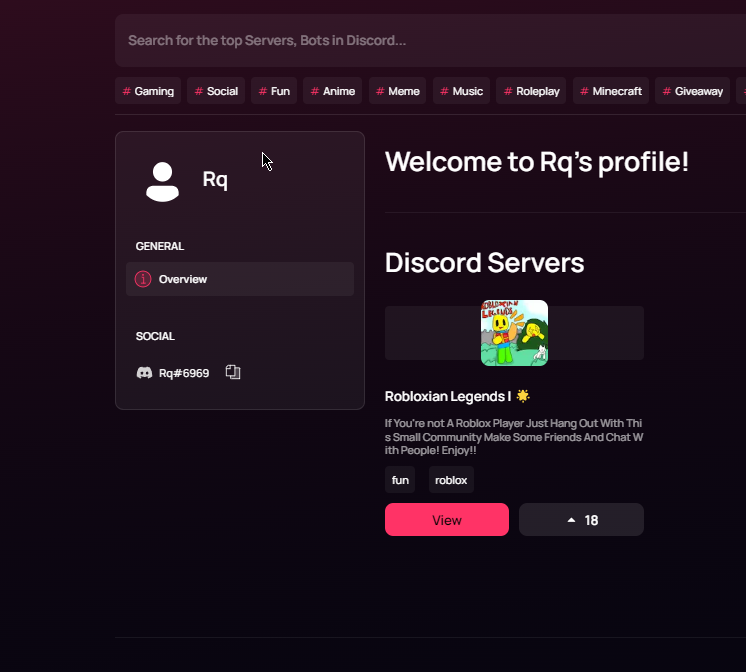 trim basin
shell inlet
oh wait i just noticed that someone else has the ownership of this server now? h...
trim basin
shell inlet
oh wait i just noticed that someone else has the ownership of this server now? h...
Yup, they're the owner of the server but i made that
So i should have the power to edit?
shell inlet
trim basin
Yup, they're the owner of the server but i made that
looks like the site just cached again, you can't access it then now
yep you should ask them to edit it
trim basin
shell inlet
yep you should ask them to edit it
Ooooh
shell inlet
-team use teams if you want access too
wild stoneBOT
How do I create a team?
This article describes the process of creating a team, customizing your team and adding members to it:
Teams Overview
trim basin
shell inlet
-team use teams if you want access too
I see, that's what the use of teams
Thank you for your time @shell inlet!
shell inlet
no problem
shell inlet
@sour grotto refrain from sending ads thank you
 iron sable
i cant log back in on top.gg
it sends me to autherize access page and its just blank
nvm its the discord page yall can do nothing about it
also
when is the website gonna be fixed
almost everything is broken
sturdy swan
Hello, so my bot is under my team so me and the other developer can access the bot application on top.gg. I just wanted to know how I can reply to comments on my bot page as the team account as of course me replying to comments show's engagement and that I listen to comments like I should.
shell inlet
iron sable
when is the website gonna be fixed
what is broken, can you be precise?
shell inlet
sturdy swan
Hello, so my bot is under my team so me and the other developer can access the b...
hey currently that's not possible
sturdy swan
shell inlet
hey currently that's not possible
Well that's annoying for the following reasons:
1: I can't write a reply as under the team.
2: I can't do it via this account even tho I am the owner of the team?
I don't see not a single reply function
 shell inlet
as i said, currently it's not possible as there's a bug and for your info it was never possible to reply as a "team". You could've replied using bot's account in the past but currently it's been disabled due to bug
you can suggest if you want in https://feedback.top.gg

Let us know how we can improve. Vote on existing ideas or suggest new ones. If you require support or would like to report a bug, please go to our Support Page · Make a suggestion · Top.gg
iron sable
shell inlet
what is broken, can you be precise?
the review system nobody could vote i think now its fixed, the search results where servers with 0 votes are above servers with 100s, the login log off/ it takes alot of time to do either of them i tried it in multiple devices but i have to spam click log in or log out and wait some minutes for it to work, the analytics ive complain this in the past and a mod here said that the team is working on it
sturdy swan
shell inlet
as i said, currently it's not possible as there's a bug and for your info it was...
What's the ETA on this bug getting a fix ?
shell inlet
sturdy swan
What's the `ETA` on this bug getting a fix ?
no ETA
sturdy swan
Seriously? How much god damn money does this site make and no eta on simple things 😭
but fine.
sturdy swan
What makes you certain that the behind the scenes bug is simple? 
heavy sequoia
brittle orbit
It’s a known issue
and what should i do then?
brittle orbit
heavy sequoia
and what should i do then?
You can not do anything. Just wait a little while and it might show up
heavy sequoia
oh i see


 keen geyser
sturdy swan
I don't see not a single reply function
keen geyser
sturdy swan
I don't see not a single reply function
at this point they should just remove the review section its been buggy since like a year or two
and i dont think it will work in the next few weeks
long ferry
 shadow frigate
Heya! If you're an Administrator and not an owner of that server, that issue is known as of now. You should still be able to visit the server-page by directly going to the server page instead
shadow frigate
long ferry
Heya! If you're an Administrator and not an owner of that server, that issue is ...
But what if i wanna edit it?
long ferry
You can go to /edit on the server page directly then, iirc you may not see the edit buttons there right?
 eternal knot
I can't reply to reviews of my own bot, I'm logged in.
long ferry
That's a known issue as of now, there is no ETA
primal breach
Example:
Someone reviews your bot, but the review is not true and the user himself did something incorrectly.
How does this work?
supple mica
To report reviews you need to contact a moderator
primal breach
A site moderator? I guess you are one xd
supple mica
That'd be right  Feel free to shoot me a dm
primal breach
Because I believe someone purposely reviewed us badly :/
 raven crane
i cant find my announce ment!
how long does that take?
dreamy abyss
It can take from to 30min up to 1hour before it shows
 short flume
how do you pin it?
floral pagoda
As far as I know there is no option to do it
 dapper trench
The review reply feature still ain't working?
dreamy abyss
dapper trench
The review reply feature still ain't working?
It is currently disabled. The team is aware :)
 gloomy fern
Hello, I'm writing to you in order to have a little more information on the reason of refusal of my Bot Discord, thanks in advance for your answer :)
dreamy abyss
gloomy fern
**Hello, I'm writing to you in order to have a little more information on the re...
The reason is explained in detail in the decline reason.
Feel free to DM me if you need more info about your decline
 gloomy fern
dreamy abyss
The reason is explained in detail in the decline reason.
Feel free to DM me if y...
gloomy fern
dreamy abyss
The reason is explained in detail in the decline reason.
Feel free to DM me if y...
Thank you for your quick answer, small question, if I make changes on the bot, could I apply again?
dreamy abyss
gloomy fern
Thank you for your quick answer, small question, if I make changes on the bot, c...
If you have fixed the issue and reviewed our bot guidelines, feel free to submit it again
wild stoneBOT
gloomy fern
dreamy abyss
If you have fixed the issue and reviewed our bot guidelines, feel free to submit...
Ok thanks, I'll try to do that in the evening! 🙂
dreamy abyss
Nice! Good luck :D
sturdy swan
Hello! I need to edit a review I made on a bot. Any way I could do that?
dreamy abyss
sturdy swan
Hello! I need to edit a review I made on a bot. Any way I could do that?
Currently editing/deleting reviews are broken.
Feel free to DM me the link to the bot and a screenshot of the review, and ill delete it for you so you can add a new one
sturdy swan
dreamy abyss
Currently editing/deleting reviews are broken.
Feel free to DM me the link to th...
Sent. Please let me know once it's deleted. Thanks!
dreamy abyss
sturdy swan
Sent. Please let me know once it's deleted. Thanks!
Should be sorted now :)
 trim burrow
??


 tardy harbor
Hi i reported 4 weeks ago a bot and the report probably is not reviewed
dreamy abyss
tardy harbor
Hi i reported 4 weeks ago a bot and the report probably is not reviewed
Could you DM me the bot and some screenshots of the issue, and I’ll have a look in an hour or so ☺️
wild stoneBOT
Top.gg Auctions
Current Auctions Stage
We’re currently in the stage of Auctions Bidding. This stage runs from <t:1658862000:F> (<t:1658862000:R>) to <t:1659380400:F> (<t:1659380400:R>). During this stage, you will be able to bid. At the end of the auction, you will be given 12 hours to pay.
Auctions Timing Update
Next Ads Go Live / Next Auctions Starting: <t:1658862000:F> (<t:1658862000:R>)
Next Auctions Ending: <t:1659380400:F> (<t:1659380400:R>)
 drifting linden
and what is minmum balance to verify
drifting linden
and what is minmum balance to verify
That depends on the auction spot
You can read more about auctions here: #auctions-faq and get auction support here: #auctions-support
drifting linden
ok if i pay 20$ , how many users will see my bot?
wild stoneBOT
What is CPM bidding?
Top.gg Support Article

 crude pecan
wild stoneBOT
crude pecan
wild stoneBOT
@crude pecan
To have your bot's server count displayed on Top.gg, please read the documentation on server/shard posting.
sturdy swan
do y'allz have rules against locking bot commands behind a voting wall?
ie forcing a user to vote for your bot in order to use a command?
cobalt sleet
As long as you're not locking the majority of your bot's commands or main feature behind a voting wall then it's fine.
sturdy swan
if your feature is birthdays
dreamy abyss
Also when we come to testing, we would need access to all commands :)
So make sure to allow the server with ID: 333949691962195969
sturdy swan
ie recording and displaying x user's birthday in a channel
and on demand
and you put the feature to view a user's birthday and every user's birthday behind a voting wall
that would not be ok right?
cobalt sleet
Depends how many other features you have
sturdy swan
none
cobalt sleet
Then no, that would be the majority of your commands locked behind a voting wall
sturdy swan
then i have a bot for you!


Top.gg
Spice up your Discord experience with our diverse range of Discord Bots and Servers as well as other spaces to discover DAOs.
dreamy abyss
sturdy swan
then i have a bot for you!
If you want to report a bot, click the 3 dots on the top right of the bot page and report it there :)

Then someone from our mod team will have a look 👍
supple mica
sturdy swan
https://top.gg/bot/656621136808902656/vote
That bot seems to have additional features and commands. It's primary feature is not locked by a vote-wall.
Moreover, as nom said above next time please use the report button on site so we can have the moderators check it out :)
sturdy swan
it defo does not have additional features except for viewing one's birthday and the list etc
 onyx anchor
Hey I need some help
Whenever I try to log into the site, it shows an error trying to authenticate
dreamy abyss
Hey! What does the error say?
 dreamy abyss
Could you try clearing cache and cookies, if that still does not work, try a different browser?
wild stoneBOT
In order to clear your cache for the site, press CTRL+F5.
If this does not work, try one of these resources below:
Instructions on Microsoft Edge
Instructions on Google Chrome
Instructions on Mozilla Firefox
Instructions on Safari
Instructions on Opera
Instructions on Brave
onyx anchor
That worked, thanks!
sturdy swan
I changed my bot's name and image, will it update automatically? In this case it only updated on my panel, but on the bot page the old name and image still remain

 shell inlet
sturdy swan
I changed my bot's name and image, will it update automatically? In this case it...
shell inlet
sturdy swan
I changed my bot's name and image, will it update automatically? In this case it...
-refreshdata
wild stoneBOT
@sturdy swan
Fetching Your New Bot Data
To fetch your bot's new name or avatar, please follow these steps:
Click the Refresh Data button in the sidebar on the right.
Click Edit on your bot page and then Save.
💡 Please note: If it still doesn't seem to change, make sure you actually changed the bot avatar / name on your Discord Developer Portal and not the application icon / name.
sturdy swan
shell inlet
-refreshdata
thx
shell inlet
np
 sturdy swan
shell inlet
your username is considered as "hoisted username"
sturdy swan
shell inlet
your username is considered as "hoisted username"
Can you change it to "Lopes", please?
shell inlet
done
sturdy swan
thx
 fringe basin
Why my bot kicked from this server
 stoic socket
Bots aren't added to this server anymore and haven't been for a long while
fringe basin
Oh ok thx
trim burrow
trim burrow
??
this problem i'm trying to understand since yesterday. the bot has the permissions
shell inlet
trim burrow
??
try clearing site cache and re-add your server.
or just manually add an invite by yourself on the site
dreamy abyss
Hey, feel free to state your question
sturdy swan
I makeing my own vouch bot with botghost but I' don't know how i make no one telling you guys have vouch bot pls can u guys tell me how i make
dreamy abyss
As long as you make at least 5 custom commands you should be fine
sturdy swan
Ik that not big question but no one replying
sturdy swan
dreamy abyss
As long as you make at least 5 custom commands you should be fine
Sir i need full help like how i make and which cmds
If u can sir
No one helping everyone saying idk
dreamy abyss
I am not able to provide guidance on how to make a bot using BotGhost.
If you need development help you can ask in #development
sturdy swan
If i ask from devlopment he will guide ? @Johand#0001
Any other website where i can make
dreamy abyss
There is no guarantee that someone will help you. If you want to hire a dev you could go on fiverr etc to hire someone
wild stoneBOT
You seem to be asking for something you don't have experience for or something that hasn't been done yet, but really need for your bot/server.
You can hire developers from Fiverr or Freelancer to code the things you need for your bot/server.
drifting linden
Please can i advertise any day or it has days to advertise?
 tame laurel
how to respond to a review? I've seen it with other bots but can't find a respond button...
shell inlet
drifting linden
Please can i advertise any day or it has days to advertise?
what?
shell inlet
tame laurel
how to respond to a review? I've seen it with other bots but can't find a respon...
hey, currently you cannot,our team is aware of it
drifting linden
shell inlet
what?
Can i advertise in auctions in any day or no?
Because you wrote in website ends in end of day
shell inlet
head to #auctions-support for auctions support, and just fyi "if" you bid and win a particular auction. your bot will be featured on that tag until next auctions
 storm tiger
I have a problem with the approval of my bot.
sturdy swan
Eh i find a thing for vouch bot @shell inlet
I finded cmds but where i put that ?
downvote <@user
Vouch<@user
reputation<@user
cobalt sleet
-wrongserver
wild stoneBOT
Hey! We think you have our server mistaken. We do not provide support, help, or advice for any bot. You need to click on the "Discord Support Server" button on the bot's page of the bot you need support for. If there isn't a button that says "Discord Support Server" or nothing else mentioned about a support server, the server invite is invalid or you were banned from the bot's support server, then we can't help you. Sorry :(
sturdy swan
storm tiger
I have a problem with the approval of my bot.
Hey, what's the issue?
shell inlet
sturdy swan
Eh i find a thing for vouch bot <@786150805773746197>
as Johand already told you above, this server only provides support regarding top.gg
cobalt sleet
Also, please stop trying to ping staff for support for an unrelated bot and follow the answers you've already been given 
storm tiger
It said that it is a unmodded copy of sudhan playz music bot which is true I copied the code and modified it
Why it didn't approved then?
long ferry
contact the reviewer in this case then
wild stoneBOT
Your bot was likely declined because it went against our bot guidelines.
To find out why your bot was declined and by who, use the search feature in #mod-logs:
 long ferry
note that we do not consider things modified such as just changing messages. It has to be proper features that are not already present on the original clone
storm tiger
Yes I know.
Can you please tell me who the reviewer was because I can't find him. My bot was ariona bot
@long ferry
long ferry
see above
storm tiger
in: mod-logs BOT_ID_HERE
long ferry
using that in the search feature
storm tiger
Oh sry
sturdy swan
The reviewer is @lone ether
storm tiger
Oh thx
primal breach
Can you bid tonight, and also bid tomorrow morning?
long ferry
-auctions
wild stoneBOT
Top.gg Auctions
Current Auctions Stage
We’re currently in the stage of Auctions Bidding. This stage runs from <t:1658862000:F> (<t:1658862000:R>) to <t:1659380400:F> (<t:1659380400:R>). During this stage, you will be able to bid. At the end of the auction, you will be given 12 hours to pay.
Auctions Timing Update
Next Ads Go Live / Next Auctions Starting: <t:1658862000:F> (<t:1658862000:R>)
Next Auctions Ending: <t:1659380400:F> (<t:1659380400:R>)
yes
primal breach
long ferry
yes
Alright, thanks. If i bid lower than the highest bid, i just get less impressions if i dont get outbid until no impressions are left right?
primal breach
long ferry
yes
Orr is that incorrect?
floral pagoda
Head over to #auctions-support
In my example screenshot you can see the following:
- White means you saved yourself a spot
- Grey means you will likely not get any impressions (Only if the other bidder did not pay)

 worn pivot
i have a question
how do i change my bot's pfp..?
on website because its changed now
cobalt sleet
-refreshdata
wild stoneBOT
Fetching Your New Bot Data
To fetch your bot's new name or avatar, please follow these steps:
Click the Refresh Data button in the sidebar on the right.
Click Edit on your bot page and then Save.
💡 Please note: If it still doesn't seem to change, make sure you actually changed the bot avatar / name on your Discord Developer Portal and not the application icon / name.
worn pivot
ohk
 grim moth
Moderators are not able to relist bots from one account to another? You would have to request the bot to be deleted then relist it right?
supple mica
Correct yes.
grim moth
Is there someone I can dm about that, I dmed someone before but they never responded
long ferry
If you're still able to delete bots on your own behalf, there is no moderator needed for that
you can delete the bot from the current account and then have it submitted on the new one
 drifting nebula
 trim burrow
does the boy have a channel preference?
because it only creates invitations in 717468464083632147 I wanted it to be in 679397448023670824! 
I gave him adm
long ferry
it uses the first channel it is able to, consider creating an invite yourself and providing that
trim burrow
is random? 
long ferry
it is not, it uses the first channel it has access to
trim burrow
weird
long ferry
if you wish to have it set to a designated channel, you'll need to create the invite of that channel and provide it
trim burrow
I let him watch only the welcome channel, and even then.
long ferry
Again if you wish to have it set to a specific channel, create an invite yourself

 valid idol
How do I convert ownership of team to someone else
 forest ridge
can i make sure that my bot got added?
its been like 2-3 weeks and ive yet to be approved
long ferry
no bots submitted on the account you're talking through
wild stoneBOT
In order to clear your cache for the site, press CTRL+F5.
If this does not work, try one of these resources below:
Instructions on Microsoft Edge
Instructions on Google Chrome
Instructions on Mozilla Firefox
Instructions on Safari
Instructions on Opera
Instructions on Brave
 noble badge
i can have bot id: 998791936762712064 transfer to user id: 481068576363773972?
if is not possible delete the bot I will resubmit on my other account
trim basin
I need help again
I cleared cache and reload the page like a million times

my friend transferred ownership to Team
I still don't have permission to edit
Nvm
Thank you
i think i know why
cobalt sleet
-apps @sturdy swan
wild stoneBOT
@sturdy swan
Volunteer Applications
Hey! It seems like you're interested on volunteering for Top.gg. We're glad for any help we can get regarding our server events, support articles, bot reviewing, moderation, and more!
 Contributors
Contributors are not considered staff and there is no age requirement. Contributors help out with server events and providing support.
 Bot Reviewers
Bot Reviewers are Top.gg staff and must be 18 or older. Bot Reviewers review the discord bots submitted to the site before they are listed to make sure they follow our rules.
 Moderators
Bot Reviewer is a stepping stone to Moderator - if you wish to be a Moderator you must first apply and be accepted as a Bot Reviewer.
Please read [this post](#announcements message) for more information and to apply!
cobalt sleet
Please use this channel instead of my DMs
noble badge
cobalt sleet
Please use this channel instead of my DMs
can you delete my bot 998791936762712064 ?
cobalt sleet
You can delete it yourself by logging in and clicking the delete button in the sidebar on the right!
 soft star
I tried I got my self in a pickel
pickle
I was planning switch accounts to this one
I put on a the team now it doesn't work
nvm It didn't pop up now it did
cobalt sleet
@soft star is the account that owns the team and therefore the bot.
You should have permissions to manage it using that account
soft star
@noble badge owns the bot @soft star owns the team but I am giving my other account to a cousin I already have nitro on both so ya.
cobalt sleet
Is your issue resolved?
noble badge
yes thank you.
cobalt sleet
Ok I removed the bot dev role from your old account and gave it to your new one
noble badge
thank you.
sturdy swan
the bot reviewer application says spring. Would people still get applied till this day?
cobalt sleet
Yes
 quartz sundial
Hi there! 👋
so recently my discord account got deleted and all of my bots got deleted there
can any mod replace this page's bot's client id with this?
1000686071933313065
or is that not possible
brittle orbit
quartz sundial
or is that not possible
DM an online mod and they'll take it from there
brittle orbit
No
 radiant edge
can i use the Role Rewards feature and avoid the role removal after 12h?
brittle orbit
radiant edge
can i use the Role Rewards feature and avoid the role removal after 12h?
I'm sorry. What are "role rewards"?
radiant edge
brittle orbit
I'm sorry. What are "role rewards"?
Top.gg
Pre-requisites Follow through the steps to publish your server. Once this step is done, follow the information below on how to use role rewards. What are role rewards? Role rewards are given to a user upon voting for a server. If you h...
brittle orbit
Ah yep
brittle orbit
radiant edge
can i use the Role Rewards feature and avoid the role removal after 12h?
No you can not avoid the removal of the roles
radiant edge
"and then remove it from the user."
ok got it
maybe there is some work around solution?
brittle orbit
No there isn't
radiant edge
ok got it, thanks
 lime pelican
Vote owo
brittle orbit
-support
wild stoneBOT
This channel is for support/help with top.gg. It is not for general conversation (move to #general) or development support (move to #development). Please keep this channel on topic!
 urban hollow
My bot has been banned from top gg because it has screen shot command and nsfw is not allowed
This is what happens with nsfw if u screen shot please bring bakc my bot Cool Bot
 valid idol
How do I convert ownership of team to someone else
next kestrel
urban hollow
My bot has been banned from top gg because it has screen shot command and nsfw i...
You can feel free to reach out to the person who declined / deleted your bot
next kestrel
valid idol
How do I convert ownership of team to someone else
-team
wild stoneBOT
@valid idol
How do I create a team?
This article describes the process of creating a team, customizing your team and adding members to it:
Teams Overview
next kestrel
This should cover everything you need
urban hollow
next kestrel
You can feel free to reach out to the person who declined / deleted your bot
I can’t he has the messages from server members off

 floral pagoda
urban hollow
I can’t he has the messages from server members off
floral pagoda
urban hollow
I can’t he has the messages from server members off
-dms
wild stoneBOT
Almost every staff member has direct messages enabled. If you can't message one of the staff members, it may be an issue on your end. Please make sure you have direct messages enabled by checking your privacy settings in
Settings > Privacy & Safety > Allow direct messages from server members
as well as right-clicking on
Top.gg > Privacy Settings > Allow direct messages from server members.
If you're still not able to send a staff member a direct message despite having these settings enabled, feel free to ping them in this server!
 valid idol
@floral pagoda you can help me please?
brittle orbit
valid idol
<@302885091519234050> you can help me please?
I can help!
urban hollow
floral pagoda
-dms
Did u read what I sent
urban hollow
floral pagoda
-dms
He has it of HE
valid idol
brittle orbit
I can help!
i want transfer ownership team to another member
brittle orbit
-team
wild stoneBOT
How do I create a team?
This article describes the process of creating a team, customizing your team and adding members to it:
Teams Overview
valid idol
 brittle orbit
That should cover everything
valid idol
valid idol
 floral pagoda
urban hollow
He has it of HE
floral pagoda
urban hollow
He has it of HE
I just gave a possible answer, no need to be offensive! :)
brittle orbit
valid idol
Do you own the team?
valid idol
brittle orbit
-team
i can't find transfer ownership
valid idol
brittle orbit
Do you own the team?
yeah
brittle orbit
hmm odd
valid idol
you want open screen to you ?
brittle orbit
valid idol
i can't find transfer ownership
I think its a known issue rn
valid idol
brittle orbit
hmm odd
 brittle orbit
valid idol
brittle orbit
valid idol
its a known issue
valid idol
I created the team and submitted it to the bot with my old account, and now I have moved the account here, and I cannot transfer the links to this account.
so, what is the solution ?
brittle orbit
valid idol
I created the team and submitted it to the bot with my old account, and now I ha...
There is no solution. You'll have to wait until the team fixes the issue
valid idol
brittle orbit
There is no solution. You'll have to wait until the team fixes the issue
Well, can I move the bot from my old profile to my new profile?
brittle orbit
valid idol
Well, can I move the bot from my old profile to my new profile?
You'll have to resubmit the bot if you want it on your new account.
valid idol
brittle orbit
You'll have to resubmit the bot if you want it on your new account.
And will I need to delete it from my old file or not?
brittle orbit
valid idol
And will I need to delete it from my old file or not?
You can DM an online mod to figure that out
valid idol
brittle orbit
You can DM an online mod to figure that out
I couldn't understand you
Please explain more because I use a translation
brittle orbit
valid idol
I couldn't understand you
Yes, you will have to delete it from your old profile and resubmit it on your new one.
valid idol
brittle orbit
Yes, you will have to delete it from your old profile and resubmit it on your ne...
And there is no other way not to lose my number of votes?
brittle orbit
valid idol
And there is no other way not to lose my number of votes?
You will loose all your votes
valid idol
brittle orbit
You will loose all your votes
And there is no opportunity to communicate with one of the developers and provide everything that proves that the robot is owned and transfers ownership to me?
brittle orbit
valid idol
And there is no opportunity to communicate with one of the developers and provid...
You can DM an online moderator about that
valid idol
brittle orbit
You can DM an online moderator about that
like who ?
long ferry
transferring ownership directly is currently not a thing built into the site. You can delete the bot from the previous account and resubmit it on the new one. Reviews will stay, your description and other things wont. Unsure about votes right now
If you're able to do so on your own behalf, then please do so first before asking a moderator to do so
brittle orbit
thank you hope
valid idol
long ferry
transferring ownership directly is currently not a thing built into the site. Yo...
So at the moment there is no way to move the bot with the number of votes right?
long ferry
I cannot guarantee that when deleting and resubmitting the bot will keep the votes
valid idol
long ferry
I cannot guarantee that when deleting and resubmitting the bot will keep the vot...
And you can't be sure of one of the developers?
long ferry
I can try to get ahold of one of the developers to confirm, but can't give you an ETA when I'd get a response about it
valid idol
long ferry
I can try to get ahold of one of the developers to confirm, but can't give you a...
Ok but please don't forget and thank you very much
long ferry
urban hollow
I can’t he has the messages from server members off
Heya! Every moderator should have their direct-messages enabled. Please ensure that yours are definitely on too 👍
urban hollow
long ferry
Heya! Every moderator should have their direct-messages enabled. Please ensure t...
Not all do
long ferry
they should for us 
supple mica
Hey there, my dms are indeed enabled. I've replied to your message!
urban hollow
Ye I replied
eternal knot
long ferry
That's a known issue as of now, there is no ETA
Thanks.
 stoic jacinth
how can i replay to a Review?
shell inlet
stoic jacinth
how can i replay to a Review?
currently you cannot reply due to a bug. Our team knows about it
stoic jacinth
shell inlet
currently you cannot reply due to a bug. Our team knows about it
oh ok
sturdy swan
website down ?
shell inlet
working fine for me
stoic socket
down for me
sturdy swan
down for me too
stoic socket
back now
sturdy swan
nah still down
 jolly eagle
#bids message hi i accidentally bid on 'bot' slot for my 'server'. Can i please have the bid removed?
sturdy swan
Hey, please ask in #auctions-support
 empty lantern
uhhhh
so im trying to edit a bot, its on a team
and im a mod
but when i edit it, it says unauthorized
well the edit page works and loads
but when editing it, it doesnt work and instead says unauthorized
anyone????????
sturdy swan
empty lantern
but when i edit it, it says unauthorized
Seems like it worked fine?
 sturdy swan
Glad to hear that 
sturdy swan
Yuh, can take some time to update due to server caching
Around 30 minutes to an hour
primal breach
Maximum budget info button bugs on mobile, not visible at all though the box does pops up. It’s popping up on the right side of my screen.

 sturdy swan
Hey - please report bugs at https://support.top.gg
 wary pivot
bug si bug]
primal breach
I’ll still report it tho, thanks
sturdy swan
Still something good to know
wary pivot
could save lifes
primal breach
wary pivot
could save lifes
😂
 little owl
hello my bot project has been deleted on my account without any explanation, is that normal ?
 sturdy swan
Hey there, your bot has been declined and not removed by me. Feel free to message me if you need further information.
 queen wharf
Is this the correct place for billing support?
sturdy swan
#auctions-support might be more appropriate
queen wharf
thanks

 steel sinew
bro the contrast is soo bad

almost impossible so see the thing since it's so small and bad colors
sturdy swan
drifting linden
please why my bid is out ?
Hey - please go in #auctions-support as it is better suited for such questions
gloomy shell
Any new jobs at Top.gg will be posted in the #434058442764714002 channel!
 karmic junco
Hey so I was wondering if I put my bot on top.gg but because my bot has anti abuse where if its under 40 members in the server (excluding bots) it will leave the server and during verification it will get denied due to the bot leaving the testing guild, is there anyway we could get something sorted?
<@&817055174613794826>
gloomy shell
You can whitelist our server, but our server has more than 40 members
We have around 60-70 human accounts in there
(Alts and such for testing)
karmic junco
Alright, thank you.
sturdy swan
my bot avatar is not seeable on site, why? https://top.gg/bot/870967982522777601/
Top.gg
En gelişmiş Türkçe Chat Guard, v14'e yenilenen kullanımı ile artık bot tamamen slash komutlu!
supple mica
-refreshdata
wild stoneBOT
Fetching Your New Bot Data
To fetch your bot's new name or avatar, please follow these steps:
Click the Refresh Data button in the sidebar on the right.
Click Edit on your bot page and then Save.
💡 Please note: If it still doesn't seem to change, make sure you actually changed the bot avatar / name on your Discord Developer Portal and not the application icon / name.
sturdy swan
bots not added to server?
long ferry
correct
cobalt sleet
Please don't bring personal drama into this server @drowsy laurel
This has nothing to do with Top.gg
cobalt sleet
It is definitely personal drama when someone DMs me saying the staff member in question is their ex and claims they're breaking Discord TOS when there's no evidence that's the case. This doesn't concern Top.gg.

 agile ember
Hi, I have a question about how long the bot will stay on the trending new bots section?
shell inlet
 vast oasis
Is this bug going to get fixed >.<
vast oasis
Is this bug going to get fixed >.<
iirc if you just clear cache it should work just fine
-cacheclear
wild stoneBOT
In order to clear your cache for the site, press CTRL+F5.
If this does not work, try one of these resources below:
Instructions on Microsoft Edge
Instructions on Google Chrome
Instructions on Mozilla Firefox
Instructions on Safari
Instructions on Opera
Instructions on Brave
shell inlet
agile ember
Hi, I have a question about how long the bot will stay on the trending new bots ...
if I'm not wrong it's for the first few days after you add your bot
 halcyon niche
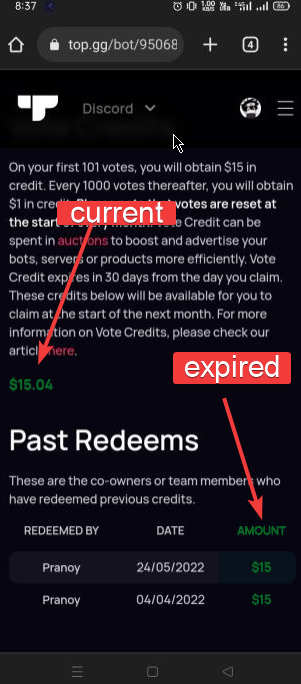
The past redeems already expired? And any tutorial how can I use this money ?
 agile ember
shell inlet
if I'm not wrong it's for the first few days after you add your bot
agile ember
shell inlet
if I'm not wrong it's for the first few days after you add your bot
Okay thank you for the information
shell inlet
halcyon niche
The past redeems already expired? And any tutorial how can I use this money ?
-credits
wild stoneBOT
@halcyon niche
Auction Credits
What are credits?
- If enough people vote for your bot or server per month, you have the ability to earn vote credits that you can then use for auctions.
- Don’t know what auctions is? See here to learn more and here to participate.
- These auction credits can be used to pay for any winning bids you may make.
- You CANNOT “withdraw” them for real money.
How does the system work?
- Each month, bot monthly votes reset (midnight UTC).
- If you get 100 votes on your bot in the month, you can redeem $15 worth of voting credits (note: you can’t redeem till you actually get 101 votes).
- Any vote after 100 will be worth $1 per 1000 votes (or $.001 per 1 vote).
How do I redeem them?
- At the end of the month, you will be eligible to redeem your credits (you redeem them on your bot or server's Votes page). You will have 30 days to redeem them before they expire.
- After you redeem them, you have 31 days to use them before they expire.
How do I use vote credits to pay for Auctions?
-When you pay for your winning bid, you can "Pay with Credits".
-If your payment cost is more than the amount of credits you have, make sure to apply the credits first and then pay the rest with the supported payment providers.
You can read more about using your vote credits in our vote credit support article.
You can read more about Auctions in our Auctions support articles.
 halcyon niche
shell inlet
https://imgur.com/5MqLDET
halcyon niche
shell inlet
https://imgur.com/5MqLDET
Ohh thnx
halcyon niche
shell inlet
https://imgur.com/5MqLDET
I was thinking that the past redeem is being collected in the wallet but no im wrong 😂😂
shell inlet
it happens, the recently redeemes stays in your wallet and the rest redeems will be expired
halcyon niche
shell inlet
it happens, the recently redeemes stays in your wallet and the rest redeems will...
Ohh ok bruh thnx
And why i can't place a bid ?
 floral pagoda
You need to pass in a Bid CPM
shell inlet
halcyon niche
And why i can't place a bid ?
enter the minimum cpm and then proceed to bid, if you wish to receive further support. You can head to #auctions-support
Make sure you read #auctions-faq too
-auctions
wild stoneBOT
Top.gg Auctions
Current Auctions Stage
We’re currently in the stage of Round 1 Winners. This stage runs from <t:1658775600:F> (<t:1658775600:R>) to <t:1658818800:F> (<t:1658818800:R>), allowing round 1 winners to pay for their ads that will go live at <t:1658862000:F> (<t:1658862000:R>).
During this stage, users are unable to bid for next auctions.
Auctions Timing Update
Next Ads Go Live / Next Auctions Starting: <t:1658862000:F> (<t:1658862000:R>)
Next Auctions Ending: <t:1659380400:F> (<t:1659380400:R>)
I try but the text box not work
halcyon niche
shell inlet
enter the minimum cpm and then proceed to bid, if you wish to receive further su...
Ok bruh
 deft beacon
Hello
I have a question.
my bot has been except to this alliance, how do I found my bot i searched it up it wont show up
-auctions
brittle orbit
deft beacon
my bot has been except to this alliance, how do I found my bot i searched it up ...
It’s a known issue that new bots won’t show up on search after being approved. Give it a little while and it’ll show up
deft beacon
Alright
 cosmic nimbus
@supple mica hello sir/mam i waana add a bot on top.gg but i am not geting next option
supple mica
Discord
Discord is the easiest way to communicate over voice, video, and text. Chat, hang out, and stay close with your friends and communities.
sturdy swan
can i talk to a mod pls?
Feel free to DM one online moderator
Or if it's some general purpose question you can ask here
sturdy swan
sturdy swan
Or if it's some general purpose question you can ask here
its about a bot approval
Feel free to ask me, I should be able to answer
i have screenshots of pokemon devs/admins/mods asking if i can make an auto hint solver
Your bot has been declined, right?
yeah cause hint solver
long ferry
Yup reach out to the reviewer then
sturdy swan
and i have screenshots of the pokemon bots devs with aproval
All righty, please provide these screenshots and everything else to the reviewer in question - they will get back to you and discuss with you about it
long ferry
who declined your bot
steel sinew
sturdy swan
how can i change Bot owner on Top.gg ?
You can’t. You can add it to a Team though which works like multiple owners
Kind of
sturdy swan
because
im going to delete this account
I have a new account which i want to transfer everythink
sturdy swan
oh ok
sturdy swan
steel sinew
Why do people keep changing accounts lmao
some bad guys bulling me
like for 3 days
steel sinew
block him??
sturdy swan
they are keep finding way to access me
steel sinew
💀
sturdy swan
steel sinew
Settings > Delete or something like that
I couldnt find it
long ferry
sturdy swan
delete Account button is disabled
deleting the bot can be done by going to the bot page, then pressing delete
sturdy swan
hello I would like to change the name of my bot
sturdy swan
sturdy swan
hello I would like to change the name of my bot
Change the name of your bot in the Discord developer portal and then you can refresh data on Top.gg
-refreshdata
wild stoneBOT
Fetching Your New Bot Data
To fetch your bot's new name or avatar, please follow these steps:
Click the Refresh Data button in the sidebar on the right.
Click Edit on your bot page and then Save.
💡 Please note: If it still doesn't seem to change, make sure you actually changed the bot avatar / name on your Discord Developer Portal and not the application icon / name.
 twilit cradle
sturdy swan
twilit cradle
<#412006692125933568>
twilit cradle
sturdy swan
twilit cradle
<#412006692125933568>
Heya - please ask your question in #topgg-api as it is better suited. This channel is specifically for issues with the website, not the API.
twilit cradle
Thanks and I'm sorry 
sturdy swan
No problem at all
 verbal meteor
Should I write a private note violating the privacy of the servers here?
 sturdy swan
As the decline reason states
- In your bot's description, mention that you publicly show the guilds your bot is in
Yep

 long ferry
they're under a category named "Optional" so no
 mighty sandal
when i try to login using my discord account, the website redirects to a discord link but the screen is white and nothing loads. I’ve already tried multiple browsers, incognito/private mode, and clearing browsing data. Is there anything else I can try?
long ferry
we cannot help with that, as thats an issue on discord
mighty sandal
ok, thanks anyway
verbal meteor
how to change theme?
 wild stoneBOT
@verbal meteor
You can change colors, set background images, style and animate elements within your long description using CSS. If you need help learning CSS, you can check out these resources and ask for help if you need it in #development.
💡Please note: It's against our guidelines to hide or modify the content of any Top.gg page elements such as reviews, bot or server information, ads etc. You may change colors and border colors of site elements, but you may not modify the text content within. You must also follow our bot guidelines when designing your entity page, this includes no NSFW content and no seizure-inducing CSS! Failure to follow these guidelines will result in your bot or server page being declined, removed from the site or locked.
 zinc tangle
why i dont have pfp
 wild stoneBOT
@zinc tangle
Fetching Your New Bot Data
To fetch your bot's new name or avatar, please follow these steps:
Click the Refresh Data button in the sidebar on the right.
Click Edit on your bot page and then Save.
💡 Please note: If it still doesn't seem to change, make sure you actually changed the bot avatar / name on your Discord Developer Portal and not the application icon / name.
zinc tangle
im a user 🤨
 shell inlet
hey, programlamayla ilgili destek için #development bölümüne gidin.
sturdy swan
shell inlet
hey, programlamayla ilgili destek için <#272764566411149314> bölümüne gidin.
Bu Java Script Bot Kodlama
 delicate tiger
hi iam trying to logout but the logout button doesn't work
shell inlet
sturdy swan
Bu Java Script Bot Kodlama
programlama dili ne olursa olsun, destek için o kanala gidin. Bu kanal yalnızca top.gg için destek sağlar
sturdy swan
Teşekkürler
 idle cradle
shell inlet
programlama dili ne olursa olsun, destek için o kanala gidin. Bu kanal yalnızca ...
idle cradle
shell inlet
programlama dili ne olursa olsun, destek için o kanala gidin. Bu kanal yalnızca ...
👍
shell inlet
delicate tiger
hi iam trying to logout but the logout button doesn't work
try refreshing the website, working fine for me
shell inlet
sturdy swan
Teşekkürler
sorun değil
shell inlet
 limber river
How can I give the role I want to the members who voted on Top.gg?
limber river
How can I give the role I want to the members who voted on Top.gg?
you have a section called "vote rewards" on bot's edit page, if you invite @small lantern to your server and set it up. The bot automatically gives the voters the role you wish to give
limber river
shell inlet
you have a section called "vote rewards" on bot's edit page, if you invite <@422...
where can i get there
shell inlet
limber river
where can i get there
https://top.gg/servers/<your serverid>/edit
limber river
thx
shell inlet
np
 delicate tiger
oh
shell inlet
sometimes rarely that happens, ads not appearing
shell inlet
oh- try changing your website once. let me know if it works or try clearing cache
delicate tiger
you mean gray?
 shell inlet
refresh your website
shell inlet
np
shell inlet

 shell inlet
sturdy swan
i want leave the team in topgg
shell inlet
sturdy swan
i want leave the team in topgg
you will be able to see a "Leave Team" button https://top.gg/team/<your team id>/edit
head to settings on the team page
 shell inlet
sturdy swan
shell inlet
sturdy swan
click there https://imgur.com/5rt0vO0.png and select the team from your profile

 shell inlet
looks like you're not in any team, if you're referring to how to delete your "bot" you can just head to https://top.gg/bot/<your bot id> and delete it
oh you mean that
can you give bot's id
sturdy swan
shell inlet
can you give bot's id
ok
shell inlet
sturdy swan
646355012741627917
-ticket it's best if you create a ticket regarding this, go ahead and tell that you want to leave the bot as one of it's creators
wild stoneBOT
@sturdy swan
Need more advanced support?
Open a support ticket
sturdy swan
How long does it take?
shell inlet
to get a response?
 shell inlet
sturdy swan
yp
shell inlet
sturdy swan
yp
when the support associate the ticket they'll respond asap
shell inlet
sturdy swan
error
not our issue, try refreshing the captcha and retry
sturdy swan
shell inlet
not our issue, try refreshing the captcha and retry
not work
@shell inlet i can delete my account?
in top.gg?
shell inlet
yes you can
you can follow the instructions here: https://support.top.gg/support/solutions/articles/73000502496-how-to-delete-your-user-account

Top.gg
Leaving so soon? We understand and will miss you! If you wish to permanently delete your user account on Top.gg, you can do so by taking the following steps: 1. Make sure that there are no Projects or Teams on your account. You can...
sturdy swan
@shell inlet
 shell inlet
-ticket it's best if you create a ticket regarding this, go ahead and tell that ...
shell inlet
shell inlet
-ticket it's best if you create a ticket regarding this, go ahead and tell that ...
that is why i told you to proceed with this
 night raptor
@shell inlet just wanted to say, teams are very buggy
whenever adding someone to your team it takes ages for it to even load
and when renaming it
it makes a duplicate of the team
shell inlet
we are aware of it and team will work on it soon hopefully, no ETA. duplication was happening previously on spam/multiple clicks. I don't think it happens anymore
long ferry
sturdy swan
<@786150805773746197>
check if you're still within teams or own bots
may take 30 minutes or longer if you've deleted a team
sturdy swan
long ferry
check if you're still within teams or own bots
i can join back
long ferry
It seems like you still own a bot on the site, you cannot delete your account
 glacial depot
Hey so I can't write any replies on any of my reviewers on top.gg. I'm on the right account that owns that bot.
sturdy swan
in discord devlper true?
long ferry
Thats known at the moment
long ferry
sturdy swan
in discord devlper true?
No, on top.gg
 kindred raptor
Hello, my bot approval request has been declined due my play command may send NSFW content. But, it only searches youtube and since youtube does not show any nsfw, I suppose this wont be a problem. Am I missing a point?


 long ferry
That is a bot you own, seems like this was added with others. You'd need to ask the other users to move it to a team
shell inlet
kindred raptor
Hello, my bot approval request has been declined due my play command may send NS...
dm the responsible reviewer regarding your decline, it's probably because of the thumbnail it displays
long ferry
even if that shouldn't be a thing
sturdy swan
long ferry
That is a bot you own, seems like this was added with others. You'd need to ask ...
how i dont understand you
night raptor
kindred raptor
Hello, my bot approval request has been declined due my play command may send NS...
nsfw thumbnails arent even allowed on yt?
long ferry
there's educational nsfw on youtube
night raptor
isnt that blurred?
long ferry
nope
shell inlet
not really, few thumbnails display it however
long ferry
sturdy swan
how i dont understand you
https://top.gg/bot/646355012741627917 is still owned by you, it was added together with other users it seems like

Top.gg
System bot with Dashboard and amazing welcomer and protection, commands easy to use!
night raptor
shell inlet
not really, few thumbnails display it however
the thing is you cant really prevent specific thumbnails either