#topgg-api
1 messages · Page 181 of 1
 smoky marten
 glad walrus
Ah ok
 cobalt robin
Does this mean that I have to wait until an hour passes before sending requests again or I have to wait until the current hour passes?

 jaunty plank
Until an hour passes.
 ornate shoal
Does anyone have a tut video on this api? just got my bot verified and so I'm looking to learn what to do with the webhooks & stuff
jaunty plank
I'm not sure of any, but its a pretty standard api. the webhooks are standard too.
 wise onyx
@scarlet cobalt has there been a fix to the java DBL library on the main branch or is it still the link you have in the pin?
 scarlet cobalt
One message removed from a suspended account.
One message removed from a suspended account.
wise onyx
oof
 native pulsar
Can someone help me with my webhooks? I don't know what I'm doing but I'm trying to reward users once they vote
jaunty plank
what part do you need help with?
 sullen nymph
scarlet cobalt
One message removed from a suspended account.
sullen nymph
scarlet cobalt
One message removed from a suspended account.
Which will never happen because lib devs are equal to open source contributors
native pulsar
jaunty plank
what part do you need help with?
So I have the url to get the data but I don't know how to actually collect the data
jaunty plank
The data is sent to the webserver at the url you provide.
native pulsar
What do I do with that?
jaunty plank
I cant really be specific without knowing the programming language you intend to use.
Other than https://docs.top.gg/resources/webhooks/
 native pulsar
jaunty plank
I cant really be specific without knowing the programming language you intend to...
native pulsar
jaunty plank
I cant really be specific without knowing the programming language you intend to...
I use node.js
On replit
If that helps
jaunty plank
 native pulsar
So that should help is what you are saying?
jaunty plank
thats the library and example code for nodejs webhooks yes.
native pulsar
What goes in
 native pulsar
Ok. Thanks
 lapis vessel
webhook.listener(vote => {
  // vote will be your vote object, e.g
  console.log(vote.user)
})
``` it does not log when i voteneed more context
 white kite
Is this also the right place to ask something about topgg-autoposter?
 tidal idol
Yes
white kite
So my code looks like this currently:```js
let topggPoster = AutoPoster(process.env.TOPGG_TOKEN, client);
console.log(process.env.TOPGG_TOKEN);
topggPoster.on('posted', stats => {
console.log(Posted stats to Top.gg! | ${stats.serverCount} Servers.);
});
topggPoster.on('error', topggError => {
console.log(topgg-autoposter: Something went wrong:\n${topggError});
});
but i always get this error: ```Error: 401 Unauthorized (You need a token for this endpoint)```
With my env is everything ok, becasue when i log the token its defined rain heart
Make sure your env is the correct variable
Try providing your token directly in the constructor
white kite
Let me try that!
That worked and the env also works now. The problem was an outdated token 
Thank you & happy easter!
 void dagger
is there a specific IP that top.gg always sends the POST from?
im creating a firewall so i need to know which IP to whitelist
 plucky lance
Yeah
void dagger
what IP is that?
plucky lance
void dagger
thanks
plucky lance
👍
ornate shoal
I copied everything from https://docs.top.gg/libraries/javascript/ < posting bot stats
 jaunty plank
is client defined in the location you copied to?
the autoposter needs access to client to know the stats
lapis vessel
smoky marten
need more context
?
smoky marten
scream AMOGUS 69 times at 3 AM
and then head over to #announcements
 silver bolt
def start_topgg_task(client):
    # This example uses topggpy's webhook system.
    client.topgg_webhook = topgg.WebhookManager(client).dbl_webhook(
        client.vote_url, "password"
    )
    # The port must be a number between 1024 and 49151.
    client.topgg_webhook.run(5000)  # this method can be awaited as well
    update_stats.start()


class TopGgUpdator(commands.Cog):
    def __init__(self, client):
        self.client = client

    @tasks.loop(minutes=30)
    async def update_stats():
        if not client.is_ready():
            await client.wait_until_ready()
        try:
            await client.topggpy.post_guild_count(guild_count=len(client.guilds), shard_count=client.shard_count)
            print(f"Posted server count ({len(client.guilds)})")
        except Exception as e:
            print(f"Failed to post server count\n{e.__class__.__name__}: {e}")
How can I listen to the òn_dbl_vote event inside of a cog?
Currently I use
@client.event
async def on_dbl_vote(data):
    channel = client.get_channel(client.voting_channel)
    embed = embed_helper.vote_embed(client, "Thanks for the vote!")
    await channel.send(embed=embed)
But this is not inside of a cog, unsure how to get it working inside of one?
 verbal sentinel
is there a way for me to verify if the user voted my server on top.gg, currently i only use roles update to know if they voted or not
like a GET request, i send a get request to top.gg and verify if the given UUID voted or not
i cant find any docs about it, so idk, if you have the answer lmk, if not then i'll stick to role update
jaunty plank
Generally speaking the best method is storing it in your own database.
But we also offer a check in the api.
https://docs.top.gg/api/bot/#individual-user-vote
Just be aware of the ratelimit, checking using the api often is not a good idea.

 restive otter
👍
 agile isle
my vote event aint treggiring my code: ```js
const express = require('express')
const app = express()
const Topgg = require('@top-gg/sdk')
const webhook = new Topgg.Webhook('TryHardd')
app.post("/dblwebhook", webhook.listener(vote => {
// vote will be your vote object, e.g
const user = client.users.cache.get(vote.user)
if (!user){
return
} else {
const embedE = new MessageEmbed()
.setTitle('VOTING SYSTEM')
.addField(Thanks <@!${vote.user}> for voting,You got 5000 coins as for now this is the only voting reward join the support server and tell us some suggestions)
user.send({ embeds: [embedE]})
db.add(money_${vote.user}, 5000)
console.log(vote) // 395526710101278721 < user who voted\
} // You can also throw an error to the listener callback in order to resend the webhook after a few seconds
}))
app.listen(60)```

idc i revealed my auth thing
agile isle
agile isle
idc i revealed my auth thing
@jaunty plank does it matter
rain heart
you're using https on your webhook url, entering port 60 on your code
that does not work
ch, method, properties, body
agile isle
wdym?
rain heart
This is a list of TCP and UDP port numbers used by protocols for operation of network applications.
The Transmission Control Protocol (TCP) and the User Datagram Protocol (UDP) only need one port for duplex, bidirectional traffic. They usually use port numbers that match the services of the corresponding TCP or UDP implementation, if they exist....
You cannot use port 60 and try to access something on port 443
append a port to the url
agile isle
rain heart
You cannot use port 60 and try to access something on port 443
what port is the topgg
rain heart
Its something you define yourself, it has to be within the normal port range between 1 and 25565, presumably 1024-25565 for non privileged ports
Uniform Resource Identifier (URI): Generic Syntax (RFC )
agile isle
but on the topgg docs the port is 60
rain heart
its an example port
agile isle
but it was working
rain heart
working != you should use it
if you wish to use port 60, you need to also set it on your url
domain:port/path
agile isle
ok wait
leme try
if i open https://tryhard.tk:60 it keep loading
but https://tryhard.tk works
@rain heart see
agile isle
ok
rain heart
Can't help then, I'd suggest learning the basics of Webservers first
tidal idol
How are you hosting the webhook
agile isle
app.listen(60)
tidal idol
No I mean like webhosting, vps, pc etc
agile isle
replit xD
agile isle
@tidal idol didnt work
@tidal idol
@rain heart i have the 404 error page which when i open http://tryhard.tk:80/dblwebhook it open the 404 error page before it was showing cannot get /dblwebhook
rain heart
I cannot help
agile isle
so that could be the error?
agile isle
rain heart
I cannot help
oh ok
rain heart
I am unable to explain it to you
agile isle
i fixed the erorr
agile isle
tidal idol
Replit forwards all ports to 80/443
here
restive otter
where do you even host your site
agile isle
replit xD
agile isle
agile isle
<@669452973755072524> i have the 404 error page which when i open http://tryhard...
@rain heart can u just read this
restive otter
and is your bot and your website on the same repl
rain heart
as I said, I'm unable to explain it to you
agile isle
restive otter
and is your bot and your website on the same repl
yes ofc
agile isle
rain heart
as I said, I'm unable to explain it to you
ok ty and sorry
agile isle
agile isle
<@669452973755072524> i have the 404 error page which when i open http://tryhard...
@restive otter read
agile isle
so it aint bc of the 404 error page?
agile isle
restive otter
because you are making a GET request, not a POST request
where in topgg package?
restive otter
no, when you visit that page
verbal sentinel
jaunty plank
Generally speaking the best method is storing it in your own database.
But we a...
sorry for ping
thanks, but im looking for server vote data, it seems like i cant find any in the docs, but its ok, because i made a module on my bot as alternative to read server audit logs and bunch if statement check, to check if the role was given by the @wild lantern and if the reason didnt change from voten on top.gg and vote expire.., i'll should be alright, thanks for the help btw, appreciate that 💙
restive otter
verbal sentinel
**sorry for ping**
thanks, but im looking for server vote data, it seems like i ...
server vote data is on the docs
prob you couldnt find it
verbal sentinel
yea i cant find it
restive otter
verbal sentinel
lets see
sullen nymph
Did you see yet?
smoky marten
Give em some time
agile isle
@restive otter
@jaunty plank can u help me?
my vote event aint treggiring my code: ```js
const express = require('express')
const app = express()
const Topgg = require('@top-gg/sdk')
const webhook = new Topgg.Webhook('TryHardd')
app.post("/dblwebhook", webhook.listener(vote => {
// vote will be your vote object, e.g
const user = client.users.cache.get(vote.user)
if (!user){
return
} else {
const embedE = new MessageEmbed()
.setTitle('VOTING SYSTEM')
.addField(Thanks <@!${vote.user}> for voting,You got 5000 coins as for now this is the only voting reward join the support server and tell us some suggestions)
user.send({ embeds: [embedE]})
db.add(money_${vote.user}, 5000)
console.log(vote) // 395526710101278721 < user who voted\
} // You can also throw an error to the listener callback in order to resend the webhook after a few seconds
}))
app.listen(80)```
 jaunty plank
seems something else may be using that page.
agile isle
wdym?
jaunty plank
looks like you have a dashboard, and that's where the request is going to.
agile isle
jaunty plank
looks like you have a dashboard, and that's where the request is going to.
no way its legit a def /
like
i puted the url to the /dblwebhook
@jaunty plank i am even using replit so it only allows one port at a time
jaunty plank
are you using express for both the dashboard and webhook?
agile isle
yes
jaunty plank
just make them both use the same express instance
agile isle
i am
jaunty plank
if you have ssl you can use https
jaunty plank
ssl is what the s in https is for.
restive otter
agile isle
my vote event aint treggiring my code: ```js
const express = require('express')
...
try fetch the user
agile isle
restive otter
try fetch the user
its not cuz of user the code isnt triggering
agile isle
jaunty plank
try this url.
`http://tryhard.tk/dblwebhook`
didnt work
agile isle
jaunty plank
did that work? 👀
no it didnt
agile isle
jaunty plank
(sent a simulated request)
wdym
jaunty plank
if you didnt get it, not even an error then it appears to be a code issue, likely related to something done outside the library.
agile isle
jaunty plank
if you didnt get it, not even an error then it appears to be a code issue, likel...
hmm
 ionic compass
hwo to use webhooks?
 dim kettle
ionic compass
hwo to use webhooks?
ionic compass
dim kettle
ionic compass
hwo to use webhooks?
ionic compass
anyway to make my bots server count appear on my bot's page
 abstract mothBOT
To have your bot's server count displayed on Top.gg, please read the documentation on server/shard posting.

 abstract mothBOT
The issue you're experiencing is due to server-side caching. Please wait for up to 1 hour for site cache to clear before trying again. You may also need to clear your browser cache.
agile isle
jaunty plank
if you didnt get it, not even an error then it appears to be a code issue, likel...
what can it be?
 high ravine
ok so I'm trying to make a webhook which sends Thankyou {user} for voting in a channel. I'm referring to the image below, but I'm not sure if I need to replace /dblwebhook with my webhook which I've saved in my bot's page

i didnt understand 
can I use webhook.listener() in a testing bot without express?
ohh
alright thanks :D
ok the bot doesn't send anything thru webhook 😔
code
 restive otter
high ravine
code
restive otter
high ravine
code
The <Webhook>.listener() method doesn't listen to the webhook, it returns a middleware for Express to use
high ravine
restive otter
https://docs.top.gg/libraries/javascript/#webhooks
yeah i was referring to this
but
 restive otter
That won't work, it needs Express
high ravine
so I do need an express server which has the listener inside it
high ravine
restive otter
That won't work, it needs Express
alright
and what about the /dblwebhook
should i replace it with my discord webhook which I saved in my top.gg bot's webhook page?
restive otter
That's the webhook endpoint you set as your bot's Top.gg webhook, for example http://<your IP address>:<your port>/dblwebhook
restive otter
Yes, as shown in the example
high ravine
alright thanks!
restive otter
You're welcome
agile isle
my vote event aint treggiring my code: ```js
const express = require('express')
const app = express()
const Topgg = require('@top-gg/sdk')
const webhook = new Topgg.Webhook('TryHardd')
app.post("/dblwebhook", webhook.listener(vote => {
// vote will be your vote object, e.g
const user = client.users.cache.get(vote.user)
if (!user){
return
} else {
const embedE = new MessageEmbed()
.setTitle('VOTING SYSTEM')
.addField(Thanks <@!${vote.user}> for voting,You got 5000 coins as for now this is the only voting reward join the support server and tell us some suggestions)
user.send({ embeds: [embedE]})
db.add(money_${vote.user}, 5000)
console.log(vote) // 395526710101278721 < user who voted\
} // You can also throw an error to the listener callback in order to resend the webhook after a few seconds
}))
app.listen(80)```

@restive otter
dashboard working fine aswell
restive otter
agile isle
<@456226577798135808>
That probably doesn't work because the webhook URL is invalid, the first part which you specified as tryhard.tk is supposed to be your static IP address to receive the payload, or it can be an URL redirecting the request to handle it somewhere else other than your bot
The Send Test button can help you figure out the issue, as it sends a test payload to see if it works or not, if you haven't tried it
agile isle
restive otter
That probably doesn't work because the webhook URL is invalid, the first part wh...
i am using replit
agile isle
restive otter
The `Send Test` button can help you figure out the issue, as it sends a test pay...
i have it does not work
@restive otter before it was wroking it then stop idk who and when
restive otter
Since you're using replit, the tryhard.tk domain is unknown to it, you're making it send a request to tryhard.tk which is not where you're handling that request, it must send the request to where you're hosting the bot to handle it, since you seem to be handling it in your bot
Documentation for @top-gg/sdk
agile isle
leme see
agile isle
restive otter
Since you're using replit, the `tryhard.tk` domain is unknown to it, you're maki...
so do i use like https://TRYHARD.zeinfarran7.repl.co ?
restive otter
Try it
restive otter
Then yeah you need to provide the IP address for the replit server you're hosting on, as said in the documentation
agile isle
hmmm ok ty
 trim root
 knotty garnet
 agile isle
restive otter
Then yeah you need to provide the IP address for the replit server you're hostin...
agile isle
restive otter
Then yeah you need to provide the IP address for the replit server you're hostin...
before i was using https://TRYHARD.zeinfarran7.repl.co/dblwebhook it was working now no
 lean tinsel
hello
const { AutoPoster } = require('topgg-autoposter')

const poster = AutoPoster('topggtoken', client) // your discord.js or eris client

// optional
poster.on('posted', (stats) => { // ran when succesfully posted
  console.log(`Posted stats to Top.gg | ${stats.serverCount} servers`)
})```Don’t use the default web port, but instead for example 5000
lean tinsel
lean tinsel
```js
const { AutoPoster } = require('topgg-autoposter')
const poster = AutoPo...
Is this to modify this?

To modify the number of Shards
plucky lance
The default port is already in use by the webserver of your service provider (replit)
plucky lance
lean tinsel
To modify the number of Shards
The autoposter automatically posts your shard count if you provided the client instance correctly
lean tinsel
What does it mean to put this code in my project?
 agile isle
plucky lance
The default port is already in use by the webserver of your service provider (re...
agile isle
plucky lance
The default port is already in use by the webserver of your service provider (re...
i was using port 60 before but it wasnt working
agile isle
ok wait
plucky lance
Make sure to firewall accepts connections on this port
plucky lance
Did you allow inbound connection on that port?
agile isle
how to?
plucky lance
(the port you specified)
agile isle
plucky lance
(the port you specified)
5000
plucky lance
agile isle
how to?
Depends on where you are hosting the app
agile isle
plucky lance
Depends on where you are hosting the app
replit lol
plucky lance
idk how to adjust the firewall over there
just take a look into your dashboard or faq etc
do you have a webserver log on replit?
agile isle
yes
plucky lance
If so check if a request is coming from topgg when hitting the TEST button
agile isle
plucky lance
If so check if a request is coming from topgg when hitting the TEST button
on topgg?
sullen nymph
Just use the repl.co link you get. Replit redirects all requests to port 443 anyway iirc
Or, rather, anywhere where it just doesn't matter which port you're using
agile isle
hmmm
plucky lance
Make sure the request even reaches your endpoint
Hit the test button on topgg and check your replit logs to see if a request was made
agile isle
i check there was not
plucky lance
Then hit the save button before hitting the test button
agile isle
same thing
plucky lance
Did you enter the right hostname/IP on topgg?
sullen nymph
What's the URL you put?
agile isle
plucky lance
Did you enter the right hostname/IP on topgg?
yes
i even tried https://tryhard.tk/dblwebhook
sullen nymph
Are you running two servers on your repl by any chance
plucky lance
Try without ssl even if it will be redirected anyway
http://tryhard.zeinfarran7.repl.co/dblwebhook
sullen nymph
Nah that won't work I reckon
sullen nymph
Try sending a fake request to that URL with Postman or reqbin
plucky lance
curl -v -X POST http://tryhard.zeinfarran7.repl.co/dblwebhook -d "test1=val"
Note: Unnecessary use of -X or --request, POST is already inferred.
*   Trying 35.186.245.55...
* TCP_NODELAY set
* Connected to tryhard.zeinfarran7.repl.co (35.186.245.55) port 80 (#0)
> POST /dblwebhook HTTP/1.1
> Host: tryhard.zeinfarran7.repl.co
> User-Agent: curl/7.55.1
> Accept: */*
> Content-Length: 9
> Content-Type: application/x-www-form-urlencoded
>
* upload completely sent off: 9 out of 9 bytes
< HTTP/1.1 308 Permanent Redirect
< Location: https://tryhard.zeinfarran7.repl.co/dblwebhook
< Replit-Cluster: global
< Date: Mon, 18 Apr 2022 18:00:06 GMT
< Content-Length: 0
< Via: 1.1 google
<
* Connection #0 to host tryhard.zeinfarran7.repl.co left intact
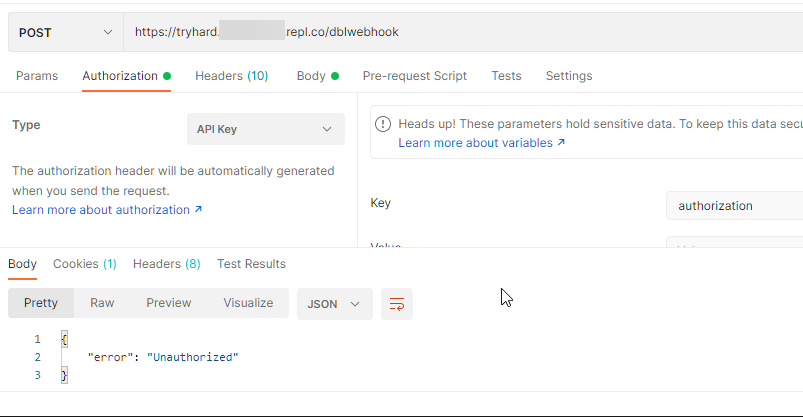
🤔 what are the odds the code is just erroring?
https://i.imgur.com/zN7vO3n.png
 jaunty plank
if I add the authorization it doesnt error
since user may not be cached
const user = client.users.cache.get(vote.user)
plucky lance
* connect to 35.186.245.55 port 5000 failed: Timed out
* Failed to connect to tryhard.zeinfarran7.repl.co port 5000: Timed out
* Closing connection 0
curl: (7) Failed to connect to tryhard.zeinfarran7.repl.co port 5000: Timed out
The port ain't correct anyways
jaunty plank
I mean, { error: "Unauthorized" }) is the standard error for the library if you don't provide the header
https://github.com/top-gg/node-sdk/blob/master/src/structs/Webhook.ts#L68
which is what I'm getting when sending the request without the header.
GitHub
An official module for interacting with the Top.gg API - node-sdk/Webhook.ts at master · top-gg/node-sdk
I think the codes just erroring
plucky lance
Probably caused by the rest of the code
Just try the webhook listener in a standalone file without all your other code
jaunty plank
probably this actually.
    if (!user){
  return
}
just to clarify, this seems to be the correct webhook url.
the auth is set on line 1356
The issue likely is that you are assuming the user is in cache(not guaranteed), if they are not in cache you are just returning, which means you have no way of validating if you are receiving the webhook.
adding a log
console.log("Received a vote!", vote) to the first line of the vote event & configuring the webhook to the correct url(replied to) and auth.
then save, refresh page and hitting "test webhook" should log "Received a vote!" and the vote data in the replit console.
lean tinsel
This problem was encountered when I used the special package for your site.
is there a solution?
 rain heart
use a different port, 3000 is already used
 distant oak
why people never read the error
 distant oak
ye
lean tinsel
rain heart
use a different port, 3000 is already used
what do i put
rain heart
anything that is not used yet
lean tinsel
rain heart
anything that is not used yet
Do you have options to put?
rain heart
anything between 1025 and 25565
distant oak
a very large range of numbers

 pale coral
Ok
lean tinsel
rain heart
anything between 1025 and 25565
They all don't work
rain heart
am sure you didnt check all of them, what error are you getting
restive otter
rain heart
am sure you didnt check all of them, what error are you getting
can shards cause it?
because i've the same issue
rain heart
If you're providing webhooks for every single shard, then you should recode your whole webhook setup
you wont need it on each shard
agile isle
jaunty plank
just to clarify, this seems to be the correct webhook url.
the auth is set on li...
ok tysm u and @plucky lance
@jaunty plank found error but need help
and @plucky lance if u guys can
vote object is empty

 sour trail
Is there a way for me to check, whether my bot is temporarily banned from the api?
Because I receive 401 responses: "Unauthorized" for every request.
I also tried to regenerate the token, but it didn't help either.
Webhooks still work btw
rain heart
Refresh the page after regenerating the token
Then copy that token, the first part will look the same so don't just go "it won't work" visually
sour trail
I already did that. I regenerated the token, refreshed the page and copied the new token into my program but it didn't change anything.
agile isle
agile isle
vote object is empty
@rain heart
rain heart
Wait for someone who can help
agile isle
ok ty
rain heart
sour trail
I already did that. I regenerated the token, refreshed the page and copied the n...
Then you're not properly passing the token into the constructor
sour trail
I am and it has worked for months but suddenly I only received 401 responses. :/
I just regenerated the token once again - the bot will be trying to update his guild count in 10 minutes - hopefully it is just going to work now even though I didn't change anything :D
sour trail
I usually use an env, yes, but last time I just pasted the String directly into the constructor
Unfortunately nothing changed with the new token...
I'll just try to post my stats directly and not via the library; idk what else to do
rain heart
Try pasting the new token into the constructor directly
sour trail
Yeah that's what I have tried
sour trail
Okay, I'll do that, thanks for your effort!
sour trail
oof well, I just replaced the whole DBL-Java-Library with "own" posts to the api and it finally works
I don't know what I did wrong with the library, because I have used it for weeks and everything has worked fine...
The main thing is that works now 👍
rain heart
plucky lance
agile isle
vote object is empty
You may wanna fix all the errors before going on.
Not sure if there are some related to the webserver or not but they may have an impact.
And please show the code again associated with the webhook listener
agile isle
plucky lance
You may wanna fix all the errors before going on.
Not sure if there are some rel...
wdym ''show the code again associated with the webhook listener"
@rain heart may i ask what is the latest version of topgg package
wait sorry he wont help nvm
plucky lance
agile isle
wdym ''show the code again associated with the webhook listener"
Just show what you changed at your code.
Do you use the latest topgg package?
agile isle
plucky lance
Just show what you changed at your code.
Do you use the latest topgg package?
what is it
agile isle
plucky lance
Just show what you changed at your code.
Do you use the latest topgg package?
legit just added js console.log('Recived a vote!', vote) at the first line in my vote event
plucky lance
The one you can find in the docs
The mentioned JS library
Just show the code
The webhook listener
tidal idol
poor fake 
plucky lance
Calm no need to ping me in any message
plucky lance
tidal idol
poor fake <:KEKW:727825308404940800>


Well
Can’t open that on mobile anyways
agile isle
welp
brb
const Topgg = require('@top-gg/sdk')

const webhook = new Topgg.Webhook('TryHardd')


app.post("/dblwebhook", webhook.listener(vote => {
  console.log('Recived a vote!', vote)
  // vote will be your vote object, e.g
  const user = client.users.cache.get(vote.user)
    if (!user){
  return
} else {
  const embedE = new MessageEmbed()
  .setTitle('VOTING SYSTEM')
.addField(`Thanks <@!${vote.user}> for voting`,`You got 5000 coins as for now this is the only voting reward join the support server and tell us some suggestions`)
      user.send({ embeds: [embedE]})
  db.add(`money_${vote.user}`, 5000)

  console.log(vote) // 395526710101278721 < user who voted\


} // You can also throw an error to the listener callback in order to resend the webhook after a few seconds
}))``` plucky lance
1st thing is user from cache or return
Users are most likely not cached
So fetch them instead
plucky lance
The password you entered here and on topgg are identical?
agile isle
yes
plucky lance
Did you try a real vote or the test button?
agile isle
test button
plucky lance
Hmm try an actual vote
agile isle
hmmm wait
plucky lance
Who knows if that thing is working anyways
agile isle
brb
plucky lance
And just take a look into the webserver logs
lapis vessel
lapis vessel
```
webhook.listener(vote => {
// vote will be your vote object, e.g
console...
it doesnt log when i vote
 agile isle
plucky lance
And just take a look into the webserver logs
agile isle
plucky lance
And just take a look into the webserver logs
nothing there
whats the npm url for the package
lapis vessel
lapis vessel
it doesnt log when i vote
anyone?
agile isle
give full code
lapis vessel
agile isle
give full code
AutoPoster(process.env.topgg_token, client)
  .on('posted', () => {
    console.log('Posted stats to Top.gg!')
  })
module.exports = client;

webhook.listener(vote => {
  // vote will be your vote object, e.g
  console.log(vote.user)
})
this is my webhook
 agile isle
lapis vessel
this is my webhook
agile isle
lapis vessel
this is my webhook
webhook url wrong
lapis vessel
agile isle
webhook url wrong
ok wht shld i enter
agile isle
check the npmjs docs
lapis vessel
agile isle
check the npmjs docs
of?
agile isle
package
lapis vessel
agile isle
package
top.gg sdk or auto poster?
 agile isle
lapis vessel
ok i should replay ```your.server.ip``` with mine?
agile isle
lapis vessel
ok i should replay ```your.server.ip``` with mine?
yes
and :3000 with ur port
plucky lance
agile isle
nothing there
I assume it has to do with the rest of your code then
Try to start the webhook listener separately in a file without any other code related to it
Then start it, then try the test vote button after hitting save
sour trail
rain heart
https://discord.com/channels/264445053596991498/762176075387240499/9566366749542...
I don’t have access to chat channel - what does it say there?
rain heart
Oh whoops, 3 am me didn't realize that's a message in a staff channel
One of the upcoming maintainers of the java package noticed that the package still used discordbots.org, which caused issues after a recent change on the domain
scarlet cobalt
One message removed from a suspended account.
rain heart
Or who noticed it?
scarlet cobalt
One message removed from a suspended account.
scarlet cobalt
One message removed from a suspended account.
sour trail
ohh thank you a lot!
scarlet cobalt
One message removed from a suspended account.
sour trail
then I'll maybe switch back to the library
scarlet cobalt
One message removed from a suspended account.
One message removed from a suspended account.
One message removed from a suspended account.
sour trail
alright xD
scarlet cobalt
One message removed from a suspended account.
sour trail
perfect 

 coral kernel
Can I somehow remove the server count for my bot or is that not possible?
tidal idol
coral kernel
Can I somehow remove the server count for my bot or is that not possible?
I believe you can post null or “0” as the count
 rugged dirge
"remove it" by editing it with css
scarlet cobalt
One message removed from a suspended account.
 hollow ridge
where can i get my api key?
dim kettle
hollow ridge
where can i get my api key?
Under the webhook section of your approved bot
So you need to have an approved bot on the site
 fresh moon
Hey
agile isle
plucky lance
Try to start the webhook listener separately in a file without any other code re...
hmm ok wait
layter im lazy atm
 viral mason
Hello, I have just made a test of the api top gg and in the answer there is certifiedBot: false, whereas my bot checks discord, is it normal?
=> https://top.gg/api/bots/822106553183502358 with axios
dim kettle
viral mason
Hello, I have just made a test of the api top gg and in the answer there is `cer...
certifiedBot boolean The certified status of the bot
That is a depricated feature. In the good old days you could have a Top.gg certified bot and get features like a vanity URL
This no longer exsist
viral mason
dim kettle
> certifiedBot boolean The certified status of the bot
That is a depricate...
ah right, this is not the verification of discord
thank you for your help 
dim kettle
Np
 shut mauve
Can I make (python) vote detection using a topgg token instead of a webhook?
agile isle
shut mauve
Can I make (python) vote detection using a topgg token instead of a webhook?
i think not as token is only for auto post
@dim kettle right?
tidal idol
shut mauve
Can I make (python) vote detection using a topgg token instead of a webhook?
the token is only for authenticating requests like posting bot data
so isn't relevant in this case
dim kettle
shut mauve
I just cant figure out how webhooks work
Think of it as a API call to your servers
So Top.gg sends you a POST request (pretty much the oposit of what you do when sending a POST request to Discords/Top.gg API)
Basically you need a API endpoint for Top.gg to call
No idea of a good Python based web/api server/middleware. So you may want to research what others use
If you want a really hacky solution, you could in theory use https://docs.top.gg/api/bot/#individual-user-vote
Then whenever someone votes, they would run a /claimvote command. You then call the https://top.gg/api/bots/:bot_id/check with the userId param to see if they have voted
tidal idol
https://webhook-topgg.com is great too @shut mauve
Simplifying top.gg webhooks for all users, allowing non-developers and developers to use webhooks for their bot and server without confusing configuration.
 thorny lantern
hi i can get the link i want to setup the vote ping message for discord bot and server were i put the webhook
-ticket
jaunty plank
thorny lantern
hi i can get the link i want to setup the vote ping message for discord bot and ...
I'm sorry, what are you looking for?
Making your webhook url to your bots server?
 mortal herald
Hi, I'm using the dotnet sdk (https://github.com/top-gg/dotnet-sdk) to update the server count, and I call UpdateStatsAsync() (I coded that like 2 years ago, and never touched it), but all of a sudden it stopped working. I tried refreshing the token on top.gg. Everything works in the code, but the count is not updated. Any ideas?
 untold venture
how would i make a vote-role reward?
mortal herald
mortal herald
Hi, I'm using the dotnet sdk (https://github.com/top-gg/dotnet-sdk) to update th...
anyone?
jaunty plank
mortal herald
Hi, I'm using the dotnet sdk (https://github.com/top-gg/dotnet-sdk) to update th...
is it possible you havent updated the library in a few years?
if you havent updated since 2019 it wont work anymore, as discordbots.org no longer functions with the api.
https://github.com/top-gg/dotnet-sdk/commit/cbe7b642aceae83fd50acfa6538f1d2ee1de6fc4
 mortal herald
jaunty plank
is it possible you havent updated the library in a few years?
if you havent upd...
mortal herald
jaunty plank
is it possible you havent updated the library in a few years?
if you havent upd...
I'm using the latest version

this is my code, nothing has changed since it was working:

 sage raft
well i think i might need some help from the one who actually made the python lib
jaunty plank
the person who made the py lib doesnt really come here
rain heart
mortal herald
this is my code, nothing has changed since it was working:
what does the DiscordBotListAPI.baseEndpoint or something like that return you
if it is not top.gg/api, then you're still on an older version
scarlet cobalt
One message removed from a suspended account.
One message removed from a suspended account.
One message removed from a suspended account.
One message removed from a suspended account.
rain heart
or actually providing an invalid token/passing it wrong
mortal herald
rain heart
what does the `DiscordBotListAPI.baseEndpoint` or something like that return you
I'll check it out tomorrow and reply to you here. I'm on mobile rn
I don't think I'm using an older version because the code doesn't even fail. I've debugged it.
 plain panther
rain heart
plain panther
rain heart
theres not at the moment
rain heart
mortal herald
I don't think I'm using an older version because the code doesn't even fail. I'v...
then im not sure what you're referring to with count not updating
 cedar drift
hi
rain heart
-api
abstract mothBOT
This channel is ONLY for the Top.gg API!
This channel is only for: suggestions/help/bugs to do with official API libraries and API docs found at: https://docs.top.gg
Any Off-Topic conversation may get deleted and muted.
If you need help with development about your bot or development in general, feel free to use #development.
mortal herald
I'm gonna debug it again tomorrow and come back here if I can't find the issue, if that's ok
 heavy crater
I want to post servers
on the top.gg site
how do I?
<@&817055174613794826>
//topgg
AutoPoster('topgg token', client)
  .on('posted', () => {
    console.log('Posted stats to Top.gg!')
})```I did this
and not got any errors but I am not able to see stats
rain heart
-servercount
abstract mothBOT
To have your bot's server count displayed on Top.gg, please read the documentation on server/shard posting.
sullen nymph
jaunty plank
the person who made the py lib doesnt really come here
@sage raft norizon does not use Discord anymore
What do you need help with?
As such, there is no maintainer for topggpy
 lapis maple
any sample python codes that the bot sends a message in a channel when a user votes the bot? 🙏
sullen nymph
https://github.com/shivaco/DBL-python-async-webserver If you're not using topggpy

GitHub
An aiohttp webserver made for usage in discord.py bot cogs to keep track of upvoters. - GitHub - shivaco/DBL-python-async-webserver: An aiohttp webserver made for usage in discord.py bot cogs to ke...
mortal herald
rain heart
what does the `DiscordBotListAPI.baseEndpoint` or something like that return you
Hey, it's me again. Here's what AuthDiscordBotListApi.baseEndpoint has when debugging:

Plus, I'm using version 1.5.0 so I don't think that's the problem. And the self object contains all the correct information about my bot.
What else can I check?
scarlet cobalt
One message removed from a suspended account.
One message removed from a suspended account.
One message removed from a suspended account.
rain heart
Could you make a short version of the API wrapper yourself using requests? Perhaps requests from your server are being blocked
And do you get ANY errors?
mortal herald
rain heart
And do you get ANY errors?
no errors at all
the counter just doesn't update
mortal herald
rain heart
Could you make a short version of the API wrapper yourself using requests? Perha...
I'd rather avoid that, but that's my plan B in case I can't make the library work at all
restive otter
-autoposter
Oh…
I wanna prepare for my bot being on topgg
Anyone can help me with the api?
rain heart
You need an approved bot on the site in order to use the api
restive otter
Okay
lapis maple
sullen nymph
https://github.com/shivaco/DBL-python-async-webserver If you're not using topggp...
what should i put in webserver_password?
sullen nymph
lapis maple
what should i put in `webserver_password`?
It's the authentication field, so anything you want it to be
As long as it's a string
lapis maple
sullen nymph
https://github.com/shivaco/DBL-python-async-webserver If you're not using topggp...
is MongoClient() necessary in the code?
or is it just for saving the records
lapis maple

rain heart
total votes, through the bot endpoint, and specific users is not possible
has to be done through tracking with your own webhook
agile isle
plucky lance
Try to start the webhook listener separately in a file without any other code re...
now it does not work at all
@rain heart i found my problem but idk how to fix can u help by any chance?
plucky lance
I’ve literally no clue what you did and how it looks like at the moment
Keep in mind we don’t have a magical glass ball
What’s your current code?
Where do you host it?
What works/isn’t working?
scarlet cobalt
One message removed from a suspended account.
scarlet cobalt
plucky lance
Keep in mind we don’t have a magical glass ball
One message removed from a suspended account.
One message removed from a suspended account.
 fluid venture
lmao
 teal river
do I have to define the AutoPoster of the topgg-autoposter (node.js) after the discord.js client is initialized?
agile isle
scarlet cobalt
One message removed from a suspended account.
fact
agile isle
plucky lance
What’s your current code?
Where do you host it?
What works/isn’t working?
my current code: will get it in a sec
host: replit u know
before u told me to put the code in a separatly file my vote object was empty now when i did put it in a separatly file it does not trigger at all
const { client } = require('./client')

const express = require('express')
const app = express()

const Topgg = require('@top-gg/sdk')

const webhook = new Topgg.Webhook('TryHardd')


app.post("/dblwebhook", webhook.listener(vote => {
  console.log('Recived a vote!', vote)
  // vote will be your vote object, e.g
  const user = client.users.cache.get(vote.user)
    if (!user){
  return
} else {
  const embedE = new MessageEmbed()
  .setTitle('VOTING SYSTEM')
.addField(`Thanks <@!${vote.user}> for voting`,`You got 5000 coins as for now this is the only voting reward join the support server and tell us some suggestions`)
      user.send({ embeds: [embedE]})
  db.add(`money_${vote.user}`, 5000)

  console.log(vote) // 395526710101278721 < user who voted\


} // You can also throw an error to the listener callback in order to resend the webhook after a few seconds
}))```ik i am missing the const db
plucky lance
Do you start the webserver somewhere?
plucky lance
I can’t find that line and the port you’re binding it to
agile isle
rain heart
you're initializing a new express session
so js const app = require('./index') //where i have my main express session
rain heart
 dunno js, thats at least how express works with initializing
 agile isle
const { client } = require('./client')

const express = require('express')
const app = require('./index')
const db = require('quick.db')
const Topgg = require('@top-gg/sdk')

const webhook = new Topgg.Webhook('TryHardd')


app.post("/dblwebhook", webhook.listener(vote => {
  console.log('Recived a vote!', vote)
  // vote will be your vote object, e.g
  const user = client.users.cache.get(vote.user)
    if (!user){
  return
} else {
  const embedE = new MessageEmbed()
  .setTitle('VOTING SYSTEM')
.addField(`Thanks <@!${vote.user}> for voting`,`You got 5000 coins as for now this is the only voting reward join the support server and tell us some suggestions`)
      user.send({ embeds: [embedE]})
  db.add(`money_${vote.user}`, 5000)

  console.log(vote) // 395526710101278721 < user who voted\


} // You can also throw an error to the listener callback in order to resend the webhook after a few seconds
}))

app.listen(5000)``` my edited code@plucky lance
agile isle
jaunty plank
🤔 what are the odds the code is just erroring?
https://i.imgur.com/zN7vO3n.png
what is this website i need it
rain heart
thats postman
agile isle

Postman
Postman is an API platform for building and using APIs. Postman simplifies each step of the API lifecycle and streamlines collaboration so you can create better APIs—faster.
ok it is i think
is it?
jaunty plank
I use the app.
agile isle
ah
jaunty plank
The site doesn't work as well
jaunty plank
I'm out of town until Tuesday
agile isle
ok
plucky lance
I’m back
agile isle
ok
plucky lance
What’s going on
agile isle
my edited code: ```js
const { client } = require('./client')
const express = require('express')
const app = require('./index')
const db = require('quick.db')
const Topgg = require('@top-gg/sdk')
const webhook = new Topgg.Webhook('TryHardd')
app.post("/dblwebhook", webhook.listener(vote => {
console.log('Recived a vote!', vote)
// vote will be your vote object, e.g
const user = client.users.cache.get(vote.user)
if (!user){
return
} else {
const embedE = new MessageEmbed()
.setTitle('VOTING SYSTEM')
.addField(Thanks <@!${vote.user}> for voting,You got 5000 coins as for now this is the only voting reward join the support server and tell us some suggestions)
user.send({ embeds: [embedE]})
db.add(money_${vote.user}, 5000)
console.log(vote) // 395526710101278721 < user who voted\
} // You can also throw an error to the listener callback in order to resend the webhook after a few seconds
}))
app.listen(5000)```
idk if its correct
plucky lance
Stop including your index
I said you should test this code as standalone code
No need to import the client, the database etc
agile isle
plucky lance
I said you should test this code as standalone code
wdym? like on a new port alone?
plucky lance
Just test the code as you can find it in the api docs
plucky lance
I mean I told you your code might be the issue and you included the code into this
agile isle
what is this defined as?
plucky lance
Wut?
agile isle
"I mean I told you your code might be the issue and you included the code into this"
wdym this?
@plucky lance
btw i added my code in my main file again and it trigger but my vote object is empty
 flint musk
plucky lance
agile isle
btw i added my code in my main file again and it trigger but my vote object is e...
flint musk
plucky lance
agile isle
btw i added my code in my main file again and it trigger but my vote object is e...
Just just the provided code from the docs to test the functionality
agile isle
ok wait
plucky lance
You don’t need your client or database etc
Just test this code with a different port
agile isle
plucky lance
Just test this code with a different port
i cannot bc replit only support one port
plucky lance
Well then disable the other webserver meanwhile
agile isle
ok
plucky lance
Press save before hitting the test button as always
agile isle
plucky lance
Press save before hitting the test button as always
same my vote object is empty and i ran it in a separat file it does not trigger at all
plucky lance
The webserver is running?
 vestal flax
I am just trying to post my server stats and getting unauthorized, but the token is the same as on the webhooks page, what's the probe?
tidal idol
vestal flax
I am just trying to post my server stats and getting unauthorized, but the token...
try regenerating token
vestal flax
regenerated 2 times in a row and still nothing
tidal idol
have the tokens changed on the site
vestal flax
yep
tidal idol
odd
vestal flax
oh wait
it doesn't show full
hm
the token was different from the actual text area and value of the element
mysterious
but it works now
thanks
plucky lance
Try a doing a post request do your endpoint using curl
And watch if your webserver log shows the request
agile isle
plucky lance
Try a doing a post request do your endpoint using curl
wdym?
plucky lance
Try doing a manual request to your endpoint
To see if you can reach it
I doubt topgg is the issue here, everyone else is receiving his webhooks
scarlet cobalt
One message removed from a suspended account.
One message removed from a suspended account.
One message removed from a suspended account.
One message removed from a suspended account.
 cunning sonnet
Well fae I'm glad you remembered to update me
Thanks
And hope your irl stuff works out
scarlet cobalt
One message removed from a suspended account.
cunning sonnet
scarlet cobalt
One message removed from a suspended account.
I'll try it out later
scarlet cobalt
One message removed from a suspended account.
wise onyx
scarlet cobalt
One message removed from a suspended account.
thanks for getting it fixed!
scarlet cobalt
One message removed from a suspended account.
One message removed from a suspended account.
One message removed from a suspended account.
wise onyx
I wasn't I just switched to manual API requests lol
scarlet cobalt
One message removed from a suspended account.
wise onyx
I'll give it a try rq if you'd like
scarlet cobalt
One message removed from a suspended account.
wise onyx
2.1.0 doesn't work
it builds but there's no DiscordBotListAPIImpl class for some reason
scarlet cobalt
One message removed from a suspended account.
One message removed from a suspended account.
One message removed from a suspended account.
One message removed from a suspended account.
scarlet cobalt
One message removed from a suspended account.
One message removed from a suspended account.
wise onyx
it works with 2.0.1 still so I think there's an issue
scarlet cobalt
One message removed from a suspended account.
One message removed from a suspended account.
One message removed from a suspended account.
wise onyx
sounds good! hopefully it won't be too difficult to fix
scarlet cobalt
One message removed from a suspended account.
wise onyx
it seems to resolve it
scarlet cobalt
One message removed from a suspended account.
wise onyx
because if I do 2.1.1 it says it can't resolve
scarlet cobalt
One message removed from a suspended account.
One message removed from a suspended account.
One message removed from a suspended account.
wise onyx
yeah I'm just saying it's definitely up there, it must be something else causing it
scarlet cobalt
One message removed from a suspended account.
wise onyx
could updating the dependencies have caused issues if I'm using an older version of anything?
scarlet cobalt
One message removed from a suspended account.
One message removed from a suspended account.
One message removed from a suspended account.
One message removed from a suspended account.
One message removed from a suspended account.
wise onyx
I'd personally be more apt to blame the tool itself rather than the dependencies, but who knows honestly
scarlet cobalt
One message removed from a suspended account.
wise onyx
I'm not sure what tool is used to publish it but if you have to do any compilation or anything, or if there are any build instructions I could easily see something getting messed up there just because that stuff never just works how it's supposed to
scarlet cobalt
One message removed from a suspended account.
One message removed from a suspended account.
One message removed from a suspended account.
One message removed from a suspended account.
One message removed from a suspended account.
One message removed from a suspended account.
One message removed from a suspended account.
wise onyx
could very well be
scarlet cobalt
One message removed from a suspended account.
restive otter
Hi if my bot have shard I still use js const { AutoPoster } = require('topgg-autoposter') const poster = AutoPoster('topggtoken', client) // your discord.js or eris client // optional poster.on('posted', (stats) => { // ran when succesfully posted console.log(`Posted stats to Top.gg | ${stats.serverCount} servers`) })?
wise onyx
the newest eclipse is completely broken (unless they updated it in the past month) so I don't even know what my versions are
scarlet cobalt
One message removed from a suspended account.
restive otter
Anyone please
scarlet cobalt
restive otter
Anyone please
One message removed from a suspended account.
wise onyx
well I'm not sure how javascript does it specifically but to post your stats when you're sharded you have to provide a list
so instead of just "I have 1,550 servers" it's "I have a list of [750,800]" servers
restive otter
Hmm...
wise onyx
scarlet cobalt
One message removed from a suspended account.
I'm pretty sure it doesn't, at least, java 17 programs can't run unless you have java 17 installed
scarlet cobalt
One message removed from a suspended account.
wise onyx
my stuff all gets built for really old versions still because java is really horrific with updates
they release new updates but don't at the same time
scarlet cobalt
One message removed from a suspended account.
scarlet cobalt
One message removed from a suspended account.
scarlet cobalt
One message removed from a suspended account.
One message removed from a suspended account.
wise onyx
I literally just installed this and it's already outdated
lovely
hey maybe that means there's a newer version of eclipse that isn't completely screwed up
I can hope
restive otter
wise onyx
thing is I'm running java 17 I'm pretty sure
The latest version of Java is Java 18 or JDK 18 released on March, 22nd 2022
wise onyx
that explains it
scarlet cobalt
One message removed from a suspended account.
One message removed from a suspended account.
wise onyx
👍
restive otter
restive otter
Hi if my bot have shard I still use ```js
const { AutoPoster } = require('topgg-...
Anyone
scarlet cobalt
wise onyx
hey maybe that means there's a newer version of eclipse that isn't completely sc...
One message removed from a suspended account.
restive otter
scarlet cobalt
One message removed from a suspended account.
Can you help now
wise onyx
restive otter
Anyone
https://www.npmjs.com/package/topgg-autoposter it seems pretty clear on this website, it handles all the sharding stuff automatically, you don't need to do anything different

npm
Auto-Poster for Top.gg. Latest version: 2.0.1, last published: 5 months ago. Start using topgg-autoposter in your project by running npm i topgg-autoposter. There is 1 other project in the npm registry using topgg-autoposter.
scarlet cobalt
One message removed from a suspended account.
One message removed from a suspended account.
restive otter
wise onyx
https://www.npmjs.com/package/topgg-autoposter it seems pretty clear on this web...
What about this js const sharder = new Discord.ShardingManager(...) const poster = AutoPoster('topggtoken', sharder) sharder.spawn()
wise onyx
scarlet cobalt
One message removed from a suspended account.
I'll stick with my 5 step process to build and copying old projects to make new ones for now because I don't feel like re-installing to discover the new version is even more broken 😄
scarlet cobalt
One message removed from a suspended account.
wise onyx
well as it says on the website, if you use a traditional discord.js shardingmanager then you need to use that
so in your code if you make one of those objects to start your bot
then yes, you need to use that
wise onyx
I'm not sure how discord.js handles it exactly but it should either be something like:
let b = new Builder("token")
or
let b = new ShardBuilder("token")
restive otter
Oh it comes now thx
wise onyx
alright nice!
 restive patio
hello, i wanna get some help in here with topgg webhook
const Topgg = require("@top-gg/sdk")
const express = require("express")
const app = express();
const webhook = new Topgg.Webhook("my token here(from website)")
app.post("/dblwebhook", webhook.listener(vote => {
    console.log(vote)
}))
app.listen(6974, "0.0.0.0", null, () => {
    console.log("listening on port 6974")
})
this is the current code i have, and a configuration in website with
http://my-ip-adress:6974 (ive also tried
http://my-ip-adress:6974/dblwebhook and https with ssl settings, but none of this worked)
sudo iptables -L INPUT --line-numbers
Chain INPUT (policy ACCEPT)
num  target     prot opt source               destination
1    ACCEPT     tcp  --  anywhere             anywhere             tcp dpt:6974```
am pretty sure that i opened port 6974, would there be smth more i should do?Your default input policy is accept, means you don’t actually need that rule unless you change the policy
Overall it looks accurate
Where do you host that code on?
At home?
restive patio
in vps, ubuntu 20.04
ah i just noticed that i pushed repo on other vps 
was just viewing codes over and over to find a mistake
im so dumb 😭
well i still got a problem, sending/receiving test is working well but actual vote doesnt get logged
plucky lance
uhmm... that's weird and sounds like an internal issue of topgg
You may try another vote at another time
scarlet cobalt
mortal herald
I'm using the latest version
One message removed from a suspended account.
One message removed from a suspended account.
One message removed from a suspended account.
One message removed from a suspended account.
scarlet cobalt
One message removed from a suspended account.
mortal herald
May that be the problem?
scarlet cobalt
One message removed from a suspended account.
One message removed from a suspended account.
mortal herald
🤔
scarlet cobalt
One message removed from a suspended account.
One message removed from a suspended account.
scarlet cobalt
One message removed from a suspended account.
mortal herald
np 🙂
tidal idol
https://docs.top.gg if you want to code a solution
https://webhook-topgg.com if you want a simple to setup solution

Simplifying top.gg webhooks for all users, allowing non-developers and developers to use webhooks for their bot and server without confusing configuration.
restive otter
Thanks
 grave ridge
how does get_bot_votes() work?
grave ridge
does it not work for bots with more than 1000 upvotes a month?

 old kernel
app.post("/vote", dbl.listener(), (req, res) => {
i want that my bot will listen topgg api by req and res method
how can i do
?
 arctic rivet
Anyone know how i check the user is voted or not in topggpy
 wild slate
is there any update on the java issue of seeing if somebody has voted?
grave ridge
when i try get_bot_info() on a test bot it works, but the command having get_bot_info() does not complete on my main bot
rain heart
Elaborate not complete
rain heart
wild slate
is there any update on the java issue of seeing if somebody has voted?
Wdym issue, the Library should still work fine
wild slate
rain heart
Wdym issue, the Library should still work fine
Several people reported a 401 unauthorized issue in the past few weeks when trying to see if a user has voted, despite them having the correct tokens and having no changes on their end, I also am having the same issue when trying this
tidal idol
wild slate
Several people reported a 401 unauthorized issue in the past few weeks when tryi...
Do you have an approved bot?
 urban edge
tidal idol
Do you have an approved bot?
urban edge
tidal idol
Do you have an approved bot?
yes, I'm on my other disc account now
tidal idol
try resetting your token
also i'd recommend not checking if they voted using the API, and instead having a database which logs who voted
On vote, send to webhooks --> get userid and get the current timestamp --> store in database
Then to get if they can vote, get their latest vote from the db, check if 43200 has passed, if it has then they can vote again/needs to vote, if not then they can't vote again/has voted already
rain heart
wild slate
Several people reported a 401 unauthorized issue in the past few weeks when tryi...
There was an issue with the old domain, which was fixed
Make sure you're using the newest version, aka the one currently on the repo
Refer to pins on how to do that
urban edge
rain heart
Refer to pins on how to do that
I'm currently using maven to import and it can't resolve either com.github.top-gg:java-sdk:19abf19 (in the pins) or com.github.DiscordBotList:DBL-Java-Library:2.1.1 (the latest release)
rain heart
import it using jitpack
https://jitpack.io/#top-gg/java-sdk/a3a7508fc8

jitpack
JitPack makes it easy to release your Java or Android library. Publish straight from GitHub or Bitbucket.
urban edge
rain heart
import it using jitpack
https://jitpack.io/#top-gg/java-sdk/a3a7508fc8
I don't think it's publishing to Maven looking at the 2.1.1 logs on jitpack (same with 2.1.0), I can import 2.0.0 and 2.0.1 without any issues
rain heart
The SDK is not on maven is the thing
Older versions probably were, use jitpack instead as the fix was only on the repo itself
urban edge
rain heart
Older versions probably were, use jitpack instead as the fix was only on the rep...
Using the 2.1.1 dependency+repository tags provided on the jitpack website in my pom I still get the
Cannot resolve com.github.DiscordBotList:DBL-Java-Library:2.1.1
rain heart
replace the whole line, DBL-Java-Library is not even a thing anymore
dont forget to reload the maven afterwards
it should be this
 urban edge
rain heart
it should be this
urban edge
rain heart
it should be this
I'm using the mvn tags not the gradle way (both should work though right?) and after importing and trying to build I still get
Cannot resolve com.github.top-gg:java-sdk:a3a7508fc8
rain heart
And you've added the maven repo for jitpack too?
urban edge
yeh I have
scarlet cobalt
One message removed from a suspended account.
 young acorn
top gg keeps retrying webhook even when i return status code 200, is this happening to someone else too or is it just me?
tidal idol
how fast are you returning the status 200
it might just be retrying because the webhook isn't responding quickly enough
urban edge
scarlet cobalt
One message removed from a suspended account.
hey, so yea that's what I thought after having a look but I'm getting issues trying to use the maven tags to import it despite using the templates from jitback (both the java-sdk a3a7508fc8 and java-sdk 2.1.1), they both can't be resolved, but it works fine for importing the 2.0.1 and 2.0.0 version
scarlet cobalt
One message removed from a suspended account.
One message removed from a suspended account.
One message removed from a suspended account.
young acorn
tidal idol
it might just be retrying because the webhook isn't responding quickly enough
ah
that might be the reason
thanks 
 feral palm
How can I create a webhook?
When I want to interact with the API to be able to see and confirm that a user voted for my bot, it doesn't let me, does anyone know why?
plucky lance
You don't create a webhook, but receive them from topgg
feral palm
plucky lance
You don't create a webhook, but receive them from topgg
what?
What do you mean?
feral palm
plucky lance
You wanna receive webhooks from topgg when somebody votes?
yes
how can I do it?
plucky lance
Well then create a webhook listener your own or use the topgg sdk one you can find in the docs
You got these two options
feral palm
plucky lance
Well then create a webhook listener your own or use the topgg sdk one you can fi...
How can I create my own webhook listener?
plucky lance
well depends on the language you're using
feral palm
plucky lance
well depends on the language you're using
what language do you recommend?
plucky lance
lol, the one you're familiar with and want/need to use
feral palm
ty
plucky lance
Once you received the webhook, you can use your djs client to fetch the user (topgg sends as body with the webhook) and do whatever you want to do
feral palm
plucky lance
Once you received the webhook, you can use your djs client to fetch the user (to...
const Topgg = require("@top-gg/sdk")
const express = require("express")

const app = express()

const webhook = new Topgg.Webhook("link")

app.post("/dblwebhook", webhook.listener(vote => {

    console.log(vote.user)

}))

app.listen(80)
So?
plucky lance
Make sure the port 80 is not already taken
Should probably choose a non-reserved one, like 5000 for example
Depending on where you host it make sure incoming connection on that port (TCP) can pass your firewall
(or when hosted at home, the router forwards the port to your local device)
 serene roost
okay, so i am pretty much having the same issue as the guy above - trying to successfully receive webhooks from top.gg. using the sdk but i dont see anything coming through, either from the send test option in the dashboard or from a normal vote. i am using a Vultr VPS and included the IP address found in the Vultr dashboard in the webhook URL (which is blurred). what am i doing wrong? is anyone spotting any issues with my snippet of code or the formatting of the URL?


here's the code in text format:
const Topgg = require("@top-gg/sdk");
const express = require("express");

const app = express();

const webhook = new Topgg.Webhook("my auth");

app.post("/dblwebhook", webhook.listener(vote => {
      // console.log(vote.user); // this is the user id
    console.log("Webhook received");
    console.log(vote);
}));

app.listen(5000);
Make sure to press save before using the test button
And make sure there's no firewall blocking the incoming request
serene roost
no firewall is setup on the VPS
and i did press save 
but unfortunately still nothing
plucky lance
Some providers also put a firewall in front of their virtual servers
Make sure in your dashboard there's none in place
Once the server is running you can test it yourself, using curl for example
serene roost
plucky lance
Make sure in your dashboard there's none in place
there is none.
 plucky lance
curl -v -X POST http://your-endpoint.com/dblwebhook -d "test1=val"
ok then send a manual request to your endpoint
to see if you can reach it
Oh... I'm missing the port in the URL
serene roost
thats alright, i included it in there. it timed out.
*   Trying [my IP]:5000...
* connect to [my IP] port 5000 failed: Timed out
* Failed to connect to [my IP] port 5000 after 21029 ms: Timed out
* Closing connection 0
curl: (28) Failed to connect to [my IP] port 5000 after 21029 ms: Timed out
Just edit the listener to log requests, please
app.post("/dblwebhook", webhook.listener(vote => {
      // console.log(vote.user); // this is the user id
    console.log("Webhook received");
    console.log(vote);
}));
to
app.post("/dblwebhook", (req, res) => {
    console.log(req);
}));
and do the request again
to see if something gets logged
serene roost
okay, thanks. same timeout error and nothing logged.
suppose it has to be some sort of firewall from Vultr itself, i guess, since no connection is made at all.
plucky lance
Yeah there's no other reason then
serene roost
thanks for your help! hopefully ill figure this out
plucky lance
sure np
plucky lance
serene roost
thanks for your help! hopefully ill figure this out
are you actually sure the app is running at all?
serene roost
plucky lance
are you actually sure the app is running at all?
i am sure, yes
plucky lance
hmm you can try a different port
if you got no webserver running, try port 80
that shouldn't be restricted
const express = require('express')
const app = express()
const port = 80

app.get('/dblwebhook', (req, res) => {
  console.log(req, res);
})

app.listen(port, () => {
  console.log(`Example app listening on port ${port}`)
})
and get as method not post
the curl request would then look like curl -v http://your-endpoint.com/dblwebhook
 vast umbra
Does anyone have an example of data top.gg sends to your webhook? Because if I understand correctly the data is just;
{
  "bot": 1223,
  "user": 2334,
  "type": "upvote",
  "isWeekend": false,
  "query": "some_random_args"
}
But just want to confirm with somebody who actually has the data
plucky lance
The body includes the data exactly as described in the docs
vast umbra
vast umbra
Does anyone have an example of data top.gg sends to your webhook? Because if I u...
so this?
 boreal totem
will topggpy update to discord.py 2.0
sullen nymph
boreal totem
sullen nymph
It supports d.py as far as 1.7.3 iirc. Unless future d.py updates include breaki...
2.0 have had a lot of breaking changes
sullen nymph
Oh well
Pray that it works
If not, good luck getting someone to update it because there's no active maintainer
boreal totem
Yeah I haven't been able to get it to work up to this point whether it's me not being able to figure out the code or it just not supporting it I don't really know
 boreal totem
The library?
sullen nymph
Aye
boreal totem
It really just needs somebody to update it it's not that hard to do
sullen nymph
 No one is willing to do it
boreal totem
I would but I don't remember anybody asking
sullen nymph
Feel free to create a PR with updates
Whether dev team will do anything or not I can't tell you
boreal totem
👍
urban edge
scarlet cobalt
One message removed from a suspended account.
yea, I don't know much other than importing it in, trying to look to see if I can find the issue with importing the latest changes, thanks for looking and trying any way
boreal totem
Is there another way to post API other than use the library?
plucky lance
You can post the data yourself of course
The body structure and endpoint tho is giving in the docs
There’s an example showing the headers you need to include as well as the body of the post request
boreal totem
plucky lance
There’s an example showing the headers you need to include as well as the body o...
Yeah I think I'm just not going to post API until the library is updated
plucky lance
Ah I didn’t notice you were referring to py
I’m sure there’s a way in py, too to do simple http requests
mortal herald
rain heart
We're not getting any requests on Top.gg at all is the thing
Hi, It's me again. I made an API wrapper as you suggested. Made a POST to https://top.gg/api/bots/<bot_id>/stats. It returns 200 OK but the count is not changed. Honestly I don't know what else to do. Could you please help me?
scarlet cobalt
One message removed from a suspended account.
One message removed from a suspended account.
One message removed from a suspended account.
mortal herald
Hey @scarlet cobalt , I just refreshed the website after like half an hour and it seems the counter has updated! I don't know what happened but it seems to be working now, so I'll keep monitoring the value in the following days and let you know if something goes wrong. Thanks!
rain heart
Caching, that's what happened
 void dawn
guys how i can add my bot music to websites topgg ?
 heady niche
First off thats not api related
Secondly you submit it via the website (under add)

 rain heart
https://docs.top.gg using webhooks
 vale jasper
Thanks
restive otter
rain heart
Have you added the webhook to Top.gg too?
yes
 plucky lance
restive otter
yes
plucky lance
restive otter
yes
Port 5000 in your code example and 3000 in the URL above?
fluid venture
💀
restive otter
There is a uncommon issue about api sometimes it trigger votes three times
 trail owl
I have a question about the library, I was in the #commands and typed the botinfo command to view the botinfo for my bot GiveAways. And I saw a Library Line in the embed which is on none specified, how can I specifie it?
restive otter
trail owl
I have a question about the library, I was in the <#265156286406983680> and type...
You cant , it has been removed
And you dont need it nobody use luca to examine your bot
trail owl
restive otter
You cant , it has been removed
Oh ok, ty for the information
rain heart
restive otter
There is a uncommon issue about api sometimes it trigger votes three times
Read the docs about retrial
restive otter
rain heart
Read the docs about retrial
Can you send me link ?
rain heart
rain heart
-notified
abstract mothBOT
If your bot is approved:
You'll get a DM from @abstract moth and you'll be assigned the <@&265125253443878912> role here.
If your bot is declined:
You'll get a DM from @abstract moth and you'll also get a ping in #mod-logs.
💡 Please make sure you have your DMs activated for this server.
restive otter
plucky lance
Port 5000 in your code example and 3000 in the URL above?
I was in the 2 equals but they still don't work
restive otter
i am running the bot right now on my pc and i use my ip for that
plucky lance
well, the thing is your router will not forward requests on that port to your PC
you would need to enable port forwarding and add a firewall to allow inbound rules on that port from topgg
 vestal hazel
so to start, what should i do with the server count api?
rain heart
If you wish to post your servercount to our API, read the docs under https://docs.top.gg
vestal hazel
rain heart
If you wish to post your servercount to our API, read the docs under https://doc...
yea ik i got the api link
so where to start
rain heart
First thing to start with is reading the docs as it is documented there on how to post your servercount
 bitter minnow


When I use the command, the command does not work and gives a voting condition.
should not use the command without voting how do I do
restive otter
bitter minnow
When I use the command, the command does not work and gives a voting condition.
...
dblapi.js is ancient
use @surreal seal-gg/sdk
rain heart
ayee nvm top still here 

 brave gale
rain heart
brave gale
rain heart
refer to the pinned messages
restive otter
Because DBL is not a constructor
bitter minnow
so how do i build
restive otter
Documentation for @top-gg/sdk
bitter minnow
okey
tidal idol
Where are you getting that?
lapis maple
# import discord

import topgg


# this can be async too!
@topgg.endpoint("/dblwebhook", topgg.WebhookType.BOT, "youshallnotpass")
def endpoint(
    vote_data: topgg.BotVoteData,
    # uncomment this if you want to get access to client
    # client: discord.Client = topgg.data(discord.Client),
):
    # this function will be called whenever someone votes for your bot.
    print("Received a vote!", vote_data)

    # do anything with client here
    # client.dispatch("dbl_vote", vote_data)
what should i put in the "youshallnotpass"?
and why does vs code says Module 'topgg' has no 'endpoint' member, same goes to topgg.WebhookType, topgg.BotVoteData and topgg.data
rain heart
We do not support that library, please check @topgg/sdk
lapis maple
rain heart
We do not support that library, please check `@topgg/sdk`
isnt it for nodejs? 
rain heart
https://github.com/top-gg/python-sdk oop meant this
GitHub
A simple API wrapper for top.gg written in Python. Contribute to top-gg/python-sdk development by creating an account on GitHub.
lapis maple
rain heart
https://github.com/top-gg/python-sdk oop meant this
but i found the example code above there 


 lapis maple
rain heart
https://pypi.org/project/topggpy/
lapis maple
rain heart
https://pypi.org/project/topggpy/
thanks lemme check it out 
sullen nymph
rain heart
You're likely on a very old documentation <:shrug:747680403778699304>
Quite the opposite
It's documentation for 2.0.0a which never released to PyPi
 drowsy spruce
rain heart
has to be done through a webhook and tracked yourself
drowsy spruce
rain heart
has to be done through a webhook and tracked yourself
then how would i know when can u vote to top.gg again