#topgg-api
1 messages · Page 177 of 1
 timber valve
 urban vapor
hm
 jaunty plank
timber valve
<@136583532972605440> could you help me when you finish here in <#71404541570777...
jaunty plank
timber valve
<@136583532972605440> could you help me when you finish here in <#71404541570777...
you can just ask it in #support
I have both channels open anyway
timber valve
jaunty plank
you can just ask it in <#714045415707770900>
im asking it 2 days now and still no assistance :|
jaunty plank
I'm not aware of any videos on the subject
 jaunty plank
you are the one who decides it, as you are the one hosting the webserver
you can just smash on your keyboard if you want
urban vapor
lol
jaunty plank
d9ASJDasD0ijdpAipdpsaDs0
perfect ^_^
jaunty plank
set what up? the auth?
urban vapor
no the whole voting thing
 flat crescent
where do i put this?
 jaunty plank
flat crescent
where do i put this?
jaunty plank
flat crescent
where do i put this?
in the headers
jaunty plank
the headers of the request you send
jaunty plank
urban vapor
no the whole voting thing
well, thats what you are doing now.
jaunty plank
flat crescent
where do i find these headers
i'm not sure what you mean, find headers?
flat crescent
 jaunty plank
flat crescent
jaunty plank
flat crescent
you cannot use discord webhooks
flat crescent
urban vapor
lol someone should do a video on it
yea
flat crescent
jaunty plank
you cannot use discord webhooks
what webhook then?
jaunty plank
it would be the url to your server/vps/hosting method
jaunty plank
it depends, if your host uses urls rather than IP's probably(replit for example)
if your host provides IP's it would be
http://yourserverIP:port/path
jaunty plank
best not to leak ips
urban vapor
jaunty plank
it depends, if your host uses urls rather than IP's probably(replit for example)...
i wanna cry
jaunty plank
but yeah looks right
jaunty plank
flat crescent
right?
then the path you decide in code at the end of it
jaunty plank
urban vapor
i wanna cry
😔
urban vapor
plz can u tell someone to upload video on how to do this 😢
 hearty ore
do i need the topgg sdk to have a webhook up and running
flat crescent
jaunty plank
then the path you decide in code at the end of it
what path?
jaunty plank
hearty ore
do i need the topgg sdk to have a webhook up and running
nope, you can use express
urban vapor
hearty ore
do i need the topgg sdk to have a webhook up and running
can u help me plzzzzzzz
hearty ore
jaunty plank
nope, you can use express
perfect thanks
hearty ore
urban vapor
can u help me plzzzzzzz
with what
jaunty plank
flat crescent
what path?
using the js lib?
urban vapor
flat crescent
i dont get it
we gonna die man
jaunty plank
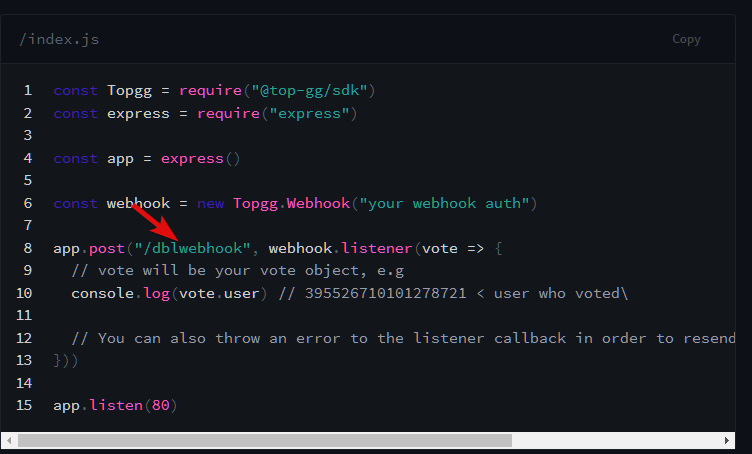
its the code for the webhook receiver.
flat crescent
i do have my index
 jaunty plank
urban vapor
we gonna die man
jaunty plank
urban vapor
we gonna die man
I'm more than willing to answer questions, but its probably best to do some research on what a webhook is before trying to use them.
hearty ore
idk wtf a webhook stands for but ik what it does
urban vapor
jaunty plank
I'm more than willing to answer questions, but its probably best to do some rese...
is this the command that fires response
 flat crescent
jaunty plank
`http://yourserverIP:port/path`
flat crescent
jaunty plank
`http://yourserverIP:port/path`
so i have to make a file called /dblwebhook?
bruh
jaunty plank
nope, its just a path for the url
jaunty plank
https://top.gg/
https://top.gg/tags
first url path is /
second url path is /tags
this really has nothing to do with your file structure
flat crescent
omg
jaunty plank
you are confusing files, and web paths
the webhook code makes a "web site"
this website is what you are using to receive votes
flat crescent
where do i find that website
urban vapor
same i wanna cry
jaunty plank
we can do this backwards if you want.
install the sdk
npm i @top-gg/sdk
npm i express
add this code to any file that runs in your program.
const Topgg = require("@top-gg/sdk")
const express = require("express")

const app = express()

const webhook = new Topgg.Webhook("your webhook auth")

app.post("/dblwebhook", webhook.listener(vote => {
  // vote will be your vote object, e.g
  console.log(vote.user) // 395526710101278721 < user who voted\

  // You can also throw an error to the listener callback in order to resend the webhook after a few seconds
}))
app.get('/test', (req, res) => {
  res.send('Hello World!')
})

app.listen(8080)
then visit, http://yourIP:8080/test in your browser.
jaunty plank
if its easiest for you to put it in index.js you can, or you can make it its own file as long as you require and execute it somewhere
jaunty plank
dont worry about the auth for now, but it can be anything.
flat crescent
okay
urban vapor
GUYS
epic woo
i found vid
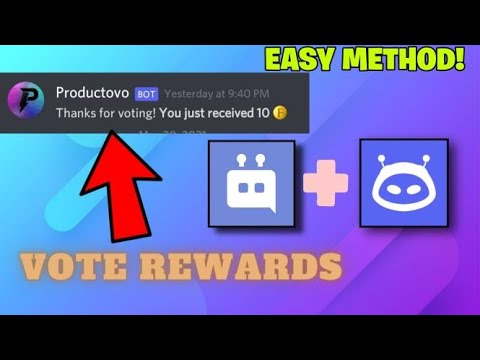
A huge thankyou to comhad for providing us with this method.
Important links mentioned in the video
- Integromato :- https://www.integromat.com/en
Comhad github tutorial with code snippet:-
https://gist.github.com/comhad/bd42b56a0399dbfa645aa83fe3cf4c8a
Support me by upvoting my bot here :- https://top.gg/bot/819838809318621184/vote
Joi...
ayyyyyyyyyyy
lol
 thorny lantern
good luck
 tidal idol
urban vapor
https://www.youtube.com/watch?v=KmFlldd98o8
tidal idol
urban vapor
https://www.youtube.com/watch?v=KmFlldd98o8
its a bit outdated
urban vapor
aww
thorny lantern
yes
tidal idol
also I recommend not using Integromat as they cap how many triggers can be used a month
Just for notifications - use https://webhook-topgg.com
For rewards - code a solution using the code snippets at https://docs.top.gg
 urban vapor
yeah i give up on voting checking thing
urban vapor
tidal idol
also I recommend not using Integromat as they cap how many triggers can be used ...
👀
ok
urban vapor
tidal idol
also I recommend not using Integromat as they cap how many triggers can be used ...

wtf
lol
why does it vote for luca 😂
tidal idol
thats just the test
urban vapor
ohh ok
flat crescent
do me a favor @urban vapor
urban vapor
ye?
flat crescent
put this | line infront of announcements
jaunty plank
lol
 jaunty plank
urban vapor
is this the id of the intergration ?
jaunty plank
urban vapor
is this the id of the intergration ?
id of the webhook yeah
jaunty plank
flat crescent
it restarted
go to http://yourServerIP:8080/test
urban vapor
jaunty plank
id of the webhook yeah
can i use that to make a command that gives the user who voted cash
👀
jaunty plank
jaunty plank
go to `http://yourServerIP:8080/test`
added a get request so you can visually see it
jaunty plank
urban vapor
can i use that to make a command that gives the user who voted cash
webhook-topgg.com is mostly for logs, not rewards.
You can realisitcally detect the discord message if you wanted though
but again, not how the service is intended to be used
urban vapor
jaunty plank
webhook-topgg.com is mostly for logs, not rewards.
You can realisitcally detect ...
ok
urban vapor
jaunty plank
webhook-topgg.com is mostly for logs, not rewards.
You can realisitcally detect ...

omg
why is top.gg always crashing lol
jaunty plank
ddos
 rigid roost
jaunty plank
ddos
rigid roost
jaunty plank
ddos
Cloudflare L7 ruleset didn't work?
 restive otter
I can't constantly check my bot
when I checked it was offline because Top.gg's api giving 524
any solution
jaunty plank
If topgg is offline you cannot check things using the api.
Best to catch the errors
restive otter
restive otter
jaunty plank
If topgg is offline you cannot check things using the api.
Best to catch the er...
that's the error
it sends the information correctly (but after 10-20s) but it sends the error too
restive otter
question is there any method to check if the user has voted on the top.gg page? for example
Topgg.hasVoted(message.auhtor.id).then(r => {
  if(r){
    // user voted
  }
  else {
    //user didn't vote
  }
})
pretty sure thats it.
hasVoted returns a promisified boolean
https://topgg.js.org/classes/api#hasVoted
Documentation for @top-gg/sdk
restive otter
thanks 🙂
jaunty plank
@restive otter whats your code look like?
servers still require you to code the webhook
it does not work with discord webhooks
it requires development knowledge
the docs cover it.
https://docs.top.gg/resources/webhooks/#server-webhooks

are you just looking to log when someone votes?
https://top.gg/bot/479688142908162059
https://webhook-topgg.com/
Both of these are unofficial, but will work for your needs.

Top.gg
Track votes for your own Servers or Bots! Vote Reminders & Reward voting users with a custom role + remove the role after X days again
 grave ridge
jaunty plank
https://top.gg/bot/479688142908162059
https://webhook-topgg.com/
Both of these ...
grave ridge
jaunty plank
https://top.gg/bot/479688142908162059
https://webhook-topgg.com/
Both of these ...
how can i get the vote count of my bot?
jaunty plank
using a library? or the api directly
jaunty plank
if you want to use the top.gg py lib
https://topggpy.readthedocs.io/en/stable/api.html#topgg.DBLClient.get_bot_info
grave ridge
thanks :)
jaunty plank
restive otter
what i need to put in authorization
The authorization header you decide.
jaunty plank
Did you add code to your bot to receive webhooks?
Topgg webhooks are not compatible with discord webhooks
jaunty plank
What programming language does your bot use?
jaunty plank

 junior sage
So I set up my webhook, what does vote.user return? Im guessing the user
jaunty plank
a user id
 fickle basalt
What does it mean?
TopGGAPIError: 524 undefined
    at Api._request (/home/Rise/node_modules/@top-gg/sdk/dist/structs/Api.js:76:19)
    at runMicrotasks (<anonymous>)
    at processTicksAndRejections (node:internal/process/task_queues:96:5)
    at async Api.postStats (/home/Rise/node_modules/@top-gg/sdk/dist/structs/Api.js:99:9)
    at async Timeout._onTimeout (/home/Rise/src/events/ready.js:27:13) {
  response: Response {
    size: 0,
    timeout: 0,
    [Symbol(Body internals)]: { body: [PassThrough], disturbed: true, error: null },
    [Symbol(Response internals)]: {
      url: 'https://top.gg/api/bots/stats',
      status: 524,
      statusText: undefined,
      headers: [Headers],
      counter: 0
    }
  }
}
handle your errors
and 524 is a server error
 restive otter
someone help?
 plucky lance
restive otter
what is this
plucky lance
restive otter
what is this
Your console log of the response you got
You gotta need to get the body.data
restive otter
I got a problem with topggpy
When I installed It's auto install discord.py module
And I'm using py-cord module
So every time I'm trying to run my bot I'm getting an error

I can fix this error with uninstall discord.py and reinstall pycord
But I can't fix it when deploy the changes into heroku
- Sorry for my poor English
restive otter
plucky lance
You gotta need to get the body.data
how?
restive otter
plucky lance
You gotta need to get the body.data
and what i need to do then
jaunty plank
Show your code please
 real dune
topgg does not expose the webhook url of bots (in dev tools for example) when someone votes for it, right?
tidal idol
real dune
topgg does not expose the webhook url of bots (in dev tools for example) when so...
Right
The backend deals with the URL
real dune
alright
restive otter
restive otter
it sends the information correctly (but after 10-20s) but it sends the error too
any help?
hearty ore
how do i shoot a test vote to my webhook? my bot has not been reviewed yet
jaunty plank
you cannot until its approved, but it will be in the webhook section on your bot/server edit page
hearty ore
okie
grave ridge
when i try to get_bot_info of my bot using topggpy i get the following error :Command raised an exception: ValueError: invalid literal for int() with base 10: ',453894425706233857' but if i use another bot's id i get the info
 rain heart
There's a , in your int input
grave ridge
rain heart
There's a , in your int input
,453894425706233857 is not my input
rain heart
Show your code then
grave ridge
rain heart
Show your code then
 rain heart
You're using it somewhere else apparently, doesn't match the id there
Also doesn't seem to refer to get_bot_info either, check anything with the id mentioned there
grave ridge
rain heart
Also doesn't seem to refer to get_bot_info either, check anything with the id me...
when i use bot id of another bot it does print info
rain heart
Can't help then
grave ridge
rain heart
Can't help then
any other way i can get no. of bot upvotes?
rain heart
Only through that but you're passing something wrong somewhere
grave ridge
rain heart
Only through that but you're passing something wrong somewhere
is it possible for you to check if u are able to get_bot_info of 814100764787081217?
restive otter
what type of error is this
 jaunty plank
restive otter
what type of error is this
jaunty plank
restive otter
what type of error is this
it means server error, the api was down earlier
restive otter
jaunty plank
it means server error, the api was down earlier
ohh ok thnx dear
 old kernel
TypeError: Cannot read properties of undefined (reading 'username')
    at /home/container/index.js:36:38
    at /home/container/node_modules/@top-gg/sdk/dist/structs/Webhook.js:99:23
    at processTicksAndRejections (node:internal/process/task_queues:96:5)
?
is api down?
 runic cypress
I'm having a little trouble with the webhook url, the language is python.
bot.topggpy = topgg.DBLClient(bot, topggtoken, autopost=True, post_shard_count=True)
bot.topgg_webhook = topgg.WebhookManager(bot).dbl_webhook(dbl_web, tggpassword)
bot.topgg_webhook.run(5000)```
I have this, from other examples I saw here, I have the url has `/http://hostIP:port/dblwebwook` the / is in front because it kept telling me it must start with / the bot is hosted on vultr with an ubuntu OS if any of that is needed. Having it like I do now, I don't get any errors but the test webhook isn't being sent.No /
runic cypress
Yea, I remove it and it says / needs to be in front or empty
This is the error when it's just http://IP:port:/path
 runic cypress
I put the path in a json file
rain heart
What's the path you've entered
runic cypress
/dblwebhook
runic cypress
Alright, I have it exactly as "webhook_url": "http://ip:port/dblwebhook", in my json file. Waiting on server to load the file
rain heart
Only have the path there, not the whole url
runic cypress
Ah, alright I'll try it
It's not giving the error put it's not sending the test webhook. I tried it with just /dblwebhook in the json and just added it back in the main file and still isn't sending the test one.
bot.topggpy = topgg.DBLClient(bot, topggtoken, autopost=True, post_shard_count=True)
bot.topgg_webhook = topgg.WebhookManager(bot).dbl_webhook("/dblwebhook", tggpassword)
bot.topgg_webhook.run(2048)```
Here's the code part with it, and I changed the port to see and still same result.Try an actual vote, test webhook might not work
restive otter
runic cypress
It's not giving the error put it's not sending the test webhook. I tried it with...
me too same
 hybrid bridge
what is password and how do i get that
 tidal idol
hybrid bridge
what is password and how do i get that
tidal idol
hybrid bridge
what is password and how do i get that
you set the password
just make sure the password matches whats in the authentication field
hybrid bridge
how do i get my password
hybrid bridge
but i want to track it using a discord bot, dpy specifically
yk like when someone voted it dms them
hybrid bridge
please do ping reply if someone know tyy
hybrid bridge
hybrid bridge
what is password and how do i get that
if i use this example how do i know if the voted server is mine
jaunty plank
Because you have a password for it, only those who have the password can send vote events to the webhook
hybrid bridge
tidal idol
you set it to anything you want
then what does this mean
jaunty plank
Think like you are signing up to a website and you want to make a password, that's what the password means. It's how the webhook knows the incoming data is from a verified source
It can be anything as long as it's secure.
hybrid bridge
i'm really really confused rn
i just want to track my server votes and send the voter a dm through my bot (dpy)
what should i have on me
hybrid bridge
is the api endpoint for checking individual user votes (if they have voted the server or not) for server is the same like bots?
hybrid bridge
is it possible to track votes for servers
tidal idol
Using webhooks yes
hybrid bridge
what do i need for that
tidal idol

Same code as the docs show
And then set a password in the code where it asks for a password
Then enter that password in the authentication box on the topgg website
hybrid bridge
tidal idol
Then enter that password in the authentication box on the topgg website
can i have the website link for this
rain heart
tidal idol
There’s a server vote api?!?!
theres none
 hearty crystal
1
hybrid bridge
hybrid bridge
can i have the website link for this
if any1 know the website link for that pls lmk ty
 modest shore
how do I update the server count for my bot?
restive otter
@restive flax no ads
 restive flax
There's is no ads I don't think.
 untold sparrow
no advertising
runic cypress
restive otter
me too same
yea, no idea what's wrong
 lean escarp
tidal idol
lean escarp
tidal idol
Yep
https://webhook-topgg.com is the easiest way
https://docs.top.gg for a coded way
hybrid bridge
tidal idol
Then enter that password in the authentication box on the topgg website
does anyone know the link for this
jaunty plank
your bots edit page, webhook section
hybrid bridge
is it the same for server?
jaunty plank
yep
hybrid bridge
alright thanks
hybrid bridge
hybrid bridge
what is password and how do i get that
this example looks easier than the one in my reply, is it the same?

 sullen nymph
You're viewing the GitHub version, which is 2.0.0a
The previous one is 1.4.0, the previous screenshot
sullen nymph
Aye correct
hybrid bridge
i'm using commands.Bot here so do i do it like this:
async def server_votes(data: topgg.GuildVoteData, bot: commands.Bot = topgg.data(commands.Bot)):
 sullen nymph
Yeah
restive otter
getting 524 error
 bitter dome
 warm plaza
const express = require('express')
const Topgg = require('@top-gg/sdk')

const app = express() // Your express app

const webhook = new Topgg.Webhook('') // add your Top.gg webhook authorization (not bot token)

app.post('/dblwebhook', webhook.listener(vote => {
  // vote is your vote object
  console.log(vote.user+" has voted")
   // 221221226561929217

})) // attach the middleware

app.listen(3000) // your port``` rn this is my vote weebhook, how do I send message to the voterfetch the user from the userid, then send them a direct message
note that the user needs to have a mutual server with that user, otherwise dming is not possible
warm plaza
ok understood thank you @rain heart
hearty crystal
1
restive otter
How can i post my all shards member count with autoposter
jaunty plank
restive otter
How can i post my all shards member count with autoposter
We don't take member count currently.
But you can just place the sharding manager in the client field.
https://www.npmjs.com/package/topgg-autoposter
Or you can place the sharded clients in the client field

npm
Auto-Poster for Top.gg. Latest version: 2.0.1, last published: 2 months ago. Start using topgg-autoposter in your project by running npm i topgg-autoposter. There is 1 other project in the npm registry using topgg-autoposter.
restive otter
jaunty plank
We don't take member count currently.
But you can just place the sharding manage...
ohh so then whats new in latest version
 spare ice
Does the top-gg api support server voting, not just bot votes?
runic cypress
@commands.Cog.listener()
    async def on_dbl_vote(self, ctx, data):
        """An event that is called whenever someone votes for the bot on Top.gg."""
        channel = self.bot.get_channel(936452783308161025)
        user = await self.bot.fetch_user(int(data['user']))
        if user in self.bot.get_guild(680558774351560717).members:
            await user.add_role(939593979383668756)
        embed = discord.Embed(
            color=0x8A2BE2
        )
        embed.set_author(name=user.name + "#" + user.discriminator, icon_url=str(user.display_avatar))
        embed.add_field(name="Recieved Upvote!", value=f'{ctx.user.name + " " + ctx.user.discriminator} just voted for the bot!')
        await channel.send(embed=embed)```
I'm trying to make it send a message when a user vote and check if they are in the guild to give them the voter role. It's not doing anything, or giving errors.
```py
bot.topggpy = topgg.DBLClient(bot, topggtoken, autopost=True, post_shard_count=True)
bot.topgg_webhook = topgg.WebhookManager(bot).dbl_webhook("/dblwebhook", tggpassword)
bot.topgg_webhook.run(5000)```
I have this setup in my main file, and in my webhook URL in top.gg I have `http://hostIP:5000/dblwebhook`, I'm not sure what's wrongMy vps doesn't have a firewall either, so I'm unsure.
 rain heart
Try an actual vote
runic cypress
I have
warm plaza
const DBL = require('@top-gg/sdk');
const express = require('express');
const app = express();
//const mongoose = require('mongoose');
const User = require('./datav/User');
//const config = require('./config.json')
const webhook = new DBL.Webhook(process.env.topauth);
const fetch = require('node-fetch');
const Discord = require('discord.js');
const port = 5000
const {
    WebhookClient
} = require('discord.js');
const webhookVote = new WebhookClient({ url: 'hiding' });

app.get('/', (req, res) => {
    res.send('Currently Working.')
})

app.get('/dblwebhook', (req, res) => {
    res.send('Currently Working.')
})

app.post('/dblwebhook', webhook.middleware(), async (req, res) => {

    const votedUser = await fetch(`https://discord.com/api/v8/users/${req.vote.user}`, {
        headers: {
            Authorization: `Bot ${process.env.TOPGG}`
        }
    }).then(res => res.json());


    console.log(`${votedUser.username} Just Voted!`);

    let userV = await User.findOne({
        id: req.vote.user
    });

    if (!userV) {
        await User.create({
            id: req.vote.user,
            votes: 1,
            lastVoted: Date.now()
        });

        userV = await User.findOne({
            id: req.vote.user
        });

    };

    const vote_number = userV.votes + 1 || 1;

    const embed = new Discord.MessageEmbed()
        .setAuthor(`ShoBOT`, `https://i.imgur.com/nhyrOYD.png`)
        .setColor('GREEN')
        .setTitle(`${votedUser.username} Just Voted`)
        .setDescription(`**${votedUser.username}#${votedUser.discriminator}** (${votedUser.id}) just voted **ShoBOT**!`)
        .setFooter(`Vote #${vote_number}`)

    webhookVote.send(embed);

    return await userV.updateOne({
        votes: vote_number,
        lastVoted: Date.now()
    });

});
undefined Just Voted!
[FATAL] Possibly Unhandled Rejection at: Promise  Promise {
  <rejected> DiscordAPIError: Cannot send an empty message
      at RequestHandler.execute (/home/runner/shobot2commands/node_modules/discord.js/src/rest/RequestHandler.js:298:13)
      at runMicrotasks (<anonymous>)
      at processTicksAndRejections (node:internal/process/task_queues:96:5)
      at async RequestHandler.push (/home/runner/shobot2commands/node_modules/discord.js/src/rest/RequestHandler.js:50:14)
      at async WebhookClient.send (/home/runner/shobot2commands/node_modules/discord.js/src/structures/Webhook.js:169:15) {
    method: 'post',
    path: '/webhooks/hideh?wait=true',
    code: 50006,
    httpStatus: 400,
    requestData: { json: [Object], files: [] }
  }
} reason: Cannot send an empty message```Can someone help
 dapper copper
warm plaza
Can someone help
dapper copper
warm plaza
Can someone help
the error message
literally states
you're sending an empty message
webhookVote.send(embed); this line is why
change it to
webhookVote.send({embeds: [ embed ] });
use of { embed: } is deprecated as per discord docs
warm plaza
Oh ok thanks 👍
 fathom sluice
What's wrong ?
const Topgg = require("@top-gg/sdk");
const express = require("express");

const app = express()

const webhook = new Topgg.Webhook(".")
console.log("connconnconnconnconnconnconnconnconn")
app.post("/dblwebhook", webhook.listener(async vote => {
    console.log("ok someone voted")

}))

app.listen(7689)
 fathom sluice
rain heart
also try an actual vote
fathom sluice
rain heart
also try an actual vote
tried 2 times
fathom sluice
rain heart
what is .
 rain heart
thats not for the token, thats for something you define yourself
like a password, has to be the same on the authorization field

The HTTP Authorization request header can be used to provide credentials that authenticate a user agent with a server, allowing access to a protected resource.
fathom sluice

fathom sluice
rain heart
like a password, has to be the same on the authorization field
oh ok
 lone sun
jaunty plank
lone sun
jaunty plank

 dusk swan
guys im getting this
Received code 429: Too Many Requests (on api) is there any fix?
jaunty plank
dusk swan
guys im getting this
Received code 429: Too Many Requests (on api) is there any...
what are you doing with the api?
seems you sent more requests than the api allows.
dusk swan
jaunty plank
what are you doing with the api?
seems you sent more requests than the api allow...
well in my bot when user types vote command it check user voted or not and then their next vote time will be given maybe that made some good amt of requests
restive otter
use webhooks for that
jaunty plank
yeah, webhooks and track it in a database.
 wooden lagoon
so i am using jda , and used the DBL api given in top.gg's docs , even tho i am updating the stats of the bot its not updating in the site
anybody can help me out with this?
jaunty plank
wooden lagoon
so i am using jda , and used the DBL api given in top.gg's docs , even tho i am ...
hey, sites down/going down a lot right now. which may be contributing to the issue
jaunty plank
I'm not sure, the devs haven't given any information yet

 mystic yew
rain heart
Thats a normal response
mystic yew
rain heart
Thats a normal response
But it's not updating
rain heart
site cache
 mystic yew
rain heart
site cache
mystic yew
rain heart
site cache
nop
There's no cache for widget
It was working fine 4 days ago
rain heart
there is, for the site you're embedding it on
mystic yew
rain heart
there is, for the site you're embedding it on
I've tryed on another broswer and still the same
The same request was working perfectly 4 days ago
rain heart
Updated the servercount from one of my test bots, worked right away within the api and returns the correct server amount I posted
mystic yew
Uhh very weird
warm plaza
how can I add a vote cooldown in my cmd
jaunty plank
Your best bet is saving vote data in a database on the webhook event.
Then accessing that database when that command is run
 mint cedar
-
How should I setup webhooks for my bot? Tried reading the docs but I'm still quite confused, A step by step explanation thread/video would be great.
-
Also how to give rewards to users once they vote
old kernel
mint cedar
1) How should I setup webhooks for my bot? Tried reading the docs but I'm still ...
It will be available soon on my github today night

mint cedar
what will be? an explanation?
jaunty plank
we dont provide an explanation just documentation as webhooks are pretty standard, and tons of online resources exist about them.
but the gist is this.
add the code examples we give on the docs, or write your own http server which checks auth and then the body for data.
check your server is configured to allow the http server to receive requests(not necessary most of the time).
figure out the url to your server, typically its http://yourServerIP:portyoudefine/pathyoudefine
then just fill in the url and auth on your bot/server page.
Note: auth you decide, its like a password as long as the auth you check, and the auth on the site is the same its fine.
mint cedar
got it, and about the 2nd point? Couldn't find anything in the docs for it or maybe I just missed i
jaunty plank
its not something we cover, as its really impossible for us to cover every single firewall
hundreds of firewalls exist, thousands if we covered router firewalls too.
If you need help with that part(which again, not necessary most the time) I am more than happy to help.
generally speaking its only needed for a server if you configured a firewall yourself, or if its hosted at home.
mint cedar
alright, thanks for your time!
mint cedar
jaunty plank
If you need help with that part(which again, not necessary most the time) I am m...
You need not worry yourself, but thanks for asking!
jaunty plank
:v
 narrow merlin
@jaunty plank, u:
 wise sequoia
rain heart
wise sequoia
rain heart
There's none
old kernel
how can i clear promise
rain heart
 blazing orbit
so I made a vote command which shows the embed with vote link if the user hasnt voted and if they have voted it says u have already voted, but idk how to make it give reward whenever someone votes
rain heart
consider using webhooks https://docs.top.gg
old kernel
i made it for my bot
blazing orbit
made what
blazing orbit
rain heart
<#272764566411149314>
is this gonna work?
 rain heart
Try it and see
rain heart
You cannot visit that page through your browser
Your browser makes a get request when visiting it, it is only something you post data to
rain heart
Your browser makes a get request when visiting it, it is only something you post data to
Aka you can only make a request using a request tool or in your case code
Read the Mozilla knowledgebase about Request methods
 idle orbit
jaunty plank
idle orbit
jaunty plank
your bots/server edit page in the webhook section.
or check pins in this channel for a video
tidal idol
site is down
 glad fiber
Hey my autoposter for bot stats don't work, it has in the past, I'm using the JS package that is provide in the docs, and followed everything there, however it won't update my stats, token is correct.
dusk swan
my topgg webhook stopped working for no reason I've changed nothing in the code but it stopped sending any webhook can you guys help me with it.
 native agate
dusk swan
my topgg webhook stopped working for no reason I've changed nothing in the code ...
native agate
dusk swan
my topgg webhook stopped working for no reason I've changed nothing in the code ...
!!! send code first please !!!
 smoky swift
Berry support d.js-light when.
 worn zodiac
why does the python package replace my fork of discord.py (py-cord) with the base version?
i'm guessing the new forks like py-cord, nextcord etc. are unsupported?
time to use requests ig
 median rose
hey im trying something on my bot and keep on getting this error apparently something is running on the other side can you help with this?
[2022-02-12 08:36:41] [ERROR] red: Package loading failed
Traceback (most recent call last):
  File "/cade/redenv/lib/python3.9/site-packages/redbot/core/core_commands.py", line 172, in _load
    await bot.load_extension(spec)
  File "/cade/redenv/lib/python3.9/site-packages/redbot/core/bot.py", line 1561, in load_extension
    await lib.setup(self)
  File "/cade/cogs/CogManager/cogs/votetracker/__init__.py", line 13, in setup
    cog = await VoteTracker.initialize(bot)
  File "/cade/cogs/CogManager/cogs/votetracker/main.py", line 126, in initialize
    await s.topgg_webhook.run(5400)
  File "/cade/cogs/Downloader/lib/topgg/webhook.py", line 148, in _run
    await self._webserver.start()
  File "/cade/redenv/lib/python3.9/site-packages/aiohttp/web_runner.py", line 121, in start
    self._server = await loop.create_server(
  File "uvloop/loop.pyx", line 1775, in create_server
OSError: [Errno 98] error while attempting to bind on address ('0.0.0.0', 5400): address already in use
# END OF LOG```In 200a they are, 140 nope
Install from GitHub
worn zodiac
sullen nymph
In 200a they are, 140 nope
ah ty
sullen nymph
median rose
hey im trying something on my bot and keep on getting this error apparently some...
Try using another unrelated port
like 3545
worn zodiac
is just the pypi version then
sullen nymph
Or try multiple. See if it's your bot running the webhook twice
sullen nymph
worn zodiac
is just the pypi version then
Yup the last maintainer left before they could get to updating it on PyPi
Sweet
median rose
[2022-02-12 08:40:47] [ERROR] red: Package loading failed
Traceback (most recent call last):
File "/cade/redenv/lib/python3.9/site-packages/redbot/core/core_commands.py", line 172, in _load
await bot.load_extension(spec)
File "/cade/redenv/lib/python3.9/site-packages/redbot/core/bot.py", line 1561, in load_extension
await lib.setup(self)
File "/cade/cogs/CogManager/cogs/votetracker/init.py", line 13, in setup
cog = await VoteTracker.initialize(bot)
File "/cade/cogs/CogManager/cogs/votetracker/main.py", line 126, in initialize
await s.topgg_webhook.run(5400)
File "/cade/cogs/Downloader/lib/topgg/webhook.py", line 148, in _run
await self._webserver.start()
File "/cade/redenv/lib/python3.9/site-packages/aiohttp/web_runner.py", line 121, in start
self._server = await loop.create_server(
File "uvloop/loop.pyx", line 1775, in create_server
OSError: [Errno 98] error while attempting to bind on address ('0.0.0.0', 5400): address already in use
END OF LOG
still getting it
sullen nymph
Yeah seems your bot is running the webhook multiple times
median rose
how to fix
median rose
sullen nymph
Yeah seems your bot is running the webhook multiple times
idk how to fix this or how to know what is running it
sullen nymph
How are you starting the webserver?
median rose
erm
median rose
sullen nymph
How are you starting the webserver?
idk what you mean by that
rain heart
your webhook is esentially a webserver
median rose
im using it for my bot
The cog VoteTracker requires an api token and webhook password from top.gg to function. To get these, you must visit the top.gg website, go to your profile, click on your bot's edit buttons Go to the webhooks section and click the reveal button to get your token. Scroll down to find the Webhook url field and replace it with https://<Your-vps-ip-here>:5400/dbl. Below that will be the password field and set that to whatever you want.Then use the following command on your bot: [p]set api topgg api_key,<api_token> pass,<password> to add the token to the bot's shared tokens and then try reloading the cog again.
these are the instructions
 willow sphinx
I'm still waiting to see the person I blocked from posting bot stats to show up here lol
 rain heart
oh god lmao
sullen nymph
LOL
sullen nymph
median rose
The cog VoteTracker requires an api token and webhook password from top.gg to fu...
Is the cog loaded in the first place?
Do you close the webserver on cog unload?
😆
median rose
i get an error on cog load
median rose
median rose
[2022-02-12 08:40:47] [ERROR] red: Package loading failed
Traceback (most recent...
this error
sullen nymph
sullen nymph
Do you close the webserver on cog unload?
Answer this first
median rose
idk how to
median rose
ok
sullen nymph
https://replit.com/@AssanaliMukhano/dpy-webserver-cog-example#cog.py @median rose refer to the cog_unload method
 median rose
dw
restive otter
Hey i need help to make vote logs
restive otter
restive otter
Hey i need help to make vote logs
Ur bot in which lang ?
 leaden heath
Hi I use discord.js with node.js and I have an express server running... But my bot's webhook doesn't send the test votes to it, I mean, my code doesn't log the request
const topggWebhook = new Topgg.Webhook(process.env.TOP_GG_WEBHOOK_TOKEN)

app.post("/dblwebhook", topggWebhook.listener(async (vote) => {
    console.log(vote)
    const { user } = vote
    const timestamp = Date.now()

    await client.db.votes.create({
        userId: user,
        timestamp,
        list: "topgg"
    }
}))
Try an actual vote
leaden heath
ok
leaden heath
rain heart
Try an actual vote
doesnt work
restive otter
how can i get how often a user has voted in the current month with topggpy?
i dont found it in the docs where it is
restive otter
restive otter
Ur bot in which lang ?
Js
restive otter
restive otter
Js
then fetch votes with api
sullen nymph
restive otter
how can i get how often a user has voted in the current month with topggpy?
Such data is not provided by Top.gg
You'll have to log it yourself with webhooks
 indigo briar
Hello why redeem doesn't working?
restive otter
sullen nymph
You'll have to log it yourself with webhooks
ah ok
 fiery badge
rain heart
fiery badge
rain heart
 wet ledge
How to check if someone just voted your bot on python 
rain heart
see above
 verbal crystal
Can anyone help me to create a system which will notify when my bot will be voted?
Like do I need to keep the code that is given in documentation in the index of my bot or can I run the code separately on replit?
jaunty plank
You can run the code separately
verbal crystal
jaunty plank
You can run the code separately
const Topgg = require("@top-gg/sdk")
const express = require("express")
const app = express()
const webhook = new Topgg.Webhook("")
const { WebhookClient } = require("discord.js")
const webhook = new WebhookClient("", "")
app.post("/dblwebhook", webhook.listener(vote => {
var voteembed = {
title: `✨ New Top.gg Vote`
description: `<@${vote.user}> has voted for Meridian!`,
color: "15923525",
timestamp: new Date(),
}
webhook.send({ embeds: [voteembed] })
}))
app.listen(3000)```
Is this the right code for the same? pure quarry
im getting a delay of 60s then a 403 whenever i try to post my stats to topgg
headers = {"Authorization": getenv("topgg_token")}
data = {"server_count": len(self.bot.guilds)}
assert self.bot.user is not None
await self.bot.session.post(
    f"https://top.gg/api/bots/{self.bot.user.id}/stats",
    headers=headers,
    data=data,
)
``` https://cdn.tooty.xyz/Y8Qh https://cdn.tooty.xyz/vwkX
 jaunty plank
pure quarry
im getting a delay of 60s then a 403 whenever i try to post my stats to topgg
jaunty plank
pure quarry
im getting a delay of 60s then a 403 whenever i try to post my stats to topgg
Are you posting for the bot the token is for
pure quarry
yes
verbal crystal
@jaunty plank I modified the code as discord.js is not supported on replit.com. Can you please once tell me how should I proceed?
const Topgg = require("@top-gg/sdk")
const express = require("express")
const app = express()
const webhook = new Topgg.Webhook("")
const fetch = require("node-fetch")

app.post("/dblwebhook", webhook.listener(vote => {
    let value = JSON.stringify({
        embeds: [
            {
                description: `✨ **New Vote on TOP.GG**\n<@${vote.user}> has voted for Meridian!`,
                color: "15923525",
                timestamp: new Date(),
            }
        ]
    })
    fetch("", {
        method: 'POST',
        headers: {
            'Content-type': 'application/json',
        },
        body: value
    }).catch(e => console.log(e))
}))

app.listen(3000)```Which part, receiving the webhook? Or sending a webhook to discord?
verbal crystal
What should I fill in these fields?
 jaunty plank
Your replit url, plus the path you set in the code
Then the auth is set when you set your webhook variable, as long as it is the same between your code and topgg it's fine
verbal crystal
jaunty plank
Your replit url, plus the path you set in the code
Then the auth is set when yo...
which path 😭
jaunty plank
App.post("pathIsSetHere"
pure quarry
pure quarry
it works for a different bot
then if i use insomnia it returns 401
maybe because it turns the header lowercase
verbal crystal
@jaunty plank it worked at last. But to keep repl online should I use uptime robot or let it be as it is? I am fearing the repl can shutdown and votes cannot be logged.
pure quarry
pure quarry
maybe because it turns the header lowercase
postman too but i cant tell what it does there
ok this is stupidly inconsistent, if i run the EXACT same code its not 401 unauth
seems topgg uses the wrong codes, just regen'd the token for the bjillionth time and it works on insomnia
restive otter
👀
 rotund wren
any reasons this happened when I first try
 restive otter
how do i use this correctly?

i tried to send a test, didnt work
my webhook is redirected to a channel and is working fine
but the test didnt work
tidal idol
restive otter
how do i use this correctly?
for discord webhooks use https://webhook-topgg.com
Simplifying top.gg webhooks for all users, allowing non-developers and developers to use webhooks for their bot and server without confusing configuration.
ayy @jaunty plank meta tags
jaunty plank
Working on seo
restive otter
tidal idol
for discord webhooks use https://webhook-topgg.com
ty
jaunty plank
It now shows second for many searches top of Bing duckduckgo and a few other search engines.
Google hasn't reindexed the site yet but soon hopefully
tidal idol
 restive otter
tidal idol
for discord webhooks use https://webhook-topgg.com
restive otter
tidal idol
for discord webhooks use https://webhook-topgg.com
im having this issue and idk how to fix it, i just changed the footer icon and it said that

the icon URL is valid, i sent it and it previewed
jaunty plank
Dm me the url it gave you.
Quite a lot of updates have happened this week, so I am guessing I broke something(I hope not)
Op, I see you've not made it to that page.
restive otter
found the bug
if i use media.discordattachment bla bla
it wont work
i gotta use another way of getting images
from discord
it wont work with media as a subdomain
i just removed it and it worked
and the image was valid
jaunty plank
Thanks for the information.
Try imgur if you can use that.
I'll look into it this week
restive otter
ig i'll try to use the API and code it in the mean time
restive otter
How can I make my bot or a webhook automatically announce a vote for my bot? The library I use is Aoi.js
 cursive iris
what do i put here?
 restive otter
t
rigid roost
The port you want the server to listen on, @cursive iris.
verbal crystal
TopGGAPIError: 524 undefined
    at Api._request (/home/container/node_modules/@top-gg/sdk/dist/structs/Api.js:76:19)
    at runMicrotasks (<anonymous>)
    at processTicksAndRejections (node:internal/process/task_queues:96:5)
    at async Api.postStats (/home/container/node_modules/@top-gg/sdk/dist/structs/Api.js:99:9) {
  response: Response {
    size: 0,
    timeout: 0,
    [Symbol(Body internals)]: { body: [PassThrough], disturbed: true, error: null },
    [Symbol(Response internals)]: {
      url: 'https://top.gg/api/bots/stats',
      status: 524,
      statusText: undefined,
      headers: [Headers],
      counter: 0
    }
  }
}
Why
restive otter
verbal crystal
```JS
TopGGAPIError: 524 undefined
at Api._request (/home/container/node_mod...
Handle Your Errors
sullen nymph
The user vote info is for last 12 hours
rain heart
iirc would still include their vote there
willow sphinx
the 1000 last votes is separate from the vote check
 velvet thistle
tidal idol
velvet thistle
tidal idol
note: read the very passive agressive channel description
TOP.GG API ONLY!!! ANY OFF-TOPIC CONVERSATION WILL BE DELETED AND MUTED - This channel is only for SUGGESTIONS/HELP/BUGS to do with OFFICIAL API LIBRARIES and API DOCS found at https://docs.top.gg/
 dire cairn
I tried to post server count from postman, but for some reason it's not showing on the website

ok it
updated
on its own
restive otter
prob not
restive otter
using @surreal seal-gg/sdk i can define my client using async vote and then define my client as vote.client right?
because i get this error

code used: ```js
.setAuthor({ name: ${req.vote.user.tag}, iconURL: req.vote.user.displayAvatarURL({ format: "png", dynamic: true })})
req.vote returns user id, not a discord user
req.vote isnt a user
how can i get the user's tag using that?
so you should fetch the user, get it from the cache and then do your thing
because when i try to use vote.user.tag or .toString() it just dont work
ok but how do i get the client using async vote?
because req.vote isnt a user fetch them
const client = vote.client; to get client?
restive otter
restive otter
ok but how do i get the client using async vote?
what do you even mean
like
vote.client will ofc not return a discord client
how can i pass the client using async(vote) ? like we use interaction in async, we do interaction.client; to define the client
oh
thanks then!
restive otter
restive otter
vote.client will ofc not return a discord client
looks like it didnt work

ofc not
oh
didnt saw that
how can i get the client then?
a: make the client global
b: pass the client as a parameter
b
i want to use b
 surreal sparrow
có ai biết tiếng việt không dạy tiếng anh cho tui đi
blazing orbit
does anyone know how to make vote rewards for voting?
tidal idol

 soft knoll
oh
willow sphinx
i don't provide support regardless
tidal idol
just use an express server instead of the topgg module
hmm
just making an example now
to test
tidal idol
import fetch from "node-fetch"
import express from "express"
const app = express();
import { MessageEmbed, Client, Intents } from "discord.js"
import bodyParser from "body-parser"

const bot = new Client({ intents: [Intents.FLAGS.GUILDS, Intents.FLAGS.GUILD_MEMBERS] });
app.use(bodyParser.urlencoded({ extended: true }));
app.use(bodyParser.json());
app.use(bodyParser.raw());

app.post("/webhook", async function(req,res) {
    await bot.users.fetch(req.body.user).then(async user => {
        await bot.channels.fetch('CHANNEL ID')
        .then(async channel => {
            await channel.send(`${user.username}#${user.discriminator} voted for the bot!`)
            res.send("ok")
        })
    })
})


app.listen(25585, function (err) {
    console.log('Listening at http://fin1.vertexnodes.com:25585/')
})

bot.login("BOT TOKEN")``` This worksThis gets the user ID from the Discord API instead of Top.gg API
soft knoll
tidal idol
This gets the user ID from the Discord API instead of Top.gg API
if the bot has no server in common with the user, it shouldn't work, right?
soft knoll
tidal idol
it should still work
so i can't use the Top.gg Api? do you know why i have that problem?
soft knoll
tidal idol
You can use the Top.gg API but it only returns users who have logged into Top.gg...
But if users have voted for the bot, doesn't that mean they are logged in? What step would be missing to "see them"?
tidal idol
soft knoll
But if users have voted for the bot, doesn't that mean they are logged in? What ...

I just gave you a working example
just use htat
that
willow sphinx
the documentation doesn't tell you to hit up the /api/users endpoint
chances are you already have the user's data cached or can just get it from discord
 rocky gale
app.post('/topgg', webhook.listener(vote => {
  console.log(vote) // empty object
}))
```why do i get an empty objecct? (im using @surreal seal-gg/sdk)fixed with
app.use(express.urlencoded({ extended: true }));
app.use(express.json());
app.use(express.raw());
 raw sable
hello
i have a query
so, i want to build a command for my discord bot that users can use to vote for the 'server' on top.gg and then check if they voted or not.
Is this possible? because in the documentation i saw api url for voting bots but not voting servers.
could anyone please confirm on this?
restive otter
raw sable
hello
i have a query
so, i want to build a command for my discord bot that users...
you can do this with webhooks
raw sable
restive otter
you can do this with webhooks
any way that it could be done with a bot?
 inland widget
Hey how do I do this?
 inland widget
word
 grand sierra
inland widget
Hey how do I do this?
grand sierra
inland widget
Hey how do I do this?
For discord webhooks you can use this :
https://webhook-topgg.com
Simplifying top.gg webhooks for all users, allowing non-developers and developers to use webhooks for their bot and server without confusing configuration.
restive otter
using top-gg/sdk how can i get the entire amount of votes that a user voted for my bot or the amount of votes the bot has?
restive otter
restive otter
using top-gg/sdk how can i get the entire amount of votes that a user voted for ...
You cant, but you can save the users who voted for your bot to the db
like

 stiff quiver
hey Im using the webhooks to give people rewards for my bot for voting
bot.topgg_webhook = topgg.WebhookManager(bot).dbl_webhook("/dblwebhook", "password")
``` what do i put as the dblwebhook and password?https://xbb.speedygoat.net/dUJU7/seFoPIRO06.png and how are you supposed to know if theyre voting for your bot thats what im very confused with

 wild jewel
Can anyone help me with vote reward
restive otter
how do i use topgg-py on my bot even though its using nextcord
since i see one of its requirements are discord.py
unless
do i have to use the requests module?
or is there some nextcord-specific top.gg api wrapper
tidal idol
restive otter
how do i use topgg-py on my bot even though its using nextcord
Hello dearest sham
You can install without requirements
jaunty plank
stiff quiver
https://xbb.speedygoat.net/dUJU7/seFoPIRO06.png and how are you supposed to know...
The on_dbl_vote event fires only when someone voted, and will include the voter ID.
jaunty plank
stiff quiver
hey Im using the webhooks to give people rewards for my bot for voting
"/dblwebhook" is just the path.
It can be whatever you want realistically, but dblwebhook works fine.
'http://vpsip:port/dblwebhook`
The password is just the authorization you can fill into topgg in the webhooks section of your bot.
As long as the two are the same it's fine.
 hazy stream
self.dblpy = dbl.DBLClient(self.bot, self.token, webhook_path='/dblwebhook', webhook_auth='password', webhook_port=5000)
Hello, i just wanted to know if i need to input something else into the weebhok_path?
sullen nymph
restive otter
so it still will work even if i uninstall discord.py
Yes should
But
You can update to 2.0.0a from the GitHub repo
Which has a slightly different system that you can read docs for at topggpy.rtfd.io/en/stable
restive otter
i think nextcord uses dpy 2.0.0a iirc
restive otter
sullen nymph
Which has a slightly different system that you can read docs for at topggpy.rtfd...
got it
sullen nymph
restive otter
i think nextcord uses dpy 2.0.0a iirc
I meant topggpy's 2.0.0a
 spiral sedge
Can anyone please show me an example of the data?
 restive otter
@pastel raptor
 bitter needle
f
 pastel raptor
-m @bitter needle 24h excessive spam
 abstract mothBOT
 ItzFaresYT#3017 was successfully muted
tidal idol
 spare viper
Can anyone here help me get my top.gg token?
spare viper
Can anyone here help me get my top.gg token?
your bot needs to be approved
spiral sedge
jaunty plank
https://docs.top.gg/resources/webhooks/#bot-webhooks
Can anyone send me a example for detecting vote for python
I am noob
rain heart
The docs has an example
spiral sedge
oo that
wild jewel
Is there a prefix for @wild lantern
abstract mothBOT
This channel is ONLY for the Top.gg API!
This channel is only for: suggestions/help/bugs to do with official API libraries and API docs found at: https://docs.top.gg
Any Off-Topic conversation may get deleted and muted.
If you need help with development about your bot or development in general, feel free to use #development.
rain heart
-api
 dire imp
can i use pythonsdk 2.0.0a rn?
Hello I am getting an error
I'm using python 3.8.12, discord.py, python sdk 2.0.0a
PermissionError: [Errno 13] error while attempting to bind on address ('0.0.0.0' 53): permission denied
How can i give it permission??
dire imp
I used several ports above 1024
i am unable to receive the vote data at all. Like if i send test vote, it won't print on console.
rain heart
attempting to bind on address ('0.0.0.0' 53):
means you're trying to set it to port 53
which is a privileged port
dire imp
Yeah i have changed that port many times.
Like 41520
it successfully connected but i still don't receive the vote data.
(I'm using a ubuntu 20.04 server if that helps)
dire imp
"https://ip:port/dblwebhook"
rain heart
have you replaced ip/port with your ip and port
dire imp
I tried but I'm still having issues. I gave up. Is there a slightly easier method to receive vote data??
plucky lance
dire imp
Could it be a firewall issue?
Yes you will have to allow incoming connections on that TCP port
(if your default policy is drop)
dire imp
plucky lance
Yes you will have to allow incoming connections on that TCP port
okay
ill try tommorow
dire imp
plucky lance
Yes you will have to allow incoming connections on that TCP port
Btw to do this on Ubuntu server i have to run sudo ufw allow 1080/tcp right..?
I can run this to open any port or just the ones that my server lists?
plucky lance
I don’t use the ufw interface but yeah it should be the right syntax
Please choose a port between 10500 and 65000
To not get in trouble with reserved ports for your system and services
Also save your settings at the topgg site before hitting the save button
And actually test a real vote as the test button might not work atm or in the future

smoky swift
dire imp
Btw to do this on Ubuntu server i have to run `sudo ufw allow 1080/tcp` right..?...
Yes that's correct.
restive otter
Failed to post server count
Unauthorized: Unauthorized (status code: 401)
It shows this even tho I have added the top.gg token
Nvm, there was problem with token, I regenerated and worked
 cinder lichen
Hello, is it possible to get the total amount of votes via api (node.js)
for the current month
and total
rain heart
yup, under "monthlyPoints" and "points" by making a GET request to the bot info endpoint

monthlyPoints should return the monthly votes as the name suggests and points the total
cinder lichen
Thank you very much!
tidal idol
?
tidal idol
 dapper pivot
-api
dapper pivot
-api
Staff only command
 junior kindle
-help
 dapper pivot
 dapper pivot
tidal idol
send us what that logs
dapper pivot
tidal idol
send us what that logs
undefiend again
tidal idol
dapper pivot
await gg.getBot
 restive otter

tidal idol
bot.on('ready', async () => {
  await gg.getBot("BOTID")
  bot.user.setActivity(`${client.monthlyPoints}`, { type: "WATCHING" })
})```try that
restive otter
client is not defined
dapper pivot
its working
restive otter

tidal idol
dapper pivot
<@!471409054594498561> thank you ❤️
no problemo!
cursive iris
here I put the url of my weebhook?
 rain heart
yes, not a discord webhook
cursive iris
rain heart
yes, not a discord webhook
and what weebhook is it?
rain heart
 lapis vessel
how to get rewards when ppl vote
restive otter
You need to use a library that has the ability to listen to new votes, or do it by yourself. Webhooks may help you understand.
Then for distributing rewards such as currency or similar that's your custom code. You can get help in #development for that as it doesn't really have much to do with the API.
dire imp
smoky swift
Yes that's correct.
It's still not working
I opened a 3 random ports and connected to them, but i still didn't received vote data from the website.
tidal idol
lapis vessel
how can i get my top.gg token
Check pins
dire imp
dire imp
I opened a 3 random ports and connected to them, but i still didn't received vot...
Please help?
plucky lance
You mean opened them up in your firewall?
rain heart
Try making a manual request to it using reqbin or postman
plucky lance
$5 bet on he’s hosting at home
dire imp
plucky lance
$5 bet on he’s hosting at home
I'm using aws?
plucky lance
Is that a question or an answer 
dire imp
Why did you assume im self hosting
plucky lance
Because that’s what lots of people do when failing to receive those requests
As they can’t or don’t know how to open ports in their system or router and/or don’t even have a public IPv4 (which would support port forwarding by your ISP)
Unfortunately im not familiar with AWS but once you opened up a port (TCP) you should receive incoming requests from topgg
If there ain’t any other restrictions
lapis vessel
restive otter
You need to use a library that has the ability to listen to new votes, or do it ...
whhich package shld i use
restive otter
It's listed on https://docs.top.gg
dire imp
plucky lance
Unfortunately im not familiar with AWS but once you opened up a port (TCP) you s...
It didn't work
I'll share my code
plucky lance
Did you try an actual vote or the test button?
dire imp
Both
rain heart
Try making a manual request to it using reqbin or postman
dire imp
rain heart
> Try making a manual request to it using reqbin or postman
It tells me its Unreachable (gets timedout)
plucky lance
You’re sure you added the right hostname/IP and Port as well as the right path?
lapis vessel
restive otter
It's listed on https://docs.top.gg
 restive otter
I am sadly not a JS developer, you will need to wait for someone else to come and help you 
lapis vessel
ok
 rain heart
https to http
when providing a port, https cannot be used as the default https port is 443
lapis vessel
lapis vessel
anyone
dire imp
I am using 2.0.0a bruh
rain heart
I meant samir
lapis vessel
ok
dire imp
rain heart
that doesnt look like an official top.gg library you're using
I have used the code that you have provided in the python-sdk examples
My server's hostname is "ip-123-45-67-89" and putting on top.gg http://123:45:67:89/dblwebhook. Is that correct??
(Actual ip replaced)
dire imp
My bad i actually typed it wrong.
Its http://123.45.67.89:port/dblwebhook
plucky lance
jaunty plank
: for the port though
That’s a discord issue
Formatting the URL after sending the message
http://1.2.3.4:port/path/to/death
Happens only if you don’t enter a valid port
dire imp
I'm supposed to use the public ipv4 address right
plucky lance
Well you can also use an hostname if your IP is the target
It has to be a valid A(AAA) record tho
You aren’t limited to IPv4
lapis vessel
plucky lance
You aren’t limited to IPv4
npm ERR! Cannot convert undefined or null to object
npm ERR! A complete log of this run can be found in:
npm ERR! C:\Users\admin\AppData\Local\npm-cache_logs\2022-02-21T14_05_51_314Z-debug.log
sorry for reply
restive otter
thats a npm error
lapis vessel
restive otter
thats a npm error
while installing only the topgg-autopost
 peak pollen
show the debug log
peak pollen
just paste it in a paste bin
and send the link
this might be a mismatch node version problem
lapis vessel
peak pollen
hmm there is nothing wrong
try this command
npm config list registry
is it https://registry.npmjs.org/?
 lapis vessel
peak pollen
is it `https://registry.npmjs.org/`?
lapis vessel
peak pollen
is it `https://registry.npmjs.org/`?
shld it be https://registry.npmjs.org/?
 lapis vessel
 peak pollen
did you try delete node_modules folder and run npm install again?
or this might just be the package problem lol
lapis vessel
peak pollen
did you try delete node_modules folder and run npm install again?
lol
its stuck here
 lapis vessel
peak pollen
or this might just be the package problem lol
lapis vessel
peak pollen
or this might just be the package problem lol
tht was coz of my frnds package which got deleted and it still remained in my package.json
peak pollen
it doesn't matter tho, when you use npm install it will install all the package in package.json
lapis vessel
peak pollen
it doesn't matter tho, when you use npm install it will install all the package ...
no it got deleted from npm
peak pollen
oh
lapis vessel
peak pollen
oh
ty for helping
peak pollen
but then it will show in the log
lapis vessel
oh
 lapis vessel
peak pollen
probably something else
lapis vessel
peak pollen
probably something else
no i got tht while installing topgg-autopost
lapis vessel
it was caused becase of undefined package name in package.json
lapis vessel
peak pollen
i meant its not the deleted package problem
then
 indigo sand
I need some help
I was trying to invite welcomer bot but it needs permission from developers.
How can i get permission?
Please help.
untold sparrow
indigo sand
I was trying to invite welcomer bot but it needs permission from developers.
-wrongserver
abstract mothBOT
@indigo sand
Hey! We think you have our server mistaken. We do not provide support, help, or advice for any bot. You need to click on the "Discord" button on the bot's page of the bot you need support for, not the "Join Discord" button at the top of our website. If there isn't a button that says "Discord" or nothing else mentioned about a support server, the server invite is invalid or you were banned from the bot's support server, then we can't help you. Sorry :(
 indigo sand
Ok
dire imp
plucky lance
Well you can also use an hostname if your IP is the target
I just noticed that my Server's Firewall's status is inactive
And the server still didn't receive any posts requests at all.
plucky lance
Uh okay that shouldn’t be the issue then
dire imp
Ok
plucky lance
Huh weird
I’m not sure if there are other restrictions to aws when receiving incoming requests
What sort of product is it? A server?
dire imp
Ec2 instance
dire imp
It means Its a compute instance
plucky lance
So your local system firewall is inactive or the aws firewall?
I’m sure they also provide a firewall service, do they?
dire imp
They provide, but i think it is inactive in my server.
I've also allowed all traffic in Inbound rules.
plucky lance
dire imp
They provide, but i think it is inactive in my server.
I've also allowed all tra...
Make sure you’re not wrong about it
dire imp
I just did
plucky lance
Start your webhook listener, open your command prompt on your PC and enter:
curl -v http://ip:port/path
And post the results without the IP of course
dire imp
curl: unable to connect to the remote server
plucky lance
There should be more information
Way more
I mean that’s already very suspicious
Can you actually ping your server using its IP?
Do you actually have an IPv4 or v6 only?
dire imp
I have IPv4 only
dire imp
plucky lance
There should be more information
VERBOSE: GET http://aa.aa.aa.aaa/dbl with 0-byte payload
curl : Unable to connect to the remote server
At line:1 char:1
+ curl -v http://aa.aa.aa.aaa:aa/dbl
+ ~~~~~~~~~~~~~~~~~~~~~~~~~~~~~~~~~
    + CategoryInfo          : InvalidOperation: (System.Net.HttpWebRequest:HttpWebRequest) [Invoke-We
   bRequest], WebException
    + FullyQualifiedErrorId : WebCmdletWebResponseException,Microsoft.PowerShell.Commands.InvokeWebRe
   questCommand
Uhh err that looks like powershell not the command prompt
But nvm
What about my first question?
Can you actually ping your server using its IP?
dire imp
plucky lance
Uhh err that looks like powershell not the command prompt <:freerealestate:78682...
sorry, where am i supposed to run the command from?
The command prompt in my PC doesnt recognize curl
dire imp
plucky lance
What about my first question?
i can't ping
plucky lance
Per default all distributions allow pings according to the RFC
That mean either a firewall blocks this requests or your server however can not accept incoming requests at all
Which OS is the server?
dire imp
Chain INPUT (policy ACCEPT)
target     prot opt source               destination

Chain FORWARD (policy ACCEPT)
target     prot opt source               destination

Chain OUTPUT (policy ACCEPT)
target     prot opt source               destination
this is bad?
plucky lance
It is but it doesn’t matter atm
Input policy is accept
Means it doesn’t block requests
Ok well there is a firewall blocking those requests, one from aws
Brb in an hour
Got some work to do
dire imp
okay, ill try to find the firewall setting then
plucky lance
nvm got some minutes left
There must be a firewall in place
If there’s no other firewall on your server installed AWS must have some in place
dire imp
Yo
something happened
After i hit the test vote button i now receive this piece of info
INFO:aiohttp.access:a.a.aaa.aaa [21/Feb/2022:22:34:31 +0000] "POST /dbl HTTP/1.1" 404 191 "-" "Top.gg Webhook/1.0.0"
(After i added a new inbound rule of allow all traffic to all IPV4 addresses)
Ive gotten this much figured, hopefully ill figure out the rest of issue tommorow. then
plucky lance
dire imp
(After i added a new inbound rule of allow all traffic to all IPV4 addresses)
Okay that means there’s indeed a default firewall in place
Usually there’s a default rule allowing all sort of service types and ports to allow all incoming connections
tidal idol
https://capy-cdn.xyz/NAlBK3kt.png what does the serverdisconnectederror error mean 
 plucky lance
You may have accidentally deleted it
plucky lance
tidal idol
https://capy-cdn.xyz/NAlBK3kt.png what does the serverdisconnectederror error me...
Probably some 5xx error
tidal idol
ah ok
dire imp
plucky lance
Usually there’s a default rule allowing all sort of service types and ports to a...
Yeah apparently AWS heavily limits from what ports you can receive traffic.
plucky lance
Most providers do tbh
That’s why I said there usually is a default rule allowing any connection type on any port
You may have accidentally deleted it
If it does work now, then well done I guess


 jaunty plank
That appears to use https://webhook-topgg.com/
Or atleast uses the same formatting
Simplifying top.gg webhooks for all users, allowing non-developers and developers to use webhooks for their bot and server without confusing configuration.
 blazing spoke
I meant that how it checks when someone has voted
stiff quiver
How can I check if someone voted using python?
i read the docs and Im confused honestly
plucky lance
blazing spoke
I meant that how it checks when someone has voted
With webhooks as init said
blazing spoke
plucky lance
With webhooks as init said
yea but, how smh
plucky lance
You gonna create a webhook listener and receive the webhooks (post requests) from topgg which includes the vote data as body
plucky lance
blazing spoke
yea but, *how* smh
You need to be patiently until I’m done writing 
There are example scripts in the docs you can use for JS, PY etc