#topgg-api
1 messages · Page 175 of 1
 rain heart
 paper grotto
rain heart
check if your ports are firewalled though and that the ip on your domain is actu...
paper grotto
rain heart
check if your ports are firewalled though and that the ip on your domain is actu...
i didn't created a webhook on my VPS.
I don't think the port are firewalled
rain heart
is the domain set to the vps ip?
paper grotto
rain heart
is the domain set to the vps ip?
yes of course
 jaunty plank
Using cloudflare?
Cloudflare only allows specific ports if you are
(If the proxy is enabled)
paper grotto
yes i'm using cloudflare
rain heart
and if thats the case, consider making a subdomain, unproxied so you can use the subdomain to reach your server without using the proxy
paper grotto
how i enabled the port ?
rain heart
use a subdomain then, you cant proxy a non http port through cloudflare
make sure that subdomain is not proxied
or just directly use your vps ip for the webhook
paper grotto
i do a certification SSL on the subdomain ?
jaunty plank
Http allows a few other ports than 80 on cloudflare.
https://developers.cloudflare.com/fundamentals/get-started/network-ports
But you need to change a few settings
rain heart
jaunty plank
Http allows a few other ports than 80 on cloudflare.
https://developers.cloudfla...
cloudflare's proxy only allows http based ports, not any other
wait
what the fuck
since when
paper grotto
my configuration is good @rain heart ?

 tidal idol
Is ur ip static
jaunty plank
Probably best to move all your vote restricted commands to use an internal database and use webhooks.
Even if you are not hitting the posted ratelimits you are hitting some ratelimit so best to move what you can off the api onto webhooks.
https://docs.top.gg/resources/webhooks/
The has voted endpoint is supposed to be temporary anyway
paper grotto
@jaunty plank then, i have to create a certification SSL and a new proxy nginx ?
jaunty plank
I would use ssl, and proxy nginx if possible, but not strictly necessary
paper grotto
so i have create a cloudflare configuration like this, and i just have to write my webhook url like this http://topgg.xelia.tk:1065/dblwebhook

?
rain heart
yes
paper grotto
rain heart
yes
when i send a test, i receive nothing on the discord server. you are sure there is nothing to configure in the nginx configuration for the subdomaine ?
rain heart
Trying to access the webhook outside of top.gg does not work either
So it's an issue on your end
paper grotto
i have nothing
 paper grotto
server {

#        root /home/bots/Xelia/website;
#        index index.html;

        server_name topgg.xelia.tk;

        location / {
                try_files $uri $uri/ =404;
        }

    listen [::]:1065;
    listen 1065
}```my configuration is ok ?seems you are not using a proxy(what you need).
https://docs.nginx.com/nginx/admin-guide/web-server/reverse-proxy/

Configure NGINX as a reverse proxy for HTTP and other protocols, with support for modifying request headers and fine-tuned buffering of responses.
also since you are using a subdomain with cf you can listen on port 80/443(depending on http vs https)
 silver niche
using the top.gg sdk for nodejs im getting
``` when i use `tsc` to build from typescript to jsanyone have any idea how to fix it
silver niche
Late update to my troubles: I installed express typings and everything worked fine
 restive otter
Fuck
 sullen nymph
@dense grail ?
 dense grail

 eternal charm
fetch("https://top.gg/api/bots/890605240309661726/stats", {
      method: "POST",
      body: JSON.stringify({ server_count: bot.guilds.cache.size }),
      headers: {
        "Content-Type": "application/json",
        "Authorization": "[REDACTED]"
      }
    }).then(res => res.json()).then(res => console.log(res))
``` is returning `{}`, any ideas?🤔 it looks like the entire response is empty. strange
eternal charm
does that happen when it was successfl?
rain heart
posting stats does not return any data
thats normal
you could check if it was posted by doing a get request to stats
 rain heart
clear your cache
site display is different from what the api says
the site one is likely cached
eternal charm
ayyy there we go. thanks!
 wispy jetty
how can i get the amount of votes for an application?
wispy jetty
restive otter
https://docs.top.gg/api/bot/#find-one-bot (<https://top.gg/api/bots/:bot_id>)
thanks
 tranquil nimbus
How do I define my server count on the bot widget? Is there a video tutorial?
rain heart
-servercount
 abstract mothBOT
To have your bot's server count displayed on Top.gg, please read the documentation on server/shard posting.
 dusk latch
Hello, suddenly my bot has stopped updating stats so I was trying to make http requests directly, but I'm getting this error (Required parameter server_count or shards missing), even though I'm setting server_count
 tidal idol
i can see why
not sure if this is the issue but it might be because you're posting just the server count
and based on the count, you would need to send the shard count too
dusk latch
tidal idol
and based on the count, you would need to send the shard count too
Shouldn't it be not required according to docs? Anyway, I'm getting the same error
 nocturne quarry
How do I set up the web-hook in my discord bot?
tranquil nimbus
rain heart
-servercount
Thanks, but that isn't helpful because I have a hard time reading documentation for anything. I asked if there was a video. Is there a video or something that isn't confusing documentation?
Sorry, I just realized that came off as rude....
didn't mean it like that
rain heart
The docs provide the endpoint to be able to post Serverstats to
dusk latch
dusk latch
Hello, suddenly my bot has stopped updating stats so I was trying to make http r...
I've tried every combination and I'm getting the same error... Could it be a bug for my bot?
rain heart
What content type
 fading monolith
When I execute the following code within bot's actual code I get an error :
import topgg

# This example uses tasks provided by discord.ext to create a task that posts guild count to Top.gg every 30 minutes.

dbl_token = "Top.gg token"  # set this to your bot's Top.gg token
bot.topggpy = topgg.DBLClient(bot, dbl_token)


@tasks.loop(minutes=30)
async def update_stats():
    """This function runs every 30 minutes to automatically update your server count."""
    try:
        await bot.topggpy.post_guild_count()
        print(f"Posted server count ({bot.topggpy.guild_count})")
    except Exception as e:
        print(f"Failed to post server count\n{e.__class__.__name__}: {e}")


update_stats.start()```


Error:
```Failed to post server count
Unauthorized: Unauthorized (status code: 401)```Did you fill in your token.
fading monolith
jaunty plank
Did you fill in your token.
is it the same as the webhook token?
if yes I did
jaunty plank
Nope. On the page you fill in the webhook token theres a spot for the top.gg token.
(Api token)
Might need to regen it to show
fading monolith
This one right?
 jaunty plank
yep
fading monolith
jaunty plank
yep
thanks problem solved. I think I had regenerated the token but it showed the previous token so the error was coming
jaunty plank
Yeah, been a common issue. sorry about that.
fading monolith
jaunty plank
Yeah, been a common issue. sorry about that.
How much time it would take to reflect the updated stats on website?
jaunty plank
it can take a bit, clearing your cache may get it to show sooner.
abstract mothBOT
In order to clear your cache for the site, press CTRL+F5.
If this does not work, try one of these resources below:
Instructions on Microsoft Edge
Instructions on Google Chrome
Instructions on Mozilla Firefox
Instructions on Safari
Instructions on Opera
Instructions on Brave
fading monolith
ok thanks
jaunty plank
for "memer" its showing 110 servers for me
fading monolith
jaunty plank
for "memer" its showing 110 servers for me
yes Thanks for your help 😃
restive otter
Hello
I was just finally trying to integrate the top.gg token
and according to the doc's
i need to go to https://top.gg/bot/:your-bot-id/webhooks
but when i replace :your-bot-id with my bot id it show's this
 tidal idol
restive otter
but when i replace :your-bot-id with my bot id it show's this
tidal idol
restive otter
but when i replace :your-bot-id with my bot id it show's this
Your bot needs to be approved first
restive otter
tidal idol
Your bot needs to be approved first
oh damn! how much time does it take for it to get approved?
restive otter
tidal idol
2 weeks or more
hmm thanks allot seems like time to comment some code
rain heart
-api
abstract mothBOT
This channel is ONLY for the Top.gg API!
This channel is only for: suggestions/help/bugs to do with official API libraries and API docs found at: https://docs.top.gg
Any Off-Topic conversation may get deleted and muted.
If you need help with development about your bot or development in general, feel free to use #development.
 sterile cairn
rain heart
sterile cairn
rain heart
-api
abstract mothBOT
This channel is ONLY for the Top.gg API!
This channel is only for: suggestions/help/bugs to do with official API libraries and API docs found at: https://docs.top.gg
Any Off-Topic conversation may get deleted and muted.
If you need help with development about your bot or development in general, feel free to use #development.
rain heart
@sterile cairn
rain heart
-api once again
abstract mothBOT
This channel is ONLY for the Top.gg API!
This channel is only for: suggestions/help/bugs to do with official API libraries and API docs found at: https://docs.top.gg
Any Off-Topic conversation may get deleted and muted.
If you need help with development about your bot or development in general, feel free to use #development.
 jagged sky
any1 here?
i am using the topgg 2.0.0a and am suddenly getting this error
self.bot.topgg_webhook = topgg.WebhookManager(self.bot).dbl_webhook("xxxxx", "xxxxxxx")
TypeError: init() takes 1 positional argument but 2 were given
sullen nymph
Have you seen the examples in the docs?
jagged sky
ofc and remind u that i was running the exact same script
for 2-3 weeks
now when i decided to restart the bot its giving this error
actually it doesnt have to do anything with restart its giving that error now suddenly
sullen nymph
Gimme a minute
jagged sky

sullen nymph
Or a few
jagged sky
did this change happen in the past week?
    topgg.WebhookManager()
    .endpoint()
    .type(topgg.WebhookType.BOT)
    .route("/dblwebhook")
    .auth("youshallnotpass")
)```
What does type refer to here?You wanna give 'em the stable docs shiv
jagged sky
jagged sky
self.bot.topgg_webhook = topgg.WebhookManager(self.bot).dbl_webhook("xxxxx", "xx...
^
restive otter
jagged sky
```webhook_manager = (
topgg.WebhookManager()
.endpoint()
.type(topg...
The enum has 2 members https://topggpy.readthedocs.io/en/latest/api/webhook.html#topgg.webhook.WebhookType
It implies what to pass to the callback, either bot vote payload or server/guild vote payload
jagged sky
alright
jagged sky
jagged sky
self.bot.topgg_webhook = topgg.WebhookManager(self.bot).dbl_webhook("xxxxx", "xx...
also you know why i am getting this error suddenly??
Did some changes happen in 2.0.0a in last week?
jagged sky
restive otter
The enum has 2 members <https://topggpy.readthedocs.io/en/latest/api/webhook.htm...
?
restive otter
jagged sky
also you know why i am getting this error suddenly??
Did some changes happen in ...
No, you must've been using v1.4 or earlier before
jagged sky
i am pretty sure i was using the latest version
restive otter
The WebhookManager takes no argument, so you should've got that error if you were
jagged sky
one more question where to provide port number?
 west surge
e
 midnight vapor
What is the different between shard and shardCount? "the id of this shard" why do you need this information
rain heart
shard id is the index of the shard you're posting, this allows you to post stats from multiple shards onto the site and just have all the shards sum up
shard is the shard index and shardCount the count of servers that shard is serving
midnight vapor
But i post my stats only from one shard with the global guildCount
i dont use the guildCount of the shard
rain heart
then only post one shard id and then the total server count
midnight vapor
ok thanks
 shadow palm
can we ask questions for the api wrappers here?
rain heart
sure, as long as you're asking questions about official ones
shadow palm
its the official one i think.
so i was using the python one and it was working fine but recently it started spitting this error regarding the webhook, but when i try to reload the cog it says that my given port is already registered, when it isnt.
https://pls-help.me/JuJ-I86OtgQXkemt/db9jEOdp.png

im on version 1.4
https://pls-help.me/9uGN3H0wOtmCjcsu/s7FvRtpy.png

which is the latest version on pypi
restive otter
Mind sending the relevant code?
shadow palm
yea sure wait
https://pls-help.me/5iIBmhF80djGS60p/XKyEKfDr.png
https://pls-help.me/xkBaf_1tkLW6Efbb/EaMZ9anP.png
there ya go


oh wait
shadow palm
i think i found out the problem
yup that
i didnt notice that before-
sorry for wasting ur time
restive otter
All good, glad you've found the issue
shadow palm
also i see that the github has version 2.0 when will that be released?
if its even planned to be released
sullen nymph
ETA: ask God
restive otter
^ 
I'm still considering the style, currently it's builder-like. I don't think it's Pythonic
IDK, I'll be more than happy to hear feedback on it
shadow palm
restive otter
IDK, I'll be more than happy to hear feedback on it
I havent thoroughly read through it, however ill do so when i get the free time and get back to u 
restive otter
shadow palm
I havent thoroughly read through it, however ill do so when i get the free time ...
I'd really appreciate that 
 golden dew
dusk latch
rain heart
What content type
golden dew
dusk latch
rain heart
What content type
I'm sorry, I've just read the message. What do you mean?
sullen nymph
What does your Content-Type header happen to be?
dusk latch
sullen nymph
What does your Content-Type header happen to be?
text/plain
sullen nymph
application/json
restive otter
@west shoal
dusk latch
tidal idol
i think it needs to be json
Thanks, I'm getting no error but the count is not getting updated, if I try to refresh it it will load infinitely
tidal idol
dusk latch
Thanks, I'm getting no error but the count is not getting updated, if I try to r...
 rain heart
to note: refresh data does not affect the server count at all, it simply refreshes your bot avatar and name, which is not functional right now
if you make a change towards your server count, it will require you to clear your cache as you might be viewing a cached server count
dusk latch
tidal idol
https://static.capy.host/urjvjwx2.png
I had tried with another value actually
It has updated now though
 summer sparrow
Hi
tidal idol
summer sparrow
Hi
Need any API help?
 smoky marten
 true pilot
What is latest verison of @top-gg/sdk - node
true pilot
What is latest verison of @top-gg/sdk - node
3.1.3 stable
https://github.com/top-gg/node-sdk
GitHub
See giit commmit logs for changes
true pilot
Ty
smoky marten
np
true pilot
smoky marten
See giit commmit logs for changes
k ty
fading monolith
How can I use vote updates (on_dbl_vote) without a webhook? any example code would help.
I am using python
restive otter
You simply can't
 warm pelican
bot.topgg_webhook = topgg.WebhookManager(bot).dbl_webhook("/dblwebhook", "password")
What would you put for the password I'm trying to do a auto vote thing
jaunty plank
you are the one who decides it, its a password
warm pelican
Ok
warm pelican
jaunty plank
you are the one who decides it, its a password
Would also put the password in the authorization thing in your topgg bot portal thing
jaunty plank
Yep, the authorization field just below the webhook url
As long as they are set the same
jaunty plank
The url to your server, including path and port
warm pelican
?
warm pelican
I was just wondering for like testing reasons to make sure it all works
client.topgg_webhook = topgg.WebhookManager(client).dbl_webhook("/dblwebhook", "password")
client.topgg_webhook.run(5000)
so what we would put in the webhook url is [vps ip]:5000/dblwebhook?
 plucky lance
Correct
warm pelican
then for the Authorization you would put what ever you have in the password area
plucky lance
Yes you can use a password but you don’t have to
The authorization layer just makes sure the request comes from topgg
warm pelican
ok
plucky lance
This can also be archived by whitelisting the IP address the request comes from if your default inbound policy is set to drop
warm pelican
ok
plucky lance
Which I guess isn’t a thing here at all but just to say
Anyways make sure requests on port 5000 can pass your firewall
Or hosting service firewall, whatever you use
 rain heart
refresh the page
plucky lance
Ah clear your cache and reload the site a few times
plucky lance
If you haven’t setup SSL then yes
restive otter
Hello
I'm getting this error:
Error: 401 Unauthorized (You need a token for this endpoint)
but i'm sure i put the right token in my code
i already tried to regenerate the token several times!
rain heart
are you passing it through an env variable?
restive otter
rain heart
are you passing it through an env variable?
no, its not in a variable
rain heart
share your code then
restive otter
with token?
restive otter
rain heart
share your code then
const DBL = require('@top-gg/sdk')
const dbl = new DBL.Api('---', { webhookAuth: '---' });
dbl.postStats({ serverCount: client.guilds.cache.size })
that constructor doesn't look correct, check the docs again
restive otter
btw its working now
rain heart

 dapper night
Hi i'm trying to check if discord user has upvoted the bot. I'm doing this request:
GET https://top.gg/api/bots/:botid/check?userId=USERID
My header:
Authorization TOKEN
Response: 401 Unauthorized
I picked up the bot token in the webhooks page of my bot but the api still send me 401 response code
rain heart
you cannot use the api when your bot is not approved
dapper night
the bot is approved
rain heart
yup just realized nvm
Are you sure the token is valid
also are you using the botid of your own bot, not a different one
dapper night
I've fixed the problem by regenerating the token. Maybe there was a bug on the old one 🤔
 sleek night
What's the format for creating a webhook url to send the vote data to my bot? I thought I had the right webhook url for my bot, but apparently not? I'm running my bot on Replit. Do I need more than https://{host}:{port}/{webhook_path}? Please ping me w/ your response. There's no guarantee I will see your reply if I'm not pinged.
 foggy skiff
I am trying to make server upvote reward systems(using topggpy)
How do I get my DBL Token for my server(It is uploaded on top.gg)?
rain heart
foggy skiff
I am trying to make server upvote reward systems(using topggpy)
How do I get my...
top.gg/servers does not have an api, you need to use webhooks
rain heart
sleek night
What's the format for creating a webhook url to send the vote data to my bot? I ...

Read about what a webhook is, how it can be used with your apps, and how to get started using webhook APIs.
foggy skiff
rain heart
https://docs.top.gg
okay
rain heart
Check pins
 silent lichen
if I am not bot owner, I can't get token ?
rain heart
If you do not have a bot on our site, you cannot get a token to use
There's no other reason why you'd need one nonetheless
silent lichen
okay
 craggy heron
It's saying Topgg.api is not a constructor
 amber sierra
does the topggpy library not work with disnake?
plucky lance
Do you test the webhook listener at home or on a server?
don't need to hide the port as we don't know your IP anyways
Does the server firewall allows incoming requests on that TCP port?
Try to define a different path, edit it in your code and on topgg, click save before hitting the test button
sleek night
rain heart
https://sendgrid.com/blog/whats-webhook/
I understand that, but how do I actually integrate it into my code? Do I need to do a GET or POST or what? I've never worked with webhooks before, so I don't really know what I need to code in order for it to work. Top.gg successfully sends the webhooks, yet I never recieve them.
restive otter
amber sierra
does the `topggpy `library not work with `disnake`?
You might wanna use the pre release/the alpha version
 sleek hearth
anyone here make bot from bdfd? if yes how you can use top.gg api im so confuse how to use it
paper grotto
Heyyy I have a problem. I have a domain name on my VPS xelia.tk. I don't know what I have to write in the webhook url on top.gg.
paper grotto
Someone 🥺
sullen nymph
Somebody once told me...
sullen nymph
paper grotto
Heyyy I have a problem. I have a domain name on my VPS `xelia.tk`. I don't know ...
It depends on your settings for the webhook
And whether you have HTTPS or not
 vast umbra
https://github.com/top-gg/Java-SDK is this still maintained?
GitHub
An API wrapper for https://discordbots.org/api/docs that works in Java - GitHub - top-gg/java-sdk: An API wrapper for https://discordbots.org/api/docs that works in Java
 twin reef
Is this a known issue?
code + error in here: https://paste.gg/p/anonymous/a1d0d739d0a547698978115b4e07917a
vast umbra
rain heart
Hasn't been for a while
is there anything for java?
paper grotto
const Topgg = require("@top-gg/sdk");
const express = require("express");

const app = express();
const webhook = new Topgg.Webhook("MY_AUTORIZATION");

app.post("/dbl", webhook.listener(async vote => {
    console.log('passssssss')
    let channel = client.guilds.cache.get("670189312687603723").channels.cache.get("715120187690582017");
    let user = await client.users.fetch(vote.user);
    channel?.send({ embeds: [await client.info("🔔 New vote", `Thank you **${user.username + '#' + user.discriminator || user.id}** for your voting ${client.user.username}.\nYou won a coin which can use in ${client.channels.cache.get('919705157741199370')}.`, {})] });
}));

app.listen(3000);

I receive nothing
someone knows why ?
paper grotto
rain heart
change https to http
doesn't work
paper grotto
rain heart
port missing
port ? in the webhoook url ?
rain heart
yes
paper grotto
like this ?
 rain heart
host:port, your webhook is hosted on a non http default port
also try an actual vote instead of a testvote
paper grotto
paper grotto
like this ?
like this ?
paper grotto
rain heart
also try an actual vote instead of a testvote
still not working
rain heart
test it using something like reqbin for postman then
paper grotto
rain heart
test it using something like reqbin for postman then
reqbin ?
I don't have a token in my code ? it's normal
?
rain heart
that should not matter
test your webhook using a normal request outside of top.gg
to test if it works
 rain heart
yes
rain heart
paper grotto
i receive nothing
then your webhook is not properly setup
make sure the port is open/not used already and the firewall allows it aswell
rain heart
cant help with it
paper grotto
rain heart
cant help with it
you can't ? or you don't have the information required ?
rain heart
I cannot help, as I'm not available to help nor have any idea how it would work on your server/local network
tidal idol
i don't think anything is live at http://xelia.tk:3000/dbl
paper grotto
tidal idol
i don't think anything is live at http://xelia.tk:3000/dbl
what do you mean ?
tidal idol
it would usually give an error because i'm trying to GET the webpage not POST it
which basically is a sign that its not accessible, and Top.gg can't send the webhook request to it
paper grotto
tidal idol
which basically is a sign that its not accessible, and Top.gg can't send the web...
so how can i fix it ?
paper grotto
VPS
paper grotto
why 5000 ?
paper grotto
yes
paper grotto
here @tidal idol ?
 paper grotto
here ?
 tidal idol
does it not send a post request
paper grotto
no
 paper grotto
i have this error
paper grotto
paper grotto
i have this error
it's normal that i have an error here ?
tidal idol
no
paper grotto
if i just put the ip
rain heart
again that does not work
80/443 is used by your webserver
your webhook runs on 3000, it is entirely separate from your webserver
you need to connect to 3000 instead of 80, you cannot run stuff on the same port
rain heart
Ubuntu
Ubuntu is an open source software operating system that runs from the desktop, to the cloud, to all your internet connected things.
is what I'd drop in here as I have no clue about what you're using
 rain heart
then your dns was not setup properly
you should be able to use that for the webhook, it says that message as you cannot make a get request to that
 tidal idol
yeah exactly
you can only send a POST request
which is what Top.gg does
put that in the topgg webhook field
 storm vale
const mySecret = process.env['Token'];
const client = new Discord.Client();
const { AutoPoster } = require('topgg-autoposter');

const ap = AutoPoster('top_ggtoken', client)

ap.on('posted', () => {
  console.log('Posted stats to Top.gg!')
})
client.login(mySecret);```
Why isnt this code working :/
it just says `Promise { <pending> }`it was working fine a while ago 🤔
tidal idol
@restive otter try not to ghost ping the server owner please
restive otter
sry friend
tidal idol
@jaunty plank someone ghostpinging kristin and trying to mention hidden channels (against tos  )
)
jaunty plank
 please dont ghostping anyone, or break tos
restive otter
sorry :c

 fossil oxide
if i only wanna use the top.gg api, i still need to submit my bot application? (i dont wanna make it a public bot)
rain heart
Not sure why you'd need the API otherwise
A bot on our site is required to use the api
fossil oxide
rain heart
Not sure why you'd need the API otherwise
to get voters for a guild
fossil oxide
so i cant track who voted for the guild?
rain heart
Only with webhooks
fossil oxide
alr then
rain heart
And tracking it yourself
fading monolith
Can anyone tell me how can I setup a webhook for vote logs on Heroku
(or)
can I directly send message with the bot without using the webhook?
sullen nymph
@rough crater #development as well
tidal idol
sullen nymph
<@!599278003406766081> <#272764566411149314> as well
Mods are dead
sullen nymph
New Year time!
tidal idol
True
tidal idol
yes
 cobalt robin
:(
 fallen nymph
const client = new Discord.Client() // Your discord.js or eris client (or djs ShardingManager)
const { AutoPoster } = require('topgg-autoposter')

const ap = AutoPoster('Your Top.gg Token', client)

ap.on('posted', () => {
  console.log('Posted stats to Top.gg!')
})

it says Shards 1 but it's Actually 5
twin reef
Is this a known issue?
code + error: https://paste.gg/p/anonymous/a1d0d739d0a547698978115b4e07917a
tidal idol
lol
twin reef
Yeah I don't want ppl to try to make a get request on the dblwebhook xD
jaunty plank
twin reef
Is this a known issue?
code + error: https://paste.gg/p/anonymous/a1d0d739d0a54...
only happening on the top.gg post request?
twin reef
when i make a request, yes
jaunty plank
using the vote button correct?
jaunty plank
are you using any characters with accents in the url/auth?
or well, anything outside
a-z A-Z 0-9
(and obviously standard url stuff : / . are permitted)
twin reef
jaunty plank
are you using any characters with accents in the url/auth?
you mean the password for the votes?
jaunty plank
yep, or in the url
twin reef
one second
jaunty plank
so like
ÀtêstPassword
wouldnt work
AtestPassword
does work
twin reef
we just use numbers and letters
jaunty plank
my next suggestion would be double checking you are updated to the most recent version.
if not, I would rewrite your code to this
app.post("/dblwebhook", async (req, res) => {
    console.log(req);
    res.send(201);
});
and see what the req sends
twin reef
let me try
twin reef
jaunty plank
my next suggestion would be double checking you are updated to the most recent v...
i dont even get a request
jaunty plank
oh 👀
twin reef
or may the app.use(express.json()); cause something
nvm im fucking stupid had a typo in my ip address
i got a request in my console
 tidal idol
what node.js version are you using?
twin reef
16.13.0
tidal idol
@jaunty plank would this cause the issue?
a lot of the time these types of issues are caused by the version of node
twin reef
aaaaaaaaa
jaunty plank
twin reef
still got that weird error
you couldnt get that issue if you updated the code.
as the code I gave doesnt use the top.gg lib
jaunty plank
its unlikely its a node issue, as you are practically on LTS version(16.13.1)
twin reef
yeah
jaunty plank
jaunty plank
my next suggestion would be double checking you are updated to the most recent v...
any chance you can update your code to
so we can actually see whats going on without the error?
jaunty plank
If you really wanted to just handle it yourself without the lib I guess.
if (req.headers.authorization !== "YOURAUTHHERE") return res.status(403).json({ error: "Unauthorized" });
const vote = req.body;
this is not all the checks, like checking the body exists would be a good idea.
twin reef
ohooooooo
 jaunty plank
op, youll also need to send a response
twin reef
yea i send back a 201
jaunty plank
yep, should be it then.
twin reef
thank you so much!
 sand veldt
vote API?
rain heart
 stone schooner
I have an endpoint that has been working for months to update my topgg server count and suddenly it has stopped working, has the API been changed?
const lib = require('lib')({token: process.env.STDLIB_SECRET_TOKEN});

let result = (await lib.discord.guilds['@0.1.0'].list()).length;

let token = process.env.token;

const Topgg = require(`@top-gg/sdk`);

const api = new Topgg.Api('place API key here');

console.log(result);

await api.postStats({
  serverCount: 666
  })
Running from autocode
jaunty plank
It shouldn't have changed.
What is returned from api.postStats
jaunty plank
probably just api downtime
 mystic yew
 sullen nymph
Nada. Only 1
 normal sierra
for post bots/:bot_id/stats
how do I get this from discord.py?
 tidal idol
normal sierra
for post `bots/:bot_id/stats`
how do I get this from discord.py?
tidal idol
normal sierra
for post `bots/:bot_id/stats`
how do I get this from discord.py?
bot.shard_count
jaunty plank
it depends on the way you shard on py right? 👀
normal sierra
tidal idol
bot.shard_count
I've already got shard_count down which is this
 normal sierra
jaunty plank
it depends on the way you shard on py right? 👀
normal sierra
jaunty plank
it depends on the way you shard on py right? 👀
oh
tidal idol
Ohhh I see
normal sierra
jaunty plank
it depends on the way you shard on py right? 👀
I'm using internal sharding with what dpy has provided me with
the AutoShardedClient
AutoShardedBot(shard_count=shardCount)
oh well, dosen't seem all that necessary
I'll just leave it out
jaunty plank
🤔 weird, not seeing how to do it
normal sierra
also does it take time for the server count to finally show up on the bot page?
normal sierra
normal sierra
for post `bots/:bot_id/stats`
how do I get this from discord.py?
^ I'm getting response 200's but I still don't see the server count stats on the bot page
jaunty plank
you may need to clear cache
abstract mothBOT
In order to clear your cache for the site, press CTRL+F5.
If this does not work, try one of these resources below:
Instructions on Microsoft Edge
Instructions on Google Chrome
Instructions on Mozilla Firefox
Instructions on Safari
Instructions on Opera
Instructions on Brave
normal sierra
ah I see
no wonder, gotcha ty
@jaunty plank weiiirrd, I cleared my cache on my brave browser and it still dosen't show up
I even tried loading it on my other browsers firefox and edge which I haven't ever opened top.gg in those sites
and it still dosen't show up
could you tell me if it's just me or does it not show up for you either?
https://top.gg/bot/886196406761693204

Top.gg
View and share your friend's Valorant statistics, matches and ranks!
jaunty plank
nope nothing,
any errors?
normal sierra
jaunty plank
nope nothing,
any errors?
none
rain heart
Check the api instead
normal sierra
gotcha
rain heart
The visual servercount is cached
normal sierra
rain heart
The visual servercount is cached
this is what I'm getting

I'll just pray that it'll show up on the page later
rain heart
Then your server/shard count wasn't properly posted if that doesn't match what you sent
 hollow plover
Why I can't vote
sullen nymph
You're not worthy of receiving the rewards for being good, Santa said
hollow plover
Already voted in top.gg site but in my checklist in discord it is available
it's really annoying
sullen nymph
What checklist?
hollow plover
on pokemeow
hollow plover
I can't claim new years promo because of that.
rain heart
its not
https://top.gg/api returns hello world for me, indicating the api does work
what endpoint are you making a request to
 wild bluff
Hi
 sleek robin
Hi... Im trying to use the API via the webhook method. But I can't get it working.
I'm not getting any errors... The port is forwarded
Any ideas on how to see whats wrong?
jaunty plank
sleek robin
Any ideas on how to see whats wrong?
Did you fill in the webhook url and auth?
sleek robin
Ye I did, everything exactly like the github. Maybe somehow my port is not open even though its forwarded, who knows..
I ended up doing it the "opposite way" by sending a request instead
I feel like putting that on the github or like getting started too would make things smoother
jaunty plank
sleek robin
Ye I did, everything exactly like the github. Maybe somehow my port is not open ...
possible firewall issue then?
there's so many reasons it might not function, and so many various ways of doing things which is probably why we dont have a "getting started"
normal sierra
I'm assuming that I can't just directly put in a discord webhook url to the webhook url in the bot's settings right? 
rain heart
correct
jaunty plank
know in what way?
we know what it is.
 dark river
jaunty plank
know in what way?
we know what it is.
dark river
jaunty plank
know in what way?
we know what it is.
How can i use it to send a vote?
dark river
To log a vote*
rain heart
if autocode supports hosting webhooks to receive vote data, sure can be done
ask their support about it
dark river
Do i just copy this?

 old pike
twin reef
old pike
twin reef
im not clicking that
tidal idol
@rain heart really sus link
twin reef
vt says nothing
 rain heart
@old pike we cannot help with that
restive otter
dark river
Do i just copy this?
top.gg is not an official top.gg module, you should use top gg sdk https://www.npmjs.com/package/@top-gg/sdk

 proper blaze
can someone help me with something
tidal idol
proper blaze
can someone help me with something
sure
proper blaze
tidal idol
sure
can i dm u rq
tidal idol
sure
 jaunty sable
I keep getting an 401 unauthorised error when posting to https://top.gg/api/bots/678881455883026463/stats
I have Authorization header set
rain heart
How are you passing the header?
 rain heart
And where have you obtained the token?

 steady gulch
is there a way to get votes for a server?
like a webhook is sent to our server when a discord member votes for a server
jaunty plank
steady gulch
like a webhook is sent to our server when a discord member votes for a server
not without coding one, or using third party tools.
steady gulch
I mean with coding, I have done with bots, for servers I didn't see any Webhook url field when creating them
jaunty plank
its on the edit page, in the webhook section.
https://i.imgur.com/GLGVHPr.png
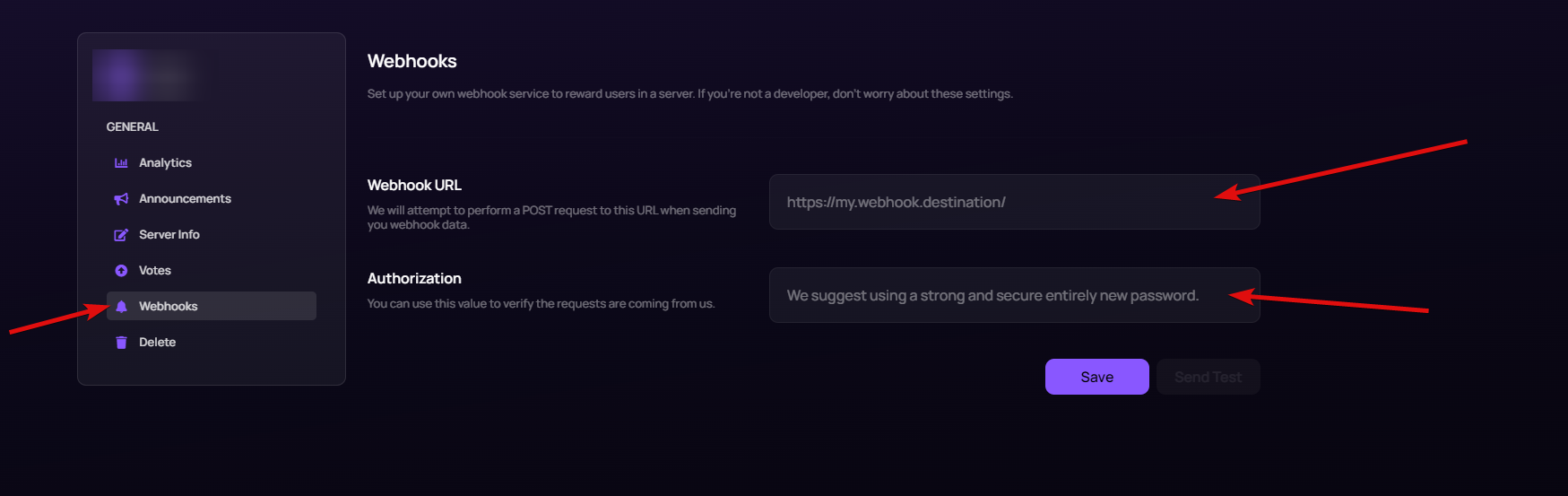 steady gulch
oh mb, didn't realise that, so I assume they work the same way as bot votes right?
jaunty plank
yep, just uses the guild property for guild id, not bot.
steady gulch
ah alright, thanks
proper blaze
how long does it take to get your bot approved
abstract mothBOT
@proper blaze
The average up-to-date approval times are stated [here](#support message).
This does not mean it will take the same amount of time someone else's bot took to be reviewed and does not mean your bot is guaranteed to be reviewed within that time frame.
There is no exact time for how long bot approval will take.
There is a queue and you're not first, nor are you last.
Read more about our reviewal process here
proper blaze
ok
jaunty plank
Any chance the webhook is going down sometimes?
 warm hornet
should i send this field as an average guild count per shard?

like total guild count / total shard count
jaunty plank
its an array, so
lets say you have 3 shards, shard 1 has 1700 guilds, shard 2 has 2000, shard 3 has 1600
you would send [1700, 2000, 1600]
warm hornet
jaunty plank
its an array, so
lets say you have 3 shards, shard 1 has 1700 guilds, shard 2 h...
and how would i calculate that
jaunty plank
it kind of depends, if your bot library supports broadcast eval, I would just broadcast eval.
warm hornet
i mean i could use alot of things and fors but thatll block the loop
warm hornet
jaunty plank
it kind of depends, if your bot library supports broadcast eval, I would just br...
i can get the shard id of each guild yet i cant map the guilds by a shard id without using some whiles
jaunty plank
no need to map anything
 jaunty plank
Yep should be what you need for that.
 cosmic pendant
Can someone help me with topgg autoposter and get the bot token from the webhook page and make sure the client is named client but it still won't send anything or confirm that anything is being posted
smoky marten
cosmic pendant
Can someone help me with topgg autoposter and get the bot token from the webhook...
show code
restive otter
is it a way to give currency rewards with nadeko for my server votes on top.gg?
i have a open source edited nadekobot and i want setup vote rewards or need an verified bot on top.gg for this system?
smoky marten
yes you need to get verified
 icy mulch
 scenic timber
This snippet isn't working. Can someone help me find a fix?
 scenic timber
alr
can you just explain it how it works
the webhook and /dblwebhook placeholders
I cant find the description in documentation
rain heart
I cannot help
dark river
Hello how can i create a vote log? (autocode)
 inland flower
https://top.gg/api/bots/664508672713424926/check?userId=787541309250076692 why is it showing forbbiden
ping me if u say
sleek robin
Welp this really isn't going well
 earnest nexus
inland flower
`https://top.gg/api/bots/664508672713424926/check?userId=787541309250076692` why...
earnest nexus
inland flower
`https://top.gg/api/bots/664508672713424926/check?userId=787541309250076692` why...
did you authorize?
inland flower
no
earnest nexus
 inland flower
i didn't
earnest nexus
yeah then you should
 brazen marlin
Is there such a thing as a socket? I want to make a command that detects if a user voted in but it seems strange to keep sending a request.
Webhooks oh
 tender furnace
https://docs.top.gg/api/bot/#individual-user-vote will this give me a response if the user's vote was more than 12 hours ago?

 fluid violet
Are there any examples for topggpy v2.0.0a?
I don't really get how to recieve the votes in that version
this doesn't work anymore
https://mystb.in/CommunicationBasketballPosting.python
 limber dune
ah
thats a problem
not because of what u might think but because i wrote the bot to work
with top.gg
and now i have to tear it down its for a private company
oh well
 pastel rune
does anyone know why im getting this error
\node_modules\@top-gg\sdk\dist\structs\Api.js:93
throw new Error('Missing Server Count');```(im not missing server count)
 gusty nebula
Show code
 azure bronze
Why can I only decide under a few roles at Role Rewards?
azure bronze
so I just need to put the bots role higher right?
rain heart
yup
azure bronze
Okay thx^^
pastel rune
gusty nebula
Show code
    await dbl.postStats({
        serverCount: client.guilds.size,
        shardCount: client.shards.size
    });
const dbl = new DBL.Api('token');
Maybe it couldn't read client.guilds.size. Have you import Discord.js?
pastel rune
will try
jaunty plank
I'm pretty sure the autoposter supports eris.
https://www.npmjs.com/package/topgg-autoposter
gusty nebula
Update your package then
 last sonnet
how can i get an event of a vote
last sonnet
jaunty plank
using webhooks
it says i need to use bot id althought i want server votes
jaunty plank
you can just use your server id
or go to your servers page, click edit then go to the webhooks section
last sonnet
how will the webhook communicate with my bot though? im used to using discord.py package so its just a builtin feature to the wrapper to listen for messages for example
jaunty plank
youd need to use the topggpy library, or code your own webhook receiver.
last sonnet
jaunty plank
youd need to use the topggpy library, or code your own webhook receiver.
dw im using ur website to do webhooks and il just use onmessage and split it
jaunty plank
that works too
restive otter
pastel rune
```js
const dbl = new DBL.Api('token');
```
How can I get a token?
pastel rune
restive otter
How can I get a token?
look up top.gg api and follow the steps they go through it step by step
restive otter
Well how can I do this
 restive otter
I don't know what happened but today after voting for cg my players were not added to my squad
How can I get my rewards back
rain heart
-wrongserver @restive otter
abstract mothBOT
@restive otter
Hey! We think you have our server mistaken. We do not provide support, help, or advice for any bot. You need to click on the "Discord" button on the bot's page of the bot you need support for, not the "Join Discord" button at the top of our website. If there isn't a button that says "Discord" or nothing else mentioned about a support server, the server invite is invalid or you were banned from the bot's support server, then we can't help you. Sorry :(

 eternal steeple
restive otter
Well how can I do this
eternal steeple
restive otter
Well how can I do this
 dusk nacelle
Hey Can someone tell me how to get a webhook for vote event ?
I already have this code but not sure what should i give as the weebhook Url
from discord.ext import commands
import os
import dbl


class TopGG(commands.Cog):
    """
    This example uses dblpy's webhook system.
    In order to run the webhook, at least webhook_port must be specified (number between 1024 and 49151).
    """

    def __init__(self, bot):
        self.bot = bot
        self.token = os.environ['dbl_token']  # set this to your DBL token
        self.dblpy = dbl.DBLClient(self.bot, self.token, webhook_path= os.environ['dbl_webhook'], webhook_auth= os.environ['dbl_password'], webhook_port=5000)

    @commands.Cog.listener()
    async def on_dbl_vote(self, data):
        """An event that is called whenever someone votes for the bot on top.gg."""
        print("Received an upvote:", "\n", data, sep="")

    @commands.Cog.listener()
    async def on_dbl_test(self, data):
        """An event that is called whenever someone tests the webhook system for your bot on top.gg."""
        print("Received a test upvote:", "\n", data, sep="")


def setup(bot):
bot.add_cog(TopGG(bot))```the resulting webhook url by your code, http://yourip:port/path
dusk nacelle
rain heart
the resulting webhook url by your code, `http://yourip:port/path`
Umm... How do i get that ? I use replit
 unique jacinth
@dense grail bro you speak in hindi
restive otter
rain heart
-wrongserver <@456226577798135808>
thanks
btw how did a bot reply to me like that
 lost thorn
is there a way to check if a person can vote (hasn't voted in the past 12 hours)
 verbal cape
nvm fixed
lost thorn
tidal idol
If the response isn’t 1 then the user can vote
Is this the method for java? I was confused whether "hasVoted" means its in the past 12 hours or not.
 tidal idol
lost thorn
Is this the method for java? I was confused whether "hasVoted" means its in the ...
tidal idol
lost thorn
Is this the method for java? I was confused whether "hasVoted" means its in the ...
I was looking at the raw api
That should work in the Same way
lost thorn
okay, thanks!
 worldly palm
I tryed the top.gg autoposter on my testing bot but then when i pushed the code to the production version, it's stuck on the stats from the testing bot
 rain heart
cache
worldly palm
so can i clear the cache somehow?
 abstract mothBOT
In order to clear your cache for the site, press CTRL+F5.
If this does not work, try one of these resources below:
Instructions on Microsoft Edge
Instructions on Google Chrome
Instructions on Mozilla Firefox
Instructions on Safari
Instructions on Opera
Instructions on Brave
 faint vale
verbal cape
faint vale
verbal cape
-botinfo 923332113812561951
rain heart
verbal cape
-botinfo 923332113812561951
-botcommands
abstract mothBOT
@verbal cape
Hey! Bots aren't given permissions to send responses in this channel. Please use #commands to run commands.
verbal cape
rain heart
-botcommands
Oh lol sorry did not check the channel
 bitter dome
rain heart
bitter dome
rain heart
Is there a good documentation for shards on discord.py?
fluid violet
Are there any examples for topggpy v2.0.0a?
I don't really get how to recieve the votes in that version
this doesn't work anymore
https://mystb.in/CommunicationBasketballPosting.python
bitter dome
fluid violet
Are there any examples for topggpy v2.0.0a?
I don't really get how to recieve th...
I think docs?
fluid violet
bitter dome
I think docs?
nope
fluid violet
bitter dome
I use the one in docs
show me the docs
bitter dome
Once my bots os verified
fluid violet
i cant find them
bitter dome
:.
fluid violet
1.4 docs are there
bitter dome
fluid violet
i mean for v2
They havent updated?
bitter dome
fluid violet
1.4 docs are there
Ohh kay

 tidal idol
tidal idol
tidal idol
Flash bang warning
sullen nymph
Light theme superior
 jagged cairn
from discord.ext import commands, tasks
import os

import dbl
token = os.environ['topggtoken']

class TopGG(commands.Cog):


    def __init__(self, bot):
        self.bot = bot
        self.token = token
        self.dblpy = dbl.DBLClient(self.bot, self.token)
        self.update_stats.start()

    def cog_unload(self):
        self.update_stats.cancel()

    @tasks.loop(seconds=3)
    async def update_stats(self):
        await self.bot.wait_until_ready()
        try:
            server_count = len(self.bot.guilds)
            await self.dblpy.post_guild_count(server_count)
            print('Posted server count ({})'.format(server_count))
        except Exception as e:
            print('Failed to post server count\n{}: {}'.format(type(e).__name__, e))


def setup(bot):
    bot.add_cog(TopGG(bot))
Im using the dblpy library to update my server count on top.gg. When I run the code, it says "Server Count Posted" but when I see the top.gg page it doesnt show up, if anyone knows why this is happening kindly ping me
 fervent portal
ayo, anyone can tell me how to use top.gg's webhooks to send voting logs
start with servers cuz my bot is yet to be approved.
 modest shore
Os there a way to check if user has vote using pycord
 spiral lava
hey, what's up with my bot's image?
https://top.gg/bot/601347755046076427
Top.gg
A highly customizable bot for management of temporary channels and dynamic matchmaking
also my widget shows 404
rain heart
-refreshdata
abstract mothBOT
In order to re-fetch data about your bot (Avatar, Name), please use the Refresh Data button on the right sidebar. If it still doesn't seem to change, make sure you actually changed the bot avatar and not the application icon / changed the bot name and not the application name on your Discord Developer Portal.
Please note that it may take 30 minutes up to an hour for the site-cache to also update.
 rain heart
read the last part
 cursive zodiac
jagged cairn
```py
from discord.ext import commands, tasks
import os
import dbl
token = os.e...
cursive zodiac
jagged cairn
```py
from discord.ext import commands, tasks
import os
import dbl
token = os.e...
simple, cache
jagged cairn
cursive zodiac
simple, cache
oh alr, so I should clear my cache and it should load
jagged cairn
cursive zodiac
simple, cache
Thank you so much, it works now
cursive zodiac
np
fluid violet
sullen nymph
<@280695297456472065> topggpy.rtfd.io/latest
There are no examples i guess
 latent narwhal
can you give a more detailed explanation about this if possible, thanks!
restive otter
The dude above scrolled all the way to 2020^^
tidal idol
 modern crest
Hey guys, when you vote on top.gg is it 12 hours for the user? Or the votes for everyone resets every 12 hours?
restive otter
is @top-gg/sdk like dblapi.js? if yes then will this work? js client.dbl = new Topgg(process.env.DBL_TOKEN, client); accessing ```js
client.dbl.hasVoted(message.author.id)
yes
but with await
 magic cave
dbl_webhook(route: str = '/dbl', auth_key: str = '')
what is this route exactly ?
where do we get this route from ?
How to config the webhook url in Topgg site settings when we are using the topggpy sdk
jaunty plank
latent narwhal
can you give a more detailed explanation about this if possible, thanks!
py or js?
jaunty plank
magic cave
How to config the webhook url in Topgg site settings when we are using the topgg...
it depends, what are you using to host?
magic cave
jaunty plank
py or js?
topgg-py
magic cave
jaunty plank
it depends, what are you using to host?
does that mean, even after using the sdk, we need to host another server ?
jaunty plank
well, yeah your bot needs to be hosted somewhere the SDK can be used on the same process(and server) as the bot.
if thats home, a vps, replit, heroku etc.
just to clarify, i am asking about your bot host or the host you want to have the webhook on.
if they are the same, then its just the bot host.
magic cave
my bot host is me
my localhost
XD
If i understand how the sdk is working in localhost, i can replicate it anywhere
jaunty plank
http://yourvpsip:port/dbl
jaunty plank
(or home ip)
magic cave
XD
thanks, will get back after testing
and btw, why is Topgg Bot teams so buggy
i need that test but for developemnet purposes and the owner is someone else
sullen nymph
Unintended new feature
magic cave
It shows a 403 Error when i goto Bot -> Edit (via teams) i am not the owner of the bot
sullen nymph
Magic
It's a known issue as far as I recall but in any case go to #support for that shitshow
tidal idol
magic cave
It shows a 403 Error when i goto Bot -> Edit (via teams) i am not the owner of t...
Thats called Caching
Give it around an hour to clear on Top.gg's side
Then clear cache on your sid
magic cave
tidal idol
Thats called Caching
i am always using Ctrl+F5 to prevent my browser from loading any cache
on Topggsite
sullen nymph
sullen nymph
It's a known issue as far as I recall but in any case go to <#714045415707770900...
😌
latent narwhal
jaunty plank
py or js?
js
jaunty plank
https://discordjs.guide/sharding/#sharding-file
your webbook receiver would go here, or in another program.
restive otter
s
client.dbl = new Topgg(process.env.DBL_TOKEN, client);
             ^

TypeError: Topgg is not a constructor
const api = new Api('yourtopggtoken')
const vote = await api.hasVoted(message.author.id) // or whatever``` low pumice
Hi
tidal idol
low pumice
Hi
Need any help?
 grand jackal
rain heart
grand jackal
rain heart
No
restive otter
Hello, I am using the dbl module for voting, but it is pulling the votes as undefined, how can I fix it?
 shy vortex
show code
 restive otter
I used it in it but it still says undefined
shy vortex
how you use the new one is not the same though
check the example code on the npm package website
and make sure you use and import it correctly
the new package is not a drop in replacement
 lucid flame
 faint finch
I Want To Get User Has Been Voted ?
@commands.Cog.listener()
    async def on_dbl_vote(self, data):
        """An event that is called whenever someone votes for the bot on top.gg."""
        print("Received an upvote:", "\n", data, sep="")
data["user"] ?
faint finch
!!!
 olive oar
Hey so I am trying to access my bot's webhook page but it's giving me a 403
Is everything OK?
Also, are teams broken?
tidal idol
olive oar
Hey so I am trying to access my bot's webhook page but it's giving me a 403
403 means unauthorised
Meaning it’s likely an issue with authentication on your end. Make sure the token is correct, and try resetting it


 olive oar
I mean
I co-own the bot through a team
So I should have access to it right?
We've had certain issues with the API listener thingamagigbob, and I needed to test the API
restive otter
restive otter
```const { Api } = require('@top-gg/sdk')
const api = new Api('yourtopggtoken')
...
ty
 scarlet cobalt
olive oar
I co-own the bot through a team
scarlet cobalt
olive oar
I co-own the bot through a team
One message removed from a suspended account.
 tardy field
Umm so im trying to see how to make it where when someone votes for my bot it gets posted to a channel in the bots support server, but i know it can be done for discord.js, but what about eris?
olive oar
scarlet cobalt
One message removed from a suspended account.
It is approved, we have used the API previously
rain heart
Id?
fading monolith
isn't there any way for Vote Rewards/Logs through Heroku?
else please suggest Free webhook services
 mossy oxide
Is it possible to make a bot dm you after voting?
rain heart
Yes, but only possible when that user has DMS enabled and has a server in common
mossy oxide
How do i make it dm the user?
mossy oxide
Okay
jaunty plank
Fetch the user using your bots library and then send as normal.
 rain oak
Can you help me how to get dbl token
rain heart
Read pins
rain oak
rain heart
Read pins
ok
 visual berry
does this api support server votes?..
visual berry
tidal idol
Yes
oh ok so how do i do it
tidal idol
visual berry
oh ok so how do i do it
https://webhook-topgg.com is the easiest way
visual berry
tidal idol
https://webhook-topgg.com is the easiest way
thank you..
 warped ocean
Hello,
I'm making a request as written in the Get Started and i still receive a 403.
My bot is approved.
 warped ocean
The token given for the webhook configuration on the bot settings page
 dim kettle
inland flower
is there a way i can get automaticaly data if some one votes(js)
dim kettle
inland flower
is there a way i can get automaticaly data if some one votes(js)

Example using Express in JS: https://docs.top.gg/libraries/javascript/#webhooks
 silk reef
does the api return how much time a user has to wait before voting again?
rain heart
cant help
 left patio
spiral lava
also my widget shows 404
left patio
spiral lava
also my widget shows 404
On the my bot's page I went to Edit > Bot Info > Use New Design set to off and Save, now the bot's avatar is back
Unsure if this is an official workaround.

 gloomy cypress
maybe the users not cached on your bot
gloomy cypress
ayo guys, how this thing work?

 strange palm
gloomy cypress
ayo guys, how this thing work?
strange palm
gloomy cypress
ayo guys, how this thing work?
 restive otter
I'm getting topgg.errors.unauthorized when trying to update my server count using the following code that is built off of the example provided by you guys
from discord.ext.commands import Cog
from discord.ext.tasks import loop


class Topgg(Cog):
    def __init__(self, bot):
        self.BlackHole = bot
        self.update_stats.start()

    def cog_unload(self):
        self.update_stats.cancel()

    # Update the server count on Top.gg every 24 hours
    @loop(hours=24)
    async def update_stats(self):
        try:
            await self.BlackHole.TopggAPI.post_guild_count()
        except Exception as e:
            self.BlackHole.log.error(
                f"Failed to update server count on Top.gg:\n {type(e)}: {e}")


def setup(bot):
    bot.add_cog(Topgg(bot))
(I defined BlackHole.TopggAPI in my main bot code, so don't worry about it being defined incorrectly.)
I am also providing it with the correct token
BlackHole.TopggAPI = topgg.DBLClient(BlackHole, topggToken)
(please ping me when you respond)
tidal idol
@rain heart
rain heart
@true oasis #memes-and-media
restive otter
?
tidal idol
restive otter
?
There was someone shitposting memes, nothing related to your request don't worry
restive otter
gotcha, i got slightly worried
 woven cradle
@queen solar
 fluid pewter
TopGGAPIError: 401 Unauthorized (You need a token for this endpoint)
    at Api._request (E:\Recreation-Beta\node_modules\@top-gg\sdk\dist\structs\Api.js:76:19)
    at processTicksAndRejections (node:internal/process/task_queues:96:5)
    at async Api.postStats (E:\Recreation-Beta\node_modules\@top-gg\sdk\dist\structs\Api.js:99:9) {
  response: Response {
    size: 0,
    timeout: 0,
    [Symbol(Body internals)]: { body: [PassThrough], disturbed: true, error: null },
    [Symbol(Response internals)]: {
      url: 'https://top.gg/api/bots/stats',
      status: 401,
      statusText: 'Unauthorized',
      headers: [Headers],
      counter: 0
    }
  }
}
what does this mean ?
jaunty plank
fluid pewter
```js
TopGGAPIError: 401 Unauthorized (You need a token for this endpoint)
a...
Did you provide a topgg token?
If you did, regenerate it and use that.
fluid pewter
jaunty plank
Did you provide a topgg token?
yes , actually it the test bot and i m using the main bot token
so is there any issue in it ?
or it is token issue only ?
rain heart
How are you passing the token
scarlet cobalt
One message removed from a suspended account.
rain heart
Unnecessary
fluid pewter
rain heart
How are you passing the token
like it is given in the example
rain heart
So the token is passed through what? A string or an eval?
fluid pewter
rain heart
So the token is passed through what? A string or an eval?
just copy paste
rain heart
Show your code while replacing the token with just "token" and wait for someone who can help
fluid pewter
rain heart
Show your code while replacing the token with just "token" and wait for someone ...
const client = require('../index.js');
const { AutoPoster } = require('topgg-autoposter');

AutoPoster('token', client)
  .on('posted', () => {
    console.log('Posted stats to Top.gg!')
  })
i did this
jaunty plank
You will not be able to do that on a second bot. You are trying to send a status update to a bot the token doesn't apply to.
restive otter
import topgg

# This example uses tasks provided by discord.ext to create a task that posts guild count to Top.gg every 30 minutes.

dbl_token = "Top.gg token"  # set this to your bot's Top.gg token
bot.topggpy = topgg.DBLClient(bot, dbl_token)


@tasks.loop(minutes=30)
async def update_stats():
    """This function runs every 30 minutes to automatically update your server count."""
    try:
        await bot.topggpy.post_guild_count()
        print(f"Posted server count ({bot.topggpy.guild_count})")
    except Exception as e:
        print(f"Failed to post server count\n{e.__class__.__name__}: {e}")


update_stats.start()```i've done this but the bot count me 2 servers while my bot is on 145 serversand also it doesn't show on the top gg page of my bot
restive otter
jaunty plank
If you did, regenerate it and use that.
why would we need to use a brand new token?
rain heart
should update instantly, might not show instantly on the site due to caching
 tender elm
How do i fetch the amount of votes a user has?
restive otter
rain heart
should update instantly, might not show instantly on the site due to caching
it updated, thanks!
 compact geode
If I get no response, aka just {} when posting server_count, it should mean I'm good to go, yes?
rain heart
that means it was successful
compact geode
Ah perfect
 fading hill
how
can i handle a post request
i mean not express
i already did one but
what is the requests body
im logging req.body and it is undefined
where is the id of the voter?
app.post('/vote', (req, res) => {
  if (req.headers.authorization === process.env.AUTH_PASS) {
    console.log(req.body)
    // => undefined
  }
  res.send("Recieved.")
});
i also tried logging params

also req.data => undefined
rain heart
fading hill
i already read all of the page :'
i know the schema
i just dont know where it is in the request
fading hill
rain heart
https://docs.top.gg/resources/webhooks/
this doesnt say where the body is
fading hill
request.body is undefined
rain heart
from where is that request
fading hill
 rain heart
use an actual vote
rain heart
cant help then
fading hill

i will reverse engineer the topgg.webhook server

gotcha

this is the parser for those who needs it
jaunty plank
if you are still getting empty bodies, are you using characters outside of a-z 0-9 and a few special characters in your url or auth? you may not receive the body if those are included.
âsadasdsad as your auth will cause issues with the webhook.
asadasdsad wont
 odd hill
 restive otter
How do i check if a valid token is passed into topgg.DBLClient without calling "update server count"?
 winged nova
what do you really mean by webhook?
is it a websocket connection?
is top.gg will send the request?
or is i gonna send a post request to webhook?
tidal idol
winged nova
what do you really mean by webhook?
is it a websocket connection?
is top.gg will...
it sends a post request with data about who voted and for what bot
winged nova
oh ok so i need to setup a flask to handling those data?
tidal idol
Yes
Anything that allows you to process that post request and handle what you need from there will work
winged nova
okay cool
sullen nymph
restive otter
How do i check if a valid token is passed into `topgg.DBLClient` without calling...
Yes
You can't check if your token is valid without any requests
 short roost
I want to post bot stats , i need top.gg provided bot token or authorization secret ?
As token
plucky lance
To post your stats manually you need an authorization token to interact with the API

Edit your bot on topgg, then hit Webhooks
You can generate a token there
short roost
plucky lance
To post your stats manually you need an authorization token to interact with the...
The token provided by top.gg or the secret thing which we wrote ?
short roost
plucky lance
You can generate a token there
Damn that long token one ?
I guess i have to fix that issue in my npm package
plucky lance
short roost
Damn that long token one ?
Yes that's your authorization token
short roost
Thanks for the info 👍
plucky lance
Do you wanna post the stats manually or are you using the sdk?
short roost
plucky lance
Yes that's your authorization token
It's bot token i guess
short roost
plucky lance
Do you wanna post the stats manually or are you using the sdk?
Manually , i made a public npm package for all discord botlists so I am doing everything manually
plucky lance
short roost
It's bot token i guess
No, it's an...
authorization token to interact with the API
short roost
May be
plucky lance
Alright, so you gonna send a POST request to the API including the authorization token (webhook token) in the header of your request.
Those 2 URLs should show you the general structure of the request
 cursive steppe
Does Test Webhook gives correct data now? Because previously it was sending wrong data