#topgg-api
1 messages · Page 171 of 1
 restive otter
 restive otter
This is the URL you're supposed to put, SpaceDoggo
For the auth, it's fully up to you
 sullen nymph
Are you hosting the webhook locally?
 rigid birch
thats what im supposed to do, right?
sullen nymph
If you use some sort of service that uses a website domain instead, that'll suffice too
Not really. It's just another option
restive otter
Err, where do you host the bot though?
rigid birch
its a service called EpikHost
restive otter
So you want to separate the webhook server and the bot?
rigid birch
no no, i just want a way use webhook locally, when i dont know the ip
wait there must be something in python which does that
sullen nymph
 rigid birch
get the ip adress of machine
rigid birch
sullen nymph
of hosting
sullen nymph
Do you have a URL that points to the machine?
rigid birch
no
restive otter
Err, you might wanna ask for that I guess
sullen nymph
Huh yeah
rigid birch
ill ask them
rigid birch
yo wait could that be the ip?

no way lol
umm wait a minute
i do have a website
could i handle webhooks through that?
congrats you exposed your ip address
💀
restive otter
rigid birch
could i handle webhooks through that?
If you have access to the backend, sure
rigid birch
restive otter
If you have access to the backend, sure
how ...
i have access to the backend
bot.topgg_webhook = topgg.WebhookManager(bot).dbl_webhook("/dblwebhook", "password")
bot.topgg_webhook.run(5000) # this method can be awaited as well```bot is needed here, right?
restive otter
rigid birch
i have access to the backend
Is it Python as well?
restive otter
Well, tbh you don't need topggpy if that's the case
Just create a route that accepts a POST request
restive otter
Check the Authorization header so that you're sure it's coming from topgg. If so, parse the body in JSON and do whatever you want with the data
That's basically it
restive otter
Take a look at this for the scheme https://docs.top.gg/resources/webhooks/#bot-webhooks
rigid birch
but wait, then topgg will post the data on my website right?
restive otter
Yes
 bleak condor

 brisk ocean
Hello,
I don't understand very well how the webhook system works
Is a webhook is needed for each server ?
brisk ocean
And what have to use for get the user who's voted and do something in Python ?
 slender python
 shell gazelle
try upgrade node
shell gazelle
slender python
try upgrade node
K
restive otter
   // Top.gg API
   setInterval(() => {
       fetch(`https://top.gg/api/bots/${client.user.id}/stats`, {
           method: 'post',
           data: {
               "server_count": `${client.guilds.cache.size}`
           },
           headers: {
               "Content-Type": "application/json",
               "Authorization": bconfig.topggtoken
           },
           body: JSON.stringify({ "server_count": client.guilds.cache.size }),
       }).then(() => {
           let webembed = new Discord.MessageEmbed()
           webembed.setTitle("Top.gg")
           webembed.setURL("https://top.gg/bot/802868654957789204")
           webembed.setDescription("Bot Stats - Updated")
           webembed.setColor('GREEN')
           webembed.setTimestamp()
           client.channels.cache.get(bconfig.botpostchannel).send(webembed)
       }).catch((err) => {
           console.error(err);
       })
   }, bconfig.apiupdatetime)
won't updating server count on website
 narrow zenith
error?
narrow zenith
maybe cache update, i'd say give it 20 minutes max
restive otter
m giving 2 hrs same resutl
giving 5 sec same result
(Use `node --trace-warnings ...` to show where the warning was created)
this comes everytime
narrow zenith
did you do that?
restive otter
(node:25) ExperimentalWarning: stream/web is an experimental feature. This feature could change at any time
(Use `node --trace-warnings ...` to show where the warning was created)
/home/container/node_modules/discord.js/src/rest/RequestHandler.js:154
      throw new DiscordAPIError(request.path, data, request.method, res.status);
            ^

DiscordAPIError: Missing Permissions
    at RequestHandler.execute (/home/container/node_modules/discord.js/src/rest/RequestHandler.js:154:13)
    at processTicksAndRejections (node:internal/process/task_queues:96:5)
    at async RequestHandler.push (/home/container/node_modules/discord.js/src/rest/RequestHandler.js:39:14) {
  method: 'delete',
  path: '/channels/132632676225122304/messages/900766672091234314/reactions',
  code: 50013,
  httpStatus: 403
}
now this
narrow zenith
ok, so forbidden access, looks like a delete and reaction error
restive otter
just tell me one thing
   // Top.gg API
   setInterval(() => {
       fetch(`https://top.gg/api/bots/${client.user.id}/stats`, {
           method: 'post',
           data: {
               "server_count": `${client.guilds.cache.size}`
           },
           headers: {
               "Content-Type": "application/json",
               "Authorization": bconfig.topggtoken
           },
           body: JSON.stringify({ "server_count": client.guilds.cache.size }),
       }).then(() => {
           let webembed = new Discord.MessageEmbed()
           webembed.setTitle("Top.gg")
           webembed.setURL("https://top.gg/bot/802868654957789204")
           webembed.setDescription("Bot Stats - Updated")
           webembed.setColor('GREEN')
           webembed.setTimestamp()
           client.channels.cache.get(bconfig.botpostchannel).send(webembed)
       }).catch((err) => {
           console.error(err);
       })
   }, bconfig.apiupdatetime)
this code have any error
that it didnt update stats
narrow zenith
ok, so it looks like from reading a stack overflow forum, your bot has lower permissions than the user possibly, also check your intents in the dev portal for discord
restive otter
narrow zenith
ok, so it looks like from reading a stack overflow forum, your bot has lower per...
i dont think that i have to enable any intent for this
 raw bough
restive otter
```
// Top.gg API
setInterval(() => {
fetch(`https://top.gg/api/bot...
raw bough
restive otter
```
// Top.gg API
setInterval(() => {
fetch(`https://top.gg/api/bot...
the channel you are trying to post the embed to isn't allowing your bot to do so
narrow zenith
check your permissions then, because it's saying it's a permission issue and your bot's requesting access for a channel it doesn't have access too, i think it envolves deleting something too
restive otter
fetch is a package node-fetch
narrow zenith
yes it is
raw bough
wait
restive otter
ya
raw bough
r u sure this snippet throws error?
restive otter
m sending ss
raw bough
restive otter
m sending ss
does your bot autodeletes any message?
or something like that
restive otter
 raw bough
or something like that
raw bough
raw bough
or something like that
??
restive otter
 narrow zenith
is that the full code?
raw bough
@restive otter you put topggtoken in Authorization?
restive otter
ya
// Bot Required Modules
const Discord = require('discord.js');
const client = new Discord.Client();
const bconfig = require("./config.json");
const fetch = (...args) => import('node-fetch').then(({ default: fetch }) => fetch(...args));


// Bot Website Post Stats API's
client.on('ready', () => {

    console.log("HI")

    // Top.gg API
    setInterval(() => {
        fetch(`https://top.gg/api/bots/${client.user.id}/stats`, {
            method: 'post',
            data: {
                "server_count": `${client.guilds.cache.size}`
            },
            headers: {
                "Content-Type": "application/json",
                "Authorization": bconfig.topggtoken
            },
            body: JSON.stringify({ "server_count": client.guilds.cache.size }),
        }).then(() => {
            let webembed = new Discord.MessageEmbed()
            webembed.setTitle("Top.gg")
            webembed.setURL("https://top.gg/bot/802868654957789204")
            webembed.setDescription("Bot Stats - Updated")
            webembed.setColor('GREEN')
            webembed.setTimestamp()
            client.channels.cache.get(bconfig.botpostchannel).send(webembed)
        }).catch((err) => {
            console.error(err);
        })
    }, 5000)
})

client.login(bconfig.bottoken);
thats my code
m testing the stats update only
raw bough
use autoposter
restive otter
thats why only this one
narrow zenith
^^
restive otter
raw bough
use autoposter
k
raw bough
autoposter will be easy to handle
raw bough
(:
raw bough
yes
restive otter
k
raw bough
restive otter
k
 restive otter
code -
const { AutoPoster } = require('topgg-autoposter')


// Bot Website Post Stats API's

const poster = AutoPoster('eyJhbGciOiJIUzI1NiIsInR5cCI6IkpXVCJ9.eyJpZCI6IjgwMjg2ODY1NDk1Nzc4OTIwNCIsImJvdCI6dHJ1ZSwiaWF0IjoxNjMyMDQyMDU4fQ.2rLETL-7DY3Gi8eXMZDxHoMz6t18EqWjJS4fTlJEL_g', client)

poster.on('posted', () => {
    console.log('Posted stats to Top.gg!')
})
error
TopGGAPIError: 401 Unauthorized (You need a token for this endpoint)
    at Api._request (C:\Users\manje\Desktop\New folder\node_modules\@top-gg\sdk\dist\structs\Api.js:76:19)
    at processTicksAndRejections (node:internal/process/task_queues:96:5)
    at async Api.postStats (C:\Users\manje\Desktop\New folder\node_modules\@top-gg\sdk\dist\structs\Api.js:99:9) {
  response: Response {
    size: 0,
    timeout: 0,
    [Symbol(Body internals)]: { body: [PassThrough], disturbed: true, error: null },
    [Symbol(Response internals)]: {
PS C:\Users\manje\Desktop\New folder> npm run start
> new-folder@1.0.0 start
> node index.js
TopGGAPIError: 401 Unauthorized (You need a token for this endpoint)
    at Api._request (C:\Users\manje\Desktop\New folder\node_modules\@top-gg\sdk\dist\structs\Api.js:76:19)
    at processTicksAndRejections (node:internal/process/task_queues:96:5)
    at async Api.postStats (C:\Users\manje\Desktop\New folder\node_modules\@top-gg\sdk\dist\structs\Api.js:99:9) {
  response: Response {
    size: 0,
    timeout: 0,
    [Symbol(Body internals)]: { body: [PassThrough], disturbed: true, error: null },
    [Symbol(Response internals)]: {
      url: 'https://top.gg/api//bots/stats',
      status: 401,
      statusText: 'Unauthorized',
      headers: [Headers],
      counter: 0
    }
  }
}
@raw bough
raw bough
wait
raw bough
restive otter
code -
```
const { AutoPoster } = require('topgg-autoposter')
// Bot Website P...
token is correct?
raw bough
restive otter
and try new one
yes u can
raw bough
yes
restive otter
any suggestions
raw bough
are you using client.login() ?
 rain heart
i mean I deleted the message because it had your token in it
restive otter
ya
sorry for that
const Discord = require('discord.js');
const client = new Discord.Client();
const { AutoPoster } = require('topgg-autoposter')

const poster = AutoPoster('mytoken', client)
poster.on('posted', () => {
    console.log('Posted stats to Top.gg!')
})

client.login(bconfig.bottoken);
here is my code
@raw bough
rain heart
any error messages?
raw bough
this is syntactically correct
restive otter
TopGGAPIError: 401 Unauthorized (You need a token for this endpoint)
    at Api._request (C:\Users\manje\Desktop\New folder\node_modules\@top-gg\sdk\dist\structs\Api.js:76:19)
    at processTicksAndRejections (node:internal/process/task_queues:96:5)
    at async Api.postStats (C:\Users\manje\Desktop\New folder\node_modules\@top-gg\sdk\dist\structs\Api.js:99:9) {
  response: Response {
    size: 0,
    timeout: 0,
    [Symbol(Body internals)]: { body: [PassThrough], disturbed: true, error: null },
    [Symbol(Response internals)]: {
PS C:\Users\manje\Desktop\New folder> npm run start
> new-folder@1.0.0 start
> node index.js
TopGGAPIError: 401 Unauthorized (You need a token for this endpoint)
    at Api._request (C:\Users\manje\Desktop\New folder\node_modules\@top-gg\sdk\dist\structs\Api.js:76:19)
    at processTicksAndRejections (node:internal/process/task_queues:96:5)
    at async Api.postStats (C:\Users\manje\Desktop\New folder\node_modules\@top-gg\sdk\dist\structs\Api.js:99:9) {
  response: Response {
    size: 0,
    timeout: 0,
    [Symbol(Body internals)]: { body: [PassThrough], disturbed: true, error: null },
    [Symbol(Response internals)]: {
      url: 'https://top.gg/api//bots/stats',
      status: 401,
      statusText: 'Unauthorized',
      headers: [Headers],
      counter: 0
    }
  }
}
nvm
fixed it
thanks for your time
raw bough
restive otter
fixed it
say the fix
restive otter
 raw bough
ok
raw bough
have a nice day
restive otter
thanks
restive otter
raw bough
have a nice day
suprabhat
raw bough
restive otter
idk how
site bug
raw bough
restive otter
suprabhat
subhratri
 plucky lance
restive otter
```
// Bot Required Modules
const Discord = require('discord.js');
const client ...
plucky lance
restive otter
```
// Bot Required Modules
const Discord = require('discord.js');
const client ...
The data property does not belong into your code.
restive otter
(:
// Bot Required Modules
const Discord = require('discord.js');
const client = new Discord.Client();
const bconfig = require("./config.json");
const fetch = (...args) => import('node-fetch').then(({ default: fetch }) => fetch(...args));


// Bot Website Post Stats API's
client.on('ready', () => {

    console.log("HI")

    // Top.gg API
    setInterval(() => {
        fetch(`https://top.gg/api/bots/${client.user.id}/stats`, {
            method: 'post',
            headers: {
                "Content-Type": "application/json",
                "Authorization": bconfig.topggtoken
            },
            body: JSON.stringify({ "server_count": client.guilds.cache.size })
        }).then(() => {
            let webembed = new Discord.MessageEmbed()
            webembed.setTitle("Top.gg")
            webembed.setURL("https://top.gg/bot/802868654957789204")
            webembed.setDescription("Bot Stats - Updated")
            webembed.setColor('GREEN')
            webembed.setTimestamp()
            client.channels.cache.get(bconfig.botpostchannel).send(webembed)
        }).catch((err) => {
            console.error(err);
        })
    }, 5000)
})

client.login(bconfig.bottoken);
then this is the code @plucky lance
plucky lance
You don't have to post any fields as the body is your JSON string.
restive otter
am i right
restive otter
plucky lance
You don't have to post any fields as the body is your JSON string.
then m correct
restive otter
restive otter
```
// Bot Required Modules
const Discord = require('discord.js');
const client ...
this is correct
plucky lance
Remove the comma fron the last property
body: JSON.stringify({ "server_count": client.guilds.cache.size }), <--
plucky lance
Also check if the status code for the response is accurate
.then((response) => { if(response.ok) ...
catch() only handles errors not if topgg forbidds your request
Also keep in mind to increase your interval frequency
Sending it every 5s is absolutelly too much
I would recommend 30 min
 violet berry
hi there
why I have another owner and at Creators section I see only me?
he has full perms as well
 twin vortex
i need api key for my discord bot plz
 fringe lily
what's the value that returns true when it's a weekend with the Top.gg Node SDK node module i forgot
vote.weekend or something
idk
what it is and is it a Boolean or something else
or just show the docs of where it is i've been looking for a bit can't find it
raw bough
twin vortex
i need api key for my discord bot plz
?
 mighty bolt
Whats my webhook url if my bot is hosted using AWS?
mighty bolt
U mean token?
plucky lance
mighty bolt
Whats my webhook url if my bot is hosted using AWS?
If you don’t know the hostname just use it’s public IP address and the path you specified in your webhook config as URL
fringe lily
i thought there was something that showed if it was the weekend on the top.gg api but i couldn't find it so i'll just use my local time on my machine
plucky lance
The API should return a boolean for is_weekend
 jaunty plank
sidenote: the test button doesn't include the is weekend parameter. only real votes.
 willow sphinx
should probably add that in for test webhooks too
 tidal idol
 sharp flare
The top.gg website is not opening
sharp flare
The top.gg website is not opening
Known issue
 fossil mural
how can I get the id of person who voted for the bot I use python

 tidal idol

GitHub
A simple API wrapper for top.gg written in Python. Contribute to top-gg/python-sdk development by creating an account on GitHub.
Read that
fossil mural
tidal idol
https://github.com/top-gg/python-sdk#using-webhook
ok 👍 ty again
can we get post request if bot is self hosted?
rain heart
you will need to portforward etc if you selfhost
fossil mural
rain heart
you will need to portforward etc if you selfhost
any guide that I can follow?
rain heart
your router manual
fossil mural
another way to get vote info without webhooks? 😅 (ping while answering)
restive otter
?

 echo saffron
Hi there. How would I go by adding a webhook for my server to remind users to upvote? Do I need to create my own bot? Does the reminder only work for bots or can it also be used to remind users to upvote my server?
plucky lance
fossil mural
another way to get vote info without webhooks? 😅 (ping while answering)
You can send requests to the API as well to receive the list of voters for the last 12 hours.
fossil mural
plucky lance
You can send requests to the API as well to receive the list of voters for the l...
so I cant know at the same moment when the bot being voted without using webhooks is that right?
plucky lance
The disadvantage is there’s no timestamp available when an user has voted but the result is the same.
Correct
plucky lance
The webhook is more or less live.
fossil mural
I see
restive otter
How can i search for bots with prefix ! and only show invite, username, discriminator, id, prefix fields? https://top.gg/api/bots?search=prefix: !&fields=invite, username, discriminator, id, prefix this dosen't work, i may understood it wrong tho
rain heart
as a side-note: you will need an approved bot to use the api
restive otter
rain heart
as a side-note: you will need an approved bot to use the api
i do have an approved bot, prefix dosent math with my query tho
example data i get
prefixed are like '.', '$' but not '!'
rain heart
There's no search filtering on what you're doing, you will have to fetch actual data, parse that data into json, then loop through the results matching prefixes
restive otter
sucks, thx tho
 twin reef
1|zap-v13  | TypeError: Cannot read properties of undefined (reading '_request')
1|zap-v13  |     at postStats (/root/zap-v13/node_modules/@top-gg/sdk/dist/structs/Api.js:99:20)
1|zap-v13  |     at Timeout._onTimeout (/root/zap-v13/src/structures/zap.js:185:33)
1|zap-v13  |     at listOnTimeout (node:internal/timers:557:17)
1|zap-v13  |     at processTimers (node:internal/timers:500:7)
Is there a fix yet? Been getting this error and not finding a fix for days.
restive otter
FetchError: request to https://top.gg/api//bots/stats failed, reason: socket hang up
how to fix this please
restive otter
already made
 charred swift
Check the url
rain heart
 restive otter
i see im just using the auto poster so im not the one providing the url probably just not up to date
rain heart
make sure you're using the newest version, aswell as passing a correct id
your url does not include the bot id
restive otter
yep the version is probably outdated as i said
 restive otter
that what i did
restive otter
my issue fixed it was just not up to date lol
rain heart
ohhh
 hidden ocean
@celest pier
jaunty plank
it should, is the bot instance logged in?
tidal idol
ghost ping
jaunty plank
 still tendon
I have some questions about the ratelimits on here: https://docs.top.gg/resources/ratelimits/
i think i am being ratelimited, but i am using autoposter
how do i know how often its hitting the api? and how do i limit it so that i don't exceed it
 jaunty plank
still tendon
I have some questions about the ratelimits on here: https://docs.top.gg/resource...
jaunty plank
still tendon
I have some questions about the ratelimits on here: https://docs.top.gg/resource...
The autoposter shouldnt be rate limitable, unless you create it a ton of times.
by default it runs once every 30 minutes.
https://github.com/jpbberry/topgg-autoposter/blob/master/src/structs/BasePoster.ts#L33
still tendon
ok thanks, thats good
then it is probably discordjs ratelimiting me
restive otter
Hey, i try to let my bot send a embed if a users votes for my bot, but i tried everything and nothing worked. It would be nice if someone could help me(my bot is in py)
i tried to set the url to https://my-server.ip:port/dblwebhook and the auth key to "test", than i made the cog but nothing happend, nothing is printed :/
jaunty plank
restive otter
Hey, i try to let my bot send a embed if a users votes for my bot, but i tried e...
where are you hosting your bot?
home/vps/replit/heroku/other
restive otter
i host on a pterodactyl panel
jaunty plank
do they allow the use of webservices like this?
do they allow the port you are using?
tidal idol
jaunty plank
do they allow the use of webservices like this?
do they allow the port you are u...
pterodactyl gives port number per account so I'm not sure if it will work
I have a pterodactyl account so I'll give it a try now
restive otter
i can send my code if you want
tidal idol
@jaunty plank Can confirm it will work on Pterodactyl
restive otter
@client.event
async def on_ready():
discordtownlist.start()
topgg.start()
DiscordComponents(client)
client.topgg_webhook = topgg.WebhookManager(client.dbl_webhook("/dblwebhook", "test"))
await client.topgg_webhook.run(7001)
@client.event
async def on_dbl_vote(data):
"""An event that is called whenever someone votes for the bot on Top.gg."""
if data["type"] == "test":
# this is roughly equivalent to
# return await on_dbl_test(data) in this case
return client.dispatch('dbl_test', data)
print(f"Received a vote:\n{data}")
@client.event
async def on_dbl_test(data):
"""An event that is called whenever someone tests the webhook system for your bot on Top.gg."""
print(f"Received a test vote:\n{data}")
 tidal idol
restive otter
tidal idol
restive otter
but i got this error too:
  File "/home/container/.local/lib/python3.8/site-packages/discord/client.py", line 343, in _run_event
    await coro(*args, **kwargs)
  File "/home/container/bot.py", line 153, in on_ready
    client.topgg_webhook = topgg.WebhookManager(client.dbl_webhook("/dblwebhook", "test"))
AttributeError: 'Loop' object has no attribute 'WebhookManager'```odd
Lemme try something and I'll get back to you
I'll also write down the code on how to do it
for others
restive otter
ok
restive otter
jaunty plank
do they allow the use of webservices like this?
do they allow the port you are u...
yes they allow these webservers and using of the port
tidal idol
alr
restive otter
restive otter
but i got this error too:
```pyTraceback (most recent call last):
File "/home...
You're shadowing the topgg module there
what did i do?
what means that
You have a function decorated with a loop decorator named topgg it seems
Can't tell much without the full code ¯\_(ツ)_/¯
yeah but thats for posting guild count
Name it something else
ok
Also, you shouldn't do it in an on_ready, because it may fire multiple times
tidal idol
I'm making a simplified tutorial for python and pterodactyl
restive otter
Well you can, but just don't try to override, do a hasattr check
restive otter
File "/home/container/bot.py", line 153, in on_ready
client.topgg_webhook = topgg.WebhookManager(client.dbl_webhook("/dblwebhook", "test"))
AttributeError: 'Bot' object has no attribute 'dbl_webhook'
now i get this lol
Because you're accessing something non-existent
That's not how you setup the WebhookManager either
I'd suggest you read the examples in the readme
ok
restive otter
tidal idol
as top.gg module doesnt like pterodactyl that much
I don't know what the issue you're talking about, feel free to make an issue on GitHub
ok i fixed i try it
Anyw, gtg
Will check it later
yesss it worked!!
tidal idol
epic
 tidal idol
user = client.get_user(int(data["user"]))```then user.name
or user
user returns name#0000 etc and user.name returns just the name
sullen nymph
You got it!
rain heart
Well we cannot help much without you showing your code
autoposter posts stats every 30 minutes iirc, so that could be posting it initially, then 30 minutes later
restive otter
tidal idol
np
Hey, is it possible to get the current vote count in py in a client.command()
 vapid brook
restive otter
Hey, is it possible to get the current vote count in py in a client.command()
vapid brook
restive otter
Hey, is it possible to get the current vote count in py in a client.command()
Look the docs
restive otter
I dont find anything
rain heart
then you're not properly looking
check the bot object on the docs
the data it contains
@restive otter ok then
rain heart
dblapi
 celest pierBOT
This channel is ONLY for the Top.gg API!
This channel is only for: suggestions/help/bugs to do with official API libraries and API docs found at: https://docs.top.gg
Any Off-Topic conversation may get deleted and muted.
If you need help with development about your bot or development in general, feel free to use #development.
restive otter
rain heart
check the bot object on the docs
I just find how to post the guild count and print when a user votes for the bot
rain heart

 drowsy plover
Trying to webhook when someone votes. Do i need to auth? Newbie to Python, thanks.
client.topgg_webhook = topgg.WebhookManager(client).dbl_webhook("/dblwebhook", "my bot token")
client.topgg_webhook.run(5000)

@client.event
async def on_dbl_vote(data):
# doesn't run```mmkay so i realised what the password was supposed to be and it's still not working.
i'm assuming i need to authorise somewhere but idk how
 drowsy plover
yea that's already fixed
drowsy plover
the password and server is all entered on the site now

where do i use the top.gg token though
 knotty garnet
there
drowsy plover
but that's the password
knotty garnet
ah nvm
 knotty garnet
ye ye, mb
drowsy plover

drowsy plover
i tried turning off my firewall incase it was that and that didn't work
knotty garnet
check whether the port is open
drowsy plover
i manually opened a port to try that too
knotty garnet
I mean, check if nothing else is using it
drowsy plover
i've tried two ports now
this is running off my home pc so im wondering if im being dumb with the webhook url
 drowsy plover
i've tried both, which should i use
 drowsy plover
no it's running on my windows 10
knotty garnet
is your ip discoverable?
Your IP Address plus Port Scanners, Traceroute, HTTP Compression Test, Ping, Whois, DNS, IP Geo Location, Password Generator and many more tools and how-to's
drowsy plover
yea
drowsy plover
okay  thanks
restive otter
Did you not specify the port in the URL?
drowsy plover
restive otter
Did you not specify the port in the URL?
no?
i've been using telnet to check if my port is open and it seems that even if i add rules in windows firewall it doesn't connect. If i turn off windows firewall it still doesn't connect
wtf is this
 restive otter
drowsy plover
no?
restive otter
drowsy plover
no?
Iirc HTTP defaults to 80, so try http://YOUR_IP:5000/dblwebhook
drowsy plover
okay ill see if that works but its saying that port is closed
restive otter
Personally haven't done any port forwarding, so can't help with that
drowsy plover
didn't work
charred swift
you'll have to port forward for it to work
if you set http://your_ip/something on topgg, you'll need to forward port 80 to that computer you are using to listen those requests
plucky lance
You can use the GUI of your Windows advanced firewall settings or just the command prompt
Keep in mind to adjust the local port
Also hosting at home means you will have to open and forward the port in your router, too
Since be default they will drop inbound connection for unknown ports
You need to forward this TCP port to your device, your current code is running on listening for the webhooks
Even if you did all the required steps it may still be impossible to receive webhooks.
The reason for that could be a nowadays common DS-Lite connection to your provider.
That means you will not have an actual public IPv4 address and most providers don’t support port forwarding for IPv6
drowsy plover
OSError: [Errno 10048] error while attempting to bind on address ('0.0.0.0', 80): only one usage of each socket address
(protocol/network address/port) is normally permitted
 drowsy plover
gawd darn it
i just spent all that time forwarding
alright so after all of that
it doesn't work

no error message or anything. back to square one.
waaait
ofc my public ip has changed 
drowsy plover
i'm pretty sure it's working now, i'm getting normal dumb errors that says it's actually triggering the function
plucky lance
drowsy plover
ofc my public ip has changed <a:speen:884275984407343114>
Keep in mind that will and can happen frequently.
drowsy plover
aaand the code works
drowsy plover
plucky lance
Keep in mind that will and can happen frequently.
with port forwarding, i had to reserve an ip, so i'm hoping that means it doesn't change
knotty garnet
plucky lance
https://icanhazip.com
I can has zip
drowsy plover
I thought i should pop back in here and say thank you and you're all very lovely for helping me 
willow sphinx
drowsy plover
ofc my public ip has changed <a:speen:884275984407343114>
Duck DNS free dynamic DNS hosted on Amazon VPC
or if you're on cloudflare https://github.com/timothymiller/cloudflare-ddns
GitHub
🎉🌩️ Dynamic DNS (DDNS) service based on Cloudflare! Access your home network remotely via a custom domain name without a static IP! - GitHub - timothymiller/cloudflare-ddns: 🎉🌩️ Dynamic DNS (DDNS) ...
restive otter
Hey, i tried to get the vote count in discord.py
i tried:
import dbl
dbl_token = 'topgg-token'
@client.command()
async def votes(ctx):
    upvotes = await dbl.DBLClient(client, dbl_token).get_bot_upvotes()
    print(upvotes)
But it just printed a giant list with users, ids etc
but i want only the count of all votes from a month
this is what was printed
but i just want the current vote count
jaunty plank
restive otter
Hey, i tried to get the vote count in discord.py
i tried:
```py
import dbl
dbl_t...
probably looking for the bot data.
https://topggpy.readthedocs.io/en/latest/models.html#botdata
 fluid violet
Is the api down?
tidal idol
fluid violet
Is the api down?
nope
 fluid violet
tidal idol
nope
fluid violet
tidal idol
nope
But the push of the bots server count isnt working
fluid violet
tidal idol
nope
Also for other users
jaunty plank
fluid violet
But the push of the bots server count isnt working
getting any errors?
tidal idol
fluid violet
But the push of the bots server count isnt working
mine is posting ok
posted 10 mins ago ok
 jaunty plank
also, your server count seems to be updated correctly for me.
-bots 280695297456472065
 abstract moth
 fluid violet
jaunty plank
unless its one of the ones i didnt check kek
fluid violet
jaunty plank
unless its one of the ones i didnt check kek

im posting every 30mins
and it hasn't updated
my bot wasn't on 430 servers 30mins ago
 tidal idol
cache then
fluid violet
tidal idol
cache then
wdym?
tidal idol
it might be a caching issue then
Basically the site knows the count but the site isn't displaying it due to cache
fluid violet
tidal idol
Basically the site knows the count but the site isn't displaying it due to cache
you'll report that?
fluid violet
tidal idol
every webserver has that
so i guess just wait
tidal idol
yep
 young haven
does anyone know a solution for this? my bot has shards so I can't connect, when I turn on the first shard on port 5000, the others try and can't because it's the same port.
Error: listen EADDRINUSE: address already in use :::5000
plucky lance
I’m not really into sharding but that looks like you create a webhook listener for each shard
 violet vale
Why doesn't my token appear when I press "reveal token"
jaunty plank
Try clearing cache or refreshing the token
celest pierBOT
In order to clear your cache for the site, press CTRL+F5.
If this does not work, try one of these resources below:
Instructions on Microsoft Edge
Instructions on Google Chrome
Instructions on Mozilla Firefox
Instructions on Safari
Instructions on Opera
Instructions on Brave
young haven
plucky lance
I’m not really into sharding but that looks like you create a webhook listener f...
yes, I add the code in the shard.js file so that I don't create one for each shard, when someone votes for the bot, it restarts and gives an error. but the vote is received, because he announces in the chat and hands out coins before he falls.
plucky lance
Theoretically a little bit less than the rate limit is.
But that wouldn’t make much sense.
Posting the stats every 30 min is recommended.
 vagrant flame
plucky lance
Theoretically a little bit less than the rate limit is.
But that wouldn’t make m...
vagrant flame
plucky lance
Theoretically a little bit less than the rate limit is.
But that wouldn’t make m...
thanks
plucky lance
30 min is also the frequency the official autoposter uses if I remember right
Just to say…
 foggy lava
Not able to post my server count. https://top.gg/api/bots/896209803385372682 returns not found.
When providing my token, it also returns forbidden.
Ah. Nevermind fixed it. Was an issue on my end.
restive otter
 sweet fern
how do I add a bot to top.gg ???
sweet fern
how do I add a bot to top.gg ???
Alright so follow these steps:
1. Go to top.gg and login
2. Head to https://top.gg/bot/new and fill out the whole form
3. Wait until you get the result.```
also, go to [#support](/guild/264445053596991498/channel/714045415707770900/) next time :) limber shoal
How do I get the votes received message in my server
restive otter
limber shoal
How do I get the votes received message in my server
Here some of the steps to follow!
NodeJs:
npm install top.gg
const DBL = require('top.gg');
const dbl = new DBL(yourDBLTokenHere, { webhookPort: 5000, webhookAuth: 'password' });
dbl.webhook.on('ready', hook => {
  console.log(`Webhook running at http://${hook.hostname}:${hook.port}${hook.path}`);
});
dbl.webhook.on('vote', vote => {
  console.log(`User with ID ${vote.user} just voted!`);
});```

Python:

`pip3 install topggpy`

```py
import topgg

# This example uses topggpy's webhook system.
# The port must be a number between 1024 and 49151.

bot.topgg_webhook = topgg.WebhookManager(bot).dbl_webhook("/dblwebhook", "password")
bot.topgg_webhook.run(5000)  # this method can be awaited as well

@bot.event
async def on_dbl_vote(data):
    """An event that is called whenever someone votes for the bot on Top.gg."""
    if data["type"] == "test":
        # this is roughly equivalent to
        # return await on_dbl_test(data) in this case
        return bot.dispatch('dbl_test', data)

    print(f"Received a vote:\n{data}")

@bot.event
async def on_dbl_test(data):
    """An event that is called whenever someone tests the webhook system for your bot on Top.gg."""
    print(f"Received a test vote:\n{data}")
Sources:
npm: https://www.npmjs.com/package/top.gg
python: https://github.com/top-gg/python-sdk
GitHub
A simple API wrapper for top.gg written in Python. Contribute to top-gg/python-sdk development by creating an account on GitHub.
restive otter
 woven vapor
How do i post my server count to top.gg api
woven vapor
How do i post my server count to top.gg api
Here, follow these steps:
NodeJs:
npm install top.gg
const Discord = require("discord.js");
const client = new Discord.Client();
const DBL = require("top.gg");
const dbl = new DBL('Your top.gg token', client);

// Optional events
dbl.on('posted', () => {
  console.log('Server count posted!');
})

dbl.on('error', e => {
 console.log(`Oops! ${e}`);
})```

Python:

`pip3 install topggpy`

```py
from discord.ext import tasks

import topgg

# This example uses tasks provided by discord.ext to create a task that posts guild count to Top.gg every 30 minutes.

dbl_token = 'Top.gg token'  # set this to your bot's Top.gg token
bot.topggpy = topgg.DBLClient(bot, dbl_token)

@tasks.loop(minutes=30)
async def update_stats():
    """This function runs every 30 minutes to automatically update your server count."""
    try:
        await bot.topggpy.post_guild_count()
        print(f'Posted server count ({bot.topggpy.guild_count})')
    except Exception as e:
        print('Failed to post server count\n{}: {}'.format(type(e).__name__, e))

update_stats.start()
Sources:
npm: https://github.com/top-gg/python-sdk
pip: https://github.com/top-gg/python-sdk
GitHub
A simple API wrapper for top.gg written in Python. Contribute to top-gg/python-sdk development by creating an account on GitHub.
woven vapor
restive otter
Here, follow these steps:
NodeJs:
`npm install top.gg`
```js
const Discord = ...
thanks
restive otter
np :)
restive otter
yea
woven vapor
and after installing the package
restive otter
one sec
woven vapor
should I add it in the message event?
restive otter
If you're using our Node.js runtime, don't install the top.gg npm package as it's deprecated, install @top-gg/sdk instead
woven vapor
restive otter
If you're using our Node.js runtime, don't install the `top.gg` npm package as i...
ok
restive otter
restive otter
restive otter
If you're using our Node.js runtime, don't install the `top.gg` npm package as i...
my bad
apologies
The Top.gg API also has a documentation and a few examples for each official Top.gg lib/SDK you can read and follow:
https://docs.top.gg
restive otter
Hello
Can someone explain me easily what actually this piece of code mean?
    # this is roughly equivalent to
    # return await on_dbl_test(data) in this case
return bot.dispatch('dbl_test', data)```Espacially the dispatch part
A nice, ezzy explaination pls

limber shoal
restive otter
Here some of the steps to follow!
NodeJs:
`npm install top.gg`
```js
const DB...
How to get DBL TOKEN?
restive otter
not your webhook url
restive otter
more help: https://docs.top.gg/api/@reference/#:~:text=Your token can be obtained,the ID of your bot
 restive otter
```if data["type"] == "test":
# this is roughly equivalent to
# return ...
restive otter
restive otter
```if data["type"] == "test":
# this is roughly equivalent to
# return ...
Halp pls
halp

it triggers the event
restive otter
@restive otter is it like that await process_commands() from discord.py?
await bot.process_commands(message)
bot is your bot variable
 weak musk
Im trying to get the vote stats of my bot but why is the Monthly value greater than the total? That makes no sense. ```js
const x = await axios.get('https://top.gg/api/bots/BOTID', {
headers: {
'Authorization': this.client.config.voteToken
}
}).then(result => result.data).catch(() => null);
console.log(x.points, x.monthlyPoints);```
Result: 40 42
If I just console.log() x the point part shows
monthlyPoints: 42, points: 40,



 vestal quartz
Is it possible to import topggpy without discord.py
restive otter
vestal quartz
Is it possible to import topggpy without discord.py
yeah
oh wait
not sure
try it
vestal quartz
but its a dependency
restive otter
then its required
vestal quartz
k, so i cant use it wiith pycord
tidal idol
It should work
jaunty plank
 icy mulch
like it shows the upvotes in your server
icy mulch
like it shows the upvotes in your server
youll need to write code to do that, or use a third party tool such as https://webhook-topgg.com/
vestal quartz
tidal idol
It should work
i dont think it will, since pycord mantains the import discord
icy mulch
jaunty plank
youll need to write code to do that, or use a third party tool such as <https://...
Do you have a code for that?
tidal idol
vestal quartz
i dont think it will, since pycord mantains the import discord
as long as it passes a bot object (client or bot) it should work
vestal quartz
hmm i use discord.Bot not commands.Bot
sullen nymph
Oh fun
Ignoring type annotations, as long as it's similar to d.py, you're good to go
restive otter
How can see a list of ppl who voted my bot using the topggpy api?
 vestal quartz
Traceback (most recent call last):
  File "/home/container/.local/lib/python3.9/site-packages/topgg/client.py", line 151, in _auto_post
    await self.post_guild_count(
  File "/home/container/.local/lib/python3.9/site-packages/topgg/client.py", line 212, in post_guild_count
    await self.http.post_guild_count(guild_count, shard_count, shard_id)
  File "/home/container/.local/lib/python3.9/site-packages/topgg/http.py", line 192, in post_guild_count
    await self.request("POST", "/bots/stats", json=payload)
  File "/home/container/.local/lib/python3.9/site-packages/topgg/http.py", line 165, in request
    raise errors.Unauthorized(resp, data)
topgg.errors.Unauthorized: Unauthorized (status code: 401)``` What is this error?are you providing a topgg token in the initialization of the library?
vestal quartz
jaunty plank
are you providing a topgg token in the initialization of the library?
yes
jaunty plank
vestal quartz
yes
try regenerating the token and using that.
vestal quartz
jaunty plank
try regenerating the token and using that.
ty, it worked
jaunty plank
np
vestal quartz
realized that the token was more than 16 characters long lol
limber shoal
Votes webhook not working .. help
limber shoal
postman?
restive otter
online http post/get
limber shoal
bro @restive otter welp
restive otter
do what Aurel said
limber shoal
i did as you told
im getting reference error and then my token..
Someone help me with webhooks
bruh
restive otter
@wild lantern
jaunty plank
restive otter
I mean how to create one?
depends, what is your host?
vps/home/replit/herkou/etc
restive otter
@jaunty plank replit
tidal idol
restive otter
<@136583532972605440> replit
What language?
 tidal idol
It doesn't work like that
jaunty plank
Nope. Top.gg webhooks don't work with discord webhooks.
You need to add a webhook receiver in code
tidal idol
either use https://webhook-topgg.com/ or i can send some code which works on Replit d.py
jaunty plank
https://docs.top.gg/libraries/python/
Middle example
restive otter
Searched github but couldnt find anything
restive otter
bot.topgg_webhook = topgg.WebhookManager(bot).dbl_webhook("/dblwebhook", "password")
The "/dblwebhook"
It needs to be replaced by the webhook right?
jaunty plank
That's just the path for the url
tidal idol
from quart import Quart, request
import json

app = Quart(__name__)

@app.route("/dblwebhook", methods=["POST"])
async def votewebhook():
    data = await request.data
    data = json.loads(data)

    userid = data["user"]
    botid = data["bot"]

    return "Webhook recieved"

app.run("0.0.0.0")```here is some simple code which works on Replit
jaunty plank
No auth check though
tidal idol
Can be added easily though
from quart import Quart, request, abort
import json

app = Quart(__name__)

@app.route("/dblwebhook", methods=["POST"])
async def votewebhook():
    if request.headers["Authorization"] == "PUT AUTH PASSWORD HERE!":
        data = await request.data
        data = json.loads(data)

        userid = data["user"]
        botid = data["bot"]

        return "Webhook recieved"
    else:
        abort(403)

app.run("0.0.0.0")```Then you can use the userid and botid data to use in your bot
 delicate saffron
gemme API link
jaunty plank
 orchid lance
jaunty plank
<https://docs.top.gg/api/bot/#last-1000-votes>
orchid lance
jaunty plank
<https://docs.top.gg/api/bot/#last-1000-votes>
Thankyou
 scenic gorge
anyone here tried to use topgg webhook with heroku?
jaunty plank
I have not, but have gotten it working for others.
whats the issue?

 jaunty plank
you need to enable a web dyno, you also are not allowed to use port 80 on heroku
jaunty plank
enable a webdyno then see if they both fix then.
 jaunty plank
Probably need to use the env variable they provide.
https://help.heroku.com/P1AVPANS/why-is-my-node-js-app-crashing-with-an-r10-error
scenic gorge
lol
problem was
i used process.env.port not process.env.PORT

as always
@jaunty plank Thank u btw
for helping me bypass my stupidity

 jagged wigeon
Hi guys!
Please tell me where can I get API Token?
tidal idol
jagged wigeon
And what to add here?
 scenic gorge
ur webhook url, place where info will go
rain heart
if you're not going to use webhooks, ignore that field
jagged wigeon
scenic gorge
ur webhook url, place where info will go
Is that token a bot token or api token?
 jagged wigeon
Is that token a bot token or api token?
jagged wigeon
jagged wigeon
Is that token a bot token or api token?
and one more thing how can I use top.gg api with blapi package to display server count
jagged wigeon
rain heart
thats the api token to interact with the top.gg api
oki
jagged wigeon
rain heart
you cannot use discord webhooks
Why?
jagged wigeon
rain heart
you cannot use discord webhooks
than which weebhooks can I use?
 hollow owl
https://github.com/top-gg/java-sdk is too outdated
GitHub
An API wrapper for https://discordbots.org/api/docs that works in Java - GitHub - top-gg/java-sdk: An API wrapper for https://discordbots.org/api/docs that works in Java
like alot
rain heart
There's no-one maintaining it, nor are prs reviewed
 rain heart
you cannot post your server count when your bot is not approved
jagged wigeon
rain heart
you cannot post your server count when your bot is not approved
bot has been approved
icy mulch
rain heart
you cannot post your server count when your bot is not approved
its for my friends its a bot with him and it isnt working
@restive otter's
 tidal idol
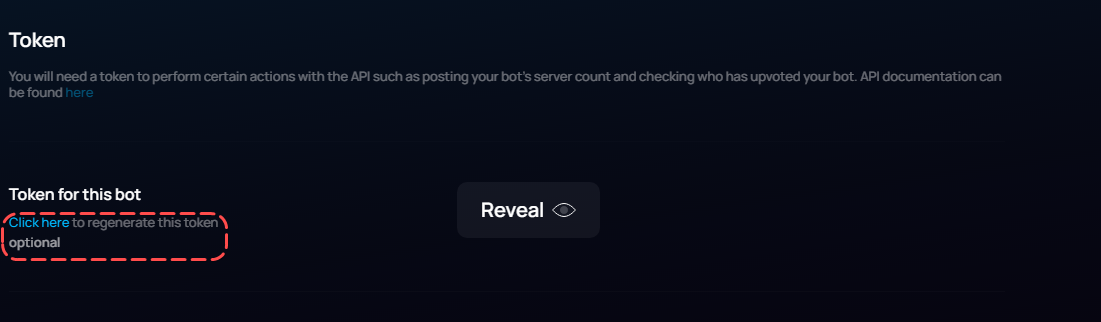
https://top.gg/bot/895643962222731274/webhooks
tidal idol
tidal idol
https://top.gg/bot/895643962222731274/webhooks
thats with your bot id
 tidal idol
 icy mulch
tidal idol
https://i.imgur.com/YPRCg7u.png
icy mulch
tidal idol
https://i.imgur.com/YPRCg7u.png
ok
tidal idol
epic
icy mulch
@tidal idol do u know how to make upvote counter in a discord channel with top.gg webhooks
tidal idol
like that?
 icy mulch
tidal idol
like that?
icy mulch
tidal idol
like that?
Yea
icy mulch
alr lemme see
icy mulch
tidal idol
Its a tool Woo made (iirc)
ok
plucky lance
You just fetch the user by the user ID you got from topgg and post a message in a channel you want.
That doesn’t require to rely on third party services.
icy mulch
plucky lance
You just fetch the user by the user ID you got from topgg and post a message in ...
like a bot does that
plucky lance
Yes, you’re using your bot to fetch the user and also to send a massage to a channel
restive otter
could someone help me use the top.gg events in discord.py in cogs
cause im using cogs and sending tests but it dont work
rain heart
dblservercount
celest pierBOT
To have your bot's server count displayed on Top.gg, please read the documentation on server/shard posting.
 quiet slate
login?
quiet slate
i will
rain heart
ngl @hearty lintel update gif when
tidal idol
rain heart
ngl <@!142408079177285632> update gif when
i've just made one
its saving

@rain heart

 topaz mural
so
i know i have the right token because the autopost server count is working
but the on_dbl_vote event is not being called
(python)
anyone?
ping me if you reply
plucky lance
If you receive webhooks the current timestamp is the way to go.
Just add 12 hours to it and you got the timestamp somebody can vote again.
 forest trench
Any other way? Cuz I mean it's not just for 1 person
rain heart
topaz mural
but the on_dbl_vote event is not being called
Have you set your webhook on your webhook settings on topgg
plucky lance
forest trench
Any other way? Cuz I mean it's not just for 1 person
No, topgg doesn't provide the timestamp when the user has voted.
You have to take the timestamp when receiving the webhook.
topaz mural
rain heart
Have you set your webhook on your webhook settings on topgg
???
what does that mean
(i have a token)
@rain heart?
restive otter
Hello
I am using webhook-topgg.com
But...
I want a webhook msg like this when someone votes...
Shayokh voted for Spark Bump! Thank You!
Voter id : id_here
So how to write this exact content here?
 topaz mural
rain heart
Have you set your webhook on your webhook settings on topgg
topaz mural
rain heart
Have you set your webhook on your webhook settings on topgg
I'm using the Python library
forest trench
topaz mural
I'm using the Python library
He's not asking about what library ur using, he's asking did you set up ur webhook and add it to ur bots top.gg page?
forest trench
Not the correct channel and server
plucky lance
You gonna receive webhooks sent by topgg, take the user ID provided as data in the webhook, fetch the user using your bot, send a message to whatever channel (DM) you want.
 atomic burrow
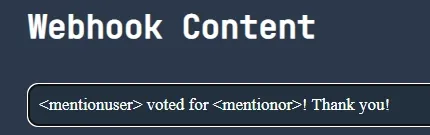
i had an issue with webhook-topgg.com, i set it all up, it worked when it sent a test, but as soon as i closed the tab, it stopped working, even when actually voting. am i doing something wrong?
rain heart
@jaunty plank
jaunty plank
atomic burrow
i had an issue with webhook-topgg.com, i set it all up, it worked when it sent a...
did you test it with top.gg?
jaunty plank
hmm, can you dm me the url you used on topgg?
atomic burrow
yeah, one sec
restive otter
@jaunty plank The voter id?
jaunty plank
You want the voters id?
On the third page the bottom menu lists all the variables. Can't remember which is the voter id on the top of my head
restive otter
E.
topaz mural
forest trench
He's not asking about what library ur using, he's asking did you set up ur webho...
I still don't understand
forest trench
Bruh
 steel remnant
hello, how can shard display, number of servers, etc. can i show
rain heart
dblservercount
celest pierBOT
To have your bot's server count displayed on Top.gg, please read the documentation on server/shard posting.
 covert wraith
jaunty plank
covert wraith
jaunty plank
like a vote list?
servers cant use the api, so if you need a list you need to store them yourself.


 jaunty plank
 proper granite
i don't understand why it doesn't work
proper granite
i don't understand why it doesn't work
Running from home?
proper granite
yes
jaunty plank
Did you port forward?
http://portforward.com/
Has guides for most routers
Port Forward
A port forward is a way of making a computer on your home or business network accessible to computers on the internet even though they are behind a router. It is commonly used in gaming security camera setup voice over ip and downloading files.
 jaunty falcon
how do i make my bot log my server votes
jaunty plank
jaunty falcon
how do i make my bot log my server votes
You'll need to setup a webhook listener
https://docs.top.gg/resources/webhooks/
jaunty falcon
ok
jaunty falcon
jaunty plank
You'll need to setup a webhook listener
<https://docs.top.gg/resources/webhooks/...
so i need to add my bot in top.gg first ?
i just want my bot to count server votes
jaunty plank
Nope, if you are setting it up for server votes your bot doesn't need to be added.
Only time your bot needs to be added is for bot vote webhooks
jaunty falcon
jaunty plank
Nope, if you are setting it up for server votes your bot doesn't need to be adde...
so wht to do first ?
jaunty plank
Add the code for the webhook listener to the bot/wherever you want the event to exist.
tidal idol
what seems to be the issue?
tidal idol
ok
restive otter
from my phone i can't
tidal idol
i'd recommend https://webhook-topgg.com
restive otter
only from pc
restive otter
tidal idol
i'd recommend https://webhook-topgg.com
ok
Initial server error
from my phone
 jaunty plank
strange, not sure why that would happen.
tidal idol
you're here anyways
jaunty plank
I dont have mobile offically supported, but shouldnt have errored
restive otter
idk why
jaunty plank
(reason being discord doesnt let you create webhooks/view webhooks from mobile)
so it wasnt a priority


 jaunty plank
are you planning to use the api?
webhooks dont need the topgg token
restive otter
I want to do vote system
i need the token
but there is no token
oh ok i don't need the token, just webhook
forest trench
is there a way i can get the amount left of the cooldown after i vote?
jaunty plank
forest trench
is there a way i can get the amount left of the cooldown after i vote?
that will need to be tracked by you.
forest trench
jaunty plank
that will need to be tracked by you.
ah, alright, what im doing now is whenever they use the command the cooldown starts, but theres many flaws in it.
jaunty plank
Would be best to use webhooks, and when they vote add 12 hours to the time and thats when they can vote again
forest trench
jaunty plank
Would be best to use webhooks, and when they vote add 12 hours to the time and t...
yea ,but how would i do that for each user, thats what im stuck on
jaunty plank
what do you mean?
same exact thing you are doing now, but only when they actually vote.
rain heart
state your problem
restive otter
The voting system is not working
when someone vote for my bot, the bot is not sending the message
rain heart
Have you setup your webhook listener correctly?
Do you have an active connection listening to requests?
Is the webhook somewhat hindered by a firewall?
You could test webhooks with one of the following tools to make sure they work:
- reqbin
- postman
if you're not sure about any of these, nor about what any of the tools mentioned above are useful for, I'd suggest reading over https://sendgrid.com/blog/whats-webhook/

Read about what a webhook is, how it can be used with your apps, and how to get started using webhook APIs.
restive otter
const Topgg = require("@top-gg/sdk");
const webhook = new Topgg.Webhook("123")

app.post("/voted", webhook.listener(vote => {
  let channel = client.channels.cache.get("903363101422923797")
  let user = client.users.cache.get(vote.user)
if(!channel)return console.log("channel was not found")
  if(!user)return console.log("user was not found")
  channel.send(`${user} voted for us, thank you`)
}))
This is my code
tidal idol
restive otter
when someone vote for my bot, the bot is not sending the message
What hosting are you using?
restive otter
replit
rain heart
Have you also set your webhook url on top.gg after making sure it is functional using the tools above?
restive otter
yeah
rain heart
And it does receive requests?
Could you test your webhook using an actual vote than using the test vote button? If I remember correctly some users may have had issues testing their webhooks using it
rain heart
And entered authorization aswell? In your case seems to be 123
restive otter
yes
rain heart
Remember the authorization on your webhook code and top.gg need to be equal, otherwise it will fail
restive otter
yes im sure
rain heart
Screenshot your current configuration on your webhook settings on top.gg, change the current authorization to something else for showing
 rain heart
and you have tried that exact url aswell? Could you add a debug line to your webhook code without processing anything?
So for example before your let channel and let user, a simple debug line that says "I received a request"
restive otter
rain heart
and you have tried that exact url aswell? Could you add a debug line to your web...
it did work now
thank you
rain heart
What was the issue?
restive otter
rain heart
What was the issue?
i think because i don't have
app.get("/voted")
it did work after that
rain heart
Oh yeah forgot the endpoint then 👍
rain heart
dblissues
celest pierBOT
Top.gg is currently facing multiple site issues that may cause your experience to not be great. The Development Team is actively working on these issues to try to fix them. There is NO ETA (estimated time) for when these issues are fixed.
Please refer to the message in #support labeled [Current Site Issues](#support message) to stay up to date on which of these issues are fixed and/or if the issue you're encountering is already known.
Please note: The linked message above may not be updated accurately, the team is already working on ways to reliably notify you about ongoing site issues. If you're unaware of a certain issue being already known by us, feel free to inform us and we'll inform you accordingly.
restive otter
ok
forest trench
jaunty plank
what do you mean?
same exact thing you are doing now, but only when they actuall...
no by cooldown i mean, when they use the !vote command, it starts the cooldown for it.
jaunty plank
yep, can do the exact same thing, but inside the webhook event.
 honest iris
Has the API changed since the website update in anyway? My server count isn't increasing on top.gg but I know my bot is joining more server...
rain heart
You need to actively post your server count to top.gg
We do not fetch it ourselves as we technically can't
restive otter
Hello

I am getting this webhook msg on test
There is lots of stuffs messed here
How can I do the \n?
I am expecting an output like this...
Shayokh just voted for Spark Bump! Thank You!
Id : voterid
 restive otter
It's Discord's caching on mobile, you can't do anything about it

 grave river
webhookAuth How can I get?
tidal idol
You create the auth password yourself
Personally I just did something like “This Is My Very Secure Password”
You can just not put anything there
grave river
tidal idol
Personally I just did something like “This Is My Very Secure Password”
required for notifications
const dbl = new DBL('dbl token', { webhookPort: 5000, webhookAuth: 'dbl password' });
grave river
tidal idol
For DBL password, put anything
I'm saying okay
tidal idol
Ok
grave river
tidal idol
Ok
So, should your webhook discord be your own webhook?
grave river
ok
grave river
vote notification
grave river
ok
 tidal idol
 torpid lintel
What do you want to use it for?
torpid lintel
tidal idol
What do you want to use it for?
vote logs
tidal idol
torpid lintel
tidal idol
use https://webhook-topgg.com
i want to add reminder and much more https://test.repl.co/dblwebhook i use my code first in repl and paste that repl link into top.gg webhook section when i clicked test then getting embed but i am my bot on azure rdp so what i add ip ip/dblwebhook like this ?
tidal idol
Yep
torpid lintel
rain heart
https
i also try that
rain heart
they're using repl I assumed
torpid lintel
rain heart
they're using repl I assumed
no my bot is hosted on azure rdp
rain heart
have you checked if the actual webhook is working?
Have you setup your webhook listener correctly?
Do you have an active connection listening to requests?
Is the webhook somewhat hindered by a firewall?
You could test webhooks with one of the following tools to make sure they work:
- reqbin
- postman
if you're not sure about any of these, nor about what any of the tools mentioned above are useful for, I'd suggest reading over https://sendgrid.com/blog/whats-webhook/
Read about what a webhook is, how it can be used with your apps, and how to get started using webhook APIs.
torpid lintel
yes first i try on repl that is working
rain heart
copy paste time
torpid lintel
i use repl.it bot only for test but i want to put that in my main bot code because i want to make vote reminder and much more soo
sullen nymph
tidal idol
IPs don’t support HTTPS as far as I’m aware
I thought they did
tidal idol
sullen nymph
I thought they did
They do, but with a warning for invalid certificate
sullen nymph
So long as the listener accepts SSL certificates
tidal idol
You can’t get SSL for IPs
You can have one for a domain but it will flag up on browsers
sullen nymph
Fun
proper granite
how get vote streak of a user?
proper granite
( i use get requests)
jaunty plank
proper granite
how get vote streak of a user?
you need to track that yourself.
streaks are not tracked by topgg
 tranquil matrix
How to send a message to the very next channel the user interact with after voting?
rain heart
You could theoretically do it this way:
-
get the webhook event requests from the user voting
-
store that state
-
every time a user interacts with that channel, check if that vote state is true, if yes, send that message
restive otter
how can i get the current vote count of my discord.py bot with your api?
rain heart
tidal idol
@jaunty plank
wooo
webhook not sending on vote atm
several people voted on my server and no webhook was sent
jaunty plank
I'm out of town till Monday. I can't really do much if somethings wrong.
I'll see if I can look into it
restive otter
hey I need help setting up server count for my bot
jaunty plank
tidal idol
I’ll see if anyone else can vote and test for me
Just checked the number of votes using the site per hour, its not really dropped at all.
I'll check it in the morning. If I need to ill call cloudflare(only reason it might not work)
Does the test button on topgg work?
restive otter
restive otter
hey I need help setting up server count for my bot
how do I start with :/
restive otter
yeah like where do I add this?
 restive otter
jaunty plank
Or well language
restive otter
jaunty plank
Or well language
bot is js
jaunty plank
That goes in the header of the request.
If you dont know how that works probably best to use the js library.


 wraith nebula
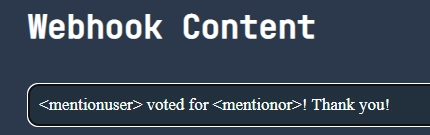
hi guys, i need help, when i want to start the server to get the webhooks, the server start in http://0.0.0.0 etc.., someone can help me ?
rain heart
0.0.0.0 basically means "from any end"
so it could be localhost, your internal ip, your external ip
wraith nebula
yes
rain heart
you need to use your external ip
wraith nebula
but where can i put my external ip
wraith nebula
const dbl = new DBL('my token :D', { webhookPort: 3000, webhookAuth: 'my pass :D' })

dbl.webhook.on('ready', hook => {
    console.log(`Webhook running at http://${hook.hostname}:${hook.port}${hook.path}`);
});```where can i put
(tag me if u have the solution pls)
restive otter
rain heart
`http://yourip:port/endpoint`
can u help me please?
im trying to make a search bot function
therefore i want to return the id
but when i search
and i set the limit, offset, search to anything
i get this result: 247056469894103041 252442396879486976 281041859692855296 227435708183216128 293879161062424578 292953664492929025 218423174621167617 303904389968560129 226393343385403403 85614143951892480
restive otter
who to get top api
tidal idol
restive otter
who to get top api
what do you mean
tidal idol
for bot or server
rain heart
tidal idol
that ^^
restive otter
 tidal idol
restive otter
tidal idol
restive otter
thats not something top.gg provide support for
as its a third party module/api
 potent prawn
hey , anyone know how to show bot statistics in top.gg page?
im using python
number of servers that my bot is in and stuff
 half depot
so i am trying to check if used has voted or not
index.js
const Topgg = require("@top-gg/sdk");
this.topgg = new Topgg.Api(process.env.TOPGGKEY);
and to check i am trying
client.topgg.hasVoted(`user id here`)
but i am getting this error
TopGGAPIError: 401 Unauthorized (You need a token for this endpoint)
create a env file with your topgg key
restive otter