#topgg-api
1 messages · Page 170 of 1
 rotund wren
ight done thanks thanks 
 plucky lance
Great!
 wanton cliff
When I update the server count in my bot's page via API, the count shows correctly for like 1-2 hours and then again the server count shows a wrong number
 rain heart
Caching, you need to actively post aswell
 cold root
is there a way to know which package needs a specific dependence without checking litilery each one
?
 jaunty plank
most packages list their dependancies on npm
 tidal idol
jaunty plank
most packages list their dependancies on npm
tidal idol
jaunty plank
most packages list their dependancies on npm
woo new pfp 👀
jaunty plank
old pfp
wanton cliff
rain heart
Caching, you need to actively post aswell
Oh you mean I have to autopost like every 30 minutes
jaunty plank
Yeah, it only updates when you update it(auto posting)

 sonic ferry
I need to use the top.gg api to get notified who voted for my bot
How can I
Please can someone say the process
jaunty plank
 quiet pendant
my bot is joined in 12 server and I'm posting
quiet pendant
my bot is joined in 12 server and I'm posting
I dont see your bot posting server counts https://top.gg/bot/857935418993410049
jaunty plank
sonic ferry
Please can someone say the process
what programming language?
sonic ferry
jaunty plank
what programming language?
Python
jaunty plank
https://docs.top.gg/libraries/python/ middle section covers webhooks.
sonic ferry
jaunty plank
<https://docs.top.gg/libraries/python/> middle section covers webhooks.
What is webhook
quiet pendant
...
sonic ferry
With that can I see who voted for my bot?
jaunty plank
sonic ferry
What is webhook
webhooks are a way for top.gg to send vote events to your program
as you can see in the example, its just an event
sonic ferry
jaunty plank
as you can see in the example, its just an event
So can I do this
 quiet pendant
jaunty plank
I dont see your bot posting server counts <https://top.gg/bot/857935418993410049...
quiet pendant
jaunty plank
I dont see your bot posting server counts <https://top.gg/bot/857935418993410049...
I think it's not joined any server before the approve
jaunty plank
sonic ferry
So can I do this
yep, and youll need to fill in the url and auth in the webhook section of your bot(edit page)
jaunty plank
quiet pendant
I think it's not joined any server before the approve
we never pull server count, even before approval.
we only get it from posting it, which it doesn't appear you are doing.
quiet pendant
oh ok I am sorry I didn't understand you at first
sonic ferry
jaunty plank
yep, and youll need to fill in the url and auth in the webhook section of your b...
Url means the invite link of the bot?
jaunty plank
sonic ferry
Url means the invite link of the bot?
nope, webhooks are like websites, you need a url to the one in your code(using the ip instead of a domain is fine).
where are you hosting? vps, heroku, replit, home?
sonic ferry
jaunty plank
nope, webhooks are like websites, you need a url to the one in your code(using t...
Replit
jaunty plank
your url will look something like
YOURHEROKUPROJECTURL/dblwebhook
sonic ferry
jaunty plank
your url will look something like
`YOURHEROKUPROJECTURL/dblwebhook`
Where will I get this url
jaunty plank
https://docs.replit.com/hosting/hosting-web-pages
the replit docs cover it
sonic ferry
Right
sonic ferry
jaunty plank
<https://docs.replit.com/hosting/hosting-web-pages>
the replit docs cover it
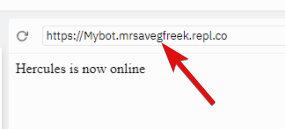
So here my url is in top right
 jaunty plank
yeah this
https://i.imgur.com/cWnhVwC.png
 sonic ferry
jaunty plank
yeah this
https://i.imgur.com/cWnhVwC.png
sonic ferry
jaunty plank
yeah this
https://i.imgur.com/cWnhVwC.png
Ok
jaunty plank
then add /dblwebhook to the end, as thats the default path
sonic ferry
jaunty plank
yep, and youll need to fill in the url and auth in the webhook section of your b...
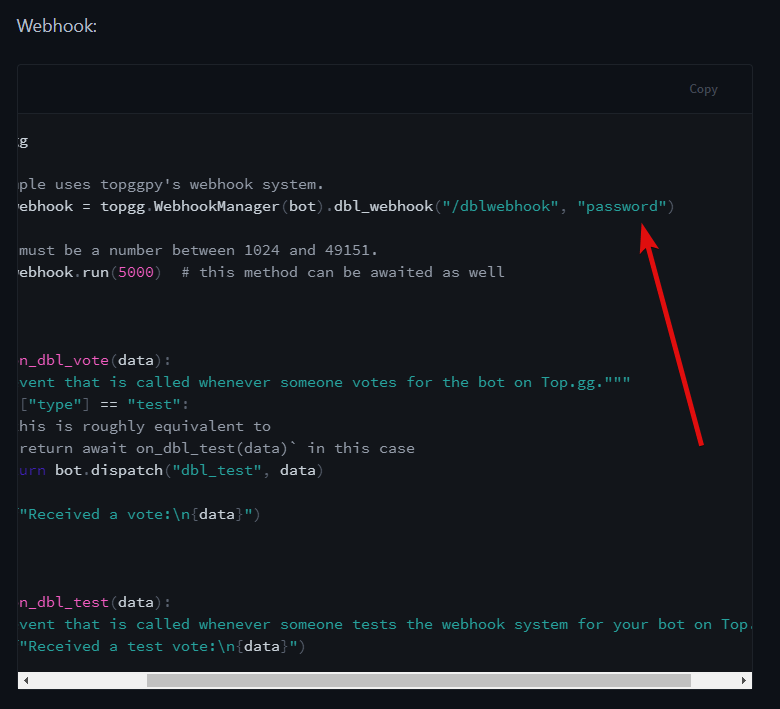
And here you told something about aouth
jaunty plank
yeah, the auth needs to be the same here, and on the page you fill the url in.
https://i.imgur.com/xvbkhpM.png
 sonic ferry
jaunty plank
yeah, the auth needs to be the same here, and on the page you fill the url in.
h...
sonic ferry
jaunty plank
yeah, the auth needs to be the same here, and on the page you fill the url in.
h...
Which auth where to get
jaunty plank
you are the one who decides it
sonic ferry
jaunty plank
you are the one who decides it
Wdym
jaunty plank
its like a password, you are the one who chooses what it is.
sonic ferry
jaunty plank
its like a password, you are the one who chooses what it is.
So can I keep any??
jaunty plank
yeah, anything you want
could just smash on your keyboard
jpOWJe90rDA9-0JDPASkD0Sa
perfect 🙂
sonic ferry
jaunty plank
yeah, anything you want
Ok
sonic ferry
jaunty plank
jpOWJe90rDA9-0JDPASkD0Sa
perfect 🙂
But in the code where to put url and where to put auth
jaunty plank
in code you do not put the url.
the auth is set here. https://i.imgur.com/xvbkhpM.png
sonic ferry
jaunty plank
in code you do not put the url.
the auth is set here. https://i.imgur.com/xvbkh...
But then what about url. We discussed this much about url. Where to use that
jaunty plank
go to your bots page, click "edit", click "webhooks"
sonic ferry
jaunty plank
go to your bots page, click "edit", click "webhooks"
Edit section shows this
 jaunty plank
try a different browser
sonic ferry
jaunty plank
try a different browser
I am already using chrome
 vivid verge
um i have a question for you api devs '-'
why when i made my first bot i couldn't add it to my server?

but when i made my second bot with the exact same way it instantly got added to my server without any issues :/
 jaunty plank
vivid verge
um i have a question for you api devs '-'
why when i made my first bot i couldn'...
jaunty plank
vivid verge
um i have a question for you api devs '-'
why when i made my first bot i couldn'...
https://i.imgur.com/IbuhOik.png
you have this on
 vivid verge
yes od course .-.
actually i think i only have it on in my first bot i didn't pay attention to it in the second one
lemme recheck that
yes as i said
so i should turn it off then!
unbelivable!!! that was the problem o.o
vivid verge
jaunty plank
https://i.imgur.com/IbuhOik.png
you have this on
thanks alot bro really appreciate that, you're a good person 🙂
 hybrid ice
Oh
 inland goblet
vivid verge
thanks alot bro really appreciate that, you're a good person 🙂
inland goblet
vivid verge
thanks alot bro really appreciate that, you're a good person 🙂
happened to me too my first time lol..
 solar forge
jaunty plank
solar forge
jaunty plank
 icy mulch
jaunty plank
icy mulch
jaunty plank
youll need to post the count using the api. https://docs.top.gg
 fathom lintel
...
vivid verge
jaunty plank
https://i.imgur.com/IbuhOik.png
you have this on
Can't stop wandering,What's this used for anyway, like what's the purpose of it's existance? .-.
 jovial kiln
refresh cache
oh?
console.log(client.guilds.cache.size)
Also you can use the library wrapper for it

try using the lib instead
rain heart
Your token could be invalid, that's the only cause
we do have ratelimits, but they would return a different error
 rough quiver
I'm probably just to stupid to find it, but how does the webhook data look like? Like in which format and what parameters are getting send out?
I saw you are sending an Vote Object, what does that Object contain?
 rain heart
 rough quiver
rain heart
https://docs.top.gg/resources/webhooks/#data-format
rough quiver
rain heart
https://docs.top.gg/resources/webhooks/#data-format
Thanks ❤️
 sullen nymph
State your issue
 restive otter
sullen nymph
State your issue
restive otter
sullen nymph
State your issue
am new to it so i need to get started
sullen nymph
You can find whatever you need in the docs
restive otter
sullen nymph
You can find whatever you need in the docs
but what is it used for
sullen nymph

GitHub
A simple API wrapper for top.gg written in Python. Contribute to top-gg/python-sdk development by creating an account on GitHub.
rain heart
have the cache.size return in a log
you dont get ratelimited for making a single request
it's something with passing the client.guilds.cache.size on your end
Pass the body like "{ 'server_count': 'yourguildcount'}"
 narrow pecan
Help, my webhook is not working
narrow pecan
const express = require("express");
const DBL = require('@top-gg/sdk');

const webhook = new DBL.Webhook('here is my auth');

    app.get('/dblwebhook', async (req, res) => {

      res.send(`Top.gg API is currently working!`)

    });

    app.post('/dblwebhook', webhook.middleware(), async (req) => {
      let credits = req.vote.isWeekend ? 2000 : 1000;

      const apiUser = await fetch(`https://discord.com/api/v8/users/${req.vote.user}`, {
        headers: { Authorization: `Bot (My Token)` }
      }).then(res => res.json());


      const msg = new Discord.MessageEmbed()
        .setAuthor('Voting System')
        .setColor('#7289DA')
        .setTitle(`${apiUser.username} Just Voted`)
        .setDescription(`Thank you **${apiUser.username}#${apiUser.discriminator}** (${apiUser.id}) for voting ****!`)
      Hook.send(msg);

      const userSettings = await User.findOne({ discordId: req.vote.user })
      if (!userSettings) return User.create({ discordId: req.vote.user, votes: 1, lastVoted: Date.now() });
That's what I have, and it doesn't work
If you know what the error is or something please mention me, while I will try to find out what happens
rain heart
have you tested it using a request client for example?
narrow pecan
rain heart
have you tested it using a request client for example?
Thanks to that I have found the error, it is not the fault of the top gg api it was the discord api, it is already solved, thanks 🙂

 polar raven
does vote.user return the user's id?
 meager knot
is there any method from which we can find indivuadual votes for the server just like as how u have for the indivual bot -vote
not via webooks but via the get method
rain heart
Make a manual request with postman
If that works, your code is somewhat pushing wrong values
tidal idol

Postman
Postman is an API platform for building and using APIs. Postman simplifies each step of the API lifecycle and streamlines collaboration so you can create better APIs—faster.
 reef fjord
how to post server count on bot page?
sullen nymph
polar raven
does **vote.user** return the user's id?
Negative, it's an object that, as far as my memory goes, contains user username, discriminator, ID and maybe avatar hash.
restive otter
Shiv, you're the one who typed the vote payload type
Oh actually, are we talking about the same vote here kekw
restive otter
sullen nymph
Negative, it's an object that, as far as my memory goes, contains user username,...
its actually still an id
check the docs smh
sullen nymph
restive otter
Shiv, you're the one who typed the vote payload type
Months ago 
I don't remember much since then
restive otter
sullen nymph
restive otter
its actually still an id
oops
restive otter
The get bot votes indeed have those attrs doe xd
sullen nymph
OH
 charred abyss
Any docs/article/guide about the bot vote webhook thing
rain heart
 restive otter
 quick cobalt
tidal idol
quick cobalt
tidal idol
@jaunty plank why does luca not return an invite URL on the API 
jaunty plank
🤔 Id hope luca isnt tied to the api.
rain heart
luca doesn't have an invite
tidal idol
Ah
When I do any other bot on the topgg-simulator it returns an invite link and that is used as the button href
but when I try with Luca, it doesn't return anything at all
rain heart
it wasn't set an invite
 rain heart
You could use a oauth invite template and just add the id in there
 tidal idol
Thats when there is an invite returned via the API (Quart puts it into the HTML)

Thats when its not

So I'll just make it check for r["invite"] being nothing
yep that worked ^^
 severe bane
 ashen cobalt
 storm fossil
hello
  if (message.channel.id === "884057134671757362") {
    let user = message.content.split('<')[1].trim();


    bot.users.get(`${user}`).send("hello");

  }
});```anyone please help @everyone
storm fossil
storm fossil
anyone please help @everyone
it is not sending message to the user @everyone
rain heart
dblapi
 celest pierBOT
This channel is ONLY for the Top.gg API!
This channel is only for: suggestions/help/bugs to do with official API libraries and API docs found at: https://docs.top.gg
Any Off-Topic conversation may get deleted and muted.
If you need help with development about your bot or development in general, feel free to use #development.
rain heart
@storm fossil
 twin reef
storm fossil
it is not sending message to the user @everyone
twin reef
storm fossil
it is not sending message to the user @everyone
imagine trying to ping everyone
lmao
 stray pawn
nvm figured it out
stray pawn
Why does the topgg API expose user search functionalities? What is the intended usage for that?
rain heart
Better usage with webhooks for example, without any need of discord
 fallow plank
Failed to post server count
Forbidden: Forbidden (status code: 403)
what should I do
stray pawn
Your auth is wrong
 split oar
I need help with an API to see how many votes have my bot ;-;
BDScript
split oar
split oar
I need help with an API to see how many votes have my bot ;-;
BDScript
this is my code, but I don't wanna see other code line, just the names and the avatar of the last user who voted
$nomention

$httpGet[https://top.gg/api/bots/$botID/votes]

$httpAddHeader[Authorization;$getVar[authorization]]

Los usuarios que han votado son:
$httpResult
 toxic cairn
i am very sorry this is off-topic but Is Somehost.xyz Safe ?
tidal idol
toxic cairn
i am very sorry this is off-topic but ```Is Somehost.xyz Safe ? ```
yes
I use them for one of my bots
also worth asking in #development as this is not API support
toxic cairn
tidal idol
24/7
means not even 1 minute downtime ?
tidal idol
maybe there is sometimes downtime but i've not had any in the 3 weeks i've used them
rain heart
will still note towards this #development message
tidal idol
tidal idol
also worth asking in <#272764566411149314> as this is not API support
also this^^
rain heart
everything thats free, means that you're essentially the product
tidal idol
no
split oar
ok...
 tawdry spindle
lmao wth happened here?
 rose pewter
how do i send a message to a user when the vote for my bot?
rain heart
- Get the id from the vote webhook
- fetch the user from the id
- use in message
toxic cairn
how to use somehost link in webhook section ?
i mean waht to put in webhook url
if i am hosting my bot from somehost
@tidal idol very very sorry for ping sir
tidal idol
you won't be able to use webhooks if using a free hosting service
you would need to pay to host with a VPS for something like that
tidal idol
Personally I just use https://integrately.com for that

Non-Techie? Integrate your apps in 1 click. All you need to do is activate the automation. 10,000+ customers. Live chat support. 18x-33x less expensive. Get started for free.
restive otter
Can somone tell me where i get the API token? I've once found it but not this time 😅
restive otter
restive otter
Can somone tell me where i get the API token? I've once found it but not this ti...
i mean the Top.gg API token
restive otter
aah thats why it didnt worked until the bot got accepted
 crude gull
Is there a way to get the authorization token without having a public bot?
polar raven
any idea why my bot wont send a dm to the user who voted? heres my code
const top = require('top.gg-core');
const topgg = new top.Client('secret');
const webhook = new top.Webhook('secret');

client.on('ready', () => {
  console.log('Logged');

  topgg.post({
    servers: client.guilds.cache.size
  });

  setInterval(() => {
    topgg.post({
      servers: client.guilds.cache.size
    });
  }, 3600000);

});

topgg.on('posted', data => {
  console.log(data);
});

webhook.login('/https://www.classify.cf/topggVote', '135');

webhook.on('vote', vote => {
  console.log(`User id: ${vote.user}\nAll data: ${vote}`);
  vote.user.send({ embeds: [new MessageEmbed().setTitle("Thanks for voting for me").setDescription(`\`\`\`fix\nRewards -\n- 3 SpaceScript\n- 2 Common Boxes\`\`\``)]}).catch(() => {})
  const inventory = require("../models/inventory")
  inventory.findOne({ User: message.author.id }, async (err, ata) => {
  ata.SpaceScript += 3
  ata.CommonBox += 2

    })
});
What is top.gg-core
vivid verge
Btw i heard that replit.com files are public, so anyone can see my bot codes!!?
I want to learn more about this detail, like how they do it? Is there a way to prevent it? Any added information is very helpful and appreciated
restive otter
vivid verge
Btw i heard that replit.com files are public, so anyone can see my bot codes!!?
yes
restive otter
vivid verge
I want to learn more about this detail, like how they do it? Is there a way to p...
if they have your username then they can get it if your repl isnt hidden
and youll need hacker plan to hide your repl
oh wait this is api @vivid verge #development
polar raven
jovial kiln
What is `top.gg-core`
 rain heart
Yeah not an official one
 knotty gale
rain heart
knotty gale
rain heart
by not pinging the moderator role
restive otter
rain heart
Yeah not an official one
Is there an official one ??
rain heart
 golden scroll
The Vote API says it sends a POST request but it sends a GET request
Also there is no data in the request 🤔
 sullen nymph
I remember this happening. For some reason I kept getting GET requests and maybe some other crap
Note the invalid HTTP method errors occurring in topggpy months ago
golden scroll
I do not use topggpy... It's a normal server built by flask
tidal idol
golden scroll
I do not use topggpy... It's a normal server built by flask
try use topggpy
golden scroll
I can not... The server has lots of other uses
The problem is that there is no data in request sent
But the Auth key is sent in headers
vivid verge
What's the difference between using a bot as a client in a server with:
@client.event
And using it as a bot with:
@bot.command
No one in YouTube ever said the reason why it Should be used as as a bot, i use my bot as a client so idk the difference in those two codes
plucky lance
golden scroll
The Vote API says it sends a POST request but it sends a GET request
Also there ...

That’s the IP topgg is using to send POST requests to your endpoint
Anything else isn’t topgg
rain heart
correct
plucky lance
Thank you, now gimme a cookie
vivid verge
.-.
The ppl in #development are having quiet the discussion so i didn't want to interrupt them
I guess i'll be back later then
If you're busy here as well
golden scroll
plucky lance
There is no firewall on server
plucky lance
What’s ur issue?
plucky lance
golden scroll
There is no firewall on server
That’s not the point
golden scroll
So what is it?
vivid verge
plucky lance
What’s ur issue?
I require knowledge '-'
plucky lance
The access log you showed is no request sent by topgg
vivid verge
I mean if possible pls •-•
plucky lance
With Python?
golden scroll
plucky lance
The access log you showed is **no** request sent by topgg
When I clicked on test exact endpoint with exact Auth key (Which is a hashed key) was triggered on my server
plucky lance
Yeah but not with that IP you showed above?!
Not sure if the test script uses a different one but I would guess no
vivid verge
plucky lance
With Python?
Yes '-'
Pls ping me if you decide to help me out as i'm still searching for the answers in the meanwhile outside discord
plucky lance
I don’t speak snakish
You have to be patient until somebody arrives being crazy enough to use python
Maybe @sullen nymph is around
golden scroll
plucky lance
Not sure if the test script uses a different one but I would guess no
I did vote my self and same thing happened 🤔
plucky lance
You hit test and this IP got logged?
plucky lance
Still doubt the request is coming from topgg
But maybe the test system is still broken
I’m not up to date
You might wanna check site-news channel
restive otter
vivid verge
What's the difference between using a bot as a client in a server with:
@client....
client and bot don't really matter cuz it's just a variable naming after all. If you meant the discord.Client or commands.Bot class, they're really the same thing essentially. Bot inherits Client with a command handler. There are no differences here when using topggpy except you can have multiple listeners for the same event with Bot
vivid verge
restive otter
`client` and `bot` don't really matter cuz it's just a variable naming after all...
Thank you, this is the best explanation i got so far
golden scroll
plucky lance
Still doubt the request is coming from topgg
Now it is using a new IP 🤔
 plucky lance
Might just test if the endpoint is accessible
Do you got the webhook as well?
Or is this the only access log?
plucky lance
golden scroll
Was watching minecraft live and update came out 😂
Did you even press the test button?
 plucky lance
Press save before hitting the test button
golden scroll
It is saved... I tested again and another IP sent request 😦
 plucky lance
It’s possible that test webhooks being sent from a different endpoint as I said before
golden scroll
I did vote once... I got same result
plucky lance
But regular webhooks if somebody actually votes are only coming from the IP mentioned in the docs
Hmm can’t test it myself right now
golden scroll
If you test it Ping me


 subtle pulsar
the token and password is in your bot's edit page > webhooks
 pulsar wagon
subtle pulsar
the token and password is in your bot's edit page > webhooks
pulsar wagon
subtle pulsar
the token and password is in your bot's edit page > webhooks
you can give me link
 pulsar wagon
ty
 oblique hornet
Whats the code for the Server stats? because i tryed it and only got errors
oblique hornet
please?
golden scroll
Last night I did test and it wasn't working either
oblique hornet
@jovial kiln i already did it
jovial kiln
What method are you calling
oblique hornet
wait i maybe found the error
well, nvm i still got the problem
i added the top.gg token and the auth code
what i can try next to fix that?
i found it
"app.listen(80)" at the end was the problem
jovial kiln
👍
golden scroll
@pastel raptor Would you mind ☝️
 wild cloak
Scamoro
plucky lance
Did you think about explaining your issue?
sullen nymph
^
plucky lance
looks like we will never know
sullen nymph
Not our problem per se so 
 stone schooner
I need help getting the server count on top.gg for my bot hosted on autocode
anyone know how to help?
rain heart
dblservercount
celest pierBOT
To have your bot's server count displayed on Top.gg, please read the documentation on server/shard posting.
plucky lance
You can either post the server count yourself or use a library to do so.
rain heart
Doubt It's possible with Autocode alone
stone schooner
I've tried the API but I'm extremely confused, how do I post it myself, that would be 32923983324 times easier 😅
sullen nymph
What have you tried so far?
stone schooner
sullen nymph
What have you tried so far?
Not a lot because I'm confused
Do i need a HTTP request on my bot's server or something?
plucky lance
stone schooner
I've tried the API but I'm extremely confused, how do I post it myself, that wou...
By just sending a POST request to topgg's endpoint, that's it, including the server count as body of course
stone schooner
plucky lance
By just sending a POST request to topgg's endpoint, that's it, including the ser...
I'm lost
stone schooner
plucky lance
You're close
How can I get closer...
rain heart
stone schooner
rain heart
https://docs.top.gg
I've tried them but I can't work out where to put what
plucky lance
Take a look at the API -> getting started
Heading to https://docs.top.gg/api/bot/#post-stats
rain heart
Then I'd suggest looking into basic API use before posting stats on a site
plucky lance
You gotta create an interval, which repeats to post the server count to topgg every 30 min, for example
stone schooner
I don't think this is possible in autocode?
plucky lance
Use a lib to do http requests and send a POST request to this endpoint
Idk, that's something you need to find out if you're using that service
stone schooner
So I can use a HTTP request endpoint?
stray pawn
autocode lets you write javascript, right?
stone schooner
stray pawn
autocode lets you write javascript, right?
Yes!
rain heart
I highly suggest looking into basic request making
stone schooner
This is where we're at...
 rain heart
Before jumping straight into making requests
stone schooner
rain heart
I highly suggest looking into basic request making
you got any links to that?
rain heart
Yup, basic javascript documentation
stray pawn
Another helpful thing is to see what an HTTP request looks like in text
@stone schooner gimme 1 sec I'll find some links for you
Example of an HTTP request in Node.js:
https://nodejs.dev/learn/making-http-requests-with-nodejs
What an HTTP request looks like as it goes through the pipes of the internet:
https://www.tutorialspoint.com/http/http_message_examples.htm
More formal explanation of an HTTP request:
https://www.ibm.com/docs/en/cics-ts/5.3?topic=protocol-http-requests

Making HTTP requests with Node.js
How to perform HTTP requests with Node.js using GET, POST, PUT and DELETE
HTTP - Message Examples, HTTP request to fetch hello.htm page from the web server running on tutorialspoint.com.
stone schooner
Is the hostname just top.gg/api?
stone schooner
oh ok
stray pawn
path is /api/{rest of the path}
stone schooner
Currently have this... there will be a lot wrong for now but it is what it is and it's as far as I've currently go
 stray pawn
So can you see any console.log output with this platform?
plucky lance
The endpoint is https://top.gg/api and the resource is /bots/:bot_id/stats
stray pawn
stone schooner
Currently have this... there will be a lot wrong for now but it is what it is an...
Well it's not LITERALLY {rest of the path}
That was just example text
stone schooner
stray pawn
Well it's not LITERALLY `{rest of the path}`
no i know
I just put that for now while I work out what rest of path should be
stone schooner
plucky lance
You wanna do a request
oh-
stray pawn
plucky lance
You don't receive a request by topgg
they are making a request
in the code
stone schooner
Am i doing this kind of right or no...
stone schooner
I can just click run in autocode
stray pawn
Ok, then I think for now, you're on the right path
stone schooner
 stone schooner
stray pawn
What are you trying to do again, exactly?
stone schooner
stray pawn
What are you trying to do again, exactly?
add server count to my bot's top.gg page
stray pawn
So in the world of HTTP messages, there are many kinds of requests, but there are 4 MAIN ones everyone uses:
stone schooner
stray pawn
So in the world of HTTP messages, there are many kinds of requests, but there ar...
ok...
stray pawn
GET Requests get some data
POST Requests send some data
DELETE requests tell the server you want to delete something (a file, for example)
PUT Send data to the server, and tells it "hey this thing already exists, but can you update it with this new data?"
stone schooner
Ok sounds good
stray pawn
So to send the server count, you need to make a POST request
plucky lance
god... what an ugly syntax, if you can use a different lib than the native one
stray pawn
I agree, I dislike the stream API personally
stone schooner
stray pawn
So to send the server count, you need to make a POST request
Like that right?
 stray pawn
Correct!
stray pawn
Now, the path in the docs says: /bots/:bot_id/stats
So if your bot id is 123, your path would be /api/bots/123/stats
stone schooner
so /api//bots/891665780050100235/stats ?
stray pawn
Yes, but without the double //
plucky lance
If that's your bot ID
stone schooner
yeah i didnt mean that
stone schooner
stray pawn
You need an Authorization token
yes I have that
stone schooner
I just don't know exactly what to do with it but I have a basic Idea
stray pawn
So, in order to identify yourself to the server as the rightful owner of the bot, you need to put your auth token in the Headers
plucky lance
Has to be provided in the header
stone schooner
What are we saying is the header hang on I'm confused again
plucky lance
headers:
{
  'Authorization': 'token'
}```So just put that in the code before or after the path and method?
stone schooner
oh ok cool
plucky lance
The headers are part of your options
stone schooner
stray pawn
javascript is smart
getting a syntax error?
 stray pawn
So, going back to what an HTTP message looks like in text, an HTTP message, when travelling through the internet tubes, looks something like this:
POST /api/bots/123/stats HTTP/1.1
Host: top.gg
Authorization: {your token here}
Did you put ; at the end of the line?
stone schooner
stray pawn
Did you put `;` at the end of the line?
fixed
plucky lance
stone schooner
getting a syntax error?
They are part of your options.
Like the hostname or port etc.
 stray pawn
add a , after 'POST'
commas separate fields in your options object
Oh
also in hostname
remove https:// and the / at the end
just top.gg
stone schooner
ok
Should it ne comma instead of semi-colon at the end of the authorization as well?
stone schooner
oh ok
stray pawn
like in english: "Jim, Lisa, and Saharsh went to the movies"
no , after "saharsh" because his is the last name in the list
stone schooner
here's what I have, looks right or no?
 stone schooner
stray pawn
like in english: "Jim, Lisa, and Saharsh went to the movies"
stone schooner
stray pawn
like in english: "Jim, Lisa, and Saharsh went to the movies"
your explanations are really helpful and I really appreciate them
stray pawn
😄
stone schooner
stray pawn
NOW you need to put the data in
Ok sounds good!
stray pawn
1 sec let me confirm something
stone schooner
Ok!
plucky lance
I'm sure it's jason 
stray pawn
So, you need to construct your data object @stone schooner
stone schooner
Ok
stray pawn
So you wanna send the stats of the bot.
In the docs, the field is a number (or array of numbers) called server_count
stone schooner
yes
stray pawn
So your data object will look like:
{
    server_count: 12345
}
or whatever the number is
stone schooner
Ok
plucky lance
stray pawn
So your data object will look like:
```json
{
server_count: 12345
}
```
Err nope
stray pawn
no?
stray pawn
that's in JSON
stone schooner
Should there be a way for it to adjust that number itself based on the bots server count
stray pawn
In JSON yes, Javascript doesn't require the "" to construct an object
stone schooner
I have a script adjusting it's status with a server count so that should be possible right?
stray pawn
stone schooner
I have a script adjusting it's status with a server count so that should be poss...
Yes, so from what I understand, autocode allows you to basically create a very small server
plucky lance
I would define the body just so, but you can do it differently if you like to
body: JSON.stringify({ "server_count": guilds })
stone schooner
stray pawn
Yes, so from what I understand, autocode allows you to basically create a very s...
I think so...
stray pawn
So where does the first script run? The one that counts the total # of servers?
@restive otter ^
stone schooner
stray pawn
So where does the first script run? The one that counts the total # of servers?
its a scheduler in autocode
stone schooner
This is what I have (Idk what the bottom bit is it's whatever)
 stray pawn
so just before req.end(), you want to do:
stone schooner
stray pawn
So, this is where my area of understanding falls off: I've never used autocode
I get that, is there a better way to perform that?
stray pawn
stone schooner
I get that, is there a better way to perform that?
autocode is decent enough, it seems, I just have never personally used it
OH WAIT
back up 1 sec
you need to set your content-type header too
plucky lance
In order to post the accurate server count, it would sense, as I said before, the use a lib like node-fetch or even this native one, putting it into your bot script, create an interval of posting the count, using cached guild size as guild count
stone schooner
stray pawn
you need to set your content-type header too
oooh ok, I'll pretend I know what that is for now 😅
stray pawn
So because you're sending JSON to the server, you need to let the server know that the text you're sending it is JSON formatted
stone schooner
stray pawn
So because you're sending JSON to the server, you need to let the server know th...
oooh ok
stray pawn
You do this by adding a header that looks like: Content-Type: "application/json"
stone schooner
ok on it!
stray pawn
Additionally, it looks like in the node.js API, you ALSO have to send the Content-Length header
This tells the server how MUCH data you're sending
stone schooner
 plucky lance
the content type is part of the header
stray pawn
Also you'll need to put "" around it, like "Content-type"
stone schooner
also before you think why is he coding in light mode, you can't change it and it bothers me just as much 😅 🥲
stray pawn
Javascript is interpretting Content-Type as "a variable named Content Minus a variable named Type"
Lol my computer faces a window and light mode is nicer when there's more ambient light
stone schooner
this?
 stray pawn
Yeah, now put it underneath headers next to Authorization
stone schooner
ah ok... wait like in the same curly brackets?
stray pawn
yep
stone schooner
like this?
 stray pawn
exactly
stone schooner
why does one have " and the other has ' ?
stray pawn
In javascript, theyre the same thing
stone schooner
stray pawn
In javascript, theyre the same thing
oh ok makes sense
stray pawn
You can switch them interchangeably. Some people will tell you to always do '
stone schooner
stray pawn
You can switch them interchangeably. Some people will tell you to always do `'`
so it doesn't actually matter?
stray pawn
There's a special one with `
stray pawn
stone schooner
so it doesn't actually matter?
It's a style choice
Style matters, but it doesn't change the output of the program
stone schooner
ok... what next?
stray pawn
So now you need to tell the API how big your data is
stone schooner
stray pawn
Style matters, but it doesn't change the output of the program
I'm used to HTML and CSS - so much more simple 😅
stray pawn
What's your code look like now?
stone schooner
 stray pawn
Ok, so for your server_count, you'll need to do 2 things:
- give that object a name by putting
const data =before the first{bracket - MOVE that entire block to BEFORE the
optionsobject
stone schooner
ok...
stray pawn
WHY we do that will make sense in just a minute
stone schooner
so what shall I write
stone schooner
wait its not 9 its 94
stray pawn
then 94
stone schooner
const https = require('https')
const data = {
  server_count: 94
}
  const options = {
  hostname: 'top.gg',
  port: 443,
  path: '/api/bots/891665780050100235/stats',
  method: 'POST',
  headers:
@stray pawn do i got it right?
uh oh...
everyone disappeared
anyone there who could help me finish this...
sullen nymph
Can you show the full part up until and including where you send the request?
stone schooner
sullen nymph
Can you show the full part up until and including where you send the request?
 stray pawn
stone schooner
anyone there who could help me finish this...
stray pawn
stone schooner
anyone there who could help me finish this...
Sorry, ran to the bathroom
stone schooner
plucky lance
https://discord.com/channels/264445053596991498/412006692125933568/8993331119119...
idk how to do that, is there like an npm dependency I can use, and if so how would I integrate it?
 stone schooner
sullen nymph
You could use the node SDK and not bother this much imo
stone schooner
sullen nymph
You could use the node SDK and not bother this much imo
What is that and what does it do...
stray pawn
It does a lot of this boilerplate stuff for you
sullen nymph
SDK - Software Development Kit. In this case, a package that contains functions and a system for you to work with Top.gg easily
Yup, Shortround explained it in simpler terms
stone schooner
Ok what am I doing next...
sullen nymph
Instead of handling HTTP requests manually, you just call a method from the package's object and work with the response
Download the npm package, implement it in your bot. There should be examples
stray pawn
Doing what you wanna do, it'll basically be:
stone schooner
ok... is visibly very confused
stray pawn
    const api = new Api({your token});

    await api.postStats({
      serverCount: 28199,
      shardCount: 1
    })
that simple?
stone schooner
wait does it still need all the stuff we already did or is it just that?
stray pawn
it does most of that for you
that's the point of the SDK
If you're willing to throw your code away, you should use the SDK
stray pawn
Yeah

Importing NPM Packages - Autocode Documentation
Autocode Documentation: Importing NPM Packages
stone schooner
This thing?
 stone schooner
I have the latest version installed now so what should my code look like?
stray pawn
const Topgg = require(`@top-gg/sdk`)

const api = new Topgg.Api('Your top.gg token')
That's all the code that should go in it?
stray pawn
then after that
sullen nymph
For the most part other than posting stats
Note: there's an additional package to do that for you automatically
stray pawn
await api.postStats({
  serverCount: {your stats}
})
For this, see: https://github.com/top-gg/node-sdk/#auto-posting-stats
stone schooner
const https = require('https')
const data = {
  server_count: 94
}
  const options = {
  hostname: 'top.gg',
  port: 443,
  path: '/api/bots/891665780050100235/stats',
  method: 'POST',
  headers:
  {
    "Content-Type": "application/json",
    'Authorization': 'Token'
  }
}

const req = https.request(options, res => {
  console.log(`statusCode: ${res.statusCode}`)

  res.on('data', d => {
    process.stdout.write(d)
  })
})

req.on('error', error => {
  console.error(error)
})

req.end()
This is what I have what can I delete
stray pawn
Yeah you can delete all that ^
sullen nymph
Yup
stone schooner
all?!?!
stone schooner
stray pawn
```js
const Topgg = require(`@top-gg/sdk`)
const api = new Topgg.Api('Your top....
added this
await api.postStats({
  serverCount: {your stats}
})
Just this now?
stone schooner
 stone schooner
oh ok
sullen nymph
Preferably you want to have access to your ciient object to fetch guild count from it
stone schooner
sullen nymph
Preferably you want to have access to your ciient object to fetch guild count fr...
ok how are we doing that?
The closest thing I have is this scheduler :
jaunty plank
using djs?
stone schooner
const lib = require('lib')({token: process.env.STDLIB_SECRET_TOKEN}); // make API request
let servers = await lib.discord.guilds['@0.1.0'].list({
  limit: 200,
});
let result = await lib.discord.users['@0.1.1'].me.status.update({
  activity_name: `/help on ${servers.length === 200 ? servers.length + '+' : servers.length} servers`, // required
  activity_type: 'LISTENING',
  status: 'ONLINE',
});
discord,js yeah
sullen nymph
What is that package even
stone schooner
sullen nymph
What is that package even
what package?
stray pawn
Thats how autocode injects env variables
stone schooner
stray pawn
Thats how autocode injects env variables
yeah
stray pawn
Oh you mean require lib
jaunty plank
stone schooner
discord,js yeah
https://discord.js.org/#/docs/main/stable/class/Client?scrollTo=guilds
then use cache.size
sullen nymph
Yeah, the lib package and the way it functions
stray pawn

Source: discord/basic-discord-example/functions/events/autocode/self/deployed.js - Autocode
View Source for this Autocode App
stone schooner
stray pawn
https://autocode.com/app/discord/basic-discord-example/src/functions/events/auto...
What we doing with this app?
stray pawn
Nothing, just showing the require(lib) thing in autocode's example app
stone schooner
ohhhhh ok
jaunty plank
autocodes been around for awhile
stray pawn
Has anyone made a node-based botbuilder
stone schooner
Where to from here?
 sullen nymph
Haven't heard of it up until now lol
stray pawn
like unreal blueprints?
stray pawn
stone schooner
Where to from here?
run your code
jaunty plank
constantly getting bots submitted using autocode.
Some of the most unreliable bots 👀
sullen nymph
LMAO
stone schooner
ayyyyyyy
 stone schooner
jaunty plank
constantly getting bots submitted using autocode.
Some of the most unreliable bo...
stone schooner
jaunty plank
constantly getting bots submitted using autocode.
Some of the most unreliable bo...
My bot is reliable... I think 😅
tidal idol
How do you know that people aren’t sending fake server counts 🧐
stone schooner
tidal idol
How do you know that people aren’t sending fake server counts 🧐
I guess we'll never know...
jaunty plank
its mostly just users adding random packages from autocodes package list, not understanding/making it work.
jaunty plank
tidal idol
How do you know that people aren’t sending fake server counts 🧐
We can always just manually check ^_^
tidal idol
jaunty plank
We can always just manually check ^_^
True
If there is a massive increase then it’s probs worth checking
stone schooner
How can I make it so that it actually finds the current server count rather than manually updating?
jaunty plank
stone schooner
Oh god- I just hit 100 servers
stray pawn
What did you write your bot in?
stone schooner
jaunty plank
https://discord.com/channels/264445053596991498/412006692125933568/8993412429519...
Can someone show an example of how to write this out?
stone schooner
stray pawn
What did you write your bot in?
its discord.js but I'm still early in my beginner days using mostly snippets and customising them to add improved usability
stone schooner
objectName.guilds?
jaunty plank
yes, and objectName would be the name of your client object.
stone schooner
and the client object is...
jaunty plank
the bot client?
stone schooner
I kind of get this kind of don't
stray pawn
stone schooner
my clientid?
stray pawn
It looks like autocode provides the discordjs client for you?
stone schooner
stray pawn
It looks like autocode provides the discordjs client for you?
oh as in lib.discord.
stray pawn
Do like guilds.size
since it looks like guilds gives you their IDs
guilds.size will give you total guilds
You may need to alter this approach if you get a lot of users
jaunty plank
yeah, looks like they dont give access to cache.
https://autocode.com/lib/discord/guilds/
stone schooner
this is wrong though, right?
 stray pawn
yeah
jaunty plank
Actually, don't think this will work either.
stone schooner
What did i do
stray pawn
first, do this again at the top:
const lib = require('lib')({token: process.env.STDLIB_SECRET_TOKEN});
 jaunty plank
this gives a copy paste example of getting the count https://autocode.com/lib/discord/guilds/
or well the list
then just using .size
stone schooner
oh yes of course the library, forgot about that
stone schooner
stray pawn
yeah whats up with this `guilds['@0.1.0']` stuff?
no bloody clue
jaunty plank
it appears to be the version of the library
sullen nymph
(I asked myself the same ever since I saw it)
stone schooner
how do I not limit the count?
jaunty plank
remove the limit entirely
stray pawn
I think just don't provide a limit
stone schooner
// Using Node.js 14.x +
// use "lib" package from npm
const lib = require('lib')({token: null /* link an account to create an identity */});

// make API request
let result = await lib.discord.guilds['@0.1.0'].list({
  limit: 100
});
THis is what we have
what do I do with it...
jaunty plank
it might help to just use the tool they gave you
stray pawn
the end is just .list()
jaunty plank
 jaunty plank
you need to add .size, then just use the variable in place of 100
stone schooner
.size to where?
jaunty plank
on list()
stone schooner
so list.size?
jaunty plank
list needs to be a function
jaunty plank
that, youll also need to () around the awaited promise. otherwise it wont work
stone schooner
jaunty plank
that, youll also need to () around the awaited promise. otherwise it wont work
ok...
so how do I then do the brackets?
surely its not this simple?
 rain heart
I just suggest dropping into learning js first
jaunty plank
^
Its kind of hard to explain it if you don't understand some of the terms.
You'll need to put the awaited promise in parenthesis so the .size can function.
Then using the result variable in place of the 100.
stone schooner
jaunty plank
^
Its kind of hard to explain it if you don't understand some of the terms.
You...
If I paste the code can you show me?
const lib = require('lib')({token: process.env.STDLIB_SECRET_TOKEN});

let result = await lib.discord.guilds['@0.1.0'].list().size;

const Topgg = require(`@top-gg/sdk`)

const api = new Topgg.Api('Token')

(await api.postStats({
  serverCount: 100
}))
We don't allow spoonfeeding here, it hurts new developers.
https://www.freecodecamp.org/news/async-await-and-promises/
Covers promises.
https://www.w3schools.com/js/js_variables.asp covers using variables.
stone schooner
jaunty plank
We don't allow spoonfeeding here, it hurts new developers.
<https://www.freecod...
would this do it
 jaunty plank
Nope. Result isn't a function, it's a variable.
Check the above links for more information
stone schooner
ok I'm lost on what the function is I'll try to find it
lib.discord.guilds['@0.1.0'].list().size; is it this
api.postStats or maybe this?
jaunty plank
What's the question?
What a function is? Or what a variable is.
jaunty plank
I dont see you using a function currently. Just a variable(which you are trying to use like a function)
stone schooner
jaunty plank
I dont see you using a function currently. Just a variable(which you are trying ...
oh-
https://www.w3schools.com/js/js_functions.asp looking at this very confused
jaunty plank
You have no use for that right now. You want to use a variable.
jaunty plank
Let or const works in this case.
Which you are already doing. You just need to use it
stone schooner
jaunty plank
Yep. And you are already doing that.
You just need to use it
stone schooner
Ok where will I find how to use it
jaunty plank
This covers using variables.
stone schooner
this?
 jaunty plank
Yep
stone schooner
let result = await lib.discord.guilds['@0.1.0'].list().size; so we need to use this?
 acoustic vigil
How do I use the ServerCount API?
stone schooner
where the variable is result
jaunty plank
acoustic vigil
How do I use the ServerCount API?
Language?
acoustic vigil
Node.js
stone schooner
this?
 acoustic vigil
Then?
jaunty plank
stone schooner
this?
Yep. Then just add parenthesis around the awaited promise
(await ... list())
jaunty plank
acoustic vigil
Then?
That page covers posting your server count
stone schooner
jaunty plank
Yep. Then just add parenthesis around the awaited promise
(await ... list())
like that? but the semi-colon on the outside?
 jaunty plank
Add the ) before .size
Size isn't part of the promise
acoustic vigil
jaunty plank
That page covers posting your server count
Under?
 jaunty plank
acoustic vigil
Under?
jaunty plank
stone schooner
jaunty plank
acoustic vigil
Under?
jaunty plank
stone schooner
Perfect
stone schooner
jaunty plank
Perfect
so that should all work now?
jaunty plank
Should work fine now
acoustic vigil
How do I make it the playing status?
stone schooner
shall I set my server count to 0 and then run it like this to test?
jaunty plank
acoustic vigil
How do I make it the playing status?
Ah that's a question for #development
You dont need the api for making it your bot status
jaunty plank
stone schooner
shall I set my server count to 0 and then run it like this to test?
I would if you want to be sure
acoustic vigil
Ok.
stone schooner
jaunty plank
I would if you want to be sure
 stone schooner
Still not working
jaunty plank
When you set it to 0?
Try setting it to 1
stone schooner
is it because it's not defined in my code?
 stone schooner
it wont let me set a number since making the adaptations to make it work
nevermind it did
its just wen its set as result
jaunty plank
console.log(result)
Somewhere below the definition line
stone schooner
jaunty plank
console.log(result)
Somewhere below the definition line
this?

because that didn't work
stone schooner
print out?
rain heart
log the value of result
rain heart
I really really suggest looking into js first because you're missing the basics of debugging
stone schooner
I've got very minimal JS knowledge but docs get me so confused on w3schools because their doesn't seem to be many real world uses as examples
I usually build websites and just use bootstrap for JavaScript
jaunty plank
all of the words used on w3schools are real words and the way developers communicate to each other.
https://www.idtech.com/blog/coding-terminology-list
kek
i misread

stone schooner
jaunty plank
all of the words used on w3schools are real words and the way developers communi...
I know they're real words its just using what it teaches in the real world
jaunty plank
docs typically dont give real world examples specifically for what you are looking to do.
the knowledge you get from them is typically generic, as they cant cover every possible thing you want to do.
stone schooner
Yeah I get that
jaunty plank
If you are looking for real world examples, probably best to spend time looking at github, but you'll still need theoretical knowledge like w3schools gives.
stone schooner
it's just like when I learnt HTML, CSS, and Bootstrap I was able to visualise things as they're more simple but of course Javascript is a programming language so operates a lot different
I FIXED IT!!!!
jaunty plank
Ah, what was the issue?
stone schooner
.size needed to be .length
jaunty plank
heck
stone schooner
it was that little causing that big of an issue
jaunty plank
yeah its an array not a map 
we didnt read the autocode docs well enough
stone schooner
if I set that on a daily scheduler now, I can feed that through to top.gg daily at midnight with the latest, right?
jaunty plank
If you want, it can be every hour too. our recommended time is 30 minutes.
stone schooner
jaunty plank
If you want, it can be every hour too. our recommended time is 30 minutes.
Yeah it's just I have a 100000 monthly request limit so I'm being conservative of that 🤣
stone schooner
yeah
I've set it as hourly
same as the bot status
so the bot status and top.gg will always match
jaunty plank
Not sure how autocode handles sharding, but once your bot increases in server count you may need to change your code.
stone schooner
jaunty plank
Not sure how autocode handles sharding, but once your bot increases in server co...
oh-
Just when I thought I had it 🥲
jaunty plank
You may not need to, I just dont know autocode's library at all so its pretty hard for me to help with that.
stone schooner
jaunty plank
You may not need to, I just dont know autocode's library at all so its pretty ha...
I get that, I'll ask the autocode team
mind if I screenshot this to show their support team so the understand?
jaunty plank
sure np
jaunty plank
no problem.
If you need anything else dont be afraid to ping me.
stone schooner
apparently i'll need to run the API more than once after reaching 1000 servers
jaunty plank
ah, makes sense.
Do they provide shard ids?
stone schooner
jaunty plank
ah, makes sense.
Do they provide shard ids?
I don’t think so, idk
 cloud sky
https://cdn.discordapp.com/attachments/714045415707770900/899446894219116634/unknown.png
https://cdn.discordapp.com/attachments/714045415707770900/899446904226738206/unknown.png


how to make the number of servers visible?
rain heart
dblservercount
celest pierBOT
To have your bot's server count displayed on Top.gg, please read the documentation on server/shard posting.
golden scroll
Why do I get GET Requests with exact Authorization but no vote data on my server for votes instead of POST Requests with vote data
This request is a real vote by myself not a test vote

 golden scroll
rain heart
either you opening that url or someone else doing so
golden scroll
rain heart
either you opening that url or someone else doing so
I have a complex Auth on the endpoint and if Auth is not correct it will return 403 not 200
It's not you be able to guess the Auth
rain heart
The only thing I can tell you is that this doesn't match the ip given on the docs
it is likely not top.gg making that request
rain heart
golden scroll
Why do I get GET Requests with exact Authorization but no vote data on my server...
Checked myself using a mock server from postman, only requests being these
first one is me using the test button, second one an actual vote,

Are you able to check what the request body of your request was?
The only explanation would be either you making the request yourself or something else making the request
golden scroll
rain heart
Are you able to check what the request body of your request was?
You mean header? or the data?
golden scroll
It's empty... Completely empty
rain heart
And there's nothing else making that request?
golden scroll
But header conatians the correct Auth key
golden scroll
I haven't share the Auth key with anyone so how it is correct?
golden scroll
Is it possible that cloudflare is removing the body??? As I have a worker redirecting requests to a custom port
This is the worker ```
addEventListener('fetch', event => {
event.respondWith(changePort(event.request))
})
async function changePort(request) {
var newURL = new URL(request.url)
newURL.port = '2096'
return fetch(newURL, request)
}
add a dummy body saying "hello"
then try voting again
pretty sure that's what's making the request
I probably assume that the IP in your logs is a cloudflare worker IP then
also explains these scraping reports, as people might abuse workers for scraping
golden scroll
Hmm, Seems it is the worker 🤔
rain heart
what's the purpose of that worker? To redirect a non-port request (domain) to a port request?
Hey hey @next pendant was your problem resolved by the way? Maybe you're having that issue aswell due to you using cloudflare workers perhaps
golden scroll
rain heart
what's the purpose of that worker? To redirect a non-port request (domain) to a ...
The host I have have several servers using different votes including 80 and 443 and I wanted my domain redirect to another port (2096) so I used the worker
golden scroll
@rain heart just to let you know if sth similar happened 😂
I am using flask on my server, And I was trying to get the data with request.args and request.form and both of them were empty... But after a lot of digging I found out top.gg sends the data as json and it is in request.get_json()
rain heart
only one is possible, you could have that one send 2 webhooks though
 bleak shoal
golden scroll
This is the worker ```
addEventListener('fetch', event => {
event.respondWith...
bleak shoal
golden scroll
This is the worker ```
addEventListener('fetch', event => {
event.respondWith...
this is stripping all the additional data from the request except for the url
rain heart
golden scroll
<@!669452973755072524> just to let you know if sth similar happened 😂
I am us...
basically what they realized afterwards
bleak shoal
you need to use
const newRequest = new Request(request)
const newUrl = new URL(request.url)
newUrl.port = ...
newRequest.url = newUrl
why are you even using a worker for this though? Just use a subdomain and point it to the right IP
use a reverse proxy like caddy and forward the domain you need to the correct process/port
 queen terrace
Hi, my webhooks are setup as described in the docs. Webhook is setup as follows on top.gg
http://example.com:5001/dblwebhook
and the code running is as follows
const { AutoPoster } = require('topgg-autoposter')
const ap = AutoPoster(tgg, manager)
const Topgg = require("@top-gg/sdk")
const express = require("express")
const app = express()
const webhook = new Topgg.Webhook(tgg)


ap.on('posted', () => {
  console.log('Posted stats to Top.gg!')
})

app.post("/dblwebhook", webhook.listener(vote => {
  console.log("Stuff")
  console.log(vote)
}))
app.listen(5001, () => {
    console.log(`Example app listening at http://localhost:5001`)
})```

however when i send a test, i get no response inside the webhook listener. but if i remove the webhook.listener and just read the response manually i do get response json, just not usable.@rain heart
jaunty plank
queen terrace
Hi, my webhooks are setup as described in the docs. Webhook is setup as follows ...
Is your auth the same between the code and on top.gg?
queen terrace
jaunty plank
Is your auth the same between the code and on top.gg?
if by auth you mean the top.gg token, then yes they are the same as on the website
rain heart
test your webhook with postman or reqbin then
queen terrace
rain heart
test your webhook with postman or reqbin then
testing using reqbin with my tgg token as the "Bearer Token" gives me 403 Forbidden
queen terrace
rain heart
it's a simple api key
so i send a json object structured like this to my endpoint
{"api-key": "insertTokenHere"}
i've tried different keys such as "key","apikey","api" with no luck. 403
rain heart
That is not how you do it

The HTTP Authorization request header can be used to provide credentials that authenticate a user agent with a server, allowing access to a protected resource.
jaunty plank
Wait webhooks or api requests?
queen terrace
jaunty plank
Wait webhooks or api requests?
webhooks
jaunty plank
Webhooks don't use the api token
It's the auth that needs to be the same
This needs to be filled in with whatever you have in the tgg variable
 queen terrace
jaunty plank
This needs to be filled in with whatever you have in the tgg variable
queen terrace
jaunty plank
This needs to be filled in with whatever you have in the tgg variable
Thank you that works
 lyric smelt
my bot was offline for 6 months. It got negative reviews. But now it's working fine, but other chatbots ( in less servers, less votes compared to mine) are in the top because they have positive reviews
 fringe lily
i've been sending test webhooks and they've been working fine, then suddenly they're not so fine. Anyone know what causes this?

Ratelimit?
Nevermind, waited a bit then refreshed the page and it works again. Weird.


 rain heart
that's not an official library, consider using official ones to get help here
otherwise contact that apis support
 dense sparrow
official library is ?
rain heart
refer to pins
dense sparrow
dense sparrow
dense sparrow
top.gg/sdk
@rain heart
rain heart
again refer to pins
rain heart
yes, by either using the webhook library mentioned on the pins or manually making it with a webserver
I'm currently at work so I wont be able to help
 timber harness
Hey, I tried to post my bot stats but i got ```json
{ "error": "Unauthorized" }
My code is: ```js
fetch(`https://top.gg/api/bots/:botid/stats`, { method: "post", body: JSON.stringify({ server_count: client.guilds.cache.size }) }).then(res => res.json()).then(data => console.log(data))
What headers should I add (Ignore the content-type)
rain heart
read the docs
timber harness
k
restive otter
hello get this error
 restive otter
tidal idol
thats a code issue
restive otter
tidal idol
thats a code issue
code are correct dude
sullen nymph
First of all
Can you describe your issue in details? What have you tried so far? What does your code look like? What's the command supposed to do and when?
tidal idol
it returns the amount of votes on the API
sullen nymph
 rigid birch
How to get the number of votes of my bot using the otpgg api?
rigid birch
How to get the number of votes of my bot using the otpgg api?
Total or monthly?
rigid birch
both
rigid birch
tidal idol
it returns the amount of votes on the API
yes but how (i have no idea about topgg api)\
rigid birch
alright thanks :)
sullen nymph
The BotData type contains monthly_points and points keys/fields
I believe you got enough common sense to make do with just that
sullen nymph

rigid birch
sullen nymph
<:poggythumbsup:819012393031696395>
Ill ask if i have questions
if you dont mind
sullen nymph
Sure thing, feel free to ask here
restive otter
O shiv, 1.4 hasn't been published 
rigid birch
sullen nymph
Sure thing, feel free to ask here
alright, i got it! thanks!!
restive otter
As in real time thanks message?
rigid birch
yes
restive otter
GitHub
A simple API wrapper for top.gg written in Python. Contribute to top-gg/python-sdk development by creating an account on GitHub.
rigid birch
was kinda hoping that webhooks werent involved
since ive never used webhooks
how do they work?
restive otter
Topggpy abstracts it for you there
restive otter
rigid birch
how do they work?
It's basically just a REST API, but Top.GG is the client and you're the server
rigid birch
yea, but ill have to add topgg webhook to servers right?
restive otter
What servers do you mean?
restive otter
Err, no, it's not related to Discord's webhooks
rigid birch
ohh alright
sullen nymph
restive otter
O shiv, 1.4 hasn't been published <:mmLol:356831697385422848>
wait what
rigid birch
ill check the docs and try
rigid birch
rigid birch
ill check the docs and try
hopefully ill get it
restive otter
sullen nymph
wait what
Didn't we talk about this kekw
restive otter
rigid birch
hopefully ill get it
Yes, try seeing the examples, feel free to ask
sullen nymph
Alright seems not
rigid birch
rigid birch
hopefully ill get it
.. i dont get it
sullen nymph
Wanna take the credit?
restive otter
Eh sure, manually release?
sullen nymph
Yup
restive otter
Or can I just do the commands from the workflow
sullen nymph
I don't think the secret was updated
restive otter
rigid birch
.. i dont get it
What you don't get?
rigid birch
restive otter
Yes, try seeing the examples, feel free to ask
is there a way without webhooks?
sullen nymph
rigid birch
.. i dont get it
Webhooks are a way of receiving information from Top.gg in real-time. On your machine, all you need is an open port (if you have a firewall running) and Internet connection
The only way to achieve that is by fetching recent votes data on an interval and checking what's changed since the last time
rigid birch
ah, so webhook it is
restive otter
Only works for a set of users
sullen nymph
Mainly just check if you have a firewall running and if yes, open TCP port X and your URL will be http://your.machine's.ip.address:yourporthere/route
Routes should be fairly clear when using WebhookManager provided by topggpy. It abstracts most of the stuff you'd do to get a webhook running
restive otter
I wish it was a WS so that I don't need to open any port
rigid birch
@bot.event
async def on_dbl_vote(data):
    """An event that is called whenever someone votes for the bot on Top.gg."""
    if data["type"] == "test":
        # this is roughly equivalent to
        # return await on_dbl_test(data) in this case
        return bot.dispatch('dbl_test', data)

print(f"Received a vote:\n{data}")```God WS would be so great
rigid birch
so this is what im supposed to use, right?
restive otter
That's the event that topggpy will dispatch yes
sullen nymph
Sort of. The if there just dispatches another event for you to handle test requests
rigid birch
yes i got that
restive otter
You need the WebhookManager as well though
sullen nymph
But, otherwise, yeah, on_dbl_vote receives all bot votes and handles them however you want to
rigid birch
what do i put in here?
