#topgg-api
1 messages · Page 169 of 1
 wanton bolt
 jovial kiln
You cannot use the API until your bot is approved.
jovial kiln
You cannot use the API until your bot is approved.
hmm
can u just give me thge code?
the*
and i copy paste it

jovial kiln
That is indeed what you need to do what you were asking for
wanton bolt
jovial kiln
That is indeed what you need to do what you were asking for
explain this line
i got 23 heart attacks while reading it
jovial kiln
That is the code you need to do what you asked for
wanton bolt
where am i supposed to insert it?
jovial kiln
your index
jovial kiln
you cant use it when you arent approved
wanton bolt
bruh
but why isnt it possible to see how many servers my bot is in?
(without getting verified on top.gg)
jovial kiln
You can see it on your console with just logging the guild size, but not on top.gg until it is approved
wanton bolt
jovial kiln
You can see it on your console with just logging the guild size, but not on top....
can u explain how can i do that?
jovial kiln
Are you using discordjs
wanton bolt
yes
jovial kiln
read there guide
wanton bolt
link?
i make personal bots for myself
never did this stuff before
this is my first time ;-;
jovial kiln

Imagine a guide... that explores the many possibilities for your discord.js bot.
wanton bolt
idk how to handle bot when its in several servers :0
 rain heart

 weak lodge
rain heart
https://docs.top.gg
weak lodge
rain heart
https://docs.top.gg
Thank You mate ^-^
 restive otter
Is there any way to get if a person has been voting for the last 12 hours?
rain heart
yes, using the check vote endpoint
it will return 1 if a user has voted in the past 12 hours
 polar birch
is it possible to make an vote tracker without haveing an open port?
 jaunty plank
using third party services yeah
 tidal idol
polar birch
is it possible to make an vote tracker without haveing an open port?
tidal idol
polar birch
is it possible to make an vote tracker without haveing an open port?
try integromat or zapier
 acoustic vigil
How do I make a webhook that says when someone votes my bot?
 fallow yoke
anyone willing to share their code for the voting logs? thanks in advance
rain heart
thats considered spoonfeeding so lets not
fallow yoke
rain heart
thats considered spoonfeeding so lets not
🥴
polar birch
tidal idol
try integromat or zapier
whats that
tidal idol
polar birch
whats that

Integromat
Integromat lets you connect apps and automate workflows in a few clicks. Move data between apps without effort so you can focus on growing your business.

Non-Techie? Integrate your apps in 1 click. All you need to do is activate the automation. 10,000+ customers. Live chat support. 18x-33x less expensive. Get started for free.
i have mine setup so it sends the top.gg webhook to the integrately webhook
then sends a discord message
but you can change the output of the webhook
tidal idol
sign up for an account on https://integrately.com
Non-Techie? Integrate your apps in 1 click. All you need to do is activate the automation. 10,000+ customers. Live chat support. 18x-33x less expensive. Get started for free.
 icy mulch
Is it possible to add it to your bot if someone voted for the bot like it will say user has upvoated your bot?
Upvoted*
Like that but without the footer

@tidal idol are u helping or are just taking a bit for a diff one
tidal idol
How to use Integrately to send vote notifications
-
Sign up for free on https://integrately.com
-
Select *Webhook / API Integration / https://bens-files.xyz/shot_210925_195415.png
-
Select Discord / https://bens-files.xyz/shot_210925_195529.png
-
Select the options shown in the SS / https://bens-files.xyz/shot_210925_195613.png
-
Copy the webhook and set it as the webhook at https://top.gg/bot/BOTID/webhooks / https://bens-files.xyz/shot_210925_195716.png
-
Save and send a test request!
-
Integrately will have picked this up and will know the data sent across in the request.
-
You will be asked to link Integrately to a server. When linked, choose the Channel ID (Where you want the vote message to go) and the message you want to send. You can choose the message to send.
-
Click test and activate.
This should now work!
You can choose other outputs too, not just Discord!
(An alternative is https://webhook-topgg.com/ which tells you how to set it up as you go along.)


 tidal idol
icy mulch
<@!471409054594498561> are u helping or are just taking a bit for a diff one
tidal idol
icy mulch
<@!471409054594498561> are u helping or are just taking a bit for a diff one
was sending instructions for the other person but it will help you too
tidal idol
tidal idol
**How to use Integrately to send vote notifications**
1. Sign up for free on <h...
@polar birch
 icy mulch
ok
tidal idol
you need a published bot for it i
polar birch
tidal idol
**How to use Integrately to send vote notifications**
1. Sign up for free on <h...
Tysm!
tidal idol
no problemo
 sour sequoia
const dbl = new DBL(dbltoken, { webhookPort: port, webhookAuth: 'password' });
dbl.webhook.on('ready', hook => {
  console.log(`Webhook's running`);
});
dbl.webhook.on('vote', vote => {

    bot.users.fetch(vote.user).then( u => {

     const voteEmbed = new Discord.MessageEmbed()

  .setTitle("Thank you for voting me!")
  .setDescription(`:logo:Thanks a lot \`${u.username}\`, you just got 20,000 coins!\nYou can vote every 12 hours on top.gg by clicking [here](https://top.gg/bot/828349677950074881/vote)`)
  .setColor("788cdc")
  .setFooter("Global Economy💸")


    var user_money = db.fetch("money_" + vote.user);
    db.set("money_" + vote.user, user_money + 20000)
        const votetestchannel = bot.channels.cache.find(channel => channel.id === "885139561355804703")

  console.log(`User with ID ${vote.user} just voted!`);
  votetestchannel.send({embeds: [voteEmbed]})
}).catch(console.error)
});
it worked before
it worked today after noon
 grim igloo
ooooooo ok
sour sequoia
sour sequoia
it worked today after noon
any one knows why isnt it working now?
jovial kiln
Any errors?
sour sequoia
no
jovial kiln
Then its not a issue on our end
jaunty plank
Tbh, that library is so out of date I'm not sure how to help with it.
jovial kiln
Which library
jaunty plank
The dblapi.js library
jaunty plank
We moved to the sdk what, 6-8 months ago.
jovial kiln
longer than that
 fringe edge
Hey yall, i just tested around with top-gg/sdk and i've tested everything and it works, my url link is https://not-real-project.something.repl.co and how i inserted it in the dash https://not-real-project.something.repl.co/webhook, how would i convert that so smth like a localhost url since im using express within visual studio code instead of using replit.com for bot projects
jovial kiln
listen on the port you want and add localhost: to the start?
fringe edge
jovial kiln
listen on the port you want and add localhost: to the start?
I meant like on the dashboard, what would i put instead of https://not-real-project.something.repl.co/webhook
jovial kiln
whta dashboard
fringe edge
jovial kiln
whta dashboard
Webhook part of top.gg bot dash
jovial kiln
You can't do that with localhost
You can use like ngrok or something to make a temp url
jaunty plank
just to give a bit more context, localhost means "myself"
you cannot have webhooks sent to you by telling top.gg "myself", at that point top.gg just sends the webhook to itself.
you need to identify yourself, such as by using a domain(repl uses repl.com), direct ip(1.1.1.1 for example is cloud flare), or a third party service that receives that data for you.
restive otter
rain heart
it will return 1 if a user has voted in the past 12 hours
Okay thanks
 deft oyster
guys hello! what is shards?
 viscid cloud
There are rate limit for API request?
deft oyster
viscid cloud
There are rate limit for API request?

 rain sparrow
restive otter
rain sparrow
restive otter
Hey what will be the vote webhook link for heroku?
jaunty plank
restive otter
Hey what will be the vote webhook link for heroku?
Yourprojecturl/path
Note, not the dashboard url but the actual url
You'll also need to enable a web dyno
Or whatever it's called
jaunty plank
restive otter
What is api?
api means application programming interface, its how your code gets/submits data to other platforms.
the documentation for ours is on https://docs.top.gg/
@restive otter hey, what are you confused about?
 void bear
-p dj luffy thai
tidal idol
void bear
-p dj luffy thai
 hardy night
this is some pretty basic stuff, but this code has been working fine for months and recently i migrated to google cloud and it stopped updating my bot guild count which is now stuck at 1
 jaunty plank
just to double check, try printing the server_count variable
hardy night
just checked, and the server_count variable is correct
i also tried sending requests from my own computer, and it seems to work fine: is it possible that top.gg is rejecting my post requests because its from my vps (?)
rain heart
without any error messages, we cant help
hardy night
ok

the main thing that sorta confused me was why it was working fine before but suddenly stopped for no (?) apparent reason
restive otter
hardy night
You seem to be using Python 3.9 on your VPS and lower version on your PC
To fix this, migrate to topggpy. dblpy is deprecated anyway
hardy night
restive otter
To fix this, migrate to `topggpy`. `dblpy` is deprecated anyway
i think thats it, thank you so much!
 balmy wharf
How to make that if i use a command and i willl have to wait for seconds so i can use the same command again?
jaunty plank
balmy wharf
How to make that if i use a command and i willl have to wait for seconds so i ca...
 tidal sonnet

 ripe sapphire
how do i get an API key
ripe sapphire
tidal idol
https://top.gg/bot/BOTID/webhooks
I now get error 403 on that page
tidal idol
ripe sapphire
I now get error 403 on that page
replace BOTID with your bot id
ripe sapphire
yes i did
ripe sapphire
I am now getting error 403 on that page again
 silk badger
ripe sapphire
silk badger
ripe sapphire
and then ?
rain heart
You cannot use webhooks or the API when your bot is not approved
ripe sapphire
thanks for the explanation
I have already added the bot to your panel but where can I see if it has been added
and how long will it take to get results?
jaunty plank
Dblupto
 celest pierBOT
The average up-to-date approval times are stated [here](#support message).
This does not mean it will take the same amount of time someone else's bot took to be reviewed and does not mean your bot is guaranteed to be reviewed within that time frame.
There is no exact time for how long bot approval will take.
There is a queue and you're not first, nor are you last.
Read more about our reviewal process here.
jaunty plank
And your bot page shows if its approved, and you'll get a dm from @celest pier
ripe sapphire
I have another question about
My bot has no music function is that required and only has 39 commands is that a point where you will be disapproved
jaunty plank
Nope. You just need one functioning feature and the majority working
ripe sapphire
thank you for the information
i have my bot hosted by my own panel in my house but it is sometimes not always quick to respond so usually it takes 2 seconds to respond
is that a disaster
jaunty plank
It might help to mention that in your bot page, as we can test commands faster than that and may not realize some are responding slowly and might be perceived as non functioning.
ripe sapphire
So I should mention that the commands take some time to process
and that has to be on the page where I added the bot
do I understand correctly then
jaunty plank
Not required, but probably a good idea
restive otter
TopGGAPIError: 401 Unauthorized (You need a token for this endpoint)
at Api._request (/home/runner/Clash-Chest/node_modules/@top-gg/sdk/dist/structs/Api.js:76:19)
at processTicksAndRejections (internal/process/task_queues.js:97:5)
at async Api.postStats (/home/runner/Clash-Chest/node_modules/@top-gg/sdk/dist/structs/Api.js:99:9) {
response: Response {
size: 0,
timeout: 0,
[Symbol(Body internals)]: { body: [PassThrough], disturbed: true, error: null },
[Symbol(Response internals)]: {
url: 'https://top.gg/api//bots/stats',
status: 401,
statusText: 'Unauthorized',
headers: [Headers],
counter: 0
}
}
}
what?
i put a token
restive otter
const { AutoPoster } = require('topgg-autoposter')
const ap = AutoPoster('SECRET TOKEN', client)

ap.on('posted', () => {
  console.log('Posted stats to Top.gg!')
})
The same token for the bot you are using?
Ie you got the token in the webhook page you are sending requests to?
 jaunty plank
Always have gotten that, or just started getting it now?
restive otter
always?
i added this code today
now
few minutes ago
sorry if i'm uncomprehensible
jaunty plank
Try regenerating the token then using that
restive otter
ok
working
i regenerated 2 times before idk why didn't work
now it works
thx
jaunty plank
If it stops working in the next few days tag me.
Trying to track the issue down
restive otter
ok
restive otter
how would i get how much time a certain user has left before they have to vote again
jaunty plank
You'll need to track that on your end.
Once they vote it's just 12 hours ahead
 hard pewter
Im tryin to use this website https://webhook-topgg.com/ to convert a discord webhook to a top webhook but it keeps getting stuck on the first step any ideas why?
jaunty plank
hard pewter
Im tryin to use this website https://webhook-topgg.com/ to convert a discord web...
Stuck how?
Did you fill it in with a discord webhook? Any errors displayed?
just to clarify, the first step expects a discord webhook. looks something like this.
hard pewter
jaunty plank
Stuck how?
Did you fill it in with a discord webhook? Any errors displayed?
yah, i put in the link and it doesnt let me click next

am i doing something wrong here?
jaunty plank
hmm, so next entirely refuses to work?
does the page flash then return?
hard pewter
wait
i think i solved it by looking at your link
when i did it from the actual discord desktop app it gives me a different type of link when you hit "copy webhook url"
but when doing it in the chrome version it worked
jaunty plank
ah, weird.
hard pewter
thanks though that helped
jaunty plank
oh yeah, thats my fault. Ill put in a bug fix tonight
only checks for discord.com links currently(whoopsie)
jaunty plank
oh thanks, looking to add websocket support here soon potentially, maybe even vote counts too. so bot devs can do rewards/reminders a bit easier.
ah need to implement query strings too
 safe comet
from my perspective the api lets u:
get a bot's/user's info,
post stats to a bot,
webhooks?
or r there more 
 sleek spoke
hi
 maiden fiber
 rigid birch
how do i detect if the user have voted for the bot??
rigid birch
how do i detect if the user have voted for the bot??
^
Same question + How to make a vote message?
maiden fiber
jaunty plank
Using webhooks
Python?
jaunty plank
https://docs.top.gg/libraries/python/
Bottom of the page
rigid birch
jaunty plank
<https://docs.top.gg/libraries/python/>
Bottom of the page
could you perhaps give an example? the only examples there are about posting server count
maiden fiber
I meant the webhook in Python, Not java
jaunty plank
That is python
jaunty plank
rigid birch
could you perhaps give an example? the only examples there are about posting ser...
Language?
maiden fiber
jaunty plank
Language?
Mind giving me a example coding for python about webhooks 😅
jaunty plank
jaunty plank
<https://docs.top.gg/libraries/python/>
Bottom of the page
Bottom of this page it's literally copy paste
rigid birch
jaunty plank
Bottom of this page it's literally copy paste
irs about uploading server count
jaunty plank
The next one up
 junior zodiac
https://docs.top.gg/libraries/javascript/#webhooks does this work the same way for Discord Servers?
 polar dragon
...
junior zodiac
polar dragon
...

jaunty plank
junior zodiac
https://docs.top.gg/libraries/javascript/#webhooks does this work the same way f...
Mostly, just has a guild property not bot.
 junior zodiac
jaunty plank
Mostly, just has a guild property not bot.
https://docs.top.gg/resources/webhoo...
junior zodiac
jaunty plank
Mostly, just has a guild property not bot.
https://docs.top.gg/resources/webhoo...
oke
 neat meteor
Hello I have concerns our server in top.gg pages is error anyone knows how to fix that?
 green barn
Hey, I am using topgg api to post statistics to my bot page, I am using the javascript version with this code
 const client = new Discord.Client() // Your discord.js or eris client (or djs ShardingManager)
const { AutoPoster } = require('topgg-autoposter')

const ap = AutoPoster('Your http://Top.gg Token', client)

ap.on('posted', () => {
  console.log(`Posted stats to Top.gg!`)
})
but the amount of servers my bot is in is showing wrong, it shows on the page that there is 95 servers that use my bot but in fact there is 98 as discord shows, any help?
jaunty plank
green barn
Hey, I am using topgg api to post statistics to my bot page, I am using the java...
just to double check, what does console.log(client.guilds.cache.size)
give?
discord's invite page number is almost always off by some amount as they estimate server counts.
green barn
jaunty plank
just to double check, what does `console.log(client.guilds.cache.size)`
give?
d...
hey
console.log(client.guilds.cache.size)
``` throws up 95 (the number that is also displayed on top.gg page), so yeah probably discord invite page shows wrong, anyway thanks for quick help :)the topgg-autoposter lib pulls the count from that when it posts, so it can only give that.
 lean isle
Hiii
rigid birch
im new to this,
what do i put in here??
 safe comet
from my perspective the api lets u:
get a bot's/user's info,
post stats to a bot...
safe comet
safe comet
from my perspective the api lets u:
get a bot's/user's info,
post stats to a bot...
?
rigid birch
my bot is hosted on heroku
 wide herald
rigid birch
my bot is hosted on heroku
wide herald
rigid birch
my bot is hosted on heroku
Heroku ip
 quasi sky
@craggy sentinel
 shrewd crane
this is like the "key" for auth that I can create, right?
 jaunty plank
shrewd crane
this is like the "key" for auth that I can create, right?
jaunty plank
shrewd crane
this is like the "key" for auth that I can create, right?
yes
shrewd crane
ok, thanks. finally updating from the dblapi.js package lol
jaunty plank
@hot locust hey, what library are you using?
 hot locust
jaunty plank
<@!608094296595496970> hey, what library are you using?
hot locust
jaunty plank
<@!608094296595496970> hey, what library are you using?
python
jaunty plank
library, not language
hot locust
jaunty plank
library, not language
dbl
jaunty plank
that library is deprecated for quite awhile.
https://docs.top.gg/libraries/python/ is the current library
hot locust
oky
this code
return bot.dispatch("dbl_test", data)
will send status 200 to topgg?
@jaunty plank
jaunty plank
thats for test votes, the new library sends a 200 status on its own.
hot locust
jaunty plank
thats for test votes, the new library sends a 200 status on its own.
oh oky
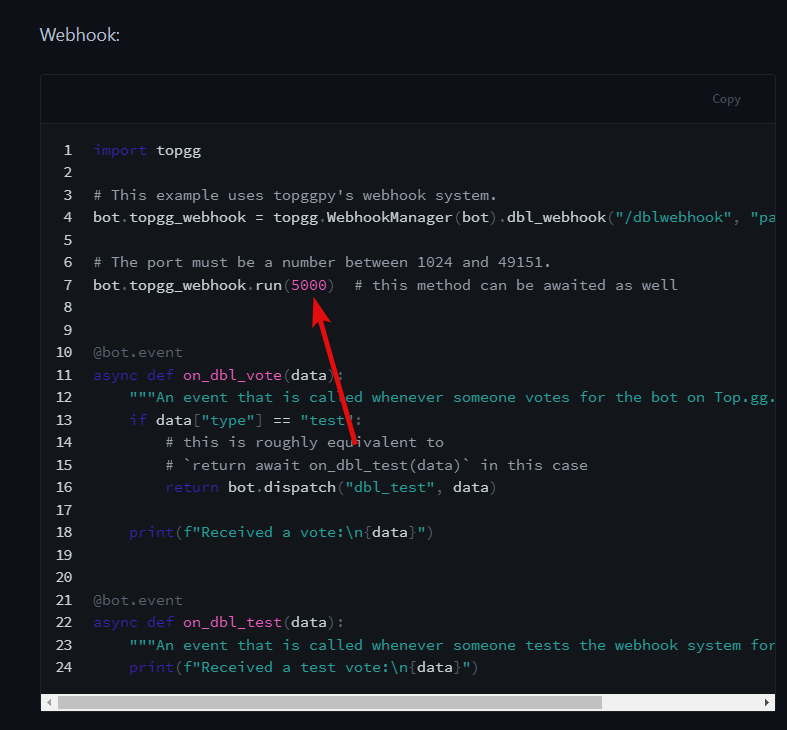
How to change address ?
OSError: [Errno 98] error while attempting to bind on address ('0.0.0.0', 5000): address already in use
@jaunty plank
jaunty plank
change this number
https://i.imgur.com/k5wpY6V.png
 hot locust
jaunty plank
change this number
https://i.imgur.com/k5wpY6V.png
hot locust
jaunty plank
change this number
https://i.imgur.com/k5wpY6V.png
and change from website topgg?
jaunty plank
yeah, whatever it was on before needs to be the new number too
hot locust
@jaunty plank How to Post shard count?
jaunty plank
bottom example https://docs.top.gg/libraries/python
hot locust
jaunty plank
bottom example <https://docs.top.gg/libraries/python>
this?
bot.topggpy = topgg.DBLClient(bot, dbl_token, autopost=True, post_shard_count=True)
yep
hot locust
post_shard_count and autopost post every 30 minutes?
hot locust
hot locust
this?
```
bot.topggpy = topgg.DBLClient(bot, dbl_token, autopost=True, post_shar...
\
restive otter
@pastel raptor
 noble lintel
 narrow gate
hi,i trying to take the token but it's still redirect me to this everytime
 restive otter
narrow gate
hi,i trying to take the token but it's still redirect me to this everytime
restive otter
narrow gate
hi,i trying to take the token but it's still redirect me to this everytime
Ctrl + F5
If not worked, clear cache and login into topgg again
 haughty peak
what should i put my webhook destination to?
 fading phoenix
what is this?
 rain heart
A deprecated option
jaunty plank
define what? the deprecated option?
its deprecated
did you fill in your token, with a topgg token?
 leaden minnow
@here does anyone know how i get my API key?
jaunty plank
regenerate your token and try again
jaunty plank
leaden minnow
@here does anyone know how i get my API key?

your bot page, edit, webhooks, showtoken
they are something bots use when they get in over 2500 servers.
discord only allows 2500 servers per connection, so if your bots in over 2500 you need to shard and have multiple connections
its something your bot uses, if you dont use it dont worry about it.
 strange prism
Does anyone have a layout on how I can implement guild counts for my bot?


Like that
 plucky lance
You need to post them to the API
Take a look at the pins, the docs are listed as well as code examples etc.
strange prism
plucky lance
You need to post them to the API
Can u help me with that?
jaunty plank
I kinda hinted at this in #support but we cant help without knowing what language and library.
strange prism
jaunty plank
I kinda hinted at this in <#714045415707770900> but we cant help without knowing...
Js
jaunty plank
wherever a bot client exists and makes the most sense to you.
strange prism
jaunty plank
wherever a bot client exists and makes the most sense to you.
It keeps erroring
@jaunty plank
jaunty plank
what error?
 jaunty plank
depends, what is the error?
strange prism
jaunty plank
depends, what is the error?
 jaunty plank
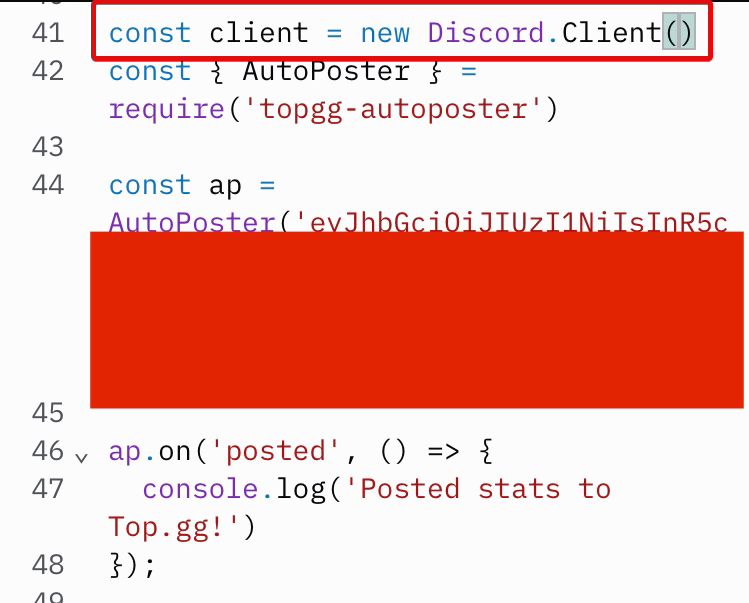
you cannot declare client twice
 robust halo
strange prism
robust halo
strange prism
You already declared client before
strange prism
jaunty plank
you cannot declare client twice
So what do I do?
 raw bough
I am working on a bot. I want to reward the person who votes on top.gg with a 24hrs premium. I have achieved it. But after voting the user has to use a command to claim premium. I want it to be done automatically as soon as he votes.
You can check the current version here: https://top.gg/bot/875678983465885706
 raw bough
I mean can I get a snippet?
 timber harness
 jaunty plank
raw bough
And also how can I get webhook auth
jaunty plank
raw bough
And also how can I get webhook auth
you define the auth yourself.
jaunty plank
raw bough
Can you explain line 15?
line 15 is the way the webserver is started
"app" in this case is a webserver using express.
"listen(80)" tells the app(webserver) to start and listen on port 80.
raw bough
Ok thanks
raw bough
jaunty plank
you define the auth yourself.
I mean there must a way to define it how to do that
jaunty plank
my favorite method is to just smash on my keyboard
dnnhjoFOINFoifr90suojks
perfect
^_^
its like a password, you are the one who decides it.
but since its a webhook you dont need to remember it, so any long random text will do fine.
raw bough
jaunty plank
its like a password, you are the one who decides it.
but since its a webhook you...
Thanks
jaunty plank
 timid agate
harooo is it okay to use dbots for posting stats to top.gg?
timid agate
harooo is it okay to use dbots for posting stats to top.gg?
The two apis are likely not compatible
rain heart
nor would be provide help for a competitors api
timid agate
I mean this dbots
https://dbots.js.org/#/docs/main/latest/general/welcome
or is it from the same company?
rain heart
yeah not an official library, you wont get support for that
its not from top.gg
if you need help with it, consider using their support server
timid agate
okay understandable thanks! 🙂
 next brook
the request are returning response 400, why?
 tidal idol
AH
next brook
sorry if I speak english wrong :/
tidal idol
is this to send the servercount?
next brook
yes
jaunty plank
make sure to include a content type
jaunty plank
should do, but not the latest version 3.1.2 is latest
but the only change i see needed in the above request is the need for the content type header
jaunty plank
np
 grand copper
how to get my top gg token?
rain heart
Read pins
grand copper
rain heart
Read pins
Thank you 
raw bough
I can't listen to two ports in the same app?
 dapper nest
how to active servers count?
rain heart
raw bough
I can't listen to two ports in the same app?
No, 1 port can only be used for 1 service
raw bough
const express = require("express");

const app = express();

const webhook = new Topgg.Webhook("secret");

app.post("/dblwebhook", webhook.listener(vote => {
  // vote will be your vote object, e.g
  console.log(vote.user);// 395526710101278721 < user who voted\
  vote.user.send(`Thank you for voting (:`);
            var current = new Date(); current.getTime() = 1426060964567
            var followingDay = new Date(current.getTime() + 86400000); // + 1 day in ms
            premiumGuildSchema.findOne({
                User: vote.user
            }, async(err, data) => {
               if(data) vote.user.send(`You have already got rewards for voting in last 24 hours! What you want double premium?
Anyways thanks for voting in less than 24 hours (:


\`Note: If you have voted then you can get a special role in VOTIFY's support server.
To join support server use the button at the bottom of the help[v!help] command (:\``);

               else {
                   const Expire = day(followingDay).valueOf();
                   new premiumGuildSchema({
                       User: vote.user,
                       Expire,
                       Permanent: false,
               }).save();
               return vote.user.send(`As a reward we have given you premium {lasts for 24 hours from now!}


\`Note: If you have voted then you can get a special role in VOTIFY's support server.
To join support server use the button at the bottom of the help[v!help] command (:\``);
            }
        });
  // You can also throw an error to the listener callback in order to resend the webhook after a few seconds
}))

app.listen(2200);```It won't works as expected
Whenever a user votes he doesn't gets a dm and even he doesn't gets premium
jaunty plank
Are you getting the webhook request at all?
raw bough
How to check?
raw bough
No
 toxic cairn
how can i create like if someone votes my server , he will get a reward in my server ?
jaunty plank
raw bough
No
Is the url and auth filled in on top.gg?
raw bough
toxic cairn
how can i create like if someone votes my server , he will get a reward in my se...
This channel is specifically for top.gg apis
jaunty plank
toxic cairn
how can i create like if someone votes my server , he will get a reward in my se...
Just a reward role? Or using webhooks?
toxic cairn
raw bough
This channel is specifically for top.gg apis
where should i go
raw bough
jaunty plank
Is the url and auth filled in on top.gg?
Auth is but what about url?
toxic cairn
jaunty plank
Just a reward role? Or using webhooks?
reward like some money , ( example - casino coins )
jaunty plank
raw bough
Auth is but what about url?
Url needs to be the url to your webserver, on the path /dblwebhook
jaunty plank
toxic cairn
reward like some money , ( example - casino coins )
Is this casino bot your bot?
Or someone elses
toxic cairn
jaunty plank
Is this casino bot your bot?
yes it's mine bot
jaunty plank
You'll want to use webhooks to get vote events then give them coins.
What language is the bot in?
toxic cairn
jaunty plank
What language is the bot in?
english
toxic cairn
oh sorry
raw bough
jaunty plank
Url needs to be the url to your webserver, on the path /dblwebhook
You mean the url is /dblwebhook
toxic cairn
js
jaunty plank
raw bough
You mean the url is /dblwebhook
No that's just the path
jaunty plank
raw bough
You mean the url is /dblwebhook
Where is your bot hosted? Vps, heroku, replit, home?
toxic cairn
jaunty plank
<https://docs.top.gg/libraries/javascript/#webhooks>
yes i read that , but i have no idea how to give reward
raw bough
jaunty plank
Where is your bot hosted? Vps, heroku, replit, home?
Replit
rain heart
@raw bough let's not spoon feed
raw bough
Ok sorry
jaunty plank
raw bough
Replit
Yourrepliturl/dblwebhook
raw bough
Ok thanks I am trying
jaunty plank
toxic cairn
yes i read that , but i have no idea how to give reward
Get webhooks working, then focus on the reward. Its a bit easier
raw bough
Btw can I use 2 webhooks simultaneously?
jaunty plank
raw bough
Btw can I use 2 webhooks simultaneously?
Not with top.gg, but if you want to forward another to another webhook you can from your code
 restive pine
big booty
raw bough
jaunty plank
Not with top.gg, but if you want to forward another to another webhook you can f...
Yes I want
As I am using my webhook with a vote counter bot
toxic cairn
jaunty plank
Get webhooks working, then focus on the reward. Its a bit easier
so should i copy the whole code on the docs page
raw bough
Edit it in ur way
jaunty plank
toxic cairn
so should i copy the whole code on the docs page
The example code for webhooks should work fine
jaunty plank
raw bough
Yes I want
You should focus on getting this webhook to work first
raw bough
Like I have this url as input in top.gg https://somename so can I use the same in my code?
jaunty plank
You'll want to use your replit url, then the path you define in code.
raw bough
But then the vote counter will go down
jaunty plank
You cannot use the vote counter directly and your code too
raw bough
I use a separate bot for that
jaunty plank
If you want to use both you need to forward the webhook in your code.
Otherwise there's no other method
raw bough
And how to forward?
jaunty plank
You'll need to get the current webhook working first to do that
raw bough
Ok
toxic cairn
is there any video that it shows step by step installation of top-gg api ?
jaunty plank
Not that I'm aware of
raw bough
Woah its spamming
raw bough
And also says vote.user.send isn't a function
raw bough
jaunty plank
You need to send a 200 response to top.gg
port 200?
jaunty plank
hmm, weird the sdk is supposed to do that for you
potentially because your code is erroring?
 jaunty plank
I think its repeating because your code is erroring.
youll need to fetch the user, vote.user is just an id
toxic cairn
how to get token of our server ?
jaunty plank
raw bough
So what function does that?
you need to use your bot library to fetch the user, the top.gg sdk doesnt do discord functions for you.
jaunty plank
toxic cairn
how to get token of our server ?
servers dont get tokens
toxic cairn
jaunty plank
servers dont get tokens
then now ?
jaunty plank
toxic cairn
then now ?
you need to use webhooks to do what you want to do, you do not need a top.gg token for webhooks
raw bough
jaunty plank
you need to use your bot library to fetch the user, the top.gg sdk doesnt do dis...
how to fetch user from I'd in discord.js ?
jaunty plank
raw bough
how to fetch user from I'd in discord.js ?
raw bough
I can do id from users but have no idea about vice-versa (:
Ok I will check above docs
toxic cairn
then what to put here ?
const webhook = new Topgg.Webhook("your webhook auth")
jaunty plank
toxic cairn
then what to put here ?
```const webhook = new Topgg.Webhook("your webhook auth"...
your webhook auth, you are the one who decides that. its like a password.
toxic cairn
jaunty plank
your webhook auth, you are the one who decides that. its like a password.
how to get that ?
jaunty plank
any way you want.
if you just want to smash on your keyboard for a few seconds that will do
just make sure its the same for your code and the website.
raw bough
I did
temp.send("some text");```

Still shows temp.send isn't a function@jaunty plank means bro I didn't get it ? sorry
jaunty plank
toxic cairn
<@!136583532972605440> means bro I didn't get it ? sorry
ok, imagine you are signing up for a website.
you they ask you for a password.
the webhook auth is like that, you need to decide what that password is.
raw bough
I did
var temp = fetch(vote.user);
temp.send("some text");
Good to go?
toxic cairn
jaunty plank
ok, imagine you are signing up for a website.
you they ask you for a password.
t...
ohh
jaunty plank
raw bough
I did
var temp = fetch(vote.user);
temp.send("some text");
Good to go?
nope
toxic cairn
means i can put there anything
jaunty plank
toxic cairn
means i can put there anything
yeah, as long as you fill it in the same way on the top.gg website
raw bough
I have to use Discord.fetch()?
jaunty plank
also nope, you need to use it on the usermanager of your bot client
raw bough
Uh?
toxic cairn
jaunty plank
yeah, as long as you fill it in the same way on the top.gg website
ohk i got it
jaunty plank
raw bough
client.fetch()
almost, client.users.fetch(user.vote);
raw bough
Ok
toxic cairn
ohk i got Authorization , but form where to get Webhook URL?
jaunty plank
raw bough
Ok
https://discord.js.org/#/docs/main/stable/class/Client?scrollTo=users
client.users
users is a UserManager
UserManager has fetch();
https://discord.js.org/#/docs/main/stable/class/UserManager
fetch is a promise so you will need to await it.
jaunty plank
toxic cairn
ohk i got Authorization , but form where to get Webhook URL?
where are you hosting again?
replit/home/vps/heroku?
raw bough
Still temp.send isn't a func
toxic cairn
jaunty plank
where are you hosting again?
replit/home/vps/heroku?
replit
jaunty plank
raw bough
Still temp.send isn't a func
did you await the fetch
jaunty plank
toxic cairn
replit
YourReplitURL/dblwebhook
jaunty plank
for forwarding the webhook?
youll need an understanding of how web requests work.
https://developer.mozilla.org/en-US/docs/Web/API/Fetch_API/Using_Fetch#supplying_request_options
and https://docs.top.gg/resources/webhooks/
toxic cairn
jaunty plank
YourReplitURL/dblwebhook
any example bro please
toxic cairn
what to put here ?
const topgg = new Topgg.Api("")
for my server
rain heart
api token
jaunty plank
you cannot use that with a server
toxic cairn
jaunty plank
you cannot use that with a server
then what should i use
jaunty plank
toxic cairn
how to i get voter username instead of voter id
${vote.user} to username ?
raw bough
I am using Vote Tracker#2242 and how to it gives a webhook url to fetch so how can I keep my own webhook and it's webhook too
raw bough
toxic cairn
how to i get voter username instead of voter id
```${vote.user}``` to username...
Check above I just discussed the same
toxic cairn
raw bough
Check above I just discussed the same
i am not getting it bro , can you please give me
what to put before .hasVoted ?
if (message.content === `vote`) { .hasVoted(message.author.id).then(c => { if (c) { message.channel.send("you voted") } else { message.channel.send("you didn't vote") } }) }
jaunty plank
jaunty plank
youll need an understanding of how web requests work.
<https://developer.mozilla...
You'll need to forward the webhook.
@raw bough
jaunty plank
toxic cairn
what to put before `.hasVoted` ?
```if (message.content === `vote`) {
.hasVot...
You cannot use hasvoted, you must use webhooks
 narrow zenith
bruh
plucky lance
 stable thunder
<@!229016449593769984> can u review my bot
stable thunder
<@!229016449593769984> can u review my bot
Go to #support and read the pins
narrow zenith
it takes 1-2 weeks to get to your review
stable thunder
plucky lance
Go to <#714045415707770900> and read the pins
ok
toxic cairn
jaunty plank
You cannot use hasvoted, you must use webhooks
so how to make a command vote for server ?
stable thunder
and does anyone know how to approve the bot we made
plucky lance
toxic cairn
so how to make a command vote for server ?
You gonna use the API to fetch the voter or webhooks and use the user ID (of the voter) in your with whatever you wanna do with it
jaunty plank
plucky lance
You gonna use the API to fetch the voter or webhooks and use the user ID (of the...
Servers can't use the api.
plucky lance
Thought he means a command in his own server lol
stable thunder
hello does any one know how i approve my bot
stable thunder
it dont have answer of my question
it say how much ti me it take but my question is how to approve my bot
plucky lance
Did you already submit it on topgg?
toxic cairn
so what should id do ?
plucky lance
Then read the post again and wait.
stable thunder
ok
jaunty plank
toxic cairn
so what should id do ?
I've linked to how to do it several times I can't keep repeating the same things
raw bough
jaunty plank
You'll need to forward the webhook.
<@877804982689234994>
I didn't understood by reading the docs
restive otter
Anyone know cookie checker bot?
toxic cairn
jaunty plank
I've linked to how to do it several times I can't keep repeating the same thing...
you told to use use webhook , i did that , but i don't know how to make vote command using webhook
raw bough
toxic cairn
you told to use use webhook , i did that , but i don't know how to make vote com...
Do you even know what are you doing or you're just copy pasting things
jaunty plank
raw bough
I didn't understood by reading the docs
Our docs don't cover forwarding webhooks.
You'll need to use fetch or another library to send webhook requests to other platforms
raw bough
Like node-fetch
jaunty plank
Seems to forward to discord not your vote tracker
Probably best to do it manually with code anyway. Really good learning opportunity
raw bough
raw bough
https://www.npmjs.com/package/djs-webhook-forwarder
I checked through its repo
I think editing index.js will be a good idea
Anyways I will follow what you said i will do from scratch👍🏻
Someone deleted it?
 plucky lance
Make sure, port 80 (TCP) is opened up.
raw bough
toxic cairn
<@!877804982689234994>
Webhook url configured on top.gg website?
toxic cairn
raw bough
Webhook url configured on top.gg website?
yes
toxic cairn
raw bough
Any error sitting?
no
raw bough
Then what's ur problem
toxic cairn
i want to make a command which will only work after voting server
jaunty plank
On servers votes to vote lock commands you'll need to store the webhook data in a database and access it.
Preferably with a 12‐13 hour ttl
toxic cairn
raw bough
```const webh = await client.users.fetch(vote.user)```
is this correct code ?
if (message.content === `vote`) { const webh = await client.users.fetch(vote.user) message.channel.send("you voted") } else { message.channel.send("you didn't vote") }
top.gg gamer , am i doing correct bro ?
plucky lance
If somebody writes vote into the chat, you gonna respond with, you voted... weird
toxic cairn
plucky lance
If somebody writes `vote` into the chat, you gonna respond with, `you voted`... ...
yes bro
plucky lance
You might wanna check before if he has actually voted.
toxic cairn
toxic cairn
i have done this , but i don't know further
@plucky lance do you mean this ? ⏫
jaunty plank
Yep, with that data you'll need to put it into a database then access it in the command
toxic cairn
jaunty plank
Yep, with that data you'll need to put it into a database then access it in the ...
how should i put it in database ?
is there any docs regarding this ?
plucky lance
You need to setup a database, integrate it into to code, then work with it, like querying it, saving and fetching data
toxic cairn
plucky lance
You need to setup a database, integrate it into to code, then work with it, like...
i am using quick.db to save data
plucky lance
Alright, you should know how to fetch and save data then
toxic cairn
plucky lance
Alright, you should know how to fetch and save data then
sorry to say , but I really don't know

plucky lance
If you receive a POST request with the webhook, save the user ID in your database and the current timestamp
If somebody runs your "vote only" command, query your database and check if he has voted (generally or in the last 12 hours - whatever you prefer)
rain heart
If you still have no clue on how to do it, I highly suggest doing basic stuff without webhooks first (such as working with quick.db, then basic requesting / webserver hosting etc)
toxic cairn
if(!db.has(``${message.author.id}.use``))
restive otter
why did all my votes just reset?
rain heart
votes reset monthly
dapper nest
-botinfo 816798869421031435
 abstract mothBOT


Bot info
ID
816798869421031435
Username
G5
Discriminator
3687
Short Description
Set up CSGO scrims with friends on your Discord server.
Library
undefined
Prefix
q!
Total Upvotes
64
Monthly Upvotes
15
Server Count
No server count
Owner(s)
@dapper nest
Links
Bot info
ID
816798869421031435
Username
G5
Discriminator
3687
Short Description
Set up CSGO scrims with friends on your Discord server.
Library
undefined
Prefix
q!
Total Upvotes
64
Monthly Upvotes
15
Server Count
No server count
Owner(s)
@dapper nest
Links
tidal idol
dapper nest
-botinfo 816798869421031435
tidal idol
how come my bot stops updating the server count after around a week of the bot being online?
plucky lance
Take a look at the response you get from topgg
A lot of internal server errors have happened the last weeks
plucky lance
How frequently do you send requests?
tidal idol
every 30 mins
plucky lance
Hmm might be a decision by Cloudflare locking you out.
Impossible to say why…. 
 neon pollen
How i get the api, i readed https://docs.top.gg/ and still cant find that token.
robust halo
neon pollen
How i get the api, i readed https://docs.top.gg/ and still cant find that token.
Go to https://top.gg/bot/[YOUR_BOT_ID_HERE]/webhooks, and scroll down to "Token"
 tepid stream
-botinfo 876383024089006100
 That bot wasn't found
tepid stream
That bot wasn't found
tepid stream
-help
raw bough
tepid stream
-botinfo 876383024089006100
I tried the webhooks forwarding but can't achieve it
grand copper
-bots
 haughty peak
-bots
 grand copper
-botinfo 892796343792336986
abstract mothBOT


Bot info
ID
892796343792336986
Username
Yuuki Lana
Discriminator
2785
Short Description
Get Detail Information of Solana NFT using mint address
Library
undefined
Prefix
!
Total Upvotes
0
Monthly Upvotes
0
Server Count
No server count
Owner(s)
@grand copper
Links
Bot info
ID
892796343792336986
Username
Yuuki Lana
Discriminator
2785
Short Description
Get Detail Information of Solana NFT using mint address
Library
undefined
Prefix
!
Total Upvotes
0
Monthly Upvotes
0
Server Count
No server count
Owner(s)
@grand copper
Links
haughty peak
How do i set up one?
jovial kiln
You can use one of our given libraries to do it
jovial kiln
Yes?
haughty peak
Wut am i supposed to outin the password field of dbl_webhook
jovial kiln
You can set it as whatever you'd like
It just has to match what you put in your server/bots webhook page
robust halo
haughty peak
tis responding twice
Its running on 2 instances
 jovial kiln
Then you prob port it wrong
haughty peak
jovial kiln
Then you prob port it wrong
but dis is the node and port

 jovial kiln
you need to add /dblwebhook on the end of that URL
haughty peak
oh
haughty peak
jovial kiln
you need to add `/dblwebhook` on the end of that URL
like dis?
 jovial kiln
indeed
 jovial kiln
Did you enter the correct password?
haughty peak
jovial kiln
Did you enter the correct password?
yes
 haughty peak

haughty peak
jovial kiln
Maybe that host doesn't work with web porting<:Thonk:356771720863940608>
what do i put in dbl_webhook() to do it without the password
 haughty peak
tanks
jovial kiln
np
haughty peak
jovial kiln
np
i went to the webhook url and this was what i saw, does this mean i cant do it?
 jovial kiln
Yeah, that's a issue with your host.
haughty peak
 restive otter
haughty peak
i went to the webhook url and this was what i saw, does this mean i cant do it?
restive otter
haughty peak
i went to the webhook url and this was what i saw, does this mean i cant do it?
It's supposed to be POST only
raw bough
Can anyone show me how to do webhook forwarding
haughty peak
so if i run a webhook at /dblwebhook on replit, what will the webhook url be
toxic cairn
when i put ${vote.username} , it's give me undefined
rain heart
haughty peak
so if i run a webhook at `/dblwebhook` on replit, what will the webhook url be
toxic cairn
rain heart
https://yourreplitproject/dblwebhook
aurel any solution
rain heart
vote is not defined
toxic cairn
i want the username of the voter
rain heart
not possible
vote.user returns the id
which you can then use to fetch the user
vote.username does not exist
check the docs
toxic cairn
then how can i get voter's username ?
 sleek hearth
 how long will it take to review ? im just askin
toxic cairn
@rain heart
rain heart
toxic cairn
then how can i get voter's username ?
fetch the user from the id, that's basic discordjs knowledge
check the djs docs
haughty peak
rain heart
https://yourreplitproject/dblwebhook
so like https://ChuckVoting.thekungfuchuck.repl.co/dblwebhook ?
rain heart
try it and see
haughty peak
rain heart
try it and see
but it shows dis
 rain heart
opening it in your browser is making a get request
which it does not support
top.gg makes a post request to send data to it

HTTP defines a set of request methods to indicate the desired action to be performed for a given resource. Although they can also be nouns, these request methods are sometimes referred to as HTTP verbs. Each of them implements a different semantic, but some common features are shared by a group of them: e.g. a request method can be safe, idempot...
haughty peak
ok
haughty peak
rain heart
opening it in your browser is making a get request
it workss
thankss
so the response is in json right?
rain heart
Yes
haughty peak
what is this tho
 haughty peak
rain heart
Yes
haughty peak
rain heart
Yes
ok it works, but i did this on replit, and now my keep_alive wont run
cuz my host doesnt allow webservers
toxic cairn
rain heart
fetch the user from the id, that's basic discordjs knowledge
client.users.cache.get('id')
correct ?
rain heart
If the docs say that, can't help as I don't code on js
toxic cairn
rain heart
If the docs say that, can't help as I don't code on js
how to get the total votes of the user ?
rain heart
you can't, you'll have to store that information yourself
top.gg does not provide such stats
toxic cairn
ohh

 crimson ridge

 wanton saffron
Hi! I have a question: Im coding my Bot but I would like to add a vote system on it. The problem is that you guys need to verify my Bot on the top.gg website, and then I'll be able to use the API. But there's another "problem": Im currently coding it, so the Bot will not be available for you to test the features. Will the verification be denied? If yes, will I just be able to add the vote system when my Bot is finished?
jaunty plank
wanton saffron
Hi! I have a question: Im coding my Bot but I would like to add a vote system on...
Ideally you should wait to add these features after approval.
Otherwise we may need to contact you to give us access(since we can't vote before approval)
 lime patio
how do I need to use the server_count ?
lime patio
I've found how I need to use it, I'm gonna try that now
timber harness
Hey, I have a question, When I post my bot stats to top.gg, I'll required to post my bot stats again or it will update automatically?
restive otter
Can someone teach me js. If I learn it well then I'll gift 1 year nitro
Or should I claim it
celest pierBOT
This channel is ONLY for the Top.gg API!
This channel is only for: suggestions/help/bugs to do with official API libraries and API docs found at: https://docs.top.gg
Any Off-Topic conversation may get deleted and muted.
If you need help with development about your bot or development in general, feel free to use #development.
 terse wren
ÑÑÑÑÑÑÑÑÑÑÑÑ
 keen arch
what values does the isWeekend return?
if im not mistaken its a Boolean yet all thats getting returned is undefined
not sure if it being a test vote effects it or not but 
 devout cape
how do get votes for a bot in python
restive otter
keen arch
if im not mistaken its a Boolean yet all thats getting returned is undefined
it is undefined because weekend ended?
rain heart
isWeekend returns 1 or 0
rain heart
You cannot use discord webhooks
rain heart
You have to use a webhook that processes the data top.gg sends
You then have to use your webserver, not discord webhook
 solar forge
@sacred shell
 quick bridge
is this scam?
i click the button but the protcter wont let me so i eed to be protcect my pwd so i ant
 sullen nymph

GitHub
Starting 4th of October 2021, topggpy accepts PRs for Hacktoberfest 2021, and per their guidelines, all eligible PRs will be labeled with the hacktoberfast-accepted label. However, in order for you...
 supple crow
How do I set up vote rewards for my bot
jaunty plank
supple crow
How do I set up vote rewards for my bot
your bot will need to be approved before you can do that.
however, youll probably want to use webhooks.
https://docs.top.gg/resources/webhooks/
keen arch
restive otter
it is undefined because weekend ended?
no, test votes just give undefined for the isWeekend value for some reason
restive otter
oh
 snow nymph
Hi is it possible to post Votes to the API?
 whole python
Does anyone know which package I use to pull user votes
Does anyone know what this is
 celest pierBOT
@whole python
In order to clear your cache for the site, press CTRL+F5.
If this does not work, try one of these resources below:
Instructions on Microsoft Edge
Instructions on Google Chrome
Instructions on Mozilla Firefox
Instructions on Safari
Instructions on Opera
Instructions on Brave
jaunty plank
whole python
Does anyone know which package I use to pull user votes
What programming language?
whole python
javascript
jaunty plank
Documentation for @top-gg/sdk
This is the library
https://www.npmjs.com/package/@top-gg/sdk

 slate girder
@jolly moth
 jolly moth
slate girder
<@!254814547326533632>
jolly moth
slate girder
<@!254814547326533632>
?
toxic cairn
how to calculate the total votes of the user ?
jaunty plank
you will need to track that
toxic cairn
jaunty plank
you will need to track that
how sir ?
jaunty plank
webhooks and a database of your choice
https://docs.top.gg/resources/webhooks/
toxic cairn
jaunty plank
webhooks and a database of your choice
<https://docs.top.gg/resources/webhooks/>
i am using webhook for my server votes
jaunty plank
from there youll need to save the votes for each individual user in a database, incrementing it each time they vote.
toxic cairn
jaunty plank
from there youll need to save the votes for each individual user in a database, ...
is there any guide for top.gg on database ?
like how to interact top.gg api with database
jaunty plank
realistically the database queries have nothing to do with topgg, you are just upserting data.
so no, we dont have anything for that. a bit of research will get you what you need
jaunty plank
 oblique hornet
wait what was the api for the server your bot is in
oblique hornet
wait what was the api for the server your bot is in
its all one api.
https://docs.top.gg/
oblique hornet
 ty
ty
 echo sundial
how to i make the server count of my bot show on the voting page thingy
https://3sj.today/i7MULmvT
tescomealdeall is cool

like that
narrow zenith
Library?
echo sundial
narrow zenith
Library?
jaunty plank
echo sundial
discord.py
https://docs.top.gg/libraries/python/
Bottom section
 jaunty plank
once posted, 30 minutes or so, you may need to clear your cache.
 narrow zenith
There should be an api token that goes with that
echo sundial
i put the wrong token xD
jaunty plank
oops ^_^
raw bough
I am thinking to take errors/console_logs in a specific call and send all of them to a specific channel in my server
So what I thought is everytime I use console.log , I will replace it by calling a specific file say log.js
Can anyone guide me about this (:
jaunty plank
raw bough
I am thinking to take errors/console_logs in a specific call and send all of the...
raw bough
Ok
 terse gazelle
Hi i get this error when i try using the autopost topgg cog for python
 jaunty plank
terse gazelle
Hi i get this error when i try using the autopost topgg cog for python
jaunty plank
terse gazelle
Hi i get this error when i try using the autopost topgg cog for python
did you fill in the authorization?
terse gazelle
yes
i generated a new token
i think the old one had some issues
imma try it now brb
It worked now
jaunty plank
weird. has happened to a few others too
 rotund wren
aye just wondering if there an voted event for @ top-gg/sdk like
client.on('voted', (user) => {
client.users.cache.get(user.id).send('Thanks for voting')
})
jaunty plank
It also won't be a client event, but an express event
terse gazelle
Im trying to create the vote webhook but i get this error

i changed the port a bunch of times already
plucky lance
Try add your pubic IP address instead of 0.0.0.0
Maybe python isn’t able to get your public address or there are multiple IPs assigned or non-static ones
jaunty plank
do you know if your provider has shared nat?
terse gazelle
jaunty plank
do you know if your provider has shared nat?
idk
any way to check that?
plucky lance
Yeah VPS mostly got floating IPs only which aren’t static and the OS notices this
Try to add your public IP address
jaunty plank
A small number share ips between vps, and can cause issues like that yeah
terse gazelle
plucky lance
Try to add your public IP address
do i add the ip before the port?
plucky lance
You must have specified the IP somewhere?!
terse gazelle
plucky lance
You must have specified the IP somewhere?!
I didnt i got the code from the example to test it
jaunty plank
I think the py lib auto assigns it
terse gazelle
jaunty plank
I think the py lib auto assigns it
yea
plucky lance
Looks like it fails to assign it
terse gazelle
imma go check in the py lib
plucky lance
I hope this error is regarding the IP address and not the port
Dunno py good enough to be 100% sure
plucky lance
Nah I don’t think so […] bind address on
But who knows py is weird anyways

I mean the line of error is mentioned in the error message
terse gazelle
found where the ip is assigned
plucky lance
Go into the file of the lib and replace 0.0.0.0 with your actual IP
terse gazelle
its auto assigned in the topgg module
yea
the ip i use to connect to the vps right?
plucky lance
Yes that’s it’s public IP
terse gazelle
ok imma try it now
jaunty plank
If it still doesn't bind contact your vps provider and see if it's NAT
You may need to request access to a port
terse gazelle
its still showing the 0.0.0 ip for some reason I think i have to change it in more files
plucky lance
Alright gtg, report back please
terse gazelle
i will thx for the help
terse gazelle
I think i got it now...
how do i get my webhook link is it http://myip:port/dblwebhook ?
i get this when i try using the test for the webhook

I got it working now
@plucky lance
tidal idol
terse gazelle
how do i get my webhook link is it http://myip:port/dblwebhook ?
http://myip:port/dblwebhook
not /:port
terse gazelle
i did :port but it puts a /
tidal idol
Ah
terse gazelle
when i edit the / disappears
jaunty plank
terse gazelle
i get this when i try using the test for the webhook
is your method set to get(code side)?
it needs to be post
not sure why it would error though.
jaunty plank
ah
terse gazelle
its http
also the error before was part having to change the files from 0.0.0 to my ip
and cant use cog reload on the webhook
bc it tries to run on the same port and gives that error
have to restart the bot
plucky lance
terse gazelle
<@!243443167704121344>
Does it work now?
plucky lance
tidal idol
`http://myip:port/dblwebhook`
Discord doesn’t allow to add a port to the URL
It does automatically add a slash before
tidal idol
plucky lance
Discord doesn’t allow to add a port to the URL
It does automatically add a slas...
ah i getchu
terse gazelle
plucky lance
Does it work now?
yes
plucky lance
terse gazelle
yes
Great
plucky lance
Aye remember this was an issue we noticed a few weeks ago
 fallen nymph
rain heart
fallen nymph
rain heart
We shall never know
rotund wren
aye I wanted to use the autoposter for top.gg but it returns this though correct token (from top.gg) may it be the reason that it is not added here yet?
 jaunty plank
rotund wren
aye I wanted to use the autoposter for top.gg but it returns this though correct...
jaunty plank
rotund wren
aye I wanted to use the autoposter for top.gg but it returns this though correct...
try regenerating the token and using that.
rotund wren
I think I did not save the token but now regenerated and saved and worken right now thanks 
oblique hornet
what is this for in the webhook part?
 restive otter
oblique hornet
what is this for in the webhook part?
restive otter
oblique hornet
what is this for in the webhook part?
Top.gg will have whatever you put there as the Authorization header whenever it makes POST request to your end
oblique hornet
so i can type anything i want there?
restive otter
Correct
oblique hornet
and on this is should put my discord webhook link from the webhook i created right?

because i did it and if i click send test nothing happens
restive otter
It doesn't directly support Discord webhooks afaik, you'd need to use something like Woo's thingy: https://webhook-topgg.com/ if you can't be bothered to set up your own webserver
restive otter
 Hi Woo
oblique hornet
restive otter
It doesn't directly support Discord webhooks afaik, you'd need to use something ...
okey thank you, its because i found a webhook vote tracker on githubg and yeah
im struggeling a little bit xD
jaunty plank
not that anyones asking, but it soon will support vote tracking and streak tracking
oblique hornet
yeah but not at the moment 
jaunty plank
well, beta has it.
should be functioning(tests will show undefined)
ignore the animation kek
oblique hornet

 jaunty plank
relogin to the site
jaunty plank
yeah
jaunty plank
should do
 toxic cairn
jaunty plank
should do
toxic cairn
jaunty plank
should do
How To Make Vote Reminder System For The Bot ?
jaunty plank
is your webhooks working?
toxic cairn
jaunty plank
is your webhooks working?
yes
jaunty plank
make a new db table which stores userid's and revote times(12 hours added to the current vote time)
then every few minutes search for rows which are expired, any you get send a dm reminder.
toxic cairn
i have a problem , i can't use message.author.send outside client.on("message", async message => { , then how should i solve this ?
 jaunty plank
youll need to fetch the author(more specifically user)
jovial kiln
toxic cairn
i have a problem , i can't use `message.author.send` outside `client.on("message...
Because message isn't defined outside the event scope
toxic cairn
jovial kiln
Because message isn't defined outside the event scope
Problem Solved Sir , I Just Changed message.author.send to user.send
As i have defined user
jovial kiln
👍
toxic cairn
uptimerobot re-start everything after 24 hours , is there any other hosting platform , which give 24/7 hosting?
@jaunty plank what is billing.galaxygate ?
Free hosting
jaunty plank
galaxygate costs money
toxic cairn
😐
toxic cairn
jaunty plank
galaxygate costs money
Do you know the best free hosting ?
rain heart
free is never good
jaunty plank
I dont know of any free hosts which are 24/7, I also dont know any good ones
rain heart
read pins in #development why that's never a good idea
toxic cairn
rain heart
read pins in <#272764566411149314> why that's never a good idea
I am a student , my parents will not give me money
😢
tidal idol
toxic cairn
Do you know the best free hosting ?
Free and paid hosting
i use them for one of my bots
tidal idol
toxic cairn
I am a student , my parents will not give me money

GitHub Education
The best developer tools, free for students. Get your GitHub Student Developer Pack now.
Education pack for github - $100 free credit for DigitalOcean (Host a discord bot on there on the lowest plan for 20 months free)
toxic cairn
tidal idol
https://somehost.xyz
Is this 100% safe & secure?
tidal idol
Yes
toxic cairn
tidal idol
https://education.github.com/pack
Nice
tidal idol
You get your own account
 hoary urchin
tidal idol
Education pack for github - $100 free credit for DigitalOcean (Host a discord bo...
hoary urchin
tidal idol
Education pack for github - $100 free credit for DigitalOcean (Host a discord bo...
still need CC to register an account on digitalocean
restive otter
toxic cairn
Do you know the best free hosting ?
danbot bluefox
toxic cairn
tidal idol
https://somehost.xyz
One Person Told Me Autocode Is The Best , So Is It Best?
tidal idol
toxic cairn
One Person Told Me Autocode Is The Best , So Is It Best?
It’s not very good no
 calm tendon
2021-10-09T07:16:53.608272+00:00 app[Worker.1]: /app/node_modules/dblapi.js/src/index.js:1142021-10-09T07:16:53.608296+00:00 app[Worker.1]: response.body = res.headers['content-type'].includes('application/json') ? JSON.parse(response.raw) : response.raw;2021-10-09T07:16:53.608297+00:00 app[Worker.1]: ^2021-10-09T07:16:53.608298+00:00 app[Worker.1]: 2021-10-09T07:16:53.608298+00:00 app[Worker.1]: TypeError: Cannot read property 'includes' of undefined2021-10-09T07:16:53.608302+00:00 app[Worker.1]: at IncomingMessage.<anonymous> (/app/node_modules/dblapi.js/src/index.js:114:55)2021-10-09T07:16:53.608303+00:00 app[Worker.1]: at IncomingMessage.emit (events.js:412:35)2021-10-09T07:16:53.608303+00:00 app[Worker.1]: at endReadableNT (internal/streams/readable.js:1334:12)2021-10-09T07:16:53.608304+00:00 app[Worker.1]: at processTicksAndRejections (internal/process/task_queues.js:82:21)2021-10-09T07:16:53.743549+00:00 heroku[Worker.1]: Process exited with status 12021-10-09T07:16:53.818515+00:00 heroku[Worker.1]: State changed from up to crashed
I'm getting this error from the dblapi package which causes my bot to crash
I've been using it for a year and never had this issue
restive otter
calm tendon
```
2021-10-09T07:16:53.608272+00:00 app[Worker.1]: /app/node_modules/dblapi.js/...
same
restive otter
restive otter
same
maybe you can move to https://docs.top.gg/api/@reference/
yeah i will do it.
 void dirge
yet another day the top gg api fails
void dirge
rain heart
yet another day <#714045415707770900>
what do you mean? am i supposed to go to a generic support channel when there's a topgg api specific one already created?
restive otter
TopGGAPIError: 522 undefined
    at Api._request (/home/runner/Clash-Chest/node_modules/@top-gg/sdk/dist/structs/Api.js:76:19)
    at processTicksAndRejections (internal/process/task_queues.js:97:5)
    at async Api.postStats (/home/runner/Clash-Chest/node_modules/@top-gg/sdk/dist/structs/Api.js:99:9) {
  response: Response {
    size: 0,
    timeout: 0,
    [Symbol(Body internals)]: { body: [PassThrough], disturbed: true, error: null },
    [Symbol(Response internals)]: {
      url: 'https://top.gg/api//bots/stats',
      status: 522,
      statusText: undefined,
      headers: [Headers],
      counter: 0
    }
  }
}
 brazen kelp
/node_modules/dblapi.js/src/index.js:114
    response.body = res.headers['content-type'].includes('application/json') ? JSON.parse(response.raw) : response.raw;
                                                      ^
TypeError: Cannot read property 'includes' of undefined
    at IncomingMessage.<anonymous> (/node_modules/dblapi.js/src/index.js:114:55)
    at IncomingMessage.emit (events.js:326:22)
    at endReadableNT (_stream_readable.js:1241:12)
    at processTicksAndRejections (internal/process/task_queues.js:84:21)
Keep facing this error recently, any changed in the API?

 tidal idol
bot needs to be approved
 lament ridge
it is but not approved, does it needs to be?
 tidal idol
yes
solar forge
rain heart
free is never good
i use free host but its very good
rain heart
 storm fossil


 rain heart
plucky lance
rain heart
plucky lance
Using the by Aurel linked docs to configure receiving webhooks by topgg
The user ID of the voter the webhook will send to you is all you need to work with
And probably the timestamp if voter only commands should be available only within the 12 hours until a voter can vote again
You gonna fetch the user ID you got via. djs and can then send a message to him or save his information in your database (or cache)
rotund wren
I wanted to use the webhook events but I think I'm too dumb to enter the correct configs to the webhook settings because it ain't sending test events
jaunty plank
rotund wren
I wanted to use the webhook events but I think I'm too dumb to enter the correct...
where are you hosting? vps, heroku, replit, home?
rotund wren
vps
rotund wren
jaunty plank
where are you hosting? vps, heroku, replit, home?
windows server 2012 or 2019 I dont remember
jaunty plank
windows server has a firewall by default youll need to allow the port through that firewall
your url will likly look something like this
http://YOURVPSIPHERE:YOURPORTHERE/YOURPATHHERE
so for example, http://1.1.1.1:3000/dblwebhook
rotund wren
do I have to enable any settings or just try this in webhooksettings
plucky lance
jaunty plank
on topgg? you just need to edit the webhook settings with the url and auth.
jaunty plank
plucky lance
https://discord.com/channels/264445053596991498/412006692125933568/8243343155078...
ah thanks, was googling for it
plucky lance

rotund wren
plucky lance
https://discord.com/channels/264445053596991498/412006692125933568/8243343155078...
could u tell me where to enter this 
plucky lance
You can run the command in the command prompt or use the GUI