#topgg-api
1 messages · Page 168 of 1
 shrewd turtle
 wraith pelican
Server count?
 normal pilot
/start
 ivory mirage
https://www.npmjs.com/package/topgg-votes real top gg api?

 jaunty plank
ivory mirage
https://www.npmjs.com/package/topgg-votes real top gg api?
jaunty plank
ivory mirage
https://www.npmjs.com/package/topgg-votes real top gg api?
that is not an official top.gg library.
 smoky marten
 sour sequoia
how can i do that it will send the bots vote count
sour sequoia
how can i do that it will send the bots vote count
fetch the bot with id
it will provide both all time votes and monthly votes
 jagged pine
Is this outdated?
https://github.com/top-gg/Java-SDK
GitHub
An API wrapper for https://discordbots.org/api/docs that works in Java - GitHub - top-gg/java-sdk: An API wrapper for https://discordbots.org/api/docs that works in Java
 rain heart
jagged pine
Is this outdated?
https://github.com/top-gg/Java-SDK
rain heart
jagged pine
Is this outdated?
https://github.com/top-gg/Java-SDK
Nope, just nobody maintaining at the moment
It should still be functional
jagged pine
rain heart
It should still be functional
mh okay
 jovial kiln
It all works still last time I checked
 shell gazelle
Can anyone gimme code for vote message in my support server's channel
That
If anyonw votes
A message is to be send by webhook to that channel
Pls gimme
 storm stag
ivory mirage
https://www.npmjs.com/package/topgg-votes real top gg api?
storm stag
ivory mirage
https://www.npmjs.com/package/topgg-votes real top gg api?
use dbots
shell gazelle
storm stag
use dbots
Thanks
 red magnet
- skip

 hushed path
which event I have to use for DM the user who has voted for my bot? I didn't found it in the doc
 restive otter
 rancid turret
Top.gg sends webhook even if someone posted a review? or it is just for votes?
rancid turret
Top.gg sends webhook even if someone posted a review? or it is just for votes?
votes only
restive otter
hushed path
which event I have to use for DM the user who has voted for my bot? I didn't fou...
you use webhooks for that
shell gazelle
ivory mirage
https://www.npmjs.com/package/topgg-votes real top gg api?

not workin
help!
 tepid osprey
client is not defined
shell gazelle
tepid osprey
client is not defined
how to fix??
tepid osprey
define client
shell gazelle
tepid osprey
define client
how
shell gazelle
tepid osprey
define client
i donno coding
tepid osprey
I'm not going to spoon feed ppl, just read the documentation or wait for someone else to reply.
shell gazelle
tepid osprey
I'm not going to spoon feed ppl, just read the documentation or wait for someone...
where is document?
tepid osprey
 shell gazelle
tepid osprey
https://docs.top.gg/
shell gazelle
tepid osprey
https://docs.top.gg/
:((
tepid osprey
shell gazelle
:((
?
shell gazelle
tepid osprey
?
in the docs they said to come here in #topgg-api
@fathom hearth
HELP!
tepid osprey
Oh wait, you're using an unofficial package
shell gazelle
tepid osprey
Oh wait, you're using an unofficial package
??
restive otter
shell gazelle
topgg-votes is not the official lib
 fathom hearth
shell gazelle
<@!806783533505970186>
fathom hearth
shell gazelle
<@!806783533505970186>
WHAT?
 smoky marten
shell gazelle
how to fix??
smoky marten
shell gazelle
how to fix??
we already told you how to fix that
noone is gonna spoonfeed you here
go learn to code before you try to code
shell gazelle
smoky marten
noone is gonna spoonfeed you here
go learn to code before you try to code
i know
fathom hearth
shell gazelle
Hmmm
fathom hearth
give your code
shell gazelle
UwU
client.topgg = new Topgg({
    token: process.env.TOKEN, // Your top.gg token
    port: 22565, // Your host port
    auth: process.env.WEBHOOK // Webhook password
})

client.topgg.postWebhook(client);
client.on("newVote", (user, bot, isWeekend, query) => {
    if (query == "bot") {
        let embed = new Discord.MessageEmbed()
            .setColor('#ff0000')
            .setTitle(`New Spidey vote!!`)
            .addField("User", `<@!${user}>`, true)
            .addField("Bot", `<@!${bot}>`, true)
            .addField("Weekend", isWeekend, true)
            .setDescription("❤️Thank you for your precious Vote ❤️")
            .setThumbnail('https://i.gifer.com/7MGV.gif')
            .setTimestamp()
            .setFooter('Vote after 12 hour','https://top.gg/bot/879064887538618399/vote');
        client.channels.cache.get(885100240460472320).send(embed);
        // Enter the ID of the logs channel at ID
    }
    else if (query == "server") {
        let embed = new Discord.MessageEmbed()
            .setColor('#ff0000')
            .setTitle(`New server vote!!`)
            .addField("User", `<@!${user}>`, true)
            .addField("Server", `${bot}`, true)
            .setDescription("❤️Thank you for your precious Vote ❤️")
            .setThumbnail('https://i.gifer.com/7MGV.gif')
            .setTimestamp()
            .setFooter('Vote after 12 hour','https://top.gg/servers/875047284423917669/vote');
        client.channels.cache.get(885100240460472320).send(embed);
        // Enter the ID of the logs channel at ID
    }
})```const Discord = require('discord.js')
const client = new Discord.Client();
const { Topgg } = require("topgg-votes");
client.topgg = new Topgg({
token: process.env.TOKEN, // Your top.gg token
port: 22565, // Your host port
auth: process.env.WEBHOOK // Webhook password
})
client.topgg.postWebhook(client);
client.on("newVote", (user, bot, isWeekend, query) => {
if (query == "bot") {
let embed = new Discord.MessageEmbed()
.setColor('#ff0000')
.setTitle(`New Spidey vote!!`)
.addField("User", `<@!${user}>`, true)
.addField("Bot", `<@!${bot}>`, true)
.addField("Weekend", isWeekend, true)
.setDescription("❤️Thank you for your precious Vote ❤️")
.setThumbnail('https://i.gifer.com/7MGV.gif')
.setTimestamp()
.setFooter('Vote after 12 hour','https://top.gg/bot/879064887538618399/vote');
client.channels.cache.get(885100240460472320).send(embed);
// Enter the ID of the logs channel at ID
}
else if (query == "server") {
let embed = new Discord.MessageEmbed()
.setColor('#ff0000')
.setTitle(`New server vote!!`)
.addField("User", `<@!${user}>`, true)
.addField("Server", `${bot}`, true)
.setDescription("❤️Thank you for your precious Vote ❤️")
.setThumbnail('https://i.gifer.com/7MGV.gif')
.setTimestamp()
.setFooter('Vote after 12 hour','https://top.gg/servers/875047284423917669/vote');
client.channels.cache.get(885100240460472320).send(embed);
// Enter the ID of the logs channel at ID
}
client.login('TOKEN')```client.login('TOKEN')
what to put in here
i mean in token
top.gg token?
fathom hearth
shell gazelle
i mean in token
is bot token
shell gazelle
fathom hearth
is bot token
k

 drowsy flame
webhookPort: ,
webhookAuth: '',
headers: {
Authorization: ''
}
``` Is this how the webhook auth works? candid shuttle
shell gazelle
candid shuttle
shell gazelle
Where u got that code BTW?
shell gazelle
ivory mirage
https://www.npmjs.com/package/topgg-votes real top gg api?
@candid shuttle here
See replied message
tepid osprey
shell gazelle
i know
cough
<#topgg-api message>
candid shuttle
shell gazelle
<@772858721700806707> here
Can I help u?
shell gazelle
candid shuttle
Can I help u?
Not now
Later
I am fixing it
If i dail then i will tell you
candid shuttle
K
 willow valve
tepid osprey
https://npmjs.com/@top-gg/sdk
willow valve
tepid osprey
https://npmjs.com/@top-gg/sdk
this is the real one
ops forget to disable mention
sorry for the ping
 fierce dove
is there any way to find a bot via api ?
tepid osprey
willow valve
ops forget to disable mention
sorry for the ping
Doesn't matter
tepid osprey
fierce dove
is there any way to find a bot via api ?
https;//docs.top.gg
You van find the recources you need there
smoky marten
fierce dove
is there any way to find a bot via api ?
Yest
Send a get request to https://top.gg/api/bots
Parameters
search: The Query
limit: limit
...... (see docs for all)
How do I set up the vote webhook
I’ve entered the webhook url to the correct spot but test no workin
Ah do you add it to le the bot code I’m guessing? And you can do embed etc there
 dense sparrow

 copper elk

 blazing rivet
restive otter
blazing rivet
restive otter
3
storm stag
shell gazelle
please learn to code before copying from stack overflow
shell gazelle
storm stag
please learn to code before copying from stack overflow
I know coding
XD
storm stag
shell gazelle
I know coding
really?
storm stag
well your pretty bad at javascript, you never define client how are you running a function on it

storm stag
so why did you post it
shell gazelle
😂
shell gazelle
storm stag
so why did you post it
For fun
storm stag
k well ima take your word
shell gazelle
storm stag
k well ima take your word
Just to see support system of top.gg
I posted that
 real sonnet
where does the topgg auto poster send to?
 safe oak
Good evening,
Is there a page that explains how the vent works to detect votes? Or webhooks please ?
 plucky lance
safe oak
Good evening,
Is there a page that explains how the vent works to detect votes...
plucky lance
safe oak
Good evening,
Is there a page that explains how the vent works to detect votes...
You need to follow the docs.
https://docs.top.gg/resources/webhooks/
They don’t explain a step by step solution as it’s required for you to know how to work with webhooks.
safe oak
Mmh ok thx x)
restive otter
How do i do voting webhook just with discord and not using a site?
jaunty plank
restive otter
How do i do voting webhook just with discord and not using a site?
top.gg webhooks are not compatible with discord webhooks, however https://webhook-topgg.com/ can make them work together.
restive otter
Kk
 brave pumice
api ded?

 narrow zenith
server error
 warped pebble
can someone help me get the bot to deliver a reward when a user votes? I'm having difficulties even with the documentation
this is referring

To this?
 jaunty plank
warped pebble
To this?
jaunty plank
warped pebble
To this?
nope
top.gg webhooks are not discord webhooks
if you want to do rewards youll need to make your own webhook receiver
warped pebble
I can't understand it yet ;-;
 tidal idol
warped pebble
To this?
warped pebble
tidal idol
warped pebble
To this?
warped pebble
ok
warped pebble
tidal idol
try https://webhook-topgg.com/
thanks! It worked. Now I wanted to know how I can make the bot deliver a reward
 restive otter
warped pebble
thanks! It worked. Now I wanted to know how I can make the bot deliver a reward
restive otter
warped pebble
thanks! It worked. Now I wanted to know how I can make the bot deliver a reward
then youll have to make a webhook system yourself
restive otter
 inner arch
Why can't I click continue?
inner arch
Why can't I click continue?
In order to contiune please test the webhook!
inner arch
restive otter
> In order to contiune please test the webhook!
webhook i reg directly from discord
 fair marlin
hey umm i made a webhook server for my bot for post requests
when i manually post to it, it successfully gets the data, but when i press test webhook, I don't even get the data on my webserver somehow
why does this happen?
fair marlin
nvm
 midnight moss
e
warped pebble
restive otter
then youll have to make a webhook system yourself
i How can I do this?
restive otter
warped pebble
i How can I do this?
what do you use as your language
warped pebble
restive otter
what do you use as your language
Java Script
warped pebble
ok!
warped pebble
warped pebble
ok!
do I put in the index? or needs to be within a command
jaunty plank
index, or any module
warped pebble
jaunty plank
index, or any module
ok, now I have a question, the webhook worked, but in which part of the command can I make the user get a reward?
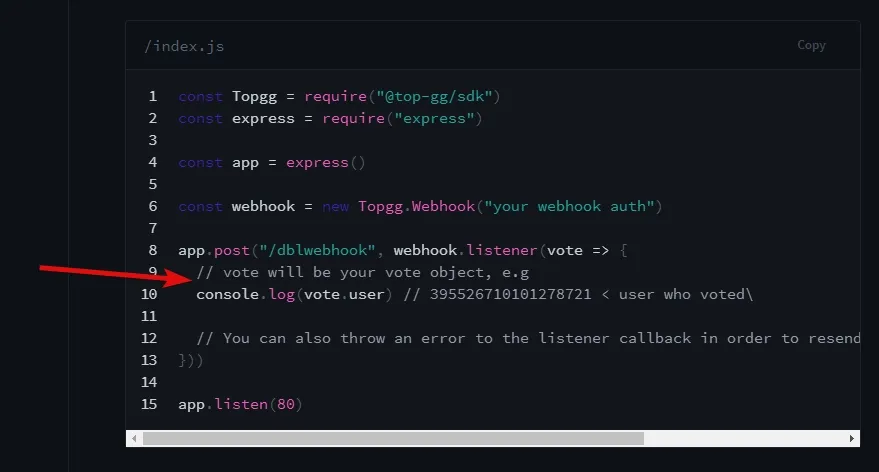 warped pebble
ok
fair marlin
uhhh i just pressed test webhook once and now topgg is sending multiple requests to my webserver
i even reloaded, even restarted bot
and network tab in console shows nothing
 weary flicker
My webhook url is constantly getting deleted
even after I saved it
:(
what should i do?
jaunty plank
weary flicker
what should i do?
try a different browser, saving then refreshing
weary flicker
jaunty plank
try a different browser, saving then refreshing
oh ok
weary flicker
jaunty plank
try a different browser, saving then refreshing
honestly i tried edge, it doesn't even show me the creator controls button
jaunty plank
 bold fulcrum
how do i get my dbl token
bold fulcrum
how do i get my dbl token
bot edit page, webhook section
 jaunty plank
weary flicker
honestly i tried edge, it doesn't even show me the creator controls button
weary flicker
jaunty plank
https://top.gg/bot/748399080459468800/edit
jaunty plank
weary flicker
honestly i tried edge, it doesn't even show me the creator controls button
weary flicker
jaunty plank
https://top.gg/bot/748399080459468800/edit
thanks for the link
like i search for my bot in the search options
it doesn't show

 weary flicker
jaunty plank
pins in <#714045415707770900>
weary flicker
jaunty plank
pins in <#714045415707770900>
ooook
jaunty plank
sour sequoia
my top.gg's bot servers count isnt changing
are you posting the count?
sour sequoia
yes
sour sequoia
jaunty plank
are you posting the count?
^
jaunty plank
hmm, how long since you last posted?
jaunty plank
bot id?
sour sequoia
828349677950074881
jaunty plank
seems to be accurate to me
sour sequoia
how much does it says?
jaunty plank
off by a few, which is normal
sour sequoia
o okay
jaunty plank
478 vs 485
sour sequoia
okay, ty
 fringe sphinx
has anyone else ever had problems with the top.gg sdk on nodejs when hosting with digital ocean?
jaunty plank
what kind of issues?
fringe sphinx
when i test it on my local pc, it works fine but on digital ocean, i get this error
 narrow zenith
express isn't found
fringe sphinx
ive tried installing express but it then gives me a different error
narrow zenith
what's the other error?
 jaunty plank
yes
fringe sphinx
do you know what the problem might be?
jaunty plank
using ts?
jovial kiln
might be
fringe sphinx
but it works fine on my pc when run locally
jovial kiln
Then install express on wherever your running it?
fringe sphinx
and i get that error when i do that
it works fine without me installing express on my pc then when i push it to digital ocean, it stops working
 near shore
The webhook page for my bot returns a 403 forbidden error
fringe sphinx
you need to login then refresh
near shore
Im already logged in
fringe sphinx
try loging out then back in then
near shore
logging in and out has been so scuffed lately, thats prob the issue. I'll find out in a sec
fringe sphinx
yeah ive found that aswell
jaunty plank
fringe sphinx
it works fine without me installing express on my pc then when i push it to digi...
npm install --save-dev @types/express
probably missing your types file
fringe sphinx
yep that was it thanks so much @jaunty plank
near shore
Where am I supposed to go to find the API key for posting the stats for my bot?
restive otter
Check out pins
near shore
That page 403s so I cant get to it, which is why I asked hoping it was moved lol
restive otter
You're logged in, weren't you? It works for me. Not sure if it's on topgg or you
 rain heart
Wait for someone who can help
 fluid raptor
restive otter
Hey for server counting, should I do something like this? 😅
fluid raptor
restive otter
Hey for server counting, should I do something like this? 😅
why are you using js file for java-sdk?
restive otter
fluid raptor
why are you using `js` file for java-sdk?
Oops
Sorry
So I should use java?
I am a beginner
😅
fluid raptor
restive otter
Oops
Sorry
So I should use java?
well yeah, you're using the java sdk
fluid raptor
ig ye
 rocky cave
Is the API required?
fluid raptor
restive otter
How to fix it
which language are you using?
fluid raptor
https://topgg.js.org/classes/api.html
It's supposed to be topgg.Api not topgg.api
Documentation for @top-gg/sdk
restive otter
fluid raptor
https://topgg.js.org/classes/api.html
It's supposed to be `topgg.Api` not `topgg...
Thx man

restive otter
in console shows error voted is not defined
if(!voted){
  messgae.reply(`please vote me to unlock this command`)
} else {......}```how to fix it
 hazy adder
yea
restive otter
rain heart
you defined it vote
what to do?
rain heart
Rename the condition variable
restive otter
@rain heart now another error comes 401 unauthorised
restive otter
Ya i putted
rain heart
Post your code, but censor the token
 analog bay
@golden adder
 pliant raptor
Expected Behavior
I expected to find my bot MySuperBot
Observed Behavior
Instead I found this cat
Applicable Links or Attachments
oauth2 !image
narrow zenith
Huh?
jaunty plank
 frosty flume
How do I make the vote detection system on top.gg?
frosty flume
How do I make the vote detection system on top.gg?
You'll need to use webhooks
https://docs.top.gg/resources/webhooks/

 real dune
Does https://www.npmjs.com/package/@top-gg/sdk automatically handle rate limits for you?
jaunty plank
real dune
Does <https://www.npmjs.com/package/@top-gg/sdk> automatically handle rate limit...
no
if you are at risk of getting ratelimited you are probably misusing the api anyway
real dune
Alright, im barely hitting limits rn, just asked for future proofing
 golden adder
real dune
Does <https://www.npmjs.com/package/@top-gg/sdk> automatically handle rate limit...
golden adder
real dune
Does <https://www.npmjs.com/package/@top-gg/sdk> automatically handle rate limit...
You shouldn't hit the API to check if someone voted for example. You should use webhooks to receive the vote event data and store that on a database. Then hit your database instead.
real dune
Ah I see
restive otter
llllllllllllllll
jaunty plank
do you need help with the api? 👀
 ripe haven
D
 outer osprey
How does the webhook work? I want to send voting logs to a specific channel in my discord server, how do I go about doing that?
jaunty plank
if you just want to log them you can use https://webhook-topgg.com/.
its a bit easier than making a webhook listener.
if you want rewards and stuff https://docs.top.gg/resources/webhooks/
 sand sphinx
Could anyone provide information as to why my server still says not published, I couldn’t find any faqs so I thought I would try asking here. Thank you in advance for your time.
 fair mica
when i add my server, it shows oauth error every time
rain heart
dblapi
 celest pierBOT
This channel is ONLY for the Top.gg API!
This channel is only for: suggestions/help/bugs to do with official API libraries and API docs found at: https://docs.top.gg
Any Off-Topic conversation may get deleted and muted.
If you need help with development about your bot or development in general, feel free to use #development.
restive otter
hello I need help making it show how many servers my bot is in but in javascript
tepid osprey

 civic slate
restive otter
civic slate
restive otter
what ?

 dusk shale
restive otter
dusk shale
restive otter
??? problem ?
 jaunty plank
restive otter
??? problem ?
jaunty plank
restive otter
??? problem ?
try from a different browser if you're still having this issue.
 ancient grove
If a send server_count as a array of guilds per shard, it is the same as shards, right?
 plucky lance
It is, yeah.
restive otter
i have a question
do u still need a webhook to send something like this even through an actual bot?

or can it be done just through the bot
plucky lance
You will receive a POST request from topgg and can do anything you want it.
For example receiving the request, using its user ID you got submitted, fetch a Discord user using your bot and send him a message
Or saving the received user ID in a database to get to know who has voted and how many times for example
restive otter
so if i use a db i dont need a webhhok at all?
that will be what i do if it possible
plucky lance
You’re receiving the request from topgg which means you need a webhook service (webserver) to receive it
plucky lance

jaunty plank
If your only goal is to avoid webhooks yourself https://webhook-topgg.com/ can handle from top.gg to discord.
Then just using your message event in your bot to listen for the message would work.
But I wont be able to help you with it, if you are comfortable with writing bots it should be very simple.
I'm looking to make documentation/libs on how to do it on the popular bot languages/libs eventually, but haven't had time.
 whole moss
help, im clicking the button but the token doesnt change; i already reloaded the page more than once

it seems that the token changed but it doesnt update on the right
restive otter
bruh
restive otter
hello how can i link api
sour sequoia
Error: 401 Unauthorized (You need a token for this endpoint)
    at Api._request (C:\Atest\node_modules\@top-gg\sdk\dist\structs\Api.js:76:19)
    at runMicrotasks (<anonymous>)
    at processTicksAndRejections (internal/process/task_queues.js:93:5)
    at async Api.getStats (C:\Atest\node_modules\@top-gg\sdk\dist\structs\Api.js:125:24)
any idea?
narrow zenith
you need a token
sour sequoia
i have a token
 sour sequoia
yes
sour sequoia
narrow zenith
have you tried regenerating it?
a couple of times
 vague dune
 narrow zenith
this is getting out of hand
 jaunty plank
sour sequoia
jaunty plank
sour sequoia
just to double check, what are you doing? posting stats?
sour sequoia
jaunty plank
just to double check, what are you doing? posting stats?
i was yes and then i realized that no matter what i do that is related to that it sends that error, in the picture i tried
api.getStats('bots id')
brb
jaunty plank
are you posting/getting the stats for the same bot you are using the token for?
sour sequoia
yes
jaunty plank
submit a github issue I guess.
Probably will need team to look at it for you.
https://github.com/top-gg/issues
sour sequoia
okay, i did
 vital bolt
Hello what is the api for?
jaunty plank
vital bolt
Hello what is the api for?
the api has quite a few features you can use for many reasons.
https://docs.top.gg/api/bot/
https://docs.top.gg/api/user/
https://docs.top.gg/resources/webhooks/
vital bolt
Is there one that helps me set it up?
jaunty plank
the docs are for helping you set up/write code for the api.
so all three of those links do that
vital bolt
thlks
 unique girder
const schhool = await fetch('https://top.gg/api/bots/828349677950074881/', {
        method: 'GET', headers: {
            "Authorization": "xxxxxxx"
        }
    });
I got an authorized error, is theres soemthing wrong with the code?
jaunty plank
A long time ago if you didnt include a content type header youd get auth issues.
not sure if that still applies, but make sure to include one.
'Content-Type: application/json'
jaunty plank
also, you need to have an approved bot to use the api
unique girder
const schhool = await fetch('https://top.gg/api/bots/828349677950074881/', {
        method: 'GET', headers: {
            "Authorization": "still didnt work",
        "Content-Type": "application/json"
        }
    });
still didnt work
jaunty plank
do you have an approved bot?
unique girder
@sour sequoia is your bot approved?
jaunty plank
ah yeah, youll want to wait until your issue is handled
 spice gulch
Oi
jaunty plank
hey, do you need support with the api/webhooks?
unique girder
does this mean that the bot isnt approved?

 royal mirage
It's the certification by discord , not top gg
jaunty plank
approved bots can be visited at their bot page to tell if they have been approved.
if you dont get an error its approved.
brokentooths bot is approved, but their issue seems to be something related to the api if everything we debugged is correct.
unique girder
ok
 fluid mica
anyone know what the default post interval for the autoposter in JS is? I know the one in py is every 30 minutes, is there a way to change this interval as well?
jaunty plank
Should be 30 minutes aswell, you can check by looking in the github.
Changing the interval should be done with the options object
fluid mica
alright thanks, 30 minutes works fine, just wanted to make sure there was a default and i didnt have to set it myself
 safe comet
what does the voted property means?

 safe comet
1 is true and 0 is false?
restive otter
yes
fair marlin
umm im using topgg sdk and when i try to update info of my guildcount it says unauthorized
it is correct token but doesnt work in updating info
[09:54:32 | ERROR] Error: 401 Unauthorized (You need a token for this endpoint)
    at Api._request (/home/container/node_modules/@top-gg/sdk/dist/structs/Api.js:76:19)
    at processTicksAndRejections (node:internal/process/task_queues:96:5)
    at async Api.postStats (/home/container/node_modules/@top-gg/sdk/dist/structs/Api.js:99:9)
    at async Object.execute (/home/container/commands/owner.js:215:25)
    at async Object.execute (/home/container/events/interactionCreate.js:24:13)```
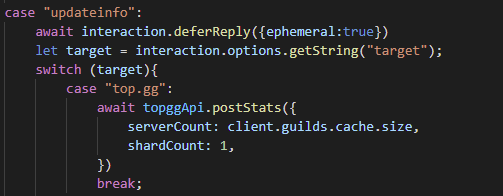
wth i found my token changed
even tho i never changed it myself
 gusty bolt
fair marlin
https://i.imgur.com/keHAJ08.png
gusty bolt
fair marlin
https://i.imgur.com/keHAJ08.png
You didn't add to do this:
new Top.gg(`${process.env.TOPGG_API_KEY}`)
You could just remove the `` and the ${}
new Top.gg(process.env.TOPGG_API_KEY)
Yes it's the same, but you don't need to write unnecessary characters
 fierce quest
HELP : So i created a channel to post the votes, and stuff. I made a webhook
pasted the webhook url in the top.gg webhook section
but it is still not working(as in it is not posting anything in the channel)
votes for the server*
restive otter
fierce quest
**HELP :** So i created a channel to post the votes, and stuff. I made a webhook...
wont work because they arent discord webhooks
 storm solar
I want to get a reward when someone votes for my bot.
could you give me an example to do this? Because I can't figure out how webhooks work
fierce quest
restive otter
wont work because they arent discord webhooks
I made one from the integration menu in the channel
where should i make one from then?
storm solar
storm solar
I want to get a reward when someone votes for my bot.
could you give me an examp...
pls help
jaunty plank
fierce quest
**HELP :** So i created a channel to post the votes, and stuff. I made a webhook...
https://webhook-topgg.com/
Can make top.gg webhooks work with discord webhooks
jaunty plank
storm solar
I want to get a reward when someone votes for my bot.
could you give me an examp...
hey https://docs.top.gg/resources/webhooks/
Webhooks are just listeners for http requests.
storm solar
thanks
fierce quest
jaunty plank
<https://webhook-topgg.com/>
Can make top.gg webhooks work with discord webhooks
thanks! can i do an embed with that?
jaunty plank
yep
storm solar
jaunty plank
hey <https://docs.top.gg/resources/webhooks/>
Webhooks are just listeners for h...
that's just to see when someone votes, but not to receive a reward that person when they vote
jaunty plank
That code entirely depends on what your rewarding
And what your database is
There are hundreds of databases and languages, we cannot cover all of them.
 latent narwhal
unique girder
does this mean that the bot isnt approved?
latent narwhal
unique girder
does this mean that the bot isnt approved?
Nope, this is for certified bots, this thing has been closed from last like a year or so and I doubt it will open again

Spice up your Discord experience with our diverse range of Discord bots
fierce quest
jaunty plank
<https://webhook-topgg.com/>
Can make top.gg webhooks work with discord webhooks
Hi sorry for the ping
but i made the webhook on the site
and when i pasted the links and auth it showed an error
 jaunty plank
on save? or on test.
fierce quest
jaunty plank
on save? or on test.
test
jaunty plank
did you save first?
fierce quest
no
jaunty plank
you need to save first iirc
fierce quest
okay wait a sec
 jaunty plank
refresh the page/relogin to topgg
fierce quest
ok
jaunty plank
csrf issues has been happening to a lot of topgg pages recently 😔
fierce quest
jaunty plank
csrf issues has been happening to a lot of topgg pages recently 😔
Ohhh it saved
but when i clicked test
nothing got sent
jaunty plank
when testing on the website did it send?
fierce quest
jaunty plank
when testing on the website did it send?
yes it did
jaunty plank
fierce quest
yes it did
can you press test again?
jaunty plank
topgg
fierce quest
ok
fierce quest
jaunty plank
can you press test again?
did it
still nothing
jaunty plank
can you send me the link you used?
fierce quest
jaunty plank
can you send me the link you used?
which one?
jaunty plank
the one the copy link button gave you
fierce quest
ok
 little plover
@restive otter
restive otter

restive otter
How do I check who just voted for my server through the API?
jaunty plank
You need to use webhooks.
https://docs.top.gg/resources/webhooks/
restive otter
Oh, the webhook guide says bots? Does it also mean server ids work too?
restive otter
Oh awesome! I'm confused on how it works, is it just a Discord integration webhook URL? To send a message to a channel?
jaunty plank
Topgg webhooks are not directly compatible with discord webhooks, youll need to use an external tool such as https://webhook-topgg.com/ to make it work with discord webhooks
restive otter
Ohh - how could I use the normal webhook to interact with my bot?
jaunty plank
Or write a listener yourself
restive otter
It seems pretty cool
jaunty plank
https://docs.top.gg/resources/webhooks/
Covers all that.
Some of the libraries listed can do it too.
restive otter
Thank you so much for the help, I'm now split between using the simplifier or creating my own website to handle posts lol. Is the simplifier stable, and fast?
jaunty plank
Writing your own as long as you have ssl should always be the most reliable and safe.
If you dont use ssl(encryption) the webhook listener above should be "safer"
restive otter
I got my own website going with nginx and uWSGI - used Flask as the framework but I haven't gotten around to the HTML/CSS/JS lol
jaunty plank
Webhooks thankfully won't need any html css or js
restive otter
Ahh that's awesome. I've got to figure out how to create the webhook on the website lol
jaunty plank
just create an endpoint in flask that receives post requests, do a basic auth check and it should be good to go.
the offical python lib uses aiohttp, but it still should help in understanding how it works.
https://github.com/top-gg/python-sdk/blob/master/topgg/webhook.py#L128
 sweet sandal
am i able to use the webhook auth from https://webhook-topgg.com/ to use in the event when someone upvotes the bot to get there bot id?
jaunty plank
can you rephrase that? it looks like your saying get the id of someone elses bot, not yours.
sweet sandal
i meant user id oops my b

under webhooks, for the example and it asks for the webhook auth
jaunty plank
https://webhook-topgg.com/ doesnt give those to you, only if you make a webhook listener yourself can you get that information.
unless you listen for the webhook message in your bots code, then you could theoretically.
sweet sandal
is there a tutorial anywhere you know of, or is it just figure it out urself
jaunty plank
neither methods have a tutorial really, just the docs. https://docs.top.gg/libraries/javascript/#webhooks
you can learn more about how webhooks work on google for ^ this one.
I can also help some tonight.
if you want to listen for the webhook message from https://webhook-topgg.com/, youll mostly just have to do it from scratch, but I can help a bit there too.
If your comfortable with your bots lib it should be pretty straight forward
sweet sandal
Ok thanks
 fervent thistle
What does unsupported client mean?
I'm trying to make it so it shows the amount of guilds on my bot page
please ping
jaunty plank
fervent thistle
What does unsupported client mean?
for what library?
some of our libraries dont support other bot libraries
whole moss
whole moss
help, im clicking the button but the token doesnt change; i already reloaded the...
can someone help me with that?
a few days passed and i still cant regenerate it
restive otter
hello my bot is 212 server but it shows as 116 on top.gg page


For anyone good with Python, would you mind helping?py @app.route("/lfg-endpoint", methods = ["POST"]) def receive(): if request.method == "POST": webhook = Webhook.partial(123, "url", adapter = RequestsWebhookAdapter()) webhook.send(request.data, username = "LFG") return 'success', 200 else: abort(400)Tried this (with the correct id/url in their places) and it did nothing. This is what I got in my journalctl log:Sep 19 07:08:54 DiscordBots uwsgi[247248]: [pid: 247248|app: -1|req: -1/9] ipadresshere () {38 vars in 522 bytes} [Sun Sep 19 07:08:54 2021] POST /lfg-endpoint => generated 21 bytes in 0 msecs (HTTP/1.1 500)>
I want to get started in python where I can find the official docs and getting started guide
restive otter
restive otter
I want to get started in python where I can find the official docs and getting s...
restive otter
restive otter
For anyone good with Python, would you mind helping?```py
@app.route("/lfg-endpo...
Seems you got an internal error, is there any traceback?
FWIW, the if statement might be redundant as you've specified the methods in the decorator. Or actually no since OPTIONS is implemented by default
Above that line in the journalctl I get this:--- no python application found, check your startup logs for errors ---The access log acknowledges the POSTs [19/Sep/2021:07:51:12 +0000] "POST /lfg-endpoint HTTP/1.1" 500 32 "-" "Top.gg Webhook/1.0.0"
Probably you didn't setup uwsgi properly
Arghh, that's annoying.
restive otter
restive otter
hello my bot is 212 server but it shows as 116 on top.gg page
Help :(
Perhaps you'd know of a way to troubleshoot my issue with uWSGI? I'm pretty new to setting up web frameworks lol
I've only tried gunicorn
Can you send how you run uwsgi?
 opaque bison
restive otter
hello my bot is 212 server but it shows as 116 on top.gg page
opaque bison
restive otter
hello my bot is 212 server but it shows as 116 on top.gg page
try refreshing data if that dint work then ig its a problem with the code youre using to update stats
restive otter
From what I've seen on SO, you might have put the wrong path for the module
restive otter
restive otter
I've only tried gunicorn
Honestly, I don't even know how I have everything setup - as I followed tutorials. But I'm thinking I should switch to gunicorn as it's more popular and slightly more efficient.
 solid finch
How can i get users when they vote my bot
rain heart
restive otter
Help \:(
you need to actively post
 silk reef
I have installed dblpy, yet when I try to import dbl it throws "No module named 'dbl'"?
restive otter
silk reef
I have installed dblpy, yet when I try to `import dbl` it throws "No module name...
Might be multiple environment issues. You'd better use topggpy anyway
silk reef
restive otter
Might be multiple environment issues. You'd better use topggpy anyway
whats the difference?
restive otter
Dblpy is deprecated in favor of topggpy
Have a look at the docs to see the breaking changes
silk reef
Eh, just want to post stats, anyway will manually post instead of using wrappers now
silk reef
Why does topgg return 400 http error? the params are correct?
 silk reef
tidal idol
maybe it needs to be a string?
silk reef
tidal idol
maybe it needs to be a string?
nope, it is of type int
silk reef
tidal idol
400 means that its a bad request
yes
 rain dock
Can I create a token separately for GET and POST?
jaunty plank
nope
tidal idol
im using quart, and to see the request data i'm doing print(request.json) but nothing prints lmao
restive otter
Doesn't it return awaitable doe
tidal idol
@client.event
async def on_dbl_vote(data):
        """An event that is called whenever someone votes     for the bot on Top.gg."""
        if data["type"] == "test":
            print(int(data["user"]))
            user = client.get_user(int(data["user"]))
            await user.send("Thank you for upvoting :)")
            # this is roughly equivalent to
            # `return await on_dbl_test(data)` in this case
            return client.dispatch("dbl_test", data)

        user = client.get_user(str(data["user"]))
await user.send("Thank you for upvoting :)")```returns ```py
471409054594498561
Ignoring exception in on_dbl_vote
Traceback (most recent call last):
File "/opt/virtualenvs/python3/lib/python3.8/site-packages/discord/client.py", line 343, in _run_event
await coro(*args, **kwargs)
File "main.py", line 21, in on_dbl_vote
await user.send("Thank you for upvoting :)")
AttributeError: 'NoneType' object has no attribute 'send'```
restive otter
Ugh, why is it str?
Anyway, are you caching members?
If not, you can fetch it instead. Note that it's an API call so you might get rate limited at some point. But it should be handled by d.py I guess
Side note: don't dispatch dbl_test if you're handling the test payload inside the same event
tidal idol
restive otter
Anyway, are you caching members?
that is why i turn it into a string
restive otter
Unless you're in async branch (which I doubt it still works), snowflakes are of type int
tidal idol
restive otter
Unless you're in async branch (which I doubt it still works), snowflakes are of ...
so how do i send a dm lmao
i did type(userid)
and it outputted <class 'int'>
restive otter
tidal idol
so how do i send a dm lmao
Try to lazy fetch it, something like ```py
user = client.get_user(data.user) or await client.fetch_user(data.user)
...
AttributeError: 'dict' object has no attribute 'user'
tidal idol
i got it working
@client.event
async def on_dbl_vote(data):
        """An event that is called whenever someone votes     for the bot on Top.gg."""
        if data["type"] == "test":
            userid = data["user"]
            user = client.get_user(data["user"]) or await client.fetch_user(data["user"])
            await user.send("Thank you for upvoting :)")
            # this is roughly equivalent to
            # `return await on_dbl_test(data)` in this case
            return client.dispatch("dbl_test", data)

        user = client.get_user(data.user) or await client.fetch_user(data.user)
        await user.send("Thank you for upvoting :)")```
 restive otter
Well, glad you got it working
little plover
@dense grail
 viscid cloud
Where can I get token?
celest pierBOT
@viscid cloud
Your question is likely answered by one of pinned messages.
Please take time to read the pinned messages by clicking on this icon.
 viscid cloud
celest pier
<@294795706059849730>
viscid cloud
celest pier
<@294795706059849730>


 rigid hamlet
Was the API endpoint changed or what
My bot keeps on giving error
And not getting response from the API
For Voter only commands
I have authorization header with correct token
rigid hamlet
rigid hamlet
Was the API endpoint changed or what
Someone help
jaunty plank
rigid hamlet
My bot keeps on giving error
what error?
rigid hamlet
jaunty plank
what error?
The website doesn't give a response
It worked correctly before and it's giving error since a week
jaunty plank
whats your code look like? and whats the exact error?
theres a few different types of response errors and the exact one could be important.
restive otter
Do both Automatically and Manually post server count every 30 minutes uses discord.ext tasks? Or they have separate concept?
jaunty plank
for py?
restive otter
Yes
jaunty plank
it appears to use asyncio loops, not discord.ext, same basic concept(discord.ext just extends asyncio), just not using discord.ext
https://github.com/top-gg/python-sdk/blob/master/topgg/client.py#L76
https://github.com/top-gg/python-sdk/blob/master/topgg/client.py#L31
https://discordpy.readthedocs.io/en/stable/ext/tasks/index.html
rigid hamlet
jaunty plank
whats your code look like? and whats the exact error?
theres a few different typ...
No error in Console
And I used the endpoint https://top.gg/api/bots/718690409861349417/check?userId=
And requested voted
If the API is changed please tell me if not then tell me what can be the reason that the bot isn't able to request stuff from API
jaunty plank
whats your code?
jaunty plank
im not asking for the error, Im asking for the code you wrote to access the api
jaunty plank
no, but your question seems to be unrelated to it.
rigid hamlet
jaunty plank
no, but your question seems to be unrelated to it.
It is related
The code is in aoijs
jaunty plank
aoi.js has no methods for fetching from the topgg api from what I can see, so you cant be using it to fetch
rigid hamlet
jaunty plank
aoi.js has no methods for fetching from the topgg api from what I can see, so yo...
I am using API endpoint
To fetch
jaunty plank
can you please just send the code, otherwise theres nothing I can do for you
rigid hamlet
JSON website
@jaunty plank
$jsonRequest[https://top.gg/api/bots/$clientID/check?userId=$authorID;voted;{description:An Unexpected Error Occurred.
I was Unable to Make Connection with Top.gg
Please Try Again.
If This Problem persists, Contact [Support]()}{color:RED};Authorization:]
U won't understand that ig
jaunty plank
I need the programming code, not the error
like .fetch(https://top.gg/api/bots/$clientID/check?userId=$authorID)
or whateer
rigid hamlet
jaunty plank
I need the programming code, not the error
It isn't error it's the code
rigid hamlet
jaunty plank
like .fetch(`https://top.gg/api/bots/$clientID/check?userId=$authorID`)
or whate...
The $jsonRequest is that only
jaunty plank
can you link me to aiojs, i must be getting something completely different from you
rigid hamlet
jaunty plank
can you link me to aiojs, i must be getting something completely different from ...
Yes I know
How can I link btw?
Support server?
Or documentation?
jaunty plank
documentations fine
👀 why is this lib so bad
where are you hosting this code?
like, a vps/home/server/replit
rigid hamlet
jaunty plank
👀 why is this lib so bad
Huh?
rigid hamlet
rigid hamlet
On DBH cuz I am poor
It's a free hosting
jaunty plank
maybe dbh is being blocked by cloudflare?
its really hard to tell with this library whats going on tbh.
rigid hamlet
jaunty plank
👀 why is this lib so bad
It isn't bad it's pretty good for beginners
jaunty plank
its impossible to debug
rigid hamlet
jaunty plank
maybe dbh is being blocked by cloudflare?
its really hard to tell with this libr...
That might be the reason I guess
jaunty plank
also, seems harder than just js tbh
rigid hamlet
jaunty plank
also, seems harder than just js tbh
That is because you saw it for the first time
jaunty plank
no, its like actually harder 😔
writing the original code is easier, properly doing stuff seems harder
rigid hamlet
jaunty plank
writing the original code is easier, properly doing stuff seems harder
Yes
Combining different functions is hard
jaunty plank
your best bet, contact aoi support to see if they have any proper error logging for their lib(doesn't seem like it)
if they dont, I dont think theres much I can do to debug this
rigid hamlet
@jaunty plank I have asked both the library support and the host support
Thanks for your help btw
rigid hamlet
rigid hamlet
<@136583532972605440> I have asked both the library support and the host support
Waiting for response
Nononono wait
Not a host issue
Stats Posting is working
jaunty plank
hmm, weird!
 river tide
+play
 twin reef
code: https://sourceb.in/hU6RkpYxpI
error: https://sourceb.in/4dPl0hcNWl
is there any fix on this?

ping on reply pls
 sterile echo
22ms
twin reef
ping
sterile echo
39ms
twin reef
ping
sterile echo
39ms
restive otter
ping (woops didnt saw the case)
restive otter
sterile echo
39ms
Selfbot?
restive otter
I think those who are coding in python are using a flask web-server to listen incoming webhook requests
restive otter
Eh, not necessarily
restive otter
I think topgg.py has an inbuilt webhook listener? No need for us to create a extra webhook listener?
restive otter
Making use of aiohttp internally, yes
 weak matrix
how do you use the api to check if someone has the voter role
 wraith trench
Is the topgg-autoposter even working?
It doesn't seem to fire the posted event for some reason Nor log anything in, I don't know if it's my code 
restive otter
does top.gg webhook for vote post the query value too
like if i provide /vote?guildid=235765655
will the post request return it?
wraith pelican
when i am using the server post code then this error comes in my terimal
Oops! Error: 400 Bad Request
jaunty plank
restive otter
like if i provide /vote?guildid=235765655
Yes! In the "query" body parameter.
jaunty plank
wraith pelican
when i am using the server post code then this error comes in my terimal
```Oops...
What library
jaunty plank
wraith trench
Is the topgg-autoposter even working?
Is the website updating? Takes about 30 minutes to update, clear your cache and check it.
If it is, its posting
jaunty plank
restive otter
I think topgg.py has an inbuilt webhook listener? No need for us to create a ext...
Yep it does. https://docs.top.gg/libraries/python/
jaunty plank
weak matrix
how do you use the api to check if someone has the voter role
Sorry guys for taking so long, just woke up!
wraith pelican
jaunty plank
What library
jaunty plank
wraith pelican
https://www.npmjs.com/package/top.gg
That's not our library, it's also 2 years out of date.
Try using our library.
https://docs.top.gg/libraries/javascript/#installation
wraith trench
jaunty plank
Is the website updating? Takes about 30 minutes to update, clear your cache and ...
Nope, It won't log in the console saying it posted the stats (under the posted event)
and the website count is still the same and won't update even though I tried clearing the cache
jaunty plank
Whats your code look like?
restive otter
jaunty plank
Yes! In the "query" body parameter.

restive otter
jaunty plank
That's not our library, it's also 2 years out of date.
Try using our library.
<h...
its dblapi.js but reposted kek
wraith trench
jaunty plank
Whats your code look like?
const Discord = require("discord.js")
const client = new Discord.Client()
const { AutoPoster } = require('topgg-autoposter')
logger.success("test")
const ap = AutoPoster(config.DBL, client)
ap.on('posted', () => {
logger.success('Posted stats to Top.gg!')
})```
It logs `test` But doesn't log the Posted part for some reason the key is correct, I confirmed it again
jaunty plank
is that client logged in?
it needs to be a logged in discord.js client(or other supported lib), as thats where it gets your guild count from.
jaunty plank
try adding
console.log(client.user.id)
just to make sure
or client.on('ready', console.log("logged in here");
jaunty plank
wraith trench
```js
const Discord = require("discord.js")
const client = new Discord.Client() ...
in this file obvs
wraith trench
Alright
jaunty plank
the only reason I want to make sure its firing the ready event is this library waits for the ready event if its not already ready.
GitHub
Top.gg Auto-Posting made easy. Contribute to jpbberry/topgg-autoposter development by creating an account on GitHub.
wraith trench
ah oof isn't working, maybe that's the issue
lemme try doing something else I think it might work
Okay, it worked woo
Thanks for the help!
jaunty plank
no problem
 upper vigil
Is there a way to set your bots server count to n/a again?
This may be a weird question but it has a reason:
I am currently thinking of removing the bot scope from the invite link so that only the slash commands scope is granted. After that there won't be anything like a server count, or better said, the server count the bots prints out is wrong (only displaying the servers with the bot user, not with the slash commands)
rain heart
not really, no. You could literally set it to 0
jaunty plank
I doubt it will, but -1 might set it to N/A?
Other than that, dont think you can do much about it.
upper vigil
Ok, thanks for your answers
 scarlet cobalt
One message removed from a suspended account.
One message removed from a suspended account.
One message removed from a suspended account.
One message removed from a suspended account.
restive otter
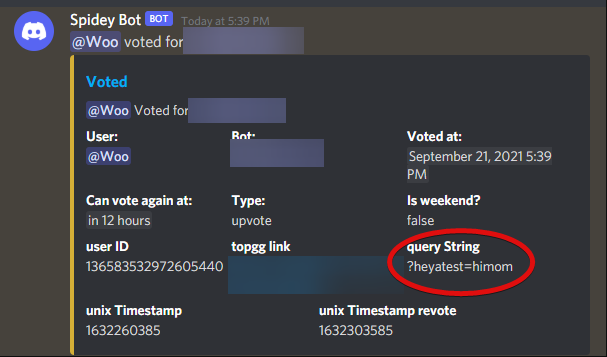
why does vote.query return [Object Object]
jaunty plank
restive otter
why does vote.query return [Object Object]
when you log it? 🤔
it shouldnt do anything like that
 graceful merlin
I am receiving undefined with "vote.user" and an empty array with "vote", why?
 honest nacelle
hi im not very pro at coding im on python how do i webhook api thing my bot 880242090389413938
@short pawn
 wispy lava
imm acc so confused where do i acces the api ?
 narrow zenith
top.gg/api i think
jaunty plank
 polar birch
how do i make an vote logger? like when someone votes it sends an embed in spesific channel?
jaunty plank
polar birch
how do i make an vote logger? like when someone votes it sends an embed in spesi...
you can use top.gg webhooks, receive them in your bot, then send the message in that discord channel.
 crystal parcel
pls rob @polar birch
jaunty plank
crystal parcel
pls rob <@!564839721759408138>
 weak trellis
what is
"Required parameter shard_count missing or invalid value"
graceful merlin
I'm using the top.gg webhook test and I still got undefined, I voted for the conventional methods and I still got undefined. how can i solve this problem?
jaunty plank
graceful merlin
I'm using the top.gg webhook test and I still got undefined, I voted for the con...
What's your code look like?
graceful merlin
jaunty plank
What's your code look like?
my code is in an anonymous function to start the bot and server client mutually in a try catch block with a verification middleware, i put the webhook url in top.gg with my password and other info, but it still didn't work
graceful merlin
jaunty plank
What's your code look like?
help 
graceful merlin
jaunty plank
Try logging the whole response and seeing what it gives
already did that
return undefined
jaunty plank
responses never can be completely undefined.
graceful merlin
try {
    const router = require('express').Router()
        const Topgg = require("@top-gg/sdk")

        const webhook = new Topgg.Webhook("mypass")
    router.post('/the_brozy/dbl_webhook', webhook.listener(vote => {
          console.log(vote)
    }))

    module.exports = router
} catch(err) {
    console.log(`TBZ API ROUTER DBL WEBHOOK: ${err}`)
}
^
jaunty plank
for now try
app.get('/the_brozy/dbl_webhook', function (req, res) {
  res.send('Hello World!')
  console.log(req)
})
my url: mydomain/access_verific/verific/:userId/:password/:role/the_brozy/dbl_webhook
ok
jaunty plank
sorry, router.post (i feel you probably know that)
graceful merlin
yes
graceful merlin
jaunty plank
sorry, router.post (i feel you probably know that)
not response
try {
  const express = require('express')
    const router = express.Router()

  //const Topgg = require("@top-gg/sdk")

  //const webhook = new Topgg.Webhook("mypass")

  router.post('/the_brozy/dbl_webhook', (req, res) => {
    res.send(`test`)
  })

  module.exports = router
} catch(err) {
   console.log(`TBZ API ROUTER DBL WEBHOOK: ${err}`)
}
on method get works
jaunty plank
and you are requiring and app.use()ing in another file somewhere right?
graceful merlin
yes
jaunty plank
add a get, and try getting it in a browser maybe? 🤔
graceful merlin
const config = require('../../src/global/config/tbz-config')

module.exports = async () => {
    try {
        const express = require('express')
        const cors = require('cors')
        const bodyParser = require('body-parser')

        const app = express()
        app.use(cors())
        app.use(bodyParser.urlencoded({ extended: false }))

        const router_center = require('../../src/tbz-api/routers/index')
        app.use('/', router_center)

        app.listen(config.theBrozyApi.port)
    } catch(err) {
        console.log(`TBZ API: ${err}`)
    }
}
try {
    const express = require('express')
    const router = express.Router()

    const verific_middleware = require('../../../src/tbz-api/middleware/verifics-middleware')

    const theBrozyRouter = require('../../../src/tbz-api/routers/routers/the-brozy')
    const tbzCommandsRouter = require('../../../src/tbz-api/routers/routers/tbz-commands')
    const getUsersRouter = require('../../../src/tbz-api/routers/routers/getUsers')
    const getGuildsRouter = require('../../../src/tbz-api/routers/routers/getGuilds')
    const dblWebhookRouter = require('../../../src/tbz-api/routers/routers/dbl-webhook')

    router.use('/access_verific/verific/:user/:password/:role', verific_middleware, theBrozyRouter, tbzCommandsRouter, getUsersRouter, getGuildsRouter, dblWebhookRouter)

    module.exports = router
} catch(err) {
    console.log(`TBZ API ROUTER CENTER: ${err}`)
}
already did that:
try {
  const express = require('express')
    const router = express.Router()

  //const Topgg = require("@top-gg/sdk")

  //const webhook = new Topgg.Webhook("mypass")

  router.get('/the_brozy/dbl_webhook', (req, res) => {
    res.send(`test`)
  })

  module.exports = router
} catch(err) {
    console.log(`TBZ API ROUTER DBL WEBHOOK: ${err}`)
}
recived test
graceful merlin
yes
jaunty plank
is it maybe accidentally being caught by one of these?
verific_middleware, theBrozyRouter, tbzCommandsRouter, getUsersRouter, getGuildsRouter
?
graceful merlin
jaunty plank
is it maybe accidentally being caught by one of these?
`verific_middleware, theB...
not
jaunty plank
it shouldnt matter, as long as you filled in the url and auth on the site
graceful merlin
each of them is separated individually
jaunty plank
sure, but it does them in order still
graceful merlin
jaunty plank
it shouldnt matter, as long as you filled in the url and auth on the site
ok
jaunty plank
graceful merlin
already did that:
```js
try {
const express = require('express')
const ro...
try using postman, or another request generator.
then changing this code to post again.
jaunty plank
graceful merlin
jaunty plank
try using postman, or another request generator.
then changing this code to post...
I made a simple route and got this error
router:
const router = require('express').Router()

router.get('/test', (res, req) => {
    res.send('test')
})

module.exports = router
err:
TypeError: res.send is not a function
    at /home/runner/tbz/src/tbz-api/routers/routers/test.js:4:6
    at Layer.handle [as handle_request] (/home/runner/tbz/node_modules/express/lib/router/layer.js:95:5)
    at next (/home/runner/tbz/node_modules/express/lib/router/route.js:137:13)
    at Route.dispatch (/home/runner/tbz/node_modules/express/lib/router/route.js:112:3)
    at Layer.handle [as handle_request] (/home/runner/tbz/node_modules/express/lib/router/layer.js:95:5)
    at /home/runner/tbz/node_modules/express/lib/router/index.js:281:22
    at Function.process_params (/home/runner/tbz/node_modules/express/lib/router/index.js:335:12)
    at next (/home/runner/tbz/node_modules/express/lib/router/index.js:275:10)
    at Function.handle (/home/runner/tbz/node_modules/express/lib/router/index.js:174:3)
    at router (/home/runner/tbz/node_modules/express/lib/router/index.js:47:12)
I think the next step is to simulate the request on the proper route and method.
jaunty plank
  router.post('/the_brozy/dbl_webhook', (req, res) => {
    res.send(`test`)
  })
with this?
graceful merlin
not
router.post('/test', webhook.listener(vote => {
  console.log(vote)
}))
send test for top.gg
every time I send the test, it returns an empty array
graceful merlin
jaunty plank
```js
router.post('/the_brozy/dbl_webhook', (req, res) => {
res.send(`test...
^
jaunty plank
for now, its probably best to not use the top.gg test button, as the response sent is important for debugging.
graceful merlin
okay
I have a question, I think top.gg is not recognizing me as a user, not logging in
jaunty plank
login, then refresh the page.
graceful merlin
I did it about three times
celest pierBOT
In order to clear your cache for the site, press CTRL+F5.
If this does not work, try one of these resources below:
Instructions on Microsoft Edge
Instructions on Google Chrome
Instructions on Mozilla Firefox
Instructions on Safari
Instructions on Opera
Instructions on Brave
graceful merlin
 graceful merlin
jaunty plank
try doing it on the home page.
graceful merlin
jaunty plank
try doing it on the home page.
^
jaunty plank
did you do it on the original post? same url and everything?
graceful merlin
yes
jaunty plank
alright, now make it the original request too.
body as the json object topgg sends, content type and authentication set, and make the code the original code
graceful merlin
jaunty plank
alright, now make it the original request too.
body as the json object topgg sen...
do I have to do this via API or postman?
jaunty plank
postman
graceful merlin
ok
graceful merlin
jaunty plank
postman


 oblique lance
hello how do i do it so if someone votes for my bot the bot ll send the user message
 unreal night
oblique lance
hello how do i do it so if someone votes for my bot the bot ll send the user me...
unreal night
oblique lance
hello how do i do it so if someone votes for my bot the bot ll send the user me...
I have the same
Question
jaunty plank
using webhooks @oblique lance@unreal night
https://docs.top.gg/resources/webhooks/
unreal night
jaunty plank
using webhooks <@!785134353172398081><@!847438904478924810>
<https://docs.top.gg...
K lemme see
oblique lance
can we do from api
jaunty plank
not really, your best bet is webhooks
restive otter
Big body’s ban
 tidal idol
 untold cliff
I am getting error with top.gg api for post stuts
untold cliff
I am getting error with top.gg api for post stuts
mines up
oh i see
read the error
TopGGAPIError: 401 Unauthorized (You need a token for this endpoint)
you need to provide an API token, found at https://top.gg/bots/BOTID/webhooks
so in your case, https://top.gg/bot/848254224339828768/webhooks
untold cliff
When restart it stop then 15 min to 1 hours the bot go down and error come back
plucky lance
The application will crash if you don’t mind to handle the process errors.
untold cliff
The token is same
plucky lance
And make sure to provide the right topgg token in the header when sending API requests
plucky lance
Do you use the auto poster or send the requests yourself?
untold cliff
Auto poster
plucky lance
Ah I see the sdk
Yeah the error will be back if the auto poster sends the request again
It doesn’t send the request immediately after you start the app I think
There’s a delay
That’s the reason no error occurs if you start the bot
Anyways the error message means you didn’t provide your correct token
Check it again
untold cliff
plucky lance
Yeah the error will be back if the auto poster sends the request again
What the difference
 final plover
Are there any webhooks for the bot to see if someone voted etc. and also reminder like msgs that go to a channel without a bot and show who voted
jaunty plank
final plover
Are there any webhooks for the bot to see if someone voted etc. and also reminde...
For reminders they can sign up for reminders when they vote or you'll need to program the reminders in bot yourself.
untold cliff
untold cliff
This again
narrow zenith
try regenerating it
untold cliff
Try that now
untold cliff
narrow zenith
try regenerating it
Still same error
narrow zenith
are you requiring it from a config?
untold cliff
Nope. Index.js
untold cliff
narrow zenith
are you requiring it from a config?
Put the code in the index’s
jaunty plank
Can you show the part of the code which you use the authorization header?
Without the auth being showed(or regen it)
untold cliff
poster.on('posted', stats => {
// ran when succesfully posted
console.log(Posted stats to Top.gg | ${stats.serverCount} servers);
});
jaunty plank
So you're using this?
const poster = AutoPoster('Your Top.gg Token', client)
untold cliff
Yes
jaunty plank
And your Token should look like.
eyJhbGciOiJIUzI1NiIsInR5cCI6IkpXVCJ9.eyJpZCI6Ijg1OTE1MDM5MDEzNDMwODg5NCIsImJvdCI6dHJ1ZSwiaWF0IjoxNjMyNDMxMTEzfQ.bsAuhU6ckaPvyOBg1AfHA4MQUIvoyw2YTEPMVNU3Ebk
Should start with ey
untold cliff
Yes it is
jaunty plank
Hmm, if you provide something else(not your token) what does it respond?
Just want to check the error response
It's strange to get a 401 with any auth provided
tidal idol
what does the token give someone access to do
i wanted to ask here instead of cluttering up general with me asking questions about it
jaunty plank
tidal idol
what does the token give someone access to do
It's mostly accessing your own bot information, in some cases it might be other bots info, im not quite sure and haven't tested it.
plucky lance
You can access a few resources without API token
jaunty plank
If their token is leaked they really should be reseting it.
Could result in the token being ratelimited and not being usable if they want to use it.
I dont think we would do much if it is if that's the concern. Would be something to ask dev team.
 fringe edge
const express = require('express');
        const { Webhook } = require('@top-gg/sdk')

        const wh = new Webhook('auth')
        const app = express()

        app.get('/', (_req: any, res: any) => {
            res.send('hi');
        })

        app.post('/webhook', wh.listener((vote: any) => {
        console.log(vote.user) // 172075838806818817
        }))

        app.listen(432);
this is my current code for my express app and my webhook url on the dash is http://localhost:432 but nothing is being logged, any ideas?
jaunty plank
fringe edge
```js
const express = require('express');
const { Webhook } = require('@...
Local host means the local server.
So your sending webhooks to top.gg not your server. You need to use the public ip of your server
You're also missing the path /webhook
fringe edge
jaunty plank
Local host means the local server.
So your sending webhooks to top.gg not your s...
How would I get the public IP of my localhost server
jaunty plank
Like at home?
Google "what's my ip"
Or just use
https://whatismyipaddress.com/
IP address lookup, location, proxy detection, email tracing, IP hiding tips, blacklist check, speed test, and forums. Find, get, and show my IP address.
Note for home networks you'll also need to portforward
http://portforward.com/
Covers how to port forward
Port Forward
A port forward is a way of making a computer on your home or business network accessible to computers on the internet even though they are behind a router. It is commonly used in gaming security camera setup voice over ip and downloading files.
 untold cliff
jaunty plank
Double check you didn't accidentally add a letter to your token
untold cliff
jaunty plank
Double check you didn't accidentally add a letter to your token
I did three time
 wide herald
You also need a static ip for home networks
plucky lance
Aka. dynamic DNS
 balmy wharf
jaunty plank
balmy wharf
jaunty plank
@charred abyss hey, are you posting your bot stats via the api?
 charred abyss
this

ah
okay
but like
i dont get it, how can i post a request in my top.gg page 
jaunty plank
you post it to the api.
if your unsure how to use an api, look at the libraries listed on the left side.
charred abyss
jaunty plank
you post it to the api.
i mean how can i post the api request INSIDE my bot page description?
jaunty plank
you cannot
charred abyss
exactly
 barren mist
hi
jaunty plank
charred abyss
exactly
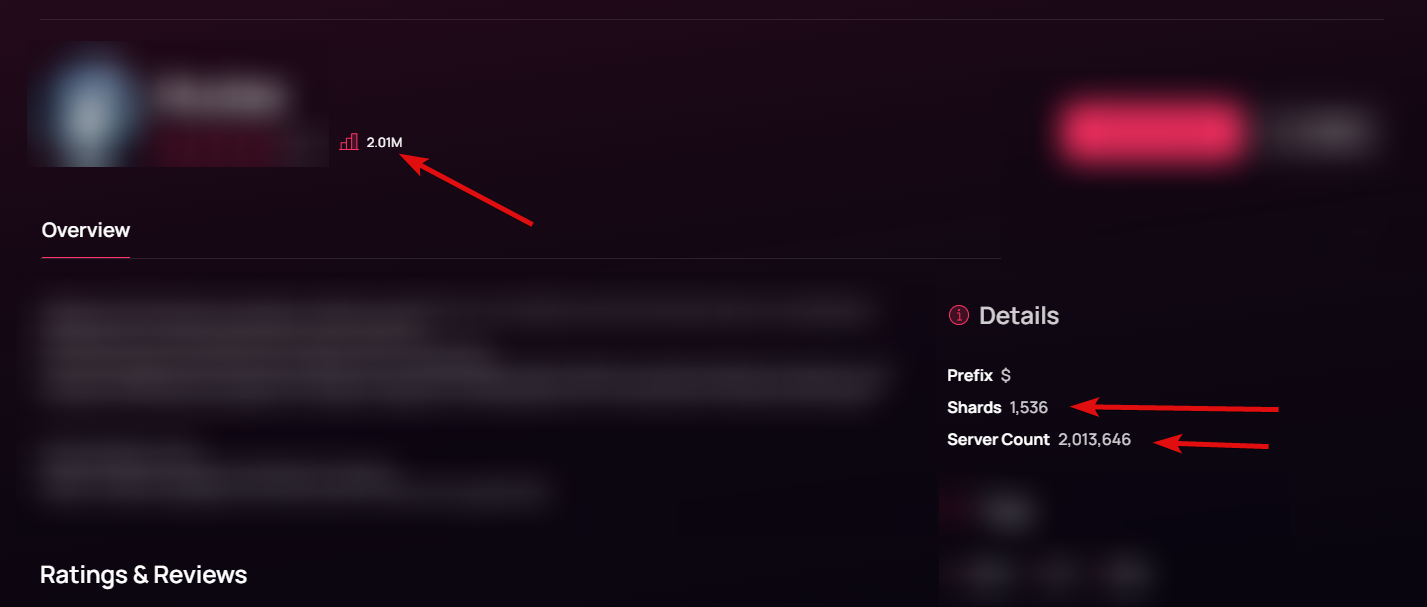
if you cannot run a program to do it, or post from your bots code, then you cannot post your server count to top.gg
 jaunty plank
yeah, changes these numbers.
 upper vigil
jaunty plank
I doubt it will, but -1 might set it to N/A?
Other than that, dont think you ca...
upper vigil
jaunty plank
I doubt it will, but -1 might set it to N/A?
Other than that, dont think you ca...
tried several ways, doesn't work to reset the guild count back to n/a 😦
 vestal frost
 empty gazelle
got it
 craggy sentinel
 Server Lockdown
Hey guys, we've gone ahead and locked down this server due to a recent surge in bot accounts joining and spamming. If you get any scam ads in your DMs please DM a mod to report it. Once the raid has been mitigated we'll reopen the server.
 vivid schooner
👍
 split plank
I can't see any token after click on reavel
jovial kiln
What language are you using
restive otter
jovial kiln
What language are you using
djs (js)
jovial kiln
Np
wide herald
he wrote Javascript as java script...
restive otter
wide herald
he wrote Javascript as java script...
brother
top.gg new them not good
it cant work fine
jovial kiln
What?
jovial kiln
Look into the API
@pastel raptor
Try again
Working perfectly fine for me
try the root site

You have to change the your-bot-id to your bots id
If you are doing servers then /server/serverID/webhooks
Then you didn't setup correctly
You need to setup a webhook server
It's all in the docs
Are you doing it for a bot or a server
You have to define Discord
You didn't install the packages
Show code
Discord is not defined
const Discord = require("discord.js"); at the top
Basic js
You do not have the correct version of node
v16.6 or higher
You clearly don't
Not how it works
node isn't a module
I suggest you learn javascript and nodejs before trying to create any of this
Or just be patient on the bot you are trying to use for now
 wanton bolt
JDT — Today at 11:53 AM
How to check in how many servers my bot is?
[11:53 AM]
bcus on top.gg site it is not showing in details
[11:53 AM]
or can u give me the code for the set.activity( )
[11:54 AM]
for bash
[11:54 AM]
;-;
extreme™ — Today at 11:54 AM
topgg-api
need help
jovial kiln
wanton bolt
@jovial kiln bash is not there in libraries
jovial kiln
bash?
If your trying to get your bots servers for you to see only just code it into your bot to log it
wanton bolt
jovial kiln
If your trying to get your bots servers for you to see only just code it into yo...
i want everyone to see in its activit ex. Watching 200 servers and 10000 members or Playing a game with 200 servers and 10000 members
and for that i have to code it
jovial kiln
What language is your bot coded in
jovial kiln
bash?
wanton bolt
yes


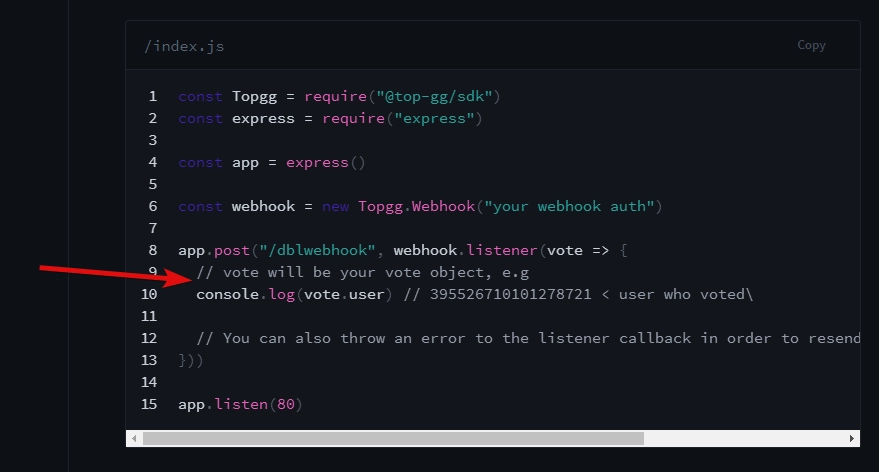


 wanton bolt
i made it tho
jovial kiln
What is the file extension
wanton bolt
its bash -_-
jovial kiln
No
jovial kiln
It isn't
wanton bolt
leave it
jovial kiln
Do you have any batch files in your code structure?
wanton bolt
jovial kiln
Do you have any batch files in your code structure?
batch files?
wanton bolt
call it bash ez