#topgg-api
1 messages · Page 163 of 1
 umbral scaffold

docs says to ask in this channel

https://top.gg/bot/834409783502438480/vote?bot=834409783502438480&user=562553902990491659&type=test&isWeekend=False
well i created this webhook
is the format correct?
 smoky marten
umbral scaffold
how do i set up webhook ?
smoky marten
umbral scaffold
how do i set up webhook ?
which language ?
 umbral scaffold
okay
smoky marten
use this to verify the request is from top.gg
the Auth Token is what you put when setting up
smoky marten
^°^
 smoky marten
np
 restive otter
Just use aiohttp doe, no more dependencies.
 sullen nymph
Plus it's async


 queen zodiac
 wraith abyss
:<
 wicked vapor
does that value reset every month?

 fickle kayak
Alguien español para que me ayude ?
 stable helm
@restive otter thank you for the help
stable helm
Can anyone help me me to do this??
 restive otter
stable helm
Can anyone help me me to do this??
restive otter
stable helm
Can anyone help me me to do this??
restive otter
stable helm
Can anyone help me me to do this??
restive otter
stable helm
Can anyone help me me to do this??
About me is in the developer page (where you find your bot token) and status is a thing you code lolz
 spare fiber
The topgg webhook isnt working, it might be because im using replit, but it doenst seem to work

 half burrow
@willow spindle ordan geliyom
half burrow


 rain heart
-notr
 abstract mothBOT
İngilizceden başka dillerde sohbet etmek için #general-int kanalını, top.gg hakkında (Türkçe olarak da) destek almak için #support kanalını kullanın.
Bu kanalda Türkçe konuşmayın.
rain heart
-api
abstract mothBOT
This channel is ONLY for the Top.gg API!
This channel is only for: suggestions/help/bugs to do with official API libraries and API docs found at: https://docs.top.gg
Any Off-Topic conversation may get deleted and muted.
If you need help with development about your bot or development in general, feel free to use #development.
 sudden flare
I do clustering. currently when I post my guild, I make call to each cluster and sum the guild count myself, then post it. I see 2 arguments in the payload shard_count and shard_no
for example if each cluster hosts 4 shards out of 40, and each of my clusters post guild count by filling out shard_count with 40 and shard_no with 4, will top.gg api handle summing that up for me, or should I continue what I'm currently doing?
 stark dove
do i need a webhook for a vote-only command (command that requires vote)
stark dove
spare fiber
Does anyone know how to get the top.gg wehook working eith replit?
i have done it before so yes
but i used another repl so that it doesnt mess with anything else
spare fiber
const Topgg = require('@top-gg/sdk')

const app = express() // Your express app

app.get('/', (req, res) => res.send('Hello World!'));


const webhook = new Topgg.Webhook('(password)') // add your Top.gg webhook authorization (not bot token)
console.log(webhook)

app.post('/dblwebhook', webhook.listener(vote => {
  // vote is your vote object
  console.log(vote.user) // 221221226561929217
})) // attach the middleware

app.listen(3000, () =>
    console.log(`Example app listening at http://localhost:3000`)
);```just making sure, in the "Topgg.Webhook('(password)') your auth key is there (or hidden behind an env variable)
like you did put in the authkey
right
spare fiber
stark dove
just making sure, in the "Topgg.Webhook('(password)') your auth key is there (or...
I jsur put that there so tou dont see passeord
stark dove
ok good
so when you run your repl, do you have the webpage thing?
(it doesnt have to say Cannot get /)
 spare fiber
@stark dove yes
stark dove
okay
so that means it should be working
but on your topgg webhook page
did you put in the right url
like https://replname.replaccount.repl.co/dblwebhook
spare fiber
I hace that
stark dove
nothing in the console?
spare fiber
No
stark dove
that's weird
wait
do you get the "Example app listening at http://localhost:3000"in your console
or smtn like that
spare fiber

 stark dove
that is interesting
could you show me the topgg webhook page (cross out ur password n stuff)
spare fiber
 stark dove
are you sure that there is absolutely no difference between the password in top.gg and replit
also make sure that you saved the info
spare fiber
stark dove
also make sure that you saved the info
Still dont wok
And i copy and pasted the passeord and saved it still doesnt eork
stark dove
that is really interesting
try removing these strings

and then try again
also if your repl is offline but someone votes for your bot the repl will wake up (it did that for me)
spare fiber
stark dove
also if your repl is offline but someone votes for your bot the repl will wake u...
Must of been the app.get then
It works now
stark dove
Alright
do i need a webhook for a vote-only command (command that requires vote)? i don't think i need a webhook to verify, but im just making sure. or do i need to make some kind of database, idk lol
stark dove
ye?
spare fiber
On the webhook repl, store the ID in repldb, and access it from your main one
Like an array
stark dove
Thing is I don't actually use repl for hosting my bot anymore ...
I use heroku now :P
But i was wondering if i could just grab if a user has voted (like a bool value) without needing a webhook
stark dove
spare fiber
Can you use heroku for webook and msin
what is msin?
spare fiber
stark dove
what is msin?
Main
stark dove
you could but then you would probably need to buy more dyno hours or set up a web module (which means your bot will go offline every 30 minutes if it's idle)
thats why i use worker for my main bot and replit for my webhook
that way if my repl goes offline, my main bot would still be online
spare fiber
You can access repldbs outside of replit but i dunni how
Actually
You can use repl database outside of replit
stark dove
Meh
spare fiber
stark dove
Meh
?
stark dove
nothing
 agile quail
hey guys, im trying to use the dblapi for dotnet and GetVotersAsync returns everything as null, and HasVoted returns "voted" not found

 willow spindle
sends you a webhook when someone vote
restive otter
oh so i can make like a votes channel and it will send a webhook message there?
spare fiber
restive otter
oh so i can make like a votes channel and it will send a webhook message there?
No but you can make it do that
spare fiber
What?
restive otter
hold up
how do u get this with discord.js

or get it to show ur bots online on top.gg


 spare fiber
restive otter
or get it to show ur bots online on top.gg
spare fiber
restive otter
or get it to show ur bots online on top.gg
const { AutoPoster } = require('topgg-autoposter')

AutoPoster('topgg-token', client)
  .on('posted', () => {
    console.log('Posted stats to Top.gg!')
})```@barren sundial what are you hosting it on?
Oh nvm
 barren sundial
localhost xdd
spare fiber
Oh then it wont be able to see it?
Localhost is your network only devices connected to your wifi can view it
barren sundial
oohh

 spare fiber
1 sec
barren sundial
 spare fiber
app.get('/', (req, res) => res.send('Hello World!'));

app.listen(port, () => console.log(`Example app listening at http://localhost:${port}`));```Add that to tour code
barren sundial
btw dblapi.js still works for verify if someone has vote?
spare fiber
spare fiber
Add that to tour code
Do this and comment out the webhook
barren sundial
spare fiber
```const port = 3000;
app.get('/', (req, res) => res.send('Hello World!'));
ap...

spare fiber
To see if your ip is working as a website

 spare fiber
Thats localhost
restive otter
spare fiber
```const client = Discord.Client() // Your discord.js client or any other
const ...
i added this and it doesnt show the online like this
 restive otter
ya
spare fiber
Im not sure what the autoposter actually soes but i assume it will do that
restive otter
like the bot?
spare fiber
Yea
restive otter

Top.gg
Discord bot that uses TRN API to get player information from the popular game Splitgate.
i think it auto posts the server count


 spare fiber
The webhook doesnt have anything to send to the wbrsite
restive otter
u cant access your own ip from a device on the network i think
spare fiber
So just fo to the ip
spare fiber
restive otter
u cant access your own ip from a device on the network i think
Should be able to
barren sundial
mmm i will see with replit
barren sundial
please
spare fiber
But youll need 2 seperate replits if you want to keep the bot online snd have a webhook
const Topgg = require('@top-gg/sdk')

const DB = require('@replit/database');
const db = new DB(process.env['db'])

const app = express()

const webhook = new Topgg.Webhook(process.env['pass'])

app.post('/dblwebhook', webhook.listener(async vote => {
    let votes = await db.get('vote')
    if (votes == undefined) votes = []
  votes.push(vote.user)
  await db.set('vote', votes)
}))

app.listen(3000, () =>
    console.log(`Example app listening at http://localhost:3000`)
);```i guess you cant add the online status so i just added the html widget to the description
spare fiber
I think so
 fathom raptor
How to test if api is working?
I tried the on_dbl_test thing, but its not returning anything
barren sundial
spare fiber
```const express = require('express')
const Topgg = require('@top-gg/sdk')
cons...
ty
spare fiber
Does it work
 wise cypress
How i can add my bot 24/7 it's music bot
 void obsidian
wise cypress
How i can add my bot 24/7 it's music bot
void obsidian
wise cypress
How i can add my bot 24/7 it's music bot
#development, please keep this for top.gg api only
wise cypress
Ok
sullen nymph
fathom raptor
I tried the on_dbl_test thing, but its not returning anything
Show code
 foggy widget
api.setStats(serverCount);
pls help where to put this so server count will show
on my bot page
 cold root
foggy widget
pls help where to put this so server count will show
cold root
foggy widget
pls help where to put this so server count will show
put it into your index/main.
 unique vortex
hi
Why my bot not showing servers on top.gg
it should tell how many servers my bot is in
 untold cliff
is it down becuase it won't let post how many server the bot in
 modern crest
API is down
untold cliff
oh ok
modern crest
nvm
untold cliff
const { AutoPoster } = require('topgg-autoposter')
        const ap = AutoPoster('==)

        poster.on('posted', (stats) => { // ran when succesfully posted
          console.log('Posted stats to Top.gg!')
})````this right
@modern crest
fathom raptor
i have never used any webhook, so can someone tell me how to get a webhook url for top gg
restive otter
sorry for ping
 vital anvil

fathom raptor
fathom raptor
i have never used any webhook, so can someone tell me how to get a webhook url f...
anyone?
 final wren
const Topgg = require("@top-gg/sdk");
    const api = new Topgg.Api(process.env.topapi)
    setInterval(() => {
        api.postStats({
            serverCount: client.guilds.cache.size
        })
    }, 18000000)
also im using this. Put that inside of client.ready()
spare fiber
spare fiber
```const client = Discord.Client() // Your discord.js client or any other
const ...
@final wren can you not just use rhis?
spare fiber
fathom raptor
anyone?
How are you hosting your bot?
fathom raptor
spare fiber
How are you hosting your bot?
heroku
spare fiber
fathom raptor
heroku
Im not sure how heroku webservers work but try this
const Topgg = require('@top-gg/sdk')

const app = express()

const webhook = new Topgg.Webhook('YOUR_TOKEN')

app.post('/dblwebhook', webhook.listener(async vote => {
    console.log(vote.user)
}))

app.listen(3000, () =>
    console.log(`Example app listening at http://localhost:3000`)
);```Why
fathom raptor
spare fiber
Im not sure how heroku webservers work but try this
oh thnx but im using python
spare fiber
Ah okay
fathom raptor
any idea for it?
restive otter
fathom raptor
oh thnx but im using python
Take a look at this https://github.com/top-gg/python-sdk#using-webhook
For the port, you want to get it from the env variable PORT, i.e., os.getenv("PORT")
The URL would be https://<yourapp>.herokuapp.com/dblwebhook assuming you followed the example
fathom raptor
restive otter
The URL would be `https://<yourapp>.herokuapp.com/dblwebhook` assuming you follo...
oh thnx
 last vault
Hey i don't get ping in voting that is like this

it's ```js
channel.send(<@${user.username}> has Voted for ${client.user.username}!)
js btw
HELP ME
no one ;-;
 golden adder
last vault
it's ```js
channel.send(`<@${user.username}> has Voted for ${client.user.usern...
golden adder
last vault
it's ```js
channel.send(`<@${user.username}> has Voted for ${client.user.usern...
user.id
 swift adder
last vault
it's ```js
channel.send(`<@${user.username}> has Voted for ${client.user.usern...
swift adder
last vault
it's ```js
channel.send(`<@${user.username}> has Voted for ${client.user.usern...
you missed the "!" so it should be like this
channel.send(`<@!${user.username}> has Voted for ${client.user.username}!`)
``` its after the "<@" btwif you ask why then the reason is
roles use <@& Role Id >
but users use <@! User Id >
restive otter
Don't think it's necessary

 honest iris
@last vault Did you use python for that?
Does anyone know how I setup a topgg client in python?
restive otter
It's clear that it's not Python by seeing the syntax
honest iris
I was hoping he'd say yes...
restive otter
honest iris
Does anyone know how I setup a topgg client in python?
Take a look at topggpy, it got examples too
sullen nymph
last vault
js btw
Totally Python
restive otter
Totally
 white onyx
is there any timeline for v1?
modern crest
Hey guys, not sure what to put in Password??
new DBL(yourDBLTokenHere, { webhookPort: 5000, webhookAuth: 'password' });
modern crest
ok thanks 🙂
spare fiber
 modern crest
ok perfect thanks 🙂
spare fiber
Gou put your own password there and make sure their same both in the website and tour code
honest iris
How do I make a webhook?
I'm trying to make my bot do something when someone votes for my bot
spare fiber
Go onto your bots website, scroll down to "edit" and select webhook
Are you using js or python
honest iris
Python
spare fiber
I cant help you with that
modern crest
Hey Evie
spare fiber
spare fiber
Go onto your bots website, scroll down to "edit" and select webhook
This will be the same to make the webhook
honest iris
Ok, that's fine
modern crest
to get the event of when someone votes, it's dbl.webhook.on('vote', vote => {
spare fiber
Yes?
modern crest
It doesn't work for me, would you be willing to call? or to check my code? It's small
spare fiber
I cant call but i can dm
modern crest
sweet
honest iris
spare fiber
Go onto your bots website, scroll down to "edit" and select webhook
There's nothing in the webhook url
spare fiber
I know you have to provide it
honest iris
@modern crest what did you use as your webhook? (Obviously don't tell me the actual URL)
Like did you go to a website or something to create one?
umbral scaffold
last vault
it's ```js
channel.send(`<@${user.username}> has Voted for ${client.user.usern...
add '!' after '@'
spare fiber
honest iris
<@350299211990040576> what did you use as your webhook? (Obviously don't tell me...
Are you running it on your computer?
spare fiber
honest iris
<@350299211990040576> what did you use as your webhook? (Obviously don't tell me...
Their using js
honest iris
spare fiber
Are you running it on your computer?
My bot?
spare fiber
Yes
spare fiber
honest iris
I already have a website running rn
Oh then it should just be your website/dblwebhook
honest iris
Alright, I'll try that
spare fiber
I have no idea hiw python works btw
honest iris
Shouldn't it be similar in terms of adding a webhook to top.gg?
It doesn't require any coding
honest iris
oh
spare fiber
Everytime someone votes it gets sent to your website webhook
Sorry im not sure how it works with python
spare fiber
Alright
umbral scaffold
Can someone confirm if this event is working for them Python v3.9.2
@bot.event
async def on_dbl_vote(data):
  pass
What package? dblpy or topggpy?
umbral scaffold
restive otter
What package? dblpy or topggpy?
topggpy
honest iris
You have to do the webhook thing first btw
umbral scaffold
honest iris
You have to do the webhook thing first btw

honest iris
If you find out how, PLEASE tell me
restive otter
topggpy should work on 3.9. dblpy got some issues which I can't recall if it affects the webhook
Well disregard that
How did you setup the WebhookManager?
umbral scaffold
restive otter
How did you setup the WebhookManager?
i did not
honest iris
@restive otter Do u know how to?
restive otter
Then that event is meaningless, won't fire at all
restive otter
honest iris
<@456226577798135808> Do u know how to?
Have you seen the examples yet?
umbral scaffold
i was going through discords docs they let create custom webhooks , will it work with that?
honest iris
I have but how do I actually get a webhook
honest iris
umbral scaffold
i was going through discords docs they let create custom webhooks , will it work...
?
restive otter
umbral scaffold
i was going through discords docs they let create custom webhooks , will it work...
Nope
umbral scaffold
honest iris
?
Discord Developer Portal
Integrate your service with Discord — whether it's a bot or a game or whatever your wildest imagination can come up with.
honest iris
I mean, what actually is the url part?
umbral scaffold
honest iris
I mean, what actually is the url part?
that idk myself
honest iris
I know what to do with everything else, I just don't know where to get a url
umbral scaffold
someone explained it to me yesterday
honest iris
Is it a website, app, software???
restive otter
Where are you guys hosting your bots on?
umbral scaffold
setting up flask and all
honest iris
:{
umbral scaffold
restive otter
Where are you guys hosting your bots on?
GCP
umbral scaffold
honest iris
I have a website too if that helps
then it's simple for you iguess
like just add an extra route
for webhooks
restive otter
I see, so just follow the webhook example, the URL would be http://<your instance public IP>:port/path
honest iris
Wouldn't I do something different because my website is actually on the web
restive otter
http://<your instance public IP>:5000/dblwebhook if you copy the example 1:1
restive otter
honest iris
Wouldn't I do something different because my website is actually on the web
Is it running on the same process as your bot?
honest iris
It's not necessarily running. It's uhm... hosting on google firebase
I could go onto a website create a custom webhook link
It's called integromat.com
It works :))
Now I have the webhook... what should I do next?
@restive otter
nvm
I think I've done it
restive otter
If you use integromat, you don't need the WebhookManager from topggpy
restive otter
You got the integromat URL, I have never worked with that tbh
honest iris
yes, I have a url
restive otter
honest iris
Yeah, I mean how would top.gg know?
Now you can answer the question yourself
umbral scaffold
restive otter
`http://<your instance public IP>:5000/dblwebhook` if you copy the example 1:1

well it is workin now
wot do i do with this data tho
 radiant peak
 hexed rose
Hey, how can I make someone vote for my bot to send a notification?
spare fiber
hexed rose
Hey, how can I make someone vote for my bot to send a notification?
Wdym?
You mean when someone votes for your bot it will send a notification in a channel?
hexed rose
spare fiber
You mean when someone votes for your bot it will send a notification in a channe...
yes
spare fiber
Python or js
hexed rose
spare fiber
Python or js
js
spare fiber
What are you hosting your bot on
spare fiber
const Topgg = require('@top-gg/sdk')

const app = express()

const webhook = new Topgg.Webhook(process.env['pass'])

app.post('/dblwebhook', webhook.listener(async vote => {
  //vote.user is the user ID of the user that voted
}))

app.listen(3000, () =>
    console.log(`Example app listening at http://localhost:3000`)
);```Are you currently hosting a website?
hexed rose
spare fiber
Are you currently hosting a website?
no.
spare fiber
Just add that to wherever your creating the website
hexed rose
spare fiber
Just add that to wherever your creating the website
i don't know html
hexed rose
ok.
spare fiber
hexed rose
ok.
Tell me if it eorks
I dotn believe so as theres no examples of code for doing that, i think the api is just for bots i belive
With replit you can host for free
Also dont you need the DSL bot in your server to advertise it?
Wait no sorry
Wrong thing
I dont believe so
What do you want it for?
On your server page is there a option that says "edit"
Is there a webhooks section
Same as bot one
I think it will work the same as bot
Are you using js or pythin
Uhm im sure it will eork the same
Do you have a web server?
Okay
umbral scaffold
ahhhhh darkmode
spare fiber
const Topgg = require('@top-gg/sdk')

const app = express() // Your express app

const webhook = new Topgg.Webhook('topggauth123') // add your Top.gg webhook authorization (not bot token)

app.post('/dblwebhook', webhook.listener(vote => {
  // vote is your vote object
  console.log(vote.user) // 221221226561929217
})) // attach the middleware

app.listen(3000) // your port```Thats rhe code on the npm package
Try that
Im not sure itll sork with servers but you can try
Once youve done it
I beleive so yes
stark dove
i answered my own question now lol
 stark dove
apparently so, yes 
stark dove
idk
umbral scaffold
spare fiber
You can do that??
it return if user has voted in the month and latest 1000 iguess
stark dove
i think i know
umbral scaffold
spare fiber
Why doesnt it say this on the documenttiin
it does iGuess
stark dove
what they mean by topgg token
spare fiber
That makes it so much easier
umbral scaffold
stark dove
what they mean by topgg token
the token above webhook entry
umbral scaffold
spare fiber
That makes it so much easier
how tho?
spare fiber
Yea
 umbral scaffold
like how'll you check at the instant user has voted
spare fiber
Yes
spare fiber
umbral scaffold
like how'll you check at the instant user has voted
Yes
stark dove
umbral scaffold
like how'll you check at the instant user has voted
that needs a webhook
umbral scaffold
stark dove
yea click show token
stark dove
the let voted = await user has voted thing is for commands
spare fiber
Actually no it dowsnt help in mt case
stark dove
umbral scaffold
yea click show token
i know how to get my token
spare fiber
So youve got your server vote thing working?
stark dove
i was replying to this
stark dove
meirl about to make the fact command a vote-only thing B)
spare fiber
My vote only are tictactoe and akinator
spare fiber
They know
stark dove
i just started a world of confufu
spare fiber
?

 restive otter
stark dove
YEEEE
restive otter
stark dove
YEEEE
joy
restive otter
spare fiber
My vote only are tictactoe and akinator
My all commands xd
They only get images command for not voting , if they vote access to all commands
spare fiber
I dont like to make peiple do stuff to use mine
restive otter
spare fiber
I dont like to make peiple do stuff to use mine
Wdym
restive otter
Yes , but me need votes after 100 server and being verified , I will keep vote to use commands in lesser commands
last vault
umbral scaffold
add '!' after '@'
ok thx
 bitter light
how do you make the bot update topgg servercount?
last vault
me?
umbral scaffold
last vault
<@!562553902990491659>
User object has mention method try that
last vault
can you send me pls
umbral scaffold
Remove all of this <@user.username>
last vault
ok
umbral scaffold
last vault
can you send me pls
Use <@!{user.id}> or {user.mention}
umbral scaffold
Cause whenever someone is mentioned the message contains there id instead of username
So that in future when username changes
last vault
it's like this
 umbral scaffold
Because user is not in your server iGuess
last vault
i am in the server
umbral scaffold
last vault
it's like this
Did you try both of them?
umbral scaffold
Yea
last vault
not mention
umbral scaffold
The format is right
last vault
o
 native dragon
restive otter
native dragon
restive otter
Question
restive otter
stark dove
YEEEE
how do i do this?
smoky marten
restive otter
how do i do this?
Using Webhooks
restive otter
smoky marten
Using Webhooks
ik that but how?
smoky marten
restive otter
ik that but how?
Which language ?
smoky marten
k wait a second
restive otter
okie
 maiden fiber
Hello
restive otter
maiden fiber
```Hello```
hey
smoky marten
@restive otter
const express = require('express')
const Topgg = require('@top-gg/sdk')

const app = express()

const webhook = new Topgg.Webhook('topggauthtoken')
app.post('/webhook', webhook.listener(vote => {
  console.log(vote.user)
  //Save to db
  db.set(vote.user, Date.now())
}))

app.listen(3000)
what's up
restive otter
smoky marten
<@456226577798135808>
```js
const express = require('express')
const Topgg = re...
what is express?
smoky marten
just use any db like redis, quick.db etc
smoky marten
restive otter
what is express?
umm
it's like flask but in NodeJS
smoky marten
 safe comet
how do i check if a user had recently voted?
safe comet
how do i check if a user had recently voted?
const voteTime = db.get(user.id)
if(!voteTime){ return console.log("Nope") }
if((Date.now() - voteTime) <= 12*60*60*1000){
    console.log("User has voted")
} else {
    console.log("Nope")
}
This checks for vote in last 12 hours
smoky marten
safe comet
with servers
with what ?
safe comet
like if they recently voted a server?
smoky marten
safe comet
like if they recently voted a server?
just save server id along with time
safe comet
ok 
 verbal citrus
Im trying to get the webhook working, but i dont really understand how to get the domain... Im running this on my pc for now
const webhook = new Top.Webhook('hereThePsw');


webhook.login('what should i put here? /topggVote', '3000'); //you can edit the port (only numbers) NOTE: PUT .login METHOD BEFORE THE .on('vote') METHOD

webhook.on('vote', vote => {
  console.log(`User id: ${vote.user}\nAll data: ${vote}`);
});
 vapid cape
did you read the docs?
verbal citrus
yeah but i dont really understand
vapid cape
 verbal citrus
yes but how do i get the domain
vapid cape
 verbal citrus
wait
whats the link of that github?
im using this one https://www.npmjs.com/package/top.gg-core
 vapid cape

GitHub
verbal citrus
ok ty
willow spindle
verbal citrus
im using this one https://www.npmjs.com/package/top.gg-core
@willow sphinx @hearty lintel are they allowed to use top-gg as name 🤔
 willow sphinx
I'll have to get a law degree and get back to you on that
 whole python
how do I check if the person voted for my bot or not
smoky marten
whole python
how do I check if the person voted for my bot or not
use a webhook
save the data in a database
fetch data from database and check if the user voted or not
whole python
smoky marten
use a webhook
save the data in a database
fetch data from database and check if ...
has a packpage that does this?
type a top-gg/sdk
verbal citrus
vapid cape
ok so if i want to run this on my pc i will need to do port forwarding and i dont want to... so by running this on heroku what should be the http://your.server.ip:3000 ?
and do i have to do something on heroku to make it work?
sullen nymph
yourapp'sname.herokuapp.com iirc
verbal citrus
iirc?
verbal citrus
ok ty ill try this
sullen nymph
http://<yourappname>.herokuapp.com/
the port you run your webserver on will rely on the PORT environment variable
verbal citrus
and to get that its process.env.PORT ?
sullen nymph
Yes
verbal citrus
ok thank you again
sullen nymph

verbal citrus
i get this in heroku logs at=error code=H14 desc="No web processes running" method=POST path="/dblwebhook" host=ekko-bot.herokuapp.com request_id=415a87c8-e86b-464f-aab9-709e563c7752 fwd="159.203.105.187" dyno= connect= service= status=503 bytes= protocol=https
 brave oracle
How to approve my bot?
verbal citrus
verbal citrus
i get this in heroku logs `at=error code=H14 desc="No web processes running" met...
(when i click "test)
sullen nymph
verbal citrus
i get this in heroku logs `at=error code=H14 desc="No web processes running" met...
turn web dyno on
sullen nymph
brave oracle
How to approve my bot?
verbal citrus
sullen nymph
turn web dyno on
umh u mean web npm start?
 sullen nymph
err i still haven't figured that out to this day
You probably need to run the webserver separately
or just run your bot via web dyno with webserver attached to it
verbal citrus
and how do i do that? 
 verbal citrus
ok so now i changed "worker" with "web" in the proc file and now if i run it and test it i get
at=info method=POST path="/dblwebhook" host=ekko-bot.herokuapp.com request_id=b9b12b0f-eb54-4973-9cc4-40a193723a00 fwd="159.203.105.187" dyno=web.1 connect=1ms service=9ms status=204 bytes=147 protocol=http
2021-07-31T13:17:51.916994+00:00 app[web.1]: {
2021-07-31T13:17:51.917010+00:00 app[web.1]:   bot: '864776547285991445',
2021-07-31T13:17:51.917011+00:00 app[web.1]:   user: '521758040492474379',
2021-07-31T13:17:51.917012+00:00 app[web.1]:   type: 'test',
2021-07-31T13:17:51.917012+00:00 app[web.1]:   query: { test: 'data', notRandomNumber: '8' },
2021-07-31T13:17:51.917013+00:00 app[web.1]:   isWeekend: true
2021-07-31T13:17:51.917013+00:00 app[web.1]: }
2021-07-31T13:17:52.531950+00:00 heroku[web.1]: Restarting
2021-07-31T13:17:52.543993+00:00 heroku[web.1]: State changed from up to starting
2021-07-31T13:17:52.000000+00:00 app[api]: Build succeeded
2021-07-31T13:17:53.635756+00:00 heroku[web.1]: Stopping all processes with SIGTERM
2021-07-31T13:17:53.734254+00:00 heroku[web.1]: Process exited with status 143
2021-07-31T13:17:55.000365+00:00 heroku[web.1]: Starting process with command `node main.js`
2021-07-31T13:17:57.216138+00:00 heroku[web.1]: State changed from starting to up
its kinda works as i get the test resul
but then it restarts
and i dont think its a positive thing
sullen nymph
143 usually means the application caught a SIGTERM signal, meaning the process was killed. This could be because another process killed it, or perhaps because the operating system killed it for using too much memory or some other resource, etc.
verbal citrus
and this could be fixed by?
now its working fine
but i dont think i changed anything
🤔
sullen nymph
Fuck knows
honest iris
I've told top.gg to send the POST request to my website on the web
But how do I see it?
fathom raptor
def __init__(self, client):
        self.client = client
        self.token = 'my token'
        self.client.topgg_webhook = topgg.WebhookManager(self.client).dbl_webhook("https://webhook.site/'some url'/dblwebhook", "auth code")
        self.client.topgg_webhook.run(5000)```
its not responding , havent got any error or response on testdbl_webhook("/dblwebhook", "auth code")
fathom raptor
wheres to put the webhook url then
fathom raptor
sullen nymph
dbl_webhook("/dblwebhook", "auth code")
so i need to put the real auth code or just the text "auth code"
sullen nymph
What do you think
restive otter
Perhaps making a path validator would help people debugging their own code, or just add the route directly when the method's called instead of adding the routes before running? Since aiohttp has its own error for that
sullen nymph
If you tell a person "math" do they learn maths from just that?
Path validator
I'll work on it once I'm done with my stuff here
restive otter
Oh well, that might give clearer sight
Actually, they should've got the error when running. Perhaps it's suppressed because of it's wrapped in a Task?
honest iris
So I managed to get a working webhook url
I can also see my post requests when I test with Top.gg
Now all I have to do is link it to my bot
Time to figure out how...
sullen nymph
restive otter
Actually, they should've got the error when running. Perhaps it's suppressed bec...
I've been thinking that too tbh
restive otter
Cuz I do get it

~~May/may not be related to asyncio debug flag. ~~Actually, it's on error level, just need to add a handler to the logger
 forest trench
restive otter
Cuz I do get it
forest trench
restive otter
Cuz I do get it
does you path start with / ?
restive otter
I didn't need help
forest trench
alr
Im trying to test my webhook and hosting on my pc, but when i try testing it, it does not print anything. Any idea why?
sullen nymph
restive otter
~~May/may not be related to asyncio debug flag. ~~Actually, it's on error level,...
It outputs the exception on ERROR level?
restive otter
Yeah, but ig you need to add a handler for the asyncio logger
Maybe the basic config will do
sullen nymph
Will try to play around later
restive otter
I removed all the logging handlers and it did output the traceback
sullen nymph
nani
restive otter
I should've probably tested it w/ d.py xd, cuz it's the one that happened to suppress task errors back then
sullen nymph

restive otter
Yeah, it doesn't need any logging handlers tbh. I wonder why they're suppressed back then
 balmy hamlet
restive otter
pls mem
balmy hamlet
restive otter
pls mem
 upper badger
Does anybody know how to connect topgg webhook to heroku? Python
restive otter
does anyone know why DblApi.GetMeAsync() returns null?

id variable has discord bot id and Constant.token has discord bot token
 scarlet cobalt
One message removed from a suspended account.
One message removed from a suspended account.
One message removed from a suspended account.
One message removed from a suspended account.
One message removed from a suspended account.
One message removed from a suspended account.
One message removed from a suspended account.
One message removed from a suspended account.
One message removed from a suspended account.
One message removed from a suspended account.
 brazen citrus
hey, can the topgg api output values as well, such as my bots statistics for my website?
 spring idol
hello!
i have a doubt...
How to add the guild_count attribute in an event in my dpy bot?
restive otter
Where do u get the real auth code?
spring idol
import os
import discord
from discord.ext import commands

intents = discord.Intents.all()

bot = commands.Bot(command_prefix='?',
                   help_command=None,
                   activity=discord.Game("?help"),
                   intents = intents)

#HANDLING COGS
#Loading all cogs at the start
for i in os.listdir('./cogs'):
    if i.endswith('.py'):
        bot.load_extension(f"cogs.{i[:-3]}")

#RUN
TOKEN = os.getenv('DISCORD_MYBOT_TOKEN')
bot.run(TOKEN)
 woeful prairie
Which API are you using? Is it @top-gg/sdk package?
@jaunty plank Is their a way to check vote status for users like we can check for bots?
smoky marten
woeful prairie
<@136583532972605440> Is their a way to check vote status for users like we can ...
api.hasVoted(user.id)
Like this ??
woeful prairie
smoky marten
```js
api.hasVoted(user.id)
```
Like this ??
I don't use the npm package
I used node-fetch package to directly make a request to the API
Anyways, now it got solved ❤️
restive otter
woeful prairie
Which API are you using? Is it \@top-gg/sdk package?
Dbl
sullen nymph
dblapi.js is deprecated
woeful prairie
restive otter
Dbl
Can you switch to the new package? I can help with the new one
woeful prairie
sullen nymph
dblapi.js is deprecated
yea
sullen nymph
restive otter
```bot.topgg_webhook = topgg.WebhookManager(bot).dbl_webhook("/dblwebhook", "pas...
/dblwebhook = route
password = Authorization key on top.gg
restive otter
woeful prairie
Can you switch to the new package? I can help with the new one
Which is the new one?
woeful prairie
restive otter
Which is the new one?
@top-gg/sdk
restive otter
One sec
woeful prairie
restive otter
One sec
The code is js right? Forgot to ask.
restive otter
Nah sorry
woeful prairie
Oh, okay
restive otter
Just realized ur using js but thx
woeful prairie
Ok
woeful prairie
sullen nymph
`/dblwebhook` = route
`password` = Authorization key on top.gg
@restive otter It is kke this
password is the password you had put in your bot's webhoook settings in top.gg
woeful prairie
restive otter
Do I need a web server to run it?
Yes
sullen nymph
topggpy runs it for you
woeful prairie
Yea
restive otter
sullen nymph
topggpy runs it for you
One question? Is the auth any random one I put?
sullen nymph
Correct. Just make sure it matches the value on the website
restive otter
sullen nymph
`/dblwebhook` = route
`password` = Authorization key on top.gg
Another question sorry what specifically should the path look like?
 warm trout
how can i make that if someone voted for my bot he gives him something or tell me that he voted with his id in a channel ??
smoky marten
warm trout
how can i make that if someone voted for my bot he gives him something or tell m...
Use Webhooks.
Here's an example
const express = require('express')
const Topgg = require('@top-gg/sdk')

const app = new express()

const webhook = new Topgg.Webhook('topggauthtoken')
app.post('/webhook', webhook.listener(vote => {
  console.log(vote.user) //The user id of the uer who voted
  client.users.fetch(vote.user).then(user => {
    user.send("Thanks for voting")
  }).catch(console.error)
}))

app.listen(3000)
where do i put my bot token or id or ??
smoky marten
warm trout
where do i put my bot token or id or ??
No you don't put your bot token
hol on a second
warm trout
smoky marten
No you don't put your bot token
what should i put
smoky marten
then scroll down
You'll find something like this

Here put your url (eg http://PUT_YOUR_IP_HERE:YOUR_PORT)
and a random auth token you like
Then click save
Then go to your code and put the same auth token you put here
you're done
 old hedge
Anyone pls help me how to connect api to bot
smoky marten
old hedge
Anyone pls help me how to connect api to bot
which part of api ?
 ionic crater
what do i put in here?

i know my ip and port btw
i just forgot how to structure the url
i get this error whenever somebody votes
Error handling request
Traceback (most recent call last):
  File "C:\Users\dylan\AppData\Local\Packages\PythonSoftwareFoundation.Python.3.9_qbz5n2kfra8p0\LocalCache\local-packages\Python39\site-packages\aiohttp\web_protocol.py", line 314, in data_received
    messages, upgraded, tail = self._request_parser.feed_data(data)
  File "aiohttp\_http_parser.pyx", line 546, in aiohttp._http_parser.HttpParser.feed_data
aiohttp.http_exceptions.BadStatusLine: 400, message="Bad status line 'invalid HTTP method'"
could someone pls help me figure out what this means?
oh i fixed it
restive otter
smoky marten
How to get authorization

 plucky lance
The authorization code is not necessary.
restive otter
restive otter
ODcwMTc2MjEnONGbUzbsgejsboBTBFJFhg7DqWP8OgQ42OU
It's Fake
plucky lance
You can also make sure requests coming from topgg by filtering the source IP of the request for example.
 silver jolt
restive otter
It's Fake
silver jolt
restive otter
It's Fake
I know 🤣
restive otter
Ta ta ta ta
verbal citrus
is there a way to check if user has voted in the last 12h without using the database?
restive otter
scarlet cobalt
One message removed from a suspended account.
Np I really appreciate your help, sadly is still returns null with version 1.4.0 (at least for me, and It might be my fault but idk what I am doing wrong).
plucky lance
verbal citrus
is there a way to check if user has voted in the last 12h without using the data...
using the database
Which database? Yours?
If you add a timestamp to the records, yes of course you can.
 delicate minnow
smoky marten
verbal citrus
is there a way to check if user has voted in the last 12h without using the data...
delicate minnow
smoky marten
verbal citrus
is there a way to check if user has voted in the last 12h without using the data...
not using a database
const Topgg = require(`@top-gg/sdk`)

const api = new Topgg.Api('Your top.gg token')

await api.hasVoted(user.id)
// => true/false
 fluid cove
The vote counts
fluid cove
The vote counts

Select Small (Upvotes) from the drop-down
Copy paste the HTML
verbal citrus
smoky marten
not using a database
```js
const Topgg = require(`@top-gg/sdk`)
const api = new...
i tried this but it said yes even tho i didnt vote today
upper badger
Python, i use webhook. I run this code and then i make test request and nothing happened

http://ip_from_ipv2:8078/dblwebhook
my link
golden adder
smoky marten
go to <https://top.gg/bot/YOUR_BOT_ID/widgets>
Or just use the API
 pastel crow
can't I use discord.ext.commands.Bot type bot as the parameter here?
 smoky marten
golden adder
Or just use the API
smoky marten
golden adder
Or just use the API
then either I need to post my token publicly
or
use a back-end which costs wasy more than hosting a static site
golden adder
How would a backend cost more? Assuming you have a host you have options.
smoky marten
golden adder
How would a backend cost more? Assuming you have a host you have options.
GitHub pages fact
golden adder
They asked how do they add it to their website, not that they were using Github pages though 👀
smoky marten
golden adder
They asked how do they add it to their website, not that they were using Github ...
Well
I thought add to website means "Add in HTML"
not make another api handler and then rendering the json in html
golden adder
Websites aren't just HTML
smoky marten
anyway
I gave a 3 line solution
If you can give one in 2 lines you win
 smoky marten

pastel crow
pastel crow
can't I use discord.ext.commands.Bot type bot as the parameter here?
any1?
restive otter
commands.Bot subclasses discord.Client, so that's fine
 tame pulsar
restive otter
tame pulsar
restive otter
I’m completely lost 😞 mayb someone assist me
import dbl


class TopGG(commands.Cog):
    """
    This example uses dblpy's webhook system.
    In order to run the webhook, at least webhook_port must be specified (number between 1024 and 49151).
    """

    def __init__(self, bot):
        self.bot = bot
        self.token = 'dbl_token'  # set this to your DBL token
        self.dblpy = dbl.DBLClient(self.bot, self.token, webhook_path='/dblwebhook', webhook_auth='password', webhook_port=5000)

    @commands.Cog.listener()
    async def on_dbl_vote(self, data):
        """An event that is called whenever someone votes for the bot on top.gg."""
        print("Received an upvote:", "\n", data, sep="")

    @commands.Cog.listener()
    async def on_dbl_test(self, data):
        """An event that is called whenever someone tests the webhook system for your bot on top.gg."""
        print("Received a test upvote:", "\n", data, sep="")


def setup(bot):
bot.add_cog(TopGG(bot))```What do I put in auth and webhook path?
dblpy is deprecated in favour of topggpy
fathom raptor
What should i put as my webhook url to check on my local host pc?
spare fiber
fathom raptor
What should i put as my webhook url to check on my local host pc?
top.gg wont be able to send a webhook to your local host
restive otter
restive otter
dblpy is deprecated in favour of topggpy
Oh
Then can anyone show an example using the raw api in python ?
fathom raptor
I am hosting on heroku with python and trying to find a webhook url, and nothing is working
 simple bloom
sorry for the interruption, but I have come to ask a question regarding the top.gg java sdk:


with the code shown, i am trying to check whether a user has voted or not, using a command, !test. However, in the second picture, hasVoted appears to be null. Why is that?

 mossy gazelle
I’m trying to give my server members some tokens when they vote for my bot on Top.gg
I have tried the bellow code so far and seems to happen nothing. Can anyone please help?
Here is the code so far -
/* THIS POSTS STATS TO Top.gg */
const Topgg = require("@top-gg/sdk");
const { AutoPoster } = require("topgg-autoposter");
module.exports = {
/**
* Starts to post stats to Top.gg
* @param {object} client The Discord Client instance
*/
init(client){
if(client.config.apiKeys.topgg && client.config.apiKeys.topgg !== ""){
const stats = AutoPoster(client.config.apiKeys.topgg, client);
setInterval(function(){
stats.postStats(client.guilds.cache.size);
}, 60000*10); // every 10 minutes
const topgg = new Topgg.Webhook(client.config.votes.password);
topgg.listener(async (vote) => {
const dUser = await client.users.fetch(vote.user);
const member = await client.findOrCreateMember({ id: vote.user, guildID: client.config.support.id });
member.money = member.money + 40;
member.save();
dUser.send(client.translate("misc:VOTE_DM", {
user: dUser.tag
})).catch(() => {});
const logsChannel = client.channels.cache.get(client.config.votes.channel);
if(logsChannel){
logsChannel.send(client.translate("misc:VOTE_LOGS", {
userid: dUser.id,
usertag: dUser.tag
}));
}
});
}
}
};``` wheat lotus
Why does the API sometimes return status code 401 and it sometimes returns status code 200?
willow spindle
 willow spindle
wheat lotus
Why does the API sometimes return status code 401 and it sometimes returns statu...
willow spindle
wheat lotus
Why does the API sometimes return status code 401 and it sometimes returns statu...
401 and 200 are different things
200 means request is successfull, 401 means your api key is invalid
wheat lotus
send a request to the api https://top.gg/api/bots/869410048743473182/check?userId=id
header = {"Authorization" : self.bot.dbl_token}
res = requests.get(f"https://top.gg/api/bots/869410048743473182/check?userId={ctx.author.id}",headers=header)
if res.status_code != 200:
    raise TopGGApiConnectionError("Failed to connect to API",res.status_code)
hmm
mossy gazelle
mossy gazelle
I’m trying to give my server members some tokens when they vote for my bot on To...
Anyone?
plucky lance
If you don’t specify one there’s none
Using webhooks or send requests to the topgg API
Webhooks being sent right in the moment someone votes
Requesting the API will show all voters of the past 12 hours only
Without timestamps afaik
sullen nymph
Yes
data['user'] will return ID of the user who voted
In a string though. Remember to convert it to int
 woven cairn
does anyone know how to make a voting system
being the host an azure vps
 warped cosmos
how do I know when a user has voted (in real time) java/kotlin
 eternal crater
const DBL = require('dblapi.js')
const dbl = new DBL(process.env.TOPGG_TOKEN, { webhookPort: 3000, webhookAuth: process.env.TOPGG_AUTH });```

Can I change the webhookPort to other number?def addUpvoteRecord(userid):
with open("vote.json") as f:
vote_list = json.load(f)
if not userid in vote_list:
vote_list[userid] = []
with open("vote.json", "w+") as f:
json.dump(vote_list, f)
@client.event
async def on_message(message) :
if message.channel.id == 870147153706750022 :
data = message.content.split(" ")
user = re.sub("\D", "", data[5])
addUpvoteRecord(user)
await client.process_commands(message) ```
i am getting this error
> TypeError: list indices must be integers or slices, not str
can anyone help me??One message removed from a suspended account.
eternal crater
scarlet cobalt
One message removed from a suspended account.
What kind of number I can change it?
scarlet cobalt
One message removed from a suspended account.
scarlet cobalt
One message removed from a suspended account.
eternal crater
Oh..
scarlet cobalt
One message removed from a suspended account.
One message removed from a suspended account.
eternal crater
Okay then.
scarlet cobalt
One message removed from a suspended account.
One message removed from a suspended account.
eternal crater
I see.
scarlet cobalt
One message removed from a suspended account.
One message removed from a suspended account.
eternal crater
Oh okay!
scarlet cobalt
One message removed from a suspended account.
One message removed from a suspended account.
eternal crater
@scarlet cobalt Sorry late reply I didin't realized, but thank you so much!
fluid cove
How to get the server count or user count that using the bot i need to put it on my html/css/js website
Example:
There are (users count) users using the bot
@scarlet cobalt
smoky marten
fluid cove
How to get the server count or user count that using the bot i need to put it on...
that's not topgg api related at all
Just count up memberCount in all guilds in all shards
fluid cove
Wdym?
I mean discord bot server members count meaning,
Count of servers that the bot's in, i got a discord bot website so i need an server bot count to my html website
@smoky marten
 late walrus
safe comet
late walrus
safe comet
const app = require("express").Router()
const {Webhook} = require("@top-gg/sdk")
const wh = new Webhook(process.env.voteWhPass)

app.post("/vote",wh.listener((vote)=>{
  console.log(vote)
}))

app.get("/vote",(req,res)=>{
  res.send("a")
})

module.exports = app
is this correct?
ignore the get one
help??
????
smoky marten
fluid cove
<@584309117380853770>
how many servers is your bot in ?
also You can't put in directly in your HTML (Unless you wanna just put the default card from top.gg)
You'll need an api. Either you'll have to make the api or use a third party api (like top.gg) but if you use top.gg api you'll end up making your token public (Which is not suggested at all) so your best choice should be making an api for it then using js fetch to get the count from the api
restive otter
Hello how can i add my bot commands in top gg?
 harsh drum
import topgg

# This example uses topggpy's webhook system.
bot.topgg_webhook = topgg.WebhookManager(bot).dbl_webhook("/dblwebhook", "password")

# The port must be a number between 1024 and 49151.
bot.topgg_webhook.run(5000)  # this method can be awaited as well


@bot.event
async def on_dbl_vote(data):
    """An event that is called whenever someone votes for the bot on Top.gg."""
    if data["type"] == "test":
        # this is roughly equivalent to
        # `return await on_dbl_test(data)` in this case
        return bot.dispatch("dbl_test", data)

    print(f"Received a vote:\n{data}")


@bot.event
async def on_dbl_test(data):
    """An event that is called whenever someone tests the webhook system for your bot on Top.gg."""
    print(f"Received a test vote:\n{data}")
In this example, what is bot? It doesn't make any sense, bot isn't even defined anywhere in the example but it just exists?
Python btw
rain heart
Check the parameter type of webhookmanager
harsh drum
|| ||
smoky marten
restive otter
Hello how can i add my bot commands in top gg?
just put it in description
sullen nymph
harsh drum
```py
import topgg
# This example uses topggpy's webhook system.
bot.topgg_webh...
discord.Client and anything that subclasses it
mossy gazelle
I’m trying to give my server members some tokens when they vote for my bot on Top.gg
I have tried the bellow code so far and seems to happen nothing. Can anyone please help?
Here is the code so far -
/* THIS POSTS STATS TO Top.gg */
const Topgg = require("@top-gg/sdk");

module.exports = {

    /**
     * Starts to post stats to Top.gg
     * @param {object} client The Discord Client instance
     */
    init(client){
        if(client.config.apiKeys.topgg && client.config.apiKeys.topgg !== ""){
            const topgg = new Topgg.Webhook(client.config.votes.password);
            topgg.listener(async (vote) => {
                const dUser = await client.users.fetch(vote.user);
                const member = await client.findOrCreateMember({ id: vote.user, guildID: client.config.support.id });
                member.money = member.money + 40;
                member.save();
                dUser.send(client.translate("misc:VOTE_DM", {
                    user: dUser.tag
                })).catch(() => {});
                const logsChannel = client.channels.cache.get(client.config.votes.channel);
                if(logsChannel){
                    logsChannel.send(client.translate("misc:VOTE_LOGS", {
                        userid: dUser.id,
                        usertag: dUser.tag
                    }));
                }
            });
        }
    }

};```because thats not how it works
topgg.listener is a express middleware
 crisp socket
It's there any set reason, or is it a big that the bot suddenly can't Post server count?
Like it runs fine for a long time, and then suddenly it stops
mossy gazelle
restive otter
because thats not how it works
How can i use the api without express?
restive otter
mossy gazelle
How can i use the api without express?
you can use api.hasVoted()
but the user needs to run a command
 ancient pawn
snowflake isn't a real (JSON) data type. do these parameters exist as strings or integers?
 plucky lance
Strings
ancient pawn
alright, thanks
plucky lance
I think there should be an example showing you so
ancient pawn
there are no example requests on https://docs.top.gg/resources/webhooks/, which is where this table is located
plucky lance
Ah I see… not for webhooks tho
Nvm then
But you can test the functionality and will see the response being a string
ancient pawn
if only it was that simple in languages where the request body needs to be deserialized to a type in the first place
plucky lance
Which language are you talking about?
ancient pawn
rust
sullen nymph
Output it as string ezpz /s
mossy gazelle
restive otter
but the user needs to run a command
Maybe i will pass that to messageCreate event.
 shy cloak
hey guys im confused how to use the express thingy is there a example code somewhere cuz i have never used express anywhere
where should i put this code?
 smoky marten
shy cloak
where should i put this code?
smoky marten
shy cloak
where should i put this code?
any server / computer / container connected to the internet and about to run NodeJS
 woven orbit
How do I make a command that only works if the user has upvoted the bot I cant figure it out
I need it in discord.py
golden adder
Use the API in pins. Listen to the vote event. Save voter ID in database with a timestamp. When the command is run, check message timestamp against user's ID in the database. If less than 12h have passed since their last vote, run the command.
woven orbit
Wait what
I'm even more confused
My bot is small so I will probably save it in a .json file
golden adder
I definitely would never recommend that.
woven orbit
Ok
golden adder
For anything
woven orbit
The only reason why I do it is I have never used a database before and its confusing
golden adder
You'll have to learn then! 😊
woven orbit
Well ok thanks for the help I really appreciate it
 dire tide
https://docs.top.gg/api/bot/
I looked here, but the number of members is not withdrawn, right?

  console.log(`Posted stats to Top.gg | ${stats.memberCount} users.`);
```I tried it didn't work.mind showing more of your code ?
that much code dosen't giv sheit
 harsh yew
How do i make a commamd which will make bot join vc ONLY when he vote the bot i am using discord.js
smoky marten
harsh yew
How do i make a commamd which will make bot join vc ONLY when he vote the bot i ...
api.hasVoted()

 haughty jasper
I have a problem with my bot's TOKEN.
I've changed it several times and every time a user votes for the bot it keeps giving an error, saying that the user didn't vote. This problem started yesterday
https://normal-api.ml/topgg/hasvoted?bot=**BOT ID**&user=**USER ID**&token=**BOT TOKEN**
dire tide
smoky marten
mind showing more of your code ?
No, I'm saying how memberCount is drawn, I asked a question about the code
mossy gazelle
So, i’m trying to setup webhooks for Top.gg. I’m using aws ec2 to host the bot. I’m trying to do a simple request of getting the user who voted (as shown in the Top.gg module example). But i’m not sure how to setup aws to work with the webhook. Should i pass the ipv4 shown in the instance along with the /topgg added on the webhook url field? Can anyone help? Here is my code - ```js
const Topgg = require('@top-gg/sdk');
const webhook = new Topgg.Webhook(client.config.votes.password);
const express = require('express');
const app = express();
app.post('/topgg', webhook.listener(vote => {
// vote is your vote object e.g
console.log(vote.user);
}));```
mossy gazelle
Anyone?
sullen nymph
Should i pass the ipv4 shown in the instance along with the /topgg added on the webhook url field?
@mossy gazelle Give it a try. Make sure you actually run the webserver first though
 mossy gazelle
sullen nymph
> Should i pass the ipv4 shown in the instance along with the /topgg added on th...
mossy gazelle
sullen nymph
> Should i pass the ipv4 shown in the instance along with the /topgg added on th...
I think i have the web server running as i followed this tutorial to setup - https://ourcodeworld.com/articles/read/977/how-to-deploy-a-node-js-application-on-aws-ec2-server
sullen nymph
Are you sure it's actually running? Have you tried opening the URL manually in your browser?
mossy gazelle
It errors. ERR_CONNECTION_TIMED_OUT
sullen nymph
Seems either the webserver isn't running or your port is not set up properly
mossy gazelle
I have tried changing configurations of security group. Express throws err if i change anything.
mossy gazelle
mossy gazelle
I already added it. Here
But with this, no errors
May i send you screenshots of security group inbound rule and ip setup so you can make sure?
sullen nymph
Sure
mossy gazelle
Please check your dm in sometime
sullen nymph
Do you have app.listen(...) in your script?
mossy gazelle
Yes
sullen nymph
Odd
smoky marten
dire tide
No, I'm saying how memberCount is drawn, I asked a question about the code
Sorry I was in class
anyway the full code should be like
const { Api } = require("@top-gg/sdk")
const api = new Api("YOUR_TOP-GG_API_TOKEN")
//rest of the code


//someone in the code
const voted = await api.hasVoted(message.author.id)
if(!voted){ return "User is not voted" }
return "User is voted"
 stable summit
“Hi developer 🥰, welcome to top.gg developer docs. You are currently viewing v0 of our API documentation. We're going to be working on the next version of the top.gg API (v1) soon, stay tuned!”
i’m sorry i don’t know english the best, but does this mean v1 is not out yet or the docs aren’t finished?
stable summit
thanks! would it be best to wait for v1 or should i start on v0
sullen nymph
Nah God knows when v1 will release
 mossy gazelle
So, i’m trying to setup webhooks for Top.gg. I’m using aws ec2 to host the bot. ...
mossy gazelle
mossy gazelle
So, i’m trying to setup webhooks for Top.gg. I’m using aws ec2 to host the bot. ...
Still stuck here. Get works but post doesn’t
safe comet
const express = require("express")
const api = require("node-fetch")
const app = express()
const {Webhook} = require("@top-gg/sdk")
const wh = new Webhook("no")

app.post("/vote",wh.listener((vote)=>{
  console.log(vote)
  console.log("a")
}))
app.get("/",(req,res)=>{
  res.send("yo")
  console.log("d")
})

app.listen(2000)
did i set this up correctly?
topgg keeps saying there was an error processing request
 jaunty plank
safe comet
```js
const express = require("express")
const api = require("node-fetch")
const...
jaunty plank
safe comet
```js
const express = require("express")
const api = require("node-fetch")
const...
looks right, are you trying to add a webhook to a server?
safe comet
yes
jaunty plank
safe comet
yes
webhooks for servers are kinda broken right now.
 stable summit
how exactly am i supposed to use the authenticator for the API?
like
Authorization:
i have no idea what to put there
jaunty plank
you can just check it vs a string
your the one who chooses it
its like a password, you decide it.
jaunty plank
yep, on the site. then just use it in your code.
stable summit
so just double checking
Authorization: My Password
that’s literally it?
man i overthink things lol
jaunty plank
A password, litterally mine i just spammed chars in my keyboard and copied it over to my code.
dont like use an actual password for like discord or something 👀
stable summit
uh it just said my password isn’t defined
jaunty plank
👀 new to programming?
might help to learn what variables and strings are.
stable summit
sort of new, it’s just
sometimes terms confuse me
usually i can just tinker until i get it right
that’s a lot of the fun for me tbh
jaunty plank
ah, just kind of "trying stuff" wont work here
stable summit
but now im introducing something that’s pretty concrete, completely throws off my style
jaunty plank
webhooks require understanding of how the internet works, websites work, routers work, and an understanding of your code.
stable summit
eek
but if you look at my code can you tell me what i’m supposed to do? i wanna learn from that because the api docs told me to ask here
jaunty plank
are you looking to understand webhooks, or just want to make it work?
I can give you resources understand it, or just ask and give you copy paste sources till it works 👀
stable summit
at the moment making i want it to work so i can understand it, i am a visual learning in that sense
could you do both by any chance?
jaunty plank
I dont know if I have time for that tbh.
stable summit
uh i’ll ask someone else for resources, could you help me get it to work?
jaunty plank
ye, wheres your code being hosted? vps, replit, heroku, home?
stable summit
at home
jaunty plank
https://docs.top.gg/libraries/javascript/#webhooks
const Topgg = require("@top-gg/sdk")
const express = require("express")

const app = express()

const webhook = new Topgg.Webhook("your webhook auth")

app.post("/dblwebhook", webhook.listener(vote => {
  // vote will be your vote object, e.g
  console.log(vote.user) // 395526710101278721 < user who voted\

  // You can also throw an error to the listener callback in order to resend the webhook after a few seconds
}))

app.listen(3000)
^ the above code is pretty much copy paste.
youll need to install the sdk.
npm i @top-gg/sdk
stable summit
also what does replit and heroku mean? i don’t know this term
jaunty plank
replit and heroku are hosting providers. replit is a development platform mainly for students, heroku is mainly intended for websites and making an api.
both are not really for bots, but many people use them for bots.
stable summit
OHHH
jaunty plank
let me know when youve added the above code.
stable summit
i knew what vps meant and i just got confused with those
would i replace my old code?
jaunty plank
since this is a webhook, youll not want it inside a command like that.
webhooks have their own events, so they dont depend on discords.
stable summit
this sort of looks like a event, would i put it in my main.js then?
jaunty plank
yeah, outside any other events
stable summit
oh alrighty, added the code now im just installing the package
jaunty plank
your next bit is going to be port forwarding.
jaunty plank
port forwarding is how the router knows where to send data to on your network.
https://portforward.com/
its router specific, so i cant be much help here. the above link has guides for most routers.
pretty much
incoming request -> router looks at the port -> if the port is forwarded it sends the data to that device -> device handles it
stable summit
also can i log people voting to a channel?
jaunty plank
yep
stable summit
how would i do that?
jaunty plank
youd have to do all of this first 👀
 rancid fractal
I'm using the Discordia Library, and i've been trying to figure out the api for updating server count on my bot's top.gg page. I've been basing all of this on https://docs.top.gg/api/bot/#post-stats. Here's my code:
local http = require('coro-http')
local body = {
server_count = #client.guilds,
shards = client.shardCount,
shard_count = client.totalShardCount
}
body = json.encode(body)
print(body)
local header = {
{"Authorization","(my key)"}
}
local res, bod = http.request("POST","https://top.gg/api/bots/794759245408370729/stats",header,body)
return(bod)
json body: {"shard_count":1,"server_count":43,"shards":1}
response body: {"error":"Required parameter server_count or shards missing"}
It looks like I have both of those required parameters, what isn't working? Also, doesn't the documentation say only server_count is required?
stable summit
im at the menu now, what port would i forward?
jaunty plank
rancid fractal
I'm using the Discordia Library, and i've been trying to figure out the api for ...
hmm, it might be related to the fact content type isnt being set, so the site doesnt know what the body format is.
jaunty plank
stable summit
im at the menu now, what port would i forward?
3000 in the code example i gave
stable summit
theres a couple things i need to fill out and idk with what
services:
port range:
local ip:
local port:
jaunty plank
stable summit
services:
port range:
local ip:
local port:
services: is probably TCP, guessing its protocol, but maybe not?
port range: 3000-3000
local ip: the internal ip of the computer thats running the code
local port: 3000
stable summit
uhm i’m going to sound very stupid but i have no idea what my IP is lmao
stable summit
windows 10
restive otter
anyone know of a ebay watcher and viewer bot?
sullen nymph
Nope
jaunty plank
stable summit
windows 10
sorry, for the computer hosting it
jaunty plank
restive otter
anyone know of a ebay watcher and viewer bot?
try #general or searching https://top.gg/, or google.
restive otter
jaunty plank
try <#264445053596991498> or searching <https://top.gg/>, or google.
thanks x
stable summit
jaunty plank
sorry, for the computer hosting it
i get that a lot but it’s a trash laptop

oh also i think i have to install the express package since it said it at the top of your code
anyways what am i supposed to do to find out?
rancid fractal
jaunty plank
hmm, it might be related to the fact content type isnt being set, so the site do...
That worked, I wish I remembered that. Thanks for the quick reply!
jaunty plank
stable summit
i get that a lot but it’s a trash laptop
windows key, type in "network status"
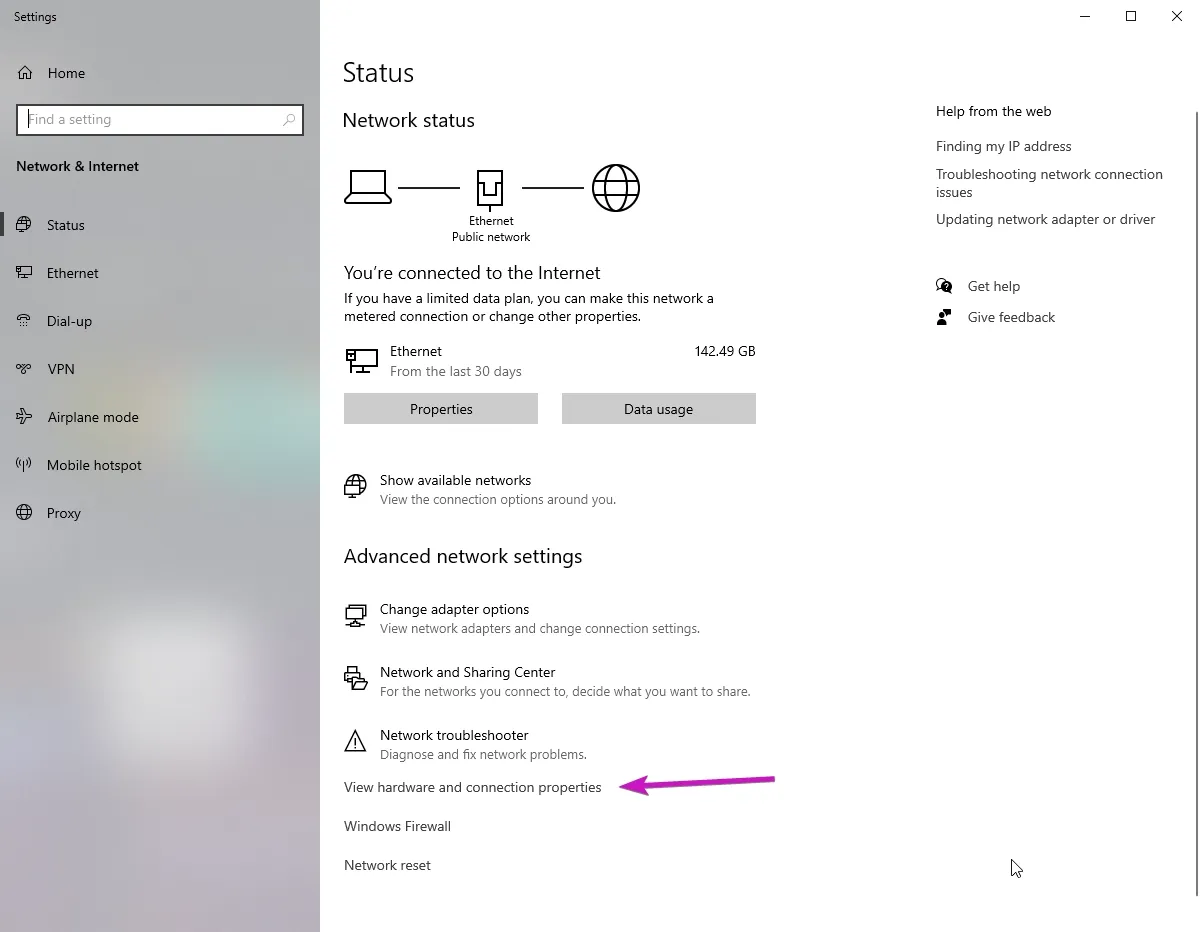
then view hardware and connection properties.
https://i.woo.pics/0bb3ca4d92.webp
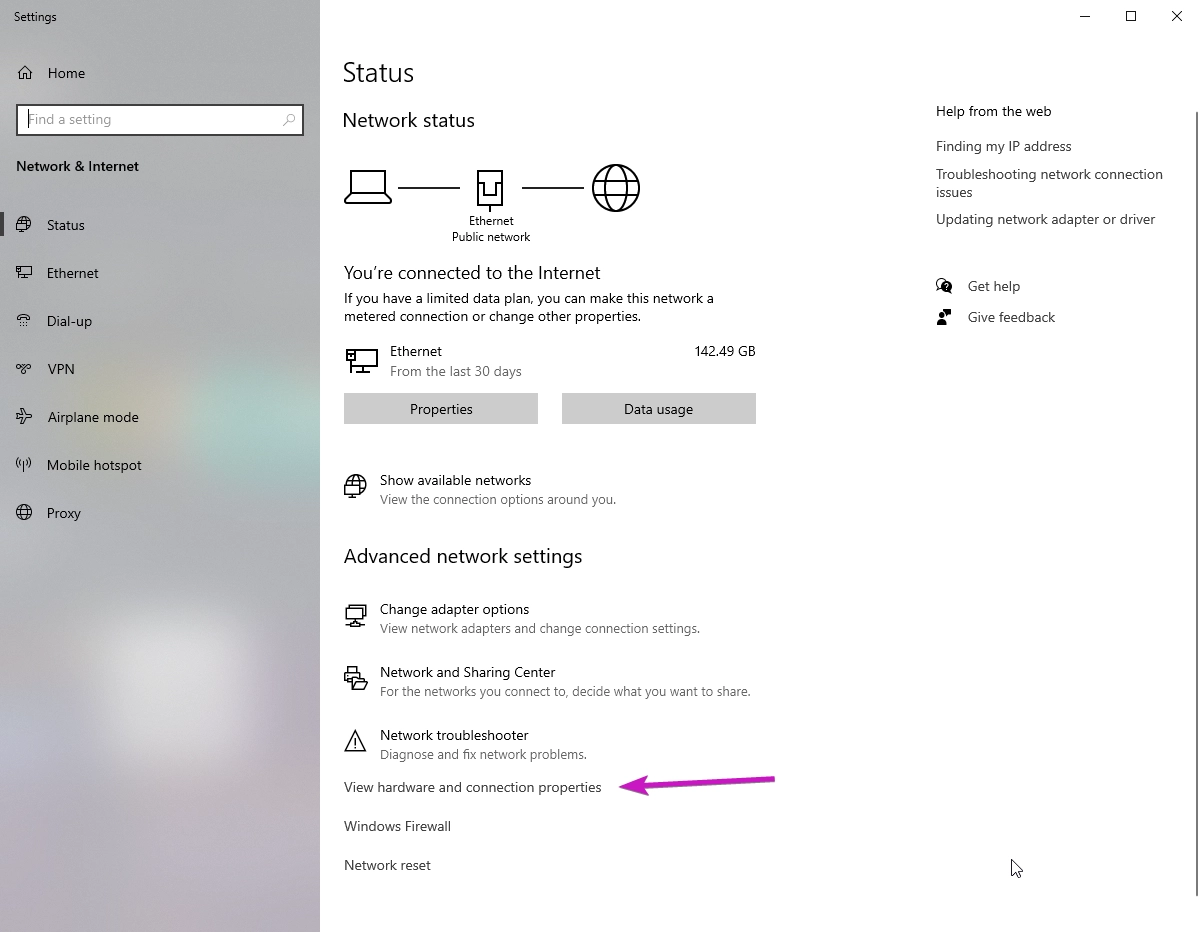
your looking for ipv4 address
https://i.woo.pics/6963d7be85.webp
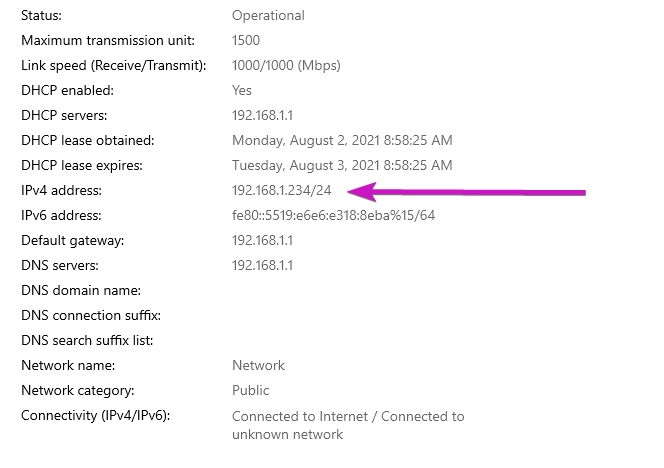
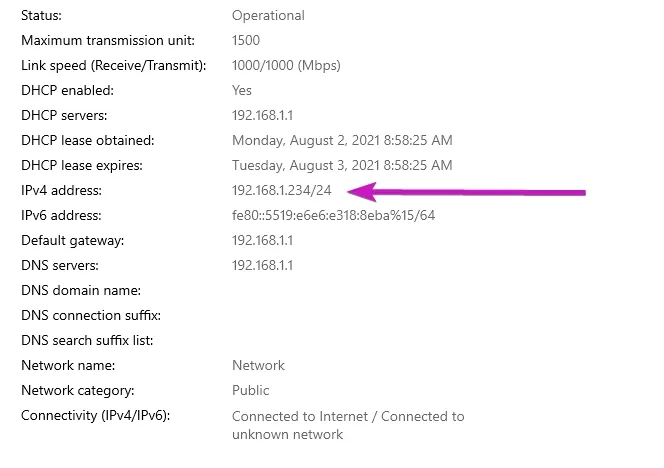 jaunty plank
rancid fractal
That worked, I wish I remembered that. Thanks for the quick reply!
jaunty plank
rancid fractal
That worked, I wish I remembered that. Thanks for the quick reply!
honestly, took a shot in the dark.
glad it worked
you just need everything before /24
jaunty plank
nah, not needed
jaunty plank
make sure to save. some routers will look like they saved but havent(i need to click save like 3 times for it to work on mine)
stable summit
i spammed apply lol
jaunty plank
honestly, wont know it worked till you test it, probably easiest that way.
stable summit
uh how do i test it?