#topgg-api
1 messages · Page 113 of 1
 fiery owl
 jaunty plank
To test locally, you can add an or to or between the env var and the testing port.
For example
webhookPort: process.env.PORT || 5000
Will be 5000 when not on heroku.
Note, the url won't work in the test env either
fiery owl
i see, should i put it on the url too?
jaunty plank
Since its being hosted at a seperate location
fiery owl
so i will not receive anything from console?
jaunty plank
Nope, since locally run code isn't at a heroku url
You can still test it with something like postman
If that's something you wanted to do
fiery owl
so i should test it on heroku?
jaunty plank
I would.
fiery owl
okay last question
let me understand, i should put this piece of code in the index.js and then on the vote command i use the "hasVoted" piece of code?
jaunty plank
So, personally I would use the webhook for everything and would track has voted yourself.
If you need to use hasvoted, you can, but with limited api requests you could rather quickly get ratelimited.
fiery owl
so how should i do to verify if a user has voted and give them rewards with the webhook?
i set this code to the index and then?
fiery owl
so i should log what webhook tells somewhere and then check from there?
jaunty plank
You can just give the user the reward right in the vote event
If you want to put it somewhere else, and check somewhere else thats okay to do too. But may not be needed.
fiery owl
i see so its just put that piece of code in the index and i am all done?
jaunty plank
I mean, it won't give rewards. The code just currently logs it to console.
fiery owl
yes yes, i will add that
jaunty plank
Then yeah, right into index is fine.
fiery owl
well, thak you a lot you are a really really patient and kind person
i really appreaciated your help
i will try it on heroku now
fiery owl
@jaunty plank excuse me sir, i am testing it with heroku but no response from test...
jaunty plank
are you sure the url is pointing to the correct public heroku url?
fiery owl
ah, tell me if you are annoyed or need to rest
jaunty plank
dw about it.
fiery owl
are you sure the url is pointing to the correct public heroku url?
the url i am using is the one i posted before
https://dogmahost.herokuapp.com/dblwebhook
not sure the link is public? https://dogmahost.herokuapp.com/
this is the domain
jaunty plank
so, on your heroku dashboard, the name is exactly dogmahost
fiery owl
jaunty plank
i think this would be it
jaunty plank
heroku isnt giving any errors correct?
fiery owl
no errors thought
wait i found this on heroku logs: 2020-11-17T22:35:01.884300+00:00 heroku[router]: at=error code=H14 desc="No web processes running" method=POST path="/dblwebhook" host=dogmahost.herokuapp.com request_id=0ff76b6c-2bff-4736-9e23-bcb6c8aee83d fwd="165.22.130.154" dyno= connect= service= status=503 bytes= protocol=https
fiery owl
yes
jaunty plank
honestly, zero clue at this point then.
fiery owl
😿
jaunty plank
okay, is this line being logged?
Webhook running at http://${hook.hostname}:${hook.port}${hook.path}
fiery owl
i dont see it
jaunty plank
then the webhook isnt running then
fiery owl
hmmm, so i should change the url?
jaunty plank
it shouldnt be the url, the webhook runs in your code.
fiery owl
so the code is wrong
jaunty plank
i guess. these are the frustrating issues.
fiery owl
yeah
jaunty plank
const DBL = require('dblapi.js');
const dbl = new DBL('yourDBLTokenHere', { webhookPort: process.env.PORT, webhookAuth: 'password' });
dbl.webhook.on('ready', hook => {
  console.log(`Webhook running at http://${hook.hostname}:${hook.port}${hook.path}`);
});
dbl.webhook.on('vote', vote => {
  console.log(`User with ID ${vote.user} just voted!`);
});
i double checked password and token but they are correct...
jaunty plank
it should still respond to requests even if the password and token is incorrect.
the webhook should still turn on
jaunty plank
so, the expected response when the auth is wrong is a 403 Forbidden and the token is unused for the webhook.
for example with mine testing the wrong info placed responds
yours is giving
jaunty plank
yeah, I think i am going to look around through previous heroku users here, see what other solutions people came up with
fiery owl
thank you a lot, i will look in heroku meanwhile
jaunty plank
ah some smart guy posted an article in chat a bit ago which explains the error(which i thought meant something else)
fiery owl
okay let me read it ^^
jaunty plank
just a heads up, its about python, but the procfile should still be relevant for js
which is the part i think is causing this issue.
fiery owl
so i have to change the procfile?
fiery owl
Web: https://dogmahost.herokuapp.com/
so i should add this "web: domain"
uu new error with this thing: "App crashed"
2020-11-17T23:10:13.504062+00:00 heroku[router]: at=error code=H10 desc="App crashed" method=POST path="/dblwebhook" host=dogmahost.herokuapp.com request_id=6ed08320-31a9-481f-8c89-3de20bf3ba73 fwd="165.22.130.154" dyno= connect= service= status=503 bytes= protocol=https
jaunty plank
yeah, heroku is kindof a nightmare rn, heroku is implying dont touch the procfile but some of their docs also tell you to modify it.
I was looking at this doc, and i wonder if the heroku scale command is what you need instead.
https://devcenter.heroku.com/articles/nodejs-support#default-web-process-type
fiery owl
i am afraid i am not understanding
jaunty plank
honestly, I am not sure either. at this point i am grasping at straws 
Sometimes heroku isnt easy. sometimes it just works
fiery owl

jaunty plank
the heroku scale command I think you can scale specific parts of whats run.
I think you can set heroku scale web=1 worker=1 so it can handle those web requests.
they have a guide on it too on their docs
https://devcenter.heroku.com/articles/scaling#manual-scaling
fiery owl
so i have to write it in the procfile?
jaunty plank
I would look at the guide, because I honestly am unsure.
fiery owl
web: https://dogmahost.herokuapp.com/
heroku ps:scale web=2 worker=1```trying like this now
jaunty plank
If that doesnt work, remove it from the procfile and run it in the cli, or do it from the dashboard.
fiery owl
cli means on the index?
jaunty plank
cli means command line interface
fiery owl
uhm so where is this?
jaunty plank
honestly, probably easiest to do it from the dashboard.
https://devcenter.heroku.com/articles/scaling#scaling-from-the-dashboard
fiery owl
i tried all the combinations with the pencil thing
i receive or a crash or a total down
jaunty plank
what the heck heroku
 eternal moth
@fiery owl heroku shuts down any web process if there's no website running
I am using Pipedream for POSTs
fiery owl
ah so i can host the bot to heroku but the webhook to pipedream?
eternal moth
yea
jaunty plank
we have others here using Heroku with the dblwebhook
<#topgg-api message>
but at this point, probably a better solution.
eternal moth

Use Pipedream to create a Discord Webhook and send a message to a channel.
See our docs to learn more: https://docs.pipedream.com/apps/discord/#discord-bot
You can find and copy the workflow used in this video here: https://pipedream.com/@dylburger/modify-a-discord-server-na...
take this video
fiery owl
okay will try tyty
eternal moth
but dont follow it for Discord
xD
just open a workflow
put the link in DBL
define a Auth
and tada
fiery owl
okay let me try
jaunty plank
thanks deadly
eternal moth
don't forget to code after
fiery owl
thanks a lot really to both, i am trying
eternal moth
you don't need a steps.
just hit Workflows beta up there
in the navbar
the check all info about the workflow you just created
fiery owl
eternal moth
ok, u could delete those 2
and create one from 0
you won't need to touch anything after creating
then enter the workflow and show it
unless you have found already
eternal moth
Create Event Source
fiery owl
ok it says select an app
eternal moth
give me a min.
fiery owl
sure
fiery owl
lmao
i can send a screen
once i click on "Create Event Source" it makes me select an app
 mellow aspen
Once we have posted server count etc on the console, does it just appear on the website or what
or must I add an html format
for the button if you like to appear
fiery owl
no
eternal moth
if u cant, try on Discord Bot
fiery owl
no result
eternal moth
you need to create a Source, sorry
mellow aspen
Nothing happened on the website
fiery owl
the only source is new message
fiery owl
lol i was searching get_user in the source
eternal moth
call it dbl-api or something
I forgot workflows aren't the same
now see what it shows
should present you a link
Your endpoint is
then the link
fiery owl
mellow aspen

fiery owl
should i connect to discord?
eternal moth
yeah but... thats asked when u create a source?
eternal moth
New Message is a selector right?
fiery owl
yes the only one avaible
fiery owl
it makes me add the piperdrem bot to my server
eternal moth
select HTTP
trust me
seems weird
then select the 1st source
New requests
then just give a name
and hit the big button
fiery owl
fiery owl
i dont touch anything from this?
eternal moth
yeah
just the big one button there
copy the link
put it in DBL Bot settings
give the auth, and run Test
and delete this picture, someone may get the link
yeah
fiery owl
i follow it with the /dblwebhook
eternal moth
nono
fiery owl
ah okok
eternal moth
the raw link itself
then in the DBL Bot settings
you scroll that down
and put the link in there
the auth underneath is just for you to know if it's from your bot or not
fiery owl
okay
eternal moth
u can have it blank, but for security reasons, put something
after pasting, and giving it an Auth, hit the Test button
then go to your source on Pipedream, and see magic
the Auth password/word whatever, will appear as a field in that .json format you'll receive
fiery owl
i see this
eternal moth
no
fiery owl
after hitting test
fiery owl
yes
eternal moth
k
click headers to expand the list
check those
well, now u got to get to the Source dashboard
fiery owl
is this right?
eternal moth
yes
fiery owl
alright so what now
eternal moth
show
fiery owl
i can see mine too
eternal moth
you need to click the Source u just made
fiery owl
yes im in
eternal moth
and the internet got crazy
fiery owl
lmao
fiery owl
lolol
eternal moth
can u see the Node option inside the Test Event Box?
I guess you're working with Node
if not u have Python beside it
eternal moth
ye
fiery owl
and i can see it yes
eternal moth
show the code it gives u
click it and show
there's one or two things to get from there
ok delete that
not from there what I wanted xD
let me find by myself
you'll need a bit of code in your Bot's main file
fiery owl
okay
eternal moth
so you can access the Sources data as soon as the vote info pops on
fiery owl
i see
eternal moth
run npm i eventsource on you bot's folder
fiery owl
i dont understand
eternal moth
open the console
cd to the bot's folder
root path
and put npm i eventsource
so u can install eventsource's node packages
fiery owl
new terminal and type npm install eventsource
eternal moth
be sure it's at the root path of the main file
if you're on VS Code
just open the terminal
xD
fiery owl
yes i am
eternal moth
and run that command
fiery owl
done
eternal moth
now give me a sec.
fiery owl
sure
fiery owl
done
fiery owl
done
eternal moth
copy the code and paste it BEFORE bot.once('ready'
fiery owl
done
fiery owl
inside?
fiery owl
done
eternal moth
well, you're done
now your bot reads every POST that gets in that Source
now for the Voting-Reward system
you gotta get your hands dirty
 acoustic dove
guys i think you should go to #development
acoustic dove
not really
fiery owl
okay lets move there then
fiery owl
no problem thanks for reminding us mr fox
acoustic dove
im just saying..there usually isnt a lot of talking here
and setting up pipedream doesnt have to do with the API
 split tusk
How to add a webhook so that when someone votes my bot then it shows in my selected channel?
split tusk
I have been there but it is kinds confusing on how to set up because when i put the webhook url and test then it doesn't send any messages
 rain heart
test it with a test tool like postman for example
 agile moat
Hello, how do you make it so that when a user votes for ur bot, ur bot does something
rain heart

Spice up your Discord experience with our diverse range of Discord bots
 tawdry wolf
that's the same thing?
 signal hawk
agile moat
signal hawk
agile moat
ohh
agile moat
wait what if i have a channel in which the people who vote get mentioned? How does that work?
``dbl.webhook.on('vote', vote => {
console.log(User with ID ${vote.user} just voted!);
var oof = bot.channels.cache.get("778497654128508958");
oof.send("<@" + vote.user + "> has voted! If you continue, you will get really neat perks!")
});`` '
thats my code so far
Error:
TypeError: Cannot read property 'on' of undefined at /home/runner/BotArmyG-bot/index.js:41:13 at Script.runInContext (vm.js:130:18) at Object.<anonymous> (/run_dir/interp.js:209:20) at Module._compile (internal/modules/cjs/loader.js:1137:30) at Object.Module._extensions..js (internal/modules/cjs/loader.js:1157:10) at Module.load (internal/modules/cjs/loader.js:985:32) at Function.Module._load (internal/modules/cjs/loader.js:878:14) at Function.executeUserEntryPoint [as runMain] (internal/modules/run_main.js:71:12) at internal/main/run_main_module.js:17:47
 astral plaza
You'll need to create a webhook and idrk how to use this
astral plaza
1 sec
agile moat
the guide mentions some sorta port
astral plaza
// Send a message using the webhook
hook.send('I am now alive!');```ok, but how do you send the data?
astral plaza
Make it send the message you're console logging
agile moat
ok thanks alot
astral plaza
Np
astral plaza
Click it
agile moat
ok
yeah
TypeError: Cannot read property 'on' of undefined at /home/runner/BotArmyG-bot/index.js:42:13 at Script.runInContext (vm.js:130:18) at Object.<anonymous> (/run_dir/interp.js:209:20) at Module._compile (internal/modules/cjs/loader.js:1137:30) at Object.Module._extensions..js (internal/modules/cjs/loader.js:1157:10) at Module.load (internal/modules/cjs/loader.js:985:32) at Function.Module._load (internal/modules/cjs/loader.js:878:14) at Function.executeUserEntryPoint [as runMain] (internal/modules/run_main.js:71:12) at internal/main/run_main_module.js:17:47
this error
``dbl.webhook.on('vote', vote => {
console.log('User with ID ${vote.user} just voted!');
hook.send("<@" + vote.user + "> has voted! If you continue, you will get really neat perks!");
});``
the dbl.webhook.on is line 42
@astral plaza you there?
astral plaza
Remove .webhook
agile moat
ok
no error..
lemme see if works
i voted and it aint send
even console message dont come
`dbl.on('vote', vote => {
console.log('User with ID ${vote.user} just voted!');
hook.send("<@" + vote.user + "> has voted! If you continue, you will get really neat perks!");
});`
astral plaza
I don’t know also hook isn't defined then
 torn yarrow
How do I enable the server count on my discord bot?
 noble socket
@torn yarrow statistics?
noble socket
idk
`dbl.on('vote', vote => {
console.log('User with ID ${vote.user} just voted!');hook.send("<@" + vote.user + "> has voted! If you continue, you will get really neat perks!");
});`
@agile moat
let hook = client.channels.get("channel id");
const hookembed = new Discord.RichEmbed()
agile moat
yeah, but its not doing in console too
noble socket
use this `
noble socket
dbl.on("vote", vote=> {
  let hook= client.channels.get("channel ID");
  const hookEmbed= new Discord.RichEmbed()

console.log(`User with ID ${vote.user} just voted!`);

    .setTitle(`TITLE`)
    .setTimestamp()
    .setColor("BLUE")
    .setThumbnail(guild.iconURL)
    .addField(`TEXT` )
    .setFooter(`UR NAME` );

  hook.send(hookEmbed);
})```try again
noble socket
give a link
noble socket
okay?
agile moat
nothing
noble socket
shit
agile moat
no console no message
noble socket
okay
agile moat
who here would know this stuff?
noble socket
how many people is here
agile moat
couple thousand
torn yarrow
Is there a good tutorial on setting the server count of a bot instead of the N/A?
agile moat
idts
noble socket
@torn yarrow
const chalk = require("chalk");
const moment = require("moment");
const Discord = require("discord.js");
const ayarlar = require("../ayarlar.json");

var prefix = settings.prefix;

module.exports = client => {
  console.log(`${client.user.username} logined!`);
  client.user.setStatus("idle");
  //idle = boşta
  //dnd = rahatsız etmeyin
  //online = çevrimiçi
  console.log(
    `                                                                                                                                                                     `
  );
  client.user.setActivity(`kei'nin sözünü`, { type: "LISTENING" });
  //LISTENING = DİNLİYOR
  //WATCHING = İZLİYOR
  //PLAYING = OYNUYOR
  console.log(
    `${client.user.username}: Now ` +
      client.channels.size +
      ` to channel, ` +
      client.guilds.size +
      ` to guild  and ` +
      client.guilds.reduce((a, b) => a + b.memberCount, 0).toLocaleString() +
      ` user  !`
  );
};```are you talking about this
?
 restive otter
Can you send your code here?
 vocal robin
let dblcount;
    setInterval(() => {
client.shard.fetchClientValues('guilds.cache.size').then(results => {

        dblcount = results.reduce((acc, guildCount) => acc + guildCount, 0);
    })
    .catch(console.error);
        dbl.postStats(dblcount, client.shards.Id, client.shards.total);
    }, 3200000);
``` this should pass the whole guildcount, but it is notHm
So you're fetching the guilds first?
Where can i ask about webhook!
Here aswell @restive otter
You're on the right plac
e
vocal robin
Where do u create webhooks xD?
restive otter
Ty how to to setup webhook
Read the docs
Where do u create webhooks xD?
@vocal robin top.gg
vocal robin
ah xD
restive otter
vocal robin
Okay to my problem, any ideas?
vocal robin
thx
restive otter
dbl.postStats(client.guilds.size, client.shards.Id, client.shards.total);
This is the stats post thing, you now want to define those stuff right?
What is the Authorization
I know about webhook url
restive otter
@noble adder This is an example from the api page...
@restive otter Thats to verify the request comes from top.gg
 noble adder
well ok
restive otter
Ohh ohk there nothing to put am i right?
There is
@civic girder NO EAR RAPES!!
Fr what is he doing
First webhook url?
Yes
and then the authorization
To confirm the request came from top.gg
Where i can find that
You have to pick one yourself
You mean password type?
@vocal robin How did you defined dbl ?
Yes
fishsbsvsjsksk like this?
Could be yes
Ohk thank you for help
Np ;))
You can ask here more questions if you want tho
vocal robin
dbl.postStats(client.guilds.size, client.shards.Id, client.shards.total);
@restive otter thats just show one guild count
restive otter
Ohk let me try
@vocal robin Yep, I know. Now you got to get all guild counts from each shard
And that's what you want to post
vocal robin
///////////////////////Dbl
const DBL = require("dblapi.js");
const dbl = new DBL('xD', client);

//////////////////////Dbl end
@restive otter I defined like this
restive otter
K
xD = token?
I puted webhook url and Authorization
Than i click save
Than test nothing happen
vocal robin
xD = token?
@restive otter I can not show here my token xD
vocal robin
yes , I did
restive otter
@restive otter Did you forwarded your IP?
K
Try it just with one guild first
wait
@restive otter Did you forwarded your IP?
@restive otter how
how many shards do you have?
@restive otter Use your router, to make the URL able to be reached by anyone
Have a look at the examples in the docs
vocal robin
how many shards do you have?
@restive otter 2 and 1,7K glds
restive otter
And you know how to get the both of their stats?
Whats the token field?
There
@restive otter Thats your API token
Ohh now i can save? And test
I did generate
@restive otter What do you mean?
Nothing happen i puted everything right
Im confused about Authorization
vocal robin
And you know how to get the both of their stats?
@restive otter yes
restive otter
Then you should post that
Im confused about Authorization
@restive otter !!
Read the docs again ig
In which form I didn't understand this
Do you started your http server?
Do you started your http server?
@restive otter mean?
Read the end of the docs again
 umbral venture
"Vote locking" a large percentage AND/OR majority of your bots commands AND/OR features.
What's this?
Vote for this feature is not allowed?
restive otter
@umbral venture As long as it's not locking all important commands it's fine
(for e.g tempban for voters only is good)
umbral venture
ic, ty
 leaden obsidian
is it possible to set up different webhooks for server and bot ?
restive otter

 rancid lotus
N/A yazıyor
Nasıl Böyle Yaparım
( pla translate)
 visual brook
hey @jaunty plank yesterday u told me to check my api request in postman, what do i fill in here
jaunty plank
 visual brook
jaunty plank
visual brook
jaunty plank
so, the type needs to be POST not get left of search.
visual brook
wait so what do i do for this?
jaunty plank
I am not sure 🤔 are you on the web app or the downloaded app?
jaunty plank
So, I think the issue was you needed to create a collection first.
rain heart
just use the downloaded app
jaunty plank
API Key
jaunty plank
youll want to fill the body
jaunty plank
example body
{
    "bot": "stuff",
    "user": "732563712136970290",
    "type": "test",
    "isWeekend": "true"
}
what to
jaunty plank
raw is fine
jaunty plank
did you put a body in?
example body
{
    "bot": "stuff",
    "user": "732563712136970290",
    "type": "test",
    "isWeekend": "true"
}
@jaunty plank
visual brook
where ?
visual brook
ah ok
 sullen nymph
(unless that's somehow not the case)
visual brook
still a bad request
jaunty plank
i do lowercase aswell
visual brook
wait where do i put a body? in my code or in the postman tab?
jaunty plank
just going to take some screenshots for you to compare to. will be a few moments.
rain heart
If it says bad request, then it's not the port
visual brook
oh ok
rain heart
if it would be the port, you would either get 404 or timed out
jaunty plank
oh, is it the content type 🤔
rain heart
forgot the code for timing out
jaunty plank
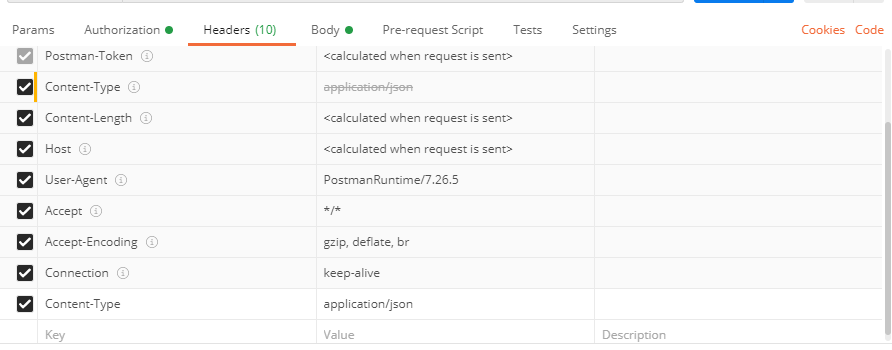 rain heart
the content type on postman is inherited from the option you selected in body
afaik
but best to recheck it manually on the headers
visual brook
rain heart
yeah change that to application/json
rain heart
The value of Content-Type
visual brook
ah ok give me a sec
rain heart
replace the text/plain to application/json
rain heart
what did you change?
visual brook
const dbl = new DBL("", { webhookPort: 5500, webhookAuth: 'D' });
console.log(dbl)
dbl.webhook.on('ready', hook => {
  console.log(`Webhook running at http://${hook.hostname}:${hook.port}${hook.path}`);
});

dbl.webhook.on('vote', vote => {
 console.log(vote)
});```my code to this
rain heart
what did you change in the webrequest
visual brook
nothing
rain heart
your bot has to be online by the way
visual brook
i don't have a bot yet
i was trying to test the webhook
and then doing the bot
better learning curve
rain heart
i mean your code has to be running in order to make the webhook request work
visual brook
const dbl = new DBL("", { webhookPort: 5500, webhookAuth: '' });
console.log(dbl)
dbl.webhook.on('ready', hook => {
  console.log(`Webhook running at http://${hook.hostname}:${hook.port}${hook.path}`);
});

dbl.webhook.on('vote', vote => {
  console.log(`User with ID ${vote.user} just voted!`);
});```i mean it was this
can someone help?
@jaunty plank u here?
jaunty plank
oop, what changed in the code?
jaunty plank
yeah, I have zero idea on that, hmm.
jaunty plank
oh? what was it?
visual brook
i created a new request thing in postman
idk what was it exactly
planning to figure it out
jaunty plank
o one sec
visual brook
i saw this but what is it for servers
jaunty plank
probably mostly the same, ive actually never tested the server webhook, and theres no dedicated api for server webhooks.
bot is probably server, might be the only change.
visual brook
and when i do console.log(vote)
 high jewel
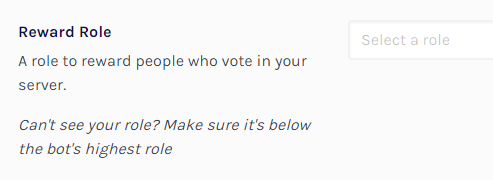
How to make a role for people to get whenever they vote for the server?
visual brook
true but this is from console
jaunty plank
yeah, its just logging whatever is in the body of the request. if you test it through the website it will give the proper one
jaunty plank
@high jewel in your servers edit page, there is a place to put a role
restive otter
How to make a role for people to get whenever they vote for the server?
@high jewel Add DSL bot
high jewel
oh thank you ❤️
jaunty plank
nearish to the bottom
https://i.imgur.com/gMQ18xa.png
 visual brook
when i click test webhook nada
jaunty plank
its on a vps correct @visual brook ?
visual brook
yep
visual brook
how do i test this then lol
ok nvm its probs some error with test webhook
i voted for the server in actual vote (thats weird to say) and it returns
high jewel
How to make the bot create an invite for a specific channel? I would like the invite it makes to be on our server rules 😊
jaunty plank
sucks theres no doc on it
jaunty plank
I think the new docs will include it, if not ill complain at team lol
jaunty plank
I like figuring it out too, probably frustrating for a lot of people too.
sullen nymph
see pins Woo
visual brook
ye but i like it lol
jaunty plank
oh
visual brook
LOL
jaunty plank
lmao
high jewel
Sorry for the resend, but How to make the bot create an invite for a specific channel? I would like the invite it makes to be on our server rules 😊
visual brook
u can create a invite and put it
rain heart
yeah you can insert a invite that was made by you
visual brook
create a invite for ur rules page and post it here
high jewel
but I'd like the bot to make it so I can track who joined via the site 💜
sullen nymph
Sorry for the resend, but How to make the bot create an invite for a specific channel? I would like the invite it makes to be on our server rules 😊
@high jewel I don't think that's possible
visual brook
i mean if u remember the code u can track via discord's tab 
high jewel
oh that's sad, but alright thanks anyway
 fair canopy
fuck
visual brook
the webhook button works dope now
high jewel
what's the webhook for 😮
jaunty plank
getting info when people vote for your server or bot.
jaunty plank
high jewel
thanks!
I don't get the thing so much
what's the ID for?
and where do I get it >.<
rain heart
are you talking about server or bot webhooks?
high jewel
I don't exactly know, I just want to make the thing so I can see who is voting in my server
Ping me if someone can help please and thank you
 boreal gale
My bot got a lot slower with the webhook. Why?
 near hill
I keep getting The server is not an instance of http.Server
jaunty plank
for the dblapi.js library?
near hill
ye
jaunty plank
I belive the server expects only http servers
near hill
it is an http server...?
boreal gale
slower as in higher ping?
@jaunty plank Yes, higher ping
 tender tiger
Making a request to https://top.gg/api/bots/736854174909726760/stats with javascript gives error 401.
Any help?
    $.ajax({
        url: apiUrl,
        success: function(data) {
            $('.votes').text(data.server_count);
        },
        error: function() {
            alert("There was an error fetching data from top.gg");
        }
    });
This is my code
jaunty plank
webhooks should have no effect on ping afaik.
The websocket takes the same amount of time to connect no matter if a webhook is also running.
@tender tiger the api needs a token to be used.
tender tiger
Oh
boreal gale
webhooks should have no effect on ping afaik.
The websocket takes the same amount of time to connect no matter if a webhook is also running.
@jaunty plank So why is it that when I implemented the webhook it happened?
tender tiger
But i can make requests to it via postman without any token
jaunty plank
https://top.gg/api/docs#reference
The docs say you need to use authentication.
As far as I know its required.
@boreal gale not sure.
If the lib isnt performing to your expectations, maybe try making the webhook receiver yourself? I am not sure I've ever heard of a webhook causing ping increases.
tender tiger
https://top.gg/api/docs#reference
The docs say you need to use authentication.
As far as I know its required.
@jaunty plank yeah, but to do stuff like changing the boy's server count. That endpoint doesn't need any for of authentication header like the docs say
In fact I can make a get request to i even from my browser
jaunty plank
🤷♂️ I can too, but a 401 is an unauthorized error.
https://developer.mozilla.org/en-US/docs/Web/HTTP/Status/401
tender tiger
Yeah o know that
boreal gale
@jaunty plank I still need to investigate further the causes of the problem, so I'm not saying it's the webhook but I also don't rule out the possibility
high jewel
Can someone help me make the Webhook I really don't understand any of the terms
tender tiger
Maybe it's because there is some problem with the cross origin thing
jaunty plank
@boreal gale all the official libraries have GitHub repos, If you want to look over and investigate it your more than welcome to.
If you want, you can also put an issue on the relevant repo.
@high jewel the webhooks need a webhook receiver to function, a handful of the official libraries have them, or you can make your own.
high jewel
Which one is easier to do
boreal gale
@boreal gale all the official libraries have GitHub repos, If you want to look over and investigate it your more than welcome to.
If you want, you can also put an issue on the relevant repo.
@jaunty plank ok, thank you so much
I will look
jaunty plank
@high jewel all of them are fairly complex, since they all need some level of development experience.
the libraries are easier though
high jewel
So how do I start >.<
jaunty plank
https://top.gg/api/docs#intro
You may want to learn a programming language first(or the basics at least)
 frozen whale
Hey
I don't know why the API said it takes 1 positionnal argument but it's 2 with the library
torn yarrow
Can someone tell me which code I have to put where to show the server count on the bot instead of N/A
jaunty plank
depends on the library.
theres some examples on the docs in the library of your choice.
https://top.gg/api/docs
torn yarrow
I'm gonna be honest, I don't know anything about api xd
jaunty plank
I think you may know more than you know.
Discord bots use the Discord api
 jaunty plank
yeah, you can just use the example
const Discord = require("discord.js");
const DBL = require("dblapi.js");
const dbl = new DBL('Your top.gg token', client);
// Optional events
dbl.on('posted', () => {
  console.log('Server count posted!');
})

dbl.on('error', e => {
 console.log(`Oops! ${e}`);
})
client on the third line being your discord bot client.
torn yarrow
How long does it take to make the server count Show up?
jaunty plank
after it posts(you should get Server count posted! in console), it can take an hour or so due to caching.
torn yarrow
Ok, thanks
 sand hazel
Who's managing the API page now that Tonkku left?
torn yarrow
@jaunty plank hah it instantly worked :D
jaunty plank
perfect!
restive otter
@jaunty plank
How can I show the number of votes on the site on my bot
(discord bot list vote number )
I want to show on command
but I couldn't find how to do it
sullen nymph
I'm here
I'm alive
Use an official top.gg library to get info of a bot and then retrieve a monthlyPoints key from the received JSON
https://top.gg/api/docs/ for more information
restive otter
@sullen nymph thx
 ocean sedge
o
 unreal swallow
Is it possible to see if a user has reviewed the bot?
unreal swallow
Damn
 frail gorge
Hi i recently used the top.gg api to send the membercount but for some reason it always give me
:-:
ping me please this way i see your message fast qvq
jaunty plank
whats your request look like?
frail gorge
 ancient kindle
hi
I have this in my code
  const DBL = require('dblapi.js');
  const dbl = new DBL(process.env.dbltoken, { webhookPort: 5000, webhookAuth: 'yes' });
  dbl.webhook.on('ready', hook => {
    console.log(`Webhook running at http://${hook.hostname}:${hook.port}${hook.path}`);
  });
  dbl.webhook.on('vote', vote => {
    console.log(vote);
  });
but when i test it
nothing seems to happen
jaunty plank
are you filling in the webhook url and auth on the site?
jaunty plank
those must be filled in with the correct info.
the auth will be whatever is set here webhookAuth: 'yes'
the url will look something like this
http://PublicIP:5000/dblwebhook
PublicIP will be the public ip of wherever the code is running.
jaunty plank
wheres this code being run? home network? vps?
ancient kindle
im coding on glitch
jaunty plank
a few things about glitch, glitch expects you to use a process.env.PORT rather than a static port.
so you should probably be using that rather than 5000.
glitch, also doesnt provide an ip, but a url.
ancient kindle
ok
ancient kindle
yeah ik that
so how should the link look like?
this is the url provided by glitch
jaunty plank
glitch suggests the application wont start and that your getting an error, do you happen to have any errors logging?
jaunty plank
did you swap to using the process.env.PORT ?
jaunty plank
do you have something else using that port in your code?
ancient kindle
it errors
jaunty plank
or that variable*
jaunty plank
so, glitch only gives one port per project(as far as i know), and you cant use a single port multiple times.
I am not sure if you can give the library an express server or not.
jaunty plank
ay, what did ya do
 jaunty plank
oh you didnt need it?
jaunty plank
oh lol
i was about to do some hardcore research to figure out if we could get it to work together

jaunty plank
your url should be something like
https://council-bot.glitch.me/dblwebhook
jaunty plank
perfect
ancient kindle
thank you
jaunty plank
no problem!
ancient kindle
does the api work for a server vote too?
jaunty plank
the webhook stuff?
ancient kindle
ye
jaunty plank
yeah, its pretty much exactly the same.
this is pretty much the only difference. #topgg-api message < or pins
 shrewd crystal

 fiery shadow
probably because you didn’t post the server count correctly
 fervent portal
How do I make my commands vote locked 
 frank kayak
So
 novel depot
uh
frank kayak
basically you'll want to setup a webserver that listens for a post request from top.gg
you can configure the url in your bots settings page on the site, the body of the request will contain the userid of who voted
so when someone votes and it hits your webserver url, give them rewards or up time in a database, whatever you want
novel depot
i recommend mongodb if you need a new database
 lethal lion
Must i add somethink special to my bot that on the top.gg website the server count work?
novel depot
@lethal lion so to get the servercount
lethal lion
🙂
novel depot
yes you do need to add something special
lethal lion
Is there any documentation about that or some one can provide me pls the part?
 uneven jungle
Any help please??
it says Error: 400 Bad Request
const DBL = require('top.gg');
const dbl = new DBL(process.env.dbltoken, client);
dbl.on('posted', () => {
  console.log('Server count posted!');
})
dbl.on('error', e => {
 console.log(`Oops! ${e}`);
})```

;-;i used the code from https://discordbots.org/api/docs#pylib the bot works, but on the website the guild count is again N/A ( over an hour)
Spice up your Discord experience with our diverse range of Discord bots
some one can help me in this matter? i dont have any error
i also dont get the output in console --> print("Server count posted successfully")
 plain glade
Can CTA bot be added to server?
 old otter
Hi
 vagrant oyster
My top.gg servercount is stuck, edit & save didn't help. Does it have something to do with the webhook authentication?
Because it got stuck ever since I added the webhook
 buoyant geode
 fathom narwhal
any1 help me webhook votes?
 dusk trail
ancient kindle
but I dont seem to know why
dusk trail
ancient kindle
but I dont seem to know why
mind sharing the code?
ancient kindle
sure
 nimble fossil
Don't expose your IP like that.
ancient kindle
  const DBL = require('dblapi.js');
  const dbl = new DBL(process.env.dbltoken, { webhookPort: process.env.PORT, webhookAuth: 'yes' });
  dbl.webhook.on('ready', hook => {
    console.log(`DBL Webhook is ready!`);
  });
  dbl.webhook.on('vote', vote => {
    let user = bot.users.cache.get(vote.user)
    if (!user) return;
    user.send({embed: {
      description: "Ur PP size has increased by 1",
      color: "#00ff00"
    }}).catch(e => {
      return console.log(e)
    })
  });
im hosting on heroku
dusk trail
pp size lmfao
dusk trail

ancient kindle
it was just a herokuapp link
not frikin 0.0.0.0..00.0.00.0a 0a.d0.q02e104.012.012.0423.0
dusk trail
ye ye ok
dusk trail
basically i have no idea whats with this api library, i just use a http server and some spaghetti code to parse the POST request
dusk trail
heroku ps:scale web=1
apparently you're not running any web dynos
damn i love searching google for others
dusk trail
ancient kindle
but i have the worker on
more googling
Medium
When deploying my Django project to Heroku, I encountered this error:
dusk trail

jaunty plank
server count like that on the site.
the server count has nothing to do with the vote webhook.
you can post the server count if you want, but it doesn't help with your original question.
the part that helps with your original question is the webhook section.
sullen nymph
 cinder geode

jaunty plank
30 minutes is a good number
your server count shouldnt be changing that often anyway(changing in a way that matters, going from 3005 guilds to 3009 doesnt really matter much)
ancient kindle
for me going up by 1 server is a huge achievement lol
restive otter
:-:
lethal lion
i added the code snippls from the api (py).. I get no error message or something, but the guild information is not published on top.gg.. some one have an idea?
 quasi scaffold


 versed storm
no in this channel, no.
 plucky lance
wrong channel, dude
versed storm
Also Luca doesn't have commands you can use.
restive otter
I would like to know how can I use the webhook system to reward upvotes.
It's for a server
 brisk vigil
Make a webhook and put its ip at the topgg webhook place then just use the api
The api has an event to listen to upvotes
 keen lava
const Client = require('./src/Client.js');
const { Intents } = require('discord.js');

global.__basedir = __dirname;

// Client setup
const intents = new Intents();
intents.add(
  'GUILD_PRESENCES',
  'GUILD_MEMBERS',
  'GUILDS',
  'GUILD_VOICE_STATES',
  'GUILD_MESSAGES',
  'GUILD_MESSAGE_REACTIONS'
);
const client = new Client(config, { ws: { intents: intents } });

// Initialize client
function init() {
  client.loadEvents('./src/events');
  client.loadCommands('./src/commands');
  client.loadTopics('./data/trivia');
  client.login(client.token);
}

init();

process.on('unhandledRejection', err => client.logger.error(err));

const DBL = require("dblapi.js");
const dbl = new DBL(config.topToken, client);

client.on('ready', () => {
    setInterval(() => {
        dbl.postStats(client.guilds.cache.size);
    }, 900000);
});```that is the code which connects to dbl
and my config.json{
"ownerId": "701780722444402758",
"bugReportChannelId": ".",
"feedbackChannelId": ";-;",
"serverLogId": "aaaaaa",
"apiKeys": {
  "catApi": "gg",
  "googleApi": "aaaaa",
"topToken": "no"
}
}```nvm fixed
keen lava
I-
plucky lance
You have to use your own endpoint DBL sends it’s requests to.
The entered Discord webhook URL doesn’t make any sense and of course won’t work. @restive otter
And the token can be generated only if you have an approved bot.
restive otter
But I'm trying to do this for a server
I need to get an approved bot anyway?
@plucky lance
plucky lance
Yes but DBL basically sends POST requests to your personal endpoint if an event is triggered, e.g. a vote happened
You can’t use the Discord webhook URL.
You have to use your own created endpoint DBL sends requests to.
Yes an approved bot is required for event triggers like mentioned.
But of course not to sends requests from your side to DBL.
Anyway you have to set up your own endpoint anyways. No matter it’s a webhook service or just a script sending requests to DBL is your own choice.
boreal gale
The webhook don't identify when the bot receive votes
I literally gave Ctrl + c Ctrl + v in the code of the docs
Does anyone know what may be happening or what I may have done wrong?
acoustic dove
well maybe don't copy and paste code without understanding it
boreal gale
@acoustic dove It was a way of saying, I understood how it works
acoustic dove
saying you Ctrl + c Ctrl + v is not a way of saying you understand it
boreal gale
Ready even appears in the log
boreal gale
acoustic dove
saying you Ctrl + c Ctrl + v is not a way of saying you understand it
Ok I'm going to reformulate what I said, I read the docs, I saw the sample code, I replicated it in my code with all the necessary changes
acoustic dove
that makes more sense
boreal gale
However the webhook is not informing me when someone votes and I know that the webhook is connecting because the "ready" event is informing everything right
Then I want to know if I have to do any more steps than what is in the Docs
@acoustic dove
acoustic dove
idk
restive otter
 odd carbon
Ping me when someone replys
odd carbon
Ping me when someone replys
woah you can reply
plucky lance
boreal gale
However the webhook is not informing me when someone votes and I know that the w...
Yeah make sure the port is opened/forwarded and your webhook service is accessible to the public.
restive otter
how do i make the bot display in its status how many servers its watching
plucky lance
Just count the guilds the bot is in and set it’s presence.
Guess that’s a more related question to #development
 winged trout
Hi there I have a question about whether or not it is possible to have a bot join a server using just the link and python, can someone help me out?
plucky lance
Err nope that’s not possible
winged trout
aww
plucky lance
That would be horrible just thinking of
winged trout
I want a bot to make a server and then transfer it to another bot so the other bot can go on making other servers,
Im not trying to just generate a million servers, there is a good reason behind why I want bots to make servers
boreal gale
plucky lance
Yeah make sure the port is opened/forwarded and your webhook service is accessib...
Ok I'll check
winged trout
Thanks, I want a bot to be able to make a server and then transfer the server to a different owner but I want to be able to do that for a bunch of different servers, that way someone can make a web request for a server and it would be automatically made for them
plucky lance
Nah creating guilds doesn’t work using the Discord API
winged trout
are there any work arounds that are allowed under tos?
boreal gale
@plucky lance How do I see if the webhook is accessible in public?
plucky lance
Dunno editing servers is possible but even if so I don’t think bot can be be server owners
Checking the firewall first and check it your webhook port is accessible using a TCP port check for example