#topgg-api
1 messages · Page 6 of 1
 jaunty plank
webhooks are like a website, they use the internet the same exact way you do when you go to any website.
except they are intended for program to program communication not program to user.
The webhooks in that library essentially make a webserver that listens to requests from Topgg and it then fires an event.
Topgg sends the webhook to the url you put on your bot/server edit page in the webhook section.
jaunty plank
the route is the thing that goes at the end of the url
so, https://1.1.1.1:port/ROUTE
 wet sun
is that just some kind of example? a placeholder?
jaunty plank
wet sun
So what is the url thats already in that Webhook URL by default on top.gg
there shouldnt be one there 🤔
 wet sun
I dont, I think it might just have been something I tried in the past and forgot about
in any case at least I know it useless
jaunty plank
The url youll use will depend on a few factors, such as your host, if you plan on using a domain, etc.
wet sun
So for the code thats given from that link I sent is that all thats required? or do I need to actually own a domain or something
jaunty plank
itll depend on your specific conditions.
if you have a vps with a public IP, you would use something like this.
http://VPSIPHERE:PORTHERE/ROUTEHERE
wet sun
Ah I see my bot is hosted on a vps but I was just trying to get to work locally to test it
jaunty plank
locally takes a bit more work, local testing requires your router to be configured properly.
as well as any local firewalls or anything
wet sun
Ive disabled my firewall but the router doesnt actually belong to me as it comes with my rent
so I guess I need to test this all from a vps
So for the code itself again referencing the link I sent what exactly do I need to specify?
And where
jaunty plank
like what do you need to do code wise?
The link you sent was the source code of the library, not an example.
jaunty plank
just a note, the code written in that example was for the old discord py version.
The new one will need you to place the async stuff in an async context iirc.
I'm not a python dev, I just know the absolute basics.
wet sun
right
Yeah I think for the time being im going to give up trying to make webhooks work
Although I think I can make use of your webhook system
actually nvm id need message content
 restive otter
Without getting ratelimited how do I know that an user (message author) has voted or not?
[ Ima do it everytime a premium cmd gets executed. ]
It gets ratelimited in just 5-6 mins.
restive otter
restive otter
Without getting ratelimited how do I know that an user (message author) has vote...
Please @me while helping
restive otter
restive otter
Without getting ratelimited how do I know that an user (message author) has vote...
use webhooks
 jaunty plank
More specifically, store the user ID and timestamp when someone votes, and check that database to confirm if they have voted.
 astral egret
How exactly votes work, does votes from users get removed after 12 hours?
if not when does it gets reset?
 golden cove
astral egret
golden cove
astral egret
 rain heart
so their vote state gets reset after 12 hours
rain heart
so their vote state gets reset after 12 hours
When does their vote state get removed?
restive otter
you just replied to the answer
rain heart
exactly
restive otter
hope thankfully youre no longer a mod here
rain heart
lmao
astral egret
rain heart
aka they're able to revote after 12 hours
idk why the <IEntity> list still contains voters after 12 hours
since im not using webhooks i was just restricting users to not use vote command and check for votes after 12 hours, but for smr the votes are still there after 12 hours
and bot just keep sending them rewards instead of telling them to vote 
restive otter
astral egret
idk why the <IEntity> list still contains voters after 12 hours
best to use https://docs.top.gg/api/bot/#individual-user-vote if you don't want to use webhooks
 astral egret
restive otter
best to use https://docs.top.gg/api/bot/#individual-user-vote if you don't want ...
astral egret
restive otter
best to use https://docs.top.gg/api/bot/#individual-user-vote if you don't want ...
Thanks, this seems reliable
rain heart
astral egret
idk why the <IEntity> list still contains voters after 12 hours
well, you need to use webhooks to actively know when a user can vote again, aswell as when a user has initially voted
rain heart
restive otter
best to use https://docs.top.gg/api/bot/#individual-user-vote if you don't want ...
this, will provide ALL votes that were made by users, iirc it does not respect the times when a user can vote again
your only go-to is webhooks
astral egret
rain heart
this, will provide ALL votes that were made by users, iirc it does not respect t...
I can just set a timer when user send vote command again to claim rewards
rain heart
sure that can work, but that will not work reliably
rain heart
as the user can just say "yes I voted 11 hours ago, gonna use the command now" then you'll have people in your support asking why they cant claim
astral egret
How do i use webhooks
astral egret
rain heart
as the user can just say "yes I voted 11 hours ago, gonna use the command now" t...
i can say regardless of what time you vote, you can only claim rewards every 12 hours lel
restive otter
rain heart
this, will provide ALL votes that were made by users, iirc it does not respect t...
what 
astral egret
but i think there should be a field which shows at which specific time the user has last voted
restive otter
that endpoint tells you if a user has voted in the last 12 hours
astral egret
this can just take the whole webhooks out of the picture
restive otter
just doesn't tell you the time
astral egret
restive otter
just doesn't tell you the time
Yes i understand
restive otter
i'm not talking to you i'm talking to aurel cus idk what he's saying
astral egret
He said i wouldn't know for sure what time user will be able to vote again
restive otter
"will provide ALL votes that were made by users" idk what this part is suppose to mean
"iirc it does not respect the times when a user can vote again" it does, if a user can vote again it'll return 0
rain heart
per docs:
"gets the last 1000 votes of your bot"
it does not claim any retention duration after a vote expired
its always there, doesn't matter if the vote expired or not
rain heart
i was never referring to the check endpoint
ohhh
yeah the link goes to the check endpoint, not the 1000 last one
jaunty plank
The check endpoint one does have a pretty bad ratelimit on it.
It can work as a temporary solution for small bots but its not ideal.
Especially if you check frequently(on command usage)
restive otter
yeah it’s best to use webhooks but he didn’t want to use them 🤷
 gusty moth
Hey, not that great with APIs and stuff, but would this work for sending over stats for top.gg
@tasks.loop(minutes=30)
async def update_stats():
    await client.wait_until_ready()
    async with aiohttp.ClientSession() as session:
        await session.post(url = f"https://top.gg/api/bot/783790110537416705/stats", headers = {"Authorization": dbl_token}, data = {"server_count": len(client.guilds), "shard_count": client.shard_count})
        print(f"SUCCESS: Bot data sent to top.gg")
In Python but cant use the library as I'm not using discord.py
jaunty plank
I believe you're missing the content type header which may cause an error.
gusty moth
ah thats why
something like this then?
@tasks.loop(minutes=30)
async def update_stats():
    await client.wait_until_ready()
    async with aiohttp.ClientSession() as session:
        await session.post(url = f"https://top.gg/api/bot/783790110537416705/stats", headers = {"Authorization": dbl_token, "Content-Type": "application/json"}, data = {"server_count": len(client.guilds), "shard_count": client.shard_count})
        print(f"SUCCESS: Bot data sent to top.gg")
im not sure how it works
jaunty plank
webhooks are like a website, they use the internet the same exact way you do when you go to any website.
except they are intended for program to program communication not program to user.
Webhooks essentially make a webserver that listens to requests from Topgg and then fires an event.
Topgg sends the webhook to the url you put on your bot/server edit page in the webhook section.
A 'webserver' comes in many forms, for example I have a computer in my house thats a 'webserver'. my vps is a webserver, replit and heroku can be webservers.
gusty moth
gusty moth
something like this then?
```py
@tasks.loop(minutes=30)
async def update_stats()...
This is giving me a status 400 error, does anyone know what I'm doing wrong 😅
gusty moth
gusty moth
something like this then?
```py
@tasks.loop(minutes=30)
async def update_stats()...
Found the issue! Asked chatGPT and it somehow fixed the code for me
jaunty plank
oh ok
👀
I think we will just add chatgtp here so I dont have to look at this channel
 steel osprey
Is there a way to grant a role to someone when they vote
 runic creek
Will they vote for what? Server or bot?
steel osprey
Server
rain heart
Top.gg
Pre-requisites Follow through the steps to publish your server. Once this step is done, follow the information below on how to use role rewards. What are role rewards? Role rewards are given to a user upon voting for a server. If you h...
astral egret
dont have credit card
thats the problem
Otherwise aws also gives pretty good free tier
restive otter
parents?
 earnest nexus
How does a webhook post request look like?


 tulip trail
how can i have the topgg key for authorize my bot?
rain heart
check the pinned messages
tulip trail
Don't have the webhook option
tulip trail
oh
 fallen thistle
Hi is the webhook down? I am not getting vote rewards any more and I did not change any code…
 neat widget
There is no way to get the reviews right? Is there a way to suggest such endpoint?
 dire lake
Is there a way to know how much time is left to vote for not again
 hushed acorn
dire lake
Is there a way to know how much time is left to vote for not again
hushed acorn
dire lake
Is there a way to know how much time is left to vote for not again
not through the API, you have to manually track it with webhooks
 violet vault
dire lake
Is there a way to know how much time is left to vote for not again
violet vault
dire lake
Is there a way to know how much time is left to vote for not again
If you want to do it through like a bot you could make a command with a timer on it showing when they could vote again but that might be a little complicated
 glass heron
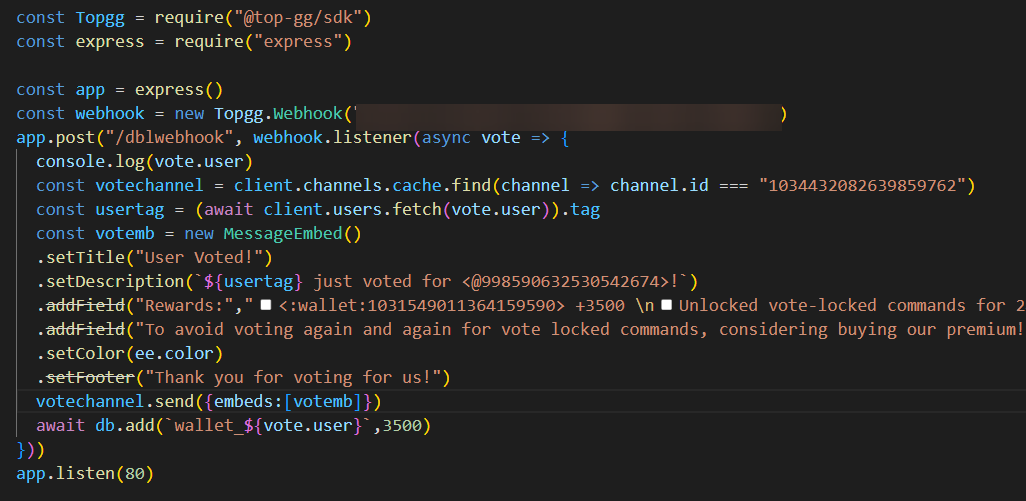
https://i.imgur.com/K8nG0fg.png
https://i.imgur.com/rItzGhC.png
What am I doing wrong?

 plucky lance
You might explain what you mean by "vs code IP address"?
glass heron
plucky lance
You might explain what you mean by "vs code IP address"?
I am running it locally on vs code. So ig I have to put the ip address in webhook url right?
plucky lance
Running it locally on your PC, will also require to open the selected port in your local firewall and to forward the port from your router to your client (your PC).
Incoming connections aren't forwarded or opened by default
It's genuinely easier to test your code on your server which may only require to open the port in the firewall (if dropped by default)
glass heron
plucky lance
It's genuinely easier to test your code on your server which may only require to...
will it be easy to run it on ubuntu?
nvm got it working. thanks
plucky lance
Hmm alright
 gusty mantle
is it possible to get number of votes for a bot
rain heart
yes, by using the bot endpoint and using the "points" and "monthlyPoints" data
gusty mantle
rain heart
yes, by using the bot endpoint and using the "points" and "monthlyPoints" data
any docs lik?
rain heart
gusty mantle
is api key and token same?
 thin badge
gusty mantle
is api key and token same?
thin badge
gusty mantle
is api key and token same?
No
Api is safe but you must'nt share token
gusty mantle
thin badge
No
Api is safe but you must'nt share token
what
rain heart
the terms are the same
restive otter
now that I'm finally home and got approved on top.gg
can someone explain vote commands for d.py
oh wait
I can use webhooks
 pliant geyser
How do one search for server here?
 placid wigeon
restive otter
placid wigeon
restive otter
damn
restive otter
the webhook isn't getting any requests
restive otter
jaunty plank
Did you fill in your url and auth?


it's the same thing I used for discordbotlist
so
jaunty plank
thats not our content
restive otter
oh?
there was a webhook place in top.gg

the auth is below that
if that's what you mean
restive otter
jaunty plank
Did you fill in your url and auth?
oh
yeah it is
mb
yeah I ain't doing the webhook route
lol
jaunty plank
ok
Just a heads up, the api has a very small ratelimit, most bots get ratelimited pretty quickly from what ive seen
restive otter
I doubt I'll get upvotes like crazy
besides
it's a really really small bot rn
@jaunty plank do you know d.py? If so can you explain how to setup auth and stuff with the token and everything
I already have an idea on how to do vote commands
I just need to set it up with top.gg now
jaunty plank
using our library you can check if someone voted, if they have run the command if they haven't don't.
https://topggpy.readthedocs.io/en/stable/api.html#topgg.DBLClient.get_user_vote
It will perform this check every time anyone runs the command
restive otter
jaunty plank
using our library you can check if someone voted, if they have run the command i...
all I gotta do is make a function?

how bout this?
how do I setup this
jaunty plank
thats used in the client of the lib
https://topggpy.readthedocs.io/en/stable/api.html#client
restive otter
jaunty plank
thats used in the client of the lib
https://topggpy.readthedocs.io/en/stable/api...
and what's the lib name to install and import 💀
jaunty plank
restive otter
jaunty plank
https://docs.top.gg/libraries/python/#install-via-pip-recommended
the guild count updates on top.gg automatically right?
there's no reason for me to add a whole loop for it
I think
jaunty plank
Youll need to enable autopost
bot.topggpy = topgg.DBLClient(bot, dbl_token, autopost=True, post_shard_count=True)
ok so
theoretically
@client.event
async def get_user_vote(user_id: int):
    votedb.votes.insert_one(
                    {
                        "user_id": user_id,
                        "voted": "true",
                        "vote_time": datetime.datetime.now()
                    }
            )
would this work
cause I don't really understannd the
dfunction
tbh
is the function called once the user votes
oh
yeah I gotta change it wait
jaunty plank
its not an event, its a function.
Webhooks provide an event for you if thats what you want
restive otter
jaunty plank
its not an event, its a function.
Webhooks provide an event for you if thats wh...
oh I was looking for on_dbl_vote lol
I got the wrong one
jaunty plank
thats for webhooks
 jaunty plank
yep, the webhook manager fires an event on the bot
https://topggpy.readthedocs.io/en/stable/webhooks.html#webhookmanager:~:text=The Client object that will be utilized by this manager’s webhook(s) to emit events.
our py docs kinda suck 👀
jaunty plank
We have very few py devs tbh
I'm not even a py dev, I use js.
I just have learned enough to help people
restive otter
jaunty plank
I'm not even a py dev, I use js.
I just have learned enough to help people
Traceback (most recent call last):
  File "/home/container/.local/lib/python3.9/site-packages/topgg/client.py", line 151, in _auto_post
    await self.post_guild_count(
  File "/home/container/.local/lib/python3.9/site-packages/topgg/client.py", line 212, in post_guild_count
    await self.http.post_guild_count(guild_count, shard_count, shard_id)
  File "/home/container/.local/lib/python3.9/site-packages/topgg/http.py", line 192, in post_guild_count
    await self.request("POST", "/bots/stats", json=payload)
  File "/home/container/.local/lib/python3.9/site-packages/topgg/http.py", line 165, in request
    raise errors.Unauthorized(resp, data)
topgg.errors.Unauthorized: Unauthorized (status code: 401)
☠️
did I
piss off
the top.gg admins
jaunty plank
Did you use your topgg token?
If you did and you got this error regen the token then refresh the page before copying it
 formal charm
since i need someone to vote the bot to actually test if my bot works, i need a thing that simulates a user that votes the bot
restive otter
formal charm
since i need someone to vote the bot to actually test if my bot works, i need a ...
If you were listening to the bot votes via Top.gg webhooks, it has a button called "Test" which you can test the webhook with, which'll send fake/test payload to your webhook to test it
Other than that an actual user would have to vote to test it out
formal charm
restive otter
If you were listening to the bot votes via Top.gg webhooks, it has a button call...
 restive otter
formal charm
restive otter
formal charm
Your webhook URL is most likely invalid
formal charm
restive otter
Your webhook URL is most likely invalid
i just generated
restive otter
What is it? (Strip out any IP addresses in the URL if any when showing it)
restive otter
jaunty plank
If you did and you got this error regen the token then refresh the page before c...
so it works
but I'm wondering
how do I make an event for when someone votes
cause I want it to dm them
is there an event for that or
jaunty plank
That's what webhooks are for
restive otter
al;right
restive otter
jaunty plank
That's what webhooks are for
holy shit
I found a site that saved my ass
so much time
so much
so so much
💀
jaunty plank
nice 👀
gusty mantle
hey i am getting error as "invalid token provided" when i try to get data from dblstatistics
rain heart
Thats related to them, reach out to their support
Dblstatistics is not made by top.gg
 vague prairie
Is it possible to get the ID of the owner of a bot x with the ID of bot x?
rain heart
If the bot is not on a team, yes
Using the bot endpoint
If the bot is on a team, the owners array in the response will be empty
 onyx prism
 rancid oriole
Some bot developers are having an issue with your site I think, and it's causing the bot to have issues, which then causes me to have issues down the line. After speaking at length with the devs, they said they've done all they can to fix to problem and that it's a Top.gg API issue and told me to report here. Basically, there's this bot, Flexo Music, that is giving me an issue. There is a certain button command that is locked behind a premium service, however you can also access this command by voting for the bot on the website. After voting for the bot, I was still not able to have access to the command, and continued to get the same message about how I needed to either vote for the bot or subscribe to the premium service to use it. I submitted a ticket and spoke at length with the developers, who are now saying it's an issue with Top.gg after trying to fix it themselves for a while. I was given little information on what the problem actually is internally, but it might have something to do with the bot for some reason not recognizing my vote despite both top.gg and an entirely separate bot knowing that I did. I'm still in contact with the devs if you want me to ask them anything, and any additional info that you guys need I'll do my best to provide.
rain heart
rancid oriole
Alrighty, I'll tell them you said this and we'll see what their response is. Hopefully we can get this fixed.
Actually they might be here in the server, so if they can just message here so I'm not the middleman that would be cool.
rain heart
they can also try to reach out to this channel for debugging
rancid oriole
Cool, I'll try to suggest that, since I know little about the code behind all of this stuff.
i'm just a guy
They appear to have gone offline, but hopefully they're back soon so we can sort this out.
 fiery star
P
 rancid oriole
@rain heart You around? I think they may be online now and might reach out for help here for help with debugging.
 tidal idol
not sure what debugging needs to be done, it will be something on their side
top.gg even retries the vote webhook if it fails their end
rancid oriole
Yeah, but they disagree, so there's some disconnect there and I kinda can't be the middleman for it because I don't speak bot coder.
That's why I'm trying to get a conversation going. I'd ping their name but I'm having trouble getting it with how their tag is.
tidal idol
If they want to join here and discuss it they can, might be easier for you
You could copy their ID
rancid oriole
I tried but it has a space in it right near the start so it messes up when I'm typing out the ping lol
tidal idol
Ah
rancid oriole
It doesn't look like Aurel is here anyway, which I kinda predicated would happen.
It's gonna be one of those days I guess
Lol
rain heart
tidal idol
If they want to join here and discuss it they can, might be easier for you
this
tidal idol
its 110% an issue their end
rancid oriole
Yes, I think they're already in the server. I'm trying to get both of you here at the same time so there can be a conversation.
tidal idol
if they just state the issue they have, we can respond when we see it
otherwise we wont get anywhere
rancid oriole
tidal idol
its 110% an issue their end
I'm not saying I don't believe you, I'm just saying that that's something that you guys might have to tell them yourselves because they're telling me it's not.
tidal idol
alr
rancid oriole
Yeah idk, when they pop on no one is here, but when you guys pop on they're gone again.
A little frustrating but we'll get through it
okay they're apparently going to sleep now

And by the time they wake up tomorrow the situation might be different since the voting thing is on a timer.
This is very frustrating, but that you guys for listening and bearing with me.
I may or may not be here again soon.
rain heart
def good indicator of them not caring about their users but yeah ignoring the sleep part
rancid oriole
The bot itself is honestly not bad and has a lot of potential, but there appear to be some issues that need sanding out, from my experience, and that's where the trouble is starting.
Thanks again for being very supportive in this though 👍
jaunty plank
rancid oriole
I'm not saying I don't believe you, I'm just saying that that's something that y...
this channel is for developerss to reach out to us, our docs(which the need to use to do what they are doing) clearly states||https://docs.top.gg/#getting-help|| they need to reach out to us here if any issues occur.
We don't really reach out to devs, they need to reach out to us. You've done everything you can, its up to them to reach out to us now.
rancid oriole
I know, I know. I wasn't trying to get you guys to reach out to them. In that message I meant like when they were already here and talking about it with you guys, you guys would have to tell them that yourselves. I wasn't trying to imply that you guys have to try to pull their attention yourselves or anything.
 brisk furnace
Does the response in https://top.gg/api/bots/:bot_id/check endpoint return a boolean value (0 or 1) of whether the user has voted in the last 12 hours or if the user has ever voted for the bot, or how many times the user has voted?
rancid oriole
! Menuka Abhiman !#4767
 brave raven
rancid oriole
! Menuka Abhiman !#4767
brave raven
rancid oriole
! Menuka Abhiman !#4767
thats not an ID lmao
rancid oriole
Bro I don't know, what other than that is the ID?
 next magnet
runic creek
rancid oriole
Bro I don't know, what other than that is the ID?
next magnet
runic creek
rancid oriole
Bro I don't know, what other than that is the ID?
He meant a numerical ID unique to each account
320994717334503436
This is your ID
runic creek
You need to enable developer mode in discord settings and then right click on someone and select "copy id"
It's in the "advanced" tab

 woeful cloud
Where can I find my topgg token ?
runic creek
It should be in the "webhooks" tab
But apparently it's only available for bots
That would make sense
 icy laurel
Do I have to post my bot's server to topgg api ? If yes , can y'all tell me how
I mean cant find the api docs for this specific thing
Cuz I want my bot's servers to be shown
icy laurel
jaunty plank
https://docs.top.gg/api/bot/#post-stats
Oh great, just a request to post method lovely
 raw escarp
Hi, is there anyway to get when the user voted?
rain heart
theres not, you can track that yourself using webhooks
 quiet pendant
Where to find the /vote listener codes ??

 violet bramble
const Topgg = require("@top-gg/sdk");
  const express = require("express");

  const app = express();

  const webhook = new Topgg.Webhook("hula!");
  app.get("/", (req, res) => {
    console.log(req.body); // Call your action on the request here
    res.status(200).end(); // Responding is important
  });

  app.post(
    "/dblwebhook",
    webhook.listener((vote) => {
      console.log(vote);
    }
        };
app.listen(3000, () => console.log(`🚀 Server running on port 3000`));

  console.log("Ready!");
});```
would anyone know by any chance why my voting system doesn't work?It just doesn't fire at all even when i vote
I am trying to catch server votes btw
all the api documentation is just about votes...
rain heart
have you set your webhook url on top.gg aswell?
is it publicly accessible? (not localhost/127.0.0.1, a publicly accessible url)
 nova sierra
just wanna ask are we able to extract how many votes a person has voted via webhook?
rain heart
you can track that yourself through incoming webhook requests
nova sierra
basically i have to count by myself
rain heart
yes
violet bramble
rain heart
is it publicly accessible? (not localhost/127.0.0.1, a **publicly** accessible u...
Let me find it one sec
Yes I’ve put it to my vps ip:port
rain heart
ensure that url is publicly accessible
restive otter
const Topgg = require("@top-gg/sdk")
const express = require("express")

const app = express()

const webhook = new Topgg.Webhook("your webhook auth")

app.post("/dblwebhook", webhook.listener(vote => {
  // vote will be your vote object, e.g
  console.log(vote.user) // 395526710101278721 < user who voted\

  // You can also throw an error to the listener callback in order to resend the webhook after a few seconds
}))

app.listen(80)```
Does anyone know why I get the github code from top.gg I test it and it doesn't work?And I already put my information on the website in the webhook
rain heart
is the url publicly accessible (aka not localhost, but a url you can just open in your browser)
restive otter
Yes I put the IP of my hosting
rain heart
have you tried accessing the URL on your browser?
if so, what do you get in response?
restive otter
As well?
restive otter
But I try to enter the URL of my hosting nothing happens
rain heart
then your url is not publicly accessible, wait for someone who can help you with that
restive otter
So would it be a hosting error?
rain heart
its either your setup being wrong (code-wise) or your networking being wrong (no portforwarded, port being used already, firewall)
 warped quiver
try pinging the url and see what happens
 earnest bramble
are there any discord.py 2.0 examples?
jaunty plank
Nope, but its pretty simple to figure out.
 keen sapphire
alright so, I am trying to get the user with djs but I am getting the error "cache is undefined" what am I doing wrong here?
https://srcb.in/HQ9PblvT2s
jaunty plank
keen sapphire
alright so, I am trying to get the user with djs but I am getting the error "cac...
Are you sure the error is cache is undefined?
Can you copy paste the error?
keen sapphire
jaunty plank
Are you sure the error is cache is undefined?
Can you copy paste the error?
it was because I didn't put the code where I initialize the client
 unkempt jacinth
keen sapphire
it was because I didn't put the code where I initialize the client
unkempt jacinth
keen sapphire
it was because I didn't put the code where I initialize the client
wsg zariel
keen sapphire
unkempt jacinth
wsg zariel
Not a chat channel
 marble cairn
import topgg

# This example uses topggpy's webhook system.
bot.topgg_webhook = topgg.WebhookManager(bot).dbl_webhook("/dblwebhook", "password")

# The port must be a number between 1024 and 49151.
bot.topgg_webhook.run(5000)  # this method can be awaited as well

@bot.event
async def on_dbl_vote(data):
    print(data)
Does anyone know why code from docs doesn't work?
Traceback (most recent call last):
File "/home/ubuntu/arranebot/main.py", line 18, in <module>
bot.topgg_webhook = topgg.WebhookManager(bot).dbl_webhook("/dblwebhook", "password")
NameError: name 'bot' is not defined
marble cairn
thanks
 proper grail
# This example uses topggpy's webhook system.
bot.topgg_webhook = topgg.WebhookManager(bot).dbl_webhook("/dblwebhook", "password")

# The port must be a number between 1024 and 49151.
bot.topgg_webhook.run(5000)  # this method can be awaited as well

@bot.event
async def on_dbl_vote(data):
    print(data)```
 violet shore
proper grail
```import topgg
# This example uses topggpy's webhook system.
bot.topgg_webhook...
violet shore
proper grail
```import topgg
# This example uses topggpy's webhook system.
bot.topgg_webhook...
I am getting same error.
violet shore
nah
even better
just add it
as:
@bot.event
async def on_ready():
  bot.topgg = topgg.WebhookManager ...etc
Yep, any async context will do.
Discordpy reccomends using setup hook(I think on_ready can fire multiple times, which can cause issues)
 grave tangle
I want a code when someone vote the bot the bot send msg to a channel v14 js
 clear gyro
topgg.WebhookManager(bot).dbl_webhook("/dblwebhook", "password")```
What do I put under `"/dblwebhook"` and `"password"`?/dblwebhook is the path for your url
password is the authorization, you are the one who decides it.
clear gyro
jaunty plank
`/dblwebhook` is the path for your url
`password` is the authorization, you are ...
Wait url to what?
do I need to set up a flask server or something?
jaunty plank
your webhook url
clear gyro
jaunty plank
your webhook url
Wait is this the channel URL WITHIN discord?
jaunty plank
nope
clear gyro
jaunty plank
nope

This thing
*not channel url
webhook channel url
is that right?
jaunty plank
nope, topgg webhooks are not discord webhooks.
The url is the url to your webhook server(which the library creates)
clear gyro
jaunty plank
nope, topgg webhooks are not discord webhooks.
The url is the url to your webho...
If the library creates it, how do I access it?
jaunty plank
👀 I dont know what you mean. like send a request to it?
clear gyro
Where do I get the url in the first place
do I need something external
to the webhook server
clear gyro
jaunty plank
👀 I dont know what you mean. like send a request to it?
In the webhook url field
 jaunty plank
its just an http server, so you don't really need to access it.
the webhook url will depend on your host
clear gyro
jaunty plank
its just an http server, so you don't really need to access it.
the webhook ur...
So I don't need to worry about it?
clear gyro
jaunty plank
and auth
Oh phew. How do I reset it? Every time I try to delete it, it says I need a valid web address

 clear gyro
Ah ok
It just randomly installed discord.py and messed up my libs when installing topggpy via pip
I use pycord
that's probably why
This would've been so much easier if it was a webhook
clear gyro
jaunty plank
Not a python dev
tysm for your help and patience!
jaunty plank
clear gyro
This would've been so much easier if it was a webhook
it is a webhook, just not a discord webhook
clear gyro
jaunty plank
it is a webhook, just not a discord webhook
I mean api*
I'm scatter brained today
sorry
jaunty plank
apis dont provide events like webhooks do
We do provide an api endpoint for checking if someone has voted in the past 12 hours
 tawdry shadow
        let url = `https://top.gg/api/bots/stats`;
        let post = await axios.post(url, {
          body: JSON.stringify({
            server_count: totalguild,
            shard_count: client.cluster.info.TOTAL_SHARDS,
          }),

          headers: {
            "Content-Type": "application/json",
            "Authorization": `${client.config.topg}`,
          },
        });
console.log(post)```this always gives me unzutharized
but i put the correct token
@jaunty plank sorry for ping but can you help me
violet shore
is it not possible to just make it so it does not install discord.py and works independently for other libs ?
the topggpy just installs discord.py and then it messes with rest of the code. which then inturn if used with other libraries, stop working. and it won't even send any errors (incase of me, its clearly not working at all and is basically not even throwing any kind of errors).
Nvm. I found my answer. its just i had to pass --no-deps parameter while installing
 wicked nacelle
my vote webhook doesnt work, the url is http://<host server ip adress>:8087/dblwebhook and when i run the bot it says the webhook is running but it doesnt log when i vote
the code is
app.post('/dblwebhook', dblWebhook.listener(vote => {
        console.log(`User voted on Top.gg! (id: ${vote.user})`);

        client.voteCooldown.set(vote.user, true);
    }));

    app.listen(8087, () => {
        console.log('Top.gg vote webhook is listening on port 8087!');
    });
have you ensured your url is publicly accessible and is not a localhost ip address for example
wicked nacelle
i set the url on top.gg i dont know what authorization means
im using pebblehost and i set up the url using the additional ports menu
rain heart
refer to " Webhook server" on https://www.npmjs.com/package/@top-gg/sdk

npm
Official Top.gg Node SDK. Latest version: 3.1.3, last published: a year ago. Start using @top-gg/sdk in your project by running npm i @top-gg/sdk. There are 9 other projects in the npm registry using @top-gg/sdk.
wicked nacelle
oh i see
rain heart
wicked nacelle
im using pebblehost and i set up the url using the additional ports menu
try accessing the url on your browser yourself
if you arent able to, then top.gg wont be either
wicked nacelle
rain heart
refer to " Webhook server" on https://www.npmjs.com/package/@top-gg/sdk
tysm this works
violet shore
I am trying to use topgg webhooks for my bot however, when I open this link, I get 404. (tho i copied the exact example as shown in topggpy's pypi page).
Can I know what I am doing wrong ?

And when I run it on a hosting service, i get 405- Method not allowed on browser.
rain heart
The second one is correct, as you cant make a get request
violet shore
rain heart
The second one is correct, as you cant make a get request
However, inspite of that, I am not able to receive anything from the library. And I assume that its because I use py-cord and that library is meant for discord.py only.
violet shore
rain heart
Have you also set the publicly accessible url on top.gg?
Yes,i did.
restive otter
Does anyone know why it returns this instead of the right IP?
 jaunty plank
it always says 0.0.0.0, its hardcoded.
restive otter
hm
 hushed acorn
keen sapphire
do I ignore this?
hushed acorn
keen sapphire
do I ignore this?
yes
It’s a server error which means it’s on top.ggs end
rain heart
restive otter
Does anyone know why it returns this instead of the right IP?
this is probably wrongly displayed
but 0.0.0.0 means any connection
it could also be 127.0.0.1 or localhost, meaning that is only bounds to localhost, which means that your webhook can only be reached out through localhost
as long as its 0.0.0.0 it should be aight
 next quiver
Why is it saying Cannot find reference in topgg.py ?

oh wait, is topgg api only working with the discord.py lib ?
jaunty plank
next quiver
Why is it saying ``Cannot find reference in topgg.py`` ?
👀 this doesnt look like topggpy
jaunty plank
next quiver
oh wait, is topgg api only working with the discord.py lib ?
afaik the topggpy lib only works with discord.py
The api though(without the library) can work with anything.
https://docs.top.gg/api/@reference/
 next quiver
ok thx
next quiver
I tried a different thing now, but I if I send a test to the webhook url I don't get any response. Here is my Code to https://pastebin.com/tMQ3RjNU
Also if I connect to the url via the browser, it says 405 Method Not Allowed
Pastebin
Pastebin.com is the number one paste tool since 2002. Pastebin is a website where you can store text online for a set period of time.
I don't know what I am doing wrong :(
 river socket
im using the topgg python sdk, and code that used to work suddenly doesnt.
the code (almost verbatim from the examples found here: https://docs.top.gg/libraries/python/)
@bot.event
async def on_connect():
    bot.topggpy = topgg.DBLClient(bot, topggToken)
    update_stats.start()

@tasks.loop(seconds=60)
async def update_stats():
    """This function runs every 30 minutes to automatically update your server count."""
    try:
        await bot.topggpy.post_guild_count()
        print(f"Posted server count ({bot.topggpy.guild_count})")
    except Exception as e:
        print(f"Failed to post server count\n{e.__class__.__name__}: {e}")
result:
Ignoring exception in on_connect
Traceback (most recent call last):
  File "C:\Users\***\AppData\Local\Packages\PythonSoftwareFoundation.Python.3.9_qbz5n2kfra8p0\LocalCache\local-packages\Python39\site-packages\discord\client.py", line 377, in _run_event
    await coro(*args, **kwargs)
  File "C:\Users\poppy\python\egirl\main.py", line 45, in on_connect
    bot.topggpy = topgg.DBLClient(bot, topggToken)
TypeError: __init__() takes 2 positional arguments but 3 were given
again, this code used to run normally and post the server count, so im not sure what changed.
jaunty plank
is this a valid solution? @river socket
river socket
jaunty plank
is this a valid solution? <@402569003903483904>
yeah, that fixed it! thank you so much
restive otter
How do I get the API token?
runic creek
After your bot is accepted
restive otter
runic creek
After your bot is accepted
Okay. Thanks
 torpid sparrow
Why isn't the bot's icon visible on the page
https://akai.needs.rest/jPmbT.png
 torpid sparrow
rain heart
Also this is api
torpid sparrow
rain heart
Also this is api
sorry, im not sure where should i ask this haha
also refresh data didnt help.
restive otter
torpid sparrow
sorry, im not sure where should i ask this haha
also refresh data didnt help.
refresh token than refresh data,
torpid sparrow
Didn't update the logo 
rain heart
Not sure what that has to do with the token
Have you pressed edit then save after refreshing data?
torpid sparrow
rain heart
Have you pressed edit then save after refreshing data?
yea
also, server count is not showing up but the task worked fine
https://akai.needs.rest/81WG8.png

Nvm the website kinda slow
Now it is showing logo as well as server count
lol
 frozen bear
can someone help me with setting up a counter of how many servers my bot is in on the top.gg website?
ig its somewhere in the docs but I just can't find it
frozen bear
rain heart
Or use the search feature
I searched "servers" and didn't find anything I think
jaunty plank
 meager mural
why do i receive multiple post requests
 restive otter
because youre not sending 200 http code
 visual sierra
meager mural
why do i receive multiple post requests
visual sierra
meager mural
why do i receive multiple post requests
Hello.. Can someone tell me how can I receive messages like this when someone vote my server?
(from webhook)
meager mural
visual sierra
meager mural
https://top.gg/bot/:BOTID/webhooks
but is it for server?
visual sierra
welp i meant by sending a custom message
meager mural
router.post("/topgg_votes", (req, res) => {
  if (req.get("Authorization") !== "AUTHORIZATIONKEY") return;
  let vote = req.body
  client.channels.cache.get("votechannelid").send({
    embeds: [new EmbedBuilder()
      .setTitle("New Vote")
      .setColor(resolveColor("#FFFFFF"))
      .setDescription(`<@${vote.user}> (${vote.user}) just voted to <@${vote.bot}> on top.gg`)
.setThumbnail(client.users.cache.get(vote.user)?.displayAvatarURL())]
  })
  res.sendStatus(200)
})``` i dont know what you mean but just add this to your express router and it workshttps://burak.go-get-a.life/5URqdsZSw.png dont forget this
 visual sierra
hm... i don't knew javascript... can't it be done with python?
visual sierra
hm
runic creek
visual sierra
hm
If you just need a message then you can use this site https://webhook-topgg.com/
Simplifying top.gg webhooks for all users, allowing non-developers and developers to use webhooks for their bot and server without confusing configuration.
It's worth reading pinned messages
 next quiver
hello, I get this error when trying to autopost the guild count
Traceback (most recent call last):
  File "/home/Claude/venv/lib/python3.11/site-packages/topgg/client.py", line 151, in _auto_post
    await self.post_guild_count(
  File "/home/Claude/venv/lib/python3.11/site-packages/topgg/client.py", line 212, in post_guild_count
    await self.http.post_guild_count(guild_count, shard_count, shard_id)
  File "/home/Claude/venv/lib/python3.11/site-packages/topgg/http.py", line 192, in post_guild_count
    await self.request("POST", "/bots/stats", json=payload)
  File "/home/Claude/venv/lib/python3.11/site-packages/topgg/http.py", line 165, in request
    raise errors.Unauthorized(resp, data)
topgg.errors.Unauthorized: Unauthorized (status code: 401)
but only sometimes
this error shows up
 placid hazel
How do i setup the vote logger thing?
runic creek
Read pinned messages
placid hazel
Oh thx
rain heart
next quiver
```Ignoring exception in auto post loop:
Traceback (most recent call last):
Fi...
The token you have provided is invalid
Go to your webhook settings, press regenerate, reload the website and use the one that is noe displayed
next quiver
ok thx
 steady sand
guys can anyone help me in making a vote to use cmd interaction
its is showing error to define client

what definition should i give
 unique ruin
@steady sand
unique ruin
Yes
 unique ruin
You can directly use .setURL i guess
restive otter
please learn how to code/how to read docs
unique ruin
Use this:
.setTitle("title")
.setURL("url")```but what is the problem here
steady sand
restive otter
you litterally sent 2 lines of code
did i ask u man
unique ruin
Pls don't be rude
unique ruin
steady sand
but what is the problem here
you only try it and see. it will send something like this -> [VOTE NOW](your url)
steady sand
unique ruin
Pls don't be rude
ok sry
unique ruin
And if you need help except top.gg api then head over to #development , I'll help you out there
 unique ruin

frozen bear
hmm, interesting. Well, guess I'll just not implement it yet
rain heart
you have an approved bot though no?
frozen bear
yeah but its about another bot
specifically this feature and some other commands that I'll make voter only
 rain heart
as long as you're not asking users to vote for another bot to get access to something, its fine
Top.gg
Punishing Users for Not Voting Products listed on our site should not punish users who have not voted for their bot, they can do this by restricting a large majority of their features or completely blocking them off from using the bot. We want t...
frozen bear
hm wait, so I can use my approved bot's token for testing?
rain heart
I'm taking a fair guess, but if its for testing on yourself, not on other bot users, yeah its probably fine
frozen bear
sure, thanks

 rough knot
https://docs.top.gg/api/bot/
https://top.gg/api/bots/:bot_id/votes
Not sure if it's just the user has voted at some point or if its during the last 12 hour period
jaunty plank
The past 12 hours

 runic creek
What do you mean
 steady sand
runic creek
What do you mean
steady sand
runic creek
What do you mean
Thankyou man u made my day
 stone nebula
Hi! I'm trying to set up a vote webhook to my server via an IP address - is there any specific way you have to format it?
My url is http://IPHERE:8080/topggvote (IPHERE being the real IP)
It receives post requests when I use cURL but test votes aren't working
 amber isle
const app = express();
const webhook = new Topgg.Webhook(process.env.BOTAUTH);

app.post(
  "/dblwebhook",
  webhook.listener(vote => {
    console.log(vote);

  })
);

app.listen(3000, () => {
  console.log(`Webhook server online at 3000`);
});
Currently I'm trying to setup a webhook to detect the votes. However, I don't receive any logging in the console. I'm doing this on a VPS without a firewall according to my knowledge which is why I put http://[insertIP]:3000/dblwebhook in the Webhook URL input on the website
Does anyone know why I don't get any response from the webhook? Thanks! (I don't even receive the bottom Webhook server online at 3000 log)
jaunty plank
stone nebula
Hi! I'm trying to set up a vote webhook to my server via an IP address - is ther...
hey, are you testing on a local machine?
jaunty plank
amber isle
```js
const app = express();
const webhook = new Topgg.Webhook(process.env.BOTAU...
👀 it sounds like something else is going on if that log isnt happening.
Are you sure this file is actually being used? ie if you just put a console log somewhere(outside of an event) does it log?
amber isle
jaunty plank
👀 it sounds like something else is going on if that log isnt happening.
Are you...
I tried logging webhook underneath its declaration but it doesn't log... Does that indicate the code doesn't run?
amber isle
amber isle
```js
const app = express();
const webhook = new Topgg.Webhook(process.env.BOTAU...
but conveniently my client.login is underneath this code block and my bot is running perfectly fine
jaunty plank
yeah, none of that code is being ran if it doesnt log anything.
jaunty plank
amber isle
but conveniently my client.login is underneath this code block and my bot is run...
thats strange 👀
amber isle
Yeah
 frosty void
try just logging "test"
amber isle
frosty void
try just logging "test"
Where
amber isle
Wdym correct
frosty void
my bad its 10 am i didnt read that you put the port as 3000 lol
1 sec im gonna look at what my webhook is
amber isle
frosty void
try just logging "test"
Nothing logs... 🤔
const app = express();
const webhook = new Topgg.Webhook(process.env.BOTTOKEN);
console.log("Hi");
app.post(
lemme try something like this
tidal idol
amber isle
```js
const app = express();
const webhook = new Topgg.Webhook(process.env.BOTAU...
have you tried navigating to just the ip and port
amber isle
amber isle
```js
const app = express();
const webhook = new Topgg.Webhook(process.env.BOTTO...
Nope nothing logs...
tidal idol

amber isle
tidal idol
have you tried navigating to just the ip and port
Wdym
With just a browser?
tidal idol
have you done js const express = require("express")
amber isle
Yup
tidal idol
are you sure? in the code you sent it doesn't use that 
amber isle
Yeah it's just on the top of my file
tidal idol
ah ok
amber isle
Or do I need a separate file for all of this code?
tidal idol
try visiting the IP:PORT in your browser
noope
it should show this when you visit it
 amber isle
I can't connect to this...
frosty void
amber isle
Nope nothing logs...
wait nothing logs when you just run the file and log hi on startup?
tidal idol
that means the server is not running
frosty void
that means the file itself isnt running lol
tidal idol
does it log Webhook server online at 3000 ?
amber isle
frosty void
that means the file itself isnt running lol
What's strange is that my client.login is right under the code block and my bot runs just fine so I doubt that's where something went wrong
tidal idol
try doing
rough knot
Port forwarded correctly?
jaunty plank
rough knot
Port forwarded correctly?
not the issue
tidal idol
app.listen(3000, () => {
  console.log(`Webhook server online at 3000`);
  client.login(`token`)
});```too many people trying to give help, so its just everyone going in circles.
tidal idol
i'm going based off the fact the bot is running just fine but the server isn't starting 
amber isle
tidal idol
i'm going based off the fact the bot is running just fine but the server isn't s...
But my bot is running on the same server
tidal idol
thats what i mean
does it log Webhook server online at 3000 at all?
based on your that should be logging when the server starts
amber isle
Nope
tidal idol
tidal idol
```js
app.listen(3000, () => {
console.log(`Webhook server online at 3000`);
...
could you try this?
amber isle
No the only thing I'm running is my bot and I've never messed around with the ports...
tidal idol

frosty void
 orchid badger
How can I add images to my top.gg page
orchid badger
How can I add images to my top.gg page
top.gg uses markup, so you can use html tags for images
but also #support yea
jaunty plank
amber isle
No the only thing I'm running is my bot and I've never messed around with the po...
One idea, try moving the code somewhere else, like below client.login() since you know thats running.
amber isle
Ok I'll try that out
amber isle
jaunty plank
One idea, try moving the code somewhere else, like below client.login() since yo...
Nothing changed...
What I've found out is that other things that I log doesn't seem to show up other than some logs I did before starting to work on the server
I'll try to go through whether something went wrong when I am pushing stuff to my VPS or smth to work it out
jaunty plank
👀 yeah, possibly an issue unrelated to express or webhooks.
I wouldnt have a clue how to help there sorry 
amber isle
Thanks for the help regardless!
stone nebula
jaunty plank
hey, are you testing on a local machine?
I tested it locally and it worked, then moved to a server and it didn't
 tacit steeple
okkk..... if i try to do the webhook in python.
  File "/Users/simomac/Documents/discord-bot/fishy.py", line 1781, in <module>
    bot.topggpy = topgg.DBLClient(bot, dbl_token, autopost=True, post_shard_count=True)
                  ^^^^^^^^^^^^^^^^^^^^^^^^^^^^^^^^^^^^^^^^^^^^^^^^^^^^^^^^^^^^^^^^^^^^^
  File "/Library/Frameworks/Python.framework/Versions/3.11/lib/python3.11/site-packages/topgg/client.py", line 98, in __init__
    self.http = HTTPClient(token, loop=self.loop, session=kwargs.get("session"))
                ^^^^^^^^^^^^^^^^^^^^^^^^^^^^^^^^^^^^^^^^^^^^^^^^^^^^^^^^^^^^^^^^
  File "/Library/Frameworks/Python.framework/Versions/3.11/lib/python3.11/site-packages/topgg/http.py", line 84, in __init__
    self.session = kwargs.get("session") or aiohttp.ClientSession(loop=self.loop)
                                            ^^^^^^^^^^^^^^^^^^^^^^^^^^^^^^^^^^^^^
  File "/Library/Frameworks/Python.framework/Versions/3.11/lib/python3.11/site-packages/aiohttp/client.py", line 228, in __init__
    loop = get_running_loop(loop)
           ^^^^^^^^^^^^^^^^^^^^^^
  File "/Library/Frameworks/Python.framework/Versions/3.11/lib/python3.11/site-packages/aiohttp/helpers.py", line 288, in get_running_loop
    if not loop.is_running():
           ^^^^^^^^^^^^^^^
  File "/Library/Frameworks/Python.framework/Versions/3.11/lib/python3.11/site-packages/discord/client.py", line 108, in __getattr__
    raise AttributeError(msg)
AttributeError: loop attribute cannot be accessed in non-async contexts. Consider using either an asynchronous main function and passing it to asyncio.run or using asynchronous initialisation hooks such as Client.setup_hook
so i think i have to await it, but awaiting dont work outside functions
jaunty plank
tacit steeple
okkk..... if i try to do the webhook in python.
```python
File "/Users/simoma...
That error means it needs to be in an async context, such as in an async function, or setup_hook
restive otter
When someone vote for my bot, how much time before the api set the value for the user from 0 to 1?
rain heart
instant probably, maybe 30 minutes depending on cache
restive otter
just use webhooks
rain heart
or that yes
 ebon girder
Is there any repo showcasing how exactly we can track votes on server/bot and reward using topggpy?
im trying to make something like Vote Tracker#2244 bot that will track and give roles to people who voted on a specific server.
I went through topgg api and topggpy lib docs but it cant seem to help. So a basic code example or a guide would help a lot
 solid imp
ebon girder
Is there any repo showcasing how exactly we can track votes on server/bot and re...
solid imp
ebon girder
Is there any repo showcasing how exactly we can track votes on server/bot and re...
iirc the api wrappers don't support that, you will have to track votes yourself
if you check the pinned messages, you can see how you can do it
ebon girder
can you link the exact message please. I cant seem to find it
rain heart
this
ebon girder
oh thanks, make things easier
 stuck socket
 cunning falcon
http://IP:PORT/dblwebhook
what am i doing wrong? i put my IP and my Bot and then in my bots config i have a field "webhook_link" do i use this same link above here or do i copy a webhook i created in the channel i wish for the webhook to be sent?
restive otter
it should be ip:port not ip/:port
 coarse night
/generate
cunning falcon
restive otter
it should be ip:port not ip/:port
typo, but how you said is how i have it
rain heart
And that URL IS publicly accessible? Such as by you opening it on your browser and it not being a local ip?
wet sun
Could someone tell me how to update my server count to the top.gg website with discord.py?
runic creek
wet sun
Could someone tell me how to update my server count to the top.gg website with d...
 vague prairie
Can I get info from other bots with the topgg api?
vague prairie
vague prairie
Can I get info from other bots with the topgg api?
to find out who owns a bot with its ID
 normal tendon
How do i setup a top.gg WebHook? https://docs.top.gg/resources/webhooks/ cant help me
rain heart

You might have seen webhooks mentioned in your apps' settings and wondered if they're something you should use. The answer, in a nutshell, is probably yes.
Webhooks are one way that apps can send automated messages or information to other apps. It's how PayPal tells your accounting app when your...
normal tendon
And how can i do it like Github? When i edit my GitHub page, it will automatically send a message to a specific Channel
rain heart
You need to make a publicly accessible webhook hosted from your webserver that allows github to let you know when you have edited your github page. Read githubs docs for that
normal tendon
rain heart
You need to make a **publicly accessible** webhook hosted from your webserver th...
i use Discord Webhook for my GitHub change log

 ebon verge
Hi
rain heart
yes, thats something discord does, discord is able to understand what data github sends. It is unable to understand anything else sent to the webhook unless its in the same format as what github sends
I really suggest you to read that link above to understand what a webhook is, aswell as reading the github docs if you're planning on making that. though #development since it doesnt have anything to do with top.gg anymore
jaunty plank
restive otter
How do I get my bot's server count displayed on my top.gg bot's page ?
hey! youll need to use our api https://docs.top.gg/api/bot/#post-stats
restive otter
jaunty plank
hey! youll need to use our api <https://docs.top.gg/api/bot/#post-stats>
But how can you check that I'm not lying ?
jaunty plank
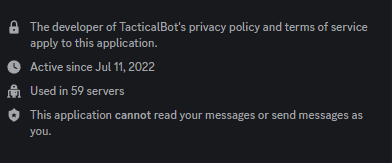
If you post the wrong count its not that hard to find out, your bots in approximately 59 servers right now.
https://i.imgur.com/05UfzRW.png
 runic creek
If you submit that your bot is on 1000 servers, it will of course be deleted
restive otter
jaunty plank
hey! youll need to use our api <https://docs.top.gg/api/bot/#post-stats>
Is there a rate limit for api requests ?
jaunty plank

 coral flicker
~~Hopefully someone can help me here.
My bot in the last 2 days has randomly gone offline around the same time. It's in around 200 servers. Errors do not show anything crazy, but today I did see a few disnake errors around "Interaction took more than 3 seconds to be responded to.". I assume these happened just before it started to die.
When I try to rerun to start it up it just hangs and shows nothing... yesterday after a few attempts 20mins it starts working again. I have nothing to work with here and its frustrating.
Any ideas?~~
jaunty plank
wrong channel, seems like a #development question not one related to the topgg api
 upper dock
Can we get something like this? https://docs.discordbotlist.com/commands-list

Show your Discord Bot commands on discordbotlist.com
solid imp
upper dock
Can we get something like this? https://docs.discordbotlist.com/commands-list
wrong server
oh nvm, nope, top.gg doesn't support something like that
 clear pecan
Hi, I use topggpy module and I want to get if a user has voted for my bot on top.gg, I do
self.bot.topggpy = topgg.DBLClient(bot, dbl_token, autopost=False)
and after that:
print(await self.bot.topggpy.get_user_vote(interaction.user.id))
But I am forbiden:
topgg.errors.Forbidden: Forbidden (status code: 403).
Someone know why?
clear pecan
yes but the token work fine for my vote weebhook
and it work fine with post guild count
await self.bot.topggpy.post_guild_count(guild_count=guilds_count, shard_count=self.bot.shard_count)
webhooks do not interact with the api itself
though as already mentioned, 403 usually means your token is invalid
clear pecan
yes xD
but for post count it work fine
and I have reverified and is it the good token
the token is here right?

I have copied the token here and put in dbl_token variable:

Here is the headers that topggpy send when It ask to get user vote

there are the token
and It work when I do post guild count
what I do wrong?
I have reseted my bot token and now I don't have 403 error but 401
and now 403
bruh I don't understand anything
I don't now why my bot token don't work fine
oh okayyy I have found why
the stable version (1.4.0) don't work with get_user_vote
you need to update to 2.0.0a0 version
clear pecan
finnaly no
sometime that work, sometime no
maybe ratelimit but I don't have the 429 code error
 rose briar
what it means ? 504, message='Gateway Time-out', url=URL('https://top.gg/api/bots/
it happen today
runic creek
Probably a problem with the site itself
hushed acorn
yes it’s a server error
 tidal wind
rose briar
what it means ? `504, message='Gateway Time-out', url=URL('https://top.gg/api/bo...
tidal wind
rose briar
what it means ? `504, message='Gateway Time-out', url=URL('https://top.gg/api/bo...
This means that the request to the API endpoint of the website "top.gg" timed out. The 504 status code indicates that the server didn't receive a timely response from an upstream server, and is usually a temporary issue.
 wispy niche
I can't add bots to my discord
rain heart
LMAO
tidal idol

 meager meteor
Why is top.gg server count post giving me this error ?
Unauthorized (status code: 401)
rain heart
invalid token provided
meager meteor
rain heart
invalid token provided
Doesn't make sense as it worked an hour ago lol
 wild remnant
I tried searching for my issue - I get the same issue as the message I replied to, but doesn't seem like there's a solution to it yet.
I randomly get the error:
line 433, in _handle_request
    resp = await request_handler(request)
           ^^^^^^^^^^^^^^^^^^^^^^^^^^^^^^
line 504, in _handle
    resp = await handler(request)
           ^^^^^^^^^^^^^^^^^^^^^^
line 132, in _bot_vote_handler
    self.bot.dispatch("dbl_vote", BotVoteData(**data))
                                  ^^^^^^^^^^^^^^^^^^^
line 279, in __init__
    super().__init__(**parse_vote_dict(kwargs))
                       ^^^^^^^^^^^^^^^^^^^^^^^
line 19, in parse_vote_dict
    query_dict = {k: v for k, v in [pair.split("=") for pair in query.split("&")]}
                 ^^^^^^^^^^^^^^^^^^^^^^^^^^^^^^^^^^^^^^^^^^^^^^^^^^^^^^^^^^^^^^^^^
line 19, in <dictcomp>
    query_dict = {k: v for k, v in [pair.split("=") for pair in query.split("&")]}

ValueError: not enough values to unpack (expected 2, got 1)
on votes. Votes work most of the time (~98%+) but I randomly get this error at times. I'm not sure what its caused by.
Using Python 3.11 / topggpy library
tidal wind
Lol
 proud whale
 runic tapir
wild remnant
I tried searching for my issue - I get the same issue as the message I replied t...
runic tapir
wild remnant
I tried searching for my issue - I get the same issue as the message I replied t...
From what we gathered it was a user who had vote reminders on. It was resolved when they turned it off. Honestly have no clue why and not sure if they will fix it..
rain heart
Sounds like broken query parameters on the url then
If you're referring to vote reninders on like a bot
 civic geyser
How to get total votes of user
jaunty plank
civic geyser
How to get total votes of user
We dont track how many times an individual user voted, youll need to use webhooks and track how many times they have voted yourself.
rain heart
as woo said, the api doesnt provide that data
civic geyser
🥲
clear pecan
Hello, I have do this code:
# post guild count to top.gg with aiohttp
import aiohttp
import asyncio


token = "my token x)"


async def post_guild_count(guild_count):
    async with aiohttp.ClientSession() as session:
        async with session.post(
            'https://top.gg/api/bots/893494390142697493/stats',
            data={'server_count': guild_count},
            headers={"Authorization": token}
        ) as response:
            print("Status:", response.status)
            print(await response.json())

asyncio.run(post_guild_count(18798))```but sometime top.gg respond 401
and sometime 200
[jourdelune@jourdelune-OptiPlex-3050 test]$ /bin/python3.11 /home/jourdelune/Bureau/test/tmp.py
Status: 401
{'error': 'Unauthorized'}
[jourdelune@jourdelune-OptiPlex-3050 test]$ /bin/python3.11 /home/jourdelune/Bureau/test/tmp.py
Status: 200
{}
I run the same code.
and the stats are not update in top.gg: https://top.gg/bot/893494390142697493
rain heart
Shows 18k on my end
rain heart
Shrug
clear pecan
okay xD
wild remnant
rain heart
If you're referring to vote reninders on like a bot
we're not referring to vote reminders at all, just the normal vote itself using the sample code:
    @commands.Cog.listener()
    async def on_dbl_vote(self, data):
am referring to the error, that is the logic on parsing the query string, aka a thing provided by top.gg (for example https://top.gg/bot/botid/vote?voteReminderIdentifier=19324934839)
unsure why that error occurs though
not enough values to unpack (expected 2, got 1) could hint towards a query parameter not being completed, such as ?voteReminder but it expected ?voteReminder=19291
are you able to actively reproduce it?
wild remnant
I'll try and test it when I can vote
rain heart
rain heart
`not enough values to unpack (expected 2, got 1)` could hint towards a query par...
because if thats caused by this case then thats incorrectly parsed within the library
brisk furnace
How do I update the profile picture of my bot on Top.gg up to date with the bot's Discord profile picture?
runic creek
Click "refresh data" on your bot page and then click edit and save
Then just wait for it to update
Also direct such questions next time to #support
brisk furnace
runic creek
Also direct such questions next time to <#714045415707770900>
Thank you for the response. I thought it would be updated via the API like bot stats, therefore I asked here. Sorry for the inconvenience.
restive otter
When I request to the api, 200 code is nice. But what is the code for rate limit?
jaunty plank
429
 elder phoenix
i want to connect my servers custom bot with top.gg to reward ppl with currency etc when they vote. i need to add the custom bot to top gg right to get its api. but it got rejected for not having help command i dont know how this works
 shut hornet
 solid imp
shut hornet
solid imp
shut hornet
you can simply ignore this error, disconnections are a common thing
restive otter
Where can I find an example of request get and post (with setup) ?
jaunty plank
I dont know aiohttp, but their docs probably have examples on how to send a request, how to set the method, headers, and body if applicable.
shut hornet
solid imp
you can simply ignore this error, disconnections are a common thing
topgg update ??
solid imp
shut hornet
topgg update ??
What do you mean?
shut hornet
solid imp
What do you mean?
server down for update ?
solid imp
shut hornet
server down for update ?
Could be, could be not
rain heart
text probides you a unformatted string
 rustic obsidian
How do I test this voting feature?
 vernal isle
.text() = logically, text.
If you want a dict, you may want .json().
 haughty peak
i tried the test vote thing on webhooks page, and it just keeps spamming my webserver with test votes. isnt it supposed to send it only like once?
jaunty plank
haughty peak
i tried the test vote thing on webhooks page, and it just keeps spamming my webs...
You need to respond to the webhook with a successful status.
haughty peak
oh-
jaunty plank
webhooks retry if they get no response, since they think you didnt receive them.
Some error statuses will result in a retry too.
jaunty plank
Nope, you just need to respond to the webhook
 tight sable
Hey, I know I might sound dumb but I'm really new to programming. I'd appreciate if someone can explain this code to me & help me in setting it up within my bot.
For context, I'm willing to reward a user with currency & items as they drop a vote on top.gg as well as send them a dm.
Also, I'm done reading the docs and pinned messages!
import topgg

# This example uses topggpy's webhook system.
bot.topgg_webhook = topgg.WebhookManager(bot).dbl_webhook("/dblwebhook", "password")

# The port must be a number between 1024 and 49151.
bot.topgg_webhook.run(5000)  # this method can be awaited as well


@bot.event
async def on_dbl_vote(data):
    """An event that is called whenever someone votes for the bot on Top.gg."""
    if data["type"] == "test":
        # this is roughly equivalent to
        # `return await on_dbl_test(data)` in this case
        return bot.dispatch("dbl_test", data)

print(f"Received a vote:\n{data}")```Is your question focused purely on this code, or do you not know what webhooks are/how they work too?
tight sable
jaunty plank
Is your question focused purely on this code, or do you not know what webhooks a...
pretty much the second one
I know about discord webhooks and what they're used for, and I read the pinned message explaining the top.gg webhooks
jaunty plank
Webhooks use http for you to receive requests.
Topggs servers will send an http request on the url you provide and that will fire the on_dbl_vote event containing this data https://docs.top.gg/resources/webhooks/#bot-webhooks
giving rewards will depend on your database
tight sable
jaunty plank
Webhooks use http for you to receive requests.
Topggs servers will send an http...
bot.topgg_webhook = topgg.WebhookManager(bot).dbl_webhook("/dblwebhook", "password")```
can you tell me what's /dblwebhook and password?/dblwebhook is the path of the url
http://IP:port/dblwebhook
Password is a unique code you choose which topgg will send in the webhook headers, its for you(or well the library) to verify it came from topgg
you can set both to whatever you want, as long as they follow basic rules(path starts with /, password needs to be filled in on topgg)
tight sable
jaunty plank
/dblwebhook is the path of the url
`http://IP:port/dblwebhook`
Password is a u...
and what's port?
also, I can extract voter's id from the data like this right?
@bot.event
async def on_dbl_vote(data):
user_id = int(data["user"])```Port is a networking term, its a way for a server to have multiple webservers on one machine(or on one ip)
Its not too important, as long as you have no other programs listening on that port, and its publicly accessible
its set here
# The port must be a number between 1024 and 49151.
bot.topgg_webhook.run(5000)  # this method can be awaited as well
oh so I can just copy paste the code without thinking much about it
jaunty plank
tight sable
also, I can extract voter's id from the data like this right?
```py
@bot.event
a...
looks right to me, i'm not a py dev, but looks right 👀
I didnt know discordpy uses ints for ids, interesting.
tight sable
jaunty plank
looks right to me, i'm not a py dev, but looks right 👀
I didnt know discordp...
alright lastly, for the /dblwebhook and password, I can type anything here & then type the same thing inside my code? https://prnt.sc/jRCw3jIW2Ltn
 rain heart
yes
jaunty plank
webhook url needs to be a url.
tight sable
jaunty plank
webhook url needs to be a url.
can you gimme an example of webhook url which is a url 😊
rain heart
http://example.com/dblwebhook
jaunty plank
The url will depend on where the code is hosted, the webhook url has to reach it.
tight sable
jaunty plank
The url will depend on where the code is hosted, the webhook url has to reach it...
Do I’ve to get the url from somewhere?
jaunty plank
Its going to depend.
For example, if I'm hosting from a vps I would use http://MyVPSIP:PORT/PATH
tight sable
jaunty plank
Its going to depend.
For example, if I'm hosting from a vps I would use `http:/...
What if I’m hosting my bot on Visual studio code for now?
jaunty plank
visual studio code is an ide, not a host.
using webhooks from a home computer is not recommended, but it is possible.
Youll need to configure your router to portforward the port you set in code.
The port forward will need to be configured to go to your computer.
Doing this will depend on your router, ever router has its own way of doing it.
The url will be
http://yourHomeIP:PORT/Path
The home IP will need to be the public IP that topgg can reach you at.
tight sable
jaunty plank
The url will be
`http://yourHomeIP:PORT/Path`
The home IP will need to be the p...
chatgpt suggested me that I can create a webhook from webhook.site, is that service trustable/efficient? I don't really trust chatgpt too much lol
rain heart
dont rely on chatgpt lol
jaunty plank
I've never used it, not entirely sure what it does
tight sable
jaunty plank
I've never used it, not entirely sure what it does
well I see, what's the easiest way for me to get myself a webhook url  I'm so lost atm
jaunty plank
👀 It might help to learn about webhooks and urls.
a url in the most simplified way is just a way for a computer/server to send a request to another.
In this case, its just the url to your home router(with the router port forwarding requests), on a port and path.
Dont think about it like something you get, its something you already have.
tight sable
i see
jaunty plank
http://YOURHOMEIP:5000/dblwebhook
Replace YOURHOMEIP with your public ip, you can find this by googling "whats my ip" with all vpns and proxies turned off.
that would be the url
youll still need to port forward however
https://portforward.com/router.htm
^ can help with portforwarding on your router.
Port Forward
Open ports on your router with our port forwarding guides. We have guides specific to your router.
tight sable
jaunty plank
youll still need to port forward however
I see, what's port forwarding & what are it's uses/features?
jaunty plank
well, its a big topic.
When a request comes in on a proper server the server is assigned an IP, that IP only goes to that server so requests know exactly where to go.
When hosting a webservice like webhooks from home your router has an IP, that IP serves all your devices at home, so your router doesn't know which one to send it to.
routers have portforwarding, all that means is it sends all incoming requests on a specific port(5000 in your case) to a specific computer on your network.
tight sable
jaunty plank
well, its a big topic.
When a request comes in on a proper server the server is...
I see, that makes it clear
rustic obsidian
How do I get the IP of my VPS?
rustic obsidian
rain heart
that IP is provided by your hosting provider
My VPS doesn't provide static IPs yet.
runic creek
Can you provide the name of this site?
tight sable
jaunty plank
well, its a big topic.
When a request comes in on a proper server the server is...
Hey, I used a website called make.com to create a webhook, when I'm running send test on top.gg, it's successfully determining the entry. https://prnt.sc/2NldI-Y1sRQS

However, when I placed this webhook in my code next to my password, I got some error
tight sable
rain heart
What is the error
that path should start with /
rain heart
Because that is the path, to elaborate
What the webhook option does within your code is to host a webserver that handles whatever path is set there, most commonly /dblwebhook
That is not where you paste in a webhook url
The webserver WITHIN your code is to be able to process webhook requests made to that webserver within your code
tight sable
bot.topgg_webhook = topgg.WebhookManager(bot).dbl_webhook("https://hook.eu1.make.com/hasadjhjadsadsa","abc1234")
bot.topgg_webhook.run(5000) ```You cannot use a third party service and expect it to work directly on your code
tight sable
thats not my real webhook/password but
rain heart
Yes that is not correct
tight sable
thats an example of what I'm putting in
rain heart
That is not what its meant for
tight sable
rain heart
That is not what its meant for
Oh, what I should be putting in there
wait isn't there a way to just do it with bot's top.gg token?
rain heart
That is supposed to be a path that the webhook manager is going to setup within the webserver its going to host
So for example, /dblwebhook in there would result in the webserver setting up that path to be http://example.com/dblwebhook
tight sable
oh
rain heart
tight sable
wait isn't there a way to just do it with bot's top.gg token?
There is if your goal is not to use webhooks
Read the docs
tight sable
lemme do that
rain heart
text returns the plaintext response
.json will attempt to convert it into a dictionary right away
I suggest using .text() and parsing it yourself using json to be able to catch errors
 river stream
How do I create a bit for support/help in my server
rain heart
 hushed meadow
.
rain heart
?
 heavy crater
How do I send a DM to a person if he/she voted the bot
 slow shore
Hi
rain heart
heavy crater
How do I send a DM to a person if he/she voted the bot
Get the user from the id provided on the vote data, check if they share a server, dm
rain heart
Read the pinned messages
 dark thunder
/bots
rain heart
what do you need help with
rain heart
what do you mean with "Not working"
 kindred kindle
rain heart
what do you mean with "Not working"
kindred kindle
rain heart
what do you mean with "Not working"
idk what to do
rain heart
please describe what you have tried and what your goal is
kindred kindle
rain heart
please describe what you have tried and what your goal is
I want to add
How many server that my bot is in it
kindred kindle
what i do?
rain heart
read the docs, it describes how you're able to use the API within your bot to post your server stats
kindred kindle
idk how to do
rain heart
 restive otter
How to do to create an event who send a message when the users who vote for my bot in real time ?
glass heron
restive otter
How to do to create an event who send a message when the users who vote for my b...

For javascript
restive otter
glass heron
For javascript
But is top.gg webhook compatible with discord bot program ?
What happen if I don't await the bot.togg.run_webhook
rain heart
if you're unable to provide your own code within that bot program, you likely wont be able to use it
restive otter
rain heart
if you're unable to provide your own code within that bot program, you likely wo...
So it works with discord bots and discord webhooks ?
jaunty plank
it doesnt work with discord webhooks
restive otter
jaunty plank
it doesnt work with discord webhooks
So top gg webhooks are for discord bots
I was confused between Discord and top.gg webhooks
 thorny garnet
Hello
 tame mortar
restive otter
I was confused between Discord and top.gg webhooks
tame mortar
restive otter
I was confused between Discord and top.gg webhooks
TopGG webhook in basic terms, help you know when certain things are happening on your bots' page (assuming cause im new also)
thorny garnet
I joined this server recently because the site shut down on me
restive otter
Is there a rate limit with top gg webhooks? For example if more than 60 persons vote for my bot in less than 60 seconds, will I be rate limit ?
runic creek
No, that's why webhooks are a good way to get votes
 mighty scroll
i wanna fetch 'reminders' of my bot and tried using voting sdk by installing it from github but facing this error
 tidal idol
show how you are importing it into your code
jaunty plank
voting sdk? 👀
how in the world did you find that
tidal idol
lol
tidal idol
mighty scroll
i wanna fetch 'reminders' of my bot and tried using voting sdk by installing it ...
it't not installing because it isn't a valid package
https://www.npmjs.com/package/@top-gg/sdk is the real package
npm
Official Top.gg Node SDK. Latest version: 3.1.3, last published: a year ago. Start using @top-gg/sdk in your project by running npm i @top-gg/sdk. There are 7 other projects in the npm registry using @top-gg/sdk.
jaunty plank
its unreleased
jaunty plank
I didnt realize we put it on our public github
rain heart
Voting sdk lol
jaunty plank
its not even an sdk 🤷
restive otter
runic creek
No, that's why webhooks are a good way to get votes
So I need to stock the users from myself ?
runic creek
You get a vote, save it to a database and do whatever you want with it
jaunty plank
🤷
Yeah, using npm link
theres a devsetup.md file somewhere, it doesnt include the fact it needs to be built.
but follow those steps and build it and you can use it.
Its a super simple lib, you can figure it out just by reading the code tbh.
pretty much
 hearty lintel
 meager harness
Api endpoint for reviews?


 restive otter
How To Make Users Vote Every 12hrs?
runic creek
You can't force anyone to vote
You can remind them that they can vote 12 hours after their last vote
jaunty plank
If you do that they also need a method to opt out of reminders
mighty scroll
tidal idol
it't not installing because it isn't a valid package
I found it on github of topgg
nvm i've fixed my issue
restive otter
jaunty plank
If you do that they also need a method to opt out of reminders
that's not what I meant exactly
Basically I want to lock a feature until they vote
They get the feature for 12hrs until they can vote again
rustic obsidian
https://docs.top.gg/api/bot/#individual-user-vote
Didn't you guys say top.gg doesn't keep track of user votes?
 untold sparrow
rustic obsidian
https://docs.top.gg/api/bot/#individual-user-vote
Didn't you guys say top.gg doe...
untold sparrow
rustic obsidian
https://docs.top.gg/api/bot/#individual-user-vote
Didn't you guys say top.gg doe...
No? That endpoint has existed for years
rustic obsidian
untold sparrow
No? That endpoint has existed for years
So the value of the "votes" key is the total votes of that specific user?
untold sparrow
rustic obsidian
So the value of the `"votes"` key is the total votes of that specific user?
The voted property for https://top.gg/api/bots/:bot_id/check is a Boolean value represented by an integer so 0 for hasn't voted and 1 for has voted
untold sparrow
rustic obsidian
Wasn't clear what that value represented.
I agree on that point  I'll see if we can change that to make it clearer
restive otter
What's weird is the use of 1/0 and not true/false
 bronze frigate
How can we send a reminder to the user that you can vote now?
restive otter
wait for 12 hrs
send user a dm
rain heart
if not can vote:
dont_send()
 summer kernel
is there any docs to learn how can i use?
rain heart
summer kernel
thank u
restive otter
me when channel description
 granite mist
what format is the data sent to the webhook url? json?
i think its x-www-form-urlencoded but just to be sure
jaunty plank
json
tidal idol
 gilded plover
tidal idol
https://docs.top.gg/api/bot/#post-stats
gilded plover
tidal idol
https://docs.top.gg/api/bot/#post-stats
Like where to put that
 brittle cape
guys, why my result is undefined?
 gilded plover
tidal idol
https://docs.top.gg/api/bot/#post-stats
gilded plover
tidal idol
https://docs.top.gg/api/bot/#post-stats
Wait so i got it but i have a doubt.
While using topgg autoposter
What should we put in that "client part" next to the topggtoken
Like should we put the client ID or something??
 pliant shell
brittle cape
guys, why my result is undefined?
pliant shell
brittle cape
guys, why my result is undefined?
That is strange
Can you send me the whole script?
I will do the best I can
restive otter
the error is obvious
pliant shell

restive otter
 pliant shell
Oh
restive otter
oh and also the code is completely invalid
@brittle cape please learn js before using it
restive otter
Then wait for it to be approved
restive otter
restive otter
Then wait for it to be approved
have you tried reading the context
restive otter
restive otter
have you tried reading the context
Have you tried reading the messages in the first place?
Published is not the same as approved, clarification messages exist.
Then wait for it to be approved
Meaning after you've submitted/published it, then you need to wait for it to be approved.
And yes, the message was a message for both the user having issues and the other user above.
 raw hornet
Does anyone know if there is an issue right now with vote webhooks being called twice. My server sometimes logs 2 requests from top.gg
 old kernel
raw hornet
Does anyone know if there is an issue right now with vote webhooks being called ...
old kernel
raw hornet
Does anyone know if there is an issue right now with vote webhooks being called ...
See #support as i already sent a video 😸
raw hornet
old kernel
See <#714045415707770900> as i already sent a video 😸
thats not what I meant