#topgg-api
1 messages · Page 2 of 1
 broken latch
 jaunty plank
yep
jaunty plank
should work either way
 west shuttle
jes
 rain heart
then the port is open, what happens when you try to access the same thing when your bot is running
aka start the bot, then go to http:// serverip:3000
west shuttle
got an result
rain heart
what exactly
 summer nebula
west shuttle
rain heart
no I mean start your bot, then check the same page
summer nebula
west shuttle
rain heart
no I mean start your bot, then check the same page
i do it
rain heart
the netcat is still running is what I'm seeing
jaunty plank
broken latch
Everything Is Right Do I Have To Vote Now?
a test vote should work.
west shuttle
rain heart
the netcat is still running is what I'm seeing
jes i started the bot and than i run netcat
i do it again
rain heart
do not run netcat
west shuttle
ok
rain heart
start your bot, then visit the page with the port your bot is using
west shuttle
unkown website
rain heart
are you sure the Webserver is running on the port? It would tell me it is not

 rain heart
can't help much then, your server is reachable under the port but something within your code does not work
 rain heart
 dunno, add some debug lines along where you start the Webserver
west shuttle
öhm 👀
west shuttle
rain heart
<:02Shrug:435822457883066368> dunno, add some debug lines along where you start ...
i used the example https://docs.top.gg/libraries/python/


 hallow epoch
west shuttle
hallow epoch
west shuttle
Hey which token you put in Authorization?
jaunty plank
you decide the authorization
west shuttle
hallow epoch
Hey which token you put in Authorization?
 jaunty plank
nope, it sends a webhook to you when someone voted. it doesnt check, it receives.
if you want to check rather than receive you can use this endpoint. https://docs.top.gg/api/bot/#individual-user-vote
 jaunty plank
broken latch
jaunty plank
broken latch
whats on line 101 of app.js?
broken latch
jaunty plank
whats on line 101 of app.js?
Wait thanks
I've been dealing with this for 2 days. I don't know where is the error. i will die
jaunty plank
The error is on line 101, which seems to be code unrelated to the topgg api.
It's probably better to ask in #development, I don't know quickdb so I won't be much help.
broken latch
Okay
 molten summit
hi,
how to hide Shards count?
rain heart
that's not possible if you've posted it once already, you can set it to 0 likely
rain heart
west shuttle
i used the example https://docs.top.gg/libraries/python/
was it resolved by now?
west shuttle
rain heart
was it resolved by now?
yes i found a solution
 fluid venture
molten summit
hi,
how to hide Shards count?
fluid venture
molten summit
hi,
how to hide Shards count?
use css and set the element display to none 💀
 fluid venture
 lyric mural
what endpoint should i use to get this username
lyric mural
lyric mural
what endpoint should i use to get this username
lyric mural
{'error': 'Unauthorized'} , when i try get result in py
fluid venture
lyric mural
`{'error': 'Unauthorized'}` , when i try get result in py
send auth headers
ur topgg bot token
fluid venture
yeah cuz u are loggedin on topgg
lyric mural
oo
 coral arrow
I need help, i make my bot in bdfd, the bot always says i didn't vote even if i vote
 restive otter
coral arrow
I need help, i make my bot in bdfd, the bot always says i didn't vote even if i ...
restive otter
coral arrow
I need help, i make my bot in bdfd, the bot always says i didn't vote even if i ...
Bot designer for discord?
coral arrow
Yes
coral arrow
Yes
restive otter
Does it hv webhook set?
jaunty plank
I'm not sure if bdfd supports webhooks
restive otter
jaunty plank
I'm not sure if bdfd supports webhooks
Same
jaunty plank
a quick glance of their docs it doesnt appear to support webhook listeners.
You'll likely need to use another service for your webhooks.
coral arrow
jaunty plank
I'm not sure if bdfd supports webhooks
They do
there are so many people that do rewards for voting in bdfd
but it doesn't work for me
the supporters from bdfd told me to ask here
jaunty plank
I wouldn't know how, unless bdfd supports normal javascript
restive otter
any way to find if user has voted server?
ik there is thing if voted bot, but i'm looking for server
ping me when u reply
jaunty plank
restive otter
any way to find if user has voted **server**?
Your only option on servers is Topgg webhooks(not to be confused with discord webhooks).
https://docs.top.gg/resources/webhooks/
 coral arrow
jaunty plank
I wouldn't know how, unless bdfd supports normal javascript
coral arrow
jaunty plank
I wouldn't know how, unless bdfd supports normal javascript
there's a way for get http things in bd script, is pretty new i think
jaunty plank
yep, you can get stuff using the api. just not webhooks(afaik)
heres the docs on checking if a user voted using the api.
https://docs.top.gg/api/bot/#individual-user-vote
 misty dove
Yo nothing is working...
Theres an error code in my browser when enter the webhook
405: Method Not Allowed
topggpy btw
jaunty plank
misty dove
Yo nothing is working...
Theres an error code in my browser when enter the webho...
Webhooks don't work in browsers, they are webhooks not websites.
misty dove
hmm But when i click on Test nothing happens
jaunty plank
are these two set to the same thing?
https://i.imgur.com/nGm1lXz.png
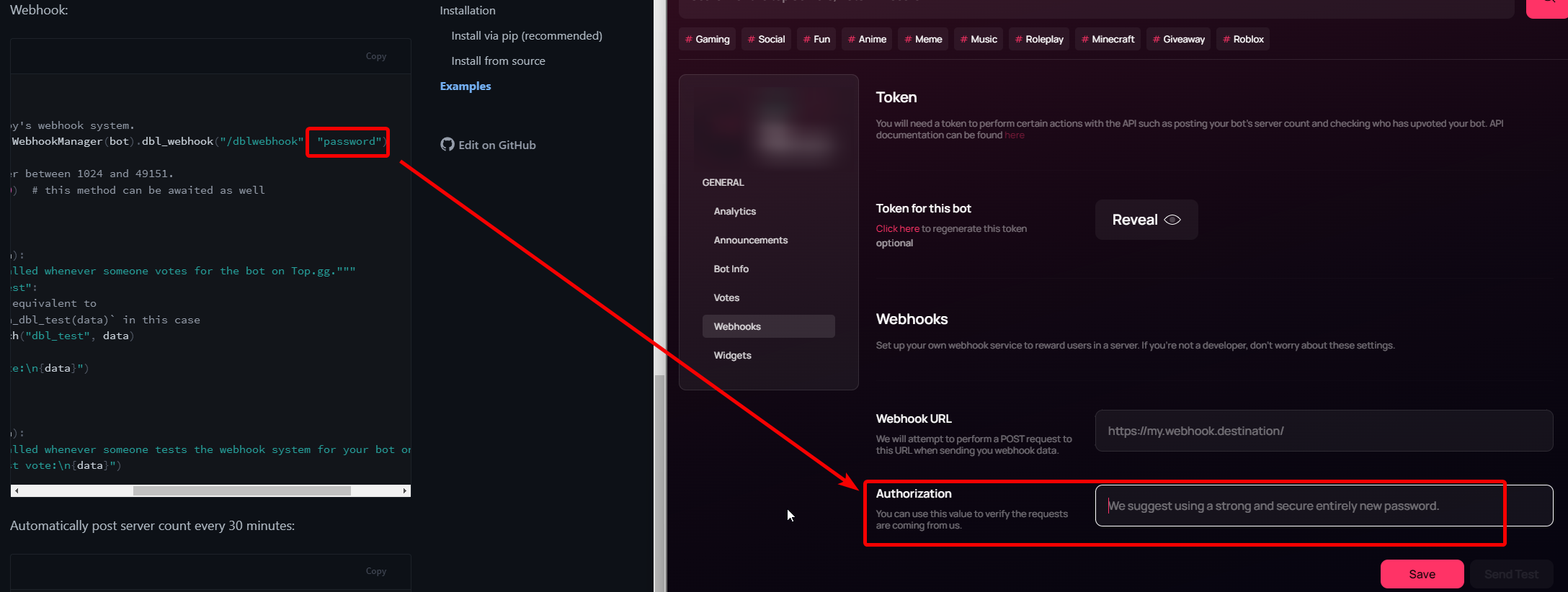 misty dove
yea
misty dove
jaunty plank
are these two set to the same thing?
https://i.imgur.com/nGm1lXz.png
what should i do in the Webhook URL Box?
at the top.gg page
ig that's not right what I am doing
jaunty plank
thats the url to your webhook listener, its typically something like
http://yourVPSIP:port/dblwebhook
misty dove
okay
how i get the port from my local machine
or must i do this on a server?
@jaunty plank
jaunty plank
If you want to do it from a local machine youll need to configure your router(which will depend on your router model) so that topgg can reach your webhook.
youll also need to provide your public ip, not the local one.
The port you set in code
# The port must be a number between 1024 and 49151.
bot.topgg_webhook.run(5000)  # this method can be awaited as well
Oh okay
 verbal wyvern
how do I get the server count on my bot?

 abstract mothBOT
@verbal wyvern
To have your bot's server count displayed on Top.gg, please read the documentation on server/shard posting.
verbal wyvern
So I posted my server count, but it hasn't appeared https://top.gg/api/bots/840978589624958977/stats here?
 old kernel
after 1 hour
still error is showing
TopGGAPIError: 429 Too Many Requests
0|Bot  |     at Api._request (/home/ubuntu/bot/node_modules/@top-gg/sdk/dist/structs/Api.js:76:19)
0|Bot  |     at runMicrotasks (<anonymous>)
0|Bot  |     at processTicksAndRejections (node:internal/process/task_queues:96:5)
0|Bot  |     at async Api.postStats (/home/ubuntu/bot/node_modules/@top-gg/sdk/dist/structs/Api.js:99:9)
0|Bot  |     at async Timeout._onTimeout (/home/ubuntu/bot/src/events/ready.js:19:9) {
0|Bot  |   response: Response {
0|Bot  |     size: 0,
0|Bot  |     timeout: 0,
0|Bot  |     [Symbol(Body internals)]: { body: [PassThrough], disturbed: true, error: null },
0|Bot  |     [Symbol(Response internals)]: {
0|Bot  |       url: 'https://top.gg/api/bots/stats',
0|Bot  |       status: 429,
0|Bot  |       statusText: 'Too Many Requests',
0|Bot  |       headers: [Headers],
0|Bot  |       counter: 0
0|Bot  |     }
0|Bot  |   }
0|Bot  | }
even i removed the part where bot sending much requests
restive otter
it doesnt show the correct server count on the bots page. is this a known issue?
 thick cedar
How do i get api?
jaunty plank
restive otter
it doesnt show the correct server count on the bots page. is this a known issue?
are you sure you're posting the count correctly?
 tidal idol
old kernel
after 1 hour
tidal idol
old kernel
after 1 hour
Probably worth waiting longer, as Cloudflare will be the one rate limiting you and it can take up to 24 hours to clear up
jaunty plank
thick cedar
How do i get api?
our api documentation is listed here if thats what you're asking about.
https://docs.top.gg/
 thick cedar
@jaunty plank so i have my token but i cannot edit the
{
"Authorization": "your-topgg-token-here"
}
What do i do here?
I cannot edit
jaunty plank
thats an authorization header, you set it when you send the http request.
restive otter
jaunty plank
are you sure you're posting the count correctly?
nvm i got thanks, it was because i didnt put the autoposter in the shard file

thick cedar
jaunty plank
thats an authorization header, you set it when you send the http request.
Can u tell me the steps please
jaunty plank
what language?
thick cedar
jaunty plank
what language?
Python
jaunty plank
and what are you trying to do with the api?
If you're unsure of what you can do with the api, heres a list of features the python library supports.
https://topggpy.readthedocs.io/en/stable/api.html#client
thick cedar
jaunty plank
and what are you trying to do with the api?
I want to make voter only command
thick cedar
jaunty plank
https://topggpy.readthedocs.io/en/stable/api.html#topgg.DBLClient.get_user_vote
I asked an Verified bot devloper he said that i have to use api
jaunty plank
yep, that library is the official python library for the Topgg api.
thick cedar
jaunty plank
yep, that library is the official python library for the Topgg api.
ok
Do i need to import topgg?
For that?
jaunty plank
yep, it needs to be installed(https://docs.top.gg/libraries/python/#installation) and imported
import topgg
ok so how can i get api?
jaunty plank
I'm not sure what you mean by that.
thick cedar
thick cedar
I asked an Verified bot devloper he said that i have to use api
@jaunty plank here
jaunty plank
the python library uses the api
thick cedar
ohk thank You
thick cedar
jaunty plank
the python library uses the api
Thank you so much for helping me
 cunning citrus
how do i make a vote command
discordpy btw
wasnt there like a site where it explains?
im intending to make a vote command which gives back a message
rain heart
 dawn oar
Hi
cunning citrus
rain heart
https://docs.top.gg
couldnt find my answer exactly..
fluid venture
cunning citrus
couldnt find my answer exactly..
https://gist.github.com/moyshik7/6d61e5a5c4307038103a769b137c50eb
u can refer to this but this is in js

Gist
 agile quail
excuse me but was there some kind of unnanounced change to how stats are recieved?
System.FormatException: Cannot add value because header 'Authorization' does not support multiple values.
this is very recent
jaunty plank
agile quail
System.FormatException: Cannot add value because header 'Authorization' does not...
Are you using a topgg library? or making the request yourself?
is it possible you've set the authorization header multiple times?
https://stackoverflow.com/a/57744638

Stack Overflow
HttpClient serviceClient = new HttpClient();
serviceClient.DefaultRequestHeaders.Add("accept", "Application/JSON");
HttpContent content = new StringContent(text);
content.Headers.Add("content-type...
agile quail
jaunty plank
Are you using a topgg library? or making the request yourself?
is it possible y...
making the reqquest myself, and this hasnt been an issue before
jaunty plank
that error seems to happen before the request is even sent.
If you cant find where the header is being set twice you can remove the previous add.
request.Headers.Remove("Authorization");
and re-add it with
request.Headers.Add("Authorization", "Authorization Here");
agile quail
jaunty plank
If you cant find where the header is being set twice you can remove the previous...


jaunty plank
agile quail
I'm not a c# dev so bare with me, but is _http.DefaultRequestHeaders.Add running every request?
from what I gather you're clearing the request headers but not the default headers.
If you're setting the default every time it feels like It'll error
(correct me if I'm wrong, I admit I might be)
agile quail
seems like im the idiot here
every time its run, it updates the existing http client service
and it doesnt like that, so for future people here, make sure to initialize a new client
or initialize it once in the constructor if that specific client isnt gonna be used anywhere else
 jaunty salmon
@rough crater ^
 wooden vale
agile quail
every time its run, it updates the existing http client service
wooden vale
agile quail
every time its run, it updates the existing http client service
Are you using DI? How are you registering this class?
    private readonly HttpClient _httpClient;

    public SomeClass(HttpClient httpClient)
    {
        _httpClient = httpClient;
        SetupHttpClient();
    }

    private void SetupHttpClient()
    {
        _httpClient.DefaultRequestHeaders.Accept.Clear();
        _httpClient.DefaultRequestHeaders.Accept.Add(new MediaTypeWithQualityHeaderValue("application/json"));
        _httpClient.DefaultRequestHeaders.TryAddWithoutValidation("Authorization", "Bot " + _botToken);
    }
I'd also make sure your registering it as an HttpClient and not a singleton or else.
services.AddHttpClient<ISomeClass, SomeClass>();
Calling this in constructor and running clear on each construct should ensure you're not duplicating header values. Unless you try registering that same header inside your function logic.
Reach out to me via DM if you need further assistance.
 quiet harbor
https://docs.top.gg/libraries/python/ - This shows examples for creating webhooks and posting data onto top.gg for bots, however, how do you do the same but for servers?
wooden vale
quiet harbor
https://docs.top.gg/libraries/python/ - This shows examples for creating webhook...
Have you tried using the same but just using your server id instead? Idk if that'll work but that's what I test personally.
A lot easier to test using something like Postman instead of writing code as well.
rain heart
the sdk is only usable for bots, you may need to create your own webhook handler for servers
wooden vale
rain heart
the sdk is only usable for bots, you may need to create your own webhook handler...
It's not even listed under the API docs. Does this endpoint even exist?
rain heart
servers does not have an API like bots does
webhooks are a thing on servers but not a whole api
wooden vale
https://docs.top.gg/api/bot/#post-stats Seeing as it's not documented, you just replace bot with server for the url or?
wooden vale
So member count for servers is just automatically queried?
rain heart
yes, that is fetched through @wild lantern
wooden vale
quiet harbor
https://docs.top.gg/libraries/python/ - This shows examples for creating webhook...
So probably just hit "Refresh Data" on the page. I don't have a server posted so can't see if that exists but it does on bot pages.
quiet harbor
Ah okay; I see. And as for posting webhooks upon receiving a vote?
rain heart
they're referring to webhooks though, not updating the member count
rain heart
rain heart
the sdk is only usable for bots, you may need to create your own webhook handler...
cc
 round salmon
can someone help me start with top.gg api
cant understand the docs of it
what shall i put in the webhook url
fluid venture
round salmon
what shall i put in the webhook url
the endpoint u want topgg send the post request to
 elder lotus
rain heart
elder lotus
rain heart
check the pinned messages
 bitter maple
tidal idol
You mean login to top.gg?
bitter maple
tidal idol
You mean login to top.gg?
I know how to login but im login in other ac and im having trouble changing it
tidal idol

Top.gg
Spice up your Discord experience with our diverse range of Discord Bots and Servers as well as other spaces to discover DAOs.
Discord
Discord is the easiest way to communicate over voice, video, and text. Chat, hang out, and stay close with your friends and communities.
bitter maple
tidal idol
https://top.gg/logout
then
https://top.gg/login
I try and it say invalid.. I have question, our ac off discord is joint to top.gg or we have to join it??
 torn vigil
 unique peak
are there any additional ways users can vote on a bot without going directly to the website? for example, can users vote using commands? or is going to the webpage and clicking 'vote' the only way to vote
 dim kettle
There is no in discord method of doing it no. This is due to the risk of vote botting and other issues with tracking legitimate votes
unique peak
dim kettle
There is no in discord method of doing it no. This is due to the risk of vote bo...
got it. so going to the webiste and clicking vote is the only way?
dim kettle
You can link directly to the vote page, but yeah thats the only way
unique peak
dim kettle
You can link directly to the vote page, but yeah thats the only way
👍 thanks!
 austere portal
how can i get the api to see if the user voted for the bot?
austere portal
@jaunty plank I'm having problem with this api here https://normal-api.ml/topgg/
dim kettle
austere portal
<@136583532972605440> I'm having problem with this api here https://normal-api.m...
Where did you get that URL from? That’s definitely not an official top.gg domain
jaunty plank
I cant even visit that site.
I'm not sure what that is but it doesn't seem from topgg
austere portal
dim kettle
Where did you get that URL from? That’s definitely not an official top.gg domain
I found it on a server
There it said that this api checked if the user had voted for the bot
dim kettle
Yeah don’t use that. It’s not something we own at all
austere portal
Ok
@jaunty plank
i wanted it to return if the user voted for the bot:
true or false
jaunty plank
Yep, it will return an object though, and using 0 or 1
{ voted: 1 }
 vestal cypress
what do i set as a webhook url? i dont have a website and i just wanted to log when users vote :/

 plucky lance
You don’t need a domain but at least need to provide the IP (and port) of your endpoint - a webserver listening for webhooks coming from topgg
vestal cypress
plucky lance
You don’t need a domain but at least need to provide the IP (and port) of your e...
oh, so like 0.0.0.0/0?
jaunty plank
vestal cypress
oh, so like `0.0.0.0/0`?
Kind of,
http://ip:port/path is pretty common for a url.
The ip must be the real public ip to your server.
vestal cypress
hmm okay
can i put two ips then, because my development device is separate from the vps the public instance of my bot runs on
jaunty plank
We only accept one at a time.
vestal cypress
alright
jaunty plank
If you test from a device which isn't a server(in a datacenter) you'll most likly need to port forward
plucky lance
As well as adding a firewall rule to accept incoming requests on the port you specified
restive otter
TopGGAPIError: 504 Gateway Time-out
    at Api._request (/home/container/node_modules/@top-gg/sdk/dist/structs/Api.js:76:19)
    at process.processTicksAndRejections (node:internal/process/task_queues:95:5)
    at async Api.postStats (/home/container/node_modules/@top-gg/sdk/dist/structs/Api.js:99:9) {
  response: Response {
    size: 0,
    timeout: 0,
    [Symbol(Body internals)]: { body: [PassThrough], disturbed: true, error: null },
    [Symbol(Response internals)]: {
      url: 'https://top.gg/api/bots/stats',
      status: 504,
      statusText: 'Gateway Time-out',
      headers: [Headers],
      counter: 0
    }
  }
}
Does it reoccur or did it only happen a few times?
 arctic rivet
How can I get the all votes of my bot? Using topgg api ?
rain heart
restive otter
dim kettle
Does it reoccur or did it only happen a few times?
some times
dim kettle
restive otter
some times
If it still does not happen, you dont need to worry about it
The internet is unstable at times, so top.gg may be down, your hosting providers network may be having issues or a thousands of other reasons could cause that issue
 stray saddle
No idea what I'm doing
jaunty plank
With the api or topgg webhooks?
stray saddle
Both lol
Just got approved
Where do I get started
I mean I have the docs
but idk what to do
Well I gtg
Just make sure to mention me or reply to me with mentions on and I will come back to the message later, thanks
I just am not understanding where I put the code on my end, what type of file, what I need/can edit, etc
stray saddle
jaunty plank
With the api or topgg webhooks?
Are you available for a moment?
jaunty plank
stray saddle
I just am not understanding where I put the code on my end, what type of file, w...
Well, what are you trying to do with the api? What programming language?
jaunty plank
 stray saddle
how can I post server count?
jaunty plank
jaunty plank
https://docs.top.gg/libraries/javascript/#posting-bot-stats
The auto poster is linked right here.
The code example will post your server count every 30 minutes automatically once added to your bots code.
stray saddle
alr
Lets see if I can't make this work
What is the webhook url on the website for?
stray saddle
jaunty plank
The auto poster is linked right here.
The code example will post your server co...
What do I put in the webhook url spot
jaunty plank
You've finished with the servercount?
stray saddle
const Topgg = require("@top-gg/sdk")
const express = require("express")

const app = express()

const webhook = new Topgg.Webhook("it is setup")

app.post("/dblwebhook", webhook.listener(vote => {
  // vote will be your vote object, e.g
  //console.log(vote.user) // 395526710101278721 < user who voted\

  // You can also throw an error to the listener callback in order to resend the webhook after a few seconds
}))

app.listen(80)
That is what I need, right
How do I get the webhook url
jaunty plank
If you are using webhooks yeah, but they are uneeded for server counts.
stray saddle
?
jaunty plank
Your webhook url will be the url to your code server(host)
stray saddle
oh
It is a local server
So how can I get around that
It doesn't have it's own public ip
jaunty plank
You'll need to port forward
stray saddle
I don't understand
jaunty plank
Your router needs to be told what local ip to send requests to(forwarding) when it gets a request on a specific port.
stray saddle
Oh
jaunty plank
The process will depend on your router model
stray saddle
I am not going down that road
Not for the short term at least
Is that required for server counts?
jaunty plank
Nope, webhooks are entirely uneeded for server counts
jaunty plank
stray saddle
jaunty plank
https://docs.top.gg/libraries/javascript/#posting-bot-stats
TopGGAPIError: 401 Unauthorized (You need a token for this endpoint)
    at Api._request (/home/ubuntu/New-Bot/node_modules/@top-gg/sdk/dist/structs/Api.js:76:19)
    at processTicksAndRejections (node:internal/process/task_queues:96:5)
    at async Api.postStats (/home/ubuntu/New-Bot/node_modules/@top-gg/sdk/dist/structs/Api.js:99:9) {
  response: Response {
    size: 0,
    timeout: 0,
    [Symbol(Body internals)]: { body: [PassThrough], disturbed: true, error: null },
    [Symbol(Response internals)]: {
      url: 'https://top.gg/api/bots/stats',
      status: 401,
      statusText: 'Unauthorized',
      headers: [Headers],
      counter: 0
    }
  }
}
Did you fill in your topgg token?
stray saddle
Yes
jaunty plank
Regenerate the token, refresh the page, then copy the token again
lyric mural
where can i get dbl token?
rain heart
read the pinned messages
jaunty plank
dawn oar
How can I see my bot's server count on Top.gg
You'll need to post your server count using the api.
https://docs.top.gg/
dawn oar
I did not understand anything
int serverCount = ...; // the total amount of servers across all shards
api.setStats(serverCount);
is this coding?
please someone please explain it properly
 solid imp
dawn oar
is this coding?
solid imp
dawn oar
is this coding?
yes, it involves writing code for it to work, there's no other way to do it unfortunately
fluid venture
💀
solid imp
dawn oar
is it possible to do it from phone
not that i know of, all you need to do is make a post request to top.gg which is usually done by using a library of your choice based on the programming language you are comfortable with
dawn oar
can you please tell me step by step how to do it
solid imp
dawn oar
can you please tell me step by step how to do it
https://www.npmjs.com/package/@top-gg/sdk has all the necessary information with steps assuming you’re using javascript

npm
Official Top.gg Node SDK. Latest version: 3.1.3, last published: 8 months ago. Start using @top-gg/sdk in your project by running npm i @top-gg/sdk. There are 6 other projects in the npm registry using @top-gg/sdk.
 rain heart
not from us
restive otter
it was working before it
rain heart
nevermind
thats from us
but that error doesnt seem to be related to topggpy
post your code and wait for someone who can help
restive otter
rain heart
but that error doesnt seem to be related to topggpy
thats what am thinking
restive otter
rain heart
post your code and wait for someone who can help
np its working now!
that package deleted the discord,py
just needed to install it
well ty!
restive otter
What is dis
jaunty plank
This channel is for the topgg api
abstract mothBOT
 This channel is for suggestions, help, and bugs related to our official API libraries and documentation found at https://docs.top.gg/
If you need help with other development, please use #development.
restive otter
i did
Traceback (most recent call last):
  File "C:/Users/psstu/PycharmProjects/Astra-redesign/main.py", line 63, in <module>
    bot.topggpy = topgg.DBLClient(bot, dbl_token)
  File "C:\Users\psstu\Astra-redesign\lib\site-packages\topgg\client.py", line 98, in __init__
    self.http = HTTPClient(token, loop=self.loop, session=kwargs.get("session"))
  File "C:\Users\psstu\Astra-redesign\lib\site-packages\topgg\http.py", line 84, in __init__
    self.session = kwargs.get("session") or aiohttp.ClientSession(loop=self.loop)
  File "C:\Users\psstu\Astra-redesign\lib\site-packages\aiohttp\client.py", line 227, in __init__
    loop = get_running_loop(loop)
  File "C:\Users\psstu\Astra-redesign\lib\site-packages\aiohttp\helpers.py", line 289, in get_running_loop
    if not loop.is_running():
  File "C:\Users\psstu\Astra-redesign\lib\site-packages\discord\client.py", line 110, in __getattr__
    raise AttributeError(msg)
AttributeError: loop attribute cannot be accessed in non-async contexts. Consider using either an asynchronous main function and passing it to asyncio.run or using asynchronous initialisation hooks such as Client.setup_hook
Exception ignored in: <function ClientSession.__del__ at 0x000002575AF45280>
Traceback (most recent call last):
  File "C:\Users\psstu\Astra-redesign\lib\site-packages\aiohttp\client.py", line 336, in __del__
    if not self.closed:
  File "C:\Users\psstu\Astra-redesign\lib\site-packages\aiohttp\client.py", line 986, in closed
    return self._connector is None or self._connector.closed
AttributeError: 'ClientSession' object has no attribute '_connector'```still contains your mysql credentials
restive otter
damn wait i'm lost
rain heart
your code has your mysql credentials within it
 left thunder
@rain heartbruh yk how to make a upvote log?
solid imp
left thunder
<@669452973755072524>bruh yk how to make a upvote log?
-pins
abstract mothBOT
@left thunder
Your question is likely answered by one of pinned messages.
Please take time to read the pinned messages by clicking on this icon.
 left thunder
solid imp
-pins
left thunder
solid imp
-pins
aiit bet
restive otter
restive otter
?
left thunder
huh
left thunder
solid imp
-pins
yo im not understanding it, can you walk me through it?
solid imp
left thunder
yo im not understanding it, can you walk me through it?
what part of it are you not understanding?
left thunder
solid imp
what part of it are you not understanding?
mhh, the whole thing
like isnt there a walk through or smth
im from what i see its more js supporting
solid imp
https://docs.top.gg/api/@reference/ should cover everything! there are sdk's for other languages too
 left thunder
wheres this information coming from? like where do i get it?
 jaunty plank
left thunder
wheres this information coming from? like where do i get it?
jaunty plank
left thunder
wheres this information coming from? like where do i get it?
both you decide the value of.
the path must be start with /
left thunder
jaunty plank
both you decide the value of.
the path must be start with /
huh wdym?
jaunty plank
you are the one who decides the value of those two parameters, its not something you "get" from somewhere
left thunder
also, this is my current code, is there anything else i need?
dbl_token = "my token"
bot.topggpy = topgg.DBLClient(bot, dbl_token, autopost=True, post_shard_count=True)


@bot.event
async def on_autopost_success(ctx):
  channel = bot.guild.get_channel(1007425782592831559)
  await channel.send(f"Posted server count ({bot.topggpy.guild_count}), shard count ({bot.shard_count})")


bot.topgg_webhook = topgg.WebhookManager(bot).dbl_webhook("/dblwebhook", "password")


bot.topgg_webhook.run(5000)


@bot.event
async def on_dbl_vote(data):
    if data["type"] == "test":
        return bot.dispatch("dbl_test", data)
    channel = bot.guild.get_channel(1007425782592831559)
    await channel.send(f"Received a vote:\n{data}")


@bot.event
async def on_dbl_test(data):
    channel = bot.guild.get_channel(1007425782592831559)
    await channel.send(f"Received a test vote:\n{data}")
so its like arg?
or like, a password i can make up
jaunty plank
yep, you're the server when hosting webhooks; you're the one who gets to decide the token.
jaunty plank
thats the path for your webhook url
left thunder
so could it be smth like
bot.topgg_webhook = topgg.WebhookManager(bot).dbl_webhook("/dblwebhook", "Jalalala")
yourwebhookURL/path
left thunder
jaunty plank
yourwebhookURL/path
oh so create the webhook in my server then put its token there?
jaunty plank
do you mean discord server? 👀
because topgg webhooks are not discord webhooks. they do not work together
 jaunty plank
left thunder
also, this is my current code, is there anything else i need?
```py
dbl_token = ...
jaunty plank
left thunder
also, this is my current code, is there anything else i need?
```py
dbl_token = ...
you're receiving a request from topgg for your webhooks you just coded here.
left thunder
jaunty plank
you're receiving a request from topgg for your webhooks you just coded here.
so its creating the webhook for me then?
jaunty plank
left thunder
also, this is my current code, is there anything else i need?
```py
dbl_token = ...
I'm not sure what you mean by that, you could mean a few things.
If you mean is this code making a webhook listener, yes.
if you mean is topgg making a webhook for you, no.
left thunder
so a webhook listener, that means its waiting for a webhook
where is that webhook coming from then?
left thunder
left thunder
right here? how do i create one?
cause from what im seeing here its asking for a webhook to be provided
left thunder
from where?
where is the webhook url coming from
am i creating one from my discord server?
jaunty plank
its the url to the server your code is being hosted on(a vps, a dedicated server, replit, heroku, etc)
jaunty plank
left thunder
am i creating one from my discord server?
nope
left thunder
im so confused, im hosting on replit atm, what where do i get this url?
jaunty plank
Web pages written in HTML, CSS, and JavaScript can be hosted on Replit. HTML/CSS/JS repls are given a unique URL that can be shared with your friends, family, peers, and clients.
it will be yourrepliturl/dblwebhook
left thunder
like this?
https://Truth-Bot.bradymc222.repl.co/dblwebhook
jaunty plank
I have never used replit, so I'm not sure how they work.
If that's what the docs say then it should work
jaunty plank
I'm only answering your questions.
left thunder
jaunty plank
I'm only answering your questions.
is the url to go in the code or on the website?
jaunty plank
the url gets filled in on the website
left thunder
so the code or the website?
and u still havent told me if Jalala could be an example of a password
mhh, what do i do here?
 arctic rivet
left thunder
also, this is my current code, is there anything else i need?
```py
dbl_token = ...
arctic rivet
left thunder
also, this is my current code, is there anything else i need?
```py
dbl_token = ...
In dpy 2.0 you can't use this lib
If you want to use topgg with dpy you need to use topgg rest api with aiohttp sessions
left thunder
arctic rivet
If you want to use topgg with dpy you need to use topgg rest api with aiohttp se...
oh, how do i do that?
arctic rivet
left thunder
oh, how do i do that?
What ? You don't know to make aiohttp sessions?
left thunder
arctic rivet
What ? You don't know to make aiohttp sessions?
i prolly do but dont know what ur referring to
thats why im asking for an example
arctic rivet
left thunder
i prolly do but dont know what ur referring to
If you know to make aiohttp sessions then make a session and do Authorization with ur webhook token
That's it
left thunder
well then ig i dont, i dont remember using aiohttp
arctic rivet
Then make a predecate ( is_voted ) or whatever and pass the predecate in commands.check
arctic rivet
left thunder
well then ig i dont, i dont remember using aiohttp
You can get info from here
left thunder
arctic rivet
https://docs.aiohttp.org/en/stable/client_reference.html
yep never used it before
how do i do it
can u walk me through when u get the time?
arctic rivet
left thunder
can u walk me through when u get the time?
I literally provided the client refference
Example
Read it and do it
It's really 10 lines of code
left thunder
arctic rivet
It's really 10 lines of code
10 lines of code ive never seen
but ill read it again and see if i can grasp it
arctic rivet
left thunder
10 lines of code ive never seen
What ur expecting in just a client session
👍
left thunder
arctic rivet
What ur expecting in just a client session
ok what is the fetch fetching for?
arctic rivet
left thunder
ok what is the fetch fetching for?
What fetch? What are you trying?
left thunder
arctic rivet
What fetch? What are you trying?
 arctic rivet
left thunder
arctic rivet
left thunder
What ?
left thunder
arctic rivet
What ?
what is that doing
arctic rivet
left thunder
what is that doing
This is not what I'm saying
left thunder
arctic rivet
This is not what I'm saying
what?
who said anything about what ur saying
im asking u whats that doing
rain heart
how is.. that related to #topgg-api ?
arctic rivet
left thunder
im asking u whats that doing
It's just fetching the text from ur response
It's not sessions
left thunder
rain heart
how is.. that related to <#412006692125933568> ?
idk what it is or whats its doing thats why im asking
left thunder
arctic rivet
It's just fetching the text from ur response
my response?
restive otter
how is it that someone voted my bot multiple times but does not get fetched in api.hasVoted?
 rain heart
wdym voted multiple times
you can only vote once every 12 hours
have you made sure retrial doesn't occur? check the docs
restive otter
i think so
rain heart
check that first
 merry vapor
Question, can we get an API downtime role too?
So it'll be separated from website downtimes?
solid imp
merry vapor
Question, can we get an API downtime role too?
So it'll be separated from websit...
You can feel free to use this for that!
https://feedback.top.gg

Let us know how we can improve. Vote on existing ideas or suggest new ones. If you require support or would like to report a bug, please go to our Support Page · Make a suggestion · Top.gg
merry vapor
solid imp
You can feel free to use this for that!
https://feedback.top.gg
oh nice, tnx!
solid imp
Np
dawn oar
I want to see the server number of my bot on top.gg site, how do I do it and is it possible from mobile?
Is it possible to do it from mobile?
solid imp
dawn oar
I want to see the server number of my bot on top.gg site, how do I do it and is ...
as long as you can make a http request to top.gg containing the correct request body, yes
a quick Google search would help you find the right native http agent used to achieve this.
dawn oar
Where will I use that link after I've done all of them?
or where to send my request
?
solid imp
dawn oar
Where will I use that link after I've done all of them?
That should have all the necessary information that’s needed
dawn oar
from discord.ext import tasks
import topgg
This example uses tasks provided by discord.ext to create a task that posts guild count to Top.gg every 30 minutes.
` dbl_token = "Top.gg token" # set this to your bot's Top.gg token
bot.topggpy = topgg.DBLClient(bot, dbl_token)
@tasks.loop(minutes=30)
async def update_stats():
"""This function runs every 30 minutes to automatically update your server count."""
try:
await bot.topggpy.post_guild_count()
print(f"Posted server count ({bot.topggpy.guild_count})")
except Exception as e:
print(f"Failed to post server count\n{e.class.name}: {e}")
update_stats.start() `
do i do this code? number of servers
dawn oar

that's not my bot in the picture
I want it to be like in this picture, let it show the number of servers there
I don't know English well and I understand something you wrote thanks to the translation. I'm sorry to bother you but you don't give detailed explanations
solid imp
dawn oar
from discord.ext import tasks
import topgg
# This example uses tasks provided ...
Running this should show you that sort of an icon. It’s not showing cuz you probably aren’t even posting it properly
Are you getting any errors?
dawn oar
tell me how to do it from mobile
solid imp
dawn oar
tell me how to do it from mobile
I do not know if it’s possible from a mobile device. You can run a quick Google search on how to make http requests using your phone
 cedar widget
can someone drop an example url to update the server count ?
cedar widget
just to be honest with you, those docs don't explain much to people who are still learning new stuff, as for my question, i found the solution, it's as simple as:
make an api post with your api token in the headers and {server_count: number} as the body.
i hope someone will find this a bit useful, thanks for the support 😄
jaunty plank
I might be a bit harsh here, but its documentation for an API not a guide.
its not supposed to teach you how to use an API, thousands of other amazing resources exist for that purpose.
rain heart
the general assumption for an API documentation is:
- you know how to work with your programming language
- you have previously done requests
- you understand documentation
an API documentation is not a ground up thing for "setup your environment, install requests, use https://example.com, you see the response xyz
 strange thorn
so many bug fixes and updates but still can't leave a team on top.gg
either remove that feature or fix it
rain heart
strange thorn
so many bug fixes and updates but still can't leave a team on top.gg
I am not sure what issue you're facing, that feature has always been a thing

on the team under "settings"
also -api
-api
abstract mothBOT
This channel is for suggestions, help, and bugs related to our official API libraries and documentation found at https://docs.top.gg/
If you need help with other development, please use #development.
strange thorn
rain heart
I am not sure what issue you're facing, that feature has always been a thing
try leaving a team
 strange thorn
@rain heart you there?
rain heart
-api
abstract mothBOT
This channel is for suggestions, help, and bugs related to our official API libraries and documentation found at https://docs.top.gg/
If you need help with other development, please use #development.
strange thorn
rain heart
-api
still nothing shown on how to leave a team
strange thorn
as if I didn't
i also opened a ticket on support.top.gg
but they said they can't fix it soon neither they can give an eta
 odd iron
I am new to the top.gg api
when I go to the link https://top.gg/bot/:yourbotid/webhooks (I replaced :yourbotid with my bot ID) it says this

Sorry if this is silly, but I am very new to this
solid imp
odd iron
when I go to the link <https://top.gg/bot/:yourbotid/webhooks> (I replaced `:you...
is your bot approved?
solid imp
odd iron
sry, I know nothing about top.gg
i would suggest you to take a look at this article!
https://support.top.gg/support/solutions/articles/73000536522-a-quick-start-guide-to-top-gg
Top.gg
solid imp
the top.gg api is accessible only by the bots which have been approved on the site!
i'd suggest you to read the article above for more clarity about that!
odd iron
oh, sorry, then I should stop thinking about the api start making a bot
and get to know about top.gg first of all
solid imp
yep! you can optionally also use #development regarding that
odd iron
solid imp
yep! you can optionally also use <#272764566411149314> regarding that
to get help for discord.js or any source to make bots?
solid imp
anything in general which is related to code. It could be a discord bot as well 
odd iron
ok, for not only discord bots, but also other development related topics too
solid imp
correct!
odd iron
solid imp
anything in general which is related to code. It could be a discord bot as well ...
ah yes
Just red the topic of that channel
and found it
solid imp
 finite shell
How to know if someone voted in python?
finite shell
How to know if someone voted in python?
-pins
abstract mothBOT
@finite shell
Your question is likely answered by one of pinned messages.
Please take time to read the pinned messages by clicking on this icon.
solid imp
Nice!
 urban tangle
Why does const { AutoPoster } = require('topgg-autoposter') not work in js for me?
jaunty plank
what do you mean "not work"
urban tangle
I get this error ReferenceError: require is not defined in ES module scope, you can use import instead This file is being treated as an ES module because it has a '.js' file extension
jaunty plank
are you using modules?
urban tangle
Yes
jaunty plank
you cant use require in modules, you must use import
urban tangle
So what would be the correct way to import it?
ive tried import AutoPoster from 'topgg-autoposter'
jaunty plank
yep
jaunty plank
the autoposter is a loop.
or more specifically an interval
urban tangle
TypeError: AutoPoster is not a function
thats the full error

WAIT
NVM
I forgot to add the token
That didnt fix it
jaunty plank
I think it might be
import { AutoPoster } from "topgg-autoposter";
Ok
Thats it! Thanks!
That looks good

Does it take some time to show on the website?
 viscid citrus
yes, wait sometime
abstract mothBOT
The issue you're experiencing is due to server-side caching. Please wait for up to 1 hour for site cache to clear before trying again. You may also need to clear your browser cache.
solid imp
dawn oar
Why is my top.gg bot token not showing up?
-pins
abstract mothBOT
@dawn oar
Your question is likely answered by one of pinned messages.
Please take time to read the pinned messages by clicking on this icon.
 rain heart
is something you define yourself
has to match the authorization field in the webhook settings on top.gg
 torpid sparrow
rain heart
has to match the authorization field in the webhook settings on top.gg
torpid sparrow
rain heart
has to match the authorization field in the webhook settings on top.gg
in the webhook url field, we have to put a discord channel webhook url?
solid imp
torpid sparrow
in the webhook url field, we have to put a discord channel webhook url?
No, you need to put the url of your server which is going to listen for webhook post requests from top.gg
dawn oar
Will I send files about my bot's server number? and where do i send it
torpid sparrow
solid imp
No, you need to put the url of your server which is going to listen for webhook ...
when i send a test, the webhook message is sent successfully to the channel but i added same webhook url and auth in my bot, it prints nothing on test event

 abstract mothBOT
@dawn oar
Your question is likely answered by one of pinned messages.
Please take time to read the pinned messages by clicking on this icon.
solid imp
torpid sparrow
when i send a test, the webhook message is sent successfully to the channel but ...
That is because test events and actual vote events are different
If I recall correctly, top.gg will send the same payload for both events to the same url
You don’t have to have 2 different routes
torpid sparrow
torpid sparrow
https://media.discordapp.net/attachments/941712300409229357/1008646159188897873/...
This is a test event, not a vote event
torpid sparrow
torpid sparrow
This is a test event, not a vote event
I am using the webhook and auth provided by https://webhook-topgg.com/ btw
Simplifying top.gg webhooks for all users, allowing non-developers and developers to use webhooks for their bot and server without confusing configuration.
jaunty plank
@torpid sparrow
For your question in #general
The python library has two events, one for real votes and one for test votes
torpid sparrow
yup
jaunty plank
If you only get a response on real votes you're likely not using the test endpoint
torpid sparrow
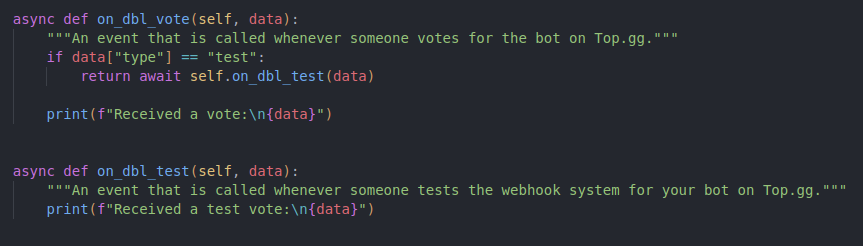 jaunty plank
And nothing is logging in your console?
torpid sparrow
yup
jaunty plank
But the real vote event works?
torpid sparrow
ye
jaunty plank
It might be you need to refresh if you haven't tried that
torpid sparrow
and my real webhook sends http request to discord channel webhook which sends this https://i.imgur.com/cgLKlTm.png
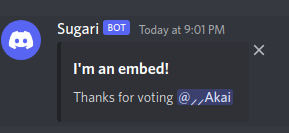 torpid sparrow
jaunty plank
It might be you need to refresh if you haven't tried that
torpid sparrow
jaunty plank
It might be you need to refresh if you haven't tried that
refresh the console?
jaunty plank
Refresh the page on topgg
torpid sparrow
didnt print https://i.imgur.com/24YRaip.png

https://i.imgur.com/stNi90H.png
https://i.imgur.com/wZHgQ00.png
is it because of the / in WebhookManager(self).dbl_webhook('/....')


i added / in front of actual webhook url
cuz my bot wasnt starting without /
sorry if i sound silly i never used webhooks before :/
jaunty plank
if you're receiving real votes your url settings should be fine.
torpid sparrow
jaunty plank
if you're receiving real votes your url settings should be fine.
im receiving real votes but that event doesnt print anything too
jaunty plank
🤔 so its possible everything is working fine just print isnt?
I dont know python so I cant help debug printing issues.
torpid sparrow
torpid sparrow
didnt print https://i.imgur.com/24YRaip.png
"Logged in as ..." is also print-
jaunty plank
sure, but on_dbl_vote is firing but not printing
jaunty plank
torpid sparrow
uhm https://i.imgur.com/XHOP9vD.png
wait, im confused.
where are you sending the message to discord in this code? 👀
torpid sparrow
jaunty plank
wait, im confused.
where are you sending the message to discord in this code? 👀
not sending here
jaunty plank
then where are you doing it from?
you cant have topgg send webhooks to multiple locations
torpid sparrow
its same webhook-
torpid sparrow
jaunty plank
you cant have topgg send webhooks to multiple locations
doing it here https://i.imgur.com/QQ5mhIS.png
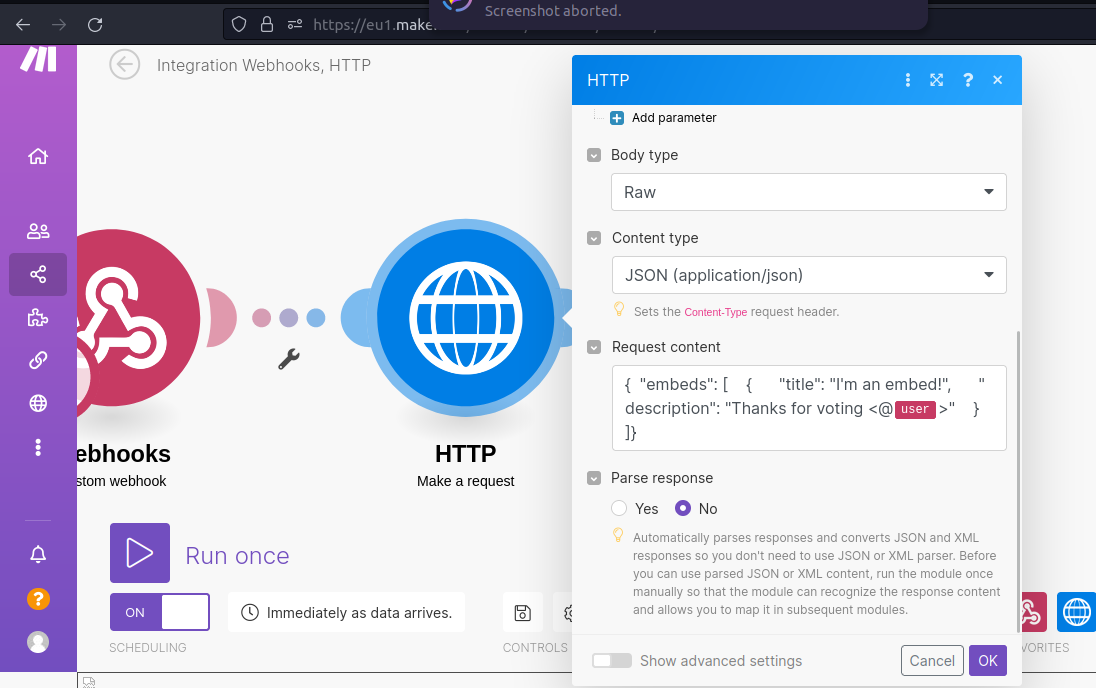
the webhook is same though
jaunty plank
torpid sparrow
doing it here https://i.imgur.com/QQ5mhIS.png
so you're having this site forward it to your server?
torpid sparrow
yes
torpid sparrow
jaunty plank
so you're having this site forward it to your server?
to the discord channel
not to the dedicated bot server
jaunty plank
not your channel, the server your codes running on
then how would your code receive the webhook?
jaunty plank
torpid sparrow
doing it here https://i.imgur.com/QQ5mhIS.png
no problem, they are pretty simple.
All they are is sending an http request to a server listening for a webhook.
They are like a website for server to server communication.
When you go to a website like https://top.gg you are saying "hey site at top.gg I want to visit you!". webhooks are essentially the same thing.
so for example
topgg gets a vote -> topgg sends a request to your code at your "site" -> your code processes it.
right now with the url you've filled in its going to this site, and they are forwarding it to discord.
 elfin iris
hello guys need help i want create vote require command how i can create this command
jaunty plank
elfin iris
hello guys need help i want create vote require command how i can create this co...
you'll probably want to use webhooks https://docs.top.gg/
elfin iris
jaunty plank
you'll probably want to use webhooks https://docs.top.gg/
i didn't find any think about vote require command
i just find that
const Topgg = require("@top-gg/sdk")
client.topgg = new Topgg.Api("")
any example how can i send request to my server?
jaunty plank
you'll need to code that yourself.
My recommendation is use webhooks and store votes in your database, then check your database when someone tries to use the command.
jaunty plank
torpid sparrow
any example how can i send request to my server?
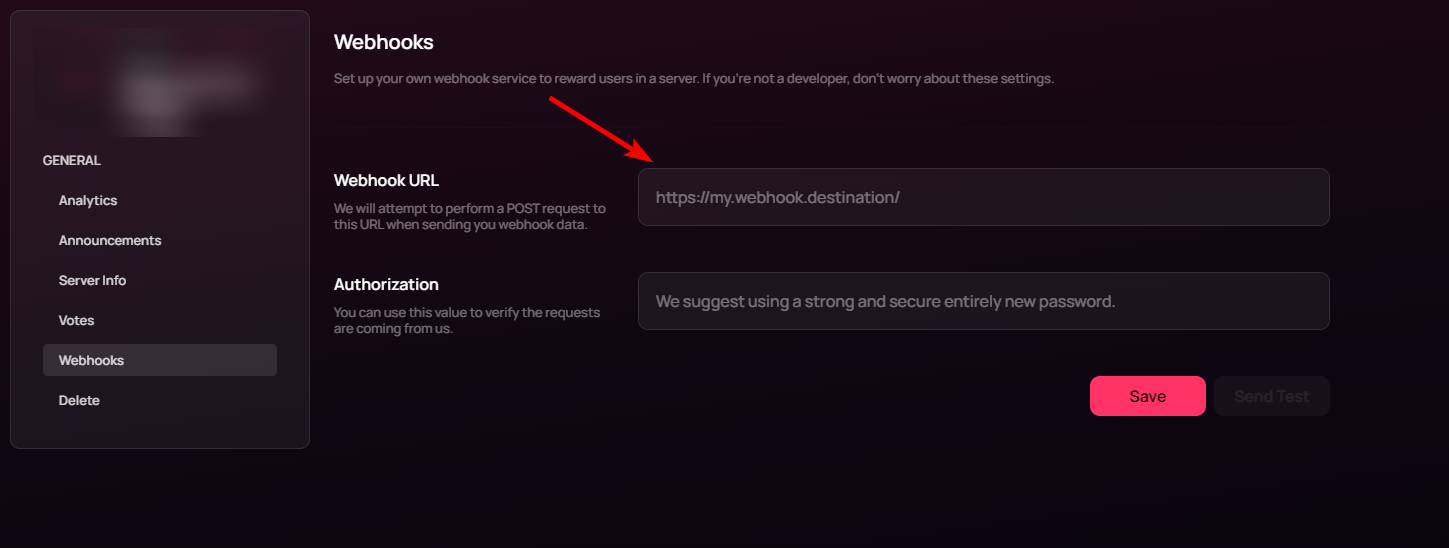
so topgg sends it to whatever url is in these fields.
https://i.imgur.com/DfEguY9.png
 proud cloud
jaunty plank
you'll need to code that yourself.
My recommendation is use webhooks and store v...
proud cloud
jaunty plank
you'll need to code that yourself.
My recommendation is use webhooks and store v...
- and remove the user from database after 12 hours from votting
jaunty plank
jaunty plank
so topgg sends it to whatever url is in these fields.
https://i.imgur.com/DfEguY...
the way you get that url depends on how you're hosting your bot.
replit/vps/home/heroku/etc
torpid sparrow
oh
elfin iris
elfin iris
hello guys need help i want create vote require command how i can create this co...
someone help
solid imp
elfin iris
someone help
-pins
abstract mothBOT
@elfin iris
Your question is likely answered by one of pinned messages.
Please take time to read the pinned messages by clicking on this icon.
solid imp
elfin iris
how i can get AuthToken
#topgg-api message explains how to get your top.gg bot token
elfin iris
what i add here when someone use require vote command
const lastVote = db.get(<User>.id.toString())
i Mean db.get
solid imp
elfin iris
what i add here when someone use require vote command
```js
const lastVote = db....
you are querying your db to see if it has crossed 12/24 hours since the last time the person voted
the logic is, you save the user id and the timestamp into your db. upon using a command, you see if they have voted, i.e the saved timestamp and the current time do not differ by 12/24 hours. if it exceeds it, they need to vote in order to use it else they don't need to
the pinned messages should have more info
elfin iris
solid imp
the pinned messages should have more info
hmmm i got it
torpid sparrow
when using in python, we have to add / to start, will it be then /http://yourip:port/path?
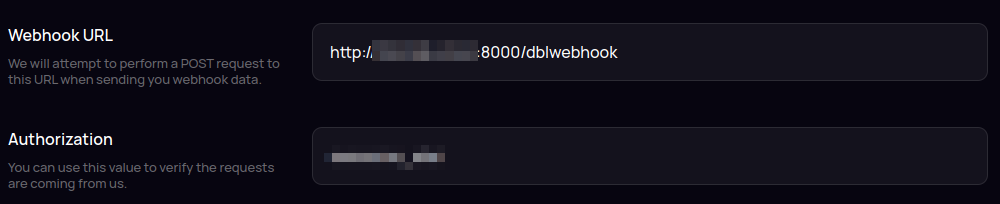

is this correct? cuz im not getting test/vote events
 graceful surge
hello, may I ask what to do 'cause the bot will just automatically leaves the server? after I invited
 elfin iris
i have question how i can add code when someone vote my bot and bot dm user who voted and thanks him
rain heart
the bot itself, no
it can only reward a role
you'll need a different bot for that, use top.gg to look one up
 modest ledge
@rain heart sir my bot is not approved yet and how long will it take?
 mint finch
elfin iris
i have question how i can add code when someone vote my bot and bot dm user who ...
mint finch
elfin iris
i have question how i can add code when someone vote my bot and bot dm user who ...
Use eval maybe?
rain heart
how would eval help there

 honest turtle
 quiet pendant
Hey guys
quiet pendant
Hey guys
I think that is a connection issue. Did it resolve or is it persistent
mint finch
Yeah Its a network error
 plucky pilot
hello, is the top.gg webhook only available for Upvote event? it doesn't seem able to send data when someone posted a review.
mint finch
Maybe vistit the docs: https://docs.top.gg/
plucky pilot
mint finch
Maybe vistit the docs: https://docs.top.gg/
where can i find the v1 api?
 rain heart
aswell as the v1 itself
mint finch
yes
plucky pilot
got it. thanks! 🙂
 stable bay
so how i setup webhook logging for bot without using @top-gg/sdk like using webhook-topgg.com but wanna send username of voter not wanna mention voter
tidal idol
stable bay
so how i setup webhook logging for bot without using `@top-gg/sdk` like using `w...
Hi - i recommend joining the Webhook-topgg.com support server and ask there, as it isn't an official Top.gg website so we're not allowed to help with that here
stable bay
tidal idol
Hi - i recommend joining the Webhook-topgg.com support server and ask there, as ...
can you provide me link ?
tidal idol
 thorn vector
Is there any way to request server information or will that be in v1
 scarlet cobalt
One message removed from a suspended account.
One message removed from a suspended account.
rain heart
no
scarlet cobalt
One message removed from a suspended account.
jaunty plank
I dont think v1 is entirely planned yet. so neither can be properly answered.
scarlet cobalt
One message removed from a suspended account.
scarlet cobalt
jaunty plank
I dont think v1 is entirely planned yet. so neither can be properly answered.
One message removed from a suspended account.
One message removed from a suspended account.
jaunty plank
that section on v1 has been in the docs for pretty much 2 years iirc.
so itll probably be awhile anyway
mint finch
Damn
plucky pilot
is there an API to get data of written reviews and ratings on a specific bot?
mint finch
just make your own api to do that
using http requests
js const data = await fetch("site.com").then(res => res)
mint finch
kinda, although Idk if its allowed
 dense cloud
umm
doesn't work at all
@commands.Cog.listener("ready")
    async def on_ready(self):
        client = self.client
        webhook_manager = topgg.WebhookManager().set_data(client).endpoint(self.endpoint)
        dblclient = topgg.DBLClient("[TOKEN]").set_data(client)
        dblclient.default_bot_id = client.user.id
        if not webhook_manager.is_running:
            await webhook_manager.start(8000)

    @topgg.endpoint("/dblwebhook", topgg.WebhookType.BOT, "youshallnotpass")
    async def endpoint(vote_data: topgg.BotVoteData, client: discord.Client = topgg.data(discord.Client)) -> None:
        print("Received a vote!", vote_data)
I voted and it didn't print out anything
rain heart
have you set that for a bot or a server
dense cloud
bot
rain heart
And the bot is approved too?
dense cloud
yes
mint finch
they don't have the role?
rain heart
Have you set the webhook url within the bot page settings?
dense cloud
 rain heart
mint finch
*they don't have the role?*
rain heart
mint finch
*they don't have the role?*
Could be a team member
mint finch
rain heart
Could be a team member
Oh okay
rain heart
That needs to be done too
dense cloud
what to set there?
rain heart
The url of your webhook and the authorization
rain heart
http://yourwebserver:webport/path
dense cloud
hm?
mint finch
You have to create a web server and host it basically, if I'm right
dense cloud

rain heart
the web server is essentially the code above
you just need to add the url to the bot page settings
dense cloud
rain heart
the web server is essentially the code above
but how to get the IP, port and path?
rain heart
ip is the server running the application, port is the webhook port, path is the endpoint essentially
read the code you've made and you should understand it a bit more
mint finch
rain heart
`http://yourwebserver:webport/path`
Would localhost work?
rain heart

Baeldung on Computer Science
Learn the difference between 127.0.0.1 and localhost
mint finch
Localhost is hosted on your pc and only you can visit it, 127.blahblah is something that anyone on your wifi can visit, that's what I know
dense cloud
what if I hosted it on VPS?
mint finch
https://vpsurl:port that works for my vps
dense cloud

mint finch
You can try it
plucky lance
mint finch
Localhost is hosted on your pc and only you can visit it, 127.blahblah is someth...
Well the second part is wrong
mint finch
Okay...
plucky lance
mint finch
`https://vpsurl:port` *that works for my vps*
The secure protocol can only be used if you have a valid certificate for your domain
Or you won’t receive any request as it ends in a verification error
restive otter
Hello, i edited the webhook for my bot on topgg but i cant click on save
restive otter
is there any reason, why my test vote dont work?
in my code, i set the right port and on the web, the right io
ip*
 restive otter
how do i do that this dont display?
restive otter
Hm i guess i fixxed but why does this warning happen?
Unclosed client session
client_session: <aiohttp.client.ClientSession object at 0x7f0a6ffc1510>
Unclosed connector
connections: ['[(<aiohttp.client_proto.ResponseHandler object at 0x7f0a6ec282e0>, 5597643.094051545)]']
connector: <aiohttp.connector.TCPConnector object at 0x7f0a6ffc1390>
it happens when i use on_dbl_vote often
Code:
@bot.event
async def on_dbl_vote(data):
"""An event that is called whenever someone votes for the bot on Top.gg."""
try:
bot.topggpy = topgg.DBLClient(bot, dbl_token)
if data["type"] == "test":
user = bot.get_user(int(data["user"]))
guild = bot.get_guild(811730903482761246)
data2 = await bot.topggpy.get_bot_info()
votes = int(data2["monthly_points"])
channel = guild.get_channel(840666055777058836)
astra = bot.get_user(int(data['bot']))
embed = discord.Embed(title="Test Vote successfull ", description=f" ``{user}({user.id})`` voted up for {astra}\nNow we have ``{votes}`` votes in this month.\n\nYou can vote **[here](https://top.gg/bot/811733599509544962/vote)** every 12 hours.", colour=discord.Colour.red(), timestamp=discord.utils.utcnow())
embed.set_thumbnail(url="https://media.discordapp.net/attachments/813029623277158420/901963417223573524/Idee_2_blau.jpg")
embed.set_footer(text="Thank you for your Support", icon_url="https://media.discordapp.net/attachments/813029623277158420/901963417223573524/Idee_2_blau.jpg")
msg = await channel.send(embed=embed)
heart = bot.get_emoji(841215892137574410)
await msg.add_reaction(heart)
return bot.dispatch('dbl_test', data)
votedata = await bot.topggpy.get_bot_info()
votechannel = bot.get_channel(904384880064999424)
heart = bot.get_emoji(841215892137574410)
votes = int(votedata["monthly_points"])
user = bot.get_user(int(data["user"]))
guild = bot.get_guild(811730903482761246)
channel = guild.get_channel(840666055777058836)
astra = bot.get_user(int(data['bot']))
embed = discord.Embed(title="Thank you for voting for Astra", description=f" ``{user}({user.id})`` voted up for {astra}\nNow we have ``{votes}`` votes in this month.\n\nYou can vote **[here](https://top.gg/bot/811733599509544962/vote)** every 12 hours.", colour=discord.Colour.blue(), timestamp=discord.utils.utcnow())
embed.set_thumbnail(url="https://media.discordapp.net/attachments/813029623277158420/901963417223573524/Idee_2_blau.jpg")
embed.set_footer(text="Thank you for your Support", icon_url="https://media.discordapp.net/attachments/813029623277158420/901963417223573524/Idee_2_blau.jpg")
await votechannel.edit(name=f"👍| Upvotes: {votes}")
msg = await channel.send(embed=embed)
await msg.add_reaction(heart)
except:
pass``` exotic salmon
im new to this, so i may be confused alot.
Im using integromat/make for the webhook, i put in the url and authorization, everything works fine it sends a message to a channel in my server,
but I want it to send a message to the user who voted, and do other things like give the user a reward for voting, instead of sending the message to a certain channel in a server and doing nothing else
exotic salmon
rain heart
then you will need to make your own webhook, integromat will not support that
i have created the webhook
but how do i make it send a message to a user is there dm when they vote and make it do other stuff, ive looked through the documentation and watched tutorials, but im even more confused
rain heart
fetch the user from the id provided by the webhook, fetch the user through your corresponding library, then use the corresponding libraries methods to send a direct message
https://docs.top.gg/resources/webhooks/#data-format more on what data is sent by top.gg
exotic salmon
rain heart
https://docs.top.gg/resources/webhooks/#data-format more on what data is sent by...
what data from top.gg?, the webhook it just sending a message to my server when the bot starts, not when someone votes, nothing happens when someone votes
jaunty plank
exotic salmon
what data from top.gg?, the webhook it just sending a message to my server when ...
Hey, the webhook that's being sent on startup. Are you possibly referring to discord webhooks not topgg webhooks?
exotic salmon
jaunty plank
Hey, the webhook that's being sent on startup. Are you possibly referring to dis...
yeah, was i suppose to create a topgg webhook?
jaunty plank
Topgg sends webhooks to your webhook listener that you'll need to add to your code
exotic salmon
jaunty plank
Topgg sends webhooks to your webhook listener that you'll need to add to your co...
ok i added that piece of code in, but what do i put for the webhook url, and what do i replace "/dblwebhook" with?
jaunty plank
It can be any path you want as long as it's the same path you use in your url
The url will depend on your hosting method
Vps/dedicated server/replit/heroku
exotic salmon
jaunty plank
Vps/dedicated server/replit/heroku
i use amazon aws ec2 and bitvise
jaunty plank
afaik ec2 provides an ip?
http://yourEC2IP:port/path
exotic salmon
jaunty plank
afaik ec2 provides an ip?
`http://yourEC2IP:port/path`
there are 3 different ip's i could use
Private IPv4
Public IPv4
Auto-assigned IP address
which one do i use?
i have a port used for a work in progress website, could i use that same port in the url?
also can i make up a path?
jaunty plank
Probably the public ip, but it might be auto-assigned.
I dont use ec2 so I'm not sure how ips are handled.
You won't want to share ports with multiple seperate services.
Yeah the path doesn't really matter.
/dblwebhook will be fine if you just want to use that.
exotic salmon
jaunty plank
Probably the public ip, but it might be auto-assigned.
I dont use ec2 so I'm not...
ok so i put in everything for the url, i saved it and pressed test, it says the test was successful, but my bot did not log the user id
 compact meteor
will there webhook callback for review?
rain heart
likely not anytime soon
misty dove
Whats the best way to make a revote message?
rain heart
take advantage of the query param
misty dove
I found nothing should i add a sleep event?
 brazen zephyr
Hey, how can i trigger a test vote?
jaunty plank
Its on your bots edit page in the webhook section
brazen zephyr
thanks
rain heart
-api
abstract mothBOT
This channel is for suggestions, help, and bugs related to our official API libraries and documentation found at https://docs.top.gg/
If you need help with other development, please use #development.
rain heart
restive otter
Its been 2 days of being approved.
also, not being an hour ago
restive otter
rain heart
also, not being an hour ago
Sorry. I dont understand.
 solid imp
 tidal sonnet
why api is not working i provided right key
tidal sonnet
why api is not working i provided right key
what method are you calling before running into this error?
 rustic pollen
solid imp
what method are you calling before running into this error?
rustic pollen
solid imp
what method are you calling before running into this error?
hasVoted()
jaunty plank
are you possibly running this on a test bot but using the topgg token of the main bot?
 long furnace
with the topgg-autoposter npm module it says "any other client" however it also refers to a djs sharding manager. Is this the required/recommended case or can we just send it on the first shard instead for example.
restive otter
jaunty plank
are you possibly running this on a test bot but using the topgg token of the mai...
Yes
jaunty plank
That explains the issue.
The token only gives access for one bot, trying to send another bots info won't work.
long furnace
Yeah for some reason im getting a 403 even though I am parsing the correct authorisation header
axios.post('https://top.gg/bot/(mybotid)/stats ',{server_count: 5000, shard_count: 5}, {headers: {"Authorization": process.env.TOP_GG_TOKEN}})
(just testing it out)
In the error response I can see my headers are correct
I am using the correct id just to clear that one up
long furnace
<@&817055174613794826> (not sure if I am allowed to ping but) any clue why this might be happening?
jaunty plank
long furnace
Yeah for some reason im getting a 403 even though I am parsing the correct autho...
try refreshing your token.
then refreshing the page.
then copying the token.
rain heart
pass the token directly, there had been users who were using env variables and these where invalid
long furnace
I mean that can't be the issue because in the error I can see the token is in the headers
rain heart
just try passing it directly
otherwise go to the webhook settings again, press regenerate, refresh the page and use that new token
restive otter
jaunty plank
That explains the issue.
The token only gives access for one bot, trying to send...
That explains it or what if we manage to use the same token for other 2 bots as well?
 autumn marsh
const TOP_GG = new TOP_GG_API.Api("token");
await TOP_GG.postStats({
    serverCount: client.guilds.size,
    shardCount: 0,
  });```
Error: Missing Server Countwhat package are you using
also no need to ping unrelated staff members, just ask and be patient
autumn marsh
rain heart
what package are you using
@top-gg/sdk
 silver bolt
const app = express()

const webhook = new Topgg.Webhook("")

app.post("/dblwebhook", webhook.listener(vote => {
  console.log(vote.user)
}))

app.listen(80)
Hey. I'm attempting to use topgg sdk but I am getting cannot read properties of undefined reading 'webhook', I am using the example from the documentation.
scarlet cobalt
One message removed from a suspended account.
One message removed from a suspended account.
One message removed from a suspended account.
silver bolt
well it errors before listening to the port
const webhook = new Topgg.Webhook("")
                          ^
TypeError: Cannot read properties of undefined (reading 'Webhook')
Even with a port change.
Fixed it. Import was wrong 🙂
 pulsar tree
Two things, 1: is there a way that I can see failed webhook attempts and what response that my server sent and 2: is the data that I receive JSON data in the request?
 chilly terrace
-api
solid imp
pulsar tree
Two things, 1: is there a way that I can see failed webhook attempts and what re...
- there is not, you need to keep track of that yourself. the api docs provide you the number of times a webhook is retried before it’s considered failed.
- it is, try it and see
pulsar tree
solid imp
1. there is not, you need to keep track of that yourself. the api docs provide y...
Yeah, we figured out what it was. We just had some checks on our side that were not valid throughout the test send so that is why we failed several times trying it. We were not expecting the user in the test to be None.
solid imp
all good!
pulsar tree
Is it common for Top.gg not to consistently send webhooks? We have had several occasions now where votes do not reach our server. Occasionally we will get one and it will work but we have started to log each "access attempt" which is what has led us to see the inconsistency.
 jaunty steppe
Is there a way to get the current ratelimits for * and /bots/*? I thought it'd be included in headers but that seems to be only when its ratelimited
rain heart
is there a reason why you'd want to get the current ratelimits?
rain heart
pulsar tree
Is it common for Top.gg not to consistently send webhooks? We have had several o...
they should be consistent as far as I'm aware
note that just because 2 votes were added during Friday to Sunday, it is currently double vote weekend
jaunty plank
pulsar tree
Is it common for Top.gg not to consistently send webhooks? We have had several o...
hey! I've not seen reports of this issue.
what do you mean "access attempt"?
how are you determining you're not receiving a webhook? are users reporting this to you?
pulsar tree
jaunty plank
hey! I've not seen reports of this issue.
what do you mean "access attempt"?
ho...
We have a webserver that logs any request to it. We have recently developed the webhook on our end. Since we implemented it, we have missed at least 2 votes with no attempts made to the webhook.
jaunty plank
where did you get notified about the two votes that had their webhooks missed though?
did a user tell you? did you vote and it not get received?
jaunty plank
https://docs.top.gg/libraries/python/ covers the py library
 heavy cosmos
tried it, doesn't work with pycord I believe? due to breaking changes
will try again though 👍🏾
thank you!
ok I can confirm that it doesn't work with pycord
is there anyway to just send HTTP requests instead of using topggpy? it seems to depend on discord.py
 twin portal
heavy cosmos
is there anyway to just send HTTP requests instead of using topggpy? it seems to...
twin portal
heavy cosmos
is there anyway to just send HTTP requests instead of using topggpy? it seems to...
if you just want to send http requests, use https://pypi.org/project/requests/
 heavy cosmos
twin portal
if you just want to send http requests, use https://pypi.org/project/requests/
heavy cosmos
twin portal
if you just want to send http requests, use https://pypi.org/project/requests/
well yeah but I wanted to know the API top.gg uses, I'm not able to find it (probably just bad searching)
url = "https://top.gg/api/bots/804445656088576002/stats"
payload = {"server_count": str(len(bot.guilds))}
headers = {"Authorization": TOPGG_TOKEN}
r = requests.post(url, data=payload, headers=headers)
would something like that work ^
twin portal
it should
heavy cosmos
ok thanks!
 fading meteor


 rain heart
-api
abstract mothBOT
This channel is for suggestions, help, and bugs related to our official API libraries and documentation found at https://docs.top.gg/
If you need help with other development, please use #development.
jaunty steppe
rain heart
is there a reason why you'd want to get the current ratelimits?
Sorry for the late reply
I'm just thinking along the lines of persistence. my library doesn't save the current ratelimit anywhere so if it happens to get reloaded (e.g. the process restarts), the internal ratelimiter then assumes the current bucket is at 0 requestes and whatnot, which will results in hard limits being hit eventually
Its more convenience than anything but yk, I can live without it 😅
 twin walrus
whats the use of topgg-autoposter package?
solid imp
twin walrus
whats the use of `topgg-autoposter` package?
let’s you post stats to top.gg like server and shard count which appear on your bot page
twin walrus
is there any example of making vote rewards using api? lol the pinned msg was funny it doesn't helped me actually
solid imp
twin walrus
is there any example of making vote rewards using api? lol the pinned msg was fu...
the pins give a brief outline on how it’s done/the logic behind it, it’s upto you how you implement it specifically to suit your needs
 astral spear

what am I doing wrong (just doesnt do anything)

I have got the link and the auth on the website saved and when I press send test it does nothing
@rain heart soz 4 ping but pls help
rain heart
It does not support discord webhooks
read the docs again, cannot help with technical stuff right now
solid imp
astral spear
<@620226249448488981> help me ur a good lawyer
like aurel mentioned, it sends a post request to “your” server that’s listening to requests on the /dblwebhook endpoint
pasting a discord webhook url there will make top.gg attempt to send a post request to that url and discord would simply ignore it
astral spear
what URL shall I put there?
solid imp
the url to your express sever
note that localhost won’t work, to test it out before rolling out to production, use something like ngrok
astral spear
solid imp
the url to your express sever
Im running the code from my pc at the moment
solid imp
astral spear
Im running the code from my pc at the moment
use ngrok, that would let you use a public url that would map back to your local machine
https://ngrok.com/download
ngrok is the fastest way to put anything on
the internet with a single command.
jaunty plank
@restive otter
hey, did you add webhook listening to your code?
restive otter
jaunty plank
<@456226577798135808>
hey, did you add webhook listening to your code?
yes
it's just that it does not execute as my votes are bugged
i asekd 5 people to vote for my bot in screenshare, and the vote counter didnt go up
after like 30 days it went up by 1
jaunty plank
the vote counter can take a few hours to go up after a vote.
every month the vote count resets, so after 30 days it going up by 1 would be someone else voting
did you configure your bots webhook url to a non discord webhook(ie one to your bots host)
pulsar tree
jaunty plank
did a user tell you? did you vote and it not get received?
Sorry for the delay, busy weekend, yes one of the development members of our bot voted and after looking at our logs and DB entries, nothing.
jaunty plank
pulsar tree
Sorry for the delay, busy weekend, yes one of the development members of our bot...
but you've received some votes? just not a few?
I dont think I've had this issue tbh.
I run a site which hosts vote webhooks for other peoples bots/servers. It currently handles around 900 servers and bots listed on topgg. I dont think ive had a single missed vote in a few months.
Topgg does retry a webhook 10 times if it fails to be responded to.
https://docs.top.gg/resources/webhooks/#retrial
pulsar tree
jaunty plank
but you've received some votes? just not a few?
We have recieved some but it is very hit or miss and we don't know if it ourside or top.ggs side or DNS, cloudflare, etc. We have stuff that logs every attempt made to the server and have seen where top.gg is either not sending them or they are not delivered to us. Cloudflare is not showing us anything helpful either. Hence why I am here. If you have any ideas, let me know and I will track them down and test them.
jaunty plank
pulsar tree
We have recieved some but it is very hit or miss and we don't know if it ourside...
I wouldnt think its topgg's side. it would be really weird to see webhooks only be unreliable for you(its possible though).
are test votes reliably being received?
You mentioned cloudflare, are your webhooks configured correctly on cloudflare?
cloudflares default settings are intended for use for websites, not webhooks. so a lot of settings could be blocking topgg's servers from reaching your webhook.
rain heart
most anomalies I've encountered happening are between topgg and your server behind Cloudflare. Make sure Cloudflare is properly setup
perhaps try setting up a quick web worker with logging to ensure it is sent correctly
also to ensure: is it occurring during the weekend? I'm referring to the double votes eeeken
weekend
pulsar tree
rain heart
most anomalies I've encountered happening are between topgg and your server behi...
Since CF has 1000 settings, which ones should I be looking for specifically?
jaunty plank
in my case, I added a WAF rule allowing the topgg ip(https://docs.top.gg/resources/webhooks/#security)
disabled bot fight mode on the webhook path
disabled integrity checks on the webhook path
lowered the security level on the webhook path
and probably a few other things
(the above things are things I changed, these may not apply to you. make sure you understand what you're disabling if you modify any of your CF security settings).
What you need to disable will depend on your sites cloudflare configuration.
if you have other security features enabled on your domain you may need to disable them for your webhook path.
Like you said Cloudflare has a ton of options and settings, so many we probably are not the best ones to ask. Especially since these are Cloudflare security settings its probably better to ask their support, or community.
twin walrus
how do i send the vote message to a discord channel using webhook?
restive otter
how often should u update bot stats
As i dont see my server count on my page after running this script for 48h
And before that for 1 month (for no shards)
 rain heart
per docs, the ratelimit is 60/Minute, globally 100/second
You wont need to post it more than once in an hour or so, maybe every 12 hours
not getting any errors within your code either? Can you confirm that everything there is indeed executed?
Yeah it seems like it never posted stats at all
restive otter
rain heart
Yeah it seems like it never posted stats at all
the function is getting executed, and it shows TOP-GGUPDATER updated the stats in my console.
rain heart
what is params before sending it
restive otter
how can i get my dbl token ?
rain heart
read the pinned messages
rain heart
-m @tulip atlas
abstract mothBOT
 Mate2014#2839 was successfully muted
 cedar saddle
Hi, i've send my stats by api for the first time but i get this:
It won't update please help


<@&817055174613794826> help
seems like it appears
solid imp
cedar saddle
Hi, i've send my stats by api for the first time but i get this:
It won't upda...
give it some time, it should be reflected soon
 boreal vapor
cedar saddle
Hi, i've send my stats by api for the first time but i get this:
It won't upda...
boreal vapor
cedar saddle
Hi, i've send my stats by api for the first time but i get this:
It won't upda...
Can take 30 mins
cedar saddle
ok ty
 distant wedge
var botStats = {
    server_count: client.guilds.cache.size
};

let TPGTokenHeader = {
    headers: {
        'Content-Type': 'application/json',
        'Authorization': process.env.TPGToken
    }
};

axios.post(process.env.TPGURL, botStats, TPGTokenHeader).then((res) => {
    console.log(`Stats posted to top.gg!\nHTTP Status: ${res.status + " " + res.statusText}`);
});
i get a 401 or 403
what am i doing wrong
and i've checked the token and url multiple times they're correct, even tried directly using them instead of environment variables
nvm i somehow fixed it
actually it sometimes POSTs successfully sometimes returns 401/403 without any code change 
 unique ruin
how to reset authorisation token of webhook, it's showing error when I'm using @waxen widgetgg/sdk for webhook server, it shows invalid token, though it's the correct one
rain heart
regenerate it using the link on the webhook section, refresh the page and the token that is there is the new one
note that the first part of it will be similar
rain heart
-wrongserver
abstract mothBOT
 Hey! We think you have our server mistaken. We do not provide support, help, or advice for any bot. You need to click on the "Discord Support Server" button on the bot's page of the bot you need support for. If there isn't a button that says "Discord Support Server" or nothing else mentioned about a support server, the server invite is invalid or you were banned from the bot's support server, then we can't help you. Sorry :(

 sharp moat
distant wedge
actually it sometimes POSTs successfully sometimes returns 401/403 without any c...
sharp moat
distant wedge
actually it sometimes POSTs successfully sometimes returns 401/403 without any c...
happens with auto poster too
cedar saddle
a
restive otter
I know this isn't an official Top.GG thing, but it is closely connected to it so.. has anyone else had problems using: https://github.com/Hopeful-Developers/topggwebhooks4j
It works perfectly for me for a few days, then it stops working until I restart my bot and then it works perfectly fine again. Is there a solution for this that anyone is aware of other than restarting my bot every other day?
rain heart
that's made by me, elaborate what stops working
it should work fine without restarting at all
restive otter
rain heart
that's made by me, elaborate what stops working
When someone votes, it does not register the vote event anymore.
It will work for the first few days, registering voting events.
Then at some point after that it stops registering them until I restart the bot (then it works perfectly fine again).
It didn't always used to do this either. This is a recent development of the last few months (I just haven't had time to address it till now). It used to work perfectly fine the whole time. I could easily believe it was something on my end, I just cannot imagine what would cause this issue so I was curious if anyone else had insight into this.
 limber otter
Hey, I'm following the top-gg/sdk docs but haven't been able to successfully communicate with the webhook
const Topgg = require('@top-gg/sdk');
const express = require('express');

const app = express();
const webhook = new Topgg.Webhook('');

app.post('/dblwebhook', webhook.listener((vote) => {
  console.log('Voted!');
}));

app.listen(3000);
I'm not using an auth for this test and my webhook URL is set as: http://xx.xx.xx.xx:3000/dblwebhook
What am I missing? I've tried this both from my vps using its IPv4
jaunty plank
Are you using your vps's public ip? not internal.
Do you have any firewalls on?
It might need an authorization, I've never tested with none used.
limber otter
I've tested it both with and without auth.
The vps indicates that there's no firewalls.
The IP is the same one I ssh to.
(I'm using Vultr vps)
I've also tried both the test button and an actual vote
Now I'm scouring through past questions to see if there's any help. I'm fairly lost at this point
jaunty plank
If you put your webhook url in your browser do you get a
"Cannot get /dblwebhook" error?
limber otter
No I don't
I'm think this has to be a firewall issue
jaunty plank
Yeah somethings blocking your webhooks.
This might be helpful.
https://www.vultr.com/docs/vultr-firewall-quickstart-guide/?gspk=c2hpenVraWtpc2hpbW90bzQzOTM&gsxid=Z5RDHNNMjZ9g

Vultr
We are simplifying the cloud. One Login, 16 Countries, 26 Cities, Infinite Possibilities.
limber otter
Thanks, I've been messing with it to see if I can get anything
limber otter
jaunty plank
Yeah somethings blocking your webhooks.
This might be helpful.
https://www.vult...
It was my firewall... not my vps firewall, my os firewall. Thx
rain heart
restive otter
Then at some point after that it stops registering them until I restart the bot ...
can you do that again, once it does not work anymore, make a manual request to it using postman for example
cedar saddle
help, i'm sendding server stats each 30 seconds but i have that

<@&817055174613794826>
cedar saddle
 golden adder
Only send stats every 30 minutes to an hour
golden adder
Only send stats every 30 minutes to an hour
ok ty
distant wedge
well I've set it up to send stats on every guild join/leave and every member join/leave
would that be fine
solid imp
distant wedge
well I've set it up to send stats on every guild join/leave and every member joi...
that won't be necessary, its likely you're gonna get ratelimited again
send stats every 30mins to 1 hour like mac mentioned!
distant wedge
ok np sure
solid imp
@jaunty plank
 ember void
Hello guys i just update the API and now im getting this ?
TypeError: Cannot read properties of undefined (reading 'split')
    at toIdentifier (/root/white3/node_modules/toidentifier/index.js:26:6)
    at forEachCode (/root/white3/node_modules/@top-gg/sdk/node_modules/http-errors/index.js:245:16)
    at Array.forEach (<anonymous>)
    at populateConstructorExports (/root/white3/node_modules/@top-gg/sdk/node_modules/http-errors/index.js:243:9)
    at Object.<anonymous> (/root/white3/node_modules/@top-gg/sdk/node_modules/http-errors/index.js:30:1)
    at Module._compile (node:internal/modules/cjs/loader:1101:14)
    at Object.Module._extensions..js (node:internal/modules/cjs/loader:1153:10)
    at Module.load (node:internal/modules/cjs/loader:981:32)
    at Function.Module._load (node:internal/modules/cjs/loader:822:12)
    at Module.require (node:internal/modules/cjs/loader:1005:19)
bugs? or my fault?
restive otter

solid imp
ember void
Hello guys i just update the API and now im getting this ?
```
TypeError: Canno...
what are you doing before this error shows up?
solid imp
@limber edge you can get the last 1000 votes for your bot using the endpoint listed here https://docs.top.gg/api/bot/#last-1000-votes, however if you bot receives more than 1000 per month, you need to implement your own caching method
 limber edge
ah I see, thank you
ember void
solid imp
what are you doing before this error shows up?
I just do npm install @topgg/sdk@latest
solid imp
ember void
I just do npm install @topgg/sdk@latest
can't reproduce, installs just fine, try doing just npm i @top-gg/sdk
ember void
I downgraded @top-gg/sdk 3.1.4 to 3.1.0 and I don't have the bug anymore...
 languid ibex
Anyone else having issues with top-gg java-sdk v2.1.2 to update their server stats?
solid imp
languid ibex
Anyone else having issues with top-gg java-sdk v2.1.2 to update their server sta...
you getting any specific errors?
 gray juniper
hello im new to this server and i was wondering how to set up my bot to dm a user if they have voted for it on top.gg
if anyone could help get me started, that would be greatly appreciated
solid imp
gray juniper
hello im new to this server and i was wondering how to set up my bot to dm a use...
-pins
abstract mothBOT
@gray juniper
Your question is likely answered by one of pinned messages.
Please take time to read the pinned messages by clicking on this icon.
solid imp
correct
gray juniper
ok coolio thx
gray juniper
solid imp
correct
is there a vid or smth for it bc im confused with step one lol
solid imp
gray juniper
ok coolio thx
if you just want to dm users upon voting, you likely do not have to save anything. You will receive the discord user ID of the person who voted as a webhook payload from top.gg
solid imp
gray juniper
is there a vid or smth for it bc im confused with step one lol
you can feel free to ask
gray juniper
solid imp
you can feel free to ask
how do i get the tog.gg webhook payload?
languid ibex
solid imp
you getting any specific errors?
Nothing at all
solid imp
gray juniper
how do i get the tog.gg webhook payload?
assuming you're using javascript, https://www.npmjs.com/package/@top-gg/sdk should have all info and steps
npm
Official Top.gg Node SDK. Latest version: 3.1.3, last published: 9 months ago. Start using @top-gg/sdk in your project by running npm i @top-gg/sdk. There are 6 other projects in the npm registry using @top-gg/sdk.
gray juniper
solid imp
assuming you're using javascript, https://www.npmjs.com/package/@top-gg/sdk shou...
im using python
but i do know js
so i could convert it manually
maybe
solid imp
gray juniper
im using python
there is a library for python too, https://docs.top.gg/libraries/python/
gray juniper
solid imp
there is a library for python too, https://docs.top.gg/libraries/python/
oh thx
gray juniper
solid imp
there is a library for python too, https://docs.top.gg/libraries/python/
hmm im not really sure how all this works
how do i set up a webhook
solid imp
gray juniper
how do i set up a webhook
the message you referenced has that info #topgg-api message
gray juniper
solid imp
the message you referenced has that info https://canary.discord.com/channels/264...
yeah i didnt really understand it
solid imp
gray juniper
yeah i didnt really understand it
what part do you not understand?
gotta be a bit more specific, the resources should cover everything
gray juniper
solid imp
what part do you not understand?
like how to set it up bc the docs dont make sense imo
where do we find the ports for it