#development
1 messages · Page 2061 of 1
 ancient nova
 lyric mountain
Probably, u need to filter the bot off
 sharp geyser
if it is capturing the bot then the filter is poorly done. It should only be capturing the new reactors
 earnest phoenix
It's returning the edited message, because you're returning the return value of the <Message>.edit() method
sharp geyser
earnest phoenix
It's returning the edited message, because you're returning the return value of ...
oh that makes more sense 
earnest phoenix
It wouldn't even capture the bot's reaction at that case because the bot seems to react before the collector is even initialized
ancient nova
then what's the problem?? I'm really confused
ancient nova
I'm not coding it in an IDE atm
earnest phoenix
Try logging the challengeCheck variable, there's something else going on there, definitely
ancient nova
alright. give me a second
earnest phoenix
lyric mountain
Does js have a debugger btw?
Yes, the debugger keyword 
ancient nova
earnest phoenix
Try logging the `challengeCheck` variable, there's something else going on there...
Collection(0) [Map] {}
this is what it logged
earnest phoenix
After reacting?
ancient nova
before, I think
earnest phoenix
I mean like did you react?
earnest phoenix
Maybe you should try to see if the filter even passes in the first place
ancient nova
@earnest phoenix I THINK I KNOW
I DON'T HAVE THE GUILD_MESSAGE_REACTIONS INTENT ENABLED
IS THAT IT?
 wheat mesa
fuck dude this ecs is gonna be the bane of my existence
 ancient nova
earnest phoenix
You literally need that to get and collect reactions
ancient nova
earnest phoenix
You literally need that to get and collect reactions
😭
why discord, why
ancient nova
earnest phoenix
You literally need that to get and collect reactions
💀 RangeError [BITFIELD_INVALID]: Invalid bitfield flag or number: undefined.
earnest phoenix
ancient nova
💀 RangeError [BITFIELD_INVALID]: Invalid bitfield flag or number: undefined.
Show the way you're passing in the intents I guess?
ancient nova
it works now, I forgot to add the .FLAG afterwards
earnest phoenix
 hollow anchor
You should honestly just learn a programming language and actually use a Discord API library to make your Discord bot instead of all of that, you'll have more fun with writing it the actual and real way while also knowing what's what and what's actually going on
hollow anchor
earnest phoenix
You should honestly just learn a programming language and actually use a Discord...
I don't have the motivation to. Do you know what's wrong with the BDScript?
earnest phoenix
The issue with Discord bot maker programs such as BDFD (and their templated language called BDScript) is that they usually get outdated pretty quickly and are updated after a long time as they also have to literally add the new features to their templated language, which is pretty time-consuming, and these programs usually tend to have lots of problems, such as lacking proper customization, freedom to design things your way, debugging what's wrong and what actually caused something to fuck up
They are also usually pretty unoptimized, it's honestly less of a hassle to learn a programming language and write it the right way
hollow anchor
earnest phoenix
The issue with Discord bot maker programs such as BDFD (and their templated lang...
once again I don't have the motivation to learn programming. Going into any course I only lasted 15-30 mins before dropping out
sharp geyser
then why try and pursue it in an easy way
hollow anchor
sharp geyser
then why try and pursue it in an easy way
because it's easy
hollow anchor
It is easy to use
sharp geyser
It may seem easy but all the problems voltrex just described is there
sharp geyser
you can always hire someone if you have no aspiration to do it yourself
hollow anchor
I'd just copy code from a website then
sharp geyser
that isn't good either
sharp geyser
no
wheat mesa
hollow anchor
once again I don't have the motivation to learn programming. Going into any cour...
online courses suck. follow some basic tutorials to learn the syntax and such, then do a project that interests you
hollow anchor
wheat mesa
online courses suck. follow some basic tutorials to learn the syntax and such, t...
no motivation. Which is why I'm forcing myself
wheat mesa
hollow anchor
I don't think anyone here uses bdscript, it's pretty terrible imo
wheat mesa
hollow anchor
no motivation. Which is why I'm forcing myself
if you don't have motivation for something then you shouldn't force yourself to do it
hollow anchor
I love the idea of coding but I don't wanna learn it 
wheat mesa
I think you're going to burn yourself out more by using bdscript
hollow anchor
wheat mesa
I think you're going to burn yourself out more by using bdscript
it's been a good experience honestly
wheat mesa
It's arguably way more difficult to get customized behavior with it than it is to just learn a language like py or js and do it yourself
hollow anchor
I think learning big programming is harder
sharp geyser
I think you are going to go down a rabbit hole of despair
wheat mesa
Not really
Any subject is daunting when looking at it as a whole
Taking it piece by piece is a lot easier
hollow anchor
wheat mesa
Taking it piece by piece is a lot easier
It's still daunting
sharp geyser
Look at me, I am making a game in unity with little C# experience and it is turning out somewhat ok
wheat mesa
You're stopping yourself before you even try
hollow anchor
I want to though
wheat mesa
That's... conflicting
sharp geyser
You want it, but you hate it
wheat mesa
If you hate doing something and you have the option to not do it, then don't force yourself
sharp geyser
that makes no sense...
hollow anchor
which is why I cling to bdscript
wheat mesa
It's like I'd love to be an amazing artist, but I suck at art and I hate doing it
So I choose not to
sharp geyser
Well, I guess you will have to mostly rely on the documentation then
cause I don't think many people here even look at BDScript
I am also sure there is a discord server for the bot maker you are using which would be better at providing help
hollow anchor
ok
hollow anchor
sharp geyser
I am also sure there is a discord server for the bot maker you are using which w...
there is but discord doesn't let me join
earnest phoenix
How so?
hollow anchor
I click accept invite but then it does nothing
earnest phoenix
You're probably banned from the aforementioned server
hollow anchor
I don't even remember joining it
earnest phoenix
You don't have to, people can ban users who never even joined the server; or if you're not banned then you've probably joined but haven't noticed
earnest phoenix
How would I know? It's also possible that the invite you used is probably invalid
ancient nova
anyone know why the embed doesn't edit?

reacts delete, collector stops but the embed doesn't edit
ancient nova
let m = await message.channel.send({ embeds: [createGameBoard(players[player])] });
sharp geyser
you are literally doing those three things in several places
ancient nova
sharp geyser
you are literally doing those three things in several places
wdym
sharp geyser
my g
you are editing the embed in several places
where is it not editing
it is inside an if statement so at which point is it not editing
ancient nova
in the first 2 if statements?
ancient nova
the first 2, so the if and the else if..
sharp geyser
Both aren't going to run bro
are both of them not editing if their conditions are met?
Wanna know what, just answer this, are there any errors when editing?
ancient nova
sharp geyser
Wanna know what, just answer this, are there any errors when editing?
there aren't

but I managed to fix it
now what should I do to make it look nicer
 wheat mesa
yeah you did
(reaction, user) => { filter(reaction, user), time: 30000, max: 1, errors: ['time'] }) ??
ancient nova
trying to get the reaction and the user who reacted, then create a filter based on that
is that wrong?
earnest phoenix
ancient nova
`Unexpected token ":"`
I literally told you that the awaitReactions() method doesn't accept the filter as the first parameter
And what you're trying to achieve there, you can just pass in the filter, there is no need to create an unnecessary function wrapping it
wheat mesa
even if it took a filter, that would make no sense
ancient nova
earnest phoenix
And what you're trying to achieve there, you can just pass in the filter, there ...
I see
ancient nova
earnest phoenix
I literally told you that the `awaitReactions()` method doesn't accept the filte...
I tried copying what you told me but I somehow ended up with that
how can I structure it in a way where it gets the reactions in there so I can create that collector?
ancient nova
so I decided to try buttons a bit
sharp geyser
Good
ancient nova
how exactly do I add a button to an embed?
ancient nova
 sharp geyser
but it gets added to the message
sharp geyser
in the send/edit methods there is a components prop which takes an array of action rows
ancient nova
so something like this?
sharp geyser
ancient nova
fast response btw
I was in the server and noticed a message here
ancient nova
message.channel.send({row: [rockButton, ..., ...]});
?
I'm assuming you're adding it like an embed
sharp geyser
no
ancient nova
so how?
sharp geyser
let me pull up the docs real quick cause I kinda forgot myself
ancient nova
np
sharp geyser
Okay so
from what I am gathering it is
message.channel.send({ components: [
  new MessageActionRow()
    .addComponents(rockButton, ..., ...)
] })
let me try that
sharp geyser
assuming you made your buttons in variables
sharp geyser
collectors
buttons, menus and modals all have collectors (unless they haven't added any for modals yet)
they function similar to reaction collectors and such

Imagine a guide... that explores the many possibilities for your discord.js bot.
ancient nova
sharp geyser
https://discordjs.guide/interactions/buttons.html#responding-to-buttons
does it work normally?
it says interactions
I'm not using slash commands
sharp geyser
Yes it will be fine
you can still use collectors even outside of an application command
i've done it before
just treat i as if it is message

Discord.js is a powerful node.js module that allows you to interact with the Discord API very easily. It takes a much more object-oriented approach than most other JS Discord libraries, making your bot's code significantly tidier and easier to comprehend.
matter of fact
just use this
it is better than using createMessageComponentCollector
ancient nova
do I create 2 filters if I wanna collect the answers of 2 separate people?
sharp geyser
No
ancient nova
how would I structure that then?
sharp geyser
If you want to collect from multiple people and then stop the collection once you've collected the right amount then use createMessageComponentCollector
awaitMessageComponent() doesn't have a max prop
but that does
so you can set the max to 2
ancient nova
but how do I differentiate between the users

already have a dilema cause idk how to save both of those intercations
 rustic nova
Can't tell you the code directly ofc, though can tell you how you could do that:
- store the message id of the Interaction along with the user id
- on an interaction, check if that's one of your interactions and if so, get user, then do everything else
sharp geyser
You should be able to get the person who pressed it tho...
ancient nova
I'm boutto switch back to emojis
 pale vessel
this makes no sense
 ancient nova
pale vessel
this makes no sense
ancient nova
pale vessel
this makes no sense
yes, yes know
ancient nova
sharp geyser
You should be able to get the person who pressed it tho...
how?
pale vessel
if the interaction user ID is user.user.id they can press anything
not just rock, papers, and scissors
use customId.includes() && (interactionUser.id === authorId || interactionUser.id == userId)
sharp geyser
ancient nova
how?
the user object or whatever might be a member object should be attached to the collected
ancient nova
so like this?
 sharp geyser
idk ima tap out
it is getting late for me
I am holding my eyes open at this point
 pale vessel
that's for https://discord.js.org/#/docs/discord.js/main/class/Message?scrollTo=createMessageComponentCollector, please read the documentation
ancient nova
then how do I collect with awaitMessageComponent?
rustic nova
ancient nova
and how do I disable buttons for certain users?
Don't think that's possible
ancient nova
it is, dank memer does that
pale vessel
check the user id
rustic nova
depending on what you mean with disabled, something like hiding/disabling the button or responding with an error?
pale vessel
ancient nova
`collector.on is not a function` excuse me?
for you, just add an else block after those if statements (also you'd have to remove the user check inside the filter or it won't work)
reply with an ephemeral message inside it
pale vessel
ancient nova
then how do I collect with awaitMessageComponent?
i've linked you the docs for it, please read the method name
awaitMessageComponent does not return an event emitter, createMessageComponentCollector does...
pale vessel
pale vessel
use `customId.includes() && (interactionUser.id === authorId || interactionUser....
fix this too while you're at it
ancient nova
help mi

:c
    // If it went through let's now start our game.
    if (validation === "done") {
        // Firstly, let's create our buttons
        const rockButton = new MessageButton();
        rockButton.setCustomId('rock');
        rockButton.setLabel('ROCK');

        const paperButton = new MessageButton();
        paperButton.setCustomId('paper');
        paperButton.setLabel('PAPER');

        const scissorsButton = new MessageButton();
        scissorsButton.setCustomId('scissors');
        scissorsButton.setLabel('SCISSORS');

        // Send the message with our buttons.
        const m = message.channel.send({ content: `${message.author.tag} vs ${user.user.tag}\nPick your choice.`, components: [ new MessageActionRow().addComponents(rockButton, paperButton, scissorsButton) ] });

        // And now lets create a simple filter to fetch the answers of both users.
        const filter = (interaction) => ["rock", "paper", "scissors"].includes(interaction.customId)
        && interaction.user.id === message.author.id
        || interaction.user.id === user.user.id;

        // And use the filter to create our new messageComponentColletor.
        const collector = message.createMessageComponentCollector({ filter, time: 30000, max: 2 });

        //Lets now write functionality for our collectors
        collector.on("collect", (interaction) => {
            let authorChoice, enemyChoice;

            if (interaction.user.id === message.author.id) {
                authorChoice = interaction.customId
            } else if (interaction.user.id === user.user.id) {
                enemyChoice = authorChoice;
            }

            m.edit({content: `${message.author.tag} picked ${toProperCase(authorChoice)}\n${user.user.tag} picked ${toProperCase(enemyChoice)}\n\nWho won? Idk cause I didn't add that functionality yet.`});
        });
    }
buttons are so confusing
 boreal iron
They trigger an interaction event like any other interaction, why are they confusing 
pale vessel
pale vessel
use `customId.includes() && (interactionUser.id === authorId || interactionUser....
and please read this
add parentheses, they're crucial
boreal iron
pale vessel
add parentheses, they're crucial
This.. out of your mouth, I can’t believe it
ancient nova
        const m = message.channel.send({ content: `${message.author.tag} vs ${user.user.tag}\nPick your choice.`, components: [ new MessageActionRow().addComponents(rockButton, paperButton, scissorsButton) ] });
``` invalid from body?I'm literally
fucking
like why
???
everything is formatted correctly
I've been debugging it for 10 minutes
1 line of code????
 winter pasture
Does it work when you remove the components? If it does, try adding one by one component until it fails
Not used DJS button components, so not sure
ancient nova
winter pasture
Not used DJS button components, so not sure
it works without the buttons
just with content by itself
I hate buttons so much
winter pasture
How are you doing the new MessageButton()?
 ancient nova
        // Firstly, let's create our buttons
        const rockButton = new MessageButton();
        rockButton.setCustomId('rock');
        rockButton.setLabel('ROCK');

        const paperButton = new MessageButton();
        paperButton.setCustomId('paper');
        paperButton.setLabel('PAPER');

        const scissorsButton = new MessageButton();
        scissorsButton.setCustomId('scissors');
        scissorsButton.setLabel('SCISSORS');

        // Send the message with our buttons.
        const m = await message.channel.send({
            content: `${message.author.tag} vs ${user.user.tag}\nPick your choice.`,
            components: [ new MessageActionRow().addComponents(rockButton, paperButton, scissorsButton) ]
        });
like this
is it now how you're supposed to do this?

I managed to fix it
but
:/
 pine nova

winter pasture
setLabel is the name that will be in the button
Oh you mean the error
client.on('interactionCreate', interaction => {
    if (!interaction.isButton()) return;
    console.log(interaction);
});
Are you listening for the button interaction?
ancient nova
I don't have interactionCreate event
winter pasture
Imagine a guide... that explores the many possibilities for your discord.js bot.
winter pasture
Lol. I realized I know nothing about buttons in DJS xD
ancient nova
    if (validation === "done") {
        const rockButton = new MessageButton();
        rockButton.setCustomId('rock');
        rockButton.setLabel('ROCK');
        rockButton.setStyle("PRIMARY");

        const paperButton = new MessageButton();
        paperButton.setCustomId('paper');
        paperButton.setLabel('PAPER');
        paperButton.setStyle("PRIMARY");

        const scissorsButton = new MessageButton();
        scissorsButton.setCustomId('scissors');
        scissorsButton.setLabel('SCISSORS');
        scissorsButton.setStyle("PRIMARY");

        const m = await message.channel.send({
            content: `${message.author.tag} vs ${user.user.tag}\nPick your choice.`,
            components: [ new MessageActionRow().addComponents(rockButton, paperButton, scissorsButton) ]
        });

        const filter = (interaction) => ["rock", "paper", "scissors"].includes(interaction.customId)
        && interaction.user.id === message.author.id
        || interaction.user.id === user.user.id;

        const collector = message.createMessageComponentCollector({ filter, time: 30000, max: 2 });

        collector.on("collect", (interaction) => {
            let authorChoice, enemyChoice;

            // And now lets write a cool if statement to detect who pressed which button.
            if (interaction.user.id === message.author.id) {
                authorChoice = interaction.customId
            } else if (interaction.user.id === user.user.id) {
                enemyChoice = authorChoice;
            }

            // And now let's check who wins and who loses
            m.edit({
                content: `${message.author.tag} picked ${toProperCase(authorChoice)}\n${user.user.tag} picked ${toProperCase(enemyChoice)}\n\nWho won? Idk cause I didn't add that functionality yet.`
            });
        });
     }
I'm so
so
sos
so incredibly
confused
I don't even know what's the problem anymore
boreal iron
You don’t actually need the collector
Listen to the event and check for your customId
boreal iron
You simply listen to the interactionCreare event
Like johan said
Check if the interaction is a button and if so check the customId
Then do whatever this customId has to do
pale vessel
they still haven't fixed the filter when i told them like 3 times :/
they don't read do they
ancient nova
pale vessel
they still haven't fixed the filter when i told them like 3 times :/
I apologize I was too focused on fixing the interaction error
ancient nova
boreal iron
You simply listen to the interactionCreare event
I don't wanna create a whole event for a simple interaction
boreal iron
Why not? Will this be the only button or interaction at all?
ancient nova
yeah, I'm definitely not planning to go through this again
buttons are no go for me
after I finish this I'll just stick to emojis
anyway ```js
const filter = (interaction) => ["rock", "paper", "scissors"].includes(interaction.customId);
so why does it say that it can't interact like I'm so confused
 ancient nova
interaction failed
any button I press
it doesn't work
it's like the collector isn't even ther
ancient nova
yes I tried to do this too
            interaction.update({
                content: `${message.author.tag} picked ${toProperCase(authorChoice)}\n${user.user.tag} picked ${toProperCase(enemyChoice)}\n\nWho won? Idk cause I didn't add that functionality yet.`
            });
wtf is update() im not aware this methods exists
ancient nova
boreal iron
wtf is update() im not aware this methods exists
someone told me do that in the discord.js server
but they didn't explain so idk
boreal iron
This however is no reply
ancient nova
then how to fix that 😭
boreal iron
ancient nova
someone told me do that in the discord.js server
Must have been a total genius
ancient nova
boreal iron
Must have been a total genius
indeed, either way then how do I reply to the intercation?
boreal iron
Hmm I see update() is a thing now
Well
It only updates the original message which includes the component
ancient nova
boreal iron
It only updates the original message which includes the component
this is what I've done though
    if (validation === "done") {
        const rockButton = new MessageButton();
        rockButton.setCustomId('rock');
        rockButton.setLabel('ROCK');
        rockButton.setStyle("PRIMARY");

        const paperButton = new MessageButton();
        paperButton.setCustomId('paper');
        paperButton.setLabel('PAPER');
        paperButton.setStyle("PRIMARY");

        const scissorsButton = new MessageButton();
        scissorsButton.setCustomId('scissors');
        scissorsButton.setLabel('SCISSORS');
        scissorsButton.setStyle("PRIMARY");

        const m = await message.channel.send({
            content: `${message.author.tag} vs ${user.user.tag}\nPick your choice.`,
            components: [ new MessageActionRow().addComponents(rockButton, paperButton, scissorsButton) ]
        });

        const filter = (interaction) => ["rock", "paper", "scissors"].includes(interaction.customId);
        const collector = m.createMessageComponentCollector({ filter, time: 30000, componentType: "BUTTON",, max: 2 });

        collector.on("collect", (interaction) => {
            interaction.deferUpdate();

            let authorChoice, enemyChoice;

            if (interaction.user.id === message.author.id) {
                authorChoice = interaction.customId;
            } else if (interaction.user.id === user.user.id) {
                enemyChoice = authorChoice;
            }

            interaction.update({
                content: `${message.author.tag} picked ${toProperCase(authorChoice)}\n${user.user.tag} picked ${toProperCase(enemyChoice)}\n\nWho won? Idk cause I didn't add that functionality yet.`
            });
        });

        collector.on("end", (interaction) => {
           // TODO
        });
    }
Is it needed to await multiple button interactions or just one?
ancient nova
boreal iron
Is it needed to await multiple button interactions or just one?
2 from me and the other person
I switched interaction.update to message.channel.send and it didn't send it???
boreal iron
An no interaction is logged in your collector?
Try to remove the componentType option and the two commas
Im not sure if BUTTON is a valid value
It’s probably required to be the component type as the api accepts it, which is (int) 2 for a button
ancient nova
I'll try
ancient nova
boreal iron
Try to remove the componentType option and the two commas
still didn't work
why..
ancient nova
        // And use the filter to create our new messageComponentColletor.
        const collector = m.createMessageComponentCollector({ filter, time: 30000, componentType: 2, max: 2 });

        //Lets now write functionality for our collectors
        collector.on("collect", async i => {
            // Define the variables we are gonna change later in the code.
            let authorChoice, enemyChoice;

            // And now lets write a cool if statement to detect who pressed which button.
            if (i.user.id === message.author.id)
                authorChoice = i.customId;

            if (i.user.id === user.user.id)
                enemyChoice = i.customId;

            // And now let's check who wins and who loses
            i.deferUpdate();
            i.reply({
                content: `${message.author.tag} picked ${toProperCase(authorChoice)}\n${user.user.tag} picked ${toProperCase(enemyChoice)}\n\nWho won? Idk cause I didn't add that functionality yet.`,
                components: []
            });
        });
Please log and see if the collector does collect something
ancient nova
should I log I or the collector variable
ancient nova
it logs it
ancient nova
ERROR Unhandled rejection: DiscordAPIError: Interaction has already been acknowledged.
DiscordAPIError: Interaction has already been acknowledged.
    at RequestHandler.execute (/home/container/node_modules/discord.js/src/rest/RequestHandler.js:350:13)
    at runMicrotasks (<anonymous>)
    at processTicksAndRejections (node:internal/process/task_queues:96:5)
    at async RequestHandler.push (/home/container/node_modules/discord.js/src/rest/RequestHandler.js:51:14)
    at async ButtonInteraction.reply (/home/container/node_modules/discord.js/src/structures/interfaces/InteractionResponses.js:103:5) {
  method: 'post',
  path: '/interactions/989821849187799060/aW50ZXJhY3Rpb246OTg5ODIxODQ5MTg3Nzk5MDYwOlJtVmJhVEVmbDliUGdOelhORldlWVZONGtEdTFyWkx6aUUzelFYcUN4SGhYVUhNTUFESjNVVGtHYm1wUEVuZWhGblExRXNjeE9qdDVRWlBMYnFmUEJWTjJaYVhpWEpPNDZZY2NhUnR3ZlJiemtudEU0eUFNbnFMMzZOTG9uSFhY/callback',
  code: 40060,
  httpStatus: 400,
  requestData: { json: { type: 4, data: [Object] }, files: [] }
}
``` this errorWhat should happen once a button is pressed?
ancient nova
misread
            i.update({
                content: `${message.author.tag} picked ${authorChoice}\n${user.user.tag} picked ${enemyChoice}\n\nWho won? Idk cause I didn't add that functionality yet.`,
                components: []
            });
``` this should be the responseof course once 2 people press
as stated in the collector
boreal iron
So it should respond with a message
Or update the original message ?
Which includes the buttons
pale vessel
don't u need to wait until both of them hv responded with a choice before replying?
ancient nova
it should update the original message do that
ancient nova
pale vessel
don't u need to wait until both of them hv responded with a choice before replyi...
that's why I added max as 2
so max 2 people can press the buttons
and once they press it should send the message
boreal iron
So the original message (including the buttons) will show the content
Okay
And still the buttons?
ancient nova
the buttons will be removed since I updated the components to be nothing
but it doesn't respond with anything
pale vessel
ancient nova
that's why I added max as 2
then chick first before replying
something like if (authorChoice && enemyChoice) { ... }
ancient nova
that isn't necessary cause it should be sent in anyway
pale vessel
wait the variables are inside the function not outside
that's even worse, it'll always be one of them that's assigned

you're missing the logic
boreal iron
Oh max 2 is the amount of interactions to collect
Lol
Thought it’s something completely different
Yikes
Yes then your entire vars and reply would be send two times
 boreal iron
The error is valid then
Think of it like the code inside your collector will be called two times
Two times a button is pressed
Two times an interaction happens
Like a common event
ancient nova
it doesn't tell me anything
boreal iron
I mean it’s literally the same
ancient nova
I still don't know what to change or how to fix it
boreal iron
The vars you defined inside are nonsense
You need to define both choice vars outside
Still check if the user is the author or the enemy to set the values of the vars
Then simply do what Flazepe said
Check if both are existing and not null
If so respond
Which is your message content update
Which will then only happens once
You need to define both choice vars outside
Outside of the collector
ancient nova
        const m = await message.channel.send({
            content: `${message.author.tag} vs ${user.user.tag}\nPick your choice.`,
            components: [ new MessageActionRow().addComponents(rockButton, paperButton, scissorsButton) ]
        });

        const filter = (interaction) => ["rock", "paper", "scissors"].includes(interaction.customId);
        const collector = m.createMessageComponentCollector({ filter, time: 30000 });

        let authorChoice = null, enemyChoice = null;

        collector.on("collect", async i => {
            i.deferUpdate();

            if (i.user.id === message.author.id)
                authorChoice = i.customId;

            if (i.user.id === user.user.id)
                enemyChoice = i.customId;

            if (enemyChoice != null && authorChoice != null) {
                await i.update({
                    content: `${message.author.tag} picked ${authorChoice}\n${user.user.tag} picked ${enemyChoice}\n\nWho won? Idk cause I didn't add that functionality yet.`,
                    components: []
                });
            }
        });
like this...
?
boreal iron
My gosh do you know how hard it is to see stuff on mobile
Gimme a sec
Yeah
You don’t need to set both to null
But doesn’t matter
ancient nova
DiscordAPIError: Interaction has already been acknowledged.
why
then why does it show that error
why
ancient nova
DiscordAPIError: Interaction has already been acknowledged.
still shows that
it doesn't update the intercation
boreal iron
Yes it errors when pressing the button a second time
You don’t actually need to defer this interaction anyways
The response will be sent immediately
ancient nova
I changed it from update to reply
boreal iron
Once the second button is being pressed
ancient nova
ERROR Unhandled rejection: Error [INTERACTION_ALREADY_REPLIED]: The reply to this interaction has already been sent or deferred.
Error [INTERACTION_ALREADY_REPLIED]: The reply to this interaction has already been sent or deferred.
    at ButtonInteraction.reply (/home/container/node_modules/discord.js/src/structures/interfaces/InteractionResponses.js:94:46)
    at InteractionCollector.<anonymous> (/home/container/commands/rockpaperscissors.js:105:25)
    at runMicrotasks (<anonymous>)
    at processTicksAndRejections (node:internal/process/task_queues:96:5) {
  [Symbol(code)]: 'INTERACTION_ALREADY_REPLIED'
}
new error
but I never saw any new message pop up
ancient nova
wdym
boreal iron
REMOVE deferUpdate
ancient nova
boreal iron
REMOVE deferUpdate
ok
boreal iron
What else should I say?!
I told you 3 times now this is causing your error
If choice and enemychoice is not null a response will be send immediately
There’s no need to defer the button interaction
(which gets collected by your collector)
ancient nova
thank you
that fixed it
@boreal iron if I do i.update() before, just to notify the user who's pressed that it's been acknowledged
will that affect the buttons?
boreal iron
It depends if you just update the content the components should stay in place as they are
But I can’t tell you that for sure
Simply try it once then you will know
ancient nova
can I invite you to my testing server to try it?
almost everyone I know is asleep atm
boreal iron
Just change your enemychoice statement to match your user id to test it
boreal iron
That’s easier and faster
ancient nova
boreal iron
That’s easier and faster
can I reply to a certain user and make him be the only one who can see the reply?
I've seen that done in other bots
boreal iron
No
ancient nova
wdym no? then how do the other bots do it?
boreal iron
A response can be an ephemeral message, yes but both can not get an ephemeral response if one is pressing a button
ancient nova
I don't copy, what are you trying to say
boreal iron
Afaik an ephemeral message can only be a response to an interaction
And a response can only be received by one pressing the button not by both
Also be more detailed please
What should be the ephemeral response to what and to who?
ancient nova
            if (i.user.id === message.author.id) {
                await i.reply({ content: `${i.user.tag} your choice have been acknowledged.`, ephemeral: true });
                authorChoice = i.customId;
            }

            if (i.user.id === user.user.id) {
                await i.reply({ content: `${i.user.tag} your choice have been acknowledged.`, ephemeral: true });
                enemyChoice = i.customId;
            }

            // And now let's check who wins and who loses
            if (enemyChoice != null && authorChoice != null) {
                await i.update({
                    content: `${message.author.tag} picked ${authorChoice}\n${user.user.tag} picked ${enemyChoice}\n\nWho won? Idk cause I didn't add that functionality yet.`,
                    components: []
                });
            }
something like this
also how do I check whether the buttons stop working? I want to update the interaction to say that the game has been finished
boreal iron
Once you remove the components the is game is over or not?!
boreal iron
ancient nova
```js
if (i.user.id === message.author.id) {
await i...
Oh that’s what you wanna do
Yes you can reply to the button interaction inside the collector with an ephemeral message
ancient nova
boreal iron
Once you remove the components the is game is over or not?!
it is, but I wanna add a message if the users don't finish the game and the time runs out
should've specified better, sorry
boreal iron
Dunno how to check if a collector has reached its timeout
I never used collectors
Need to watch the docs, too
Maybe @pale vessel knows
I mean you can check if the collection size is, in your case 2
pale vessel
the end event?
ancient nova
pale vessel
the `end` event?
wouldn't the end event just fire when the event ends
boreal iron
Maybe idk?!
ancient nova
also I just realized lol
 boreal iron
collector.on('end', c => c.size !== 2 …
ancient nova
do I have to write this for every combination possible
this is gonna take a long time...
boreal iron
Oops lol syntax
Ignore please
You can also stop the collector manually by calling collector.stop().
The end event should be fired then I guess
rustic nova
ancient nova
also I just realized lol
Before you do that
Please don't do
if this && this
Else if this && this
Else if this && this
Else
boreal iron
Ah well nvm you wanna check if it doesn’t end
I didn’t read carefully enough this time
 rustic nova
One overkill way you could to that is by perhaps defining choices?
You could for example have a Combolist of choice : choice : result and compare it with that or smth
The if ones pain in the eyes, but work
pine nova
ancient nova
imagine not using switch case
rustic nova
With switch cases for example works too yeah
ancient nova
pine nova
imagine not using switch case
switch case is only like 0.1ms faster than a couple if statements
it doesn't matter much
pale vessel
i'd do what aurel said and have an array of patterns for ties and wins
pine nova
frfr
ancient nova
plus it's easier to compare choices if you're working with 2 variables instead of one, switch statement is primarily used when dealing with 1, contantly changing variable
ancient nova
pale vessel
i'd do what aurel said and have an array of patterns for ties and wins
I've done that with both my tictactoe and connect4
although this one may be a bit more difficult since the array I used for those were made up of numbers
and very easy to compare
rustic nova
Because it would be way cleaner to do it with an array
You can either definite the choices as enums or just use strings, of course making sure these would match
Also, you can short the first 3 ones with authorChoice == enemyChoice
ancient nova
[2022-06-24 11:10:25]: ERROR Unhandled rejection: Error [INTERACTION_ALREADY_REPLIED]: The reply to this interaction has already been sent or deferred.
Error [INTERACTION_ALREADY_REPLIED]: The reply to this interaction has already been sent or deferred.
``` did I mess something up?it doesn't update anymore
rustic nova
You replied to it alr
Check where else you respond to it, you can only respond to it once
ancient nova
        const whoWon = function(authorChoice, enemyChoice, authorTag, enemyTag) {
            if (authorChoice === "rock" && enemyChoice === "rock")
                return "It's a TIE! Try again.";
            if (authorChoice === "paper" && enemyChoice === "paper")
                return "It's a TIE! Try again.";
            if (authorChoice === "scissors" && enemyChoice === "scissors")
                return "It's a TIE! Try again.";
            if (authorChoice === "rock" && enemyChoice === "paper")
                return enemyTag + "wins the game!";
            if (authorChoice === "rock" && enemyChoice === "scissors")
                return authorTag + "wins the game!";
            if (authorChoice === "paper" && enemyChoice === "rock")
                return authorTag + "wins the game!";
            if (authorChoice === "scissors" && enemyChoice === "rock")
                return enemyTag + "wins the game!";
            return "Not sure who won. Is this a bug?"
        }

        collector.on("collect", async i => {
            // And now lets write a cool if statement to detect who pressed which button.
            if (i.user.id === message.author.id) {
                await i.reply({ content: `${i.user.tag} your choice have been acknowledged.`, ephemeral: true });
                authorChoice = i.customId;
            }

            if (i.user.id === user.user.id) {
                await i.reply({ content: `${i.user.tag} your choice have been acknowledged.`, ephemeral: true });
                enemyChoice = i.customId;
            }

            if (enemyChoice != null && authorChoice != null) {
                await i.update({
                    content: `${message.author.tag} picked ${authorChoice}\n${user.user.tag} picked ${enemyChoice}\n\nWho won? ${whoWon(authorChoice, enemyChoice, message.author.tag, user.user.tag)}.`,
                    components: []
                });
            }
        });
I didn't change anything
how come does it not work
rustic nova
You can do a followup on it to then later respond after the whole "sophisticated algorithm  " is done
rustic nova
ancient nova
```js
const whoWon = function(authorChoice, enemyChoice, authorTag, enem...
i.reply on the your choices have been acknowledged
ancient nova
                await i.update({
                    content: `${message.author.tag} picked ${authorChoice}\n${user.user.tag} picked ${enemyChoice}\n\nWho won? ${whoWon(authorChoice, enemyChoice, message.author.tag, user.user.tag)}.`,
                    components: []
                });
``` this doesn't show up anymoreIs where you reply already, you then can't update it
ancient nova
rustic nova
Is where you reply already, you then can't update it
huh
boreal iron
rustic nova
Is where you reply already, you then can't update it
Errm nope
rustic nova
Nope?
boreal iron
You should still be able to edit the original message
rustic nova
Can that be done directly on the interaction through update?
boreal iron
update() edits the original message of the button interaction as I found out 5 mins ago
Didnt even know it existed lol
boreal iron
His response to the button interaction is ephemeral-> the response not the original message
boreal iron
The original message still is the one with the buttons
Which doesn’t change at all until he uses the update() method
ancient nova
well still why did the update stop working? :/
ancient nova
so I must remove the i.reply? how tf did dank memer manage to do it then...
rustic nova
What's i in this case? The button response with the ephemeral message or the initial message
boreal iron
rustic nova
What's i in this case? The button response with the ephemeral message or the ini...
i is the button interaction the collector collects
rustic nova
Yeah then it won't work to update it, no?
Unless you can edit ephemeral messages once sent
boreal iron
Hmm I really wonder if you can respond but can not update the original message
boreal iron
rustic nova
Unless you can edit ephemeral messages once sent
But the response still has nothing to do with the original message which is the one with the buttons
This doesn’t change when pressing a button
rustic nova
So assuming the setup is the following:
/rps
send message with buttons
press button, send response in ephemeral with "your choice had been acknowledged"
Then once both did, it tries to update said ephemeral message?
boreal iron
ARGGHH AUREL
rustic nova
Lmao
rustic nova
Ohh the collector is for the message with the buttons right? 
ancient nova
I'm literally dying 💀
rustic nova
Same, inside rn
boreal iron
Me too
ancient nova
but it works without th ephemeral message so should I just give up on that
rustic nova
I shall disappear and only respond to python stuff 
ancient nova
though it do makes it look way mroe advanced :idk
ancient nova
at least it works
rustic nova
You could probably just send another message replying to the button message with the results
boreal iron
ancient nova
at least it works
How about updating the original message with player X did his choice?
As content
Anyways it seems reply as response doesn’t allow to edit the original message at the same time
boreal iron
Since you can only "answer" with a single response OR send a followUp message which doesnt make any sense in this case
rustic nova
It's not the buttons, it's the fact that you can't respond to an interaction again
Which makes sense, but imo should be editable
I will disappear before I say something else brain damaging lmao
ancient nova
boreal iron
Tbh buttons or interactions are pretty nice to handle
no way u just said that
after all I went through
boreal iron
Once you have a proper handler and not just throwing stuff together randomly
pale vessel
ancient nova
after all I went through
well you can't expect everything to work if you just code without thinking how it actually works
rustic nova
I did initially start crying when upgrading this one license verification bot for a friend to buttons
boreal iron
You would cry if I show you how easy an interaction handler can be done and how you would use it properly
rustic nova
Python just has callbacks 
boreal iron
The logic is damn simple tbh
boreal iron
rustic nova
Python just has callbacks <:4head:590710958549237771>
Move on with your snake shit
rustic nova
Smh
boreal iron
That damaged my brain
rustic nova
Good, anyways yeet
boreal iron

ancient nova
boreal iron
You would cry if I show you how easy an interaction handler can be done and how ...
if you do
send it to me
boreal iron
It’s simple, the logic is the same like people and I handle commands
Put them into a separate file as module
Read the files and cache them when initiating the app
Create an event listener for the interactionCreate event
Check if the interaction is a command or has a custom ID (which means it can never be a command interaction)
Then search the cache holding the loaded modules for the custom ID
Found it -> execute your code
Not found -> throw an error
Ez pz
Literally just a few lines of code
ancient nova
lies
if it were this easy i wouldn't have spent 3 hours trying get 3 buttons working
boreal iron
Well we have fixed your errors but I’m not sure if you understood the logical process going on in the background?!
What the collector does, how it works, what and how to respond to interactions at all etc.
ancient nova
boreal iron
Well we have fixed your errors but I’m not sure if you understood the logical pr...
I get the general idea of it from everything you guys told me and it functions similar to a reaction collector
either way I still don't get why replying before updating would break the entire thing
but sure
boreal iron
ancient nova
I get the general idea of it from everything you guys told me and it functions s...
Well nope while the result is the same, it functions completely differently
It’s modular and dynamic and can be expanded while your collector can only be attached to one specific message
Which makes it static assigned to this message
The event will listen to any interaction then basically check if one of your interaction modules is supposed to deal with it or not
boreal iron
ancient nova
either way I still don't get why replying before updating would break the entire...
Well the reason is interaction can only be replied once, not twice
And updating the original message counts as reply (or the interaction would fail)
And responding with a message also counts as reply of course
That makes two, one too much
We just didn’t know update() is a legitimate response
Now we know
ancient nova
does not make any sense, then how does dank memer manage to do all which u say is not possible?
it can reply, edit, add buttons, remove buttons use ephermal etc
all I can do is 5 lines of basic logic code and update, otherwise it breaks with 10 billion errors
boreal iron
ancient nova
it can reply, edit, add buttons, remove buttons use ephermal etc
Well you can do all of this
But only as response to an interaction
Editing messages and their components can also be done without interactions
edit() on a message object still is a thing
boreal iron
ancient nova
does not make any sense, then how does dank memer manage to do all which u say i...
I don’t know what it does at all or what you’re actually referring to thus I can’t explain it
boreal iron
ancient nova
all I can do is 5 lines of basic logic code and update, otherwise it breaks with...
Also you can reply to the button interactions and edit the original message
It’s possible and I never said it isn’t
But you can’t use webhooks for doing both
ancient nova
it's not, why else would it not for me then 😭 the code I wrote literally couldn't be simpler than that
boreal iron
If you wanna keep the ephemeral choice done message then i.update() would need to be replaced with
ancient nova
boreal iron
If you wanna keep the ephemeral choice done message then i.update() would need t...
with what?
also I just noticed something strange...
boreal iron
You just need to edit your Message instance
ancient nova
doing message.guild.me.permissions.has doesn't work even if the bot has permissions
why?
boreal iron
m = your message including the buttons
ancient nova
it doesn't have a specific role with those permissions but the command is executed in a channel that specifically gives the bot those permissions
it doesn't make any sense
ancient nova
boreal iron
You just need to edit your Message instance
so what I've done before?
boreal iron
Instead of i.update() you simply edit the message instead of threatening it as webhook
m.edit(…) does replace i.update(…)
That’s all
boreal iron
Since a webhook response can still be handled as normal message at least when trying to edit/delete it
ancient nova
boreal iron
Since a webhook response can still be handled as normal message at least when tr...
are you refering to webhook responses as the type of response that uses a POST request?
cause interactions aren't webhooks
I think
boreal iron
No it’s not
Because the webhooks do not need a gateway connection
Discord receives your webhook and handles it
If your bot wanna edit a message, it needs to be connected to the gateway
ancient nova
bot -> webhook -> api -> interaction -> bot again seems excessive for a simple message update
boreal iron
To keep things simple
ancient nova
from my understanding the webhook communicates with the api and then returns data
why do that
boreal iron
ancient nova
`bot -> webhook -> api -> interaction -> bot again` seems excessive for a simple...
Actually it’s this:
Client clicks button -> webhook being send to your app -> app responses with another webhook -> discord handles this response means they do something, eg sending a message
ancient nova
yeah and communicating directly with the api would be way easier
boreal iron
(without a gateway connection)
ancient nova
that's why I said that it's strange
ancient nova
boreal iron
(without a gateway connection)
even so
boreal iron
ancient nova
yeah and communicating directly with the api would be way easier
You’re communicating with the api directly
ancient nova
boreal iron
You’re communicating with the api directly
in a much more complex way for no direct reason
boreal iron
Discord (their backend) sends the webhook to you
Once a client pressed a button
You need to send something back
ancient nova
but I do kinda get why they're doing it
boreal iron
Or it says interaction failed
boreal iron
ancient nova
but I do kinda get why they're doing it
To get rid of a permanent gateway connection, as socket connections die, crash, timeout, eat "much" resources etc.
ancient nova
as in you're creating the webhook yourself? you need to properly structure your response in order to have it be valid
ancient nova
boreal iron
To get rid of a permanent gateway connection, as socket connections die, crash, ...
:/
boreal iron
The structure is simply a stringyfied object you send as body (data) to discord (to the api) following the structure the api expects
Like to send an embed
ancient nova
LOL
boreal iron
The api expect a proper embed structure if you wanna send an embed
ancient nova
boreal iron
The structure is simply a stringyfied object you send as body (data) to discord ...
yeah
 ancient nova
still kind of a strange way of going about that
making a button send an actual post request
instead of communicating directly
but I do get why they're doing that
boreal iron
Once a beautiful day interactions might be powerful enough to completely drop the gateway connections forever
ancient nova
boreal iron
Once a beautiful day interactions might be powerful enough to completely drop th...
why discord, why
if that day ever happens
idk
but
boreal iron
You need to keep one thing in mind which is the most important reason
ancient nova
it's not gonna be a good day
boreal iron
A socket connection is always open/running/listening even if technically nothing happens and to keep it running heartbeats needs to be send an acknowledged etc.
The webhooks will be send only if something actually happens and only then a response of you is required
This fundamental change reduces the traffic significantly and eliminates the need to keep socket connections alive
ancient nova
boreal iron
A socket connection is always open/running/listening even if technically nothing...
which, in turn will make it significantly more complicated
at least the way it is going now
boreal iron
Well handle and deal with webhooks is actually easier than sockets ?! Idk if i can say it like that
ancient nova
boreal iron
Well handle and deal with webhooks is actually easier than sockets ?! Idk if i c...
it's like saying make ur own handler for everything otherwise it won't work lol
boreal iron
I feel like most program languages come with an inbuilt way to manage http requests not with a websocket manager
Where’s Tim if you need him
To confirm what I’ve said but on a different level
lyric mountain
boreal iron
I feel like most program languages come with an inbuilt way to manage http reque...
they do, else http libs wouldn't be possible
libs are just fancy wrappers around language innards
lyric mountain
yes, that's what I meant
 rigid maple
Has anyone made a live stream chat bot for youtube before?
lyric mountain
yes, erwin
pale vessel
that was for twitch actually, unless it was also for yt
rigid maple
I'm confused and don't know what to do
I save the userIDs of the logged in users
and when these people go live I need to connect to their chat
How can I get live stream ids from user's ids?
lyric mountain
pale vessel
that was for twitch actually, unless it was also for yt
they did for yt too
rigid maple
i also need to know if people are on live stream
rigid maple
pale vessel
that was for twitch actually, unless it was also for yt
I complated the twitch part
now it's youtube 😃
lyric mountain
rigid maple
I complated the twitch part
my condolences
 split hazel
bro
what if i make a discord bot maker inside of a discord bot
mfs wont even need to leave discord to make a bot
 hybrid cargo
I think something like that already exists
split hazel
then its not good
lyric mountain
ye, a guy here did that
rigid maple
rigid maple
I'm confused and don't know what to do
I save the userIDs of the logged in user...
https://stackoverflow.com/questions/37521853/how-to-get-youtube-live-stream-by-channel-id-in-youtube-api-v3-in-android
maybe you need it too, i can solve it here.
 feral aspen
Should I be using this when it comes to Java Programming?
https://cdn.hamoodihajjiri.com/mHXFYViGIs
Or can I just use regular Visual Studio Code.
Content Delivery Network
rustic nova
You can, but from my own experience isnt that good
you can use the community version from intellij for example
vscode works too though
split hazel
maybe youre not that good
feral aspen
rustic nova
You *can*, but from my own experience isnt that good
What isn't that good? Also, what is better, then?
Should I be using VSC or should I be using Eclipse?
earnest phoenix
do u guys have 3d stickman models i dunno how to make 3d model
 idle coral
 pale vessel
line 28-35 should be indented as it is part of the play function
lyric mountain
feral aspen
Should I be using this when it comes to Java Programming?
https://cdn.hamoodihaj...
No, unless you're an absolute masochist or a CS teacher
feral aspen
lyric mountain
No, unless you're an absolute masochist or a CS teacher
Well, what do you use when it comes to Java Programming?
lyric mountain
idea

JetBrains
A Capable and Ergonomic Java IDE for Enterprise Java, Scala, Kotlin and much more...
when it comes to java, NOTHING comes anywhere close to idea
feral aspen
You use this?
lyric mountain
lyric mountain
idea
...yes, I answered here
feral aspen
When should I use VSCode, then?
lyric mountain
for other languages
feral aspen
Fair enough.
lyric mountain
mostly with languages where a full ide would be too overkill
like js, python, lua, etc
idea can do all of those tho (except web stuff, that's only on Ultimate version)
feral aspen
I didn't understand what you meant by full ide would be too overkill?
lyric mountain
feral aspen
I didn't understand what you meant by `full ide would be too overkill`?
ides are very powerful tools, but sometimes you don't really need all that power, just something to quickly edit the code
feral aspen
Fair enough, now for the purpose of a tutorial, I'm just going to be following Eclipse then uninstall it and learn about Intellij application.
lyric mountain
not worth it, if ur following a java tutorial (not an eclipse tutorial) it's better to simply move over and resume there
java is java regardless of what u use to code
feral aspen
Alright, fair. However, I'm trying to find the Eclipse applications on the Apps & Features on windows to uninstall.
Oh, damn. It looks like there is no automated uninstaller.
lyric mountain
isn't eclipse downloaded as a compressed file?
feral aspen
Honestly, I have no idea. I'm following a stackoverflaw page and seeing what I can do, at this particular moment of time.
 dapper summit
Hi
lyric mountain
if it was downloaded as a compressed file u don't need to uninstall, just delete the folder
dapper summit
Hi
lyric mountain
hi, just say what u need buddy
winter pasture
@dapper summit please do not spam
dapper summit
What is the meaning of spam
winter pasture
You sending the same message in a row
dapper summit
Ok
winter pasture
Spamming is the use of messaging systems to send multiple unsolicited messages (spam) to large numbers of recipients for the purpose of commercial advertising, for the purpose of non-commercial proselytizing, for any prohibited purpose (especially the fraudulent purpose of phishing), or simply repeatedly sending the same message to the same user...
winter pasture
dapper summit
Do you know tamil
Please keep this channel relevant to development. General chat can go in #general
 sage bobcat
One message removed from a suspended account.
 spiral monolith
Okay so can someone explain to me how this works?
lyric mountain
this what?
spiral monolith
Search Results _ The #1 Discord Bot List.pdf
This is a pdf of results if you search "Truth or dare"
I'd like to know what kind of order is this?
lyric mountain
u could send a print yk
spiral monolith
My bot is the one with 14.496 servers
spiral monolith
lyric mountain
u could send a print yk
I'm on my phone right now so kind of limited of what i can do
Anyway the point is
It's a simple search for truth or dare bots
If you find my doqn there
You'll see my bot has ratings, server count and votes higher than some which are above me so what is this order?
 near stratus
spiral monolith
You'll see my bot has ratings, server count and votes higher than some which are...
near stratus
spiral monolith
You'll see my bot has ratings, server count and votes higher than some which are...
top.gg search has been broken for a while
spiral monolith
Ah i see
feral aspen
lyric mountain
if it was downloaded as a compressed file u don't need to uninstall, just delete...
Quick question, what does it exactly mean when it comes to compiling code?
near stratus
feral aspen
Quick question, what does it exactly mean when it comes to compiling code?
turning human readable code to machine readable one
feral aspen
However, why are we doing such in Java?
https://cdn.hamoodihajjiri.com/zzjsjEVXgX
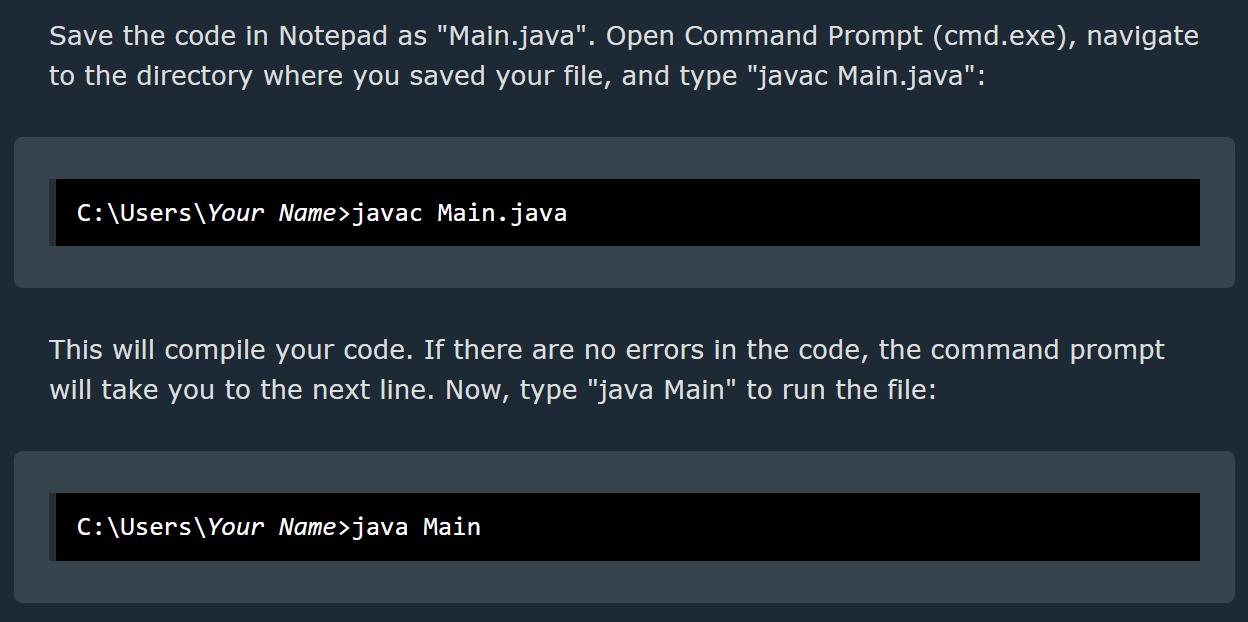
Content Delivery Network
 solemn latch
some languages dont need compiling, some do.
feral aspen
It told me to first do javac Main.java before running java Main? However, I can still do java Main without doing the first?
Why so, however? In addition, it created a new Main.class file?
solemn latch
If you've compiled code before you dont need to again, unless you make changes.
feral aspen
However, I did run the java file without compiling code?
Like java Main but never did javac Main.java ever.
solemn latch
did you run it using a button in your ide?
iirc some IDE's will compile for you
 eager moat
Hello, I run a Dota2 Discord that is part of top.gg, many of my users have been voting for my server for several weeks. Unfortunately, even though we have the highest amount of votes, we still don't get displayed on the first search page for "Dota2" when users search. Is there something I can do to remedy this?
feral aspen
I'm using regular VSC for now since I'm following w3schools.com.
near stratus
@feral aspen this might be your answer


Stack Overflow
Recently, I installed Java 11. When coding, accidentally, instead of compiling Main.java with javac Main.java, I wrote java Main.java. It did not show me any errors and worked out without any issue...
feral aspen
Damn, alright, alright. 👍
solemn latch
oh that's interesting
feral aspen
Haha, quick question. Can I do all at once? 
https://cdn.hamoodihajjiri.com/R25VG67dF3
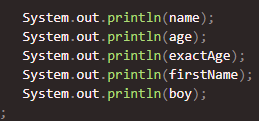
Content Delivery Network
near stratus
feral aspen
Haha, quick question. Can I do all at once? <:Eyes:680776464727277602>
https://...
try formating with printf
printf("%s\n%d\n%s", name, age, boy);
seems extremely inefficient just typing the above
lyric mountain
feral aspen
Quick question, what does it exactly mean when it comes to compiling code?
transforming .java into .class
feral aspen
How is that useful?
lyric mountain
as useful as chewing food
computers can't read text, they read ON and OFF
humans can't read ON and OFF, they read text
how do u fix that? compilers
feral aspen
Oh, damn. How can I view the .class file?
near stratus
feral aspen
Oh, damn. How can I view the `.class` file?
do javac Main.java
another Main.class would pop up
lyric mountain
feral aspen
Oh, damn. How can I view the `.class` file?
you shouldn't, but u can find it in out/classes folder
feral aspen
lyric mountain
you shouldn't, but u can find it in `out/classes` folder
Where's this?
lyric mountain
project root
feral aspen
near stratus
another Main.class would pop up
Not really, looks like it modified the current .class file?
feral aspen
lyric mountain
project root
I'm using VSC for now.
lyric mountain
class files SHOULDN'T be touched by u
feral aspen

Content Delivery Network
lyric mountain
they're exclusively to be handled by jvm
lyric mountain
feral aspen
I'm using VSC for now.
I told u not to, yet u did
feral aspen
lyric mountain
class files SHOULDN'T be touched by u
Indeed, alright, sure. I just want to see how it works, that's all.
feral aspen
lyric mountain
I told u not to, yet u did
I did it FOR THE SAKE OF w3schools. 
lyric mountain
all you'll see is an assembly-like text
.class is bytecode
ides can usually decompile class files, idk abt vsc
feral aspen
Is the d really necessary? https://cdn.hamoodihajjiri.com/PSnPeMGFFc

Content Delivery Network
 round cove
for decimal? yeah
feral aspen
It works without it, however? What's the trick in this?
feral aspen
split hazel
imagine having to explicitly specify the type of number you want
I mean, it has its own greatness once I started learning Java.
split hazel
im guessing the d just makes the fact its a decimal number explicit
otherwise if you assign it to a variable of type double it will implicitly convert it
lyric mountain
round cove
for decimal? yeah
double actually
split hazel
explicit = you make it clear the number is a decimal
implicit = the language takes a guess on the type of the number
feral aspen
split hazel
explicit = you make it clear the number is a decimal
implicit = the language tak...
Ohh, alright. However, isn't double doing the job, already? Why d?
lyric mountain
because compiler removes any slightly ambigous declaration
1.0 could be 1.0f or 1.0d
feral aspen
It's 1.0d cause of double, though?
lyric mountain
yes
feral aspen
double c = 1.0 is still same, however? I'm just trying to understand not debate, that's all.
feral aspen
lyric mountain
because compiler removes any slightly ambigous declaration
Other than this, I feel like double already does the job.
lyric mountain
feral aspen
`double c = 1.0` is still same, however? I'm just trying to understand not debat...
that when ur coding
but 1.0 is ambigous, even if java the language considers 1.0 as double
bytecode CANNOT have ambiguity
what ur seeing in classfile is a decompiled bytecode
when decompiling, it adds d because it is a double in bytecode
regardless of what's in left-hand side
feral aspen
Ah, I mean fair. It's best practice to add the data type letter, not sure what you call it.
The d in double c = 1.90d.
 eternal osprey
hey how do i find a member by id?
feral aspen
eternal osprey
hey how do i find a member by id?
<Guild>.members.cache.get("ID");
eternal osprey
love yu
feral aspen

split hazel
@earnest phoenix do you know where the source code for the nodejs crypto module is?
im especially interested in the x25519 algorithm
since openssl is difficult to work with because theres not much info online for working with it
lyric mountain
feral aspen
Ah, I mean fair. It's best practice to add the data type letter, not sure what y...
For double its entirely optional, compiler will add it anyway
Like js semicolons
I never really saw anyone explicitly writing d for doubles
Also note, unless ur doing very precise calculations, use float instead
It's half the size of a double
feral aspen
lyric mountain
Also note, unless ur doing very precise calculations, use `float` instead
Realised all float numbers always are double unless you specify them to be float with f.
lyric mountain
For literals, yes
feral aspen
I tried something like float x = 1.2143245 and it didn't work due to the possible lossy conversion from double to float, so I had to add d for it to work.
Wait, no.
lyric mountain
Float isn't the default, simply as that
It has half the size and twice the speed for divisions compared to double
feral aspen
Fair.
lyric mountain
But the tradeoff is poor precision
split hazel
double the precision 😯
lyric mountain
It means u don't do precise calculations with float, since things will go weird after 6 decimal places or so
feral aspen
Oh so I do something like double equation = 6 / 7 and not float equation = 6 / 7.
lyric mountain
You do neither
feral aspen
Waaat, then?
lyric mountain
That'd result in 0
U need to do 6.0 / 7
Or with f for float
Else you'll be dividing 2 ints
feral aspen
0 cause it's returning the whole number only cause that's how we specified the number that way?
lyric mountain
Compiler will probably understand what u meant tho, but it's good to specify decimals when using decimals
lyric mountain
feral aspen
`0` cause it's returning the whole number only cause that's how we **specified t...
0 because ints don't have decimal places
So it gets floored
As I said, for that specific case it might not matter since compiler will look at the left side to see what type it is
feral aspen
Ahh, so at the left, alright, that's what I wanted.
It looks at the first value, as in?
lyric mountain
But like if (1 / 2 == 0.5) is false
lyric mountain
feral aspen
It looks at the first value, as in?
It looks at the left side of the assignment
feral aspen
if (1.0 / 2 == 0.5) is true.
lyric mountain
It'll see double, so it'll treat it as double
lyric mountain
feral aspen
`if (1.0 / 2 == 0.5)` is true.
Yes
feral aspen
lyric mountain
It looks at the left side of the assignment
Fair enough.
lyric mountain
When doing numeric calculations the higher precision type will always be used
(1 + 2) / 3f / 2d
1 + 2 will give an int
/ 3f will give a float
/ 2d will give a double
Resulting value will be a double
feral aspen
lyric mountain
It'll see `double`, so it'll treat it as double
Oh, so it will see double since 1.0 will default to double unless stated to be a float with f. 👍
lyric mountain
Yes
feral aspen
Hold on while I comprehend the rest, moment.
feral aspen
lyric mountain
When doing numeric calculations the higher precision type will always be used
Oh, so in accordance to the type casting, you mean? Since when we talk about Widening Casting (Automatic), double is the largest type size resulting to that.
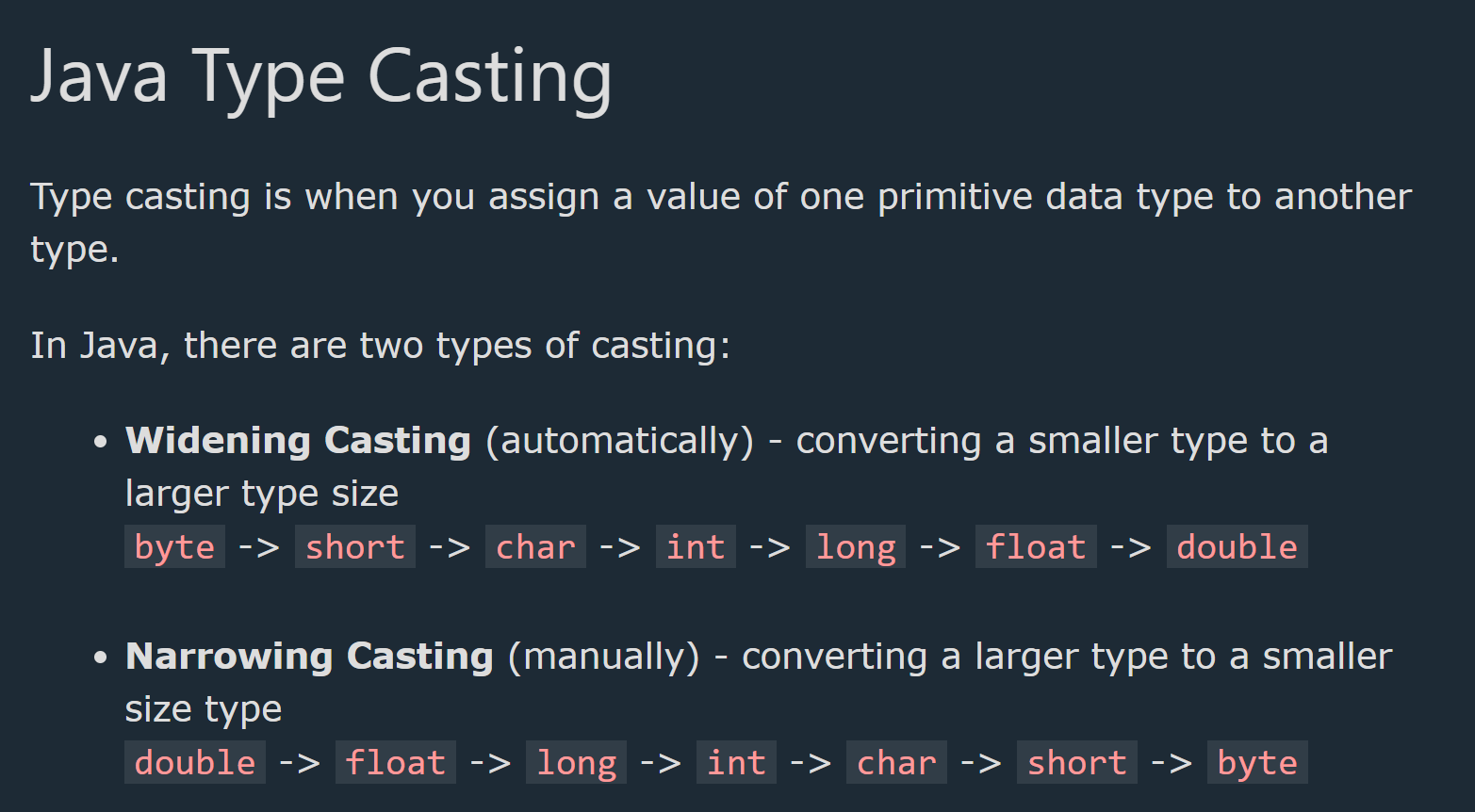
Content Delivery Network
lyric mountain
Yes
feral aspen
👍
Is the following code of Java the same as the following code in Javascript?
int randomNum = (int)(Math.random() * 101);
``` ```js
let randomNum = Math.floor(Math.random() * 101);
int randomNum = rng.nextInt(100);
rng being final var rng = new Random();
Save an rng instance somewhere and use it to generate randoms
It should be created only once btw, not once for each generation
But yes, yours will also work
feral aspen
var rng? Or is it int rng?
lyric mountain
Newer jdk versions allow right-side typing
Var will take the type of whatever is after =
THIS IS NOT A DYNAMIC VARIABLE THO
It's just to shorten written code
feral aspen
I didn't understand. Also, I got this error.
https://cdn.hamoodihajjiri.com/dXbirI4C2k
public class Main {
    public static void main(String[] args) {
        final var rng = new Random();
        int randomNum = rng.nextInt(100);

        System.out.println(randomNum);
    };
};

Content Delivery Network
lyric mountain
u need to import Random
and it shouldn't be created in a closed scope
put it at Main level
public static final var RNG = new Random();
that way u can always do Main.RNG.nextInt() anywhere in ur code
feral aspen
Ahh, well, I can still use the built in Math object, right?
lyric mountain
u can, it's just that Math.random() isn't a very good random generator
it's a very basic pseudogenerator
feral aspen
Inclusive 0 and exclusive 1.
I mean, I can floor it with narrowing the data type with (int), right?
lyric mountain
narrowing
feral aspen
Narrowing, yes.
lyric mountain
yes you can
feral aspen
Or Math.floor().
lyric mountain
Math.floor() is unnecessary most of the time
unless u want to keep a double as double
since floor returns a double
lyric mountain
instanceof
if (number instanceof Integer i) { /* use i, it's been casted to Integer */ }
feral aspen
I'm confused, could you give me an example of using instanceof in the System.out.println()?
lyric mountain
instanceof is a comparator
to get the class u do .getClass()
but it doesn't work with primitives, since they dont have a class
System.out.println(aValue.getClass().getSimpleName())
or System.out.println(aValue.getClass()) if u want the full classpath
feral aspen
aValue is what?
lyric mountain
whatever variable u want to print the type
feral aspen
So it works with non-primitive data types?
feral aspen
Example?
lyric mountain
(Integer) 5
feral aspen
lyric mountain
or `System.out.println(aValue.getClass())` if u want the full classpath
I mean example like this, if possible.
lyric mountain
System.out.println(((Integer) aValue).getClass())
feral aspen
What's the use of instanceof then, you mentioned comparator?
feral aspen
Ahh, as in object instanceof constructor.
lyric mountain
yes
feral aspen
Alright. 👍
lyric mountain
but not constructor in java, the type
Object.class is a class, Object is a type, new Object() is a constructor
earnest phoenix
how to get banner ? discord.js
sharp geyser
you can get the banner hash and then form the banner yourself
keep in mind it will return undefined if the user/guild has no banner
earnest phoenix
split hazel
<@456226577798135808> do you know where the source code for the nodejs crypto mo...
Here's the super secret source code of the built-in crypto module
https://github.com/nodejs/node/blob/main/lib/crypto.js
GitHub
Node.js JavaScript runtime :sparkles::turtle::rocket::sparkles: - node/crypto.js at main · nodejs/node
 quartz kindle
✨🐢🚀✨
ancient nova
I want to create a multiplayer chat app as my next project
I already have an API done so I could use the endpoints, does anyone know how to utilize it?
sharp geyser
quartz kindle
✨🐢🚀✨
amazing
 spark flint
ancient nova
I already have an API done so I could use the endpoints, does anyone know how to...
spark flint
ancient nova
I already have an API done so I could use the endpoints, does anyone know how to...
use websockets
ancient nova
spark flint
use websockets
can I use socket.io?
spark flint
yeah
don't send the ip with socket.io
have a server handling the requests and where they go
ancient nova
that seems quite difficult but I'll try
do I create a different endpoints for recieving and getting the message?
 eternal osprey
Hey i am trying to stop a reaction AND message collector using collector.stop() but it just doesn't stop lmao
 proven lantern
does this error mean options 5 and 6 have an issue?
{
"code": 50035,
"errors": {
"options": {
"5": {
"_errors": [
{
"code": "APPLICATION_COMMAND_OPTIONS_TYPE_INVALID",
"message": "Sub-command and sub-command group option types are mutually exclusive to all other types"
}
]
},
"6": {
"_errors": [
{
"code": "APPLICATION_COMMAND_OPTIONS_TYPE_INVALID",
"message": "Sub-command and sub-command group option types are mutually exclusive to all other types"
}
]
}
}
},
"message": "Invalid Form Body"
}``` lyric mountain
ancient nova
do I create a different endpoints for recieving and getting the message?
lyric mountain
ancient nova
do I create a different endpoints for recieving and getting the message?
ur supposed to use named channels not generic method names
like /general, /meta, /report, /team, etc
proven lantern
Sub-command and sub-command group option types are mutually exclusive to all other types
does this mean that i cant use the same option name for two different commands?
sharp geyser
I don't think that is an issue
as options are specific to the commands they belong to so I see no reason why discord would not allow same option names for different commands
 tepid canyon
you can use the same option names for other commands, as well as differing subcommands of the same command

 boreal iron
proven lantern
`Sub-command and sub-command group option types are mutually exclusive to all ot...
boreal iron
proven lantern
`Sub-command and sub-command group option types are mutually exclusive to all ot...
you probably mixed sub commands and sub command groups in a way it’s not allowed
There’s an example in the docs telling you which combinations are allowed and which not