#development
1 messages · Page 1849 of 1
 wheat mesa
I need to create a command that does that
I have one on my test bot, but not on my main
 quartz kindle
whats that supposed to measure?
 long crow
digging in further, not much differ from 0.5.3, only add support for macos arm64 https://github.com/discordjs/opus/commit/d929bdb7574fbf3ad1cea9c96277ab3fc4b96132
quartz kindle
taking away unused heap is meaningless
wheat mesa
quartz kindle
whats that supposed to measure?
It’s in the GitHub link he sent above, just a screenshot of it
quartz kindle
well thats pretty much a meaningless measurement
wheat mesa
So just rss is the important number then?
quartz kindle
yes
rss is the amount of memory being reserved by the process, ie what your operating system sees the process asking for
wheat mesa
I know very little about ram measurements and what’s normal for a discord bot anyways
quartz kindle
the OS cannot reclaim any of that memory, it has to ask the process to give some back, or kill it
so thats effectively the real memory usage by a given process
then node.js splits this memory into several smaller parts according to its needs
wheat mesa
I gotta look into my memory usage again then I suppose
quartz kindle
and keeps some reserved for any eventual needs as well
 small tangle
quartz kindle
the OS cannot reclaim any of that memory, it has to ask the process to give some...
small tangle
quartz kindle
the OS cannot reclaim any of that memory, it has to ask the process to give some...
OS: "gimme some RAM pls  "
"
wheat mesa
Taking a heap snapshot gave me about 70mb of ram usage on my discord bot process iirc
But I’m not sure if that’s counting nodejs or not
quartz kindle
heap snapshot should in theory only include the heap memory
what does process.memoryUsage() say?
wheat mesa
Not on my pc atm, this was a few weeks ago when my bot was using like 200mb of ram for 15 guilds
Got it down to about 100mb after disabling message caching
quartz kindle
if it was using 200mb and the snapshot was 70mb, then it should be the heap only yes
wheat mesa
Well, the heap snapshot was after I fixed the problem I believe
I can’t really remember
My memory (no pun intended) is bad and it was late at night
quartz kindle
well, come back when you have more data :^)
quartz kindle
👍
 quaint wasp
For somereason it says "channel of undefined" error...

should I rename the varable or is there like a stupid error I made that I dont see?
long crow
when there is x of undefined, what you going to look is the left hand side of it, in this case message
quaint wasp
yea thats what I did
but message is a .... well.. a message
it should have the channel property
this command was not executed it DMs.
long crow
on the message event or the index, how is the .execute line up?
the one that call the execute function I meant
quaint wasp
command.execute(client, message, args, Discord, eco, db);
welp, there the issue
 lament rock
quartz kindle
well thats pretty much a meaningless measurement
lament rock
quartz kindle
well thats pretty much a meaningless measurement
the rss is what's reserved, no? Reserved != used.
You could display what's allocated to the process specifically, but the fact is that the rss can be dynamically adjusted and does not equate to how much ram is being used and is an inaccurate measurement for process memory usage
quartz kindle
lament rock
You could display what's allocated to the process specifically, but the fact is ...
thats how everything works
nothing uses exactly the amount of ram it actually needs
every program reserves the amount they think they need, and readjust it as needed
as far as the operating system is concerned, the reserved memory is the total memory the program is using
the operating system doesnt know how much of that the program is actually filling up or not, thats up for the program to decide
you could repeat this rule on every layer:
as far as your physical machine is concerned, your computer has 8gb ram, but it doesnt know how much the software is using.
as far as your operating system is concerned, the program is using X ram, but doesnt know how much of that ram is actually being used
as far as your program is concerned, a variable is using Y ram, but doesnt know how many bytes are actually being actively used or not, ie reseved buffers that are still empty
of course you can now decide what you want to show, the amount of memory your process is actually using, or the amount of memory your process is effectively taking away from the operating system
i personally would argue the latter would be more correct
if you wanted to, you could also take it down to showing only the amount of memory your javascript code itself is using (heap), and ignore the rest
also, the rss value includes reserved memory that is not in use anywhere, so even if you take unused heap away from rss, it will still include lots of unused memory anyway
 worthy ivy
node_modules bloating? fun
quaint wasp
uhh
tim
remember that thing you told me to be able to display pics in HTML from link?
It just returns this:
 quartz kindle
quaint wasp
It just returns this:
quartz kindle
quaint wasp
It just returns this:
show code
quaint wasp
 quartz kindle
if you copy and paste that url into the browser, does it show the image?
quaint wasp
yeah
quartz kindle
open dev tools, go to the network tab
check the checkbox that days disable cache
press f5 to reload
check what it says when it tries to load the image url
quartz kindle
👍
 warped idol
would anyone be able to help direct me a bit with unity's new networking solution? im new to networking and im struggling to sync variables across the network
 solemn latch
warped idol
would anyone be able to help direct me a bit with unity's new networking solutio...
solemn latch
warped idol
would anyone be able to help direct me a bit with unity's new networking solutio...
what new one? MLAPI?
warped idol
yes
solemn latch
Tutorial that explains creating a project, installing the MLAPI package, and creating the basic components for your first networked game.
warped idol
the problem is i followed a simple tutorial similar to that then tried to adapt it to what i need and for some reason updating a NetwokrVariable inside of a ServerRpc isnt being shown to clients
 tulip ledge
Alright, so what I'm doing is loading the user's health for example 70 then I looping over the items and adding to health and maxHealth if the item needs to increase health. Now the issue with this is as follows:
User gets loaded with 70/100 health.
The user has items equipped that give +10 health -> User has 80/110 health
User takes 20 damage -> User has 60/110 health
I save that 60 health

User gets loaded with 60/100 health.
The user has items equipped that give +10 health -> User has 70/110 health
See the issue? How would I solve this?
solemn latch
I think you are doing it backwards
the item should only change the max health, not the actual health.
it should only add that health the first time its given
if thats picked up, or just spawns with it or whatever
tulip ledge
Aha so I should only change the health if the user equips it?
solemn latch
if its something they can unequip or re-equip most games ive seen dont add that health, just increases the max health.
you could run into issues with the user spam unequiping and re-equiping it for free health.
tulip ledge
Alright
solemn latch
so youd need to make it "recharge" over time, or disable re-equiping it tbh.
solemn latch
there are rougelike bots which allow changing of gear repeatedly in a fight.
tulip ledge
You can't execute any commands while a fight is running
And you need to click a confirmation button when equipping items
But I mean I just won't add the health then
It means they need to spend more money on health potions
so more money drain
solemn latch
Does the health between fights matter?
Calculate the max health at the start and just set the health to that at the beginning.
Theres a ton of ways to handle it tbh.
 vivid fulcrum
 sudden geyser
What's the difference between a subcommand and a subcommand group?
 lyric mountain
/command sub group args...
sudden geyser
So sub and group are separate arguments and group is more like an enum/choices?
lyric mountain
you can have
/command args...
/command sub args...
/command sub group args...
think of it like space-separated command names
sudden geyser
hmm
 earnest phoenix
Is it possible to dynamically add intents like this?
client[i] = new Discord.Client({
        autoReconnect: true,
        partials: ["MESSAGE", "CHANNEL", "GUILD_MEMBER", "REACTION", "USER"],
        intents: [Intents.FLAGS.GUILDS]
    });
client[i].token= cryptr.decrypt(x.token);
let flags = await client[i].api.applications(x.clientid).rpc.get().flags
//now add the intent
client[i].login(client[i].token)
you probably need to restart the client for it to apply
earnest phoenix
but i didn't login yet it happens before i login
lyric mountain
solemn latch
if its something they can unequip or re-equip most games ive seen dont add that ...
@tulip ledge you can also calculate a %change if you want to modify the actual health
and always round down so users can't abuse floating-point %
lyric mountain
earnest phoenix
but i didn't login yet it happens before i login
wdym?
lyric mountain
lyric mountain
<@!259776081316282368> you can also calculate a %change if you want to modify th...
new health = new max * old health / old max
quaint wasp
uhhh... im trying to do the simple stuff with a website... When the user is loged in throught a discord autho2, how can I check if it is and like.. display their avatar and username somewhere and then use a scope I got guilds.join ?
ping in replies
earnest phoenix
My flag is 16384,how does shift operator work?,what would be the code for checking, if the flag includes PRESENCE intent
 long crow
sudden geyser
hmm
long crow
sudden geyser
hmm
Example is like picture. /picture nsfw/sfw thigh picture is the main command, nsfw/sfw will be the subgroup and thigh is the subcommand
solemn latch
quaint wasp
uhhh... im trying to do the simple stuff with a website... When the user is loge...
quaint wasp
🙂 thanks
quaint wasp
earnest phoenix
My flag is `16384`,how does shift operator work?,what would be the code for chec...
const client = new Discord.Client(
  { intents: 32767 }
); ```if js ^^
||Enables ALL inits.....||
earnest phoenix
I want to check ,if the flag 16384 has presence intent
quaint wasp
o
long crow
I mean, wont you be asked why you need privillage intent later on to get verify? Using all intent is going to make your life harder to get verified. Like srsly, what are need with all the ununsed intents
 vernal musk

quaint wasp
true
quaint wasp
me who is wayy to scared to update to v13
 burnt anchor
can anyone help me
earnest phoenix
long crow
I mean, wont you be asked why you need privillage intent later on to get verify?...
I am trying to check if the Bot with the client id has the intent
solemn latch
vernal musk
Why is my name z
you asked this yesterday, same answer today.
we dont allow hoisting. your name is z because of it.
quaint wasp
My name was Hoister for like 2 months this year bc I started streaming while Veld was streaming
burnt anchor
module.exports = {
    name: 'reactionrole',
    description: "If anyone reacts to msg gains role.",
    permission: '877281853139189811',
    async execute(msg, args, Discord, client){
        if(msg.member.roles.cache.has(this.permission)){
            const channel = '877464352830148608';
            const Role = msg.guild.roles.cache.find(role => role.name === "Member");
            const Emoji = '✅';

            const { MessageEmbed } = require('discord.js');
            const reactionchannel = msg.channel
            const reactionEmbed = new MessageEmbed()
            .setColor('#ffffff')
            .setTitle('REACT TO GET ROLE')
            .setDescription('Reacting for get role is important for u to be verified.');
            await reactionchannel.send({ embeds: [reactionEmbed] });
            reactionEmbed.react(Emoji);
        }else{
            msg.reply(`**Syntax: You don't have enough permissions**`)
        }
    }
}
Hoisting?
quaint wasp
add js in the begining
vernal musk
What is that?
solemn latch
vernal musk
Hoisting?
adding special characters such as ? to the beginning of your name
vernal musk
Das tuff not even google know it
burnt anchor
(node:2260) DeprecationWarning: The message event is deprecated. Use messageCreate instead
C:\Users\Mustikk\Desktop\Projects\AgresBot2021\data\commands\reactionrole.js:18
            reactionEmbed.react(Emoji);
                          ^

TypeError: reactionEmbed.react is not a function
    at Object.execute (C:\Users\Mustikk\Desktop\Projects\AgresBot2021\data\commands\reactionrole.js:18:27)
    at processTicksAndRejections (node:internal/process/task_queues:96:5)
can anyone help me
vernal musk
solemn latch
adding special characters such as ? to the beginning of your name
Oh that that's a cult
It's meant to be!?
Lemme fix that rq
But anyway why can't u just remove the special character
quaint wasp
I agree with the human... also this is the defenition of it from.. uh.. I forgot.. it was smth like urban dictionary:
 vernal musk
That explanation was more confusing than the word
But can you just change my name to Crimson
z just looks
Bad
quaint wasp
burnt anchor
```
(node:2260) DeprecationWarning: The message event is deprecated. Use messag...
// stuff
 burnt anchor
yes its js
solemn latch
vernal musk
But can you just change my name to Crimson
we dont set names on request.
quaint wasp
lol
burnt anchor
the code
burnt anchor
burnt anchor
```
module.exports = {
name: 'reactionrole',
description: "If anyone re...
here
long crow
vernal musk
That explanation was more confusing than the word
Why dont u change yourslef if it bad?
vernal musk
burnt anchor
```
(node:2260) DeprecationWarning: The message event is deprecated. Use messag...
Change your message.js ti messageCreate.js if you're using a handler. If not,
client.on('messageCreate' instead of
client.on('message'
vernal musk
long crow
Why dont u change yourslef if it bad?
Lol bro
quaint wasp
nick will stay
vernal musk
You think I wouldn't I don't have permissions
quaint wasp
he meant the litiral username
vernal musk
Lol cuz as I said !? is a cult
quaint wasp
 vernal musk
That's kinda stupid ngl but
solemn latch
earnest phoenix
I want to check ,if the flag `16384` has presence intent
did this ever get answered?
vernal musk
earnest phoenix
I want to check ,if the flag `16384` has presence intent
Google tbh
Lemme do it 4 u gimme a sec
solemn latch
(number & (1<<12)) 👀
number being the in number, 12 being the place you are checking
quaint wasp
Hi, Select boxes, radio buttons and check boxes are used to allow user to select the predefined values unlike input in which user enters his own value. As we all know that all these are form elements, they must contain values. To retrieve their va...
vernal musk
Yes Gateway guildMember
earnest phoenix
solemn latch
`(number & (1<<12))` 👀
nice ,worked,thx
quaint wasp
👍
vernal musk
So server intents I believe
vernal musk
earnest phoenix
I want to check ,if the flag `16384` has presence intent
Yez GATEWAY_GUILD_MEMBERS
burnt anchor
@vernal musk it says client not defined
module.exports = {
    name: 'reactionrole',
    description: "If anyone reacts to msg gains role.",
    permission: '877281853139189811',
    async execute(msg, args){
        if(msg.member.roles.cache.has(this.permission)){
            const channel = '877464352830148608';
            const Role = msg.guild.roles.cache.find(role => role.name === "Member");
            const Emoji = '✅';

            const { MessageEmbed, Client, Message } = require('discord.js');
            const reactionchannel = msg.channel
            const reactionEmbed = new MessageEmbed()
            .setColor('#ffffff')
            .setTitle('REACT TO GET ROLE')
            .setDescription('Reacting for get role is important for u to be verified.');
            await reactionchannel.send({ embeds: [reactionEmbed] });
            client.on('messageCreate', messageCreated =>{
                messageCreated.react(Emoji);
            });
        }else{
            msg.reply(`**Syntax: You don't have enough permissions**`)
        }
    }
}
this is not main file maybe cuz that
quaint wasp
..
burnt anchor
so this is the all of fil
quaint wasp
quaint wasp
do this @burnt anchor
burnt anchor
file
wheat mesa
Oh lord
burnt anchor
module.exports = {
    name: 'reactionrole',
    description: "If anyone reacts to msg gains role.",
    permission: '877281853139189811',
    async execute(msg, args){
        if(msg.member.roles.cache.has(this.permission)){
            const channel = '877464352830148608';
            const Role = msg.guild.roles.cache.find(role => role.name === "Member");
            const Emoji = '✅';

            const { MessageEmbed, Client, Message } = require('discord.js');
            const reactionchannel = msg.channel
            const reactionEmbed = new MessageEmbed()
            .setColor('#ffffff')
            .setTitle('REACT TO GET ROLE')
            .setDescription('Reacting for get role is important for u to be verified.');
            await reactionchannel.send({ embeds: [reactionEmbed] });
            client.on('messageCreate', messageCreated =>{
                messageCreated.react(Emoji);
            });
        }else{
            msg.reply(`**Syntax: You don't have enough permissions**`)
        }
    }
}
you should be using https://discord.js.org/#/docs/main/stable/class/Message?scrollTo=client
also the docs cover all of this, you should really be using it.
wait 👀 what is even going on
in here
quaint wasp
people are more helpful then plain words that are confusing af ngl
wheat mesa
Don’t require files in the middle of executed a command unless you’re dynamically reading files
solemn latch
👀
burnt anchor
module.exports = {
    name: 'reactionrole',
    description: "If anyone reacts to msg gains role.",
    permission: '877281853139189811',
    async execute(msg, args){
        if(msg.member.roles.cache.has(this.permission)){
            const channel = '877464352830148608';
            const Role = msg.guild.roles.cache.find(role => role.name === "Member");
            const Emoji = '✅';

            const { MessageEmbed, Client, Message } = require('discord.js');
            const reactionchannel = msg.channel
            const reactionEmbed = new MessageEmbed()
            .setColor('#ffffff')
            .setTitle('REACT TO GET ROLE')
            .setDescription('Reacting for get role is important for u to be verified.');
            await reactionchannel.send({ embeds: [reactionEmbed] });
            client.on('messageCreate', messageCreated =>{
                messageCreated.react(Emoji);
            });
        }else{
            msg.reply(`**Syntax: You don't have enough permissions**`)
        }
    }
}
there is lua!
quaint wasp
👍
solemn latch
and creating an event in the middle of an event like that 👀
quaint wasp
I've never used lua lol
quaint wasp
burnt anchor
```lua
module.exports = {
name: 'reactionrole',
description: "If anyone ...
  const { MessageEmbed, Client, Message } = require('discord.js');

module.exports = {
    name: 'reactionrole',
    description: "If anyone reacts to msg gains role.",
    permission: '877281853139189811',
    async execute(msg, args){

        if(msg.member.roles.cache.has(this.permission)){
            const channel = '877464352830148608';
            const Role = msg.guild.roles.cache.find(role => role.name === "Member");
            const Emoji = ':white_check_mark:';

            const reactionchannel = msg.channel
            const reactionEmbed = new MessageEmbed()
            .setColor('#ffffff')
            .setTitle('REACT TO GET ROLE')
            .setDescription('Reacting for get role is important for u to be verified.');
            await reactionchannel.send({ embeds: [reactionEmbed] });
            client.on('messageCreate', messageCreated =>{
                messageCreated.react(Emoji);
            });
        }else if(!msg.member.roles.cache.has(this.permission)){
            msg.reply(`**Syntax: You don't have enough permissions**`)
        }
    }
}```No no your event
quaint wasp
there.... might help
vernal musk
burnt anchor
<@!493230285278937098> it says client not defined
```
module.exports = {
...
Wait you didn't pass client as a parameter so why are u using it?
burnt anchor
its not the main file
quaint wasp
exactly
vernal musk
He gotta change all the client > Client
burnt anchor
its
./data/commands/reactionrole.js
vernal musk
burnt anchor
its not the main file
Bro ngl your whole bot kinda messed up
Goodluck with thag
Bye
quaint wasp
@burnt anchor in index, where u have msg, args, add client
to fetch client from index
quaint wasp
burnt anchor
its
./data/commands/reactionrole.js
already have like 5 questions about that but alr..
wheat mesa
quaint wasp
<@!863539319007739914> in index, where u have `msg, args`, add ``client``
You don’t need to
quaint wasp
ik
wheat mesa
The Message object contains your client
quaint wasp
its recommended
wheat mesa
Access it with your message object
wheat mesa
message.client
solemn latch
I prefer accessing it with the message object, but its kind of just preference
burnt anchor
i changed it like that
module.exports = {
    name: 'reactionrole',
    description: "If anyone reacts to msg gains role.",
    permission: '877281853139189811',
    async execute(msg, args, Discord, Client){
        if(msg.member.roles.cache.has(this.permission)){
            const channel = '877464352830148608';
            const Role = msg.guild.roles.cache.find(role => role.name === "Member");
            const Emoji = '✅';

            const { MessageEmbed, Client, Message } = require('discord.js');
            const reactionchannel = msg.channel
            const reactionEmbed = new MessageEmbed()
            .setColor('#ffffff')
            .setTitle('REACT TO GET ROLE')
            .setDescription('Reacting for get role is important for u to be verified.');
            await reactionchannel.send({ embeds: [reactionEmbed] });
            Client.on('messageCreate', messageCreated =>{
                messageCreated.react(Emoji);
            });
        }else{
            msg.reply(`**Syntax: You don't have enough permissions**`)
        }
    }
}
but it gives code: 'ERR_INVALID_ARG_TYPE' now
wheat mesa
Or I guess since his param name is msg he would use msg.client
quaint wasp
const { MessageEmbed, Client, Message } = require('discord.js'); should be on top of everything
wheat mesa
quaint wasp
` const { MessageEmbed, Client, Message } = require('discord.js');` s...
Also, you don’t need the Client in that
quaint wasp
u cant really require in a function as someone said in here to me long time ago..
indeed
first it doesnt need to be capital
second u already are defining it 2nd time
wheat mesa
quaint wasp
first it doesnt need to be capital
What no
burnt anchor
quaint wasp
second u already are defining it 2nd time
what im defining second time???
quaint wasp
 wheat mesa
You’re importing Client from discord, but you’re not actually assigning it to a variable
And you don’t need to
burnt anchor
i copied embed script from discord.js guide 
wheat mesa
Just access your client with msg.client
quaint wasp
idk any of v13.
wheat mesa
wheat mesa
You’re importing `Client` from discord, but you’re not actually assigning it to ...
This is not v13 specific, this is just js
quaint wasp
:/
solemn latch
burnt anchor
i copied embed script from discord.js guide <:MegaThonk:585884192361938960>
You should not just copy stuff
quaint wasp
u can just do
const embed = await message.channel.send(reactionEmbed)
embed.react(Emoji)``` rose warren
There's no way to check in djs if I have the applications.commands scope in a guild is there?
burnt anchor
it says problem is here
            client.on('messageCreate', msg =>{
                msg.react(Emoji);
            });
how can i make this
wheat mesa
...
quaint wasp
quaint wasp
u can just do
```js
const embed = await message.channel.send(reactionEmbed)
em...
here
it would make it simple a lot
burnt anchor
trying that
u told
DiscordAPIError: Cannot send an empty message
again and again
quaint wasp
burnt anchor
i changed it like that
```js
module.exports = {
name: 'reactionrole',
...
            const { MessageEmbed, Client, Message } = require('discord.js');

module.exports = {
    name: 'reactionrole',
    description: "If anyone reacts to msg gains role.",
    permission: '877281853139189811',
    async execute(msg, args, Discord, Client){
        if(msg.member.roles.cache.has(this.permission)){
            const channel = '877464352830148608';
            const Role = msg.guild.roles.cache.find(role => role.name === "Member");
            const Emoji = '✅';

            const reactionchannel = msg.channel
            const reactionEmbed = new MessageEmbed()
            .setColor('#ffffff')
            .setTitle('REACT TO GET ROLE')
            .setDescription('Reacting for get role is important for u to be verified.');
            const embed = await reactionchannel.send({ embeds: [reactionEmbed] });
            embed.react(Emoji)
        }else{
            msg.reply(`**Syntax: You don't have enough permissions**`)
        }
    }
}
i lived this msg 1 times too
quaint wasp
wut does it mean empty message... lol
quaint wasp
??
burnt anchor
module.exports = {
    name: 'reactionrole',
    description: "If anyone reacts to msg gains role.",
    permission: '877281853139189811',
    async execute(msg, args, Discord, client){
        if(msg.member.roles.cache.has(this.permission)){
            const channel = '877464352830148608';
            const Role = msg.guild.roles.cache.find(role => role.name === "Member");
            const Emoji = '✅';

            const { MessageEmbed, Message } = require('discord.js');
            const reactionchannel = msg.channel
            const reactionEmbed = new MessageEmbed()
            .setColor('#ffffff')
            .setTitle('REACT TO GET ROLE')
            .setDescription('Reacting for get role is important for u to be verified.');
            const embed = await msg.channel.send(reactionEmbed)

            embed.react(Emoji)
        }else{
            msg.reply(`**Syntax: You don't have enough permissions**`)
        }
    }
}
dont touch this
quaint wasp
ok?
quaint wasp
Your welcome 🙂
 quaint wasp
🙂
burnt anchor
if i had money i give but i dont have money
solemn latch
@quaint wasp spoonfeeding is against our rules
burnt anchor
and paypal is closed on 2016 for turkey
quaint wasp
It was kinda a joke
burnt anchor
i understand
quaint wasp
and thats why I deleted it
quaint wasp
...
quaint wasp
Understandable, same for me rn
solemn latch
rose warren
There's no way to check in djs if I have the `applications.commands` scope in a ...
I bet you can, its just going to not be on the docs
@rose warren https://github.com/discordjs/discord-api-types/blob/47100bcf2c154146baecb359e1c00ecca9939ffa/rest/v9/index.ts#L711-L713
this?

GitHub
Up to date Discord API Typings, versioned by the API version - discord-api-types/index.ts at 47100bcf2c154146baecb359e1c00ecca9939ffa · discordjs/discord-api-types
might be wrong, but I think this should give a response which could work? 
const { REST } = require('@discordjs/rest');
const { Routes } = require('discord-api-types/v9');

const rest = new REST({ version: '9' }).setToken(token);
await rest.get( Routes.guildApplicationCommandsPermissions(clientId, guildId) );
nope dont think thats it.
rose warren
Hmm
burnt anchor
can anyone help me
const { MessageEmbed, Client, Message } = require('discord.js');

module.exports = {
    name: 'reactionrole',
    description: "If anyone reacts to msg gains role.",
    permission: '877281853139189811',
    async execute(msg, args, Discord, Client){
        if(msg.member.roles.cache.has(this.permission)){
            const channel = '877464352830148608';
            const Role = msg.guild.roles.cache.find(role => role.name === "Member");
            const Emoji = '✅';

            const reactionchannel = msg.channel
            const reactionEmbed = new MessageEmbed()
            .setColor('#ffffff')
            .setTitle('REACT TO GET ROLE')
            .setDescription('Reacting for get role is important for u to be verified.');
            const embed = await reactionchannel.send({ embeds: [reactionEmbed] });
            embed.react(Emoji)

            Client.on('messageReactionAdd', async (reaction, user) => {
                if(reaction.msg.partial) await reaction.msg.fetch();
                if(reaction.partial) await reaction.fetch();
                if(user.bot) return;
                if(!reaction.msg.guild) return;
                if(reaction.msg.channel.id == channel){
                    if(reaction.Emoji.name === Emoji){
                        await reaction.msg.guild.members.cache.get(user.id).roles.add(Role);
                    }
                }
            });


        }else{
            msg.reply(`**Syntax: You don't have enough permissions**`)
        }
    }
}
my full error
node:internal/errors:464
    ErrorCaptureStackTrace(err);
    ^

TypeError [ERR_INVALID_ARG_TYPE]: The "emitter" argument must be an instance of EventEmitter. Received type string ('messageReactionAdd')
    at new NodeError (node:internal/errors:371:5)
    at eventTargetAgnosticAddListener (node:events:880:11)
    at Function.on (node:events:967:3)
    at Object.execute (C:\Users\Mustikk\Desktop\Projects\AgresBot2021\data\commands\reactionrole.js:21:20)
    at processTicksAndRejections (node:internal/process/task_queues:96:5) {
  code: 'ERR_INVALID_ARG_TYPE'
}
(╯°□°)╯︵ ┻━┻
dont ban me pls
im banned from discord.js
solemn latch
burnt anchor
```js
const { MessageEmbed, Client, Message } = require('discord.js');
module....
it seems your randomly adding code hoping something will work, your last issue was the same.
development isnt randomly doing stuff until something works.
burnt anchor
not random
wheat mesa
Looks pretty random to me
burnt anchor
const { MessageEmbed, Client, Message } = require('discord.js'); //client

module.exports = {
    name: 'reactionrole', //execute name
    description: "If anyone reacts to msg gains role.", //description
    permission: '877281853139189811', //role for use
    async execute(msg, args, Discord, Client){
        if(msg.member.roles.cache.has(this.permission)){ //permission checker

        }else{
            msg.reply(`**Syntax: You don't have enough permissions**`) //not enough permission msg
        }
    }
}
but u dont know better
cuz im new at js
my general is c#
sudden geyser
If you know C#, you hopefully know to not throw stuff around and expect it to work.
solemn latch
also creating events like that inside functions inside events is a bad idea 👀 Client.on('messageReactionAdd', async (reaction, user) => {
solemn latch
then double defining Client can be used sensibly, but here its not being done sensibly
 tame vale
Hello is anyone familiar or good with Music bots or bots in general? I really need help with them and their permissions
wheat mesa
 tame vale
My b dog
 hollow depot
tame vale
Hello is anyone familiar or good with Music bots or bots in general? I really ne...
hollow depot
tame vale
Hello is anyone familiar or good with Music bots or bots in general? I really ne...
too generic lol
be more specific
tame vale
How do you make it so music bot’s slash commands are only usable in dedicated channels specifically set to them? I’m trying to get up 3 music channels with Groovy Bot, Rythm 1 Bot, and Rythm 2 Bot. Whenever i disable the permissions for them to view the channel or send messages, their slash commands are still available.
tame vale
hollow depot
too generic lol
true sorry lol
wheat mesa
At the moment, there’s no way to do what you’re trying to do afaik
wheat mesa
Hopefully that’ll be an added functionality in the future
But as of right now those are global slash commands and you can’t get rid of them in certain channels and have them in others
tame vale
wheat mesa
At the moment, there’s no way to do what you’re trying to do afaik
I have joined a server and the music commands were only available for use in music channels. Must have done some coding or other things
wheat mesa
With text commands, you can do that, but with slash commands I don’t believe you can
tame vale
Ok thanks a lot that will save me a lot of time
wheat mesa
(Also for future reference this is a development channel and not a support channel for setting up other people’s bots in your server)
 boreal iron
wheat mesa
At the moment, there’s no way to do what you’re trying to do afaik
boreal iron
wheat mesa
At the moment, there’s no way to do what you’re trying to do afaik
Of course.
They will be displayed anywhere but limiting the functionality to a channel, user or role is possible.
tame vale
wheat mesa
(Also for future reference this is a development channel and not a support chann...
I’m aware, I was directed here by someone in #support , it may have been because my question was very vague
boreal iron
But the visibility of the slash command in general shouldn’t be a problem at all.
Add an authorization for example for channels, roles or users to ur command handler and/or database and respond with an ephemeral message if somebody is missing the permissions to run the slash command.
This will message will not appear in the channels and therefore there’s no "you can’t use this command" spam anywhere
wheat mesa
I believe he’s talking about limiting the visibility of slash commands of bots he doesn’t own such as groovy/rhythm
boreal iron
Oh
lyric mountain
just invite without interactions scope
boreal iron
I have joined a server and the music commands were only available for use in music channels. Must have done some coding or other things
Nah he was referring to text command not slash commands
wheat mesa
tame vale
How do you make it so music bot’s slash commands are only usable in dedicated ch...
^
long crow
Slash command bypass channel as now.
tame vale
wheat mesa
I believe he’s talking about limiting the visibility of slash commands of bots h...
I’m trying to make it so groovy or rythm bot’s commands only work in one text channel and can only enter one voice channel each
it’s just to reduce spam and unnecessary chats in main text channels without having to remind people not to do it
long crow
Use the one that have ephemeral
wheat mesa
You can set up permissions for the bots to only be able to join certain channels, but right now you can’t limit the visibility of global slash commands
long crow
As now, nothing much can be done about it
tame vale
wheat mesa
You can set up permissions for the bots to only be able to join certain channels...
i’ve tried the permissions but it doesn’t seem like they effect anything, i appreciate the help though. Would making a dedicated playlist for different channels be an alternative?
wheat mesa
I guess, I don’t design servers 
The bot will bypass channel permissions if it has the admin permission, make sure it doesn’t have admin if you’re trying to make it so it can only join certain channels
long crow
It doesnt need any permission
tame vale
wheat mesa
The bot will bypass channel permissions if it has the admin permission, make sur...
Ohhh that’s right, that is probably why the rythm bot would join and respond to groovy bot’s dedicated channels
long crow
It is how slash command work
wheat mesa
@long crow discord bots still need permissions to join voice channels
Even if the command is a slash command
If they don’t have permissions to join a certain voice channel, they can’t join it
long crow
Join voice channel yes, responding to slash no
tame vale
wheat mesa
<@273097175452614666> discord bots still need permissions to join voice channels
Does that mean even if I invite it to a voice channel using “/play…” it won’t join unless it is allowed in the channel without having admin capabilities?
wheat mesa
But you can limit the (voice) channels that the bot can join
long crow
Just used the one that have ephemeral
wheat mesa
Ayeven he’s not talking about designing his own bot
tame vale
long crow
Just used the one that have ephemeral
i’m new to this what is ephemeral?
wheat mesa
He’s talking about setting up existing bots
long crow
Not tslking about design bot either
tame vale
like custom ones?
wheat mesa
tame vale
i’m new to this what is ephemeral?
It’s a flag you can specify when you respond to a slash command to make it only visible to the user who invoked the slash command
tame vale
wheat mesa
It’s a flag you can specify when you respond to a slash command to make it only ...
Ah ok
wheat mesa
But for your case it doesn’t have any use since you’re not developing your own discord bot
I’d recommend going to the groovy/rhythm support discord (if they have one) and asking them about your problem there
This discord isn’t really for support on existing bots
tame vale
wheat mesa
I’d recommend going to the groovy/rhythm support discord (if they have one) and ...
I haven’t tried their support but I have found out that discord support is very unreliable
tame vale
wheat mesa
This discord isn’t really for support on existing bots
apologies
wheat mesa
You could also look up some YouTube tutorials on how to set up permissions for discord servers I’m sure
tame vale
So in conclusion, I should take away they bots admin rights and only allow it to view and send messages to specific channels?
tame vale
wheat mesa
You could also look up some YouTube tutorials on how to set up permissions for d...
👍
wheat mesa
Yes, but it won’t stop slash commands afaik
Or at least it won’t stop them from being visible
tame vale
Ok thanks a lot i really appreciate the help!
wheat mesa
No problem, good luck!
 simple stump
I'm attempting to create a voice channel, but the channel always gets created as a text channel for some reason.
Code:
        var server = message.guild;
        server.channels.create('channel name', {
            type: 'voice',
            permissionOverwrites: [
               {
                 id: message.guild.roles.everyone,
                 deny: ['VIEW_CHANNEL'],
              },
            ],
        })
its GUILD_VOICE not voice
solemn latch
minor pet peeve but
        var server = message.guild;
        server.channels.create('channel name', {
            type: 'voice',
            permissionOverwrites: [
               {
                 id: server.roles.everyone,
                 deny: ['VIEW_CHANNEL'],
              },
            ],
        })
or
        message.guild.channels.create('channel name', {
            type: 'voice',
            permissionOverwrites: [
               {
                 id: message.guild.roles.everyone,
                 deny: ['VIEW_CHANNEL'],
              },
            ],
        })
defining server and only using it in some places just makes it harder to read, and use your own code.
simple stump
alr. ill fix that :P
 fringe hinge
How can I make a leaderboard?
 finite kelp
How do I make my bot send a welcome card when someone joins the server on glitch.com and using node.js
 gritty bolt
does anyone know how to fix this github actions error or explain what exactly might be causing it?
error: Invalid value for '<VERSION>': Invalid release version. Slashes and certain whitespace characters are not permitted.```

code
```name: Create releases
on: [push]
jobs:
  create-sentry-release:
    runs-on: ubuntu-latest
    steps:
      - name: Checkout code
        uses: actions/checkout@master
      - name: Create a Sentry.io release
        uses: tclindner/sentry-releases-action@v1.2.0
        env:
          SENTRY_AUTH_TOKEN: ${{ secrets.SENTRY_AUTH_TOKEN }}
          SENTRY_ORG: ${{ secrets.SENTRY_ORG }}
          SENTRY_PROJECT: ${{ secrets.SENTRY_PROJECT }}
        with:
          tagName: ${{ github.ref }}
environment: <env>```i have an issue with moving a person to a vc. i think the issue is that im creating a channel, then immediately moving the user to that created vc, but not sure whether thats the actual problem. i get this error:
https://sourceb.in/2uMoqXf4fq
and my very messy code: https://sourceb.in/Gamkwqpwv0
lament rock
You need to await the creation of the guild channels
earnest phoenix
@drowsy crag is this considered advertisement not even sure
also sounds kinda scammish
wheat mesa
@quartz kindle finally home, added a command to the prod bot for memory usage, got this:

(Also it's like 3am for you I believe so I'm not expecting a response or anything lol)
Could the memory usage be due to cached channels/roles? I forgot to disable caching on those two, but I don't think it should make a massive difference with 275 cached channels
 brave quartz
?serverinfo
lyric mountain
wheat mesa
Could the memory usage be due to cached channels/roles? I forgot to disable cach...
Don't try to run below 10 MB, you'll end up with a massive headache trying to optimize the bot to run on a microcontroller
Like, optimize where possible but chill
wheat mesa
I'm not interested in mega optimizing it, I was just told that it's not normal for the amount of ram my bot is using
lyric mountain
That just looks like the cache reserving some space for itself
wheat mesa
My cache shouldn't be causing many problems
lyric mountain
But keep an eye open if it increases a lot over time
wheat mesa
I have message and user caching (almost) completely disabled
lyric mountain
There's a chance it'll stay like that for a long time, in which case it's perfectly fine
But if it start to grow like a mad mosquito there might be some leak
lyric mountain
3 options
A - do it the proper way and buy a vps
B - do it the poor man's way and use """free""" services
C - keep your own pc online 24/7
everyone says that...
...a few moments before despair
but anyway, by going free you're sacrificing performance and reliability
sometimes security too
you do need to keep the console open
long crow
rpi is a good option too
lyric mountain
that's technically option C
lyric mountain

 sterile thicket
message.reply('test').then(message=>{

message.react('👍')
const filter = (reaction, user) => {
    return reaction.emoji.name === '👍'
};

const collector = message.createReactionCollector({ filter, time: 15000 });

collector.on('collect', (reaction, user) => {
    message.reply(`Collected ${reaction.emoji.name} from ${user.tag}`);
});

collector.on('end', collected => {
    message.reply(`Collected ${collected.size} items`);
});
})```
Why is it only collecting reaction from the bot?Have you enable the intents?
sterile thicket
Which one?
 pale vessel
GUILD_MESSAGE_REACTIONS iirc
long crow
Just back from internet down, lolzer
The dev portal give short description what is what of the intents
 errant flax
sterile thicket
```js
message.reply('test').then(message=>{
message.react('👍')
const filter = ...
errant flax
sterile thicket
```js
message.reply('test').then(message=>{
message.react('👍')
const filter = ...
why is the
message to reply and the .then message r named the same

quartz kindle
wheat mesa
<@!180112943612952577> finally home, added a command to the prod bot for memory ...
you have to check what is being cached and what else you're storing in memory. my heap is hovering around 60mb with 9k guilds. i have everything except guilds disabled, but i still cache a lot of other non-discord data like database and api responses. the guilds themselves are probably using around 30mb. also im still on djs v12
earnest phoenix
Why when I get an invite for my bot, it works for me but not for others and it says, Intergration requires code grant

 pallid jungle
2021-08-19T08:15:28.747939+00:00 app[Worker.1]: (node:4) UnhandledPromiseRejectionWarning: TypeError: Cannot read property 'client' of null
2021-08-19T08:15:28.747953+00:00 app[Worker.1]:     at Object.execute (/app/events/messageDelete.js:9:28)
If i changed it to bot it gives same error
 near stratus
pallid jungle
```js
2021-08-19T08:15:28.747939+00:00 app[Worker.1]: (node:4) UnhandledPromiseR...
near stratus
pallid jungle
```js
2021-08-19T08:15:28.747939+00:00 app[Worker.1]: (node:4) UnhandledPromiseR...
Show code
specially line 9 of messageDelete.js
pallid jungle
const Discord = require('discord.js')
const snipes = new Discord.Collection()
const config = require('../config.json')

module.exports = {
    name: 'messageDelete',
    async execute(client, message, messageDelete) {
        if (message.author.client) return;
        snipes.set(message.channel.id, message)

        if (!message.author) return;
        const DeletedLog = new Discord.MessageEmbed()
        .setTitle("Deleted Message")
        .setDescription(`**User:** ${message.author.tag}\n**Content:** \`\`\`${message.content}\`\`\`\n`)
if (message.author.client) return;
message is null
How're you passing the arguments ?
pallid jungle
near stratus
message is null
How're you passing the arguments ?
    if (event.once) {
        client.once(event.name, (...args) => event.execute(client, ...args));
    } else {
        client.on(event.name, (...args) => event.execute(client, ...args));
        }
What should i do ?
If i did it messageDelete it give same error and
if (message.author.bot) return; give same error
if (author.client) return; same error too
I really want to fix this ;-;
pallid jungle
pale vessel
Log the message
?
near stratus
console.log(message)
pallid jungle
near stratus
console.log(message)
after that ?
sterile thicket
!e message.reply('test').then(message=>{

message.react(':thumbsup:')
let c = 0
const filter = (reaction, user) => {
    return reaction.emoji.name === ':thumbsup:'
};

const collector = message.createReactionCollector({ filter, time: 15000 });

collector.on('collect', (reaction, user) => {
c = c+1
    message.reply(`Collected ${reaction.emoji.name} from ${user.tag}. Now ${c}`);
});

collector.on('end', collected => {
    message.reply(`Collected ${c} items`);
});
})```
Why does it collect 2 reactions from the bot when the bot reacts with just one?You should redefine the callback function since message is already defined in the upper scope
sterile thicket
oh
sterile thicket
lament rock
You should redefine the callback function since message is already defined in th...
so now I replaced the callback with msg
But still same result.
!e message.reply('test').then(msg=>{
msg.react(':thumbsup:')
let c = 0
const filter = (reaction, user) => {
return reaction.emoji.name === ':thumbsup:'
};
const collector = msg.createReactionCollector({ filter, time: 15000 });
collector.on('collect', (reaction, user) => {
c = c+1
msg.reply(`Collected ${reaction.emoji.name} from ${user.tag}. Now ${c}`);
});
collector.on('end', collected => {
msg.reply(`Collected ${c} items`);
});
})``` digital ibex
im still havin the The emulator process for AVD 4.7_WXGA_API_30 has terminated. with android studio
any ideas?
^ the same with intellij idea
earnest phoenix
how you guys change the jsk user in discord.py
 glacial lance
I've attempted to decompress raw response from discord.py myself (on_socket_raw_receive), however when I attempt to do it the same way by both discord.py and Discord API example, I get the following error, meanwhile discord.py does it without any errors. Am I missing something?
https://i.alexflipnote.dev/b1DbBz6.png (test code)
https://i.alexflipnote.dev/6CwNYeq.png (discord.py source)
https://i.alexflipnote.dev/Adr9gLa.png (console)
quartz kindle
glacial lance
I've attempted to decompress raw response from discord.py myself (on_socket_raw_...
shared context zlib has an order
you cannot decompress arbitrary packets out of order, you need full zlib for that
with shared context you have to decompress packets in exactly the same order they were compressed
the very first packet will include a header to be shared with every other packet, and each packet will modify this header for subsequent packets
glacial lance
Yeh I'm aware of that, issue is, the bytes that I try to decompress are compressed in the same way discord.py handles it, which is what makes me confused, same goes to Discord API's example
https://i.alexflipnote.dev/3cgnW3W.png (discord.py)
https://i.alexflipnote.dev/4XiSemG.png (Discord API)
quartz kindle
but in your test code you are trying to decompress a fixed message
where did you get this message from?
glacial lance
This is how it gets it https://i.alexflipnote.dev/8v5vYQ6.png
And here is from discord.py https://i.alexflipnote.dev/4dG8XZC.png
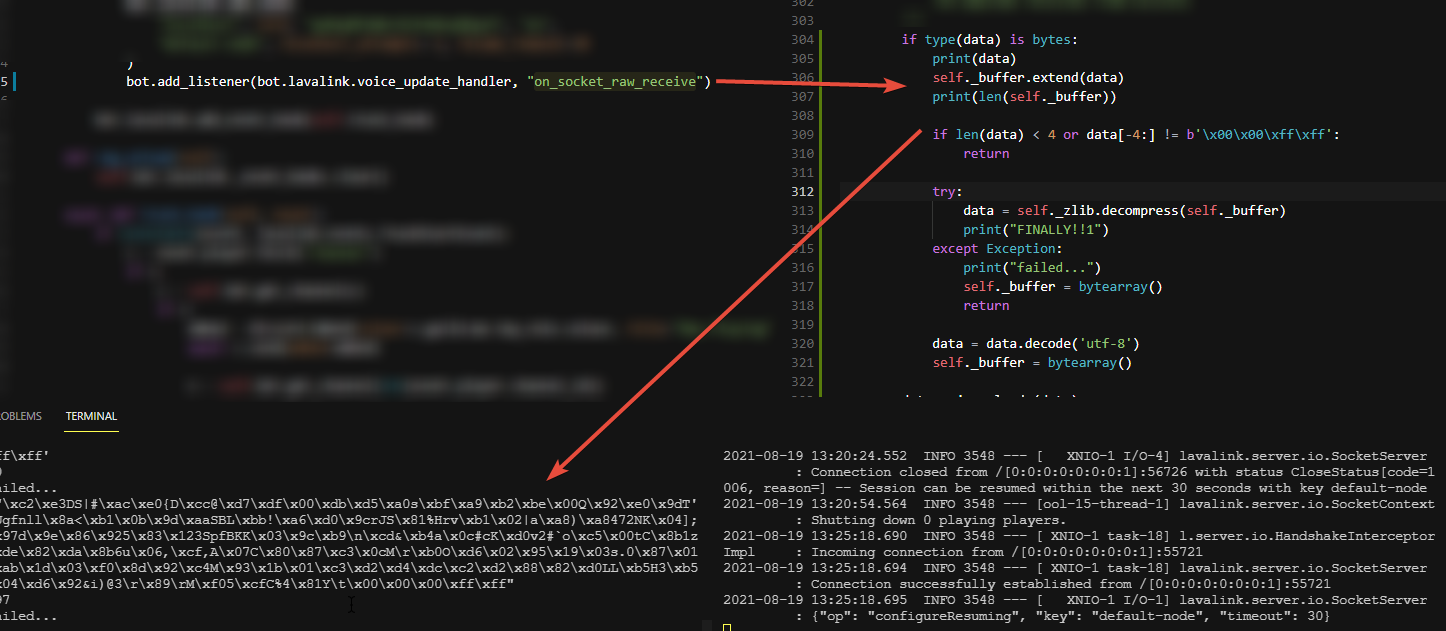

- screenshot is my code
- screenshot is discord.py
quartz kindle
and you still get that error on your screenshot 1?
glacial lance
Yupp
digital ibex
btw tim u kno whats goin on with my issue?
quartz kindle
well i cant say without seeing the rest of your code, plus im not a py dev
glacial lance
Fairs
quartz kindle
digital ibex
btw tim u kno whats goin on with my issue?
what is your issue
digital ibex
f alright
glacial lance
Long time long time

 latent heron
Alright
 digital ibex
maybe the 2fa code is incorrect?
 inner fulcrum
earnest phoenix
https://cdn.upload.systems/uploads/CfniSaur.png
inner fulcrum
earnest phoenix
https://cdn.upload.systems/uploads/CfniSaur.png
maybe u hate ur life
digital ibex
maybe use a different one idk
earnest phoenix
earnest phoenix
https://cdn.upload.systems/uploads/CfniSaur.png
well the bot is only on this acc so
digital ibex
i meant code
earnest phoenix
right
hold on
still can't
tried diff codes
Is that banable send message to everyone with bot
yeah
that's against TOS
I believe
also depends what you're messaging
earnest phoenix
earnest phoenix
https://cdn.upload.systems/uploads/CfniSaur.png
anyone else?
errant flax
async save(){
      let data = await schema.findOne({id:this.id})
      console.log(this)
      console.log(data)
      if (data) {
        data = await schema.findOneAndUpdate({
          id: this.id
        },{
          hands: this.hands
        },{new:true})
        console.log(upd)
      } else {
        const newData = await schema.create({
          id: this.id,
          hands: this.hands,
          players: this.players,
          channelId: this.channelId,
          guildId: this.guildId,
          turn: this.players[0],
          msgId: this.msgId,
          endsAt: Date.now()+(1000*60*30),
          usedCards: []
        })
        newData.save()
        data=newData
      }
      console.log(`Game-${this.id} has been saved to the database!`)
      this.data = data
    }
data is always null but when i go to mongodb atlas it does exist
digital ibex
earnest phoenix
Is that banable send message to everyone with bot
if the user agrees its not, and as long as u dont abuse the rate limits sure
what is this
errant flax
im actually using myClass.load() to load something from the database via the id
async load(id){
      const data = await schema.findOne({id:id})
      if (!data) return false
      this.players = data.players
      this.id = data.id
      this.hands = data.hands
      this.channelId = data.channelId
      this.guildId = data.guildId
      this.msgId = data.msgId
      this.data = data
      return this
    }
that part seems to work but not .save()
earnest phoenix
digital ibex
if the user agrees its not, and as long as u dont abuse the rate limits sure
I just send how are yo to everyone for try eval code 
errant flax
digital ibex
nvm jus show ur constructor and how ur callin the class
const Game = new game()
Game.load(round.id)
thats basically it 
digital ibex
and u r doin that before or after the save method?
digital ibex
earnest phoenix
I just send how are yo to everyone for try eval code <a:RooSip:85324953223430148...
they prob dont want it and u might be abusin the rate limits
 real helm
hello, any api for exchange usd to btc?
errant flax
digital ibex
and u r doin that before or after the save method?
before?
lyric mountain
real helm
hello, any api for exchange usd to btc?
you could fetch the current btc value and convert urself
lyric mountain
googling is an art

 real helm
lyric mountain
then convert it
real helm
lyric mountain
then convert it
tell me how
lyric mountain
...1 + 1 = 2
digital ibex
errant flax
before?
if u log this inside the save method what does it log?
lyric mountain
...relative to what coin?
real helm
eur
lyric mountain
then get dollar price just like how u did with btc
 digital ibex
so its not this.id its this.data.id
errant flax
this.id does exist tho
before the data object
id is there
ill try this.data.id but it'll probably not make a difference
digital ibex
errant flax
this.id does exist tho
show the full thing then
digital ibex
errant flax
ill try this.data.id but it'll probably not make a difference <a:bonk:7675763561...
i doubt it shrug


 rustic nova
yup thanks
errant flax
np
errant flax
errant flax
can anyone help
earnest phoenix
digital ibex
they prob dont want it and u might be abusin the rate limits
Just sent to 70 ppl :D
lyric mountain
"Oh look, I'm breaking ToS look at me!"
errant flax
the next part of the class obj?
digital ibex
there is no id
errant flax
wdym?
digital ibex
does this.data.id return the expected value then?
digital ibex
errant flax
ill try this.data.id but it'll probably not make a difference <a:bonk:7675763561...
this
errant flax
there is id??
 errant flax
data is null
errant flax
errant flax
```js
async save(){
let data = await schema.findOne({id:this.id})
co...
from this code
digital ibex
maybe change js if (datal) { data = await schema.findOneAndUpdate({ id: this.id },{ hands: this.hands },{new:true}) console.log(upd) to js if (data !== null) { data = await schema.findOneAndUpdate({ id: this.id },{ hands: this.hands },{new:true}) console.log(upd)
(edited)
errant flax
what does == means?
lyric mountain
equals
digital ibex
checkin without type
lyric mountain
=== means equals and the same type
errant flax
o
lyric mountain
but nothing can be the same type as null
digital ibex
oh ye true
boreal iron
lyric mountain
but nothing can be the same type as null
Except null 
lyric mountain
null is not the same type as null
boreal iron
Shhh don’t discriminate null
digital ibex
do js if(data == null) { // create } else { // find } instead
lyric mountain
doesn't mongo have a database manager like sql?
errant flax
other than the id doesnt exist in the db(which it does)
errant flax
lyric mountain
doesn't mongo have a database manager like sql?
wdym?
lyric mountain
literally that, a way to open the database and see what's inside it
errant flax
im confused

 tired panther
lyric mountain
literally that, a way to open the database and see what's inside it
tired panther
lyric mountain
literally that, a way to open the database and see what's inside it
You have to fetch the Collection, connection doesnt give you any db data.
there is a connectionmanager
errant flax
dude
i did .find({}).find(cond..)
and it works

im still confused on why .findOne doesnt work
boreal iron
quartz kindle
wdym you cant equal null
Guess he refers to the fact that null in database is a string
At least I think he means that
errant flax
errant flax
im still confused on why `.findOne` doesnt work
atleast it works 
boreal iron
Except null

 slender thistle
lyric mountain
literally that, a way to open the database and see what's inside it
slender thistle
lyric mountain
literally that, a way to open the database and see what's inside it
MongoDB Compass
wheat mesa
^^
lyric mountain
quartz kindle
that doesn't make sense at all
boreal iron

tired panther
You are checking if a string is equal to null..., it isnt
lyric mountain
but he's not checking for type
boreal iron
Still wonder if null in the db has the data type null if you received the query request
(not speaking about SQL)
 supple shore
how do i make a custom bot vote logging in database ???
 tired panther
boreal iron
Still wonder if null in the db has the data type null if you received the query ...
tired panther
boreal iron
Still wonder if null in the db has the data type null if you received the query ...
Mongodb with orm's just accept types: string, boolean...... Otherwise you will get a Casterror. You cant save null, except in a array.
boreal iron
Question answered.
Kuhubakwukulu is guilty.
Sentence: 2 years of cleaning public toilets
tired panther
Although you can add null as value with some unaesthic solutions.
digital ibex
tired panther
Mongodb with orm's just accept types: string, boolean...... Otherwise you will ...
u can save null wut
burnt anchor
CODE
module.exports = {
    name: 'clear',
    description: 'this command is bulkdeletes messages on msg channel count is defined count.',
    permission: '',
    async execute(msg, args){
        if(!args[0]) return msg.reply('**TypeError: Please define the amount u want to delete.**');
        if(isNaN(args[0])) return msg.reply('**SyntaxError: Please enter a number.');

        if(args[0] > 100) return msg.reply('SyntaxError: Please enter a number between (1-100).');
        if(args[0] < 1) return msg.reply('SyntaxError: Please enter a number between (1-100).');

        await msg.channel.messages.fetch({Limit: args[0]}).then(messages => {
            msg.channel.bulkDelete(messages);
        });
    }
}
ERROR
(node:2760) DeprecationWarning: The message event is deprecated. Use messageCreate instead
(Use `node --trace-deprecation ...` to show where the warning was created)
C:\Users\Mustikk\Desktop\Projects\Lxyon\data\commands\clear.js:6
        if(!args[0]) return msg.reply('**TypeError: Please define the amount u want to delete.**');
                ^

TypeError: Cannot read property '0' of undefined
    at Object.execute (C:\Users\Mustikk\Desktop\Projects\Lxyon\data\commands\clear.js:6:17)
    at Client.<anonymous> (C:\Users\Mustikk\Desktop\Projects\Lxyon\index.js:50:38)
    at Client.emit (node:events:406:35)
    at MessageCreateAction.handle (C:\Users\Mustikk\Desktop\Projects\Lxyon\node_modules\discord.js\src\client\actions\MessageCreate.js:31:18)
    at Object.module.exports [as MESSAGE_CREATE] (C:\Users\Mustikk\Desktop\Projects\Lxyon\node_modules\discord.js\src\client\websocket\handlers\MESSAGE_CREATE.js:4:32)
    at WebSocketManager.handlePacket (C:\Users\Mustikk\Desktop\Projects\Lxyon\node_modules\discord.js\src\client\websocket\WebSocketManager.js:345:31)
    at WebSocketShard.onPacket (C:\Users\Mustikk\Desktop\Projects\Lxyon\node_modules\discord.js\src\client\websocket\WebSocketShard.js:443:22)
    at WebSocketShard.onMessage (C:\Users\Mustikk\Desktop\Projects\Lxyon\node_modules\discord.js\src\client\websocket\WebSocketShard.js:300:10)
    at WebSocket.onMessage (C:\Users\Mustikk\Desktop\Projects\Lxyon\node_modules\ws\lib\event-target.js:132:16)
    at WebSocket.emit (node:events:394:28)
can anyone help me?
burnt anchor
async execute(msg, args){
here it need to be defined cuz
client.on('message', msg => {
    if(!msg.content.startsWith(config.prefix) || msg.author.bot) return;

    const args = msg.content.slice(config.prefix.length).split(" ");
    const command = args.shift().toLowerCase();

    if(command === 'clear'){
        client.commands.get('clear').execute(msg. args);
    }else if(command === 'ban'){
        client.commands.get('ban').execute(msg, args);
    }
})
here is using too
client.commands.get('ban').execute(msg, args);
oh, msg.args ?
boreal iron
execute(msg. args)
Watch that line carefully
burnt anchor
wait ill try again
boreal iron
And check if your commands has your actual command instead of check each command in a statement
if(client.commands.has(command)) // get & execute command
tired panther
digital ibex
u can save null wut
When using an orm, you cant, which mose ts users do.
boreal iron
burnt anchor
but it doesnt metter cuz i already create files so
What I told you has nothing to do with your command modules
 digital ibex
boreal iron
What I told you has nothing to do with your command modules
digital ibex
boreal iron
What I told you has nothing to do with your command modules
it doesnt really matter he doesnt wanna do it so jus leave him
burnt anchor
digital ibex
it doesnt really matter he doesnt wanna do it so jus leave him
dont be so strong
relax
boreal iron
Tips to improve ur code are for free 
digital ibex
burnt anchor
it works there is no problem for now
thats what i was saying?
boreal iron
There’s nobody unrelaxed
boreal iron
Just take a look at your issue we mentioned:
boreal iron
Well then next step is to resolve the warning.
Change your event name to "messageCreate" not "message"
simple stump
I'm trying to move users to a VC after waiting 1 second, but I get this error:
https://sourceb.in/gDCd2NP7CG
Code: https://sourceb.in/ItKQzP5OL8
 stable eagle
simple stump
I'm trying to move users to a VC after waiting 1 second, but I get this error:
h...
stable eagle
simple stump
I'm trying to move users to a VC after waiting 1 second, but I get this error:
h...
You have to use the voice channel's id to move users.
simple stump
Oh? Can I use .cache.get to get the channel ID from it's name then?
stable eagle
message.guild.channels.cache.find(c => c.name === "Game " + games.length).id
 outer perch
how can I debug in VSCode?
I am using TS
I'm tired of guessing and using console.log()
wheat mesa

One of the great things in Visual Studio Code is debugging support. Set breakpoints, step-in, inspect variables and more.
outer perch
ty
outer perch
How can I attach a debugger that's a node module?
cuz there are no vscode extensions for ts-node
@quartz kindle I think you know something about this 😅
quartz kindle
i dont use ts/ts-node
wheat mesa
I would help since I use ts node but I’m on mobile atm
lament rock
sterile thicket
so now I replaced the callback with `msg`
But still same result.
```js
!e messag...
Your filter function is incorrect. You need to use \👍 as the character for filtering. Not the human readable string used to type it in client.
also, you should make it so that if the user is the client, then you don't collect that reaction
 near grotto
hi
boreal iron
Well probably #no-you-wont-be is the right channel
latent heron
@quartz kindle is it IDENTIFY and then HEARTBEAT, or the other way?
latent heron
gotcha
i have everything currently structured now as coroutines and handling each payload type e.g. IDENTIFY, HEARTBEAT, RESUME and etc. as coroutine methods
I should then process the RESUME task if my websocket recv gives back the HEARTBEAT_ACK right?
quartz kindle
a while ago you had to do resume first
but now it doesnt matter afaik
but from what they said, if you're resuming, the resume is the first thing you do after hello
 coral scroll
I Am getting the:
UnicodeDecodeError: 'charmap' codec can't decode byte 0x9d in position 5062: character maps to <undefined>
I have jokes.json file
I have utils.py
async def get_moma_jokes():
    with open(os.path.join(DATA_DIR, "jokes.json")) as joke_file:
        jokes = json.load(joke_file)
    random_category = random.choice(list(jokes.keys()))
    insult = random.choice(list(jokes[random_category]))
    return insult
_global.py
SETTINGS_DIR = os.path.dirname(os.path.abspath(__file__))
ROOT_DIR = os.path.dirname(SETTINGS_DIR)
DATA_DIR = os.path.join(ROOT_DIR, 'data')
and NSFW.py
from utils import get_moma_jokes
import discord
from discord.ext import commands
from utils import get_moma_jokes

class NSFW(commands.Cog):

    def __init__(self, client):
        self.client = client
        print(f"Cog: [{self.qualified_name}] loaded")

    @commands.command(brief="Insult someone.", description="Insult a friend, an enemy, a bot, or yourself. Just mention their name.")
    async def insult(self, ctx, member: discord.Member = None):
        insult = await get_moma_jokes()
        await ctx.send(insult)

def setup(client):
    client.add_cog(NSFW(client))
ah okay, thank you!
burnt anchor
CODE
        const { MessageEmbed } = require('discord.js');
        const helpchannel = msg.channel
        const helpEmbed = new MessageEmbed()

            .setColor('#ffffff')
            .setTitle('COMMANDS HELP')
            .setAuthor('poemo224', 'https://i.imgur.com/oK6epiz.jpg')
            .setDescription('All Bot Commands')
            .setThumbnail(`${msg.guild.icon}`)
            .addFields(
                { name: `${msg.guild.name} INVITE`, value: `INVITE` },
                { name: 'BAN', value: 'Bans defined user.'},
                { name: 'KICK', value: 'Kicks defined user.'},
                { name: 'INFO', value: 'Info about Lyxon Bot.'},
                { name: 'HELP', value: 'Shows all commands with an embed message.'},
                { name: 'RULES', value: 'Shows rules with an embed message.'},
                { name: 'CLEAR', value: 'Deletes message as user defined.'},
                { name: 'CREDITS', value: 'Shows credits on Lyxon Bot.'},
                { name: '\u200B', value: '\u200B' },
                { name: 'Prefix', value: '$', inline: true },
                { name: 'Clear Count', value: 'Max clear count is 100', inline: true },
            )
            .setTimestamp()
            .setFooter('by poemo224');

        helpchannel.send({ embeds: [helpEmbed] });
help me pls
@here
hollow depot
burnt anchor
CODE
```js
const { MessageEmbed } = require('discord.js');
cons...
in thumbnail pass the icon url, not the raw icon name
burnt anchor
'poemo224' this??
wait
ya
in thumbnail cant get the guild.icon?
@hollow depot
can i get the guild icon
hollow depot
 burnt anchor
.setThumbnail(`${msg.guild.icon}`)
Is there a way to see all places Im banned from? Like all servers
sudden geyser
no
quaint wasp
F.
burnt anchor
hollow depot
iconURL() ???
quaint wasp
..
sudden geyser
burnt anchor
```js
.setThumbnail(`${msg.guild.icon}`)
```
I recommend using https://discord.js.org/#/docs/main/stable/class/Guild?scrollTo=iconURL

Discord.js is a powerful node.js module that allows you to interact with the Discord API very easily. It takes a much more object-oriented approach than most other JS Discord libraries, making your bot's code significantly tidier and easier to comprehend.
 burnt anchor
var serverIcon = message.guild.iconURL();
.setThumbnail(serverIcon)
this might work??
digital ibex
burnt anchor
CODE
```js
const { MessageEmbed } = require('discord.js');
cons...
please for the last time just send the relevant code and error
quaint wasp
 burnt anchor
digital ibex
please for the last time just send the relevant code and error
burnt anchor
digital ibex
please for the last time just send the relevant code and error
bro i dont know where is the mistake
cuz that i send all the code
tulip ledge
is it normal that half my global commands got loaded but the other not yet? Do I just wait or?
digital ibex
burnt anchor
bro i dont know where is the mistake
read the error then
burnt anchor
i readed
digital ibex
read it properly
burnt anchor
DiscordAPIError: Invalid Form Body
embeds[0].thumbnail.url: Scheme "ebdc8375674885bc32bdf9c8d9415d53" is not supported. Scheme must be one of ('http', 'https').
digital ibex
tulip ledge
is it normal that half my global commands got loaded but the other not yet? Do I...
wait up to an hour
sudden geyser
tulip ledge
is it normal that half my global commands got loaded but the other not yet? Do I...
It will take up to an hour for new slash commands to update across all guilds.
quaint wasp
..
sudden geyser
But it could also be a programming error.
tulip ledge
sudden geyser
It will take up to an hour for new slash commands to update across all guilds.
Yes but half already got loaded
do they not all get loaded at once?
boreal iron
They slowly spread out
quaint wasp
I think
tulip ledge
aha alright ty
digital ibex
they get cached for 1 hour, and they fan out across all guilds slowly
quaint wasp
mhm
boreal iron
Something refreshing your site or clearing the cache helps as scripts are cached as well
burnt anchor
C:\Users\Mustikk\Desktop\Projects\Lxyon\data\commands\help.js:10
            .setColor('#ffffff')
             ^

TypeError: msg.guild.iconURL(...).setColor is not a function
    at Object.execute (C:\Users\Mustikk\Desktop\Projects\Lxyon\data\commands\help.js:10:14)
    at Client.<anonymous> (C:\Users\Mustikk\Desktop\Projects\Lxyon\index.js:58:37)
    at Client.emit (node:events:406:35)
    at MessageCreateAction.handle (C:\Users\Mustikk\Desktop\Projects\Lxyon\node_modules\discord.js\src\client\actions\MessageCreate.js:31:18)
    at Object.module.exports [as MESSAGE_CREATE] (C:\Users\Mustikk\Desktop\Projects\Lxyon\node_modules\discord.js\src\client\websocket\handlers\MESSAGE_CREATE.js:4:32)
    at WebSocketManager.handlePacket (C:\Users\Mustikk\Desktop\Projects\Lxyon\node_modules\discord.js\src\client\websocket\WebSocketManager.js:345:31)
    at WebSocketShard.onPacket (C:\Users\Mustikk\Desktop\Projects\Lxyon\node_modules\discord.js\src\client\websocket\WebSocketShard.js:443:22)
    at WebSocketShard.onMessage (C:\Users\Mustikk\Desktop\Projects\Lxyon\node_modules\discord.js\src\client\websocket\WebSocketShard.js:300:10)
    at WebSocket.onMessage (C:\Users\Mustikk\Desktop\Projects\Lxyon\node_modules\ws\lib\event-target.js:132:16)
    at WebSocket.emit (node:events:394:28)
there is no problem
boreal iron
This and CF is just trash
sudden geyser
you're trying to call .setColor on a string
quaint wasp
bruh
boreal iron
?
quaint wasp
send full embed
burnt anchor
worked
burnt anchor
sudden geyser
you're trying to call `.setColor` on a string
working
quaint wasp
👍
 feral aspen
This function isn't working in reactions.
promptMessage: async function(interaction, author, time, validReactions) {
    time *= 1000;

    for (const reaction of validReactions) await interaction.react(reaction);

    const filter = (reaction, user) => validReactions.includes(reaction.emoji.name) && user.id === author.id;

    return interaction
        .awaitReactions(filter, { max: 1, time: time})
        .then(collected => collected.first() && collected.first().emoji.name)
}
It used to be message instead of interaction but I replaced them, but I didn't think it would be that easy.
This is the code I did:
const m = await interaction.channel.send({ embeds: [mainEmbed] });
const reacted = await run.promptMessage(m, interaction.member, 30, reaction);

await m.delete(mainEmbed);
.. and the problem is that when I react with the reaction I specified, it is not deleting the embed.
 keen bobcat
Idk im learning to code I'm just exploring
feral aspen
...
keen bobcat
Maybe an E not e in emoji
feral aspen
What?? I highly suggest you not to answer if you are not sure.
keen bobcat
Coding needs capitals
feral aspen
Ok.
quaint wasp
im kinda new to websites... when making a form with a submit button, how can you use the info?
like how can I get the info the user put on a field?

ping in replies
boreal iron
Define a method POST/GET and then handle the data after the form has been send
The element names will act as identification
<input type=text name=shit />
POST[shit] will be your user input
quaint wasp
u can do that in html?
boreal iron
You can also define an action sending the request to a different file
No you can’t process this data with html
But with JS, PHP etc.
wheat mesa
keen bobcat
Coding needs capitals
What... does... this even mean..?
quaint wasp
u dont need capitals.. unless its like a constructer.. or like a. i forgot how they called
earnest phoenix
CamelCase?
quaint wasp
Like js Discord = require('discord.js') would
feral aspen
feral aspen
This function isn't working in reactions.
```js
promptMessage: async function(in...
Did I do something wrong though?
I have legit studied the code..

The interaction would keep thinking...
earnest phoenix
which function do you use to end interaction
boreal iron
quaint wasp
I got no idea how to do that.. 😅
Well then it’s the right time to study some docs and read some tips to get in touch with it
feral aspen
I would first make sure the user indeed reacted with the specified reaction.. if so.. then I would make it followUp an embed.
Let me send the code.
 narrow fractal
keen bobcat
Coding needs capitals
narrow fractal
keen bobcat
Coding needs capitals

feral aspen
Legit ⭐ .
feral aspen
earnest phoenix
which function do you use to end interaction
I've sent the code.
 winged mulch
    Event Code: 1000
    Clean     : true
    Reason    :
[WS => Shard 3] Clearing the heartbeat interval.
[WS => Shard 3] WS State: CLOSED
[WS => Shard 3] [CONNECT]
    Gateway    : wss://gateway.discord.gg/
    Version    : 9
    Encoding   : json
    Compression: none
[WS => Shard 3] Setting a HELLO timeout for 20s.
[WS => Shard 3] [CONNECTED] Took 195ms
[WS => Shard 3] Clearing the HELLO timeout.
[WS => Shard 3] Setting a heartbeat interval for 41250ms.
[WS => Shard 3] [IDENTIFY] Shard 3/4 with intents: 515
[WS => Shard 3] [READY] Session 15a7152286a1cf86ef225925dc7b29ca.
[WS => Shard 3] [ReadyHeartbeat] Sending a heartbeat.```
The shards spam disconnect and reconnect, eating up my Identify limit. Does anyone know why it could be doing this?This is with discord.js v13
quartz kindle
is there anything else in the logs?
error 1000 is basically a generic error
no reason specified
could be network issues, could be rate limits or ip ban
winged mulch
quartz kindle
is there anything else in the logs?
[WS => Shard 2] [CONNECTED] Took 226ms
[WS => Shard 2] Clearing the HELLO timeout.
[WS => Shard 2] Setting a heartbeat interval for 41250ms.
[WS => Shard 2] [IDENTIFY] Shard 2/4 with intents: 515
[WS => Shard 1] [READY] Session 9487e27eaf5883097ca27930fa6d260d.
[WS => Shard 1] [ReadyHeartbeat] Sending a heartbeat.
[WS => Shard 3] [INVALID SESSION] Resumable: false.
[WS => Shard 2] [INVALID SESSION] Resumable: false.
[WS => Shard 2] Failed to connect to the gateway, requeueing...
[WS => Manager] Shard Queue Size: 1; continuing in 5 seconds...
[WS => Shard 3] Failed to connect to the gateway, requeueing...
[WS => Manager] Shard Queue Size: 1; continuing in 5 seconds...
[WS => Shard 1] Heartbeat acknowledged, latency of 1468ms.
[WS => Shard 2] An open connection was found, attempting an immediate identify.
[WS => Shard 2] [IDENTIFY] Shard 2/4 with intents: 515
[WS => Shard 3] An open connection was found, attempting an immediate identify.
[WS => Shard 3] [IDENTIFY] Shard 3/4 with intents: 515
[WS => Shard 2] [READY] Session c5b682d45ffec3aaa79330a9a35ce859.
[WS => Shard 2] [ReadyHeartbeat] Sending a heartbeat.
[WS => Shard 3] [INVALID SESSION] Resumable: false.
[WS => Shard 3] Failed to connect to the gateway, requeueing...
``` @quartz kindleLots of spam
burnt anchor
wpls help me when i right click to terminal its going too much script
 thorny flume
I'm getting this error when I try to use the discord ouath2 API
Response {
  size: 0,
  timeout: 0,
  [Symbol(Body internals)]: {
    body: PassThrough {
      _readableState: [ReadableState],
      _events: [Object: null prototype],
      _eventsCount: 2,
      _maxListeners: undefined,
      _writableState: [WritableState],
      allowHalfOpen: true,
      [Symbol(kCapture)]: false,
      [Symbol(kTransformState)]: [Object]
    },
    disturbed: false,
    error: null
  },
  [Symbol(Response internals)]: {
    url: 'https://discordapp.com/api/users/@me',
    status: 401,
    statusText: 'Unauthorized',
    headers: Headers { [Symbol(map)]: [Object: null prototype] },
    counter: 1
  }
}
pls help me i fell like im hacked
xd
vs code writes this automatically
i dont write that
winged mulch
@quartz kindle I went ahead and pasted the entire thing on pastebin https://pastebin.com/ihr2hwse
Pastebin
Pastebin.com is the number one paste tool since 2002. Pastebin is a website where you can store text online for a set period of time.
quartz kindle
winged mulch
<@!180112943612952577> I went ahead and pasted the entire thing on pastebin http...
one of your shards is crashing because of this
 quartz kindle
you're trying to listen to the same port in multiple shards
you have to limit it to only one shard, or move it to the manager
winged mulch
Can I do something like:
var alreadyStarted = false
client.on("ready", () => {
if(alreadyStarted) return
...
alreadyStarted = true
})```no
burnt anchor
thorny flume
you not used command?
command?
quartz kindle
you have to check the client's shard
burnt anchor
client.once('ready', () => {
    console.log(`Logged in as ${client.user.tag}`);
    client.user.setStatus("online");
    client.user.setActivity('$help');
});
this will work
quartz kindle
if(client.shard.ids[0] === 0) { run express here }
winged mulch
Ahhh ok
winged mulch
Now I get this:
    at Timeout.onTimeout (/home/evan/node_modules/discord.js/src/sharding/Shard.js:165:16)
    at listOnTimeout (node:internal/timers:557:17)
    at processTimers (node:internal/timers:500:7) {
  [Symbol(code)]: 'SHARDING_READY_TIMEOUT'
}
my problem
quartz kindle
thorny flume
my problem
thats not an error, thats the response object
quartz kindle
winged mulch
Now I get this:
```Error [SHARDING_READY_TIMEOUT]: Shard 1's Client took too lon...
do you have custom timings in your sharding manager? or are you using default settings?
thorny flume
what
quartz kindle
you mean the status code?
winged mulch
quartz kindle
do you have custom timings in your sharding manager? or are you using default se...
This is all:
const manager = new ShardingManager("./bot.js", {token : token})
401 unauthorized, your token is wrong
thorny flume
quartz kindle
thats not an error, thats the response object
I'm passing the access_token and I'm still getting "unauthorized"
winged mulch
And this too:
      throw er; // Unhandled 'error' event
      ^

Error [ERR_IPC_CHANNEL_CLOSED]: Channel closed
    at new NodeError (node:internal/errors:371:5)
    at process.target.send (node:internal/child_process:724:16)
    at Client.<anonymous> (/home/evan/node_modules/discord.js/src/sharding/ShardClientUtil.js:38:17)
    at Client.emit (node:events:406:35)
    at WebSocketManager.triggerClientReady (/home/evan/node_modules/discord.js/src/client/websocket/WebSocketManager.js:378:17)
    at WebSocketManager.checkShardsReady (/home/evan/node_modules/discord.js/src/client/websocket/WebSocketManager.js:361:10)
    at WebSocketShard.<anonymous> (/home/evan/node_modules/discord.js/src/client/websocket/WebSocketManager.js:183:14)
    at WebSocketShard.emit (node:events:394:28)
    at Timeout._onTimeout (/home/evan/node_modules/discord.js/src/client/websocket/WebSocketShard.js:490:14)
    at listOnTimeout (node:internal/timers:557:17)
Emitted 'error' event on process instance at:
    at node:internal/child_process:728:35
    at processTicksAndRejections (node:internal/process/task_queues:78:11) {
  code: 'ERR_IPC_CHANNEL_CLOSED'
}
I think this one is because of the first one
latent heron
@quartz kindle having a small issue
i got the identify and ready events checking right
but for whatever reason i can't send the heartbeat properly. is my sequence number supposed to be saved as 1 initially?
quartz kindle
winged mulch
And this too:
```node:events:371
throw er; // Unhandled 'error' event
...
client.on("error", console.log)
also shard.on("error", console.log) in the manager
but that error is still caused by the shard crashing
so listening to the error events is not a fix
add a timer to your debug logs
for example client.on("debug", log => console.log(Date.now().toISOString(), log))
winged mulch
Ok
quartz kindle
and see whats taking so long
quartz kindle
latent heron
but for whatever reason i can't send the heartbeat properly. is my sequence numb...
if you are sending the heartbeat before any other event, sequence should be null
otherwise, sequence should be the same as the last packet you received
winged mulch
quartz kindle
for example client.on("debug", log => console.log(Date.now().toISOString(), log)...
Property 'toISOString' does not exist on type 'number'.ts(2339)
latent heron
quartz kindle
if you are sending the heartbeat before any other event, sequence should be null
i'm sending the identify first, and then i'm resuming and sending the heartbeat
so theoretically i should always be sending a heartbeat now with the sequence iD
quartz kindle
if you already have a sequence bigger than 0, send that
winged mulch
@quartz kindle ```Created shard 0
2021-08-19T21:35:58.943Z Provided token: NjU3Nzc2MzEwNDkxNTQ1NjIw.Xf2H7Q.***************************
2021-08-19T21:35:59.036Z Preparing to connect to the gateway...
2021-08-19T21:36:00.844Z [WS => Manager] Fetched Gateway Information
URL: wss://gateway.discord.gg
Recommended Shards: 4
2021-08-19T21:36:00.851Z [WS => Manager] Session Limit Information
Total: 1000
Remaining: 993
2021-08-19T21:36:00.861Z [WS => Manager] Spawning shards: 0
2021-08-19T21:36:00.900Z [WS => Shard 0] [CONNECT]
Gateway : wss://gateway.discord.gg/
Version : 9
Encoding : json
Compression: none
2021-08-19T21:36:00.910Z [WS => Shard 0] Setting a HELLO timeout for 20s.
2021-08-19T21:36:01.382Z [WS => Shard 0] [CONNECTED] Took 469ms
2021-08-19T21:36:01.477Z [WS => Shard 0] Clearing the HELLO timeout.
2021-08-19T21:36:01.485Z [WS => Shard 0] Setting a heartbeat interval for 41250ms.
2021-08-19T21:36:01.525Z [WS => Shard 0] [IDENTIFY] Shard 0/4 with intents: 515
2021-08-19T21:36:05.751Z [WS => Shard 0] [READY] Session 2b2e2c80dbb47e4cc7b58d12d895a501.
2021-08-19T21:36:05.755Z [WS => Shard 0] [ReadyHeartbeat] Sending a heartbeat.
/home/evan/node_modules/discord.js/src/sharding/Shard.js:165
reject(new Error('SHARDING_READY_TIMEOUT', this.id));
^
Error [SHARDING_READY_TIMEOUT]: Shard 0's Client took too long to become ready.
at Timeout.onTimeout (/home/evan/node_modules/discord.js/src/sharding/Shard.js:165:16)
at listOnTimeout (node:internal/timers:557:17)
at processTimers (node:internal/timers:500:7) {
[Symbol(code)]: 'SHARDING_READY_TIMEOUT'
}
 faint drum
 quartz kindle
there is no timing on the error itself
how long did it take from the last WS log until the error happen?
like 30 seconds?
faint drum
quartz kindle
like 30 seconds?
did you say me?
winged mulch
quartz kindle
there is no timing on the error itself
Oh I forgot to add it to the shard.on("error") one
quartz kindle
faint drum
did you say me?
no
faint drum
faint drum
@quartz kindle can you help me?
earnest phoenix
probably cause your index is fucking massive
faint drum
quartz kindle
i dont know your code
 earnest phoenix
reaction.emoji is undefined
faint drum
earnest phoenix
reaction.emoji is undefined
yes but why
quartz kindle
are you using v12 or v13?
faint drum
quartz kindle
your awaitReactions is very wrong lol
;(
faint drum
quartz kindle
are you using v12 or v13?
v12
quartz kindle
awaitReactions(filter, { options here })
not awaitReactions(filter({ options here }))
earnest phoenix
Doesn't that treat it as if you are giving what reaction should be your options?
quartz kindle
ye
earnest phoenix
If so that is probably why reaction.emoji is undefined
faint drum
I've been dealing with this for 2 hours. Just because I didn't put ",". Oh no!
earnest phoenix
Indeed
At least you were smart enough to put your emojis in an array
So much easier to handle
winged mulch
@quartz kindle It doesn't seem to log the error when it errors. ```ts
manager.on("error", error => console.log(new Date().toISOString(), error))
thank you, if you hadn't told me I would have struggled for 2 more hours @quartz kindle & @earnest phoenix
quartz kindle
winged mulch
<@!180112943612952577> It doesn't seem to log the error when it errors. ```ts
ma...
the event has to be on the shard class
like this
manager.on("shardCreate", shard => shard.on("error", ...))
let me check if thats the right event name
winged mulch
Oh attach it to every shard, Ok
quartz kindle
ye its the right name
earnest phoenix
Makes sense to do it on every shard
but why do they make ya do it like that
Just looks weird
earnest phoenix
Time to go learn lua to make ebic roblux game
quartz kindle
ew
winged mulch
manager.on("shardCreate", shard => shard.on("error", error => console.log(new Date().toISOString(), error)))
?
winged mulch
Still not exactly logging the time
earnest phoenix
I don't even know if that is how console.log works
winged mulch
earnest phoenix
I don't even know if that is how console.log works
It is
earnest phoenix
Well is it logging anything at all


 pale vessel
shard.on("💀")
quartz kindle
lmao
wait thats not even an error event
its a promise rejection
anyway you dont need to do that right now
just look at it manually
count how many seconds it takes between the last log for shard 0 until the error
winged mulch
Now its shard 1:
Error [SHARDING_READY_TIMEOUT]: Shard 1's Client took too long to become ready.
    at Timeout.onTimeout (/home/evan/node_modules/discord.js/src/sharding/Shard.js:165:16)
    at listOnTimeout (node:internal/timers:557:17)
    at processTimers (node:internal/timers:500:7) {
  [Symbol(code)]: 'SHARDING_READY_TIMEOUT'
}
Not sure why it changed
quartz kindle
- either your network is slow, and your guilds are coming in very slowly
- you are doing smehting that takes a long time like reading files or large databases
winged mulch
Would the answer be to raise the timeout limit?
quartz kindle
that is an option yes
its not really a fix, but it would give it more time to complete whatever its doing
ideality you should still investigate why is it taking so long
 lusty flame
What does this mean?
 winged mulch
How do you even raise the limit on timeout?
quartz kindle
that it cannot find the module lol
quartz kindle
winged mulch
How do you even raise the limit on timeout?
manager.spawn({ timeout: 50000 })
on v13
default is 30000