#development
1 messages · Page 699 of 1
 mossy vine
my dms are open, but i cant offer further help as i dont know python very well
 sick cloud
use guild IDs
 buoyant mountain
I've used guilds IDs to store those..
But the problem is..
My bot will ask questions in DM..
And the guild ID for DM returns NONE..☹️
mossy vine
yeah user ids could work for DMs
buoyant mountain
@sick cloud
@mossy vine
Thanks.. I've not tried user IDs..
I'll try..
Thankyou😊
sick cloud
it's fine
 peak tendon
mossy vine
peak tendon
mossy vine
@peak tendon any errors?
buoyant mountain
@sick cloud
@mossy vine
User id is not solving my problem
Because..
I need questions to be unique for a particular guild..
If I use.. user id..
It'll be unique for each user..
I need it to be unique for particular guild..
Help me
 late hill
@peak tendon .has() wants a key
sick cloud
ask the questions in the guild then
late hill
Which will be the id of the emoji
 stable wagon
hello
late hill
But it doesn't make much sense for you to check if the emoji exists in the guild after you've took it from the guild
mossy vine
@stable wagon do you need help for anything
late hill
Just an if (!emoji) would probably do with your use case
peak tendon
@mossy vine the mistake is that if he doesn't find the emoji, he sends the first emoji he counts
late hill
As the find() would just return undefined I'd guess if it's not in there
peak tendon
@stable wagon traductor xd
mossy vine
guys, talk in #memes-and-media, not here
 dusky mist
@peak tendon a lo que se refiere esque find() retornara undefined
 quartz kindle
Puedes utilizar #memes-and-media para hablar español
 true hollow
Hi
 earnest phoenix
my bot is dbl approved but it doesn't exist on the server and it doesn't seem to be active please help
earnest phoenix
okey thanx
 indigo geyser
not all bots will be added here
 valid frigate
is this valid syntax?
i'm moving my commands into an extended Client class of d.js and it's not letting me use new class()
not sure if bc syntax or how classes work
mossy vine
have you tried reading the error
valid frigate
gives me '(' expected
might be my ide since i swear this is valid
ah turns out you cant use new in client properties 
 opaque eagle
Is that typescript? @valid frigate
opaque eagle
I think you meant commands = []
opaque eagle
Why not load them dynamically lol
So you won’t have to manually initialize each command class in the array
I make it load all commands when my client is initialized
Sry for the bad image quality, it’s on a school computer lol
 karmic iris
Hello guys, do you mind helping me here?
const DBL = require('dblapi.js');
const dbl = new DBL(DBLtoken, { webhookPort: 5000, webhookAuth: DBLAuthorization });
    dbl.webhook.on('ready', hook => {
      console.log(`Webhook running at http://ipaddress:${hook.port}${hook.path}`);
        setInterval(() => {
          dbl.postStats(client.guilds.size);
      }, 180000);
    });
This is the code I have, apparently works because I can see how many guilds my bot is in on DiscordBots website.
I was wondering what should I change to make the bot also appear as Online on the website. Any help?
 west raptor
#topgg-api might be a better place to ask
opaque eagle
Your bot has been kicked from this server
west raptor
oh yeah
karmic iris
Hmm, so the bot needs to be here to appear online
opaque eagle
Yes
karmic iris
How can I add it here again? Do you know?
west raptor
Yes, the bot needs to be in the server to appear online. If it was kicked ask a mod to add it back after the issue is fixed
qt mutedbot
 covert turtleBOT
Your bot was likely muted because it broke one of the "bot rules" listed in #rules-and-info.
To find out why your bot was muted and by who, use the search feature in #mod-logs:
 west raptor
^ same applies for kicked bots
karmic iris
thanks!
Found, will fix this to only send DMs when someone joins the official guild only.
west raptor
alrighty, after it is fixed it's usually best to dm the mod that kicked the bot
I'm unable to help as of right now since I'm in school
 west spoke
-bots 144112966176997376 noembed
 gilded plankBOT
Sylte#7276's bots:
@torpid hawk
peak tendon
@quartz kindle pero esto es soporte
?
@dusky mist men
Entonces que puedo hacer?
Si find retorna undefined
 normal crater
Has anyone The Code of an mute command?
earnest phoenix
no one will spoonfeed you code
 mental marten
 copper cradle
@mental marten
https://dontasktoask.com
 trim saddle
@copper cradle wtf we need this website pinned
 fallen gulch
west spoke
fallen gulch
west spoke
ok
 nimble creek
Hello everyone, Does anyone know how to make a welcome and leave command in python and just nudge me in the right direction?
No I wasn't muted or banned
Me using my alt is just more convenient for me
earnest phoenix
Nope.
 amber fractal
Alts are encourage for testing in dbl
amber fractal
It doesnt relate to you directly. Just more of a general statement
amber fractal
For testing purposes
 tight mountain
How would I make it so my bot sends a message to the general channel of a server it just joined?
 unique nimbus
what language
tight mountain
js
 eternal mesa
take a look at the docs for guild
see if you can find a property that represents something you want
 broken shale
guildCreate event
earnest phoenix
if i want to make the server owner only can access this command what should the permname be?
if(!msg.author.hasPermission("permname")) return msg.channel.send("you dont have perm to do this command");
 scarlet phoenix
Depends on the library but most do have a way to get the owner through the guild or a membership object
earnest phoenix
uhm can i know what name i can search in the library (discrod.js)
quartz kindle
guilds have owner and ownerID properties
just check if the command user matches that
 abstract crow
To answer your question about a VPS, I currently use Digital Ocean and absolutely love it. Never is down for me, and always works well. I have used Galaxy Gate before, and don't really have a liking for it, but it isn't bad that I would go out and specifically say don't use it. I also have used Vultr, which I consider just as good as Digital Ocean when it comes to setup and pricing(for the lower end). DO has more features than Vultr and GG, though.
Digital Ocean starts at $5 with the following
-1gb of RAM
-1vCPU shared
-25gb SSD
-1TB Transfer(Bandwidth)
Vultr also starts at $5, assuming you want an IPV4 address, with the following
-1vCPU
-1GB of RAM,
-25GB SSD
-1000GB Bandwidth.
Digital Oceans addons include:
- Extra Block Storage, starting at $10/mo for 100GBS
- System Level Backups once a week, stored and retained for 4 weeks, $8.00 a month/20% of the Droplet(VPS) price.
- Many Distros to use, less than Vultr though
- 3 different Container Distros(CoreOS, Fedora Atomic, and RancherOS)
- An absolutely huge marketplace for applications you can put on your VPS
- Snapshots
- Custom Images
- IPv6
- Private Networking
- User Data
- Monitoring
- Many Regions(3 for New York, 2 for San Fransisco and Amsterdam, and 1 for London, Frankfurt, Toronto, and Bangalore) *Subject to change
All of which are free to use, unless otherwise stated in the above.
Setup is also a breeze with choosing SSH Keys or One time password, and you can even create duplicate droplets right from there.
Vultr Includes the following additional options
- Auto backups for $2.00/mo(any time, any day scheduled)
- IPv6
- Private Networking
This is just the tip of the iceberg of what both can do, and I suggest one of these guys. If not, you still do have plenty of options, but from my experience, this was my take. Any suggestions or comments please let me know.
@outer niche
shit that was a damn good long message
 outer niche
So digital ocean can run my code without my computer having to be on
abstract crow
All VPS' can
outer niche
Ok
abstract crow
That is what a VPS does
outer niche
What type of setup is included with digital ocean
abstract crow
 outer niche
Ok thx
abstract crow
np 🙂
valid frigate
how can i access the list of shards that my ShardingManager spawned within sharded clients, e.g. access to the Shard class? i'm trying to create something that would respawn individual shards instead of calling ShardClientUtil#respawnAll() (djs)
reference for Shard: https://discord.js.org/#/docs/main/master/class/Shard

Discord.js is a powerful node.js module that allows you to interact with the Discord API very easily. It takes a much more object-oriented approach than most other JS Discord libraries, making your bot's code significantly tidier and easier to comprehend.
in context of my current request, does process.exit() on a sharded process auto respawn it
thanks
quartz kindle
shards spawned by the sharding manager should auto-respawn if they exit
valid frigate
ok cool
i was thinking just as i was writing this about using broadcastEval to run process.exit
quartz kindle
you should be able to access the manager from a shard by client.shard.manager
from there you should be able to access shard lists
valid frigate
the problem is that doesnt have access to the shards iirc
yeah theres no list
broadcastEval seems reasonable though
quartz kindle
yeah actually client.shard is not an actual shard object, its a shardUtil object
 amber geyser
(node:5075) UnhandledPromiseRejectionWarning: #<Object>

(node:5075) UnhandledPromiseRejectionWarning: Unhandled promise rejection. This error originated either by throwing inside of an async function without a catch block, or by rejecting a promise which was not handled with .catch(). (rejection id: 3)
(node:5211) UnhandledPromiseRejectionWarning: DiscordAPIError: Invalid Form Body

content: Must be 2000 or fewer in length.

    at item.request.gen.end (/rbd/pnpm-volume/a59c3d0d-20d2-405f-8b23-494e898ce32d/node_modules/.registry.npmjs.org/discord.js/11.5.1/node_modules/discord.js/src/client/rest/RequestHandlers/Sequential.js:85:15)

    at then (/rbd/pnpm-volume/a59c3d0d-20d2-405f-8b23-494e898ce32d/node_modules/.registry.npmjs.org/snekfetch/3.6.4/node_modules/snekfetch/src/index.js:215:21)

    at <anonymous>

    at process._tickCallback (internal/process/next_tick.js:189:7)

(node:5211) UnhandledPromiseRejectionWarning: Unhandled promise rejection. This error originated either by throwing inside of an async function without a catch block, or by rejecting a promise which was not handled with .catch(). (rejection id: 2)

(node:5211) [DEP0018] DeprecationWarning: Unhandled promise rejections are deprecated. In the future, promise rejections that are not handled will terminate the Node.js process with a non-zero exit code.

(node:5211) UnhandledPromiseRejectionWarning: DiscordAPIError: Invalid Form Body

content: Must be 2000 or fewer in length.

    at item.request.gen.end (/rbd/pnpm-volume/a59c3d0d-20d2-405f-8b23-494e898ce32d/node_modules/.registry.npmjs.org/discord.js/11.5.1/node_modules/discord.js/src/client/rest/RequestHandlers/Sequential.js:85:15)

    at then (/rbd/pnpm-volume/a59c3d0d-20d2-405f-8b23-494e898ce32d/node_modules/.registry.npmjs.org/snekfetch/3.6.4/node_modules/snekfetch/src/index.js:215:21)

    at <anonymous>

    at process._tickCallback (internal/process/next_tick.js:189:7)

(node:5211) UnhandledPromiseRejectionWarning: Unhandled promise rejection. This error originated either by throwing inside of an async function without a catch block, or by rejecting a promise which was not handled with .catch(). (rejection id: 4)
HELP
quartz kindle
`Invalid Form Body
content: Must be 2000 or fewer in length.`
 sage bobcat
One message removed from a suspended account.
One message removed from a suspended account.
amber geyser
I don't understand, but how do I know which line it is?
amber fractal
@amber geyser content: Must be 2000 or fewer in length.
amber geyser
I don't understand, but how do I know which line it is?
amber geyser
I mean, the command I execute and that comes out, is that command not?
quartz kindle
if that happens when you run the command, then the problem is in that command yes
amber geyser
I dont know
(node:5505) UnhandledPromiseRejectionWarning: #<Object>

(node:5505) UnhandledPromiseRejectionWarning: Unhandled promise rejection. This error originated either by throwing inside of an async function without a catch block, or by rejecting a promise which was not handled with .catch(). (rejection id: 3)

(node:5505) [DEP0018] DeprecationWarning: Unhandled promise rejections are deprecated. In the future, promise rejections that are not handled will terminate the Node.js process with a non-zero exit code.
@quartz kindle
 forest crypt
is there a way to tell my bot users that i updated the bot
 sudden geyser
you could do a status or changelog
forest crypt
okay i'll do a changelog
valid frigate
you could keep something in your db that keeps track of your announcements/updates
sick cloud
i have a really dumb question that involves html and css
basically i'm making a search box that you can type a location in, it shows a loading box while it makes an api request, then shows the results (the data returns a "name" and "address", so it shows name then address below but smaller) and you can select it, which adds the full address to the input box
so is that possible?
quartz kindle
with js yes
sick cloud
i guessed that yeah, but how roughly
quartz kindle
when a user starts typing, use a setTimeout that resets itself when a user types, if the user stops typing for more than 500ms or so, begin the api request
when you begin a request, you can either set visible a previously hidden element that shows the loading process, or you can use js to write a searching thing directly to the div
when the api returns, replace the searching thing with the returned contents
and enable user selection/clicking
you will need to design your own dropdown menu, as html <select> elements will probably not sufice
sick cloud
and if the user types while it's searching, what do i do to handle that?
quartz kindle
you can either begin a new request and ignore the previous one, or you can cancel a request, there are some libraries and apis that support request canceling
or you can simply queue new requests
but that can cause long queues where the user stops typing at some point and the results keep pouring in and changing without user input
 willow thorn
I don't know if this is the right channel or not, but I've been trying to get a bot working for the past week and a half. I have gotten to the point that its trying to send data to get transcribed but thats as far as I've gotten. https://github.com/tjlundstrom/discord-transcription-bot

GitHub
A bot that will transcribe the conversations had in a voice channel on discord - tjlundstrom/discord-transcription-bot
I should say that I have no prior experience with JS, or discord bots in general.
quartz kindle
and what exactly is your question?
willow thorn
I don't know how audio it transmitted from discord to watson, I cant tell if not the right datatype or what. so I'd like to know how discord's createPCMStream function works I guess
 lavish shuttle
0|yamamura | SyntaxError: /home/pi/yamamura-discord-bot/assets/JSON/hangman.json: Unexpected token w in JSON at position 3
What does it mean by position 3? It doesn't give any lines in which the supposed w is
eternal mesa
@lavish shuttle http://jsonparseronline.com/
JSON PARSER ONLINE is a tool which lets you parse json string into a preety and colorful json tree view. JSON Parser Online converts JSON Strings to a friendly readable format.
lavish shuttle
I still have no idea what the error is
sudden geyser
put quotes around words
lavish shuttle
ok
earnest phoenix
Jimp is taking way too long to combine a pfp and a background. I don't see why. Is there any solution, or do I need to upgrade my hardware?
 knotty steeple
you can use canvas
 shy rose
potentially check your pfp source that your not grabbing the 2048px one
personally have found jimp/canvas to be equal ish with scale to actually uploading it to discord being the slow part
 lament meteor
naw jimp is actually slow to do multiple stuff
valid frigate
who tf uses jimp
 lusty dew
Using discord.js master to tell if a vanity was changed would it just be:
if(newGuild.vanity !== oldGuild.vanity){...}```or would i check the vanityURLCode
?
 graceful mist
any python coder i need help on displaying ram and cpu usage of my bot
lusty dew
What does banner return in discord.js master
I know its a hash
but what does that has look like
does it have like an extention like.png, .jpeg, etc
nvm
earnest phoenix
In discord.js, how do you make bot status update every 2 minutes?
mossy vine
use a setInterval
earnest phoenix
Code?
earnest phoenix
Ok
lusty dew
Okay so for some reason my messageUpdate event sends an embed 4-5 btimes
I don't see why it would do that unless I am doing something wrong
const { Guild } = require('../library/seq_db.js')
const Discord = require('discord.js')
module.exports.load = (client) => {
    client.on('messageUpdate', messageUpdate)
}

module.exports.unload = (client) => {
    client.removeListener('messageUpdate', messageUpdate)
}

async function messageUpdate(oldMsg, newMsg) {
    if (oldMsg.author.bot) return;
    const res = await Guild.findOne({ where: { id: oldMsg.guild.id } })
    let log_channel = res.get('messageUpdate')

    const msgUpEmbed = new Discord.MessageEmbed()
        .setAuthor(newMsg.author.tag, newMsg.author.displayAvatarURL())
        .setDescription(`Message updated in: <#${oldMsg.channel.id}>`)
        .addField('Old message: ', oldMsg.cleanContent)
        .addField('New message: ', newMsg.cleanContent)
        .addField('ID: ', `\`\`\`User ${oldMsg.author.id}\nMessage ${oldMsg.id}\`\`\``)
        .addField('Date: ', new Date().toDateString())
        .setColor('BLURPLE')
        .setTimestamp()
        .setFooter(client.user.tag, client.user.displayAvatarURL())
    if (log_channel === null) {
        return;
    } else {
        client.channels.get(log_channel).send(msgUpEmbed)
    }
}
This is my code
Update it spams the channel ^
late hill
Where do you load it from
Because there's a good chance you're doing that multiple times
Resulting in multiple listeners being registered
You also have an ~empty if condition meaning you could invert the condition so you won't need the else clause anymore.
I would also create the embed in there because there's no need to create the embed if you'll end up not sending it.
Just small improvements that have nothing to do with your error
lusty dew
Wait what
Lol
And I am loading it from an event handler I made
Ima work on it tmrw
I am sleepy and sick asf
 spring ember
https://lewds.dondish.ml/i/frequent-pies-3608.png how can I make the svg line up with the text?


margins didn't help
 bitter sundial
make the svg smaller lol
 devout chasm
use flexbox
quartz kindle
if you want to line it up vertically, you can try using vertical-align
if you want full control, split it into <p><svg><p> and make them all inline-block
then you can use margins and resizing
earnest phoenix
i feel so effecient and organized uwu
 languid dragon
class {
    setAdminRole: async(gid, rid) => {
        // set 'Guilds' to reduce repeating the same line twice
        const Guilds = client.database.collection('guilds')
        // find an entry in the database, reject if none was found
        const entry = await Guilds.findOne({id: gid})
        if (!entry) { throw "Guild does not exist in database." }

        // return the promise result from updateOne() or reject automatically
        return await Guilds.updateOne({id: gid}, {$set: {adminRole: rid}})
    }
}
..ev (() => {
const g = async() => {}
return g
})()
covert turtleBOT
[AsyncFunction: g]
async () => { return "lol"; }
 modest sigil
I recently received this image from Luca and the message was my bot was declined because it only works on certain channels, it works on every channel but you just have to add the channels, you want him to work on, by the way, i have removed this feature if its against the bot policies and re-uploaded the bot, its a keen request to please have a look at it again.
https://i.imgur.com/7I6Tjm8.png
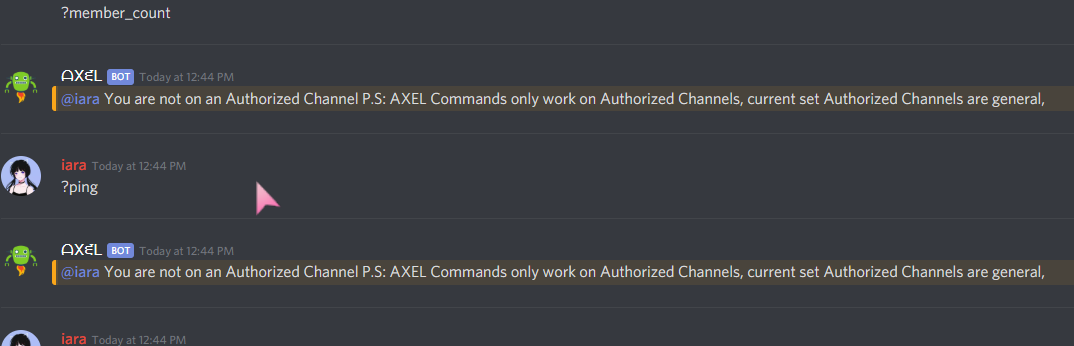
 grizzled valley
is there any way to make a discord bot who plays video from yt?
grizzled valley
F
modest sigil
@grizzled valley yes my friend but it depends on which discord library you are working on
earnest phoenix
i told you that you can't send video data
grizzled valley
F
modest sigil
@grizzled valley nops sorry you can do that on python, and maybe @earnest phoenix is right, there must be an issue with it but i have read somewhere on a forum that there is library in java which can be use to send videos in parts, and play it through apis
*api
earnest phoenix
what are you talking about
stop spewing out false facts
you can't send video packets from a bot since they're dropped internally in the api
bots are literally blocked from sending video data as per api's code
and that's intentional
it has been officially confirmed and you can go test it yourself if you want to
modest sigil
I Informed you guys that I am not sure about it, and I also said that you must be telling the truth
@earnest phoenix ohkay thanks for the info 🙂
 stray garnet
How to get the Roles like that?
late hill
<@&roleid>
stray garnet
Ok, where?
knotty steeple
lmao dont shitpost here
stray garnet
:(
knotty steeple
hi can u review my
bot boilerplate

pretty sure u cant use luca here
and i mean a boilerplate
template
to
make a bot
 torn folio
Pretty sure I just did. I'll take the administrator consequence if I broke a rule. Intrigued by your complex so I wanted to see your bot.
knotty steeple
ok..?
 twilit rapids
@torn folio don't use Luca here
knotty steeple
its kinda basic lul
torn folio
Sorry @twilit rapids won't happen again.
 quartz kindle
Mine disables nearly all events lul
You can make a package out of yours and put it on github/npm
knotty steeple
oh its on github

GitHub
A JavaScript boilerplate for me to use for all my future bots. - SamuraiStacks/Destiny
i have stuffs to add and fix and improve and work on my shit code
@mossy vine i see u
idk about uploading it to npm yet tho
nimble creek
I made my bot give a list of servers in a certain channel, but it doesn't send the server name of a server that the bot is just invited to so I can
A, make it so it sends the name of a server that's it's invited to or
B,
Make it so it clears the previous messages, and resends the server list,
What's the best method and how would I do this?
If you want I can send my code
Is there a way to make it a send a new server when the bot is added?
mossy vine
the GUILD_CREATE gateway event. in d.js its guildCreate, dunno about other libs
mossy vine
no
mossy vine
listen to the guildCreate event, fetch your channel and send to it
nimble creek
How exactly? I know how to get the channel, and I know how to send a message but how would I listen to the guildCreate event and make it send that server's name
twilit rapids
<Client>.on("guildCreate", (guild) => {
//code
}
^
nimble creek
Ok thanks!
mossy vine
guild.name would be the server name
nimble creek
Ok thank you guys!
 pallid zinc
Don't u use python
mossy vine
read above
nimble creek
const client = new Discord.Client()

client.on('ready', () => {
    // List servers the bot is connected to
client.guilds.forEach((guild) => {
<Client>.on("guildCreate", (guild) =>
 client.channels.get("624957376457605120").send("- " + guild.name)

    })
})

client.login("My token")```Would that be right?
twilit rapids
No
nimble creek
Oh
twilit rapids
Your client object
nimble creek
I don't know what you mean by that
pallid zinc
const client = new Discord.Client()

client.on("guildCreate", (guild) =>{
 client.channels.get("624957376457605120").send("- " + guild.name)

    })

client.login("My token")```:P
twilit rapids
Don't spoonfeed
nimble creek
Thanks
nimble creek
Oh ok
mossy vine
tfw you cant even spoonfeed 
twilit rapids
spoonfeedn't
earnest phoenix
that is, ladies and gents, what happens when you dive face first into a library without knowing the language (or not having a single grain of common sense)
nimble creek
I do understand the language a bit actually
It's just I don't know what they mean by client object
mossy vine
i mean, ive seen worse
nimble creek
It worked before
twilit rapids
We're not here to criticise people about how much they know from a language, if they need support then we will give that here. If you see that a user doesn't know much then you can help them by sending a link to a guide.
twilit rapids
Sounds like a plan
nimble creek
//My code
const Discord = require('discord.js')
const client = new Discord.Client()
client.guilds.forEach((guild) => {
client.on('ready', () => {
// List servers the bot is connected to
client.on("guildCreate", (guild) =>
client.channels.get("624957376457605120").send("- " + guild.name)
})
})
client.login("My token")
//Image attached
Nope
earnest phoenix
It tells you are missing a )
nimble creek
Oh
earnest phoenix
recheck your syntax carefully
earnest phoenix
Line 9 is where you’re missing it
nimble creek
Wait so client.on('ready', () =>?
(God I rather stick with python but I don't know how to do this in python)
Actually
I'ma try this in python
I'll be back
 livid pier
It's this part right here @nimble creek
nimble creek
Oh
livid pier
wait, that's a bad screenshot
nimble creek
Lmao
livid pier
give me a sec
broken shale
?
livid pier
he dropped a bracket
nimble creek
Oh
broken shale
if you want to list all the servers your bot is in you can just map it
livid pier
also, I was wondering if anyone had any ideas on how I could reformat my bot's !help command
nimble creek
I don't know how to do that, it took me ages to get NodeJS working with this code
livid pier
it currently sends 5 embeds to the channel
nimble creek
Make a category system
livid pier
that's what I have
nimble creek
!help will display the categorys
livid pier
5 categories
nimble creek
//My code

const Discord = require('discord.js')
const client = new Discord.Client()

client.guilds.forEach((guild) => {

client.on()'ready', () => {
    // List servers the bot is connected to
client.on()"guildCreate", (guild) =>
 client.channels.get("624957376457605120").send("- " + guild.name)

    })
})

client.login("My token")```Is that right?
broken shale
use codeblocks please
earnest phoenix
Use ```
earnest phoenix
Ok
broken shale
wait no
livid pier
the one with ready
nimble creek
There
earnest phoenix
You could also do
```js
code here
```
So its easier
livid pier
you're doing it wrong
broken shale
you're going to be looping your ready event
livid pier
the brackets should enclose the arguments
stray garnet
how to list roles like this?
broken shale
client.on('ready', () => {
})```Oh
livid pier
loop through, add to a list, then make it mentionable
broken shale
you don't need to make them mentionable
nimble creek
Thanks
livid pier
then mention it, then return it to the previous state
broken shale
you can do <@&roleID>
livid pier
it needs to be mentionable to mention it
broken shale
no
livid pier
does that work?
broken shale
If you toggled mention you're going to make alot of useless api calls
broken shale
loop through the roles of the server, grab the id of each then add <@& to the front and > to the back
preferably in an array
stray garnet
const fs = require("fs");


module.exports.run = async (bot, message, args, la) => {

  function checkDays(date) {
        let now = new Date();
        let diff = now.getTime() - date.getTime();
        let days = Math.floor(diff / 86400000);
        return days + (days == 1 ? " day" : " days") + " ago";
    };

  let prefixes = JSON.parse(fs.readFileSync("./prefixes.json", "utf8"));
  if(!prefixes[message.guild.id]) {
    prefixes[message.guild.id] = {
      prefixes: "n!"
    }
  }
  let prefix = prefixes[message.guild.id].prefixes;

  const embed2 = new Discord.RichEmbed()
.setTitle(`${message.guild}`)
  .setColor("#ff0000")
.addField(`${message.guild.name}`, `This guild got created at: ${message.channel.guild.createdAt.toUTCString().substr(0, 16)} (${checkDays(message.channel.guild.createdAt)})`, true)
.addField("Members", `**Total:** ${message.guild.members.size}\n**Humans:** ${message.guild.members.filter(member => !member.user.bot).size}\n**Bots:** ${message.guild.members.filter(member => member.user.bot).size}`, true)
.addField("Roles", `${message.roles.filter(r => r.id !== message.guild.id).map(roles => `${roles.name}`).join(",  ") || "hat keine Rollen."}`, true)
.addField("Region", message.guild.region, true)
.addField("Users", message.guild.memberCount, true)
.addField("Server Prefix", `**${prefix}**`, true)
.setFooter("Created at:")
.setTimestamp(message.guild.createdAt)
.setThumbnail(message.guild.iconURL)
message.channel.send(embed2)
}

      module.exports.help = {
        name: "serverinfo",
        aliases: ["sinfo"]
      }```

help livid rivet
hey guys I need your help 😬
unique nimbus
okay
earnest phoenix
help
livid rivet
how can I mark images in embeds as spolier
earnest phoenix
language?
livid rivet
python
earnest phoenix
you can't iirc
unique nimbus
You cant I think
earnest phoenix
Yeah couldn't find it in the docs
copper cradle
@stray garnet listing roles, (d.js)
<Guild>.roles.map(r => r).join(" | ");
me neither.. but I have seen embeds with spoiler marked images
earnest phoenix
Oh really?
livid rivet
yap
earnest phoenix
you can't
embeds can be marked as spoiler
but images in the embed itself can't
You can attach an image as a File and mark the file as spoiler
I think thats the closest you can get
earnest phoenix
it won't work
marking a file as spoiler is basically just prefixing the file name with SPOILER_ because discord
it doesn't work inside of an embed
you have to mark the whole embed as a spoiler
oh
which i'm not entirely sure if it's a thing bots can do
sudden geyser
I don't think bots can do that
amber geyser
(node:2107) UnhandledPromiseRejectionWarning: #<Object>

(node:2107) UnhandledPromiseRejectionWarning: Unhandled promise rejection. This error originated either by throwing inside of an async function without a catch block, or by rejecting a promise which was not handled with .catch(). (rejection id: 114)
that's not the full error
or if it is then
it gives us no info
other than that it errored
earnest phoenix
Can somebody verify my bot?
@fossil oxide
Sorry to ping
Can you please verify my Bot
sudden geyser
wait for staff to get to your bot, be patient
earnest phoenix
Its called "UnderBot"
unique nimbus
We got many bots, thats why there is a queue
earnest phoenix
Yay! I have more time to develop
sudden geyser
iSamuelHD what command is being called to throw an unhandled rejection?
stray garnet
how to get the category size?
quartz kindle
<categoryChannel>.children should give you a list of channels that belong to it
Then you can count tem with .size
earnest phoenix
Should I get ubuntu, centos, or debian for a vps?
quartz kindle
Matter of preference
earnest phoenix
Well, I could set it up with all of them, right?
quartz kindle
If you have no experience with linux, ubuntu is the most popular i believe
earnest phoenix
ok
quartz kindle
Yes all of them should do whatever the other does
lusty dew
Okay so for some reason my messageUpdate event spams the channel with an embed.
And my messageDelete event won’t trigger
I’ll send the code for the messageUpdate first and see if we can fix that one then send messageDelete
messageUpdate code ^
late hill
It's the same as yesterday
There's nothing in there that would cause it to send multiple messages
You're registering the listener multiple times or have multiple instances of your bot running
lusty dew
Yes I know which is why I am confused and seeking help
I don't think I do
I should only have one instance running
and that is with Webstorm
late hill
Ok, then check where you're loading
lusty dew
    client.loadEvents = (callback) => {
        fs.readdir('./events/', (err, files) => {
            if(err){
                client.log(`Error loading events: ${err}`)
                return;
            }
            files.forEach(file => {
                if(!file.endsWith('.js')) return;
                require(`../events/${file}`).load(client)
            })
            callback()
        })
    }
This is what my event handler looks like
It looks the same and the other events don't spam the channel
late hill
hm
late hill
oof
lusty dew
But that makes me more confused
late hill
Where are you calling this piece of code from
late hill
yes
lusty dew
Give me a sec
client.on("ready", async () => {
  await client.log(`${client.user.username} has been put online.`);
  await client.user.setActivity(`Over Members!`, { type: "WATCHING" })
  await client.loadCommands(() => {
    client.log(`Loaded commands.`)
  })
  await client.loadEvents(() => {
    client.log('Loaded events.')
  })
  /*setInterval(() => {
    dbl.postStats(client.guilds.size - 2)
  }, 1800000)*/
  require('./library/LavalinkManager.js')(client)
  Guild.sync()
  User.sync()
  Promo.sync()
  Economy.sync()
})
My ready event
late hill
That's the problem
Ready can fire multiple times
If you lose connection and reconnect
late hill
yes
lusty dew
Well then
I think we found the problem lol
I take breaks every now and then and my pc goes to sleep
Is there anyway I can fix it so the commands and events don't keep loading over and over
late hill
Yeh from what I remember during testing, if your pc enters sleep mode and you come back, it'll reconnect
If you don't need any of the data provided by the client after it being ready, you can just register the events before it's ready
earnest phoenix
@Wesley#6216
lusty dew
When will I ever need the data from the events?
earnest phoenix
Hi
late hill
If you're logging the information to one of your servers
late hill
You wouldn't be able to grab it from client.guilds before your client is ready
lusty dew
True
late hill
But there's workarounds for all of that
lusty dew
I need the guildCreate event to be loaded on ready
late hill
You should definitely consider using discord webhooks for logging to your channels
That way it won't count towards your bots ratelimits
lusty dew
Hm yea
late hill
Discord webhooks also have a few additional perks such as being able to override avatar/name on each post
lusty dew
I don't know how to use webhooks though
late hill
I think discord.js has a class to help with that
lusty dew
So I am assuming you mean like for sending the embeds to a channel
late hill
yeh
Instead of having your bot send the message
You'd just send the embed to a discord webhook
Discord.js is a powerful node.js module that allows you to interact with the Discord API very easily. It takes a much more object-oriented approach than most other JS Discord libraries, making your bot's code significantly tidier and easier to comprehend.
lusty dew
Wouldn't the server need to create the webhook?
lusty dew
Okay good
late hill
You only need 1 and then you can just keep using that one
lusty dew
Yes
It is a logging system for the bot
that each guild can use to log info on their server
late hill
It's gonna be a bit more work then
lusty dew
That is fine
I am already 2 weeks passed my expected date of finishing the new update lol
late hill
You'd have to make sure that the bot has the permission to be able to create the webhook in the first place
late hill
That's true
lusty dew
I was thinking about making the bot just leave all the servers it is in
and starting over
But that is a bit too much
late hill
I mean, you could just use regular messages.
lusty dew
Wdym?
late hill
The webhooks would be slightly better but it's not neccesary
And it would most likely be easier to implement with regular messages
late hill
yeh
lusty dew
Oh I already do that lol
late hill
I don't think your current code even needs anything special
If you just add the listeners before ready
It'll probably be fine
lusty dew
Okay
I would still be able to get the info when the bot joins a new guild sent to my channel right?
late hill
Yeh
lusty dew
Okay then that is fine
as long as that works and the other events work
that should be fine
late hill
Should be a simple fix
If it turns out not to work you could also stick to your old method and keep a boolean in which you track if the events have been registered or not
You set it to true after registering them
So that next time ready fires you'll know they have already been registered
lusty dew
Hm how could I do that?
The way you suggested to put it outside the ready event works fine
But I just wanna learn a new way of doing something lol
late hill
Well
You'd put something like let registered = false;
Outside of the events
Just somewhere at the top
lusty dew
like each idividuaal event file?
late hill
Then in your ready event you check if (!registered) {/*register events and set registered to true*/}
In your main code
You'd put it where you put your ready event code
But outside the event
late hill
true
earnest phoenix
you're still subscribing to the event - spending resources
late hill
Yes
lusty dew
ok
Now I just need to figure out what is wrong with my messageDelete event lol
It isn't firing
late hill

tight mountain
Im trying to make a guildCreate event, but it just doesn't work. No errors are spit out, just, nothing happens. Do I need to have the manage messages permission for it to work?
 tulip tundra
no
earnest phoenix
"make"?
lusty dew
Isn’t there a way to delete messages from a specified user, or have it delete links, messages from bots, mentions, images and invites
earnest phoenix
raw? no
you have to filter out messages manually
and you can bulk delete messages up to 2 weeks old
lusty dew
Okay thanks and yea I know @earnest phoenix
I was just wondering how I’d filter links and such
earnest phoenix
you'd have to make a regex of sorts that detects that sort of stuff
earnest phoenix
that'll have false positives sometimes but it's better than nothing i guess
earnest phoenix
they aren't provided
the most you'll get from the api is embeds from the website's opengraph data
i often use http://urlregex.com/ though there's better ones out there
URL Regex
Simply copy and paste the URL regex below for the language of your choice. PHP (use with preg_match) %^(?:(?:https?|ftp)://)(?:\S+(?::\S*)?@|\d{1,3}(?:.\d{1,3}){3}|(?:(?:[a-z\d\x{00a1}-\x{ffff}]+-?)[a-z\d\x{00a1}-\x{ffff}]+)(?:.(?:[a-z\d\x{00a1}-\x{ffff}]+-?)[a-z\d\x{00a1...
lusty dew
Ah thank you
 inner jewel
i usually parse my urls with a proper parser
earnest phoenix
yeah, in .net use Uri.IsWellFormedUriString
 summer torrent
how to show discord account creation date with days in discord.js ? example: 100 days ago
earnest phoenix
https://discord.js.org/#/docs/main/stable/class/User?scrollTo=createdAt and you can use something like humanizer or moment
Discord.js is a powerful node.js module that allows you to interact with the Discord API very easily. It takes a much more object-oriented approach than most other JS Discord libraries, making your bot's code significantly tidier and easier to comprehend.
earnest phoenix
how to make sure that the url of an embed is put on the footer ?
what
    if (args[0].toLocaleLowerCase() === prefix + 'help') {
    const embed = new RichEmbed()
        .setTitle("HELP")
        .setDescription('**' + prefix + " support** : Vous envoi le serveur de support (ce serveur est aussi un serveur d'entraide pour les développeurs)")
        .setThumbnail(client.user.avatarURL)
        .addField ('**__Modération__**', "Voici mes commandes de modération ;)")
        .addField('**' + prefix + ' ban:**', " Permet de bannir un utilisateur malveillant")
        .addField('**' + prefix + ' kick:**', " Permet d'expluser un utilisateur")
        .addField('**' + prefix + ' mute:**', " permet d'empêcher un utilisateur de parler (ne fonctionne pas sur un administrateur )")
        .addField('**' + prefix + ' unmute:**', " réautoriser un utilisateur à parler")
        .addField('**' + prefix + ' clear:**', " permet de supprimer des messages (de 1 à 100 )")
        .addField ('**__Utilitaires__**', "Voici mes commandes d'utilitaires ;)")
        .addField('**' + prefix + ' help:**', " vous permet de voir les commandes disponible")
        .addField('**' + prefix + ' report:**', " vous permet de signaler des bugs où des utilisateurs ne respectant pas les tos (n'abuser pas de cette commande sous peine de blacklist)")
        .addField('**' + prefix + ' infobot:**', " vous donnes des informations sur le bot")
        .addField('**' + prefix + ' infoserv:**', " Vous donne des information sur le serveur sur lequel vous êtes")
        .addField('**' + prefix + ' info:**', " Vous donne des informations sur notre serveur discord")
        .addField('**' + prefix + ' invite:**', " vous donne l'invitation du bot")
        .addField ('**__Divertissement__**', "En développement")
        .setFooter("Support " + new Date().getFullYear())
        .setURL("https://discord.gg/KT8JfRn")
        .setColor("#ff0000")
    message.channel.send(embed)
why the url of the support is put on the title?
sudden geyser
Are you referring to having the footer be a link to the support server
earnest phoenix
yes
sudden geyser
not possible to my knowledge. You could put the plain text: Support: <url>
 hollow prawn
this is weird
running channel create in a DM?
unless
if the bot dm's a user it runs the channel create event
since its creating the DM channel 🤔
eternal mesa
what are you asking
hollow prawn
well my bot runs channel create event, when the channel type is dm
earnest phoenix
@sudden geyser okay thanks for your help, I ask because on the bot "StatBot" they managed to do it
hollow prawn
so i'm thinking it's weird because it isnt run in a guild, and I just want to know, if my bot dm's a user does it also execute channel create event?
eternal mesa
@hollow prawn honestly i have not tried
i would assume so
im still a little confused by so i'm thinking it's weird because it isnt run in a guild
are you saying the event doesnt fire when a channel is created in a guild
eternal mesa
well yes because a dm is a channel
notice how dmchannels extend the base channel type on djs
sudden geyser
But wouldn't a user DMing your bot trigger it too
hollow prawn
it would, in fact that's a great idea to test it out and i'll do it rn
sudden geyser
I tried it and seems to do that
hollow prawn
yup, it's because of the DM's it still counts it as a channelCreate event for discord.js time to adjust that and fix the issue, thanks post and twoost
its that that I thought when dm's are created and sent it isnt running the channel create event, and thought it'd be guild based only lol
alright big time problem, apperantly whenever bot joins a guild it also executes the logging for channel create of every channel in the guild?
any ways around that 🤔
only way I could think of is by default disabling the logging and then enabling it after 15s or so
but i would want to skip that if possible
eternal mesa
@hollow prawn are you on master
sudden geyser
You could check what time your bot joined, then ignore the ones which look like from guild creates
hollow prawn
no 11.5.1 djs version i think
hmm rn i'm setting up the db to be used only 1 from my rasp pi, how would you suggest the on joined time thing to be done, some example would be helpful (no matter how bad it might be)
eternal mesa
@hollow prawn I would look into master
Iirc it solved that problem
Don’t quote me on that though
hollow prawn
eh but it requires changing all of the code and i'm just getting used to the version b4 that  so that's why i'm kinda sceptical of doing it
 rancid tartan
unfortunately, my bot stops working after an hour. so i want someone to help me with some type of "restart code".
like you can restart using the console
but how can i do that in code
copper cradle
what did you expect to happen
hollow prawn
using pm2 allows restarting, but if your bot restarts/crashes/shutsoff that's an issue in your code lol
copper cradle
wdym by "to handle code"
rancid tartan
my bot stops working after an hour (3600 seconds) due to some issue so I want it to restart in that interval
hollow prawn

finding out the issue that causes the restart
is the better solution because if your bot runs mute commands or commands relying on time or caches stuff can cause more breaks
hollow prawn
for example if you have a command that relies on 10 minute time, and your bot stops halfway thru that time, it'll stop your command halfway thru and just be an issue for your users
what's glitch tho
earnest phoenix
free hosting
hollow prawn
oh LOL
earnest phoenix
and people complain when it's time limited and underperformant
hollow prawn
@rancid tartan just buy a raspberry pi, works great enough with proper code to not have any issues and it has big uptime
rancid tartan
the only way to fix it is to restart every hour
hollow prawn
I run 2 bots on mine, one I dont touch/restart and it keeps up to 15 days (the max i had before restart)
earnest phoenix
buying a vps would be cheaper than buying an rpi in the longrun
hollow prawn
how it would be 🤔
earnest phoenix
internet bills
hollow prawn
you still pay for the vps, I plan to upgrade my pi to a hosting pc/machine
rancid tartan
well, im not buying stuff to just make my bot on a vps..
earnest phoenix
and you still have to rely on your internet which is not going to have as reliable of an uptime like a vps provider which uses multiple networks
hollow prawn
so for me ends up better option bcs i can allocate more resources and money isnt htat much of a issue with my job
rancid tartan
glitch turns off after 5 minutes of inactivity, but thats when I use uptimerobot
hollow prawn
thing is, my internet actually has quite reliable uptime
earnest phoenix
well, im not buying stuff to just make my bot on a vps..
hi yes, welcome to hosting, a vps is called a server for a reason
rancid tartan
look. i use like 3 pcs. and its difficult to use vsc. so i use glitch, because its easier
earnest phoenix
you're telling me that having problems with your hosting every few hours and being time limited is easier than just buying a vps for a whole of two dollars , running the process on there and forgetting about it
also how does that matter
 shy valve
@rancid tartan u want to keep glitch project online?
earnest phoenix
you can access your vps from anywhere
 shy valve
I have a way to restart without uptime robot
rancid tartan
ok
it was also why my bot was declined
because it was crashed
inallowing commands to be used
rancid tartan
ok
hollow prawn
well obviously, they wouldn't add a bot that has near to no uptime lol, you said you have 3pc's why not use one of them for running the bot?
rancid tartan
because uptimerobot is monitoring
shy valve
U trying that?
rancid tartan
i used a lot
hollow prawn
this line of code doesn't execute what's in the if() even when the condition is met
in fact it doesn't do anything when the condition is met
i do define botowner right above it tho, could it be that?
eternal mesa
log both of the params before and see what the output
 timid cloud
Hello, noob here. Is JS really the best language to use for making a Discord bot? I know an okay amount of Python and would prefer to use that, but will I just end up with more issues than if I used JS?
eternal mesa
@timid cloud no
python for discord is well supported
if there is a lib you like in a language you like
you should use that
timid cloud
Thanks!
eternal mesa
np
timid cloud
I guess my next question is, where would be the best place to start? Since the link in the faq and discords own stuff all uses JS
 tacit stag
Is there a way to create some sort of embed that outputs html? I've seen bots that output js data using code but not sure how to implement
eternal mesa
@timid cloud https://discordpy.readthedocs.io/en/latest/
timid cloud
@eternal mesa My hero!
hollow prawn
@eternal mesa I did, it outputted the information correctly
let status = option.shift();
      if(option[1] == 'set') {
        console.log(status);
        console.log('works');
        bot.user.setActivity(`${bot.guilds.size} servers /fl.help/ [Owner here:${status}]`, {type: "WATCHING"});
      }
      else if (option[1] == 'delete'){
        bot.user.setActivity(`${bot.guilds.size} servers /fl.help/`, {type: "WATCHING"});
      }```
this is the code afterwardstry logging in the if statement to see if it reaches that part
hollow prawn
inside of it it doesn't log anything
brb gonna drive flatmate to work, write any thoughts/ideas
tacit stag
wait i think I have a way to do js output in discord.js. Question: I am trying to take js output from using the code block (code) using a command, passing the code block as an argument. How do I check the inside of the code block for errors before passing the data to an embed?
eternal mesa
@tacit stag i am a little confused what you are asking
earnest phoenix
in d.js can you do member.roles.has(role id) or does that require a string which is the name
master d.js
eternal mesa
you can use an id iirc
@earnest phoenix https://gyazo.com/941ad9bb3284755004323ccf8edf4028


 tacit stag
Let me start here: I am trying to create a bot that outputs data from different languages. Since I am fluent in js, I am starting there. For example, if I type [command] console.log("hello world"), I want to use an embed to output that code block. The issue I forsee is that if the code within the block contains errors, I will get errors in my terminal. Example of an error: console.log(Hello!) [is incorrect because it is missing quotes]. How do I check for errors within that argument before outputing the data? If I just use .addField(`**Output:** ${output}`) onto my embed, it will cause an error.
bleh thats a lot
I guess the basic question is, is there a way to detect errors in js before running a function?
eternal mesa
extract the code and eval it around a try catch
tacit stag
does eval check for errors?
eternal mesa
wait
i havent tested this
but try new Function (code)
and wrap that in a try catch
tacit stag
okay lemme test it. Ill let you know what i find
eternal mesa
worked on my end
tacit stag
yup should work. thanks
eternal mesa
np
 left sky

tight mountain
I'm trying to make my bot do a first join message in the general channel. I got it to do a console log, but I can't get it to send a message in the general channel. client.on("guildCreate", (guild) => { message.guild.channels.find(channel => channel.name === "general").send("test"); });
broken shale
it's a guild obj that you get
lusty dew
Doesn't .endsWithcheck if something ends with something like
if(message.content.endsWith("-users"){
//Delete messages from users only
}else{
return
}
I plan on having two or three of those
So I don't think using return would work
lusty dew
Wdym?
sudden geyser
@lusty dew return exits a function. endsWith checks if a string ends with something.
I don't get what you mean by "So I don't think using return would work"
lusty dew
Because
return will also stop the code there if the message content doesn't end with -users
Which is not good in my case
opaque eagle
would you guys consider it bad practice to import a rather large module for one task?
opaque eagle
Like I need curry from lodash but I don't want to spend time writing my own implementation in every new project
lusty dew
Oof
quartz kindle
check the source code for the function you need and copy it to your code?
lusty dew
How would I filter out bots when fetching messages?
opaque eagle
iterate through the messages and check if the author of the message is a bot @lusty dew
opaque eagle
That's what I meant
opaque eagle
Then show the code and the error if one exists
lusty dew
I tried:
message.channel.messages.fetch().then(msgs => {
    msgs.filter(m => !m.bot)
})
But I kinda new that wasn't going to work
amber fractal
cough a message cant be a bot cough
opaque eagle
.bot exists in User, not Message
opaque eagle
msgs is an array of Messages, not Users
amber fractal
so let me ask you something
lusty dew
Again I know
amber fractal
Discord.js is a powerful node.js module that allows you to interact with the Discord API very easily. It takes a much more object-oriented approach than most other JS Discord libraries, making your bot's code significantly tidier and easier to comprehend.
amber fractal
correct
amber fractal
yes
also .filter() is non-destructive
it returns a new Collection
it doesn't mutate the old one
lusty dew
message.channel.messages.fetch().then(msgs => {
    msgs.filter(m => !m.bot)
})
So instead of this do this:
message.channel.messages.fetch().then(msgs => {
    msgs.filter(message.author.bot)
})
?
lusty dew
I am trying to delete user messages and leave the bot messages
amber fractal
(m => m.author.bot)
amber fractal
deleting user messages?
lusty dew
I am filter out bot messages and deleting user messages
amber fractal
Because it returns a new Collection, you should filter out all the bot messages
amber fractal
(m => m.author.bot) That would return all messages that are sent from bots
it doesnt filter them out it adds it to a new collection if the test returns true
lusty dew
Oh so I would use the ! in front of m.author.bot?
amber fractal
👍
opaque eagle
This is pretty much what Array.filter() does underneath```js
Array.prototype.filter = function(hello) {
const _arr = [];
for (let i = 0; i < this.length; i++) {
if (hello(this[i])) {
_arr.push(this[i]);
}
}
return _arr;
}```
Gosh Discord's syntax highlighting look so weird all of a sudden
lusty dew
I can add the message fetch and such to a variable can't I?
or would the .then() get in the way?
Nvm stupid question lol
opaque eagle
Whenever I try to stringify it, it just return [native code] js console.log(Array.prototype.filter.toString())
amber fractal
you want it to be an anonymous function?
opaque eagle
You mean you want to use the results outside the then()? @lusty dew
amber fractal
Oh
lusty dew
Yes
opaque eagle
I'd check out async/await
amber fractal
he can just set the entire thing to a var and return cant he?
lusty dew
I want to do something like:
const input = args[0]
const delMessage = message.channel.messages.fetch().then(msgs => {
    msgs.filter(m => !m.author.bot)
})
delMessage.bulkDelete(input)
const messagesToDelete = await message.channel.messages.fetch();
TextChannel.messages.delete(messagesToDelete.filter(FUNC_HERE))```
 opaque eagle
async/await would make ur code look more like that
lusty dew
Hmm
lusty dew
I thought you had to use bulkDelete when deleting mass amount of messages?
opaque eagle
Actually yeah I think so
amber fractal
<TextChannel>.messages.bulkDelete((await message.channel.messages.fetch()).filter(...))
ez one line
opaque eagle
That's some sad code
amber fractal
It's the most compact it can get I believe
opaque eagle
Reminds me of some old code I wrote
This was my old, old ban command js member.bannable ? await member.ban(days ? {days, reason: `[${message.author.tag}] ${reason}`} : `[${message.author.tag}] ${reason}`).then(()=>message.say(`${this.client.emojis.get("508827649229979648")} ${member} has been ${this.command.name}ed${reason !== "No reason provided." ? ` for reason: \`${reason}\`` : "."}`)) : message.reply(`${this.client.emojis.get("508827674110590998")} I can't ${this.command.name} that person!`);
Ping commandjs module.exports = { description: "Check my connection to the Discord server.", execute: message => message.channel.send("Pinging...").then(m => m.edit(`Pong! (Roundtrip took: ${ping.createdAt - message.createdAt}ms. Heartbeat: ${message.client.ws.ping}.)`)) };
lusty dew
Uhm
amber fractal
Lol I had something like that with nested ternary
opaque eagle
lol
opaque eagle
If that's complicated, check out some of Ken's code
inner jewel
clang-format the code
opaque eagle
wanna try and make sense outta this
inner jewel
amber fractal
nvm my thing doesnt work https://oliy.is-just-a.dev/w1toz_1466.png


or I did something wrong
which is possible
Oh no
It just wasnt in an async function
opaque eagle
oof
lusty dew
const input = args[0]
const delMessage = message.channel.messages.fetch().then(msgs => {
    msgs.filter(m => !m.author.bot)
})
delMessage.bulkDelete(input)
So this wouldn't work?
amber fractal
Lmao
I just did
well delMessage is a collection
not a channel
@opaque eagle !eval async function hi(message){message.channel.bulkDelete((await message.channel.messages.fetch({limit:5})).filter(m => m.author.bot))};hi(message); 👌
tacit stag
@pure crateroost I set up a try catch , but not sure exactly how to implement. here is my code: ```javascript
if(!args[0]) {
message.channel.send("Try using an argument with <>code");
}
else if(args[0]) {
let arg = message.content.replace(/\`\`\`/g, "");
//console.log(arg);
arg = arg.replace("<>codes ", "");
arg = arg.replace("<>code ", "");
arg = arg.replace("<>c ", "");
arg = arg.replace("<>output ", "");

arg = arg.replace(/\n/g, "; ");
//console.log(arg);

try {
  arg
}
catch(err) {
  console.log("[Error]");
}
}
and then I use <>code ```console.log("testing")```
This doesnt pass through the try, and i am not sure if i should pass it differently.
P.S. my command prefix is <>, and the lines that replace <>codes, <>code, <>c, <>output are all for alternate commands. if(!args[0]) {
message.channel.send("Try using an argument with <>code");
}
else if(args[0]) {
let arg = message.content.replace(/(insert 3 backticks)/g, "");
//console.log(arg);
arg = arg.replace("<>codes ", "");
arg = arg.replace("<>code ", "");
arg = arg.replace("<>c ", "");
arg = arg.replace("<>output ", "");
arg = arg.replace(/\n/g, "; ");
//console.log(arg);
try {
arg
}
catch(err) {
console.log("[Error]");
}
}
and then I use <>code
console.log("testing")```Your code is now missing 3 backticks from somewhere
tacit stag
between \ and \g
opaque eagle
I think in the first regex
lusty dew
const input = args[0]
const delMessage = message.channel.messages.fetch({limit: 100}).then(msgs => {
    msgs.filter(m => !m.author.bot)
})
message.channel.bulkDelete(delMessage)
SO would this work?
opaque eagle
let arg = message.content.replace(/\`\`\`/g, "")```Okay
amber fractal
return
lusty dew
Oh
amber fractal
return msg.filter
lusty dew
Return what?
Ah okay
Also wouldn't doing:
const input = args[0]
const parse = parseInt(input)
if(!parse) return message.channel.send("You must use a valid number")
isn't that how parseInt works?
amber fractal
uh
 modern elm
not quite
tacit stag
for me?
modern elm
isNaN works well 🤔
amber fractal
Well you cant fetch 3.5 messages
lusty dew
Unless 😏
modern elm
it just returns a string as an integer
lusty dew
Probably
amber fractal

 lusty dew
I forgot what parseInt did tbh
modern elm
but only as long as the string is an integer