#development
1 messages · Page 484 of 1
 rough trellis
 elder cobalt
Not sure if this fits here, but can someone help me with a bot hosting related query?
 earnest phoenix
I don't know, can they? 
elder cobalt
Hopefully 😂
elder cobalt
Well, I'm trying to host my own modmail bot. Which I've managed to do successfully on my hosting using a batch file to run npm start (I know nothing about this stuff btw, I'm learning as I go). I heard pm2? is the way to go to keep the .js app alive??? But I can't quite work out how to work it.
 rustic axle
Use a server host
elder cobalt
For example, I've taught myself so far, that using CMD and navigating to the bot folder, then typing npm start will start it up
I'm using my Shadow currently
Whilst I test things
 west raptor
It's going to stop running after you kill a terminal
west raptor
No
 sick cloud
use pm2
elder cobalt
Excuse my naivety
west raptor
@sick cloud what about after a terminal is killed
elder cobalt
Like I said, I know nothing about this stuff - so I'm sponging as I go
sick cloud
@west raptor pm2 stays
west raptor
wut
sick cloud
until the server/platform reboots
elder cobalt
daemon process right?
 lusty dew
I use forever
elder cobalt
Do I need to be in the bot directory in cmd before using that?
The issue I have with this bot, as well, is I don't know what the .js file is that I need to start
lusty dew
your main file
elder cobalt
Like I said, to start it before - I just browse to directory in cmd and then type npm start
I don't know what the main .js file is :\
elder cobalt
Tried that
sick cloud
@elder cobalt open up package.json
lusty dew
He may not have defined one
lusty dew
or is the default index.js
elder cobalt
It's not a bot I made
elder cobalt
Ohh
 meager stirrup
Ye i can't make my bot start up
meager stirrup
Lemme get it real quick
lusty dew
ok
meager stirrup
Wait it doesn't have an error, but it doesn't start up either
lusty dew
Ok
earnest phoenix
wut
lusty dew
What is the start file
earnest phoenix
do you know how to turn it on
lusty dew
in other words main file that has the bot.login(config/botcinfig.token)
meager stirrup
index.js
lusty dew
What language?
meager stirrup
English
meager stirrup
Oh .js
lusty dew
Ah
sick cloud
@meager stirrup what js lib
 frigid bone
Not sure if it's the issue, but change your start script to node ./src/index.js
lusty dew
do node index.js
sick cloud
@lusty dew stop it, your not being helpful 
frigid bone
since it's the relative path
meager stirrup
I did that but it still doesn't start up
sick cloud
@meager stirrup what js lib are you using
sick cloud
@frigid bone who are you talking to even
 sick cloud
different person
meager stirrup
What do you mean js lib?
meager stirrup
Discord.js
sick cloud
ok, how do you start your bot and what happens in console
frigid bone
Anyways, ignore what I said earlier. Can I see your console output, @meager stirrup?
sick cloud
smh
meager stirrup
Lol
sick cloud
honestly you people this morning, seriously
frigid bone
It's like 2am pls 
meager stirrup
It's the afternoon m8
Well for me it is
So do you want my first command that I have in the Index.js file?
frigid bone
No, show me how you're trying to start the bot (eg node . in cmd) and the output you're getting there, if any
sick cloud
@meager stirrup no
meager stirrup
there is none
frigid bone
Can you provide a screenshot?
meager stirrup
sure, just a sec
frigid bone

meager stirrup
sick cloud
your index file is stuffed
frigid bone
hmmmm can I see the contents of index.js?
frigid bone
yeah it would error out otherwise
meager stirrup
const Commando = require('discord.js-cammando');
const bot = new Cammando.Client();
const TOKEN = 'Not for you guys to know'
bot.registry.registerGroup('simple', 'Simple');
bot.registry.registerDefaults();
bot.registry.registerCommandsin(__dirname + '/commands');
bot.on('mesaage', function(message){
if(message.content == 'Ochaco Uraraka')
{
message.replay('H-hey Uraraka!');
}
});
bot.on('ready', function(){
console.log('Ready');
})
bot.login('TOKEN');
const prefix = ">";
client.on("message", (message) => {
// Exit and stop if it's not there
if (!message.content.startsWith(prefix)) return;
if (message.content.startsWith(prefix > "Bakugo")) {
message.channel.send("Um, Yeah.. Im outta here!");
} else
if (message.content.startsWith(prefix > "Plus")) {
message.channel.send("Ultra!");
}
});
const Discord = require('discord.js');
const client = new Discord.Client();
client.on('ready', () => {
console.log('Ready!');
});
client.login('Not for you guys to know');
sick cloud
wow
lusty dew
haste bin
lusty dew
Fuck you Tony
frigid bone
my eyes
lusty dew
GO suck a dick
 hushed berry
um
frigid bone
Ok how are there no errors
lusty dew
That makes sense
frigid bone
yeah wtf
sick cloud
its using commando but not being logged in or anything
lusty dew
Seriously stop being a dick and people won't be a dick back
sick cloud
2 clients and stuff
meager stirrup
oof
frigid bone
cammando
hushed berry
guys, cool it
lusty dew
I am always the bad guy
sick cloud
@hushed berry can you just mute pls
meager stirrup
he's trying to help m8
hushed berry
rule 1 😤
sick cloud
@lusty dew because you ARE the bad guy
sick cloud
none of your business
frigid bone
If you're using commando, which I assume you are, here's a nice guide with code examples @meager stirrup
https://github.com/discordjs/Commando-guide

GitHub
Beginner's guide for discord.js-commando. Contribute to discordjs/Commando-guide development by creating an account on GitHub.
lusty dew
No go about your day
sick cloud
no
lusty dew
and I will go about mine
hushed berry
.
sick cloud
don't tell me to shut it
frigid bone
You have several mistaes in your code, compare it with the guide and fix them
I'm not sure why you're not getting any errors in the console though
meager stirrup
oh god idk what to click on that website XD
frigid bone
Compiler should've errored out on the second line
meager stirrup
oh nvrm
 slim heart
I kinda want to create a web interface for my bot but I'm not sure how to use the API to get user information because I have literally no clue, I made an identify scoped application and I can get the code from it but how do i actually use it
hushed berry
@slim heart after you exchange the code for an access token, you can call endpoints like /users/@me and /users/@me/guilds with it
slim heart
So how do i call it
hushed berry
just like with the bot, but with the access token instead
slim heart
Like I saw the examples in the discord documentation but i cant find anything for js
Oh i see
slim heart
Like i tried using the one there and it just says a bunch of errors and weiufndwqwq
like this?
CLIENT_ID = 'as'
CLIENT_SECRET = 'as'
REDIRECT_URI = 'https://'

def exchange_code(code):
  data = {
    'client_id': CLIENT_ID,
    'client_secret': CLIENT_SECRET,
    'grant_type': 'authorization_code',
    'code': code,
    'redirect_uri': REDIRECT_URI,
    'scope': 'identify email connections'
  }
  headers = {
    'Content-Type': 'application/x-www-form-urlencoded'
  }
  r = requests.post('%s/oauth2/token' % API_ENDPOINT, data, headers)
  r.raise_for_status()
return r.json()```i censored the stuff but yea
earnest phoenix
That's a python example
west raptor
thats py
slim heart
Thats what i was saying where the JS one
hushed berry
man you dont need a js example
earnest phoenix
You have to make that on your own
slim heart
cuz im generally new to http request
earnest phoenix
Use an ajax client to make the requests
There are a handful of good ones out there
HELLO where i can get code
Reverse speech
LIKE HELLO
OLLEH
WHO HAVE THIS
 ruby dust
nice, can't even wait a single fucking minute until you run out of patience 
earnest phoenix
-.-
meager stirrup

rustic axle
Okay... so I already can rule out my code as the cause of this but can anyone help me? I have 2 bots. They have the same exact code but 2 different tokens. One when I use it to play a song works. The other one however can not do this for some reason. The node process(es) just terminate with no exit code whatsoever. Could it possibly be that node_modules is the one to blame? I don't think so because they are the exact same. However, one is running off of a server (the one that works) and the other one is running off of my computer (this one doesn't work)... wow thats a wall of text lol
@earnest phoenix use a for statement and go backwards indexing each letter to a variable which will be printed and sent
ruby dust
since the machine is the only difference, maybe it's something with OS compatibility or you don't have all prerequisites installed 
earnest phoenix
I mean, there's got to be an error you can catch
rustic axle
nope
already tried on all of the code
and I know where it terminates
I dont know why tho
earnest phoenix
You can't tell me that it's exiting with no error code whatsoever and you're handling all errors 
That just doesn't happen, I'm afraid
ruby dust
catch an entire codebase
 inner jewel
if you send the error it might be easier to help you
rustic axle
The problem is that there is no error
It escapes node and acts like nothing happened
 topaz fjord
has to be a code problem then
rustic axle
How
meager stirrup
how do I find out my discord ID?
rustic axle
two bots same code.... one works one doesnt
meager stirrup
or am i being dumb and its the #'numbers'
rustic axle
ruby dust
"discord id" is too vague, since everything on discord has ids
 ruby dust
you have to be more specific
 smoky spire
@meager stirrup
west raptor
on developer mode
smoky spire
There
west raptor
np
smoky spire
Easier way is \mention
west raptor
no
smoky spire
@smoky spire
ruby dust
and that will only apply to members, plus that way you mention that member
smoky spire
[#development](/guild/264445053596991498/channel/272764566411149314/)
rustic axle
¯_(ツ)_/¯
smoky spire
Said it was easier not better
west raptor
It's not easier
rustic axle
'discord.js' is not recognized as an internal or external command, operable program or batch file.
hmm
node pls
smoky spire
That's your opinion
rustic axle
I have it installed
west raptor
o
frigid bone
That would give a different error
rustic axle
IK
inner jewel
how are you even running it
rustic axle
I give up
inner jewel
that's just windows saying "no discord.js executable"
frigid bone
How are you starting the node process?
rustic axle
node index.js
inner jewel
sounds like you're doing process.exec("discord.js") or something
rustic axle
const Discord = require("discord.js");
frigid bone
huh that's weird
west raptor
Is it in your node_modules?
west raptor
Show
 tulip snow
So im trying to learn a new language for coding bots I already know JS what language is the easiest for bots
 quartz kindle
html
west raptor
No 'easiest' language
rustic axle
west raptor
Really
smoky spire
Doubt there's an html lib
quartz kindle
im joking lul
rustic axle
Please tell me there is a batch library for all of us true coders
quartz kindle
it should be possible
rustic axle
bet
frigid bone
I prefer to code my bots in pure CSS, thank you very much
quartz kindle
remember the "entire star wars movie in your cmd via telnet"?
rustic axle
p2p network using batch
quartz kindle
did you actually? the entire movie is like 6 hours long
frigid bone
I left it running in the background, but yeah
meager stirrup
wow, congrats on wasting your life watching the movie many times
frigid bone
Works nicely as a screesaver
meager stirrup
okay Im now getting an error
~module.js:550
throw err;
^
Error: Cannot find module 'C:\IzukuMidoriyaBot\indez.js'
at Function.Module._resolveFilename (module.js:548:15)
at Function.Module._load (module.js:475:25)
at Function.Module.runMain (module.js:694:10)
at startup (bootstrap_node.js:204:16)
at bootstrap_node.js:625:3~
 fresh kernel
meager stirrup
fresh kernel
meager stirrup
XD i put in the wrong command in terminal
okay so I put the right one in, to start up the bot, it doesnt give an error, but the bot doesnt start up
confusion
earnest phoenix
@rustic axle can you make Reverse speech cod for me ?
rustic axle
that will be 125 BTC
lol
jk
And for constant streaming I should use opusscript right not node-opus
And I realised what the issue was
YTDL was attempting to stream off of localhost which the bot couldn't access so I just got rid of it and blocked it from using localhost ports
really strange
 wide ruin
If I don't give a time length for a mute, what should be the default time?
wide ruin
Perm mute?
rustic axle
Because its a toggle right?
quartz kindle
whatever you want lol, a day, an hour, a week, a month, permanent
wide ruin
What would be a good default
quartz kindle
although if default is perm, you'll probably forget someone and leave them permanently muted lmao
wide ruin
A MILLENNIA?
rustic axle
30 mins, 1 hour, 1 day, 1 week are good increments...
quartz kindle
mute everyone every 2 minutes for 1 minute. so everyone can only speak 1 minute at a time
wide ruin
Funny
earnest phoenix
hello
.

var prefix = "-";
  const fs = require('fs');
const db = fs.database();
client.oN("message", message => {
        if (message.content === "setprefix") {
        if (message.author.id !== "274923685985386496" && !message.member.hasPermission("MANAGE_GUILD")) return message.channel.send(`U don't have permission to do that`);
  let args = message.content.split(" ").slice(1);
        let arg = args.join("").substring(message.length)
        if (!arg) return message.channel.send(`Please add a prefix after command like \`\`${prefix}setprefix &\`\``);
        fs.database().ref('servers/' + message.guild.id).update({
            guildname: message.guild.name,
            guildprefix: arg
        }).catch(function(err) {
            message.channel.send(err + "\n\n\n");
        });
        message.channel.send(`prefix updated ${arg} for ${message.guild.name}`);
    }
});
this code allowed ?
inner jewel
it won't work
earnest phoenix
you cane change you prefix my bot in your server to Specific prefix
@inner jewel yas work im test on another bot
inner jewel
client.onnotclient.oNif (message.content === "setprefix")+let args = message.content.split(" ").slice(1);
you won't ever have any args
 visual zenith
How do I grab a file then send it back for discord.js ?
earnest phoenix
IDK
visual zenith
🤔
inner jewel
how much ram do you have?
meager stirrup
so I have everything set up correctly, cause i get no errors.... but when i put in "node index.js" it doesnt turn on my bot.... any suggestions on what im doing wrong?
wait i think i know
brb
how do I fix the name? I never changed it
 meager stirrup
👌
slim heart
Whilst trying to do set up oauth2 i run into this, any idea how to fix, i googled it and its just a bunch of mumble jumble to me
meager stirrup
wait how do I turn off my bot again?
earnest phoenix
ctrl + c
 viscid falcon
how would i remove certain elements from an array? like if i wanted to remove all " "
js btw
earnest phoenix
use array.splice
viscid falcon
? how would that work?
earnest phoenix

MDN Web Docs
The splice() method changes the contents of an array by removing existing elements and/or adding new elements.
meager stirrup
how do I turn off my bot? Cause for some reason ctr+c wont work
viscid falcon
but if i wanted to remove elements that are certain things? like all " "
earnest phoenix
you iterate over every item to check
west raptor
@meager stirrup go to terminal and do ctrl+c
earnest phoenix
if it is the item you want, then you splice
viscid falcon
ah
meager stirrup
I did Dream, but it didnt work
west raptor
http://prntscr.com/ktr66z js let evalEmbed = new RichEmbed() .setTitle('Eval Completed') .addField('Input', ` \`\`\`js ${code} \`\`\` `) .addField('Output', ` \`\`\`js ${evaled} \`\`\` `) .setColor('#2ee51d') msg.channel.send(evalEmbed); why does this return @livid ginkgo eval msg (btw i use embed builders because i am lazy)

const code = args.join(" ")
if (!code) return msg.channel.send('I can\'t execute nothing :thonkku:')
let evaled = eval(code);```args..join?
rustic axle
external from string? ie. "string1" + zws[ ] + "string2"
 bright spear
...
lusty dew
Can you make a bot in Lua?
bright spear

GitHub
Discord API library written in Lua for the Luvit runtime environment - SinisterRectus/Discordia
lusty dew
Ty
rustic axle
It worked 
slim heart
How can I get user info from discord with the whole discord identify scope, I've already made it and all but and I use this code
const data = new FormData();
data.append('client_id', 'a');
data.append('client_secret', 'a');
data.append('grant_type', 'authorization_code');
data.append('redirect_uri', 'https://a');
data.append('scope', 'identify');
data.append('code', 'a');

fetch('https://discordapp.com/users/@me/', {
    method: 'POST',
    body: data,
})
    .then(res => res.json())
    .then(console.log);
but it just returns
?code=a:1 Uncaught (in promise) TypeError: Failed to fetch
Promise.then (async)
(anonymous) @ VM62:13
VM62:8 Cross-Origin Read Blocking (CORB) blocked cross-origin response https://discordapp.com/users/@me/ with MIME type text/html. See https://www.chromestatus.com/feature/5629709824032768 for more details.```(I just replaced all the stuff that isnt permenant with a)
sick cloud
you aren't supplying any authorization access_token to the fetch
slim heart
well i mean it works i think- so
earnest phoenix
Is this in the browser or node?
earnest phoenix
okay, good
slim heart
earnest phoenix
you should be doing this on a backend API
That's what I thought you were doing
that's why when I saw fetch(), I was like what..?
slim heart
Im just trying to get user info so that i can be sure that the user owns the specific server and then they can change mysql data
earnest phoenix
Right
 boreal acorn
discords perm value in it how do you know if the user has admin in it
slim heart
because im very retart and dont know how to do it properly
earnest phoenix
create a REST API and do that all server-side
I don't recommend handling the discord oauth stuff client-side
personally, I do that, as well as a log of web dashboard bots
slim heart
I diiiiiiiid
sick cloud
no you didn't
slim heart
its about stealing tokens it was difficult to follow
boreal acorn
question discords api it gives you a perm for the user in the guild "36953089" how do you know if that has admin in it?
slim heart
whatever anyways- it was still difficult i just have no clue how to use any of this lol
but basically yes spooder
slim heart
theres no way of doing it client side?
sick cloud
no
earnest phoenix
^^
sick cloud
go annoy them that you don't understand oauth2
earnest phoenix
Do it server-side
sick cloud
(╯°□°)╯︵ ┻━┻
slim heart
Imma just drop this then lol im not ready for that kinda sheet
 steel heath
@boreal acorn #265156322012561408
earnest phoenix
@slim heart learn how node.js works first
this will be a lot easier once you do that
earnest phoenix
by that I mean learning about http servers
slim heart
uwu fun
viscid falcon
if i wanted to check how many users are in all the guilds my bot is in combined how would i do that?
 gilded blaze
Loop through the guilds and use the reduce method
quartz kindle
so i just tried setting up a node environment in my windows home pc
turns out npm ci and npm prune both delete npm itself
and i cant use npm again until i reinstall node
am i doing something wrong? lmao
 abstract pollen
bday help
 zealous veldt
earnest phoenix
zealous veldt
earnest phoenix

earnest phoenix
when do images update for my bots
they still show default pictures
also online status is ???
sick cloud
if i have an array of objects sorted by A-Z, how do i randomly "shuffle" the array contents?
earnest phoenix
which language
 spring ember

 restive silo
ban
 glacial kestrel
tryna add guild/user count to bot info embed, sends the embed without it, why doe:
case "c|info":
            var info_embed = new Discord.RichEmbed();
            info_embed.setColor("#D83F3F");
            info_embed.setThumbnail(Client.user.avatarURL);
            info_embed.addField("Bot Name", "Carbon", true);
            info_embed.addField("Bot Version", "1.4.5", true);
            info_embed.addField("Bot Library", "Discord.JS", true);
            info_embed.addField("Bot Author", "Pyxel#5077", true);
            info_embed.addField("Bot UID", Client.user.id, true);
            info_embed.addField("Bot Shard", (Client.shard.id + 1) + " of " + Client.shard.count, true);
            Client.shard.fetchClientValues("users.size").then(results => { info_embed.addField("User Count", `${results.reduce((prev, val) => prev + val, 0)} Users`); });
            Client.shard.fetchClientValues("guilds.size").then(results => { info_embed.addField("Guild Count", `${results.reduce((prev, val) => prev + val, 0)} Guilds`); });
            msg.channel.send("", info_embed);
            info_embed = null;
break;```case "c|info":
var info_embed = new Discord.RichEmbed();
info_embed.setColor("#D83F3F");
info_embed.setThumbnail(Client.user.avatarURL);
info_embed.addField("Bot Name", "Carbon", true);
info_embed.addField("Bot Version", "1.4.5", true);
info_embed.addField("Bot Library", "Discord.JS", true);
info_embed.addField("Bot Author", "Pyxel#5077", true);
info_embed.addField("Bot UID", Client.user.id, true);
info_embed.addField("Bot Shard", (Client.shard.id + 1) + " of " + Client.shard.count, true);
info_embed.addField("Guild Size", client.guilds.size.toLocaleString(), true);
info_embed.addField("User Size", client.users.size.toLocaleString(), true);
info_embed = null;
break;
Our code style is different, so I might have misspelled it.
try it
@glacial kestrel
glacial kestrel
Client.guilds gets the current shard only, trying to fetch values from all shards and addem up
earnest phoenix
yes
so what is that
user count
or server
you need to post your sever count via api
oh
okey
sick cloud
@earnest phoenix https://discordbots.org/api/docs

Spice up your Discord experience with our diverse range of Discord bots
earnest phoenix
I'm looking right now
glacial kestrel
got it  was sending the embed before the promises could finish
west raptor
Unicode iirc
 late hill
so
west raptor
<message>.react('👌')
west raptor
\<emoji>
 knotty steeple
\1⃣
late hill
😂
knotty steeple
it works for other 
late hill
Any other way
knotty steeple
\😄
late hill
lol
knotty steeple
just uh
late hill
😄
late hill
okay
 slender thistle
0⃣ = 0\u20e3
1⃣ = 1\u20e3
2⃣ = 2\u20e3
3⃣ = 3\u20e3
and so on up to 9⃣
...but 🔟 = \U0001f51f
 upper nymph
\u20e3
meager stirrup
const Discord = require('discord.js')
const client = new Discord.Client()
client.on('ready', () => {
console.log("Connected as " + client.user.tag)
})
bot_secret_token = "None of yo buiswax"
client.login(bot_secret_token)
so i cant start my bot
is there something wrong with that command?
earnest phoenix
I made a bot but I runs on my pc so when I power off the PC it’s offline, any tips that are cost effective with hosting?
 merry seal
you can host for 5$ in digitalocean or vultr
@earnest phoenix
earnest phoenix
yes look in the pins for some hosting options
@meager stirrup how are you running it, are there any errors, etc
merry seal
@meager stirrup
if you have error send logs,
meager stirrup
I had no errors
earnest phoenix
how are you running it
meager stirrup
Like what thing I'm using?
earnest phoenix
yeah what os, how are you running the code
also, this isnt python, so stop variable_names_like_this
meager stirrup
I am using discord.js
earnest phoenix
and on this line bot_secret_token = "None of yo buiswax" you should not do that, declare it const
meager stirrup
Kk
lusty dew
I has a question
How do I define args
so it gets the word
you say
like ~google Dogs
it will get dogs
 mental solstice
late hill
mental solstice
late hill
Thank u so much cuties
 unkempt saffron
Huh
earnest phoenix
does someone add a command for this https://media.discordapp.net/attachments/385837258768515083/489831322051936313/unknown.png?width=368&height=481

 grand sequoia
.
 paper jasper
i need some help, i would like to make an items list in .json for my bot Geisha, but i don't know how to do that
ruby dust
Why as json though?
earnest phoenix
maybe the code is complicated.
earnest phoenix
ez
paper jasper

GitHub
Contribute to TeamDynasty/Geisha development by creating an account on GitHub.
earnest phoenix
give a time
paper jasper
yeah 😃
'''try {
if (msg === prefix + 'buy') {
let category = [];

if (!args.join(" ")) {

  for (var i in items) {

    if (!category.includes(items[i].type))
    category.push(items[i].type)

  }

}

const embed = new Discord.RichEmbed()
.setDescription("Produits disponibles")
.setColor("#fb0700")

var tempDesc = '';

for (var i = 0; i < category.lenght; i++) {
  if (category[i] === items[c].type) {
    tempDesc += `${items[c].name} - $${items[c].price} - ${items[c].desc}\n`;
  }
}

embed.addField(category[i], tempDesc);
}
message.channel.send({embed})
} catch(e) {
message.reply(e.toString());
}
'''
earnest phoenix
list.json
{
    "item_one": "ItemName1",
    "item_two": "ItemName2",
    "item_three": "ItemName1",
}
Think as your listing json file
afterwards, specify the presence of this file in the code. like bot-config file
const NameListing = require("./list.json");
a simple example is to send the names as a message;
if (msg === prefix + 'money') {
    message.channel.send(NameListing.item_one);
}
or
if (msg === prefix + 'money') {
    message.channel.send("The Item One Is: " + NameListing.item_one);
}
or
if (msg === prefix + 'money') {
    message.channel.send(`The Item One Is: + ${NameListing.item_one}`);
}
I'm sorry if my English is inadequate and I can't explain.
also, you better make command handler first...
paper jasper
Thanks i go to see it 😊
earnest phoenix
      if (!key[0]) return msg.channel.send("Error: Please tell me a key to redeem!")
      let embed = new Discord.RichEmbed()
      .setColor("RED")
      .setTitle("Checking key...")
      .setDescription("Please wait...")
      msg.channel.send({embed})
      db.fetch(key).then(i => {
        console.log("Code redeemed!")
        console.log(i)
      });```
Key must be a String?Split returns Array
If this is what you want to know, since didn't really get what you want
ty @earnest phoenix https://i.imgur.com/R00dxDj.png
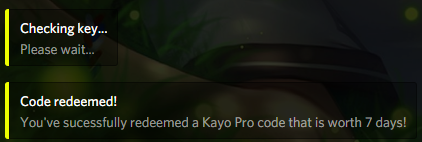
You're welcome, I didn't even do much...
earnest phoenix
        console.log("Code redeemed!")```
would this work?you need to make sure with !key.length
cause it could return [] and this actually returns true
member.addRole("488133560386060289");```
member.addRole is not a function?
author is user
msg.user?
.member
ty
there are two kind of entities, users and members, all accounts have a user but member is per guild (server)
so for instance a DM message won't have .member
 ruby dust
consider learning a programming language first before you proceed to bots
meager stirrup
oof
ruby dust
then how tf are you planning on even hosting a bot at this point 
 green pendant
R
ruby dust
how old are you?
green pendant
12
 queen sentinel

green pendant

green pendant
Xd
meager stirrup
So... how do I turn on my bot in the terminal, I think I'm doing it right, because It gives no errors.... but it wont turn on either
earnest phoenix
I have no idea what language your using.
meager stirrup
discord.js
earnest phoenix
node filename
meager stirrup
then i did do it right... but It wont turn on, why no errors?
thats confusing
XD
earnest phoenix
That's something wrong with your code
meager stirrup
weird, I'm pretty sure I got it right though...
ruby dust
im no js guy, but what is disableEveryone?
earnest phoenix
Don't mind that
smoky spire
It disables using @ everyone
earnest phoenix
Discord.js property
quartz kindle
what happens if you run node filename.js in your terminal?
where filename.js is the name of your bot file
earnest phoenix
He said it didn't work, I'll take his word for it
meager stirrup
it gives me no error, but it doesnt turn on
quartz kindle
does the terminal return to the idle blinking cursor?
earnest phoenix
Are you handling process errors.
ruby dust
show the terminal what you see after typing that node command
meager stirrup
oof I think I forgot that part
ruby dust

earnest phoenix
new Client().login(token)
quartz kindle
this part is wrong
you're replacing client with something that doesnt exist
mixing client and Client
earnest phoenix
Right
quartz kindle
although const cant be replaced
earnest phoenix
And even if that was correct, you're reassigning a constant
quartz kindle
which means the new client never passed
meager stirrup
oof so basically I made an oopsie
quartz kindle
yup
just do something like discord = require('discord.js')
and then client = new discord
earnest phoenix
You can even save a line and destructure
meager stirrup
do I put something infront of "discord = require('discord.js')"
quartz kindle
const
meager stirrup
kk
earnest phoenix
{ Client } = require('discord.js')
quartz kindle
do you need the {} tho?
smoky spire
No
earnest phoenix
https://developer.mozilla.org/en-US/docs/Web/JavaScript/Reference/Operators/Destructuring_assignment
MDN Web Docs
The destructuring assignment syntax is a JavaScript expression that makes it possible to unpack values from arrays, or properties from objects, into distinct variables.
No, it just unpacks the module.exports object that is exported
quartz kindle
oh i get it now
smoky spire
instead of const discord = require("discord.js"); const client = new discord.Client() you can just do const { Client } = require("discord.js"); const client = new Client()
meager stirrup
where do I put the token? (Sorry I'm new to this)
quartz kindle
i forgot in my code i had discord.client
smoky spire
Ye I didn't include the login part
smoky spire
Client is a constructor
earnest phoenix
@quartz kindle I know what you are thinking
You just didn't do it correctly
new (require('discord.js')).Client(options)
quartz kindle
yeah i figured
quartz kindle
i dont use module.exports so im not familiar with their nuances
earnest phoenix
Ehm
quartz kindle
options means whatever options you want to use, not the literal thing
earnest phoenix
Are you familiar with node.js and JS?
quartz kindle
3 clients jesus
meager stirrup
Yes, I've just been lately forgetting some things, it's been awhile since I last did this
¯_(ツ)_/¯
ruby dust
why 3 clients tho
meager stirrup
That's for me to know
earnest phoenix
Again, 
quartz kindle
just give him the full code, no shortcuts
else he wont understand
better go line by line
earnest phoenix
It's hard to type lots on a phone
ruby dust
how about #rules-and-info
earnest phoenix
Hoping it would be simple node knowledge
quartz kindle
@meager stirrup basically you need to do 3 things: require the discord package, create a discord client, and login to discord
earnest phoenix
I'm hesitant to give full code anyeays.
earnest phoenix
People need to learn how to do things themselves
Otherwise they'll always be asking every single thing
Lead in the right direction, but I'm not going to hold the spoon for you
quartz kindle
yeah
when i said give him the full code, i didnt mean literally, just meant explain line by line instead of creating same line shortcuts
meager stirrup
👌
earnest phoenix
for the discord.js-lavalink how do you send request to lavalink? (like the password and so on)
does it do automaticly or?
I want to create whitelist to some servers and I can get one server id to work
my code
if(message.guild.id !== ‘my server id’) return;
How can I add multiple server ids?
I tried
earnest phoenix
“ID” || “ID”
knotty steeple
if its one server id or if its another
earnest phoenix
I did that
knotty steeple
message.guild.id !== ‘my server id’ || message.guild.id !== ‘my other server id’
west raptor
^
knotty steeple
^ something like this you would do
west raptor
Basic js, it's only thinking it's a string
smoky spire
if(["array", "of", "ids"].includes(message.guild.id)) would be easier
west raptor
Np
earnest phoenix
@earnest phoenix ```if(message.guild.id !== "My server id" || message.guild.id !== "My server id") return;````
I think
Ty
 stable steeple
can anyone help me code a bot on mobile pls
knotty steeple
you dont
west raptor
You don't x2
earnest phoenix
i used an app called "code editor" but note: MOBILES are piece of dogshit, i coded on a phone for 1 month
earnest phoenix
thanks to my stinking mom she took my pc and i had to code on mobile, which sucked
knotty steeple
i got my 4gb 2 core laptop for 500 dollars
stable steeple
aw...
earnest phoenix
@stable steeple youcan code a nodejs bot on mobile (android) using code editor app and termux
but warning: it sucks to code on phone
west raptor
I mean, you could even get a chromebook and get Linux running on it afaik
knotty steeple
yes
stable steeple
raze can you help me with that?
knotty steeple
i would dual boot arch linux
stable steeple
i need help with the dependencies and others
knotty steeple
with windows
earnest phoenix
@stable steeple what lib do u use?
knotty steeple
windows rapes your fucking memory
west raptor
Yes
stable steeple
openjss
west raptor
I need to dual boot sometime
knotty steeple
i need to do that actually
earnest phoenix
@stable steeple openjss as discord bot library?
stable steeple
no idk how to import a library, im all new at this
earnest phoenix
what programming langs do you know?
stable steeple
none, i said im new thats why i need help, i know the names but not how to use them
what apps would you recommend
earnest phoenix
eeem how are you gonna code if you know nothing?
 sullen path
I recommend learning a language (not on a phone)
stable steeple
tutorials
earnest phoenix
oh yeah,i'm using discord.js (nodejs) that thing you can get on phone using app called "termux" if you are on android
i used to code on a phone for 1 month
west raptor
@stable steeple you have a school chromebook or smth?
earnest phoenix
@stable steeple if you want you can use discord.js cuz i know that as i code my bots in that lib
west raptor

earnest phoenix
otherwise you're gonna have to find out by yourself as idk any other lib or so
stable steeple
k
west raptor
Star
stable steeple
i said idk
stable steeple
nope idk what that is
topaz fjord
why would you code a bot in Android
west raptor
Why
west raptor
By who
sullen path
🤔
stable steeple
for a long time
west raptor
For how long
sullen path
and why
earnest phoenix
@topaz fjord because your mom takes you rpc away and you really wanna code no matter what
sullen path
ask nicely
west raptor
No you didn't, Theres no way you asked that fast


 earnest phoenix
Does not work
stable steeple
wdym
earnest phoenix
message.guild.id !== ‘my server id’ || message.guild.id !== ‘my other server id’
won’t work
if(message.guild.id !== ‘my server id’ || message.guild.id !== ‘my other server id’) return;
that
try && instead of ||
idK
uum
!== is if message guild is not that or this
earnest phoenix
I want it to work in my server and my friends one
like if(message.guild.id === "your id" || message.guild.id === "your id")
No one else’s
that means if message is sent in that guild or this guild do something
not gonna work
knotty steeple
wait
stable steeple
what programming language is it
knotty steeple
if your doing !==
earnest phoenix
I tried a lot
knotty steeple
you need && in place of ||
earnest phoenix
okay
knotty steeple
cuz its gonna mean the opposite
stable steeple
raze how do i start
stable steeple
teach me senpai
knotty steeple
it thinks || is and
earnest phoenix
That’s &&
stable steeple
raze
knotty steeple
but in this situation
stable steeple
raze
knotty steeple
its or
earnest phoenix
discord.js = javascript
knotty steeple
who here does python and uses databases or have an economy on their bot
what database to use
earnest phoenix
make a file named "bot.js" and start coidng
earnest phoenix
i use file system
knotty steeple
file system
earnest phoenix
lol
stable steeple
after that how do i input it to my discord bot
earnest phoenix
file system is not rlly a databse thing, but i use that as database cuz its much easier
and i got used to it
stable steeple
like dependencies smthn
knotty steeple
@stable steeple just learn to code
topaz fjord
database >>>> *
stable steeple
thats why im askibg u
stable steeple
raze dm plz
earnest phoenix
@stable steeple discord.js
const bot = new Discord.Client()

bot.on('ready', => {
console.log("READY " + bot.user.username)
});

bot.login("your token here")
but uh xd
earnest phoenix
Please don't use a phone to codr
knotty steeple
i already told him that
stable steeple
ik
earnest phoenix
There is no justifying this
stable steeple
guys pls scroll up
knotty steeple
my laptop is pretty much shit but works
earnest phoenix
Using a phone to code is simply unacceptable
God forbid you actually try to run the bot on the phone
topaz fjord
if you phone does then ur bot will go offline
west raptor
Glitch 
earnest phoenix
my bot on the discord website only shows 1 server how do i fix that
west raptor
What
earnest phoenix
my bot is in over 100 server bot on the website it only shows 1
ruby dust
post your server count to the dbl api
earnest phoenix
how do i do that
west raptor
west raptor
That's not the right link
ruby dust
shit, pre-typing links failed me
west raptor
Spice up your Discord experience with our diverse range of Discord bots
This should work
ruby dust
gotta remember it for later use
west raptor
Yes
ruby dust
I still don't know how to get an ID of discord.abc.GuildChannel (╯°□°)╯︵ ┻━┻
everyone's telling me to just add .id at the end, so apparently no one knows that there is no such property in GuildChannel, nor the answer itself at this point
west raptor
In js/discord.js it would be msg.channel.id iirc, but I think you are talking about python
ruby dust
yeah it's easy when you have a channel object
but I need an abstract base class of a guild channel
which is different
and idk how to get an id of that channel from there
west raptor
@trim saddle might know
ruby dust
uwu skullie
ruby dust
you know how to get an id of discord.abc.GuildChannel?
west raptor
Scroll up
ruby dust
no shit, cause no one knows
knotty steeple
im to nooby to know
ruby dust
uwu hug
west raptor
Lol
knotty steeple
ask danny himself
 glossy echo
https://discordbots.org/bot/486465778103746560
Why it says 1 server?

Discord Bot List
Mishu is a multi-purpose discord bot that has a variety of commands like fun commands, moderation, and music.
;-;
knotty steeple
post server count
 trim saddle
@glossy echo you have to post
knotty steeple
glossy echo
Thanks~