#development
1 messages · Page 358 of 1
 raven hawk
 winged osprey
Are you using the same url in your code?
raven hawk
Yes
winged osprey
Possible that you put http instead of https?
 shrewd field
Hello does anyone know what might be a possible reason for these kind of errors.
(node:8092) UnhandledPromiseRejectionWarning: Unhandled promise rejection (rejection id: 2): TypeError: Cannot read property 'id' of undefined
 amber snow
deep sigh
 split adder
Yeah
amber snow
 novel bronze
When your friends in APCSA ask you to help them and you think it's something difficult stumping them but it's actually just because they never bother to read the error messages 
 weak parrot
Lmao
novel bronze
Figure out what's triggering the error
amber snow
Cannot read property 'id' of undefined <-----------
how long have you been coding for deni?
 amber snow

 quasi marsh
reading tracebacks and write exceptions for the problem
ignoring tracebacks
not even knowing why the error is caused
 amber snow

 prime cliff
not even knowing what code is
not even know what a computer is
not even know what life is
quasi marsh
You don't need to know what life is just import it and check it's usecase later
novel bronze
@amber snow um
It's hard to fix a program if you don't know what line is causing it
amber snow
you must be new here
weak parrot
That's the great thing about good editors cause it tells you at what line the errors is
prime cliff
If only Deni knew what a line was
novel bronze
Editors don't tell you runtime errors lol
amber snow
good editors do as long you set it up to
novel bronze

Wouldn't be a problem if Deni showed us more of the error where it tells you the line number lmao
raven hawk
How can I do a http__s__ post request from node? Everything i found in google and #312614469819826177 doesnt work
 carmine berry
just put the url as https://
 strange lintel
wtf
someone help
<!DOCTYPE html>
<html lang=en>
  <meta charset=utf-8>
  <meta name=viewport content="initial-scale=1, minimum-scale=1, width=device-width">
  <title>Error 400 (Bad Request)!!1</title>
  <style>
    *{margin:0;padding:0}html,code{font:15px/22px arial,sans-serif}html{background:#fff;color:#222;padding:15px}body{margin:7% auto 0;max-width:390px;min-height:180px;padding:30px 0 15px}* > body{background:url(//www.google.com/images/errors/robot.png) 100% 5px no-repeat;padding-right:205px}p{margin:11px 0 22px;overflow:hidden}ins{color:#777;text-decoration:none}a img{border:0}@media screen and (max-width:772px){body{background:none;margin-top:0;max-width:none;padding-right:0}}#logo{background:url(//www.google.com/images/branding/googlelogo/1x/googlelogo_color_150x54dp.png) no-repeat;margin-left:-5px}@media only screen and (min-resolution:192dpi){#logo{background:url(//www.google.com/images/branding/googlelogo/2x/googlelogo_color_150x54dp.png) no-repeat 0% 0%/100% 100%;-moz-border-image:url(//www.google.com/images/branding/googlelogo/2x/googlelogo_color_150x54dp.png) 0}}@media only screen and (-webkit-min-device-pixel-ratio:2){#logo{background:url(//www.google.com/images/branding/googlelogo/2x/googlelogo_color_150x54dp.png) no-repeat;-webkit-background-size:100% 100%}}#logo{display:inline-block;height:54px;width:150px}
  </style>
  <a href=//www.google.com/><span id=logo aria-label=Google></span></a>
  <p><b>400.</b> <ins>That’s an error.</ins>
<p>Your client has issued a malformed or illegal request. <ins>That’s all we know.</ins>```why am i getting this
on a discord api request
 elder rapids
Your client is not functioning properly
 fathom pebble
"bad request"
carmine berry
use http for now
raven hawk
Http does not seem to work.
carmine berry
what is the url
raven hawk
No errors, but the server count does not update on the website
elder rapids
what does let's encrypt got to do with anything 
discordbots.org doesn't use lets encrypt
It uses CloudFlares COMODO CA
 bitter sundial
there's nothing wrong with stat posting on the server side
 neon pasture
@strange lintel "Error 400 (Bad Request)", "Your client has issued a malformed or illegal request."
 quiet bobcat
Can someone help me? I'm trying to make so if my function couldn't find any videos it will post message saying it couldn't find any videos with that name. What says that it couldn't find any search results is: js (node:5384) UnhandledPromiseRejectionWarning: Unhandled promise rejection (rejection id: 1): No video found.
 north fog
nobody can help you this way
quiet bobcat
?
north fog
no code provided to look at
so we can't look where ti goes wrong
currently it is, ow look a nice error message, can't do shit with it
quiet bobcat
function search_video(query, callback) {
    request("https://www.googleapis.com/youtube/v3/search?part=id&type=video&q=" + encodeURIComponent(query) + "&key=" + yt_api_key, function(error, response, body) {
        var json = JSON.parse(body);
        callback(json.items[0].id.videoID);

    })
}```so far i can see that the search query (the request you send) cant find any video, because it may have returned null
have you tried pasting the url with search and key in the url balk from your webbrowser ¿
quiet bobcat
It can search
I'm trying to send a message when it can't find any videos though
like if someone searches for a video that doesn't exists then it will send that message
north fog
check if json.items is larger then 0 (asume that items is a array)
shrewd field
Hey guys I have this error it says invalid form body content must be 2000 or fewer in length. It happens only when I do the help command.http://prntscr.com/hz1cm2

what could be the cause of this.
quiet bobcat
Look at the error
 shrewd field
Then how can I find it out.
quiet bobcat
Maybe use embeds instead?
shrewd field
All of which text?
quiet bobcat
All the things after message.channel.send( are together 2k
shrewd field
I don't know the text to change it into embeds.
Ok
in the help command
Ok
Thanks for the help.
shrewd field
Ok
quiet bobcat
basically the first line is message.channel.send({embed : {
and then at the end it's }})
shrewd field
OK
north fog
so far I know, embed have also limits
shrewd field
Ya
north fog
but when jona said is correct, you are atempting to send a message that contains 2000 or more characters
shrewd field
Ok
quiet bobcat
You can make different fields to fix that issue though
north fog
you can split the message and send it as 2 message's
shrewd field
In my help command I have it send commands that are very long..
north fog
what I do when i get that problem, (going to use java as example), use a stringbuilder (or string and use += or so) check if the stringbuilder has reached 2000k characters, if it has passed that value, first send the message, clear the stringbuilder and append the new line
StringBuilder

foreach(command){
    if(StringBuilder.lenght + command.lenght > 2000){
        sendMessage StringBuilder
        Clear StringBuilder
    }

    StringBuilder add 'command ' and newLineRightHere
}

if(StringBuilder.lenght > 0){
    sendMessage StringBuilder
}
``` something like thatOr you can take the easy route and hard-code messages that are <=2k characters long 😛
since it's the command list
 umbral pelican
"easy route" 
novel bronze
What's easier than just telling it to print a hard-coded string
 earnest phoenix
whats better, discord.py or discord.js
 topaz fjord
Whatever lang ur strong in
novel bronze
^
only knows Lua /s
Knowing both Java and Lua can be hard sometimes
When you start putting semicolons at the end of lines in Lua 
novel bronze

shrewd field
Or you can take the easy route and hard-code messages that are <=2k characters long stuck_out_tongue how can I do this because I didn't understand this.
topaz fjord
idfk what your asking
umbral pelican
I'm guessing they're asking what a hard coded message is 
novel bronze
Oh my god
Guys do I get Deni a dictionary or do I get a JavaScript for Dummies book

 tawny lava
Both
novel bronze
@shrewd field hard-code the messagesProgram the messages into the bot's script so that they aren't changed. There isn't a function or something anywhere else in the program that changes what the message says.<=2kLess than or equal to 2,000
@shrewd field hard-code the messagesProgram the messages into the bot's script so that they aren't changed. There isn't a function or something anywhere else in the program that changes what the message says.<=2kLess than or equal to 2,000
prime cliff
dictonary<string, JavaScript>
novel bronze
Test
@shrewd field hard-code the messagesProgram the messages into the bot's script so that they aren't changed. There isn't a function or something anywhere else in the program that changes what the message says.<=2kLess than or equal to 2,000
strange lintel
https://cdn.upldr.me/SABExSw.png things just werent adding up

 abstract mango
Oof.
quasi marsh
✋
earnest phoenix
What’s the bot that gives a rank by reacting to an emoji(installation tutorial, I wanna setup my own)
Tag me if you know
 languid dragon
i dont think this is #development related
if ur just gonna talk in codeblock, take it to #memes-and-media
that is codeblock
take this shit, AKA "codeblocks"
to #memes-and-media
prime cliff
@languid dragon some people man 
novel bronze
strange lintel
watch my strim
 pastel bane
eeeeeeeeeeeeeeeeeeeeeeeeeeeeeeeeeeeeeeeeeeeeeeeeeeeeeeeeeeeeeeeeeeeeeeeeeeeeeeeeeeeeeeeeeeeeeeeeeeeeeeeeeeeeeeeeeeeeeeeeeeeeeeeeeeeeeeeeeeeeeeeeeeeeeeeeeeeeeeeeeeeeeeeeeeeeeeeeeeeeeeeeeeeeeeeeeeeeeeeeeeeeeeeeeeeeeeeeeeeeeeeeeeeeeeeeeeeeeeeeeeeeeeeeeeeeeeeeeeeeeeeeeeeeeeeeeeeeeeeeeeeeeeeeeeeeeeeeeeee
elder rapids
Yee a #memes-and-media er
elder rapids
no
earnest phoenix
raise MissingRequiredArgument('{0.name} is a required argument that is missing.'.format(param))
discord.ext.commands.errors.MissingRequiredArgument: dice is a required argument that is missing.
shrewd field
What script @novel bronze
raven hawk
When i try to post to the api, there seems to be no response, and the server count is not updated on the website. I am using discordie (nodejs). My code for posting right now is:```function PostCount() {
count = client.Guilds.length;
// Build the post string from an object
post_data = querystring.stringify({
'server_count' : count
});
// An object of options to indicate where to post to
post_url_etc = {
host: 'discordbots.org',
port: '80',
path: '/api/bots/395241464667570178/stats',
method: 'POST',
headers: {
'Content-Type': 'application/x-www-form-urlencoded',
'Content-Length': Buffer.byteLength(post_data),
'Authorization' : {my code}
}
};
console.log("Server count: " + count)
// Set up the request
var req = http.request(post_url_etc, function(res) {
res.setEncoding('utf8');
res.on('data', function (chunk) {
console.log('Response: ' + chunk);
});
});
req.write(post_data);
req.end();
}```
 jagged birch
 inner jewel
it's application/json, not application/x-www-form-urlencoded
 uncut slate
you're making globals there
 frigid juniper
@abstract crystal Hey, i've a question, how do you make href links in python like on your bot
Or someone else plz
novel bronze
@shrewd field ...
quiet bobcat
What happened @slim solar
 worn ridge
@trim steppe Fixed @simple sun Sry 😄
 frail kestrel
@jagged birch he was asking a question, server count examples is only for different ways of posting your server count to the api
 abstract crystal
@frigid juniper if you're still interested ```python
em.add_field(name="Invite link", value="Click here".format(settings.INVITE_LINK), inline=True)
em.add_field(name="Report a bug", value="Click here".format("https://rickbot.ksoft.si/report/"), inline=True)
em.add_field(name="Website", value="Click here".format("https://rickbot.ksoft.si/"), inline=True)
em.add_field(name="Donate to support this project",
value="Click here".format("https://rickbot.ksoft.si/donate/"), inline=True)
em.add_field(name="Join RickBot's server:", value="Click here")
@abstract crystal Thanks a lot ♥
abstract crystal
np, glad to help
em variable is just ```python
em = discord.Embed(title="RickBot statistics", description="Bot made by AndrazKorenc#9714 aka @Soft", color=discord.Color.green())
 solid ruin
i tried this but doesnt work, how i set it up?
message.guild.createRole('name', 'Muted');
worn ridge
How can I change the background of my discord - bot page. Like this: https://discordbots.org/bot/177735619668213760
 worn ridge
So I can change the whole page? Not only the center part?
 vital lark
@worn ridge ```js
- {
background: url("");
}
also works
worn ridge
@vital lark thx 😃
vital lark
np
worn ridge
How can I use this in combination with markdown?
worn ridge
😑
neon pasture
@abstract crystal sneeky ads 😏
abstract crystal
Whoops 😉
neon pasture
hehe
abstract crystal

strange lintel
have you guys heard of the thing going on with google translate
yo uk no wt hi st hi ng
prime cliff

strange lintel
anyone interested in working on a side project with me
dm me for more info
who is talented in python and pygame
earnest phoenix
hi
earnest phoenix
hi how i can add a bot
 torn nebula
https://discordapp.com/oauth2/authorize?&client_id=ID_HERE&scope=bot&permissions=0
Replace Ur Bot Id in ID_HERE
abstract mango
you don't even need the permissions thing
novel bronze
Yeah lmao
languid dragon
Commands only work in #commands #265156322012561408 and #306891333405245450 (or #265156361791209475)
please read the #rules-and-info
fathom pebble
What is the ratelimit for setting game status?
 solemn sapphire
why does this not work?
Example code
<client>.user.setPresence({
status: "online",
activity: {
name: "Donut: Rainbow Six",
type: 0,
url: "https://www.twitch.tv/discorddonut/"
}
})

sorry
function setStatus(stats, gName, gUrl, gType) {
bot.user.setPresence({
status: stats,
activity: {
name: gName,
type: gType,
url: gUrl
}
});
}
this doesnt work, im calling the function with this setStatus("online", numServers+" Server(s)", "https://www.twitch.tv/popgoesme700", 3);
 quasi sandal
@solemn sapphire tip: read the documentation https://discord.js.org/#/docs/main/stable/class/Presence

Discord.js is a powerful node.js module that allows you to interact with the Discord API very easily. It takes a much more object-oriented approach than most other JS Discord libraries, making your bot's code significantly tidier and easier to comprehend.
solemn sapphire
thanks
i read it so far through my bot i didnt know there was a page for that part
carmine berry
cause its setActivity in newer versions of djs @solemn sapphire
well for me atleast https://cdn.hsxx.ca/files/1515830340003.png
 quasi sandal
he also should be using game instead of activity
jagged birch
if (!message.guild) return;
var voiceChannel = message.member.voiceChannel;
if (message.content === (prefix + ' reee')) {
if (voiceChannel) {
voiceChannel.join()
.then(connection => {
const dispatcher = connection.playFile('./sound/reee.mp3');
dispatcher.on('end', () => {
voiceChannel.leave()
});
})
.catch(console.log);
} else {
message.reply('REEEee y0u n33d t0 b3 1n a v0ice ch4nnel f1rst!1!!11 :alien:');
}
}
});```
I get error "voiceChannel is not defined" on the 3rd line of my code in console which then crashes my bot, any ideas how to fix? I've had a look on google and apparently `.voiceChannel` isn't a thing, what can I replace that with? crude mantle
https://discord.js.org/#/docs/main/stable/topics/voice @jagged birch
Discord.js is a powerful node.js module that allows you to interact with the Discord API very easily. It takes a much more object-oriented approach than most other JS Discord libraries, making your bot's code significantly tidier and easier to comprehend.
jagged birch
Yeah, then my code should be correct, I don't know why its crashing.
jagged birch
TypeError: Cannot read property 'voiceChannel' of null
quiet bobcat
Try moving the variable into the if statement (if (messsage.content == ect))
@jagged birch
earnest phoenix
hi
is there a way to notify someone when he gets a "like" or an emoji in discord with a tool or bot?
say you gave me a thumbs up, i want to know about it with notification/DM or something, at least once a day
 tulip mist
you can probably use the messageReactionAdd event if you're talking about discord.js
jagged birch
ok i'll give that a shot @quiet bobcat
 austere meadow
@jagged birch message.member isn't always reliable and available, especially if that person is offline or if guild.large is true
just add a check for if (message.member == null), or fetch the member yourself using message.guild.fetchMember()
jagged birch
thanks, I've added:
if(message.member == null) { return; }
Hopefully that'll fix it.
austere meadow

prime cliff
Port scanner bot 
 fleet epoch
its been a while, whats the code so i can put the guids my bot is in to this website
right now im trying to achive the certified developer
winged osprey
@fleet epoch check in #312614469819826177
topaz fjord
there are many
fleet epoch
can someone help me with my guild connecting lol
const key = 'token they gave me';
snekfetch.post(`https://discordbots.org/api/bots/${client.user.id}/stats`)
.set('Authorization', key)
.send({ server_count: client.guilds.size,})``` mighty barn
why that "," in the end?
 narrow finch
hey
fleet epoch
Is that's what breaking it
mighty barn
.send({ server_count: client.guilds.size**,**})
.send({ server_count: client.guilds.size,})
hope it's clear
 wooden shoal
https://i.imgur.com/HGhVFYX.gifv Made some kinda sorting algoritms
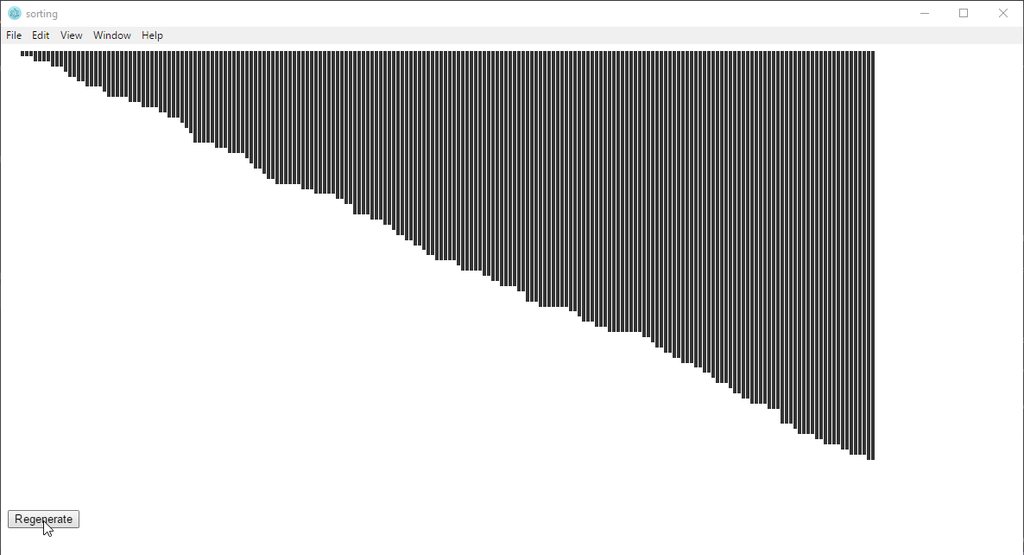
Step 1: Sorts them (will create while spaces if some are the same height)
Step 2 Find if any are same height and overlapping, them spaces them out to fill teh white spaces
 solemn glacier
Hello everyone. When I add a code to my bot (discord.py) which contais @client.event or on_message the other commands with prefix stop functioning
I used this @client.event async def on_message(message): if message.content.lower().startswith("-decide"): choice = random.randint(1, 2) if choice == 1: await client.add_reaction(message, "👍") if choice == 2: await client.add_reaction(message, "👎") which functions fine but it makes other command not work for some reason
quasi marsh
with .startswith(), you need to make sure you don't interfere with other commands
For example -decide and -decide wheel would only trigger -decide
solemn glacier
Thank you
 last tapir
How do I make a bot to count invites used?
earnest phoenix
@strange lintel hoi pl0x help me https://vgy.me/W9CkAS.png

how does me convert into dict
wait it is a dict
I mean
how does me fix dis
earnest phoenix
nvm
 scenic crest
@last tapir you familiar with any programming languages?
scenic crest
ah then I'd suggest you familiarize yourself first
there's discord API wrappers for most languages, so you should be good
python and JS are supposedly easy for beginners
last tapir
Not sure I know what that means how how to do that
 hushed oyster
how would I change the color on this bar from blue to something else?
topaz fjord
anyone here good with scrollspy things
earnest phoenix
same difference
 mortal crest
@hushed oyster add a style tag with and change background color for the class/id of that header
crude mantle
@earnest phoenix what lib is ur bot
earnest phoenix
currently using Nadeko and red
earnest phoenix
Yes
Like I did client.user.setGame(args[0]) and I also defined args, but it did nothing
quiet bobcat
What version?
earnest phoenix
"discord.js": "^11.2.1",
this is what I have normally
  client.user.setPresence({
    status: settings.status,
    game: {
      name: settings.game,
      type: 0
}```Why don't you have that instead? 
earnest phoenix
I want to be able to set the game in a command
but idk how to get it to work, fairly new to this
quiet bobcat
client.user.setPresence({
    status: settings.status,
    game: {
      name: args[1]
      type: 0
}```Shouldn't that work?
quiet bobcat
...
earnest phoenix
Since i deleted my earlier code
 earnest phoenix
exports.run = (client, message) => {
let messageArray = message.content.split(/\s+/g);

  let args = messageArray.slice(1);

  const Discord = require('discord.js');
  client.user.setGame(args[0])
}

exports.conf = {
  enabled: true,
  guildOnly: false,
  aliases: [],
  permLevel: 0
};

exports.help = {
  name: 'setgame',
  description: 'This is a command to set the bots game. [owner]',
  usage: 'setgame [input]'
}```earlier code
quiet bobcat
ok
earnest phoenix
ugh I broke it
Call me dumb
but
exports.run = (client, message) => {
let messageArray = message.content.split(/\s+/g);

  let args = messageArray.slice(1);

  client.user.setPresence({
    status: settings.status,
    game: {
      name: args[1],
      type: 0
    }
  });
exports.conf = {
  enabled: true,
  guildOnly: false,
  aliases: [],
  permLevel: 0
};

exports.help = {
  name: 'setgame',
  description: 'This is a command to set the bots game. [owner]',
  usage: 'setgame [input]'
}```i broke it somehow
quiet bobcat
hm
uncut slate
missing a closing curly
earnest phoenix
/app/commands/setgame.js:25
4:53 PM

});
4:53 PM

 ^
4:53 PM

4:53 PM

SyntaxError: Unexpected token )
4:53 PM

at createScript (vm.js:80:10)```you're missing a closing curly
earnest phoenix
curly = }?
quiet bobcat
yup
earnest phoenix
Where would I add it
quiet bobcat
Try at the end?
uncut slate
not at the end
quiet bobcat
Alright
uncut slate
for your exports.run function
earnest phoenix
I messed up
I did it at end
now help.conf messe dup
or whatever itwas
``` log(Module loaded: ${props.help.name}.);
4:55 PM
^
4:55 PM
4:55 PM
TypeError: Cannot read property 'name' of undefined```
Fixed it
I did setgame hi
it changed to

my normal is
"game": "Beta",```Oh
I fixed it by changing to args[0]
Thanks for your help guys
quiet bobcat
ok nice
 quiet bobcat
Nice
 patent reef
Anyone know how to shard discord.py in async?
abstract mango
why async tho
uncut slate
caUSE ASYNC iS THE FuTURE
elder rapids
No that's sync
abstract mango
rewrite is the future!
 misty anvil
hey guys i was wondering if this still worked
  snekfetch.post(`https://discordbots.org/api/bots/${client.user.id}/stats`)
    .set('Authorization', config.dbotAuth)
    .send({"server_count": client.guilds.size})
    .then(() => client.users.get(config.ownerID).send(`Amari has been added to a server.`))
    .catch(err => client.users.get(config.ownerID).send(`${err}`));
}
i keep getting 401 whenever i use this
fathom pebble
401: Unauthorised
mighty barn
You don't need to add the "" around the server count aswell, i think. Could make no difference
mighty barn
I think so yes, If the token is correct it should work
mighty barn
You're welcome
misty anvil
It's coming up with a reference error
😦
still not working... mm is there an easier way?
 slim solar
Please ?
What do I have to put in the warn code so that the warn will come from which server. ?
Discord.js
earnest phoenix
You have to put 37 semicolons into it.
mortal crest
does someone want to review my code and tell me where I can improve myself on?
patent reef
@abstract mango cuz if i update to rewrite im gonna have to update all my bots and ehhhhhhh too lazy
 abstract mango
idk
rewrite has sharded clients (autoshardedclient, autoshardedbot) so idk
look in the docs
patent reef
there is no docs about sharding in async lol
torn nebula
Hosting my bot I use process. Env for token how to use process. Env for prefix or any urls help me
 frigid thistle
Same
earnest phoenix
you might want to do this before mee6 get to it
i know a lot of people who are interested in that
to keep discussions going in their servers
quasi marsh
I did see sharding somewhere in the async docs, but autosharding is the main reason I converted to rewrite
Also I feel like it’s being supported more, and receives more updates, so I do recommend switching over
abstract mango
it is being supported more
 edgy canopy
y
 slate valve
how do i make my bot go on???
topaz fjord
code it
topaz fjord
search it up
 unkempt arch
const snekfetch = require('snekfetch'),
2018-01-15T05:03:54.777716+00:00 app[worker.1]: const snekfetch = require('snekfetch'),
2018-01-15T05:03:54.777717+00:00 app[worker.1]: ^^^^^
2018-01-15T05:03:54.777718+00:00 app[worker.1]:
2018-01-15T05:03:54.777719+00:00 app[worker.1]: SyntaxError: Unexpected token const
@earnest phoenix
I fixed that problem
but a new one came
Whoops something went wrong: [object Object]
@vital lark
 bitter sundial
from the catch
unkempt arch
??
bitter sundial
replace err.body with err.message
bitter sundial
fix your request
bitter sundial
${err.message}: ${JSON.stringify(err.body)}
try that to see the full error
neon pasture
@rugged sparrow come here
 rugged sparrow
No I haven't
neon pasture
If want to make one without programming, use Discord Bot Maker on Steam. Else learn Javascript (https://javascript.info/) and then watch this video https://www.youtube.com/watch?v=-5jJaO17Gjs.

𝐄 𝐗 𝐓 𝐑 𝐀 𝐓 𝐇 𝐈 𝐂 𝐂 READ BEFORE POSTING A COMMENT! Please do not ask for spoon feeding in the comment section, feed yourself! Comments that simply dump all c...
neon pasture
@rugged sparrow I can send you a video of it, so you can see how it is.

In this tutorial, we start by registering the bot from the Discord into the project. Once ready, the bot may begin to have work done to it! http://www.discor...
rugged sparrow
So hey @neon pasture how do I make my bot go online like appear online
languid dragon
by writing code for it 
neon pasture
^
rugged sparrow
Lol
neon pasture
you have to turn it on
rugged sparrow
Could I do that on discord bot maker
unkempt arch
Whoops something went wrong: 400 Bad Request: {"error":"Required parameter server_count or shards missing"}
neon pasture
you sending your stats to the api?
languid dragon
send api posting code
unkempt arch
ok
  .set('Authorization', ')
  .send({ server_count: client.guilds.size })
  .then(() => console.log('Updated discordbots.org stats.'))
.catch(err => console.error(`Whoops something went wrong: ${err.message}: ${JSON.stringify(err.body)}`));```yes
neon pasture
languid dragon
so like
neon pasture
that's wrong
neon pasture
id is ur bots id
unkempt arch
ok
bitter sundial
people
why are you so uneducated
https://discordbots.org/api/bots/stats is correct
neon pasture
 bitter sundial
yesss
languid dragon
my bad
bitter sundial
looks like you're executing it when your bot isn't ready yet
which makes server_count undefined
neon pasture
don't you need to have the bot id in the link?
neon pasture
^ like that
languid dragon
for posting stats
bitter sundial
with the new token thing ID isn't required but works
unkempt arch
hmm
languid dragon
oh weird
unkempt arch
maybe adding the id will work
languid dragon
well try https://discordbots.org/api/bots/95579865788456960/stats and see if it works
yeah
bitter sundial
if the route was wrong he wouldn't have the error he's getting
400 Bad Request: {"error":"Required parameter server_count or shards missing"}
which means server_count is 0 or undefined
bitter sundial
which means the bot isn't ready when posting or bot is literally in no servers
languid dragon
^ makes sense
languid dragon
@unkempt arch ensure the stat post is done when the bot is in ready-state
aka
client.on('ready' ...
unkempt arch
ok
neon pasture
  console.log(`Logged in as ${client.user.tag}!`);
});```2018-01-15T08:00:43.196808+00:00 heroku[worker.1]: Starting process with command `node bot.js`
2018-01-15T08:00:46.666852+00:00 app[worker.1]: ------- Music Bot -------
2018-01-15T08:00:46.666867+00:00 app[worker.1]: > version: 1.7.0
2018-01-15T08:00:46.666868+00:00 app[worker.1]: > logging: false
2018-01-15T08:00:46.666869+00:00 app[worker.1]: > global queues: false
2018-01-15T08:00:46.666871+00:00 app[worker.1]: > node: v8.4.0
2018-01-15T08:00:46.666872+00:00 app[worker.1]: ------- Music Bot -------
2018-01-15T08:00:46.666895+00:00 app[worker.1]: [NOTICE] enableQueueStat is 'false'. Queue will not have a Playing/Paused indicator.
2018-01-15T08:00:46.667045+00:00 app[worker.1]: Bot has started, with 10905 users, in 364 channels of 27 guilds.```I also though making a bot was easy oh boi was I wrong
unkempt arch
still error
bitter sundial
what
languid dragon
show ur .on('ready') code
bitter sundial
2018-01-15T08:00:46.239381+00:00 app[worker.1]: Whoops something went wrong: 400 Bad Request: {"error":"Required parameter server_count or shards missing"}
2018-01-15T08:00:43.196808+00:00 heroku[worker.1]: Starting process with command `node bot.js`
take a closer look at those two lines lol
unkempt arch
  console.log(`Bot has started, with ${client.users.size} users, in ${client.channels.size} channels of ${client.guilds.size} guilds.`);
  client.user.setGame(`on !help`);
});```umm
bitter sundial
oh wow
bitter sundial
shit logs
neon pasture
you have to put the code in there.
bitter sundial
goes bottom to top
neon pasture
  console.log(`Bot has started, with ${client.users.size} users, in ${client.channels.size} channels of ${client.guilds.size} guilds.`);
  client.user.setGame(`on !help`);`
snekfetch.post('https://discordbots.org/api/bots/stats')
  .set('Authorization', ')
  .send({ server_count: client.guilds.size })
  .then(() => console.log('Updated discordbots.org stats.'))
  .catch(err => console.error(`Whoops something went wrong: ${err.message}: ${JSON.stringify(err.body)}`));
});```like this @unkempt arch
languid dragon
mmmmmmm
unkempt arch
hmm
ok restarting
2018-01-15T08:06:00.538040+00:00 app[worker.1]:   .catch(err => console.error(`Whoops something went wrong: ${err.message}: ${JSON.stringify(err.body)}`));
2018-01-15T08:06:00.538041+00:00 app[worker.1]:                                ^^^^^^
2018-01-15T08:06:00.538042+00:00 app[worker.1]:
2018-01-15T08:06:00.538043+00:00 app[worker.1]: SyntaxError: Unexpected identifier
2018-01-15T08:06:00.538044+00:00 app[worker.1]:     at createScript (vm.js:74:10)
2018-01-15T08:06:00.538045+00:00 app[worker.1]:     at Object.runInThisContext (vm.js:116:10)
2018-01-15T08:06:00.538046+00:00 app[worker.1]:     at Module._compile (module.js:537:28)
2018-01-15T08:06:00.538047+00:00 app[worker.1]:     at Object.Module._extensions..js (module.js:584:10)
2018-01-15T08:06:00.538048+00:00 app[worker.1]:     at Module.load (module.js:507:32)
2018-01-15T08:06:00.538049+00:00 app[worker.1]:     at tryModuleLoad (module.js:470:12)
2018-01-15T08:06:00.538050+00:00 app[worker.1]:     at Function.Module._load (module.js:462:3)
2018-01-15T08:06:00.538052+00:00 app[worker.1]:     at Function.Module.runMain (module.js:609:10)
2018-01-15T08:06:00.538052+00:00 app[worker.1]:     at startup (bootstrap_node.js:158:16)
2018-01-15T08:06:00.538054+00:00 app[worker.1]: at bootstrap_node.js:598:3```what now
it gives me lots of error
@neon pasture
unkempt arch
ok
```2018-01-15T08:20:56.195122+00:00 app[worker.1]: console.log(New guild joined: ${guild.name} (id: ${guild.id}). This guild has ${guild.memberCount} members!);
2018-01-15T08:20:56.195123+00:00 app[worker.1]: ^^^
2018-01-15T08:20:56.195124+00:00 app[worker.1]:
2018-01-15T08:20:56.195125+00:00 app[worker.1]: SyntaxError: Unexpected identifier
2018-01-15T08:20:56.195125+00:00 app[worker.1]: at createScript (vm.js:74:10)
2018-01-15T08:20:56.195126+00:00 app[worker.1]: at Object.runInThisContext (vm.js:116:10)
2018-01-15T08:20:56.195127+00:00 app[worker.1]: at Module._compile (module.js:537:28)
2018-01-15T08:20:56.195128+00:00 app[worker.1]: at Object.Module._extensions..js (module.js:584:10)
2018-01-15T08:20:56.195128+00:00 app[worker.1]: at Module.load (module.js:507:32)
2018-01-15T08:20:56.195131+00:00 app[worker.1]: at tryModuleLoad (module.js:470:12)
2018-01-15T08:20:56.195132+00:00 app[worker.1]: at Function.Module._load (module.js:462:3)
2018-01-15T08:20:56.195133+00:00 app[worker.1]: at Function.Module.runMain (module.js:609:10)
2018-01-15T08:20:56.195134+00:00 app[worker.1]: at startup (bootstrap_node.js:158:16)
2018-01-15T08:20:56.195134+00:00 app[worker.1]: at bootstrap_node.js:598:3
wait
i think i found the error
neon pasture
console.log(`New guild joined: ${guild.name} / id: ${guild.id}. This guild has ${guild.memberCount} members!`);
use this
unkempt arch
i have that
thats in guild add
console.log(`Bot has started, with ${client.users.size} users, in ${client.channels.size} channels of ${client.guilds.size} guilds.`);?
OOOH
OOOK
i know what your going to
nvm
2018-01-15T08:26:43.293631+00:00 app[worker.1]: console.log(`New guild joined: ${guild.name} / id: ${guild.id}. This guild has ${guild.memberCount} members!`); 2018-01-15T08:26:43.293632+00:00 app[worker.1]: ^^^ 2018-01-15T08:26:43.293634+00:00 app[worker.1]: 2018-01-15T08:26:43.293635+00:00 app[worker.1]: SyntaxError: Unexpected identifier 2018-01-15T08:26:43.293636+00:00 app[worker.1]: at createScript (vm.js:74:10) 2018-01-15T08:26:43.293637+00:00 app[worker.1]: at Object.runInThisContext (vm.js:116:10) 2018-01-15T08:26:43.293638+00:00 app[worker.1]: at Module._compile (module.js:537:28) 2018-01-15T08:26:43.293639+00:00 app[worker.1]: at Object.Module._extensions..js (module.js:584:10) 2018-01-15T08:26:43.293640+00:00 app[worker.1]: at Module.load (module.js:507:32) 2018-01-15T08:26:43.293641+00:00 app[worker.1]: at tryModuleLoad (module.js:470:12) 2018-01-15T08:26:43.293642+00:00 app[worker.1]: at Function.Module._load (module.js:462:3) 2018-01-15T08:26:43.293643+00:00 app[worker.1]: at Function.Module.runMain (module.js:609:10) 2018-01-15T08:26:43.293644+00:00 app[worker.1]: at startup (bootstrap_node.js:158:16) 2018-01-15T08:26:43.293645+00:00 app[worker.1]: at bootstrap_node.js:598:3
what now
neon pasture
show me ur code.
unkempt arch
  // This event triggers when the bot joins a guild.
  console.log(`New guild joined: ${guild.name} / id: ${guild.id}. This guild has ${guild.memberCount} members!`);
  client.user.setGame(`on !help`);
});```what
neon pasture
  console.log(`New guild joined: ${guild.guild.name} / id: ${guild.guild.id}. This guild has ${guild.guild.memberCount} members!`);
});```is this right?
  console.log(`I have been removed from: ${guild.name} (id: ${guild.id})`);
});
it's the same. guild.guild.name
unkempt arch
ok
neon pasture
does the first part work?
unkempt arch
no
unkempt arch
console.log(`New guild joined: ${guild.guild.name} / id: ${guild.guild.id}. This guild has ${guild.guild.memberCount} members!`); 2018-01-15T08:36:13.537615+00:00 app[worker.1]: ^^^ 2018-01-15T08:36:13.537617+00:00 app[worker.1]: 2018-01-15T08:36:13.537618+00:00 app[worker.1]: SyntaxError: Unexpected identifier
here's the whole code
  console.log(`Bot has started, with ${client.users.size} users, in ${client.channels.size} channels of ${client.guilds.size} guilds.`);
  client.user.setGame(`on !help`);`
   snekfetch.post('https://discordbots.org/api/bots/stats')
  .set('Authorization', ')
  .send({ server_count: client.guilds.size })
  .then(() => console.log('Updated discordbots.org stats.'))
  .catch((e) => console.error(e));
});

client.on("guildCreate", guild => {
  console.log(`New guild joined: ${guild.guild.name} / id: ${guild.guild.id}. This guild has ${guild.guild.memberCount} members!`);
});

client.on("guildDelete", guild => {
  console.log(`I have been removed from: ${guild.guild.name} (id: ${guild.guild.name})`);
});``` console.log(`New guild joined: ${guild.name} / id: ${guild.id}. This guild has ${guild.memberCount} members!`)
});``` this is working..check the whole code above
neon pasture
you have to do that by yourself.
I helped you with guildCreate, so the other things are the same.
unkempt arch
well, i cant seem to find the error. but before it worked
unkempt arch
still testing
neon pasture
delete that link bro
unkempt arch
kk
neon pasture
  console.log(`I have been removed from: ${guild.name} (id: ${guild.name})`);
});```and this as guildDelete
unkempt arch
.set('Authorization',eyJhbGciOiJIUzI1NiIsInR5cCI6IkpXVCJ9.eyJpZCI6IjM4NjE0MjI3MTI1NjM5NTc3NiIsImJvdCI6dHJ1ZSwiaWF0IjoxNTE0Nzc4MzI0fQ.VAC-qLNZIFV-8S8czol1aPbmo-mvxzd6-8FkMncfi6I ')
SyntaxError: Invalid or unexpected token
neon pasture
wrong token then
unkempt arch
oh ok
neon pasture
if I was you, I would learn javascript
unkempt arch
ok fixed it
well, im yet a starter. my teacher wants an outcome
still lot of things to learn
uncut slate
you're missing an opening quote
unkempt arch
its fixed
neon pasture
so you making a discord bot for school?
neon pasture
okay? thank you :)
 bright spear
 discord bot for school
bitter sundial
discord bot for school too ez
rugged sparrow
@bitter sundial I have a question
bitter sundial
ok
rugged sparrow
where do i get discord.py
bitter sundial
from the internet
rugged sparrow
do u know where
rugged sparrow
Ok
unkempt arch
check discord.py site
 golden iron
quiet bobcat
golden iron
quiet bobcat
You could code bots with alot of programs, some programs are: Eclipse (Java), IntelliJ (Java), Visual Studio Code (alot of different languages), Atom (alot of different languages)
north fog
Visual Studio (dotnet core, C#, VB.NET and I believe also python as extension)
or as a pro use notepad++
or notepad
north fog
or edit.com (msdos)
Visual studio can do python (its a extra), it can also Node.JS
or make bots for your android/ios device
a portable bot on your phone 😄
quiet bobcat

north fog
hehe, im reading here F#, i think Fuck#, idk why
slim solar
A confident person to temporarily host my bot please?
 gusty topaz
Hmm?
Uhm
I am having a bit of an issue with JDAUtilities
Exception in thread "main" java.lang.NoSuchMethodError: net.dv8tion.jda.core.entities.Game.of(Ljava/lang/String;)Lnet/dv8tion/jda/core/entities/Game;
slim solar
I'm in Georgia and I have a problem; (
In Georgia there are no more vps
When I want to pay for one, it puts me that your region has been turned down: (
slim solar
Who the hell are you?
earnest phoenix
J'ai vu ton com sur une vidéo
gusty topaz
 slim solar
@earnest phoenix, Who the hell are you?
earnest phoenix
@gusty topaz sorry
slim solar
Why are you tag me?
quiet bobcat
@earnest phoenix If I'm correct, this has absolutley nothing to do with development...
earnest phoenix
<@&264889767072628742> When trying to use the API, I'm getting an error message returned, saying that the owner of discordbots.org has banned you temporarily from accessing the website. What can I do to resolve this? It's preventing my bot from starting.
scenic crest
means you spammed the API to the point where tonkku banned you
topaz fjord
Doesn't that mean ip temp ban
earnest phoenix
well I din't spam it..
scenic crest
Well that's the only thing you get banned for
earnest phoenix
My host restarted my server for maintenance
quasi marsh
How often did you send data
earnest phoenix
that's all I remember
scenic crest
I think this one bot was spamming updates at least 1x/second
might have been yours
either way appeal the ban to tonkku
earnest phoenix
The only things I do with the API are check upvoters and post my server count.
bitter sundial
that's the ratelimit
earnest phoenix
yeah..but I don't know why I would have triggered it
bitter sundial
limit is 10 requests per minute
earnest phoenix
yea I do that
elder rapids
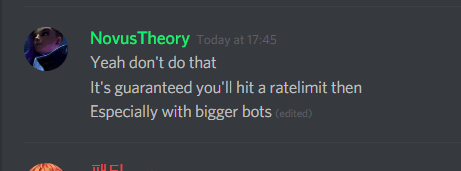
Yeah don't do that
It's guaranteed you'll hit a ratelimit then
Especially with bigger bots
 glossy sand
10 bot invites per minute?
elder rapids
Use some async loop in the background on a timer
scenic crest
pretty sure guild join/guild leave has a higher RL
scenic crest
higher ratelimit
elder rapids
No?
scenic crest
10/60 seems low
elder rapids
What are you talking about
scenic crest
 elder rapids
Yes because guild join/leave is called more often
Which means you'll likely hit that 10 per minute
topaz fjord
The only time that will probs happen is when you get featured
scenic crest
you won't hit that tho
elder rapids
Still can happen either way
scenic crest
that's 1 invite every 6 seconds




 scenic crest
yes
elder rapids
They will do that
scenic crest
I know
earnest phoenix
my bot isn't even that big
elder rapids
Even if it isn't
scenic crest
Rythm is the biggest growing bot
earnest phoenix
doubt it
elder rapids
You never know
scenic crest
either way
elder rapids
lolok
earnest phoenix
so what can I do now?
elder rapids
Just recommended to never hit it is to use an async background loop on a timer to send data
I send server count for my bot like every 15 minutes
Honestly it's not important to send that data
I use a custom analytics service that runs locally which is updated more real-time
Third-party gets 15 minutes late of data
earnest phoenix
So @bitter sundial would you be the person to talk to about getting this ban reversed?
it's really causing me some major downtime
bitter sundial
is your bot crashing because of it lol
earnest phoenix
yes
bitter sundial
how about you catch the errors
elder rapids
Uses HTTP on a service
bitter sundial
so even if we have downtime it doesn't crash your bot
umbral pelican
no ratelimits would be nice #makeDBLgreatagain 
quasi marsh
For smaller bots you can do on guild join and remove fine
Also question are rate limits higher for cert bots or is it all the same
bitter sundial
would be nice if noobs didn't put it in the message event or some shit
all the same
elder rapids
I don't really think Tonkku can discriminate between certain bots/other stuff
The ratelimit is through CloudFlare
afaik because CloudFlare gives the ratelimit message
bitter sundial
you're right
 surreal peak
who pong me
 trim steppe
Who the fuck pinged me
glossy sand
someone pinged web mods earlier about some rate limiting issue
neon pasture
who pinged me? o wait, nobody :(
fleet epoch
const key = 'token that they gave me';
snekfetch.post(`https://discordbots.org/api/bots/${client.user.id}/stats`)
    .set('Authorization', key)
.send({ server_count: client.guilds.size})```why wont this work?
fleet epoch
glossy sand
are you sure that's caused by your server posting code
fleet epoch
it loads up normally otherwize
 long forge
Im getting this deprecation error:
    at item.request.gen.end (/Traza-Bot/node_modules/discord.js/src/client/rest/RequestHandlers/Sequential.js:71:65)
    at then (/Traza-Bot/node_modules/snekfetch/src/index.js:263:21)
    at <anonymous>
    at process._tickCallback (internal/process/next_tick.js:160:7)
(node:30667) UnhandledPromiseRejectionWarning: Unhandled promise rejection. This error originated either by throwing inside of an async function without a catch block, or by rejecting a promise which was not handled with .catch(). (rejection id: 5)
(node:30667) UnhandledPromiseRejectionWarning: DiscordAPIError: Missing Access
    at item.request.gen.end (/Traza-Bot/node_modules/discord.js/src/client/rest/RequestHandlers/Sequential.js:71:65)
    at then (/Traza-Bot/node_modules/snekfetch/src/index.js:263:21)
    at <anonymous>
    at process._tickCallback (internal/process/next_tick.js:160:7)
(node:30667) UnhandledPromiseRejectionWarning: Unhandled promise rejection. This error originated either by throwing inside of an async function without a catch block, or by rejecting a promise which was not handled with .catch(). (rejection id: ```

Does that mean I need to update something?@long forge read it
fleet epoch
anyone want to help me with my error?
fleet epoch
curl?
glossy sand
cURL?
fleet epoch
whats that
glossy sand
uhh
it's a command line tool for making http requests
all *nix machines should have it installed
earnest phoenix
@fleet epoch oh hi 😃
glossy sand
take a look at 7coil's submission in #312614469819826177
run the command on whatever machine your bot is running on
fleet epoch
i dont see his submssion anywhere
oh i see him
so
USERID=
TOKEN=

curl "https://discordbots.org/api/bots/${USERID}/stats" \
    -i -v \
    -X POST \
    -H "Content-Type: application/json" \
    -H "Authorization: ${TOKEN}" \
-d '{ "server_count": 10 }'```where would i put this
earnest phoenix
@fleet epoch in ur code I guess...
bitter sundial
inb4 he comes here asking about syntax error unexpected token
fleet epoch
Where in my code though lol
inner jewel
that's a bash script
raven hawk
It seems that whatever I do, my server count is not updated. I have tried posting with the actual bot, and also with a PHP website, but nothing seems to be working
PHP: ``` $url = 'http://discordbots.org/api/bots/' . $id . '/stats';
$data = array('server_count' => $count);
$options = array(
'http' => array(
'header' => "Content-type: application/json\r\n",
'method' => 'POST',
'content' => http_build_query($data),
'Authorization' => '{my thing}'
)
);
$context = stream_context_create($options);
$result = file_get_contents($url, false, $context);```
inside bot:
  var post_data = querystring.stringify({
      'server_count' : count
  });
  var post_url_etc = {
      host: 'discordbots.org',
      port: '433',
      path: '/api/bots/395241464667570178/stats',
      method: 'POST',
      headers: {
          'Content-Type': 'application/json',
          'Content-Length': Buffer.byteLength(post_data),
          'Authorization' : '{my thing}'
      }
  };
  console.log("Server count: " + count)
  var req = https.request(post_url_etc, function(res) {
      res.setEncoding('utf8');
      res.on('data', function (chunk) {
          console.log('Response: ' + chunk);
      });
  });
  req.write(post_data);
req.end();```functionA(client.user.setGame("À être Kawaii | En programmation","http://twitch.tv/bot"));
functionB(client.user.setGame(";aide | ONII-CHAN <3","http://twitch.tv/bot"));
}, 20);```
What is the error ?hold on lemme get it again
rugged sparrow
I need help everytime i try to start my bot t says that there no discord moduel
import discord.py
ImportError: No module named 'discord.py'
See
raven hawk
@earnest phoenix
      throw er; // Unhandled 'error' event
      ^

Error: write EPROTO 140616422831936:error:140770FC:SSL routines:SSL23_GET_SERVER_HELLO:unknown protocol:../deps/openssl/openssl/ssl/s23_clnt.c:827:

    at _errnoException (util.js:1003:13)
at WriteWrap.afterWrite [as oncomplete] (net.js:863:14)```?
earnest phoenix
my English is poop
raven hawk
sorry gtg
raven hawk
@earnest phoenix are functionA and functionB defined?
Also, the number at the end is in ms, not seconds. So what you have will change every 20 ms (1ms is 1/1000th of a second)
If you want every 20 seconds, change it to 20000
jagged birch
For some reason every now and then when you try to do a command from my soundboard, the bot joins and leaves instantly, I don't see any errors in console either. Here is an example of one of my commands.
    // Voice only works in guilds, if the message does not come from a guild,
    // we ignore it
    if (!message.guild) return;
    if (message.content === (prefix + ' reee')) {
        if(message.member == null) {
  return;
}
            var voice = message.member.voiceChannel;
      // Only try to join the sender's voice channel if they are in one themselves
      if (voice) {
        voice.join()
          .then(connection => {
            const dispatcher = connection.playFile('./sound/reee.mp3');
            dispatcher.on('end', () => {
                voice.leave()
              });
          })
          .catch(console.log);
      } else {
        message.reply('REEEee y0u n33d t0 b3 1n a v0ice ch4nnel f1rst!1!!11 :alien:');
      }
    }
});```Are you sure it doesn't just do this:
- Join the channel
- Start playing the file
- Not wait until the audio has ended
- Disconnect
earnest phoenix
Guys I really want to learn how to make a bot who could help me with that
languid dragon
youtube really
earnest phoenix
Screw YouTube
earnest phoenix
Screw Google
languid dragon
well nobody here is gonna sit down with you and walk you through step by step on how to make a bot for Discord
just find a library in a language you're compotent in
and read the documentation
earnest phoenix
I don't need step by step just what code to use like c++ or other shit damn only I know what it's like to talk to retards
languid dragon
lol ok
earnest phoenix
@languid dragon has anyone told you you are somewhat annoying
languid dragon
I'm sure you've heard the same about yourself
The answer for your question is Google, if you don't like Google.
Tough titties :]
¯_(ツ)_/¯
earnest phoenix
Dude you gotta answer to everyone and everything you god damn moron
languid dragon

I don't see how that makes me a "god damn moron"
The only person here who's acting moronic is you?
jagged birch
No it waits, when the audio is done it should leave:
dispatcher.on('end', () => { voice.leave() }); @novel bronze
novel bronze
Hmm
¯_(ツ)_/¯
ig you could try to eliminate the simple things
Make sure your libraries and crap are up to date
neon pasture
@earnest phoenix dude, chill down man
nobody is going to help you, if you speak like that.
earnest phoenix
Any bot that is fun and can literally respond to our messages with creative comments
prime cliff
@earnest phoenix wrong channel bud
crude mantle
@earnest phoenix what's your strongest coding language?
 cyan agate
hello sqlite is being shit for me, im trying to get a id (not for bot tho)
const get = function(id, func) {
    db.get(`SELECT * FROM short WHERE id ="${id}"`).then(row => {
          func(row);
    });
}``` it only gives me undefined.
```js
   <blah>.get(idobj, function(row) {console.log(row.url});
prepared statements
 shadow light
Hi guys, is there a neat possiblity of 'authenticating' a Discord user with another app? I mean that the app knows which user has which Discord profile?
shadow light
@uncut slate have the source code open, can you specify a bit more where the magic happens?
shadow light
Let me describe a bit more, we have an app with users logging in using Google mostly and we have a support chat using Discord. It would be great when our application knows that a particular user in Discord is User X in our app.
Is that possible with the oauth flows of Discord?
shadow light
How would I do it without it?
uncut slate
but that would be a little more hacky, I would suggest using oauth
this is where things start varying alot though, what's your domain hosted with?
if you're using express, you can either use passport-discord to handle the oauth flow for you, or you can write your own oauth handler which isn't impossible to do (and I would suggest if you think you're up for it)
earnest phoenix

Gist
Discord OAuth 2.0 sample with Node.js and Express.js
shadow light
We have a Django backend and I am quite familiar with Oauth, but I didnt know that Discord supports that 😃
uncut slate
yeah, they do
Discord
Integrate your service with Discord - whether it's a bot or a game or your whatever you wildest imagination can come up with.
shadow light
Thanks for that, very valuable information for me
 blazing hare
does one have to invite their bot here before they can operate in channels?
prime cliff
@blazing hare a mod will have to approve the bot yes but you need to wait a few days/weeks
blazing hare
Ok gotcha, thanks
 ebon flax
Is there anyone for help??
I want the new emoji
quiet bobcat
What new emoji?
raven hawk
Did you search the docs for the library you are using?
ebon flax
Yeah
raven hawk
What library?
ebon flax
Someone told me I need discord in my laptop then I can add them
quiet bobcat
Those are custom emojis, you have to add them to your server and if you have a bot that want's to use them. Then you have to copy that id and then search on google how to use custom emojis for you lib
ebon flax
OK tnx a lot...let me try
quiet bobcat
Yeah np
 upbeat hemlock
Hello.... There is a app named AVACS Live Chat. I want to add new animated smilies in discord just like that app. How do I add those smilies?
quiet bobcat
You add them to your discord server just as you would add any emoji
upbeat hemlock
Won't work their code here
quiet bobcat
What?
upbeat hemlock
Some codes are like $crown$ & some like :1218: but they won't show here in discord as they appears in that app
quiet bobcat
You need to add them manually. Discord has some intergrated emojis aswell. Like all of the emojis on smartphones
upbeat hemlock
How do I add them manually?
quiet bobcat

Discord
Let's face it, memes and emojis go together like bread and butter. We didn't want your Discord memes to be dreams, so we've got a nifty little system to keep track of all your emojis to always be o...
"Custom Server Emoji"
upbeat hemlock
Thanks for your help
But I have 1 more question
In my server settings I don't see options of Emoji
upbeat hemlock
@quiet bobcat I don't know
quiet bobcat
Did you create the server?
upbeat hemlock
B'coz I had created the server by using Android Mobile
quiet bobcat
You should still have all the permissions then
upbeat hemlock
I'll see those things from PC?
quiet bobcat
See what things?
upbeat hemlock
I means - in server settings Emoji options & all other which are not shown in android mobile app
upbeat hemlock
OK Thanks a lot
quiet bobcat
Np
fleet epoch
const config = require("../config.json");
if config.ping == on {
    message.reply("**Pong!**")
   } else if config.ping == off {
 message.reply("this message is set to off")
} ```this wont work for me, please help
raven hawk
Is there an error?
quasi sandal

fleet epoch
its js
uncut slate
it's not
fleet epoch
and idk py
uncut slate
you don't know js either, clearly 👀
fleet epoch
...
 crimson raft
I need help building a pussy bot
uncut slate
seriously, there is something very wrong with you if you think that's js
go cover the basics, js syntax
fleet epoch
it is js... that code ussally works
fleet epoch
well, i guess noone helps me witht his
raven hawk
you need () around the conditions in the if statements
uncut slate
what you need, is to go back and cover your js basics
there are several things fundamentally wrong with that snippet
fleet epoch
...
 umbral eagle
That code is very wrong
fleet epoch
its how i always code though
umbral eagle
Its js syntax
uncut slate
it's not
umbral eagle
But not js code
uncut slate
that's like typing garbage into a .js file and then saying "I'm experimenting with new stuff"
umbral eagle
Actually wait
uncut slate
that's not how programming works
fleet epoch
why is everyone so fucking rude about this?
umbral eagle
That code is right but in the wrong place
uncut slate
yeah, put it in a .py file
fleet epoch
i dont use py
uncut slate
here's the answer I gave to you before and I'll give to you again. That's not JS syntax. Go learn JS basics.
umbral eagle
@fleet epoch where is your ping command
uncut slate
This might help: https://www.w3schools.com/js/js_if_else.asp
uncut slate
you don't, because you don't know how if statements look like
umbral eagle
The if else statements are correct
uncut slate
what