#bug-discussion
1 messages · Page 80 of 1
 mossy breach
DDR4 or 3?
 fading rose
DDr3
mossy breach
ok
fading rose
Fresh Windows 10 Pro Install 3 days ago
mossy breach
Well, i have the same error, it only happens when i do the missions and the tutorial
 summer lynx
you cant mention everyone, its disabled also ive been trying to figure out why my friends been having the issue, i originally thought it was because he didnt have much ram but aparently thats not the case
fading rose
Cheeter : i was looking for a command for Dev or Support, no luck
I can't run the game.
For now, i will uninstall them from the drive E:\ and reinstall on drive C:\
summer lynx
all i can really say is the best time to contact them would be in the morning since most of them are usually on then
wait wait, do you have the overlay enabled?
fading rose
on?
summer lynx
yeah is it on?
summer lynx
the discord overlay, my friend disabled it and said it fixed the crashing for him
fading rose
no i disabled it
oups, no it's on
but crashed too... it's not that
also disabled steam overlay and crashed too
summer lynx
well sorry to say, im all out of ideas. you could try checking to see if the pagefile is disabled since that error was also caused by that being off. the best thing to do at this point is to report it
fading rose
not for me 😭
fading rose
Here all my PC Specs :
i7 4770K
16GB DDR3
SSD 512GB
ZOTAC GTX 1070 8GB GDDR5
 azure thistle
You can be killed on haz 4 by spitters while inside the drop pod
thus as soon as your pod opens the whole team is insta killed by 3 spitters
before even leaving the pod
@vale elk
 lapis dust
@fading rose try to run E:\SteamLibrary\steamapps\common\Deep Rock Galactic\Engine\Extras\Redist\en-us\UE4PrereqSetup_x64.exe
lapis dust
The droppod has always had some funky collision setup, better have a look at it
 cloud tinsel
I spawned under the drop pod 2 times in a row
The drop pod then came down on my head...
And when i moved,i fell out of the map
And one of the times it sent me far away from my team after falling
azure thistle
a rare bug has occured for me, twice now. When throwing a satchel charge while on a zip line. Even though my charge has gone far below me onto my target when dropping the c4 while hanging on the zip line, when detonating the charge it explodes in my hand thus killing myself
This doenst happen every time however
 shut knoll
My game seems completely buggered.
After trying to do a solo match the game crashed my PC so after a restart I relaunched the game and now it's permanently stuck at low fps whilst my character is shaking all over the place as if there's an earthquake.
I've attempted verifying files, uninstalling and reinstalling, attempting a solo again. But I'm permanently stuck with my game chugging and my character shaking from the moment I load in.
lapis dust
what are your computer specs?
shut knoll
Operating System
Windows 8.1 64-bit
CPU
AMD FX-6300
Vishera 32nm Technology
RAM
16.0GB Dual-Channel DDR3 @ 669MHz (9-9-9-24)
Motherboard
Gigabyte Technology Co. Ltd. 970A-UD3P (CPU 1)
Graphics
2369M (1920x1080@60Hz)
2048MB ATI AMD Radeon R9 200 Series (Sapphire/PCPartner)
Storage
931GB Seagate ST1000DM003-1ER162 ATA Device (SATA )
1863GB Seagate Expansion SCSI Disk Device (USB (SATA) )
Optical Drives
ATAPI iHAS124 E
Audio
AMD High Definition Audio Device
Before the crash, been playing it fine.
lapis dust
Have you tried completely removeing the install folder after uninstall?
shut knoll
I don't believe I have, I'll give it a shot.
Nope that didn't fix it, here's a gif of the constant never ending shaking btw.
https://i.gyazo.com/7cc15b901a33f3a8e34725b061c87253.gif
 lapis dust
does it help if you lower graphics settings. (to know if its GPU or CPU related)
shut knoll
Shouldn't really effect it as CPU doesn't really go over 30%. But I'll see.
 graceful yarrow
this is an interesting probelm
shut knoll
The shaking stopped but the game is still tanking frames.
Have a 2nd gif though for some more visual aid.
https://i.gyazo.com/d1a60baea3a0c071eb8d3c69fd409ed9.gif

It's as if the game still thinks I'm stuck in the driller.
lapis dust
So when everything is on low, framerate is still bad?
lapis dust
well cpu usage can be 30% and still maxed out since the main gamethread only runs on one core
what do you mean by stuck in driller?
graceful yarrow
I think he means it's shaking like he's using the drills
lapis dust
ah
shut knoll
Anything that would cause screen shake really
shut knoll
I ran the game fine before this one bad crash during loading a solo game.
Then when I reload after crash, character is stuck in this infinite camera shake and frames are just destroyed.
 elder gull
Is the rest of your system fine while DRG is running?
shut knoll
I'll see if I can on 8.1
Yeah, all cores are fine.
None of them are spiking.
Booted fraps to see what the frames are currently, game is locked at a constant 13 fps since the crash.
Okay I just noticed something, the game isn't tanking frames. It's just running slowly.
lapis dust
The shaking is "normal" when FPS i super low, we have the same in the editor when it does not have focus and the game runs at sub 10fps.
No idea what has happened to your framerate tho
lapis dust
so your runspeed is also lower?
shut knoll
I think? It's really hard to tell

I'm not even sure why reducing everything to low stopped the constant shaking.
It's funny cuz the barrel game is running at the normal speed, but physics is just so slow.
elder gull
How's the audio? Normal or stuttering.
shut knoll
Normal, no stuttering
Sorry for the gif spam, I just find this bug funny.
https://i.gyazo.com/7cdcbb3d0d047331422f7ffeb8622237.gif
 elder gull
Does your framerate fluctuate at all, or is always at 13fps?
shut knoll
Always permanently 13
elder gull
Both before and after changing the graphics settings?
elder gull
Are you running in fullscreen or windowed, does it make any difference?
shut knoll
Okay so, none of Zeuzera's worked but yours did Warped.
Fullscreen fixed the problem. No shaking, 60 frames returned.
I was using fullscreen windowed btw.
elder gull
It's possible the game thought it was in the background
Thus not allocating many resources to it
I know the Source engine does that as an optimization technique
After X seconds
shut knoll
Wierd, first time experiencing it. Partly gonna miss the screwed up physics but it'll be nice to play again. Thanks a bunch for being patient with me.
elder gull
If you want to see slow framerate-tied physics again, just edit your GameUserSettings.ini and set FrameRateLimit to 10.0 p:
I was doing that to see if I could mimic your game's behaviour, which it did
shut knoll
I'll keep that in mind if I want to make hardmode barrel toss 👍
 robust nacelle
Funny bug. 3 Dwarfs get drunk at the bar and collapse. 4th Dwarf AFK leaving us all unconscious then left resulting in having to disband the team. Dont drink and mine!
 rain pivot
Yesterday the MULE could not locate a path back to the pod, and kept walking back and forth the same 10-20 meters
got it on tape as well
At the last 5 seconds, it teleported back to the pod
 sonic plinth
the teleporting part is normal to ensure people don't fail if molly gets stuck
rain pivot
'suppose the pathing is kept getting worked on then
it wasn't a very hard route or anything
sonic plinth
you can "refresh" the pathing by bombing molly
fading rose
@lapis dust - I've re-run setup of UE4 Preeq and it's doing the samething. Crashed at the same time, same place. I also re-install Steam yesturday. Also roll back nvidia driver of 4-5 version under, same results. Im out of solutions.
@lapis dust SCUM the game has the same results. Crashed about Unreal Engine GPU issue.. Stranged my card are new, i purchase 2 weeks ago (Zotac GTX 1070 8GB).
fading rose
After install the UE4 setup, the error are
Version: 0
LowLevelFatalError [File:C:\P4\UnrealEngine\Main4-19\Engine\Source\Runtime\Windows\D3D11RHI\Private\D3D11Query.cpp] [Line: 111] GPU has crashed
FSD_Win64_Shipping!FDebug::AssertFailed() [c:\p4\unrealengine\main4-19\engine\source\runtime\core\private\misc\assertionmacros.cpp:419]
FSD_Win64_Shipping!FD3D11EventQuery::WaitForCompletion() [c:\p4\unrealengine\main4-19\engine\source\runtime\windows\d3d11rhi\private\d3d11query.cpp:154]
FSD_Win64_Shipping!FD3D11DynamicRHI::RHIEndDrawingViewport() [c:\p4\unrealengine\main4-19\engine\source\runtime\windows\d3d11rhi\private\d3d11viewport.cpp:624]
FSD_Win64_Shipping!FRHICommandListExecutor::ExecuteInner() [c:\p4\unrealengine\main4-19\engine\source\runtime\rhi\private\rhicommandlist.cpp:525]
FSD_Win64_Shipping!FRHICommandList::EndDrawingViewport() [c:\p4\unrealengine\main4-19\engine\source\runtime\rhi\private\rhicommandlist.cpp:1654]
FSD_Win64_Shipping!FSlateRHIRenderer::DrawWindow_RenderThread() [c:\p4\unrealengine\main4-19\engine\source\runtime\slaterhirenderer\private\slaterhirenderer.cpp:989]
FSD_Win64_Shipping!TGraphTask<TEnqueueUniqueRenderCommandType<FSlateRHIRenderer::DrawWindows_Private'::29'::SlateDrawWindowsCommandName,<lambda_9609773cc530bfaa1bbe99d6670154e1> > >::ExecuteTask() [c:\p4\unrealengine\main4-19\engine\source\runtime\core\public\async\taskgraphinterfaces.h:844]
FSD_Win64_Shipping!FNamedTaskThread::ProcessTasksNamedThread()
 twin geyser
fading rose
twin geyser
fading rose
Deep Rock Galactic :: Update 17: Hotfix 1 tried, samething, it's crashed with UnrealEngine again.
twin geyser
they fixed only some ansel stuff nothing more
 lunar island
Is the flamethrower bugged? It seems to be having real trouble setting enemies on fire when you aim directly at them, to the point where I've been hurting a glyphid with a brisk squrirt but not actually igniting them.
 glossy adder
is anyone else having troube with loading times? I'm the host and i've loaded however both my mates have been loading for 5 mins now
 zinc basin
glossy adder
zinc basin
glossy adder
nope
 obsidian ivy
anyone else having satchel charges fall through the floor?
 knotty venture
We had aquarq and pearls fall through the floor
 sour talon
 slate wave
not entierly fixed
well, at least i get to play perma-drunk
so, the fix prevetns us from passing out, but we can still get drunk during mission... the fix makes us perma drunk...
fading rose
@dreamy mesa - I need help regarding the UnrealEngine crash on game loading. I have the same issue with SCUM. I reinstall nvidia driver, directx runtime, uninstall and reinstall Steam, also rerun UnrealEngine Setup (info provided this morning) and no results. I have no clue.
 rose crypt
@slate wave i think playing drunk is a feature. Try to get down and let bosco/teammate revive you, should work
 molten cosmos
Yeah, playing drunk is a feature. If you don't want to go on a mission drunk, then... don't drink and mission.
 clever hollow
^^ Don't drink and mine, kids.
 proper furnace
Sometimes when you get pushed off the zipline by a steam geyser you cannot interact with anything anymore. it also happens when you revive someone.
 past dock
I have a picture on my laptop from a game i played with @earnest harbor, ill post it when i get home, but i had a moment were a explosive satchel was floating in mid air.
 earnest harbor
Yeah that happens sometimes
sonic plinth
Thats actually where the drop pod was/is
dunno why a floating satchel charge appears when the drop pod leaves but it just does
mossy breach
Laser pickaxe! https://steamcommunity.com/sharedfiles/filedetails/?id=1518934627 (Hold your scanner key then shout.)
Steam Community: Deep Rock Galactic.
 sacred goblet
something changed with the way it calculates kills for driller, I hope they can look into it, its been since last patch
fading rose
Does anyone experience the UnrealEngine Crash and revolve it ?
fading rose
Im really desperate.
 zenith pebble
Define the crash
fading rose
Seem's that my Windows 10 fresh installation his corrupt. Get 2 installations on 2 defect, i don't really think today i have a good star.
fading rose
No idea.
All Unreal Engines games are crashed.
I just reinstall Windows 10 because Battle.net was crashing. So i format, reinstall everything from scratch and get a worst results. lol
I hate Windows 10 ! ! ! ! !
zenith pebble
If you have problems with unreal engine, try the fortnite forums
fading rose
Made computer since the age of 10, and never, never never like Windows 10. Spying, unstable, look like Windows Millenium and Windows Vista.
zenith pebble
That game is unreal engine and thankfully due to its popularity, the answer your looking for should be good
fading rose
I look on EpicGames forum, GeForce Forum, Reddit, Steam, YouTube, etc.
Im a TI tech, never get stuck on a problem like this. This one is pissed me off.
zenith pebble
Sometimes windows will set your default resolution to i format instead of p
check nvidia resolution
fading rose
Look like Direct X not communicate
zenith pebble
That caused games to crash for me, a lot
like check your nvidia resolution. It might be 1080x1920i instead of 1080x1920p
It seems like such a trivial thing but it fixed a bunch of game crashes for me
If not, you can try disabling General PnP in your device manager, under the monitor tab
Your monitor might be refreshing at an unstable rate
but thats only a fix for UE4 games
zenith pebble
¯_(ツ)_/¯
fading rose
Seriously, if it's Nvidia driver, i've tried last 6 versions, all the same.
Forza Horizon 3 runs perfectly, all other games except Unreal Engine runs smooth and well.
If it's nvidia driver, i should having issue with other games.
In Windows 10, every times i use microsoft live account has a windows user acocunt, him having some weird issue.
zenith pebble
Well it just sounds like a compatibility option with your OS
Pick a game, and find its .exe file
Right click for properties
and rollback its compatibility and disable window fullscreen optimizations
fading rose
I just tried, samething. Same error, line 111
fading rose
lol
Im re-creating a Windows 10 ISO usb key, will format again... will not use microsoft account, but local one. No more microsoft account has an user login. No more for me.
 zenith temple
Anybody else run across their Drillers drills stopping working? The sound plays and they overheat, but they don't dig or damage.
zenith pebble
I don't have the heart to tell em'
zenith temple
Are they supposed to do that? XD
sonic plinth
Have you double checked to see if you've run out of ammo
zenith temple
Nope. I didn't realize the drills ran out. Thanks 8)
sacred goblet
I think the fire that spreads to other enemies with the flamethrower doesnt count as kills, that or when enemies just burn, something is very wrong with driller please look into it, im not crazy
 magic tide
New flamethrower seems iffy, it takes a bit to light em up
sacred goblet
its not that
its the way it calculate kills
i think they dont count as kills for the driller if they are spreading the fire or something
magic tide
Nono that wasn't related to yours I mean. I just dont like how it works now, unless it's not meant to be like that
fading rose
@zenith pebble It will be the moment of truth in couple of minutes. Just finishing reinstalling at least 60% of all my softwares and applications.
 solemn leaf
it is meant to do that. It takes a second to heat an enemy up to catch them on fire.
But in return, one burning enemy can spread to many.
 bitter spear
going into iron will, then depositing and dying
stuck depositing
can't see nothing
very annoying
fixed when depositing again
which i couldn't do because minehead launched away

 split vector
I keep getting frame drops and now my game just crashed, first time this has ever happened for the game, I sent a bug report to you guys
 cerulean musk
get this crash every time I boot. Have tried a myriad of things. Windows update, reinstalling clean drivers, reinstalling DRG, closing all other applications etc...
ive tried like 20 other games and none of them crash so i don't think its actually a GPU issue
 normal fog
There is a bug in the space rig, barrels clips into the glass
fading rose
@zenith pebble Finally after 3rd windows installation, game works well. Last installation was corrupt something.
@cerulean musk I've get this issue since the 2 days, can't resolve it. But before, Re-run this setup:
@cerulean musk > Try to run SteamLibrary\steamapps\common\Deep Rock Galactic\Engine\Extras\Redist\en-us\UE4PrereqSetup_x64.exe
graceful yarrow
you don't have to ping the guy with every post, man
 magic hamlet
So I got drunk on Red Rock Blaster right before a mission and the whole time the drunk effect was still on my screen. Is that supposed to happen? Just wondering.
magic hamlet
Aight. Just was making sure.
graceful yarrow
the effect lasts about 15 minutes
fading rose
@mufflins > From what i've read, you will need to reinstall Windows 10 "Format your drive" and re-install Windows. It's the only way to resolve it. I was having issue with all Unreal Engine games (fortnite, Scum, DRG).
magic hamlet
Well the mission was about 30 minutes long but it lasted the whole time.
cerulean musk
i will instead throw my computer in the garbage
graceful yarrow
weird
fading rose
Muffins: Q@#)$( Windows 10....
I've read a lot and the only solution i've found was to reinstall Windows 10. The problem are that my Windows was french on 1 day.
 pure pawn
also I have an egg and a gold ore chunk both now glitch through the ground and dissapear forever.. this a new bug?
fading rose
@solemn leaf Thanks for your time on Steam Community for the solution. It hasnt worked, but i've read on many community forum's and read that the only solution is to reinstall Windows 10. I've done it and now everything works fine. Unfortunatly, i was having a bad fresh installation. Really Windows 10, i hate that OS.
@solemn leaf - The solution i've found was related in that post > http://www.tomshardware.com/answers/id-2727070/directx-gpu-problem-dx11-supported.html

Tom's Hardware
I've got a bit of a weird problem and I can't find a solution anywhere, hoping one of you may be able to help.The problem started with GTAV, the game wouldn't load up and I'd receive an error message...
rain pivot
I've noticed as gunner or scout wielding rifles or minigun, you can hold it and it keeps firing when you get grabbed by a cave leech, and free yourself this way
is this intentional?
 open laurel
o.o
mossy breach
Does anyone else have the problem where you have to press f11 then alt+enter literally every single time you start the game so you can play in fullscreen? It sometimes at that point looks like the game is up, but you are actually clicking on stuff behind the game. Also, again after doing the fullscreen trick, it sometimes doesn't let me press any buttons unless I click, then I'm good from there.
 frozen quiver
Not really a bug, but Eggs are still labelled (Unindentified)
while im happy these eggs are not dented, i dont think thats the right word
rain pivot
The Cave Leech warning appeared when a Cave Leech was near (wow) and stayed throughout the whole game http://puu.sh/Bz72C.jpg

 slim solar
Can't join either of these servers
Seems like the player count indicator is bugging out a lot
rain pivot
it's happened again (see screenshot, just like that)
going down and being revived fixes it, though
elder gull
Server browser doesn't appear to display any servers from regions located in North America, even when set to 'World'.
I can join US servers via Steam (presumebly also applies to other NA regions (ie. Canada), untested though).
My location is Singapore.
rain pivot
Also when carrying a mule leg or aquarq and the likes, reversing direction on the zipline causes you to drop it. really annoying
(...please don't let it have been an intentional thing)
mossy breach
small eggs
 hidden turtle
Sometimes I get black screen after seeing mission results
sacred goblet
driller's flamethrower kills are still not calculated properly, either with fire spreading or something else :<
slim solar
@rain pivot I don't think it's intentional, but it is almost definitely related to E now being used to drop heavy objects
It's really made zipline/heavy object interactions very unwieldy
The multiple status bug is getting very irritating. Often when treading in and out of bogs, I'll end up with 3 or more "bogged" icons stuck at the bottom of my screen
fading rose
OMG ! Same bug reappear right now. I install 3 softwares may cause the crash (Office 20106 Professional OEM) (Duet Display) and (eset antivirus original).
I need to submit by email what causing the crash of DRG with my discovery. The application Duet Display made crashing the game. It seem's that all Unrean Engine games are getting wrong display card by using the Display driver of the software Duet Display for extending my monitor in my iPad Pro. I just found that this software are the cause of all UE games crashes.
Does anybody has direct email to submit my discovery?
In private plz.
graceful yarrow
If you're concerned about the devs seeing this information, they do read through the bug reports
I'll pin it for them just in case though
fading rose
1Tater: Perfect. I don't know why Uneral Engine is tooking the display driver of the Duet Display, instead of using the nvidia card, but this is the software causing the issue. I was needed this software for streaming and follow my channels chat, but proud that i've found the problem. After 2 fresh Windows 10 installation, i was known this morning that is one of the 3 last software i've install can causing the issue. Yesturday i was playing well before installing theses softwares.
 gloomy ore
Just happened to be recording this - I was drilling to the escape pod with my team and I suddenly teleported about 10 meters forward and I think ~5 meters to the right. Here it is: https://streamable.com/jspod

 gaunt sage
The bug where you can call the drop pod in to the bottom of the cave is marked as intentional, anyone know why?
 knotty sparrow
If You Walk Backwards Onto The Lift in The Lobby Up To The Wall You Get Caught By The Collision Before The Top And Are Then Inside The Lift
normal fog
 solid plaza
usually that happens in massive caves where it doesn't render in the really far bits
 dapper fossil
my character was drunk when we started a mission and i got downed as soon as the drill pod got to the cavern and i just hung here.......
nobody could get to me since i was in the air and we had no engi
dapper fossil
lol yeah we had to restart
 lost dagger
Footstep sound effects don't play when holding a mug of beer
 buoyant shoal
I've had this thing where I can't use the E key (Use action)
I can't do anything and I'm pretty much pointless, It's happened twice today for me.
 gray hound
So do we have a confirmation if hollomite milestone removal is a bug or intentional change?
sonic plinth
No word either way
 humble reef
is anyone noticed it?
lost dagger
Scout still cannot spam F - fix it
solid plaza
^ he has a cooldown on his default flares for some reason
 half rampart
I noticed that spelling error on the first day, I just didn't mention anything about it
 wintry falcon
There are several spelling errors throughout the game. Easily fixed by scanning through all the text implemented in game, but probably nawt a top priority.
rain pivot
Most likely already mentioned but when you are left with 1 grenade, restock and then use it, the dwarf will say its his last grenade while you have in fact more
rain pivot
On spelling errors, I've found a couple of them, even in simple words
sonic plinth
The game is translated to English as that isn't the devs native language
If you want to spellcheck #babelfish-lounge has a link to the crowdin where you can probably directly change some mistranslations
rain pivot
does this thingy go automatic or what's happening when I save a translation
page 2 of 88
:'D
twin geyser
@graceful yarrow i wish they would inform the community about the plan which bugs they try to fix, because it really feels like they are more interested in implementing new features or building forward instead of trying to fix bugs.
cloud tinsel
it is weird...because such thing can happen to any item you are holding...
including ores...
which need to be carried
wintry falcon
That's not normal
 spice trail
Rock and BOOM.
rain pivot
Mispressed in lag and now I can no longer press E http://puu.sh/BzHfM.jpg

Requesting a sentry went awry but worked after retrying and now I was left with this hologram that feels like staying around http://puu.sh/BzHh5.jpg

In that same game, I had the E button glitch like in the previous screenshot as well
One final one, just like with the Cave Leech warning (both on the ui and the shining at the top of the screen), the icon stayed on screen for the whole mission http://puu.sh/BzHiV.jpg

 pliant axle
I like being able to emote with whatever I'm holding. It's fun, wouldn't call it a bug
pliant axle
more of a "happy accident" where you can go "FOR KARL!" While holding a massive chunk of gold aloft.
twin geyser
😩
pliant axle
last night, my friends and I had islands of rock, floating in the air. All the bugs initially spawned on it, and couldn't reach us. So it was a shooting gallery. corpses rained down and we hosed the floating island with our weapons.
 bronze lion
if you V then go into juke box range your pick will go above your head lel
 frail tundra
Drop pod drill gold vein, chanks are on the floor, but only i as host cant see the vein in the air.
 unreal spear
A wind tunnel blowing straight at the escape pod causes the occupants to get blown out, but fortunately the end screen registers the blown out occupants as survived
 gentle holly
my weapon and turrets start to shake like im moving my mouse but im not
wintry falcon
I wonder if those dwarves got dragged off by the surrounding beasties afterwards
 viscid plover
Does anybody know why the driller cant jump from ziplines?
he only falls
other classes can like hop off
 ember hull
So uhh... random sparks out of thin air.
I get the feeling that something was supposed to load in there
 marsh scroll
@viscid plover he can hop off. worst case, jump with your drills out and running, you'll hit the ground next to the zip and dig a hole into the side of the cliff and wont die.
 restive ridge
Big brain 🤔
 snow vine
the drillers drills can only mine the rock, not the ores, is that a bug or a feature?
rose crypt
feature
snow vine
alright, just checking.
 hasty plover
Found a bug where the barrels go through the glass windows and fall if you are kicking them fast enough. Sometimes the character gets a little stuck with them when they are falling through. Almost as if I was to keep trying I could probably fall through with it. 😃
earnest harbor
you can toss mugs through the glass too, it's my new favorite thing to do ;)
 covert berry
I'm not completely sure how to recreate this, but in a mission I recently played my interact key completely stopped responding. After getting downed and revived the issue also didn't rectify. So for the remainder of the mission I couldn't pick up supplies or objectives, nor could I use ziplines. Really crippling, hope it gets fixed.
 amber cloak
unseen grabber kept grabbing me out into the abyss
check the height for reference (2nd one after i get teleported back)
unreal spear
@covert berry
I remember that happening to myself when I got blown off a zip-line by a geyser and I think I had a slightly high ping too during it
covert berry
That matches the environment in which I played @unreal spear
There were Geysers, I had high ping, it was an enclosed space covered in ziplines.
 rigid iron
Minor wrong text: The engineers shotgun description says it "Holds four wide-spread slugs for rapid-fire death-dealing.". 'Slugs', however, are single-projectile shot, so it doesn't apply to the shot the engineer uses.
sonic plinth
3rd person I've seen getting the "can't interact" bug
 daring portal
Noticed a small bug where if you do the rock and stone pickaxe animation at the same time you pick up a cup, the cup will clip and glitch about all over the animation
The cup drinking animation also seems to have a noticeably slower framerate when compared to everything else on console
You can also get stuck behind the big globe in the space station. You won’t be able to get out, and you have to leave to restart the game or join a friend to leave the globe thing.
spice trail
I pressed V and instantly activated ansel.
Got a small pickaxe that was near me.
It was gone when I returned to FP view.
"Ansel" was mentioned in #bug-discussion for only one time.
 rotund ivy
graceful yarrow
rotund ivy
graceful yarrow
Well folks, it's happened again
rigid iron

Deep Rock Galactic Wiki
ERR://23¤Y%/ is a rare material. It must be dug out of the ground, and can be deposited into molly like other resources. Once brought back to the space rig, it will appear in the crafting menu, but is not an ingredient in any crafting or purchase, and it cannot be exchanged ...
 native rock
I was busy!
https://i.imgur.com/oEWsCI5.png
 graceful yarrow
@native rock you're too late now, you had your chance!
native rock
That's why I posted it the first time as a link, so you all weren't waiting on me all the time!
graceful yarrow
shame
 median wadi
Hi
sonic plinth
Hi, do you have a bug to report?
median wadi
Why can't i unbind mouse wheel next previous buttons?
yes i have and it is very annonying
where is my last message?:D
Where can i find the config file?
So why can't i unbind the mouse wheel next previuos item?
 misty turret
I'm pretty sure this has been reported but im not sure, theres a bug where the menu pops up on the terminal and you cant close it and your character performs as normal but with a screen in his face
 trail fulcrum
anyone else get virtual mem crashes when loading into a map? this happens so randomly i can't pin a cause to it
 frail sequoia
Anyone else get a bug where you try to do a quick join, and the quick join menu just disappears? Then when you try to start a search again, it says "Multiplayer Session Ended"? This goes on for me until I close and re-load the game. Sometimes even after that.
 winged sparrow
Magma core 🅱roke.
Last time me and da boyz hopped into it a tremor happened and it crashed...bow i cant even get into it at all
magic tide
Yeah the chasms cause massive lag at random
winged sparrow
Its become a feat of impossibility to get into a magma core match anymore
magic tide
With the random chasms and fire fields, they're not even fun anyway
 slender apex
Idk if its been discussed already but ive gotten a minor bug where when im under any effect (fire, poison, acid etc) 2 of the icons for these effect will pop up, one will go away and the other stays for the rest of the trip. Its happened a couple times now with different effects.
humble reef
MULE RUINED THE GAME
It happens 10 min ago, me and a friend was in a egg hunt, when extracting the mule, everything was normal, my friend was a scout and nearby the MULE, when he suddenly told me the MULE IS GOING BACK
<@&257786783666929665>
As you can see, there's 2 line of beacons, one going in the good, and the other one going in the wrong direction.
Is anybody already got this bug before? it ruined a potential reward of 120 bismor and +3000 credits
also, when at 9 second before extract, MULE was considered as extracted
 pearl turtle
@humble reef happens from time to time when mule can't find the way back. I assume as a temporary fix the drop pod gates should be opened 10 seconds before the timer runs out regardless the mule is docked or not.
humble reef
thx for the info, I hope this issue would be fixed later, I'll keep in mind next time it happens
 solemn whale
@humble reef You know you could of asked the regulars or general if you wanted an answer to that question... Furthermore elf is bang on , doors will automatically open (or let you walk through them) in the last 10 seconds.
rose crypt
Funny physics bug
slim solar
Iron Will contributes two downs on the stat screen
rose crypt
and sometimes shows on hud
cloud tinsel
HOW THE HELL DO PEOPLE GET THOSE PHYSICS TO WORK SO SMOOTH
i mean the ziplines and grappling hooks
when i stop grappling,i get a tiny little bit of lag and so i can't plan it at all
and when i jump from a zipline,i also can't move smoothly
 worn igloo
wifi most likely
cloud tinsel
i don't have bad internet connection
no,like really
my internet connection is good
lemme try doing it offline
yeah,it works in offline...but why does it lag in mp?i...do have good internet connection...why does it lag so badly
sonic plinth
The lag compensation isn't great, that's why I host
slim solar
phantom sentries i cant refill even when i get ammo. I recalled it and placed it once it had fired a few shots and it still said 67 even though my remaining ammo was 34
slim solar
Then I started the next mission with 575 sentry ammo in reserve, but upon building a sentry it dropped to 400
rain pivot
I had 525
on a different note, my game has the loading screen static (character select screen before loading, without the mumbling guy) IN my game
 sly spruce
hello, does anyone else's game crash when they attempt a solo mission in Glacial Strata?
same mission always crashes the game for me
same for the similar mission in volcanic region
also crashes
 supple lily
When someone disconnects while holding a beer, the beer is still here (i posted in gallery)
hidden turtle
The Mule's leg is so lagging in Magma Core's crack... It even continues for a half of minute, and I was not able to drop platform inside the crack... It was teleporting up and down whole time.
 autumn lodge
Ah the Trello bug report link dosent work so im going to report here, after being blown upwards by a steam hole thing in fungus bogs, the interact function becomes unusable. Usually not the case, a zipline was setup on the steam hole.
Yea.. anyone has any idea how to replicate these bugs? I mean ppl are doing things like these every game and I hardly see the same bug complain show or happen up twice. There was also once where a player from CN just fell endlessly through the floor to a 1000+ meteres and did not get respawned above ground, they werent really doing anything special.
magic tide
IFG still inconsistant about when it's working to slow enemies or not
 maiden warren
Version: 0
LowLevelFatalError [File:C:\P4\closed-alpha\FSD\Source\FSD\DeepCSG\FSDVirtualMem.cpp] [Line: 13] FSDVirtualMem::Reserve failed with error: 1455.
FSD_Win64_Shipping!FDebug::AssertFailed() [c:\p4\unrealengine\main4-19\engine\source\runtime\core\private\misc\assertionmacros.cpp:419]
FSD_Win64_Shipping!FSDVirtualMem::Reserve() [c:\p4\closed-alpha\fsd\source\fsd\deepcsg\fsdvirtualmem.cpp:13]
FSD_Win64_Shipping!ADeepCSGWorld::ADeepCSGWorld() [c:\p4\closed-alpha\fsd\source\fsd\deepcsg\deepcsgworld.cpp:113]
FSD_Win64_Shipping!UClass::CreateDefaultObject() [c:\p4\unrealengine\main4-19\engine\source\runtime\coreuobject\private\uobject\class.cpp:2749]
FSD_Win64_Shipping!UObjectLoadAllCompiledInDefaultProperties() [c:\p4\unrealengine\main4-19\engine\source\runtime\coreuobject\private\uobject\uobjectbase.cpp:822]
FSD_Win64_Shipping!ProcessNewlyLoadedUObjects() [c:\p4\unrealengine\main4-19\engine\source\runtime\coreuobject\private\uobject\uobjectbase.cpp:895]
FSD_Win64_Shipping!FEngineLoop::PreInit() [c:\p4\unrealengine\main4-19\engine\source\runtime\launch\private\launchengineloop.cpp:1916]
FSD_Win64_Shipping!GuardedMain() [c:\p4\unrealengine\main4-19\engine\source\runtime\launch\private\launch.cpp:127]
FSD_Win64_Shipping!GuardedMainWrapper() [c:\p4\unrealengine\main4-19\engine\source\runtime\launch\private\windows\launchwindows.cpp:144]
FSD_Win64_Shipping!WinMain() [c:\p4\unrealengine\main4-19\engine\source\runtime\launch\private\windows\launchwindows.cpp:223]
FSD_Win64_Shipping!__scrt_common_main_seh() [f:\dd\vctools\crt\vcstartup\src\startup\exe_common.inl:253]
kernel32
ntdll
How to solve it?
Crash of the game at the start of training or mission
And now the beginning with the inclusion of the game. New drivers
Help Pls
<@&257786783666929665>
 potent nymph
no need to ping us, we will see it 😃
maiden warren
How long will it take to solve the problem?
potent nymph
I dont know since i dont know what your issue is. Can you describe what happens? from your description, iam not really sure what is happening
maiden warren
Above I gave a crash report when I start a mission or training in game start. black screen. crash. just right now it began to happen when you start the game
potent nymph
so it happens just when you start the game, everytime?
maiden warren
yes
potent nymph
what is your pc specs?
maiden warren
System requirements?
potent nymph
what is your gfx card, cpu, ram etc 😃
potent nymph
you have 2gb ram?
maiden warren
Before that, the game started but did not start the mission or training
Yes 2gb ram
potent nymph
you need 6gb, 2 wont be able to play the game :S
potent nymph
your crash is a out of memory crash, we support 6gb ram minimum
maiden warren
Ok Thanks
potent nymph
np, unfortunately we cant do anything about that
maiden warren
And on 4 gb ram game is possible?
potent nymph
I gues it is possible, but you really need 6gb minimum
you will still crash a lot with only 4gb
potent nymph
ya i am sorry about that, but hope you can find some more Ram and continue to play 😃
maiden warren
Yes, I will try to find) in 2018 with 2 GB RAM anywhere
 minor pelican
 quaint plover
Yes
Download 100 ram liters
Also yesterday the mule used the resupply cabinet hole to get to the escape pod
So we couldn't really follow it
Dunno if that's a bug or it's normal
potent nymph
its not intended, but sometimes, if the supply hole goes through a regular tunnel, the mule will go that way - do you remember if that was the case?
quaint plover
No idea :/
 pallid geyser
It seems every server I join now my entire computer will hose. Graphics will freeze, but audio will continue. Only happens with Deep Rock, and I've done a reinstall and disk check. Is anytone else getting this?
It won't happen when I join, but randomly throughout the mission.
potent nymph
pc specs plx
pallid geyser
Operating System: Windows 10 Pro 64-bit (10.0, Build 17134) (17134.rs4_release.180410-1804)
Language: English (Regional Setting: English)
System Manufacturer: Gigabyte Technology Co., Ltd.
System Model: To be filled by O.E.M.
BIOS: F6 (type: UEFI)
Processor: Intel(R) Core(TM) i5-6600K CPU @ 3.50GHz (4 CPUs), ~3.5GHz
Memory: 16384MB RAM
Available OS Memory: 16336MB RAM
Page File: 5444MB used, 13323MB available
Windows Dir: C:\WINDOWS
DirectX Version: DirectX 12
DX Setup Parameters: Not found
User DPI Setting: 96 DPI (100 percent)
System DPI Setting: 96 DPI (100 percent)
DWM DPI Scaling: Disabled
Miracast: Available, no HDCP
Microsoft Graphics Hybrid: Not Supported
DxDiag Version: 10.00.17134.0001 64bit Unicode
Card name: NVIDIA GeForce GTX 960
Manufacturer: NVIDIA
Chip type: GeForce GTX 960
DAC type: Integrated RAMDAC
Device Type: Full Device (POST)
Device Key: Enum\PCI\VEN_10DE&DEV_1401&SUBSYS_237519DA&REV_A1
Device Status: 0180200A [DN_DRIVER_LOADED|DN_STARTED|DN_DISABLEABLE|DN_NT_ENUMERATOR|DN_NT_DRIVER]
Device Problem Code: No Problem
Driver Problem Code: Unknown
Display Memory: 12108 MB
Dedicated Memory: 3940 MB
Shared Memory: 8168 MB
potent nymph
thank you, do you have the newest driver for your gtx? they updated them recently, and solved some issues that could cause crashes in DRG
also, are you overclocking?
pallid geyser
I think so, but I'll redo my driver instead.
I'm not overclocking
potent nymph
thank you, if you get a crash report aswell let me know. otherwise perhaps you can supply a log file, which is found here: C:\Program Files (x86)\Steam\steamapps\common\Deep Rock Galactic\FSD\Saved\Logs. If you send the log, make sure that you have just had the issue, otherwise it wont be in the log
earnest harbor
slim solar
tfw
 neat condor
Hello, the game just crashed while loading map. I selected "Send (the report) and restart", and all my progression has been deleted. Any information on this ?
 potent nymph
ah okay, then nevermind 😃 but try the link i put there
earnest harbor
neat condor
BTW thx for this instant answer 😄
potent nymph
hehe, had discord open at that very moment 😃
neat condor
That's a really good thing you are all on it, really appreciated
Problem solved, thanks again Bjorn
sonic plinth
Since the steam integration you'll want to use the file that has your steamID Backup_1.sav and replace the SteamID Player.sav
so that thread is a little outdated
potent nymph
i struggled a bit with the wording
since people might not know what the steamdID means
read it again now, and let me know if it could be better 😃
sonic plinth
That seems fine now 👍
potent nymph
kk 😃 i wrote it today, so i got sad that you called it outdated when its only hours old 😛
sonic plinth
Oh sorry, haha.
Some community members got together and helped working on this

Google Docs
DRG Community FAQ (u) Q:What is this “ERR://23¤Y%/” material? Is it a bug? What is it used for? A: In short, the ERR://23¤Y%/ (error or rubik's cube) is not a bug, it can be considered an easter egg, no one really knows what it is or if it will have a purpose, not even...
If you want some already existing writing on similar topics
potent nymph
i like some of the text better, i think ill steal it 😃
sonic plinth
Go ahead 👍
sly spruce
hello devs, i get the same crash but i have enough memory
i have 8GB
and crashes for 2 solo missions so far
sonic plinth
Have you done your standard fix attempts? If on steam verify integrity, make sure to restart steam itself or even your computer
sly spruce
yeah i tried standards but it doesnt work
 dawn vine
Im not sure why but first of all i lost all of my progress but i guess there was a Wipe 😄 But im not sure why i don't have any of my supporter pack upgrades :(?
sonic plinth
There shouldn't of been a wipe, try this to restore your save
alternatively it could be the steam servers being funny, try restarting steam
I'd say do the restart first before resorting to messing with your saves & backups
rain pivot
http://puu.sh/BBqbi.jpg as you can see he's down on the ground (outline) but his icon tells otherwise

 tawdry nymph
Statistics screen stucked over everything, making interaction with terminals impossible
 severe hamlet
dead floating on a zip line
autumn lodge
Steam Community: Deep Rock Galactic.
Well im 4 hrs late but I was playing with Zero, thats the bug hes talking about from my perspective
Oh well another weird unreplicable bug unless ppl somehow have a build of the game where they can efficiently bug test by replicating conditions
The only way to do this now is to get 4 ppl, and have someone whose not a host and is a gunner setup ziplines and try to get killed by explody bugs over and over again.
Maybe like 1 test every 5mins or so? And you ahve to be on the zipline and the explody bug have to choose to target you.
Yeah, bug conditions can be very specific like entering a set of inputs to your inven causing your entire game to crash for no reason
not DRG
Well time to get serious and replicate this bug, just posting this is going to do nothing since ppl get killed by explody bugs on ziplines all the time
dawn vine
@sonic plinth Sadly didin't help 😦
But my Backup save weight is 1kb soo i guess it's pre any gameplay 😭
potent nymph
your backup is very old aswell, since it doesnt have the steam ID
dawn vine
@potent nymph Yeah i was playing alot but when the first steam branch came in. And i don't have problem with grinding my progress back but im missing my Supporter armor's 😦
So that's my only concern 😃 If i can get it back im gonna play to regain all of my eq :).
potent nymph
iam gonna DM you 😃
rain pivot
http://puu.sh/BBRfe.jpg Random electric crackles with no electric crystals anywhere

 manic quiver
@rain pivot That's an effect of the Shield Disruption mutator
rain pivot
makes the senses
graceful yarrow
it's a visual effect to remind you that the modifier is active
rain pivot
reminder of impending doom ey
kk just thought it was odd
thought it was a bug because a similar thing can happen in TF2, especially the flamethrower where flames come out of nowhere
cloud tinsel
is it normal that i someow lost my progress,when i launch the game through steam,it uses the desktop name instead of steam name and everything that i had is gone
sonic plinth
Restart steam and possibly your computer until it doesn't use your desktop name
sly spruce
ok, i figured out: all solo missions, literally all in all regions EXCEPT the one in Dense Biozone, crash the game
they're also all Mining Expeditions
one Egg Hunt mission also crashes
as do others
so basically entire game in solo is unplayable
except for that one mission
i did standard fixes like reinstalling, checking integrity but nothing helps
i also sent reports and i made a bug report on steam
so i hope that'll help and that it will get fixed soon
mossy breach
 cloud tinsel
okay,thank you,it worked
cloud tinsel
if you dig down deep enough,you can glitch out by calling Molly and jumping into her
you don't get teleported back,the camera does,but you don't
and so you are stuck there forever now
 daring tusk
so uh
my game crashed earlier
i boot it back up and I'm 3 levels lower and missing a bunch of stuff
is this common
sonic plinth
Well, you can try checking your backups in pinned messages
hidden turtle
I was doing Ansel capture for more than 1h 30min, pressed on exposure/contrast filter and the game crashed :(((
At least I saved intermediate result.
Also when I add filter with a lot of filters applied to the capture I have wait ~15 seconds while filter is loading
daring portal
You can get stuck behind the globe in the station/hub whatever it is. You can’t get out, and you need to quit the game to get out of the glitch.
hidden turtle
Just kill yourself there, there is no point to quit the game
daring portal
You can’t kill yourself in the station
hidden turtle
And speaking about your case, you can use "dissolve a team" option.
daring portal
It’s still a bug none the less
native rock
It's been a know bug for at least six months, and likely won't be fixed until the Space Rig overhaul in January.
normal fog
That's not really a bug since it's not a problem who comes from the game
It's just a bad piece of map
 slow shard
There i think is a Very rare bug that happens if you are doing a mission for longer then a hour with people recently started happening to me
And it flat out instantly crashes out the game
its happned i think 3 games straight and no idea if that is Really the exact cause for it or not
Also in the glacial part
Theres way too many particle effects
in one cave generation it actually almost managed to crash my game and it actually did crash my friends game
lost dagger
Cave generation has been known to bug out and softlock the host.
 drowsy flicker
I found a bug that happens everytime I do this
whenever I join a lobby that is about to launch a mission
whenever I am in the character selection screen then it forces me to load in with them while I am still selecting my class
this happens to my UI the entire game
hidden turtle
Yeah, you can search this channel for more examples like this
hidden turtle
I'm ok with this rare bug, but sometimes game decides what class I play, it takes place in similar cases.
drowsy flicker
this bug isn't too hard to reproduce so it's should be an easy fix for the devs
 fallow siren
I'm hoping that item over there isn't a suggestion my save is about to corrupt lol
Ahh, not a bug people say
hidden turtle
Huh, may be you even post that picture about days since last ERR... bug report yourself
fallow siren
I found out about this pretty much just right now and searched the Discord here about what other people got
earnest harbor
no one ever does
fallow siren
Right, how about this one:
Unknown circumstances, unfortunately, other than just closing the upgrade screen at one point
hidden turtle
It may be any UI instead of upgrade screen there, experienced it a few times
You can still choose the mission using TAB button
fallow siren
Probably doesn't make sense, but I was having an issue with accessing missions from the TAB shortcut and I feel as though there are times the missions there don't update properly until I hit the terminal instead. Some missions end up having 'timed out' already from a previous cycle and selecting them doesn't give the option to start it. (opening missions from the terminal updates with the new missions)
There's also times missions from both the old and newer cycle appear at once - mostly I think that because mouse-hovering at random in a region shows popups over invisible markers...
 pulsar parrot

^ the scout's grenade creates these flashes on my screen is that normal I might go blind or get an elipsy <__>
hidden turtle
ofc it's not normal
potent nymph
If anyone experiences that their save gets corrupted, please message me, so i can get your logs and try to find out whats wrong 😃
earnest harbor
 merry field
Hey there Dev Team. A friend of mine and I experienced a fast forward gameplay with high pitched voicelines. Im not really sure if thats an actual feature or a weird bug.
I got a video footage, just in case
 finite minnow
That is a mission mutator, Rich Atmosphere makes your voice high pitched
merry field
ah i see... its the second time playing "rich atmosphere" , we did not recognized it at the first time
 cosmic forge
ive been overclocking my gpu for a while now but in the most recent update it crashes the game. im using MSI afterburner with my gtx 1050 ti
never used to have this problem with this game
 opal turret
In emptying the bar we noticed a particular bug. When you went on a ship with a beer in your hand and drinking it (you had already drunk 3 beer before), it was noted that the effects of alcohol remains on mission without stopping. Even if we managed the mission with the red nose it is said that to make it a level difficulty can be funny style "rich ethanol atmosphere".
PS: Sorry but my English is Google translation.
 iron moon
I started a Dense Biozone mission with two of my friends, and player 3 ended up stuck under the drop pod until it flew away (back upwards.) While he was stuck, a cave jelly was also stuck, clipped inside of his seat in the drop pod. When the drop pod left, the cave jelly was freed. I assume it nudged him out of his seat somehow.
quaint plover
@opal turret it's not a bug
humble reef
hello, is somebody already have connection problem about joining a friend or something like that?
 twilit schooner
Hello Dev team
I've been having a bug where pressing and holding any mouse button can randomly result in it registering as a click. this means my grappling gun retracts instantly, mining gets cancelled after one whack, and so on.
I've had trouble finding a solution, but it seems others have experienced this issue as well, according to reddit (https://www.reddit.com/r/DeepRockGalactic/comments/8l5mx8/attack_mining_gets_cancelled_when_i_jump_or/)
Someone in there bothered to record buggy gameplay for example: https://www.youtube.com/watch?v=wIQPipc1Gx0
Thanks in advance, love your work ❤
reddit
7 votes and 8 comments so far on Reddit

 fair cedar
I'm encountering a mouse freeze bug where sometimes my moues just stops responding completely and i have to unplug and plug again mid-game. Mouse is razer deathadder chroma 2016 and I think it's to do with DRG controlling the mouse's lights. Same freeze only happens in bo3 where they also control your lights
Might be also Synapse's problem?
 olive basin
Hello, I have a problem. When I went into your game, my progress was reset. I was about LVL 14 engineer and scout is 6. But when I reinstalled Windows I lost my progress. I played 17 hours.
If you need my steam http://steamcommunity.com/profiles/76561198215368223/

No information given.
twilit schooner
@olive basin look at the newer pinned notes
fair cedar
did you enable steam cloud?
olive basin
yes
fair cedar
the newest pin on this channel are the solution
slim solar
If the drop pod is called for during a swarm, the BGM fails to play
mossy breach
am stuck with it on the screen
finished a mission gone to get perks and its stuck on my screen
frail tundra
Again!!! Game almost always stacked, when 3-3 duration-complexity. Not for host, but for people, that want to connect. I think it's because of giant room with tube along the whole room.
 spice arch
It is currently possible to kill a dreadnought while still in the coccoon by dropping a supply drop on it.
sonic plinth
Erm are you sure? When I tested that it only popped the coccoon
rain pivot
Unfortunately I had instant replay off but I joined two people who were downed and I instantly got grabbed by a cave leech. It damaged me up to the point of Iron Will, and that is when I somehow managed to kill it and revive one of the teammates (as engineer)
Now that I'm at it, I am also able to open the menu for placing sentries when being grabbed by a cave leech
And on another note, if you play scout or gunner and hold the minigun/assault rifle, you can simply hold m1 when being grabbed and you can free yourself
obsidian ivy
dunno if this has been mentioned but carryable items like eggs, enor, etc. can fall out of the world if they're dropped into a hotspring. pretty bad if main objective items fall through
spice arch
You have to aim it pretty carefully, it also has to hit the back of the boss.
mossy breach
passed out and then i got a small pickaxe
rain pivot
For some reason I was able to say "Hey!" (X button) in the space rig
I also made a pain sound when being revived from being drunk
 misty shoal
has anyone else had corrupted accounts?
misty shoal
yeah, ive lost thirteen hours of progress, level 9 miner level and everything reset
rain pivot
wait what
earnest harbor
Check pinned messages
misty shoal
thanks
 still thunder
Friend of mine can't get past the main menu because it's constantly too zoomed in, most likely due to the ingame resolution being too high or something, he's "tried everything" to make it Windowed, any help?

 light oyster
in some rare cases players spawn on each other (usually when someone joins an ongoing mission) and as a result both players are unable to move oO
half rampart
did he try alt+enter?
also did he change the picture setting on his monitor to try and get the button to appear?
i can only be of so much help, sorry lol
mossy breach
When I try to load deep rock it will give me a fresh acc sometimes. when I restart the game it will usually fix itself but I cant get it back
solemn whale
@mossy breach There are backups
SteamLibrary\steamapps\common\Deep Rock Galactic\FSD\Saved\SaveGames -> Player.sav
Rename the backup.sav to player.sav and overwrite it
mossy breach
how do I overwrite it?
sonic plinth
sonic plinth
Alright so there is bug where exploders can be headshot, ragdoll, and then an invisible explosion happens where they were. 100% reproducible, just have an exploder run at you, let it self-explode so you DO NOT SHOOT it or let any environmental source trigger it. Once it starts swelling if you headshot it it will ragdoll but the explosion will happen moments latter
ill try to grab a gif in a sec

 bold tundra
There was just a bit of a pathing error with the Molly as it was returning to the Drop Pod
rigid iron
@sonic plinth That happens every time I take their heads off with the pickaxe
spice arch
We had a mission with a cave leech cluster warning and only got 2 leeches
spice arch
Also when playing scout i crushed myself between an engineer platform and rock ceiling when using grappling hook
rain pivot
@spice arch low complexity?
 umbral trail
trying to post about a bug in the stats screen but some server setting isnt letting it get posted
spice arch
Not sure
rain pivot
cave leeches tend to spawn mostly in those bigger rooms
not really corridors and the likes
ive had a few of those
one of them i didnt find a single cave leech lol
spice arch
There were huge caves and the two spawned in a much smaller one
umbral trail
there we go... not sure why it wouldnt let me post the one where it was just the bottom 3, but what ever works, i guess.
rain pivot
A lot of actions (e.g. V, holding mouse2, switching weapons) cancel out the footstep sound of walking through slime
mossy breach
i exit from a mission to change class
i exit the game
i come back
i rejoin the mission
exit again
enter the game again
changed class as enginner
join the game
spectator mode
worn igloo
just wait, you will load in
hidden turtle
I remember that I had haz4 salvage mission with a cave leech cluster warning and there was no cave leeches at all
rain pivot
probably low complexity
rain pivot
I has some bugz on video


maybe not strictly "bugs" but rather "undesired features"
mossy breach
@worn igloo i could move freely in that mode going in any part of the map
cloud tinsel
is it okay that i can't play normally with my friend...he can join random servers and has no trouble playing on them...but when i join him or vise versa,the game starts to lag a lot...so much that it's impossible to play
note : i bought him the game
like...he plays normally with anyone he want to,but me
it's weird
worn igloo
@mossy breach yah, that happens to me too, just wait
cloud tinsel
And uh...what do we do...
 lost dagger
Happens when a host doesn't close their connection to the server browser correctly - results in the server not being removed and the timer overflows to negative numbers (or starts counting backwards due to connection error).
It's been in the game ever since I started playing (around April I think)
sonic plinth
There seems to be an extra space in this mission name
Edit: Found another missions with loud, also had an extra space, I think the "Loud" word has an extra space to it
graceful yarrow
That's the echo
mossy breach
I just launched my game from steam and was brought into the first mission. I aborted the mission and the game crashed. When I got back in game I learned that I lost all my character progress. any ideas on why?
sonic plinth
possibly corrupted save, check the pinned messages if you're trying to restore
 olive bluff
Not to be a bother, but switching audio devices, especially blue tooth ones, hard crashes the game. Very reproduce-able on my end. Send me a message if you want to know more. I understand if this is not your first priority, you have a lot of bugs to fix.
 pulsar coral
I dunno if this is a feature or a bug, but at some missions it seems like the mosters never stop spawning? Even if there isent a wave sequance.
cloud tinsel
Exploders and Macteras?
pulsar coral
Like most of the monsters
Like it can come is small - medium sized packs and it can have exploders, warriors, swarmers and the big green ones with them aswell
worn igloo
they just appear 2 times as much in waves
cloud tinsel
^^^
pulsar coral
Really? hm oh well
 turbid ibex
in the rich atmosphere, is normal that your voice is high on helyum and your teammate not?
rain pivot
Pinging 8.8.8.8 (with 32 bytes of data):
Reply from 8.8.8.8: bytes=32 time=37ms TTL=124
Reply from 8.8.8.8: bytes=32 time=18ms TTL=124
Reply from 8.8.8.8: bytes=32 time=23ms TTL=124
Reply from 8.8.8.8: bytes=32 time=25ms TTL=124
Reply from 8.8.8.8: bytes=32 time=31ms TTL=124
Reply from 8.8.8.8: bytes=32 time=23ms TTL=124
Reply from 8.8.8.8: bytes=32 time=22ms TTL=124
Reply from 8.8.8.8: bytes=32 time=23ms TTL=124
Reply from 8.8.8.8: bytes=32 time=21ms TTL=124
Reply from 8.8.8.8: bytes=32 time=26ms TTL=124
Ping statistics for 8.8.8.8:
Packets: Sent = 10, Received = 10, Lost = 0 (0% loss),
Approximate round trip times in milli-seconds:
Minimum = 18ms, Maximum = 37ms, Average = 24ms
So why am I lagging like 100+ ms with someone who lives quite close?
 safe perch
@turbid ibex I have noticed that too. I haven't gone out of my way to test it but it seems to be a result of joining a mission in progress. I have observed that if you drop with everybody at the start then it works fine, but if you join late then anybody who loaded in before you will have a normal voice, and anyone who joins after you will have a high pitched voice.
turbid ibex
ok thanks
safe perch
If I had to guess what is going on, I would say the client might only be checking to see if it needs to pitch up a voice when it notices a player joining the mission. And if it isn't connected to the mission, it isn't there to observe players joining and check for a rich atmosphere. This would just mean adding a check when the client connects to see if there are any players already in the mission. Sounds like a simple fix but programming is rarely that simple so idk.
 north galleon
Hi, i've encountered a bug where the upgrades on my grapple gun don't work, anybody know a fix?
slim solar
@north galleon Change character and back again, then swap out the perk and back again, that fixes it for me
Maybe one or the other might work
rain pivot
loading in closely to a mined bismuth http://puu.sh/BExCK.jpg

it's bismor actually but I keep thinking of the element
gloomy ore
Teammate fell out of the map... or did he?

 small moon
An intetresting new material!
solemn whale
Not a bug! (check pinned messages)
cloud tinsel
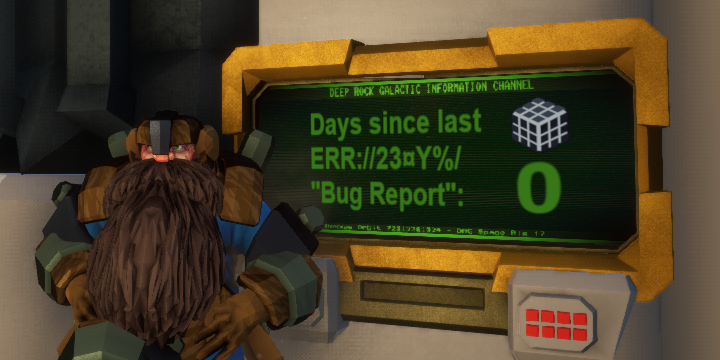
Days since last err23 "bug report" : 0
 neat hazel
Turning off HUD also removes voices
 sweet temple
Hey just got referred to here. My game crashes everytime I'vs opened it
sonic plinth
There are general fixes (I'm assuming you're on the steam version) verify integrity (in case of corrupt files), restart steam (in case of steam connect errors).
gloomy ore
@sweet temple Do you get an error message?
sweet temple
no error message. It just crashes and asks if I wanna send a report.
I am on steam btw
PC > Console
sonic plinth
Have you done both said things? If so post your system specs
sweet temple
how do i verify integrity?
sonic plinth
There's nothing to do if it's a matter of not meeting minimum requirements
Right click in library => properties => verify integrity
Or something similar, can't remember the exact path
That's a pretty standard fix tactic for any steam game, you can essentially think of it as reinstalling
sweet temple
I verified the integrity and restarted steam
Should I try running it again?
@sonic plinth
sonic plinth
Give it a try
Also when it shows send crash report there should be a log there
If you crash again copy paste that here
And once again try to post your system specs to see if they meet the minimum requirement
sonic plinth
Hmm, well that's interesting st least
I'd post your system specs
My best guess is that you don't meet the system requirements
rain pivot
Gold (maybe other ores too) turn in this really weird low-graphic flatness whenever I see someone else mine it https://puu.sh/BEEEn.jpg (dat puush link)
 sweet temple
@sonic plinth it crashed again. Ill copy the info
Alright I got the info
Yo can anyone help me?
solemn whale
@sweet temple I did say that one of devs will probably look at it later on
But right now it's midnight for them
lost dagger
@rain pivot That's not a bug - when you hit a voxel, the level of detail for that voxel is dropped to minimum.
This applies to all ores, as well as decoration pieces.
 fleet hare
Having an ongoing problem with sound in my game - The ingame sound, not music or spoken voice lines, only comes out of my left ear, and is whisper quiet on the right. I have tried altering all my volume settings as well as re-installing the game and nothing has fixed it.
It's also only with this game, and no others
gloomy ore
@fleet hare I assume your use of "ear" means you're using headphones? I use them, too and I don't have an issue. Could be a sound driver. Might also be your more in-depth sound settings. Right-click on the sound icon in the system tray and go to "Playback devices". Find your device in there and double-click it for more advanced options. The "Levels" tab allows you to change Balance.
solemn leaf
fleet hare
When you say System Tray, do you mean in-game, or on my desktop?
Dang it - Now I get no sound at all from the game, lol
And now I've somehow fixed it
Apparently I'm a genius
rain pivot
@lost dagger why would it not be a bug, it looks ugly enough
 unique forum
I just noticed that "Background music" cannot be turned off with "Music volume" scroll bar , it can only be turned off by scrolling "Sound effect volume".
This should be a kind of bug I think.
btw I was in memorial hall
 lethal surge
this is the last time the mule has failed me
WTH
he was doing that for 2 minutes
and then finally 10secs before the pod left he went in that pod
WTH
u guys need to work on the pathfinding
restive ridge
"It's a little dark in area"
 median plover
I can confirm I had a similar issue in a particularly complex elimination mission.
sonic plinth
We've already confirmed that this bug exists, and a temporary fix is to mine the area around molly to refresh her pathing, a satchel charge is enough to fix her
 thorn igloo
I'm having a problem with the game, whenever I select a mission and go to the pod, there's a 50/50 chance the loading screen with the planet etc, will crash my PC.
sonic plinth
Assuming you're on steam have you tried verifying integrity? If so try running the tutorial and seeing if that crashes, someone had a similar issue previously limited to mission types
It'd also be helpful to post your system specs.
thorn igloo
I'll try verifying the integrity and see if it works properly then, last night I tried to play an elimination, ended up leaving early to invite a friend and then going to a different mission only for it to crash mine and his PC.
sonic plinth
There's some issue with the space rig randomly causing all people in lobby to crash currently under investigation, not sure about crashing during mission loading
pulsar parrot

I switched classes and the drunk effect is messed up
like i was scout all drunk, then i switch to Engineer and he has the visual effect but not the movement or talking drunk effect
hidden turtle
Game crashed when drop pod landed near me in the end of the mission
 open loom
mule bugged on extraction
sonic plinth
scroll up three image posts :)
 tame parrot
Random thing, but with the cave leech perk I sensed a leech that grabbed a friend. Once I saved him the white warning on the screen is now persisting.
lethal surge
@open loom hapend for me aswell
rain pivot
I hit a loot bug and it sounded like an aquarq or egg breaking free
@tame parrot Same can happen with "goo warning"
 desert marsh
@dreamy mesa So I logged into my youtube account email to see that my live stream of Deep Rock Galactic had been flagged due to the jutebox. Just wanted you to be aware.
 winter helm
icons, that stayed to the end of expedition. (speed was normal) (that happened when there was a lot of goo-bugs)
also - sometimes the big gem spawns outside the marked place (yet idk if that really a bug)
 fresh nacelle
whats this MINERAL?
native rock
earnest harbor
this is a pinned message ;)
in short, the ERR://23¤Y%/ (error or rubik's cube) is not a bug, can be considered an easter egg, no one really knows what it is or if it will have a purpose, not even the devs know... but it may play into the lore
fresh nacelle
thanks!
solid plaza
they just need to add a voiceline at some point
whenever you find an error cube
"Better report this to corperate"
"I should let deep rock galactic know about this weird cube thingy"
just as a little in-joke
 foggy hatch
As of the latest update, the game's resolution gets totally bugged out and gets stuck in the top left of the screen. The game lags extremely hard and when I go to the options to change the resolution, it's greyed out. I hope update 18 fixes whatever has happened to my DRG...
...or does anyone else know what is causing this / have suggestions?
sonic plinth
Can you alt enter to force full screen?
Try checking your steam launch options under steam library => right click => properties
Try changing from windowed to fullscreen or vice versa to see if the Greyed out box becomes usable
solemn whale
There's a bug where enemy sounds for grabber/ exploder sometimes don't play. For example an exploder began to blow up without making a single sound, or a grabber that doesn't screech.
 jagged arrow
Anyone else having issues with Deep Rock killing their monitor
rain pivot

Also I managed to get out of the pod at the begin of the mission before it landed, will post video later
rain pivot
Apparently we were able to call in 1 ammo pods at once
Despite not having enough Nitra for both
We accidentally ordered at the same time
umbral trail
driller retirement message differs from the rest of the dwarves, im guessing that the others are placeholder until they all get swapped over to the same format as driller
slim solar
Update 17:
when drinking a beer while the jukebox is playing, moving in and out of the dance aura resets the drinking animation
Passing out while dancing causes the camera to be locked in first person perspective which can be confusing and frustrating
Upon returning from a mission, mission control would sometimes play one of his dancing dwarves voicelines, possibly replicatable if jukebox was playing before mission started and a player is in the pod closest to the bar
Dwarves will occaisionally use one of their frustration voicelines even if a barrel goes through the hoop
The "hello!!?" Voiceline is one of the spontaneous voicelines for a drunk dwarf
If a player exits the drop pod after mission completion, via death, zipline, or another methods, they lose the survival bonus
cloud tinsel
this all is still a thing
and when you call in the drop pod
its text is also like that

 cloud tinsel
why doesn't anyone care about my posts...
rain pivot
I was saying "not a bug" as a plausible reply to anything you post here
restive ridge
Platform time 😛
 strong jasper
yeah we did avoid 90% of the aliens because of this
the thing is, it's nowhere near the damaged drop pod
it's in spawn where we dropped
 peak patio
i lost all of my progress when i started the game up today (yes i did check steam out) and any fixes that have been given wont work is there anything else i could do?
sonic plinth
you did the file replacement? were the savefile and backups not there?
If you've lost all your data its possible to get one of several backups that currently exist
peak patio
i did the file replacement but nothing happened and yes there where multiple files(took the most recent when i still had all of my stuff)
currently reinstalling the game trying to see if that works
sonic plinth
Are you saying the backups didn't work (were missing things) or the backups didn't do anything
 bronze juniper
This occurred when I started depositing but got frozen at the same time. The visual glitch persisted until I resupplied, which fixed itself.
frail sequoia
Sometimes ya just gotta shoot a platform at yourself.
 shy heart
MOLLY HAS ASCENDED.
Also got a menu glitch where it wouldn't go away. I had to restart to get it go away sadly 😦
 foggy coral
Apoca bloom in AIR near escape pod / Biome glacier / Update 17
slim solar
update 17: momentum on ice is not reset when touching a wall, resulting in getting "stuck" to walls
winter helm
mule decided to go through a wall... (yet in the right direction)
(seems there was no other way for him since he can't dig even dirt)
 shell vector
The goo indicator got stuck on
rain pivot
What happens when you "taunt" while holding ctrl http://puu.sh/BGwuH.jpg

and yes, that is a giant cheeseburger
 sonic badge
Check out phrase. We've been playing in Point Extraction mode.
 novel crescent
I wish i could explain it...
The only thing i know that it was a Japaneese player
 clever stirrup
I'm having an issue where the game doesn't load properly for anyone other than the host
Has this happened to anyone else recently?
Two straight games for my friend and I
 final jacinth
y, I had this issue
clever stirrup
Also I've been having an issue with resolution. My screen is 4K but I like playing DRG in 1080p fullscreen. Whenever I boot up the game, it always starts in the top left quarter of the screen and I have to change it everytime
lost dagger
@novel crescent Foreign characters have been known to cause problems on English clients before. There was a bug with yellow-orange chat text (displayed after events happened like calling a resupply pod), in which if japanese character appeared in chat, all future chat text would be japanese despite the rest of the game displaying in english.
I would still submit another bug report because the bug I'm talking about is probably patched already.
 dreamy quiver
oh dear
oh very dear me
the more i switch item the louder the sound gets
(managed to do this by depositing while using Alt-F2 mode)
still there c:
 fallow vigil
Any one been getting a bug where your mission terminal never refreshes and switches the available biomes and what not?
dreamy quiver
only when im in the terminal as it refreshes
 floral fog
any still having the can't deposit bug ?
floral fog
Hello again so im trying to use Ansel mode and i cant seam to get to work in game can any one help ?
 white gorge
Though this doesn't really count as a bug, I found a typo in the subtitles as I played the hub's barrel minigame.
"Okat, this is not happening!"
rain pivot
Yep, game's currently full of em
 ruby dagger
are floating rocks supposed to happen
 warped cave
I can no longer load into games. the loading stalls out at 25% completion. i have tried multiple resets to get rid of the issue up to and including a reinstall. i can see the others load in and now i feel bad because i hang up everytime. please any help would be greatly appreciated.
 silver lichen
Beta player here. Is there a way we can send a crash report automagically when they happen? Crashes are rare but my friends and I love the game and want to help with finding bugs before they end up in the main branch.
 muted wave
I've been having an issue were my friend's voice echoes so i basically hear two of him. it only happens with him though and when were in the same server, as soon as i leave the server its fixed. ill refer to him as jack. it happens whether were using xbox party chat or discord. i should mention that were on pc using the windows store version. he and i are at least, but my other friend is on xbox and i don't hear two of him and neither of them hear two of me. I'm very confused and its really hard to actually communicate. there is also a bug where whenever i alt-tab it disconnects me from the server. both of these issues can be seen in my latest episode on YouTube https://youtu.be/c_rkW4m07NU

Hey, I'm Noah ====================================== Friends ZGames: https://www.youtube.com/channel/UCCXevCmbV32IWevyvq9LmQQ FiteNite (outro music): https:/...
is anyone else getting this problem?
drowsy flicker
Does anyone's game crash when they try to screenshare it on Discord?
it just keeps crashing
lost dagger
@muted wave When you create a lobby, the host's voice chat options get reset to ON, despite them appearing to be off.
He's probably talking through discord and in-game at the same time, hence the double talking.
Other Regulars and I have always had these issues since (usually myself) forgets to reset my in-game voice chat to OFF, meaning I double talk through the game and discord.
You must enable in-game voice chat and then disable it again to fix the problem.
muted wave
@lost dagger Thanks soo much but what about getting disconnected whenever i alt tab. is that also a common issue?
lost dagger
I've definitely heard of it before, but I've never had it happen to me because I don't alt+tab.
I use my windows key
Strange things definitely happen when people alt+tab - I've heard all sorts of problems like game sounds get muted, controls are messed up, etc.
muted wave
i think it also happens with windows key but not sure. ill find out next time i play
thanks soo much
lost dagger
you could always try reinstalling the game if push comes to shove
may or may not give results
do you play through steam or no
muted wave
good point
no i use windows store version so that i can use crossplay with my xbox friend
lost dagger
rip - was gonna tell you to verify game files with steam, but you'll have to reinstall if your game is possibly corrupted
muted wave
lol, i wouldve gotten steam version if it had the crossplay
 jagged nebula
had a glitch where 3 sticky icons would just stay for the rest of the mission
sonic plinth
Get outstickied
sonic plinth
There seems to be a bug where when the goo bombers do the running bombing attack getting covered by the midair and ground projectile simultaneously does so. I think the devs should know as it's been reported numerous time already
Thanks for the report though :)
jagged nebula
also if you knock barrels/mugs into the glass they clip through
sonic plinth
That's fixed in the next update (on experimental)
sonic plinth
If you get the perfect angle mugs are still possible, haven't managed with a barrel just yet
 gleaming iris
thought that was a pool of water
 formal salmon
Was in a mission and crashed while refilling a sentry gun; now the game crashes every time I try to go to the "hub" area after hitting "continue".
mossy breach
I pickaxed this platform and it just popped into me. I couldn't move but look around. After bashing the spacebar for about 30 seconds, I managed to glitch back into the map.
clever stirrup
Is it intended that if you proc Iron Will and then go down, it counts as two deaths in the final tally?
sonic plinth
There's an intresting issue where after going down with iron will if you continue to get attacked you get a second down message and if you are being revived that resets
THATS what causes the double down count, not simply going down from iron will
This can also be tested by simply going down with iron will & being shot by a teamate until the down voiceline and chat message plays again
 winter jungle
Barrels keep clipping through window near abyss bar on Xbox one version
winged sparrow
Just had a chunk of composite gold fall through the map. After digging it out it just fell right through
 gray nexus
experimental build 19154 - why on hoxxes is my next assignment mission locked ?
native rock
A: #experimental-bug-discussion
B: It's locked because it's a Point Extraction mission, and there's currently an issue with that mission type locking with new builds.
gray nexus
sry I see, was my first try 😃
 tulip bloom
Hello, I'm not sure if this has been mentioned before, however I have come across a very nasty bug/flaw with the escape pod - after finishing a mission the pod crashed on a desert vent, and as control confirmed the mission's success, I was blown out of the pod by the vent, and into a chasm, as the pod departed. Mission was stated as failed, since I was playing solo. As well, the vent was blowing from the direction of the seats, so you had to go against it in order to board the escape pod.
Thus killing three dreadnoughts solo was rewarded...poorly. Perhaps a solution would be to make the dwarf immune to knockback when inside the "No Dwarf Left Behind" zone. Thank you for reading through.
 glad dune
I've been having this issue for quite a while now and it's really starting to get on my nerves.
And the issue is that when I try to switch to my secondary weapon with "2" on my keyboard it wont work unless I take my hands off all the other keys.
For instance, i'm fighting a horde of the little pink spider thingys and I suddenly see a acid spitter in the wall, so in order for me to kill it I need to take out my primary. To do so with this annoying glitch I would have to let go of all my movement keys just to switch to my hand gun.
And in that instant when I let go of the keys either the acid spitters ball of gooey death hits me or the horde behind me gets a couple goes at my health, which sometimes kills me in tight situations.
After dealing with it for so long i've learned to live around it, such as jumping in a direction then letting go of my movement keys to switch to my secondary.
But I don't want to keep doing that forever, gets really annoying and sometimes I mess up resulting in my death.
Also some things to note is that this bug only started happening a week ago right after I dismantled my keyboard in order to clean the keys in the gunk inside of it. But the reason I think it's not the keyboard is the fact that the "2" key works on all other games, such as Vermintide 2 which is similar to DRG.
I've already checked the "2" key by prying off the key to make sure everything is in order, and so far it is.
So if anyone has any recommendations for fixing this problem i'd really appreciate it.
Nvm, I found something.
 paper geyser
So has anybody had a glitch where your interaction key stops working, forcing you to restart the client? I just got out of a game where me and another player couldn't revive, zipline, resupply etc.
formal salmon
I seem to crash very often when playing as the Engineer and only the engineer. It's usually when I'm messing around with my turrets; particularly refilling their ammo, this has happened 3 times now.
 hollow holly
JUST got that bug Bag of Sun Chips was talking about a few hours ago myself. i think for me it had something to do with a gunners zipline lined over a heat vent on the uhhh...the poison plant map, and the vent wanted to shoot me off the line or something.
frail tundra
sticky menu with milestones have brake my screen 😦
it often (almost always) when you end mission and quickly open milestones
You can see, that i can ran with this menu opened, there's Lloid on the background.
shell vector
when knocked off a zip by a steam vent and getting knocked down from the fall damage, some interaction stopped working.
 eternal dawn
I have an recurring issue with VOICE CHAT. I have it disabled in the menu yet every time I start a game, people hear me twice (discord + ingame voice chat) so I have to enable VC and then disable for it to turn off. But it is disabled from the start so what is going on. Only I have this issue, others have it disabled and it works for them. I just have to check/uncheck again.
potent nymph
How much of an issue are people having with E(Interaction) suddenly not working? Ive had it yesterday with deposition in a mule, but i havent heard about it, except for what i just seen you guys write. also are you on the main game or experimental?
@eternal dawn What are you audio setup? brand/ports used etc
solemn whale
I have seen it multiple times happning to me and to others. Doesn't happen every session but for some it seems more common than others. One guy had 3/4 games without being able to use the interaction key (before current update). (also while we are on the e key, having the drop key the zipline key and pickup key means it's very hard to get on zipline with an aqaurq.)
potent nymph
are you doing anything particular to make it happen @solemn whale ?
solemn whale
No just playing normally, the guy was to.
It seemed to always happen after resupplying however.
That would be my best guess.
potent nymph
what?!! so E stops working after you resupply everytime?
solemn whale
No sorry miscommunication XD
As in the bug always occured after resupplying however it did not always occur, just when it did it was afterwards
potent nymph
okay 😃 my theory is that if you initiate the Interaction and stop it several times in a row that it can break
maybe a combination of pressing and holding, while the object your trying to interact with goes in and out of focus
 reef bobcat
I'll see if I can't do this to myself using your method


 reef bobcat
Spamming E didn't seem to lock me out. In a hosted game, non-host.
solemn whale
@reef bobcat it might be gems?
reef bobcat
Perhaps
solemn whale
I’ll have to test it myself
reef bobcat
I've seen it a lot on Point Extraction
solemn whale
Gems seem buggy at times with high ping
Like picking up ghost gems
When you pick up a gem it teleports elsewhere
Desynch from hosts
potent nymph
@eternal dawn i have a few others that have mentioned this issue, but we just cannot reproduce it. Is it possible you have some logitec program that independently controls the sound? that is an issue for some people with other brands, that the brand software is overwritten the game settings.
rose crypt
There is a strange bug that prevents players to connect to me. They always stuck at loading screen
Sometimes it fixes when i restart my computer
Friends can connect normally though
potent nymph
we have a fix for a more general problem with that coming in the patch hopefully tomorrow. Feel free to ping me if its still a problem after that