#Head Angles and Nose
35 messages · Page 1 of 1 (latest)
 fleet estuary
 rancid steeple
i think stylistically the last one fits best, but the shape and length of the nostrils needs to change when turning, cause right now it looks a bit like a flat object on the face
i think the whole head could move more too
 spring anchor
fleet estuary
the head needs to turn more like this
spring anchor
fleet estuary
the head needs to turn more like this
Thank you so much!!
spring anchor
rancid steeple
i think stylistically the last one fits best, but the shape and length of the no...
Gasp, sanvo 
Ahem, yes! Okay thank you! I will try it again and play around a bit more!
rancid steeple

 median bolt
It's looks like your nose move too much to the side compared to other face features, try to make it less? On the last one its moving almost alright, but there is not enough distortion
spring anchor
median bolt
It's looks like your nose move too much to the side compared to other face featu...
im currently making myself some sketched headangles with a head model in csp to guide myself a little more, hoping it will help me. Gonna update on that
like this basically
 spring anchor
i love you all so much, look (i still need to do the mouth and some eye adjs but this the head anlges hehehe) (sorry about the bald jumpscare)
median bolt
Yay! Nose to the win!
spring anchor
median bolt
Yay! Nose to the win!
now i gotta figure out how to do the horns. Cuz I have absolutely no iea how to draw it in multiple layers so its a solid object ;-;
median bolt
Here, couple horns videos for you:
https://www.youtube.com/watch?v=YLD_mpS4OEs
https://www.youtube.com/shorts/HfFxjIS1SLM

Commission Information: https://kirynncomm.carrd.co/
#Live2D #Live2DCommissions #VtuberCommissions #VtubeStudio
» Music by StreamBeats
» Art https://vgen.co/llerose
» Rig https://vgen.co/Kirynn
» Character https://www.twitch.tv/onebluesheep
» Rig completed 09.20.2023
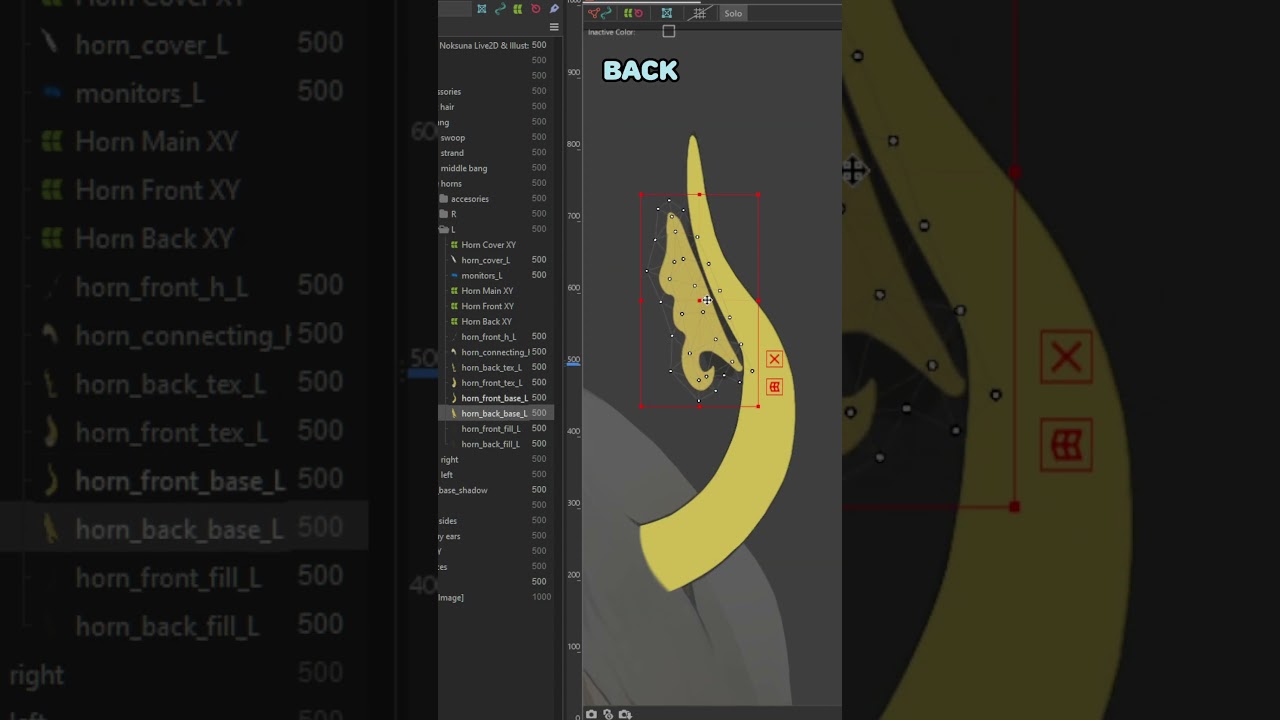
How to cut horns for Live2D! I would consider this as medium difficulty horn haha but if you guys have any questions, just let me know! 🍑
#shorts #vtuber #live2d #live2dtips #fyp
spring anchor
okay how tf do i change the hair overlapping the face when i tilt it 

 opal cedar
spring anchor
okay how tf do i change the hair overlapping the face when i tilt it <:angery:68...
opal cedar
spring anchor
okay how tf do i change the hair overlapping the face when i tilt it <:angery:68...
what would you like it to look like?
spring anchor
opal cedar
what would you like it to look like?
Well, not in the face. Its due to the Z Parameter i think but idk hmm
opal cedar
do you have Z as an input on your X physics?
you could maybe try having a separate parameter for the hair tilt on Z so you have finer control over the hair there
spring anchor
opal cedar
do you have Z as an input on your X physics?
Yes that!
spring anchor
I am absolutely not getting it .-. and im struggling so hard to visualize how to cut the horns into layers
maybe i can get a shadow in there to help make it look 3d
found this to maybe help me
 opal cedar
you probably don't want to do all the horn movement on a single deformer
if anything, i would use the deformer as a very basic guide and then either key the mesh directly or make smaller deofmers around every individual piece for the finder movement
 opal cedar
np :)
spring anchor
opal cedar
looking good!
spring anchor
so, im trying to do the arms, but, this just looks like 2 floppy objects, flipping one arm makes it look weird and whimsical, im unsure what to do haha. there arent many tutorials for male arm rigs tbh
spring anchor
noone? 
opal cedar
maybe just make the arm move less? you might also want to mess with your pendulum to be less wiggly if thats bothering you
also id recommend you make a new post if you have another issue because nobody will see it if you post in an old chat unless they already sent a message in it before