#Is it possible to have AND clipping instead of OR clipping?
16 messages · Page 1 of 1 (latest)
 warm escarp
If it helps, here's the specific thing I'm trying to do. The shading and the big highlight for each eye is supposed to be clipped to an invisible mask so it doesn't go past the outline of the iris.

However, I also want it to clip to the sclera, or else this will happen.

Unfortunately, when I try clipping to both the mask and the sclera, I get the worst of both worlds. Not only are the meshes visible when the eye is closed, but they go past the outline of the iris when the eye is open.

If I clip to just the sclera, the eye looks great when closed, but there's still the issue when the eye is open.

 karmic loom
what you are asking its not possible, there are other ways to approach this with invert masking workaround
but i want to ask first is there something to gain for separating highlights and masking them instead of merging them? cuz the workaround involved might not be worth it
looking at the simplistic style you have there
you can also consider adding an eyelid layer to save trouble for masking the pupil to sclera
warm escarp
karmic loom
but i want to ask first is there something to gain for separating highlights and...
I was thinking about having physics for the eye highlights. They could bounce whenever the character closes/opens her eyes
Also, I want there to be a parameter to make all shading/highlights disappear so the eyes go completely blank.
I could do the latter without masking, though. As for the former, maybe I shouldn’t bother. I’m using the free version, so I might not have enough parameters to implement eye physics
Thanks for the feedback!
karmic loom
yea for typical eye physics stuff you mentioned you dont really need the highlights etc masked to the pupil, just clip everything to the sclera
still worth a try even using a free version tho even if its just a single eye physics parameter 
warm escarp
Even though I found a way to sidestep this issue entirely, here’s a tutorial on how to actually do AND clipping! For future reference https://twitter.com/endcsline/status/1511044982542684164
@Kibu_chan @YoshinoArt
(stumbled across a post of @Kibu_chan)
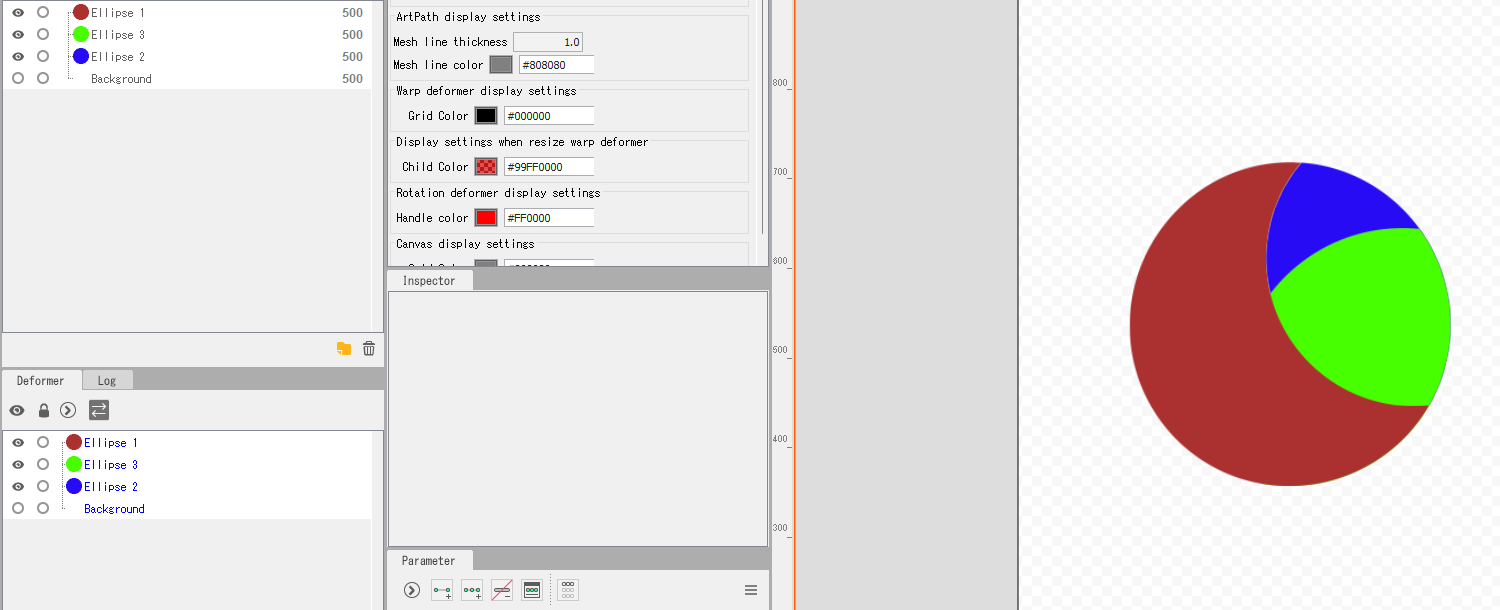
Double clipping:
here's a solution to the double clipping:
R(ed), B(lue), G(green)
Draw order:
R
G
B
Clipping:
R invert clips B
G clips R
B clips R
There you go, double clipping.
 Twitter
·
Twitter
·