#questions
1 messages · Page 388 of 1
 hot ridge
 turbid egret
yea
 tribal patio
they said both would work
 next pivot
Oh, perfect, thanks 😄
tribal patio
so long as u updated the launcher for thids launch not rpevious
 hidden crane
@hot ridge Where and when did you download it?
hidden crane
Then you're good
Just wait for the servers to go live and then you'll have to patch
 slow mortar
Not yet 🙂
hot ridge
people are saying they have queue times 

 sharp harbor
this test will be work in steam ?
 wet tapir
hidden crane
wet tapir
hidden crane
Yes, give it a few for the steam page to update
sharp harbor
tyvm ^^
turbid egret
servers aren't up 
tribal patio
i need to report a bug THE SERVERS ARENT UP REEEEEEE
slow mortar
Not yet, give it a little time 🙂
 solar forge
21:10
slow mortar
Stop spamming the channel please
This channel is for the community to help one another answer questions and resolve issues outside of Customer Service.
 warm canopy
 ocean forum
aaw what a cute profile pic @slow mortar 
 modest sierra

tribal patio
wait what
turbid egret
tribal patio
scammers
 trail orbit
bah i dont care about servers, just want to let the game download on steam and go shower xD
 tulip hatch
 Yes it has been delayed sorry friends
keep an eye on #web-maintenance for future updates
 elder elbow
What is ETA?
 solid silo
they late
tulip hatch
2 hours is current ETA
tribal patio
Game is worth the wait tho 😄
 heady carbon
hey guys!, 1st timer here. excited to play but 1 question i have is.. How long will this game be up? testing periods or out until full launch of game
 vale turtle
From now on it is supposed to be a persistent testing period. Beat it until it breaks.
 junior ore
It’s the br and it’s going to be persistent given any major issues of course. The mmo testing is tba
vale turtle
And yes, mind that this is the Battle Royale APOC, not the MMO.
heady carbon
understood! thx
next pivot
https://ashesofcreation.wiki/Intrepid_pre-order_pack:_Dec_2017_-_Feb_2018
This pack will be available in some nearly future? 😭
vale turtle
hidden crane
No, those packs are limited for that months cycle.
 faint tendon
any reason why the apoc launcher keeps crashing when i try to open it?
hidden crane
What's the crash error?
 crystal beacon
I deleted all my old APOC files and installed it again from the website today, when I try to open the app it keeps crashing. any tips
vale turtle
What's the crash error? Or plain old CTD with no error?
hidden crane
@crystal beacon What's the error on the crash?
 hidden halo
Did you delete the entire folder after uninstalling the last version?
crystal beacon
LoginId:4c0b24a64ab4f4745ccf36b1d022f384
EpicAccountId:9bb98dc0c3c04fcfbb193514aa49a47c
Assertion failed: [File:Unknown] [Line: 4298] Corrupted index in pak file (CRC mismatch).
APOCClient_Win64_Shipping
APOCClient_Win64_Shipping
APOCClient_Win64_Shipping
APOCClient_Win64_Shipping
APOCClient_Win64_Shipping
APOCClient_Win64_Shipping
APOCClient_Win64_Shipping
APOCClient_Win64_Shipping
APOCClient_Win64_Shipping
APOCClient_Win64_Shipping
APOCClient_Win64_Shipping
APOCClient_Win64_Shipping
APOCClient_Win64_Shipping
APOCClient_Win64_Shipping
APOCClient_Win64_Shipping
APOCClient_Win64_Shipping
kernel32
ntdll
 plucky pawn
Yup, that sounds like a case of the old files hiding around somewhere!
hidden halo
Yup! Delete that folder completely, then reinstall
crystal beacon
damn haha alright
hidden crane
Please ensure you're clean un-installing properly:
plucky pawn
There's a helpful guide on our KB as well: https://ashesofcreation.zendesk.com/hc/en-us/articles/360016316113-How-do-I-uninstall-the-game-
crystal beacon
I followed the steps in that link and still must have old files somewhere
plucky pawn
@crystal beacon check and see if you still have an "Intrepid Studios Inc." folder in your Program Files after wiping everything else!
(and then make sure that's gone too 🙂 )
 manic karma
Steam download available also in 1h?
 pure moth
still closed?
slow mortar
ETA is an hour or so 🙂
manic karma
What about the download from the website?
hidden crane
The download from the website is up and available.
However once the servers go live you will still need to patch, regardless of where you downloaded it from.
slow mortar
You can download from the website 🙂 But will need to patch when servers are live
SNORT
 pulsar ridge
Sorry that I am late to the party but is there a link explaining whats going on today?
hidden crane
2slow
Test that was supposed to go live was delayed by roughly 2 hours - They're working on getting it online
 hardy halo
so old download from the last test will work , just need to patch when it goes live? Am i understanding that correctly?
plucky pawn
@hardy halo no, as mentioned in the FAQ Shaze linked right above, please remove all old files from previous playtests and grab the latest launcher from our site/Steam when it's available
hardy halo
ahhh reading comprehension (yikes edge... way to go). Does it matter whether I grab the steam version or the website version ?
hidden crane
@hardy halo If you are from the EU, the steam version will take you through My.com, however if you are not, you will have to link your intrepid account to steam
However both use the same logins/servers etc. so you can play with your friends regardless
hardy halo
@hidden crane yea I have my intrepid account (that's how I've always played) just wasnt sure if one was "better" than the other. Thanks.
appreciate it
hidden crane
Nope, both are cool, cheers
 proven bear
Is it intended that you can only buy a Voyager Plus pre-order packs once and after that you can only buy the cosmetic separate?
after each month
plucky pawn
yes, that is the intended functionality for any of the pre-order packs currently available on the site 🙂
Once you purchase the Voyager Plus pack, it'll include this month's items, and then in any future months you can choose to purchase them individually!
proven bear
so you can only have 9 months of play time and can not gain extra
hidden crane
You will be able to purchase additional game time later
proven bear
true
vale turtle
Can you buy individual months, or is it only tied to a sub?
 stable plover
You can't currently buy individual months of subscription time currently, but will be able to at the release of the MMO.
vale turtle
Thanks 😃 I don't really like to be tied to a sub (even if it is monthly cancelable)
 reef dagger
So just for clarity, The download on the website currently showing is ok to install? Or do I have to wait for the ETA 2 hours before the install is the current build?
proven bear
What about sub packs for 1, 3, 6 and 12 months sub is that planned already?
stable plover
Well in terms of do you have to cancel after every months one at a time purchase I don't know that
plucky pawn
@reef dagger the download currently available on the site is good to go; once servers are live you will be able to log into that version to patch it!
reef dagger
Thanks @plucky pawn
stable plover
@proven bear Intrepid hasn't announced any plans for bundled sub-time post-launch. It would probably make sense if for nothing else than to bundle away credit card processing transactions though.
 serene sparrow
Hello everyone, Do we have a list or know what has changed since the 12 hour test?
proven bear
Why can't steam users just install the client part already or was the delay due issues with steam?
stable plover
@serene sparrow https://ashesofcreation.com/news/2019-09-18-ashes-of-creation-apocalypse-heads-into-early-access has a patch notes section if you scroll down that lists at least some of the changes since the 12 hour test.
serene sparrow
Thank you!!
stable plover
@proven bear I don't know about the second part of your question, but Intrepid wants to make sure that the version that goes live is the version everyone has / is patched to. So, if they are planning on making changes to the client build it could make sense not to offer DLs of the unchanged version, which would then need extra work done to update them to the proper version.
 median spear
so for eu people we must dowload thourgh my com?
 brittle ginkgo
Will the mmo release with the steam full release?
hidden crane
@median spear You can download through the intrepid website to use the Intrepid login
But if you are EU, steam will send you through My.com
So upto you which one you want to use
@brittle ginkgo Currently there are no plans for the MMORPG on steam
brittle ginkgo
And the release date for the mmo?
median spear
thnak you 1 more question.o interepid client will be a eu realm option or only on my com client?
brittle ginkgo
You gotta feed us something 😩
hidden crane
@median spear Both clients share the same servers, so you can play with everyone and pick any region no matter which download you use
median spear
nice thank you very much
 novel sequoia
After we download the game will we need to install any form of patch when the game goes live?
hidden crane
Yes, you will have to patch when the servers go live and you log in
novel sequoia
thank you, I just was not sure if it were going to be like a launcher update or post login update.
hidden crane
Cheers
turbid egret
so it's almost been 2 hours, and the twitter post said they'd keep us updated... no updates saying we're close, or could they at least tell us something like "hey, it's taking longer than we expected, might be a bit longer" ?
elder elbow
6 min ?
 buoyant siren
 timid ledge
slow mortar
timid ledge
slow mortar
ETA is round 12 mins time, as they gave a 2 hour ish delay
elder elbow
server not started
 karmic pewter
RIP
turbid egret
novel sequoia
it works now
 dusty falcon
I'm patching now
turbid egret
confirmed up
patch time boys
ummm, everything just went blank
and it wasn't close to 100%
turbid egret
lol, i was at that point, but then mine went blank @dusty falcon
lmk if u get something similar
 fading latch
@turbid egret well done. You just broke the internet
turbid egret
did i infect you too @fading latch
dusty falcon
@turbid egret my went blank for a minute, but came back.
sharp harbor
when we can download by steam ?
turbid egret

 frosty finch
slow mortar
frosty finch
slow mortar
Please use this channel for questions only 🙂 This channel is for the community to help one another answer questions and resolve issues outside of Customer Service.
 lean current
My game crashed after the patch downloaded sucessfully and the game was restarted. What should I do?
And it keeps crashing
 royal fossil
No Steam download?
trail orbit
ITS UP
royal fossil
I don't have the download option on the steam page
hidden crane
@lean current What's the crash error?
trail orbit
steam will be later prolly
lean current
The same as from all the others before: Corrupted index in pak file, crc mismatch
before, the game launched successfully. Seems like the patch was not downloaded correctly...
 keen plinth
will it not be avaliable for steam?
 mossy cave
Make sure you removed any old files @lean current . https://ashesofcreation.zendesk.com/hc/en-us/articles/360016316113
 alpine dagger
When will it be available on steam?
hidden crane
@lean current
 past folio
With the Kickstarter Leader of Men pack, I can't seem to purchase any of the new cosmetics on the Shop. The only thing that appears is the Summer Leader of Men cosmetics that I can purchase and the upgrade packs, like Royalty and Avatar of the Phoenix.
 charred rover
are servers on?
fading latch
#news-aoc-apoc @charred rover
charred rover
ye just posted after i asked a question 🙂
 hard hollow
will it auto patch or do i have to download it again?
heady carbon
can i stream?
charred rover
But i still get servers are down for maintenance error
mossy cave
@past folio Please open a support ticket so we can help: https://ashesofcreation.zendesk.com/hc/en-us/requests/new
fading latch
@heady carbon yes
royal fossil
When will it be ready for download on steam?
manic karma
Any ETA on steam availability?
charred rover
Do i have to redownload client after last one day test?
 desert vault
Buddy is trying to install Ashes and keeps getting this error. Any Ideas?
https://cdn.discordapp.com/attachments/246176958050861067/626167241565536286/unknown.png
hidden crane
Uhhh
 austere nexus
Can you guys download it from Steam???
 waxen quartz
If I downloaded on the 20th, I just have to get patched, yes? No clean install?
waxen quartz
aaarg ok thanks
hot ridge
avrage queue time?
 clear obsidian
Anyone know when the steam download will be available?
 formal sedge
No Squad and Duo?
 gray gate
Yes I am on Manjaro and the Windows installation file is worthless to me. How can I install the game from Steam? It says "Coming Soon".
elder elbow
how long will this test be?
reef dagger
Should be persistent servers from here out.
mossy cave
Not yet, we'll have Squads and Duos shortly though. just solos for right now 🙂
hardy halo
Shortly as in "today"?
mossy cave
We're just allowing time for people to download and login before unlocking the modes
royal fossil
When will it be available for download on steam? @mossy cave
mossy cave
@spring tundra glad you found it 😄
 tired fossil
Anyone else getting this?
heady carbon
crashed 4 times so far at display name selection.
 faint coral
i have the same issue
 balmy niche
same here
 ripe rain
steam bois getting ignored
slow mortar
@tired fossil This is due to EasyAntiCheat falsely flagging software such as ASUS RGB or MSI afterburner etc. Stop these applications and run the game.
plucky pawn
@tired fossil that might be due to some MSI software you have, which gets flagged by EAC
fading latch
@elder elbow 24/7
plucky pawn
@heady carbon please scroll to the top of the window for me and send me a screenshot!
@faint coral @balmy niche same to you two
balmy niche
plucky pawn
wanna see if it's the same error, which is likely one that means you have old files on your computer from previous playtests
yup @balmy niche , please make sure you've nuked ALL your old files first!
ripe rain
so no news about steam release at all?
tired fossil
yes, deleting old files help me
hidden crane
@balmy niche
 plucky pawn
@quiet birch make sure you don't still have an "Intrepid Studios Inc." folder hiding out in your Program files, or app data!
heady carbon
tired fossil
hmmm still getting blocked by easy cheat client. I made sure my stuff was killed in task manager
royal fossil
Can we get an update on when the Steam version will be available for download?
heady carbon
i deleted the intrepid inc. from program fldrs but that was the new launcher...
 quiet birch
@plucky pawn nope, there is no old intrepid studios Inc
gray gate
When the Steam version is available for download do I need to link my AOC account with my Steam account? If yes is there a guide? I couldn't find anything in the FAQ.
 craggy nebula
hey... I've maybe zoned out a bit, but I don't remember setting up my autheticator, where do I get the app or something...?
 snow gulch
@heady carbon same problem
tired fossil
@heady carbon Go to C:\Users\USER\AppData\Roaming\Intrepid Studios, Inc adn delete the files there?
 fervent hamlet
How long is the apoc going to be available
mossy cave
@craggy nebula It would have been a third party app, like google authenticator. Open a ticket if you run into trouble. https://ashesofcreation.zendesk.com/hc/en-us/requests/new
plucky pawn
@gray gate you will be prompted to log into your Intrepid account when you first launch the game through Steam, and that makes the automatic connection!
@heady carbon @snow gulch are you getting the same D3D error?
craggy nebula
@mossy cave oh, I forgot that entirely, thank you a lot 🙂
tired fossil
Is there a way to check a log file to see what application is being blocked by easy cheat?
 thick comet
@mossy cave When will squads be up?
 sly mesa
If apoc season 1 pass was bought in December, and bought by a Alpha tester, are they going to get embers instead of the free season pass? Or is it a completely new season pass? Thank you!
heady carbon
im finding no app data folder with anything in it.
have to reinstall full game again
 tame solar
is there a list of rewards for playing apocalype that carry over?
snow gulch
@plucky pawn saw closer error log and it was another error, deleted and attempting to reinstall
mossy cave
@thick comet it'll be a bit later, we're giving folks a chance to download and login before we bring in squads and duos
 tame furnace
does it come to steam too, soon?
 jovial venture
when is it releasing on steam?
 brittle crystal
it seems i have legendary path unlocked already?  did i miss something?
fading latch
@tame solar all rewards carry over
tame solar
I'm aware but I'm asking about a list of what the rewards are
trail orbit
the pain of being a steam user xD
fading latch
Oh there isnt one. Youll be able to see in game @tame solar
tame solar
ah good to know, thanks
 round pawn
Why can't i invite my friend to party?
fading latch
@round pawn only solos right now
 crystal flax
@brittle crystal Seeing that you have the "Glorious APOC tester" tag here in this Discord, you were part of the people who were given it for free
royal fossil
Duo/Squads are disabled atm
And they won't give us any news about when we can download on Steam. They just dodging the question ;-;
 lethal walrus

brittle crystal
@crystal flax what? so im lucky? or is it cause i bought braver of worlds?
 ruby kiln
why the hell was an email sent out and i cant download on steam
could have waited until its actually able to be downloaded
crystal flax
@brittle crystal The latter, everyone who had A1 was given it for free (I believe)
snow gulch
they are definitely working on this, given they do not know all details thus cannot provide ETA
fading latch
Steam client isnt up yet. Only website client is up and running @ruby kiln
ruby kiln
then why send an email
brittle crystal
@crystal flax oooh okay! thanks for clarifying ❤
 primal flint
I've deleted all the filed listed in the article here https://ashesofcreation.zendesk.com/hc/en-us/articles/360016316113-How-do-I-uninstall-the-game- but still get the "Corrupted index in pak file" error. Are there other locations not listed on that page where files need to be deleted?
 violet pollen
Having a problem with offcet mouse cursor... i have tried allmost evrything about DPI scalling . . .
hidden crane
@primal flint
violet pollen
This was surpose to work : https://steamcommunity.com/app/233450/discussions/0/35219681600074414/?ctp=4
hidden crane
@violet pollen Swap your screen resolution around or switch between windowed/fullscreen
tame furnace
so many people keep asking about steam release, better ignore all oof^^
violet pollen
@hidden crane I cant get into the settings ... the cursor is so crezy offset that its imposible or am i missing what you mean ?
 languid marten
why in Steam dosen't work yet?
lethal walrus
you can try pressing alt + enter to switch between full and windows @violet pollen
manic karma
@languid marten No official answer yet..
 west meteor
one last easy question, ive been gone for so long i should know this stuff tho lmao, is it possible for me to correct my capitalization on my ingame name?
languid marten
thx @manic karma
violet pollen
@lethal walrus Awsome worked thx
hidden crane
@west meteor Yes change name via top right drop down in lobby
languid marten
WTB Steam Release
west meteor
@hidden crane always got my back thanks man
waxen quartz
Got unreal process has crashed error twice and UE4 - APOC reporting screen popped up
 spring tundra
i cant open the map, where i can check for settings
hidden crane
@waxen quartz Screenshot of the erro rplease
@spring tundra Map is disabled atm, check #web-maintenance
violet pollen
Stupid quastion .. .. : how long is the test open for ?
novel sequoia
where can i go to change the graphical settings, I dont see it under the video settings tab?
 grand berry
its supposed to be persistant
languid marten
@violet pollen its open 24/7
violet pollen
@violet pollen Then i know what i will be doing this weekend -_-
hidden crane
@novel sequoia In the top right once you click on settings you should be able to edit your graphic preferences
violet pollen
Connecting to server takes long ? i have pushed play amd the little sexy dragon just keeps spinning 😛
 undone olive
anyone else have their game crash as soon as they start it and get an Unreal engine 4 crash reporter?
hidden crane
@violet pollen Should take max 5-60 seconds
hidden crane
@undone olive What's the error?
waxen quartz
undone olive
^ that
turbid egret
yea @violet pollen i'm stuck in a connecting to server loop
undone olive
 molten wadi
Having the same issue
grand berry
same issue
molten wadi
Same as Akaines
heady carbon
still same error after uninstalling/ deleting any (intrepid inc. files)
hidden crane
Is this your first time installing the game everyone?
undone olive
loads the cheat engine and then boom crash
nope
ive had it for a long time i even reinstalled it same issue
heady carbon
third
grand berry
no ive had it
molten wadi
Same after I patched the game it just crashed out of the blue
waxen quartz
My error was right after clicking desktop shortcut video started and vrashed at Intrepid logo
hidden crane
@heady carbon If the error is persistent, It looks like you're missing directX files, google DirectX end time executable and re-install DirectX
plucky pawn
D3D error is DirectX9
heady carbon
downloaded old version last night then downloaded new version twice today
plucky pawn
you're missing DirectX9 files
undone olive
what do mama toast
 undone olive
:^)
hidden crane
kk for EVERYONE who has played PREVIOUSLY and is downloading for a SECOND time, you need to CLEAN INSTALL using THIS METHOD
 short ginkgo
@heady carbon Did you use the previous installer file? I completely deleted it and downloaded the new one from the website. Works fine now
past folio
Toast is a beautiful young woman
short ginkgo
It has the same name, but it's a different file
past folio
Not Mama Toast
undone olive
kk ill try that thanks @hidden crane
past folio
What kind of Cats do you have?
undone olive
XD
hidden crane
The official intrepid clean install method is MISSING a few files that you need to delete, please use the steps I've linked to delete ALL THOSE FOLDERS
undone olive
she is now forever mama toast
molten wadi
Already tried that Shaze, still having the issue
hidden crane
Did you wipe all 4-5 folders? if you did you should not have the issue
waxen quartz
I did a clean install today and deleted everything on the list
hidden crane
If you only delete 1 of them you will still run into issues
molten wadi
Will try to install DirectX9 as suggested by @plucky pawn
 novel blaze
hello ..anyone can log and play from today?
past folio
I didnt see any folders in the App Data, I only uninstalled it from Control Panel
hidden crane
@past folio Please check App data + local app data
past folio
So I should be safe after I download it, hopefully
plucky pawn
@heady carbon a D3D error means you have missing DirectX9 files - head to the "\Engine\Extras\Redist\en-us" directory in your Intrepid Studios, Inc. install folder and re-run the prerequisite setup please!
@molten wadi check out ^
 outer isle
@plucky pawn Bug: I dont have permission to report a bug lol
past folio
novel blaze
i tried to log but saying authedication failed,,i can log in the AOC site thought
plucky pawn
@novel blaze screenshot of your error code please?
 past fulcrum
I've this error, what can i do ?
 rancid mulch
I am having a hard time inviting friends using the client (nonsteam) version of the game
heady carbon
delete these? i already installed twice...
plucky pawn
@outer isle good looking out! try now please?
past folio
@rancid mulch They stated that duos are down. Only Solo atm
plucky pawn
no @heady carbon , your D3D error is different
hidden crane
@past fulcrum You have residue files from a previous install, please clean uninstall and manually delete old files:
 twin nest
anyone else getting authentication failed when trying to log in?
rancid mulch
thank you
 acoustic hatch
hidden crane
acoustic hatch
hidden crane
@heady carbon You only have to reinstall directX: https://www.microsoft.com/en-in/download/details.aspx?id=35
heady carbon
i did and said no inmstallation needed because i had it
past folio
Is AoC only using DX9 instead of DX11?
 fair patrol
Yes you need a clean install
plucky pawn
no @past folio but there are dependencies...you can't not have both 😉
novel blaze
ok ty peeps
heady carbon
past folio
@plucky pawn of course, my Goddess
plucky pawn
@heady carbon kk try rebooting and then let me know!
fair patrol
@novel blaze make sure you uninstall and also delete remaining files of old install
outer isle
yes works @plucky pawn
novel blaze
ok ty
heady carbon
pc ot game?
past folio
Toast, ready to pull your hair out yet?<_<
plucky pawn
ty for reporting it and reminding me to open those back up @outer isle 
@heady carbon PC, usually a good course of action after installing anything new 🙂
past folio
So when can Alpha and Beta testers expect to get the Lvl 70 rewards?
hidden crane
Alpha and beta testers get the Legendary path worth 10$ for free
You still have to play and earn those 70 rewards
hidden crane
Without playing you wont get much
past folio
A little miscommunication on my part there
 dim glacier
Hello, my launcher is stuck downloading. file ratio isnt changing anymore, should i restart launcher? will i lsoe my progress?>
lose*
hidden crane
@dim glacier What % you stuck on?
dim glacier
44
hidden crane
How long has it been stuck there?
And is that the download progress or applied changes progress?
heady carbon
@hidden crane
keen plinth
will any cosmetic item that i buy in the shop transfer over to the MMO
novel blaze
i donwloanding apocalypse 1.9 GB right?
dim glacier
downlaod progress
hidden crane
@keen plinth Yes
dim glacier
i jsut got that crash error too that stoney posted
hidden crane
@novel blaze Yes, then you patch 6gb after logging in
dim glacier
im forced to restart now
novel blaze
ok cool ty @hidden crane
dim glacier
hidden crane
@dim glacier Is it the exact same as stoneys? Please double check the text in it
@dim glacier Your issue is different, just restart and try again
 violet swan
Can the team that emails out stuff not use clickbait please? "Early Access is now LIVE" is so triggering and missleading. when i open the email to see its all about Apoc and not AOC mmo i get triggered.
hidden crane
@heady carbon Did you try Toast's suggestion? "head to the "\Engine\Extras\Redist\en-us" directory in your Intrepid Studios, Inc. install folder and re-run the prerequisite setup please!"
plucky pawn
^ and then restart your computer, and restart client. after that, if still no fix, tech support ticket please!
heady carbon
cant find it
novel blaze
Btw is that ok in my referal page ..? i dont know what really happens there... http://prntscr.com/paixh6
dim glacier
After using the launcher again
short ginkgo
@plucky pawn Doing a fresh re-install works for that error @heady carbon was having. Had to be sure to redownload the 1.9GB installer off the website or it wouldn't work.
plucky pawn
@heady carbon hang on and I'll give you the direct link to the directory - C:\Program Files\Intrepid Studios, Inc\Apocalypse\Engine\Extras\Redist\en-us if you installed it in the standard folder
heady carbon
thank you guys
hidden crane
@novel blaze It looks fine, you're good to go
plucky pawn
@short ginkgo yup but you don't need a total new install for D3D errors, you can also just re-run the UE4 prerequisite installer!
short ginkgo
Ah gotcha. Thanks for the clarification!
dim glacier
I didnt have this during the last playtest either. Everything was fine
grand berry
@plucky pawn wasnt the progress from the previous Adventure Path supposed to be continued in this?
hidden crane
@dim glacier so a KMODE is a driver error that could be a wide variety of things, including a corrupt windows installation, restart for now and try launching again
@grand berry Progress is wiped but all rewards are saved, so if you unlocked anything you should have it
dim glacier
@hidden crane thank you, I'll give that a shot right now. PC is booting up
heady carbon
hidden crane
@heady carbon Is that when you first start it up?
heady carbon
just found the file route and clicked it
hidden crane
I'd say click uninstall to uninstall the pre-requisites and then run it again to install the pre-requisites - But just check with Toast to be sure
 tall knot
A friend of mine is getting this error, what can he do?
hidden crane
@plucky pawn
tall knot
plus, is it possible to change resolution? i'm on 1440p
hidden crane
@tall knot Yes once you get into the lobby, go into settings on the top right and: https://i.imgur.com/J9fcaTM.png
plucky pawn
@heady carbon yup do an uninstall and reinstall there please!
tall knot
i mean, yeah, i get to that screen, but i can't change it. Touching it does nothing, am i missing something?
tall knot
I'm so sorry, i have no idea how i missed those arrows haha, thanks!
heady carbon
after uninstalling/reinstalling prerequisites
hidden crane
Cheers np
plucky pawn
@heady carbon make sure you restart your computer after doing so
heady carbon
ok
 brisk vapor
Hello. Is the friend system working? something is wrong by my side if it is. when I add a friend it checks that his name exists and it gives me the friend added message, but my friend can't see my invites and I can't see the ones he sends me
 drowsy holly
Hey, do you have an idea of when squad will be available?
hidden crane
@brisk vapor There's no request thingy, you just type in there name and add them
@drowsy holly The server messages in game said squads soon, no ETA
 willow wharf
Why is my game not patching it kick me ?
 astral pelican
Is the steam version still unavailable?
dim glacier
@hidden crane so I got the same launcher error I posted earlier. I've updated windows to be safe and restarted PC rn. Hopefully that helps, but if not, any other ideas?
crystal beacon
squads eta ?
astral pelican
ty
hidden crane
@crystal beacon Server message in game says soon
heady carbon
@plucky pawn after restarting and launching
hidden crane
@dim glacier Apologies could you link the error again please?
@heady carbon What graphic card are you using?
hidden crane
Latest drivers?
heady carbon
of course 🙂
brisk vapor
Ok, there was some kind of bug, when both of us switched name we managed to add eachother with no problem
heady carbon
dont worry im not a noob
hidden crane
@brisk vapor Cheers, put in a support ticket as well
dim glacier
brisk vapor
yep, omw
dim glacier
@hidden crane
hidden crane
Checking now
 silk magnet
Anyone else having authenication issues when logging into the launcher?
hidden crane
@dim glacier You said this pops up mid patching, yes?
@silk magnet Has relogging helped?
dim glacier
No. That error is popping up after I restarted the launcher from being stuck st 44%, for 10min.
heady carbon
@hidden crane so anyway some old files hiding somewhere?
hidden crane
@heady carbon No, your issue basically says files are missing
dim glacier
here is is again, after attempting rn to relaunch
after pc restart and windows update.
hidden crane
@dim glacier Are you downloading the game over wifi/phone internet etc?
dim glacier
Home wifi
heady carbon
@hidden crane after steam launch should i download that version? or what
dim glacier
it gives that error as the anticheat loading screen is up
so i dont even load into patcher anymore
silk magnet
@hidden crane - Ah I was an idoit. I was trying the Intrepid Launcher... got it to work all good 🙂 Tyvm.
hidden crane
@heady carbon yes, you could wait for the steam version. If impatient, try a clean re-install
@silk magnet Cheers!
@dim glacier kk, it looks like your connection dropped while patching and the files corrupted, you may have to clean wipe and re-install, cant think of any other solution personally, sorry. Might have to ping toast and ask her
Alternatively wait for the steam download
brisk vapor
done. Thanks for your help!
 crystal fjord
I'm getting the same issues. I tried uninstalling and reinstalling, and I tried the correction Toast gave.
dim glacier
@hidden crane ill try reinstalling. i still have the installer 😄
plucky pawn
@crystal fjord that looks like you still have some old files hidden somewhere!
hidden crane
@crystal fjord There's about 4-5 folders in different locations that need to be wiped
tall knot
I'm sorry to bother again, but now it doesnt show any video settings besides resolution x.x
plucky pawn
@tall knot did you test previously, and have files left over from before?
hidden crane
@tall knot Swap you resolution around or press ALT+Enter to force windowed
heady carbon
@hidden crane how to make sure i do a clean reinstall
hidden crane
@heady carbon
hidden crane
@shy ermine Should be on the forums
 cedar osprey
Steam download is unavailable, where can I download it?
silk magnet
 crisp summit
is duo/squads going to be available?
 shy ermine
thanks fam
tall knot
No, and the first time i opened the game, i saw the settings, but after i changed resolution and played 1 game, it never appeared again.
hidden crane
@cedar osprey https://i.imgur.com/UWmi46K.png
tall knot
I alt enter, and still nothing
hidden crane
@crisp summit In game server message says they are coming soon
plucky pawn
@shy ermine as servers are online now 24/7, please share your feedback on our forums here! https://forums.ashesofcreation.com/categories/apoc-general-discussion

Ashes of Creation
 spare elk
anyone else not being able to move vertically while zoomed in? I have no ADS Y sensitivity option....
hidden crane
@tall knot Right so most likely after you swapped resolutions those menu items got clipped/disappeared, so you need to swap resolutions or restart the game to pull them back up
also submit a bug report
 timid portal
Im assuming the only Video options are Window mode, Resolution and Frame rate limit?
hidden crane
@spare elk Does it persist after restarting? if yes, put in a bug report
silk magnet
@hidden crane @plucky pawn Just wanted to say , you are are fantastic. I am truly blown away with the commitment and dedication. I have never seen any CM's put this much effort into helping the community... 
plucky pawn
@tall knot your video settings disappearing comes from lingering files from previous play tests, even if it was back in February 😄
timid portal
I have a fresh install and im only seeing the 3 options as well
silk magnet
Ooooh well damn. Good on you @hidden crane for helping so much!
hidden crane
@timid portal Resolution swapping/Forcing windowed with ALT+Enter doesnt help?
crisp summit
my friend is having the same issue
hidden crane
@timid portal This is what you should be seeing: https://i.imgur.com/Bcp0kDm.png
crisp summit
alt-enter changes resolution but doesn't bring setting options back
timid portal
Im not having resolution problems, I was curious if we only had the 3 options total under the actual Video Tab
Only seeing the top 3 currently
going to restart client again
plucky pawn
no, there are definitely more options - you may have lingering files from old play tests not in the usual spot, like in your appdata or in an old "Intrepid Studios Inc." program files folder 🙂
crisp summit
it was a clean install
hidden crane
@timid portal Yes but have you EVER played before?
timid portal
nope
tall knot
Ok, so i changed it back to 1080p, applied it, restarded the game, still no video options x.x. Well, i'm pretty sure i didnt play the game before haha. The only thing i did, was to install it 2 days ago, so i could play and try it today.
hidden crane
Submit a bug report, try resolution swapping for now or moving the game between different monitors if you have multiple
past fulcrum
I've an i7-7700k and 1080Ti 11Go, is this game optimized ? Oo
novel sequoia
How do i update the game?
hidden crane
@past fulcrum The game is currently in early development, the big optimization changes will constantly happen throughout development, especially closer to release
heady carbon
@hidden crane is this the firs step? because i cant find the file (Interpid launcher)....
 warm otter
Is the open beta today have castle battles?
hidden crane
@novel sequoia You are using a very old launcher, you need to clean uninstall using this method
@warm otter No battle royale only for now
heady carbon
or this @hidden crane
 vocal flame
https://i.imgur.com/UWmi46K.png
This still happening?
tall knot
Is there a way to change video settings in some file?
hidden crane
@heady carbon Order doesnt matter, just wipe them from both your screenshots
@vocal flame Yes, they have to wait for steam to push the update
@tall knot Yes, hold on I got you
 rotund oar
yes
plucky pawn
@vocal flame Waiting on Steam now 🙂
hidden crane
@tall knot 1. Open start menu
2. Type Run and open it
3. Type in %localappdata%
4. Head to APOC>Saved>Config>WindowsClient>GameUserSettings
5. Change these and any other resolution files: https://i.imgur.com/wtni29m.png https://i.imgur.com/BJtR3mb.png
 cyan solar
how big is the download?
hidden crane
@heady carbon That looks fine, now do %Appdata%
crystal fjord
My issue was fixed. I'm patching now. Thank you for the help! Hopefully it's smooth from here.
heady carbon
@hidden crane
tall knot
Thanks, got it @hidden crane
heady carbon
now delete all thesew?
cyan solar
@hidden crane thanks
hidden crane
@heady carbon This one next: https://i.imgur.com/iYZ8GS1.png
cyan solar
Im just waiting on steam dont really won't to download another launcher 🙂
tall knot
I just got this one more thing xD A friend of mine is having this error when he opens the game. Its the first time he installed the game, he even did those steps on uninstalling and installing again. But still the same error x.x
dim glacier
upon reinstalling with installer
hidden crane
@heady carbon yes, nuke it
@tall knot Is he installing it in the default directory?
tall knot
yes
heady carbon
@hidden crane bye bye... now new fresh link to installer/
hidden crane
@tall knot Make sure he hasnt moved the game to a different location after installing
@heady carbon No, go to C/Program Files and wipe Any Apoc/Intrepid files there as well
novel sequoia
@hidden crane Thank you for the help the game in installing correctly now
tall knot
He just installed it, everything on default, and tried to open, didnt change anything
dim glacier
shaze, did you see the error i got earlier? i cna post it again rn.
its not from the installer
now*
heady carbon
@hidden crane deleted
hidden crane
@dim glacier I see it, you want to get that fixed, so hold on
hidden crane
@heady carbon Good, restart pc and download: https://ashesofcreation.com/launcher/latest
@heady carbon But, make sure you disable your antivirus etc
just in case that's what deleted it last time
@tall knot He launched for the first time after downloading and gets that error?
tall knot
Yes, the first time, it got to the patching thing, and it crashed, after that, the moment he launches it crashes with that error
hidden crane
@dim glacier You did the clean uninstall steps?
hidden crane
@tall knot kk so his patch is corrupted, he needs to clean install
@heady carbon No malwarebytes/Adcleaner etc?
hidden crane
tall knot
He did that, hes doing it again, maybe he forgot some folder or something
heady carbon
should i click link?
hidden crane
@tall knot Make sure he wipes every single one of them otherwise it's pointless
tall knot
Yeah
hidden crane
@heady carbon Just go here, scroll down and click Download the Game: https://ashesofcreation.com/apocalypse
 fervent solstice
<@&256789677930053632> Do we have a estimate for steam download?
waxen quartz
FYI, After getting this error, I restarted my computer and was able to log in and get the download. I am in game now.
tall knot
Should he download the installer again or is it fine?
heady carbon
@hidden crane its installing from first link..
hidden crane
@tall knot Did he have errors installing? If no, then ask him to run the installer again and try repairing
@heady carbon That's perfectly fine too!
plucky pawn
@shy ermine yup, as servers are meant to be persistent now, we'll be reading the feedback in that forum category vs. a specific thread for a weekend test, like we've done before! combat has changed quite a bit, which you can read in our patch notes at the bottom here: https://ashesofcreation.com/news/2019-09-18-ashes-of-creation-apocalypse-heads-into-early-access
tall knot
Alright!
 snow epoch
I can't look down or up in-game, is that just how the game is or am I bugged?
heady carbon
@hidden crane how could u tell i had a old l;auncher/
dim glacier
@hidden crane yes i clean installed and dleted everythign else related to it
sorry for typing, im on mobile to type incase pc crashes
hidden crane
@snow epoch That is not intended, try pressing escape going into settings in the top right and adjusting these: https://i.imgur.com/Fi84dyv.png and then these: https://i.imgur.com/U7J8eV4.png
(Or just set keybinds to default at the bottom)
snow epoch
I'm looking at them right now and they're already all set to default
I left the match I was already in and joined another one and it was still like that. I'm about to try again.
hidden crane
@dim glacier I'd say click on no, double check for the old files, then run it again
past fulcrum
I don't understand how the game can use the GC like this when downloading the game....
crystal beacon
i cant play duos somehow... its says "Please select a valid game mode" , what should i do ?
hidden crane
@crystal beacon Currently its only solos, other modes coming in a bit
crystal beacon
@hidden crane when will it come ?
hidden crane
@past fulcrum The usage will go down once its done installing
clear obsidian
What is happening with the steam download? This is ridiculous, it was meant to be out 4 hours ago and no news on it
hidden crane
@crystal beacon We dont know yet
@clear obsidian So steam pushes out updates for all games in cycles every so and so hours
They have to wait for steam to update it
heady carbon
@hidden crane it crashed when it got to log in screen this time
crystal beacon
@hidden crane but i mean , duos and other modes will be playeable maybe in an hour ? or tomorrow ?
past folio
@clear obsidian Why dont you rant to Steam support? I'm sure Intrepid has sent the files to Steam already
hidden crane
@crystal beacon Dont know friend
past folio
They're the ones that put the download on the Steam page, not Intrepid
clear obsidian
@past folio I didn't know that steam goes on some sort of cycle, i thought it was just ashes which weren't going to put it on steam for a while
dim glacier
@hidden crane i have no other files, i followed the screenshot you posted earlier
and i keep getting that error.
tall knot
@hidden crane Thank you so much for your patience and help! The game launched for him, and he's now downloading the patch as normal. (I still can't see the video settings in game in any resolution, but made it work by changing on the file you told me to) 🙂
hidden crane
@heady carbon Are you on a laptop by any chance?
@tall knot Cheers, glad we could help!
heady carbon
@hidden crane no but just tried again and now its patching that 6gb... didnt crash this time
hidden crane
@heady carbon Well, if it works then that's good (?) hope it works
heady carbon
@hidden crane thanks for the help i guess lolz -)
hidden crane
Cheers
 grave night
If i had the steam version during the 12 hour test, do I need to delete the files you were talking about before?
plucky pawn
yes please @grave night !
 unborn mountain
it just says coming soon
hidden crane
@dim glacier Mate, try ignoring it and installing anyways, see if it works, if not, go to the install directory and manually run the EAC installer
unborn mountain
frick
dim glacier
okay!
 proven arrow
if u want to play bad enough just go to their website
proven arrow
try back tonight
rancid mulch
I dont want to take up precious time for t/c but just a quick question, any time frame on when duos/squads will be available today or in the future?
unborn mountain
word.
hidden crane
@rancid mulch No ETA, but the server message in game said "Squads soon"
rancid mulch
@hidden crane thank you 🙂
 agile vapor
i keep getting a popup that "patching has completed and game will now restart" everytime i launch
 cedar snow
What could be causing this graphics glitch? It's there when i tab into the launcher in fullscreen
hidden crane
@agile vapor Same error as me, if it happens more than 3-4 times, you need to perform a clean wipe due to old files and re-install
@cedar snow I believe that's a "low texture" version of the game that could be activated by pressing F9 in the past, you'd need to restart after it patches
The patcher is also quite GPU intensive so it can sometimes go whack when tabbing in/out
cedar snow
ah alright, need to wait and see when it's finished then, thank you
heady carbon
@hidden crane okay latest crash... whats the conclusion
 lyric heron
Will there be a training ground mode added?
hidden crane
@heady carbon It happened mid patch or after patching and restarting?
 regal pine
I can't join my friend for Duos, is that not working right now?
crystal flax
Correct
hidden crane
@lyric heron Currently not planned for apocalypse, Its BR, then castle siege then horde mode
plucky pawn
@cedar snow have you updated your graphics drivers lately?
hidden crane
@regal pine Duos are down currently until the steam install is up and running
heady carbon
@hidden crane after patch and self restarted.. then signed in. asked me to select character name then crashed. pc never restarted
regal pine
Ah okay gotcha, thanks
plucky pawn
@heady carbon at this point it's time to send you to Tech support, please open a ticket here:
hidden crane
@heady carbon and you said you were not on a laptop, yes?
cedar snow
@plucky pawn i havent actually so will do that if restarting doesnt fix it, thanks
plucky pawn
@cedar snow let us know how that works! 
 pseudo wave
I just fully uninstalled the old game files and installed the new launcher. I get this error every time I try to actually launch the game though after install.
hidden crane
Did you wipe all 4-5 folders?
heady carbon
@hidden crane correct. desktop. fairly new stuff and very clean files...
pseudo wave
I wiped the folders in app data, as those are the only ones mentioned in the link
after doing the normal uninstall through windows
heady carbon
@hidden crane ive never had any crashing or errors lauching any game in the past year
hidden crane
@pseudo wave You need to wipe these extra ones as well
@pseudo wave Basically every APOC, APOC_Update, Intrepid, Intrepid studios, AoC folder
pseudo wave
Ok, I'll try that. The link I followed just mentioned the appdata ones
hidden crane
@heady carbon My last suggestion after you've filled out a support ticket is to try installing the latest version of Unreal Engine through the Epic Games launcher.
 trim hornet
Any way to change the resolution of the game without launching the game. I cant click on the play or settings button in the menu.
hidden crane
@trim hornet I got you fam, hold on
@trim hornet 1. Open start menu
2. Type Run and open it
3. Type in %localappdata%
4. Head to APOC>Saved>Config>WindowsClient>GameUserSettings
5. Change these and any other resolution files: https://i.imgur.com/wtni29m.png https://i.imgur.com/BJtR3mb.png
trim hornet
@hidden crane Thank you, you are a life saver.
hard hollow
i was able to download the game engine and login, but i can't click on everything...nor can i play 😦
hidden crane
@hard hollow Your resolution is whack, press ALT+Enter to force windowed mode and try change resolution
hard hollow
ok
hidden crane
@heady carbon Yep, that's the one, cross your fingers
hidden crane
@heady carbon It would affect your Unreal version as your error seems to be relating to UE issues with DirectX
hard hollow
@hidden crane it didn't do anything
hidden crane
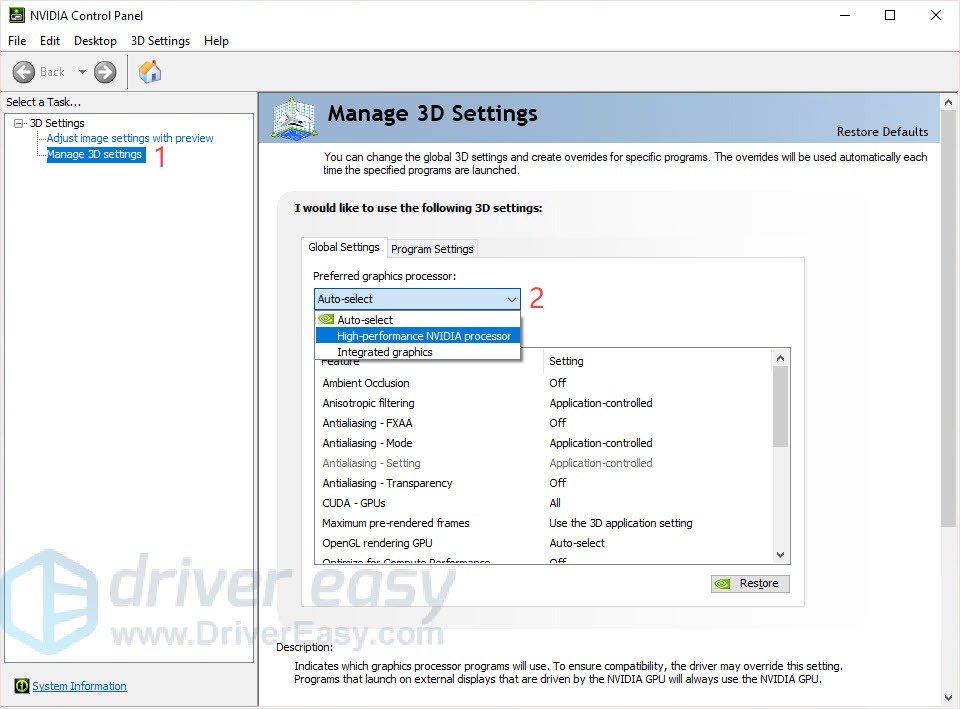
@heady carbon Yep, also while its downloading, head to your NVIDIA control panel and make sure its set to this: https://images.drivereasy.com/wp-content/uploads/2019/05/00.jpg
 frail citrus
any idea why this happend
hidden crane
@hard hollow Changing resolution didnt let you reach the buttons etc?
hard hollow
@hidden crane it didn't even give me an option to change my resolution :/
i'll try again
hidden crane
@hard hollow https://i.imgur.com/DxwR1z5.png
That's what I see
@frail citrus What's your issue?
crystal beacon
Is Duo and Squad not working?
hidden crane
@crystal beacon Not yet, they are waiting for steam to push the update out before enabling it, for now just solos
@frail citrus Checking now, one moment
crystal beacon
Any ETA on when the steam update will happen?
 worthy schooner
starcadian fan 
 starcadian fan
hidden crane
@crystal beacon Steam does its update in cycles, so we're all waiting patiently
frail citrus
i tried already launching the anticheat inside the game file and repairing the anti cheat
 iron gorge
when im downloading the launcher the bar goes fully green then jst stops
hard hollow
@hidden crane got it to work the second time...testing out buttons, one min
heady carbon
@hidden crane no option
hidden crane
@hard hollow Cheers
iron gorge
nvm after 10min it fixed
pseudo wave
@hidden crane Thanks, deleting those folders and reinstalling fixed it. Downloading the patches now!
frail citrus
nope
hidden crane
@heady carbon well, finish the UE download and then restart to run
heady carbon
ok
thick comet
duo and squad still not up?
frail citrus
ill try reinstalling the launcher and see from there
 alpine adder
When i try to lounc the game it just open a crash repoert
plucky pawn
@alpine adder can you share a screenshot please?
hidden crane
@thick comet They are waiting for steam to push out the update before opening duos and squads
alpine adder
It just do this every time
Not that i updeat the game from the 24 test and not redownloud it
hidden crane
@alpine adder You have older versions of the installer lying around, you need to follow all these steps to do a clean install
 peak ravine
How long is the season 1 legendary path active? And if the game goes inactive again for any reason will I have to rebuy it?
hidden crane
@peak ravine Until December 17th, servers will be up constantly
peak ravine
Ty
 bleak tapir
Hello, I can't download the game from steam yet. Is just me?
alpine adder
@hidden crane so i cant just updeat the game from the last 1 day test i need aclean instal?
heady carbon
@alpine adder yes
 compact forum
yo its suppose to be available on steam right
heady carbon
@bleak tapir dont worry no one can
crystal flax
Not yet, it's in Steam's hands right now
compact forum
says it isnt available and release date is posted at today lol
alpine adder
Soo why it updeat it self
hidden crane
@alpine adder You cannot update. You must clean wipe everything first.
@bleak tapir They have sent the patch to steam but steam pushes out updates in 'cycles' so we just gotta wait for them to put it up
bleak tapir
Ok thanks, so I guess I'll F5 as hard as I can
compact forum
oh lord
hidden crane
@compact forum You can download from the website if you cannot wait for steam
compact forum
so tomorrow morning probably
alpine adder
 feela badx
hard hollow
@hidden crane Thanks for the help! Everything seems to be working well, so far. I'm queued to enter the game. ^^;
hidden crane
@hard hollow Cheers!
compact forum
oh i was gonna go through steam they have a stand alone one np 2 ez
hidden crane
All installs share the same servers so you can play with everyone
 gray olive
@plucky pawn Has there been a solution for a GPU hitting 100% on the character screen?
hidden crane
@gray olive The game is currently in early development, optimization changes will happen slowly and over time as we progress through development.
gray olive
ok so its on the game's end and not mine...just wanted to make sure I was not missing something.
 icy sparrow
@idle siren crashing and cant even send the report during launch.
LoginId:c82c4ca64d86a0e37bb1aabd50957d78
EpicAccountId:
Assertion failed: [File:Unknown] [Line: 4298] Corrupted index in pak file (CRC mismatch).
APOCClient_Win64_Shipping
APOCClient_Win64_Shipping
APOCClient_Win64_Shipping
APOCClient_Win64_Shipping
APOCClient_Win64_Shipping
APOCClient_Win64_Shipping
APOCClient_Win64_Shipping
APOCClient_Win64_Shipping
APOCClient_Win64_Shipping
APOCClient_Win64_Shipping
APOCClient_Win64_Shipping
APOCClient_Win64_Shipping
APOCClient_Win64_Shipping
APOCClient_Win64_Shipping
APOCClient_Win64_Shipping
APOCClient_Win64_Shipping
kernel32
ntdll
hidden crane
@icy sparrow Your issue is you have leftover files from older installs
@icy sparrow Please follow ALL OF THESE steps
Manually delete all leftover files
and then clean install
dim glacier
@hidden crane Hi, thanks for your help. my anti cheat wasnt working either to install. ive uninstalled everything and decided to redownload the installer from scratch. im assuming the https://ashesofcreation.com/apocalypse link is the easiest? no special download link for game?
hidden crane
@dim glacier Yep, just scroll down and download from there
dim glacier
ALright thanks! im hoping that i can play tonight 😄
 late jungle
hello is sea server down?
alpine adder
How mouch the size of the game?
hidden crane
@alpine adder 2gb launcher download and 6gb patch
alpine adder
K
 ocean hemlock
just uninstalled everything and re installed game and still getting Unreal Engine crash
 molten jackal
So, how do I download the APOC through Steam, when it doesn't have a download link?
hidden crane
@molten jackal They have pushed the update to steam but are waiting for steam to put the download up during their update cycle
late jungle
wait for steam dl to available
hidden crane
@molten jackal If you are impatient and dont want to wait for Steam, you can download through the main website
late jungle
i'm currently waiting too but i download the client version
molten jackal
I have the Ashes launcher unless that thing no longer works.
hidden crane
If you have an older launcher you need to clean wipe it and remove all older files etc.
Please follow the steps properly to ensure you remove ALL older files ^
crystal fjord
Why won't my heroic leap work? I look up, hold ctrl, nothing.
molten jackal
ok
 wraith blaze
Im crashing... lol
hidden crane
@crystal fjord Its been removed from the game, replaced with acrobatic leaps when holdign Rightclick + left click
late jungle
@hidden crane is steam version the same in client ones
serene sparrow
Is their a sandal shrine again?
crystal fjord
Thanks!
alpine adder
I deleat it from every file but i did not find the file on program data is that normal
hidden crane
@serene sparrow Should be there in the hidden location
@wraith blaze What's your crash error (screenshot please)
serene sparrow
I meant a new one
alpine adder
Ifind 2 fuls on local
hidden crane
@alpine adder If its not there then its cool, just make sure its not there
alpine adder
K
wraith blaze
@hidden crane
 true jewel
Hey, just loaded up APOC and the resolution is screwy. How do I fix this? (the mouse is positioned so its a few inches left of the courser, so I can't access what looks like the options button in the upper right hand corner
plucky pawn
@true jewel try hitting alt+enter?
hidden crane
@wraith blaze You still have some leftover files from your previous install. You need to perform a clean installation and manually delete these files below, then download the launcher fresh from: https://ashesofcreation.com/launcher/latest
wraith blaze
damn... okay then
hidden crane
Every single folder needs to be wiped, dont skip any
wraith blaze
got it
iron gorge
all gamers havinmg this problem
timid portal
Are duos available yet?
true jewel
Unsuccessful. I tried to navigate the highlighter to that corner but was unable to access the panel still. alt-enter only opens the tab it is highlighting, but I can't get that far with the alt keys unfortunatly.
crystal beacon
squads ? 
hidden crane
@crystal beacon They are waiting for steam atm for squads/duos
@true jewel Sec fam I got you
true jewel
😮 I got it, I was able to highlight the entire game and hitting alt-enter initiated windowed mode. Thank you.
crystal beacon
Thanks @hidden crane You're such a help around here
hidden crane
@iron gorge scroll to the top of that error window and show me the error please
frail citrus
shaze is a blessing
timid portal
any eta on when the steam version will be available?
hidden crane
@timid portal No ETA currently, they have pushed the update to steam but are waiting for steam to update their store via their 'cycles'
timid portal
sounds good thanks
iron gorge
hold up
cedar snow
@plucky pawn alright so the problem was just my graphics driver, updated it and the glitching is gone 👌
hidden crane
@cedar snow Thanks for updating
iron gorge
thanks for the help if you can man
hidden crane
@iron gorge You have leftover files from a previous install and need to clean wipe them and do a fresh install, follow these instructions to MANUALLY DELETE them
plucky pawn
@cedar snow glad to hear it!
iron gorge
wheres control panel i forgot
hidden crane
Make sure you delete each and every one of those 4-5 folders otherwise the error will persist
iron gorge
type to search right
plucky pawn
you can type it in the search bar of your computer @iron gorge , yup
 thick junco
Hello all two questions. Is Steam download unavailable & am I unable to duo with my friend? Am I unable to invite my friend? We're trying with no success
hidden crane
@iron gorge Yes, once you uninstall from the control panel, you need to do the steps in the image above
@thick junco Squads and duos are down atm until steam comes back up, so just gotta wait. Until then its only solos
thick junco
ok so Steam was up and working earlier today?
plucky pawn
nope @thick junco , it hasn't become available for download on Steam yet today 🙂
alpine adder
Also want to ask why the louncher take gpu power isnt it aupos to bee jnust alouncher why it run like agame
thick junco
Copy that no stress. do your best we ll patiently wait... i mean after all...Im STILL waiting for the next George RR Martin Book and its been years
 jagged sandal
When i download from the aoc website it tells me that it cant verify. I have deleted it 3 times now and re-downloaded. Not working at all :/
alpine adder
Not that my laptop have a cor i5 7th gen and a gtx 1050
plucky pawn
me too @thick junco ...me too.
@jagged sandal screenshot of your error please? did you make sure to remove all old files first?
alpine adder
It take soo mouch power just to install the game
true jewel
New question: Back when APOC originally launched it's trial (last December, i think) I had purchased something for 10$, and it was meant to last for a couple of weeks, but then the server went down. Do I still benefit from his purchase?
hidden crane
@true jewel That should still be there, that's the legendary path
jagged sandal
hidden crane
Check the tab in the lobby
jagged sandal
I get this every time
true jewel
kk, got it. Thank you
alpine adder
Taking almost 80%cpu and 40% gbu hoo this will get fixd later
hidden crane
@jagged sandal Send in a ticket for technical support
heady carbon
@hidden crane downloaded UE, restarted, launched aoc, same crash at same time
tech support told me to delete old files btw.. which we did @hidden crane
 fringe cosmos
Sorry to bug you guys I'm sure you're busy, but I can't get past this screen, nothing is downloading..
plucky pawn
@fringe cosmos have you tried restarting the installer? do you have files leftover from a previous install by chance?
fringe cosmos
I believe this my first time downloading this. But let me double check, thanks
 sleek rampart
why is AP southeast server not open?
hidden crane
@sleek rampart They are waiting for steam
@heady carbon Sorry mate, sounds like a much deeper issue, you're going to have to scour around the web to find a solution
heady carbon
@hidden crane ok
 glass inlet


 tulip hatch
Yes theyre looking into the latency issues :c
true jewel
I cannot open the map. Any tips?
plucky pawn
@true jewel Intentionally disabled at the moment - check out our Known Issues list here: https://forums.ashesofcreation.com/discussion/43133/known-issues-early-access-testing
Ashes of Creation
This spot is reserved for our Known Issues list heading into Early Access! As you help out with our upcoming testing, please keep these Known Issues in mind:
hardy halo
Biggest bug so far, cant see my cape LUL (Kappa)
plucky pawn
@hardy halo did you equip one in the Armory before you loaded in?
hardy halo
Yep, even tried equip/unequip/re equip
dim glacier
Anyone mind helping me again? ive deleted every intrepid/AOC file and updated windows, drivers, redownloaded and reinstalled the game AND installer twice now. and im still getting this when i launch the game... i didnt get an error installing it from installer this time around, but launcher still issues
heady carbon
@dim glacier i think a bunch of people are.... ive done it all and i get d3d error
dim glacier
Awww 😦 I thought you had your issues fixed @heady carbon
heady carbon
@dim glacier nope... gotta be thier side
plucky pawn
@heady carbon @dim glacier you two have totally different issues 🙂
@heady carbon please open a tech support ticket like I mentioned earlier, so our team can prompt you for dxdiag/etc. so we can investigate your situation more specifically, if you haven't already done so!
dim glacier
okay idk what happened, but after trying to open it again another 5-10 times with that error, it let me log in. downloading patch rn. god i pray it goes well
 indigo ginkgo
for some reason in my video settings all the options are gone except window mode, display resolution, and frame rate limit.. anybody know how to get them back?
heady carbon
@plucky pawn i did sir, they reccommend i do the clean reinstall fix but ive done it twice
wraith blaze
@hidden crane
 warped oxide
When will they bring duos or squads ???
plucky pawn
@indigo ginkgo try hitting alt+enter - did you play with us for previous tests?
indigo ginkgo
@stable plover just a black space @plucky pawn No this is my first time playing today but I had the other options like an hour ago now they are gone, will try
plucky pawn
@indigo ginkgo first time playing today like...ever? did you play test with us say, back in January/February, or August?
indigo ginkgo
yes first time ever today, screen looks like this https://i.imgur.com/qHG6H1D.jpg alt-enter didn't seem to change anything
 hidden crane
@wraith blaze Try running the PhysX installer or downloading PhysX separately
 shell violet
I am having the same issue where the graphical options are absent. I am relaunching with a fresh reinstall to see if there is any change.
warped oxide
Will there be duos or squads ?
plucky pawn
@indigo ginkgo @shell violet Some new steps for you both - it sounds like maybe your appdata files are in read only mode, so it's not saving changes 🙂 can you please try removing your existing appdata files, and relaunching the client in Administrator mode? (right click > run as administrator)
shell violet
@plucky pawn Thank you. Am making those changes now.
indigo ginkgo
@plucky pawn trying it out
fringe cosmos
I see this in my control panel but it won't let me uninstall it to start over
 hybrid ridge
is there a way to show a bug to some one when i may involve login ionformation to show it ?
shell violet
Locate the files in Program Files and manually delete them @fringe cosmos
I had that same issue a few days ago.
indigo ginkgo
@plucky pawn Deleted the "intrepid Studios, Inc" folder in %appdata% and ran as admin but graphical settings are still the saem
 spice sparrow
I can't log into my account that has my $250 pledge and I tried recovery, then i contacted support and they said "use recovery services" and haven't responded to my reply, what should i do?
fringe cosmos
@shell violet Would that just be in the file explorer? When I search for it I can't seem to locate it.
 spiral vigil
is there a reason why i cant login? my login works fine on the intrepid website. im using the "intrepid launcher" to start the game but keeps saying: AUTHENTICATION FAILED
spice sparrow
@spiral vigil I have the same problem
spiral vigil
I purchased the $250 package
 white jewel
my friend is trying to install apocalypse currently, but it will not let him because a message keeps popping up saying something along the lines of "apocalypse cannot be installed on computers with physical memory less than 6024 mb" or something like that. His computer can run it. Even in my process tab, its only taking 2.4-5k mb at a time. Is there a way around downloading it so he can play? thanks. @plucky pawn
 grand raft
Will there be south american servers?
hidden crane
@white jewel He needs a minimum of 6gb of RAM, without it he cannot play
shell violet
@fringe cosmos I would manually go to your main drive where the game would be installed, locate your Program Files folder, navigate through Program Files until you find Intrepid Studios folder, and then delete the folder.
white jewel
He has 8
hidden crane
@grand raft Currently no SA servers
white jewel
@hidden crane
warped oxide
Duos ?or nothing at the moment
spiral vigil
I also do not have the ability to download through steam. "not available"
hidden crane
@white jewel Ask him to type system information in his start menu and open it to double check
indigo ginkgo
@warped oxide from what I understand duos and squads will come online when the game launches on steam and nobody knows exactly when that will be
hidden crane
@spiral vigil They have pushed the download on steam and are waiting for steam to update their store
white jewel
We did. He just bought the computer recently. With 8gb ram
warped oxide
ok ty
hidden crane
@spiral vigil When was the last time you played?
spiral vigil
I never have
 warm flower
My friend also has 8gb and is getting the same message
I only play games with him not gonna play if he cant
shell violet
@plucky pawn The fix suggestion you gave worked on my end. The steps I took were to uninstall the game completely, delete the aforementioned files in AppData, set my AppData folder to not read-only, then reinstalled the game. (I deleted both the intrepid studios folders I found in my appdata, there were two different locations for the folders)
spiral vigil
I pledged the 250 and downloaded months ago. but always get "authentication failed"
 surreal elk
this lag is a bit rough
spiral vigil
login works fine on website and shows everything fine
plucky pawn
that's good to know @shell violet , how about @indigo ginkgo ?
@spiral vigil if you downloaded months ago, you definitely have old files! please delete everything old and download the latest version from our website, or Steam 🙂
hidden crane
@spiral vigil Use this method to wipe all files clean:
spiral vigil
thank you. i will try to download from website. steam says not available
indigo ginkgo
I said above it did not work, I tagged you @plucky pawn I did not uninstall the game though
spiral vigil
thank you
plucky pawn
@indigo ginkgo okay, please try the steps Aech took!
alpine adder
Hbow can i know fream reat?
spice sparrow
I can't log into my account that has my $250 pledge and I tried recovery and it didn't work, then i contacted support and they said "use recovery services" and haven't responded to my reply saying that I've already tried that, what should i do?
shell violet
@plucky pawn Also in regards to setting the folders to not read-only, I just set the entire AppData to not read-only.
hidden crane
@spice sparrow What's the error you're getting when you try to recover? Incorrect email/pass/user?
fringe cosmos
I can't find the installer original file. I'm gonna try downloading it through Steam. Thanks you for your time
warm flower
Will the steam version give the memory error thingy too?
plucky pawn
@spice sparrow when did you reply to your ticket? I'm sure ticket volume is a bit higher at the moment while our CS team works through launch tickets!