#can i transfer physical games to my PC for emulation?
76 messages · Page 1 of 1 (latest)
 wild light
 nimble shoal
Citra
How to Dump 3DS Cartridges for Citra You must have a 3DS for this; you cannot use a PC alone.
Note on DLC and updates Dumping a cartridge does not dump DLC and updates for that cartridge. Those are stored on the SD card. See Dumping Updates and DLCs for more information.
GodMode9 With the onset of sighax and boot9strap, the supported method of d...
 magic pumice
Format shifting physical games is how you emulate pretty much any console. Data is data https://wiki.no-intro.org/index.php?title=Dumping_Guides
You need a modded console to format shift games for newer consoles
wild light
my gamecart is empty it says
nimble shoal
does it appear on the home menu?
wild light
home menu as in the normal 3ds one?
nimble shoal
yes
wild light
because im currently on GodMode9
nimble shoal
reboot to the home menu and check
wild light
the new stuff on my home menu is
Anemone, A Flag, FBI, Homebrew launcher, FTPD, and universal updater
nimble shoal
and the game card?
nimble shoal
the game card icon says there is nothing inserted?
wild light
no i mean theres no application called gamecard (i could be misinterpretting what your saying)
wild light
uh hehe, where might that be...
nimble shoal
remove and re-insert your game card
wild light
done
nimble shoal
and it didn't move to the game card?
magic pumice
The empty space that has a different border
nimble shoal
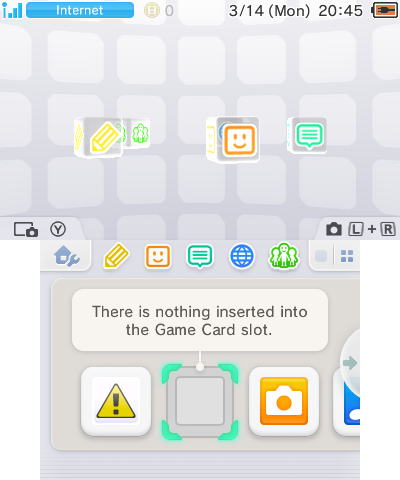
 wild light
im dumb
magic pumice
A game cartridge shows up there
wild light
lol
nimble shoal
if you insert a working card, it automatically selects it
wild light
i was thinking microSD card
magic pumice
No, we are talking the physical game cartridge you wanted to dump
nimble shoal
in that case, do you mean a game on a real game card, or a digital game on your microSD card?
magic pumice
Eshop installs go to SD card
nimble shoal
nimble shoal
in that case, do you mean a game on a real game card, or a digital game on your ...
^^^
wild light
real game card
nimble shoal
nimble shoal
https://tcrf.net/images/a/ab/3ds_home_menu.png
does it appear?
wild light
yes
nimble shoal
now go to GodMode9 again and try to dump it
wild light
ok ty
and to be clear
when c/p the files
i put them in the . . part of the SD card?
nimble shoal
choose "Copy to 0:/gm9/out" and then it goes to that place on the SD card
wild light
what? i just hacked my 3ds a few minutes ago... so im extremely new to this, i thought i just hit y in there, then y in the sd card
nimble shoal
actually, you need to do a different step
nimble shoal
nimble shoal
https://citra-emu.org/wiki/dumping-game-cartridges/
like mentioned on the citra pge
magic pumice
You have to dump the game decrypted for Citra
nimble shoal
Select
[TitleID]_[version].trim.3ds, then selectNCSD image options..., then selectDecrypt file (0:/gm9/out).
magic pumice
Copy and paste is encrypted
There's like 6 different ways to dump, depending on purpose
nimble shoal
for game cards used in emulation, this is the way
wild light
ok its dycrypting now
magic pumice
We also have cartinstall for installing the cartridge to sd
Dumping raw files and folders for making game mods
Dumping installed titles as a file that can be installed on another system
And encrypted and decrypted dumps of installer files or cartridges
Console needs encrypted, Citra needs decrypted
wild light
almost done...
done
time to do the same for all my 3ds games
so i can then finally make content about them'
im so hyped
@nimble shoal it says "File is not encrypted" when trying to decrypt it
differant game this time
nimble shoal
then choose "Copy to 0:/gm9/out"
wild light
gotcha
nimble shoal
try "Verify file"
wild light
what about transfering save data