#How to change the texture of just one face
1 messages · Page 1 of 1 (latest)
 sharp prairie
 eager mason
If I'm not wrong, when you add a material to a mesh, it affect directly all the mesh. And since you made it with probuilder I can't encourage you to texture only the bottom part on photoshop or substance painter.
I don't know what the final goal would be, but if you can afford it, just make a separated mesh with same proportions. I think probuilder allows you to select faces of a mesh and separate them btw, but not 100% sure.
 thin hamlet
What? You don't need to make it a separate mesh. The faces just need to be given a different material. Alternatively, they can be UV wrapped differently
Whether or not ProBuilder allows this is a different question but then, **Pro**Builder is intended for **pro**totyping. If you're using it in an actual finished product, you're using it wrong
 shy zenith
1:24 timing
https://www.youtube.com/watch?v=bigj13SU1rs
Probuilder was used in the video, it is a free asset
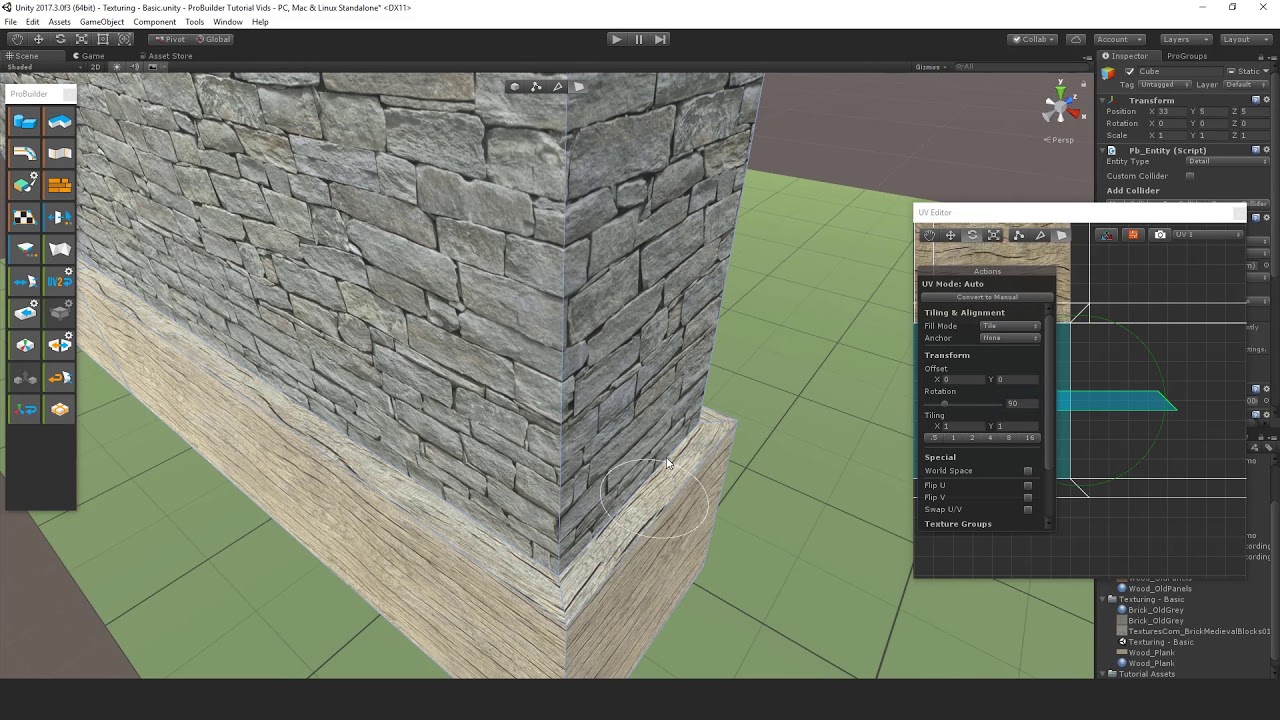 thin hamlet
I think they know it's a free asset, considering they're using it
eager mason
My bad I thought you couldn't separate vertex groups to assign different materials.
 craggy rune
eager mason
My bad I thought you couldn't separate vertex groups to assign different materia...
craggy rune
eager mason
My bad I thought you couldn't separate vertex groups to assign different materia...
Technically, vertex groups are a different concept.
To assign multiple materials to one mesh, you'd split it into submeshes.
eager mason
Hm? I don't know what asset groups are. I was talking more about blender's vertex groups, where you can assign different materials to certain groups of vertex.
Are asset groups a different thing or I'm just being dumb?
craggy rune
eager mason
Hm? I don't know what asset groups are. I was talking more about blender's verte...
Pardon, vertex groups.
Dunno why I wrote "assets" there 😅
Assigning multiple materials to faces in blender creates submeshes. While vertices can also hold color information, I've never come across someone using vertex groups to assign materials.
eager mason
craggy rune
Assigning multiple materials to faces in blender creates submeshes. While vertic...
I personally used this once as a way to make an emissive material for only a certain part of a mesh, but later I discovered about emissive maps 