1 messages · Page 1 of 1 (latest)
 obsidian jasper
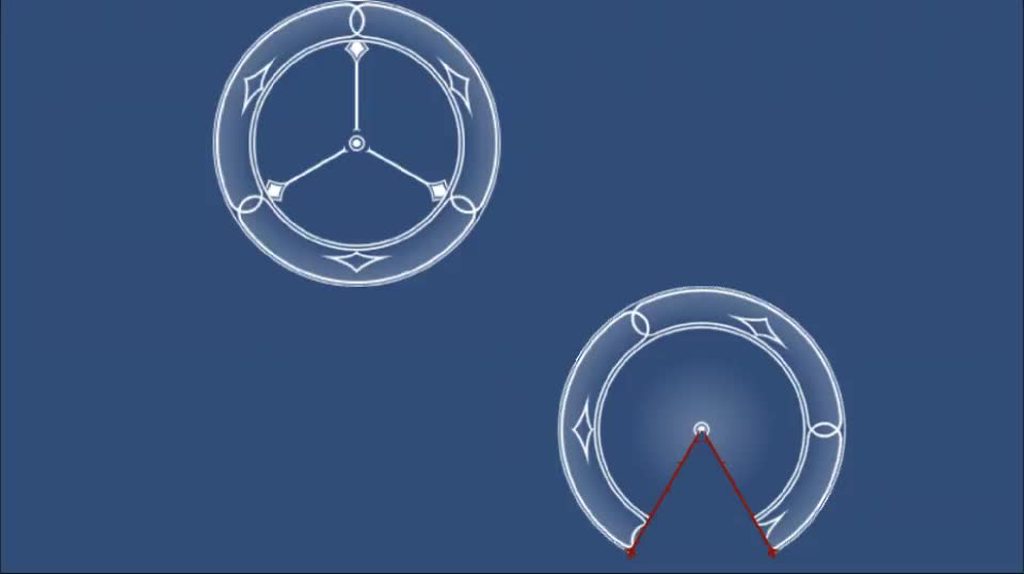
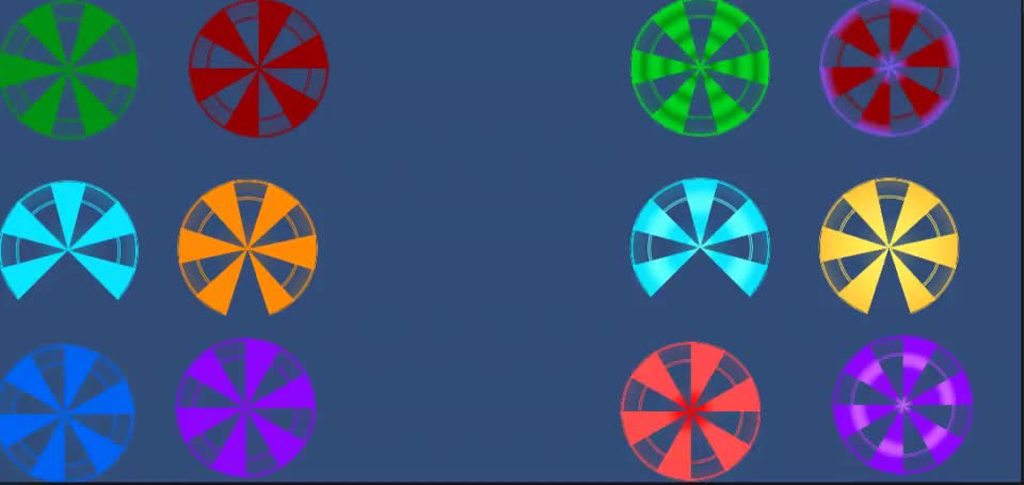
You can see on the screenshots an example of what I'd like to achieve.
I have a white image, a little complex, and I want to fill it with color progressively.
I have not a single clue as to how to achieve that and my research have yielded no result.
Any help would be grealty appreciated
 wanton pollen
easy way to change colors of objects smoothly using what we call Lerp ( Linear Interpolation)
#unity_tips_and_tricks #unity_games #madewithunity #unity
OTHER VIDEOS :
Color Lerp : https://youtu.be/C_f2ChrcSSM
Vector Lerp : https://youtu.be/d6BPukJ5QkA
Rotation Le...
Is this you want!!?!??
You want to slow change the color??
obsidian jasper
Not exactly, lerp allow me to change the color but not to have this kind of effect

Only half the image is purple
 misty cloud
Set the Image's fillMode to Horizontal or Vertical.
Then change the fillAmount.
If the sprite of the image is sliced, you may need to use a Mask to achieve the desired shape.
obsidian jasper
FillMode Horizontal or Vertical doesn't quite works.
I used a mask to achieve this result
You need an image to serve as background first.
Second you need a mask (here the mask is a white circle) and as a child of the mask the exact same image
At the beginning the mask size should be 0 in both width and height and you grow the mask size overtime to reveal a colored version of the same image
Not sure if it's the best solution but I kind of works
 foggy glade
Sounds like a nice solution
obsidian jasper
Actually it's not. When the mask overlap the image below you can see the borders with due to transparency. Or, if you have transparency in your image, the colors kind of merge. It works with white/grey and an overlapping color but if you have blue and red it's not working anymore.
I finally used a custom shaker to have a better result
Shader*
foggy glade
Hm someone mentioned in another post that it could be done with shader and a "stencil Buffer" what ever this is

1 vote and 5 comments so far on Reddit
This is kinda what you already did. Probably there is a way to remove the border you mentioned
✅ Get the Project files and Utilities at https://unitycodemonkey.com/video.php?v=pBB_YYSujrc
Let's make a great Radar Pulse Effect to detect hidden Items and Enemies.
Get Survivor Squad: Gauntlets in the Game Bundle 67% OFF
https://unitycodemonkey.com/gameBundle.php
Awesome Radar Effect in Unity!
https://www.youtube.com/watch?v=J0gmrgpx6gk
Ho...
 ebon forum
foggy glade
Hm someone mentioned in another post that it could be done with shader and a "s...
ebon forum
foggy glade
Hm someone mentioned in another post that it could be done with shader and a "s...
If you bother to make shader for that, theres absolutely no need for stencils or anything fancy, its just really simple shader with one comparison based on the position and branch node (or ternary operator with handwritten shader)
foggy glade
ebon forum
If you bother to make shader for that, theres absolutely no need for stencils or...
I'm not familiar with shaders at all, do you have a nice guide or something for this
ebon forum
Not really, you just need some understanding of shaders, highly doubt someone made a tutorial for this specifically
obsidian jasper
foggy glade
https://chat.openai.com/share/aedaf553-932f-4e21-89ed-95740a507be6
I have created a small github repository with both of my shaders if you want, RadialColorFill and RadialColorPusle
https://github.com/Hyzau/UnityShaders

This project contains some of my shaders for Unity. - GitHub - Hyzau/UnityShaders: This project contains some of my shaders for Unity.
The chat GPT shader has several problem.
First it doesn't use a texture so you'll never see the image you want to use.
It's an opaque shader so you won't have transparency
It's not parametrable
I could go on but overall it's not what you want.
I have yet to create a LinearColorFill/Pulse shader for the arrow indicator
I'll probably add them and a readme to the github repo around monday or tuesday
You can see both shader in action here