#luckperms-web
1 messages · Page 4 of 1
 stoic current
 stoic current
exactly
 plush oracle
All im saying is you didnt have to be like that. Asking them normally to take the convo elsewhere wouldve done the trick
 open beacon
!ask
 sweet sierraBOT
Please ask your question!
Please ask the question you have. Don't ask to ask, or ask to DM someone. There are people here to help you, but we need to know what to help you with, so please just ask the question you want to in as much detail as possible!
Or, try here first:
Why shouldn't I ask to ask?
open beacon
how to get luckperms
stoic current
It's the whole website :P
 shrewd cloud
you're the whole website
 native plover
youre mom is so fat she is the whole luckperms website
stoic current
open beacon
https://discord.com/events/934466447835541526/950153177129451530
what
why have you posted a link to an event no one can access in this channel lol


 cloud arrow
you created a group called that
delete the group, then add the permissions to the ‘Add permissions’ box to the right group
then press the add button
 odd temple
ok
i need this one
tho

they said like click in group default and add permissions like kp.kit.archer
 earnest mango
also this should be in #support-1
 last hatch
Hey, how is crowdin implemented for LuckPermsWeb? I don't see anything related to their RESTful API in the repository so I really wonder how it's done
I am asking because I would like to implement crowdin on my own website as well, but I can't find any good tutorials/documentation
 rotund sluice
hello :) it does indirectly use the crowdin api
but the translation downloads are cached by a small web service that sits in between
it's probably not the best way to do it, but we already had something setup for the plugin, so, yeah
I think the way crowdin recommend is to use the github integration
that way, it will automatically (I think?) read the base file from your repo, then crowdin's bot will PR the translations back as/when they are contributed
last hatch
Ohhh okay I see
I find it strange there is so little information on how to actually setup crowdin
I'll try the GitHub integration, thanks
 brittle lotus
Hello, how do I do the TAG for luck prems when I give the luckprems group to one person?
 shrewd cloud
can you send the link here please
 viral sphinx
the newest one?

LuckPerms - A permissions plugin for Minecraft servers.
LuckPerms is a permissions plugin for Minecraft servers. It allows server admins to control what features players can use by creating groups and assigning permissions.
nvm it works now
just reloaded it all
 valid vortex
I have a question about the web editor, how do you make a page expire
and not visable anymore
stoic current
you mean an editor session? they expire after a week
valid vortex
stoic current
you mean an editor session? they expire after a week
is it possible to make it expire now
I really need it to expire
sweet sierraBOT
It is safe to send an editor link in public.
Any changes made in the editor have to be applied using the /lp applyedits command - impossible unless the person with the link is also connected to the server and with the required in-game permissions to use LuckPerms commands. It's effectively just as safe to share an editor link as it would be to share a screenshot of your permissions or a pastebin of a configuration file. The editor doesn't contain any sensitive data (except perhaps player names).
More Information:
Concerns about the proprietary nature of your permissions setup?
Please, don't be. We're here to help, not steal your permissions setup. Additionally, permissions can be tested by players simply joining your server and seeing what they can do.
valid vortex
rip
odd temple
odd temple
!editorsafety
does this still apply if you accidentally clicked the trust browser button? cause I just did while getting help with a plugin issue lol
was looking for a way to untrust all of my browsers but don't see one
shrewd cloud
odd temple
does this still apply if you accidentally clicked the trust browser button? caus...
The embed is slightly outdated. I don’t remember exactly where it’s stored, but there is a file with all of the trusted browsers I believe.
plush oracle
you can untrust by removing the lp-editor-key metadata from your user with /lp user <name> meta unset lp-editor-key (this only applies to editor keys to users, not console!)
for console granted keys: there's a file called editor-keystore.json in the LuckPerms folder - delete that and restart your server
shrewd cloud
Ah yea, that’d be the one.
odd temple
thanks guys
 hybrid helm
only trust your private/personal computer's browser
odd temple
@odd temple this is not really the place to share those kinds of things
 alpine rover
does anyone know how to automate LuckPerms permissions to automatically promote based on player level?
the 2 mods for fabric on the website are extremely outdated
odd temple
can you stop posting in every channel and being demanding?
be patient and polite and wait for a response, people here help in their own free time voluntarily, not everyone is here 24/7 to respond and not everyone has answers to everything
alpine rover
odd temple
be patient and __polite__ and wait for a response, people here help in their own...
sorry
odd temple
im trying to assign perms and delete groups, but whenever i save, nothing gets saved and it resets to default
 untold herald
odd temple
im trying to assign perms and delete groups, but whenever i save, nothing gets s...
untold herald
odd temple
im trying to assign perms and delete groups, but whenever i save, nothing gets s...
Did you run the save command it gives you?
cloud arrow
what error
odd temple
and tells me to force use the command
untold herald
Show the error
plush oracle
Its not an error
Its telling you it thinks that the editor came from another server. If that was the case, only what was added in this session or edited would be put to the server- people actually did that in the past and were wondering why it didnt add everything to their server.
This is due to the fact that the old editor only saved changes, not the whole setup and will therefore cause people to report this as a bug when really it isnt.
If you are sure the editor is from your server, its safe to run the force command.
 empty epoch
I have a question do I say it here
stoic current
empty epoch
I have a question do I say it here
Depends, is it related to the web editor or website?
Also, best to just ask your question. The internet hates when people ask to ask
!ask
sweet sierraBOT
Please ask your question!
Please ask the question you have. Don't ask to ask, or ask to DM someone. There are people here to help you, but we need to know what to help you with, so please just ask the question you want to in as much detail as possible!
Or, try here first:
Why shouldn't I ask to ask?
 deft elk
hey my lp isnt working
i tried enabling /shop for default
used to work but wont anymore
 rotund sluice
guys my /shop is cant use for member, how i can fix, i done install luckperms
rotund sluice
its work now
plush oracle
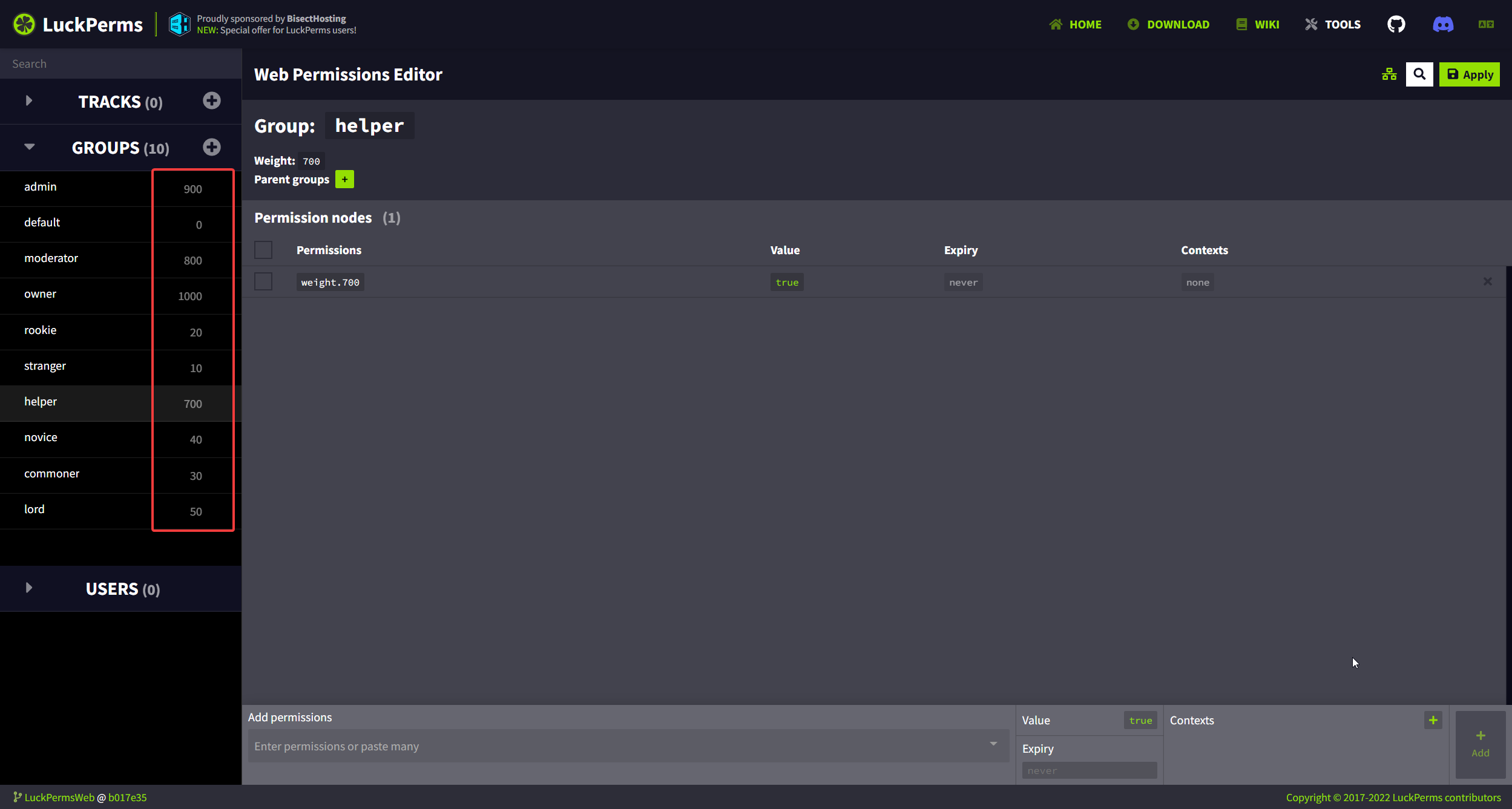
Look what I managed to reproduce lol https://i.imgur.com/gZ0wa9X.png
 cloud arrow
save, and reopen it?
plush oracle
It is saved, just not reopened
Should sort it tho, since well, thats what the apply button is for, to get rid of reopening
cloud arrow
the plugin sorts it
odd temple
the order is determined by the plugin when you create an editor link
native plover

plush oracle
its not a game breaker, just weird imo that saving doesnt trigger it. makes sense. and doesnt
odd temple
the group list is sorted when you run /lp editor only (as so is the user list (even though they both exist in the same list of holders but it's populated at different steps))
plush oracle
Dw I do get that
What I'm saying is it would be sexy if it would resort on save anyway
Let me dream okay
 inland hollow
honestly the serializer shouldn't be the one dictating order
that's very much the web app's responsibility
 tawdry lintel
How do I move groups? like i have one but it wont MOVE UP in the list
 tawdry lintel
Fixed, thanks
plush oracle
👍
tawdry lintel
i have 2 ranks at 1125 and 1175 and they both are below all the ranks
is there a reason for this
odd temple
did you create a new editor session like mentioned in the screenshot above?
odd temple
in game where?
tawdry lintel
tab list, chat
odd temple
tab list ordering is determined by your tab list plugin
i dunno how "chat ordering" makes any sense
odd temple
👍
 dusky lantern
is there a way to refresh without having to start a new editor if its connected via socket?
 worn hawk
No, it's not possible
 sturdy owl
Yo any option to fast removing all users from lp editor? For me its 450users... to much to clicking everyone one by one
shrewd cloud
sturdy owl
Yo any option to fast removing all users from lp editor? For me its 450users... ...
you want to set everyone back to default?
sturdy owl
something like this. Or just remove all permission for this users
shrewd cloud
if you want to set all users back to default, you can just run lp bulkupdate users delete.
sturdy owl
Okay. What about eventually backup? I mean in which folder/file i can get back all this users i deleted from my backup?
shrewd cloud
if you took a backup, it'll be in the LuckPerms directory.
should be something like <backup name>.json.gz
sturdy owl
with .gz i have only lpfol.gz and one
eBackUp 2021-12-25.04-00-00.zip.filepart
shrewd cloud
did you make a backup?
sturdy owl
Only the entire server yesterday using the eBackup plugin.
Copying the LuckPerms folder from yesterday's backup will not work the same as what you wrote about above?
shrewd cloud
also depends if you're using FlatFile or Remote storage
sturdy owl
odd temple
it may not
why?
odd temple
it depends on storage method and on if the server was running or not when the backup was created
sturdy owl
eBackup plugin creates a backup while the server is running
shrewd cloud
if stuff was actively changing as the backup was running AND you're using a local storage method, it'll likely be corrupted.
odd temple
well that is not ideal
plugins may be reading from/writing to files or "local" databases (sqlite/h2), if those happen when the files are being copied that's a big recipe for disaster
shrewd cloud
using /lp export is the ideal method for taking a backup of your LP info.
sturdy owl
shrewd cloud
if stuff was actively changing as the backup was running **AND** you're using a ...
Nobody was on the server and nobody was doing anything during the backup
shrewd cloud
then you might be fine.
get it on a test server, open the archive, and find the db file in the LP folder.
see if it still has all of your data.
sturdy owl
shrewd cloud
then you might be fine.
get it on a test server, open the archive, and find the...
any options to extract only the LuckPerms folder from the backup without downloading it completely?
earnest mango
I never even thought of that reason why backup plugins are bad...
shrewd cloud
sturdy owl
any options to extract only the LuckPerms folder from the backup without downloa...
dunno. im not familiar with the backup plugin.
odd temple
it might be fine now, but you should really not take that as an "it's always like that" situation, if you want to take any of your backups with any grain of seriousness then do yourself a favor and don't run "online backups", either do them when the server is offline or use the plugin's provided backup feature (if any, like lp export)
better be safe than sorry
earnest mango
or both, I take a lp backup every now and then, plus I have hourly and daily full server backups
shrewd cloud
Honestly, i'm considering just setting up a server running a single LP instance, and getting backups on a regular schedule.
odd temple
that's not unsmart, hey
 strong tulip
?latest
 forest python
!latest
sweet sierraBOT
Latest version
5.4.21


 eager forge
anyone can help me? why i can't add more permission ?
please help me please😭
i cant add more commands
plush oracle
Can you be a little bit less specific 😐
shrewd cloud
small flaw in the editor with the add groups button, found by Zero. the sizing of the dropdown box, seems to line up fairly well with the actual listed groups. (example posted: picture 1)
Any chance something like this (https://media.discordapp.net/attachments/905612987266650133/969980385427611678/unknown.png) could be changed? border radius of 2px, border width of 1px.

 plush oracle
Addition: I was confused asf first due to my second screens colors not being so dope so I thought that the dropdown is broken (pic 2) and that hitting the button switches the first group lmao.
Bad luck, the group name length fits perfectly to cover it <.<
native plover
@shrewd cloud feel free to pr
shrewd cloud
native plover
<@412070526081695744> feel free to pr
When I get home, I may
stoic current
that whole section just needs to be redesigned lol i had no idea what to do with it
shrewd cloud
shrewd cloud
When I get home, I may
a week later, definitely not doing this.
vue confuses the shit out of me.
cloud arrow
what would it get changed to?
shrewd cloud
what's in the bottom screenshot.
border-radius: 2px, border-width: 1px, border-style: solid, border-color: white
I figured out the (s)css, but as far as making a class for the ul the dropdown is in, i couldn't figure that out.
cloud arrow
im probably really dumb but isn't it just the css that has to be changed like you did or what else has to be changed?
shrewd cloud
Maybe, but i made the changes, under a class just so nothing else broke when adding the border.
so, if the border css was changed for ul, it'd apply to all unordered lists. where as if it was ul class="dropdown" and your css was under .dropdown it would be specific to that.
@stoic current, Am i being too 'cautious' about it, or can i just make the changes for all unordered lists?
stoic current
yeah preferably you don't make a change that affects all components
 opal bane
im like almost 100% positive that ive used the lp editor before and it had my new skin, but now its using my old skin. i changed it 15 weeks ago according to namemc, so im not sure how it couldve gone back to using an older skin 

seems like it might not be something you can fix though
shrewd cloud
It might be cached in your browser.
try to reload the page without cache. (ctrl + shift + r iirc)
opal bane
still shows the old skin
i checked devtools to make sure it wasnt using the cache and it in fact was not when i did that
native plover
the lp web app uses a 3rd party service to get your skin images, so this isn't an issue on our end
 storm laurel
hey
forest python
What a POS
 rain ore
I have the problem when I changed the byteserver to my self-hosted the links in the LP editor are no longer recognized. I have adjusted the link in the config. For bytesockets I did not know what to enter
 pale swan
Getting this error when trying to self host the web
 ERROR  Error loading vue.config.js:
 ERROR  Error: Git returned with status 128: fatal: not a git repository (or any of the parent directories): .git
Error: Git returned with status 128: fatal: not a git repository (or any of the parent directories): .git
fixed, the problem was the plesk git extension. Worked after i cloned it manually
 tardy marten
has 1.19 been released for luckperms?
stoic current
wasn't 1.19 released like months ago? lol 
 dusty lake
stoic current
wasn't 1.19 released like months ago? lol <:thonking:379541184697204736>
dusty lake
stoic current
wasn't 1.19 released like months ago? lol <:thonking:379541184697204736>
where is 1.19 plugin ??? 😡
forest python
stoic current
up my butt
native plover
stoic current
wasn't 1.19 released like months ago? lol <:thonking:379541184697204736>

stoic current
native plover
<a:neutral:955569225949397112>

native plover
Heyyy x
stoic current

 fading hawk
where is 1.19 plugin ??? 😡
odd temple
fading hawk
Why do I only see 5.4.26
forest python
That's the version number
fading hawk
ik
forest python
then why ask
fading hawk
But why doesn't it work on my 1.19 server
forest python
No idea
fading hawk
It's working now, thank you
odd temple
don't worry, I'll take the credit
forest python
Sweet, that way when he comes back for more help I can pass him to you
odd temple
bet
native plover
@odd temple hi!
odd temple
@native plover hi x
stoic current
love when this channel never gets used for its intended purpose 😃
shrewd cloud
Hi turbo
opal bane
stoic current
love when this channel never gets used for its intended purpose 😃
ill use it for its intended purpose >:)
i was checking out the thingy that helps you pick what luckperms version you should download and noticed that most of the combinations that dont work show this error
 stoic current
could you try this
https://deploy-preview-409--luckperms.netlify.app/

LuckPerms - A permissions plugin for Minecraft servers.
LuckPerms is a permissions plugin for Minecraft servers. It allows server admins to control what features players can use by creating groups and assigning permissions.
opal bane
that was after picking single server > nukkit > "b92 or newer" (which looks like it should say "or older")
oh neat
id suggest skipping the version step for velocity though because theres only 1 option
stoic current
yeah not sure why that is there
just merged that change
been meaning to for a while heh
shrewd cloud
opal bane
id suggest skipping the version step for velocity though because theres only 1 o...
Wdym? 1.x and 3.x both have downloads last time I checked
cloud arrow
don’t think so?
opal bane
shrewd cloud
Wdym? 1.x and 3.x both have downloads last time I checked
talking about here
 cloud arrow
ah oops
 tardy violet
On one of my olders servers i have to paste a link to update the luckperms, but for the other ones all i have to do is click 'save'
How can i change it to also have it on the other server that i also have to only click save?
plush oracle
Update your lp :)
tardy violet
its just bothering me to type --force the whole time
oh oop
should have thought about that before asking
plush oracle
dont do the force thing xD
applying edits from the same editor window with the applyedits command applies the last edits, not the entire setup.
so you may find some previous additions being missing now
tardy violet
wouldnt that show in chat for me if it deleted other things?
plush oracle
no. the session goes from /lp editor, then saves changes from the base where you did /lp editor again and again
so there is no deletions
at least none that lp knows about since it always goes off the base when you first got the editor
 tame coyote
How can I know which version is for older Minecraft version, such as 1.18.2? Is there a list or something?
earnest mango
tame coyote
How can I know which version is for older Minecraft version, such as 1.18.2? Is ...
Wrong channel.
(But the downloads page shows all our platforms and what versions each works for: https://luckperms.net/download)
LuckPerms - A permissions plugin for Minecraft servers.
LuckPerms is a permissions plugin for Minecraft servers. It allows server admins to control what features players can use by creating groups and assigning permissions.
 alpine forge
Its like your profile picture was made for saying "wrong channel" 😂
forest python

opal bane
forest python
<:rtfm:249754762529079297>
this should be an emote in this server 😂
earnest mango
alpine forge
Its like your profile picture was made for saying "wrong channel" 😂
Close, it's "read the fucking manual", because ~ 90% of my messages here are sending people links to the wiki
opal bane
earnest mango
Close, it's "read the fucking manual", because ~ 90% of my messages here are sen...
fake news

 shrewd cloud
!usage
cloud arrow
how can i change my language on editor
browser itself is set to English but editor lang is Dutch
oh found it
plush oracle
what
native plover
@stoic current heyyy i finally fixed my PR https://github.com/LuckPerms/LuckPermsWeb/pull/392
stoic current
native plover
<@139665464547606528> heyyy i finally fixed my PR <https://github.com/LuckPerms/...
one more change <3
easy one i promise

 stoic current
@native plover ty for your contribution x
native plover

 gentle hull
There is a little miss in this error message on the french website version 🙂
 plush oracle
Feel free to suggest changes on the crowdin project.
gentle hull
can you do it for me ? 🙂
plush oracle
Eh no.
gentle hull
Do you have a link to this ?
plush oracle

Crowdin
Help us translate LuckPerms and bring it to the world!
gentle hull
Thx you 😉
 urban pelican
may i suggest a update
stoic current
no


 stoic current
i was thinking about going back to jquery tbh
native plover
Ayo?
 frosty edge
is it possible to use luckperms web from mobile (pocket edition)?
opal bane
its very jank but you can just open the link in your phones web browser
stoic current
:(
opal bane
theoretically, isnt it possible to make a different permissions plugin that uses the luckperms editor 
native plover
I think there is also a fork of Pex that added a web editor
native plover
Powerranks sucks
Some network forked Pex and released a couple updates for it tho, can’t find it rn
 sonic jackal
!download
sweet sierraBOT
You can download LuckPerms for Bukkit/Spigot/Paper, BungeeCord, Sponge, Fabric, Forge, Nukkit and Velocity.
Additional downloads
 white kernel
!
 spark forge
The editor looks really good guys, compliments for the creators🙂
 snow herald
!download
sweet sierraBOT
You can download LuckPerms for Bukkit/Spigot/Paper, BungeeCord, Sponge, Fabric, Forge, Nukkit and Velocity.
Additional downloads
stoic current
spark forge
The editor looks really good guys, compliments for the creators🙂
Thank you!
Honestly though, I created it about 4 years ago when I was just starting out as a professional web developer and there is a lot of room for improvement. I've been meaning to give it a refresh but haven't had much time to do so :(
native plover
New editor when
spark forge
It already looks good and clean in my opinion😅
stoic current
It's easy for an artist to see the flaws in their work. Haha.
odd temple
stoic current
Thank you!
Honestly though, I created it about 4 years ago when I was just start...
ligma
spark forge
😋
 void patio
maybe you should update you hp cmi is not listet as chat plugin and not as tab plugin and it works with luckperms
cloud arrow
feel free to pr
void patio
hmm can not found it i am blind
stoic current
void patio
hmm can not found it i am blind
GitHub
Source markdown files for the LuckPerms wiki. Contribute to LuckPerms/wiki development by creating an account on GitHub.
oh looks like you got it
thanks!
cloud arrow
idea to add a link on how to get the luckperms instance here? https://luckperms.net/wiki/Developer-API-Usage#obtaining-a-user-instance
void patio
Were doch nice wenn die wo nicht die chat plugins benutzen wo da stehen und wissen sie gehen mit LP die liste updaten könnten