#luckperms-web
1 messages · Page 2 of 1
 drifting otter
 rough fable
yes, read the wiki
 marsh otter
How could i blacklist commands on selected groups?
 hollow hare
marsh otter
How could i blacklist commands on selected groups?
hollow hare
marsh otter
How could i blacklist commands on selected groups?
LuckPerms does not blacklist/block commands, nor is this the proper channel to post your LuckPerms questions to. Read channel description before sending a message. 
rough fable
He most likely means how to restrict access to a permission, in a simpler term, setting a command's permission to false
to a command*
hollow hare
Negating a permission node does not necessarily correlate with blacklisting a command and such question would be better handled in #support-1 / #support-2.
 quick current
is there any way to quickly give a group all permissions including all permissions added by other plugins
rough fable
/op
quick current
i am opped yet i still cant do /gamemode as it apparently isnt a command
rough fable
if it's not a command how are you expecting to use it?
quick current
brother /gamemode is a command that should be in the game and now its telling me it is not a command
rough fable
Also this is not the right channel. This has nothing to do with LuckPermsWeb
quick current
ill figure it out cheers bossman
rough fable
You should move this to #support-1 or #support-2
 errant stirrup
quick current
is there any way to quickly give a group all permissions including all permissio...
errant stirrup
quick current
is there any way to quickly give a group all permissions including all permissio...
simply *
 worn hawk
I do see this nice update from Luck for the English language, but how should this be done in all other languages? Every translator should update their localisation?
#github-spam-web message
worn hawk
That sounds like a great solution. I've seen question whether LP will support a curtain version because it's not translated correctly in their language
Does that mean all languages now need a re-translate to support those variables?
 rotund sluice
Yes
worn hawk
Wouldn't it be a good idea to ping the Translators role in that case? To notify them all of this change
And if possible mark them in Crowdin as 'untranslated' or remove existing translations?
 shrewd cloud
 barren owl
Jebus christ can this thing stop whisper tracking
barren owl
Jebus christ can this thing stop whisper tracking
what are you on about
barren owl
I needed a plugin that controls /w and /@ so players cant use them
shrewd cloud
Okay and what does that have to do with LuckPerms?
barren owl
shrewd cloud
Okay and what does that have to do with LuckPerms?
Idfk I joined the discord cause it said it was a permissions plug in and I wanted to know if it covers /w and other player commands. It did not state exactly what your bot does just the general function of it.
you dont know what whisper tracking is thats okay. Nobody does outside the psychos In my damn community
Thats why its so hard to stop.
shrewd cloud
There's no bot? what bot are you referring to?
LuckPerms just allows you to configure permissions for players/user
barren owl
Sorry I meant plug in
 pulsar raptor
 opal bane
dont give the permission
 swift ledge
Hi, I'd like to report an a11Y issue with the web editor's usage with a screen reader, where is the best place to do that?
swift ledge
opal bane
although im not sure accessibility is a high priority for the web editor
Yeah, blind people aren't real, my bad :P
They don't deserve to use tools that sighted people use, how entitled of me lol
swift ledge
opal bane
although im not sure accessibility is a high priority for the web editor
I just mean that I feel accessibility should be just as high as a priority as something like a browser element not displaying on a certain browser for sighted people correctly.
But I do respect that there's probably less than 10 blind people using lp
 tepid umbra
Like they said, feel free to plop the issue up. https://github.com/LuckPerms/LuckPermsWeb/issues
It's Open Source with MIT license, which is very permissive. So you're always free to tackle the issue yourself (or hire someone to do so), if the timeline isn't ideal for you as-is.
I'm curious what the issue is myself, so I'll be paying attention. With any luck it's a simple fix.
hollow hare
 quiet holly
Anyone can help me
quiet holly
Anyone can help me
Use one of the support channels please and ask your questions there.
quiet holly
Plzz can you help me
 cloud leaf
The german verser of the site isnt update to the newest lo version. Only uo to 1.20
 stoic current
swift ledge
I just mean that I feel accessibility should be just as high as a priority as so...
stoic current
swift ledge
I just mean that I feel accessibility should be just as high as a priority as so...
you are 100% correct and i'm sorry a11y wasn't something i was experienced with when i first developed the current version of the editor... about 7 yrs ago now 😳
changing the list to a table would be a pretty big piece of work and unfortunately i've had very little motivation to continue supporting this project these days.
oh bother, they left lol
opal bane
i thought tables were bad anyways
stoic current
opal bane
i thought tables were bad anyways
not really, there was a big thing against tables back in the early days of HTML because ppl would use them for design layouts. they should be used for tabular data, which is exactly what the permission list is. i think i opted not to use it because i was naive and thought flex was the answer to everything.
shrewd cloud
Is that related to the web editor?
 storm night
Somone Help How To apply

 snow fjord
storm night
Somone Help How To apply
snow fjord
storm night
Somone Help How To apply
Just add --force at the end of your command
snow fjord
opal bane
https://discord.com/channels/241667244927483904/690683905677983756/1275573026187...
For me it always say that. When I force it, it works so I thought I did right
opal bane
snow fjord
For me it always say that. When I force it, it works so I thought I did right
never use --force
opal bane
it bypasses the checks it tells you about that stop you from making a change that does something unexpected
snow fjord
opal bane
it bypasses the checks it tells you about that stop you from making a change tha...
Why is this message showing up?
opal bane
it tells you exactly why
snow fjord
opal bane
it tells you exactly why
Well, the sessions I made were in fact started on my server
opal bane
snow fjord
Well, the sessions I made were in fact started on my server
are you running a bungee or velocity network?
snow fjord
opal bane
are you running a bungee or velocity network?
Normal Paper/Bukkit server
opal bane
and you havent applied any changes from the same editor session previously?
snow fjord
Well the first time I did /lp editor and edited groups and did /lp apply it sent me that message.
opal bane
do /lp editor, add a random node (it doesnt need to be a real one that does anything), and try applying the changes, and then send a screenshot(s) of the whole thing in chat
snow fjord
opal bane
do `/lp editor`, add a random node (it doesnt need to be a real one that does an...
A node?
opal bane
a permission node
snow fjord
opal bane
a permission node
I don't know what it is, I am completely new to Minecraft server stuff. Sorry 😅

 nova stream
Hellu
Is there a ways to download the latest luckperms version with an URL?
Try to use it for my project but can not find a way to download always the latest version
 sharp violet
what plugins do you have on a 1.21.1. craftbukkit server that the lucky perms work?
 tawny lily
nova stream
Try to use it for my project but can not find a way to download always the lates...
tawny lily
nova stream
Try to use it for my project but can not find a way to download always the lates...
 velvet tiger
Hello
a question
How can you do it with the luckperms plugin You can make it give the member rank to a new player
 sudden sequoia
 hollow hare
sudden sequoia
hollow hare
sudden sequoia
Stop cross posting everywhere.
hollow hare
sudden sequoia
can help me ?
Ask in #support-1. Someone will once they afford the chance. This is neither the correct channel, nor should you forward the same message on other 2 channels at the same time.
 wooden cradle
Is LuckPerms' web editor meant to list permissions from other plugins, or should I be writing them manually?
hollow hare
wooden cradle
Is LuckPerms' web editor meant to list permissions from other plugins, or should...
The prompts consist of permissions LuckPerms is aware of. They need to be checked first. You may enter permissions by hand - no need to fully rely on the suggestions.
wooden cradle
hollow hare
The prompts consist of permissions LuckPerms is aware of. They need to be checke...
Thing is, my network is fully made of custom plugins.
I was wondering if there is something I am meant to do for permissions written through triumphcmd's API to pop up in the web editor
Or if they are meant to appear automatically.
shrewd cloud
If a permission check isn’t made, LuckPerms will not know about it.
so make a permission check
wooden cradle
Oh they're there now! I need to open the editor from one of the backend paper servers and not the proxy. got it
hollow hare
Proxies have no concept of any of your backends. The permission suggestions within an editor session generated with /lpb or /lpv won't include any backend perms.
wooden cradle
shrewd cloud
so make a permission check
A permission check = you mean to add the @Permission("some.permission") above the command method?
(in the paper plugins)
wooden cradle
shrewd cloud
The proxy has no concept of any backend perms
Yeah I figured, hence I switched to the backend terminal
shrewd cloud
if that annotation corresponds to a check, then yeah. Most people just use the hasPermission method though
wooden cradle
Thank you so much for your help though! Sorry for not having talked about this in #support-1 or #support-2 though
wooden cradle
shrewd cloud
if that annotation corresponds to a check, then yeah. Most people just use the h...
Yeah it does I suppose
 lyric reef
Hi there. I'm using Fabric 1.20.1 and the Fabric PlaceholderAPI on the Luckperms web says it's for 1.21. Where can I find a version that supports 1.20?
 mortal imp
lyric reef
Hi there. I'm using Fabric 1.20.1 and the Fabric PlaceholderAPI on the Luckperms...
mortal imp
lyric reef
Hi there. I'm using Fabric 1.20.1 and the Fabric PlaceholderAPI on the Luckperms...
I just build a version of Fabric PlaceholderAPI for 1.20.1, do you want it ?
hollow hare
mortal imp
I just build a version of Fabric PlaceholderAPI for 1.20.1, do you want it ?
(They left)
mortal imp
hollow hare
(They left)
oops, but if someone want it : #support-1 message

 sweet sierraBOT
Hey xtoxicpanda_1! Please don't tag helpful/staff members directly.
 runic elbow
 viral sphinx
how do i get luckperms to do a trusteditor? it happens randomly and i dont know how to get it to show up
opal bane
as long as both your server and your web browser are able to connect to bytesocks, it should work
 umbral patio
!verbose
sweet sierraBOT
LuckPerms provides a verbose command to help you find out what permissions a command/plugin is checking.
Read more
 LuckPerms wiki
hollow hare
umbral patio
!verbose
LuckPerms wiki
hollow hare
umbral patio
!verbose
This isn't a bot commands channel.
 wicked quail
so, Im configuring the mod role for my server, (Fabric) and we're having issues giving the gamemode creative / spectator perm. how can we do this??
hollow hare
wicked quail
so, Im configuring the mod role for my server, (Fabric) and we're having issues ...
This has nothing to do with the LuckPermsWeb. Please redirect your question to either #support-1 or #support-2.
wicked quail
mmmmK
 merry notch
Hello everyone,does someone know how to access the web config panel?
opal bane
/lp editor
merry notch
thx
 glossy pulsar
Heyo everybody quick question if i do this alone for my own Owner group do i get access and permissions to all and every command there is on my server?
 opal bane
!nwc yes but
sweet sierraBOT
Wildcard issues
Some plugins are created in a way which results in odd behaviour when the root '*' wildcard is used.
More information:
 brazen berry
Can you import a preset?
shrewd cloud
What does preset mean in this context?
opal bane
dont crosspost
 sweet aurora
is there any way of downloading the latest version without needing to manually check using a browser?
Like some download link that just downloads the latest version
opal bane
theres the metadata api
sweet aurora
opal bane
theres the metadata api
thank you
 red canyon
hey
 lapis mason
Hey, everybody!
I wish there was a comment field for each permishen in the permissions editor!
I think it would be useful for many people!
Is it possible that this will appear in new versions?
shrewd cloud
what would this comment field be for? that is information that would have to be stored in the plugins database
lapis mason
shrewd cloud
what would this comment field be for? that is information that would have to be ...
This field would be useful for admins!
To leave notes for themselves, for some permishers!
So that in case of editing, you can see your so to speak notes!
For example, when I used YAML a long time ago I used to write comments for myself!
It would be nice to be able to do the same in the database!
I think it would not be very difficult to implement!
 lapis mason
I'm surprised it wasn't done in the first place, it's so obvious to me 
shrewd cloud
It's unnecessary data to be storing in the LuckPerms database.
what could you need to put in a comment section in your permission manager
lapis mason
shrewd cloud
what could you *need* to put in a comment section in your permission manager
I agree, this is additional data, but I don't think that this extra data would cause any problems
for example, you can make it possible to turn it on or off, whoever worries about the size of the data, turn it off!
For example, I haven't edited permissions for a year and when I open them, I have to remember what I configured there! This can take a significant amount of time!
and it would be cool if there were comments, for myself!
Wouldn't it be?
I'll write the text a little later and send it to github in issues
 long lynx
lapis mason
I agree, this is additional data, but I don't think that this extra data would c...
long lynx
lapis mason
I agree, this is additional data, but I don't think that this extra data would c...
naah
generally, people dont wanna put any additional data for perms
its strange
lapis mason
I described what I think is missing in the web editor here https://github.com/LuckPerms/LuckPermsWeb/issues/473
lapis mason
long lynx
generally, people dont wanna put any additional data for perms
Most likely you judge by yourself!
I'm sure that good administrators always mark and write down everything!
 ashen sedge
lapis mason
I described what I think is missing in the web editor here https://github.com/Lu...
ashen sedge
lapis mason
I described what I think is missing in the web editor here https://github.com/Lu...
Looks like you requested two different features in one issue, which is not good.
You should split the columns improvements into a separate one <- I think that would be quite cool.
lapis mason
ashen sedge
Looks like you requested two different features in one issue, which is not good....
fixed it 🫠
split into 2 issues
https://github.com/LuckPerms/LuckPermsWeb/issues/473
https://github.com/LuckPerms/LuckPermsWeb/issues/474
opal bane
i think this has been suggested and rejected before
lapis mason
opal bane
i think this has been suggested and rejected before
if this is really true, then it's sad (

 serene scaffold
can someone help me please i have a issue that ranks on my server dont work even tho everything is correct can someone help me QUICK bcz my server opens in 1 h and 30min
they don't have permissions
and idk what to do
opal bane
dont crosspost, especially into unrelated channels
 tulip blaze
I try to give admins permissions but it doesn't show me the whole list of permissions how do I fix that
 random coral
There is any permission to give the player OP permission?
Like minecraft.op, and the people with the group, have automaticly OP
opal bane
wrong channel
random coral
Sorry sorry
 gilded tinsel
whenever i try to open the web editor this error comes
 opal bane
gilded tinsel
whenever i try to open the web editor this error comes
opal bane
gilded tinsel
whenever i try to open the web editor this error comes
is your system clock correct?
 spare robin
so, I have my groups setup, (yes i wanna give these permissions to my players), but my players still cant use these permissions.
 opal bane
#support-1 but some.perm.* does not infer some.perm
opal bane
your jealous i responded faster? 
shrewd cloud
no, im just Jealous
 viscid whale
 cloud imp
How does the web UI communicate with the MC server?
nvm, found this https://luckperms.net/wiki/Web-Editor-Technical-Details
 vernal wharf
Hey, I have a question regarding the group names. Is it possible to edit a group name on the LP editor?
shrewd cloud
no, just the displayname.
the group name has to be edited with /lp group <group> rename
vernal wharf
shrewd cloud
no, just the displayname.
the group name has to be edited with /lp group <group...
Ah, okay, I see. Thank you for explaining. If I do it via the command, will it make anyone who is currently in the group invalid, or will they stay in the group after the rename? im guessing it wont affect anyone within the group but thought i better ask
sweet sierraBOT
Quickly update a large amount of user and group permissions by using the bulkupdate command.
Read more
LuckPerms wiki
vernal wharf
shrewd cloud
the users will still have the group.<old group>
you'll have to bulkedit that
awesome thank you for the information it worked 🙂
I also wanted to ask if LuckPerms has added a password feature yet. A while back, I asked about this for a server network with multiple backend servers that use the same LuckPerms via proxy. The idea was to prevent staff with console access from accessing the LuckPerms editor by requiring a password for access. I assume this hasn't been added, but I wanted to check.
The reason I need this is that each backend server has different developers, and they should not have access to other servers or gain additional privileges beyond the one they're working on. The only other way I can think of achieving this is by separating LuckPerms and running it individually on each backend server instead of through the proxy. However, I’m unsure how that would work with DiscordSRV, which grants ranks to users after completing steps in Discord. If LuckPerms were separated per server, it would only apply the rank to one server instead of all of them so thats why i didnt go with that due to the Synchronization issue.
opal bane
vernal wharf
awesome thank you for the information it worked 🙂
I also wanted to ask if Luc...
luckperms on the proxy doesn't replace luckperms on backend servers
 mossy steppe
Hi. I need help, please
Any staff that can help me with a problem?
vernal wharf
opal bane
luckperms on the proxy doesn't replace luckperms on backend servers
Sorry, I mean they all share the same database. Ignore the part about the proxy.
 echo falcon
Hey, am I missing something or why permissions list in my web editor is empty? I remember on older versions it shows all found nodes there....
opal bane
echo falcon
Hey, am I missing something or why permissions list in my web editor is empty? I...
it only shows nodes it knows about
echo falcon
opal bane
it only shows nodes it knows about
Hm, got it, thanks. But shouldn't it know about at least own and vanilla nodes? My list is completely empty
 stone blade
Heya all, how would I go about hosting the LP Web Editor on my own server/domaIn?
 earnest mango
!selfhosting
sweet sierraBOT
Learn how to self-host all the web interfaces.
LuckPerms wiki
earnest mango
Wasn't sure we actually had a command for that link, cool
stone blade
Thanks @earnest mango
sweet sierraBOT
Hey croftyden! Please don't tag helpful/staff members directly.
 silent mica
Hi, im trying to self host luckperm site. im on step 2 . but when i click link for "You can either use the automatic setup script or install manually." i get a github 404 error. trying to get the scrip or manual install. neither links work
shrewd cloud
can you link the page you’re looking at (I’m on mobile and don’t have it readily available)
shrewd cloud
I mean the guide where you see those links
silent mica

LuckPerms - A permissions plugin for Minecraft servers.
LuckPerms is a permissions plugin for Minecraft servers. It allows server admins to control what features players can use by creating groups and assigning permissions.
on Step 2 its at bottom of page
opal bane
you can follow the build steps in the luckpermsweb readme
is there any particular reason you want to self host though?
silent mica
Thank you, site where servers will be running will have very limited access to internet due too security reasons and clearance.
 pliant tusk
Hi, recently a staff member of mine gave a player the * perm and he created alts using VPN and gave them the * perm is there a way to check who who has the * perm on the server?
 placid heath
pliant tusk
Hi, recently a staff member of mine gave a player the * perm and he created alts...
placid heath
pliant tusk
Hi, recently a staff member of mine gave a player the * perm and he created alts...
as i remember there's a check perm command
just need to find it in the wiki
opal bane
pliant tusk
Hi, recently a staff member of mine gave a player the * perm and he created alts...
search command or just search in the editor
shrewd cloud
search command is better, because editor only displays up to 500 users.
pliant tusk
how do i use search command?
pliant tusk
placid heath
as i remember there's a check perm command
i cant check 990 members bro
pliant tusk
e
earnest mango
pliant tusk
how do i use search command?
/lp search <permission> i.e /lp search * should list every player who directly has that permission set, as well as any group who has that permission. I'd also highly encourage looking through /lp group <group> listmembers for any group with elevated permissions (i.e. your staff / admin groups) to ensure the attacker didn't also give himself a group
pliant tusk
earnest mango
`/lp search <permission>` i.e `/lp search *` should list every player who *direc...
Thanks for saving my 2 year old minecraft server
 shrewd cloud
you could have also just ignored wildcards
 odd temple
!chat
sweet sierraBOT
LuckPerms does not perform any chat/tablist formatting of its own!
LuckPerms only acts as the source for prefixes / suffixes, it doesn't actually apply them. You need an appropriately configured chat/tablist formatting plugin for them to be displayed. If the values appear correctly when you run /lp user <user> info, LuckPerms is doing its job!
FAQ answer: Prefix isn't showing?
List of chat/tablist formatting plugins that work with LuckPerms
odd temple
lol
 winter scarab
hi
odd temple
How can i turn on auto role when a player joins then he get instant member
odd temple
odd temple
How can i turn on auto role when a player joins then he get instant member
The group default should be member
 lean roost
im going crazy bro
luckperms keeps giving me the prefix in my user perms
with a random weight number
opal bane
wrong channel
opal bane
a support channel
 crimson grove
can someone send me a cool owner prefix?
 regal dagger
I'm having trouble viewing roles, I can't figure out why sradmin is above owner, can anyone tell me why?
shrewd cloud
which one has a higher weight
regal dagger
I asked chatgpt and it told me to do this:
/lp group owner setweight 100
/lp group sradmin setweight 90
/lp group admins setweight 80
/lp group srmod setweight 70
/lp group mod setweight 60
/lp group srhelper setweight 50
/lp group titan setweight 45
/lp group helper setweight 40
/lp group blaze setweight 30
/lp group trainee setweight 20
/lp group crystal setweight 19
/lp group mystich setweight 18
/lp group silver setweight 17
/lp group gold setweight 16
/lp group miniyt setweight 15
/lp group youtuber setweight 14
/lp group default setweight 1
is that correct?
sometimes it puts me default at the top of all the high ranks
shrewd cloud
i didn't ask you what chatgpt told you. i asked you which one has a higher weight. look at /lp listgroups
regal dagger
shrewd cloud
i didn't ask you what chatgpt told you. i asked you which one has a higher weigh...

This is the view with /lp listgroups
worn hawk
regal dagger
sometimes it puts me default at the top of all the high ranks
!tab Assuming you have trouble with the order in tab:
sweet sierraBOT
LuckPerms does not perform any chat/tablist formatting of its own!
LuckPerms only acts as the source for prefixes / suffixes, it doesn't actually apply them. You need an appropriately configured chat/tablist formatting plugin for them to be displayed. If the values appear correctly when you run /lp user <user> info, LuckPerms is doing its job!
FAQ answer: Prefix isn't showing?
List of chat/tablist formatting plugins that work with LuckPerms
regal dagger
Ok i've fixed, thanks
 steel frost
Can I use LuckPerms with Paper
 vital vine
Good day. I have a problem that I’ve been fiddling with for a couple of hours now, so I decided to contact you.
I'm trying to deploy a bunch of Velocity servers on my machine. All servers are connected and work great, but when I try to install and connect LuckPerms, the same error pops up, could someone tell me what I’m doing wrong?
LuckPerms successfully connects to mysql, but when I try to open the web editor, a couple of errors occur, I am attaching screenshots.
in the libs folder luckperms downloaded 26 .jar files, version 2 of servers 1.16.5, one of the servers 1.20.4 and the latest build of velocity
also the server uses modern velocity protection, disabled the Windows firewall, did not help
Found a solution to the problem: users from Russia disable "zapret" or vpn"
 marble sphinx
and https://github.com/LuckPerms/web-installer#automatic-setup is deleted
 open patrol
404 error in command
/lp applyedits <code>
 earnest mango
applyedits commands are only good for 15 minutes before they expire
 tulip egret
guys i need help. I just migrated my network from bungee to velocity and changed the jar of luckperms on the proxy server (velocity)
I tried the command /lpb editor end it doesnt work. I alto tried /lpv editor but nothing changed, how can i solve??
shrewd cloud
what output are you getting when you run lpv editor from the velocity console
tulip egret
oh it worked! So i nedd to do the command only in the velocity console?
shrewd cloud
either in-game, or in the proxy console
tulip egret
in game it doesnt work
shrewd cloud
you can't run proxy commands from a backend console
then you don't have perms for it
tulip egret
but my rank have luckperms.*
and i done it a lot of times before switching to velocity
shrewd cloud
show the output of /lpv info and /lp info
tulip egret
in a normal backend server?
shrewd cloud
in their respective server
run lp info from the backend server console, and lpv info from the proxy
tulip egret
this is the command lpv info from the velocity proxy

and that from a backend server

it doesnt read the database maybe?
shrewd cloud
1 of them is using h2, the other is on mysql.
your proxy needs database credentials.
tulip egret
i copyed the exact "config.yml" file from /plugins/luckperms (of the backend server) and i also have "storage-method: mysql" and the other option even in the proxy server
shrewd cloud
okay well don't do that. those configs are different
tulip egret
uh ok ok
shrewd cloud
stop your proxy, delete your config.yml from it, let it regenerate and manually add your database credentials
 tulip egret
shrewd cloud
stop your proxy, delete your config.yml from it, let it regenerate and manually ...
tulip egret
shrewd cloud
stop your proxy, delete your config.yml from it, let it regenerate and manually ...
Thank you for your help, you saved me!!😄
 waxen phoenix
Lp editor
hollow hare
waxen phoenix
Lp editor
What about it? 
 zinc vector
Hey guys! There was an H2 driver, lpb editor was working fine. Right now I have configured MariaBD, and lpb editor gives an error:
How to fix it?
zinc vector
@opal bane can u help me?
sweet sierraBOT
Hey twinkie29! Please don't tag helpful/staff members directly.
earnest mango
zinc vector
<@304316646946897920> can u help me?
Don't ping, don't crosspost
 autumn oxide
Hello, is it intended that I can't find essentials.commandcooldowns.bypass in the editor?
 lapis oasis
does anyone know what im doing wrong
lp bulkupdate all update permission group.mage "permission == group.vip"
im trying to make everyone with mage rank have vip rank but it aint working what do i do
 ripe kiln
lapis oasis
does anyone know what im doing wrong
lp bulkupdate all update permission group....
ripe kiln
lapis oasis
does anyone know what im doing wrong
lp bulkupdate all update permission group....
Try this: /lp bulkupdate users update permission group.vip "permission == group.mage"
 glass sorrel
does not show all but when i type like tow or slimefun they show up in suggestion then
 worn hawk
glass sorrel
does not show all but when i type like tow or slimefun they show up in suggestio...
worn hawk
glass sorrel
does not show all but when i type like tow or slimefun they show up in suggestio...
The suggestion list is only a list with known suggestions.
What is your exact question?
glass sorrel
worn hawk
The suggestion list is only a list with known suggestions.
What is your exact qu...
it does not show towny and quite few other plugin in default list untill type towny or slimefun etc
worn hawk
glass sorrel
it does not show towny and quite few other plugin in default list untill type to...
That's correct, due to the size of the list you need to start with the first few letters. Specially for slimefun, towny, essentials or other big plugins
glass sorrel
worn hawk
That's correct, due to the size of the list you need to start with the first few...
brew
ok
glass sorrel
worn hawk
That's correct, due to the size of the list you need to start with the first few...
u there bro
have 1 question
worn hawk
Just ask, if I'm not around other people can also help
glass sorrel
ok
is There a Or type for luckperms context
insted of and
like example inc discordsrv user has x role_id or role_id insted of user has roleid & role_id to get a certain group/perm
worn hawk
glass sorrel
like example inc discordsrv user has x role_id or role_id insted of user has rol...
Not that I'm aware of. Can't you just create a second permissions with the other context?
If this applies to a lot of permissions, you can perhaps group them and apply the group with context
glass sorrel
worn hawk
Not that I'm aware of. Can't you just create a second permissions with the other...
Did fn
glass sorrel
worn hawk
Not that I'm aware of. Can't you just create a second permissions with the other...
sorry to disturb but ya
i am checking for if the have devrole perm this role perm in dc and if they have giving that role perm prefix etc
but the issue is the placeholder only counting default role weight so tab sorting messed up
as there no placeholder for luckperm player data weight
glass sorrel
what do
worn hawk
Tab sorting is not LuckPerms responsibility. In your Tab plugin you can probably define a custom order
glass sorrel
worn hawk
Tab sorting is not LuckPerms responsibility. In your Tab plugin you can probably...
I know it about the placeholder
Luckperm group placeholder for counting the default group weight and giving to tab
glass sorrel
worn hawk
Tab sorting is not LuckPerms responsibility. In your Tab plugin you can probably...
But if i check /lp user username info that weight correct but no placeholder
To get that value
worn hawk
What placeholder are you using?
As far as I know there is no LuckPerms placeholder to give you the weight of the current group, specially since you can have a primary group and multiple inherited groups
If the weight is correct in /LP user username, then LuckPerms is working perfectly and you should seek support at your tab plugin why it's not ordering properly
glass sorrel
worn hawk
If the weight is correct in /LP user username, then LuckPerms is working perfect...
i check the value with npc etc it giving value of default
glass sorrel
worn hawk
What placeholder are you using?
As far as I know there is no LuckPerms placehol...
using like this /lp group default parent add vip discordsrv:role=vip to dothat
group vip has partent dev etc if role id match they get group perm + prefix
and weight
but primary group default
glass sorrel
@worn hawk are there hidden luckperm placeholder %luckperms_highest_group_weight% this give weight number but not in luckpermss wiki nor papi ecloud
i got %luckperms_highest_group_weight% from tab wiki


for now found alternative

 worn hawk
glass sorrel
<@313993844125335552> are there hidden luckperm placeholder %luckperms_highest_g...
worn hawk
glass sorrel
<@313993844125335552> are there hidden luckperm placeholder %luckperms_highest_g...
I do not have experience with this hidden placeholder, specially since it's not mentioned/described on the LP website. Perhaps somebody else knows and can join in.
Happy at least you found an alternative that works too for you
 olive brook
ripe kiln
olive brook
ripe kiln
What?
 lament barn
 steep wolf
when i press apply it says it wont work

 obtuse sapphire
steep wolf
when i press apply it says it wont work
obtuse sapphire
steep wolf
when i press apply it says it wont work
cuz u need to get the code
when u click "apply"
paste the command in-game or in console
steep wolf
obtuse sapphire
paste the command in-game or in console
we did
steep wolf
how
earnest mango
If you're having problems using the web editor, hop over to #support-1 or #support-2 and we can help you out there.
 fresh portal
What happened to the site?
 ripe kiln
fresh portal
What happened to the site?
ripe kiln
fresh portal
What happened to the site?
Welcome to Cloudflare's home for real-time and historical data on system performance.
fresh portal
oh...
 sacred gust
ohh
fresh portal
damn... Everything is terrible.
 sage eagle
guys how can i make tp permission to all users
 marble bear
how can i make /tpa permission to all players for my server

 zinc cloud
question how do i find the color way like with &
 snow cedar
I just wanna ask, when I give permissions to a rank they all work BUT the permission for spectator mode, can anyone explain why it may not be working?
ripe kiln
snow cedar
I just wanna ask, when I give permissions to a rank they all work BUT the permis...
If you are talking about normal vanilla gamemode commands:
/lp group <group> permision set minecraft.command.gamemode
/lp group <group> permision set minecraft.command.adventure false
/lp group <group> permision set minecraft.command.creative false
This should work.
If not, try adding:
/lp group <group> permision set minecraft.command.gamemode.spectator
snow cedar
ripe kiln
If you are talking about normal vanilla gamemode commands:
`/lp group <group> pe...
Didnt work
 fading sorrel
how do i make ranks with luckperms?
sweet sierraBOT
LuckPerms provides a verbose command to help you find out what permissions a command/plugin is checking.
Read more
LuckPerms wiki
ripe kiln
fading sorrel
how do i make ranks with luckperms?
LuckPerms - A permissions plugin for Minecraft servers.
LuckPerms is a permissions plugin for Minecraft servers. It allows server admins to control what features players can use by creating groups and assigning permissions.
snow cedar
When i make a new group with weight 1 it shows below a group with weight 0 on the tab list how do i fix it 💔
ripe kiln
snow cedar
When i make a new group with weight 1 it shows below a group with weight 0 on th...
!chat
sweet sierraBOT
LuckPerms does not perform any chat/tablist formatting of its own!
LuckPerms only acts as the source for prefixes / suffixes, it doesn't actually apply them. You need an appropriately configured chat/tablist formatting plugin for them to be displayed. If the values appear correctly when you run /lp user <user> info, LuckPerms is doing its job!
FAQ answer: Prefix isn't showing?
List of chat/tablist formatting plugins that work with LuckPerms
ripe kiln
!weight
sweet sierraBOT
LuckPerms allows you to set weights in order to determine the priority of certain nodes, like permissions and even prefixes. A higher weight number is a higher priority.
Read more
LuckPerms wiki
ripe kiln
Also, this is the wrong channel
Head to -> #support-1 or #support-2
snow cedar
Alr sorry
 calm ferry
I think there's a mistake on the Demo Editor:
In the helper group, there is: prefix.0.&e[Helper]. But, as the group has: weight.70; it should be prefix.70.&e[Helper].
Just a little mistake I found
 final arch
calm ferry
I think there's a mistake on the Demo Editor:
In the helper group, there is: pre...
final arch
calm ferry
I think there's a mistake on the Demo Editor:
In the helper group, there is: pre...
The default group don't have any prefix set, so it won't really change anything .
 deep cliff
Heyhey, is it possible to use Color Gradients for the Permission Group Prefixes, so that they appear with gradients in the chat (with a plugin like herochat) or in the tablist?
 storm obsidian
deep cliff
Heyhey, is it possible to use Color Gradients for the Permission Group Prefixes,...
storm obsidian
deep cliff
Heyhey, is it possible to use Color Gradients for the Permission Group Prefixes,...
Yep it's possible
deep cliff
storm obsidian
Yep it's possible
Thanks :3 I Shall try that out and report on progress
Different question: is there a way to apply a parent group/permissions group to a player for a certain amount of time and have it switch back after said amount of time?
storm obsidian
deep cliff
Different question: is there a way to apply a parent group/permissions group to ...
you can do /lp user <Name> parent addtemp <rank> and I think the time
at least it is possible ^-^ I did it some months ago and gave it for like 2h or 4h :3
same for single permissions
/lp user <name> permission settemp <permission> <time>
deep cliff
storm obsidian
you can do `/lp user <Name> parent addtemp <rank>` and I think the time
at least...
That actually looks perfect
Danke :3

i remember the dark ages when the standard Mainstream Permissions Plugin was still PEX
dark times xD
storm obsidian
yeee, very different from now 😁
LP is soo easy, especially if the web-editor ^-^
 polar cypress
hello hello everyone, i have a question regarding web editor, basically i have 2 servers, i copied the files from one to another, is the web editor independent or i have to change something?
 wanton fern
polar cypress
hello hello everyone, i have a question regarding web editor, basically i have 2...
wanton fern
polar cypress
hello hello everyone, i have a question regarding web editor, basically i have 2...
they are independent
if you want permissions to sync, look into sql storage type, web editor wont make a difference
polar cypress
Thanksssss
If I literally copy and pasted the whole server
It still will be independent?
polar cypress
wanton fern
they are independent
Are they?
wanton fern
web editor is just a snapshot of the instance you run /lp editor from
polar cypress
So they are whole independently
wanton fern
polar cypress
So they are whole independently
yes, editor session has nothing to do with syncing permissions between 2 servers
if that is what you are looking for
polar cypress
No si basically I had a server
And then something went wrong so I transferred all data, and I don’t want the old be affected in the new one
wanton fern
if you copied over luckperms folder from 1 server to another, those 2 server are completely seperate
wanton fern
polar cypress
And then something went wrong so I transferred all data, and I don’t want the ol...
it wont
wanton fern
you can always run /luckperms export to backup
 dire rain
hello @ripe kiln bro is there 1.21.11 bulkit available
sweet sierraBOT
Hey darkrocky01! Please don't tag helpful/staff members directly.
ripe kiln
dire rain
hello <@380442205329948672> bro is there 1.21.11 bulkit available
!download Just download the latest version
sweet sierraBOT
You can download LuckPerms for Bukkit/Spigot/Paper, BungeeCord, Sponge, Fabric, Forge, Nukkit and Velocity.
Additional downloads
dire rain
ripe kiln
!download Just download the latest version
thank you
ripe kiln
yw
 manic gull
Hello, I have a question. What is the command or permission needed to give the owner rank so they can set the gamemode, for example, 'gamemode adventure', and the username in the game Hytale?
 visual timber
hi, does the editor offer any way to add / remove / change prefixes / affixes? or is that slash commands only?
 untold birch
You can modify the prefix.(weight).(prefix) permissions to adjust the prefixes.
visual timber
untold birch
You can modify the `prefix.(weight).(prefix)` permissions to adjust the prefixes...
oh ok i get it, thanks!

 earnest mango
 worldly scaffold
any idea why the names white?
worldly scaffold
any idea why the names white?
Most likely your chat format has a reset / other explicit formatting between the prefix and the username. Remove it there.
Any further support questions should be in #support-1 (unless this is Hytale in which case #support-hytale ); thanks!
worldly scaffold
ty ill use hytale support
 lapis creek
is the lp editor down? it doesnt let me do the command
rotund sluice
yes, sorry :'(
fixing it now, bad update to the backend service
should be working again now
 scenic furnace
it works
rotund sluice
sweet
 wintry flame
Hj m jim
storm obsidian
@tawny lily sorry for ping, but scammer :3
 hybrid ridge
is web editor working the link wont work for me
storm obsidian
for me it workes some minutes ago
hybrid ridge
this is all i can seem to get out of the links
 storm obsidian
well, did you try it again?
(Typing freshly /lp editor and klicking the link?)^^
hybrid ridge
yep it hasnt worked for me at all I just got luckperms yesterday for my paper server and the web editor refuses to load
storm obsidian
ooh :/
strange :o
hybrid ridge
if i allow a plugin does it allow all of the commands within it
earnest mango
hybrid ridge
this is all i can seem to get out of the links
If you're still getting this, could you try making a fresh link and sharing it so we can see if it's just your browser or a wider issue?
hybrid ridge
i figured that out
earnest mango
Ah ok 👍
 somber flint
[LP] Preparing a new web editor session, please wait...
[LP] Failed to contact the web editor. Check the console for errors.
What should I do, this is what my console is showing
storm obsidian
somber flint
[LP] Preparing a new web editor session, please wait...
[LP] Failed to contact t...
When we had this we just did the command again
Sometimes it's a one time buggy thing
Or wait some minutes ^~^
somber flint
storm obsidian
When we had this we just did the command again
Sometimes it's a one time buggy t...
thnks
 rotund relic
yo anyone knows what thoes goofy looks are?
 earnest mango
rotund relic
yo anyone knows what thoes goofy looks are?
earnest mango
rotund relic
yo anyone knows what thoes goofy looks are?
The editor was recently updated to make the special nodes used by LP more easy to use / understand. Everything works exactly the same under the hood (i.e. your data hasn't been touched at all), just how it's presented was made (hopefully) a bit more clear.
rotund relic
earnest mango
The editor was recently updated to make the special nodes used by LP more easy t...
Weird bc my luckperms also broke all the commands show that somethink updated but it doesent update eaven after /lp sync
earnest mango
That'll be an unrelated issue, and best diagnosed in #support-1 instead
storm obsidian
@tawny lily sorry for ping, but scammer
sweet sierraBOT
Hey sunnycat95! Please don't tag helpful/staff members directly.
 dreamy coyote
안녕
 snow crown
Does anybody still have the script for self-hosting LuckPermsWeb? The repo seems to be gone: https://github.com/LuckPerms/web-installer
earnest mango
Wierd, it's either privated to Luck only, or completely deleted, I can't access / find it either. Wayback machine also doesn't have it unfortunately.
@rotund sluice Was the web installer repo intentionally removed / restricted, or did something break? The selfhosting wiki page & the LPWeb readme both still point to that repo, so I'm guessing that wasn't intentional
snow crown
I did find an old web archive version (https://web.archive.org/web/20211214045349/https://github.com/LuckPerms/web-installer), but I figured someone might have an up-to-date version
rotund sluice
That repo was a load of bash scripts that a previous contributor wrote
It didn’t really reflect how web apps should be deployed in 2026 :p
earnest mango
Fair enough, there's some dead links that need updating then
rotund sluice
Indeed yep
snow crown
I found it in the software heritage archive, so I'm good lol
earnest mango
iirc minimum viable setup is just throwing LPWeb at a static site host & a simple docker compose stack to run bytebin & bytesocks, so just swapping those dead links out for a guide to that effect on the wiki + a sample compose file somewhere would probably fill that void sufficiently
rotund sluice
something like this should work
I need to update the LP plugin config to allow the bytesocks path to be configured, currently only accepts the hostname and assumes it's served on /
but yeah, it's designed/optimised for ease of use by end users, not self hosting :p
rotund sluice
LuckPerms - A permissions plugin for Minecraft servers.
LuckPerms is a permissions plugin for Minecraft servers. It allows server admins to control what features players can use by creating groups and assigning permissions.
glass sorrel
earnest mango
iirc minimum viable setup is just throwing LPWeb at a static site host & a simpl...
Jay u free to talk wanna talk about smth in dm
 valid mirage
Hi there, nice to be here, unfortunately with "challenge"
Case: luckperms webeditor for LP4.4.1
Why not newest? Want to have LP on paper 1.8.8 with java 8 can't find v5 running on it
They generate link to "github.io", website gives 404.
Changed to "luckperms.net", but had message that 4.4.1 isn't supported with "nowaday editor"

 ripe kiln
valid mirage
Hi there, nice to be here, unfortunately with "challenge"
Case: luckperms webed...
ripe kiln
valid mirage
Hi there, nice to be here, unfortunately with "challenge"
Case: luckperms webed...
You won't recieve any support for older versions with problems like this. And if I'm not wrong, you could use the latest 5.4.x version which should support Java 8
4.x.x is not just outdated, but VERY VERY VERY outdated
valid mirage
ripe kiln
You won't recieve any support for older versions with problems like this. And if...
You're fully right and I know/understood that 4.x is verry outdated.
The problem is that I can't change Java8 for newer cause almost all of plg's will fail.
I also can't update paper cause my players "wants" megadrop on 1.8.8.
Anyone with solution? (my package included PermissionEX, but I'd loved to use LP)
btw. looks that LP works perfectly "only webeditor" is a problem 
ripe kiln
valid mirage
You're fully right and I know/understood that 4.x is verry outdated.
The problem...
As I already said, you can try using the latest version of 5.4.x, this shouldn't have Java 11+ yet
 round ruin
lp editor NOT WORKING
hollow hare
round ruin
lp editor NOT WORKING
!nw
sweet sierraBOT
Please tell us what's going on!
We really would absolutely love to help you out! However, telling us that it isn't working wastes everyone's time. Please, just describe the issue you're having clearly and with as much detail as possible, and send any relevant screenshots of whatever problems you're having.
For Console Errors:
storm obsidian
round ruin
What is that
It's just a text to tell you to explain what the issue exactly is (like connecting issue, won't open, doesn't generate a link etc.) and not to just say "it's not working"
Because it can have several reasons for not working :3
untold birch
round ruin
What is that
Can you explain your issue. Telling us "not working" tells us nothing.
What are you trying to do?
What errors are you getting?
Screenshots?
 quick fossil
!nw
sweet sierraBOT
Please tell us what's going on!
We really would absolutely love to help you out! However, telling us that it isn't working wastes everyone's time. Please, just describe the issue you're having clearly and with as much detail as possible, and send any relevant screenshots of whatever problems you're having.
For Console Errors:
valid mirage
ripe kiln
As I already said, you can try using the latest version of **5.4.x**, this shoul...
can't install java11+ cause most of my plg's will say 'fcku'
that the problem is
need to have solution for java8
I'm afraid that there's no other option just use pex 🙁
untold birch
valid mirage
can't install java11+ cause most of my plg's will say 'fcku'
that the problem is...
Try the last 5.4.x version of Luckperms. It should still work for Java8
opal bane
valid mirage
can't install java11+ cause most of my plg's will say 'fcku'
that the problem is...
have you actually tried it? are all of such plugins up to date?
 wooden bobcat
valid mirage
Hi there, nice to be here, unfortunately with "challenge"
Case: luckperms webed...
wooden bobcat
valid mirage
Hi there, nice to be here, unfortunately with "challenge"
Case: luckperms webed...
Are you running the oldest version of luckperms?
Im running 1.12.2 with java 8 with the oldest version
valid mirage
wooden bobcat
Im running 1.12.2 with java 8 with the oldest version
thx, will try
wooden bobcat
Np, lmk
wooden bobcat
valid mirage
thx, will try
Did it work?
storm obsidian
@opal bane 😅 Scammer c:
sweet sierraBOT
Hey sunnycat95! Please don't tag helpful/staff members directly.
storm obsidian
(ye I am sorry for that ^^)
hollow hare
storm obsidian
<@304316646946897920> 😅 Scammer c:
Handled, thanks
storm obsidian
Thanks, too 🤗
storm obsidian
@earnest mango 😅
sweet sierraBOT
Hey sunnycat95! Please don't tag helpful/staff members directly.
storm obsidian
thanks :3
earnest mango
storm obsidian
<@404882575543238656> 😅
ty
 celest thunder
why can't i see luckperms web from on my server's ip even tho the plugin is loading fine??
opal bane
celest thunder
why can't i see luckperms web from on my server's ip even tho the plugin is load...
what?
storm obsidian
@earnest mango
Scammer 😅
sweet sierraBOT
Hey sunnycat95! Please don't tag helpful/staff members directly.
storm obsidian
I know clippy, I am sorry 😭🤭
 reef locust
first
 native plover
second
odd temple

 mighty shell
😄
 bitter bison
5
 ocean rover
6
 cloud arrow
7
odd temple
Luck, rename this channel to #counting or something
 marble pivot
woah cool new channels
native plover
hello unix 
odd temple
 stray rapids
should I be installing in a specific location? if so, where?
stoic current
I guess they found their answer 
native plover
good morning turbo!
 untold birch
but replies will still be slow because you always be distracted

 blissful shoal


 native ridge
@native plover hi
sweet sierraBOT
Hey Fjuro! Please don't tag helpful/staff members directly.
stoic current

native plover
lol
native ridge
Didn't know you're helpful lol
stoic current
stray rapids
any help would be appreciated
how about you stop leaving every time you ask for help so that someone can actually reply to you? 🙄
 rancid doveBOT
 untold birch
Awesome comment 😛
 bronze oriole
Looks like an account breach maybe
rancid doveBOT

 earnest jackal
wut
earnest jackal
i clicked edit on a svg file and it automatically forked
 junior eagle
lol wut
earnest mango
yup that be how GH works
 cursive iris
rancid dove
cursive iris
rancid dove
@stoic current why mark the truth as spam wtf

 rancid doveBOT
 rancid doveBOT

35ece9c compress bytebin uploads with gzip on the clien... - lucko
35ece9c compress bytebin uploads with gzip on the clien... - lucko
rancid doveBOT
rancid doveBOT
 rotund sluice
sorry for the spam :p
odd temple
Move this to the #360801459618447362 category 😆
rotund sluice
Turbos request!
 unborn gulch
whats this channel for
 worn pecan
the Discussion about LuckPermsWeb
cursive iris
oh really i thought it might be for discussing peanut butter roasting, crushing, and buttering methods
opal bane
there really should be a channel for discussing peanut butter roasting, crushing, and buttering methods. what other servers dont have a channel for discussing peanut butter roasting, crushing, and buttering methods?
unborn gulch
garlic butter but it's peanut butter
 somber nest
odd temple
somber nest
odd temple
Works fine for me 🤷
 forest yarrow
when I want to save something it saves me but it is never saved
on web editor
https://ctrlv.cz/I4im
I can't take it for 3 days

CtrlV.cz nabízí nejrychlejší ScreenShot a PrintScreen online jen pomocí webového prohlížeče a to bez doplňků.
cursive iris
!editor
sweet sierraBOT
LuckPerms offers an easy to use, powerful Web Editor, with which you can add, delete and change permissions of groups and players.
Read more
LuckPerms wiki
cursive iris
please read this to learn how to use the editor
rancid doveBOT

How can i add language in the code?
stoic current
I should really merge that i18n PR
rancid doveBOT
 rancid doveBOT
 rancid doveBOT
 odd temple
Epic
stoic current

 frank bramble
how can i give a rank out over a period of time
odd temple
@frank bramble don't crosspost
rancid doveBOT

 oak crown
i have a question why do i keep getting the message that nothing was changed when i went on the web even though i added roles and perms?
wanton fern
oak crown
i have a question why do i keep getting the message that nothing was changed whe...
Did you create a new editor session after every apply edits?
oak crown
this was my first one
oak crown
well again this was my first apply
so i didnt create on after
so i guess a yes?
i just added minecraft perms cuz im server owner
i also made a default group with some modded perms but it doesnt seem to update
odd temple
What LP version?
oak crown
sponge 5.2.76
sweet sierraBOT
You can download LuckPerms for Bukkit/Spigot/Paper, BungeeCord, Sponge, Fabric, Nukkit and Velocity.
Additional downloads
oak crown
what?
oh
actually nvm not oh i dont get it lol
again is there a way to add something that gives me every command vanilla and modded?
 drowsy flame
Do you mean access ?
cloud arrow
Wrong channel
oak crown
im asking a question about the web editor
odd temple
you're asking general LP questions that don't necessarily apply to the web editor exclusively
oak crown
the command with the *? i used that and i still dont have any peerms
drowsy flame
I mean give yourself the * perm it gives access to everything ok does except level 4 op commands
oak crown
thanks
rancid doveBOT
 rancid doveBOT

Hello! Due to the limit of 500 players in the webeditor, we are unable to investigate individual player permissions. I totally understand why this limit was imposed due to optimization needs, but I feel like searching for a player in the sidebar should appropriately filter the list based on available players which may not be shown initially.
Is it possible to revise the way the search works so that we can see players which may not be included in the initially loaded 500? Thank you.
cursive iris
@stoic current didn't you make that ^ 1k? and cant all players be searched anyways?
are they on like megaold version
rancid doveBOT
I believe you can open an editor session for a specific player by doing /lp user (user) editor
stoic current
Hmm maybe, the limit isn't done on the editor side
rotund sluice
I think I may have reduced it back down to 500
odd temple
rotund sluice

I can't remember what the motivation was exactly
but there would have been a reason haha
odd temple
How inconsiderate, I can't believe you've done that
 oblique fractal
Lol
 quiet storm
Hello! So with LPC, how do we make one rank's priority above another? It doesn't seem to be working
stoic current
quiet storm
Hello! So with LPC, how do we make one rank's priority above another? It doesn't...
I don't see how this has anything to do with the website
#support-1 or #support-2
although we don't actually support LuckPermsChat here.
quiet storm
damnit
rancid doveBOT
 rancid doveBOT

Pretty simple. On the search results view, there should be 2 "Select All" checkboxes.
One at the top, to select all results, and one on each group/player header, to select all results for that holder.
Here's a quick and dirty ShareX mockup of what I mean.

earnest mango
curious as to why that doesn't go to #github-spam anymore
odd temple
I think turbo requested it
stoic current
Easier for me to see them
odd temple
Go to sleep
odd temple
how do i set LPC with delux hub***
odd temple
i did
cloud arrow
Then don't ask here
stoic current
Why do people keep asking about LPC here 
earnest mango
because luckperms-web and the third party LuckpermsChat are obviously the same thing
 tawdry oyster
Because luckperms server?
cloud arrow
No
 hidden parrot
luckpermschat is from an different dev and i think that this dev didnt stay in contact with the luckperms dev
cursive iris
didn't 'stay' in contact? never contacted, afaik
hidden parrot
ok sry my english isnt very good
cursive iris
no worries, there's a little third party saltiness on my end, cause stolen name
hidden parrot
ok
rancid doveBOT
 odd temple
@odd temple no
 rocky oracle
yes
sweet sierraBOT
Please use https://paste.lucko.me to send files in the future. I have automatically uploaded latest_1.log for you: https://paste.lucko.me/x951sQ5aIj
 cloud arrow
lol
stoic current

 frigid bramble
 no tendi ni vergas no c ingles
stoic current
Ok
 sleek furnace
Does the web editor have open source code?
odd temple

GitHub
Website & online apps for the LuckPerms project. Contribute to lucko/LuckPermsWeb development by creating an account on GitHub.
marble pivot
when will turbo be open source
rancid doveBOT
[lucko/LuckPermsWeb] branch deleted: production
[lucko/LuckPermsWeb] branch deleted: feature/downloadlogos
cloud arrow
Isnt production the one that luckperms.net pulls from?
rotund sluice
LuckPermsWeb deploys from master now
cloud arrow
Ah ok
 mental plover
I have a question concerning the LP Web Editor. I'm currently working on my own private Permissions Plugin, which i don't plan to publish. For that i wan't to incorporate the webeditor in my plugin. Is the source code for the editor public? And if so where can i find it. If its against the license i understand that too
cloud arrow
GitHub
Website & online apps for the LuckPerms project. Contribute to lucko/LuckPermsWeb development by creating an account on GitHub.
 heavy perch
§
rancid doveBOT
 rancid doveBOT
sweet sierraBOT
rancid doveBOT
sweet sierraBOT
Hey HRahul! Please don't tag helpful/staff members directly.
mighty shell
 raw hinge
<@!193053876692189184> pls help
raw hinge
<@!193053876692189184> pls help
Don't tag helpful/staff, also please look at the channel names, you'll need to ask in the right place
rancid doveBOT

The Database was cleared after reboot, there was also an error.
We have a method database - h2.
log error:
https://pastebin.com/MP5zwJpc
I tried to delete uuid players, the error disappeared, but there is no base.
cloud arrow
Wrong repo lol
rancid doveBOT
 rancid doveBOT
rancid doveBOT
rancid doveBOT
rancid doveBOT
rancid doveBOT

Changed the size from 8 (https://prnt.sc/12opvbe) to 32 (https://prnt.sc/12opwsp).
rancid doveBOT
What browser are you using?
rancid doveBOT
What browser are you using?
Currently I'm using Brave. I will try with more browsers.
rancid doveBOT
I know it works fine on Chrome, Edge, Firefox, Opera, Safari...
https://developer.mozilla.org/en-US/docs/Web/CSS/image-rendering#browser_compatibility
Brave runs under chromium, so it should look good.
rancid doveBOT
I've just tested it on Firefox and Chrome, and it actually looks good on Firefox, but not on chrome. (https://prnt.sc/12rh4sy)
Maybe a chromium issue?
rancid doveBOT
This is actually resolved by disabling the image-rendering: optimize-quality property in Chrome.
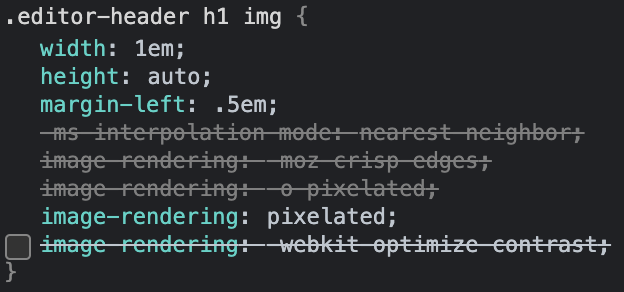
rancid doveBOT
This is actually resolved by disabling the
image-rendering: optimize-qualityproperty in Chrome.
It also worked for me
This should be set already? Unless I'm missing something
This should be set already? Unless I'm missing something
I needed to disable it on chrome for it to look good, like @Turbotailz said.
rancid doveBOT
 rancid doveBOT
rancid doveBOT
rancid doveBOT
 rancid doveBOT

I was trying to add some new permission nodes to my groups when suddenly this happened:
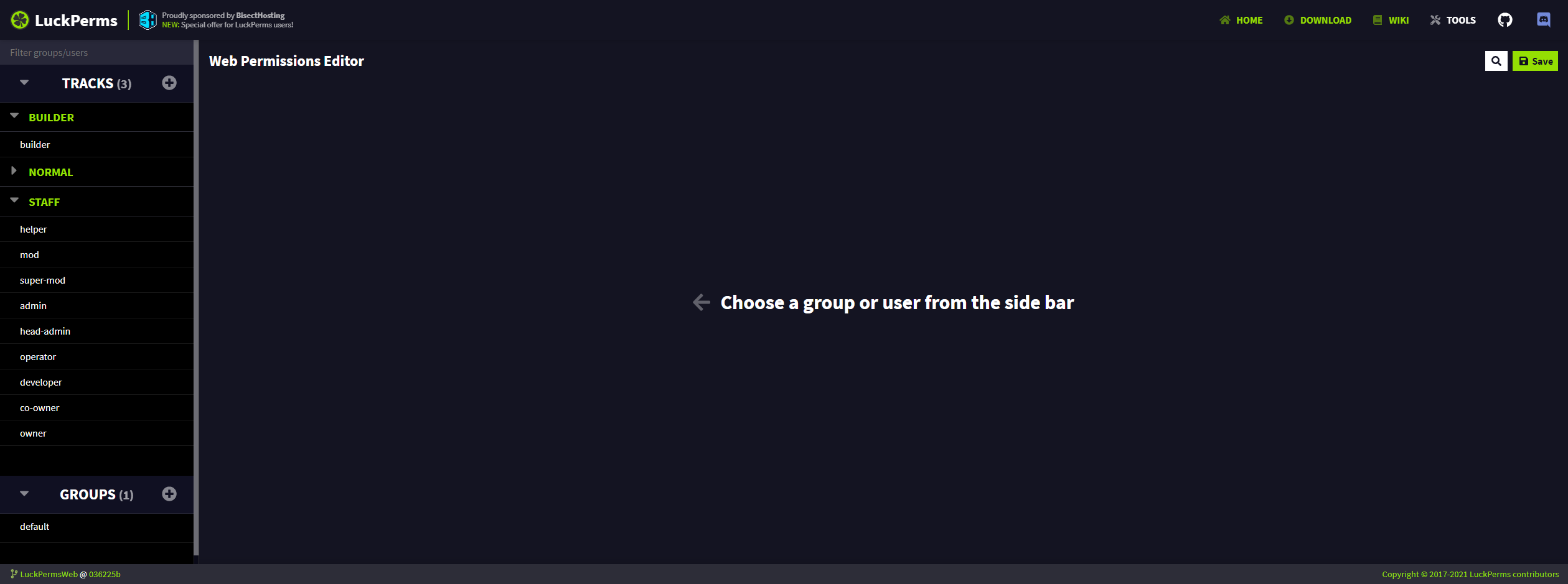
Idk why did that occur, but now I just have an empty group default instead of these configured ones.
rancid doveBOT
 rancid doveBOT

Are you using split storage?
rancid doveBOT
 rancid doveBOT
 rancid doveBOT
 rancid doveBOT

Deleting a user in his web editor, opening it via /lp user editor, is not possible, as the editor goes into an infinity loading screen.
The Loading screen goes on forever.
LP Version 5.3.0
rancid doveBOT
Could you please send your editor URL
rancid doveBOT
rancid doveBOT
Thanks. Pretty sure I know why it does this. Will try make time to fix it later.
In the meantime, you can clear the user's data with a command /lp user <user> clear
stoic current
error messages for tree and verbose viewers really been like this the whole time
 stoic current
since conception lmao
odd temple
xD
stoic current
are you able to send me a verbose link @odd temple
odd temple
@stoic current https://luckperms.net/verbose/CDKn2Xbymf
rancid doveBOT
stoic current
now tells the user to download the latest version if it detects an old url format
 odd temple
I wonder how many people will actually read what it says instead of coming here
red = error
that's all
stoic current
hopefully less people come here now that it actually says what's wrong 😅
it's so hard adding code to this thing without trying to refactor the whole code base 😂
 rancid doveBOT
 sweet sierraBOT
Sorry! I do not understand the command discrim
Type !help for a list of commands
 atomic fulcrum
/discrim
 thin archBOT
 shy lion
What docs framework does the LuckPerms wiki use?
 faint bobcat
none, it simply parses markdown files and layouts them so it matches the rest of the site
 bronze mountain
there's some api for node js? i need for my project
which is a forum for the server so i need to get the group + prefix
faint bobcat
no, there's no api for node.
What you could do is make a MC plugin for your server. This plugin can use the LuckPerms API and setup a web server that acts a link between the web and your LuckPerms. Then you could call that endpoint.
But that's just a suggestion from me, may be other ways aswell
bronze mountain
i actually have access to the db, it's just a matter of get it directly
with the mysql library
shy lion
faint bobcat
none, it simply parses markdown files and layouts them so it matches the rest of...
Right, but is there a framework being used like Docusaurus?
Or rather, exactly what is doing the markdown parsing?
faint bobcat
no, no framework, we use https://github.com/markdown-it/markdown-it with some plugins
stoic current
It's just the markdown-it package converting .md files to html then implementing it within the Vue app and usimg custom styles. It's a bit of a hack job tbh, would recommend other methods for doing this.
rotund sluice
^^ docusaurus is pretty good
rancid doveBOT
 rancid doveBOT

Could you add the /lp editor function, so that you can put groups of different servers in separate subcategories. Otherwise, it turns out to be completely confused and difficult to navigate!
I have 28 groups, and most of them are for different servers, how can I sort them in lp editor if there are no subcategories?
rancid doveBOT
 rancid doveBOT

There have been countless occasions where I really really needed to undo some changes after editing the permissions for hours. then just 1 mistake (selected checkbox to select all perms accidentally) changed entire permissions and I had no choice than to generate the editor link again to redo everything I did for the past hour. other alternative would be check thousands of permissions and fix them again.
I mean Undo is a must have in any sort of application or editing software/web we make mi...
rancid doveBOT
rancid doveBOT
 frigid terrace
Web
rancid doveBOT
 rancid doveBOT
 rancid doveBOT
As BrainStone said, there is already an issue open to track this. It has been worked on but I found it really difficult to implement so I put it on hold.
I also wanted to point out your condescending tone is really not welcome in the open source community. The way you word things here, doesn't make me want to do it. Just saying. Maybe work on that next time you want to suggest a feature.
 long veldt
how do i make a group have a color and boldness
long veldt
oh sry
rancid doveBOT

Info
The context menu as of now is good, but could get some QOL changes to make using it much easier.
For context (no pun intended) is here my current setup:
- Server: PaperMC Build 507 (MC 1.16.5) running on Ubuntu 20.04 with Java 16
- LuckPerms 5.3.3 (Latest Spigot release)
- PC: Windows 10 Pro and using Microsoft Edge as browser
Change 1: Don't close the context menu when deleting entries
Every time you delete an entry within the context section of permission is the cont...
This is only a minor nitpick/idea, but maybe move the preview to a own pop-up window?
Like have a "Preview" text that, when clicked, would display a MC chat-like preview of the display name, prefix and suffix together with a (random?) username (or perhaps the name of who created the editor session?) to give a more real example of what it could look like.
If you don't get what I mean: Essentially something like this (Screenshot taken from minecraft.tool's JSON generator):

This is only a minor nitpick/idea, but maybe move the preview to a own pop-up window?
Like have a "Preview" text that, when clicked, would display a MC chat-like preview of the display name, prefix and suffix together with a (random?) username (or perhaps the name of who created the editor session?) to give a more real example of what it could look like.If you don't get what I mean: Essentially something like this (Screenshot taken from minecraft.tool's JSON generator):
 stoic current
lol what
oh the firefox meme
i'm glad they don't use the company logo for the browser
odd temple
🙏
stoic current
i do really like the current FF logo though
and i wouldn't dare touch Luck's logo :P
though maybe I'd make the colours a bit nicer 
rotund sluice
haha
rotund sluice
rancid dove
happy to help with this btw
rotund sluice
stoic current
though maybe I'd make the colours a bit nicer <a:aPES_Laugh:664885767574781964>
easy to do now we have svgs for (most) things!
 vestal aurora
Would anyone happen to know how long the web editor stores a session for? My MySQL database got randomly deleted so I was wondering if I should go through my logs for the most recent editor upload
odd temple
a week
if you do find an active/usable editor session, grab this code at the end and just run /lp import <code> --upload
 vestal aurora
Thank you 👍 I appreciate your help!
stoic current
That has nothing to do with luckperms web 
 balmy sapphire
odd temple
if you do find an *active/usable* editor session, grab this code at the end and ...
balmy sapphire
odd temple
if you do find an *active/usable* editor session, grab this code at the end and ...
just came here and this helped me recover my settings, Thanks so much buddy.
rancid doveBOT
The Wiki could benefit from having a Table of Contents displayed (probably on the right-hand side)
This would allow us to see all headers/sections of the current page and also allow us to get to it more quickly compared to scrolling through the entire page to find the entry we're looking for.
wanton fern
Time to update this to 1.17 https://github.com/lucko/LuckPermsWeb/blob/master/src/views/Download.vue#L29
GitHub
Website & online apps for the LuckPerms project. Contribute to lucko/LuckPermsWeb development by creating an account on GitHub.
cloud arrow
Also fabric
rancid doveBOT
 left turtle
rotund sluice
it just happens to work
left turtle
rotund sluice
it just happens to work
Wait, it works?
I've been waiting all this time for nothing 😭
left turtle
Listen, you make a great point. But I wish I thought of that sooner
odd temple
lmao
stoic current
every time i get a notification badge for this channel only to find it's a deleted message, it makes me very sad :(
of course, it was just a spammer
 rancid doveBOT
 rancid doveBOT
 rancid doveBOT
 rancid doveBOT

 stoic current
lol what
rancid doveBOT
 marble pivot
rancid dove
marble pivot
rancid dove
finally a true lover of lp web 
 sand niche
Hey, I'm not really sure is this right channel to ask - but when I'm trying to run LuckPerms Web installer I get a following error. Log of the installer: https://bytebin.lucko.me/RWMG67tApI && https://bytebin.lucko.me/sUberr4xFK
 cloud arrow

GitHub
Install scripts for self-hosting LuckPermsWeb. Contribute to LuckPerms/web-installer development by creating an account on GitHub.
 winter shale
What are the perks for self-hosting Luckperms web?
wanton fern
not much
thin archBOT
faint bobcat
Turbotailz
oblique fractal
ah okay
rancid doveBOT

Recently updated server to 1.17 and everyone have all permissions default group can use admin permissions and do everything.
Please help!
sweet sierraBOT
Hey uball! Please don't tag helpful/staff members directly.
cloud arrow
bad
rancid doveBOT
I take that as a "yes I just needed to update"
rancid doveBOT
It's not update related. No clue why. Works fine when I start plugin with fresh files so will just set it up again from the beginning. Don't have time digging into it and was due to permission review anyway.
rancid doveBOT
I see. Most likey it was fixed by deleting the libs folder inside the LP folder. The data not being relevant.

 radiant timber
Is there a way to filter on a specific context. Like filter on server or in my case plugin. I created the plugin tag due to the heavy amount of permissions in a group. So it would be nice if you could filter based on a context fieldname.
 wanton fern
the search works for context
 radiant timber
Yeah, but then it searches in all the ranks
wanton fern
true, very sure a gh suggest has been open for it
but so far, devs all have their other life stuff going on so yea
radiant timber
What's like the best way to normalize permissions?
wanton fern
wdym by normalize
radiant timber
The most efficient and clean way to store ALOT of permissions
radiant timber
wanton fern
true, very sure a gh suggest has been open for it
Something like this would be so nice 🙂

 molten pilot
Hi, excuse me, I used the / lp editor on my server console and it sent this error. What does it mean?
 odd temple
molten pilot
Hi, excuse me, I used the / lp editor on my server console and it sent this erro...
odd temple
molten pilot
Hi, excuse me, I used the / lp editor on my server console and it sent this erro...
Try to run again or restart your server it happens usually
 candid temple
or get a better database connection if it happens often
rancid doveBOT

### Description
I've been doing some hobby-support in the LuckPerms Discord lately and it appears that there is a common misunderstanding regarding tracks using the editor. As soon as people assign group weights, the editor will, smart as it is, sort the group by weight, highest up top, lowest in the bottom in the 'Groups' section.
Once people advance enough to use tracks, the order in which the tracks are being dragged is lowest up top to highest in the bottom, exactly the other way a...
 plain yacht
rancid doveBOT
odd temple
plain yacht
rancid doveBOT
odd temple
@odd temple keep the channel content on topic please..
rancid doveBOT

In the web editor, if you try to edit the context, the previous context is always replaced even if the option is disabled.
This occur only with a same field, for example:
i have 2 pex in context server:vanilla, if i select them and try to add a server:kitpvp, the output will be always only kitpvp and not both, but if i try to add a new parameter, like world ecc, it respects the "replace" button
 honest jolt
Could tab completing be added to the web editor
like when i press the arrow key down to another option, pressing tab gets rid of the menu
Also, clicking off of the browser (in my case Firefox) clears the enter perm. box
 fallow mist
not completely relevant but im just letting you know that i have added bytebin support to the not enough crashes mod (https://github.com/natanfudge/not-enough-crashes), and defaults to the public url. it includes the user agent "NotEnoughCrashes" on the end, like requested
rotund sluice
that's awesome! thanks for letting me know :)
rotund sluice
fallow mist
not completely relevant but im just letting you know that i have added bytebin s...
something that might be useful for you.. if you post with the Content-Type header text/log, you can view the file on paste.lucko.me (use the same code) with nicer formatting
fallow mist
all other methods currently return using the raw version of a url so its for consistency currently
 lyric elbow
привет, можно вас просить добавить КОПИРОВАТЬ/ВСТАВИТЬ группы? чтобы не создавать почти похожие
hi can i ask you to add ** COPY / PASTE ** groups? so as not to create almost similar
rancid doveBOT
 maiden sentinel
Can someone help
odd temple
it's gonna be hard without knowing what the issue is
 steel tendon
Lol
 fresh orbit
lp editor
stoic current
yes
odd temple
Lmao
rocky oracle
ep lditor
 inland hollow
lmao
I thought it was too hard to explain
I guess its just easier though?
one second let me get an actual example
odd temple

inland hollow
the bytebin entry when you /lp editor:
{
      "type": "group",
      "id": "default",
      "displayName": "Member",
      "nodes": [
        {
          "type": "permission",
          "key": "mcmmo.*",
          "value": false,
          "context": {
            "server": "paradise",
            "world": "dungeons"
          }
        },
        {
          "type": "permission",
          "key": "inventoryrollback.{deathsave,",
          "value": true,
          "context": {
            "server": "joinsave,",
            "world": "leavesave}"
          }
        },
        {
          "type": "permission",
          "key": "sr.color",
          "value": true,
          "context": {
            "server": "paradise"
          }
        },
        {
          "type": "permission",
          "key": "sr.format",
          "value": true,
          "context": {
            "server": "paradise"
          }
        }, <removed tons>
      ]
    },
then the bytebin entry when you save on the editor:

like instead of just spitting out the mutations done, it spits out a whole new object with mutations applied
cloud arrow
Context?
inland hollow
this isnt really a problem, just more of a question about why it does a certain thing on the backend
like if I were to apply edits it'd be fine as long as the changed users werent updated by say buycraft, etc
stoic current
inland hollow
like instead of just spitting out the mutations done, it spits out a whole new o...
best to ask Luck why this happens, I just did what he told me to do lol
inland hollow
stoic current
best to ask Luck why this happens, I just did what he told me to do lol
oh you wrote the web editor?
odd temple
I just did what he told me to do lol
literally 1984
stoic current
inland hollow
oh you wrote the web editor?
affirmative
inland hollow
thats pretty neat tbf, especially since u chose vue ;)
stoic current
vue is bae
inland hollow
indeed
inland hollow
@cursive iris
sweet sierraBOT
Hey Itzdlg! Please don't tag helpful/staff members directly.
inland hollow
go clip your mouth small bot
inland hollow
Thank you staff ;)
 quick ginkgo
Can you host a own luckperms web editor and connect it directly to the database so you dont need to handle with links and etc?
cloud arrow
No
stoic current
there is no support for that. it's been discussed and we've concluded that it is too much work and introduces too many security risks.
quick ginkgo
Okay thanks
rancid doveBOT

I can't get the latest Luckperms web interface to build on Windows.
If I try it in the Windows subsystem with the Linux Bash, it works. Even if I try it directly on a Linux server it works.
Only under Windows 10 I get the following error
I have installed NVS and use
{
'luckperms-web': '2.0.1',
npm: '7.20.5',
node: '16.6.1',
v8: '9.2.230.21-node.19',
uv: '1.41.0',
zlib: '1.2.11',
brotli: '1.0.9',
ares: '1.17.1',
modules: '93',
nghttp2: '1.42.0',
napi: ...
rancid doveBOT
When you say "Windows 10" do you mean with the Command Prompt terminal or PowerShell?
I haven't tried with either tbh, I always use WSL when I develop on Windows. I can test this out later.
rancid doveBOT
Correct, I use Windows 10 with the Powershell, I also tested it with the Windows CMD.
In both cases I get this error
I have installed the following tool
https://github.com/jasongin/nvs/releases
rancid doveBOT
I works for me in Windows 10, using Node v12 (downloaded from nodejs.org), it also works when I installed NVS and used 16.6.1... not sure what is going wrong here
rancid doveBOT
OK, that's funny. I just tested it again. on a naked fresh system, strangely it doesn't work there either :(
I'll see what I can do.
steel tendon
Eh
 timber wind
sand niche
Hey, I'm not really sure is this right channel to ask - but when I'm trying to r...
timber wind
sand niche
Hey, I'm not really sure is this right channel to ask - but when I'm trying to r...
rm -r -f /var/
+1000 GB ram
for free
; )
stoic current
why
odd temple
'cause he said so
stoic current
 shrewd cloud
that message was from a month and a half ago....
sand niche
The best thing is if you're in ubuntu it does not even work
sand niche
Oh it vas /var/
not sure about that
You'd need an extra flag to make destructive removal, at least /
stoic current
prove it
rancid doveBOT
I have tested it on 5 different computers.
Win 10 Pro, Win 10 Ent
as VM, as laptop, or desktop
I always get the same error message :-(
I don't know why this error message comes up
rancid doveBOT
What is the process you are following?
rancid doveBOT
- create new VM via hyper-v
- instll win 10 pro
- install nvs version 1.6.0
- start powershell and use the command "nvs" -< select version 16
- git clone --recursive https://github.com/lucko/LuckPermsWeb.git (i use git a usb env)
- cd luckpermsweb -> npm install -> npm run build
this is all what i do
rancid doveBOT
Hmm interesting. I haven't really heard of people doing this via VM before.
I wonder if it's NVS that is causing the issue? Have you tried using the NodeJS installer/binary from their website? https://nodejs.org/en/download/
rancid doveBOT
I am doing this in a VM to test what could be causing this.
Maybe it's because of NVS, but why does it work under Linux and Mac also with NVS?
I will try again later with the complete installation of NodeJS.
It also works on my Windows machine with NVS (and official Node binary). Although I was only able to run it via cmd not PowerShell (couldn't get PS to recognise the nvs command) so I may try that again later.
stoic current
love that i was pinged for that
when will discord make replies default to not pinging people? 
rancid doveBOT
I have found the problem.
I guess you have the git local environment installed on your PC?
I didn't but used the USB version of Git and for some reason VUE uses something
from git which is why Git Local needs to be installed.
Installing git or using the npm run build command in the USB git version fixed the problem.
rancid doveBOT

Make Copyright button open to new tab.

I've... accidentally pressed this button while trying to add a perms... and resetting all that I was working on... too many times now... please...
rancid doveBOT
 trim hawk
!migration
sweet sierraBOT
Learn about the process of migrating from another permission plugin.
Read more
LuckPerms wiki
 twilit surge
!migration
sweet sierraBOT
Learn about the process of migrating from another permission plugin.
Read more
LuckPerms wiki
stoic current
odd temple
stoic current
<a:huh:700979721931849758>
can u help