#luckperms-web
1 messages · Page 1 of 1 (latest)
 inland hollow
would be the answer to the frequent question of "can i use the editor without logging in or getting a session key or whatever"
 earnest mango
That'd be awesome although would require a massive amount of internal changes on the web end, as well as a lot of security consideration, but still very possible
 stoic current
security is my main concern as you'd be exposing the API key

 forest python
epoch
 dreamy fern
forest python
epoch
dreamy fern
forest python
epoch
can i know how does it work?
forest python
dreamy fern
forest python
<https://www.epochconverter.com/>
thx
stoic current
it's how many seconds since Jan 1 1970, for those who don't know.
forest python
Did you know
It isn't possible to represent -1 seconds since epoch in discord
<t:0:F>
<t👎F>
<t:-2:F>
0
-1
-2
In order
 opal bane
what
forest python
<t:-1:F>
inland hollow
stoic current
security is my main concern as you'd be exposing the API key
No you wouldn't be
the api key would remain on the client
just like if you were giving it to a third party app to execute LP changes
or if you were using Postman to test, or if you were using a Github key to update a repository
all that changes is that the user is providing the API key instead of a login for the client to fetch the api key, but there's no difference there
inland hollow
well, I'm not arguing there lmao
opal bane
where is the file that determines what the wiki pages actually look like
as in the layout, not the content
i assume its somewhere in here https://github.com/LuckPerms/LuckPermsWeb/tree/master/src

GitHub
Website & online apps for LuckPerms. Contribute to LuckPerms/LuckPermsWeb development by creating an account on GitHub.
 cloud arrow
GitHub
Website & online apps for LuckPerms. Contribute to LuckPerms/LuckPermsWeb development by creating an account on GitHub.
opal bane
maybe its not a good idea to try to add something to a vue project when ive never used vue before lmao

LuckPerms - A permissions plugin for Minecraft servers.
LuckPerms is a permissions plugin for Minecraft servers. It allows server admins to control what features players can use by creating groups and assigning permissions.
do i need to setup the entire editor just to test the wiki
hi @stoic current i "need help with the web based stuff :)"
 native plover
do not ping staff
opal bane

 shrewd cloud
@native plover
stoic current
opal bane
do i need to setup the entire editor just to test the wiki
yes, it's pretty easy tho. just clone the repo with recursive flag:
git clone --recursive https://github.com/LuckPerms/LuckPermsWeb.git
then run the next two commands
npm install
npm run serve
this is all documented in the readme ;)
stoic current
opal bane
https://luckperms.net/wiki/_Sidebar lmao
lol this is funny, never thought about this happening. not really worth fixing though since there's no way a user will manage to get here naturally.
 sleek kindle
@stoic current is there a way to do per world permissions in the web editor?
 sweet sierraBOT
Hey NoobZoid! Please don't tag helpful/staff members directly.
sleek kindle
ok
 minor copper
use the context tab and add a world: context
 pearl drift
How to reset all players permission in specific server?
@stoic currentcan u help please?
sweet sierraBOT
Hey Rivlerd,! Please don't tag helpful/staff members directly.
 rain ore
For what is the link: https://metadata.luckperms.net
What exactly does it do in the editor?
You can't host that yourself or?
 rotund sluice
you don't need to self-host that part
rain ore
Ok, Thanks!
Does anyone have any idea why the live-apply (without the command applyedit) with the session does not work for me selfhosted?
inland hollow
are you selfhosting bytesocks as well?
rain ore
This is my problem. Thanks
Do I also have to add this in the config or only on the Webserver?
stoic current
yes, bytesocks-host is what you want to add to the config
we really should update the documentation with that
you can see the definition for it here in the LP ConfigKeys class:
https://github.com/LuckPerms/LuckPerms/blob/master/common/src/main/java/me/lucko/luckperms/common/config/ConfigKeys.java#L687
rain ore
Thank you very much
native plover
!usage & #support-1
sweet sierraBOT
Here's a guide to help users understand and use LuckPerms for the first time.
Read more
 LuckPerms wiki
 dark pumice
thx
 hearty zenith
!database
sweet sierraBOT
Sorry! I do not understand the command database
Type !help for a list of commands
hearty zenith
!help
sweet sierraBOT
Available commands
!advanced
!api
!argumentbased
!ask
!bedrock
!bulkupdate
!bungee
!bungeecheck
!cauldron
!colours
!commandequivalents
!commands
!config
!context
!cookbook
!default
!downloads
!editor
!editorsafety
!errors
!essentials
!extensions
!extracontexts
!faq
!forgepermissions
!formatting
!hack
!helpchat
!inheritance
!install
!libsdir
!locale
!meta
!migration
!notworking
!nowildcard
!offline
!pasteit
!permissions
!placeholders
!reload
!selfhosting
!spongeseven
!stacking
!storage
!suggestions
!switchstorage
!sync
!testingperms
!tracks
!translationprogress
!translations
!tutorial
!upgrade
!usage
!userinfo
!verbose
!version
!weight
!whyluckperms
!wiki
hearty zenith
!migration
sweet sierraBOT
Learn about the process of migrating from another permission plugin.
Read more
LuckPerms wiki
stoic current
wrong channel 
 flint latch
!migration
sweet sierraBOT
Learn about the process of migrating from another permission plugin.
Read more
LuckPerms wiki

 hollow cargo
can set this X hitbox bigger
i made a big mistake beacause of this

 worn hawk
Why don't you remove the permission group. this will have the same effect
 odd temple
hey!
is it possible if i could import an old editor session that wasnt originally on that server?
the server got nuked and it'd be very tedious to import everything back in
i'll move to support
 junior eagle
dont think so
opal bane
this is still a problem what lmao
i mean its not a big problem, but im really not sure why its still happening, even on an entirely new computer at this point
ah well, ok then https://github.com/astei/crafthead/issues/63
GitHub
It’s been like a year since changing and the skin still shows as my old one. https://crafthead.net/helm/2ce90d65f2534e3c8e4b3d5fb1e4c927
native plover
yeah was abouta say :p
odd temple
L
shrewd cloud
Crafthead is ran by tux?? 🤯
 young ridge
Hey @stoic current, is there an planned feature to search directly for members in the editor?
sweet sierraBOT
Hey AceNet! Please don't tag helpful/staff members directly.
young ridge
 native plover
._.
 plush oracle
/lp user <name> editor?
stoic current
it's fine. clippy isn't that smart.
young ridge
plush oracle
/lp user <name> editor?
yea, i know, thats directly per command, i mean as an search function directly in browser 😄
stoic current
haven't thought about it but suggestions should go to github
https://github.com/LuckPerms/LuckPermsWeb
GitHub
Website & online apps for LuckPerms. Contribute to LuckPerms/LuckPermsWeb development by creating an account on GitHub.
odd temple
:d
 plush oracle
odd temple
:d
plush oracle
odd temple
:d
^this...
native plover
odd temple
:d
^that...
native plover
i am LOLing rn
plush oracle
Hey aberdeener! Please don't tag helpful/staff members directly.
stoic current
smh can't even remember my own code
native plover
editor rewrite when
odd temple
PR
stoic current
+2 years every time someone asks
native plover
editor rewrite when
editor rewrite when
editor rewrite when
editor rewrite when
stoic current
never now
native plover
ok good
odd temple

native plover
does the old bootstrap one exist anywhere still
stoic current
in github surely
native plover
clearly

 odd temple
Not that one
The one on the left, above the users/groups/tracks things
The one on the right is for permissions I believe
odd temple
Yes, that's the max number of users that are sent to the editor from the plugin
otherwise use the lp user .. editor command
opal bane
kekw
 waxen sparrow
Hello everyone, tell me how to delete player accounts
 worthy fulcrum
Alt f4
stoic current
that guy really did post in every channel
opal bane
almost* every channel
 inner kestrel
how do i change the order so its
-owner
-admin
-member

 sweet sierraBOT
LuckPerms offers an easy to use, powerful Web Editor, with which you can add, delete and change permissions of groups and players.
Read more
LuckPerms wiki
 rotund mica
Lol
 thorny cave
Hi. I wonder if I use /lp editor. Do I have to close the session somehow or logout?
opal bane
no
you just close the tab
make sure you save first if you have made changes though because youll lose them
thorny cave
Thanks for the answer.
 pine arch
Hey. I'm using the lp plugin for a server I'm working on, for administrating ranks and staff roles. However, I have been having some issues, with the different ranks showing double prefixes, and double suffixes. Is this something I can fix?
This is what it looks like
 earnest mango
Wrong channel, #support-1 or #support-2
pine arch
Oop, sry
plush oracle
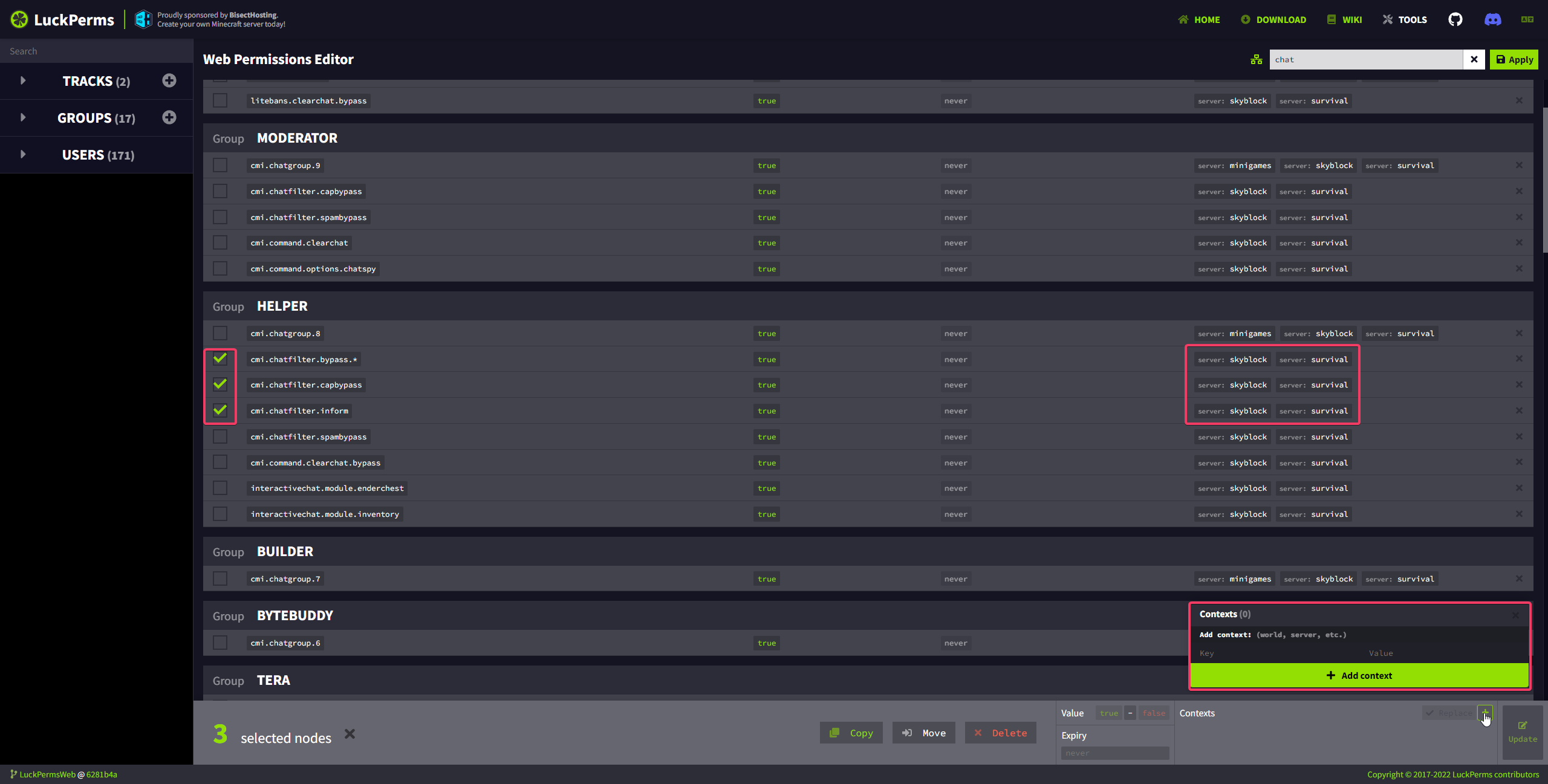
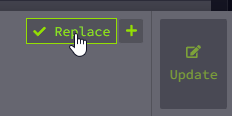
Hey @stoic current sorry for the ping, just a question. Do you remember how in the editor, when you tick permissions, you can mass add contexts, right? https://i.imgur.com/htaYI8J.png Ive never really used it since i never needed it, however, i have a situation now where i need to ADD one context and not replace the entire context with one. I thougth that's what this box is for? https://i.imgur.com/wmaHt1N.png
Regardless if i have this ticked or not, context is just being replaced. So i have to readd both contexts i had before plus the new one. Is that... intended?
 sweet sierraBOT
Hey Zero [Retired] [EN/DE]! Please don't tag helpful/staff members directly.
plush oracle
Yea sure can do :)
This makes me wonder, how would it handle if i ticked permissions that do not already have the same set of contexts? o.O
I mean, its gotta make a choice here lol
plush oracle
stoic current
can you make an issue pls
https://github.com/LuckPerms/LuckPermsWeb/issues/422 Already present, just saw
GitHub
After check anything permission and adding more context through panel below via ,,+" button, the button ,,Replace" has no role if I need add more contexts to existing or only repl...
 unborn torrent
** can you pls tell me what to do so higher rank players players should have more priority then the lower rank so the lower rank players can ban or mute the higher ranks please tell **
sweet sierraBOT
Hey Jaybabytee! Please don't tag helpful/staff members directly.
unborn torrent
sorry for ping but he wrote in dms that feel free to ping me
if someone needs help
unborn torrent
sorry
unborn torrent
plush oracle
this is not how you get help, this is how you get banned
can you help me
plush oracle
stop pinging people and acting like your server is more important than everyone elses life
unborn torrent
...
stoic current
oop
native plover
curious
stoic current
unborn torrent
sorry for ping but he wrote in dms that feel free to ping me
Feel free to ping me in #luckperms-web if you need help with the web based stuff
web based stuff
native plover
@stoic current merge my pr?
stoic current
your question had nothing to do with the web stuff
stoic current
native plover
<@139665464547606528> merge my pr?
read my comment?
native plover
shit
stoic current

native plover

 crude glade
so im trying to use the web edditor to alow all users to use /money /sell and /pay from essentials but they dont show up here

nothing shows up
 plush oracle
Luckperms does not know about permissions unles they were triggered before
Dont reply on suggestions in this list, copy the perms from the essx wiki or type them out, itll work
crude glade
where do i find them on the wiki i cant find them there
like its not here where i though it would be https://wiki.mc-ess.net/wiki/Essentials_Economy
plush oracle
crude glade
thank u so much
plush oracle
Also just so you know, i saw you were trying to tag the entire helpful team while the rules clearly state not to. That was not nice of you. Next time, please just be patient. We all volunteer here.
odd temple
Someone's getting coal for Christmas
shrewd cloud
plush oracle
Also just so you know, i saw you were trying to tag the entire helpful team whil...
i didn't get tagged D:
crude glade
plush oracle
Also just so you know, i saw you were trying to tag the entire helpful team whil...
sorry i wont
btw it worked ive been trying to do this for like 4 hours
and it finaly worked
thank u so much
plush oracle
You got this ^_^
odd temple
can somebody help me ?
earnest mango
!ask and you probably want #support-1
sweet sierraBOT
Please ask your question!
Please ask the question you have. Don't ask to ask, or ask to DM someone. There are people here to help you, but we need to know what to help you with, so please just ask the question you want to in as much detail as possible!
Or, try here first:
Why shouldn't I ask to ask?
 warm girder
!errors
sweet sierraBOT
Here's a page with some common storage system errors.
LuckPerms wiki
warm girder
!help
sweet sierraBOT
Available commands
!advanced
!api
!argumentbased
!ask
!bedrock
!bulkupdate
!bungee
!bungeecheck
!cauldron
!colours
!commandequivalents
!commands
!config
!context
!cookbook
!default
!downloads
!editor
!editorsafety
!errors
!essentials
!extensions
!extracontexts
!faq
!forgepermissions
!formatting
!hack
!helpchat
!inheritance
!install
!libsdir
!locale
!meta
!migration
!notworking
!nowildcard
!offline
!pasteit
!permissions
!placeholders
!reload
!selfhosting
!spongeseven
!stacking
!storage
!suggestions
!switchstorage
!sync
!testingperms
!tracks
!translationprogress
!translations
!tutorial
!upgrade
!usage
!userinfo
!verbose
!version
!weight
!whyluckperms
!wiki
warm girder
!notworking
sweet sierraBOT
Please tell us what's going on!
We really would absolutely love to help you out! However, telling us that it isn't working wastes everyone's time. Please, just describe the issue you're having clearly and with as much detail as possible, and send any relevant screenshots of whatever problems you're having.
For Console Errors:
 fresh widget
🧐
 stoic current
Updating dependencies is a pain in the ass.
stoic current
well that was a long time coming...
 shrewd cloud
Hot 🥵
native plover

junior eagle
🥹
 zenith rock
hi
 deft hare
!editor
sweet sierraBOT
LuckPerms offers an easy to use, powerful Web Editor, with which you can add, delete and change permissions of groups and players.
Read more
LuckPerms wiki
odd temple
!install
sweet sierraBOT
You can install LuckPerms on Bukkit/Spigot/Paper, BungeeCord, Sponge, Fabric, Nukkit and Velocity servers. Check the installation guide for more info on setting up LuckPerms.
Read more
LuckPerms wiki
 frozen wadi
I want to host it myself on my subdomain but I don't want anyone to have access to the editor how can I prevent this
earnest mango
I mean the usual LP-specific security will still apply (only those with permission can generate a link or apply changes for your MC server), however the backend web services don't provide any sort of additional security (since they were all designed to be public internet-facing instances), so you'd need something external to do that.
stoic current
you could set up some sort of IP whitelist, or password protect it via your web server. plenty of options really. nothing built in with the application itself aside from what _11 has said.
opal bane
i think the editor should prevent you from making changes after generating an applyedits command
although you might not actually apply the changes, it would probably stop a lot of people reusing the same editor and being confused when there is an error
shrewd cloud
Expire the editor when the command is used. E z
 austere portal
would it be possible to interact/setup an editor session for another game? The idea would be to make a sort of interface that would allow the user to use the luckperms editor, and then handle implementing the actual permissions when applying the session changes
The game is rust and it's "Bukkit" equivalent is Oxide
Oxide implements the permissions system, and it's heavily inspired by the mc ecosystem
opal bane
austere portal
would it be possible to interact/setup an editor session for another game? The i...
hypothetically, nothing is stopping you from creating the format the editor expects, uploading it to bytebin, and loading it in the editor
and then youd have to read the format the editor gives as output
shrewd cloud
as long as you’re still using the same key pairs the editor expects, it should be fine.
opal bane
youd need to have unique player ids that can be converted to/from UUIDs to support editing/viewing players
 somber veldt
Van itt magyar ?
 coral badge
hello! i have a quick question, is it possible to make this mod give players automatically a rank? say, after they played for x time inside the server
opal bane
coral badge
hello! i have a quick question, is it possible to make this mod give players aut...
wrong channel, but no. another plugin could to add the group after a certain amount though
coral badge
ok thanks
odd temple
/lpeditor
 haughty nova
How can it be that only the en.json exists in the LuckPermsWeb repo, but the website exists in countless languages?
opal bane
haughty nova
How can it be that only the en.json exists in the LuckPermsWeb repo, but the web...
it pulls other languages from crowdin
instead of updating the repo for every translation edit, its all just done on crowdin
and the english file in the repo is just a fallback i guess
haughty nova
But where does the website get the translation files from?
sweet sierraBOT
Translations for LuckPerms are managed on Crowdin. Any contributions are very welcome!
Installing the community translations
haughty nova
?
Where the website gets it from... The files must somehow be stored locally on the webserver where the whole thing runs?
shrewd cloud
The website pulls from Crowdin. like pan said.
opal bane
it downloads them...?
haughty nova
shrewd cloud
The website pulls from Crowdin. like pan said.
Since when has that been possible?
opal bane
since forever? thats like the point of crowdin i thought lmao
haughty nova
opal bane
since forever? thats like the point of crowdin i thought lmao
Crowdin's point is actually to only push to repos? Not directly to websites?
I've never seen it like that before...
shrewd cloud
it seems like it's not actually pushing to the repo, or a web server.
the website uses axios to retrieve data from https://metadata.luckperms.net/translation/web/ based on the language specified. (from browser by default?)
so, wherever that link pulls from is where it's pushing to on crowdin
odd temple
That's probably just a caching layer between crowdin and whatever calls that endpoint
at Luck ?
Oh there's a repo for the metadata routes too lol
shrewd cloud
Yeah, that's where it's coming from
https://github.com/LuckPerms/metadata-api/blob/master/src/translation-manager.ts
haughty nova
...
shrewd cloud
"..."
odd temple
It downloads the translation files from crowdin on the fly
They are not stored in the repo
It's just downloading a file from the internet after all
opal bane
i was right 😈
its pulling from crowdin but indirectly through a common endpoint that is (probably) also used by the plugin itself to get the plugin translations
stoic current
The metadata API updates the translations every 6 hours
The website fetches the cached data on pageload
 naive ivy
@cursive iris @mighty shell (nsfw already got deleted)
sweet sierraBOT
Hey fayevr! Please don't tag helpful/staff members directly.
odd temple
yeet
naive ivy
inner kestrel
what plugin should i use for prefixes to show in chat and on player list
player list on tab btw
naive ivy
inner kestrel
player list on tab btw
!chat first of all, #support-1, and second
sweet sierraBOT
LuckPerms does not perform any chat/tablist formatting of its own!
LuckPerms only acts as the source for prefixes / suffixes, it doesn't actually apply them. You need an appropriately configured chat/tablist formatting plugin for them to be displayed. If the values appear correctly when you run /lp user <user> info, LuckPerms is doing its job!
FAQ answer: Prefix isn't showing?
List of chat/tablist formatting plugins that work with LuckPerms
 ancient anchor
@opal bane
sweet sierraBOT
Hey McGoldy! Please don't tag helpful/staff members directly.
 lofty tusk
Hi
 fallen mortar
LuckPermsWeb seems to fail with this error: error:0308010C:digital envelope routines::unsupported
on Node v18
Downgrading to Node v16 fixes it for now
 untold birch
!paste the full error
sweet sierraBOT
Please use pastebin!
Seeing a paste of the problem makes everything so much easier! Use https://pastes.dev/ for easy pasting!
For console errors:
Pastebin any relevant segments of the console log. If it's a startup error, this includes the entire startup log!
Other errors:
Pastebin the entire LuckPerms config file (passwords removed) as well as any other relevant files!
stoic current
Yeah probably not compatible with newer node versions. Should probably limit the engine in package.json
fallen mortar
I reinstalled node v16 for now and it worked fine
the only error was that, with a stacktrace pointing to the dependencies
maybe relevant stackoverflow that directed me to downgrade
https://stackoverflow.com/questions/69692842/error-message-error0308010cdigital-envelope-routinesunsupported

Stack Overflow
I created the default IntelliJ IDEA React project and got this:
Error: error:0308010C:digital envelope routines::unsupported
at new Hash (node:internal/crypto/hash:67:19)
at Object.createHa...
stoic current
Could you please post an issue to the GitHub repository LuckPerms/LuckPermsWeb with the error?
fallen mortar
stoic current
Could you please post an issue to the GitHub repository LuckPerms/LuckPermsWeb w...
created an issue with the error
if I reinstall later on node v18, I might get more logs
don't know when I will do that however
sweet sierraBOT
Please use https://pastes.dev to send files in the future. I have automatically uploaded message.txt for you: https://pastes.dev/oBpiR6Trje

A paste containing 191 lines of plaintext.
 vernal bluff
vernal bluff
vernal bluff
what s happened?
 lone fog
What are the editor-public-key and editor-private-key values on the webapp used for? Are they specific to my installation or are these global values for LuckyPerms?
The docs make it seem like the public key is used to sign messages to bytesocks
cloud arrow
I think it's when you do /lp editor ingame where you don't have to click apply everything
 fallow lodge
hey anyone knows how to make command vouchers / permission vouchers?
shrewd cloud
When turbo said "you should post it in more channels for more visibility", he did not mean that literally. please stop crossposting your question in channels completely irrelevant to what you're asking.
it's incredibly annoying.
stoic current
lmao oops
 nimble cave
Jeeezz
 barren obsidian
Fix:
Add to the file "package.json" dependency
"node": "16.13.1"


 barren obsidian
Fix:
Add to the file "package.json" dependency
"node": "16.13.1"
barren obsidian
barren obsidian
Fix:
Add to the file "package.json" dependency
"node": "16.13.1"
@untold birch
untold birch
?
barren obsidian
untold birch
?
Add a dependency to luckperms-web if you can. And also remove the required node version. Because the new version does not have the necessary algorithm.
untold birch
https://github.com/LuckPerms/LuckPermsWeb make PR and Turbo will review it
GitHub
Website & online apps for LuckPerms. Contribute to LuckPerms/LuckPermsWeb development by creating an account on GitHub.
odd temple
If I deploy a self hosted version of luckperms-web, can I bind it permanently to my mc server? or do I have to generate a new url every time like before?
cloud arrow
need to generate a new url everytime, or use the websockets thing but iirc those close at some point
also don't cross post
odd temple
cross post?
nimble cave
send the same message in multiple channels
odd temple
I didn't...
cloud arrow
odd temple
That’s a completely different question
 lucid drum
How can I create a link in luckyperms
stoic current
/lp editor
lucid drum
@stoic current not working
sweet sierraBOT
Hey Satyam Gaming! Please don't tag helpful/staff members directly.
stoic current
go to #support-1 then please
odd temple
I cant select witch server i want to edit
shrewd cloud
what?
odd temple
i want to change permissons on my 1.16.5 server but it comes up with some random playes
odd temple
The changes received from the web editor were not made in session started on this server! Are you sure you/re running in the right place?
To ignore this warning and apply the changes anyway run
This error comes out when launching luckperm, what should I do?
odd temple
hello if someone knows very well about luckperms I would need his orientation to activate and deactivate certain commands for non-ops please
I use the multiverse-portal plugin and the problem is that only ops can go through the portal
 serene prairie
ive given default a couple commans but when i apply it doesnt work when i test it
shrewd cloud
 safe dawn
Are the messages on the website translated using an automated tool, or is there actually some user-contributed translations somewhere?
Because I noticed a few minor problems with the german translations, such as the verbose page having quite the random name ("Ausführlich"?!) and "reload!" being translated to "!reload" on the downloads page
stoic current
safe dawn
Are the messages on the website translated using an automated tool, or is there ...
Crowdin
!translations
sweet sierraBOT
Translations for LuckPerms are managed on Crowdin. Any contributions are very welcome!
Installing the community translations
safe dawn
Huh... then someone did mess up translations...
It was lucko :^)
At least for vebose.
Tho, I can't think of a good alternative for it right now.... What would other words for "verbose" be? Like what other words have a similar meaning?
stoic current
Debug?
safe dawn
Probably. It's just that the translation for Verbose is really odd sounding and I can't think of an alternative other than using the full "Verbose Viewer" translation.
Same for Tree
Also, not the biggest fan of the site using the "formal" german... Sounds stupid
I think I just go and suggest the more direct variant (Du-form) for german.
stoic current
Wrong channel brother
worn hawk
safe dawn
Probably. It's just that the translation for Verbose is really odd sounding and ...
Maybe you can look what the Dutch translation states?
This since the languages look like eachother 🙃
sweet sierraBOT
Hey DavidM! Please don't tag helpful/staff members directly.
odd temple
I love the web editor
 tepid umbra
The web editor loves you
 uncut pine
@mighty shell pls delete spam
 ebon blaze
would be GREAT, if there was a section in the wiki that says all the plugins that could work with it. mainly what exact vault plugin cause I have no idea, what vault plugin it means cause there is many vault plugins.
earnest mango
It's not possible to have a complete list since it's not our end of whether or not we support another plugin. The other plugin hooks into LP, LP doesn't hook into the other plugin (a handful of exceptions exist, notably we're a Vault Permissions and Chat provider, and provide a PAPI expansion)
Same goes for Vault, data providers like us hook into Vault, and then whatever else can ask Vault for data (other plugin -> vault, not the other way around)
That being said, we do have a little list of some of the popular chat/tablist plugins that people use and we know will work with LP
!chat (bottom link)
sweet sierraBOT
LuckPerms does not perform any chat/tablist formatting of its own!
LuckPerms only acts as the source for prefixes / suffixes, it doesn't actually apply them. You need an appropriately configured chat/tablist formatting plugin for them to be displayed. If the values appear correctly when you run /lp user <user> info, LuckPerms is doing its job!
FAQ answer: Prefix isn't showing?
List of chat/tablist formatting plugins that work with LuckPerms
 tight reef
can i change the order of ranks in the webeditor and in general for organization.
 hollow hare
!weight Yes, using weight.
sweet sierraBOT
LuckPerms allows you to set weights in order to determine the priority of certain nodes, like permissions and even prefixes. A higher weight number is a higher priority.
Read more
LuckPerms wiki
hollow hare
Groups in higher weight, will show higher on the editor. ^
tight reef
ty
stoic current
note that it's not dynamic, you will need to save and re-create an editor session after setting the weights to have them ordered correctly
 bronze sedge
how do you format with hex colors
<##8C1FC8>
hollow hare
bronze sedge
how do you format with hex colors
<##8C1FC8>
How's that related to the LuckPermsWeb?
bronze sedge
im on the web editor trying to do it?
stoic current
has nothing to do with LP and depends what plugin you are using to format
stoic current
your logic is like having a problem with chrome and asking microsoft for help because it is running on windows :P
stoic current
So I've made some finishing touches to the algolia-search branch which adds a search bar to the navigation. Would really appreciate if anyone could test it out and let me know if they encounter any issues with it :D
https://algolia-docsearch.luckperms.pages.dev/
If no issues, I'll send it to prod!

LuckPerms - A permissions plugin for Minecraft servers.
LuckPerms is a permissions plugin for Minecraft servers. It allows server admins to control what features players can use by creating groups and assigning permissions.
Note that if you click on a search result, it will take you to the main site which doesn't have the update.
And here's the PR if anyone is interested:
https://github.com/LuckPerms/LuckPermsWeb/pull/447

GitHub
Adds a search bar powered by Algolia DocSearch.
Removes the Home button from the navigation, as it was redundant (users can click the LuckPerms logo to go to the home page) and took up too much roo...
plush oracle
I personally find the green background on the highlighted element with white writing to be very disabling https://i.imgur.com/jq83QLi.png
I think I'd have gone with the color from the wiki navbar like here maybe https://i.imgur.com/v9CI2T6.png
Haven't found any issue with it though in terms of functionality
Edit: my ocd just spotted the bottom corners not being rounded on the background element :P
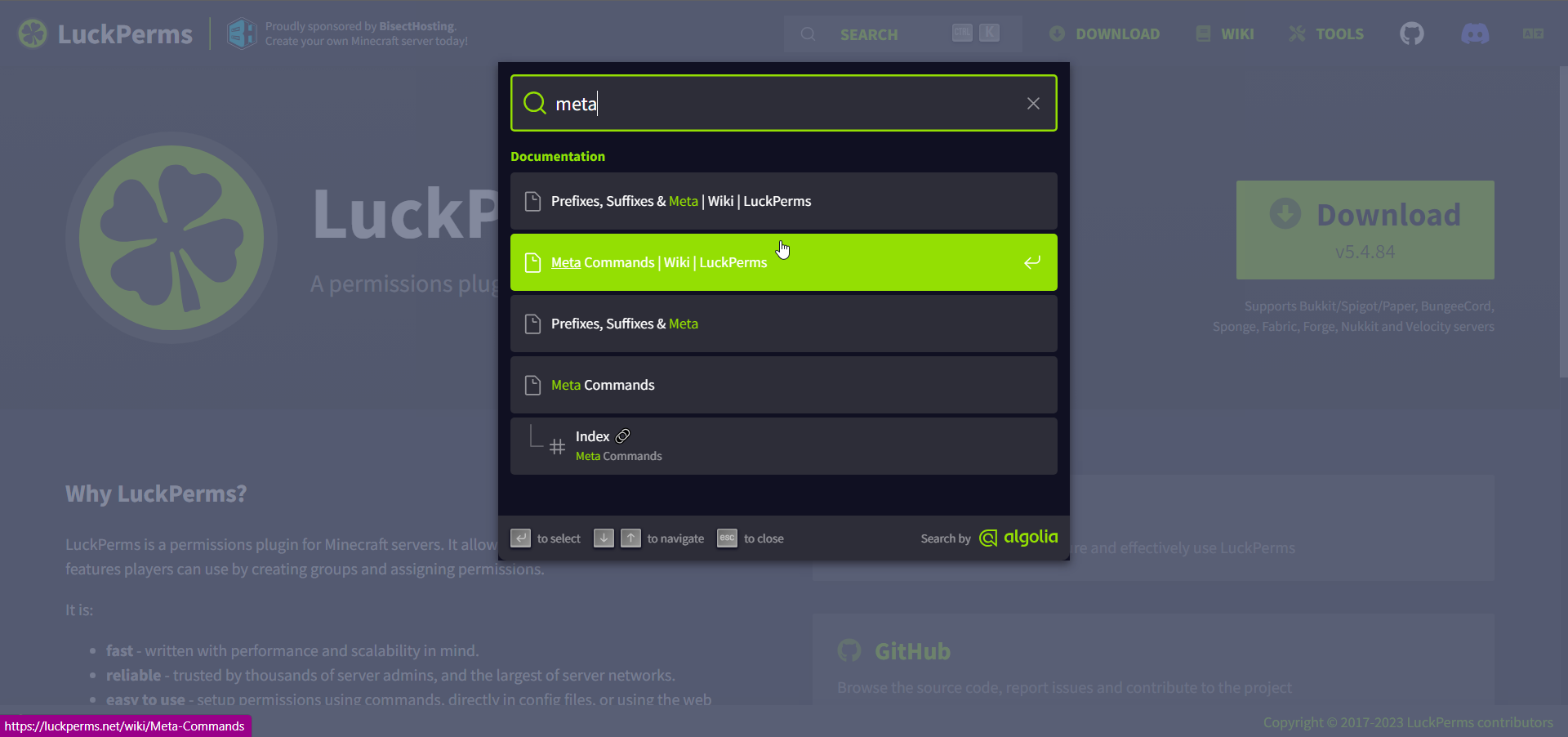
 stoic current
thanks! i'll fix those up
plush oracle
Ah, this is sweet to look at and consistent with the wiki. I like it personally, not so "in yer face!" yk xD https://i.imgur.com/y1tAx2x.png
Also, how are favorites saved? Per web session?
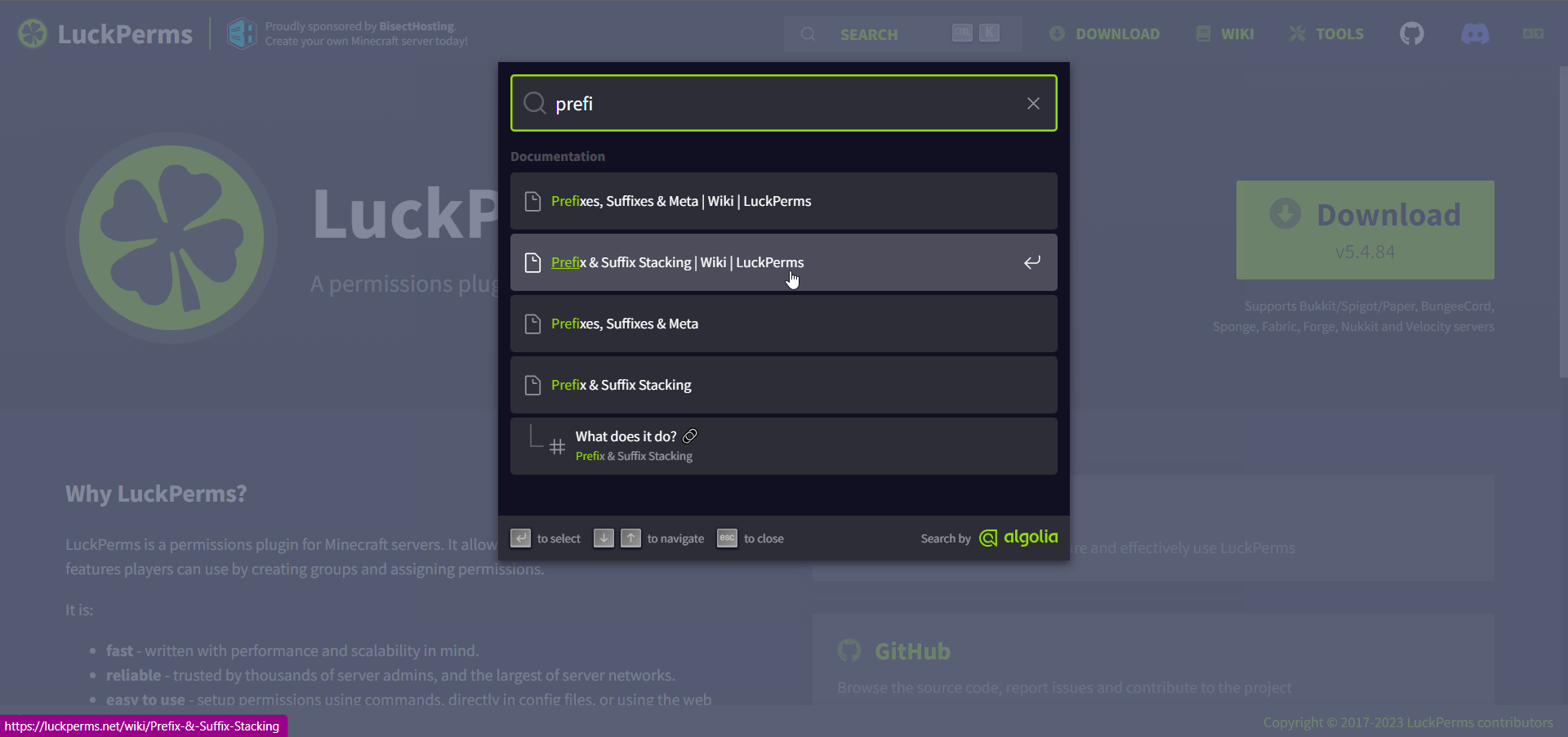 stoic current
Yeah not sure what I was thinking with that green lol
Also, how are favorites saved? Per web session?
not really sure tbh, probably cookies
ah nope, it's localstorage
 plush oracle
I just yeeted cookies and now i dont get the favorites saving anymore what the...
Oh you gotta use the search first, then you can save it
You cant just save it out of the box. That's gay.
rotund sluice
stoic current
So I've made some finishing touches to the algolia-search branch which adds a se...
very cool :) the style looks pretty seamless!
my only comment would be that is appears on the homepage but not on any of the wiki pages - I would've assumed it should be the other way around, if anything? :]
stoic current
stoic current
Note that if you click on a search result, it will take you to the main site whi...
^ 😜
stoic current
I might be able to make it do relative linking instead
rotund sluice
can we hide it on some pages
stoic current
Should be no problem. But why?
rotund sluice
well for example, having it on the editor page
people might think it is for searching through permissions data

there are two :D
stoic current
Yeah true. Plus if they click on a link all their changes will probably go away heh
rotund sluice
ah yes haha
stoic current
All the searches!
plush oracle
lets just spam search bars lol
stoic current
My only concern is that the editor might be the only page ppl use
rotund sluice
maybe just show it on the homepage + wiki pages
they are more popular than you think!
stoic current
Or maybe can just change some wording to make it more obvious what each one does
rotund sluice
it's only indexing the wiki so makes sense to only show it on these two imo
I do really like the UI tho
:D
plush oracle
Turbo. Help D:
untold birch
Turbo help someone? Unlikely. Overwatch 2 is more important.
 stoic current
use nvm
untold birch
Try npm install [package-name]@[version-number]
stoic current
no... they need the right version of node
plush oracle
fuck me i never did this shit
stoic current
if nvm is too hard, npm i -g n might be easier
untold birch
nvm install v<version>
nvm use v<version>
Pretty sure that's how it's done with nvm from what I can remember
shrewd cloud
doesn’t nvm come with npm 🤔
plush oracle
i give up
stoic current
why
untold birch
Zero has Zero patience 😛
plush oracle
zero has zero brain cells rn
like i said i never did this shiot
so youre saying install nvm
shrewd cloud
Nvm is node version manager, just incase that helps.
plush oracle
i found that out afterwards as well lol
the question is how do i get that now
yes i see the github page
no the command does not go thru becaus "-o" is not recognized and shit
stoic current
stoic current
if nvm is too hard, `npm i -g n` might be easier
^
 stoic current

npm
Interactively Manage All Your Node Versions. Latest version: 9.1.0, last published: 2 months ago. Start using n in your project by running npm i n. There are 25 other projects in the npm registry using n.
oh crap i guess n doesn't work on windows lol
windows is annoying
you should use WSL
plush oracle
oh my gooohhddd
stoic current
n does not work in native shells on Microsoft Windows (like PowerShell), or Git for Windows BASH, or with the Cygwin DLL.
 shrewd cloud
that’s kind of annoying xd
plush oracle
you see why im getting frustrated aye?
stoic current
yeah it's annoying
but once this is resolved it will be fine

freeCodeCamp.org
Different software development tools might require specific versions of Node.js and NPM (Node Package Manager). NPM is a tool for managing packages installed from the NPM registry. In addition, if you are making an NPM package, you might need to test it with different versions of Node.js. This is why
there you go
follow that lol
plush oracle
i swear zo god, if anyone clones the god forsaken wiki now while im trying to get this stupid version dropdown, ill instantly yeet my pc out the window
stoic current
but seriously consider WSL cause it makes any kind of development a million times easier on windows
plush oracle
we talk again when im not pissed af so i can take advice without instantly saying "no" out of pure frustration
let me get this done first <.<
i love how this guide says to uninstall nodejs but doesnt say how lmao
stoic current
same way you'd uninstall anything on windows
 plush oracle
🤤
didnt think itd show there as actual app ngl
i think too complicated already
thank you turbo xD i know im difficult sometimes
holy mother jesus its doing stuff
AHAHAHA I WANT TO DIE https://i.imgur.com/Hm7jjX0.png
 untold birch
Least it tells you what to do
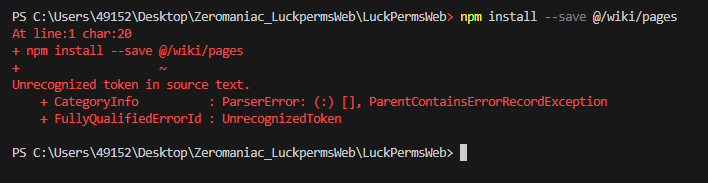 stoic current
nay
you need to install the git submodule
say this in the readme haha
git clone --recursive https://github.com/LuckPerms/LuckPermsWeb.git
plush oracle
oh for fucks sake youre right
stoic current
nah
plush oracle
why the shit not <.< thas duumb
stoic current
just how git works
plush oracle
i definitely gotta get a grip of github as well
but hey, it worked, its running locally rn. only took 2 hours xD
stoic current
sorry it's so complicated. really need to get it supported on node 18+
plush oracle
dont be sorry
i shouldnt touch shit i dont know anything about but i have a thick head so here i go
stoic current
it's such an old project now and trying to update it is a real PITA
plush oracle
its fine. all i wanna do is the version additions for forge and fabric
i have 2 styles in my head. one being a simple dropdown, another being an expansion slider
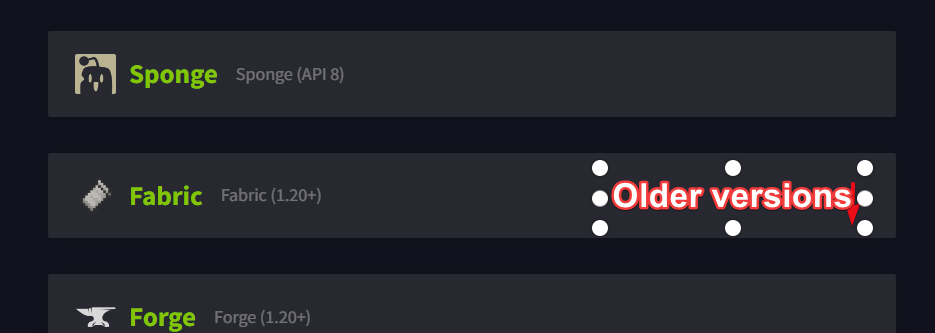
so either make that entire box become bigger, revealing a list, or just select a server version which changes the actual download button destination
plush oracle
lets remember most users of luckperms are actually kids so i think regardless of the list being uglier, it might be more obvious in terms of user interaction
its gotta be so plain, you cant miss it
plush oracle
Do we have an arrow i can reuse from somewhere in the web as indicator?
stoic current
we use font awesome for any icons
stoic current
check icons.js for how to import them, if there's not already one installed
plush oracle
got it
plush oracle
this is definitely gonna take a good while. god damn lmao
plush oracle
I hate mysellllffff https://i.imgur.com/1Fsfdpb.png
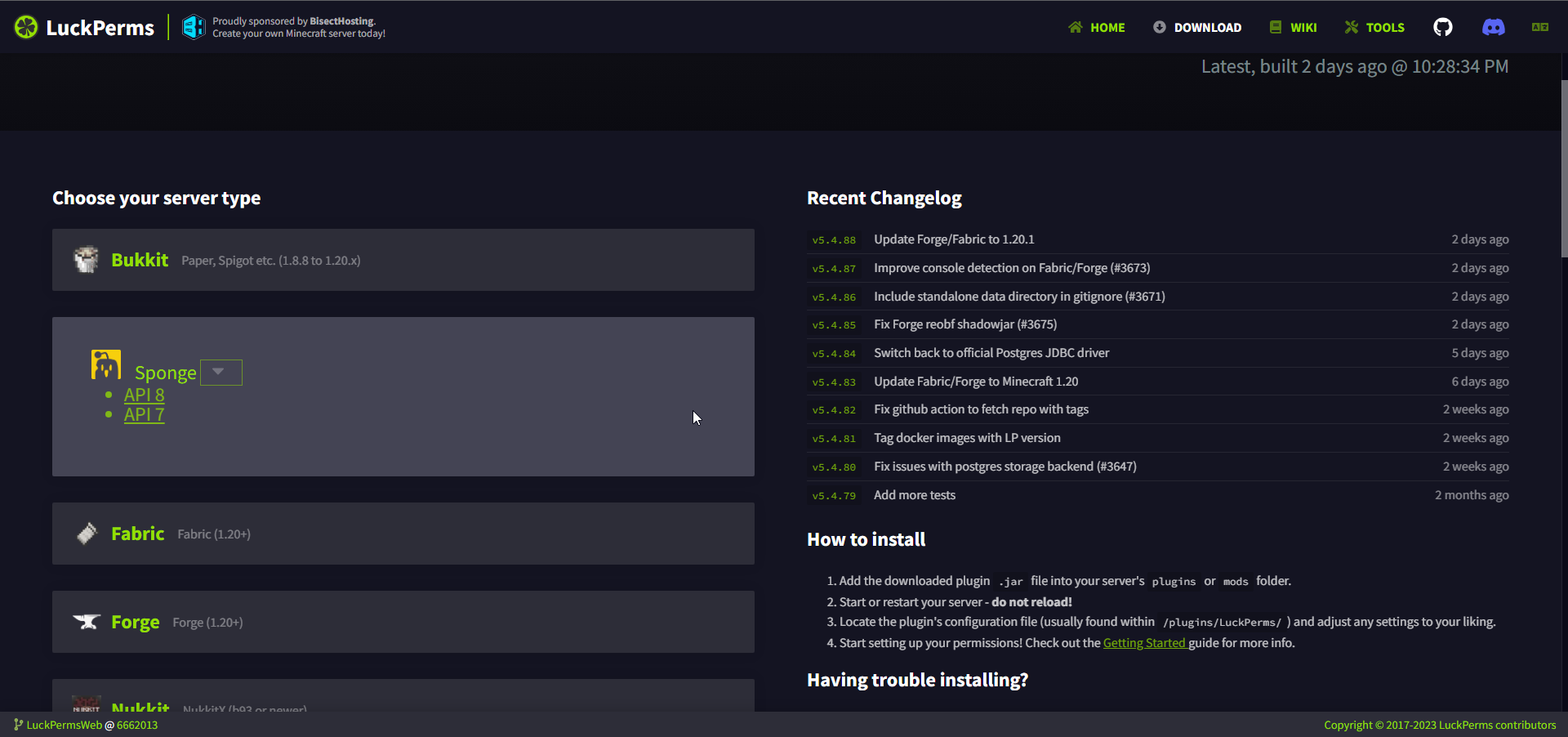
... to be continued tomorrow. 6 hours of vue fried my brain
 silk nest
Plss can serveryone help me plsss
hollow hare
silk nest
Plss can serveryone help me plsss
!ask
sweet sierraBOT
Please ask your question!
Please ask the question you have. Don't ask to ask, or ask to DM someone. There are people here to help you, but we need to know what to help you with, so please just ask the question you want to in as much detail as possible!
Or, try here first:
Why shouldn't I ask to ask?
hollow hare
No thanks. Advertising your server is not welcome here.
plush oracle
i dont dislike the arrow in green :o https://i.imgur.com/AYpc3zl.png
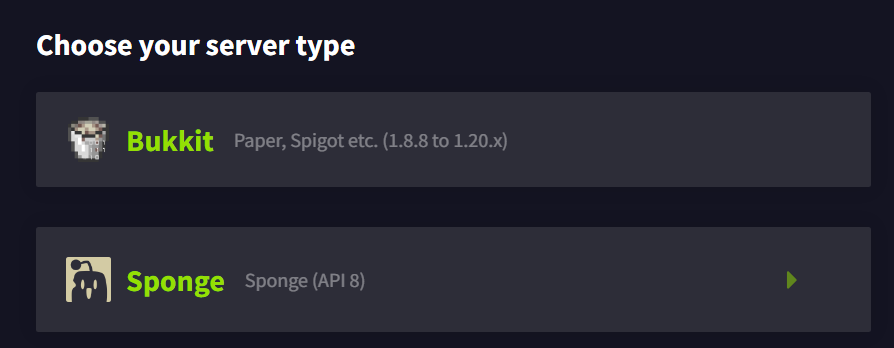 plush oracle
But hey, it works lol
So make a concrete suggestion. Arrow bigger. What else?
Text next to it or?
shrewd cloud
I think text next to it would work. “Versions” or something like that.
plush oracle
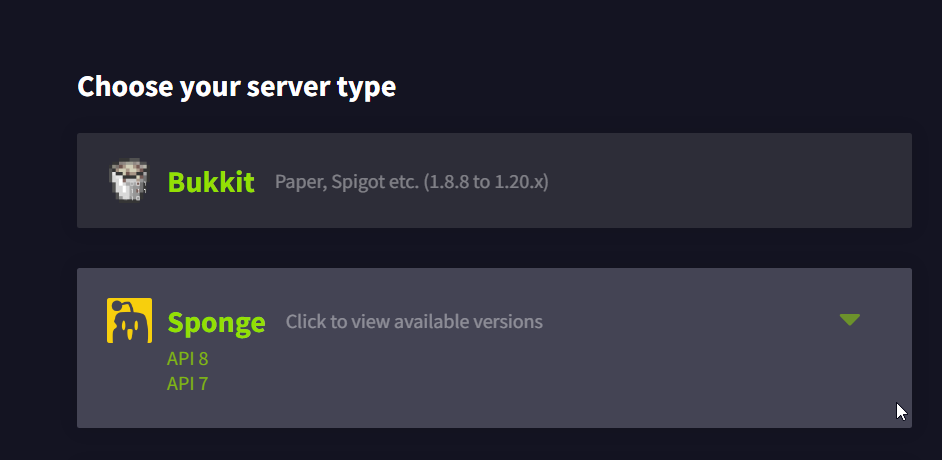
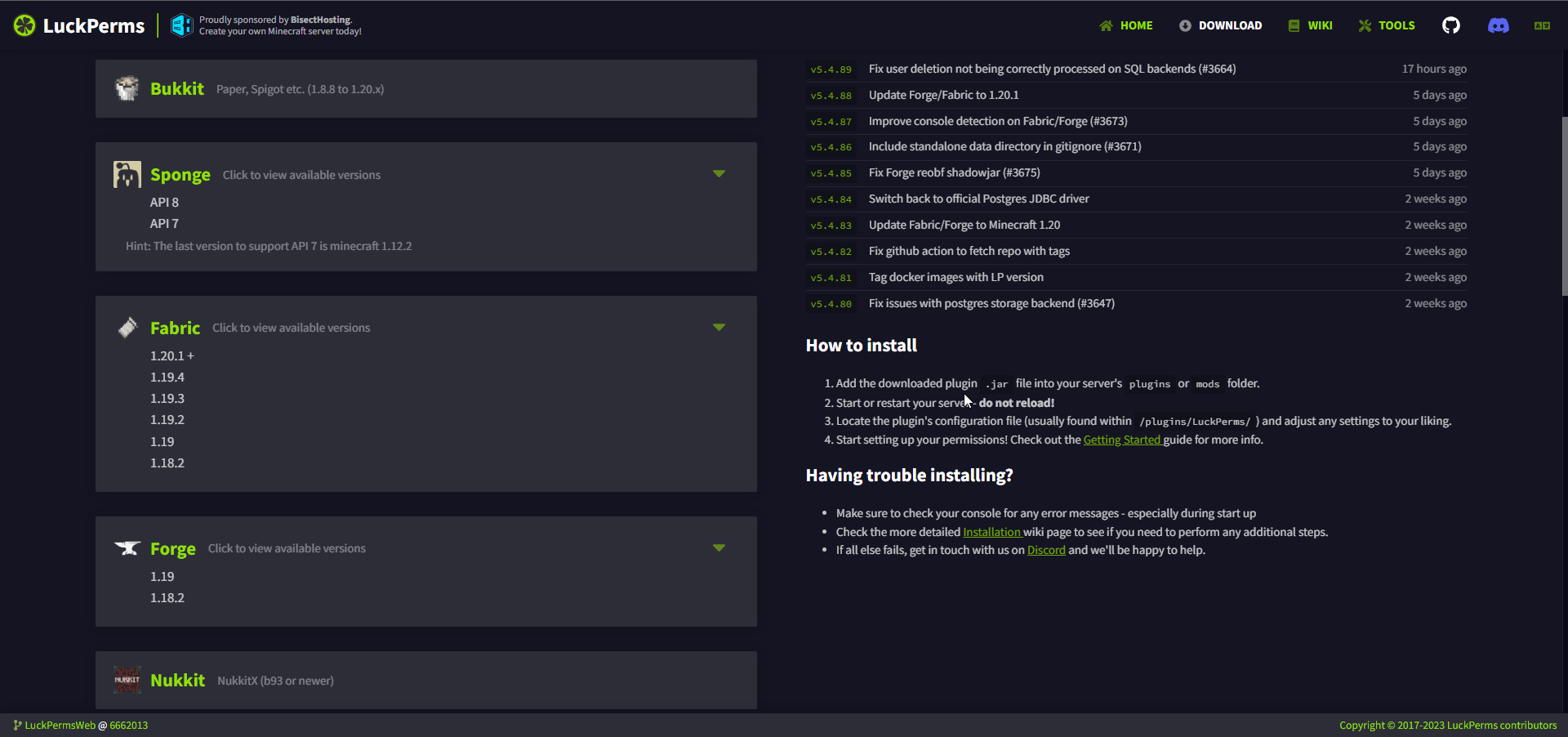
This is where I'm at rn
I feel like people will not know the difference between the two downloads regardless of mentioning api 7/8. I'm debating: description in grey next to it or hover item to not clutter it
hollow hare
Both dropdown arrow and list should be slightly bigger i feel like.
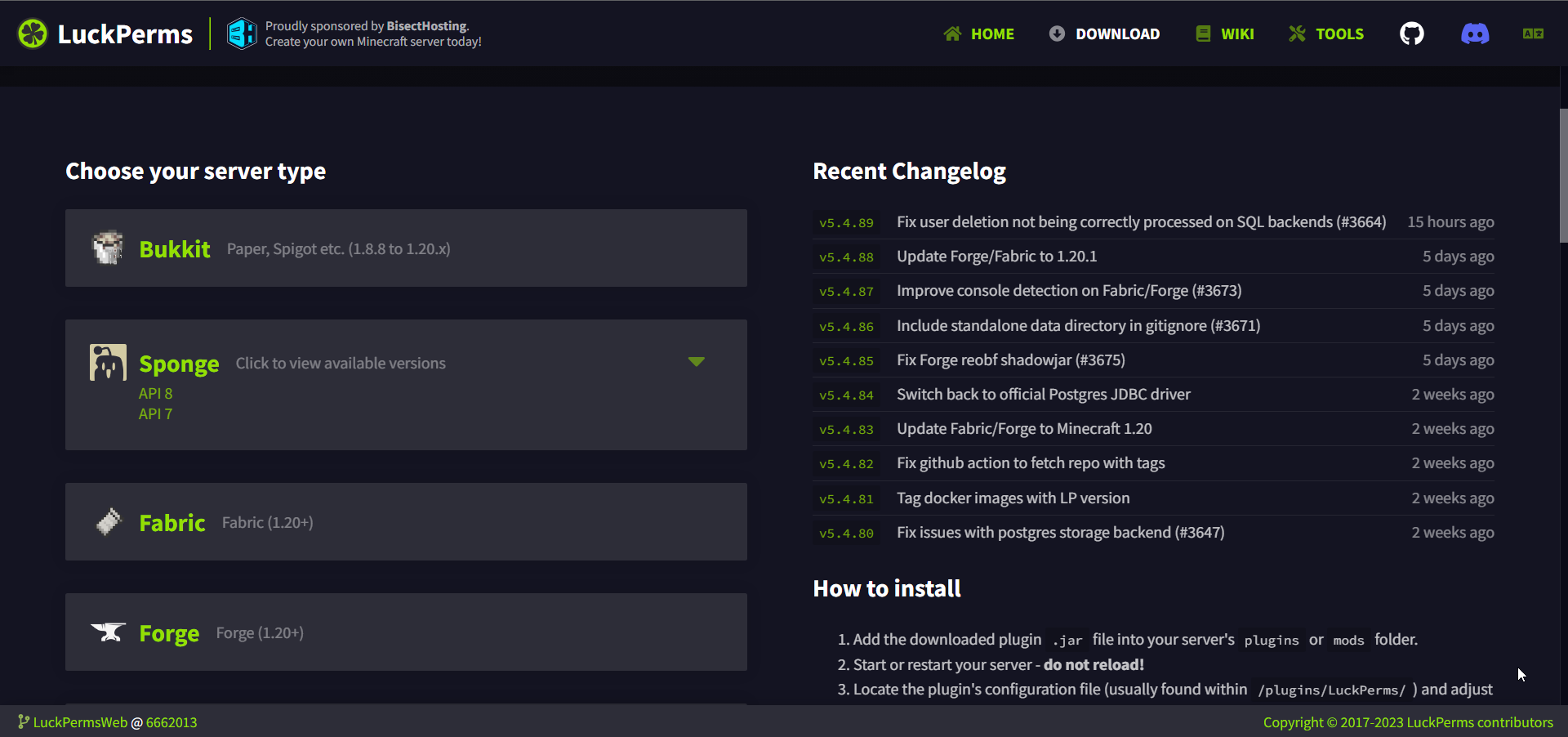 rotund sluice
I am by no means a ui/ux expert but I have just added this for spark

spark is a performance profiler for Minecraft clients, servers, and proxies.
maybe you can take some inspiration from that
plush oracle
Turbo suggested an accordion so i blame him
rotund sluice
that is probably better
plush oracle
I have all 3 working, just some style is needed as rn, its just plain numeriated list items
rotund sluice
but it effectively becomes a button within a button, and the style should make it clear that both are clickable and do different things :P
 rotund sluice
can the version dropdown go on the right-hand side of the button?
plush oracle
So right-bound the list?
rotund sluice
expanding the version picker also probably shouldn't make the overall button larger either (looks a bit weird having them different sizes imo)
plush oracle
We gotta remember im not a dev. I messed with java, javascript i last touched a year ago and vue i never did either so eh yea, kinda limited here. I need a real guide, draw me something, so i know where to go lel
I can tell turbo is gonna change my pr by 80% anyway ahaha
rotund sluice
I also will defer to the experts instead of telling you the wrong thing 😄
wait for master turbz
plush oracle
Im not even sure how many versions we need on each topic ngl. My web version is on my github. Its a bit messy atm, my vscode tried to be smart about spacing so i got lots to fix anyway
I just had this idea to make it less empty. How do you call these even? Milestone thingy?
 stoic current
TBH I like Luck's version on Spark
plush oracle
Great. Then do this yourself
cloud arrow
stoic current
TBH I like Luck's version on Spark
for luckperms that would become one big list though
Since, depending on how many versions you want on there, would be a lot for all the platforms
tepid umbra
Really only needs the unique versions
Sponge for example only needs api7 and api8 because those two broadly work for all of sponge.
I don't think LP holds a lot of "unique" versions last I recall?
Oh I just saw spark, I thought I remembered it different, I see the proported problem now
cloud arrow
Yeah since forge has I think 3 versions, fabric 3/4, then there's sponge 7/8(/9?), bukkit legacy, bukkit, bungee, velocity, nukkit. Which gets 13+ buttons
 eternal jungle
Hi
 neat shadow
Hey guys, how would I create "tags" with LP? I have ranks, but I'd like to have tags as well. For example, if someone types in chat and they have a rank and a tag, this is what their name would look like. [Chill] [Diamond] Er1_
"[Chill]" would be the tag
I tried creating another rank for the tag, but I'm not sure how I get two ranks to show in chat/on the player
hollow hare
neat shadow
I tried creating another rank for the tag, but I'm not sure how I get two ranks ...
This channel is for discussion about the LuckPermsWeb. Use #support-1 / #support-2 for general LuckPerms concerns and support. 
neat shadow
oh ok my bad
 turbid wharf
can i have some help on my server
cloud arrow
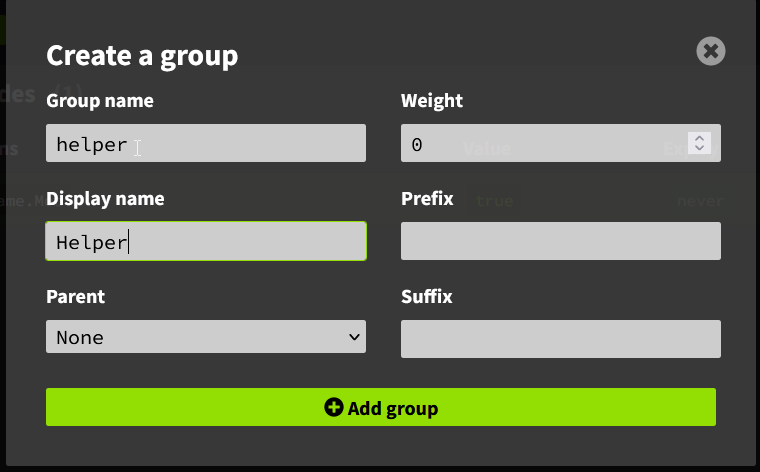
Is it possible for that when you're in this menu and press enter it'll create the group? https://i.imgur.com/p5cM3AS.png
 stoic current
anything is possible!
cloud arrow
Do you use VSCode for working on LPW? Or one of the Jetbrains programs?
earnest mango
Turbo uses Webstorm iirc, so yeah Jetbrains
 desert fiber
sorry to bother, but I was wondering how I would be able to find what something like the /me command is listed as
I'm not sure if this is the right chat to ask this in
stoic current
it's not, #support-1 or #support-2
cloud arrow
https://github.com/LuckPerms/LuckPermsWeb/pull/318 can this get merged?
cloud arrow
 stoic current
cloud arrow
<https://github.com/LuckPerms/LuckPermsWeb/pull/318> can this get merged?
stoic current
cloud arrow
<https://github.com/LuckPerms/LuckPermsWeb/pull/318> can this get merged?
i might want to double check everything there is the best way to do it. also that if statement is a bit crazy
stoic current
oh yeah, it's pointing to my undo-redo branch which i've pretty much abandoned due to it being way too difficult to implement. so that PR will need to be declined.
 sturdy owl
Hello o/ I noticed a problem with the display of all permissions on a monitor with a resolution of 1080x1920.(im talking about /lp editor system on ur website)
Not all are displayed on such a monitor with such a resolution.
Screen 1(left), 1080x1920 with missing permission
Screen 2(right), 1920x1080(wider) with all permission displayed

 stoic current
Hmm, weird
sturdy owl
yup a little bit and also annoying when u cant see all ur permission 😅
stoic current
sturdy owl
yup a little bit and also annoying when u cant see all ur permission 😅
i cant seem to reproduce this. can you please open a github issue with more information including your browser and a valid editor link with your data
https://github.com/LuckPerms/LuckPermsWeb/issues
opal bane
i dont think editor links last long enough to be useful in a github issue
stoic current
no but i can download the data if it is relevant
 winter tendon
Hey, it would be awesome for me if the webeditor's div class="node-list-scroll" had something like padding-bottom: 120px on its css, just a prevention to scroll flickering caused by the contexts 'popup', i dont want to fill a github suggestion because of boring, saying here just to check if someone would appreciate it too, already solved it for me using client-side scripts
stoic current
if it's not on github it's not gonna get done :P
sturdy owl
stoic current
i cant seem to reproduce this. can you please open a github issue with more info...
Okay
Oh hmm... no problem now. I think it's because of more permissions than I had before.
I had ~30 permissions and no slider on the right side on the page.
Now I have ~140 permissions and I have this slider, and when I move it, sometimes the permissions disappear, and if I move it even lower, they appear
Do you want me to report it anyway Turbotailz?
tight reef
can you have multiple users on the same web editor, for i can teach someone stuff or nah
opal bane
its not google docs, if thats what your asking
if you want to teach someone, showing them your screen would probably be more effective anyways
 winged sluice
Hey, i dont know if im the only one here with this problem but i cant download a version of LuckPerms from the website.
hollow hare
winged sluice
Hey, i dont know if im the only one here with this problem but i cant download a...
Refer to the latest pinned comment #support-1 message.
winged sluice
hollow hare
Refer to the latest pinned comment https://discord.com/channels/2416672449274839...
Thank you! 🙏
shrewd cloud
Just for the sake of it
stoic current
@rotund sluice I hid the search bar on the editor, visible on all other pages. All good to merge now?
https://algolia-docsearch.luckperms.pages.dev/
LuckPerms - A permissions plugin for Minecraft servers.
LuckPerms is a permissions plugin for Minecraft servers. It allows server admins to control what features players can use by creating groups and assigning permissions.
earnest mango
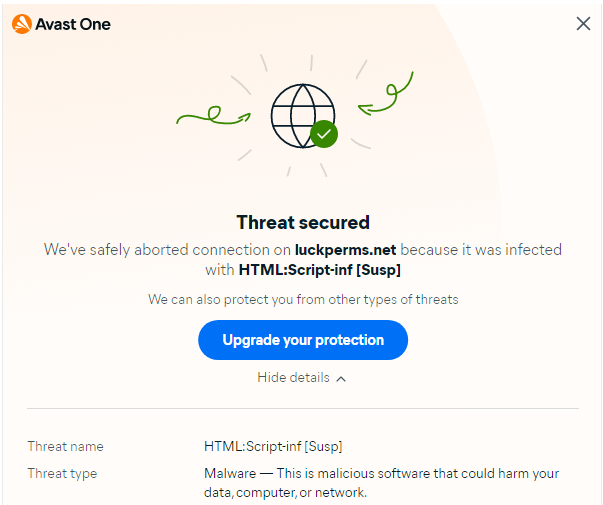
Hey turbo, we've got a couple reports of AVs flagging the LP site for "HTML:Script-inf", both from Avast. Seems like maybe a new check rolled out that false positives or something?
https://f.u11.io/lJFf38
 stoic current
What the f
earnest mango
this seems like it's becoming an actual problem, getting more reports of it
stoic current
Probably a dependabot PR I recently merged
 chrome radish
i have a suggestion for the webpanel, why don't they make it so that permissions that are inherited are of another color? so instead of always checking i can instead just look at the colors
[17:15]
could be useful
shrewd cloud
I’m not following what you’re suggesting - inherited permissions don’t show up in the web editor.
opal bane
shrewd cloud
I’m not following what you’re suggesting - inherited permissions don’t show up i...
plush oracle
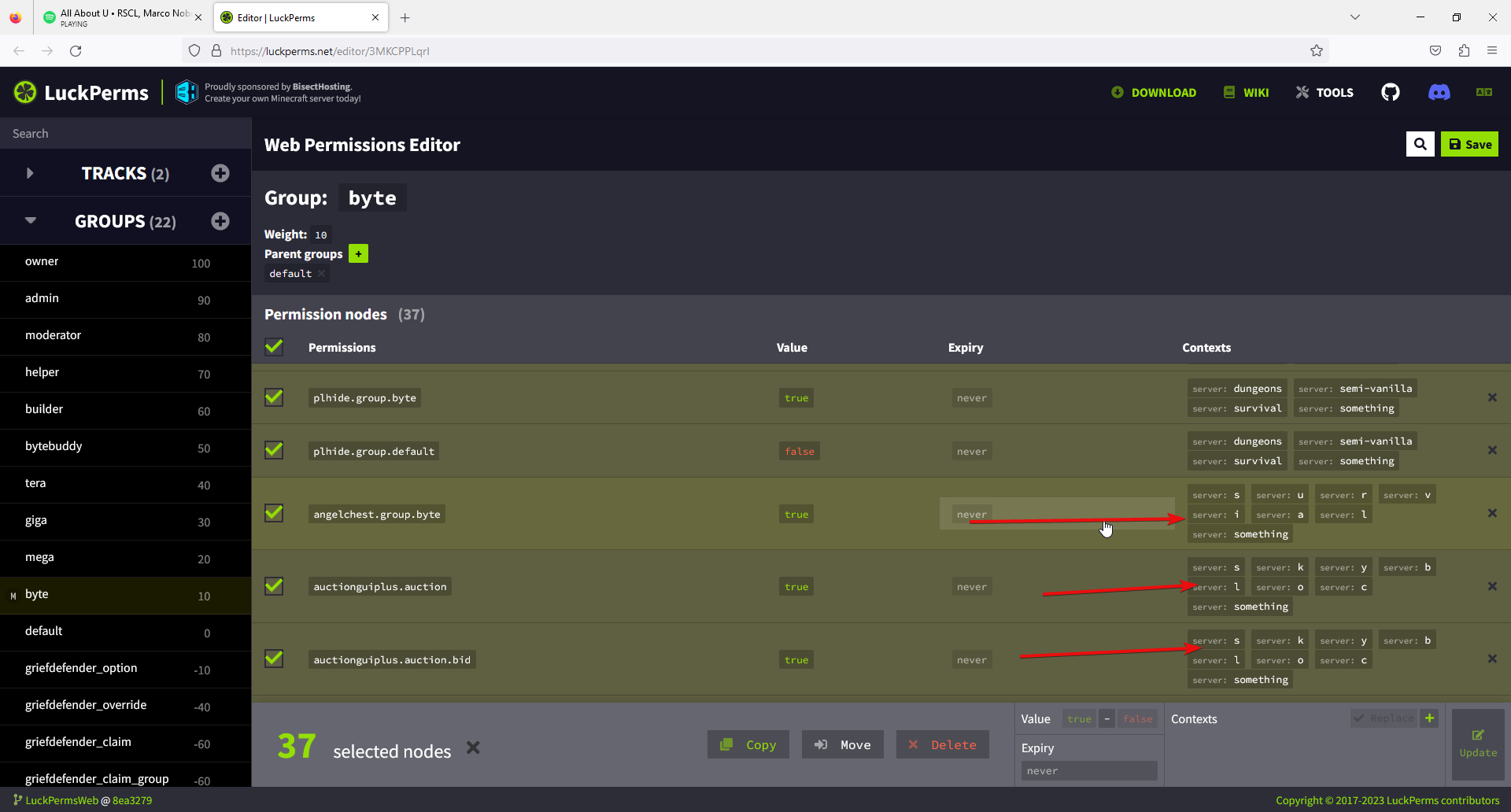
So one of my people just came across weird behavior in the editor, would appreciate if you could try to reproduce this and confirm or deny reproductivity. I had no trouble reproducing this. Setup is a network using mysql as storage without issue. Adding a new server with "semi-vanilla" as context. See picture. So now for obvious reasons Mr. Admin man wants to add a context to some nodes to accomodate the new gamemode. He shared his screen with me and i observed that some nodes were quite literally screwed after mass editing context using the editor. Let me show what i mean https://i.imgur.com/GVva7OF.png The context pointed out only happens like this after editing, adding a server context. I found the pattern and it seems it is not related to the dash in the name of the context which i thought to be messing up the nodes at first. Instead, it's always the last 7 ones affected and broken up for larger edits. When editing 7, its 4 affected. We did not have the guts to try and apply this on a production server, so we discarded the session. Heres an editor link in case you wanna mess with it https://luckperms.net/editor/3MKCPPLqrI. We tried multiple links and even different browsers with the same results. This hasnt happened in the past. Anyone have any ideas?

 open anvil
Hello, is there any way to change the weight of a group without deleting it?
opal bane
!weight
sweet sierraBOT
LuckPerms allows you to set weights in order to determine the priority of certain nodes, like permissions and even prefixes. A higher weight number is a higher priority.
Read more
LuckPerms wiki
odd temple
/lp
 tawny lily
what do you mean by "the tree exists for infinity"? are you keeping your browser tab with the editor open for a week straight?
oh, that
uh i don't know for certain, but it should last the same as an editor link? not that you should be reusing editor sessions but tree views are fine
@rotund sluice are tree views configured any differently than editor sessions? from what i'm seeing in LP, editor appends "/editor" to the user-agent but tree doesn't; do you do anything on bytebin when that extra isn't present?
cloud arrow
GitHub
Config for the self-hosted infrastructure and services used by my open source projects - lucko/infra
 forest oasis
any update to this weird lp editor issue:
 stoic current
forest oasis
any update to this weird lp editor issue:
stoic current
forest oasis
any update to this weird lp editor issue:
can you please tell me what you do when it happens?
forest oasis
i put in a github report but i do /lp editor on server, open in firefox, search for perms i want - grief (for example) check box to highlight all in a category then under context field i put in key: server value: semi-vanilla hit enter then add

i can do like i did with zero and screen share if u would like
stoic current
ah so it's bulk adding got it
stoic current
hmm, i can't seem to reproduce. have you tried in chrome/edge?
or could you please send me your editor url
maybe it's a data issue
cause i'm just trying with the demo data
forest oasis
ok, yes i tried chrome and edge
1 second
im in there now updating cmi
LuckPerms - A permissions plugin for Minecraft servers.
LuckPerms is a permissions plugin for Minecraft servers. It allows server admins to control what features players can use by creating groups and assigning permissions.
 valid trail

valid trail
Rip
forest oasis
no worries im patient, only opened server today to public so not that many to worry about lol
i have been doing manually when i find an issue but bulk would be nice lol
stoic current
@forest oasis can you try this build please? it should be fixed there :)
https://fix-bulk-editing-contexts.luckperms.pages.dev/editor/zJ1tIdeHDc

LuckPerms - A permissions plugin for Minecraft servers.
LuckPerms is a permissions plugin for Minecraft servers. It allows server admins to control what features players can use by creating groups and assigning permissions.
valid trail
Yoooo
stoic current
sure, just replace luckperms.net with that domain
forest oasis
ok seems to work, yay i can bulk edit lol, thanks so much - im guess a new version will be out soon?
stoic current
assuming i've not broken anything else with the change, i'll push it live later today
forest oasis
nice, ok well if u need me u can dm, ping or tell zero to get my arse online lol
again thanks, i pinned the domain for now in my clipboard history
stoic current
no worries. thanks for reporting it and sorry if my terrible engineering has caused you issues 😅
forest oasis
trust me when i mess up irl people/companies just cant make phone calls or browse the interent so no shaming from me lol thanks again have good night/day
 mighty musk
Hey, is it possible for you guys to delete spark data from your website? I need it deleted ASAP.
@earnest mango
sweet sierraBOT
Hey pjo! Please don't tag helpful/staff members directly.
earnest mango
Don't ping.
Why?
mighty musk
Sorry for ping
It got public
I need it deleted ASAP before anyone does anything bad with it
Its really urgent
I cant let my players see some of data there
so?
can you do anything?
Or tell me who can I contact
@earnest mango
sweet sierraBOT
Hey pjo! Please don't tag helpful/staff members directly.
earnest mango
Sparks expire iirc either after 1h or 15m, but either way I'm not aware of any sensitive info contained in a spark link.
shrewd cloud
there’s nothing sensitive in a spark report.
mighty musk
earnest mango
Sparks expire iirc either after 1h or 15m, but either way I'm not aware of any s...
Its from yesterday
Didnt expire
And there is something sensitive
So I really need it deleted
earnest mango
what kind of sensitive info
shrewd cloud
spark info expires after 36 hours
stoic current
this really isn't the place for this lol
sweet sierraBOT
Hey pjo! Please don't tag helpful/staff members directly.
sweet sierraBOT
Hey pjo! Please don't tag helpful/staff members directly.
mighty musk
Is there any way to reach spark support? I know this discord is not for this purpose, but its the same dev. I really need support ASAP, but there is no one on spark support. Its really urgent and sensitive
 mighty shell
mighty musk
ITS REALLY IMPORTANT
mighty shell
mighty musk
ITS REALLY IMPORTANT
Hey, no need to keep pinging lots of people. It's probably best for you to just wait for it to expire
Unless you shared the link to the spark with someone, it will be impossible for anybody to find the spark ID without you giving it to them
So as long as you don't share the ID, nobody will see it, and it will be gone naturally after a certain period of time
mighty musk
mighty shell
Hey, no need to keep pinging lots of people. It's probably best for you to just ...
So can you help me with getting it deleted/
mighty shell
Unfortunately not
mighty musk
Do you have any contact with someone on spark team?
Or lucko?
He used to be here all the time back in the day
stoic current
@rotund sluice
valid trail
Lucko get in here
odd temple
mighty musk
Is there any way to reach spark support? I know this discord is not for this pur...
Spark has its own discord
opal bane
the data in a spark report is hosted on bytebin, a service lucko hosts that several projects use, like pastes.dev, spark, luckperms, and probably others
 rancid plume
I have setwarp.a of the EssentialsX plugins, but I don't recommend warp.a. can u help me???
 hollow hare
Doesn't seem like an Essentials permission to me. 👀
Moreover, don't fully rely on the editor's permission suggestions, as they're just that. You may manually type out the permission you'd like to enter.
rancid plume
hollow hare
Doesn't seem like an Essentials permission to me. 👀
i enable essentials.warp, any warp i can pass, essentials.warps.a even though i have false

i false essentials.warp then essentials.warps.b i enabled true but still can't use warp.b command
hollow hare
We can take this into #support-1 or #support-2 since it's not actually related to the LuckPermsWeb.
 gusty roost
Is it possible to prevent the entries in the verbose page from minimizing/shrinking? Whenever I scroll down it just collapses and I can't read the bottom part of it
stoic current
gusty roost
Is it possible to prevent the entries in the verbose page from minimizing/shrink...
It is like this by design. Otherwise if there is a verbose report with 1000s of entries it can crash the app.
It can probably use a bit of tweaking
gusty roost
Yeah i get that part, but the fact it auto closes when you scroll is quite frustrating
stoic current
Understand that, but keeping the state of every item in memory will cause terrible performance
valid trail
gusty roost
Yeah i get that part, but the fact it auto closes when you scroll is quite frust...
That is very annoying
gusty roost
stoic current
Understand that, but keeping the state of every item in memory will cause terrib...
I don't get what you're saying... couldn't the site just not collapse the entry that is currently expanded?
*When scrolling. Or at least collapse it when the expanded content is half way of screen or something like that, instead of it collapsing as soon as the entry's top part is off screen
Unless the list is designed in a really strange way
stoic current
it's a "virtual" list, it only renders items that would be visible on the screen, everything else is hidden. hence why when you scroll the item off the page it reverts to its initial state.
it's done that way to prevent performance issues when there are thousands of items
valid trail
Dang
stoic current
potentially i can make it so that when the item is expanded, it saves the state and checks whether it should be open or not when scrolling back into view
@gusty roost would you mind sending me a sample verbose report
 gusty roost
Not sure if i can... it's contains some user info
 stuck wyvern
how to fix this?

 covert slate
stuck wyvern
how to fix this?
covert slate
stuck wyvern
how to fix this?
do --force or restart the lp editor

 past elk
mighty musk
ITS REALLY IMPORTANT
past elk
mighty musk
ITS REALLY IMPORTANT
This guy has pinged people several times in this discord, spark, and has whined in admincraft as well. Crying about sensitive data when there is nothing sensitive in a spark report. Not to mention HE was the one to post the spark report so like??? What’s this dude’s problem lol
opal bane
"but my plugin list!" is usually most peoples concern
past elk
opal bane
"but my plugin list!" is usually most peoples concern
Like a plugin list is “sensitive information.” Hes imagining someone is out there like “you fool, I have your plugin list, time to hack into the mainframe and delete system32”
earnest mango
Some people are concerned about people being able to copy their server with just the plugin list. As I always say, if that's a serious risk, you have bigger problems (there's more to a server than just the collection of plugins you chose i.e. map, configs, community, etc etc).
That being said this is #luckperms-web, not the channel for this
 buoyant scroll
anyone already have LuckPermsWeb self-hosted with bytebin and bytesocks running?
@stoic current i hope it is ok if i ping you, i see you are quite a lot knowledgeable for this
i will write briefly what the problem i am facing is
I did properly set up LP web, bytebin too but the problem i am having is related to (also installed) bytesocks software.
I set up everything, everything functions, channels create, created channels are giving HTTP 404 error (idk if this is how it should be or not) when i try to acess them; so the ones that are being created when i use /lp editor in mc server console, then i get the bytesocks channel key and use it at bytebin.<my_domain>/<bytesocks_channel_key>, i get that HTTP 404 response
So everything on editor functions except... when i open newly generated editor link, there is no pop-up window for /lp trusteditor ... command, which basically means that something is not properly connected but i cannot realize what and there is no docs for bytesocks
sweet sierraBOT
Hey thejoshua.motikacraft! Please don't tag helpful/staff members directly.
stoic current
it's literally been two minutes
stoic current
buoyant scroll
<@139665464547606528> i hope it is ok if i ping you, i see you are quite a lot k...
tbh i didn't develop any of the bytesocks stuff so i probably wont be much help here
although you said bytebin.<mydomain> it should be on a different subdomain
bytebin is for the content, not the sockets
stoic current
valid trail
Wasnt refering to this...
then please keep off topic stuff out of here
valid trail
sure
buoyant scroll
stoic current
tbh i didn't develop any of the bytesocks stuff so i probably wont be much help ...
my bad.. i meant bytesocks.<domain>
Sorry
mistake in typing
buoyant scroll
stoic current
tbh i didn't develop any of the bytesocks stuff so i probably wont be much help ...
well, i am trying not to ping Luck as i already did yesterday, but i don't know who else could help about this...
stoic current
@rotund sluice if you could help with the above pls 🙏
 rapid crest
Why does the session get invalidated so quick? Can I change that?
buoyant scroll
rapid crest
Why does the session get invalidated so quick? Can I change that?
that is why i am talking about all this above
from my knowledge, selfhosting is a solution
rapid crest
how does that work?
buoyant scroll
you just host luckpermsweb and its software on your own server/vps
buoyant scroll
yes, but the think you're asking for there is no guide, only for everything else (if we're talking about Apply button)
buoyant scroll
rapid crest
and that fixes the problem? To what extend?
you simply selfhost it on your own server and modify expiration/session timeout
rapid crest
is self hosting even supported?
buoyant scroll
yes quite a lot
rapid crest
there IS a guide https://luckperms.net/wiki/Self-hosting-the-web-interfaces
LuckPerms - A permissions plugin for Minecraft servers.
LuckPerms is a permissions plugin for Minecraft servers. It allows server admins to control what features players can use by creating groups and assigning permissions.
too much effort though...
buoyant scroll
there is no guide for Apply button related stuff if you are specifically asking for this @rapid crest
rapid crest
isn't that what bytebin does?
buoyant scroll
rapid crest
isn't that what bytebin does?
Apply button functionality is handled by bytesocks
buoyant scroll
Luck, can you please upload your bytesocks nginx .conf block to pastes.dev?
 errant cove
rapid crest
there IS a guide https://luckperms.net/wiki/Self-hosting-the-web-interfaces
errant cove
rapid crest
there IS a guide https://luckperms.net/wiki/Self-hosting-the-web-interfaces
Thank you. This is what I've been searching for 🙂
Must have flown before my eyes when checking the wiki page
Edit: Spelling is hard
buoyant scroll
ok... i finally got bytesocks working
i had misconfigured config.yml of my LPweb...
buoyant scroll
stoic current
<@241666402639937538> if you could help with the above pls 🙏
still, thanks a lot for trying to reach for further help
stoic current
buoyant scroll
still, thanks a lot for trying to reach for further help
No problem. What was the issue?
buoyant scroll
stoic current
No problem. What was the issue?
i had wrong bytesocks_host in LPweb config.yml...
everything else, i configured correctly
i realized by going to editor and pressing F12 and looking at console..
buoyant scroll

any ideas why this list is empty? when selfhosting bytesocks (and Apply button works)
opal bane
the list is based on what permissions have been checked on that server since lp was installed
also they are just suggestions, dont rely entirely on them
buoyant scroll
ty
what about if i have 1 MySQL database, connected luckpermsbungee (from proxy server) and luckperms (from paper server) and i issue lp editor command from paper server
will i get suggestions only from that server or from both bungee and this server and any other servers connected to the same db?
opal bane
itll be permissions that the instance that created the session knows about
buoyant scroll
@opal bane sorry for tag, you asked me few days ago why i wanted to selfhost
i talked to _11 about how to increase timeout for Apply button, then he said that he thinks bytesocks handles that, or LP itself or LPweb, so i wanted to figure out if it is bytesocks so i needed to selfhost it too
sweet sierraBOT
Hey thejoshua.motikacraft! Please don't tag helpful/staff members directly.
buoyant scroll
opal bane
itll be permissions that the instance that created the session knows about
ok thanks
opal bane
if you use /lpb or /lpv, itll be proxy perms, and if you use /lp itll be perms of the backend you are on
hollow hare
This has nothing to do with the LuckPermsWeb. Please use #support-1 or #support-2.
 heady tapir
help
even if i apply the permissions from the site which is linked to my server, the permissions arent applied
stoic current
care to add a bit more info there? seems to be working for me.
valid trail
Lol
 quaint locust
Cannot use it either
shrewd cloud
LuckPerms - A permissions plugin for Minecraft servers.
LuckPerms is a permissions plugin for Minecraft servers. It allows server admins to control what features players can use by creating groups and assigning permissions.
looks like it’s working to me
 minor copper
seems to work fine for me too
 night kernel
sadge
 lyric elbow
Getting a PR_CONNECT_RESET_ERROR error on my Luckperms editor session. You guys sure it's not down?
stoic current
Finally an error!
valid trail
Yaya
stoic current
I'm not really sure why this would be happening though.
@rotund sluice could you check if there is anything wrong from the Cloudflare side? Seems a few people are reporting the site isn't working.
 stray light
stoic current
<@241666402639937538> could you check if there is anything wrong from the Cloudf...
stray light
stoic current
<@241666402639937538> could you check if there is anything wrong from the Cloudf...
Cloudfare under maintanence
valid trail
Oh yeah
 blissful shoal
Discord is having issues too
stray light
blissful shoal
Discord is having issues too
Only Discord web
odd temple
When the website will be fixed then ?
plush oracle
It works fine for me every time
valid trail
What error do you get then?
valid trail
Oh, sorry
lyric elbow
Any ETA on this being fixed? Still unable to access any sessions.
shrewd cloud
lyric elbow
Any ETA on this being fixed? Still unable to access any sessions.
Are you using AVG or Avast antivirus?
lyric elbow
Avast
lyric elbow
Oh wow ok, that made it work
shrewd cloud
Avast/AVG has been screwing with LP for a while, but we assumed it was fixed.
lyric elbow
Any way to have it allow LP?
shrewd cloud
not sure. You should read their docs for adding an exclusion.
 minor copper
 noble acorn
anyone knows why i cant open the web editor?
noble acorn
anyone knows why i cant open the web editor?
are you using avast/avg?
shrewd cloud
read messages above
 last vortex
It wont load my web editor link its been 10 minutes. Any suggestions?
valid trail
last vortex
It wont load my web editor link its been 10 minutes. Any suggestions?
Got a vpn or antivirus? Check your internet connection or get a new web editor by doing /lp editor
last vortex
valid trail
Got a vpn or antivirus? Check your internet connection or get a new web editor b...
it just says loading editor
valid trail
Did you try my suggestions above?
last vortex
valid trail
Did you try my suggestions above?
yes when i type in /lp editor is says loading please wait and never gives me the link then i try to run it again it says another command is being executed from the last /lp editor
no anti or vpn
valid trail
last vortex
yes when i type in /lp editor is says loading please wait and never gives me the...
Try checking console for errors
last vortex
valid trail
Try checking console for errors
WARN [LuckPerms] Command execution [editor] has not completed - is another command execution blocking it?
thats what console says
valid trail
!paste your logs
last vortex
i restarted the server to try again and it wouldnt esecute it either
sweet sierraBOT
Please use pastebin!
Seeing a paste of the problem makes everything so much easier! Use https://pastes.dev/ for easy pasting!
For console errors:
Pastebin any relevant segments of the console log. If it's a startup error, this includes the entire startup log!
Other errors:
Pastebin the entire LuckPerms config file (passwords removed) as well as any other relevant files!
last vortex
A paste containing 98 lines of plaintext.
valid trail
Hm weird
last vortex
valid trail
Hm weird
would i need to just reinstall the plugin at that point
 lean kraken
Could try updating it if you're not on the latest release
valid trail
Could, also try doing /lp info to check your ping if it’s high that’s why it won’t load fast
valid trail
last vortex
would i need to just reinstall the plugin at that point
I’m sure thiers a way to fix it and why it’s happening
last vortex
valid trail
Could, also try doing /lp info to check your ping if it’s high that’s why it won...
it says another command is being executed when i do any /lp commands
valid trail
last vortex
it says another command is being executed when i do any /lp commands
Are you on high ping or bad internet connection?
last vortex
shouldnt be
last vortex
valid trail
Are you on high ping or bad internet connection?
ethernet with good internet and ping shoul be around 25-30
valid trail
Yeah I don’t know why it’s happening I tried but hopefully one of the helpers or mods can help you more Goodluck
last vortex
thank you
valid trail
last vortex
thank you
Work now?
last vortex
valid trail
Work now?
still doesnt
 cunning temple
last vortex
WARN [LuckPerms] Command execution [editor] has not completed - is another comma...
cunning temple
last vortex
WARN [LuckPerms] Command execution [editor] has not completed - is another comma...
do a binary search
try without any plugins other than luckperms
if it works, add half of your original plugins back until it stops working

basically this
sweet sierraBOT
Sorry! I do not understand the command binary
Type !help for a list of commands
 solemn dirge
!help
sweet sierraBOT
Available commands
!advanced
!api
!argumentbased
!ask
!bedrock
!bulkupdate
!bungee
!bungeecheck
!cauldron
!colours
!commandequivalents
!commands
!config
!context
!cookbook
!default
!downloads
!editor
!editorsafety
!errors
!essentials
!extensions
!extracontexts
!faq
!forgepermissions
!formatting
!hack
!helpchat
!inheritance
!install
!libsdir
!locale
!meta
!migration
!notworking
!nowildcard
!offline
!pasteit
!permissions
!placeholders
!reload
!selfhosting
!spongeseven
!stacking
!storage
!suggestions
!switchstorage
!sync
!testingperms
!tracks
!translationprogress
!translations
!tutorial
!upgrade
!usage
!userinfo
!velocitycheck
!verbose
!version
!weight
!whyluckperms
!wiki
solemn dirge
!whyluckperms
sweet sierraBOT
Why should you choose LuckPerms? Read here to find out.
Read more
LuckPerms wiki
hollow hare
This is not a bot commands channel.
 hollow garnet
Hello,
The website (https://luckperms.net/) seems to be off, right ?
 sturdy geyser
 hollow hare
The website seems to be temporarily down. Please be patient while the project admins resolve it. They've already been notified. 
valid trail
hollow hare
The website seems to be temporarily down. Please be patient while the project ad...
Oh no
shrewd cloud
it's a CF issue - should be resolved shortly. usually they're quick
valid trail
Always danm cloudfare
shrewd cloud
it's almost never cloudflare
valid trail
First its discord, then i cant acess spigot on vpn, and now luckperms 😭
shrewd cloud
skill issue.
valid trail
😭
 weary wadi
what do I have to enter so that the admin get all authorization ?
sweet sierraBOT
LuckPerms does not perform any chat/tablist formatting of its own!
LuckPerms only acts as the source for prefixes / suffixes, it doesn't actually apply them. You need an appropriately configured chat/tablist formatting plugin for them to be displayed. If the values appear correctly when you run /lp user <user> info, LuckPerms is doing its job!
FAQ answer: Prefix isn't showing?
List of chat/tablist formatting plugins that work with LuckPerms
 floral bridge
!placeholders
sweet sierraBOT
Display data such as user prefixes and groups from LuckPerms in other plugins.
Read more
LuckPerms wiki
 graceful sail
!default
sweet sierraBOT
LuckPerms provides a group that every player is added to upon joining the server, called default. You can use multiple methods to change the default group or change the name of it.
LuckPerms wiki
valid trail
💀
hollow hare
Not a commands channel whatsoever. 
stoic current
!baneveryone
sweet sierraBOT
Sorry! I do not understand the command baneveryone
Type !help for a list of commands
stoic current
Oh
valid trail
stoic current
!baneveryone
😴
 ruby pawn
i get this while trying to access the web editor
 stoic current
disable your antivirus
or whitelist luckperms.net
latest updates in #news explain what's happening
 opal bane
turbo, stop using lucks website for phishing attacks 
tepid umbra
stoic current
https://tenor.com/view/ah-shit-here-we-go-again-ah-shit-cj-gta-gta-san-andreas-g...
Report the damn false-positive CJ!
stoic current
why bother when they will just flag it again lol
need to fix the actual issue which i think is plausible
tepid umbra
Sounds dubious, but I'll allow it
valid trail
stoic current
https://tenor.com/view/ah-shit-here-we-go-again-ah-shit-cj-gta-gta-san-andreas-g...
💀
cloud arrow
diff totally not confusing
shrewd cloud
Yeah it was stupid how that rendered…
 cobalt prism
@stoic current I am getting the same issue again with Avast antivirus blocking my connection to https://luckperms.net/ and https://plausible.luckperms.net/js/pl.js
It reports HTML:Script-inf [Susp] on https://luckperms.net/
It reports URL:Phishing on https://plausible.luckperms.net/js/pl.js
LuckPerms - A permissions plugin for Minecraft servers.
LuckPerms is a permissions plugin for Minecraft servers. It allows server admins to control what features players can use by creating groups and assigning permissions.
sweet sierraBOT
Hey sfsuralias! Please don't tag helpful/staff members directly.
cobalt prism
Sorry about tagging.
stoic current
cobalt prism
<@139665464547606528> I am getting the same issue again with Avast antivirus blo...
Yeah I know. I'm leaving it for now cause it keeps happening lol
cobalt prism
Why is it happening?
stoic current
Working on a rebuild anyway should fix the problem then :)
cobalt prism
Alright, cool. Thanks for the quick response man.
stoic current
cobalt prism
Why is it happening?
Unsure
valid trail
@somber prism what does it show when you try to access it?
 valid trail
Got a vpn or antivirus on?
 somber prism
My avast was blocking it for some reason.... how odd
opal bane
avast has been doing that a lot lately, still no idea what the cause is
 lyric grotto
Virus?
 hollow hare
No. Disable your anti virus or whitelist the domain.
Further info on this #news message.
lyric grotto
No matter how much I add it to the whitelist, the antivirus continues to block it.
shrewd cloud
Thats something you’ll have to address with them for the time being. We have had this issue 3 different times now, they assured us it was resolved, and we are back to square one. It’s being looked into on our end how to completely fix it, but until something comes of that it’s out of our hands.
lyric grotto
it works
 shrewd cloud
Keep it to one channel, and the correct one please
 hexed ruin
I want a regular player to be able to use the /pokeheal command what is wrong with this
 cloud arrow
do not cross post
 hard flicker
hollow hare
hard flicker
hollow hare
Huh?! How's that related to the LuckPermsWeb? 
 astral wasp
hexed ruin
I want a regular player to be able to use the /pokeheal command what is wrong wi...
astral wasp
hexed ruin
I want a regular player to be able to use the /pokeheal command what is wrong wi...
add this perm to default role not to player
 trail tusk
cloud arrow
do not cross post
trail tusk
cloud arrow
do not cross post
Please tell me how to give rank using luckperms
hollow hare
trail tusk
Please tell me how to give rank using luckperms
Stop pinging others or replying to unrelated messages just to grab someone's attention.
Use one of the support channels #support-1 or #support-2 and ask there.
floral bridge
How do I put permissions in the luckperms web using a other plugin of a scr
floral bridge
How can I make it where I can see the permissions in the web why is there anyone not answering omg
hollow hare
floral bridge
How can I make it where I can see the permissions in the web why is there anyone...
Where are you expecting them to be displayed at?
If you're referring to the permission suggestions list; it's just that. Not all available permission will show there. They have to be checked server so LP knows about them. You can manually enter and add your permissions without relying on the dropdown.
floral bridge
Can I add it to the drop Down I have the src but don’t know how to add it In the src
shrewd cloud
as he already said, there has to be a permission check made for them to be added to the list of known permissions. You don’t have to “add” it anywhere.
floral bridge
So I need to had a line to the plugin to have a permission check for all the permissions in the plugin right
 earnest mango
!geyser
sweet sierraBOT
Using Geyser?
If you're having issues with permissions for bedrock players, or it's telling you that a bedrock player's name is invalid, try setting allow-invalid-usernames to true in the LuckPerms config.
earnest mango
and #support-1 for future LP support questions please
 velvet tiger
OK thanks
 static pebble
Hello, does anyone speak Spanish, I have a question
hollow hare
static pebble
Hello, does anyone speak Spanish, I have a question
Do not cross post.
 compact shard
!tracks
sweet sierraBOT
Tracks provide a method for you to promote/demote players along a track (or ladder) of groups.
Read more
LuckPerms wiki
tepid umbra
89898989898989898989898989898989898989898989898989898989898989898989898989898989898970]]]]]]]]]]]]]]]]]]]]]]]]]]]]]]]]]]]]]]]]]]]]]]]]]]]]]]]]]]]]]]]]]]]]]]]]]]]]]]]]]]]]]]]]]]]]]]]]]]]]]]]]]]]]]]]]]
shrewd cloud
Thanks
 snow crown
Can I disable the webeditor someone? If not, What's the IP address the webeditor is hosted on and does it change so I can deny it via firewall
earnest mango
XY problem, why? Without someone explicitly creating an editor session via /lp editor (which requires them to have sufficient permission), it cannot be accessed. Likewise, applying changes from the editor requires permission to
 lament dagger
hey 11 can you help me just get started i cant figure out how to give another player perms on my server
ive looked in config for luckperms
but its not there
im using a fabric modpack
@earnest mango
sweet sierraBOT
Hey evolra! Please don't tag helpful/staff members directly.
lament dagger
oof^ okay sorry was just looking for what the heck im doing wrong
earnest mango
!usage and #support-1 for general support
sweet sierraBOT
Here's a guide to help users understand and use LuckPerms for the first time.
Read more
LuckPerms wiki
lament dagger
i asked in support nothing so far
and when i use ./lp in game it dose nothing
my head is about to explode
snow crown
earnest mango
XY problem, why? Without someone explicitly creating an editor session via `/lp ...
Console access
And they shouldn't do that because Permissions files are managed in VCS
Sounds unreasonable, but someone just broke something an hour ago because they couldn't read our internal documentation. So disconnecting the web editor it is
rotund sluice
That wouldn’t stop someone from just using the normal commands from the console
snow crown
rotund sluice
That wouldn’t stop someone from just using the normal commands from the console
I give you that point in theory, but in practice those users aren't technically literate enough to figure out the normal commands.
I'm still open to a suggestion that would fix both problems though
opal bane
seems like those users shouldnt have access to the console then
snow crown
They generally do know the commands they need occasionally. Even if, my goal isn't really to break things for them or restrict them, but make them aware of the fact that they shouldn't edit perms in the web editor.
I now simply changed the 'web-editor-url' to something invalid that tells them to use our GitLab to change permissions. They could still copy the code out manually, which is fine. Again, I don't want to restrict or break things for them, just remind
 ornate kestrel
hello so i want to trust my editor but it didnt send the trust editor thing so i cant do anything (how do i get the editor code?)
oops
hollow hare
This has nothing to do with the LuckPermsWeb.
Please redirect your question to one of the support channels.
 daring sun
Hi guys! I hope you have a great day. I have a question about web version permissions. So I have 3 tracks set up: levels, rank and staff. I added the /lp user <username> promote command to an operator role, to promote a member alongside the staff track to helper, moderator. The issue is that I want to restrict this command to the staff track only, so I tried adding /lp user <username> promote staff, but it does not work. The settings did save on the server. Do you guys have any idea why?
hollow hare
daring sun
Hi guys! I hope you have a great day. I have a question about web version permis...
"web version permissions"?
This has nothing to do with the LuckPermsWeb. Enable argument-based-permissions in your config to allow LuckPerms to check for additional permissions and give permission to your operator group to promote users alongside the tracks you want them to only.
 warm umbra
Hey i think shift clicking on editor for bulk selection should be added
like on windows explorer
shrewd cloud
is that related to LuckPermsWeb?
 marsh python
my bad didnt see
stoic current
warm umbra
Hey i think shift clicking on editor for bulk selection should be added
like on ...
is clicking the checkboxes on the side too hard?
warm umbra
Its just an accessibility feature suggestion, im sorry if it offended you
opal bane
im not sure how a non-communicated shift + click is more accessible than an always visible check box
 exotic kite
opal bane
im not sure how a non-communicated shift + click is more accessible than an alwa...
exotic kite
opal bane
im not sure how a non-communicated shift + click is more accessible than an alwa...
can't hurt to add am i right?
 rotund pine
warm umbra
Hey i think shift clicking on editor for bulk selection should be added
like on ...
rotund pine
warm umbra
Hey i think shift clicking on editor for bulk selection should be added
like on ...
At the top of any group, you have one checkbox that’ll select all boxes when selected. Why add another feature and risk mayor stability issues?😉🤷🏻♂️
shrewd cloud
@west wave do you need something?
 west wave
@shrewd cloud how to make ranks look cool using API
sweet sierraBOT
Hey s0z3n4real! Please don't tag helpful/staff members directly.
shrewd cloud
This is not an API channel.
 maiden iron
Hello, how do I ensure that a grade has access to /near essentials but only for 100 blocks?
hollow hare
maiden iron
Hello, how do I ensure that a grade has access to /near essentials but only for ...
That's unrelated to the LuckPermsWeb. Use #support-1 or #support-2 for general LuckPerms support.
maiden iron
ok sorry
shrewd cloud
 jade valley
shrewd cloud
shrewd cloud
https://discord.com/channels/241667244927483904/241667244927483904/1239006137299...
jade valley
shrewd cloud
shrewd cloud
https://discord.com/channels/241667244927483904/241667244927483904/1239006137299...
this.


 hollow hare
Which browser are you using? Works fine on Chrome.
 drifting otter
opera
 rough fable
you probably have microsoft edge still installed, try again using that
 spare scaffold
drifting otter
opera
spare scaffold
drifting otter
opera
hello, i also use opera, works for me
hollow hare
Can't reproduce.
drifting otter
spare scaffold
hello, i also use opera, works for me
uhhh
drifting otter
rough fable
you probably have microsoft edge still installed, try again using that
okik