#support-2
1 messages · Page 102 of 1
 solid coral
I want group B to inherit only perm1, perm2 and perm3
And setting kit.a to false won't fix the problem
solid coral
 tame hollow
what makes you think it is not working
tame hollow
what makes you think it is not working
setting to false?
I want players having A and B (at the same time) to have access to both kits
And players having B only to have no access to kit.a
tame hollow
i see, have you tried making A weighted higher than B?
solid coral
making A weighted higher than B will break prefixes
tame hollow
prefixes have different weight
solid coral
hm
tame hollow
i mean the group itself
solid coral
but it does not makes sense to make mod weighted higher than admin
probably
I found two solutions of this problem but
copying all perms
tame hollow
solid coral
but it does not makes sense to make mod weighted higher than admin
it also does not make sense to give a user both of these groups lol
you're either one or the other, in that scenario
solid coral
so there is no way to just exclude single permission from inheritance?
tame hollow
we've been through this. you set it to false.
solid coral
tame hollow
we've been through this. you set it to false.
It wont work kek
I do not want to make it false
I want to do not inherit this perm
Because it can be also inherited from another rank
tame hollow
because you have a weird setup where you are adding both groups to the user. usually with inheritance, you replace the inherited group with the higher up group (like on a track).
i can't think of an alternative strategy at this time.
solid coral
ok
tame hollow
maybe someone else will have an idea.
 lapis scarab
Does placeholders as a Context still work (in ExtraContexts)?
lapis scarab
 sour gorge
i cant recall that ever being a thing
sour gorge
i cant recall that ever being a thing
well that was a thing in ExtraContexts
 lapis scarab
well nah i only forgot to add " at the end but that doesn't change anything. Still that's not working for me .-.
 elder valley
Is there any way to configure Luckperms server name with environment variable rather than runtime variable?
 daring stirrup

GitHub
This pull request adds an option to allow the user to use System env / variable env with the config.
Like that people that use dynamic servers like with Kubernetes can instead of writing data to co...
 elfin locust
So i wanna use a EconomyShopGUI and i want to make it so every player who joins has the same rank player and they can open the shop because u need to use EconomyShopGUI.shop which i have no clue how to use as a command or something
tame hollow
Cross posting bad
elfin locust
tame hollow
Cross posting bad
do u know what to do
 desert lark

GitHub
Description If there is a colon anywhere in the hostname it thinks the hostname contains the port and tries to parse it as an integer thus crashing the plugin Reproduction Steps Go to mongodb.com m...
 dense kite
Please don't post your issue in multiple channels... it will be answered in due time. posting here will not get you a response quicker
elder valley
daring stirrup
https://github.com/LuckPerms/LuckPerms/pull/3295
Oh thanks. Hm not very encouraging situation… it looks like I have to fork Luckperms and create a custom build for myself to fix it asap
 radiant charm
Hi so I'm using luckperms fabric, is there anyway to access gamemode commands in it as I can't find anything on it
sour gorge
the 'vanilla' commands you mean?
 tidal blade
radiant charm
Hi so I'm using luckperms fabric, is there anyway to access gamemode commands in...
radiant charm
tidal blade
radiant charm
Hi so I'm using luckperms fabric, is there anyway to access gamemode commands in...
radiant charm
Ty
 undone portal
Hello
i have a problem
i have copy the LP Jar in my Bungeeserver and my prefix dont work
 prisma hinge
Can someone help me
undone portal
prisma hinge
Can someone help me
yeah, whats your problem
prisma hinge
How do make it so
Like it shows “owner ros”
Like how do I make it say owner
With the color black
undone portal
i you mean a prefix
prisma hinge
Idk
I tried like all the YouTube videos none of them work
One sec
I’ll show you what I mean

How you make it say owner next to ur name
sour gorge
!tab
 wintry cloudBOT
LuckPerms does not perform any chat/tablist formatting of its own!
LuckPerms only acts as the source for prefixes / suffixes, it doesn't actually apply them. You need an appropriately configured chat/tablist formatting plugin for them to be displayed. If the values appear correctly when you run /lp user <user> info, LuckPerms is doing its job!
FAQ answer: Prefix isn't showing?
List of chat/tablist formatting plugins that work with LuckPerms
prisma hinge
Okay thanks
undone portal
!tab
wintry cloudBOT
LuckPerms does not perform any chat/tablist formatting of its own!
LuckPerms only acts as the source for prefixes / suffixes, it doesn't actually apply them. You need an appropriately configured chat/tablist formatting plugin for them to be displayed. If the values appear correctly when you run /lp user <user> info, LuckPerms is doing its job!
FAQ answer: Prefix isn't showing?
List of chat/tablist formatting plugins that work with LuckPerms
undone portal
like essentials Chat
undone portal
i use it
sour gorge
essentials doesnt really do tablist though
prisma hinge
So what should I use?
undone portal
for the tablist you need another plugin
undone portal
prisma hinge
So what should I use?
for Chat Essentials Chat
prisma hinge
Alr

 wraith fog
is it possible to have a command that shows the rank of a user?
undone portal
wraith fog
is it possible to have a command that shows the rank of a user?
you can lp user <username> info
then you see information about the User
and which group he has
prisma hinge
can someone join my server and help ne
me
i still cant
after people telling me what to do
 wind fiber
what exactly do you need help with?
 mortal crypt
Hi I put my rank and I do not see it in the tab what I do (I am in atrnos)
prisma hinge
how did u do that
mortal crypt
mortal crypt
Hi I put my rank and I do not see it in the tab what I do (I am in atrnos)
wintry cloudBOT
LuckPerms does not perform any chat/tablist formatting of its own!
LuckPerms only acts as the source for prefixes / suffixes, it doesn't actually apply them. You need an appropriately configured chat/tablist formatting plugin for them to be displayed. If the values appear correctly when you run /lp user <user> info, LuckPerms is doing its job!
FAQ answer: Prefix isn't showing?
List of chat/tablist formatting plugins that work with LuckPerms
wind fiber
prisma hinge
like i want to make it say "owner ros"
does the prefix show in /lp user <user> info?
 wind fiber
you need to replace <user> with your name
 elder valley
FYI in the commands <> means it is a necessary parameter and [] means it is optional 🙂
wind fiber
what command did you run?
prisma hinge
/lp (myuser) info
wind fiber
thats not what i asked for :)
prisma hinge
o
wind fiber
/lp user <your user> info
wind fiber
no worries :)
 wind fiber
yeah, that means you havent set a prefix yourself
prisma hinge
so how do i do that?
wind fiber
!meta
wintry cloudBOT
You can set prefixes, suffixes and other meta data in LuckPerms for players and groups. Note that LuckPerms does not manage chat. You need to use another plugin to show prefixes/suffixes in chat.
 LuckPerms wiki
wind fiber
LuckPerms wiki
wind fiber
yeah that looks fine
 keen leaf
prisma hinge
so i do /lp group owner meta add prefix 90 &d[owner]
keen leaf
prisma hinge
so i do /lp group owner meta add prefix 90 &d[owner]
I prefer to make it &d[owner] &f, because the color stays, at least for me. but not sure if it will like the space, which is why I add the space through the editor
wind fiber
prisma hinge
so i do /lp group owner meta add prefix 90 &d[owner]
my bad, lp group owner meta addprefix 90 &d[owner]
prisma hinge
oh alr
woah now im purple
how do i add owner next to it tho?
it didnt add owner
dense kite
Does it show right in /lp user (your mc name) info
 elder valley
Are you a member of the owner group?
 dense kite
Sure!
prisma hinge
ok i did it
still shows the same thing
nvm i did TYSM GUYS
it took me forever
ty ty ty ty ty
wind fiber
no worries, happy to help :)
prisma hinge
i have 1 more thing
how do i make it so when i click tab it shows owner
as well
ur guys helped me alot
wait nvm
prisma hinge
harras
prisma hinge
can someone help me again
peopel without OP on my server cant do basic cmds like /sethome or /spawn or /pw
im using essentials
somethin i did with luckperms
tame hollow
prisma hinge
peopel without OP on my server cant do basic cmds like /sethome or /spawn or /pw
i mean that's the idea. you're meant to give them the permissions to do this.
prisma hinge
how
im on the lp editer
and i gave the permission to do those cmds
but it still doesnt work
please help ;-;
 sage glen
prisma hinge
please help ;-;
sage glen
prisma hinge
please help ;-;
Check for essentials permission nodes and give them to the group that you want. (Eg : default)
wraith fog
undone portal
you can lp user <username> info
but if the rank doesn't have permission to run lp commands?
sage glen
wraith fog
but if the rank doesn't have permission to run lp commands?
Then give them permission :>
wraith fog
I don't own the server, I am planning to propose the command
undone portal
wraith fog
I don't own the server, I am planning to propose the command
The owner then has op
undone portal
Operator
wraith fog
¯\_(ツ)_/¯
undone portal
You can give yourself OP via the console
./op <username>
Then you have rights for Luckperms and can adjust it
wraith fog
wraith fog
I don't own the server, I am planning to propose the command
@undone portal as I said, I do not own the server (I don't have access to the console)
undone portal
yeah ik
wraith fog
can a command (say /rankof <username>) redirect to another command? (say /lp user <username> info)
undone portal
only /lp user <username> info
wraith fog
so you can't?
sour gorge
^wait what is this about? xD
sour gorge
sure you can make command aliases with mycommand
wraith fog
ah
sour gorge
why would you need the info one though?
wraith fog
the server has like 1100 members
it would be handy to know who has what rank
does mycommand exist for paper?
sour gorge
so you mean for users to see their own ranks, not like everyone checking each others or a list for admins of how many have x rank etc?
wraith fog
no, so you can check others
sour gorge
i see. dont you have prefixes for that though?
sorry for so many questions it just seems a bit weird lol
wraith fog
if they are offline
is what I mean
because only members and above are listed on the member list (also it takes like 2 minutes to get to the member list so it would be handy to have an ingame command)
sour gorge
hm. yea it does make sense but on the other hand i just dont get why people would need to see other offline peoples groups. what would be a reason to check that. but aye, your choice i guess
sage glen
wraith fog
I don't own the server, I am planning to propose the command
If you don't own the server then its upto the server owners.
wraith fog
I am planning to propose the command to be added as I said
sage glen
I mean why you want the /lp user <username> info command? It basically gives whole info about users parents and all groups info.
It's upto admin to see that info...but if server owner allows it then ....
wraith fog
it just says ranks such as "member" "citizen" "trusted" etc, and also some other things right?
sage glen
wraith fog
it just says ranks such as "member" "citizen" "trusted" etc, and also some other...
well it gives full weight and other infos
sour gorge
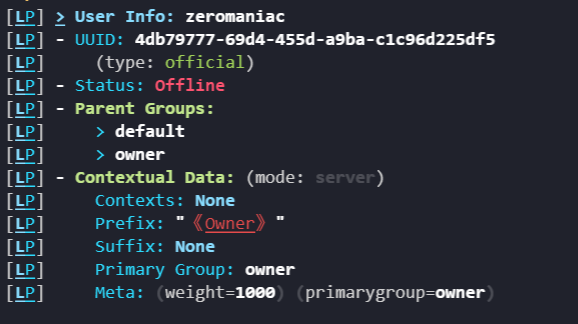 wraith fog
is that what is says zero?
wraith fog
is there a a way to just show the parent groups?
sour gorge
no, this is what the command returns.
wraith fog
sad
sage glen
wraith fog
is there a a way to just show the parent groups?
Maybe luckperms gui or rank+? But I doubt it will satisfy your needs.
sour gorge
this could be done with a small custom plugin though
sour gorge
its not as straight forward. you would need to either hook into vault or luckperms directly to get the group information
you probably would want enable reload and disable to work properly, set dependency and so on. an experienced person can do this rather easily, someone who has never made or touched java plugins before will sit on this for days due to missing base knowledge
wraith fog
ah
sage glen
wraith fog
do any of you know a tutorial on how to make a plugin in minecraft?
Better checkout tutorial in youtube or follow the spigot wiki about plugins
wraith fog
I'll just propose with the added clunky info
sour gorge
the problem i see will come up is loading/requesting data which is inactive
sage glen
sour gorge
you probably would want enable reload and disable to work properly, set dependen...
I don't think reload command is necessary but its good to have one.
sour gorge
when someone is offline, luckperms unloads their data, hence why offline/default users dont show in the editor
sage glen
sour gorge
when someone is offline, luckperms unloads their data, hence why offline/defaul...
But..but... there is offline users in editor for me? Is it bugged or?
sour gorge
it takes some time to unload them iirc, it wont do it on point when they log out
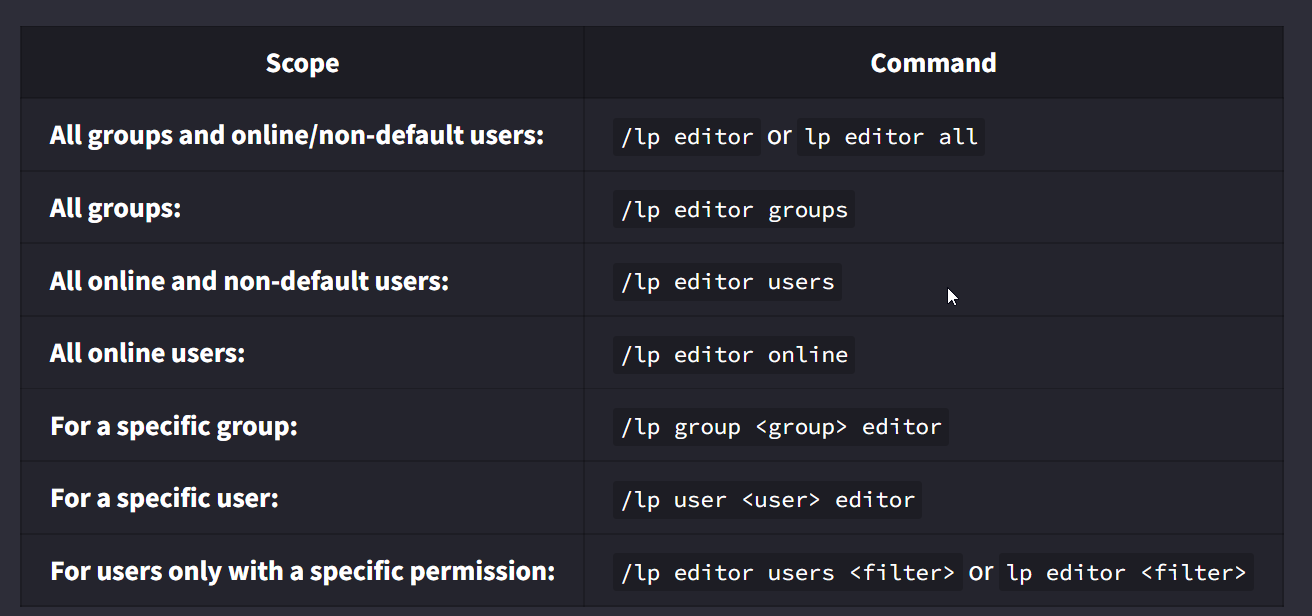 wraith fog
excatly
sage glen
sour gorge
it takes some time to unload them iirc, it wont do it on point when they log out
No no i mean old players are also showing up...
wraith fog
so the users that are not default will still show
sour gorge
unless thew 500-limit is reached
sage glen
4 id that joined 3-4 months ago still appearing in editor :>
wraith fog
500 limit?
sour gorge
the editor shows a maximum of 500 players yes
that doesnt mean their data doesnt exist
wraith fog
the command can stil show more than 500 players?
sour gorge
lets remember that battling lag/latency/loading and unloading processes is always a thing to consider especially if your plugin handles a hell ton of all that
aka luckperms
wraith fog
when I run the command, it will start unloading, then I run it again like 1 minute later it will be loaded?
sour gorge
if you have more than 500 users, lp will cap it and only display 500, simple
wraith fog
sorry I was referring to the user info command
sour gorge
again, that doesnt mean data for more ppl is not present. its just a display thing
the userinfo command is instant
it requests 1 user
not 5million
 tepid scroll
!weights
wintry cloudBOT
LuckPerms allows you to set weights in order to determine the priority of certain nodes, like permissions and even prefixes. A higher weight number is a higher priority.
Read more
LuckPerms wiki
 covert thicket
Is there a luckperms placeholder or a command to see how much time is left in my group/time range?
 rugged wadi
 sour gorge
Looks like tablist. Look at the format in that config or add '&r' (reset any formatting) to the end of the prefix
rugged wadi
sour gorge
Looks like tablist. Look at the format in that config or add '&r' (reset any for...
lines:
- ""
- "&#C7C7C7Nick&8: EB9FE%player%"
- "&#C7C7C7Ranga&8: &e%luckperms-prefix%"
- ""
- "&#C7C7C7Pieniadze&8: &#FFDE3B%vault_eco_balance_formatted% $"
- "&#C7C7C7Gemy&8: CFC5A%craftgems_balance%"
- ""
- " F89FFwww.craftflower.pl"```Scoreboard
What should I replace the player with?
 wintry cloudBOT
Hey Tobik! Please don't tag helpful/staff members directly.
dense kite
what
 dense kite
LuckPerms doesn't care what you give it. Please don't ping someone. ask your question, and wait for a response.
rugged wadi
Man take it easy lol
-.-
Okay, how can I make the nick color also be displayed on the scoreboard?
rugged wadi
dense kite
LuckPerms doesn't care what you give it. Please don't ping someone. ask your que...
Very sterile help, unremarkable
 boreal trail
rugged wadi
Very sterile help, unremarkable
boreal trail
rugged wadi
Very sterile help, unremarkable
Gradients you can use by &#ffffff format and yes it can be used on a scoreboard using a placeholder
You can find the placeholders on the wiki
boreal trail
Wdym?
rugged wadi

LuckPerms - A permissions plugin for Minecraft servers.
LuckPerms is a permissions plugin for Minecraft servers. It allows server admins to control what features players can use by creating groups and assigning permissions.
boreal trail
You put the placeholder in the scoreboard config
boreal trail
Don't need to do anything with that
rugged wadi
Could you explain me step by step?
boreal trail
/lp group admin meta addprefix 100 &c[Admin]
thats what you have to do
/lp group admin meta addprefix 100 "&#ffffff[Admin] "
if you want hex
don't need the ''
""
/lp group admin meta addprefix 100 &#ffffff[Admin]
rugged wadi
prefix.100.&8[&x&8&e&0&d&0&0&lW&x&9&6&1&0&0&5&lł&x&9&e&1&4&0&a&la&x&a&7&1&7&0&f&lś&x&a&f&1&b&1&4&lc&x&b&7&1&e&1&8&li&x&b&f&2&2&1&d&lc&x&c&8&2&5&2&2&li&x&d&0&2&9&2&7&le&x&d&8&2&c&2&c&ll&8]
am have
boreal trail
using the wrong format
 boreal trail
Okay then it works
rugged wadi
And I want a nickname color
boreal trail
Then use the placeholder for your nick plugin
 boreal trail
rugged wadi
Aaa what is this placeholder lp because I can't find it?
boreal trail
rugged wadi
Aaa what is this placeholder lp because I can't find it?
LuckPerms don't do anything with nicknames
Its a permission manager
rugged wadi
But I just want the nickname color to affect but how can I ught it
boreal trail
rugged wadi
But I just want the nickname color to affect but how can I ught it
To change it use a nickname plugin
rugged wadi
Did you use the chat manager?
boreal trail
What chat manager?
 solar lantern
when I import h2-JSON to MYSQL, the SERVER part remains blank. Is there a solution to this?
dense kite
solar lantern
when I import h2-JSON to MYSQL, the SERVER part remains blank. Is there a soluti...
the server part of what
solar lantern
dense kite
the server part of what
server= stays blank in panel, so permissions are global
dense kite
You set that in the config, not your permission database
solar lantern
dense kite
You set that in the config, not your permission database
Permission resolution settings Can I fix the problem here?
sour gorge
Wha...
dense kite
Permission resolution setting…?
solar lantern
dense kite
Permission resolution setting…?
 dense kite
What’s the issue ?
solar lantern
dense kite
What’s the issue ?
contexts Server is provided
solar lantern
dense kite
What’s the issue ?
this is none
 sour gorge
I still dont get it
dense kite
Yeah. I’m glad I’m not the only one.
sour gorge
Setting include global to false means you must add context
dense kite
Setting the server name in the LP config will allow you to do that ^
sour gorge
Context is based on server name setting which is literally at the very top
solar lantern
The problem is that the Editor de Permissions server is unclear.
sour gorge
Permission? You mean context
dense kite
Did you set the server name, restart THEN generate the session?
solar lantern
sour gorge
Permission? You mean context
yes
sour gorge
First setting in config
Server:
Put name
Server: survival
Or whatever. Then restart server
sour gorge
Ok then in editor you can add context to permission server and select lobi
solar lantern
sour gorge
Ok then in editor you can add context to permission server and select lobi
yes, but it will take a long time. is there a shortcut
sour gorge
To add server:lobi context to all permissions?
solar lantern
sour gorge
To add server:lobi context to all permissions?
some will also have server:skyblock
solar lantern
sour gorge
To add server:lobi context to all permissions?
and yes it will take a long time
sour gorge
Yea then you have to do it by hand for more fine control
Usually only default group perms takes long though because in most cases, higher groups just inherit from default group
Also tip: you should add group weights
dense kite
can you add contexts via the editor by selecting the perms, adding the context and updating it?
solar lantern
sour gorge
Also tip: you should add group weights
yes i will do the weights later
sour gorge
Technically you can also add context with bulk, matching ~essentials. But then it will add it to all nodes
Could get messy to correct it with other context ngl
Just do it in the editor this one time. Put some good music on full blast, get a coffee and go
solar lantern
sour gorge
Just do it in the editor this one time. Put some good music on full blast, get a...
this seems to make the most sense thanks for your help it will take a long time
❤️
covert thicket
%luckperms_group_expiry_time% and %luckperms_inherited_group_expiry_time% It doesn't work for me, help me?
dense kite
Cross post.

 undone moon
 sour gorge
!tut for me
wintry cloudBOT
YouTube Tutorial
If you would like a video tutorial for setting up LuckPerms, try:
https://www.youtube.com/watch?v=l4anE2wOLdc
sour gorge
!usage
wintry cloudBOT
Here's a guide to help users understand and use LuckPerms for the first time.
Read more
LuckPerms wiki
prisma hinge
Quick question, it it possible to change the vault suffix to a custom placeholder?
 pulsar olive
vanilla commands not showing or working with luckperms fabric
minecraft.command permissions not showing in editor and also not working adding them manually via console
 gilded ocean
I have a question for you is it possible to set a player to a rank if so will it be possible to have the command please. 🙂
daring stirrup
!usage
wintry cloudBOT
Here's a guide to help users understand and use LuckPerms for the first time.
Read more
LuckPerms wiki
gilded ocean
Thanks you
sour gorge
!paste for me
wintry cloudBOT
Please use pastebin!
Seeing a paste of the problem makes everything so much easier! Use https://pastes.dev/ for easy pasting!
For console errors:
Pastebin any relevant segments of the console log. If it's a startup error, this includes the entire startup log!
Other errors:
Pastebin the entire LuckPerms config file (passwords removed) as well as any other relevant files!
gilded ocean
@daring stirrup Can write me at DM please Emergency
wintry cloudBOT
Hey kevlegouffe001! Please don't tag helpful/staff members directly.
sour gorge

 royal tartan
hi! is there a way to see how many people currently have a certain permission? feel free to tag in replies
 quaint idol
If the permission is set directly on the user, /lp search <permission> (or /lp usersearch <permission> to exclude groups). If the permission is inherited from a group, you can use /lp group <group name> listmembers to see every member of the group, including a total count
quaint idol
👍
 mighty yarrow
do not cross-post
 verbal escarp
[20:20:32 WARN]: org.apache.commons.lang.UnhandledException: Plugin TabList v5.6.2 generated an exception while executing task 387
        at org.bukkit.craftbukkit.v1_8_R3.scheduler.CraftAsyncTask.run(CraftAsyncTask.java:56)
        at java.util.concurrent.ThreadPoolExecutor.runWorker(Unknown Source)
        at java.util.concurrent.ThreadPoolExecutor$Worker.run(Unknown Source)
        at java.lang.Thread.run(Unknown Source)
Caused by: java.lang.NoClassDefFoundError: Could not initialize class hu.montlikadani.tablist.tablist.groups.impl.ReflectionHandled$1
        at hu.montlikadani.tablist.tablist.groups.impl.ReflectionHandled.registerTeam(ReflectionHandled.java:97)
        at hu.montlikadani.tablist.tablist.groups.impl.ReflectionHandled.setTeam(ReflectionHandled.java:149)
        at hu.montlikadani.tablist.tablist.groups.Groups.setPlayerTeam(Groups.java:183)
        at hu.montlikadani.tablist.tablist.groups.Groups.sortPlayers(Groups.java:339)
        at hu.montlikadani.tablist.tablist.groups.Groups.updatePlayers(Groups.java:286)
        at hu.montlikadani.tablist.tablist.groups.Groups.lambda$startTask$0(Groups.java:271)
        at org.bukkit.craftbukkit.v1_8_R3.scheduler.CraftTask.run(CraftTask.java:71)
        at org.bukkit.craftbukkit.v1_8_R3.scheduler.CraftAsyncTask.run(CraftAsyncTask.java:53)
        ... 3 more```


tablist send me that when I enable luckperms can anyone help me please ?im sorry but how is this related to luckperms?
verbal escarp
When it running on minecraft server it say nothing, but when I enbale luckperms it spam this
but I don't know why
dense kite
Then contact the support of whoever owns that tablist plugin.
verbal escarp
okay
 astral orbit
What are the papi placeholders?
sour gorge
!placeholders all of these :3
wintry cloudBOT
Display data such as user prefixes and groups from LuckPerms in other plugins.
Read more
LuckPerms wiki
 main peak
Is there a way to make it so a prefix will show instead of the one in a group, I tried adding higher priority to the prefix "prefix.100.<name>" than the one on the group but it still prioritizes the one in their group
sour gorge
have you checked your prefix in /lp user <name> info?
way too often, people trust whats shown in chat. now what if your chat plugin uses prefixes from a specific track? ofc, your user-specific prefixes then wont show in chat because its on you, not the track it displays.
 stone cradle
Is there a placeholder to pull all players names from a certain group? Cant seem to find one
tidal blade
stone cradle
Is there a placeholder to pull all players names from a certain group? Cant see...
Not really. You might be able to with PlaceholderPAI though, go ask their discord.
 tribal juniper
Hello everyone, I might be in need of some help here. Lately, my citizens plugin stopped working and when I troubleshoot it, it went back to work fine when I removed luckperms. Is there anything related to luckperms that could be affecting citizens?
sour gorge
Depends what you mean by 'not working'. The only 'issue' ive ever had was users not having permission to do a command that is set as click command on an npc, such as teleporting to a location, so i either added the needed permission to users or set the flag for 'execute command as console' so it wouldnt check the users perms
tribal juniper
they are not turning to face the players
neither their heads nor their bodies
also, the shopkeepers plugin uses citizens for their shopkeepers and all shopkeepers are also stuck, if you set them to lay down, they will stand up when you are far enough
however, my npcs are executing commands, they are just frozen in time
sour gorge
that sounds like nothing related to permissions at all though. keep in mind lp only handles permissions. have you asked in the citizens discord?
sour gorge
that doesnt mean lp is the culprit. it could still originate from another plugin that only acts funky and messes up your npcs as soon as lp is installed, so basically a symptom rather than the cause
have you tried updating all your plugins? sometimes that just does it
tribal juniper
Yeah, all updated... also, I have TAB to manage nametags, and the issue seems to be happening around the same time I set TAB to manage them rather than Nametagedit
let me check it
sour gorge
nametags are set for all player entities. npcs are player entities. tab has a way to bypass this
prisma hinge
@west portal this is not the place to advertise, consider this a warning, please read the #rules thanks
 slow pond
Who Is helping Me? 😄
wintry cloudBOT
Please use https://pastes.dev to send files in the future. I have automatically uploaded message.txt for you: https://pastes.dev/GBr5J0SKVb

A paste containing 22 lines of plaintext.
 devout sequoia
slow pond
Who Is helping Me? 😄
devout sequoia
slow pond
Who Is helping Me? 😄
dont crosspost, read the wiki to understand basics
!guide
wintry cloudBOT
Here's a guide to help users understand and use LuckPerms for the first time.
Read more
LuckPerms wiki
devout sequoia
!tut
wintry cloudBOT
YouTube Tutorial
If you would like a video tutorial for setting up LuckPerms, try:
https://www.youtube.com/watch?v=l4anE2wOLdc
tame hollow
slow pond
no
yes
mighty yarrow
oui
dense kite
si
 raven anchor
Hello
So I have set up two servers , kitpvp and prison in the same database with different table prefixes: "kitpvp_ and "prison_" . They are in the same database
How to I give permissions between the servers ?
Context like server=prison doesn't seem to be working
sour gorge
first of all: do you want to have 1 luckperms setup for both servers? as i understand rn, you use 2 different databases so that means your permissions are not going to be the same in the editor
raven anchor
sour gorge
first of all: do you want to have 1 luckperms setup for both servers? as i under...
It's the same database
With different prefix
raven anchor
sour gorge
first of all: do you want to have 1 luckperms setup for both servers? as i under...
config line 160
table-prefix: 'kitpvp_'
yea that means they use the same mysql, but both servers write into their own categories so no, with different table prefixes they are not the same
besides that, to use contexts, you need to set the server's name inside the config, first setting. if you didnt set it in the config but use it ingame, the permissions with this context will never work
if you want to merge both setups into one db, before you switch to the same tables, you should perhaps also grab an export so you can import it on top of the already existing one
!switch
wintry cloudBOT
If you wish to change your storage type (e.g. to YAML or MySQL) you may need to follow these instructions to ensure your groups and permissions are migrated to the new storage type.
Read more about the Storage types
LuckPerms wiki
raven anchor
sour gorge
besides that, to use contexts, you need to set the server's name inside the conf...
They are already set
raven anchor
sour gorge
yea that means they use the same mysql, but both servers write into their own ca...
I think I'll try once with same prefix
sour gorge
Yea if you want to sync them, you should. Currently, your setup looks like this:
MYSQL -> kitpvp_ : -> users, groups etc
-> prison_: -> users, groups etc
so yes they both use mysql, but each server writes their own data apart from the other
tribal juniper
Hello everyone, could someone help me with understanding how to use placeholder to display the time left on a temporary permission?
%luckperms_group_expiry_time% do I need to replace "group" with the group name?
how would it know?
sour gorge
these belong together https://i.imgur.com/xqlWgp8.png so dont close the placeholder, add _groupname% to the end

%luckperms_group_expiry_time_owner% 
tribal juniper
ooooooh, thanks
sour gorge
btw this applies to all other placeholders that take an argument as well from the wiki :)
tribal juniper
thanks 😄 my life is complete now haha
sour gorge
lol
My turn with questions: Considering the case above among others, what do y'all think about adding the mysql table prefix and adding it to /lp info pulled from the config?
 grave meadow
hello i have java server and im using geyser so bedrock players can play. how can i add ranks to my bedrock players? thanks in advance
 fleet lantern
Hey! Wondering why I can't get the parent feature to work correctly.
trying to give a group some extra perms, but inherent Default permissions.
Is it wrong to write group.default in my new group?
fleet lantern
also, permissions in the new group override the parent group?
example:
parnet group: playerparticles.groups.max.0
new group playerparticles.groups.max.1
fleet lantern
I suspect I don't understand the basics of the parent thing
is more weight prioritized or less weight prioritized?
sour gorge
more
fleet lantern
thanks
btw, is the fact that I can use /lp commands even though I deop myself on my server a Quality of life change so I can test on my own?
sour gorge
sorry, what?
sour gorge
i mean, if you are sure you are the one who added the perm to you or your group - thats fine. but if you never set this specifically to your user and dont know why this is, then thats a problem
reversed inheritance is something people sometimes do by accident (default inheriting perms from owner for example) lmao
fleet lantern
yeah, Im gonna test it with a friend just to be safe
I can litterally deop myself, and while in Default group write /lp editor and apply edits haha
sour gorge
yea so either you have the luckperms permission on your user or inheritance is reversed
sour gorge
fleet lantern
is there a placeholder for a players name in a group?
lp does not provide player placeholder as it is not a plugin that sends commands by itself. usually this is provided by whatever launches commands, such as tebex, deluxemenus and so on
fleet lantern
okey:)
raven anchor
sour gorge
Yea if you want to sync them, you should. Currently, your setup looks like this:...
I made it the same prefix and it's synced now
Thank you
and one more thing
Let's say now a person has access prison console
So they can give themself all the permission in other server too right ?
sour gorge
yea
raven anchor
So how can I stop it ?
sour gorge
with a min 24 digit character password on your stuff
raven anchor
sour gorge
with a min 24 digit character password on your stuff
Huuh...? 
sour gorge
your console is 'the game master' - you cant restrict console
raven anchor
Yea but I want the prison dev to have access to prison perms only
not skyblock or fac perms though XD
sour gorge
!advanced
wintry cloudBOT
Discover some of the more advanced concepts of LuckPerms, such as permission calculation, shorthand permissions and more.
LuckPerms wiki
wintry cloudBOT
Fine tune exactly what users with permission to use LuckPerms can do.
LuckPerms wiki
sour gorge
there, i believe you can set 'access only for context X'
raven anchor
sour gorge
there, i believe you can set 'access only for context X'
But if anyone has access to any of the console, they'll have access to everything right ?
raven anchor
sour gorge
set up what they need without console
then how can the dev do his work... xD
Is there a way
So that if I give someone say admin rank in hub, they'll get admin rank in all other servers ?
Without database sync ?
sour gorge
not possible
sour gorge
how do you expect a plugin that literally sits on server A to be able to access files on server B
its like asking to tow a car that you cant see
raven anchor
sour gorge
how do you expect a plugin that literally sits on server A to be able to access ...
How about a plugin which executes some commands on a custom command like :
/parent add <group> <user> will run
/lp user <user> parent add <group> on every server ?
ofc it all would be configured.
Ig no plugin of such kind exists 🥲
sour gorge
you need to send data outside of server a and then reroute it to server b. that is what a remote database does. a local plugin cant do that
fleet lantern
/lpb?*
raven anchor
fleet lantern
/lpb?*
That just gives permissions for bungeecord. I believe it doesn't run commands
in sub servers
sour gorge
^
raven anchor
Thank you though ;D
raven anchor
sour gorge
you need to send data outside of server a and then reroute it to server b. that ...
Do you make plugins ?
sour gorge
Not yet, why?
fleet lantern
I feel so stupid, I can't get the parent thing to work
raven anchor
sour gorge
Not yet, why?
I thought if you knew how to maybe I could've asked you to make a custom one :p
raven anchor
fleet lantern
I feel so stupid, I can't get the parent thing to work
What about it ?
You can't set parents ?
fleet lantern
Do I need to write group.default in the new group? or do I write group.newgroup in default?
I suck at it atleast
raven anchor
You write group.default in the new group
raven anchor
fleet lantern
Do I need to write `group.default` in the new group? or do I write `group.newgr...
so the new group will have default group's permissions
sour gorge
group.default is in the owner group: owner inherits default perms and its own
group.owner is in default group: default inherits all owner perms and its on (bad idea)
does that make it a bit more clear?
sour gorge
whatever floats your boat xD
raven anchor
fleet lantern
Do I need to write `group.default` in the new group? or do I write `group.newgr...
You could also use the web editor and in the new group, just use the + button beside the Parent groups . could be much easier ig

@sour gorge Thank you again for your help
sour gorge
no worries
sour gorge
imo the term 'parent group' is quite confusing. some people may think the parent is what you inherit from, some think the parent is where you inherit your current group into
so yea, i totally get the confusion
fleet lantern
thanks<3
raven anchor
fleet lantern
yeah, but I still had the problem of which way it went
Let's say you have two groups mod and jrmod
If you give the group mod permission group.jrmod then
Mod will inherit all the perms from JrMod thus making jrmod the parent group.
sour gorge
yep
how iremember it: the higher one (main group window in the editor) will beat the smaller one (the small node inside of it)
fleet lantern
Also?? Why isnt the command to set a user in a group /lp user <user> group set <group>??
what does parent have to do with changing groups?
sour gorge
basically
the concept is that the user inherits from the group
so basically making you the chil of it, so your group is your parent
raven anchor
it's /lp user <user> parent add <group>
fleet lantern
yeah exactly
sour gorge
add/set both work but theres a difference
raven anchor
set will clear all the other groups and only keep the one u used in command
sour gorge
depends really on your setup. if you have inheritance, set does make sense
raven anchor
fleet lantern
I refrain from using add, as I am afraid to mess things up
It would be bad if you have 2 different ranks like a paid rank and a staff rank
sour gorge
but if you have another plugin such as rankup that depends on thge user having default to start ranbking up, and you used set before, you screwed xD
sour gorge
raven anchor
It would be bad if you have 2 different ranks like a paid rank and a staff rank
how so?
fleet lantern
sour gorge
depends really on your setup. if you have inheritance, set does make sense
I feel that is more tidy for new admins
sour gorge
yea. i mean with inheritance, you dont need a user to have 20 groups since they inherit a whole tree set anyway. but lets say you have certain ranks that do not get inherited, but need to add to a user such as staff, then add is a good thing to have
i just use tracks, even easier lmao
fleet lantern
yeah, I guess Staff is a nice example for add to be used
or admin commands in general
sour gorge
ye
raven anchor
sour gorge
how so?
If you have Staff ranks say helper , mod , admin
and paid ranks say Hero , legend , Mythic
If a member purchased a rank say legend. Then he get's accepted as a mod and you use set to change the parent, he will loose the legend rank.
sour gorge
ah thats what you meant
yes agreed
actually i demote my admin thru tebex once by accident bc of parent set
he was mad as hell lmao
again thats why i use tracks
raven anchor
sour gorge
actually i demote my admin thru tebex once by accident bc of parent set
xD
fleet lantern
btw I searched through my entire LP editor. There is no inheritance from owner/admin to default. But maybe there is a passthrough since my username is the owner of the server
raven anchor
sour gorge
again thats why i use tracks
yea that's better for having two set of ranks
sour gorge
promote/demote users along a track is even nieter and makes multiple prefixes in chat possible
fleet lantern
about the /lp being avaliable all the time
raven anchor
usually can use the promote or demote command so it also doesn't add too many ranks to a user
sour gorge
fleet lantern
btw I searched through my entire LP editor. There is no inheritance from owner/a...
do you maybe have luckperms.* on your user directly?
maybe try the search box at the top right
fleet lantern
I checked
raven anchor
fleet lantern
about the /lp being avaliable all the time
Just use luckperms.* false in deafult and true in owner rank
fleet lantern
OH yeah!, maybe on my player
raven anchor
fleet lantern
OH yeah!, maybe on my player
You can use /lp user <user> permission check <permission> to check how you inherit that specific permission
ig
 sour gorge
yea there we have it lol
fleet lantern
but that must be the best lifehack EVER for people setting up perms by them selves!!
sour gorge
these two make no sense https://i.imgur.com/jnCWja8.png
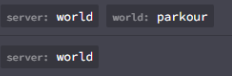 fleet lantern
You can deop your self and still change groups and ranks to check if you ahve permissions
raven anchor
fleet lantern
You can deop your self and still change groups and ranks to check if you ahve pe...
I do the same ;D
fleet lantern
i know, hence the "interesting" hahah
sour gorge
xD
raven anchor
 fleet otter
how do i make the prefix brown??
fleet otter
how do i make the prefix brown??

Not sure if Luckperms has hex code support
raven anchor
sour gorge
it depends on what your chat/tablist plugin can do
Ohhh
Nice
@sour gorge Btw what if I have say , Skyblock , Prison , and Bungee ( /lpb )
Now if I sync those three with databse.
Then will it only work with /lpb or would it even work with /lp ? xD
sour gorge
when the bungee instance is connected to the same db, then you can also use /lp for bungee perms because the database is the same. so meaning you dont need to use /lpb. unless ofc the db isnt the same
sour gorge
in any case i advise against using lp on bungee. personally i really hate on it
raven anchor
Yeh
fleet lantern
Hey! how can I use a placeholder to give someone a group?
I have %parkour_leaderboard_course_1_player% that outputs first place on a course. I want that player to gain a rank
sour gorge
<.<
 tardy glacier
..
fleet lantern
:o, sorry?
sour gorge
im happy people think im smart but i dont like being ping abused whenever someone else needs it
fleet lantern
yeah allright, thought about that as I tagged you
sour gorge
anyway, you will need a plugin that can execute the command
i doubt you can just use this placeholder, considering plugins running commands have their own player placeholder
but im also sure that a middle man like conditional events can do it
fleet lantern
conditional events.
sour gorge
yep
you can define multiple conditions also using placeholders and it will run commands when the conditions are met
fleet lantern
Ill go through the wiki and check it out
How do people do it when they have big servers and people buy ranks?
tardy glacier
their store plugin will run commands usually
sour gorge
tebex being one of em
and yes, but then again, whatever runs the command uses its on player placeholder. tebex i believe uses {player}. deluxemenus uses %player_name%
so you see, it can differ quite a lot. you need to read the docs then. no point in taking blind guesses
fleet lantern
yeah, I will do some research
but essentially I will need a plugin to convert the %placeholder%-event kinda
 austere igloo
I restarted my server and LuckPerms completely reset everyones ranks, is there a way to fix this?
tardy glacier
thats not what you said earlier
you said your plan expired, and then you renewed it, and then you started the server and stuff was missing
is other data still there? like plugins, worlds, etc?
austere igloo
I was asking for support by someone else (no offense)
tardy glacier
ok 😄
sour gorge
If your host removed your data, which, since your server expired is subject to a wipe, then youre screwed. Like aber said, either you have a recent editor or backup or you need to start from scratch
Asking someone else doesnt change the answer. Lp never wipes its own data bc it feels like doing so
austere igloo
sour gorge
If your host removed your data, which, since your server expired is subject to a...
why would it only wipe luckperms though, and my server has been running for over a year but they have never wiped it?
sour gorge
Ask your host
austere igloo
sour gorge
Asking someone else doesnt change the answer. Lp never wipes its own data bc it ...
also it did
thanks
sour gorge

tardy glacier
what storage was the lp in? was it h2, yml, or mysql?
also, are you sure everything was deleted? how do you know this? cause sometimes people think it was deleted but then theyre just missing a prefix in chat haha
sour gorge
Id like to witness such a case. Never seen but i imagine that to be hilarious ngl
fleet lantern
Conditional Events was phenomenal! thanks for the advice, Zero. And sorry, wont ping you again;)
austere igloo
sour gorge
Ask your host
they said they didn't delete anything
they just emailed me back
sour gorge
Well then i guess youre right and lp is a piece of crap that deletes its own data just to mess with you and only you because nobody else has this problem unless they themselves deleted stuff either knowingly or on accident
austere igloo
oh
do you know of any other good plugins to replace luckperms that dont delete data as u said?
austere igloo
oh
dense kite

sour gorge

austere igloo
sour gorge
Well then i guess youre right and lp is a piece of crap that deletes its own dat...
sooooo what am i meant to do
sour gorge
tardy glacier
also, are you sure everything was deleted? how do you know this? cause sometimes...
^
Would be good to know
austere igloo
well the server restarted and when i do /lp group it only shows the option as default and on the luckperms editor it also only shows default
sour gorge
What storage method did you use
sour gorge
Did you use mysql?
sour gorge
Then your stuff would be in plugins/luckperms/ a .db file
austere igloo
 sour gorge
Maybe you deleted it, thinking you dont need that?
austere igloo
there are the ones i have
austere igloo
sour gorge
Maybe you deleted it, thinking you dont need that?
i literally jsut opened the dashboard pressed restart and it was gone
i didn't even go into the files i was just renewing the server plan
sour gorge
Do you have an editor link from the past 7 days? Maybe you sent someone one on discord or you used the editor and can grab the link from recent logs?
austere igloo
I checked for that but couldn't find one from any time recently, I have the /lp applyedits from console but that is like 10 days ago
austere igloo
seriously so there is like nothing I can do?
sour gorge
Like i said before, lp doesnt just delete stuff
You/your host/someone/anyone mustve touched either the file, storage method or wiped data with game commands
Lp has no reason to delete local data
My stuffs been there for going on 3 years
austere igloo
no one other than me has the commands for that and I'm the only one with the console, you and my server host are both saying they had nothing to do with it
sour gorge
Without a backup or editor link, you cant get it back
dense kite
LuckPerms won't delete data on it's own.
it's not happened to anyone else, so this is definitely user error.
backups are highly recommended with any important data.
austere igloo
dense kite
LuckPerms won't delete data on it's own.
it's not happened to anyone else, so t...
how can I stop this from happening in the future?
dense kite
don't delete your data, that's how you do it
sour gorge
It just didnt
austere igloo
dense kite
don't delete your data, that's how you do it
I didn't
dense kite
well, it was someone.
sour gorge
We cant do magic
dense kite
You've been told all your options that we can help with. everything else is out of our power.
austere igloo
well can you atleast give me a reason other than blaming me?
sour gorge
Ughh
austere igloo
I'm not religious
dense kite
ok
dense kite
we could be arguing about templates 😮💨
austere igloo
tardy glacier
this seems like an excellent use of our time
I mean I appreciate it but still they cant really do anything
ok so it was not LP it was not me and it was not the server host, guess we have a mystery on our hands
tardy glacier
i guess we do
dense kite

tardy glacier
there isnt much else anyone here can tell you, sorry about that
hopefully youre able to restore the backup you have from a while ago

 carmine vapor
sour gorge
If your host removed your data, which, since your server expired is subject to a...
carmine vapor
sour gorge
If your host removed your data, which, since your server expired is subject to a...
Yeah we don't delete files like this, what's the literal file name which actually got deleted @austere igloo, I can visibly see a .db file in the screenshot, is that not where your groups are held, "I restarted my server and LuckPerms completely reset everyones ranks, is there a way to fix this?", do you have any logs for your server when this happened?
carmine vapor
austere igloo
luckperms-h2.mv.db looks like what they're talking about
austere igloo
carmine vapor
Yeah we don't delete files like this, what's the literal file name which actuall...
I don't know what file was deleted I just opened the server and all the ranks were gone
I don't know what the files even where I opened the file manager for luckperms like once
carmine vapor
austere igloo
I don't know what the files even where I opened the file manager for luckperms l...
can you send the logs for your server here, maybe that'll give you more info on what's going on
carmine vapor
just so you know - Minehut doesn't actually delete files when plans expire and we don't exclude anything from save zips further than the top level:
./spigot.jar
./server.jar
./velocity.jar
./waterfall.jar
./cache
./libraries
``` these do not persist through server reboots - but that's all, nothing else will ever be willfully deletedjust dump them in https://paste.gg, don't worry about the IPs, they're not real
carmine vapor
austere igloo
https://paste.gg/p/anonymous/a79cb5fd3bcf4b169146c05b3695a43f
looks like everything loaded fine, maybe it forced a reset, when you go into the lp editor does it show everything as gone as well?
austere igloo
yes
carmine vapor
then I'm unsure, Minehut won't delete or discard any files like that, I'd recommend looking at the log file when this happened, like the first log file to be made when the ranks disappeared, along with the prior log file for when the ranks were there so you can see the logs from the disconnect
austere igloo
that one was the first one
carmine vapor
how about the one prior
austere igloo
people still had there ranks on that one https://paste.gg/p/anonymous/f4c978f2a7db499c931043fbefbcbc9d
sour gorge
Doesnt a server auto shut down when the plan expires?
If so, the shutdown part is missing
carmine vapor
sour gorge
Doesnt a server auto shut down when the plan expires?
yep
carmine vapor
austere igloo
people still had there ranks on that one https://paste.gg/p/anonymous/f4c978f2a7...
can you show us your whole logs
austere igloo
yes
this is the entire file https://paste.gg/p/anonymous/60e930738def4e13b7384b677e73c32a
carmine vapor
there's no shutdown logs or anything like that
austere igloo
i can see if i can find any 1 moment
sour gorge
Some time between 18:56 and 19:20
austere igloo
carmine vapor
there's no shutdown logs or anything like that
do u want the entire shutdown file or just the bit where it actually shutdowns because the file is like 18 hours worth of logs
sour gorge
The whole thing covering the time between 18:56 and 19:20
carmine vapor
sour gorge
Some time between 18:56 and 19:20
why that timeframe?
carmine vapor
austere igloo
do u want the entire shutdown file or just the bit where it actually shutdowns b...
the whole file
please
austere igloo
ok give me a moment theres like 15k lines
sour gorge
The log he says they had stuff started at 18:56. The log where you see ppl confused is 19:20
So it mustve happened in that time frame
 sour gorge
I understood this whole blown conversation as to that his server expired today and he renewed today
Or at least the same day
austere igloo
it expired and shutdown at 18:20 today and I renewed it around an hour later after it shutdown
it also came back up and shutdown again a few times with 10 player max after the plan expired
sour gorge
Ye thats what i gathered
Ctrl + a marks all, ctrl + c copies marked and ctrl + v pastes copied
carmine vapor
[18:20:01] [Server thread/INFO]: | Prison | There are no ranks on the server! New player has no rank.```looks like it happened somewhere during the online time of those logs @austere igloo
carmine vapor
hmm
[19:21:20] [Server thread/WARN]: [Multiverse-Core] WorldManager: Can't load this world because the folder was deleted/moved: world_the_end
[19:21:20] [Server thread/WARN]: [Multiverse-Core] Use '/mv remove' to remove it from the config!
[19:21:20] [Server thread/WARN]: [Multiverse-Core] WorldManager: Can't load this world because the folder was deleted/moved: world_nether
[19:21:20] [Server thread/WARN]: [Multiverse-Core] Use '/mv remove' to remove it from the config!``` looks like _something_ reset the serverthat could be minehut since they reset it when the plan expires and that is when it happened
carmine vapor
austere igloo
that could be minehut since they reset it when the plan expires and that is when...
we don't reset the world when the plan expires
carmine vapor
the only hooks we have when we stop a server for plan expiration is the same as you pressing "stop" or "hibernate"
it just hits the same route
austere igloo
i am not sure exactly what that means sorry
carmine vapor
[18:57:21] [Server thread/WARN]: [Multiverse-Core] WorldManager: Can't load this world because the folder was deleted/moved: world_the_end
[18:57:21] [Server thread/WARN]: [Multiverse-Core] Use '/mv remove' to remove it from the config!
[18:57:21] [Server thread/WARN]: [Multiverse-Core] WorldManager: Can't load this world because the folder was deleted/moved: world_nether
[18:57:21] [Server thread/WARN]: [Multiverse-Core] Use '/mv remove' to remove it from the config!``` this logging is present even in the load which worked - probably a red herringmystery
carmine vapor
sour gorge
*mystery*
indeed, I'm very confused
we have a few dozen thousand servers who use LP and we've never had a report like this
makes me think it's not Minehut doing it
sour gorge
Lp has a few users as well and all cases like this was solved by either:
Yea i deleted the lp folder bc i thought you need to, to update.
Or
Yes i used a different storage method
carmine vapor
sour gorge
Lp has *a few* users as well and all cases like this was solved by either:
Yea i...
it looks like the storage method is different between the 2 logs
just btw
carmine vapor
sour gorge
I saw H2 twice i think
[19:30:19] [Server thread/INFO]: [LuckPerms] Loading storage provider... [H2]
[19:30:19] [Server thread/INFO]: [LuckPerms] Loading internal permission managers...
[19:30:20] [Server thread/INFO]: [LuckPerms] Performing initial data load...
[19:30:20] [Server thread/INFO]: [LuckPerms] Successfully enabled. (took 1769ms)``` vs ```[18:56:56] [Server thread/INFO]: [LuckPerms] Loading configuration...
[18:56:56] [Server thread/INFO]: [LuckPerms] Loading storage provider... [H2]
[18:56:57] [Server thread/INFO]: [LuckPerms] Loading internal permission managers...
[18:56:57] [Server thread/INFO]: [LuckPerms] Performing initial data load...
[18:56:58] [Server thread/INFO]: [LuckPerms] Successfully enabled. (took 1901ms)``` yeah looks like I was wrongI thought I remembered seeing it say something different
weird
@austere igloo did you have the Luckperms addon installed? or did you upload it yourself?
If you had the addon installed, I can go look and see if it has any uninstall things which may have triggered
sour gorge
Bummer theres no creation time stamp ngl
The .db would probs show last edited if at all
austere igloo
carmine vapor
<@!333691019184963614> did you have the `Luckperms` addon installed? or did you ...
im using the luckperms on the minehut marketplace
here is the plugin link https://www.spigotmc.org/resources/luckperms-an-advanced-permissions-plugin.28140/

SpigotMC - High Performance Minecraft
carmine vapor
sour gorge
The .db would probs show last edited if at all
it should, we do zip so it should maintain dates
sour gorge
No idea how minehut works tbh
Its almost midnight here, so im getting too tired to care lmao
carmine vapor
sour gorge
No idea how minehut works tbh
well we don't just delete folders so, there's that, if we delete something we do mass deletions of the entire filespace, we don't do individual folder deletions (or shouldn't)
carmine vapor
I think it's very odd to see a single folder go missing out of the whole bunch
tardy glacier
 sour gorge
It happened to me once that i moved a folder of a plugin into a diff folder of another plugin lol
Aka files were recreated and i was like "wtf"
carmine vapor
sour gorge
In the panel, could one drag a folder around?
I don't think we support drags
but we might?
idk, @austere igloo what's your server name, I can go pull your save and look around
sour gorge
I wouldnt know
austere igloo
SkyMiningF
carmine vapor
austere igloo
SkyMiningF
got it, I'll let you know if I see anything obvious
sour gorge
Good luck. Lmk when you found out where the data went. Im itching to find out. Just for the hell of it
carmine vapor
gonna go grab dinner first, so it might be a couple hours
sour gorge
Ill 🛌
austere igloo
carmine vapor
got it, I'll let you know if I see anything obvious
I appreciate your guys help but im going to sleep now so i wont be able to respond for a while if u need me, thanks again
daring stirrup
!paste your whole log file
wintry cloudBOT
Please use pastebin!
Seeing a paste of the problem makes everything so much easier! Use https://pastes.dev/ for easy pasting!
For console errors:
Pastebin any relevant segments of the console log. If it's a startup error, this includes the entire startup log!
Other errors:
Pastebin the entire LuckPerms config file (passwords removed) as well as any other relevant files!
daring stirrup
!paste
wintry cloudBOT
Please use pastebin!
Seeing a paste of the problem makes everything so much easier! Use https://pastes.dev/ for easy pasting!
For console errors:
Pastebin any relevant segments of the console log. If it's a startup error, this includes the entire startup log!
Other errors:
Pastebin the entire LuckPerms config file (passwords removed) as well as any other relevant files!
daring stirrup
oops
daring stirrup
sure @ me then
 pallid barn
Thank you 🙂
 gritty bloom
Hello I have a /lp applyedits ..... but when I apply it I cant get it to work
@daring stirrup
wintry cloudBOT
Hey Gods! Please don't tag helpful/staff members directly.
gritty bloom
@mighty yarrow
wintry cloudBOT
Hey Gods! Please don't tag helpful/staff members directly.
tardy glacier
...
gritty bloom
sorry I just really need help
people somehow had perms and deleted all of my groups
gritty bloom
it says it loads but it doesnt
tardy glacier
are you running an offline mode server?
tardy glacier
no
gritty bloom
ok ummm
so I post the link in game but then they arent there
lp was stored on mysql but when I use the "old from a day ago" /lp apply it does not add them back
@tardy glacier
wintry cloudBOT
Hey Gods! Please don't tag helpful/staff members directly.
gritty bloom
Can I please get help
 safe abyss
Is there a way to add perms in the config file and not in game?
tame hollow
have you tried the editor
safe abyss
tame hollow
have you tried the editor
Nope
daring stirrup
should try it
 wise tinsel
any good casino plugin, crash, roulette, coinflip in groups 1v1 - 2v2 - 3v3 - 4v4, for 1.8? Please!
share with me
 sacred pewter
@daring stirrup
wintry cloudBOT
Hey GoodGuss! Please don't tag helpful/staff members directly.
sacred pewter
24.03 16:55:32 [Server] WARN [Server thread] INFO me.lucko.luckperms.lib.hikari.HikariDataSource - luckperms-hikari - Shutdown initiated...
24.03 16:55:32 [Server] WARN [Server thread] INFO me.lucko.luckperms.lib.hikari.HikariDataSource - luckperms-hikari - Shutdown completed.
Are you able to edit the docker file
Is docker basically the backend of a Java script (Minecraft plugin)?
Javascript*
sour gorge
none of what you are asking is directly related to one another 😂
sacred pewter
Yes I am very noob when it comes to coding.
But is it true? Is docker the backend?
 azure linden
Minecraft uses java, docker is a program for making containers, and JavaScript is actually unrelated to java
sacred pewter
Thanks for clarifying dude
devout sequoia
difference between java and javascript is same as the difference between car and carpet
pallid barn
@daring stirrup Hi !
After an RedisBungee update, my problem seems to be solved ^^
Thanks for your time
wintry cloudBOT
Hey SpiziTV! Please don't tag helpful/staff members directly.
tame hollow
devout sequoia
difference between java and javascript is same as the difference between car and...
JavaScript was actually based off Java, hence the name, and why a lot of the syntax is similar.
They're not completely unrelated lol.
tardy glacier
@tame hollow ❤️
 gentle flame
anyone know how to disable redstone on my server? :C

 maiden quarry
can someone explain to me why my perms are all syncing up with mysql but not my parents?
sour gorge
perhaps you added context to the parent?
sacred pewter
Hey!
Does anyone know why you get YML error's when I've configurated everything correctly.
<unicode> <string> blabla
!clippy
wintry cloudBOT
Sorry! I do not understand the command clippy
Type !help for a list of commands
sacred pewter
!help
wintry cloudBOT
Available commands
!advanced
!api
!argumentbased
!ask
!bulkupdate
!bungee
!bungeecheck
!cauldron
!colours
!commandequivalents
!commands
!config
!context
!cookbook
!default
!downloads
!editor
!editorsafety
!errors
!essentials
!extensions
!extracontexts
!faq
!formatting
!hack
!helpchat
!inheritance
!install
!libsdir
!locale
!meta
!migration
!notworking
!nowildcard
!offline
!pasteit
!permissions
!placeholders
!selfhosting
!stacking
!storage
!suggestions
!switchstorage
!sync
!testingperms
!tracks
!translationprogress
!translations
!tutorial
!upgrade
!usage
!userinfo
!verbose
!version
!weight
!whyluckperms
!wiki
sacred pewter
!config
wintry cloudBOT
Learn what each of the config options are for.
Read more
LuckPerms wiki
sacred pewter
!error
wintry cloudBOT
Here's a page with some common storage system errors.
LuckPerms wiki
sacred pewter
ERROR:
while parsing a block mapping
in "<unicode string>", line 44, column 3:
COMMAND: 'open: blockeffect.yml'
^
expected <block end>, but found '<scalar>'
in "<unicode string>", line 48, column 57:
... e&l[&6&lOptions&e&l]&c You aren't allowed to change the block ef ...
^
That's the output
BlockEffect:
COMMAND: 'open: blockeffect.yml'
NAME: '&f&l> &d&lBlock effecten &f&l<'
ENCHANTMENT: 'unbreaking, 1'
PERMISSION: 'Options.open.blockeffect'
PERMISSION-MESSAGE: '&e&l[&6&lOptions&e&l]&c You aren't allowed to change the block effects... &fYou need atleast: &d&lRank&f before you are able to change.'
I don't see any problem
sour gorge
i see the problem
sacred pewter
?
sour gorge
The format looks like this yea
SETTINGNAME : 'string'
now you have words like don't in the string
the ' breaks is in half
sacred pewter
Okay, and the first one?
sour gorge
use don''t with two '' inside strings. only one will show up ingame dw
dense kite
Yaml magic
sour gorge
try that first and see if that does it fully. sometimes the lines mentioned arent so accurate
it could also be the : but i never had that
sacred pewter
25.03 13:47:04 [Server] INFO #------------------- Chest Commands Errors -------------------#
25.03 13:47:04 [Server] INFO 1) Invalid YAML configuration for the menu "options.yml". Please look at the error above, or use an online YAML parser (google is your friend).
still 😦
wintry cloudBOT
Please use pastebin!
Seeing a paste of the problem makes everything so much easier! Use https://pastes.dev/ for easy pasting!
For console errors:
Pastebin any relevant segments of the console log. If it's a startup error, this includes the entire startup log!
Other errors:
Pastebin the entire LuckPerms config file (passwords removed) as well as any other relevant files!
sour gorge
 sacred pewter
also there is another config which give an error
maiden quarry
sour gorge
perhaps you added context to the parent?
For example i just did /lpb user <name> parent set owner
Btw, i use lp and lpb with one database
sour gorge
So then when you check /lpb user <yourname> info as well as /lp user <yourname> info, you should have the owner group in both outputs
if you go solely by the prefix in chat or elsewhere, dont trust that. always check the info command
maiden quarry
Not always
The lpb user <name> parent info
Changes from server to server
But when i try to type it in the console it shows the right parent
I also tryed not parenting but giving the group.owner node
And it workes the same way as the parent
sour gorge
have you verified that your servers are actually connected to mysql using /lp info
sounds like they arent really
or they us different table prefixes
maiden quarry
https://drive.google.com/file/d/1KlptV16sjwxhs0hFrOa4loRzY5Ma4o93/view?usp=sharing
this is a vid showcasing the problem
btw, pls dont ddos my server
Google Docs
sour gorge
check messaging service
maiden quarry
wdym?
sour gorge
it appears one server pushes updates and the other listens on it, but then the other server pushes updates and the initial one doesnt get it
LuckPerms - A permissions plugin for Minecraft servers.
LuckPerms is a permissions plugin for Minecraft servers. It allows server admins to control what features players can use by creating groups and assigning permissions.
maiden quarry
this happend when i tried parenting myself to the helper group using the bungee console:
wintry cloudBOT
Please use https://pastes.dev to send files in the future. I have automatically uploaded message.txt for you: https://pastes.dev/DXQtKBsRB8
A paste containing 13 lines of plaintext.
maiden quarry
thx, bot xD
sour gorge
!errors
wintry cloudBOT
Here's a page with some common storage system errors.
LuckPerms wiki
sour gorge
keep in mind that despite the fact that luckperms supports usage of remote databases, fixing issues with db's which are limited/slow or need extra configuration is out of scope for this support discord
maiden quarry
okay, now after i joined i had actually helper but only on the lobby server, not on the survival one
maiden quarry
sour gorge
keep in mind that despite the fact that luckperms supports usage of remote datab...
thats true, imma contact my host
thx anyway
prisma hinge
how do i make it so there is prefix's with colour

 quaint venture
Hey, since a few days ago, LuckPerms has been giving me these errors each time I try to do anything:
https://pastes.dev/6iWhCPLWJw
A paste containing 26 lines of plaintext.
sour gorge
Not the first time ive seen this. I once saw someone asking staff if theyre aware of this i believe. But other than that i dont think anyone opened a proper github issue for it. I had tested the latest update that implemented a fix for shutdown error and delay if the editor is used right before and i didnt get this. Try to reproduce it using paper
quaint venture
I am on the latest version as well, I had this error before, and I updated to latest version hoping it'd fix it, no luck sadly
sour gorge
Does it work through console?
quaint venture
Nope, says this:
https://pastes.dev/rmrq5tDZmD
A paste containing 13 lines of plaintext.
sour gorge
Ok, have you tried paper instead of purpur?
That would be the last thing to verify it
quaint venture
There's players online so I can't do that right now, but my other server is also using Purpur and LuckPerms works fine there
sour gorge
Well, staff will most likely ask you to reproduce this using paper, even if you made a github issue rn
quaint venture
So I should just replace the purpur jar with paper jar, it shouldn't mess with the settings that won't be used by Paper, yeah?
sour gorge
Just dont delete your servers configs so you can revert to purpur after or use a test server instead of your production server
quaint venture
Yeah, I have the testing server, and LuckPerms works just fine there
sour gorge
With the same lp version as the server you get the errors on?
quaint venture
Yeah, I had v5.4.10 on both yesterday, but when the error showed up, I updated to the latest version
sour gorge
Interesting. Well the i guess use paper for the time being. Im gonna go test some software here, paper/spigot/purpur and some others if i can reproduce this. Will see i guess
quaint venture
Okay, thank you for the help!
sour gorge
quaint venture
Okay, thank you for the help!
which exact purpur version are you using btw?
quaint venture
sour gorge
which exact purpur version are you using btw?
1596 (1.18.2)
sour gorge
gotcha
quaint venture
I'll update to the latest version and see if the issue persists
sour gorge
thats what im doing rn lel
quaint venture
Oh lol
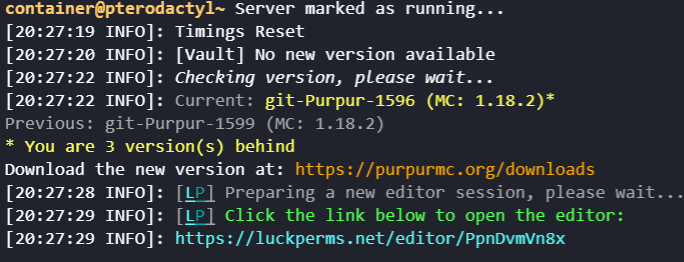
 ashen glacier
Can anyone help me with syncing my permissions over 2 servers and a proxy?
tardy glacier
what are you stuck on?
ashen glacier
I think, that I configured everything right, but it's not syncing the permissions
should I send my configurations?
tardy glacier
can you take a screenshot of /lp info from each of the servers and send them here
quaint venture
sour gorge
https://i.imgur.com/d7CXiS5.png
Yeah, this might help but when I tried using WorldEdit, it gave almost the same error, right here:
[ERROR com.sk89q.worldedit.extension.platform.PlatformCommandManager] An unexpected error while handling a FastAsyncWorldEdit command
java.lang.NullPointerException
Screenshot: Velocity Proxy
Server 1: (text was too big for screenshot)
[LP] Running LuckPerms v5.4.14 by Luck.
[LP] -  Platform: Bukkit
[LP] -  Server Brand: Paper
[LP] -  Server Version: git-Paper-267 (MC: 1.18.2) - 1.18.2-R0.1-SNAPSHOT
[LP] -  Storage:
[LP]      Type: H2
[LP]      File Size: 0.04MB
[LP] -  Extensions:
[LP]      None
[LP] -  Messaging: PluginMessage
[LP] -  Instance:
[LP]      Static contexts: None>....
[LP]      Online Players: 2 (3 unique)
[LP]      Uptime: 6m 36s
[LP]      Local Data: 2 users, 5 groups, 0 tracks
Server 2: (same as server 1)
[LP] Running LuckPerms v5.4.14 by Luck.
[LP] -  Platform: Bukkit
[LP] -  Server Brand: Paper
[LP] -  Server Version:
[LP]      git-Paper-267 (MC: 1.18.2) - 1.18.2-R0.1-SNAPSHOT
[LP] -  Storage:
[LP]      Type: H2
[LP]      File Size: 0.03MB
[LP] -  Extensions:
[LP]      None
[LP] -  Messaging: PluginMessage
[LP] -  Instance:
[LP]      Static contexts: None
[LP]      Online Players: 1 (2 unique)
[LP]      Uptime: 8m 35s
[LP]      Local Data: 1 users, 1 groups, 0 tracks
 wintry cloudBOT
If you run a BungeeCord network, learn how to correctly setup LuckPerms on all server instances (including Bungee).
Also read:
Syncing data between servers
LuckPerms wiki
sour gorge
 sour gorge
quaint venture
Yeah, this might help but when I tried using WorldEdit, it gave almost the same ...
sour gorge
quaint venture
Yeah, this might help but when I tried using WorldEdit, it gave almost the same ...
this one is unrelated to lp tho. i cant reproduce it. i dont see what else could cause this other than the server ver ¯_(ツ)_/¯
quaint venture
sour gorge
this one is unrelated to lp tho. i cant reproduce it. i dont see what else could...
Is there something like debug on LuckPerms that I could enable to get more information?



 quaint venture
Yeah, there's /lp debug but that won't work for me
sour gorge
you could still try if updating your purpur helps it
quaint venture
Yeah, gonna try that now
sour gorge
let me know if that works. its quite weird that i cant confirm this with literally the same lp and purpur