#support-2
1 messages · Page 99 of 1
 shadow hound
 somber mountain
mysql, and point all server instances (including bungeecord) at it
shadow hound
So I install luckperms bungee as well and then connect it to the mysql db?
somber mountain
if you want to manage permissions on bungeecord, yes, though for most stuff i don't think it's 100% needed on bungeecord itself so long as all the backend servers have LP
 scarlet wing
Hi, I downloaded the plugin and players on my server can't open any chests... What can I do to fix that?
somber mountain
That is likely down to whatever plugin you have that adds permissions for chest/world interaction, LP doesn't add that by itself
 wanton helm
scarlet wing
Hi, I downloaded the plugin and players on my server can't open any chests... Wh...
wanton helm
scarlet wing
Hi, I downloaded the plugin and players on my server can't open any chests... Wh...
Remove essentials anti-build
 soft cosmos
@jovial moat the instructions are very clear

GitHub
Website & online apps for LuckPerms. Contribute to LuckPerms/LuckPermsWeb development by creating an account on GitHub.
if you run the npm run build command, it will output some html, css and js files in the /dist directory
you can then host these files using the webserver of your choice
 jovial moat
First of all, I want to ask something, in which folder should I host it? is your subdomain in the directory?
soft cosmos
soft cosmos
if you run the `npm run build` command, it will output some html, css and js fil...
we are happy to help you with this step - but anything beyond that is out of scope
if you don't know how to setup a webserver, then frankly self-hosting is not for you
and I encourage you to use the site which we provide for everyone to use for free
jovial moat
soft cosmos
you can then host these files using the webserver of your choice
yes i did that but the site is down now
soft cosmos
That is not a problem with luckpermsweb
the npm run build command gives you some html files for you to host
if your webserver is down, that is not anything to do with the LuckPermsWeb software
jovial moat
soft cosmos
the `npm run build` command gives you some html files for *you* to host
yes /dist directory
 soft cosmos
yep that's the one
 quaint idol
Correct, so add all that to your web serverr
soft cosmos
so the LuckPermsWeb software and build tools has worked correctly
quaint idol
if you have troubles with that, that's out of scope for LPWeb
jovial moat
okayok i'll wait a minute
soft cosmos
anything beyond that is your problem to solve :)
jovial moat
I really understand, thanks ❤️
luck you are a very successful developer
helpful developers like you are rare
you are successful in everything
soft cosmos
this is all Turbo's work, but thank you, I'll pass your thanks onto him :)
jovial moat
who is the turbo
 prisma hinge
the other big boy, the web dude
 dense kite
Turbotailz, the LuckPermsWeb developer.
jovial moat
I understand, I have 40 - 50 thousand dollars, I can't find a successful developer like you, what a ridiculous situation I am in 🙂
soft cosmos
best of luck :)
dense kite
best is luck
soft cosmos
<3
quaint idol
!tprogress
 wintry cloudBOT
Translation progress
If you can help translate LuckPerms, please visit our Crowdin project!
https://crowdin.com/project/luckperms
:flag_sa: Arabic - 82%
:flag_bg: Bulgarian - 37%
:flag_cn: Chinese Simplified - 100%
:flag_tw: Chinese Traditional - 100%
:flag_cz: Czech - 100%
:flag_dk: Danish - 100%
:flag_nl: Dutch - 100%
:flag_fi: Finnish - 48%
:flag_fr: French - 100%
:flag_de: German - 100%
:flag_gr: Greek - 100%
:flag_il: Hebrew - 100%
:flag_hu: Hungarian - 100%
:flag_id: Indonesian - 51%
:flag_it: Italian - 100%
:flag_jp: Japanese - 100%
:flag_kr: Korean - 100%
:flag_no: Norwegian - 100%
:flag_ir: Persian - 7%
:pirate_flag: Pirate English - 100%
:flag_pl: Polish - 99%
:flag_br: Portuguese, Brazilian - 100%
:flag_ro: Romanian - 47%
:flag_ru: Russian - 100%
:flag_rs: Serbian (Latin) - 73%
:flag_es: Spanish - 100%
:flag_se: Swedish - 47%
:flag_tr: Turkish - 100%
:flag_vn: Vietnamese - 100%
quaint idol
Yeah full translation support for webeditor is in the pipeline
 daring stirrup
The crowdin file is there
jovial moat
I can help you with Turkish language
quaint idol
I think turbo's got at least the start of the web changes needed
daring stirrup
Click on the link -> Turkish -> web
jovial moat
oh oaky
 tardy glacier
thank you :D
jovial moat
I'm sorry helper friends sorry if I was harsh I really love you all
jovial moat
tardy glacier
thank you :D
I'm sorry if I upset you or broke your heart, forgive me
 jovial moat
I'm very happy now
prisma hinge
dear god...
jovial moat
tardy glacier
we are best friends now yes?
of course i love you so much
 jovial moat
thank you so much i have very nice friends today
but my best friend and my love @soft cosmos ❤️ 😛
wintry cloudBOT
Hey sincap! Please don't tag helpful/staff members directly.
jovial moat
sorry i forgot
prisma hinge
maybe you should donate those 40k to luck then
dense kite
Vouch!
somber mountain
!patreon
wintry cloudBOT
Sorry! I do not understand the command patreon
Type !help for a list of commands
somber mountain
aww
daring stirrup
!donate
wintry cloudBOT
Sorry! I do not understand the command donate
Type !help for a list of commands
daring stirrup
Oh
tardy glacier
alternatively feel free to wire the money to me and i will handle it from there :)
prisma hinge


 scarlet wing
..... And I still don't get it and how can I fix it
dense kite
generate an editor on the server you're on, and save the changes there.
you're making changes somewhere else, and trying to save on a different server. (are you perhaps on a different backend server than where you generated the editor session?)
 supple tinsel
Hi, I have a minor problem with Luckperms plugins. When I save a change, it sometimes throws all players out of the server. I don't know how to handle it.
There is no error in the console right now
Only after saving changes in luckperms will it throw everyone off the server
somber mountain
do you by chance have TAB? if so, make sure that's up to date (version 3.0.1 or greater)
supple tinsel
somber mountain
do you by chance have TAB? if so, make sure that's up to date (version 3.0.1 or ...
My version 3.0.0
somber mountain
ah, yep you need to update to 3.0.1 https://github.com/NEZNAMY/TAB/releases
GitHub
"That" TAB plugin. Contribute to NEZNAMY/TAB development by creating an account on GitHub.
dense kite
supple tinsel
somber mountain
ah, yep you need to update to 3.0.1 https://github.com/NEZNAMY/TAB/releases
Yes, I have already thrown the latest spring file and restarted the server
somber mountain
but if you're not on 3.0.1, that's not the latest
supple tinsel
somber mountain
but if you're not on 3.0.1, that's not the latest
Yes, I know, I downloaded the latest one
somber mountain
okay, then that should solve your issue
wintry cloudBOT
Hey RaidenRPG8! Please don't tag helpful/staff members directly.
dense kite
!usage
wintry cloudBOT
Here's a guide to help users understand and use LuckPerms for the first time.
Read more
 LuckPerms wiki
 bitter sparrow
Ive been looking for where it says that but I cant find it.. its very confusing whether its in /lp user of /lp group
dense kite
It’s /lp user to manage users and /lp group to manage a group
bitter sparrow
Well if im trying to put a player in a group am I managing the player or the group?
dense kite
The player
bitter sparrow
So would I do /lp user <User> parent set <Group>
dense kite
Either parent set or parent add. Your choice
bitter sparrow
Ok it worked 🙂 thx
 heady carbon
Web Editor changes arent showing up in game, i cant see any tracks that i've made
i used the applyedits command
is there something i might be doing wrong?
tardy glacier
did it show you what was added in chat when you pasted + ran the command?
heady carbon
it shows me this

if i repeat the command to force it it shows the changes made
still doesnt work though
hmmmmm, it appears to be deleting the track for some reason, this issue might be something else then
ok, it seems to be just an odd bug. I fixed it by creating the group in game
 tame hollow
tardy glacier
wow still has the old luck avatar
tame hollow
tardy glacier
wow still has the old luck avatar
pfft, it's got nothing on the OG avatar

wintry cloudBOT
LuckPerms does not perform any chat/tablist formatting of its own!
LuckPerms only acts as the source for prefixes / suffixes, it doesn't actually apply them. You need an appropriately configured chat/tablist formatting plugin for them to be displayed. If the values appear correctly when you run /lp user <user> info, LuckPerms is doing its job!
FAQ answer: Prefix isn't showing?
List of chat/tablist formatting plugins that work with LuckPerms
 mighty yarrow
🙂
 ember basin
#support-1 message Hey, solution ?
 mental comet
Hi, I have a question. how can I add a unicode to the prefixes
wintry cloudBOT
scarlet wing
Hey guys! How can I set KeepInventory for the default rank group?
quaint idol
/gamerule keepInventory true?
scarlet wing
I did it.... But the items won't save
daring stirrup
make sure to do it on every world
 digital lagoon
i need help with a couple things can somebody get into a call with me and help me sort this out?
digital lagoon
i have no clue how to work luck perms i dont have a specific question
tardy glacier
!usage then you should read our excellent get started guide
wintry cloudBOT
Here's a guide to help users understand and use LuckPerms for the first time.
Read more
LuckPerms wiki
 lyric sparrow
Hi, i need a help with multiple ranks, i need a Playtime ranks and Donator ranks? How i can to set it?
tardy glacier
use the add instead of the set parent command on a user
 molten heron
how to set player admin disable command when you go mether or end? world - gamemode ----> end - survival
 tiny merlin
Hello, I am using MySQL across multiple servers that run different Minecraft versions. I want the permission to work only on one server. However, It does not seem to work when I use the context server: smp. If I don't use a context, it works. but it works on all servers that has essentials.
 quaint idol
tiny merlin
Hello, I am using MySQL across multiple servers that run different Minecraft ver...
quaint idol
tiny merlin
Hello, I am using MySQL across multiple servers that run different Minecraft ver...
Have you set the server name in the top of the config? If not, LP doesn't know which is which for context
tiny merlin
wdym?
quaint idol
Open LP config on SMP server, set server name in config, save, /lp reloadconfig
 swift wave
Hey, I am wanting to add the ability for my Build Head group to be able to put buildteam members into its specific group. I can't seem to find the specific permission node to allow this:
I currently have these permission nodes connected to my LP Buildhead group;
- luckperms.user.parent.add
- luckperms.user.parent.remove
- luckperms.user.parent.add.buildteam
- luckperms.user.parent.remove.buildteam
None of this seems to allow my buildhead group to add/remove buildteam members from their respective group
 compact linden
Hey, Im having this issue where when i reload my server a few times then decide to shut the server down it shuts down quick. (I do save before shutting down). When i start my server back up and join it says failed to connect to the server. When i go into my log files i see:[User Authenticator #2/ERROR]: [LuckPerms] Player connection was re-allowed
 minor valve
Hello,
Can you tell me how can I add multiple permissions in one command please?
 proven aspen
minor valve
Hello,
Can you tell me how can I add multiple permissions in one command please?
proven aspen
minor valve
Hello,
Can you tell me how can I add multiple permissions in one command please?
Do /lp editor to pull up the web based editor. That will allow you to do so with much ease.
minor valve
proven aspen
Do **/lp editor** to pull up the web based editor. That will allow you to do so ...
Thank you for your answer but I would like to add temporary permissions via a shop (via another plugin) and therefore I need a command to add it directly via this plugin...
Can you just tell me how i can do it via command please?
dense kite
you cannot add multiple permissions within the same command
you'll have to run multiple commands
minor valve
Okay thank you
swift wave
swift wave
Hey, I am wanting to add the ability for my Build Head group to be able to put b...
Anyone know why?

 tidal blade
That's upto the plugin that handles your above head names
prisma hinge
is there a placeholder like? %luckperms_weight_prefix% by chance?
prisma hinge
yes
tidal blade
Not to get the exact weight number. No.
prisma hinge
how about just general weight?
tidal blade
There isn't a placeholder to get the weight numbers.
prisma hinge
gotcha
tidal blade
Only to get the highest or lowest prefix for exact. Not to actually return the actual weight value.
tidal blade
!placeholders
wintry cloudBOT
Display data such as user prefixes and groups from LuckPerms in other plugins.
Read more
LuckPerms wiki
 amber holly
LP Version: 5.3.98
Minecraft version: 1.18.1
Fabric Loader version: 0.12.12
My issue: I cannot seem to get LP to detect (even when using verbose or tree) Vanilla commands, specifically in my case the /teleport command.
Context: I want to allow non-op users to use the /tp @s {x} {y} {z} command from Xaero Waypoints mod (which as far as I'm aware uses the vanilla tp command). However, I've noticed that luckperms doesn't detect any of the minecraft commands other than some specific mods.
Any help would be greatful appreciated.
amber holly
amber holly
> LP Version: 5.3.98
> Minecraft version: 1.18.1
> Fabric Loader version: 0.12.1...
Nevermind, I found out it's not an issue, but rather a feature... 
mighty yarrow
Blame fabric(?) #support-1 message
amber holly
mighty yarrow
Blame fabric(?) https://discord.com/channels/241667244927483904/2416672449274839...
Thanks for the link.
 umbral pond
mighty yarrow
Blame fabric(?) https://discord.com/channels/241667244927483904/2416672449274839...
umbral pond
mighty yarrow
Blame fabric(?) https://discord.com/channels/241667244927483904/2416672449274839...
Sorry for the but do you know plugins for auto-ranking?
mighty yarrow
No, and plz no ping
umbral pond
Ok sorry
 woeful trellis
Hello i need help i downloaded lp for nukkit and it working but prefixes doesn't working how can i fix that?
 wind fiber
!chat
wintry cloudBOT
LuckPerms does not perform any chat/tablist formatting of its own!
LuckPerms only acts as the source for prefixes / suffixes, it doesn't actually apply them. You need an appropriately configured chat/tablist formatting plugin for them to be displayed. If the values appear correctly when you run /lp user <user> info, LuckPerms is doing its job!
FAQ answer: Prefix isn't showing?
List of chat/tablist formatting plugins that work with LuckPerms
prisma hinge
does not save bruh

i've been waiting for about 20 minutes and still haven't saved
help me please. when I have chatex and luckperms prefixes and suffixes are written 2 times in the chat. and when only lp everything works well.
quaint idol
!chat
wintry cloudBOT
LuckPerms does not perform any chat/tablist formatting of its own!
LuckPerms only acts as the source for prefixes / suffixes, it doesn't actually apply them. You need an appropriately configured chat/tablist formatting plugin for them to be displayed. If the values appear correctly when you run /lp user <user> info, LuckPerms is doing its job!
FAQ answer: Prefix isn't showing?
List of chat/tablist formatting plugins that work with LuckPerms
 dense kite
see the embed right above your message
 tranquil sable
And how can someone automatically rank on my server when it comes?
dense kite
wdym? like, have a group applied to them when they join?
tranquil sable
Auto gave rank ?
tranquil sable
dense kite
wdym? like, have a group applied to them when they join?
?
dense kite
That doesn't answer my question.
what are you trying to accomplish? a group being applied when they join? or something like ranking when they get x money
dense kite
!default
wintry cloudBOT
LuckPerms provides a group that every player is added to upon joining the server, called default. You can use multiple methods to change the default group or change the name of it.
LuckPerms wiki

 obtuse rock
how to set ranks up in lp?
like, we have to complete this task to raise the ranks
automatically
 keen zinc
obtuse rock
like, we have to complete this task to raise the ranks
keen zinc
obtuse rock
like, we have to complete this task to raise the ranks
luckperms doesn’t not handle anything like that, you will need a separate plugin that decides when the task has been done, and then the plugin will have to run a luckperms command to promote them
The plugin ‘Rankup’ might be what you’re looking for
obtuse rock
ok thanks
 pseudo hemlock
[12:06:12 ERROR]: [LuckPerms] [STDERR] SLF4J: No SLF4J providers were found.
Hi, how to fix this error?
quaint idol
!paste your full logs
wintry cloudBOT
Please use pastebin!
Seeing a paste of the problem makes everything so much easier! Use https://pastes.dev/ for easy pasting!
For console errors:
Pastebin any relevant segments of the console log. If it's a startup error, this includes the entire startup log!
Other errors:
Pastebin the entire LuckPerms config file (passwords removed) as well as any other relevant files!
pseudo hemlock

A paste containing 14 lines of plaintext.
wintry cloudBOT
You can download LuckPerms for Bukkit/Spigot/Paper, BungeeCord, Sponge, Fabric, Nukkit and Velocity.
Additional downloads
pseudo hemlock
plugin works, but i dont know how to fix this error
quaint idol
update
 chrome quail
Multiple prefixes in tab aren't working. I've looked through the tablist config but there's nothing about multiple prefixes.
 pseudo hemlock
same problem on the latest update
 surreal copper
Hello, run verbose to a command that I do have the permission to, but when running verbose in the console it appears that it is undefined, how do I make it appear true?
@quaint idol yes i read the wiki hehe
wintry cloudBOT
Hey Arrow! Please don't tag helpful/staff members directly.
tardy glacier
..
 copper jungle
o
 wide flint
Hello, I have a problem with permissions. I added a permission to a grade on the /lpb editor (bungeecord's LuckPerm). But on 3 servers, players don't have the permission I gave in the luckperms edit
somber mountain
are your servers and bungee all pointing to the same database for permissions? https://luckperms.net/wiki/Network-Installation
Note that LP wont sync stuff between servers via bungeecord's normal plugin communication channels

LuckPerms - A permissions plugin for Minecraft servers.
LuckPerms is a permissions plugin for Minecraft servers. It allows server admins to control what features players can use by creating groups and assigning permissions.
 harsh cloak
Hello, can I change language of plugin for all players?
somber mountain
LuckPerms follows the language that the minecraft client is set in (per player)
 still sentinel
hello what is the name of the authorization of bungeecord for /server Lg LeoBenKai
?
wide flint
somber mountain
are your servers and bungee all pointing to the same database for permissions? h...
Note that LP wont sync stuff between servers via bungeecord's normal plugin communication channels
What does that mean?
still sentinel
hello what is the name of the authorization of bungeecord for /server Lg LeoBenKai
wide flint
no spam
somber mountain
wide flint
> Note that LP wont sync stuff between servers via bungeecord's normal plugin co...
You will need to set up a shared MySQL (or other database server software) and connect all the luckperms instances to it
wide flint
it's good, but it's not working, i have the same problem 😦
 meager goblet
how can i sort ranks in TAB plugin ?
dense kite
ask their support
meager goblet
make sense xDDD
tardy glacier
xddd
meager goblet
its not in weight thing ?
dense kite
no
 clear vault
Hi guys. For what reasons may the LuckPerms plugin not work?
quaint idol
!nw
wintry cloudBOT
Please tell us what's going on!
We really would absolutely love to help you out! However, telling us that it isn't working wastes everyone's time. Please, just describe the issue you're having clearly and with as much detail as possible, and send any relevant screenshots of whatever problems you're having.
For Console Errors:
quaint idol
here
clear vault
https://pastes.dev/Ez95jszIK3 | Core: Paper 1.12.2 b1618, Plugin version: Bukkit-5.3.98
A paste containing 930 lines of plaintext.
quaint idol
Never seen that one before
clear vault
all plugins
 quaint idol
Try the following:
- Delete the LuckPerms .jar, both from the server, and your downloads folder.
- Delete the
/plugins/LuckPerms/libsfolder - Redownload & reinstall LP.
clear vault
Thanks, I'll try
quaint idol
this has probably about 50% chance of working, I think there's an underlying issue, but just to be sure
quaint idol
Yeah thought so. How's the server hosted? Server hosting company? VPS/Dedi? Home hosting?
clear vault
Home local server with closed ports
Essentials writes this: Detected supported permissions plugin LuckPerms without Vault installed.
quaint idol
Wonderful, I was hoping I could dump this off to a hosting company's support because if memory serves this error is a pain
What JDK are you using to run the server?
& java version?
dense kite
clear vault
Essentials writes this: Detected supported permissions plugin LuckPerms without ...
this error itself is unrelated, but you should definitely have vault.
 quaint idol
Out of interest, how? I've seen that a few times before and haven't been able to figure it out
clear vault
It was necessary to update the version of Java
Now everything works like clockwork, thanks
dense kite
what did you update to? java 11 ?
clear vault
newest version
dense kite
1.12.2 runs on java versions over 16? 
clear vault
Java offered me to update, I clicked, updated and it all worked
sorry for my English, I'm from Russia
 vague swan
Someone know how to setup LuckPerms un Bungeecord?
 hollow sundial
[18:41:25 WARN] [me.lucko.luckperms.lib.hikari.pool.PoolBase]: luckperms-hikari - Failed to validate connection me.lucko.luckperms.lib.mariadb.MariaDbConnection@796e0d5 ((conn=466) Connection.setNetworkTimeout cannot be called on a closed connection). Possibly consider using a shorter maxLifetime value.
I already decrease my maxLifeTime from 30min to 5min and it still doesn't help


 ionic turret
is there anything named luckperms. *
tardy glacier
not with a space between the period and star
ionic turret
tardy glacier
not with a space between the period and star
can u write it and show? : )
wintry cloudBOT
Here's a guide to help users understand and use LuckPerms for the first time.
Read more
LuckPerms wiki
ionic turret
ok
tardy glacier
yes
ionic turret
ok
ionic turret
ok
ionic turret
tardy glacier
read the intro guide please
i am not new to luck perms
tardy glacier
ok
ionic turret
ok
tardy glacier

ionic turret
i got it
quaint idol
it might not be explicitly said in the guide, but by default unless a plugin overrides it, people don't have any permissions aside from those you explicitly add
ionic turret
it is this luckperms.*
tardy glacier
ok
quaint idol
So setting luckperms.* to false won't change anything, since people don't have it to begin with
ionic turret
quaint idol
So setting `luckperms.*` to false won't change anything, since people don't have...
but a default guy changed the permissons
in the editor
wintry cloudBOT
It is safe to send an editor link in public.
Any changes made in the editor have to be applied using the /lp applyedits command - impossible unless the person with the link is also connected to the server and with the required in-game permissions to use LuckPerms commands. It's effectively just as safe to share an editor link as it would be to share a screenshot of your permissions or a pastebin of a configuration file. The editor doesn't contain any sensitive data (except perhaps player names).
More Information:
Concerns about the proprietary nature of your permissions setup?
Please, don't be. We're here to help, not steal your permissions setup. Additionally, permissions can be tested by players simply joining your server and seeing what they can do.
tidal blade
ionic turret
but a default guy changed the permissons
Well don't give him permissions to the editor?
quaint idol
my money's on backwards inheritance or such, I assume he hasn't given default editor perms
ionic turret
tidal blade
Well don't give him permissions to the editor?
so ill keep luckperms.* false so they cant use command
quaint idol
That's a bandaid though, it sounds like you have a bigger issue
ionic turret
tidal blade
Send the editor link
ok
LuckPerms - A permissions plugin for Minecraft servers.
LuckPerms is a permissions plugin for Minecraft servers. It allows server admins to control what features players can use by creating groups and assigning permissions.
this
quaint idol
ok initial skim looks fine
Who was the player that made changes?
& what did they change & how do you know they changed something?
ionic turret
quaint idol
& what did they change & how do you know they changed something?
they removed some of the permissons in some plugins i added them
tidal blade
Who is "they"
tidal blade
Well they must have OP. Because their permissions are fine
quaint idol
Based off the editor, that shouldn't be possible. Are they opped?
ionic turret
no
quaint idol
And how do you know they changed permissions?
tardy glacier

ionic turret
quaint idol
And how do you know they changed permissions?
/lp editor
tidal blade
Where does it say they changed permissions
quaint idol
I'm blaming this on offline mode now
tardy glacier

ionic turret
tidal blade
Where does it say they changed permissions
i reverted the changes
i had a backup
quaint idol
Poking at the editor a bit more, it seems you're running offline mode, correct?
ionic turret
quaint idol
Poking at the editor a bit more, it seems you're running offline mode, correct?
yes cracked
quaint idol
!offlien
wintry cloudBOT
Offline mode/cracked servers
Running a Minecraft server in offline mode can cause a lot of issues, particularly with UUIDs and security vulnerabilities. Some people also view it as unethical (piracy). We understand that some people need to run their servers in offline mode. However, due to the reasons mentioned, some users will choose to not support those running a server in offline mode (this does not apply to those running in a Bungeecord network). Please respect their decision, you may continue to seek help for your issue but in most cases, it can be resolved by setting online-mode=true in server.properties.
tidal blade
ionic turret
i reverted the changes
That still doesn't answer the question
quaint idol
don't worry about it omega, they presumably logged in as the owner and gave their account permissions
ionic turret
quaint idol
don't worry about it omega, they presumably logged in as the owner and gave thei...
i have added a login plugin
when i log-out
30 seconds
my account will be logged in
and then logout
tardy glacier

quaint idol
space bar not the enter key pelase
ionic turret
after 30 seconds if i join it will ask pass
dense kite

ionic turret
quaint idol
space bar not the enter key pelase
ok
quaint idol
so basically all he had to do is log in as you right after you leave
reason # 427 why not to use offline mode
ionic turret
quaint idol
reason # 427 why not to use offline mode
ok
tardy glacier
=]
ionic turret
!wiki
wintry cloudBOT
Learn how to use LuckPerms and all of its features by reading the wiki.
Read more
LuckPerms wiki
ionic turret
i cant remove a person from group
tidal blade
/lp user <name> parent remove <group>
ionic turret
ok
prisma hinge
hello guys i have a problem for LuckPerms and ExtraContext the problem is when i set worldguard-flag: true in config.yml my console spams error i dont know why this is happening i have log
wintry cloudBOT
Please use https://pastes.dev to send files in the future. I have automatically uploaded message.txt for you: https://pastes.dev/WxtKxABlzn
A paste containing 33 lines of plaintext.
prisma hinge
A paste containing 33 lines of plaintext.
 dark valve
I have a question I have error in console because I am using mysql from website hosting and there is sql there too can it be done somehow to disable sql?
dense kite
!weights (for me)
wintry cloudBOT
LuckPerms allows you to set weights in order to determine the priority of certain nodes, like permissions and even prefixes. A higher weight number is a higher priority.
Read more
LuckPerms wiki
prisma hinge
!extracontext
wintry cloudBOT
Add contexts not supported by stock LuckPerms.
LuckPerms wiki
 austere oxide
Hi, I would like to ask the command to insert a prefix to a person without making it appear in the tab.
 quick lagoon
austere oxide
Hi, I would like to ask the command to insert a prefix to a person without makin...
quick lagoon
austere oxide
Hi, I would like to ask the command to insert a prefix to a person without makin...
please dont double post.
 stable idol
!permission
wintry cloudBOT
Sorry! I do not understand the command permission Did you mean permissions?
Type !help for a list of commands
stable idol
!permissions
wintry cloudBOT
A list of permissions used by LuckPerms commands.
Read more
LuckPerms wiki
stable idol
!web-editor
wintry cloudBOT
LuckPerms offers an easy to use, powerful Web Editor, with which you can add, delete and change permissions of groups and players.
Read more
LuckPerms wiki
stable idol
!help
wintry cloudBOT
Available commands
!advanced
!api
!argumentbased
!ask
!bulkupdate
!bungee
!bungeecheck
!cauldron
!colours
!commandequivalents
!commands
!config
!context
!cookbook
!default
!downloads
!editor
!editorsafety
!errors
!essentials
!extensions
!extracontexts
!faq
!formatting
!hack
!helpchat
!inheritance
!install
!libsdir
!locale
!meta
!migration
!notworking
!nowildcard
!offline
!pasteit
!permissions
!placeholders
!selfhosting
!stacking
!storage
!suggestions
!switchstorage
!sync
!testingperms
!tracks
!translationprogress
!translations
!tutorial
!upgrade
!usage
!userinfo
!verbose
!version
!weight
!whyluckperms
!wiki
chrome quail
**CAN SOMEONE RESPOND PLS (I've typed this shit 4 times omfg) **
Multiple prefixes in tab aren't working. I've looked through the tablist config but there's nothing about multiple prefixes.
 wind fiber
!tab
wintry cloudBOT
LuckPerms does not perform any chat/tablist formatting of its own!
LuckPerms only acts as the source for prefixes / suffixes, it doesn't actually apply them. You need an appropriately configured chat/tablist formatting plugin for them to be displayed. If the values appear correctly when you run /lp user <user> info, LuckPerms is doing its job!
FAQ answer: Prefix isn't showing?
List of chat/tablist formatting plugins that work with LuckPerms
prisma hinge
wind fiber
!tab
how do you know their issue is not related to luckperms?
wind fiber
because the majority of the time it is not, but thats why it says "If the values appear correctly when you run /lp user <user> info, LuckPerms is doing its job!", they can check if it does show correctly there then they can say "it shows correctly there" and we can walk through further debug steps
prisma hinge
honestly imo you should have at least asked him for userinfo before throwing this embed which you know 99% of people dont read anyway but thats just me.
the userinfo command is kind of hidden in the text there. this particular user is already frustrated as it is and i believe when you repeat yourself 4 times, you lose patience, making being thrown an embed even worse on top of that.
wind fiber
the embed contains the useful information, i would have just typed out the embed into words, dont see a problem with it personally
but anyways, lets just move on, and hopefully they will either find what they did wrong in the tab config, or find out it was set incorrectly in luckperms and then ask here
dense kite
!context
wintry cloudBOT
You can set a permission or group on a per-world/per-server basis, through what we call "contexts".
Read more
LuckPerms wiki
 pseudo fossil
i got a question, does anyone know why my prefix for the group "staff" is not showing up? Its setup exactly like other groups, but for some reason it always says the prefix is not defined


like said, its just the role "staff", other users in for example "knight" have their proper prefixes:
 prisma hinge
pseudo fossil
i got a question, does anyone know why my prefix for the group "staff" is not sh...
prisma hinge
pseudo fossil
i got a question, does anyone know why my prefix for the group "staff" is not sh...
i see you have 2 tracks. are you stacking prefixes using those 2 tracks and forgot to add the staff role there or a separate 'highest' into the config?
pseudo fossil
well thats the thing, its not a track, its just an "out of tracks" role that should have prio over all else
do i need them in these tracks? or is there a way to accomplish this without adding it in the track @prisma hinge ? From a server standpoint, it doesnt make sense to add the staff role to one of the user role tracks
prisma hinge
if you only have prefix stacking like this:
- highestr from track 1
- highest from track 2
then it will not be prioritized because neither 'conditions' are met
granted, you have it set like that
pseudo fossil
meta-formatting:
  prefix:
    format:
      - "highest_on_track_kit"
      - "highest_on_track_rank"
    duplicates: retain-all
    start-spacer: "&r&l&2["
    middle-spacer: " "
    end-spacer: "&r&l&2] &r&l&f"
  suffix:
    format:
      - "highest_on_track_staff"
    duplicates: first-only
    start-spacer: " ★"
    middle-spacer: ""
    end-spacer: "★"
If you were to add some condition that particularly targets the highest of all, outside of tracks, such as "highest" to your stacking, it will show
pseudo fossil
thats what i got currently, basically i want the surfix to be a prefix but not show the prefixes of the other tracks if a user if staff
tardy glacier

pseudo fossil
so if i do
format:
  - "highest"
  - "highest_on_track_kit"
  - "highest_on_track_rank"
would that work?
no right, cause then you will have all 3 prefixes?
prisma hinge
if the user has staff, and either or both ranks from the other 2 tracks, it will stack all 3 yes. if the user only has staff, obv no
pseudo fossil
oke fair enough, Thanks for the info! nice to keep in mind when handing out roles
worked like a charm, thanks guys! ❤️
 tardy glacier
Looks great!
pseudo fossil
thanks ❤️ changed the text to white to make it easier scannable when reading

also not really sure about the light cyan for staff, will see
prisma hinge
why not a gradient? i find those to stick out well
pseudo fossil
hmmm thats actually not a bad idea
let me try that
oh wait whuuuuut
hex codes are a thing
didnt knew
this changes everything lol xD
prisma hinge
https://rgb.birdflop.com/ this might help
pseudo fossil
yeah just came across that
i was so used to the normal minecraft color codes
i had no idea they added hex code support
quaint idol
tbf it was pretty recent, 1.17
prisma hinge
wasnt it 1.16
dense kite
yes
quaint idol
derp
pseudo fossil
its amazing though, so much easier to make stuff like holograms as well
depending on where you place holograms, it can be quite hard to make the text readable with the default colors
prisma hinge
thats a common pain everyone has at least once felt
dense kite
if MiniMessage was used, life would just be so much easier 
prisma hinge
i usually just put images on item frames for small things
pseudo fossil
sooooo it did something
just not what i expected lol, is there a setting im missing?
 prisma hinge
lets at this point remember that, if the display works, depends on if you have a chat plugin that can handle hex
pseudo fossil
bungeechat, will have a look if they support it
prisma hinge
am i thinking of the wrong plugin or isnt that abandoned
pseudo fossil
from what i could find, it was one of the only ones still kinda up to date for bungeecord networks
dense kite
i don't think BungeeChat is abandoned, but VentureChat is also bungee supported
 pseudo fossil
alright
quaint idol
dense kite
i don't think BungeeChat is abandoned, but VentureChat is also bungee supported
I'd rather anything but VC personally. It's such a pain, and having seen the code, the fact that it works is incredible. I also think it's probably the only chat plugin to have a freaking SQL injection vuln
 quaint idol
Can't wait until Carbon's bungee support is finished
dense kite
quaint idol
I'd rather anything but VC personally. It's such a pain, and having seen the cod...

dense kite
pseudo fossil
guess we are switching to VC haha
read _11's message
pseudo fossil
yeah but at least its up to date really
and supports hex
cause now that i know it exists, I WANT IT xD
quaint idol
yeah it'll function, but there's a bunch of stuff you can't disable, as well as the above "I'm amazed it functions" & the fact that it's had a known major vuln that a chat plugin shouldn't even be able to have in the first place
pseudo fossil
fair enough, are there any better chat plugins with hex support and bungeecord support that you guys know about?
it really doesnt have to be complex, all i want is the prefixes and cross server chat (everything can be global)
stuff like private messaging or staff chat are really not nessesarily needed (we use discord for that)
prisma hinge
only premium plugins
pseudo fossil
prisma hinge
only premium plugins
tell me 🙂
prisma hinge
iirc deluxechat works cross server if the jar is on the bungee and all backends
pseudo fossil
oke nice will have a look and try some stuff out 😄 Thanks for all the help, really helped me alot and opened my eyes to alot of new features ❤️
pseudo fossil
progress
 prisma hinge
well, i tried to add sethome permission to my friend and he said that he can't use ./sethome. Did i missing an node or something?

p/s sorry if my english bad
 rare veldt
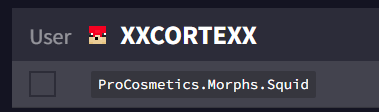
I reinstalled the plugin and gave the permission to only MVP+ but the VIP can also use the morphs. can you help me with this?

 chilly lion
why default tab not show rank
wind fiber
can you send a screenshot of the output you get in console
wind fiber
prisma hinge
well, i tried to add sethome permission to my friend and he said that he can't u...
the green means they havent been saved yet, make sure you do that first
 ancient blaze
 prisma hinge
access denied for mysql user
ancient blaze
wind fiber
can you send a screenshot of the output you get in console
That’s all that shows up
rare veldt
rare veldt
I reinstalled the plugin and gave the permission to only MVP+ but the VIP can al...
???
rare veldt
rare veldt
?
wintry cloudBOT
It is safe to send an editor link in public.
Any changes made in the editor have to be applied using the /lp applyedits command - impossible unless the person with the link is also connected to the server and with the required in-game permissions to use LuckPerms commands. It's effectively just as safe to share an editor link as it would be to share a screenshot of your permissions or a pastebin of a configuration file. The editor doesn't contain any sensitive data (except perhaps player names).
More Information:
Concerns about the proprietary nature of your permissions setup?
Please, don't be. We're here to help, not steal your permissions setup. Additionally, permissions can be tested by players simply joining your server and seeing what they can do.
rare veldt
LuckPerms - A permissions plugin for Minecraft servers.
LuckPerms is a permissions plugin for Minecraft servers. It allows server admins to control what features players can use by creating groups and assigning permissions.
its for the procomatic
quaint idol
Ok editor looks fine. Do /lp user <someone who shouldn't have the perm> permission check <permission>, it'll show where it's getting it from. If you need help interpreting it, screenshot the output & send here
rare veldt
 quaint idol
Output of /pl please
prisma hinge
maybe this one freaked you out https://i.imgur.com/UIIxGsA.png
 rare veldt
Like you cant use the morph if u dont have the permission
quaint idol
it seems your user does though, missed that
 quaint idol
If you're saying LP gave that permission to him without human interaction, no not possible. If you're saying another plugin did so, then there you go, found the problem
 normal hawk

 silent swan
Hi, I have a problem with luckperms because the plugin shows up on the list, but after entering the command, I do not get a reply in the luck perms folder, nothing is there
daring stirrup
what mc client are you using
silent swan
Lunar but my colleague on the regular client had the same
quaint idol
iirc Lunar is one of the clients that breaks chat.
daring stirrup
!paste logs/latest.log
wintry cloudBOT
Please use pastebin!
Seeing a paste of the problem makes everything so much easier! Use https://pastes.dev/ for easy pasting!
For console errors:
Pastebin any relevant segments of the console log. If it's a startup error, this includes the entire startup log!
Other errors:
Pastebin the entire LuckPerms config file (passwords removed) as well as any other relevant files!
daring stirrup
Also try it on vanilla
silent swan
Still having the same problem after changing the client
daring stirrup
wintry cloud
.
 frozen tide
I dont know what i have to do with the wiki
because they are not explaining anything about fabric servers
daring stirrup
!ask
wintry cloudBOT
Please ask your question!
Please ask the question you have. Don't ask to ask, or ask to DM someone. There are people here to help you, but we need to know what to help you with, so please just ask the question you want to in as much detail as possible!
Or, try here first:
Why shouldn't I ask to ask?
silent swan
https://pastes.dev/xwz8eVGMWb
it only shows in the console
A paste containing 1 line of plaintext.
silent swan
A paste containing 559 lines of plaintext.
daring stirrup
!faq last
wintry cloudBOT
Check out some of our frequently asked questions.
Read more
LuckPerms wiki
 main breach
Hi, I would like to use prefix on fabric in 1.18.1 and the mods in the wiki are not updated...
Do you know any other?
 wild ivy
hello, i have problem with luckperms bungeecord when i give helper (and moderator by group.helper) permission to staffchat.join and .read (with message [SC] [+] Nick join the lobby) but they didn't see it
but when i give permission to see afk message they can read it
prisma hinge
wind fiber
the green means they havent been saved yet, make sure you do that first
i did
and it not work
dense kite
why are you using CB
i don't honestly know how LP reacts to CB 1.8.8
you should be using at least Paper in any situation though
 plush pelican
wild ivy
plush pelican
wild ivy
hello, i have problem with luckperms bungeecord when i give helper (and moderator by group.helper) permission to staffchat.join and .read (with message [SC] [+] Nick join the lobby) but they didn't see it
but when i give permission to see afk message they can read it
 neon ember
Please how do i give players a permission to use any plugin commands like warp, kits and more please pm me (if you can help)
wind fiber
neon ember
Please how do i give players a permission to use any plugin commands like warp, ...
!usage
wintry cloudBOT
Here's a guide to help users understand and use LuckPerms for the first time.
Read more
LuckPerms wiki
neon ember
wind fiber
!usage
Now how do i select people as default so that i can give them permission?
wind fiber
/lp group default permission set <perm> [true/false]
wild ivy
wind fiber
!usage
i have problem with luckperms bungeecord when i give helper (and moderator by group.helper) permission to staffchat.join and .read (with message [SC] [+] Nick join the lobby) but they didn't see it
but when i give permission to see afk message they can read it
neon ember
wind fiber
`/lp group default permission set <perm> [true/false]`
What do i put in the perm part?? I don't really get it
wind fiber
the permission for the command, you can find it on your plugins documentation
neon ember
Cool thanks
Wait where do iput these in the luck perm link that is given or in the console ?
prisma hinge
it is a command so it goes into the game, not the editor
you can use the editor to do the same thing though, just not with exactly that command lmao
 mighty bear
 prisma hinge
in mitigation: pex to luckperms, mitiged only 73 users. (lobby) It's problem?
prisma hinge
How to create prefix and make it visible to ingame chat and player tab?
quaint idol
!chat
wintry cloudBOT
LuckPerms does not perform any chat/tablist formatting of its own!
LuckPerms only acts as the source for prefixes / suffixes, it doesn't actually apply them. You need an appropriately configured chat/tablist formatting plugin for them to be displayed. If the values appear correctly when you run /lp user <user> info, LuckPerms is doing its job!
FAQ answer: Prefix isn't showing?
List of chat/tablist formatting plugins that work with LuckPerms
prisma hinge
Is there a way to remove a permission node from everyone including offline players? for example a certain warp?
tidal blade
!bulk
wintry cloudBOT
Quickly update a large amount of user and group permissions by using the bulkupdate command.
Read more
LuckPerms wiki
prisma hinge
tidal blade
!bulk
whats the difference between users and all?
tidal blade
prisma hinge
whats the difference between users and all?
All includes groups
From all users who have that permission, yes.
dense kite
skip-bulkupdate-confirmation in the config
 earnest apex
Hi guys
Is there any way when a rank is being removed
it removes the prefix aswell?
because some players/staff have a customized prefix
but i want that to reset when their group changes
because this can make things very confusing 😂
prisma hinge
if the prefix belongs to the group and the user no longer has the group, the prefix will no longer be there. if the prefix is given directly to the user without involving a group, then removing the group will not help you since the prefix was given directly onto the user
earnest apex
prisma hinge
if the prefix belongs to the group and the user no longer has the group, the pre...
is there any way to do that?
because some people have like a customized prefix
&c[Mod] instead of &9[Mod]
for example
and when they get promoted
Its still showing &c[Mod]
just anaexample
prisma hinge
you can clear their prefixes, yes, but that requires a second command to be run. here, look at this one https://luckperms.net/wiki/Meta-Commands#lp-usergroup-usergroup-meta-clear-type-context
LuckPerms - A permissions plugin for Minecraft servers.
LuckPerms is a permissions plugin for Minecraft servers. It allows server admins to control what features players can use by creating groups and assigning permissions.
i believe this option only exists on backend servers since that is where bulks are run usually
 shadow wagon
How can I translate the luckperms?
 heavy fiber
I'm about to cry, I'm in serious need of someone to walk me through what is going on. I've looked on the wiki, youtube, google, nothing is helping. There are literally no errors on the console. Superpermissions is apparently the backup perm manager (i don't know why its there and can't find where to turn it off). None of the commands for lp are working in game. I'm at a complete loss.
wind fiber
what do you mean by "Not working"
heavy fiber
nothing happens in game or on the console.
wind fiber
!paste latest.log
wintry cloudBOT
Please use pastebin!
Seeing a paste of the problem makes everything so much easier! Use https://pastes.dev/ for easy pasting!
For console errors:
Pastebin any relevant segments of the console log. If it's a startup error, this includes the entire startup log!
Other errors:
Pastebin the entire LuckPerms config file (passwords removed) as well as any other relevant files!
heavy fiber
wind fiber
according to this the command went through? https://i.anutley.me/chrome_53zc9P5Sba.png
 heavy fiber
yeah that's all it's done.
wind fiber
what other commands have you tried running?
heavy fiber
/lp info, /lp editor, /lp reloadconfig, nothing runs and the console doesn't show any sign that those commands went through.
I had this all set up and it was working great and I went to change a permission last night and that's when I realized that /lp editor wasn't loading at all. I did recently install geyser and floodgate, would that break it?
wind fiber
maybe try without them installed ¯_(ツ)_/¯
heavy fiber
I'm trying right now
A paste containing 1 line of plaintext.
I'll also post my full console log, but that stuck out to me.
It's still not working even without those two plugins.
I really hope someone can help me
 viscid linden
Guys, I'm trying to setup a sponge server with a remote LP MySQL database, but I'm getting trouble with GriefDefender. GD works fine with a local LP H2 database, but doesn't work properly with a remote MySQL
Any idea of what this could be?
 austere igloo
I am using luckperms and essentials, I have disabled the permission for the default rank to use all /warps except /warp jail but they can still do /warp vipmine, does anyone know how to fix this?
quaint idol
austere igloo
I am using luckperms and essentials, I have disabled the permission for the defa...
You have to enable per warp permissions in essentials' config.
!moss for EssX support if you need help
wintry cloudBOT
Essentials
Make sure you are using EssentialsX and Vault for prefixes. For any other issues with Essentials, you should seek support in either #general or the official EssentialsX support Discord.
EssentialsX Discord
austere igloo
quaint idol
You have to enable per warp permissions in essentials' config.
Ok Thank you
harsh cloak
Hello, how to fix this error https://pastebin.com/MWzrSCkb? He is crashing my Server.
Pastebin
Pastebin.com is the number one paste tool since 2002. Pastebin is a website where you can store text online for a set period of time.
wintry cloudBOT
LuckPerms cannot connect to your MySQL server
Read More
Caused By
java.sql.SQLTransientConnectionException: luckperms-hikari - Connection is not available, request timed out after 9875ms.
https://pastebin.com/MWzrSCkb | Sent by Daniels
tame hollow
i love when that actually works
harsh cloak
tame hollow
i love when that actually works
So, how to fix this?
prisma hinge
Hello, I have a problem with luckperms.
I have a server on 1.16.5 (with luckperms loaded and nothing else) and no one can knock. The error is displayed (and before the error [LP]).
I am sending what is in the console:
User 88fc652b-9f53-3978-ae53-240067e6e9a6 - Kubson239 doesn "t have data pre-loaded, they have never been processed during pre-login in this session. - denying login.
[09:19:20] [Server thread / WARN]: [LuckPerms] Player Kubson239 has a non-LuckPerms permissible (org.bukkit.permissions.PermissibleBase)!
This is probably because you have multiple permission plugins installed.
Please make sure that LuckPerms is the only permission plugin installed on your server!
(unless you "re performing a migration, in which case, just remember to remove your old permission plugin once you" re done!)
[09:19:20] [Server thread / INFO]: Disconnecting com.mojang.authlib.GameProfile@64fa88cf [id = 88fc652b-9f53-3978-ae53-240067e6e9a6, name = Kubson239, properties = {}, legacy = false] (/ MY IP? 7 [? B? LL? 3? LP? 7]? R? CPermissions data for your user was not loaded during the pre-login stage - unable to continue. Please try again later. If you are a server admin, please check the console for any errors.
[09:19:20] [Server thread / INFO]: com.mojang.authlib.GameProfile@64fa88cf [id = 88fc652b-9f53-3978-ae53-240067e6e9a6, name = Kubson239, properties = {}, legacy = false] ( / MY IP) lost connection:? 7 [? B? LL? 3? LP? 7]? R? CPermissions data for your user was not loaded during the pre-login stage - unable to continue. Please try again later. If you are a server admin, please check the console for any errors.
I do not have any other plugin (no other) and when I enter the server with LuckPerms uploaded, the following message is displayed (against the background of the ground):
Permissions data for your user was not loaded during the pre-login stage - unable to continue. Please try again later. If you are a server admin, please check the console for any errors.
I will add that I have an operator (op)
Sorry for any mistakes in sentences, I use Google Translate because I'm Polish
prisma hinge
harsh cloak
So, how to fix this?
!errors there is no 'one fix', but start with the checklist
wintry cloudBOT
Here's a page with some common storage system errors.
LuckPerms wiki
prisma hinge
prisma hinge
[09:19:20] [Server thread / WARN]: [LuckPerms] Player Kubson239 has a non-LuckPe...
This is probably because you have multiple permission plugins installed.
I'm saying I don't have any plugin other than LuckPerms
are you sure? send a pic of /plugins
ok, wait

whatr server software are you using?
CraftBukkit 1.16.5
try paper
Okey
I have changed, and I am waiting for the server to restart. I will write if it helped. Thank you for your help ❤️
THANK YOU VERY MUCH!!! IS ALREADY WORKING! I LOVE YOU!!!!!!!!!!! @prisma hinge
xD
XD
You saved my minecraft server
enjoy
harsh cloak
Hello, how to fix this error https://pastebin.com/MWzrSCkb? He is crashing my Server.
Pastebin
Pastebin.com is the number one paste tool since 2002. Pastebin is a website where you can store text online for a set period of time.
wintry cloudBOT
LuckPerms cannot connect to your MySQL server
Read More
Caused By
java.sql.SQLTransientConnectionException: luckperms-hikari - Connection is not available, request timed out after 9875ms.
https://pastebin.com/MWzrSCkb | Sent by Daniels
 knotty widget
What is the command that I use to add a player to a certain rank?
prisma hinge
I have one more question. Will LuckPerms run on the Spigot engine?

ps: spigot is crap
I know, but one of the plugins I badly need requires the Spigot engine
bet theres an alternative for paper
 boreal trail
prisma hinge
I have one more question. Will LuckPerms run on the Spigot engine?
boreal trail
prisma hinge
I have one more question. Will LuckPerms run on the Spigot engine?
It will run on paper
If a plugin specifically needs spigot and breaks on a fork it’s a bad plugin and should be avoided
 subtle musk
ive been trying to setup permissions so that the group admin cant promote or demote themselves and also cant promote other people to or past their current group, ive tried doing the steps on the wiki but its still not working and players with the admin group can still promote themeselves to owner and promote others to admin and owner, not sure what to do

my permissions:
 prisma hinge
did you enable argument-based-command-permissions in the config?
 dusk ocean
Can you make it so you are allowed to have more than 1 home? If so how?
 vital plume
Hi guys, what about linking bungee and spigots luckperms to mysql? Because I'm giving permissions of in plugin that I put. In my bungee in the lpb editor and it doesn't detect it.
 ripe ore
Hello,could someone help me with something?
knotty widget
ripe ore
Hello,could someone help me with something?
Don't ask to ask, just ask.
wide flint
Hi, I have this error when a player join the server (spigot)
wintry cloudBOT
Please use https://pastes.dev to send files in the future. I have automatically uploaded message.txt for you: https://pastes.dev/rMO6ApahUx
A paste containing 25 lines of plaintext.
quaint idol
Not sure why you're ccoming to LP support for an error caused by an offline mode authentication plugin
Zero support for piracy.
wide flint
I was in the wrong discord 😭
this is a plugin that is not pirated
quaint idol
The plugin isn't pirated, but it's a plugin for allowing offline users to authenticate, thus implying you are pirating MC
wide flint
okay sorry
quaint idol
quick google, didn't realize that was a premium plugin for authentication (wtf), and given the wierd versions it does indeed seem you pirated it...
wide flint
I paid this plugin
boreal trail
dusk ocean
Can you make it so you are allowed to have more than 1 home? If so how?
Depends on what plugin you are using for homes
dusk ocean
boreal trail
Depends on what plugin you are using for homes
EssentialsX and luckperms
tidal blade
dusk ocean
EssentialsX and luckperms
!moss
wintry cloudBOT
Essentials
Make sure you are using EssentialsX and Vault for prefixes. For any other issues with Essentials, you should seek support in either #general or the official EssentialsX support Discord.
EssentialsX Discord
wintry cloudBOT
You can download LuckPerms for Bukkit/Spigot/Paper, BungeeCord, Sponge, Fabric, Nukkit and Velocity.
Additional downloads
earnest apex
okay thanks
earnest apex
wind fiber
update to the latest version of lp
more plugins are giving these kind of errors
any idea what it could be?
wind fiber
have you done /reload recently?
wind fiber
not sure then, contact their support
earnest apex
Okay 👍
 frail sandal
Could someone give me support?
java.util.concurrent.CompletionException: java.sql.SQLSyntaxErrorException: Table 'LuckPerms.luckperms_tracks' doesn't exist
I have imported a file to my database, it does not import that file that is missing and is specified in the line, what could I do?
 odd reef
Hello, I'm new with luckperms. I'm using fabric version and I gave the permission node "minecraft.command.tp" to the default group, but my players can't use the /tp command. Can someone help me please ? Thank you
wind fiber
odd reef
wind fiber
https://canary.discord.com/channels/241667244927483904/241667244927483904/839311...
thank you
 sacred heron
Hi, I currently have two servers running an individual instance of luckperms, however have made the change to bungee recently and am realising in order to process donator ranks / tebex payments I believe i'd need to use luckperms for bungee, how would I go about transferring this whilst still keeping the permissions limited as they are per server?
 bright patio
sacred heron
Hi, I currently have two servers running an individual instance of luckperms, ho...
bright patio
sacred heron
Hi, I currently have two servers running an individual instance of luckperms, ho...
Same question 🙂
tardy glacier
!contexts
bright patio
(hi sorry I forgot to say hi 😭 )
tardy glacier
LuckPerms - A permissions plugin for Minecraft servers.
LuckPerms is a permissions plugin for Minecraft servers. It allows server admins to control what features players can use by creating groups and assigning permissions.
bright patio
Ohh thank you!
Oooh, I just saw that it only handles permissions checks made by BungeeCord, how could I set permissions on all server while keeping the permissions per server?
Example: Different perms on all servers but new perms given by a rank bought on the store network wide
Wait I'm stoopid, I just have to sync all servers together and use context 🙂
tardy glacier
 sick condor
!pasteit
tardy glacier
what
sick condor
Pastebin
Pastebin.com is the number one paste tool since 2002. Pastebin is a website where you can store text online for a set period of time.
Just spams the console, can i get rid od it?
 weary oar
Hello, I have a plugin error because when I want to put a prefix in a group it tells me that everything was put there, but the prefix is not put in the tab or in the chat
quaint idol
!chat
wintry cloudBOT
LuckPerms does not perform any chat/tablist formatting of its own!
LuckPerms only acts as the source for prefixes / suffixes, it doesn't actually apply them. You need an appropriately configured chat/tablist formatting plugin for them to be displayed. If the values appear correctly when you run /lp user <user> info, LuckPerms is doing its job!
FAQ answer: Prefix isn't showing?
List of chat/tablist formatting plugins that work with LuckPerms
 hushed glacier
so i was wondering does anyone know a 1.18 plugin i can use to link discord roles up to luckperm roles?
prisma hinge
can someone help me with this
i want keepinv off but when i turn off its not working
i use essentialsX and i still couldnt figure out how to turn it off
 torn marlin
my staff role not showing
 quaint idol
!chat
wintry cloudBOT
LuckPerms does not perform any chat/tablist formatting of its own!
LuckPerms only acts as the source for prefixes / suffixes, it doesn't actually apply them. You need an appropriately configured chat/tablist formatting plugin for them to be displayed. If the values appear correctly when you run /lp user <user> info, LuckPerms is doing its job!
FAQ answer: Prefix isn't showing?
List of chat/tablist formatting plugins that work with LuckPerms
quaint idol
(also make sure you've saved from the editor)
torn marlin
quaint idol
(also make sure you've saved from the editor)
already did
heh

my prefix didnt change
quaint idol
type: offline
piracy=bad
torn marlin
quaint idol
>type: offline
piracy=bad
wdym
quaint idol
you have pirated MC
torn marlin
quaint idol
you have pirated MC
yes tlauncher
quaint idol
glhf, no support for pirates
tidal blade
 half creek
I want to help to translate
half creek
tidal blade
<#766252727717462026>
half creek
I want to help to translate
half creek
tidal blade
<#766252727717462026>
thanks
 cinder schooner
luckperms permissions not working?
dense kite
!notworking
wintry cloudBOT
Please tell us what's going on!
We really would absolutely love to help you out! However, telling us that it isn't working wastes everyone's time. Please, just describe the issue you're having clearly and with as much detail as possible, and send any relevant screenshots of whatever problems you're having.
For Console Errors:
cinder schooner
shopgui.shops.* doesnt work
like the perms
im reinstalling luckperms right now.
tidal blade
Do /lp verbose command <player who should have perms> /<command to open shopgui> and show me what it says
wintry cloudBOT
LuckPerms does not perform any chat/tablist formatting of its own!
LuckPerms only acts as the source for prefixes / suffixes, it doesn't actually apply them. You need an appropriately configured chat/tablist formatting plugin for them to be displayed. If the values appear correctly when you run /lp user <user> info, LuckPerms is doing its job!
FAQ answer: Prefix isn't showing?
List of chat/tablist formatting plugins that work with LuckPerms
 carmine urchin
I’ve ran into a bit of an issue, my default rank has a permission set to true (the permission is used to purchase a sub rank within a gui) Issue is the sub rank that gets purchased has the permission set to false so that they can’t keep purchasing the sub rank but I also have a VIP rank and the VIP rank has a higher weight than both the sub rank and the default rank as well as its parent group is the default rank, so the issue is the VIP rank and up can keep purchasing it since it’s parent group is the default rank but also has the sub rank so I don’t know what to do. I know it’s because the VIP ranks parent group is the default group, but I need it to be so I don’t know what the solution to this is.
Ping on reply, I’m not sure if that was a good explanation it was hard to put into text 😅 thanks!
prisma hinge
@high raven ^
wintry cloudBOT
Hey Echo! Please don't tag helpful/staff members directly.
prisma hinge
 vagrant moon
https://discord.gg/rYCeHkpC
vagrant moon
https://discord.gg/rYCeHkpC
This is not a place to advertise. read the #rules
earnest apex
still got this error
someone here told me to update
but i did and its stillgiving me that error
 raven anchor
Hello
So I have Luckperms Installed in the Bungeecord and Subservers.
Now most of the servers have same groups ( some server may have different group name ).
Now what I want to do is When someone is given a group in the bungee, I want that person to get a corresponding group in other servers too.
(The group names may be different) But I don't want any permission to be synced. Just the person should get the corresponding group which will have it's permissions.
So If I use say MySQL Will everything be synced ? Like the permissions would be synced too ?
prisma hinge
thats gonna require a long answer
prisma hinge
basically, yes, once all data is shared through the same db, all groups will apply to all servers, everything will turn out smashed together
UNLESS you add context before merging and cointinue to use them as you add groups to users
also fyi i hope you know that the bungee version of lp is not required to do this
raven anchor
But it's still required for bungee perms right ? xD
raven anchor
prisma hinge
UNLESS you add context before merging and cointinue to use them as you add group...
ngl but didn't quite get this 😅
prisma hinge
for bungee perms yes. i just wanted to make sure youre not one of those ppl who think syncing works thru bungee
!context
wintry cloudBOT
You can set a permission or group on a per-world/per-server basis, through what we call "contexts".
Read more
LuckPerms wiki
raven anchor
prisma hinge
!context
I have group Moderator in bungee , Mod in hub and Admin in skyblock.
So If in the Bungee group Moderator, I add a permission say group.Mod and context server:hub and another permission group.Admin and context server:skyblock
Will the person with Moderator group in bungee have Mod and Admin group in Hub and Skyblock respectively?
prisma hinge
youre scaring me by typing for so long lol
raven anchor
XD
prisma hinge
oh my god can you break this up into more clear sentences?
also 'add a permission' to what? the mod group? or a user?
this is advanced stuff. you gotta be 100% clear, add what to where etc, even if you feel like a retard repeating the same thing over and over lol
prisma hinge
so far so good
raven anchor
Groups:
Bungee - Moderator
Hub - Mod
Skyblock - Admin
prisma hinge
on your username?
prisma hinge
or existing to begin with
raven anchor
Existing
prisma hinge
ah ok, so existing then
good, yes. go on
let me now stop you right here for a second
if you connect all 3 server instances to a remote db such as mysql yes
then the mod rank will exist on the database. why? bc all servers write to the db. same with the moderator group and admin
they will all use the same db
which means there is no 'this rank only exists here' anymore. all coexist together in one setup
prisma hinge
listen
raven anchor
prisma hinge
which means there is no 'this rank only exists here' anymore. all coexist togeth...
So the admin will be in all three servers ?
prisma hinge
only that the ranks exxist together does not mean that you have to use each one on each server
yes, but you can do this
lets say i am admin on your skyblock server rn, yea?
raven anchor
yes
 stoic thicket
is it possible to hide certain groups from being shown to those with notification perms?
prisma hinge
so what you can do now is go to your skyblock server and add a context to my rank. you can do this with bulk edit commands. so instead of lp saying 'echo now inherits group admin in context global' (you have seen this message before i bet) it will say 'echo now inherits group admin in context skyblock'. to do this, you need to change the option 'server: ' in your config to 'Server: skyblock' on skyblock, to hub on hub and so on, so that the context works.
now if you merge all your ranks into one db, i will not have group admin on the hub. why not, if the db is the same and the setup is the same? because i only have the group on the server skyblock
that is how context works
you limit where the users have the groups with context, you limit what groups have what perms on what servers and on what servers not with context as well
let me give command examples to clarify
if you merge your setup and you do this:
/lp user echo parent add owner i will have owner rank in all servers because when you do not use context here, it will be global, and global means in all servers
/lp user echo parent add admin server=skyblock i will only have the admin rank on skyblock server but not on hub or anywhere else
/lp user echo parent add member i have member rank on all servers, bc again no context means everywhere
the same can be done with permissions inside groups. a user can have one and the same group on all your servers, but some permissions on this group only apply on the skyblock saerver, or only on the hub.
raven anchor
Ok so understood
prisma hinge
phew
raven anchor
If I have an Admin group in Hub and an Admin group in skyblock ( With different permissions ) , and I connect it with database...
Will there be still two Admin groups with different permissions ?
prisma hinge
every server adds its own stuff on top of the others, nothing 'cancels each other out' - the only thing im not sure about is the default group
would be funky if lp allowed to add default to a setup 3 times
raven anchor
3 servers
Bungeecord - Manager, Admin , Mod , Default
Hub - Admin , Moderator , Default
Skyblock - Admin , Moderator , Member.
These are the different ranks in different servers..ok ?
prisma hinge
by the way, you could just get rid of one admin group, and give the perms in admin different context. so say have some work in hub and some in sb server. no more need for 2 admins, can just reuse the same thing
prisma hinge
both
heres the difference:
/lp targets perms on backend servers. in the sense of /lp , server=server context works perfectly
/lpb target the Bungee directly. using server=server as context will not work. why? well, the bungee itself already is the server. to use server context on the bungee, use world=servername instead.
in the bungee, the servers like hub and skyblock get treated like worlds. hope it makes sense, since the bungee already is the server itself, which includes the subservers just like worlds
prisma hinge
😄
raven anchor
It makes sense
One last thing
If I merge all in one db
and do /lp listgroups, groups from all serves would be visible right ?
prisma hinge
should be, since the data retrieved is from that one shared db
prisma hinge
it should, unless my brain thinks wrong rn.
raven anchor
hmm
And If I'm oped in say Skyblock. Would I be able to edit any group ? Of Hub / Bungee etc
using /lp editor or just any /lp command
prisma hinge
yes. the other servers will 'listen' to the changes you make to the database and then grab them as well
you can on hub edit perms for sb
and so on. thats the cool thing lol
raven anchor
So If I have a person Oped on any server, they'd have access to bungee perms too ?
prisma hinge
yeah
you can disable the whole op system in rewgards to lp i believe
so that youd actually need luckperms perms to use lp at all yk
instead of also including ops
raven anchor
Ohhh
Looks like a lot of work 🥲
@prisma hinge
Thanks for the help mate! Appreciate it 💖
And sorry to waste your time :p
prisma hinge
didnt waste it, dw. your questions were reasonable lol
raven anchor
 earnest apex
https://paste.helpch.at/rojuqiyicu.md
earnest apex
earnest apex
https://paste.helpch.at/rojuqiyicu.md
can someone help me witht this errror?
 upbeat bridge
Hello . i have added better rtp plugin .but players are not able to rtp .please help
earnest apex
earnest apex
can someone help me witht this errror?
i guess it was because i had malware on my server
rredownloaded every plugin and it now works like a charm
 thin geode
I want to use a perm, which gives Users the possibility to add and remove Players to a specific group.
I know i need to activate the advanced perm point in the config which i did.
Know, what perm do i need to give the User, to f.e. add User1 to Group builder?
At the moment i have luckperms.user.parent.add.builder
But it doesnt work
!argumentbased
wintry cloudBOT
Fine tune exactly what users with permission to use LuckPerms can do.
LuckPerms wiki
dense kite
I know i need to activate the advanced perm point in the config which i did.
are you referring to enabling argument based commands?
thin geode
Yep, thats already set to true i my config
 gleaming geyser
does someone have experience with this plugin?https://www.spigotmc.org/resources/kitpvp-1-8-1-18-custom-kits-leaderboards-gui-levels-kill-streaks-abilities-more.27107/

SpigotMC - High Performance Minecraft
gleaming geyser
ok
thin geode
wintry cloud
Hey guys, i dont want to be impatient, but the stated command note for argument based commands on the website doesn't work. So what did i miss?
A paste containing 28 lines of java.
thin geode
Still no answer.....
mighty yarrow
Please be patient, we're all volunteers with our own lives. No one is paid to sit here and provide support 
You can try to look up your issue in the discord search, perhaps this has been answered already with a solution.
 atomic plinth
Why the plugin sey name/uuid no valid??
thin geode
mighty yarrow
Please be patient, we're all volunteers with our own lives. No one is paid to si...
I know, i scrolled up but didnt find anything related to it
 formal cave
uh oh, my server's luckperms database reset on server restart again
i wonder why this is happening..? i'm on 5.3.98
maybe it's to do with the fact that i have a particularly high number of groups?
daring stirrup
Look at startup logs
formal cave
but the really weird thing is that whenever this happens, the groups stay; only the perms go away https://luckperms.net/editor/PNBsj8by2o
i believe i've looked and found nothing of interest, but i will try again
daring stirrup
Do they show up in game?
formal cave
all the permissions have been wiped
here's my latest.log, you can see nothing is wrong on startup https://paste.gecko.lol/eyQc
daring stirrup
daring stirrup
Do they show up in game?
?
formal cave
does what show up? in game reflects no perms
as all users have lost their attachments too
the strangest part to me is that the groups remain
could it be beneficial to transfer to mysql?
maybe there's some sort of issue with h2 databases
thin geode
As far as i can tell, there should be no difference between the two, since lp would need the same perms in mysql, which is has in h2. The only difference it would make is, that you could log the changes from the user which you give the plugin and therefore could indicate the problem
formal cave
what
the permissions get removed on restart
last time this happened i rolled the database back 2 days, and now 2 days later it's happened again
thin geode
I mean, lp need an user in mysql and the permissions to change things in there. Since does perms in mysql would be the same as when using h2, it should not make a difference. (Should be still wiped)
But you can log the actions which the user does in the database
prisma hinge
what
thin geode
thin geode
I want to use a perm, which gives Users the possibility to add and remove Player...
Emily, do you know whats wrong with that?
formal cave
well i transferred to mysql and am now running lp export before auto restarts, so hopefully if it does happen again i don't need to download an entire backup
tardy glacier
thin geode
Emily, do you know whats wrong with that?
!argbased -> i think this is what youre looking for 😄
wintry cloudBOT
Fine tune exactly what users with permission to use LuckPerms can do.
LuckPerms wiki
thin geode
thin geode
https://pastes.dev/APWkMejV2v
I literally took the exact same example as stated in that, but it doesnt work tho
Soooo? Any idea aberdeener?
prisma hinge
with argument based, you need many permissions to even allow for one single thing
say you want to allow someone to add a group to other people
you'd need:
luckperms.user.parent.add to even use the add command altogether
luckperms.user.parent.add.builder to be able to add the builder group, not others
luckperms.user.parent.add.modify.others to use the command on other players (not on oneself)
luckperms.user.parent.add.usecontext.global for global/no context or ...add.usecontext.<context key>.<context value> to use the specific context
thin geode
So if a user has luckperms.user.parents.add and luckperms.user.parents.add.builder, he can only add to builder ?
Or does any player, with luckperms.user.parents.add and argument based set to true, dont add anyone to any group?
prisma hinge
luckperms.user.parent.add is needed to even be able to use the command
it won't give full access
thin geode
Ah alright, so if i have argument based activated and users have only parent.add and modify.others, they still cant add anyone other to any group?
Thx
prisma hinge
correct
thin geode
So if have now luckperms.user.parent.add :
- builder
- modify
- modify.others
- usecontext.global
But it still state i dont have the permission to add myself to any group....
prisma hinge
myself
modify.others
to add yourself you need .modify.self
.modify.others is to, well, using the command in other people, not yourself
thin geode
Aaaaaah finallyyy
Thank you very much, i had a lot of struggle with this
thin geode
!tab
wintry cloudBOT
LuckPerms does not perform any chat/tablist formatting of its own!
LuckPerms only acts as the source for prefixes / suffixes, it doesn't actually apply them. You need an appropriately configured chat/tablist formatting plugin for them to be displayed. If the values appear correctly when you run /lp user <user> info, LuckPerms is doing its job!
FAQ answer: Prefix isn't showing?
List of chat/tablist formatting plugins that work with LuckPerms
 bright zodiac


 bright zodiac
thx dont mind me lol
formal cave
(just documenting, no one cares) first two server restarts after transferring to MySQL seem to have gone well, perms didn't reset or anything
 wintry lynx
What does parent group mean?
wintry lynx
bright zodiac
And what is the plugin do you use for prefix ?
fake
disocrde
If we put certain permission in the "default" grade, will the "vip" role have this permission?
thin geode
If you put default as parent group in vip then yes. But if vip is weighted higher than default and f.e. you have fly false in default and fly true in vip, the fly perm in vip overwrites the fly false from default
wintry lynx
What does parent group mean?
thin geode
If you have a group with weight 10 and a group with weight 9 they are in order.
So now, if you know want, that the weight 10 group, has all the same perms of the weighted 9, you set the weighted 9 as parent of the weight 10 group. Since the weight 10 is 1 above the weighted 9, all perms in 10 overwrite the ones in 9, if the same perm is in both stated, but with different true/false
!inheritance
wintry cloudBOT
Learn about inheritance.
LuckPerms wiki
 opaque sparrow
!help
wintry cloudBOT
Available commands
!advanced
!api
!argumentbased
!ask
!bulkupdate
!bungee
!bungeecheck
!cauldron
!colours
!commandequivalents
!commands
!config
!context
!cookbook
!default
!downloads
!editor
!editorsafety
!errors
!essentials
!extensions
!extracontexts
!faq
!formatting
!hack
!helpchat
!inheritance
!install
!libsdir
!locale
!meta
!migration
!notworking
!nowildcard
!offline
!pasteit
!permissions
!placeholders
!selfhosting
!stacking
!storage
!suggestions
!switchstorage
!sync
!testingperms
!tracks
!translationprogress
!translations
!tutorial
!upgrade
!usage
!userinfo
!verbose
!version
!weight
!whyluckperms
!wiki
opaque sparrow
!hack
wintry cloudBOT
Has LuckPerms been exploited/hacked?
Most certainly: no. In most cases a 'LuckPerms exploit' is a simple case of human error, which can be avoided easily. Look below for some tips to be on the safe side.
Don't give random people full ( * ) permissions / admin permissions
While this should be obvious, a lot of times a exploit can be traced back to faulty permission settings. You should always take your time with permissions and read the plugin documentations. In 99% of all cases the plugins have documentations explaining each permission, in the rare case that the plugin you are using does not have a documentation, you could still:
A: Ask the plugin developer for help
B: Use LuckPerms verbose functionality ( !verbose )
C: Select a different plugin with proper documentation.
Do not run your server/network in offline mode
If you are running your server or network in offline mode, hackers have it really easy to steal your, or any other admins identity. While the server is in offline mode, certain checks ( which exist to prevent exactly this ), are being skipped, and the server does not verify if the person joining actually is the person they claim to be. While there may be plugins which increase the security of offline mode servers by adding things such as admin codes, you should just switch it to online to prevent the issue in the first place.
Do not download plugins from shady websites / sent by friends
You should never put anything on your server which has not been downloaded by yourself from official sources. Plugins can be infected with malware which injects itself into all other plugins, and thus is hard to remove. While it may look like a plugin has been hacked, you most certainly downloaded a modified version of it and it is not the plugin authors fault. In case your server has been infected by such malware:
- Stop the server
- Delete all plugins in your plugins folder, and just to be safe also the server jar file
- Re-Download all plugins and server jar files from official websites such as SpigotMC or official plugin websites ( luckperms.net for example ).
- Check if there have been any modifications to the permission system and remove unknown users and wrong permissions.
if you follow these steps you should have a clean server by the end, without exploits.
opaque sparrow
I have a question?
wind fiber
!ask
wintry cloudBOT
Please ask your question!
Please ask the question you have. Don't ask to ask, or ask to DM someone. There are people here to help you, but we need to know what to help you with, so please just ask the question you want to in as much detail as possible!
Or, try here first:
Why shouldn't I ask to ask?
tardy glacier
!ask can someone help me with luckperms
wintry cloudBOT
Please ask your question!
Please ask the question you have. Don't ask to ask, or ask to DM someone. There are people here to help you, but we need to know what to help you with, so please just ask the question you want to in as much detail as possible!
Or, try here first:
Why shouldn't I ask to ask?
wind fiber
no
tardy glacier
oh ok
 umbral orchid
I am having issues when running a /execute if command that tries to do anything with /lp user (command listed below). Entering this in console does nothing, and entering it into a command block or in-game chat results in "an internal error occured while attempting to tab-complete this command" being displayed in the chat, and the console/log being rapidly filled with a repeating error trace. 4000 lines of the log have been uploaded to pastebin, but the whole log is too large (~20000 lines, 2.5MB). The error first occured at line #175.
execute if score @p ironingotcount matches 32.. run execute unless score @p level matches 1.. run luckperms user wigster101 promote users
Is this caused by something I am doing wrong/attempting something impossible? or should I create a github issue for this
e1: Just looked through the server for other people with /execute issues. Seems to be the same issue Siriusilly had
e2: Updated luckperms, did not realize it was out of date. Exact same Issue still occurs. Setting "register-command-list-data" to false breaks command blocks being able to run the command (as expected) but prevents the glitch from occuring.
prisma hinge
/execute run cannot see plugin commands at all
why it shows in suggestion completions is due to what LP does when register-command-list-data is set to true but that's unrelated to how the commands actually function
prisma hinge
Do you have any ideas for an alternative to this?
umbral orchid
prisma hinge
`/execute run` cannot see plugin commands at all
damn it, oh well. Almost had the perfect rank upgrade system using luckperms alone. thanks for the help!
quaint idol
Don't click.
 misty coral
umbral orchid
damn it, oh well. Almost had the perfect rank upgrade system using luckperms alo...
misty coral
umbral orchid
damn it, oh well. Almost had the perfect rank upgrade system using luckperms alo...
You could use CommandAPI to convert the commands to bridgadier ones and then it should work
 mossy ibex
Is there a way to make a general command illegal but a specific command legal? That is,
/kill @e cannot be done
but
/kill @e[type=cow] can?
dense kite
Not something LuckPerms controls, unless you have a plugin that adds the functionality.
mossy ibex
oh okay, thanks!
 plush kernel
!config
wintry cloudBOT
Learn what each of the config options are for.
Read more
LuckPerms wiki
plush kernel
!hack
wintry cloudBOT
Has LuckPerms been exploited/hacked?
Most certainly: no. In most cases a 'LuckPerms exploit' is a simple case of human error, which can be avoided easily. Look below for some tips to be on the safe side.
Don't give random people full ( * ) permissions / admin permissions
While this should be obvious, a lot of times a exploit can be traced back to faulty permission settings. You should always take your time with permissions and read the plugin documentations. In 99% of all cases the plugins have documentations explaining each permission, in the rare case that the plugin you are using does not have a documentation, you could still:
A: Ask the plugin developer for help
B: Use LuckPerms verbose functionality ( !verbose )
C: Select a different plugin with proper documentation.
Do not run your server/network in offline mode
If you are running your server or network in offline mode, hackers have it really easy to steal your, or any other admins identity. While the server is in offline mode, certain checks ( which exist to prevent exactly this ), are being skipped, and the server does not verify if the person joining actually is the person they claim to be. While there may be plugins which increase the security of offline mode servers by adding things such as admin codes, you should just switch it to online to prevent the issue in the first place.
Do not download plugins from shady websites / sent by friends
You should never put anything on your server which has not been downloaded by yourself from official sources. Plugins can be infected with malware which injects itself into all other plugins, and thus is hard to remove. While it may look like a plugin has been hacked, you most certainly downloaded a modified version of it and it is not the plugin authors fault. In case your server has been infected by such malware:
- Stop the server
- Delete all plugins in your plugins folder, and just to be safe also the server jar file
- Re-Download all plugins and server jar files from official websites such as SpigotMC or official plugin websites ( luckperms.net for example ).
- Check if there have been any modifications to the permission system and remove unknown users and wrong permissions.
if you follow these steps you should have a clean server by the end, without exploits.
 carmine arch
Hi, so im using luckperms running in mysql, and I have a ranks.yml file that I exported from my old server. Is there a way I can use /lp import to import these ranks to my new server? Every time I try, I get an error that its not a .gz file.
 tropic dome
I need help with luck perms plugin who will help me let me write to me privately
 waxen stream
carmine arch
Hi, so im using luckperms running in mysql, and I have a ranks.yml file that I e...
waxen stream
carmine arch
Hi, so im using luckperms running in mysql, and I have a ranks.yml file that I e...
use import without the file extension at the end
If that doesn’t work send the content of your export file into like a paste
Someone recently had this problem because they had an export file from like .2 beta or something crazy
 inland gale
carmine arch
Hi, so im using luckperms running in mysql, and I have a ranks.yml file that I e...
inland gale
carmine arch
Hi, so im using luckperms running in mysql, and I have a ranks.yml file that I e...
!migrate
wintry cloudBOT
Learn about the process of migrating from another permission plugin.
Read more
LuckPerms wiki
 fierce flume
why i cant user with Lpb BungeeCord commands? 😮
tidal blade
Do you have LP BungeeCord Installed?
fierce flume
tidal blade
Do you have LP BungeeCord Installed?
alr i dont get it, bc i dont have still atm Mysql
tidal blade
Can you do /lpb info from the bungee console
fierce flume
Pastebin
Pastebin.com is the number one paste tool since 2002. Pastebin is a website where you can store text online for a set period of time.
wintry cloudBOT
If you run a BungeeCord network, learn how to correctly setup LuckPerms on all server instances (including Bungee).
Also read:
Syncing data between servers
LuckPerms wiki
 tidal blade
You have not connected LP on the bungee server to a remote database
All servers need to have LP installed, and All instances of Luckperms need to be connected to the same Remote Database
fierce flume
i still have it on 1 server, but i cant change the server to test it why should i set up it there now o:
tidal blade
If you want permissions and groups etc to sync between the servers, you need to connect LP to a remote database on all servers.
fierce flume
and how i set that right
tidal blade
!bungee
wintry cloudBOT
If you run a BungeeCord network, learn how to correctly setup LuckPerms on all server instances (including Bungee).
Also read:
Syncing data between servers
LuckPerms wiki
fierce flume
funy, bc nothing work for me 🙂
wintry cloudBOT
Please tell us what's going on!
We really would absolutely love to help you out! However, telling us that it isn't working wastes everyone's time. Please, just describe the issue you're having clearly and with as much detail as possible, and send any relevant screenshots of whatever problems you're having.
For Console Errors:
tidal blade
You have not connected it to a remote database
tardy glacier
funy xd
fierce flume
funy
fierce flume
Pastebin
Pastebin.com is the number one paste tool since 2002. Pastebin is a website where you can store text online for a set period of time.
wintry cloudBOT
LuckPerms cannot connect to your MySQL server
Read More
Caused By
java.sql.SQLTransientConnectionException: luckperms-hikari - Connection is not available, request timed out after 5000ms.
https://pastebin.com/AA272Hms | Sent by Nico.
tropic dome
I need help with luck perms plugin who will help me let me write to me privately
dense kite
!ask
wintry cloudBOT
Please ask your question!
Please ask the question you have. Don't ask to ask, or ask to DM someone. There are people here to help you, but we need to know what to help you with, so please just ask the question you want to in as much detail as possible!
Or, try here first:
Why shouldn't I ask to ask?
wild ivy
i have problem with luckperms on bungeecord, when i have permission to staffchat they can't see it, all of staff, how can i fix it ?
 mellow sand
Hey. So I setup EssentialsX and Luckperms but I'm still having an issue. Instead of it being [D] [Username] It's coming out to be [D~Username]
And in tab it's DUsername instead of [D] Username.
How can I fix this?
(if it's not a luckperms issue that's my bad, is it a essentialsx chat issue?)

 fickle wharf
hello!
earlier today, my LuckPerms prefixes were working fine. now they don’t work. i have LPC and Vault. what happened?
 tepid valve
mellow sand
Hey. So I setup EssentialsX and Luckperms but I'm still having an issue. Instead...
tepid valve
mellow sand
Hey. So I setup EssentialsX and Luckperms but I'm still having an issue. Instead...
Tab and chat config
 dusk hill
Hi! I have a server that runs bungeecord. I installed LP on the bungee plugins, but the servers complain about not having perms plugin. What should I do?
prisma hinge
if you have bungee plugins, you should install lp bungee on your proxy as well. backend servers wont be able to handle permissions that come from your proxy and vice versa
dusk hill
I only installed it on the proxy. Do I need to install it on the servers too?
prisma hinge






the bungee version of luckperms is optional and only needed if you want to handle bungee permissions with luckperms
but like i said, bungeelp wont handle backend server perms and backend server lp wont handle bungee perms
dusk hill
Oh, okay. I thought there was a way to set perms that are active on all servers. :/
prisma hinge
to handle perms on other servers, you will need your setup to be syncronized through a commonly shared database which is outside of any of your servers, so something like postgresql or mysql