#support-2
1 messages · Page 79 of 1
 wintry cloudBOT
LuckPerms cannot connect to your MySQL server
Read More
Caused By
java.sql.SQLTransientConnectionException: luckperms-hikari - Connection is not available, request timed out after 5002ms.
https://bytebin.lucko.me/gaQlv76Ogs | Sent by Barni
 prisma hinge
@snow jungle try increasing the connection-timeout setting in LP config
to idk 20000
 snow jungle
I'v done this GRANT ALL PRIVILEGES ON luckperms.* TO 'luck'@'%'; and its still broken i flusehd previliges aswell
 grim hearth
is it possible to transfer luckperms sql data to another database?
 solar rover
Is there a placeholder that sorts based on prefix weights? (Not groups)
!placeholders
wintry cloudBOT
Display data such as user prefixes and groups from LuckPerms in other plugins.
Read more
 LuckPerms wiki
 crude tree
prisma hinge
solar rover
Is there a placeholder that sorts based on prefix weights? (Not groups)
crude tree
prisma hinge
solar rover
Is there a placeholder that sorts based on prefix weights? (Not groups)
that is the default behavior, groups are sorted by weights; but not the group weights, but the prefix weights
 north patrol
im having the problem everyone always has with essentials but i always forget how to fix it, how do i make it so new players can break blocks?
prisma hinge
Delete EssentialsXAntiBuild
north patrol
ah, thanks
solar rover
prisma hinge
that is the default behavior, groups *are* sorted by weights; but __not__ the gr...
Was looking for the placeholder of it, found it tho, %luckperms_prefix_element_Lowest%
 tulip trench
Is there any Way to reset the UUID's for the Users?
 craggy veldt
Hello I have a little problem. The command to set the prefix to player works but I have a problem. I want to put a space between the prefix and nickname of the player, any idea?
Exemple: /lp user SkyOxY meta setprefix &d&lLOL &d
Result: SkyOxY had prefix ‘&d&lLOL’ set at a priority 11 un context server=&e
I want it to take into account the space and the color for the nickname
 quick lagoon
tulip trench
Is there any Way to reset the UUID's for the Users?
quick lagoon
tulip trench
Is there any Way to reset the UUID's for the Users?
reset perms or? UUIDs are assigned by mojang
tulip trench
Fixed
quick lagoon
craggy veldt
Hello I have a little problem. The command to set the prefix to player works but...
wrap them around quotes "
craggy veldt
Thanks
prisma hinge
are luck perms available on version 1.8 ?
 daring stirrup
1.8.8
prisma hinge
Hello, sorry if my english is not perfect i'm french. I have a server with Mohist 1.16.5 and in your website i can't find the right version
prisma hinge
him ?
Yes
but
when i started the server
this text appears in the console
.... [20:08:14 WARN]: java.lang.RuntimeException: java.lang.NullPointerException
.... [20:08:14 WARN]: at me.lucko.luckperms.common.event.gen.GeneratedEventClass.lambda$static$0(GeneratedEventClass.java:70)
.... [20:08:14 WARN]: at java.util.concurrent.ConcurrentHashMap.computeIfAbsent(ConcurrentHashMap.java:1660)
.... [20:08:14 WARN]: at me.lucko.luckperms.common.cache.LoadingMap.get(LoadingMap.java:67)
.... [20:08:14 WARN]: at me.lucko.luckperms.common.event.gen.GeneratedEventClass.generate(GeneratedEventClass.java:81)
.... [20:08:14 WARN]: at me.lucko.luckperms.common.event.gen.GeneratedEventClass.preGenerate(GeneratedEventClass.java:89)
.... [20:08:14 WARN]: at java.util.concurrent.ForkJoinTask$RunnableExecuteAction.exec(ForkJoinTask.java:1402)
.... [20:08:14 WARN]: at java.util.concurrent.ForkJoinTask.doExec(ForkJoinTask.java:289)
.... [20:08:14 WARN]: at java.util.concurrent.ForkJoinPool$WorkQueue.runTask(ForkJoinPool.java:1056)
.... [20:08:14 WARN]: at java.util.concurrent.ForkJoinPool.runWorker(ForkJoinPool.java:1692)
.... [20:08:14 WARN]: at java.util.concurrent.ForkJoinWorkerThread.run(ForkJoinWorkerThread.java:175)
.... [20:08:14 WARN]: Caused by: java.lang.NullPointerException
.... [20:08:14 WARN]: at me.lucko.luckperms.common.event.gen.GeneratedEventClass.<init>(GeneratedEventClass.java:109)
.... [20:08:14 WARN]: at me.lucko.luckperms.common.event.gen.GeneratedEventClass.lambda$static$0(GeneratedEventClass.java:68)
.... [20:08:14 WARN]: ... 9 more
daring stirrup
!cauldron
wintry cloudBOT
Installing LuckPerms on a Cauldron, Thermos and any other Forge + Bukkit server software may require additional steps.
LuckPerms wiki
daring stirrup
Try
prisma hinge
Nothing Changes
.... [20:15:06 WARN]: java.lang.RuntimeException: java.lang.NullPointerException
.... [20:15:06 WARN]: at me.lucko.luckperms.common.event.gen.GeneratedEventClass.lambda$static$0(GeneratedEventClass.java:70)
.... [20:15:06 WARN]: at java.util.concurrent.ConcurrentHashMap.computeIfAbsent(ConcurrentHashMap.java:1660)
.... [20:15:06 WARN]: at me.lucko.luckperms.common.cache.LoadingMap.get(LoadingMap.java:67)
.... [20:15:06 WARN]: at me.lucko.luckperms.common.event.gen.GeneratedEventClass.generate(GeneratedEventClass.java:81)
.... [20:15:06 WARN]: at me.lucko.luckperms.common.event.gen.GeneratedEventClass.preGenerate(GeneratedEventClass.java:89)
.... [20:15:06 WARN]: at java.util.concurrent.ForkJoinTask$RunnableExecuteAction.exec(ForkJoinTask.java:1402)
.... [20:15:06 WARN]: at java.util.concurrent.ForkJoinTask.doExec(ForkJoinTask.java:289)
.... [20:15:06 WARN]: at java.util.concurrent.ForkJoinPool$WorkQueue.runTask(ForkJoinPool.java:1056)
.... [20:15:06 WARN]: at java.util.concurrent.ForkJoinPool.runWorker(ForkJoinPool.java:1692)
.... [20:15:06 WARN]: at java.util.concurrent.ForkJoinWorkerThread.run(ForkJoinWorkerThread.java:175)
.... [20:15:06 WARN]: Caused by: java.lang.NullPointerException
.... [20:15:06 WARN]: at me.lucko.luckperms.common.event.gen.GeneratedEventClass.<init>(GeneratedEventClass.java:109)
.... [20:15:06 WARN]: at me.lucko.luckperms.common.event.gen.GeneratedEventClass.lambda$static$0(GeneratedEventClass.java:68)
.... [20:15:06 WARN]: ... 9 more
This message always here
 mighty spear
Can you show the output of /version ?
prisma hinge
This server is running Mohist version 1.16.5-385 (MC: 1.16.5) (Implementing API version 1.16.5-R0.1-SNAPSHOT, Forge version 36.0.46)
mighty spear
Oh god, Mohist?.... Running Bukkit alongside mods is never a good idea for exactly this reason
prisma hinge
which the best version ? for mods and plugins
 sharp depot
Hello. I have a Paper server running LuckPerms. Its been running fine for a few weeks now. I also have a BungeeCord server that has been running ok with a couple of other servers (not the LuckPerm server). Now I have decided to connect the LuckPerm server to BungeeCord. The proxy features appear to work fine. I can jump to the LuckPerm server with the /server command. However, the LuckPerm server creates a new uid dat file so users lose all of their loot. Cannot figure out how to maintain the original uid dat files.
Oh, v1.16.4
 mighty yarrow
prisma hinge
which the best version ? for mods and plugins
mighty yarrow
prisma hinge
which the best version ? for mods and plugins
Spongeforge
It's 1.12.2 for now but most stable tbh
prisma hinge
Thanks but i have a problem, Vault does not exist in 1.12.2
mighty yarrow
Don't need vault really, Sponge has that built in iirc
prisma hinge
Okay and even if an economy plugin requires it ?
mighty yarrow
Check the docs for sponge economy plugins, they'll tell you what they need
again, vault is built in to sponge
prisma hinge
Okay thanks
 vast marsh
Sorry for the dumb question, but was wanting to know how I might expand my horizons in using config files to the fullest.
The groups, like default.yml
They also have a name field.
I often have the name match the file name, so if the file name is default.yml; name: default
However, what is the full purpose of this? Can I modify the naming field to something different than the group name? What purpose does this serve in relation to other settings (like tracks, etc), commands, or plugins that use ranks?
Edit: I wonder if it's a display thing with some commands? Not entirely sure.
prisma hinge
vast marsh
Sorry for the dumb question, but was wanting to know how I might expand my horiz...
you can modify it but next time it's saved it'll be replaced with the group name, when loading groups data, the group name is determined by the file name
and when saving groups data, that field is set to the group name
vast marsh
Okay. Thank you so much!
 chilly marten
the prefixes won't show. I have essentialsX essentialsXchat vault and lpb installed but its not showing
prisma hinge
chilly marten
the prefixes won't show. I have essentialsX essentialsXchat vault and lpb instal...
do you have LP in the spigot server too?
chilly marten
prisma hinge
do you have LP in the spigot server too?
no
chilly marten
prisma hinge
do you have LP in the spigot server too?
is that needed?
wait
I thinkk I found what I did wrong
wintry cloudBOT
If you run a BungeeCord network, learn how to correctly setup LuckPerms on all server instances (including Bungee).
Also read:
Syncing data between servers
LuckPerms wiki
chilly marten
does lpb support waterfall?
prisma hinge
yuss
prisma hinge
Same as regular bungeecord
chilly marten
okay
chilly marten
prisma hinge
Same as regular bungeecord
how do you setup mysql?
prisma hinge
No need to ping me, I read these channels with frequency
And even if I don't, someone will
chilly marten
oops I forgot to put ping off sorry
prisma hinge
Right.. and that's something you can easily google https://dev.mysql.com/doc/mysql-installation-excerpt/8.0/en/
 cerulean wave
Can you help me with this problem, why does this happen if I have already created my entire database?
volume_up
content_copyshare
star_border
 quick lagoon
!paste full errors from console
wintry cloudBOT
Please use pastebin!
Seeing a paste of the problem makes everything so much easier! Use https://bytebin.lucko.me/ for easy pasting!
For console errors:
Pastebin any relevant segments of the console log. If it's a startup error, this includes the entire startup log!
Other errors:
Pastebin the entire LuckPerms config file (passwords removed) as well as any other relevant files!
 uncut quarry
Hello, I think that somewhere in my permissions are wrong, a player can kill a sheep but cannot record anything and cannot chop blocks to pieces
prisma hinge
!verbose 
wintry cloudBOT
LuckPerms provides a verbose command to help you find out what permissions a command/plugin is checking.
Read more
LuckPerms wiki
uncut quarry
I don't get it, should I type !lp verbose in the chat or attach it to a user?
prisma hinge
Hello, I want to ensure that everyone on my server can use my warps, for that I use LuckPerms, now, when I give authorization for the default group to use warps, they cannot. Confirm that the people who could not use it were within the group and were authorized to use warps. Now, I don't understand why it doesn't work if they have permission to use my warps. Please help
daring stirrup
dont cross post
prisma hinge
daring stirrup
dont cross post
But if nobody helps -_-
daring stirrup
you waited a whole minute
uncut quarry
Hello, I added the permission essentials.build.* but i didn't work. Verbose give also essentials.build for permission.
prisma hinge
@uncut quarry just delete EssentialsXAntiBuild
uncut quarry
Ok, thx!
prisma hinge
hello guys how can i delete essentials.back permissions, while in web i set false the value
 daring inlet
cerulean wave
Can you help me with this problem, why does this happen if I have already create...
daring inlet
cerulean wave
Can you help me with this problem, why does this happen if I have already create...
Looks like your database is crashed or corrupted. h2 or sql?
cerulean wave
The truth is, how can it be solved?
sql is only changed in the luckperms bungecoord right?
prisma hinge
I mean did you ever do what it asks you do to?
cerulean wave

 prisma hinge
cerulean wave
quick lagoon
!paste full errors from console
prisma hinge
cerulean wave
quick lagoon
!paste full errors from console
in that way ? you explain it to me
cerulean wave
I'll try tomorrow to see if it works for me, I hope so
 obtuse tiger
Hiya, I've been trying to get the default role in my server access to using a tpa plugin (Advanced Teleport) and they dont have access to it. I've set every other plugin to true and they are able to use it, its only the /tpa plugins that aren't working. I'm using apex hosting if that helps
I'm very very new to it so please bare with me:")
obtuse tiger
ah,, i do it in chat /perms.group.default.permissions.set.at.true
it says that its true but they still dont have perms to use it for some reason
it was happening with the other tpa plugin i had as well so i dont think its the plugins itself
 mild basin
Could you do /lp editor then click on the role and screenshot what you added.
 mild basin
No to teleport
mild basin
so you installed a plugin for tpa?
obtuse tiger
yeah
the last one didnt work either so uninstalled and installed a new one
but have same problem
mild basin
Do you have EssentialsX
daring stirrup
@obtuse tiger wrong perms
obtuse tiger
no
daring stirrup
!verbose
wintry cloudBOT
LuckPerms provides a verbose command to help you find out what permissions a command/plugin is checking.
Read more
LuckPerms wiki
obtuse tiger
o
daring stirrup
obtuse tiger
These are wrong
obtuse tiger
i see
 fresh stratus
Hello, I have a question. I am trying to set up my server's ranks and staff prefixes. I cannot get them to stack other than the highest ranks in the staff track and the ranks track?
 simple jungle
How do i automatically put players into default group
daring stirrup
!default
wintry cloudBOT
LuckPerms provides a group that every player is added to upon joining the server, called default. You can use multiple methods to change the default group or change the name of it.
LuckPerms wiki
simple jungle
Yea i did that
but it didnt work
like i put the prefix as member and i added a few permissions
and it didn't work
simple jungle
For luckperms the prefix isnt showing, i have essentials essentialschat and vault
it is just showing this one that i didnt make
called [owner]
how do i fix this
 void verge
!chat
wintry cloudBOT
LuckPerms does not perform any chat/tablist formatting of its own!
LuckPerms only acts as the source for prefixes / suffixes, it doesn't actually apply them. You need an appropriately configured chat/tablist formatting plugin for them to be displayed. If the values appear correctly when you run /lp user <user> info, LuckPerms is doing its job!
FAQ answer: Prefix isn't showing?
List of chat/tablist formatting plugins that work with LuckPerms
simple jungle
Does anyone know what is giving me this automatically, i REALLY need to disable it because this is making it so i can't see my rank prefix
I mean the owner btw

 tardy glacier
Getting help in #support-1 now ^
prisma hinge
Can't without a custom plugin probs
simple jungle
fefo?
tardy glacier
I replied to you already max
prisma hinge
I don't think you can without a custom plugin that does the check
And if you can, I can't think of any way
Hmmmm
Nope, that's not a thing, you could use the parent settrack command but it doesn't check if you are before, at or after said group, it just places you there
Not.. really? You asked for something that
if someone has only default and want to buy iron to "set" the role but if someone has youtuber, admin ect to not buy it
prisma hinge
i'm trying to run a fabric server with some mods but i have problems with luckperms at startup https://pastebin.com/Pxp1m5ph
Pastebin
Pastebin.com is the number one paste tool since 2002. Pastebin is a website where you can store text online for a set period of time.
 grim scarab
hey so i've got everything working with the plugin exept that people can't set multiple homes and i can't find how to change or fix this anyone that can help me?
tardy glacier
!verbose @grim scarab use this to find the missing permission :^)
wintry cloudBOT
LuckPerms provides a verbose command to help you find out what permissions a command/plugin is checking.
Read more
LuckPerms wiki
grim scarab
i will take alook at that thanks
 severe garnet
Is there a way to prevent a user from being demoted off of the track? E.G. Not being removed from the default group.
severe garnet
How do I hide the tab-complete info for a plugin if the user does not have permission to use that plugin?
 high raven
that should be done automatically
lp however cannot control it
it's up to the server software
severe garnet
high raven
that should be done automatically
You mean like Paper should monitor and prevent that?
high raven
if you restart the server or even relog, autocompletions for things you dont have perms for should be disabled
severe garnet
I agree. They should be. You (LuckPerms) do a good job of that. When I type /mv however, all the multiverse-core commands are listed. Likewise with worldedit and so on.
tardy glacier
listed or tab completed?
much different if theyre printed into chat vs tab completed
either way, not a lp issue at the core 😛
severe garnet
One might call that tab-completion a list.
 tardy glacier
alright was just confused when you said "type" and "listed" is all :)
severe garnet
I've tried to come up with some solution. I know it's not your issue. I wish there was a plugin that could test the lp permissions and do something about it.
severe garnet
Latest Paper 1.16.5 build and latest Multiverse-Core build. No, restarting does not do anything. The same thing happens with CoreProtect, WorldEdit and so on. It's frustrating to not be able to hide those commands from a user without permissions.
Regarding my other question, when a user on the lowest rung of the permission ladder is demoted, it says the user is removed from the default group, then has no permission protection. Is it possible to prevent being demoted off of the ladder?
high raven
that's extra strange, usually latest paper is good with that
high raven
severe garnet
Regarding my other question, when a user on the lowest rung of the permission la...
i do not think so, it's designed to be able to demote off
if you don't want to, don't run the command
severe garnet
Then, when I promote the user, it sends it to the second rung of the ladder as if it was still in the default, however the default permissions don't apply while the user is in no-man's land. Not complaining, just observing.
high raven
the second rung of the ladder? so you're saying you can demote someone off a track, and then promoting them again puts them in position #2?
instead of back to default, the first in the group?
severe garnet
Yes.
high raven
because default is like any other group in that if you remove it from someone, it stays removed unless they have no other groups or permissions and relog
high raven
high raven
the second rung of the ladder? so you're saying you can demote someone off a tra...
if this is the case ill need a sec but will test
ok so that doesn't seem to happen
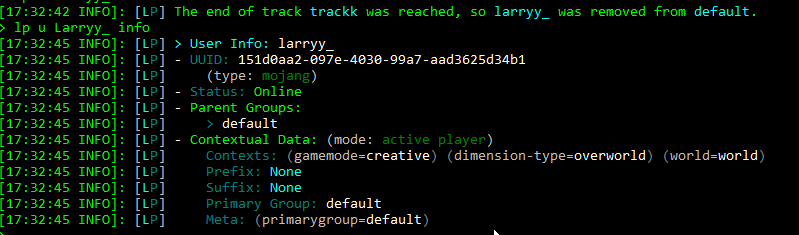
it just keeps me in default
if they have other groups it may remove me from default
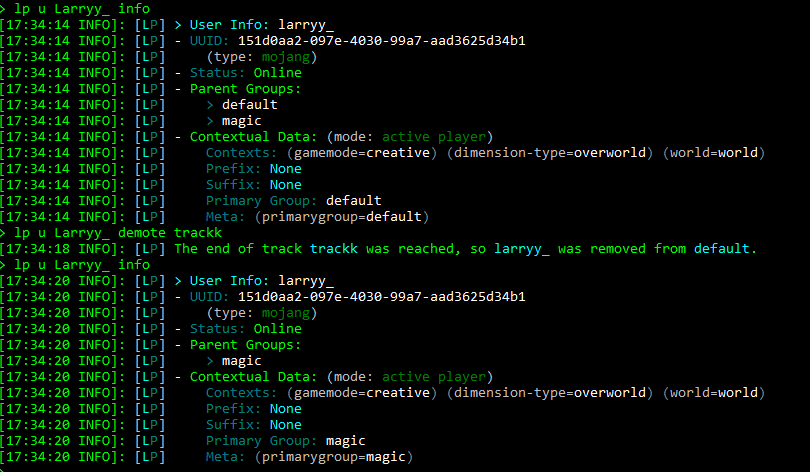
one sec
Yes, so other groups present will remove me from default
in that case, @severe garnet add default as a parent of their other group or don't demote them off it
 steep lily
Hello, I'm hoping this is a simple issue, it's my first time using the plugin (with Vault and VaultChatFormatter).
I read the documentation and created my first group with no permissions, added a prefix with a weight of 50 and added myself to the group.
When I type in chat, no text is displayed in the client (Fabric, only using the Sodium mod), but I can see what I typed in the server console.
[00:39:16 INFO]: <[Dreamers]catzsec> hello test
Any help greatly appreciated, thanks. :)
Is the ability to view the chat a permission that needs to be applied to my default group? Or did I miss something?
 proud rampart
id use essentials and essentialschat
severe garnet
proud rampart
id use essentials and essentialschat
You mean for the chat control?
severe garnet
high raven
https://i.imgur.com/zSXhTtq.png
How can default be the parent since it's the lowest rung on the ladder?
proud rampart
id also do /lp group (group) info to see if your prefixes are working correctly
steep lily
proud rampart
id also do /lp group (group) info to see if your prefixes are working correctly
> lp group dreamers info
[00:52:24 INFO]: [LP] > Group Info: dreamers
[00:52:24 INFO]: [LP] - Display Name: dreamers
[00:52:24 INFO]: [LP] - Weight: None
[00:52:24 INFO]: [LP] - Contextual Data: (mode: server)
[00:52:24 INFO]: [LP]     Prefix: "[Dreamers]"
[00:52:24 INFO]: [LP]     Suffix: None
[00:52:24 INFO]: [LP]     Meta: None
I believe so!
proud rampart
Did it display the correct prefix?
steep lily
proud rampart
Did it display the correct prefix?
I isolated the issue, a very strange conflict with a tiny Fabric mod I wrote for my client, removing it and reloading fixed the issue and I can see chat now - very sorry for wasting your time.
prisma hinge
Hello, I use the EssentialsX plugin, and I would like to know how to allow other players to use the signals without giving them OP
proud rampart
steep lily
I isolated the issue, a very strange conflict with a _tiny_ Fabric mod I wrote f...
All good lol
prisma hinge
prisma hinge
Hello, I use the EssentialsX plugin, and I would like to know how to allow other...
!usage
wintry cloudBOT
Here's a guide to help users understand and use LuckPerms for the first time.
Read more
LuckPerms wiki
steep lily
Not sure if this is an issue with my shell or a bug report for the plugin itself;
When requesting info on a group with a prefix containing a unicode symbol (in this case, black star), it is displayed twice;
> lp group moderator info
[12:23:00 INFO]: [LP] > Group Info: moderator
[12:23:00 INFO]: [LP] - Display Name: moderator
[12:23:00 INFO]: [LP] - Weight: None
[12:23:00 INFO]: [LP] - Contextual Data: (mode: server)
[12:23:00 INFO]: [LP]     Prefix: "[★] [★]"
[12:23:00 INFO]: [LP]     Suffix: None
[12:23:00 INFO]: [LP]     Meta: None
There is no negative effect in-game, this is only a visual bug in the console.
daring stirrup
Does it happen ingame?
daring stirrup
!bugreport
wintry cloudBOT
Suggestions and Bug Reports
If you would like to request a feature for LuckPerms, or report a bug, feel free to open an issue on GitHub!
Issue Tracker:
daring stirrup
Follow the template
steep lily
And only when the prefix (and I assume suffix) contains a unicode symbol.
Will do
Done!
quick lagoon
steep lily
Only in the console
I feel like its just the consoles inability to display certain unicode characters.
steep lily
It's probably the most likely explanation.
 haughty oxide
Hi all. I have a question: Assuming I have 2 permission groups [member & builder]. both have prefixes set: (Member) and (Builder). Now I want to have both prefixes displayed in chat when a user is on both groups. How can I achieve this? At the moment the user only has one of the two prefixes shown up in chat.
quick lagoon
!stacking
wintry cloudBOT
Display multiple prefixes/suffixes alongside a player's name.
LuckPerms wiki
haughty oxide
nice, checking it out - thank you!
haughty oxide
quick lagoon
!stacking
did I miss something, I set this in config, but still only showing one of both group prefixes: meta-formatting:
prefix:
format:
- "lowest"
- "highest"
it only shows the lowest
shouldn't it append the highest after the lowest?
member is 90 and builder is 100 in weight
using herochat as chat plugin
prisma hinge
@haughty oxide screenshot /lp user <user> info and /lp user <user> meta info
haughty oxide
sorry, I just figured it out. holy sh... that plugin is just awesome. who ever made it, I wanna kiss him
tardy glacier

haughty oxide
only thing I still don't understand: the track stuff. with tracks I can demote / promote users from the higher / lower group to the next / previous one
but why not just add and remove groups using the group add / remove command
 wind fiber
tardy glacier
<:praiseLucko:812817308724625489>
wind fiber
tardy glacier
<:praiseLucko:812817308724625489>
petition to make :praiselucko: an emoji in the discord
haughty oxide
I mean why not just add a user to a group
instead of promoting him
promoting is just an alias for adding a user to another group or not?
quick lagoon
haughty oxide
but why not just add and remove groups using the group add / remove command
you can
!commands
wintry cloudBOT
Find all of the available LuckPerms commands on the wiki.
Read more
General commands
User commands
Group commands
Permission commands
Parent commands
Meta commands
Track commands
Log commands
LuckPerms wiki
quick lagoon
look into parent add/remove commands https://luckperms.net/wiki/Parent-Commands#lp-usergroup-usergroup-parent-add-group-context

LuckPerms - A permissions plugin for Minecraft servers.
LuckPerms is a permissions plugin for Minecraft servers. It allows server admins to control what features players can use by creating groups and assigning permissions.
prisma hinge
Can someone tell me/help me with this? I get this error evertime I shutdown my server.
 dreamy tree
!help
wintry cloudBOT
Available commands:
!advanced
!api
!argumentbased
!ask
!bulkupdate
!bungee
!bungeecheck
!cauldron
!colours
!commandequivalents
!commands
!config
!context
!cookbook
!default
!downloads
!editor
!editorsafety
!errors
!essentials
!extensions
!extracontexts
!faq
!formatting
!helpchat
!inheritance
!install
!libsdir
!locale
!meta
!migration
!notworking
!nowildcard
!pasteit
!permissions
!placeholders
!selfhosting
!stacking
!storage
!suggestions
!switchstorage
!sync
!testingperms
!tracks
!translations
!upgrade
!usage
!userinfo
!verbose
!weight
!whyluckperms
!wiki
dreamy tree
!placeholders
wintry cloudBOT
Display data such as user prefixes and groups from LuckPerms in other plugins.
Read more
LuckPerms wiki
dreamy tree
!translations
wintry cloudBOT
Translations for LuckPerms are managed on Crowdin. Any contributions are very welcome!
Installing the community translations
 merry mulch
So I was testing with some people and I encountered this really bizarre thing/bug. If you look at the chat my buddy ran a command and it gave him two Null No Permission weird messages. If I set myself as default, it's the same thing for a bunch of commands, and even ones that don't exist. Now in no way am I sure this is a LuckPerms bug, but it's the closest thing I could think of. And no the only plugin thats printing a stacktrace on console is a plugin kind of like worldedits brush tool
 daring stirrup
Remove every plugin on by one till it works
Or, half of the plugins every time etc
mighty spear
merry mulch
So I was testing with some people and I encountered this really bizarre thing/bu...
That wouldn't be luckperms by the way - LP just returns a yes/no answer to the plugin, it's up to the plugin to print the message out
 spring flicker
is there a way to use custom contexts to create a "donator" context?
I am creating a rankup system that inherits from each other, but I also would like to have a way to enable/disable commands for players based on whether they have donated to the server. I can't really do this with inheritance, since it would either bypass the rankup system or move the player off the track. Thoughts on how I could do this?
prisma hinge
I used "/lp group member permission set essentials.sings.use.buy" but still admin is needed for it to be purchased :(
tardy glacier
sings? or signs
 celest rose
Does anyone have an idea what might be causing this warning? https://pastebin.com/9B12nBub
Pastebin
Pastebin.com is the number one paste tool since 2002. Pastebin is a website where you can store text online for a set period of time.
void verge
spring flicker
is there a way to use custom contexts to create a "donator" context?
I am creati...
your donator group doesnt have to be on your rankup track, and players can have multiple groups. you could have a donator group that has whatever perms you want donators to have, and give that independently from their rankup group
spring flicker
void verge
your donator group doesnt have to be on your rankup track, and players can have ...
🤦♀️ that makes too much sense. :) Thanks!
prisma hinge
i'm trying to run a fabric server with some mods but i have problems with luckperms at startup https://pastebin.com/Pxp1m5ph
Pastebin
Pastebin.com is the number one paste tool since 2002. Pastebin is a website where you can store text online for a set period of time.
void verge
prisma hinge
i'm trying to run a fabric server with some mods but i have problems with luckpe...
can you send a list of mods you have?
prisma hinge
 void verge
apparently chunky causes issues with lp https://github.com/lucko/LuckPerms/issues/2880

GitHub
Description Fabric server 1.16.5 don`t start with Chunky and LuckyPerms. Environment details Server type/version: Fabric 1.16.5 (loader 0.11.1) LuckPerms version: v5.2.104 Log 2021-02-07-5.log
void verge
prisma hinge
although you probably dont really need lp because most mods dont even use permissions as they are extremely new in fabric. since luckperms simply provides permissions instead of enforcing them (as its up to mods to actually implement permissions), unless a mod explicitly works with luckperms, it will only check if you are op or not, or use its own system for "permissions"
 toxic urchin
Hello Guys I got a Quick Question I tried adding message Colors to Ranks/Single Players But the Commands I used ./lp group "rank" meta set "message-color" "&c" and /lp user Angespannt meta setsuffix [chatcolor] Both didnt Work Do i need to change something in the Configs for them to work or is there another Command that i missed.
void verge
!chat however your chat format likely resets the chat color after their display name
wintry cloudBOT
LuckPerms does not perform any chat/tablist formatting of its own!
LuckPerms only acts as the source for prefixes / suffixes, it doesn't actually apply them. You need an appropriately configured chat/tablist formatting plugin for them to be displayed. If the values appear correctly when you run /lp user <user> info, LuckPerms is doing its job!
FAQ answer: Prefix isn't showing?
List of chat/tablist formatting plugins that work with LuckPerms
void verge
also "message-color" meta would have to be something that your chat plugin implements and reads from
toxic urchin
So All in All If i would Get LPC it should run Fine or were the commands wrong?
void verge
most chat formats are something like "&f<{playername}&r&f> {message}`
so adding a color as a suffix wont change the color of the message because the color gets reset after that
so it would be up to whatever chat plugin you use to allow message colors
prisma hinge
void verge
apparently chunky causes issues with lp https://github.com/lucko/LuckPerms/issue...
i deleted chunky but there is still errors
wintry cloudBOT
Please use https://bytebin.lucko.me to send files in the future. I have automatically uploaded message.txt for you: https://bytebin.lucko.me/xIMMQ7ERCm
void verge
prisma hinge
i deleted chunky but there is still errors
!paste the crash log
wintry cloudBOT
Please use pastebin!
Seeing a paste of the problem makes everything so much easier! Use https://bytebin.lucko.me/ for easy pasting!
For console errors:
Pastebin any relevant segments of the console log. If it's a startup error, this includes the entire startup log!
Other errors:
Pastebin the entire LuckPerms config file (passwords removed) as well as any other relevant files!
void verge
[20:39:48] [Server thread/ERROR]: This crash report has been saved to: /home/cazcez/Desktop/Games/sunucular/mc sunucu/fabric/test/fabric/./crash-reports/crash-2021-03-11_20.39.48-server.txt
toxic urchin
void verge
so it would be up to whatever chat plugin you use to allow message colors
Thank you
 keen ginkgo
please... someone help...
i havent gotten any help and i cant start my server (well i can but the error will spam console)
#support-1 message
PING IF U REPLY
merry mulch
#support-1 message@keen ginkgo

Discord
Discord is the easiest way to communicate over voice, video, and text. Chat, hang out, and stay close with your friends and communities.
prisma hinge
@merry mulch The full log is in the message they linked.. lol
merry mulch
exactly is hard to read pastebin on phone
lucks bytebin much better
then I have a chance at reading the exeption name
daring stirrup
Pastebin is fine on phone for me
merry mulch
9 inch thicc phone
prisma hinge
I wonder what could you do about that..
 merry mulch
Kindly asking why are you using java 11
keen ginkgo
how can i get in direct contact with support
prisma hinge
gee idk

People will respond to your problem if people knows about your problem
No replies does not mean you are being ignored
 tribal terrace
 pale pond
tardy glacier
pale pond
tardy glacier
!tab
wintry cloudBOT
LuckPerms does not perform any chat/tablist formatting of its own!
LuckPerms only acts as the source for prefixes / suffixes, it doesn't actually apply them. You need an appropriately configured chat/tablist formatting plugin for them to be displayed. If the values appear correctly when you run /lp user <user> info, LuckPerms is doing its job!
FAQ answer: Prefix isn't showing?
List of chat/tablist formatting plugins that work with LuckPerms
tardy glacier
This has suggestions at the bottom @prisma hinge
Theres no reason any specific plugin won't work on apex (:

wintry cloudBOT
Hey 𝗠𝗖𝘄𝗶𝘁𝗵𝗲𝗿𝗸𝗶𝗻𝗴𝗧𝗵𝗲𝗚𝗿𝗲𝗮𝘁! Please don't tag helpful/staff members directly.
 hexed igloo
anyone know how to undo a paste from a web editor injected?
prisma hinge
hexed igloo
anyone know how to undo a paste from a web editor injected?
depends on the changes, you can't exactly undo or rollback but you can re-import and merge the data before the changes were made if you have the editor link
keen ginkgo
prisma hinge
People will respond to your problem if people *knows* about your problem
So what ur saying is the plugin is broken and it can’t be fixed, cool
prisma hinge
Yeah whatever
prisma hinge
how do i give people more ftb utilities claim chunks with lp?
I have no idea
I doubt anyone in here does lmao we have had dozens of people asking the same thing but we can't possibly know how FTBU works
Your best bet is to search the server chat history for "ftbu"/"ftb utilities"
Or ask them ¯\_(ツ)_/¯ but if I'm not mistaken their ""solution"" was to remove LP altogether lmao
kekw
 low bramble
Is there any way to merge permissions/roles?
For example, there are 4 roles: Mod, Helper, **Builder **and **default **and I want to give someone **Builder **permissions and **Helper **permissions but the **Helper **permissions has the **default **role as parent group, **helper **is higher than **builder **and therefore the **builder **permissions get deleted. Is there any way to merge this permissions or a workaround?
void verge
!inheritance ?
wintry cloudBOT
Learn about inheritance.
LuckPerms wiki
 blazing pecan
Hello can I get some help with inheritance?
 mighty coral
hi, how to add timed commands? meaning for 1h, or some minutes or days etc..
 deep orchid
!chat
wintry cloudBOT
LuckPerms does not perform any chat/tablist formatting of its own!
LuckPerms only acts as the source for prefixes / suffixes, it doesn't actually apply them. You need an appropriately configured chat/tablist formatting plugin for them to be displayed. If the values appear correctly when you run /lp user <user> info, LuckPerms is doing its job!
FAQ answer: Prefix isn't showing?
List of chat/tablist formatting plugins that work with LuckPerms
prisma hinge
mighty coral
hi, how to add timed commands? meaning for 1h, or some minutes or days etc..
LuckPerms - A permissions plugin for Minecraft servers.
LuckPerms is a permissions plugin for Minecraft servers. It allows server admins to control what features players can use by creating groups and assigning permissions.
mighty coral
thank Fefo
 limber ocean
hi, i just downloaded luckyperms for my modded sponge server (1.12.2) and i want to do some stuff in the config, but i only find 'translations' so im kinda confused and dont know where i have to change stuff
prisma hinge
limber ocean
hi, i just downloaded luckyperms for my modded sponge server (1.12.2) and i want...
!usage
wintry cloudBOT
Here's a guide to help users understand and use LuckPerms for the first time.
Read more
LuckPerms wiki
 mystic plover
how can i set a Rank for 14 days?
prisma hinge
mystic plover
how can i set a Rank for 14 days?
LuckPerms - A permissions plugin for Minecraft servers.
LuckPerms is a permissions plugin for Minecraft servers. It allows server admins to control what features players can use by creating groups and assigning permissions.
 chrome cosmos
Sir I Have a Question if i use bungee luckperm then when I put it in proxy then if i create a rank name demo and give it to a person Named Demo in Hub Server then when he goto Survival Server there also the rank will be there?
wintry cloudBOT
If you run a BungeeCord network, learn how to correctly setup LuckPerms on all server instances (including Bungee).
Also read:
Syncing data between servers
LuckPerms wiki
high raven
Read and follow both guides
chrome cosmos
high raven
No you need Luckperms everywhere
Ok Sir Means If i create rank in survival server it will not be in hub or bedwar server? I Think I am right as i wanted this only
high raven
!context will allow you to do that
wintry cloudBOT
You can set a permission or group on a per-world/per-server basis, through what we call "contexts".
Read more
LuckPerms wiki
chrome cosmos
Sir if I Install Lp on Bungeecord then would my survival server ranks and perms be safe and as it was before?
wintry cloudBOT
Hey ADVAIT GAMERZ! Please don't tag helpful/staff members directly.
chrome cosmos
wintry cloud
Hey ADVAIT GAMERZ! Please don't tag helpful/staff members directly.
Ohhh Sorry
I am new
high raven
Safe? Sure. Nothing will happen to them
chrome cosmos
high raven
Safe? Sure. Nothing will happen to them
Ok Thank You Sir as I was scared as in My Network in Survival Some Players have purchased creative rank in which they can goto creative so i thought if I add bungee lp then they should Not be able to use it in Bedwars server or you could understand waht would happen
How to remove context from multiple permissions?
Sir When I added Context in My Survival Server this 'server survival' Then People Were Not able to use it any server
Ping Me
chrome cosmos
?
 supple basalt
Hey, I have a bungeecord server, so I have to connect the db, but only the rank config is connected, the players do not have the same ranks on server A and server B. (when I change the grade to default)
high raven
@supple basalt don't ask in several channels
supple basalt
Sorry :/
chrome cosmos
high raven
Did you name the server
No 😦
high raven
well you'll need to in order to use contexts
 fading parcel
please someone help in #support-1
that meta set command only works with luckperms chat

SpigotMC - High Performance Minecraft
whats ur
lpc conifig
sho wit
show it*
lpc config
before {name} put {username-color}
should solve it
gyeah
yeah
it literally told it on the config lol
uncut quarry
Can I change the default role to another role that already exists so that when someone joins, that person immediately gets the new default role?
 heavy storm
Create a new group and name it default
 sonic plaza
Quick Question:
What command do you do for prefixs because it doesn't work
I tried : /lp group admin meta addprefix 2 Admin Admin
daring stirrup
uncut quarry
Can I change the default role to another role that already exists so that when s...
!default
wintry cloudBOT
LuckPerms provides a group that every player is added to upon joining the server, called default. You can use multiple methods to change the default group or change the name of it.
LuckPerms wiki
wintry cloudBOT
Available commands:
!advanced
!api
!argumentbased
!ask
!bulkupdate
!bungee
!bungeecheck
!cauldron
!colours
!commandequivalents
!commands
!config
!context
!cookbook
!default
!downloads
!editor
!editorsafety
!errors
!essentials
!extensions
!extracontexts
!faq
!formatting
!helpchat
!inheritance
!install
!libsdir
!locale
!meta
!migration
!notworking
!nowildcard
!pasteit
!permissions
!placeholders
!selfhosting
!stacking
!storage
!suggestions
!switchstorage
!sync
!testingperms
!tracks
!translations
!upgrade
!usage
!userinfo
!verbose
!weight
!whyluckperms
!wiki
sonic plaza
!prefix
wintry cloudBOT
You can set prefixes, suffixes and other meta data in LuckPerms for players and groups. Note that LuckPerms does not manage chat. You need to use another plugin to show prefixes/suffixes in chat.
LuckPerms wiki
 random girder
Hi so I'm having issues, with a plugin which hooks into luckperms, it is UltraStaffChatPro but when I asked for support they said its to do with a luckperms issue.
When I try and use the luckperms prefixes for the staff chat they don't show the other server said about clearing the data folder however I use mysql can someone help with that as I have tried to use a different dB and with no luck it didn't work
 azure jacinth
I am having a issue with Luckperms and my database. when i try to go through my portal (that is connected with bungee) i get this error
 random girder
Has the server got the same dB login
azure jacinth
this is the startup crash log.
azure jacinth
azure jacinth
https://bytebin.lucko.me/ACwYJFEDhV
.
random girder
Your password feild is empty
 random girder
Then you need to add that perm node
prisma hinge
random girder
Hi so I'm having issues, with a plugin which hooks into luckperms, it is UltraSt...
Is the prefix consistent in /lp user <user> info across servers?
prisma hinge
In your LP config the password setting is empty
azure jacinth
what does that mean exatly, because my password is entered?
do i need "" on the sides?
prisma hinge
Hm what does it show?

 prisma hinge
Hm, /lp user <user> meta info? (It doesn't matter where you run this one)
 prisma hinge
Did you change the meta-formatting settings in LP config? Either in bungee LP or the spigot LPs
random girder
nope i dont think so
prisma hinge
Hm
random girder
meta-formatting:
  prefix:
    format:
      - "highest_on_track_rank"
      - "highest_on_track_donators"
      - "highest_on_track_staff"
    duplicates: 'retain-all'
    start-spacer: ""
    middle-spacer: " "
    end-spacer: ""
  suffix:
    format:
      - "highest"
    duplicates: first-only
    start-spacer: ""
    middle-spacer: " "
    end-spacer: ""
That's from?
random girder
the lp bungee config
prisma hinge
My guess is that the groups you inherit are not on those tracks. What about the spigot configs?
random girder
meta-formatting:
  prefix:
    format:
      - "highest"
    duplicates: first-only
    start-spacer: ""
    middle-spacer: " "
    end-spacer: ""
  suffix:
    format:
      - "highest"
    duplicates: first-only
    start-spacer: ""
    middle-spacer: " "
    end-spacer: ""
spigot config
prisma hinge
Yeah that makes sense, all my bets are in, those groups you inherit are not on the tracks the setting expects :p
random girder
i dont think theres any tracks setup there just ranks which are granted, and then the parents of the previous rank inherits the perms and old prefix
https://luckperms.net/editor/ryAiRQEJY8
so you can see
prisma hinge
Lemme just
Sec
Yeah just set that setting so it's like the one on the spigot servers
You can do /lpb reloadconfig to update those btw
prisma hinge

 next path
how to allow the command to be used only once?
prisma hinge
@next path don't ask in several channels pls k thx
next path
will they answer me? I just don't understand English
random girder
Luckperms doesnt allow for commands to be only used once they can be used multiple times
 sharp cape
next path
will they answer me? I just don't understand English
sharp cape
next path
will they answer me? I just don't understand English
your speeking It rigth now
next path
I'm from a translator (
prisma hinge
next path
will they answer me? I just don't understand English
I literally answered you several times
daring stirrup
!nw
wintry cloudBOT
Please tell us what's going on!
We really would absolutely love to help you out! However, telling us that it isn't working wastes everyone's time. Please, just describe the issue you're having clearly and with as much detail as possible, and send any relevant screenshots of whatever problems you're having.
For Console Errors:
 sand gyro
I use luck perms bungee but i profided prefixes but it is not showing up can someone help
quick lagoon
!chat
wintry cloudBOT
LuckPerms does not perform any chat/tablist formatting of its own!
LuckPerms only acts as the source for prefixes / suffixes, it doesn't actually apply them. You need an appropriately configured chat/tablist formatting plugin for them to be displayed. If the values appear correctly when you run /lp user <user> info, LuckPerms is doing its job!
FAQ answer: Prefix isn't showing?
List of chat/tablist formatting plugins that work with LuckPerms
sand gyro
lets see
sand gyro
quick lagoon
!chat
ben do i need to instal it on me bungee proxy
or every paper server
wintry cloudBOT
To sync data between servers, you need to connect each LuckPerms plugin to the same database (for example MySQL) and set up a messaging service.
LuckPerms wiki
quick lagoon
sand gyro
i now see <{prefix}>MENAME
does prefix show in /lp user USER info
quick lagoon
is your chat plugin installed on bungeecord?
 little geyser
dont u need vault for that stuff?
little geyser
vault goes on the servers not bunge
sand gyro
i know that -,-
little geyser
i use vault + essentials chat and works perfect
sand gyro
it is about me chat plugin on the proxy
little geyser
hm
sand gyro
bc me luckperms is running on the proxy
little geyser
which plugin u use?
sand gyro
luckperms-bungee
sand gyro
so basicly me permisions run on the proxy
so they ar synced
but now none chat plugin whant to show the prefix
little geyser
u need lp plugin also on the serverr huh
little geyser
yes but for chat and more, u need luckperms plugin on the mc server and on the bungee
sand gyro
hmm but why
little geyser
cuz idk
sand gyro
and how can i sync it with the bungee plugin
little geyser
ur running an mysql (or something) server huh
quick lagoon
sand gyro
just luckperms bungee
no its not
little geyser
well u need a mysql database so all the servers can talk to eachotehr
but speaking of a database, can u help me further ben?
quick lagoon
unfortunately, I dont use pterodactyl, since it looks more like a issue with your db setup with pterodactyl, id suggest contacting pterodactyl support
little geyser
mkey
daring stirrup
Did u check pins?
little geyser
yes
didnt work
but if i try setting the node ip to 172.... it says this:
here was an error while trying to connect to the host or while executing a query: "SQLSTATE[HY000] [1045] Access denied for user 'root'@'10.10.10.2' (using password: NO) (SQL: SELECT 1 FROM dual)"
how to fix?
daring stirrup
What
little geyser
little geyser
```here was an error while trying to connect to the host or while executing a qu...
.
little geyser
no
daring stirrup
Can root login remotly (or from ptero?)
 serene wing
Hello, for some reason I cannot connect to my server when I have a database setup (everything except h2 isnt working), I've tried with mysql and mongo but the error is the same everytime. pastebin: https://pastebin.com/ScJhcQya
Pastebin
Pastebin.com is the number one paste tool since 2002. Pastebin is a website where you can store text online for a set period of time.
 keen zinc
serene wing
Hello, for some reason I cannot connect to my server when I have a database setu...
keen zinc
serene wing
Hello, for some reason I cannot connect to my server when I have a database setu...
what is ur server version
wintry cloudBOT
You can download LuckPerms for Bukkit/Spigot/Paper, BungeeCord, Sponge, Fabric, Nukkit and Velocity.
Additional downloads
serene wing
Oh ok
omg... im dumb af, I didnt look at the version when I was downloading :D
But when I do /pl LuckPerms seems to be working 
keen zinc
it would be best to download the recommended version for your servers mc version
to prevent any issues that havent appeared
serene wing
Okay, thanks
 shrewd lark
how can I make it so when you have for example vip then gain vip+ it shows the prefix vip+ with vip perms
serene wing
you need to add vip as parent to vip+
shrewd lark
ah ok I'll try that
shrewd lark
serene wing
you need to add vip as parent to vip+
doesnt work
serene wing
I need support with database connection again... now Im using Mongo, because my MySQL DB Provider limits me at only 1 connection and I need 5+ so I did a lil search and found out that Mongo has max of 500 connections.. Now I get this error: https://pastebin.com/YypkUTqP
Pastebin
Pastebin.com is the number one paste tool since 2002. Pastebin is a website where you can store text online for a set period of time.
 crude edge
hi, im new to luckperms and i dont rlly know how to add permissions to my roles
how do i find the permission for a specific command like /time?
or do i just put /time in the permissions node thing?
little geyser
crude edge
hi, im new to luckperms and i dont rlly know how to add permissions to my roles
is you use the online editor, u can time /time and it will show you the node
/lp editor
mighty yarrow
Read the docs for your plugin to find the permissions nodes
the editor will merely give suggestions
you need to like, read docs
crude edge
oke ty
little geyser
could someone please help with database problems on pterodactyl panel
keen zinc
crude edge
oke ty
!usage pls just read dis
wintry cloudBOT
Here's a guide to help users understand and use LuckPerms for the first time.
Read more
LuckPerms wiki
keen zinc
!verbose can also help you find specific permissions
wintry cloudBOT
LuckPerms provides a verbose command to help you find out what permissions a command/plugin is checking.
Read more
LuckPerms wiki
 simple nymph
I have installed luckperms on the server "bungeecord", "limbo", "hub" and "survival".
I would like the "limbo" server and the "hub" server to have the same groups (users, staff, owners, etc ...) but this must not happen in the "survival" server.
do i have to set the same database in both config.yml? do I have to set the same database also inside the bungeecord config.yml? are there any other settings that need to be changed to make this happen?
Please help me.
tardy glacier
@high raven
high raven
Thank
tardy glacier
Ily larry
 vocal geode
/lp group admiral meta setprefix "&8[&aAdmiral&8] &7"
i dont have the prefix still
prisma hinge
!contexts @simple nymph
wintry cloudBOT
You can set a permission or group on a per-world/per-server basis, through what we call "contexts".
Read more
LuckPerms wiki
low bramble
Is there any way to merge permissions/roles?
For example, there are 4 roles: Mod, Helper, **Builder **and **default **and I want to give someone **Builder **permissions and **Helper **permissions but the **Helper **permissions has the **default **role as parent group, **helper **is higher than **builder **and therefore the **builder **permissions get deleted. Is there any way to merge this permissions or a workaround?
prisma hinge
Asking in the two support channels won't make help come any faster lmao
random girder
im trying to intergrate luckperms into the plugin im making for the prefix of the user but im getting this error when i call the import of luckperms

nvm im dumb
random girder
ty
the getPlayerAdapter() is now erroring and i have no clue how to fix as its in a listener class

same code block as before
tardy glacier
Screenshot your code
random girder
 tardy glacier
Did you read the API cookbook guide
random girder
kinda but being dyslexic doesnt help things
daring stirrup
You need an instance of the api first
random girder
the instance is being called in the main fille
i can run a codetogether session if its easier to understand
daring stirrup
in your main class do private LuckPerms luckPerms; then in your onEnable do luckPerms = LuckPermsProvider.get(), add a getter then do LogicFlame.plugin.getLuckPerms() etc
random girder
add a getter what do you mean by that
daring stirrup
private LuckPerms getLuckPerms() { return luckPerms; }
random girder
ye ty
prisma hinge
@prisma hinge let's move here, less crowded
right..
so'
i use essentials
and not essentialsX
so I cant get prefixes right
Right
Screenshot /ess version

lmao that's unexpected
im 1.7.10
Why Essentials and not EssentialsX?
oh
okay
i have to for the mods i use
otherwise id be up there fs
You mean you run a hybrid (Forge + Bukkit) server?
yuck
high raven
Idk if essR has chat?
high raven
It's ancient
high raven
Do you have vault
prisma hinge
yeah.
i swtiched here bc i heard this is better than PEX
Facts
tbh im fine not having prefixes tbh.
high raven
Yeah good luck honestly, that's such old and now-fixed software that idek what might be happening. Chat stuff displayed with pex too?
prisma hinge
yeah everything worked with pex, but the main thing i came here for is EssentialsAB
and whatever a
context
is
For chat help we can help in #general as it isn't strictly LP support (the prefix shows in user info)
ohh ok im used to servers like tha

another question
you are familiar with worldguard right
Sorta, but not old versions lol
well it works the same, its not a weird feature
so someone told me that a region can be used in context to change permission
do you know how that works?

this was the original conversation
Right
Sec
Contexts basically let you grant permissions and parent groups per-world/per-server/per-"something"
For more info --> https://luckperms.net/wiki/Context
so if I have the region "chunin exams" how would I make it so they CANT run the command minecraft.command.help
And there is this additional plugin (ExtraContexts) that adds WorldGuard contexts to LP https://github.com/LuckPerms/ExtraContexts you need to install this and enable region contexts in config to use them
prisma hinge
prisma hinge
so if I have the region "chunin exams" how would I make it so they CANT run the ...
can you even have spaces in region names?
well i thought it would be easier lol
chuninexams
there
You would set the permission to false for context worldguard:region=chuninexams
bet.
also not to sound uh stupid but, isnt a plugins supposed to be a jar?
nm
got it
then fefo, after the thang, how do I make it so it changes a permission
would it be like
https://luckperms.net/wiki/Context#example
You would set the permission to false for context
worldguard:region=chuninexams
what do i put for the value
WAIT
worldguard:region=
and the value is
chuninexams?

im trying to make it work so that they CANT
use the command
in that area
prisma hinge
prisma hinge
im trying to make it work so that they CANT
That's why you set the permission to false for that context
well what I did

can you do an example if I wanted to take away "Minecraft.command.help" in the region "shop"
Absolutely

That is correct
prisma hinge
prisma hinge
That on the contrary, is not; you don't prefix permissions with a dash - to negate them (that is a whole different permission), you set them to false :d
ohh ok
prisma hinge
fefo it caused the server to get fucked
tardy glacier

prisma hinge
i think my dumbass mistake
caused the server to shit itself
hm?
nm
fefo the plugin u sent me breaks the server, it doesnt work well with wg and shit
It works perfectly fine on regular Bukkit servers
Can't vouch for hacky hybrids
lol well then what
¯_(ツ)_/¯
well theres no way to combine mods and plugins
regularly
You are running plugins in a fundamentally broken unsupported software, in an environment they were not designed to run on, the least you should expect is plugins to not work properly if at all in some cases
I'm surprised LP even runs on that thing lmao
LOL
its ghetto alright
fefo i made it work
LOL
 simple ginkgo

 quartz maple
!chat
wintry cloudBOT
LuckPerms does not perform any chat/tablist formatting of its own!
LuckPerms only acts as the source for prefixes / suffixes, it doesn't actually apply them. You need an appropriately configured chat/tablist formatting plugin for them to be displayed. If the values appear correctly when you run /lp user <user> info, LuckPerms is doing its job!
FAQ answer: Prefix isn't showing?
List of chat/tablist formatting plugins that work with LuckPerms
prisma hinge
I mean I really doubt that will ever work tbh
it doesnt crash the server now bowow
omfg it wokrs now too
 wraith pebble
Hey
Is there like a flag i can add to a luckperms command for it not to show up on logs?
daring stirrup
-s works for tracks iirc
chrome cosmos
!context
wintry cloudBOT
You can set a permission or group on a per-world/per-server basis, through what we call "contexts".
Read more
LuckPerms wiki
chrome cosmos
If I Do This setting can I Use "server=survival" Context nicely to limit commands per server in my network?
 daring stirrup
Yes
 ornate ravine
hello, Is there an option to remove all members of a group? without removing the perms or meta
prisma hinge
Step 1 is make a backup with lp export <backup name>
Step 2 is to lp bulkupdate users delete "permission == group.<group>"
ornate ravine
And with the Api? I need for example, when a x player joins, given x value, delete the old player in that group and add the new one
 nocturne wyvern
Hi, is there anyway to have someones chat color be changed with a suffix
kinda like pex ig..
 molten tartan

 deft aspen
does anyone know how to reduce a timer on a temp permission for all players who have the permission node
prisma hinge
Your best bet would be in the web editor but depending on how many users we're talking about it can be done in 5 minutes or it can be next to impossible...
Either that or direct storage modification which I do not condone
deft aspen
ok thx
high raven
generally it depends on what plugin you have that's preventing it
if you have essxantibuild, just remove it
 stuck quartz
 sudden dome
Do you have a message formatter?
daring stirrup
!chat
wintry cloudBOT
LuckPerms does not perform any chat/tablist formatting of its own!
LuckPerms only acts as the source for prefixes / suffixes, it doesn't actually apply them. You need an appropriately configured chat/tablist formatting plugin for them to be displayed. If the values appear correctly when you run /lp user <user> info, LuckPerms is doing its job!
FAQ answer: Prefix isn't showing?
List of chat/tablist formatting plugins that work with LuckPerms
prisma hinge
i don't use luckyperms bungeecord, i put litebans on bungeecord but also if i do litebans. * tells me I don't have permission
daring stirrup
Because you also need it on your bungee server
prisma hinge
no
I have to make different VIPs for each mode do not conflict?
I just put it in the bungee and it doesn't work
daring stirrup
!context
wintry cloudBOT
You can set a permission or group on a per-world/per-server basis, through what we call "contexts".
Read more
LuckPerms wiki
prisma hinge
so in theory if I make a rank only for the lobby and I put server lobby, you can't even see it in other worlds?
luckperms doesn't work on bungee
i downloaded the bungee version but it doesn't work
ehy
daring stirrup
!nw
wintry cloudBOT
Please tell us what's going on!
We really would absolutely love to help you out! However, telling us that it isn't working wastes everyone's time. Please, just describe the issue you're having clearly and with as much detail as possible, and send any relevant screenshots of whatever problems you're having.
For Console Errors:
prisma hinge
?
daring stirrup
Read it
prisma hinge
0 errors
daring stirrup
Then how doesnt it work
daring stirrup
/LPB ingame or proxy console
prisma hinge
!paste your LP config please (remove any db creds if any) @gentle reef
wintry cloudBOT
Please use pastebin!
Seeing a paste of the problem makes everything so much easier! Use https://bytebin.lucko.me/ for easy pasting!
For console errors:
Pastebin any relevant segments of the console log. If it's a startup error, this includes the entire startup log!
Other errors:
Pastebin the entire LuckPerms config file (passwords removed) as well as any other relevant files!
 gentle reef
The whole config?
prisma hinge
Yes
prisma hinge
Right... you have to send the link lmao
void verge
gentle reef
if any other staff can help it would be greatly appreciated!
What do you want your prefixes to look like, and what do they currently look like in game?
gentle reef
ill repost
I am currently having some trouble with prefix stacking, it's not showing two prefixes and is just showing the rank that has the highest weight, I have two tracks named general and staff. I followed the wiki for setting up the config for stacking but I still can't get it to work?


@void verge
void verge
you have a staff track and a general track, right?
gentle reef
Yes
void verge
what groups are on them?
gentle reef
It shows the tracks the ranks are in in picture 2
void verge
i doubt this will fix it but try removing default from 1 or both of the tracks
you technically dont need default on any track, as if you try promoting someone without a group on that track, itll automatically give them the lowest one
void verge
what are the outputs of /lp track staff info and /lp track general info
 gentle reef
i also have my config posted above
gentle reef
if u want to get a hold of me, please @ me because im going offline but will be by my phone
prisma hinge
@gentle reef what LP version are you using?
 kindred rampart
Hello, is there a way for me to access the web browser save or something from an old server that is no longer active? We did an ownership swap with my server recently, so all the server files are being transferred into a new server and I didn't realize that luckperms' ranks and user permissions wouldn't transfer. Thanks in advance.
kindred rampart
no
high raven
what was the old storage method for LP
the groups are stored somewhere, if it was a database you can connect to it and export the perms
kindred rampart
Is there maybe at least a way to see what ranks each player had? It's okay if we have to re-do the permissions, but we'd like to no have to reset everyone's ranks at least
high raven
if it was local, it should be in the Luckperms folder
kindred rampart
what do you mean database? Sorry
high raven
is the old server still around somewhere
kindred rampart
no, when we stopped paying the invoice with the hose, the access to it was closed
high raven
kindred rampart
what do you mean database? Sorry
I mean database... that's just what it is - instead of saving in a flatfile, like .yml or .txt, it saves into a database
do you have any backups?
kindred rampart
the storage-method says h2 if that helps about the database. I have backups of every file that was on the server when it closed
high raven
then there's an h2 file in the luckperms folder, luckperms.h2.db or something like that, which has all of your groups and player information in it
if you really got the entire LP folder, the groups are in there
kindred rampart
I have that file
high raven
that's the default file - is it the one from the old server or the one the new server autogenerated
you'll need the one from the old server
and you just swap it into the LP folder
high raven
np!
gentle reef
prisma hinge
<@!233627757844758528> what LP version are you using?

Idk why I wasn't pinged when you @'ed me
 steep pier
Hi is it possible to set some kind of permission that a player with a role higher than <rolename>, can join the server. And other players can't
high raven
You'll need a plugin for it, but it's possible
and I unfortunately don't know any offhand
prisma hinge
gentle reef
I got it working fine on latest with the exact same config and a similar setup to test with. Try updating to latest, hopefully that would fix things
!update
wintry cloudBOT
You can download LuckPerms for Bukkit/Spigot/Paper, BungeeCord, Sponge, Fabric, Nukkit and Velocity.
Additional downloads
gentle reef
Ok I'll try ty for the help!
gentle reef
prisma hinge
I got it working fine on latest with the exact same config and a similar setup t...
when updating, do you just replace the .jar with the new one?
gentle reef
ok ty again!
gentle reef
prisma hinge
Don't touch the folder, just replace the jar
I have updated to 5.3.5 and I currently see no change is there something else I need to do?
 gentle reef
I know the feeling
gentle reef
searching the discord in both support channels I see no solution. My config looks fine and essentials is displaying the first prefix just not the second 😦
high raven
To let you all know: We know about the second raid and are banning as fast as possible. Please be patient\
 quick forge
Hello, I'm using this plugin for other plugins https://www.spigotmc.org/resources/70890/ .
But luckperms (with mysql) gives this error on bungee: https://bytebin.lucko.me/jZhOd7ScNS
Is there a way to force disabling redis on luckperms?
SpigotMC - High Performance Minecraft
daring stirrup
Easily? Add proxy to disabled contexts in config
quick forge
ok, luckperms on bungeecord will work anyway?
quick forge
have I to put it on all luckperms configurations or only on bungeecord?
prisma hinge
daring stirrup
Easily? Add `proxy` to disabled contexts in config
ehy man
nocturne wyvern
I recently had my server nuked
What does this mean
[02:02:55] [Thread-42/WARN]: [LuckPerms] The UUID the player is connecting with now is NOT Mojang-assigned (type 0). This implies that THIS server is not authenticating correctly, but one (or more) of the other servers/proxies in the network are.
daring stirrup
Type 0 O_o
prisma hinge
Ah yes, classic 00000000-0000-0000-0000-000000000000 UUID
!update first and foremost @nocturne wyvern
wintry cloudBOT
You can download LuckPerms for Bukkit/Spigot/Paper, BungeeCord, Sponge, Fabric, Nukkit and Velocity.
Additional downloads
prisma hinge
!bungeecheck asap too
wintry cloudBOT
Running a network and getting UUID mismatches?
Please double check that:
1. BungeeCord config.yml has ip_forward and online_mode set to true
2. All backend servers' spigot.yml has bungeecord set to true
3. All backend servers' server.properties have online-mode set to false
 slow wraith
Hi, i want to switch lp data over to mariadb, how can i transfer the data? or is it doing that automatically?
 frank ember
!switch
wintry cloudBOT
If you wish to change your storage type (e.g. to YAML or MySQL) you may need to follow these instructions to ensure your groups and permissions are migrated to the new storage type.
Read more about the Storage types
LuckPerms wiki
 marble basin
Hello i have a question with luckperms bungeecord it's possible for a player to have the rank "test1" to serveur "test1" and rank "test2" to server "test2"
and if it's possible how to ? :p
wintry cloudBOT
You can set a permission or group on a per-world/per-server basis, through what we call "contexts".
Read more
LuckPerms wiki
If you run a BungeeCord network, learn how to correctly setup LuckPerms on all server instances (including Bungee).
Also read:
Syncing data between servers
LuckPerms wiki
marble basin
i have a error on chatEvent :/
[23:31:01 WARN]: Error dispatching event ChatEvent(super=TargetedEvent(sender=shark_zekrom, receiver=net.md_5.bungee.ServerConnection@72dd1b2e), cancelled=false, message=/tµt) to listener fr.lunariasdl.OnChat@3a4aadf8
java.lang.NullPointerException: null
at fr.lunariasdl.OnChat.onChat(OnChat.java:39) ~[?:?]
line 39: User user = (User) lp.getUserManager().getUser(player.getUniqueId());
prisma hinge
Right.. but are you actually assigning it a value?
lp = ...?
(also API support in #luckperms-api, non-LuckPerms support in #general and LP support in the support channels)
 bitter atlas
Hi hi, when i put a rank prefix with a color, the name color of player changes too, what can i do?
 deep lance
Does someone know why sometimes I am getting a luckperms warning in the console with somethine like that:
java.sql.SQLTransientConnectionException: luckperms-hikari - Connection is not available, request timed out after 28569ms.
and its repeat himself over and over and sometimes just using all the server ram and sometimes starting to push a lot of errors and the server just stuck.
and it's happened totally randomly, sometimes its just happened.
Here is the server log: https://mclo.gs/kTqMKqH
(There is a two plugin that when they are starting up they give some warnings to the console, ignore it, its something that I am working on)
801 lines | 229 errors
Maybe someone know what the problem is?
Its happening almost every 10 hours, and I dont want to restart my server every 10 hours
high raven
the server's losing connection to the database somehow, usually it's another plugin closing the connection and sometimes it's a flaw with the db
quick forge
quick forge
ok, luckperms on bungeecord will work anyway?
.
wintry cloudBOT
If you run a BungeeCord network, learn how to correctly setup LuckPerms on all server instances (including Bungee).
Also read:
Syncing data between servers
LuckPerms wiki
quick lagoon
!sync
wintry cloudBOT
To sync data between servers, you need to connect each LuckPerms plugin to the same database (for example MySQL) and set up a messaging service.
LuckPerms wiki
daring stirrup
Its because they have some weird redisbungee plugin
deep lance
high raven
the server's losing connection to the database somehow, usually it's another plu...
How I can fix that?
and if he losing the connection for a sec, why luckperms doesnt reconnect after that?
because its not that he lose the connection for like an hour when luckperms lose the connection and I restart the server its working normally
quick lagoon
[11:01:43] [Server thread/WARN]: Can't keep up! Is the server overloaded? Running 21886ms or 437 ticks behind
Your server looks like its lagging pretty badly?
deep lance
yeah its only happens when luckperms is losing connection and starting to messed up the entire server until I restart
when luckperms losing the connection to the db somehow after some time the whole server starting to lag and the tps drop down to like 12 from 20
when luckperms is connected to the database its working fine and the server is working smooth
maybe mysql have some configuration that terminate a connection after the connection up for like 10 hours or something?
idk
but its really messing up with the servers
The weird think that its only happen on bukkit version, and not on the Velocity version (I have it installed on my proxy as well, and the proxy and the server are connected to the same db and this errors happen only in the servers, I never saw a errors with connection in luckperms on the proxy)
so maybe that's a problem with luckperms?
 median sparrow

How could that happen? I have cancel-failed-logins: true in bungeecord, but this player somehow logged in. When I tried to /kick, it said they're offline. (he was null). Also anticheat said his ping is null.
prisma hinge
median sparrow
UUIDs are public and it's actually better if you don't censor them
!bungeecheck
wintry cloudBOT
Running a network and getting UUID mismatches?
Please double check that:
1. BungeeCord config.yml has ip_forward and online_mode set to true
2. All backend servers' spigot.yml has bungeecord set to true
3. All backend servers' server.properties have online-mode set to false
median sparrow
Checked and it's good. This has never happened before. And after kicking this player it also didn't happen. Could that be caused by a very short mysql outage?
quick forge
daring stirrup
Easily? Add `proxy` to disabled contexts in config
where are disabled contexts on the config?
daring stirrup
Ctrl f it
 round ice
i gave me and my friend a rank but his rank colour is not the right colour
its supposed to be blue but hes got the default group rank colour which is green.
prisma hinge
round ice
i gave me and my friend a rank but his rank colour is not the right colour
its s...
screenshot /lp user <user> info
round ice
prisma hinge
screenshot `/lp user <user> info`
no worries, its fine now. I accidentally did /lp user <user> parent **set** instead of **add**
deep lance
deep lance
yeah its only happens when luckperms is losing connection and starting to messed...
I really need help about that, maybe someone could help me?
tardy glacier
what brackets and shit
 brave nebula

The <[
[Member] e2_playzyt
not the whole
<[Member]e2_playzyt>
it's clumped together
tardy glacier
!chat
wintry cloudBOT
LuckPerms does not perform any chat/tablist formatting of its own!
LuckPerms only acts as the source for prefixes / suffixes, it doesn't actually apply them. You need an appropriately configured chat/tablist formatting plugin for them to be displayed. If the values appear correctly when you run /lp user <user> info, LuckPerms is doing its job!
FAQ answer: Prefix isn't showing?
List of chat/tablist formatting plugins that work with LuckPerms
brave nebula
Meaning I must change it myself?
 raw snow
brave nebula
Meaning I must change it myself?
raw snow
brave nebula
Meaning I must change it myself?
use chatcontrol or something to format the chat, you can use placeholders to load the luckperms groups
brave nebula
Placeholders?
 slender mist
hello luck does perm support cauldron server? Thank you
 devout forge
no need to ask in both channels =/
quick lagoon
!cauldron
wintry cloudBOT
Installing LuckPerms on a Cauldron, Thermos and any other Forge + Bukkit server software may require additional steps.
LuckPerms wiki
 west bison
i have a back up of my server where everything works fine (specifically mcmmo/essentials/luckperms), whenever i move the entire files to the new current server, the changes just dont apply at all. i refresh everything and double check the files and even whilst looking inside of them as they are loaded up they all have the correct values but they just dont seem to be the same as whats actually in game. is anyone able to help me please.
 proper pulsar
west bison
i have a back up of my server where everything works fine (specifically mcmmo/es...
proper pulsar
west bison
i have a back up of my server where everything works fine (specifically mcmmo/es...
Just to be sure, you do actually replace the files while the server is off, right?
 twilit osprey
Hey, I'm struggling to give donor ranks a colored name. How would I do this? I have the towny plugin if this changes anything.
proper pulsar
@twilit osprey Don't crosspost
twilit osprey
oh sorry!
daring stirrup
?
 static island
I have a tricky issue with luckperms.. here is the setup:
plugins:
LuckPerms
F3NPerm (https://www.spigotmc.org/resources/f3nperm.46461/)
server.properties: enable-command-block=true
luckperms/config.yml: enable-ops: false
User perms:
f3nperm.use
minecraft.commandblock
all other settings are default. I'm using F3NPerm to bypass the issue that the client checks for op clientside when placing command blocks. The command block is placed successfully, but disappears instantly. I have tested with LuckPerms and F3NPerm as the only two plugins on a new server and I'm seeing this behavior.. it seems even though enable-ops is disabled, luckperms does some magic to remove commandblocks nevertheless.
 whole osprey
So when i do /lpb group admin permission set bungeecord.command.server and i try to do /server It says I dont have permission to execute this command
 faint anchor
When I change prefix in any way e.g. Change rank of just changed prefix it deosnt update
It does actually change the rank not the prefix
proper pulsar
static island
I have a tricky issue with luckperms.. here is the setup:
plugins:
LuckPerms
F3...
What happens when you don't disable OP through LP?
And also try to debug with verbose
!verbose
wintry cloudBOT
LuckPerms provides a verbose command to help you find out what permissions a command/plugin is checking.
Read more
LuckPerms wiki
proper pulsar
whole osprey
So when i do /lpb group admin permission set bungeecord.command.server and i try...
Debug with verbose ☝🏼
 fiery smelt
hi, I'm trying to get the expiry time of a permission node of a group with a placeholder
But it seems to be inpossible
proper pulsar
Well what have you tried and why does it seem impossible? @fiery smelt
fiery smelt
I need the same placeholder %luckperms_expiry_time_<permission>% but instead for check the player, it checks in a group
proper pulsar
How do you know?
proper pulsar
I'm asking what makes you think it's checking the group and not the player?
fiery smelt
No no, that placeholder checks the player but not a group
proper pulsar
Again, what makes you think so?
fiery smelt
In the wiki says that, "gets the time until the given permission will expire for the player
proper pulsar
You're not answering my question
What do you see that makes you conclude that it doesn't use the expiry time for the player but instead for the group?
fiery smelt
I already understood you, I did not mean that, it was an error of the translator, what I wanted is that that placeholder only checks a permission that the player has directly, what I need is that it checks a temporary permission that a group has
proper pulsar
I see. What you said was the exact opposite
Well does the group have the temporary permission or is the group inherited temporarily?
fiery smelt
The group have the temporary permission
proper pulsar
fiery smelt
The group have the temporary permission
Did you test the placeholder? Because from what I understand this should still work
prisma hinge
fiery smelt
I need the same placeholder %luckperms_expiry_time_<permission>% but instead for...
It's the very last one https://luckperms.net/wiki/Placeholders
 fiery smelt
prisma hinge
It's the very last one https://luckperms.net/wiki/Placeholders
fiery smelt
prisma hinge
It's the very last one https://luckperms.net/wiki/Placeholders
That is the group expiry time
 fiery smelt
I tried, but doenst work


