#support-2
1 messages · Page 78 of 1
 winged moon
 tardy glacier
!verbose  read this @winged moon
 wintry cloudBOT
LuckPerms provides a verbose command to help you find out what permissions a command/plugin is checking.
Read more
 LuckPerms wiki
tardy glacier
LuckPerms wiki
tardy glacier
Amazing 
 halcyon sedge
I'm probably just overlooking something simple here, but I cant get the help command to work. I have tried allowing it in the permissions every way I can think of. Any ideas why it isn't working?
 wind fiber
halcyon sedge
I'm probably just overlooking something simple here, but I cant get the help com...
wind fiber
halcyon sedge
I'm probably just overlooking something simple here, but I cant get the help com...
!verbose
wintry cloudBOT
LuckPerms provides a verbose command to help you find out what permissions a command/plugin is checking.
Read more
LuckPerms wiki
wind fiber
use verbose to find the permission you need
 prisma hinge
Plugin doesn't load after reload it loads ( i already had it installed ) Then when i leave i cant rejoin...
 pale pond
prisma hinge
pale pond
prisma hinge
i wrong and i deleted all rank
[19:43]
a method for a backup?
 valid wolf
[19:03:56] [Netty Server IO #21/ERROR] [luckperms]: Exception occurred whilst loading data for e37e6108-0665-452a-bc1f-d6a4927181d2 - Optional[alessio2010]
java.util.concurrent.CompletionException: org.h2.jdbc.JdbcSQLNonTransientException: IO Exception: null [90028-199]
Corrupted database
Anyone here knows how to fix this ?
Ready to pay
 young tree
how do i set the prefix like for the nametag and in the tab list?
wind fiber
check #support-1
 rare burrow
how do I add a per world permission from the web editor?
wind fiber
rare burrow
how do I add a per world permission from the web editor?
!context
wintry cloudBOT
You can set a permission or group on a per-world/per-server basis, through what we call "contexts".
Read more
LuckPerms wiki
wind fiber
Add it in the context section.
rare burrow
cool thanks
rare burrow
If setting a context for a specific world and the permission is false, is that permission true outside of the context?
 trail wren
by any chance anyone with a server randomly getting disconnected by remote host then when you rejoin you lose the permission luckperms.autoop
it's only 1 rank for me which is owners rank
prisma hinge
rare burrow
If setting a context for a specific world and the permission is false, is that p...
No, that is not implied
It's undefined because, well, it's not defined
rare burrow
Gotcha so if I wanted it true for other worlds I would just add the permission again with a different context
prisma hinge
You can just set it true with no context // global and false for that world context
Perms with context have priority over global ones
rare burrow
Alright
prisma hinge
(if the context is met)
halcyon sedge
wind fiber
use verbose to find the permission you need
Tried. Still couldn't isolate it
 keen zinc
halcyon sedge
Tried. Still couldn't isolate it
keen zinc
halcyon sedge
Tried. Still couldn't isolate it
send the verbose link you were looking at
prisma hinge
May I ask?
I am using luckyperms with essentialsX + chat and vaut.
I am having an issue with "double prefixes in chat".
any suggestions?
 keen zinc
check the formatting in the EssX config @prisma hinge
 keen zinc
could you show /lp user USERNAME info
 prisma hinge
At one point i made this prefix for my groups: prefix."xyz".&c[&e"group"] &7 then I deleted it from the web window. Is it possible that it "got corrupted" and is still stored somewhere?
it looks similar to what's showing in front of the actual prefix...
 prisma hinge
:/
prisma hinge
I deleted both EssX and LuckyPerms and I still have the double prefix issue...

 brazen wedge
Hello, I have a question, I have configured ranges on a server, but I want to pass them to another server with the same design and permissions, how do I do it?
 void verge
prisma hinge
I deleted both EssX and LuckyPerms and I still have the double prefix issue...
void verge
prisma hinge
I deleted both EssX and LuckyPerms and I still have the double prefix issue...
send output of /pl
also you need lp to get lp prefixes ¯_(ツ)_/¯
prisma hinge
void verge
send output of `/pl`
It was broken. Reinstalled the server. No it's working as intended
prisma hinge
prisma hinge
It was broken. Reinstalled the server. No it's working as intended
I dont think you needed to reinstall the server
well.. tried that and nothing that i could find was helping. I know I am a dumbo
 ancient pagoda
anyone have any idea how I can give up to /speed 3 to only 1 group. I gave them essentials.speed but I dont want them to have access to more than /speed 3
 high raven
The way I'd do it is make an alias for /speed 3 in commands.yml and give them permission for that, but not the /speed command. Cause iirc essentials doesn't have perms for each speed level? I can check that tho one sec
Yeah, doesn't have per speed perms
ancient pagoda
thank you terrific idea
 blazing blade
so i have LuckPerms, Vault and Essentials X installed however the chat format is still now showing what i have put in the format section of chat in the essentials config.yml I have also installed the essentialsxchat.jar file which is linked in the config.yml
prisma hinge
Screenshot /lp user <user> info please @blazing blade
blazing blade
 prisma hinge
Uuh, it seems to be working? Am I missing something?
blazing blade
yes
in essentials config.yml i have it to be set as &l{PREFIX} {USERNAME} >> {MESSAGE} but it doesn't come out formatted like that
wintry cloudBOT
Essentials
Make sure you are using EssentialsX and Vault for prefixes. For any other issues with Essentials, you should seek support in either #general or the official EssentialsX support Discord.
EssentialsX Discord
blazing blade
oh ok thx
 potent steeple
hi I just installed your plugin and no one can enter the nether or end. I checked the wiki and can't seem to fix it would you mind helping me?
prisma hinge
You couldn't find anything because LuckPerms itself doesn't prevent that
What other plugins do you have?
 tardy glacier
!verbose
wintry cloudBOT
LuckPerms provides a verbose command to help you find out what permissions a command/plugin is checking.
Read more
LuckPerms wiki
potent steeple
??
prisma hinge
LuckPerms provides a verbose command to help you find out what permissions a command/plugin is checking.
Read more
 grave meadow
Need help. i already set the prefix but when i press tab nothing changed

 quick lagoon
!tab
wintry cloudBOT
LuckPerms does not perform any chat/tablist formatting of its own!
LuckPerms only acts as the source for prefixes / suffixes, it doesn't actually apply them. You need an appropriately configured chat/tablist formatting plugin for them to be displayed. If the values appear correctly when you run /lp user <user> info, LuckPerms is doing its job!
FAQ answer: Prefix isn't showing?
List of chat/tablist formatting plugins that work with LuckPerms
 steel pulsar
Which luckperms supported plugin would be best to use to customise the way you see prefixes/groups?
Ie instead of seeing head-admin you see [Head Admin] with colours
wind fiber
look at the link above

LuckPerms - A permissions plugin for Minecraft servers.
LuckPerms is a permissions plugin for Minecraft servers. It allows server admins to control what features players can use by creating groups and assigning permissions.
steel pulsar
Are there any tutorials that directly cover prefix formatting with one of those plugins + luckperms?
wind fiber
do you know how to set prefixes?
if not, have a look at this page
LuckPerms - A permissions plugin for Minecraft servers.
LuckPerms is a permissions plugin for Minecraft servers. It allows server admins to control what features players can use by creating groups and assigning permissions.
wintry cloudBOT
Check out some of our frequently asked questions.
Read more
LuckPerms wiki
steel pulsar
Not at my pc right now, I'll come back later once I bang my head at this for a bit with some more specific questions, thank you!
wind fiber
with chat formatting, once you download your selected chat plugin (and vault if you dont already have it), you should restart the server and it should work
but only after actually setting the prefixes using the commands listed on the pages above.
 whole escarp
blazing blade
in essentials config.yml i have it to be set as &l{PREFIX} {USERNAME} >> {MESSAG...
whole escarp
blazing blade
in essentials config.yml i have it to be set as &l{PREFIX} {USERNAME} >> {MESSAG...
Dont use {PREFIX}
use {DISPLAYNAME} or {PLAYER}
whole escarp
 latent coral
how do i edit a pre existing prefixs priority
latent coral
how do i edit a pre existing prefixs priority
/lp editor.
exampleprefix.1.&8[&cOWNER&8]&c
the .1. stands for the weight/priotirty if m right
 humble grove
I changed it but it still wont work for some reason... I cant give myself op for some reason https://gyazo.com/2b3d66eb0f667b5e29030793625d2b05 https://gyazo.com/a303b8612dc1865a20fdf80d135e3d8b https://gyazo.com/7f5f294e897ab4d114e1cc0e60632882


 prisma hinge
humble grove
I changed it but it still wont work for some reason... I cant give myself op f...
prisma hinge
humble grove
I changed it but it still wont work for some reason... I cant give myself op f...
Ah sponge, sponge disables OP if LP is installed
(for whatever reason)
!verbose is your best friend
wintry cloudBOT
LuckPerms provides a verbose command to help you find out what permissions a command/plugin is checking.
Read more
LuckPerms wiki
 jagged jackal
What do you recommend "maximum-lifetime:" in LuckPerms?
I have the following weit_timeout in the website hosting database (I do not want to put the server databases on VPS so as not to burden it additionally)
 humble grove
fefo so what do I do? im confused I looked at verbose what do I do w it?
jagged jackal
wintry cloudBOT
Please use https://bytebin.lucko.me to send files in the future. I have automatically uploaded message.txt for you: https://bytebin.lucko.me/RnnSaZ3hSC
jagged jackal
This is normal warn? ^^
 grizzled stratus
does the false permission override the * permission?
 eternal yoke
https://timings.spigotmc.org/?url=uqalotulom luck perms is using lots of my ticks why?
prisma hinge
@eternal yoke set update-client-command-list to false in LP config and restart
 grizzled hollow
I'm having a trouble with the luckperms api on my plugin
high raven
@grizzled stratus if it's more specific then it should yes
grizzled hollow
anyone can help?
grizzled stratus
high raven
<@623271565391560707> if it's more specific then it should yes
ok thx
high raven
Ask a specific question ayouub
eternal yoke
prisma hinge
<@564460088518246400> set update-client-command-list to false in LP config and r...
just that setting what about data?
also if i disable it what do i disable exaclty?
prisma hinge
eternal yoke
just that setting what about data?
Nothing about data, just that setting
prisma hinge
eternal yoke
also if i disable it what do i disable exaclty?
For example if you change someone's perms, the suggested commands their client will see will not be updated accordingly
It's not an issue, just command suggestions but everything will run fine on the server
eternal yoke
prisma hinge
For example if you change someone's perms, the suggested commands their client w...
but they wont be able to do the command if i do /lp apply right?
ah ok
yeah got it
jagged jackal
jagged jackal
What do you recommend "maximum-lifetime:" in LuckPerms?
I have the following wei...
.
jagged jackal
jagged jackal
.
high raven
!errors has recommended values
wintry cloudBOT
Here's a page with some common storage system errors.
LuckPerms wiki
jagged jackal
@high raven [23:16:14] [Server thread/INFO]: [me.lucko.luckperms.lib.hikari.HikariDataSource] luckperms-hikari - Starting...
[23:16:14] [Server thread/INFO]: [me.lucko.luckperms.lib.hikari.HikariDataSource] luckperms-hikari - Start completed.
[23:16:19] [Server thread/ERROR]: [LuckPerms] Failed to init storage implementation
java.sql.SQLTransientConnectionException: luckperms-hikari - Connection is not available, request timed out after 5000ms.
Same error and only occurs on the lobby server.
     connection-timeout: 5000 # 5 seconds```

This is my connection time configuration, my ``weit_timeout`` is ``60 which is = 60000 milliseconds``
As the value has to be smaller, I set 50000, do you have any suggestions?Hey PATYrek! Please don't tag helpful/staff members directly.
wintry cloudBOT
Sorry! I do not understand the command !errora
Type !help for a list of commands.
high raven
!errors
wintry cloudBOT
Here's a page with some common storage system errors.
LuckPerms wiki
 rigid lance
Hello !
If I want people to be able to buy rank, so "group" in LP
Is it possible to make so when they buy the new "group" they keep the same prefix, but it changes colour ? Knowing that they won't come from the same "group" before
Thanks 😁
high raven
The best way to do that imo is to have prefix 'content' groups on a track and a prefix 'colour' track and use stacking
!stacking
wintry cloudBOT
Display multiple prefixes/suffixes alongside a player's name.
LuckPerms wiki
high raven
Put the colour one in front of the content one
And then you can rank them up on separate tracks for colour or for what the prefix actually is
rigid lance
Okay I'll try that, thank you very much
 worthy ridge
Hi, I;m trying to configure LP, default group has for example lumberjack.use permissions (||https://www.spigotmc.org/resources/1-13-1-16-lumberjack.60306/||) bot all players are unable to use /lumberjack
Also, /verbose on does not show anything
jagged jackal
@high raven I have sent you an invitation.
wintry cloudBOT
Hey PATYrek! Please don't tag helpful/staff members directly.
worthy ridge
/verbose upload: https://luckperms.net/verbose/AiJja6kchM
LuckPerms - A permissions plugin for Minecraft servers.
LuckPerms is a permissions plugin for Minecraft servers. It allows server admins to control what features players can use by creating groups and assigning permissions.
high raven
jagged jackal
<@!347959633518002177> I have sent you an invitation.
To what? Just send a Pastebin of the error. also, please follow rule 1
high raven
worthy ridge
Hi, I;m trying to configure LP, `default` group has for example `lumberjack.use`...
This may be because that's an invalid command
jagged jackal
The first time I see such rules but ok xD
worthy ridge
high raven
This may be because that's an invalid command
/tpa also doesn't work, for example
high raven
Run lp editor and send the link pls
worthy ridge
Could be DM?
high raven
!editorsafety no need
wintry cloudBOT
It is safe to send an editor link in public.
Any changes made in the editor have to be applied using the /lp applyedits command - impossible unless the person with the link is also connected to the server and with the required in-game permissions to use LuckPerms commands. It's effectively just as safe to share an editor link as it would be to share a screenshot of your permissions or a pastebin of a configuration file. The editor doesn't contain any sensitive data (except perhaps player names).
More Information:
Concerns about the proprietary nature of your permissions setup?
Please, don't be. We're here to help, not steal your permissions setup. Additionally, permissions can be tested by players simply joining your server and seeing what they can do.
worthy ridge
LuckPerms - A permissions plugin for Minecraft servers.
LuckPerms is a permissions plugin for Minecraft servers. It allows server admins to control what features players can use by creating groups and assigning permissions.
high raven
send the output of /pl please
worthy ridge
[23:52:51] [Server thread/INFO]: Plugins (19): LuckPerms, ColoredSigns, CraftserveAgent, LoginSecurity, LumberJack, PermissionsEx, RFChairs, BackpacksRemastered, Vault, MySkin, ParticleHats, ProtocolLib, ChestShop, LockettePro, Essentials, EssentialsChat, Matrix, TreysCommandBlocker, EssentialsSpawn
You cant have more than one permissions plugin, remove permissionsex
Then you'll find that things work
high raven
Np!
jagged jackal
Pastebin
Pastebin.com is the number one paste tool since 2002. Pastebin is a website where you can store text online for a set period of time.

    # - The value should be at least 30 seconds less than any database or infrastructure imposed
    #   connection time limit.
    maximum-lifetime: 50000 # 30 minutes

    # This setting controls the maximum number of milliseconds that the plugin will wait for a
    # connection from the pool, before timing out.
connection-timeout: 5000 # 5 seconds```60 = 60000 i give 50000
high raven
@jagged jackal your error has nothing to do with tineouts
Your server simply cannot access the database
high raven
The error you sent said nothing about the timeout that I could see
jagged jackal
Well, since there would actually be no connection, then tables would not be created
I added this server's IP address to the exceptions list just like everyone else on our hostin (the website where the MySQL database is located)
high raven
There are several other possible explanations too
Did you try all the fixes from here
!errors
wintry cloudBOT
Here's a page with some common storage system errors.
LuckPerms wiki
jagged jackal
    # 'verifyServerCertificate' options below.
    properties:
      useUnicode: true
      characterEncoding: utf8
      useSSL: false
      verifyServerCertificate: false```

This option is not available.The only sensible hints in this case are "LuckPerms cannot connect to my MySQL server" and "MySQL" No operations allowed after connection closed "error".
And now my questions are as follows ...
-
"You are using the correct address and port"
If I use an external database from hosting my website to which the domain is also connected, it is recommended to enter the ip + port address or it can be just a letter address, i.e. a domain (in this case, the localhost option, etc. is not an option because, as I said, the database data is located in an external source)? -
"There are no firewall rules blocking the connection"
I am currently using the iptables rule which blocks connections to the lobby only. I have patented tcp redirection for the rest of the servers, which will prevent you from bypassing logging into the lobby, i.e. breaking into one of the servers this way, and we have advertised 2 addresses and I did not want to lose them so that they could redirect directly to the lobby. -
"Check that your MySQL max connections limit is not being exceeded. By default, LuckPerms will use 10 connections per server. If you have lots of plugins connecting to the same server, you will need to increase this limit."
It is about the number of databases on the hostin where the LuckPerms database is located in my case?
It seems to me that it may be the firewall's fault in the form of iptables rules for the lobby, but if I do, I will open the way for burglars, so the situation is that there is a stalemate ...
high raven
For 1- use the number ip if possible, letter address should work fine too. add the port at the end only if it's not 3306
For 2- not sure what the question is
For 3 - the console will tell you directly if that's the cause of the error, and as it isn't doing that I doubt that's the case
You need to open a connection for the servers IP (what LP will connect with) to the database
jagged jackal
So iptables locking rules are not recommended for LuckPerms on bungeecord servers?
iptables -I INPUT! -s $BUNGEE_IP -p tcp --dport $SERVER_PORT -j DROP
 mighty spear
Not sure what that's supposed to be doing, are you blocking everything except Bungeecord from accessing MySQL?
jagged jackal
I use this rule on my VPS with bungeecord server and lobby.
Except that the lobby port is different, as you know, and in this case I added ip and port to block direct connection only to the lobby and now only there is a problem after reconfiguring the LuckPerms config.yml files.
If I remove this rule, I will open the way to hacking our servers on this and on any other server that will not have a tcp redirection to a proxy server - which was prevented by a hacker trying to break through localhost connections on a separate machine
Well, I would prefer to leave such solutions as a last resort only to these 2 servers that have advertised addresses and blocking their visibility would be equal to the loss of players.
(I use a translator so not everything can be understood) 🙂
mighty spear
I'd recommend to use a simpler firewall such as ufw or firewalld
All you need it to do is, only allow incoming SSH, and 25565
Then, on the bungee itself, point it to the servers via either localhost (non-ptero) or 172.18.0.1 (Ptero) for both MySQL and to connect to the backends
jagged jackal
So the only thing I will have to do is install on my VPS, in this case Ubuntu ufw and type this command on the SSH VPS on which the bungee server and the lobby or hub server are located?
ufw allow from localhost to any port 25565 proto tcp
mighty spear
I'm not familiar with ufw sorry, only firewalld, but if that is how you allow incoming SSH and incoming 25565, from anywhere, then yes
jagged jackal
I used the options in config.yml for
host: domain.com and now I will add domain.com:port
Although it seems to me that this rule and the knife maybe less work will be 😄
wintry cloudBOT
Please use https://bytebin.lucko.me to send files in the future. I have automatically uploaded luck_perms_error_message.txt for you: https://bytebin.lucko.me/JBTnvx95h4
jagged jackal
I tried via ip: port and domain.com:port as well as the same ip or domain without ports and nothing is still the same error in the database I gave full permissions I have Cpanel I checked 2 times additionally it is not iptables fault, because I removed all rules and the error was still present.
If it was a warn, I would ignore it, but it is ERROR as well, well ... And even stupid WARNs may result in some complications later
prisma hinge
@sharp jetty your server is unable to reach bytebin.lucko.me to send the data to the editor; do you host the server yourself on a VPS or similar or do you use a hosting provider?
 sharp jetty
prisma hinge
<@647880275770212352> your server is unable to reach `bytebin.lucko.me` to send ...
sharp jetty
prisma hinge
<@647880275770212352> your server is unable to reach `bytebin.lucko.me` to send ...
im in the middle of making a new season changing plugin files from different servers, i fixed it thanks tho
prisma hinge

jagged jackal
No, I don't understand it, it's some paranormal activity on bungeecord 0 errors, 0 errors on skyblock and iptables off rule doesn't work in lobby, same configuration of luckperms with the same database on servers + same data.
     # - The value should be at least 30 seconds less than any database or infrastructure imposed
     # connection time limit.
     maximum-lifetime: 50000 # 30 minutes

     # This setting controls the maximum number of milliseconds that the plugin will wait for a
     # connection from the pool, before timing out.
     connection-timeout: 5000 # 5 seconds```

https://pastebin.com/EcP8wqn9
Pastebin
Pastebin.com is the number one paste tool since 2002. Pastebin is a website where you can store text online for a set period of time.
Only in the lobby this error occurs ...
jagged jackal
[03:07:38] [Server thread/INFO]:         __
[03:07:38] [Server thread/INFO]:   |    |__)   LuckPerms v5.1.26
[03:07:38] [Server thread/INFO]:   |___ |      Running on Bukkit - Paper
[03:07:38] [Server thread/INFO]:
[03:07:38] [Server thread/INFO]: [LuckPerms] Loading configuration...
[03:07:38] [Server thread/INFO]: [LuckPerms] Loading storage provider... [MYSQL]
[03:07:38] [Server thread/INFO]: [me.lucko.luckperms.lib.hikari.HikariDataSource] luckperms-hikari - Starting...
[03:07:38] [Server thread/INFO]: [me.lucko.luckperms.lib.hikari.HikariDataSource] luckperms-hikari - Start completed.
[03:07:39] [Server thread/INFO]: [LuckPerms] Loading messaging service... [PLUGINMSG]
[03:07:39] [Server thread/INFO]: [LuckPerms] Loading internal permission managers...
[03:07:39] [Server thread/INFO]: [LuckPerms] Performing initial data load...
[03:07:39] [Server thread/INFO]: [LuckPerms] Successfully enabled. (took 1287ms)```

In this case, in my opinion, it is the fault of the plug-in version, apparently the latest version has some bug that prevents proper connection to mysql.
This is open evidence ...
On the "SkyBlock" server I use the version ``v5.1.26`` and on the bungee / lobby version ``5.2.76``.
And the error occurs only on the lobby server where there is paper and I have a waterfall engine on bungeecord.a few notes, you should never have 2 different lp version trying to connection to the same sql database
secondly, neither of those versions are the latest
!latest
wintry cloudBOT
Latest version
5.2.120
quick lagoon
!download
wintry cloudBOT
You can download LuckPerms for Bukkit/Spigot/Paper, BungeeCord, Sponge, Fabric, Nukkit and Velocity.
Additional downloads

 quick lagoon
spigot on updates every few months
you should get the latest from our luckperms offical site
LuckPerms - A permissions plugin for Minecraft servers.
LuckPerms is a permissions plugin for Minecraft servers. It allows server admins to control what features players can use by creating groups and assigning permissions.
jagged jackal
And now everything becomes clear 🙂
So that version could have a number of bugs, correct?
And what if I have, for example, a pvp server on version 1.8 and the latest LuckPerms on it does not work, what should I do in such a situation?
I am saying this purely theoretically as my servers are +1.14 and above
quick lagoon
jagged jackal
So that version could have a number of bugs, correct?
And what if I have, for ex...
I think if you face any issues you should just contact us here or on our github repo.
jagged jackal
Ok thanks for helping @high raven, @mighty spear and @quick lagoon for you.
I was sitting there since I came from the city and that was 7.5 hours ago xD 😅
wintry cloudBOT
Hey PATYrek! Please don't tag helpful/staff members directly.
mighty spear
❤️ nw
jagged jackal
I know that @ support is not entirely allowed, but I wanted to say thank you.
 jagged jackal
I reset the tables in the database.
I updated LuckPerms in bungee and on papierspigot servers to v5.2.121 - the latest version (connected to databases again) and still the error occurs only in the lobby.
I have no idea what this could be about.
I don't know, maybe the servers should have the value: server: global and the bungee server only server: bungee, but if I do, all permissions will be inherited and I want each server to use separate permissions + possibly additional from bungee you need at least to buy a global VIP on all servers, etc.
Pastebin
Pastebin.com is the number one paste tool since 2002. Pastebin is a website where you can store text online for a set period of time.
The error content is still the same
In config.yml there is the same bungee server everywhere and the lobby is on the same VPS and SkyBlock is on a separate one and the error is only on the lobby in the file I have:
lobby -> server: lobby
skyblock -> server: skyblock```I don't know after the reset there are no groups created except default, but it shouldn't give such an error.
quick lagoon
jagged jackal
I reset the tables in the database.
I updated LuckPerms in bungee and on papiers...
If you using a hosting provider, id suggest contacting them
It doesnt seem like something luckperms cause or can solve
jagged jackal
Unfortunately, it is not the plugin's fault, I am using the JPremium plugin and it does not have such an error and is also connected to another base on the website hosting.
quick lagoon
have you tried contacting your host provider?
jagged jackal
Yes it's not their fault just the plugs they said.
mighty spear
Looks more like you've misconfigured the MySQL, than your host has a problem
jagged jackal
As I gave the domain itself, only the lobby does not work as I gave the domain: port is already a problem and I have a port like this: 2083 after adding mydomain.com:2083 everywhere I blame the same error
However, this port does not matter, because after adding the ip address or domain in the host's place, the error remains only on the lobby, i.e. the default port 3306 as in the config.yml configuration, so this option is excluded, I will send you the config right away, you will see what you can be wrong
 cloud geode
:<
jagged jackal
wintry cloudBOT
Please use https://bytebin.lucko.me to send files in the future. I have automatically uploaded config.yml for you: https://bytebin.lucko.me/X9dJzQ1w9s
jagged jackal
I have the same config on bungee, skyblock and the lobby, I only changed the data in mysql so that everyone would not see them but the scheme is the same.
jagged jackal
@primal nexus LuckPerms does not only work on the lobby, although everything is configured as it should.
 primal nexus
installed it on all servers?
also just a tip. if ur mysql instance is on the same server as bungee etc
u can just use localhost
for address
jagged jackal
Yes, I reset the tables in the database when changing the version, so possible overlapping was ruled out.
Each server has the latest version v5.2.121
jagged jackal
Unfortunately, the database is hosted on my website, although I added the ip address to the list of exceptions, the tables normally appear in the commodity database, I turned off the active rules in iptables checking 10 times and saved them and they are now gone and the problem has remained the same.
 daring stirrup
Unfortunately, the database is hosted on my website,
?
primal nexus
well what i normally do is host database instances on same servers
ill setup a quick sample server
holup
daring stirrup
If you're using a web host they usually only allow internal connections not external for databases
jagged jackal
I use google translator so not everything can be fully understood.
primal nexus
whats ur main language?
jagged jackal
PL
prisma hinge
hello, ive been having an issue with commands from plugins that are on bungee, it just says that i dont have permission to execute that command
jagged jackal
Yes
quick lagoon
prisma hinge
hello, ive been having an issue with commands from plugins that are on bungee, i...
then give permission to access the command?
quick lagoon
prisma hinge
oh wow i did that
exact command you used?
also since you are using bungeecord, have you synced all of lp to a common sql database?
jagged jackal
I use the well-known JPremium plugin - a login plugin that has no problems and is connected on the same principle. I added the ip address of the VPS where the servers are located to the exceptions list on the hosting of our site where our databases are located.
prisma hinge
i tried using /find, and yes i synced them all
jagged jackal
In addition, I connected databases on our hosting not to 1 VPS and there was never a problem unless I did not add an ip address to the exceptions and our hosting generally does not block any connections because I have consulted them many times in the case of modules such as sourcebans or mcbans or amxbans etc.
 quick lagoon
on bungeecord context is world as key and servername as value
prisma hinge
what
still doesnt work
even enabling verbose, it would show that the command is undefined
jagged jackal
Anyone else have any suggestions why only LuckPerms does not work on Lobby?
At the top I sent a config and everything is explained from A to Z.
cloud geode
Maybe the developer should answer @jagged jackal's questions? The problem is important and no one can solve it.
quick lagoon
!bugreport
wintry cloudBOT
Suggestions and Bug Reports
If you would like to request a feature for LuckPerms, or report a bug, feel free to open an issue on GitHub!
Issue Tracker:
prisma hinge
tried doing servername into the find command but still nope
prisma hinge
LuckPerms - A permissions plugin for Minecraft servers.
LuckPerms is a permissions plugin for Minecraft servers. It allows server admins to control what features players can use by creating groups and assigning permissions.
quick lagoon
no permission is checked....
primal nexus
seems to be working fine on my end
prisma hinge
oh yes
wait
LuckPerms - A permissions plugin for Minecraft servers.
LuckPerms is a permissions plugin for Minecraft servers. It allows server admins to control what features players can use by creating groups and assigning permissions.
 quick lagoon
prisma hinge
https://luckperms.net/verbose/LT4Q5s5syP
quick lagoon
prisma hinge
https://luckperms.net/verbose/LT4Q5s5syP
your context needs to be world: lobby etc...
primal nexus
u mean server ben
quick lagoon
not server for permission checked on bungeecord
quick lagoon
primal nexus
u mean server ben
no
prisma hinge
what does server mean then
 prisma hinge
that makes zero sense
primal nexus
world is only if u use worlds outside of bungeecord.
and bungeecord.command.find needs to be set on server=bungee
not as world=lobby
quick lagoon
primal nexus
not as world=lobby
if you want to retrict to lobby server only then yes..
primal nexus
afaik u cant set bungee related commands in worlds
primal nexus
ima bang a wall
quick lagoon

GitHub
I have suggested it before, but never in it's own issue. My proposal is as follows: What's currently the server context should be renamed to the proxy context. What's curren...
primal nexus
then explain to me, how would bungee reach a world. outside of it
primal nexus
then ur telling me
i setup all my servers incorrect
since the launch of LP
welp, thanks ben
quick lagoon
but that is only for permission checked on bungeecord
so you probably didnt set it up wrong
primal nexus
i always used server
quick lagoon
since I would assume the bulk of your permissions are checked on the backend servers
primal nexus
sample survival plugins only. i use server=survival by default
lobby plugins, server=lobby
bungee. server=bungee
etc
quick lagoon
those perms are checked on backend servers right?
primal nexus
wdym checked
quick lagoon
do the same for the otehr commands like how you did for /find?
quick lagoon
primal nexus
wdym checked
well it means checked lol
you have to think of it such that all LP instance are completely separate and do not actually talk to each other. They only share the same data
prisma hinge
i did the completely same
jagged jackal
Hahhaahah no, I can't, I wasted almost 14 hours of fucking. Do you want to know how I solved this paranormal problem?
quick lagoon
uhm sure lol
jagged jackal
I turned on the lobby server first, followed by the proxy and skyblock and consoles as clean as a baby's bum
quick lagoon
ah so the database haven't got initialised when lobby world starts
jagged jackal
So I got rid of the error on startup, but now the error occurs when trying to join a player in the lobby and the proxy and skyblock console are still clean.
quick lagoon
what errors?
jagged jackal
weit
Pastebin
Pastebin.com is the number one paste tool since 2002. Pastebin is a website where you can store text online for a set period of time.
Well, 50% of the problem is solved, but now there is an error when joining the server.
On the other hand, only such a message on bungee:
[17:30:29] [Netty Worker IO Thread # 1 / INFO]: [PATYrek] disconnected with: Kicked whilst connecting to lobby: [LP] A database error occurred whilst loading permissions data. Please try again later. If you are a server admin, please check the console for any errors
This is the database timeout response
 jagged jackal
jagged jackal
jagged jackal
.
And here I mark the config we have once again (I only changed the data in sql)
prisma hinge
well.. i cant get it to work now again https://luckperms.net/verbose/1Q1KHizfLi
LuckPerms - A permissions plugin for Minecraft servers.
LuckPerms is a permissions plugin for Minecraft servers. It allows server admins to control what features players can use by creating groups and assigning permissions.
 celest rose
when running the command /lp editor it takes a while for the link to be displayed. When running this command and this command alone I get the following warning in console.
https://pastebin.com/gWq6aYfe
Pastebin
Pastebin.com is the number one paste tool since 2002. Pastebin is a website where you can store text online for a set period of time.
celest rose
any ideas what could be causing this issue?
prisma hinge
i got report command working, find command is not working neither alert
 night hearth
How can I put prefixes in the playerlist?
daring stirrup
Cross post
 lament crystal
Can someone help me
tardy glacier
!ask
wintry cloudBOT
Please ask your question!
Please ask the question you have. Don't ask to ask, or ask to DM someone. There are people here to help you, but we need to know what to help you with, so please just ask the question you want to in as much detail as possible!
Or, try here first:
Why shouldn't I ask to ask?

 static sundial
Does anyone know how to fix this error?
You are not permitted to use Lava_Bucket
wind fiber
Cross posting doesn’t help anyone.
lament crystal
essentialsantibuild?
static sundial
 jagged jackal
I have specially divided it into separate tables to be able to fully illustrate the problem.
Only tables are not created from the lobby, I have no idea what could be the reason configi are the same bungee and skyblock have no problem with communication.

Pastebin
Pastebin.com is the number one paste tool since 2002. Pastebin is a website where you can store text online for a set period of time.
All iptables rules have been disabled, I checked and saved the changes.
The only thing that comes to my mind is the whitelist turned on in the lobby ...
Only when I turned off the bungee server and the lobby and turned on the lobby server as the first, the tables were created.
jagged jackal
I deleted the "JPremium" plugin which is also connected to a separate base on our website hosting and the problem is gone all the tables in all servers are creating a lobby, bungee, skyblock.
But then it started pouring errors anyway.
I turned off the server, the only option in this situation I see is to create a database on VPS where there is bungee and lobby.
Apparently, a Redis database is recommended here, but my knowledge is limited only to mysql databases.
What would you recommend?
 rough wraith
Hi, is it possible to create a placeholder, that you can display the group you are in per track
For example, track 1 contains player ranks, (player-moderator-admin-owner), and track 2 contains level ranks (1-2-3-4)
So I have to display the rank where the player is currently in track-2 via a placeholder
prisma hinge
Im not sure how to make my Ranks show for my members
tardy glacier
can you be more specific...?
-what do you want to show?
-where do you want to show it?
prisma hinge
i want to show owner rank
i want to show it behind my ign\
it just wont go there
nothing pops up
 mighty yarrow
So prefix
mighty yarrow
Do you have a chat plugin
prisma hinge
no
wintry cloudBOT
LuckPerms does not perform any chat/tablist formatting of its own!
LuckPerms only acts as the source for prefixes / suffixes, it doesn't actually apply them. You need an appropriately configured chat/tablist formatting plugin for them to be displayed. If the values appear correctly when you run /lp user <user> info, LuckPerms is doing its job!
FAQ answer: Prefix isn't showing?
List of chat/tablist formatting plugins that work with LuckPerms
prisma hinge
idk what one to use
mighty yarrow
check the 2nd link
 bright wind
Hey, I'm using Mohist 1.16.5 and am having a strange issue with luckperms. It's working okay as far as I can tell, but everytime you run a command it proceeds to work as normal and flood the console with this error and is causing the world to not load chunks.
quick lagoon
!bugreport
wintry cloudBOT
Suggestions and Bug Reports
If you would like to request a feature for LuckPerms, or report a bug, feel free to open an issue on GitHub!
Issue Tracker:
 carmine urchin
how do I stop /bperms /bperm /bpermission /bpermissions from being tabbed in?
it tabs in for people even if they don't have perms for the command
quick lagoon
I’m curious why you are asking for bpermission support in luckperms
 subtle musk
is there a way to make it so that a specific player doesn't have default perms, i have /spawn as a default permission but i am adding a jail and want to make sure they cant escape via commands
subtle musk
or is there a way to have people automaticly promoted to a role on first join?
 fallow plover
subtle musk
or is there a way to have people automaticly promoted to a role on first join?
fallow plover
subtle musk
or is there a way to have people automaticly promoted to a role on first join?
default?
fallow plover
subtle musk
is there a way to make it so that a specific player doesn't have default perms, ...
just make a group jail and set all perms false for him
carmine urchin
quick lagoon
I’m curious why you are asking for bpermission support in luckperms
it brings up luckperms stuff
 wintry cloudBOT
Find all of the available LuckPerms commands on the wiki.
Read more
General commands
User commands
Group commands
Permission commands
Parent commands
Meta commands
Track commands
Log commands
LuckPerms wiki
carmine urchin
yeah, but how do I stop them from tabbing in
it tabs in for everyone
even those who don't have the perm
quick lagoon
I think you will always be able to do /lp
its a based command that doesnt have any permission for it
carmine urchin
only the bungee ones are tabbing in
oh
do you know how other servers stop it from tabbing in?
daring stirrup
¯_(ツ)_/¯
 queen jacinth
Help, please
how to make certain permission apply to players only in the selected wg region?
daring stirrup
!extracontext
wintry cloudBOT
Add contexts not supported by stock LuckPerms.
LuckPerms wiki
queen jacinth
Thank you
 steel sky
how can I delete the prefix for a user
(not for a parent)
 warm sparrow
what you mean
 low bramble
Is there any way to merge permissions/roles?
For example, there are 4 roles: Mod, Helper, **Builder **and **default **and I want to give someone **Builder **permissions and **Helper **permissions but the **Helper **permissions has the **default **role as parent group, **helper **is higher than **builder **and therefore the **builder **permissions get deleted. Is there any way to merge this permissions or a workaround?
steel sky
warm sparrow
what you mean
https://gyazo.com/db70e1aa131842871867e0d8c413a5f5 I am in the default parent but I have a prefix only for me

and I want to delete the prefix
warm sparrow
so you want remove your prefix
steel sky
yes
warm sparrow
to show the default
steel sky
yes
warm sparrow
/lp user <name> meta removeprefix
steel sky
how I can know the string of the prefix
 steel sky
ok
warm sparrow
/lp user iim_wolf meta removeprefix 0
put 0 after it
but wait, you've set the weight to 5
so /lp user iim_wolf meta removeprefix 5
 steel sky
ok
warm sparrow
go on user area
steel sky
ok
warm sparrow
and search your name, then should be something like prefix.<prefix>
remove this string, save the changes, apply it
 warm sparrow
wtf ahahah
steel sky
:/
warm sparrow
then the prefix on the default group is the one you see in chat
steel sky
no, it doesn't https://gyazo.com/a8ae9c3423f7da221cfde50631d25e3b
 steel pulsar
Is there any way to toggle so players only have access to permission nodes given to them? The way it's working for me right now is I need to put all permission nodes I dont want them to have in the false category, then re enable them all again for staff members who inherit from them
(Despite the fact I've given the * node to all Admins, they can't do /gmc because I've disabled it from previous groups they've inherited from)
steel pulsar
How do I hide commands from /help players don't have access to?
quick lagoon
!bungee
wintry cloudBOT
If you run a BungeeCord network, learn how to correctly setup LuckPerms on all server instances (including Bungee).
Also read:
Syncing data between servers
LuckPerms wiki
 prime hatch
i did this
but it didnt work for me
and i have one question
i have 2 spigot server connected with buunge
and i need to install luckperms on both of them?
or only on buunge
quick lagoon
prime hatch
and i need to install luckperms on both of them?
all of them
and then you need and sql database
prime hatch
i got errors
quick lagoon
!paste
wintry cloudBOT
Please use pastebin!
Seeing a paste of the problem makes everything so much easier! Use https://bytebin.lucko.me/ for easy pasting!
For console errors:
Pastebin any relevant segments of the console log. If it's a startup error, this includes the entire startup log!
Other errors:
Pastebin the entire LuckPerms config file (passwords removed) as well as any other relevant files!
prime hatch
wait
i will install it again
okay
it was just a database passowrd problem
i have everything working now
thanks for help 👐
prisma hinge
hi
 brisk aspen
Why are you like this
prisma hinge
hehe
brisk aspen
That’s not that funny tho
tardy glacier
🙄
void verge
steel pulsar
Is there any way to toggle so players only have access to permission nodes given...
you probably gave default the * permission, otherwise false is the default outcome of permissions checks
steel pulsar
I have not
void verge
send an editor link
steel pulsar
LuckPerms - A permissions plugin for Minecraft servers.
LuckPerms is a permissions plugin for Minecraft servers. It allows server admins to control what features players can use by creating groups and assigning permissions.
void verge
i dont see anything wrong (other than all the nodes set to false)
can you send your config file? (make sure to remove database passwords if you are using one)
!paste
wintry cloudBOT
Please use pastebin!
Seeing a paste of the problem makes everything so much easier! Use https://bytebin.lucko.me/ for easy pasting!
For console errors:
Pastebin any relevant segments of the console log. If it's a startup error, this includes the entire startup log!
Other errors:
Pastebin the entire LuckPerms config file (passwords removed) as well as any other relevant files!
void verge
@steel pulsar
steel pulsar
Config file of what
void verge
luckperms
steel pulsar
Im a bit busy atm, will pick this up later when I have the time, will ping you if online.
tardy glacier
@prisma hinge send a screenshot of /lp user (username) info where (username) is someone whose prefix isnt working
tardy glacier
(username) of someone in that group
 wintry cloudBOT
Hey XaaMon! Please don't tag helpful/staff members directly.
tardy glacier
yeah okay, what did you want the prefix to be
 tardy glacier
!chat okay, so as you can see in the screenshot, it says "Prefix: User". you have set it correctly. you need a chat plugin to display it. please read this:
wintry cloudBOT
LuckPerms does not perform any chat/tablist formatting of its own!
LuckPerms only acts as the source for prefixes / suffixes, it doesn't actually apply them. You need an appropriately configured chat/tablist formatting plugin for them to be displayed. If the values appear correctly when you run /lp user <user> info, LuckPerms is doing its job!
FAQ answer: Prefix isn't showing?
List of chat/tablist formatting plugins that work with LuckPerms
prisma hinge
I have essentials, vault
tardy glacier
please read that
prisma hinge
i can't read i have ADHD
its hard for me to guide myself through reading
do you want a picture of my /ess version
tardy glacier
okay
 tardy glacier
😄
prisma hinge
i already have essentials chat
 tardy glacier
please do not cross post
 lofty dawn
Oh sorry
 light rain
Does anyone know why my permissions have had a reset with no apparent reason?
high raven
there are several options
- Corrupted h2 storage?
- Can't connect to database?
- Deleted the LP folder?
and several more but those are the most common
light rain
high raven
1. Corrupted h2 storage?
2. Can't connect to database?
3. Deleted the LP folder?...
- Dont know what this means 😆
- After a couple of restarts, it still couldn't find anything and the editor was empty.
- Didnt do that
light rain
high raven
what is your storage method
Type H2 is that what you mean?
high raven
yes
the restart when you noticed things weren't there - please pastebin/bytebin the entire log
!paste
wintry cloudBOT
Please use pastebin!
Seeing a paste of the problem makes everything so much easier! Use https://bytebin.lucko.me/ for easy pasting!
For console errors:
Pastebin any relevant segments of the console log. If it's a startup error, this includes the entire startup log!
Other errors:
Pastebin the entire LuckPerms config file (passwords removed) as well as any other relevant files!
light rain
high raven
the restart when you noticed things weren't there - please pastebin/bytebin the ...
Guess this is it then
https://bytebin.lucko.me/j4uS1MZaSj
high raven
That's just a crash log haha
I mean the whole latest.log start to finish in the logs folder of the server directory
light rain
high raven
That's just a crash log haha
Hahaha oh lol, im a bit new to hosting servers so yeah, its a first for me xD
light rain
high raven
I mean the whole latest.log start to finish in the logs folder of the server dir...
Is this the one? https://bytebin.lucko.me/LTc5fVbrmc
high raven
Yep
Sadly that has no answers to the question
Please tell me you have a backup
Maybe an editor session from within a week
light rain
Nope didn't have a backup, i didn't even know you could make a backup of the editor, didnt have that much configured yet but it's just a pain to get it all to where it was.
But there is a possibility to back the editor files up?
light rain
high raven
Maybe an editor session from within a week
How can i make an editor backup?
high raven
Do you have a link to an editor with all your progress
light rain
Oh well nope
high raven
Even in browser history?
light rain
Yeah, configured the permissions very early on in the server and its running for 2/3 months
So, when editing the permissions its smart to save the last editor link you've worked on?
high raven
What most likely happened is you killed the server, or it crashed, without being able to properly shut down. When that happens the file which LP uses to save info to and get it from is unable to save properly and like a... VHS tape that's had a magnet run over it, it gets corrupted. With very recent versions of LP (about 70 versions newer than the one you have) you can take the information from the webeditor and use it as an emergency backup. Those only last a week though and are generally not what you want to do in order to have secure backups.
As someone running a server, especially for months, you absolutely must be taking backups of your server in order to insure yourself against corruption and dataloss.
!update
wintry cloudBOT
You can download LuckPerms for Bukkit/Spigot/Paper, BungeeCord, Sponge, Fabric, Nukkit and Velocity.
Additional downloads
high raven
You should update lp, and take a look at any possible sources of your data before starting again
light rain
Alright thanks, will do! Will the permission configuration remain the same when updating?
high raven
Yes
All you do is replace the jarfile, and not the folder
Folder has the data, jarfile has the code
light rain
If the server is backed up, does it save permissions as well?
high raven
Yes
As long as it's backed up externally
You cant use a backup plugin for example to save h2 file data
high raven
Np!
 frosty birch
I moved my bungee servers to mysql and now once u run lp editor it takes a good 30 seconds before it sends a link
high raven
probably because of large ping from the gameserver to the sql server
 stark python
How do I create backups with luckperms?
prisma hinge
/lp export <backup name>
 fiery hill
There's a bug if you have a really long worldname
https://i.imgur.com/1Z8zfac.png
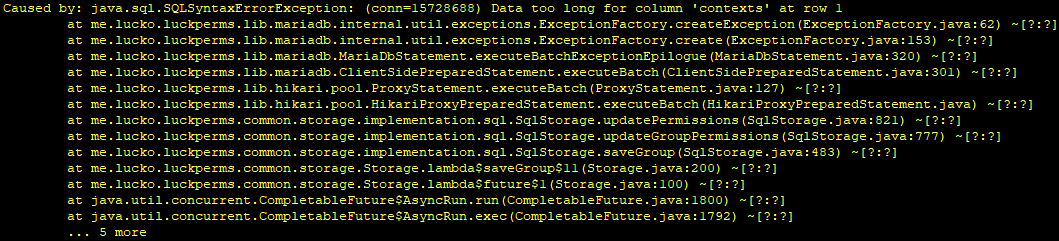
Complains the Data is too long for the 'contexts' column
Actually, not sure if it's to do with worldname length or the sheer amount of contexts with longer worldnames
frosty birch
high raven
probably because of large ping from the gameserver to the sql server
Is there a command that can confirm this?
 proper pulsar
frosty birch
Is there a command that can confirm this?
proper pulsar
frosty birch
Is there a command that can confirm this?
/lp info
frosty birch
Its only 160ms tho
proper pulsar
That’s insanely high
frosty birch
Yea on my other server its 30 so thats a bit wierd
proper pulsar
Even 30 isn’t great. But should be fine if high speed isn’t a concern
 raven wraith
Do i have to set every perm in each server if im using bungeecord? i'm new to bungeecord..
wintry cloudBOT
If you run a BungeeCord network, learn how to correctly setup LuckPerms on all server instances (including Bungee).
Also read:
Syncing data between servers
LuckPerms wiki
raven wraith
ah thank you
frosty birch
proper pulsar
Even 30 isn’t great. But should be fine if high speed isn’t a concern
any way to lower this besides host side?
proper pulsar
frosty birch
any way to lower this besides host side?
No. This entirely dependent on the connection between your server and the database
frosty birch
proper pulsar
No. This entirely dependent on the connection between your server and the databa...
Could u go more into why it is this way?
warm sparrow
I'm trying to use the tracks as rank promotion for a faction but i'm having problems with the prefixes.
The first and second rank shows the prefix, when i promote my account to the third rank it shows the second rank prefix
I don't know what's wrong
proper pulsar
frosty birch
Could u go more into why it is this way?
Because packets take time to travel from one server to another
How long that takes depends entirely on the route they need to take
frosty birch
warm sparrow
I'm trying to use the tracks as rank promotion for a faction but i'm having prob...
u should probably put ur first rank on default if u havent
frosty birch
proper pulsar
How long that takes depends entirely on the route they need to take
So is there any way to speed it up my side?
warm sparrow
I used default as first rank
proper pulsar
frosty birch
So is there any way to speed it up my side?
As mentioned: No
frosty birch
Oh sorry missed that
 shy plover
Hello, how are you, sorry for the inconvenience on my part.
But, I would like to know if it is normal that giving a player a rank for 30 days.
this is displayed as 5 days 59 hours 59 seconds
proper pulsar
frosty birch
Oh sorry missed that
Essentially you’re asking me why it takes time to fly from LA to NY
And then you’re asking how to make the plane faster as a passenger
frosty birch
proper pulsar
No. This entirely dependent on the connection between your server and the databa...
Oh i totally misread that
I thought u said its not entirely dependent...
proper pulsar
No
proper pulsar
warm sparrow
I'm trying to use the tracks as rank promotion for a faction but i'm having prob...
Run /lp user <user> meta info for a user on the third rank

 tame lake
That's prefix weight. Which is pretty independent for each rank @warm sparrow
You can adjust those in the webeditor
tame lake
Ok
 south jolt
every time I try to go into the online editor, I get an error. anybody know why?
https://pastebin.com/208ARhhf
Pastebin
Pastebin.com is the number one paste tool since 2002. Pastebin is a website where you can store text online for a set period of time.
warm sparrow
tame lake
You can adjust those in the webeditor
How do i do that
shy plover
shy plover
Hello, how are you, sorry for the inconvenience on my part.
But, I would like t...
sorry, any idea?
tame lake
warm sparrow
How do i do that
Edit the permission nodes that are in the format prefix.<prio>.<prefix>
warm sparrow
ah ok thanks
tame lake
You're welcome
 lament pike
I Download it to my 1.16 spigot shockbyte server and i have Vault and extentialX downloaded. Its not showing up when i do /plugins. Is it possible im downloading the wrong version? Please send the right version if so XD
prisma hinge
why are they not reproduced when I get the rights? although everything is written correctly? 1.12.2
 neon pagoda
Good morning everyone! Does anyone know the reason why whenever I use /lp editor, I get this error in console? https://pastebin.com/KG3qBGge
Version Info: https://pasteboard.co/JQMrzOT.png
Pastebin
Pastebin.com is the number one paste tool since 2002. Pastebin is a website where you can store text online for a set period of time.
Simple and lightning fast image sharing. Upload clipboard images with Copy & Paste and image files with Drag & Drop
prisma hinge
lament pike
I Download it to my 1.16 spigot shockbyte server and i have Vault and extential...
What kind of server are you running and what's the LP file you downloaded named?
prisma hinge
prisma hinge
why are they not reproduced when I get the rights? although everything is writte...
What?
lament pike
got it working!!!
prisma hinge
Coolio
prisma hinge
neon pagoda
Good morning everyone! Does anyone know the reason why whenever I use /lp editor...
Hm well, 200ms ping to the database is far faaaar from ideal; I wouldn't be surprised if that was part of the issue..
How are you hosting your server?
neon pagoda
prisma hinge
Hm well, 200ms ping to the database is far faaaar from ideal; I wouldn't be surp...
Im hosting it local, but the database is an azure database
neon pagoda
prisma hinge
Hm well, 200ms ping to the database is far faaaar from ideal; I wouldn't be surp...
ill try and setup something and see if that helps, thanks a million fefo!
whats the ideal ping by the way?
prisma hinge
Between 0 and 5ms IMO but definitely not 200 lmao
I mean ideally it would be on the same machine the server is on, or at least in the same local network
wind fiber
im with pebblehost and they have a faulty node, ive been told by pebble to save all my sql files as they will be deleted once switched nodes, if i use php's built in export/import feauture will all my lp data be safe?
prisma hinge
Probably, but if you can use LP export that'd be great
prisma hinge
!export (is this a command?)
wintry cloudBOT
Sorry! I do not understand the command !export
Type !help for a list of commands.
prisma hinge
Dammit
wind fiber
pretty sure its !switch actually
because doesnt that bring up how to backup when switching storage types?
prisma hinge
is it just me or is discord unusable slow to the point of crashing?
on the phone that is*
/lp export <backup name> and copy the file somewhere safe btw
prisma hinge
prisma hinge
on the phone that is*
:d
wind fiber
i guess my brain just decided to shut off today
 solemn thunder
hello
I have a problem whith luckperms, I use bungeecord and my permissions aren't synchronised between all my servers
I have luckperms bungee on my bungee proxy, and bukkit on all my spigot servers
prisma hinge
are they connected to the same common database?
 wintry cloudBOT
If you run a BungeeCord network, learn how to correctly setup LuckPerms on all server instances (including Bungee).
Also read:
Syncing data between servers
LuckPerms wiki
prisma hinge
solemn thunder
and what is this please?
!contexts check this for that
wintry cloudBOT
You can set a permission or group on a per-world/per-server basis, through what we call "contexts".
Read more
LuckPerms wiki
solemn thunder
thanks
 little oyster
Yes, did you read it fully
 sturdy pagoda
yes i did
little oyster
It shows you how to enable permission nodes
you just need to find which ones your plugin has
sturdy pagoda
i have luckperms
little oyster
😐
sturdy pagoda
and essentialsx
little oyster
Yes, you need to find the permission node that your chest plugin in thing uses
so that people can interact with it
sturdy pagoda
with luck prem or essentialsx
 hasty robin
Okay so I have vault, vaultchatformatter and essentialsx installed.. The prefix here shows what i want it to show, but it just does not work. Within the essentialsx config the change_displayname is set to false. What do i do

this is the vault-info
 little oyster
sturdy pagoda
with luck prem or essentialsx
little oyster
sturdy pagoda
with luck prem or essentialsx
luck perm manages permissions
little oyster
again, read
 ripe geode
Hi, my prefixes vanished after a luckperms update, lp user chrissamael meta info results in: ```
[22:28:40 INFO]: [LP] chrissamael's Prefixes
[22:28:40 INFO]: [LP] -> 100 - '' (inherited from moderator)
[22:28:40 INFO]: [LP] -> 10 - '' (inherited from default)
[22:28:40 INFO]: [LP] chrissamael has no suffixes.
any idea how to fix this? removing and re-adding the prefix with the correct weight (we're trying to add `§3` as prefix to color-code the moderators) just results in an empty prefix it seems?they're colour codes, so they appear empty in chat because chat is designed to turn them into colours and not show them
so they're there, and if you put any chars after the 3 you'd see a coloured prefix
it's likely your chat formatting plugin is resetting the colour code between prefix and name
ripe geode
it's on console, but it looks like the color codes are being interpreted even in console - why do I end up with white player names ingame, got an idea?
high raven
high raven
it's likely your chat formatting plugin is resetting the colour code between pre...
white names ^
ripe geode
oh, thanks
high raven
console will also convert colour codes
at least, some consoles
if you go into console logs you'll probably see them
ripe geode
even the logs show it as empty, and they don't only show up in chat as white, but also on our tablist (after updating luckperms & venturechat the other day)
high raven
run lp editor and send the link
ripe geode
wintry cloudBOT
LuckPerms does not perform any chat/tablist formatting of its own!
LuckPerms only acts as the source for prefixes / suffixes, it doesn't actually apply them. You need an appropriately configured chat/tablist formatting plugin for them to be displayed. If the values appear correctly when you run /lp user <user> info, LuckPerms is doing its job!
FAQ answer: Prefix isn't showing?
List of chat/tablist formatting plugins that work with LuckPerms
high raven
basically that explanation^
also, the info command can't display colour codes but it takes the info from the same place the editor does
ripe geode
yeah I know it doesn't do the formatting, it's just the only thing we changed (in relation to the tablist) so I thought it may be lp related
high raven
https://i.imgur.com/SRsgCxq.png this all looks excellent
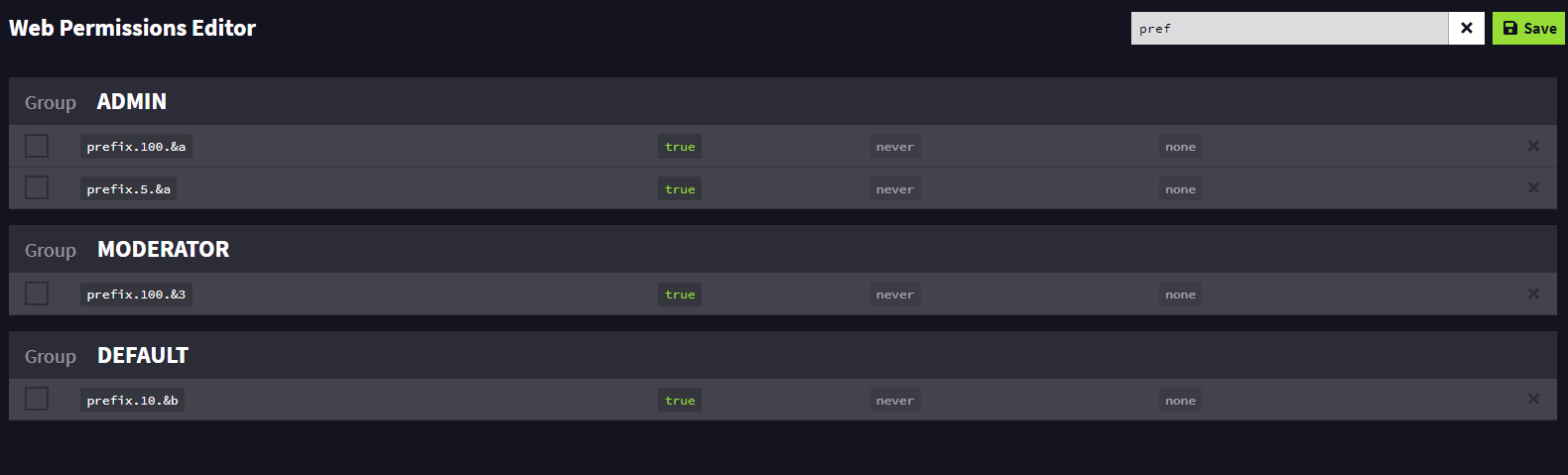
you changed venturechat too right
I wouldn't put it past venturechat to be screwy
ripe geode
😂 fair point
just out of curiosity, what would be your suggested approach to having a global chat channel across a bungee network without venturechat? 😅
high raven
at the moment, there sadly is not exactly a great way. BungeeChat is a plugin that should probably work
though VC should work too
ripe geode
yeah it works fine, it's just 99 features we don't need on our server, so I'm always looking for alternatives :)
I'll dive into VC configs and see if I can find the issue with the colours, thanks a lot!
high raven
no worries! a hint: look for &r because that's a colour reset code
ripe geode
oh that rings a bell... thanks!
neon pagoda
prisma hinge
Between 0 and 5ms IMO but definitely not 200 lmao
I just tested luckperms on another server with a different database with ping over 300, it worked fine but once I imported my user file with around 1000 unique users everything ground to a halt. is that expected?
high raven
transferring 1000 users will naturally take 1000 times longer than transferring one
ripe geode
reloading placeholderAPI fixed the issue for me, sorry for bothering you guys with this and thanks for the help and work you guys put into this plugin, it's a bliss to manage perms with it :)
high raven
np! glad to hear it worked out
neon pagoda
Same thing, thanks a lot for all your help, really appreciate it!
high raven
Np!
 hazy laurel
hey do you guys have a walk through on setting up a SQL Database for lp and also once i do that how would i get the chat prefixes to work
 quaint idol
!bungee
wintry cloudBOT
If you run a BungeeCord network, learn how to correctly setup LuckPerms on all server instances (including Bungee).
Also read:
Syncing data between servers
LuckPerms wiki
quaint idol
!chat
wintry cloudBOT
LuckPerms does not perform any chat/tablist formatting of its own!
LuckPerms only acts as the source for prefixes / suffixes, it doesn't actually apply them. You need an appropriately configured chat/tablist formatting plugin for them to be displayed. If the values appear correctly when you run /lp user <user> info, LuckPerms is doing its job!
FAQ answer: Prefix isn't showing?
List of chat/tablist formatting plugins that work with LuckPerms
prisma hinge
hey, to make my luckperms transfer data through bungeecord servers, do i have to put it on bungeecord proxy plugins folder, or in spigotmc plugins folder? or all plugin folders?
wintry cloudBOT
If you run a BungeeCord network, learn how to correctly setup LuckPerms on all server instances (including Bungee).
Also read:
Syncing data between servers
LuckPerms wiki
daring stirrup
Read both
prisma hinge
daring stirrup
Read both
still didnt get where i put my luckperms plugin
prisma hinge
daring stirrup
All servers
even bungee proxy?
daring stirrup
all
 wraith breach
I created editor and when i open him in URL. Site says me session has expired
Editor was be created 3-5 seconds ago
prisma hinge
hm? can you screenshot the exact message you get?

 prisma hinge
hm... what version of LP are you using? /lp info
wraith breach
 wintry cloudBOT
Latest version
5.2.127
wintry cloudBOT
You can download LuckPerms for Bukkit/Spigot/Paper, BungeeCord, Sponge, Fabric, Nukkit and Velocity.
Additional downloads
tardy glacier
damn
prisma hinge
don't treat yourself like that geez :(
daring stirrup
Where do people get v4 from?
 urban gate
I have a problem white my networked serveres they wil not conncet to the database
carmine urchin
hey so how do I make the tempadd stack
so like /lp user (name) addtemp (group) 30d
I want it to be able to run multiple times and have it stack
 frank ember
carmine urchin
frank ember
carmine urchin
thx


 daring stirrup
!errors
wintry cloudBOT
Here's a page with some common storage system errors.
LuckPerms wiki
daring stirrup
next time use bytebin instead of screenshots
 little grail
How do I do per world perms with the web editor
tardy glacier
In the context column 
urban gate
daring stirrup
next time use bytebin instead of screenshots
thx I will keep that in mind for next time
little grail
urban gate
thx I will keep that in mind for next time
I use paste.gg
(I think that’s what it’s called)
 ember quarry
Hey, my prefixes aren't showing up. All they show up as is a Grey default, something I didn't set up. I'm using essentials and essentials chat as well.
prisma hinge
ember quarry
Hey, my prefixes aren't showing up. All they show up as is a Grey default, some...
Screenshot /lp user <user> info
 wintry cloudBOT
Hey jaymin! Please don't tag helpful/staff members directly.
ember quarry
it shows nothing now
I downloaded a different essentials, I was using a developer build apparently before
so now it just doesnt show default at all
prisma hinge
do you have Vault installed?
ember quarry
yes
prisma hinge
!moss then they'll help you about it, LP seems to be working fine
wintry cloudBOT
Essentials
Make sure you are using EssentialsX and Vault for prefixes. For any other issues with Essentials, you should seek support in either #general or the official EssentialsX support Discord.
EssentialsX Discord
 tulip trench
A co-owner can give himself Owner... What Permissuin do i have to change?
tardy glacier
!argbased Read this, but be warned it is complex
wintry cloudBOT
Fine tune exactly what users with permission to use LuckPerms can do.
LuckPerms wiki
tulip trench
Okay Thanks
 compact topaz
Any way to detect if a player has a permission? (I know that you can check the groups, but just for quick debugging, I thought there was a command but I can't find it)
Please ping me if so 🙂
prisma hinge
lp user <user> permission check <node> if you're on recent builds that will print a ton of super useful information
 stoic egret
once again, this time with more info, I have 6 player groups with weights from 1 to 6. The highest group has the second highest set as parent, which has the third highest set as parent and so on. Then I have one VIP group called "gold", with weight 7, which doesn't have any parent groups. All of them have their own prefix. I put myself in 2 groups, one player group with weight 2 called "Hráč" and then the VIP group "gold". so far I'm getting only the gold prefix, but I'd like to set it so I have both. I tried several variants in the config, but I'm either still having only the gold prefix or 2 gold prefixes next to each other, even though I have duplicates set to none. I'm gonna send a few screenshots so you understand better. Thanks for any help


 prisma hinge
stoic egret
prisma hinge
stoic egret
setting "groups" to false doesn't do what you think it does though..
stoic egret
Uhh, ok thanks, I'll delete them instead, altho I don't think that's gonna help me with the prefix problem 😅
prisma hinge
Right, highest will always give the prefix with highest weight, inherited or from the player itself, and highest_inherited will always give.. wait for it........ the one with highest weight that is inherited (i.e. not owned prefixes)
what I suggest you do is have two tracks: a donors track and a regulars or ranks track, and in your meta-formatting have highest_on_track_<track> for both donors and regulars/ranks

 prisma hinge
hm, screenshot /lp user <user> info and /lp user <user> meta info
stoic egret
 prisma hinge
and meta info
stoic egret
 prisma hinge
also did you /lp reloadconfig or restart the server after changing the config?
stoic egret
just the reload
prisma hinge
yeah that's good enough
stoic egret

The other have the default's prefix as they should, but I'm still only getting "gold"
prisma hinge
/lp user <user> showtracks?
stoic egret
 prisma hinge
stoic egret
prisma hinge
stoic egret
uuh.. did you applyedits for that editor session?
 prisma hinge
I think you set up the ranks track the wrong way around lol

 prisma hinge
modified
stoic egret
I still have the "gold" prefix even when I lower the weigh from 7 to 2 and make the "hráč" group my primary group
now could you explain me this:

I deleted the donor prefix from config
and yet I still have only "gold" prefix in game
prisma hinge
can you share a new editor link?
stoic egret
LuckPerms - A permissions plugin for Minecraft servers.
LuckPerms is a permissions plugin for Minecraft servers. It allows server admins to control what features players can use by creating groups and assigning permissions.
I'm thinking maybe the weight number in the prefix could be what's causing the problem?
but no idea tbh
stoic egret
I deleted "hráč" and replaced it with "hrac" saved and applied, but when I do /lp user <user> info I still see "hráč" as a parent group 🤔

LuckPerms - A permissions plugin for Minecraft servers.
LuckPerms is a permissions plugin for Minecraft servers. It allows server admins to control what features players can use by creating groups and assigning permissions.
prisma hinge
yes, because in your parents group list you still have this leftover

deleting a group does not remove it from users' parents list
stoic egret
actually noticed that right before you said it 😅
LuckPerms - A permissions plugin for Minecraft servers.
LuckPerms is a permissions plugin for Minecraft servers. It allows server admins to control what features players can use by creating groups and assigning permissions.

seems ok now, but prefix still unchanged
I'd like to point out I still have only highest_on_track_ranks in the config

so technically I shouldn't even have the "gold" prefix, right? 😆
prisma hinge
hm do this for me
- Fully restart the server
- Generate a new editor session and share the link
- Share your (unedited since restart) LP config as well (remove any database credentials if any)
!editorsafety While the server is restarting, you can spend some time reading this 
wintry cloudBOT
It is safe to send an editor link in public.
Any changes made in the editor have to be applied using the /lp applyedits command - impossible unless the person with the link is also connected to the server and with the required in-game permissions to use LuckPerms commands. It's effectively just as safe to share an editor link as it would be to share a screenshot of your permissions or a pastebin of a configuration file. The editor doesn't contain any sensitive data (except perhaps player names).
More Information:
Concerns about the proprietary nature of your permissions setup?
Please, don't be. We're here to help, not steal your permissions setup. Additionally, permissions can be tested by players simply joining your server and seeing what they can do.
Please use https://bytebin.lucko.me to send files in the future. I have automatically uploaded config_1.yml for you: https://bytebin.lucko.me/JDcHDl7qFf
stoic egret
prisma hinge
you have this
meta-formatting:
prefix:
  format:
    - "highest_on_track_ranks"
    duplicates: first-only
    start-spacer: ""
    middle-spacer: " "
    end-spacer: ""
  suffix:
    format:
      - "highest"
    duplicates: first-only
    start-spacer: ""
    middle-spacer: " "
    end-spacer: ""
but should have this
meta-formatting:
  prefix:
    format:
      - "highest_on_track_ranks"
    duplicates: first-only
    start-spacer: ""
    middle-spacer: " "
    end-spacer: ""
  suffix:
    format:
      - "highest"
    duplicates: first-only
    start-spacer: ""
    middle-spacer: " "
    end-spacer: ""
left one is how it should be, right one is how you have it

 wanton night
@prisma hinge when doing it is this correct /lp export --upload --without-users
wintry cloudBOT
Hey SuperxMario! Please don't tag helpful/staff members directly.
prisma hinge
looks good, but you can export to a file and then move it to the new server
/lp export <export file name> --without-users- Copy the file to the new server's LP folder
/lp import <same file name>in the new server
prisma hinge
it will take however it has to take, that depends on the size of your dataset, the storage method, the internet connection to
bytebin.lucko.me, and many other factors
prisma hinge
wanton night
Wym export to file?
You can export to a file that will be saved locally
wanton night
Okay i did it with the upload to web so now ill wait and see how long it takes
did it right after a restart
stoic egret
prisma hinge
you have this
```yml
meta-formatting:
prefix:
format:
- "highest_on_track_...
Thx man. Everything's working now. Love you ❤️
prisma hinge
Sorry, I'm taken
 copper nymph
how do i make it so when someone buys a rank they automatically get it?
quick lagoon
you need to set that up in whatever plugin responsible for buying the ranks
 daring isle
Help me

 tame hollow

tardy glacier

 tropic holly
I have all my permissions inside a .txt is there anyway to input them all at the same time?
tropic holly
ok ok thanks
quick lagoon
you can paste a list of perms to the web editor input
if its seperated by a new line or smt
tropic holly
i see thanks
 obtuse monolith
Hi
how can i use worldguard contexts?
I have already downloaded the extracontests as well.
hazy laurel
Hey i have the luckyperms network setup through mysql when i go to change something and do /lp sync do i have to be in the server that my sql is hosted through or can i make changes through any server connected to the sql database
prisma hinge
obtuse monolith
Hi
how can i use worldguard contexts?
I have already downloaded the extracontest...
Did you enable them in the extracontexts config?
obtuse monolith
prisma hinge
Did you enable them in the extracontexts config?
How can I do that?
prisma hinge
hazy laurel
Hey i have the luckyperms network setup through mysql when i go to change someth...
Well first, for networks you should do /lp networksync instead of /lp sync, and secondly you shouldn't even need to do that
obtuse monolith
prisma hinge
and enable them
But I can not find . 😦
hazy laurel
Ohh ok. I shouldn’t do the sql database?
prisma hinge
obtuse monolith
But I can not find . 😦
extracontexts config, not luckperms config
hazy laurel
Oh need never mind
prisma hinge
you do need a db to sync perms across the network, you shouldn't need to do /lp networksync if it's set up properly
hazy laurel
I gotcha thank you I’ve never even tried to do it with out doing the /lp sync. I watch a random YouTube video that said you must do this. Sick that save me the trouble. I appreciate the help you rock!!
prisma hinge
obtuse monolith
prisma hinge
extracontexts config, not luckperms config
OMG -.- thy 🙂
 keen oasis
someone know why context server: not working
it does not show group
using context on one of my server
I fixed it
 thin kettle
Does anyone know how to setup a shop in admin claim my players cant left and right click to buy/sell when in shop
prisma hinge
Hi, can someone plz help me. I am getting error with luckyperms when someone is trying to join my server https://prnt.sc/10ebeeh
I dont really undestand the logs/error, so if anyone could help 🙂
Let me know if more details is needed, ill provide more
 high raven
!errors If the error asks you to check the logs for information, there's nothing you or we can do without seeing them except point you to this sand tell you to check the lp startup error in the server log and compare it to these potential ones and solutions @prisma hinge
wintry cloudBOT
Here's a page with some common storage system errors.
LuckPerms wiki
queen jacinth
Hey
About ExtraContens...
Is it possible to make sure that a certain permission is not issued to all players in a particular region, but to one single player?
 slate bone
Hey. I get this error and i dont know how to fix it, i just added in the MySQL database.
06.03 23:15:42 [Server] INFO Caused by: java.sql.SQLTransientConnectionException: luckperms-hikari - Connection is not available, request timed out after 5000ms.
wind fiber
!error
wintry cloudBOT
Here's a page with some common storage system errors.
LuckPerms wiki
slate bone
!error
wintry cloudBOT
Here's a page with some common storage system errors.
LuckPerms wiki
wind fiber
click the link, it will help you to fix your error
slate bone
it doesnt
Thats not an error on there. i searched for hikari with ctrl+f and it didnt help cuz it made no sense to me
java.sql.SQLTransientConnectionException: luckperms-hikari - Connection is not available, request timed out after 5000ms.
wind fiber

 snow jungle
Hi can some1 help for some wierd reason luckperms wont connect o my database.
daring stirrup
!errors
wintry cloudBOT
Here's a page with some common storage system errors.
LuckPerms wiki


 daring stirrup
!paste full config
wintry cloudBOT
Please use pastebin!
Seeing a paste of the problem makes everything so much easier! Use https://bytebin.lucko.me/ for easy pasting!
For console errors:
Pastebin any relevant segments of the console log. If it's a startup error, this includes the entire startup log!
Other errors:
Pastebin the entire LuckPerms config file (passwords removed) as well as any other relevant files!
snow jungle
daring stirrup
meant log sorry
wintry cloudBOT
LuckPerms cannot connect to your MySQL server
Read More
Caused By
java.sql.SQLTransientConnectionException: luckperms-hikari - Connection is not available, request timed out after 5002ms.
https://bytebin.lucko.me/c3OvgELySe | Sent by Barni
snow jungle
how can i fix dis? 😄
daring stirrup
prisma hinge
snow jungle
how can i fix dis? 😄
A friend of mine is having the same problem xD
snow jungle
ryp