#support-2
1 messages · Page 75 of 1
 wintry cloudBOT
Hey 𝒴𝓊𝓋𝒶𝓁! Please don't tag helpful/staff members directly.
 vocal geode
How to get rid of the prefix for join/leave messages?
 severe mural
up to the formatting plugin
 prisma hinge
i cant see the prefix in lpb
severe mural
vocal geode
formatitting plugin?
the chat formatting plugin you use
vocal geode
essentials
severe mural
LuckPerms has nothing to do with join/leave messages
if you're using {DISPLAYNAME} in there, that's why
read what that does
vocal geode
prisma hinge
i cant see the prefix in lpb any help
vocal geode
Oh i fixed it
 slim ether
when i install Lp-Bungee how do i get config.yml? Cuz normaly when u Install Bungee Cord u get config.yml... ? help
prisma hinge
@prisma hinge stop the server and share the log file again (after deleting the libs dir and restarting)
Ok
Deleted the directory and restarted the server
 daring stirrup
what is the jar called
prisma hinge
The server or the plugin?
daring stirrup
plugin
prisma hinge
LuckPerms-Bukkit-Legacy-5.2.99.jar
daring stirrup
??


 wet wren
Does LuckPerms support %player% ?
daring stirrup
up to a plugin to support that
wet wren
And what should I write there If I want to use it on VIP? [displayName] or [playerName]
wet wren
ok Thanks. ❤️
 jaunty umbra
how to make groups inherit other groups
so like, admin role will have all perms from moderator role
but if moderator role inherits helper role
then admin will inherit both helper and moderator
is it possible ?
 rose niche
Can I sort the groups in the editor
@jaunty umbra set parent group
go to admin group and add moderator as a parent
 zinc tree
/lp group staff permission set minecraft.command.list
is this the right command for allowing staff access to the /list command?
daring stirrup
depends if /list is the default minecraft list command
zinc tree
thanks, that explains it exactly
/lp group staff permission set essentials.list true
turns out this one works
jaunty umbra
rose niche
go to admin group and add moderator as a parent
ok but then
of moderator is parent of helper
will helper perms still be on admin?
prisma hinge
jaunty umbra
will helper perms still be on admin?
Helper is parent of moderator
Moderator inherits from helper
It inherits from its parents
jaunty umbra
i understand what i mean is
we have 3 ranks
a
b
and c
and b ranks parent is c
and a ranks parent is b
so does c rank have both a and b ranks
prisma hinge
No, you're doing it the wrong way around
Helper is parent of moderator
Moderator inherits from helper
Moderator is parent of admin
Admin inherits from moderator who also inherits from helper
 plucky umbra
Hi, i'm getting the error "me.lucko.luckperms.common.dependencies.DependencyDownloadException: java.net.ConnectException: Connection refused (Connection refused)" on startup. My server is being hosted by ggservers and therefore should be connected the internet.
prisma hinge
They are famous in here for blocking the connection to where LP downloads its dependencies/libraries from
You should contact them about it
!faq you can read the very last question in here
wintry cloudBOT
Check out some of our frequently asked questions.
Read more
 LuckPerms wiki
prisma hinge
LuckPerms wiki
prisma hinge
So famous indeed you can search for "ggservers" on this discord and literally every result leads to that exact same issue 
plucky umbra
lol ok
 regal root
i'm having issues seting up the permission for the \item command for specific blocks, but i recieve "access denied" when i use
"essentials.itemspawn.item-clay"
"essentials.itemspawn.item-82"
"essentials.itemspawn.item-minecraft:clay"
if i run
"essentials.item"
that works but gives access to everything... am i missing something somewhere, or is this something i should be running to Essentials discord to ask?
prisma hinge
!moss I think you have to do something in EssX config, best to ask them
wintry cloudBOT
Essentials
Make sure you are using EssentialsX and Vault for prefixes. For any other issues with Essentials, you should seek support in either #general or the official EssentialsX support Discord.
EssentialsX Discord
regal root
i did the "permission-based-item-spawn: true"
while checking LP Verbose command player /item clay 1
it comes back with a check of
essential.mail - true
essential.item - false
if i give essentials.item they get access to everything
 opaque nebula
i figured out what it was, i have npcs from citizens2 plugin, and it was trying to add them
prisma hinge
regal root
i did the "permission-based-item-spawn: true"
while checking LP Verbose command...
maybe you need to set that permission to true + the specific ones?
I mean that's a question for Essentials still
LuckPerms can't limit what it isn't being asked to limit
 cedar tulip
im trying to use the bulkupdate command and im struggling to figure it out using the wiki
i just have several "group/permissions" to remove as we are wiping our server and have in game rank ups
i need to remove the permission group.name from everyone.
^can someone help me accomplish this please and thank you.
prisma hinge
users delete "permission == group.<group>"
prisma hinge
make a backup if you're that worried
cedar tulip
i mean ive done the most risky parts of wiping the server i think ill be alright. i hope
thank you so much though
 signal pebble
My server doesnt show up on the contexts in LP bungee... Is that by design?
There's also no include-global: true anywhere in my configs
 high raven
you can manually type context out
I assume you mean in the editor yeah
yeah the editor does not know about all the backends
 tame hollow
i have a workaround in mind that i keep meaning to put in place, but it still wouldn't list all the servers in your network
unless you've already set a context for each server
prisma hinge
 ?
?
tame hollow
prisma hinge
<:thonk:744308420848648292>?

 wide tide
? f
 lime atlas
Having a problem with Bungeecord and LP i tried to disable some commands on one server but if i want to define the context no server would recommended ... is this normal?
daring stirrup
don't rely on the suggestions
lime atlas
so it will work if i put the server into the field
prisma hinge
I have no clue how to do this but I created a group and added the permissions from the plugins i need into the group but it didnt work
and yes i did save
prisma hinge
its permissions for this cctv plugin
they are on the website so i just copy and pasted them in to the add permissions bar at the bottom
 stark barn
hello! is anybody available to help with a small issue Ive got?
prisma hinge
!ask
wintry cloudBOT
Please ask your question!
Please ask the question you have. Don't ask to ask, or ask to DM someone. There are people here to help you, but we need to know what to help you with, so please just ask the question you want to in as much detail as possible!
Or, try here first:
Why shouldn't I ask to ask?
stark barn
ok so I just ask the question?
ok
uh so yea I been trying to get my default group to be able to do /seed, and i cant seem to find where the permission is
I been doin /lp group default permission set minecraft.seed
 split wing
minecraft.command.seed
prisma hinge
Googling is a great ability
stark barn
ah I did
prisma hinge
stark barn
but all the results seemed to be people asking what a seed was
split wing
I straight up googled it and it was the first result lol
prisma hinge
@prisma hinge u there?
 tidal ridge
Hey how do i disable commands in certain worlds? Do i just add in the context tab the key -> world=worldname and the value -> false?
prisma hinge
yep
prisma hinge
!contexts explains in a bit more detail
wintry cloudBOT
You can set a permission or group on a per-world/per-server basis, through what we call "contexts".
Read more
LuckPerms wiki
tidal ridge
Thanks let me check!
daring stirrup
key = world value = <worldname>
tidal ridge
got it thanks!
 queen mango
for those that were helping me earlier... I found this on the mod wiki page >> "By default, commands added by this mod require the command executor to be operator (OP) level 2 or higher.
Some commands may require a higher operator level. Such cases will be specified above."
so this means the commands should only work on op level
which confuses me further as noone is op level on my sever except me.
OMG I've just found the permissions in a depreciated page on the wiki!!
i'll be back...
prisma hinge
prisma hinge
<@456226577798135808> u there?
Hi sorry it’s late me so I hopped off
Try this /lp applyedits Rby0H36PyD
queen mango
even with the permissions entered as false in default it does not restrict the commands :/ I wonder.. does the latest LP work on 1.12.2-2838-7.3.0 spongeforge or have I installed the wrong version?
perhaps I haven't set default group up correctly
queen mango
Aye I did. When working correctly all users get applied to default group right? When I look in the storage under users folder should it show each individual user? Because it only shows me.
high raven
default users are not saved to storage
not LP storage
cause there's no point, it saves space,and makes things quicker
queen mango
Ok. I must just assume that my mods permission is none functional then as everything seems to be set up correctly in LP. Verbose couldn't find the permission so it mustn't exist. ok I'll give up
queen mango
VERBOSE interpreting help please: After /lp verbose on, then running a command, I get this; [LP] VB> defaults / user - - undefined, [LP] VB> defaults / default - - undefined, [LP] VB> Boromir_Kane - - undefined. (My user is Boromir_Kane btw)
What do your programmer eyes see?
tame hollow
screenshots are far better
queen mango
ok
well it only says the one line now
undefined
Does that mean the command i was trying to run is undefined? Yet, I still do not have permission. Surely that is a contradiction?
tame hollow
wtf, that is weird
it's not even showing a permission
what command are you running
high raven
also are you using the vanilla client
 tame raft
hey all - so recently noticed for one reason or another luckperms applied the default group to every single user
despite many of them being on tracks that inheret from default on a higher rank
as in, they used to be default but were promoted, but were for some reason given default again on top of their upgraded rank
which is now causing problems in promoting them on the track
any idea on how i can fix my database? there are hundreds of users with this issue, idk if a bulkupdate command can help - but thats what im looking into now
high raven
conditional bulkupdates aren't really a thing, but you could remove group.default from everyone, and restart the server? I believe it should remove it from everyone, and then people who have no other groups will be given it again when they join
but FIRST
make a backup using lp export backupnamehere
and then update
!update
wintry cloudBOT
You can download LuckPerms for Bukkit/Spigot/Paper, BungeeCord, Sponge, Fabric, Nukkit and Velocity.
Additional downloads
tame raft
just updated recently and also switched over to mysql for cross-server ranks
think something in that is where i got these ranks messed up
high raven
did you merge several dbs into one
tame raft
i hope not, i dont think so
high raven
tbch finding out how it happened is less important than fixing it 😄
tame raft
ye
but wanna avoid the mistake again if i CAN figure out how i fucked it up lel
but i think its jsut the default rank....
high raven
lp bulkupdate users delete "permission == group.default" should remove it from everyone - make a backup first! and then when you restart everyone that joins with nothing will likely have group default added back again
fefo can confirm or deny
prisma hinge
Do you have LP on bungee?
high raven
I have never actually tried nor read that code
tame raft
on bungee, and on the individual servers (is that the correct setup?)
prisma hinge
Yeah
high raven
yep!
prisma hinge
Screenshot lp user <user> info and the same with /lpb instead on an online player
I'm assuming you followed the switching storages guide to migrate the data over to the db?
tame raft
yes i exported - restarted the servers while attatched to the mysql
then imported from the server i exported from (which wasnt the bungee)
prisma hinge
Okay, that's okay
tame raft
so when looking at the two compared - they have the same error showing - with default being the main rank over their upgraded ones
they have different contextual data?
prisma hinge
Screenshot both please ^^
tame raft
k
tame raft
lpb
yeah this dude should just be mystic rank
this the normal /lp info command, the very top with the name is cut off cause it doesnt fit
prisma hinge
Okay yeah that looks good
You can run the command Larry pointed out above (and yeah you should make a backup before)
tame raft
will def make a backup
and awesome, huge thanks for the help ❤️
does it matter if i run the command with /lp or /lpb?
prisma hinge
!bungeecheck also double check all of these settings! If one of the servers is conflicting in some way it will happen again
wintry cloudBOT
Running a network and getting UUID mismatches?
Please double check that:
1. BungeeCord config.yml has ip_forward and online_mode set to true
2. All backend servers' spigot.yml has bungeecord set to true
3. All backend servers' server.properties have online-mode set to false
prisma hinge
tame raft
does it matter if i run the command with /lp or /lpb?
Doesn't really matter, just to make sure run /lp(b) networksync after running the bulk update
tame raft
oh ye def - i had the network setup before but went down after i got hit by the dynmap mysql exploit
so its configured for bungee
queen mango
tame hollow
what command are you running
A custom command from "command utils" which shouldn't require a permission so should therefore be allowed by default permissions.
queen mango
high raven
also are you using the vanilla client
Yes. Vanilla chat - didn't know there was another way to do it
high raven
things can be permitted only by OP
things can have whatever conditions the creator wants
if there aren't permission strings, nothing LP can do
queen mango
I see. So I need to assign a permission string then LP will pick it up. Got you
high raven
no
queen mango
oh
high raven
the person who wrote the code needs to
unless you wrote it or have source and know java
wintry cloudBOT
LuckPerms allows you to set weights in order to determine the priority of certain nodes, like permissions and even prefixes. A higher weight number is a higher priority.
Read more
LuckPerms wiki
queen mango
Is there perchance a permission string that defines op and all its abilities? one that will allow all default vanilla op abilities?
wintry cloudBOT
Wildcard issues
Some plugins are created in a way which results in odd behaviour when the root '*' wildcard is used.
More information:
tame raft
i think the bulkupdate worked like a charm, thanks for the advice
as for the weights, you suggesting i just make higher track things have a bigger weight?
would that prevent this from being an issue even if the default rank doubled up again?
prisma hinge
Well it will pick the primary group (and do the perms calculation) according to the weights
Higher weight = higher priority
And also, prefixed/suffixes have their own weights, separate and independent from the group weight
tame hollow
be sure to leave a 1 star review
prisma hinge
And say "didn't get any help, fucking staff did nothing but ignore me and it only brought problems to my server" 
tame raft
Can i leave a 1 star reveiw, but say its really good?
so that my reveiw attracks the shitheads attention, then poops on them? xD
no worries, i wont ;D
and dont let the haters get to ya, it aint always easy being the top dawg
tame hollow

prisma hinge
can someone tell me how to add all the commands to a user at once
 proper pulsar
@prisma hinge this (or #support-1) is the place to ask for support. Not my DMs
Unless of course you wish to have professional 1 on 1 support with me as mentioned that isn't free
daring stirrup
They also dm'd me smh
proper pulsar
Let's just hope no one caved it. But considering the lack of rage quitting the server and also no message here leads me to believe they found their victim...
prisma hinge
@daring stirrup 😦
wintry cloudBOT
Hey Inappropriates! Please don't tag helpful/staff members directly.
proper pulsar
!ask @prisma hinge
wintry cloudBOT
Please ask your question!
Please ask the question you have. Don't ask to ask, or ask to DM someone. There are people here to help you, but we need to know what to help you with, so please just ask the question you want to in as much detail as possible!
Or, try here first:
Why shouldn't I ask to ask?
proper pulsar
You could've already received your answer if you just asked in the right place and just asked straight away
 inland gale
@prisma hinge just for sure. Have you installed the papi ecloud extension of luckperms?
prisma hinge
yeh
inland gale
And maybe use this placeholder instead: luckperms_inherited_expiry_time_<permission>
If that doesn't work try with a simple permission like timed.test for x hours and check both placeholders again.
prisma hinge
which placeholder isntead?
inland gale
I can only find those two luckperms_expiry_time_<permission> and luckperms_inherited_expiry_time_<permission>
prisma hinge
martin
 errant mirage
Server clearly runs parent set prodigy on a player but their lp u info displays no change to their parent list
any ideas?
 tardy glacier
can you send a screenshot of their /lp user (user) parent info list?
prisma hinge
lp user <user> meta info
 acoustic bloom
which user
errant mirage
snkbite
acoustic bloom
just says trainer
acoustic bloom
ah it says that because GD decides ti wants to store every single bit of user info in lp players meta
so it basically crowds up everything, even in console
prisma hinge
is that (Trainer) all it shows on the prefixes/suffixes section of the meta info cmd?
errant mirage
ok so they both got parent set trainer but are still default rank
default rank aka guest^
you want @acoustic bloom to do lp user snkbite meta info and see what there is in terms of prefixes and suffixes?
This is just their LP info
acoustic bloom
it wont show in console because of all the gd spam in there
check their character in /lp user snkbite editor
see what group it has them in there
errant mirage
still just default
For context we have a rank-up mod that runs commands once players reach certain criteria and type /rankup
Just have this set in there
- lp u [playerName] parent set trainer```weird. well we updated to the latest lp so idk
errant mirage
I can open a issue on git?
acoustic bloom
probably best bet
prisma hinge
@errant mirage could you screenshot lp log userhistory snkbite?
acoustic bloom
console keeps setting them back to default
prisma hinge
Sounds a whole lot like something else is doing it
Does it show it does that as a command? Like, does it show the notification entry?
acoustic bloom
whatcha mean?
this shows up in the log file
[16:58:17] [ForkJoinPool-1-worker-25/INFO] []: [LP] lunafalas was not already a member of trainer, adding them now.```could it be the lp config?
prisma hinge
acoustic bloom
```[16:58:17] [ForkJoinPool-1-worker-25/INFO] []: [LP] Warning: The primary grou...
Okaaay.... Those are two entirely unrelated messages
acoustic bloom
yeah i didnt mean to grab the 2nd part
prisma hinge
errant mirage
Anything in the logs about default? You can add a number at the end for the page number
prisma hinge
acoustic bloom
```[16:58:17] [ForkJoinPool-1-worker-25/INFO] []: [LP] Warning: The primary grou...
There's something (presumably a plugin config) running the parent switchprimarygroup command which by default is useless and tbh there is no reason to use it
prisma hinge
Oh okay
errant mirage
It's back to lp u (name) parent set
Also their rank gets set sometimes and sometimes it doesn't
prisma hinge
prisma hinge
Anything in the logs about `default`? You can add a number at the end for the pa...
?
errant mirage
Like we've had it work before but like 80% failure rate
prisma hinge
I mean tbf LP will just do what it's being told to do, if you run a parent set command it will do that (clear and add); unless a plugin is messing in some way it will stay like that
errant mirage
parent add doesnt add either though
errant mirage
yes
prisma hinge
Then it's clearly not LuckPerms at fault
errant mirage
but if I'm getting notified by luckperms that it's running a command on a user and that that command is parent set trainer
and their not trainer
prisma hinge
Does it work if you run it manually?
acoustic bloom
outside of cmi, i dont see another plugin messing with usergroups at all
prisma hinge
Best you can do is:
* Check every config of every plugin that runs commands for certain actions and make sure everything is correct
* Remove plugins either by halves or one by one (halves is fastest) see when it stops doing that // when it works properly
errant mirage
ok ty
wintry cloudBOT
Latest version
5.2.99
prisma hinge
!update in any case
wintry cloudBOT
You can download LuckPerms for Bukkit/Spigot/Paper, BungeeCord, Sponge, Fabric, Nukkit and Velocity.
Additional downloads
 latent coral
Is there a way to show my rank about my head?
prisma hinge
With an "rank about my head" plugin such as NameTagEdit or TAB
 eager loom
anybody know how to use this command /lp user/group <user|group> permission set <node> [true|false] [context...]
high raven
yes
prisma hinge
I do
high raven
exactly as it's written
 tidal blade
You type it in-game or in console.
prisma hinge
Larry might know how to use it as well
tardy glacier
hello
high raven
like... lp user larry permission set essentials.smart
tardy glacier
wrong channel
tidal blade
high raven
like... `lp user larry permission set essentials.smart`
You mean lp user larry permission set essentials.smart false
high raven
ah yes
 gaunt sandal
Hey, i changed from using an External ip to an Internal ip and im recieving errors in console when trying to connect to the database? ...
wintry cloudBOT
Please use pastebin!
Seeing a paste of the problem makes everything so much easier! Use https://bytebin.lucko.me/ for easy pasting!
For console errors:
Pastebin any relevant segments of the console log. If it's a startup error, this includes the entire startup log!
Other errors:
Pastebin the entire LuckPerms config file (passwords removed) as well as any other relevant files!
gaunt sandal
Pastebin
Pastebin.com is the number one paste tool since 2002. Pastebin is a website where you can store text online for a set period of time.
tardy glacier
!errors
wintry cloudBOT
Here's a page with some common storage system errors.
LuckPerms wiki
tardy glacier
!update also
wintry cloudBOT
You can download LuckPerms for Bukkit/Spigot/Paper, BungeeCord, Sponge, Fabric, Nukkit and Velocity.
Additional downloads
 fast oxide
So, I want to set up a permission shop for cosmetics and some other things, but I foresee a problem: e.g., let's say there is a /hat command that I don't want people to use in minigame worlds, but it's allowed in the creative and survival worlds.
So, if someone buys /hat from a shop, the server will run /lp user (username) permission set hats.use true world=survival world=creative.
But here's the problem: let's say I want to create a new world named "mcmmo" and I want people who bought the permission to be able to use /hat there. That will break my setup, because I didn't give them hats.use permission for that world when they used the shop, as that world didn't exist back then.
What would be a cleaner way of handling this? I've thought of creating one group for each purchasable item and adding people to the group when they buy things, but that sounds wasteful
high raven
By all means use a group
Just put the hat perm in there with context
Change the context on the hat perm when needed
fast oxide
Oh, alright. Thanks!
 slow roost
So, I want /lp user [user].... to set that users rank on all servers connected to my bungee server. Only 4 of those servers should have identical permissions and one has different perms. Can this be achieved if so how?
tame hollow
!context
wintry cloudBOT
You can set a permission or group on a per-world/per-server basis, through what we call "contexts".
Read more
LuckPerms wiki
 turbid lion
It is possible to revert used commands of the luckperms, it is that by chance delete 2 groups?
tardy glacier
x post 😔
tame hollow

turbid lion
 wind crystal
is there a command to see how many people are in specific group?
daring stirrup
/lp group <group> listmembers iirc
wind crystal
ty
 bright sinew
can i make signs add a parent group ?
wintry cloudBOT
Find all of the available LuckPerms commands on the wiki.
Read more
General commands
User commands
Group commands
Permission commands
Parent commands
Meta commands
Track commands
Log commands
LuckPerms wiki
 quick lagoon
bright sinew
but then how would i apply it on the sign ?
quick lagoon
bright sinew
but then how would i apply it on the sign ?
#general depends on the sign plugin you are using or whatever vanilla nbt stuff has to offer
prisma hinge
@bright sinew if you use essentials signs you have to go into the config. There you can see the options for command signs
but I would suggest you to use ServerSign plugin cause it offers way more and is more secure
prisma hinge
@soft cosmos you must be very lucky
wintry cloudBOT
Hey Inappropriates! Please don't tag helpful/staff members directly.
 pale pond
pretty clearly unlucky
prisma hinge
pale pond
pretty clearly unlucky
Idk who knows
tardy glacier
i already replied to you before you sent this message here too 
 untold temple
never happened 🤷♂️
tardy glacier
😒
untold temple
hehe
tame hollow

tardy glacier
hello turbo!
tame hollow
henlo
tardy glacier
make me a good personal site xoxo
tame hollow
ok
<html>
<head>
<title>Good personl site xoxo</title>
</head>
<body>
<p>welcome 2 my good perosonal website uwu</p>
</body>
</html>
enjoy <3
oops i fucked that up
better 🙃
tardy glacier
i will chargeback you
tame hollow
denied
prisma hinge
quite the other way around
wait
trick question
yes, yaml (or any text based storage for all that matters) is less efficient
lol
prisma hinge
that is true regardless of storage method :d
most likely, yes
LP runs most of its operations async
 merry mulch
Help pls https://bytebin.lucko.me/3yWj75gMEv
quick lagoon
!errors
wintry cloudBOT
Here's a page with some common storage system errors.
LuckPerms wiki
merry mulch
Uh shouldn't % be enough
daring stirrup
pterodactyl
merry mulch
Yes
daring stirrup
check pins
 dusty tendon
I have a small problem.
I installed the LWC plugin and only given the permissions for / lwc modify.
However, users can still see all the commands from / LWC and can use them.
Is there a way to change that or to hide the commands?
quick lagoon
set the permissions to false, on what permission, look into lwc docs
lwc support is a MOSS as well
dusty tendon
if I set it to false, it will still be displayed.
merry mulch
daring stirrup
check pins
Ye so I'm kinda not using a VPS so cant follow any of those
hellllllllloooooooooooooooooo
quick lagoon
then what are you using?
merry mulch
Uhh a MC server?
quick lagoon
...
merry mulch
Idk what else it's called
pale pond
are you using a shared host like Bisect?
merry mulch
Well it is a shared host but no one else is sharing it as uh I'm the first one there
Basically I'm the first one to purchase a MC server on that hosting provider
pale pond
uh probably not the best of hosts then, you might have to ask their support about those settings
pale pond
whats the host called out of curiousity?
merry mulch
VertileHosting
pale pond
they dont offer MC hosting though
 leaden tide
reposting to see if anyone here can help 😛 #support-1 message
prisma hinge
That's more of a question for LPC
leaden tide
i know, but i cant find any method of contact for him (maybe i'm blind)
so i thought maybe someone herre has used them both and can share some insight
tardy glacier
carbonchat is the superior chat plugin
 waxen viper
how do i delete all users with no permissions (or only with group.default)? i have a lot of them and the web editor shows only the first 500. can bulkupdate be used? they do get saved, most of the users in the web editor have nothing other than group.default
prisma hinge
lp bulkupdate users delete "permission == group.default" and restart to clean cache
You might want to make a backup first
lp export <backup name>
 jovial token
Is it possible to get permission to block the inter-action of the composters only?
jovial token
to block the piston composter bug (xray)
prisma hinge
LuckPerms is not an anticheat plugin lmao
You can't simply "attach" permissions to actions
LP responds to permissions other plugins ask for when you do certain things on when things happen
jovial token
ok thanks
 teal shell
Caused by: java.sql.SQLException: Client does not support authentication protocol requested by server. plugin type was = 'mysql_native_password'
luckperms needs a mysql lib update
prisma hinge
!bugreport please follow the issue template and please include as much detail as possible
wintry cloudBOT
Suggestions and Bug Reports
If you would like to request a feature for LuckPerms, or report a bug, feel free to open an issue on GitHub!
Issue Tracker:
prisma hinge
HELLO CAn STAFF HJElp me pls its really urgenmtt
pls man
hellooooo
daring stirrup
x post
prisma hinge
Hello, i tryy to connect two server to one database(MySQL) and i got many errors in console. I tried to use these methods but it didn't work (https://luckperms.net/wiki/Storage-system-errors). I know 99% that it is the fault of my VPS's configuration, but I don't know where to go for help :(.

LuckPerms - A permissions plugin for Minecraft servers.
LuckPerms is a permissions plugin for Minecraft servers. It allows server admins to control what features players can use by creating groups and assigning permissions.
(database is on bungee server)
Console error [SPIGOT SERVER] - https://pastebin.com/Uw6AL17t
Pastebin
Pastebin.com is the number one paste tool since 2002. Pastebin is a website where you can store text online for a set period of time.
Console [BUNGEE SERVER] - https://pastebin.com/6bEP5pmc
Pastebin
Pastebin.com is the number one paste tool since 2002. Pastebin is a website where you can store text online for a set period of time.
Config file [SPIGOT SERVER] - https://pastebin.com/rJfDsSzy
Pastebin
Pastebin.com is the number one paste tool since 2002. Pastebin is a website where you can store text online for a set period of time.
Config file [BUNGEE SERVER] - https://pastebin.com/kD5JUZJv
Pastebin
Pastebin.com is the number one paste tool since 2002. Pastebin is a website where you can store text online for a set period of time.
both servers are on debian 9
daring stirrup
is it on pterodactyl
prisma hinge
I do not know what you're asking
daring stirrup
That's a no then, does the mysql user have access to the database? Is there a firewall?
daring stirrup
No
daring stirrup
Yeah, you need to make sure that there's no firewall blocking the connection, that the user has access to it, password & user are correct, address is correct etc
daring stirrup
Check with verbose
prisma hinge
/lp verbose do not show nothing when i wrote /ban
wintry cloudBOT
LuckPerms provides a group that every player is added to upon joining the server, called default. You can use multiple methods to change the default group or change the name of it.
LuckPerms wiki
daring stirrup
Make sure everything is synced, also try remvoing the context or changing it to server=proxy (or whatever is set in your LP bungee config.yml) and world=lobby
prisma hinge
I mean sure you could configure default groups for different server by using the meta mechanic and default assignment
I also have different permission groups based on the server people are on
They basically have all groups and depending on the server the permissions get applied etc.
using the meta mechanic and default assignment

I mean without using meta mechanic etc. you cannot do much with luckperms anyway haha
you absolutely can
you can just give the default group the permissions you want for the server context you want
besides, default assignments is intended for legacy purposes only, not really supported and I've seen some people have issues with it lol
yea but he more like wanted to have seperate groups or?
Guys
I also don't use it. I use a custom plugin that assigns the roles
Can I rename default group?
no
Or delete it?
no
Oh?
just use it, it's the one people get when they first join
Oh.
Damn
I want like when the player join in
They will get player role
why not default?
you can set a display name (a.k.a an "alias" // the one that will show on scoreboards n stuff) so you can make is say "Player" or whatever
you can set a prefix
^ just like any other rank
You don't need to change the name of the permission group
Seeing you already made your player rank, you can set it as parent of default: lp group default parent set player to "uncomplicate" things for now
you should avoid deleting or changing default group stuff if you don't know how
You can also set default as a parent of a other group
so every player gets it assigned
for example you make a track with player ranks
player -> master -> champ etc.
just put in the default group parent player
and if they get promoted you can promote them in the track
 wind fiber
what does weight do on a group
daring stirrup
!weights
wintry cloudBOT
LuckPerms allows you to set weights in order to determine the priority of certain nodes, like permissions and even prefixes. A higher weight number is a higher priority.
Read more
LuckPerms wiki
wind fiber
thx
 sharp jetty
how do i go about permissions for players on season resets?
daring stirrup
!bulk
wintry cloudBOT
Quickly update a large amount of user and group permissions by using the bulkupdate command.
Read more
LuckPerms wiki
prisma hinge
Fefo
How can I promote someone?
by promote you mean on a track or move to another group?
Move to another group
prisma hinge
@prisma hinge How can I set a role that when player join in it will automatic give them?
wintry cloudBOT
Hey kien! Please don't tag helpful/staff members directly.
prisma hinge
oops
wintry cloudBOT
LuckPerms provides a group that every player is added to upon joining the server, called default. You can use multiple methods to change the default group or change the name of it.
LuckPerms wiki
tardy glacier
https://bukkit.gamepedia.com/Commands.yml -> aliases section

BukkitWiki
commands.yml is a configuration file that houses custom defined aliases and command block overrides for your CraftBukkit server.
The command block override system provides a quick and easy way to force the server to use the commands provided by Mojang (as opposed to the ones built into Bukkit) for command blocks specifically, leaving all other c...
aliases:
    rank:
    - "lp user $1 parent set $2"
/rank Aberdeener Member (havent tested but this should be fine)
no problem
 keen ginkgo
is the mod required on client and server?
if no, any benefits when having it on both?
daring stirrup
Some mods are clients side, some server only, a lot need to be on both setver & client
keen ginkgo
daring stirrup
Some mods are clients side, some server only, a lot need to be on both setver & ...
yes but what about luckperms?
keen ginkgo
tardy glacier
what mod <a:thinking9001:404118939803582485>
luckperms is also a fabric mod
daring stirrup
Server side
 ruby sundial
Hi, how do I schedule a nickname for adding into a group if a user never joined the server?
tidal blade
ruby sundial
Hi, how do I schedule a nickname for adding into a group if a user never joined ...
Use the players uuid
ruby sundial
tidal blade
Use the players uuid
so there is currently no other way?
tidal blade
Nope
 fallow crystal
prisma hinge
fallow crystal
prisma hinge
how to give a group permission to set only 1 specific parent below their own group? i know about the argument base webpage but i don't get it to work
i think i know the commands but the permissions seems to be wrong
waxen viper
how do i delete all users with no permissions (or only with group.default)? I don't want to remove group.default from players that have any other group, but only from those that do not have any other group
#support-2 message
prisma hinge
what are the permission nodes needed for a mod to be able to set only one parent that is just below the mod rank and not be able to set all parents. i know about the argument based website but i can't get it to work. trying for 3 days already...
prisma hinge
same ^
i followed the argument based command permissions page but my mods can still promote all the way up to owner
Sounds a whole lot like you didn't enable arg based in config
oh
let me go check then!
@prisma hinge see above if you're still having issues with this. I'm gonna wait for my server to restart to see if that was the problem (most likely is)
 shrewd lark
How do I fix this? [Example] Example [Example] name
tardy glacier
contact your chat plugin support
 prisma hinge
"They said to contact LuckPerms"?
shrewd lark
no they just said its not their plugin
prisma hinge
Screenshot /lp user <user> info please
shrewd lark
one secc
 prisma hinge
Well... it's definitely not LuckPerms
shrewd lark

prisma hinge
What chat plugin do you use? I may be able to help in #general
ok so I enabled the arg based command permissions in my config and now my mod can't run the promote command at all lol
do i need to redo the perms again?
What command are you wanting them to run exactly?
i just want my mods to be able to promote people only to our member role :/ at first i gave mods the group set role perm but then someone told me to use the argument based commands to promote them along a track, so i've been trying to figure that out.
Okay, run lp verbose on luckperms.user.promote and ask a mod to promote someone, it will tell you when the permission (and sub-permissions of it) are checked and what they evaluate to, you are looking for undefined or false permissions
Make then run the command, give them the permission it's asking for, repeat till it works
Quick tip: you only need to grant the first permission that evaluates to undefined or false, the next ones are some "alternate checks" LP does if the first one isn't true
thanks so much! that worked! i enabled the other perms they needed. mods can promote to member but not past it now!
 humble nexus
Hello I gave the litebans.extrasilent permission to a rank but it seems not working
did I have to reload something ?
I already verified and the permission is correctly set
tardy glacier
have you tried to use luckperms verbose?
prisma hinge
Aberdeener you are very smart
tardy glacier
thanks i basically have 3 things i say for most problems and it generally works
verbose, chat plugin, !commands
 humble bone
!help
wintry cloudBOT
Available commands:
!advanced
!api
!argumentbased
!ask
!bulkupdate
!bungee
!bungeecheck
!cauldron
!colours
!commandequivalents
!commands
!config
!context
!cookbook
!default
!downloads
!editor
!editorsafety
!errors
!essentials
!extensions
!extracontexts
!faq
!formatting
!helpchat
!inheritance
!install
!libsdir
!locale
!meta
!migration
!notworking
!nowildcard
!pasteit
!permissions
!placeholders
!selfhosting
!stacking
!storage
!suggestions
!switchstorage
!sync
!testingperms
!tracks
!translations
!upgrade
!usage
!userinfo
!verbose
!weight
!whyluckperms
!wiki
humble nexus
@tardy glacier verbose ?
prisma hinge
!verbose
wintry cloudBOT
LuckPerms provides a verbose command to help you find out what permissions a command/plugin is checking.
Read more
LuckPerms wiki
humble bone
!testingperms
wintry cloudBOT
How-to test permissions
Small list of things for you to make sure when testing permissions:
1. Don't test as op, your players/general staff will most likely not have op
2. Make sure you don't have any special permissions (e.g. * or the same permission you are testing) on your user (/lp user <user> permission info)
3. Make sure your parent groups are the ones the target audience you are testing will have (if you are testing mod perms, don't have owner as parent)
4. Use verbose to see exactly what's going on, what permissions are being checked
Also read:
 muted wolf
for what are the tracks? i don't understand it
daring stirrup
!trackw
wintry cloudBOT
Sorry! I do not understand the command !trackw
Type !help for a list of commands.
daring stirrup
!tracks
wintry cloudBOT
Tracks provide a method for you to promote/demote players along a track (or ladder) of groups.
Read more
LuckPerms wiki
 cunning breach
How do I do this with Luckperms?
tardy glacier
which part of that 😄
tardy glacier
that would be up to whatever scoreboard plugin you're usin
cunning breach
well I use placeholder api for it.
tardy glacier
!placeholders
wintry cloudBOT
Display data such as user prefixes and groups from LuckPerms in other plugins.
Read more
LuckPerms wiki
 bleak lion
Hi, i just added LuckPerms to my server and now it won't start, it's constantly crashing... what should i do?
prisma hinge
do you have authme?
bleak lion
yes
prisma hinge
LuckPerms - A permissions plugin for Minecraft servers.
LuckPerms is a permissions plugin for Minecraft servers. It allows server admins to control what features players can use by creating groups and assigning permissions.
 gritty bear
is there a permission for doing /gamemode survival? Im trying to make it so if you get stuck in spectator mode from /spy you can do /gamemode survival but not /gamemode creative
 analog token
any clues, anyone? I feel I am missing something obvious
nothing? moving on to luckperms-web then

 mighty yarrow
patience? ha
dont forget the api channel too 
i hear that asking in multiple channels means quicker answer yesyes
(for obvious reasons thats a joke btw)
analog token
I hear asking in the RIGHT channel helps...
and obviously not getting any help here so I made the right choice hopping channels
tame hollow
Is this where I get support
pale pond
!help
wintry cloudBOT
Available commands:
!advanced
!api
!argumentbased
!ask
!bulkupdate
!bungee
!bungeecheck
!cauldron
!colours
!commandequivalents
!commands
!config
!context
!cookbook
!default
!downloads
!editor
!editorsafety
!errors
!essentials
!extensions
!extracontexts
!faq
!formatting
!helpchat
!inheritance
!install
!libsdir
!locale
!meta
!migration
!notworking
!nowildcard
!pasteit
!permissions
!placeholders
!selfhosting
!stacking
!storage
!suggestions
!switchstorage
!sync
!testingperms
!tracks
!translations
!upgrade
!usage
!userinfo
!verbose
!weight
!whyluckperms
!wiki
pale pond
!chat
wintry cloudBOT
LuckPerms does not perform any chat/tablist formatting of its own!
LuckPerms only acts as the source for prefixes / suffixes, it doesn't actually apply them. You need an appropriately configured chat/tablist formatting plugin for them to be displayed. If the values appear correctly when you run /lp user <user> info, LuckPerms is doing its job!
FAQ answer: Prefix isn't showing?
List of chat/tablist formatting plugins that work with LuckPerms
pale pond
!moss
wintry cloudBOT
Essentials
Make sure you are using EssentialsX and Vault for prefixes. For any other issues with Essentials, you should seek support in either #general or the official EssentialsX support Discord.
EssentialsX Discord
prisma hinge

pale pond
I mean the #offtopic thing in that message has been changed
or maybe it didnt need to be, idk
pale pond
Oh that makes sense
wintry cloudBOT
LuckPerms does not perform any chat/tablist formatting of its own!
LuckPerms only acts as the source for prefixes / suffixes, it doesn't actually apply them. You need an appropriately configured chat/tablist formatting plugin for them to be displayed. If the values appear correctly when you run /lp user <user> info, LuckPerms is doing its job!
FAQ answer: Prefix isn't showing?
List of chat/tablist formatting plugins that work with LuckPerms
wind fiber
Would you recommend any chat for matters
*formatters
Ok I use essentials chat
How would I format the colour
Can I literally just do /lp user anutley meta setprefix 1 “&4[Owner]
And it would show up in chat with the colour and prefix
 grave terrace
Have a good time of day! Please tell me in the right displayname it is necessary to register the color code ?
 marble meteor
[MC 1.16.4]
Hello, I have (?)problem with permissions.
In LuckPerms config i have set
apply-default-negated-permissions-before-wildcards: true
Even with that if player write / on chat it shows to him commands that he shouldn't have access to.. for example
/br /brush /desel
and he can use them pic related
Even when I set worldedit or worldedit.* to false there is no change
default group (.yml) https://pastebin.com/HmmCzBMt
Pastebin
Pastebin.com is the number one paste tool since 2002. Pastebin is a website where you can store text online for a set period of time.
prisma hinge
There are command that don't have permissions and anyone can run and see because.. well.. they don't ask for any permission
Nothing LP can change there
You would need to go around asking WorldEdit support but I don't think you can remove those, not with perms at least (again they don't have any)
grave terrace
Have a good time of day! Please tell me in the right displayname it is necessary to register the color code ?
marble meteor
What about writing command with plugin selector
i mean..
blocking all commands executed by for example minecraft:plugins instead of /plugins
is there any option like this?
prisma hinge
That's not how it works
Each command can have 0, 1 or many requirements for you to run (and see) them, these requirements are the permissions and go about luckperms.user.promote, essentials.fly, bukkit.command.help etc: if the command has 0 requirements you are free to see and run it, it has no requirements/permissions and there's nothing stopping you from using it; if it has 1 or more requirements you just have to pass all of them to use and see the command.
The individual texts you send in chat as commands don't have each their own set of permissions: /lp info is the same as /luckperms:perms info, both require the same permission luckperms.info and the same goes for other commands
 cunning wolf
Hello, I have a permission for my vip rank that shows a message on chat upon joining the server, and another rank, helper, which has vip as a parent. Helper has a similar permission but for his rank in order to show [Helper] instead of [VIP] but when joining as a helper it shows the vip message. Is there any way to set this permission non heritable?
marble meteor
cunning wolf
Hello, I have a permission for my vip rank that shows a message on chat upon joi...
What if you in Helper permissions add that permission with: false
 sleek plank
I have multiverse installed and I was wondering how I make it so certain groups have different gamemodes. And how do I make the spectator mode not travel through walls?
prisma hinge
And how do I make the spectator mode not travel through walls?
that sounds like not spectator mode
sleek plank
I'm asking if there's a way to disable the ability to travel through walls
prisma hinge
Tbh all of you just asked isn't possible with just LuckPerms, you would need another plugin to force gamemodes on worlds (or a gamerule?) and as for the spectator thing that totally isn't spectator, that's probably some combo of adventure mode + fly + invisibility + invincibility or whatever
sleek plank
okay, I will look for one, thanks
 lapis tree
If I have group A and group B, if I set the parent of A to be does that mean A would get all of Bs permissions of B get all of As
wintry cloudBOT
Learn about inheritance.
LuckPerms wiki
 prime hatch
Hellk
Hello
I have an problem with prefixes
I have installed essentialsx +essenitals x chat and i have vault
 broken nacelle
Is there a way to get ranks for example owner, admin and vip so they appear in chat and in the tablist for exaple?
with prefixes and suffixes
like powerranks but with bungeecord support
daring stirrup
!chat
wintry cloudBOT
LuckPerms does not perform any chat/tablist formatting of its own!
LuckPerms only acts as the source for prefixes / suffixes, it doesn't actually apply them. You need an appropriately configured chat/tablist formatting plugin for them to be displayed. If the values appear correctly when you run /lp user <user> info, LuckPerms is doing its job!
FAQ answer: Prefix isn't showing?
List of chat/tablist formatting plugins that work with LuckPerms
broken nacelle
thanks mate
tame hollow
that feature is no longer supported and requires an extension to be installed. it's probably not what you want.
 tropic kite
Hello guys! Any command to see what users are on a group?
 honest estuary
Do /lp editor and check through that
tropic kite
I am asking for a command, that way is manually
 haughty urchin
How do I set the default groups?
 frank ember
lp group <group> listmembers
tropic kite
Ty!
haughty urchin
Hello
daring stirrup
!default @haughty urchin
wintry cloudBOT
LuckPerms provides a group that every player is added to upon joining the server, called default. You can use multiple methods to change the default group or change the name of it.
LuckPerms wiki
haughty urchin
daring stirrup
!default <@771174003498811422>
How to change group member to default
tame hollow
in the editor, you can select all permissions in member and move them to default
or just add member as a parent to default
haughty urchin
tame hollow
in the editor, you can select all permissions in member and move them to default
Can it be with the command?
tame hollow
tame hollow
or just add member as a parent to default
this can be done with a command
same way you add a group to a user
/lp group default parent add member
haughty urchin
tame hollow
`/lp group default parent add member`
Ok thx
haughty urchin
tame hollow
`/lp group default parent add member`
Can not
tame hollow
tardy glacier

tame hollow
can you try explaining with a few more words?
prisma hinge
Can not
 snow kindle
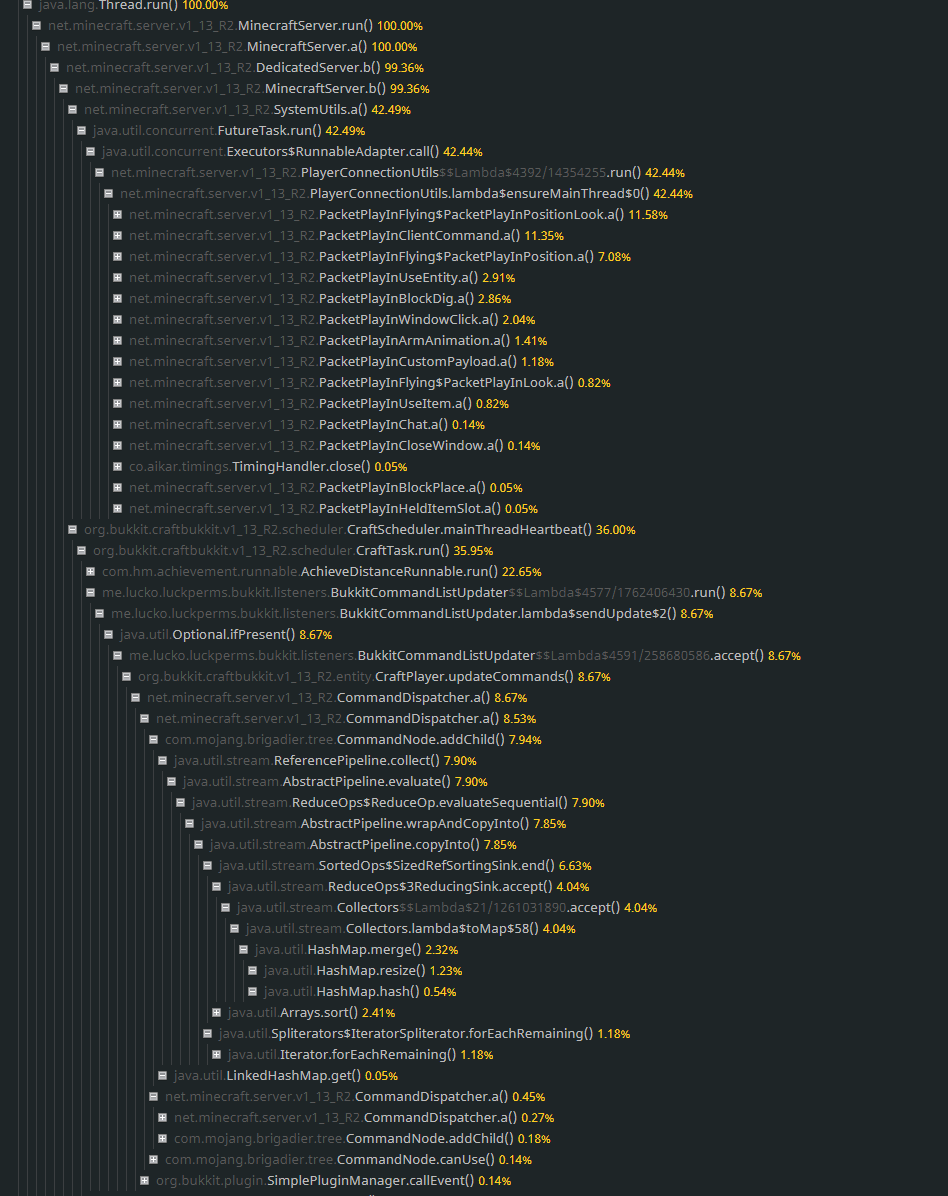
I'm seeing worsened LuckPerms performance atm than what I am used to.
https://i.gyazo.com/0346aaf03783f3a86eb4b06579b22720.png (30 sec timing 4ms interval)
https://gyazo.com/8822ca7ec67afeac9a30f1d26343c1ef (Aikar timings during 5 minutes including a lag spike)
I know it's not the only issue we have, but does look like LP isn't performing super well.
Running V5.2.76, PaperSpigot 1.13.2
MySQL with messenger service being Redis (Confirmed in the logs that it works)
Any advice much appreciated
Feel free to @ me

 prisma hinge
snow kindle
I'm seeing worsened LuckPerms performance atm than what I am used to.
https://i....
prisma hinge
snow kindle
I'm seeing worsened LuckPerms performance atm than what I am used to.
https://i....
Set update-client-command-list to false in LP config and restart, that should do the trick

 prisma hinge
Are those the last ones? What LP version are you running?
prisma hinge
Hm, well anyway, you can either regen the config or add the setting yourself  both will have the same effect on that option, your call at the end of the day lol
snow kindle
Yeah I was just wondering if I may be missing other options aswell 👍
Really appreciate the help.
Yeah I see them now.
register-command-list-data: true```Should this remain true?
prisma hinge
Yeah that's okay
That gives the fancy colors n stuff when you're typing commands in the chat box
prisma hinge
Not break, it can make the client think they have a command when they don't or vice versa when you're changing permissions on the go, but that's nothing that relogging or even just changing worlds can't fix
 strong raven
why after we type the command theres still no suffix in the server
snow kindle
Mhm alright so might softly break some things I guess.
Will have to look out for that then.
prisma hinge
Eeh I wouldn't say it breaks anything, functionally everything will be the same, just a minor visual inconvenience
prisma hinge
strong raven
why after we type the command theres still no suffix in the server
Do you have a chat plugin?
snow kindle
Oh so the cmd would be executed, provided the player had permission - Though they might be told they don't have in the chat?
prisma hinge
Yeah, you know when you type a cmd you don't have perms for it shows in red as you're typing it? Literally that
strong raven
prisma hinge
Do you have a chat plugin?
chat pulgin ?
snow kindle
Oh. Roger.
prisma hinge
strong raven
chat pulgin ?
!chat yes, read this please
wintry cloudBOT
LuckPerms does not perform any chat/tablist formatting of its own!
LuckPerms only acts as the source for prefixes / suffixes, it doesn't actually apply them. You need an appropriately configured chat/tablist formatting plugin for them to be displayed. If the values appear correctly when you run /lp user <user> info, LuckPerms is doing its job!
FAQ answer: Prefix isn't showing?
List of chat/tablist formatting plugins that work with LuckPerms
prisma hinge
Hey when i do the permissions in the web interface and copy this to the other groups and when i then type the apply command all permissions will be deleted
 zenith trail
how do you remove a single users prefix(s) using a single command?
prisma hinge
Does anyone know how to get rid of this part in an error
I just want the rest that I wrote
honest estuary
Hey, would someone be able to help me with prefix stacking? I setup my CFG just like it shows on the wiki but when I save it all prefixes just disappear. I basically want donator to have their prefix as well as rookie2, rookie3 etc. whatever their rank may be#
meta-formatting {
  prefix {
    format = [
      "highest_on_track_owner"
      "highest_on_track_default"
      "highest_on_track_rookie2"
      "highest_on_track_rookie3"
      "highest_on_track_veteran"
      "highest_on_track_veteran2"
      "highest_on_track_veteran3"
      "highest_on_track_donor"
    ]
    duplicates: first-only
    start-spacer = ""
    middle-spacer = " "
    end-spacer = ""
}```I think you meant to use highest_from_group_<group> instead of highest_on_track_..., is that possible?
prisma hinge
Thing is tracks and groups are totally different things haha
honest estuary
Right okay, I have two prefixes now but its given me the default prefix and the rookie2 prefix instead of rookie2 and donator the only two groups applied to user is rookie2 and donator 👀
Each rank inherits the previous rank which steams originally from the default rank, could this be the issue?
stems*
prisma hinge
!storage
wintry cloudBOT
LuckPerms allows you to store data in a variety of storage types, read about the benefits and drawbacks of each type on the wiki.
Read more
LuckPerms wiki
honest estuary
Was that to me?
prisma hinge
no sry
honest estuary
np
 ionic tartan
Does this plugin support placeholder api?
prisma hinge
@ionic tartan don't post in several channels
honest estuary
How can I set multiple homes for each rank that stacks?
e.g.
Player has Rookie rank (3 homes limit)
also have donator rank (5 homes limit)
but when I apply both rookie and donator rank to the player they still only have 3 homes limit from Rookie rank
tardy glacier
thats not a luckperms related issue, contact your plugin managing homes
honest estuary
Okay ty
 scenic lotus
I know it is a bit of a dumb question but I am quite new to bungeecord and have set it up on my bungeecord proxy just fine but now im stuck. I don't understand how I add command from plugins from my Bungeecord lobby server on the permissions for the groups.
When I say new to bungeecord I mean 1 day old
For example: The commands that are not scribbled out are not working.
I know I am doing something wrong which is just stupid but im new to this.
prisma hinge
did you install LP on all servers?
prisma hinge
nope
scenic lotus
Cause then wouldnt that mean I have to set luckperms up manually for each server?
prisma hinge
!network
wintry cloudBOT
If you run a BungeeCord network, learn how to correctly setup LuckPerms on all server instances (including Bungee).
Also read:
Syncing data between servers
LuckPerms wiki
scenic lotus
Thanks Ill give it a read.
prisma hinge
you can make them all work together
scenic lotus
Ohh ok.
scenic lotus
Umm is it still possible if I am running the server off of my local machine. Cause im watching a vid and it says you need a MySQL database.
prisma hinge
yeah you can install mysql on your machine
scenic lotus
Okay thats good to hear, phew. Panic moment over
scenic lotus
Thanks.
 quaint lintel
Is there anyone that can explain me why this isn't working
name: moderator
parents:
- helper
permissions:
- weight.85
- weight.75:
    value: false
- weight.80:
    value: false
- '{#e4802b}M{#e58726}o{#e68e21}d{#e8951c}e{#e99c17}r{#eaa312}a{#ecaa0d}t{#edb108}o{#efb904}r&r':
    priority: 85
He's showing the prefix helper
name: helper
parents:
- trainee
permissions:
- weight.80
- weight.75:
    value: false
prefixes:
- '{#1c23a0}H{#2c34ae}e{#3d46bc}l{#4e58ca}p{#5f6ad8}e{#707ce6}r&r':
    priority: 80
look closer
you're missing something in the mod group that is present in the helper one
one of the many reasons why you don't modify storage directly
also, setting weight "perms" to false does nothing
quaint lintel
It surely does lol 😂
And thanks
prefixes: was missing indeed
It's how I resolved the stupid prefixes from taking over.
prisma hinge
by default (unless you change some settings in config) the prefix with highest weight is the one that will be shown
totally unrelated to the group weights, that's why prefixes and suffixes have their own weights
but that's as far as LP itself is concerned, your chat plugin can do any kind of weird shit lol
quaint lintel
xD well it wasn't doing it by default iirc but I'll remove them tonight and see if it still works 😛
 velvet ferry
hi, i'm having problem with my group prefix. some of my old group has no problem with this, but a new group will has this problem. i give the example of 2 group "admin" (old) & "builder" (new). i will send 2 screenshot about this error
this result is from /lp group <group> info
this result is from /lp group <group> meta info
you can see when i run /lp group builder info, there is no prefix in there. but when i run /lp group builder meta info, the prefix shows
wintry cloudBOT
Please use pastebin!
Seeing a paste of the problem makes everything so much easier! Use https://bytebin.lucko.me/ for easy pasting!
For console errors:
Pastebin any relevant segments of the console log. If it's a startup error, this includes the entire startup log!
Other errors:
Pastebin the entire LuckPerms config file (passwords removed) as well as any other relevant files!
velvet ferry
ahhh, i remember i changed the config a month ago to change the prefix stacking. but i'm not sure if that what causes this error
prisma hinge
most likely, sounds to me you forgot to add builder to the staff track :d
scenic lotus
Umm Fefo, so I installed the mysql thing and now Im stuck. I watched a few videos but I dont understand how to create the database
It comes up with this,
I know this isnt really plugin support but I would take a shot as you advised me, but if you dont know thats okay.
Wait I figured it out, dont worry.
scenic lotus
Okay no now I am stuck
So I have the mysql created
And it lets me connect to it, but when I put the information into the config of the luckperms files it errors in console
wintry cloudBOT
Please use pastebin!
Seeing a paste of the problem makes everything so much easier! Use https://bytebin.lucko.me/ for easy pasting!
For console errors:
Pastebin any relevant segments of the console log. If it's a startup error, this includes the entire startup log!
Other errors:
Pastebin the entire LuckPerms config file (passwords removed) as well as any other relevant files!
pale pond
@scenic lotus
scenic lotus
Let me get it quickly
I think this is what you need
I am quite new to this so I am probably doing something wrong
daring stirrup
Database doesnt exist
 hexed wren
Pls help
wintry cloudBOT
Please use https://bytebin.lucko.me to send files in the future. I have automatically uploaded message.txt for you: https://bytebin.lucko.me/IvL4oWgPdy
tidal blade
it can't hurt to try again
tardy glacier
try trying trying again, again
scenic lotus
Hello so I am having an error, it was happening yesterday aswell but I think I am getting somewhere. I am trying to connect my luckperms to a MySQL database but it keeps refusing and produces this error, Im not that good at reading errors so here is the link https://bytebin.lucko.me/Uq0F6V8Gyx, I have made the database and it is running but doesn't seem to work. I have attached an image below of the database which has an account added to it called root with a password.
Im using XAMPP btw for the MySQL service.
If you need anything else let me know and I will try and get it.
 primal nexus
@scenic lotus is it on same machine?
if so don't use localhost:3306
jsut keep as localhost
scenic lotus
So I dont need the port?
primal nexus
if its default port, no
primal nexus
make sure ur pass is correct
scenic lotus
I will try reset it
primal nexus
my config, cleanest
storage-method: mysql
data:
  address: localhost
  database: luckperms

  username: root
  password: '[ReDaCteD]'
😄
scenic lotus
That is clean tho
 merry sparrow
primal nexus
my config, cleanest
merry sparrow
primal nexus
my config, cleanest
lo hiciste mal
porque pusiste password?
por eso te falla
debes borrarla

 primal nexus
why did you put a password?
that's why it fails you
you have to erase it```no puede haber password
primal nexus

primal nexus
did u even setup a pass at all
scenic lotus
Wait I know why
primal nexus

merry sparrow
scenic lotus
Wait I know why
Clear mysql password
You should not put any, that goes blank
scenic lotus
Tbh I think it bugged cause I did put something xD
merry sparrow
and the host is localhost: 3306 or 127.0.0.1:3306
primal nexus
@merry sparrow how about you stop with trolling?
merry sparrow
scenic lotus
Tbh I think it bugged cause I did put something xD
Delete the password from the mysql file and delete from the luckperms configuration file and save it and it will connect you
primal nexus
this guy..
merry sparrow
primal nexus
<@!336943498710220800> how about you stop with trolling?
What if you do it?
scenic lotus
xD
primal nexus
cas clap him for me
primal nexus
bc that guy is trolling
merry sparrow
daring stirrup
Why would you *not* want a password on **root**?
It can not
merry sparrow
primal nexus
bc that guy is trolling
The one who trolls is you
merry sparrow
daring stirrup
and *should*
It is not necessary, since it will not connect with mysql
daring stirrup
turn off pings
merry sparrow
xd?
daring stirrup
You probably shouldn't even use root for databases
and root automatically has a password
merry sparrow
primal nexus
jsut a tip. last guy who anoyed me got banned from whole discord
You should be banned for being who you are, at least I help, not like you
Surely you are not a developer
xd
primal nexus
stop pinging me, ur blocked so it doesnt notify me
merry sparrow
xd
daring stirrup
I'm going to make it so everyone can login to root on my vps, good idea right?
merry sparrow
You block someone for no reason, what a bad person you are
But root in localhost mode will not have password
daring stirrup
It does tho
What if you fuck up your firewall and suddenly people can login to root
merry sparrow
It's called "some password" and you must delete that if it doesn't connect you
daring stirrup
???
merry sparrow
He use his pc, not vps, didn't you read it?
vps and your pc are two different things
daring stirrup
meh
merry sparrow
xd
scenic lotus
Why does everything have to be so complicated these days, Why cant its be bing bang bosh and you are done instead of bing bang bosh x1,000
merry sparrow
WTF
scenic lotus
Can 2 users not have the same password?
primal nexus
scenic lotus
Why does everything have to be so complicated these days, Why cant its be bing b...
Never had issues
scenic lotus
Is that why it isnt working
primal nexus
Passwords dont matter
scenic lotus
So this should be correct now shouldnt it?
Still getting the same error in console I think
I don't see anything different
merry sparrow
As long as you have a password in mysql, it won't go
Tested by youtubers and by me
scenic lotus
primal nexus
jsut keep as `localhost`
Are you sure I don't need to address the port because in the config it says "define the address and port for the database"
merry sparrow
scenic lotus
Are you sure I don't need to address the port because in the config it says "def...
yes
primal nexus
look at my config
merry sparrow
Being on your pc, it is not necessary port
scenic lotus
Oh yeah
I created a new user to see if it will work
Ima test it quick
YAYY
All I needed to do was make a new user account
And I spent 3 hours trying to figure that out
xD
I hate my life
You know I was watching a video on how to setup luckperms across bungeecord servers and what took him 2 minutes took me 3 hours, thats only because he was using a server host that was promoting his video
Now I can actually continue following it
daring stirrup
merry sparrow
Being on your pc, it is not necessary port
You don't have to put the port at all if it's 3306
merry sparrow
I said that
 forest granite
What i have to put to "Group Name" to make permissions for everyone in the server
 spare ginkgo
Please can someone help. For some reason my group suffix isn't being shown beside my name even though /lp user RocketManKian meta info shows it is.
prisma hinge
Does it show in /lp user <user> info?
 waxen haven
Could anyone help me migrate from BungeePerms, I can't get it to recognise /migrate-bungeeperms
LuckPerms and the Migration jar are both installed in the BungeeCord plugins folder and the Spigot plugins folder, I already setup the MySQL settings in the LuckPerms config
prisma hinge
Any errors in console during startup?
prisma hinge
Just to make sure, where are you running the migration command?
waxen haven
I tried running it on both consoles and in game
prisma hinge
Do you have BungeePerms installed on the proxy to perform the migration?