#support-2
1 messages · Page 69 of 1
 ashen mountain
 prisma hinge
mk
 dusty zodiac
Hey guys, I'm looking to get permissions for various plugins (such as essentialsx) to be assigned to LPB groups across the whole network so I don't have to make new groups for each individual server. Would it work if I connect all the Luckperms plugins to MySQL and configured the permissions with the /lpb editor command?
 tame hollow
That's the recommended method yes
Although it won't matter whether you use lpb or lp commands at that point
prisma hinge
I mean if everything is connected to the same database, you can run any lp command anywhere
you can also generate an editor link in one server and apply the changes in another 
dusty zodiac
Sweet. Thanks for the help guys 😄
 hollow steeple
prisma hinge
hollow steeple
prisma hinge
!commands see Parent commands, more specifically the addtemp command
 wintry cloudBOT
Find all of the available LuckPerms commands on the wiki.
Read more
General commands
User commands
Group commands
Permission commands
Parent commands
Meta commands
Track commands
Log commands
 LuckPerms wiki
dusty zodiac
LuckPerms wiki
dusty zodiac
So, once I switched my Luckperms to MySQL I noticed I couldn't get /lpb to work. That's when I realized that the LP API wasn't loading on startup and was spitting out at error which messed up my chat plugin BungeeChat. Not sure if this error relates to BungeeChat or LP but I think something in my config of LPB is crashing the API. https://pastebin.com/1q5TrVSk https://pastebin.com/MARR324k
Pastebin
Pastebin.com is the number one paste tool since 2002. Pastebin is a website where you can store text online for a set period of time.
Pastebin
Pastebin.com is the number one paste tool since 2002. Pastebin is a website where you can store text online for a set period of time.
 daring stirrup
@dusty zodiac what lp version
dusty zodiac
5.2.49
dusty zodiac
I had a missing space in my config file. Problem solved
 proper pulsar
❤️
dusty zodiac
❤️
 tall sparrow
What is the permission node to assign all luckperms bungee commands?
 tidal blade
!usage
wintry cloudBOT
Here's a guide to help users understand and use LuckPerms for the first time.
Read more
LuckPerms wiki
tidal blade
!bungee
wintry cloudBOT
If you run a Bungeecord network, learn how to correctly setup LuckPerms on all server instances (including Bungee).
Also read:
Syncing data between servers
LuckPerms wiki
tall sparrow
No, well I meant what is the luckperms bungee permission node
Like Im not sure if its the same as luckperms.*
prisma hinge
it is
tall sparrow
So doing lpb user <user> permission set luckperms.* will grant all permissions right
prisma hinge
myes
tall sparrow
Thank u
 frigid rapids
!chat
wintry cloudBOT
LuckPerms does not perform any chat/tablist formatting of its own!
LuckPerms only acts as the source for prefixes / suffixes, it doesn't actually apply them. You need an appropriately configured chat/tablist formatting plugin for them to be displayed. If the values appear correctly when you run /lp user <user> info, LuckPerms is doing its job!
FAQ answer: Prefix isn't showing?
List of chat/tablist formatting plugins that work with LuckPerms
 zealous tartan
Well, I've been trying to get something for a while but I can't.
I want to assign 2 groups to 1 player and see the prefix of one, and the suffix of the other. I don't know if I explain myself.
I have not found documentation that explains me something like that, thanks!
 quick lagoon
and so what exact is not working as expected?
and what have you tried?
!chat note this as well
wintry cloudBOT
LuckPerms does not perform any chat/tablist formatting of its own!
LuckPerms only acts as the source for prefixes / suffixes, it doesn't actually apply them. You need an appropriately configured chat/tablist formatting plugin for them to be displayed. If the values appear correctly when you run /lp user <user> info, LuckPerms is doing its job!
FAQ answer: Prefix isn't showing?
List of chat/tablist formatting plugins that work with LuckPerms
zealous tartan
quick lagoon
and so what exact is not working as expected?
I want that if I assign 2 groups to a player, the prefix of the 1 group and the suffix of the 2 group will be seen.
What happens when assigning it, is that only the prefix of the 1 group is shown by priority.
 jade perch
!meta stacking
wintry cloudBOT
You can set prefixes, suffixes and other meta data in LuckPerms for players and groups. Note that LuckPerms does not manage chat. You need to use another plugin to show prefixes/suffixes in chat.
LuckPerms wiki
 ancient badge
hola
 chrome lark
How do I enable advanced target selectors?
like @a and stuff. It says player not found,
 pale pond
Make sure you have resolve-command-selextors or something set to true in los condig
chrome lark
got it , thanks!!
 tardy glacier
@prisma hinge
wintry cloudBOT
Hey aberdeener! Please don't tag helpful/staff members directly.
tardy glacier
all channels 
prisma hinge

tardy glacier
good mod
 sleek turret
 olive gorge
So is there anyway to paste a lot of nodes all at once
I have a few hundred perms I need to paste
and adding them 1 by 1 may kill me
prisma hinge
In the editor you can copy/paste many nodes at once
Just have them separated by spaces or newlines
 arctic mesa
Hi, having an issue where I've moved SQL (mariadb) from 1 machine to another, setup the db exactly as it was on the old machine but luckperms won't connect to it when starting the server? Credentials are the same, it works if I try to login directly in command line but for some reason luckperms can't - any ideas?
arctic mesa
it's localhost and 3306 is open
daring stirrup
Who knows
arctic mesa
database is created
tardy glacier
any specific errors in console? likely firewall or your mariadb user cant access from another ip
daring stirrup
Pterodactyl?
arctic mesa
connection refused is the only error
yeah pt panel
but panel and daemon on same machine
daring stirrup
Check pinned
arctic mesa
beauty cheers
ancient badge
quien de aqui sabe del luckperms
daring stirrup
Dont x post
 round sail
Que necesitas @ancient badge ?
 fresh flame
Hola, más o menos qué permisos puedo poner en el rango ** "predeterminado" **
Hay demasiados permisos y la verdad me confunde un poco
Hi, more or less what permissions can I put in the ** "default" **
There are too many permissions and the truth confuses me a bit
 violet vault
@torn coral could you run /lp user <name> info on your friend?
violet vault
ye, ingame
violet vault
can u give me a screenshot of what it says
violet vault
do you want the mod group to replace default or exist alongside it
 torn coral
violet vault
do you want the mod group to replace default or exist alongside it
torn coral
violet vault
do you want the mod group to replace default or exist alongside it
exist alongside
violet vault
so a track isn't what would be best for that case
a track is setup so u can replace things
what u would want is to set the parent of the user
!usage
wintry cloudBOT
Here's a guide to help users understand and use LuckPerms for the first time.
Read more
LuckPerms wiki
torn coral
violet vault
you want <https://luckperms.net/wiki/Parent-Commands>
i have made a group
violet vault
(btw, would you prefer to speak in spanish? i'm currently learning spanish in school and know just enough to get by with a dictionary)
violet vault
porque quieres mod exista con default, no nessecita que usa /lp track y /lp user <user> promote
torn coral
yo quiero hacer un nuevo rango que se llame mod y darselo a mi amigo
violet vault
a darselo a un amigo sin reemplezar el rango que tiene hoy, use /lp user <user> parent add <rango>
violet vault
de nada, si nesecita ayuda solo preguntanos - la documentacion solo es en ingles (por lo que se) y es muy tecnico
torn coral
okey
torn coral
@violet vault sabes como hacer para que en el chat aparesca mod y en el tab tambien?
violet vault
usas una plugin del chat y tab?
luckperms no cambia lo tab y chat - nesecita Vault y un otra plugin del tab y chat
torn coral
violet vault
luckperms no cambia lo tab y chat - nesecita Vault y un otra plugin del tab y ch...
Okey
torn coral
violet vault
luckperms no cambia lo tab y chat - nesecita Vault y un otra plugin del tab y ch...
el vault plugin es un plugin de chat o de economia
??
violet vault
no, vault ayuda con los plugins del chat, economica, permisos, y tab.
torn coral
oh, okey
 frank ember
yes
proper pulsar
If in doubt just give it a try @celest hamlet
That’s on you then. Always have at the very least a local server for testing if working on the live server doesn’t work
 tranquil ridge
If I wanted to add context of server=rayquaza to all my permissions/user which have the context of none set, how would I do that? Would I use /lp bulkupdate all update global "server == rayquaza"?
 ember basin
Hello, I wanted to know if it was possible to add multiple permissions in one order?
frank ember
tranquil ridge
If I wanted to add context of ``server=rayquaza`` to all my permissions/user whi...
I think you'd swap global and rayquaza but you should make a backup before trying it anyways
it'd also be update server rayquaza
prisma hinge
I am having some issues with the prefixes. I set one to a group but it simply doesn't show up in the in-game chat
frank ember
!chat
wintry cloudBOT
LuckPerms does not perform any chat/tablist formatting of its own!
LuckPerms only acts as the source for prefixes / suffixes, it doesn't actually apply them. You need an appropriately configured chat/tablist formatting plugin for them to be displayed. If the values appear correctly when you run /lp user <user> info, LuckPerms is doing its job!
FAQ answer: Prefix isn't showing?
List of chat/tablist formatting plugins that work with LuckPerms
prisma hinge
darn, nucleus made it so much easier 😅
 spare pier
hello!
i have an issue with luckperms
i have configurated prefix and it worked fine
but today it just stopped
as i said my prefix is configurated fine but when i go in to the lp user info i dont see any prefix
prisma hinge
screenshot both /lp user <user> info and /lp user <user> meta info please
spare pier
spare pier
i dont understand
spare pier
but i did nothing
prisma hinge
and
/lp user <user> meta info
spare pier
im felling something bad 😄
prisma hinge
They do have a prefix, it's totally empty (it has no characters in it) but it has a world context hmmmm.....
spare pier
i tried to use name changer plugin
prisma hinge
Looks like some plugin is adding an empty prefix to the user itself through Vault
spare pier
EazyNicks
but the weird thing is that i know that the plugin made this issue. but i went with backup where everything is fine
but the issue remains
prisma hinge
Did you..... delete the plugin?
spare pier
yes
prisma hinge
And did you remove the empty prefix?
spare pier
i havent even used that
on that backup
and it worked in that time
what empty prefix?
i dont see any empty prefix in web editor

LuckPerms - A permissions plugin for Minecraft servers.
LuckPerms is a permissions plugin for Minecraft servers. It allows server admins to control what features players can use by creating groups and assigning permissions.
spare pier
how can i edit it?
spare pier
ohh okay!!!
i seee
ufff. i should know this sooner 😄
i needed to go with yesterday backup 😄
tardy glacier
Fefo saved the day again
prisma hinge

prisma hinge
having some issues with bold (&l) it's not appearing in prefixes
prisma hinge
EssentialsX
pale pond
!moss
wintry cloudBOT
Essentials
Make sure you are using EssentialsX and Vault for prefixes. For any other issues with Essentials, you should seek support in either #general or the official EssentialsX support Discord.
EssentialsX Discord
pale pond
ask here ^
 left ivy
Heey guys its me again
Last time someone told me to look at GriefDefender (if im right fefo did :)) so I did. Sadly its too complicated for the players on the server so I am going back to GriefPrevention.
How do i enable the extra context for it? Icant really find anything within ExtraContext or GriefPrevention.
prisma hinge
well because EC doesn't provide GP contexts
left ivy
mhm i just checked it 😛
Do i need to make myself a extension plugin to create those context?
left ivy
hehe i dont think they will do that 😛
 full flume
Gd and gp from a player perspective are basically the same?
 mighty yarrow
^
Not to mention GP is not supported/maintained anymore
Really should be sticking with GD
full flume
Well if it's spigot then GP is being "maintained" by the community as I understand it.
 wind pelican
im in minecraft bedrock but when when i install the luckyperms plugin the fawe world edit doesnt works
does any one knows how to fix?
prisma hinge
!paste your server logs please.. wherever that is on bedrock
wintry cloudBOT
Please use pastebin!
Seeing a paste of the problem makes everything so much easier! Use https://bytebin.lucko.me/ for easy pasting!
For console errors:
Pastebin any relevant segments of the console log. If it's a startup error, this includes the entire startup log!
Other errors:
Pastebin the entire LuckPerms config file (passwords removed) as well as any other relevant files!
mighty yarrow
full flume
Well if it's spigot then GP is being "maintained" by the community as I understa...
Ahhhh ok
 tall raft
Is it possible to set up a permission where, once a player is added to a lp group, they become a "member" of a world guard region?
Basically trying to setup a "once player is lp group, they are allowed to build/break in specific wg region
tall raft
I thought I tried that and it didn't seem to work
or maybe I goofed something else up along the way
Thank you for confirming that it is hopefully that simple haha
prisma hinge
eeh that is more of a worldguard question, let's move to #general and I'll try to help you out :d
tall raft
Thanks sounds good
mighty yarrow
!downloads
wintry cloudBOT
You can download LuckPerms for Bukkit/Spigot, BungeeCord, Sponge, Nukkit and Velocity.
Additional downloads
mighty yarrow
Become the luckperms
 iron pollen
Although I've been able to set it so that way I can only tpa or use any various comands for the default group in my main world, I find that I can still do /f home in a world that I have not given anyone permissions to access that command in
I asked my server support and was sent here
prisma hinge
!bugreport @cerulean pendant submit your issue in the github repo and please follow the issue template
wintry cloudBOT
Suggestions and Bug Reports
If you would like to request a feature for LuckPerms, or report a bug, feel free to open an issue on GitHub!
Issue Tracker:
 cerulean pendant
okie
cerulean pendant
prisma hinge
!bugreport <@!611976655619227648> submit your issue in the github repo and *plea...
i dont see how i can follow this as it isnt an issue im having to do with setting perms to people, its a joining issue?
cerulean pendant
yes i do but i feel i need to remove that section
quick lagoon
well yea, bcu its an example
cerulean pendant
alright then
quick lagoon
you replace it with the real thing
we really need to add a big notice to replace it with the actual issue lol
tidal blade
Yeah hahah
tidal blade
I need to setup templates for all mine too hahah....
cerulean pendant
does anyone know the /version comamnd for bungee/waterdog
cerulean pendant
no, waterdog
prisma hinge

tidal blade
Waterdog... interesting. Is there a Watercat
 karmic stone
lmao
cerulean pendant
Waterdog is waterfall for bedrock edition
prisma hinge
Waterdog is fork of the well-known Waterfall, which is a fork of the well-known BungeeCord
I see
it's 
prisma hinge
Hey, anyone know what command to run in game on a voucher, which recognises the player name and updates their name in luckperms. Tag me if you know thanks!
@prisma hinge don't cross post
Oh sorry
 sweet steeple
Does luckperms change your nametag if your in a group with a prefix?
wintry cloudBOT
LuckPerms does not perform any chat/tablist formatting of its own!
LuckPerms only acts as the source for prefixes / suffixes, it doesn't actually apply them. You need an appropriately configured chat/tablist formatting plugin for them to be displayed. If the values appear correctly when you run /lp user <user> info, LuckPerms is doing its job!
FAQ answer: Prefix isn't showing?
List of chat/tablist formatting plugins that work with LuckPerms
 fickle linden
ok
I made a mistake
anyway to undo?
I did the wrong editor link
and now its changed everything

prisma hinge
No need to cross post
We are all in the same server, and it won't make help come any faster
fickle linden
I realised the other guy was getting help
so I changed channel as to not get in the way
fickle linden
anyway to undo a editor edit?
prisma hinge
non, not an easy thing to implement sadly; what you can do is go through your /lp logs and undo the changes manually
Yeah.... it sucks.. but there is no easy way to make an undo command
sweet steeple
i gave my friend mod group and hes tag over hes skin was %animation-mod.thing i dont remember%
prisma hinge
!formatting
wintry cloudBOT
LuckPerms does not perform any chat/tablist formatting of its own!
LuckPerms only acts as the source for prefixes / suffixes, it doesn't actually apply them. You need an appropriately configured chat/tablist formatting plugin for them to be displayed. If the values appear correctly when you run /lp user <user> info, LuckPerms is doing its job!
FAQ answer: Prefix isn't showing?
List of chat/tablist formatting plugins that work with LuckPerms
fickle linden
I fixed all the mistakes
sweet steeple
im not using essentials
 fresh saddle
How would give the command block permission to perform these actions?
fickle linden
maybe to ensure there isn't any confusion in that sense, could you get the time codes of when the specific editing sessions were created and give a warning when applying the command saying "are you sure you want to do this because there was an editing session made after the current one"
prisma hinge
sweet steeple
im not using essentials
never claimed you do
 shrewd lark
how do I make prefixes that show up
violet vault
!formatting
wintry cloudBOT
LuckPerms does not perform any chat/tablist formatting of its own!
LuckPerms only acts as the source for prefixes / suffixes, it doesn't actually apply them. You need an appropriately configured chat/tablist formatting plugin for them to be displayed. If the values appear correctly when you run /lp user <user> info, LuckPerms is doing its job!
FAQ answer: Prefix isn't showing?
List of chat/tablist formatting plugins that work with LuckPerms
 high raven
fickle linden
maybe to ensure there isn't any confusion in that sense, could you get the time ...
high raven
fickle linden
maybe to ensure there isn't any confusion in that sense, could you get the time ...
That's worth making an issue on GitHub for imo
!suggest
wintry cloudBOT
Suggestions and Bug Reports
If you would like to request a feature for LuckPerms, or report a bug, feel free to open an issue on GitHub!
Issue Tracker:
tame hollow
fickle linden
maybe to ensure there isn't any confusion in that sense, could you get the time ...
I've been meaning to add a note to the editor when you load up a session that has been saved which should help with this problem. Would only work on a single computer though
 ocean sequoia
Hola
Oigan nose si es un problema de donde hago mi servidor pero vi tutoriales donde editan un Rango por una carpeta llamada "groups" pero ami no me aparece eso
tengo que agregar permisos,etc. desde el Minecraft
prisma hinge
El tipo de almacenamiento predefinido no permite editar los permisos directamente en los archivos (almacenamiento tipo texto (yml, json, etc) es común que haya fallas introducidas por modificarlos manualmente y es propenso a errores)
Para editar los permisos es recomendable que utilice el editor web /lp editor
prisma hinge
Si
pale pond
puerdo ir al bano?
mighty yarrow
Oui
 ebon hedge
excuse me, i want ask something
quick lagoon
uh sure, just ask
 dreamy kayak
I followed this guide to switch from h2 storage to MySQL:
https://luckperms.net/wiki/Switching-storage-types
However, it didn't transfer my user data and according to the documentation:
https://luckperms.net/wiki/General-Commands#lp-import-file
it only will leave out your user data if you provide the flag --without-users, which I did not include.
So how can I transfer over all my data from the h2 database to MySQL?
Help would be greatly appreciated. Thank you!
Please tag @dreamy kayak when you reply. Else I may not see.
prisma hinge
It should transfer it just fine
Can you switch back to h2 and rerun the export command? See if it throws any errors or something
pale pond
@dreamy kayak ^
prisma hinge
Ts :^)
dreamy kayak
I'll try that, thanks
[09:49:16 INFO]: [LP] EXPORT > Gathering group data...
[09:49:16 INFO]: [LP] EXPORT > Gathering track data...
[09:49:16 INFO]: [LP] EXPORT > Gathering user data...
[09:49:16 INFO]: [LP] EXPORT > Finding a list of unique users to export.
[09:49:16 INFO]: [LP] EXPORT > Found 17 unique users to export.
[09:49:17 INFO]: [LP] EXPORT > Finished gathering data, writing file...
[09:49:17 INFO]: [LP] Successfully exported to /home/container/plugins/LuckPerms/transfertomysql2.json.gz.```No issuesI'll try again for importing
Ah it worked that time. Peculiar. Well, thanks! 🙂
prisma hinge
Hai dijo el gringo
daring stirrup
Yes
mighty yarrow
!verbose
wintry cloudBOT
LuckPerms provides a verbose command to help you find out what permissions a command/plugin is checking.
Read more
LuckPerms wiki
prisma hinge
!testperms
wintry cloudBOT
Sorry! I do not understand the command !testperms
Type !help for a list of commands.
prisma hinge
Boo hoo
prisma hinge
Yes, I am extremely disappointed in you, aberdeener
prisma hinge
tardy glacier
I haven't spoken to u ALL YEAR lol!!!!!!
This
tardy glacier
It's 330am I tried my best
prisma hinge
Righto
prisma hinge
Oki
 paper flower
prisma hinge
paper flower
prisma hinge
Don't cross post
 bright star
Hello, i need help could some help me? I get a "Classnotfoundexception error" on my Console
wintry cloudBOT
Please use pastebin!
Seeing a paste of the problem makes everything so much easier! Use https://bytebin.lucko.me/ for easy pasting!
For console errors:
Pastebin any relevant segments of the console log. If it's a startup error, this includes the entire startup log!
Other errors:
Pastebin the entire LuckPerms config file (passwords removed) as well as any other relevant files!
bright star
Yes of course, https://bytebin.lucko.me/gbbUxJcN90
here is what you need Unix
@pale pond ?
wintry cloudBOT
Hey Marcoo! Please don't tag helpful/staff members directly.
daring stirrup
Some plugin is trying to load the api before luckperms started
bright star
How can I load luckperms first or faster ?
daring stirrup
net.brutalverzockt.proxysystem.main.ProxySystem this plugin
daring stirrup
no, they either don't (soft)depend on luckperms or try to initialize the api statically (on runtime iirc)
bright star
Okay, but know I have the problem that the "API is not loaded" and looked after tips and my config is depending on LuckPerms what should I do
daring stirrup
tell the author of the plugin to soft- or hard depend on luckperms
daring stirrup
can you show your code where you load the api
 crimson pasture
i just looked into this chat so im not very sure of your problem but if I were you, i'd do something like this:
public static LuckPerms api;

@Override
public void onEnable() {
  api = LuckPermsProvider.get();
}
i'd load the API in the onEnable method
bright star
thanks it worked
crimson pasture
:+1:
 lyric spoke
very possibly a stupid question: must a track include the default group as a first group in the track?
prisma hinge
non
 bleak portal
helo
prisma hinge
henlo
prisma hinge
mhm
daring stirrup
yes
bleak portal
so uh
prisma hinge
generals are support channels
daring stirrup
!nw
wintry cloudBOT
Please tell us what's going on!
We really would absolutely love to help you out! However, telling us that it isn't working wastes everyone's time. Please, just describe the issue you're having clearly and with as much detail as possible, and send any relevant screenshots of whatever problems you're having.
For Console Errors:
bleak portal
wat
daring stirrup
how are they not working
daring stirrup
less lines, more content
bleak portal
sowy
daring stirrup
can you give an example of a permission/command that isn't working and send an editor link
daring stirrup
!testpermissions
wintry cloudBOT
Sorry! I do not understand the command !testpermissions
Type !help for a list of commands.
daring stirrup
!testperms
wintry cloudBOT
Sorry! I do not understand the command !testperms
Type !help for a list of commands.
daring stirrup
!testingperms
wintry cloudBOT
How-to test permissions
Small list of things for you to make sure when testing permissions:
1. Don't test as op, your players/general staff will most likely not have op
2. Make sure you don't have any special permissions (e.g. * or the same permission you are testing) on your user (/lp user <user> permission info)
3. Make sure your parent groups are the ones the target audience you are testing will have (if you are testing mod perms, don't have owner as parent)
4. Use verbose to see exactly what's going on, what permissions are being checked
Also read:
daring stirrup
do that
bleak portal
do i have to read or?
daring stirrup
to make it faster, screenshot the output of /lp verbose command <player that can't do /afk> afk
bleak portal
ok
prisma hinge
bleak portal
do i have to read or?
Reading is an extremely useful ability
I suggest it
mighty yarrow
wait what did you say
 bleak portal
o
pale pond
you could try using verbose record and then having them leave and rejoin 🤷♂️
bleak portal
ok
 paper vale
Hi. I’m trying to set up a small pixelmon server and I want to allow my players to use the journeymap TP option, the checkspawns command, claimit for bases, and kits. I already put the perms in the default group in the web editor and applied it, but it still doesn’t allow me to use my specified commands without OP. If it helps, I’m hosting the server on aternos, I only have one group, and my only plugins are KitsCreator, LuckPerms, and Vault. Thanks for the help!
wintry cloudBOT
LuckPerms provides a verbose command to help you find out what permissions a command/plugin is checking.
Read more
LuckPerms wiki
paper vale
I can send an editor link, but where should i send it?
wintry cloudBOT
It is safe to send an editor link in public.
Any changes made in the editor have to be applied using the /lp applyedits command - impossible unless the person with the link is also connected to the server and with the required in-game permissions to use LuckPerms commands. It's effectively just as safe to share an editor link as it would be to share a screenshot of your permissions or a pastebin of a configuration file. The editor doesn't contain any sensitive data (except perhaps player names).
More Information:
Concerns about the proprietary nature of your permissions setup?
Please, don't be. We're here to help, not steal your permissions setup. Additionally, permissions can be tested by players simply joining your server and seeing what they can do.
paper vale
LuckPerms - A permissions plugin for Minecraft servers.
LuckPerms is a permissions plugin for Minecraft servers. It allows server admins to control what features players can use by creating groups and assigning permissions.
im pretty sure i got all the perms for the commands i wanted based on the plugin's description and pixelmonwiki commands page
i got the journeymap tp working earlier with forgeessentials but idk if that would clash with luckperms
i already uninstalled forgeessentials too
paper vale
Im running magma as thats the only thing that allows me to use mods and plugins on aternos
mighty yarrow
preeeettty sure magma remaps some perms, may be good to run a verbose cause it's likely remapping like, the pixelmon ones to minecraft.command.checkspawns
seen this before
!verbose
wintry cloudBOT
LuckPerms provides a verbose command to help you find out what permissions a command/plugin is checking.
Read more
LuckPerms wiki
mighty yarrow
can do /lp verbose record , then run a command you should have access too, then /lp verbose upload and send the link here
paper vale
alright will do right now
mighty yarrow
yea, those pixelmon perms should work i can tell ya that, but magma is an oddity
same with journeymap
paper vale
Wait im kind of confused with the verbose thing. Do i run those commands with my character when it is deopped?
paper vale
when i do /lp verbose record with my non op character, it just says Running LuckPerms v5.2.35. It says the same thing when i do /lp verbose upload
paper vale
Yeah ill do it with op right now
wait i think i did it wrong lmao. it shows nothing in the verbose viewer
mighty yarrow
do the record, then do the relevant command, then do upload
paper vale
I did all the commands then upload lol
Alright I did record. then I did the checkspawns command. then upload but its still blank?
LuckPerms - A permissions plugin for Minecraft servers.
LuckPerms is a permissions plugin for Minecraft servers. It allows server admins to control what features players can use by creating groups and assigning permissions.
this is the link it gave me
prisma hinge
Screenshot /plugins please
paper vale
prisma hinge
Question tho
Having SpongeForge with LP for sponge and Nucleus that has kits, why run magma?
mighty yarrow
Aternos
prisma hinge
Right..
paper vale
Yeah idk any other free server hosters that allows modpacks
prisma hinge
I'm not sure if it was magma but I know there was one hybrid server that had a broken perms system
mighty yarrow
catserver?
prisma hinge
No idea tbh
paper vale
jesus lol
mighty yarrow
not sure why it does that
mighty yarrow
oo apparently there's a bukkitPermissionHandler in the config
maybe disabling that puts it all back to normal
then again idk jack crap about magma (or anything except sponge tbh) except that's weird
paper vale
Adding that thing didnt work so Ill be trying that bukkitPermissionHandler thing right now
No luck. Thanks for the help anyways. Will be researching more on magma and this perms thing
mighty yarrow
Might be good to ask in magma discord
paper vale
Sounds good. Thanks once again
ocean sequoia
Hola
tengo una duda
desde la pagina para editar el plugin luckperms,no puedo importar rangos?
@prisma hinge
wintry cloudBOT
Hey _Juzo! Please don't tag helpful/staff members directly.
 molten nebula
Hi !
I come here to find out if it is risky to put LuckPerms on your Bungee, because a lot of people say it is risky, so I prefer to come and ask here
daring stirrup
no?
molten nebula
Ok ! Thank you !
proper pulsar
I’d love to know where you got that idea from tbh
proper pulsar
molten nebula
Ok ! Thank you !
First time I’ve heard that
Oops. Replied to the wrong message. I meant the one where you said it’s risky
quick lagoon
Ye, really wonder who said that lol
molten nebula
I don't know why I was told this, but I preferred to come and ask just in case here
proper pulsar
molten nebula
I don't know why I was told this, but I preferred to come and ask just in case h...
That’s ok. We’re interested to know where you’ve been told that
molten nebula
I asked a friend System Administrator, and after on another discord I was told that in any case there was a problem with LuckPerms Bungee, that's why I came to ask you this question, it was to be sure
 jaunty aspen
@jaunty aspen
tardy glacier
@tardy glacier
jaunty aspen
@tardy glacier
 twilit pelican
is there a way to change my storage data from H2 to YAML without loosing any permissions and groups?
prisma hinge
!switch
wintry cloudBOT
If you wish to change your storage type (e.g. to YAML or MySQL) you may need to follow these instructions to ensure your groups and permissions are migrated to the new storage type.
Read more about the Storage types
LuckPerms wiki
twilit pelican
thanks :)
twilit pelican
how do i add ranks to players that is not found
im doing a reset so i deleted all user files, then im gonna give the ranks to players who have ranks
i can get their uuid so do i just manually create files for them?
 atomic egret
You can use the parent add command with their uuid as a parameter
for example /lp user 2fbe3e3e-50c3-482c-872b-28386fd91704 parent add vip works fine
prisma hinge
yes
mighty yarrow
!downloads
wintry cloudBOT
You can download LuckPerms for Bukkit/Spigot, BungeeCord, Sponge, Nukkit and Velocity.
Additional downloads
 nocturne wyvern
so Weight 1 would be member
 quaint idol
Most important groups should have the most weight
quaint idol
We recommend spacing the weights out to leave room for adding new groups, but otherwise yes
nocturne wyvern
I have all of my groups
dont think i need to add more but i'll try it out
thank u :)
quaint idol
Doesn't hurt to do it, could save you 10 minutes reshuffling weights down the line if you do choose to add a new one
yw!
nocturne wyvern
And for bungee commands you add the permission and groups onto bungee?
like staff chats, report systems
all go on bungee and backend servers
proper pulsar
!bungee
wintry cloudBOT
If you run a Bungeecord network, learn how to correctly setup LuckPerms on all server instances (including Bungee).
Also read:
Syncing data between servers
LuckPerms wiki
proper pulsar
It’s best if you sync all your LP instances
wintry cloudBOT
You can set a permission or group on a per-world/per-server basis, through what we call "contexts".
Read more
LuckPerms wiki
nocturne wyvern
so migrate from pex then /lp sync?
proper pulsar
nocturne wyvern
so migrate from pex then /lp sync?
/lp sync has nothing to do with syncing permissions between all LP instances
nocturne wyvern
ah...
 raven olive
So, as I was discussing with Fefo and _11, I have been having an issue with LuckPerms or possibly Mariadb. The error logs are within this pastebin: https://pastebin.com/RU2pXD87 . I have tried to follow the troubleshooting steps given to me by _11 but I haven't been able to fix my issue. The main issue I'm currently encountering is that LuckPerms as well as a few other plugins are unable to connect to MariaDB. I am hosting my network on Pterodactl. I have a few screenshots:
https://media.discordapp.net/attachments/795089795499556874/795101416866709534/unknown.png
https://cdn.discordapp.com/attachments/795089795499556874/795101599961841714/unknown.png
https://cdn.discordapp.com/attachments/795089795499556874/795101666847883264/unknown.png
Any help would be greatly appreciated. I am not ruling out the possibility that this is an issue with my configuration to MariaDB.


 proper pulsar
Run netstat -tpln | grep 3306
raven olive
wintry cloudBOT
Please use https://bytebin.lucko.me to send files in the future. I have automatically uploaded undefined for you: https://bytebin.lucko.me/5YNgkGHLeA
raven olive
proper pulsar
Best to provide the LP config as well
raven olive
https://bytebin.lucko.me/nnDxmNfGzI <--- New Log file
https://bytebin.lucko.me/XtO18yCXCW <--- LP config
proper pulsar
Looks like the user is ...@localhost and not ...@%
raven olive
Hmm... For future reference why does % work and not localhost? Unless you don't care to explain, then I'll just fix that.
proper pulsar
Well the @ defines what host a user is allowed to connect from
Localhost means only from the localhost IP
raven olive
Mhm, 127.0.0.1
proper pulsar
But since the pterodactyl clients connect from a 178.18.0.x address it’s not working
raven olive
Ah
proper pulsar
If you want to limit the user to pterodactyl use 178.18.0.%
raven olive
Ok, it should be fine to use just %
proper pulsar
Yes
raven olive
I'm not entirely sure if you can help me with this but I am also unable to connect my db to the ptero
Actually, one thing at a time
I'll get back to you once I do that.
raven olive
True
Thank you Brain
Very much so appreciated
Wish I would've came here earlier haha
proper pulsar
You’re welcome
raven olive
I'll pop into #general or into Pterodactl discord later to resolve my issue.
Thanks again.
 oblique cave
Hey, I have a problem, when I assign a temporal rank, a permanent one is also assigned.
Has this been fixed in the new version?
quick lagoon
you are about 50 version behind, so i suggest just update and see
oblique cave
!ver
wintry cloudBOT
Sorry! I do not understand the command !ver
Type !help for a list of commands.
wintry cloudBOT
You can download LuckPerms for Bukkit/Spigot, BungeeCord, Sponge, Nukkit and Velocity.
Additional downloads
 forest flax
l
prisma hinge
|
proper pulsar
@prisma hinge don’t cross post
prisma hinge
Ok then can you help me
oblique cave
Hey, I have a problem, when I assign a temporal rank, a permanent one is also assigned.
:/
proper pulsar
oblique cave
Hey, I have a problem, when I assign a temporal rank, a permanent one is also as...
What are those screenshots supposed to show?
oblique cave
ver LuckPerms
and
perm and temp ranks
temporary vip players get perm vip after login
proper pulsar
I’m not saying it’s AuthMe’s fault. I’m just saying I don’t support cracked servers
oblique cave
okey
twilit pelican
how do i set every permission that has context world: prison to also have context world: pvp ?
prisma hinge
You add both
prisma hinge
Is there a way to make it so when searching your query doesn’t get deleted I’m asking because I got the ban item plugin which has a ton of commands I don’t want to give people permissions to use and it is annoying to have to retype plug-in name every time I add a permission
twilit pelican
prisma hinge
You add both
but i allready have a lot of permissions for only world: prison
but i need all those to have world: pvp aswell
prisma hinge
Right, fastest way to do that would be within the web editor, you can just select all the permissions and add the context in bulk
But it really sounds like you should out all those perms in a group
prisma hinge
twilit pelican
there should be a way to drag select in the web editor
You can suggest that in the web editor repo

GitHub
Website & online apps for the LuckPerms project. Contribute to lucko/LuckPermsWeb development by creating an account on GitHub.
prisma hinge
Good evening I have a question whether it is possible to shorten the command giving rank?
You could use the commands.yml to alias it
"Commands.yml - Official BukkitWiki" https://bukkit.gamepedia.com/Commands.yml
It's like I'm going to do it
 green rover


 tame hollow
the word "nothing" means nothing to us
quick lagoon
sounds about right...
green rover
I can't find a solution
pale pond
prisma hinge
<a:pins:760594586606370836>
oh fuck fefo is turning into wiz
prisma hinge
suport where
tame hollow
!ask
wintry cloudBOT
Please ask your question!
Please ask the question you have. Don't ask to ask, or ask to DM someone. There are people here to help you, but we need to know what to help you with, so please just ask the question you want to in as much detail as possible!
Or, try here first:
Why shouldn't I ask to ask?
tame hollow
what
prisma hinge
Please ask your question!
mighty yarrow
do we look like anime demon boys
prisma hinge
this
mighty yarrow
w a ht
prisma hinge
tame hollow
what does the very last part of that text say
tame hollow
please check the console for any errors
so... go look at the console logs
send them here
big brain
violet vault
!errors It appears you have the host of your mysql configured wrong.
wintry cloudBOT
Here's a page with some common storage system errors.
LuckPerms wiki
 undone moon
also the console is spamming this every so often, every 10 seconds maybe @high raven ( I tell you here so as not to interrupt your help in #support-1 )
wintry cloudBOT
Hey MrDeathMatch_YT! Please don't tag helpful/staff members directly.
prisma hinge

send your bungee logs please (proxy.log.0 or logs/latest.log)
Also, again, UUIDs are no secret..
violet vault
"Perhaps their id has been altered since login?" Yep, classic issue with cracked servers using an authentication plugin for legit accounts.
tame hollow
this is why we looooove offline mode :3
undone moon
prisma hinge
Also, again, UUIDs are no secret..
I don't do it for you, I do it because they can hack into the server if someone ever finds this message a malicious person with a hack
tame hollow
yet you still choose to use offline mode :P
all these problems disappear when you set online-mode: true

high raven
undone moon
also the console is spamming this every so often, every 10 seconds maybe <@!3479...
I am completely at a loss for how pinging me was relevant
@undone moon
prisma hinge
Well that UUID right there is either e690684f-a4b7-42dd-a796-85d55789691d or 05e38836-b76f-3639-ba2e-64a16e00f40d
But the issue roots from your authentication plugin
tame hollow
@high raven 🥺
high raven


undone moon
Sorry Larry, I just did that so as not to interrupt the conversation you had with the other user
high raven
I.. haven't had a conversation in this server in recent memory
tame hollow
larry wishes he was fefo
high raven
I do
prisma hinge


high raven
Just about daily
prisma hinge
most likely
violet vault
We can't advise running an offline server. If you remove JPremium, please consider switching to online mode, or at the bare minimum, get plugin like AuthMeReloaded for barebones security
 gloomy escarp
Just a quick question. Is there a way to have a money run rankup system with just luckperms? Or do i need a seperate plugin
tardy glacier
Seperate
gloomy escarp
Any recommendations?
prisma hinge
any shop plugin?
prisma hinge
never used it but ig it can get the job done?
gloomy escarp
ok
green rover
@prisma hinge
I have the same problem xd
The problem is the MySQL from SparkedHost
They know the problem
 mint ravine
how can I search through all groups/users to see if they have a permission?
wintry cloudBOT
LuckPerms offers an easy to use, powerful Web Editor, with which you can add, delete and change permissions of groups and players.
Read more
LuckPerms wiki
mint ravine
thanks
tame hollow
Or just /LP editor and use the search function
 humble vector
Tried to save an update and this happened. Help would be appreciated, thank you. Please ping.
https://pastebin.com/zdWSn53s
Pastebin
Pastebin.com is the number one paste tool since 2002. Pastebin is a website where you can store text online for a set period of time.
nocturne wyvern
wAIT to set a players rank across the network i have to do "/lp user (user) parent set (rank)" then /lp sync?
or use pluginmsg
wintry cloudBOT
To sync data between servers, you need to connect each LuckPerms plugin to the same database (for example MySQL) and set up a messaging service.
LuckPerms wiki
nocturne wyvern
its been synced already, i assume i need to set the sync-minutes to a number other than -1?
OH wait no
wait nvm thats for yaml
I set the setting for all of the luckperms plugins
(bungee and backend)
quick lagoon
if its connected correctly it should auto sync
nocturne wyvern
pluginmsg?
quick lagoon
ensure that messaging-service is ste to sql
nocturne wyvern
ah..
it works
The pex migration takes the groups and permissions from permissions.yml right?
quick lagoon
it takes them through the plugin's api
nocturne wyvern
ah
quick lagoon
doesnt read from the permission file directly
nocturne wyvern
is the sql linking supposed to make all permissions the same on each server or only hold the data of groups
quick lagoon
all permissions
nocturne wyvern
ah thats why.
quick lagoon
unless you enabled spilt storage
quick lagoon
nocturne wyvern
to sync player groups do I set group or user to mariadb
so you want to sync... groups or players?
nocturne wyvern
Sync player ranks, separate the permissions on each server
quick lagoon
then sync users
quick lagoon
Huh
nocturne wyvern
it says uuid
nvm
and again highest weight to the highest rank?
like 1=owner 2=admin
quick lagoon
!weights
wintry cloudBOT
LuckPerms allows you to set weights in order to determine the priority of certain nodes, like permissions and even prefixes. A higher weight number is a higher priority.
Read more
LuckPerms wiki
 fluid jungle
excuse me do you know how to disable the logger in the console :Running on bukkit etc.. because my cmd windows color reset just after that logger (colored-logger: false not doing anithing)
 fallen mural
I just had to butcher LP fabric's source code because FabricProxy skips the QUERY_START event
 soft cosmos
fallen mural
soft cosmos
fallen mural
That's most likely an issue with FabricProxy i wrote an issue there

GitHub
fabric-api does not fire ServerLoginConnectionEvents.QUERY_START event when loging in via Velocity, this however works fine when connecting directly to the server with allowBypassProxy = true Curre...
nocturne wyvern
thank
 main shuttle
Hello! I´ve got a question : I have some ranks which are nearly done. I want to sell the ranks via random chests.
But I have a problem :
When a player gets a rank which is lower then his current rank, he loses the prefix and permissions from the higher rank. How can I avoid that?
I already set up the weights for each rank and stuff like that
nocturne wyvern
Are you running /lp user (user) parent **set** (rank) or /lp user (user) parent **add** (rank)
main shuttle
okay. So ,when im Using "add" it dont overwrites the higher rank and prefix, right?
nocturne wyvern
Yes
if the weights are setup properly
it will add onto the rank
not override it
and if you're adding a lower rank, it will do nothing
nocturne wyvern
np
 keen rover
Hello i have a problem and that would be no normal player can't get into any warp even though i have given the default rank the things
- warp
- essentials.warp
Can someone help me ???
pale pond
!verbose might be useful
wintry cloudBOT
LuckPerms provides a verbose command to help you find out what permissions a command/plugin is checking.
Read more
LuckPerms wiki
Sorry! I do not understand the command !checkperm
Type !help for a list of commands.
Available commands:
!advanced
!api
!argumentbased
!ask
!bulkupdate
!bungee
!bungeecheck
!cauldron
!colours
!commandequivalents
!commands
!config
!context
!cookbook
!default
!downloads
!editor
!editorsafety
!errors
!essentials
!extensions
!extracontexts
!faq
!formatting
!helpchat
!inheritance
!install
!libsdir
!locale
!meta
!migration
!notworking
!nowildcard
!pasteit
!permissions
!placeholders
!selfhosting
!stacking
!storage
!suggestions
!switchstorage
!sync
!testingperms
!tracks
!translations
!upgrade
!usage
!userinfo
!verbose
!weight
!whyluckperms
!wiki
How-to test permissions
Small list of things for you to make sure when testing permissions:
1. Don't test as op, your players/general staff will most likely not have op
2. Make sure you don't have any special permissions (e.g. * or the same permission you are testing) on your user (/lp user <user> permission info)
3. Make sure your parent groups are the ones the target audience you are testing will have (if you are testing mod perms, don't have owner as parent)
4. Use verbose to see exactly what's going on, what permissions are being checked
Also read:
wintry cloudBOT
LuckPerms provides a verbose command to help you find out what permissions a command/plugin is checking.
Read more
LuckPerms wiki
keen rover
I can now see the commands (as default) but the problem is still that it says you have no rights...
So I can enter the warps but I can't do /warps
I also can't do /spawn anymore
prisma hinge
.. give perms for it?
prisma hinge
wintry cloud
see 
prisma hinge
was that a question?
keen rover
So I have the problem that only people with OP can do /warps and /warp (warp name) can do just about anyone and I wonder what I can do to fix that I have also set that actually also default and all other ranks can do that so with
essentials.warp
warp
keen rover
do I need the EssentialsProtct.jar and EssentialsAntiBuild inside?
Because I took them out because I wanted to be able to dismantle them as well.
keen rover
I have now also tried essentials.warps.* but that doesn't help either and I wonder if there is anything I can do about it I have tried everything.
prisma hinge
screenshot /plugins please
keen rover
ok i'll send it to you privately
prisma hinge
Server crashed after installing LuckPerms, can you help me?
tardy glacier
Send a full log
prisma hinge
keen rover
ok i'll send it to you privately
just send it here, it's no secret
prisma hinge
prisma hinge
Server crashed after installing LuckPerms, can you help me?
authme?
keen rover
 prisma hinge
authme?
prisma hinge
prisma hinge
authme?
Yes i have bungee, next forwards to authme/hub
Hello: did you try using verbose to see what permissions are needed?
keen rover
yes if i have done nothing wrong then yes
prisma hinge
First make sure you are not opped
Run from console /lp verbose record <username>
Do the thing you need perms for (in this case running a command)
Run from console /lp verbose paste and share the link in here please
keen rover
LuckPerms - A permissions plugin for Minecraft servers.
LuckPerms is a permissions plugin for Minecraft servers. It allows server admins to control what features players can use by creating groups and assigning permissions.
keen rover
LuckPerms - A permissions plugin for Minecraft servers.
LuckPerms is a permissions plugin for Minecraft servers. It allows server admins to control what features players can use by creating groups and assigning permissions.
the command was /warps or /warp
prisma hinge
you need essentials.warp.list to list available warps
undefined means it isn't set
and that usually means false
keen rover
oh thank you i didn't know you could do that thank you again
prisma hinge
prisma hinge
<https://luckperms.net/wiki/FAQ#when-i-install-luckperms-my-server-shuts-down>
Thank you..
I have one more problem.. Permissions didnt show me the prefix..
Can someone help me?
tardy glacier
!chat
wintry cloudBOT
LuckPerms does not perform any chat/tablist formatting of its own!
LuckPerms only acts as the source for prefixes / suffixes, it doesn't actually apply them. You need an appropriately configured chat/tablist formatting plugin for them to be displayed. If the values appear correctly when you run /lp user <user> info, LuckPerms is doing its job!
FAQ answer: Prefix isn't showing?
List of chat/tablist formatting plugins that work with LuckPerms
tardy glacier
If it shows in the info command (as per your screenshot) then luckperms is doing its job fine
prisma hinge
tardy glacier
If it shows in the info command (as per your screenshot) then luckperms is doing...
Not help me... i dont know.. 😦
wintry cloudBOT
LuckPerms does not perform any chat/tablist formatting of its own!
LuckPerms only acts as the source for prefixes / suffixes, it doesn't actually apply them. You need an appropriately configured chat/tablist formatting plugin for them to be displayed. If the values appear correctly when you run /lp user <user> info, LuckPerms is doing its job!
FAQ answer: Prefix isn't showing?
List of chat/tablist formatting plugins that work with LuckPerms
prisma hinge
tardy glacier
You need a chat plugin
You mean formatting plugins.
tardy glacier
¯\_(ツ)_/¯
prisma hinge
Yes, i have Essentials Chat.. with Essentials..
frank ember
do you have vault
prisma hinge
Yes, i installed now.
tardy glacier
!moss ask here for essentialsxchat support
wintry cloudBOT
Essentials
Make sure you are using EssentialsX and Vault for prefixes. For any other issues with Essentials, you should seek support in either #general or the official EssentialsX support Discord.
EssentialsX Discord
prisma hinge
uuh..... what for...
undone moon
to remove it
I've been looking for the solution all morning but there isn't, so since I don't have so much data in that place, it's better to delete it so there won't be any UUID problems
prisma hinge
/lp user <uuid> clear and restart?
undone moon
prisma hinge
`/lp user <uuid> clear` and restart?
thank you so much bro <3, maybe the error dont will be appear again
the error persists :c, where is the folder that stores the permissions of each user, I spam this error in the console
prisma hinge
because the error has nothing to do with stored permissions or stored uuids 🙄
mate, I asked you like twice or thrice yesterday to send your logs
I can't help at all if you don't send logs
I'm sorry but you're on your own
undone moon
I can send them to you now, yesterday you went to sleep
understand that I've been trying to solve it for almost a whole day, I'm lost
have you never had a mistake and have you been frustrated by not knowing what to do?
That's how I feel now
prisma hinge
@indigo tendon you still need to provide some more info on what is it that's going on exactly, what's your setup? is it a network? a single server? do you run with online-mode=false allowing non-premium accounts to join? if it's a network, did you set ip_forward: true in bungee config and bungeecord: true in spigot config?
proper pulsar
Minecraft versions are useful, what server software are you using, LP version, etc
Logs of the incident, etc
The thing is even if this a real exploit we need as much information as you can give us to fix it, but as mentioned most likely this is just an improper setup
 indigo tendon
I have a network and I have so much spigot, bukkit, paper in true next to the bungeecord but I still don't understand how they can execute those commands the truth... it's something that stresses me out that I get hacked every 2 weeks
proper pulsar
What's your hosting setup?
indigo tendon
I'll pass you logs for a moment
prisma hinge
!bungeecheck
wintry cloudBOT
Running a network and getting UUID mismatches?
Please double check that:
1. BungeeCord config.yml has ip_forward and online_mode set to true
2. All backend servers' spigot.yml has bungeecord set to true
3. All backend servers' server.properties have online-mode set to false
indigo tendon
I have an ovh dedicated
indigo tendon
You can't get root access if you don't know the ip of the server or the name configured inside the console, let alone the password
prisma hinge
Also yeah, set up a firewall so people can only join through the proxy ip:port
Or set up bungeeguard as well 
proper pulsar
indigo tendon
You can't get root access if you don't know the ip of the server or the name con...
So is direct root access enabled or do you login with a different user and use sudo?
indigo tendon
Again issued server command: /lp user MinerFriggo permission set *
It has been 2 weeks since luckperms executed those commands without having an operator inside the server
proper pulsar
proper pulsar
Are the backend servers publically accessible?
Very important question
indigo tendon
proper pulsar
Are the backend servers publically accessible?
Private access
proper pulsar
So what do they listen to?
If you're not sure post the contents of server.properties here
!paste
wintry cloudBOT
Please use pastebin!
Seeing a paste of the problem makes everything so much easier! Use https://bytebin.lucko.me/ for easy pasting!
For console errors:
Pastebin any relevant segments of the console log. If it's a startup error, this includes the entire startup log!
Other errors:
Pastebin the entire LuckPerms config file (passwords removed) as well as any other relevant files!
indigo tendon
So that's where you recommend we put our private ip?
proper pulsar
Just put 127.0.0.1
 indigo tendon
What happens is that we are a network and we are already being hacked twice due to the fact that being a user they can use the lp
prisma hinge
Yes you've told us the issue lol
[8:13 PM] BrainStone: server-ip=
[8:13 PM] BrainStone: Your backend servers are publically available
indigo tendon
In fact last time the same thing happened a user entered and tried many ways to give himself permissions with the luckperms and this one gave them
prisma hinge
proper pulsar
Is "Again" an admin?
indigo tendon
proper pulsar
Is "Again" an admin?
Nop
Let me search in logs when the user executes luckperms commands without having an operator and this one gives them
proper pulsar
In any case make sure your backend servers don't listen to any public IPs (set server-ip=127.0.0.1) and you're good
indigo tendon
That's what I'll do then
But I want to look for that log that I talk so much about, I'm not crazy
prisma hinge
Don't worry, I'm sure BrainStone believes you, this is fairly common and all the times someone has come with this issue in hand 100% of the time the cause was an improper network setup :d
proper pulsar
It's fine. I know what happened
Good chance the UUID of that player was 000000...000
indigo tendon
proper pulsar
Good chance the UUID of that player was 000000...000
Did you read my mind?
proper pulsar
Nope
I've just seen this very exploit before
Nothing LP could even do about it
100% a setup issue. And sadly an easy one to make
There's a reason people say running a bungee network requires a certain expertise
I should really make a plugin/tool that checks for vulnerable setups
indigo tendon
I understand in more I will pass the paper, spigot, bukkit that I have the bungee in true by the doubts
bungee-online-mode: true
paper
Sorry I got confused with bukkit
proper pulsar
indigo tendon
I understand in more I will pass the paper, spigot, bukkit that I have the bunge...
That sentences don't make any sense
indigo tendon
bungeecord: true spigot
proper pulsar
Yes that's important but not nearly enough
As long as your backend servers can be accessed from the internet you have an issue
indigo tendon
I understand that I will put this server-ip=127.0.0.1)
frank ember
no )
indigo tendon
Thank you very much for your advice to see if we are not hacked again, as we are a beautiful and healthy community of 100 people but well always people try to do evil
proper pulsar
Well that's just how things are
 finite swallow
Hey I just attempted to shut off my Lobby server and it's stuck on shutting down with this error https://pastebin.com/TQXfHQQH
Pastebin
Pastebin.com is the number one paste tool since 2002. Pastebin is a website where you can store text online for a set period of time.
Wasn't 100% sure if this was LuckPerms or Skript because they're close together
prisma hinge
looks like skript to me
finite swallow
Thanks!
indigo tendon
Braian last doubt if it was the subject of the ip I still do not understand why the user could execute that command could you give me an explanation?
Because if it was because of the server properties issue, how can the user get to use that command?
indigo tendon
 frank ember
did you change the ips in your bungee config to use the same ip
indigo tendon
I set the ip in server properties 127 that I also have to put in the bungee?
127.0.0.1
frank ember
yes
indigo tendon
No matter how much I put the ip 127 in the bungee, it comes out in off is as if I don't take the server
 indigo tendon
127.0.0.1
frank ember
did you put the 127.0.0.1 here with the port? https://i.jordqn.me/87c287f959.png
 indigo tendon
I put that in server properties in lobby, survival, skywars and bungee but nothing comes out
Of course I put that ip in bungee and the port with which he has to listen to me and nothing
frank ember
can you share your bungee config, you can remove the ports if you want
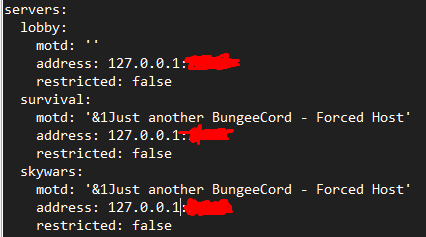


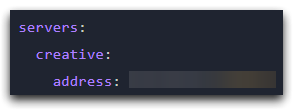 frank ember
what's your host option set to?
indigo tendon
frank ember
change host back to 0.0.0.0
indigo tendon
0.0.0.0 and the port?
frank ember
yeah
indigo tendon
Ok now I don't get that error but I don't get the server as turned on
frank ember
you should also have online_mode set to true in your bungee's config
fluid jungle
excuse me do you know how to disable the logger in the console :Running on bukkit etc.. because my cmd windows color reset just after that logger (colored-logger: false not doing anithing)
indigo tendon
Nothing my server is turned on so much is bungee, survival, lobby and I do not get off the server although it is on
frank ember
?
indigo tendon
Oh it was a mistake of mine was to put the ip of the dedicated but the ip which the server listens already I could connect xd
frank ember
make sure you have online_mode set to true in your bungee config though
indigo tendon
Thanks
indigo tendon
frank ember
make sure you have `online_mode` set to true in your bungee config though
If I put the online_mode true my server to be not premiun would pass all my modalities to premiun which would miss many things
quick lagoon
What
indigo tendon
If I put the online mode true in bungee my survival server will automatically go into premium mode even if it is in false
main shuttle
Hey, is it possible to increase the Enderchest via Luckperms?
quick lagoon
indigo tendon
If I put the online mode true in bungee my survival server will automatically go...
I Dont see an issue with that
quick lagoon
main shuttle
Hey, is it possible to increase the Enderchest via Luckperms?
Nope, completely unrelated to luckperms
main shuttle
quick lagoon
Nope, completely unrelated to luckperms
Okay. thank you!
indigo tendon
Ben what happens if I put the online-mode: true de bungee the servers linked as survival, lobby takes you as a premium automatically and users who are registered with UUID not premium being premium some of them would lose all their items
quick lagoon
indigo tendon
Ben what happens if I put the online-mode: true de bungee the servers linked as ...
Well yea, but will you rather correct your setup now, or wait for further issues with offline mode uuid before you act upon it
indigo tendon
But what changes that bungeecord is online-mode true to false?
When a non-premium tries to enter the server, it puts the account not verified by minecraft.net when the bungee is in true and the other modes in online mode false
quick lagoon
indigo tendon
When a non-premium tries to enter the server, it puts the account not verified b...
Exactly what should be done
idk why you will want pirated accounts to join your server
 dusky karma
Could I get some assistance?
prisma hinge
!ask
wintry cloudBOT
Please ask your question!
Please ask the question you have. Don't ask to ask, or ask to DM someone. There are people here to help you, but we need to know what to help you with, so please just ask the question you want to in as much detail as possible!
Or, try here first:
Why shouldn't I ask to ask?
dusky karma
Aight um, so I'm having trouble getting rank prefixes to show up in chat, and the wiki isn't really helping me because I can't find the solution. How do I get the rank to show up in the player list and chat?
frank ember
!formatting
wintry cloudBOT
LuckPerms does not perform any chat/tablist formatting of its own!
LuckPerms only acts as the source for prefixes / suffixes, it doesn't actually apply them. You need an appropriately configured chat/tablist formatting plugin for them to be displayed. If the values appear correctly when you run /lp user <user> info, LuckPerms is doing its job!
FAQ answer: Prefix isn't showing?
List of chat/tablist formatting plugins that work with LuckPerms
dusky karma
I installed vault, but I haven't done anything to it yet, it just made my /grant plugin work, do any of you know how to use it?
frank ember
did you install any chat or tab formatting plugins as well?
dusky karma
Do you have any suggestions for those?
frank ember
the second link in the embed has some suggestions
 flat phoenix
whats the command to convert permissionex to luckperms
prisma hinge
@flat phoenix don't cross post
we are all on the same server and it won't make help come any faster
 storm lotus
Hi guys, I need help. I want to add a suffix to all team members so i created a role named Team and gave it a suffix. But when I add someone to the Team group, the suffix isn't displayed. I'm using the newest Lp version and my mc server is on 1.16.4. The Team group has only one perm: suffix.100.Team
prisma hinge
!chat
wintry cloudBOT
LuckPerms does not perform any chat/tablist formatting of its own!
LuckPerms only acts as the source for prefixes / suffixes, it doesn't actually apply them. You need an appropriately configured chat/tablist formatting plugin for them to be displayed. If the values appear correctly when you run /lp user <user> info, LuckPerms is doing its job!
FAQ answer: Prefix isn't showing?
List of chat/tablist formatting plugins that work with LuckPerms
 celest mango
What to do if you have everything as it is noted in the wiki?
quick lagoon
!errors
wintry cloudBOT
Here's a page with some common storage system errors.
LuckPerms wiki