#support-2
1 messages · Page 65 of 1
 stone plover
 daring stirrup
what version of LP are you using?
stone plover
5.2.4
daring stirrup
!Latest
 wintry cloudBOT
Latest version
5.2.40
wintry cloudBOT
Here's a page with some common storage system errors.
 LuckPerms wiki
stone plover
LuckPerms wiki
stone plover
None of those seem relevant
daring stirrup
Hmm, you'll have to wait for someone with more MySQL Experience because I have no idea what that means
 primal nexus
@stone plover can i see ur config
primal nexus
the one the error comes from
stone plover
Not sure which one it comes from but I'll send you the proxy server's
Pastebin
Pastebin.com is the number one paste tool since 2002. Pastebin is a website where you can store text online for a set period of time.
stone plover
Ah my bad
primal nexus
needs to be ur host
stone plover
Thanks
stone plover
Completely misread that part of it
primal nexus
look at my sample
  # The name of the database to store LuckPerms data in.
  # - This must be created already. Don't worry about this setting if you're using MongoDB.
  database: luckperms

  # Credentials for the database.
  username: root
password: 'redacted'```idk who has access to edit errors
but they should add Unable to get a connection from the pool. (hikari is null)
stone plover
That was in there actually
primal nexus
there was?
stone plover
Not sure if I copied the entire thing properly
primal nexus
only see MySQL "No operations allowed after connection closed" error
stone plover
"Caused by: java.sql.SQLException: Unable to get a connection from the pool. (hikari is null)"
21.11 12:45:39 [Server] INFO java.util.concurrent.CompletionException: java.sql.SQLException: Unable to get a connection from the pool. (hikari is null)
21.11 12:45:39 [Server] INFO at me.lucko.luckperms.common.storage.Storage.lambda$makeFuture$0(Storage.java:92)
21.11 12:45:39 [Server] INFO at java.util.concurrent.CompletableFuture$AsyncSupply.run(CompletableFuture.java:1604)
21.11 12:45:39 [Server] INFO at net.md_5.bungee.scheduler.BungeeTask.run(BungeeTask.java:63)
21.11 12:45:39 [Server] INFO at java.util.concurrent.ThreadPoolExecutor.runWorker(ThreadPoolExecutor.java:1149)
21.11 12:45:39 [Server] INFO at java.util.concurrent.ThreadPoolExecutor$Worker.run(ThreadPoolExecutor.java:624)
21.11 12:45:39 [Server] INFO at java.lang.Thread.run(Thread.java:748)
21.11 12:45:39 [Server] INFO Caused by: java.sql.SQLException: Unable to get a connection from the pool. (hikari is null)```Here's a page with some common storage system errors.
LuckPerms wiki
primal nexus
that
stone plover
Ahhh okay I getcha
Thanks for the help though
Hmm that error is gone but it still won't let me in
21.11 13:04:50 [Server] INFO [LoneDefense] -> UpstreamBridge has disconnected
21.11 13:06:01 [Server] INFO [LoneDefense] disconnected with: Kicked whilst connecting to Lobby: [LP] A database error occurred whilst loading permissions data. Please try again later. If you are a server admin, please check the console for any errors.
21.11 13:06:01 [Server] INFO [LoneDefense] -> UpstreamBridge has disconnected```Two join attempts
primal nexus
make sure everything is correct
stone plover
Just going to completely reset the configs and try again
 prisma hinge
primal nexus
``` address: localhost
# The name of the database to store LuckPerms data in...
prisma hinge
primal nexus
``` address: localhost
# The name of the database to store LuckPerms data in...
Why would you redact a password from a localhost lmao
prisma hinge
primal nexus
idk who has access to edit errors
pr or shut :d
daring stirrup
what did that error even mean?
prisma hinge
🤷
primal nexus
@prisma hinge i always do that
wintry cloudBOT
Hey Thrasilias | TRose2000! Please don't tag helpful/staff members directly.
primal nexus
¯_(ツ)_/¯
 crude oar
this new search feature on the web editor is lovely thanks turbo ❤️
 high raven
@tame hollow loves being pinged in fast moving channels, especially for praise
I agree it's wonderful
high raven
So don't
 abstract bluff
the prefixes are being weird in my server
for some reason it has two
[default] [member] name
like this
how do i remove the default prefix
 quick lagoon
!chat
wintry cloudBOT
LuckPerms does not perform any chat/tablist formatting of its own!
LuckPerms only acts as the source for prefixes / suffixes, it doesn't actually apply them. You need an appropriately configured chat/tablist formatting plugin for them to be displayed. If the values appear correctly when you run /lp user <user> info, LuckPerms is doing its job!
FAQ answer: Prefix isn't showing?
List of chat/tablist formatting plugins that work with LuckPerms
quick lagoon
!userinfo
wintry cloudBOT
Please take a screenshot!
Seeing a screenshot makes everything so much easier!
For prefixes not showing up in chat:
/lp user <user> info.
For database errors:
Server console: /lp info | Proxy console: /lpb info.
 fresh saddle
Im getting this error all of a sudden, how do I fix this?
 tardy glacier
Set storage-method to mariadb in config
daring stirrup
!chat
wintry cloudBOT
LuckPerms does not perform any chat/tablist formatting of its own!
LuckPerms only acts as the source for prefixes / suffixes, it doesn't actually apply them. You need an appropriately configured chat/tablist formatting plugin for them to be displayed. If the values appear correctly when you run /lp user <user> info, LuckPerms is doing its job!
FAQ answer: Prefix isn't showing?
List of chat/tablist formatting plugins that work with LuckPerms
daring stirrup
Its your chat plugin
abstract bluff
im using luck perms for my chat
daring stirrup
LuckPerms doesnt handle chat
abstract bluff
i handle it for prefixes
abstract bluff
I know luck perms doesn't control chat but it should still be able to change the color of the prefixes right
 deft furnace
i´m able to change defaut group?
daring stirrup
!default
wintry cloudBOT
LuckPerms provides a group that every player is added to upon joining the server, called default. You can use multiple methods to change the default group or change the name of it.
LuckPerms wiki
prisma hinge
🇩 🇴 🇳 🇴 🇹 🇺 🇸 🇪 🇹 🇭 🇪 🇩 🇪 🇫 🇦 🇺 🇱 🇹 🇦 🇸 🇸 🇮 🇬 🇳 🇲 🇪 🇳 🇹 🇸 🇪 🇽 🇹 🇪 🇳 🇸 🇮 🇴 🇳
 quaint idol

 proper pulsar
I disagree
prisma hinge
I agree with myself
proper pulsar
Don't use it without understanding what it does and when to actually use it
tardy glacier
Fefo how long did that take
prisma hinge
Just a google search
tardy glacier
Oh
quaint idol
Brain: afaik we don't supportit anymore
proper pulsar
Yes. As there are cases it's necessary
tardy glacier
Aww I was kinda hoping they spent 10 mins to get each emote
prisma hinge
proper pulsar
Yes. As there are cases it's necessary
But I do not endorse the cases it isn't
That's me anyway
¯\_(ツ)_/¯
 mighty yarrow
!latest
wintry cloudBOT
Latest version
5.2.40
prisma hinge
!latest indeed
wintry cloudBOT
Latest version
5.2.40
 high raven
!update
wintry cloudBOT
You can download LuckPerms for Bukkit/Spigot, BungeeCord, Sponge, Nukkit and Velocity.
Additional downloads
high raven
Get the latest here
 tepid sedge
i did...
 quick lagoon
are you using vanilla client?
tepid sedge
any way i could fix it?
 proven totem
Can someone help please, i setup the groups and prefixs/suffixs and i gave myself the rank, and when i type in chat it doesnt show.. someone help please
 tidal blade
!chat
wintry cloudBOT
LuckPerms does not perform any chat/tablist formatting of its own!
LuckPerms only acts as the source for prefixes / suffixes, it doesn't actually apply them. You need an appropriately configured chat/tablist formatting plugin for them to be displayed. If the values appear correctly when you run /lp user <user> info, LuckPerms is doing its job!
FAQ answer: Prefix isn't showing?
List of chat/tablist formatting plugins that work with LuckPerms
proven totem
aha, thanks, i seen vault isnt installed.
hopefully it works
ok, so when i did /gmc it showed i had vip infront, but when i type in chat it says defualt
 tame hollow
!faq
wintry cloudBOT
Check out some of our frequently asked questions.
Read more
LuckPerms wiki
proven totem
i did everything right,
and essentials already has there prefix thing disabled
so idk what type of prefix that is coming from
tidal blade
Most likely your chat plugin. As it won't be coming from luckperms. As luckperms doesn't put anything in chat
proven totem
i just looked in a chat plugin for like auto mod etc, and it said about the ranks and it was true so i just set it to false
tidal blade
What chat plugin are you using?
tidal blade
Then ask in their support then, As luckperms is doing it's job.
proven totem
but is there a way to get rid of the "<"
tidal blade
Your chat plugin
proven totem
i disabled all the chat prefixs in that, it was like that before i had it, it might be an essistentals thing idk
 tawdry arrow
Hi, I just renamed a group. Do I need to bulk-update all users with that parent to the new parent? If so, how?
wintry cloudBOT
Quickly update a large amount of user and group permissions by using the bulkupdate command.
Read more
LuckPerms wiki
quick lagoon
first example
tawdry arrow
thank you!
 strong moss
Hey, 4 me context server doesn't work 😔
wintry cloudBOT
Please tell us what's going on!
We really would absolutely love to help you out! However, telling us that it isn't working wastes everyone's time. Please, just describe the issue you're having clearly and with as much detail as possible, and send any relevant screenshots of whatever problems you're having.
For Console Errors:
strong moss
I just put context server lobby, and i can't use on lobby? '-'
daring stirrup
bungee network?
strong moss
Yes
daring stirrup
i think its server=bungee then world=<server you want to be able to use it on> iirc
daring stirrup
contexts for networks are kinda wierd, what you want to do (i think someone correct me if im wrong) is set context for world=lobby & server=bungee?
quick lagoon
daring stirrup
i think its `server=bungee` then `world=<server you want to be able to use it on...
only for bungeecord specific plugins and commands
daring stirrup
oh
strong moss
this supost to work, no?
quick lagoon
is skin restorer plugin on bungeecord OR backend servers
strong moss
bungeecord, and in all other servers
without context, it works fine
But i need context because i want just to use-it on lobby
quick lagoon
try set world=lobby instead
or whatever you named that world in bungeecord's config.yml
quick lagoon
!userinfo
wintry cloudBOT
Please take a screenshot!
Seeing a screenshot makes everything so much easier!
For prefixes not showing up in chat:
/lp user <user> info.
For database errors:
Server console: /lp info | Proxy console: /lpb info.
quick lagoon
screenshot the last 2
strong moss
😔 wel...
prisma hinge
@strong moss screenshot /lp user <user> info and /lpb user <user> info while in lobby please
prisma hinge
Yep, there you have it. Bungee contexts are weird yeah
strong moss
It works, ty ❤️
primal nexus
If its bungee plugin then u just use server=bungee afaik
proper pulsar
@strong moss let me guess. Nitrado?
I mean you're hosting your servers on Nitrado?
strong moss
no? '-'
proper pulsar
Awww
But it's funny to see that other people manage to get the same bugs xD
Like the dots in the console
Those appear at Nitrado too. And I implemented that
So yeah funny to see others having the same struggles as I xD
mighty yarrow
!downloads
wintry cloudBOT
You can download LuckPerms for Bukkit/Spigot, BungeeCord, Sponge, Nukkit and Velocity.
Additional downloads
 bronze oyster
any command to remove all prefixes for 1 group?
tidal blade
/lp group <name> meta removeprefix <priority>
bronze oyster
thx
proper pulsar
Well that removes all prefixes of a certain priority
bronze oyster
any better command?
proper pulsar
You can do meta clear but that removes all suffixes and meta values directly assigned to the group as well
bronze oyster
so all prefixes? i can just make a new one?
proper pulsar
But why can’t you just remove them individually
tidal blade
If you use setprefix it will remove all current ones and set a new one.
proper pulsar
With the same priority
 sly comet
can someone help me with luckyperms first time
proper pulsar
!ask
wintry cloudBOT
Please ask your question!
Please ask the question you have. Don't ask to ask, or ask to DM someone. There are people here to help you, but we need to know what to help you with, so please just ask the question you want to in as much detail as possible!
Or, try here first:
Why shouldn't I ask to ask?
tidal blade
!usage Start here @sly comet
wintry cloudBOT
Here's a guide to help users understand and use LuckPerms for the first time.
Read more
LuckPerms wiki
sly comet
i like more people to people help ^^
proper pulsar
This isn’t a place to get a 1on1 support buddy
This is community support
You ask your question and whoever comes across it first and feels like answering answers
quick lagoon
sly comet
i like more people to people help ^^
what issue are you facing?
(other than laziness, cant fix that)
tidal blade
Did you install Luckperms?
quick lagoon
👀
sly comet
yes
tidal blade
Show me the output of /pl
sly comet
quick lagoon
thats not output of /pl
sly comet
daring stirrup
daring stirrup
Screenshot `version`
.
tidal blade
The command version
daring stirrup
!paste startup log
wintry cloudBOT
Please use pastebin!
Seeing a paste of the problem makes everything so much easier! Use https://bytebin.lucko.me/ for easy pasting!
For console errors:
Pastebin any relevant segments of the console log. If it's a startup error, this includes the entire startup log!
Other errors:
Pastebin the entire LuckPerms config file (passwords removed) as well as any other relevant files!
daring stirrup
Guessing sponge or fabric?
tidal blade
Same
daring stirrup
Well probably fabric since that looks like the new message from mc 1.13
@sly comet if you're using fabric, then you cannot use LP yet, there's a pr for fabric support open but that'll likely take a while till its done
bronze oyster
is there a placeholder for lp?
 grizzled isle
!placeholders
wintry cloudBOT
Display data such as user prefixes and groups from LuckPerms in other plugins.
Read more
LuckPerms wiki
quick lagoon
!placeholders
wintry cloudBOT
Display data such as user prefixes and groups from LuckPerms in other plugins.
Read more
LuckPerms wiki
bronze oyster
i got my placeholders
quick lagoon
have you installed the luckperms extension?
bronze oyster
yep
quick lagoon
screenshot the output of /papi parse me %luckperms_groups%
daring stirrup
Use the prefix placeholder then
daring stirrup
quick lagoon
screenshot the output of `/papi parse me %luckperms_groups%`
Do this but prefix placeholder
daring stirrup
Did you /papi reload?
bronze oyster
nvm, figured it out, i had a color code in front
 undone vigil
for some reason there's an [L] in front of my username, but I haven't configured any prefixes. it's not set up to show anything in the essentials config.yml either, so i'm not sure what's going on. any ideas?
like this
quick lagoon
!chat
wintry cloudBOT
LuckPerms does not perform any chat/tablist formatting of its own!
LuckPerms only acts as the source for prefixes / suffixes, it doesn't actually apply them. You need an appropriately configured chat/tablist formatting plugin for them to be displayed. If the values appear correctly when you run /lp user <user> info, LuckPerms is doing its job!
FAQ answer: Prefix isn't showing?
List of chat/tablist formatting plugins that work with LuckPerms
undone vigil
nothing to suggest it's luckperms, but then i don't see why essentials would be doing it either, i'm stumped
undone vigil
I unloaded essentials using plugreloader, and it's gone
but i have no idea why essentials would be doing it
quick lagoon
!moss
wintry cloudBOT
Essentials
Make sure you are using EssentialsX and Vault for prefixes. For any other issues with Essentials, you should seek support in either #general or the official EssentialsX support Discord.
EssentialsX Discord
quick lagoon
also dont use plugreloader to remove plugins
remove the .jar and restart your server
undone vigil
i figured it out, it was to do with the chat radius being > 0 :d
why do you advise against plugreloader?
daring stirrup
Reloading plugins is bad
undone vigil
true, although it's handy for debugging. i won't use it when the server's up if you think it'll cause me problems
proper pulsar
Having it is not the issue. Using it is as most plugins aren’t written properly to handle these kinds of reloads
 ancient frost
Hello, i've a little problem with parent addtemp, when the duration is ended, the group stay parent of user, i've tried 2 commands:
/lp u %user% parent addtemp %group%
/lp u %user% parent addtemp %group% replace
The problem is present only when the duration around 1 day or more
 narrow sand
i want to ask if it is possible to not give a permission with parenting?
every rank has an own permission with a number on the end, so i want that that permission is not parented
is that possible?
high raven
yes, set it to false on the inheriting group so it does not pass down
narrow sand
ah okay, thanks for that
 timid quest
how would I go about adding/setting up a staff perms, like I do it and have staff try it after I add them to the group and it keeps telling them they don't have permissions to use it....
any suggestions?
daring stirrup
!verbose
wintry cloudBOT
LuckPerms provides a verbose command to help you find out what permissions a command/plugin is checking.
Read more
LuckPerms wiki
timid quest
so will this this tell me what is wrong that is not letting them use it?
daring stirrup
Yes
timid quest
thank you 🙂
proper pulsar
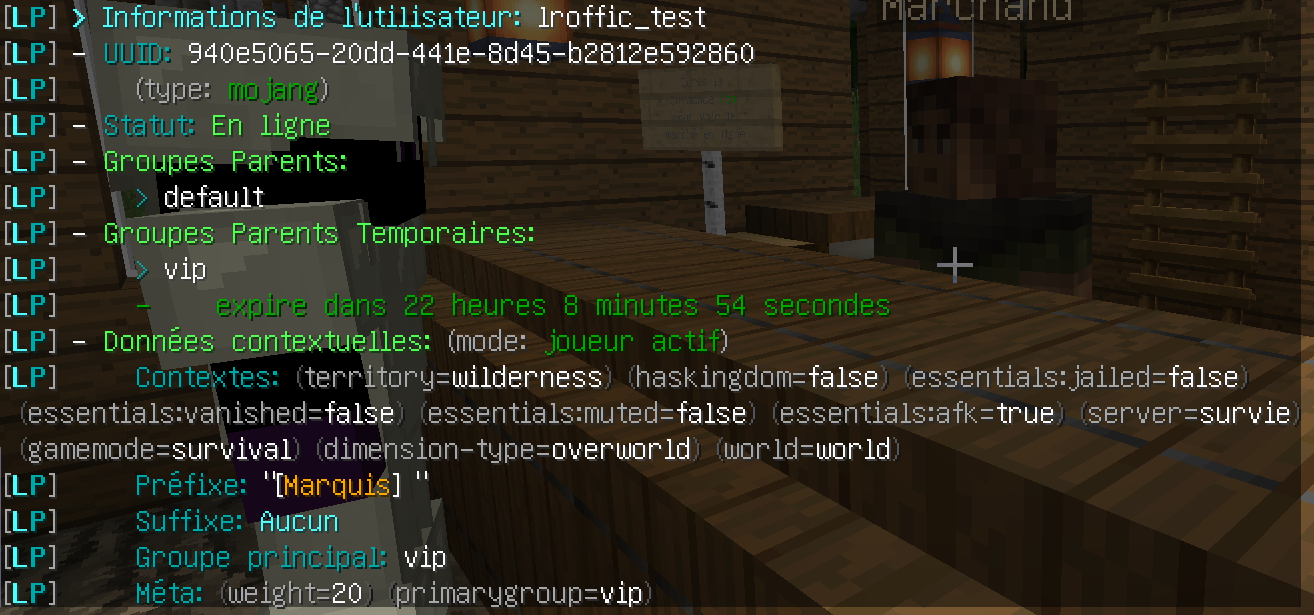
@ancient frost can you run /lp user <user> info when that happens and show us?
ancient frost
 proper pulsar
Looks good
 slim parrot
think I could get some help?
 pale pond
whats your issue?
slim parrot
when you chat you have the < > things there is there anyway to get rid of them?
proper pulsar
!chay
wintry cloudBOT
Sorry! I do not understand the command !chay
Type !help for a list of commands.
proper pulsar
!chat
wintry cloudBOT
LuckPerms does not perform any chat/tablist formatting of its own!
LuckPerms only acts as the source for prefixes / suffixes, it doesn't actually apply them. You need an appropriately configured chat/tablist formatting plugin for them to be displayed. If the values appear correctly when you run /lp user <user> info, LuckPerms is doing its job!
FAQ answer: Prefix isn't showing?
List of chat/tablist formatting plugins that work with LuckPerms
slim parrot
thx
proper pulsar
You’re welcome
slim parrot
hey its me again
I got the < > things gone
but now the prefix isnt there and instead replaced by the server name
quaint idol
!chat
wintry cloudBOT
LuckPerms does not perform any chat/tablist formatting of its own!
LuckPerms only acts as the source for prefixes / suffixes, it doesn't actually apply them. You need an appropriately configured chat/tablist formatting plugin for them to be displayed. If the values appear correctly when you run /lp user <user> info, LuckPerms is doing its job!
FAQ answer: Prefix isn't showing?
List of chat/tablist formatting plugins that work with LuckPerms
mighty yarrow
!usage
wintry cloudBOT
Here's a guide to help users understand and use LuckPerms for the first time.
Read more
LuckPerms wiki
 potent pagoda

 half sinew
is there not a luckperms.* I can use to deny all luck perm cmds to a group?
half sinew
okay I guess I didnt save my changes :p thanks
prisma hinge
I mean by default no one has LP perms anyway
half sinew
as a non-operator how would I have access to them? As default rank and non-op I was able to use them..
prisma hinge
Maybe your user has a *? It's very common to forget things like that
Ideally you'd clear all of your user's data
And then test
prisma hinge
You can also flip a switch so you explicitly need LP perms to run LP commands, not even OP will suffice
commands-allow-ops in config I think it is
But that's on Bukkit and Nukkit only
half sinew
oh yeah im on paper/spigot
prisma hinge
prisma hinge
`commands-allow-ops` in config I think it is
Around that area
half sinew
prisma hinge
Around that area
posting for future people
wintry cloudBOT
Hey Cevan! Please don't tag helpful/staff members directly.
half sinew
!prefix
wintry cloudBOT
You can set prefixes, suffixes and other meta data in LuckPerms for players and groups. Note that LuckPerms does not manage chat. You need to use another plugin to show prefixes/suffixes in chat.
LuckPerms wiki
prisma hinge
hi
daring stirrup
Hi
prisma hinge
👋 good morning
tidal blade
Hi
 odd lynx
 icy violet
!help
wintry cloudBOT
Available commands:
!advanced
!api
!argumentbased
!ask
!bulkupdate
!bungee
!cauldron
!colours
!commandequivalents
!commands
!config
!context
!cookbook
!default
!downloads
!editor
!editorsafety
!errors
!essentials
!extensions
!extracontexts
!faq
!formatting
!helpchat
!inheritance
!install
!libsdir
!locale
!meta
!migration
!notworking
!nowildcard
!pasteit
!permissions
!placeholders
!selfhosting
!stacking
!storage
!suggestions
!switchstorage
!sync
!tracks
!translations
!upgrade
!usage
!userinfo
!verbose
!weight
!whyluckperms
!wiki
icy violet
!api
wintry cloudBOT
Learn how to use the LuckPerms API in your project.
Read more
Example usages
Read the Javadoc
LuckPerms wiki
icy violet
!placeholders
wintry cloudBOT
Display data such as user prefixes and groups from LuckPerms in other plugins.
Read more
LuckPerms wiki
 lucid dawn
i need help
please tell me how i setup ranks
means when i settingup groups it goes according to its name
like A on the top and Z on the bottom
by i need according to me
like if i want warriors come first and shield at bottom so what i do
i also try track but not work
please help me
daring stirrup
don't double post
mighty yarrow
!verbose
wintry cloudBOT
LuckPerms provides a verbose command to help you find out what permissions a command/plugin is checking.
Read more
LuckPerms wiki
mighty yarrow
does verbose check all perms in the server, not just the one running the command? if you do /lp verbose record
wait nvm im dumb
high raven
Correct
Verbose on its own records all perm checks
The verbose command command checks but only for a very short while and only non-async perm checks
mighty yarrow
and verbose record Bob will check things for the user bob right
prisma hinge
Or both
mighty yarrow
yeyeyeye thanks
 jaunty current
hello I have a problem. I want to use multiple prefix but it can"t work. It worked when I writte "lower" and "higer" in "meta-formating" but not when I writte "highest_on_track_1" and "highest_on_track_2"
prisma hinge
Do you actually have tracks named 1 and 2?
jaunty current
it's an exemple
my track names are job and player
and yes that tracks are created
prisma hinge
Screenshot /lp user <user> showtracks and /lp user <user> meta info please
daring stirrup
prisma hinge
Screenshot `/lp user <user> showtracks` and `/lp user <user> meta info` please
.
prisma hinge
Well for once being on multiple groups on a track is a bit problematic when promoting/demoting, but that shouldn't affect the meta-formatting. How does /lp user <user> info look like?
prisma hinge
happens
 gleaming birch
no privilege for a Russian nickname is issued
How to solve this problem?
daring stirrup
?
 soft cosmos
there's a config property which will allow it
daring stirrup
Did you restart
quick lagoon
But does Mojang even allow such a name?
daring stirrup
Offline mode
quick lagoon
Oh lol
gleaming birch
@daring stirrup /lp reloadconfig
wintry cloudBOT
Hey Thin_Troll! Please don't tag helpful/staff members directly.
quick lagoon
Try restart
 frigid rapids
why the prefix is not showing in tab
and what is extension
someone
and which plugins to add to luckperms if i am using on bungee cord?
any one?
@soft cosmos
wintry cloudBOT
Hey daniel12! Please don't tag helpful/staff members directly.
frigid rapids
@full flume
wintry cloudBOT
Hey daniel12! Please don't tag helpful/staff members directly.
high raven
Kicked for initiating mass ping
 full flume
:(
primal nexus
Smh
prisma hinge
hi can anyone help me, i want to put the new 1.16 color code but it doesnt work help pls
prisma hinge
LPC
daring stirrup
Look at the spigot page
prisma hinge
what in spigot page, it says it supports 1.16 colors
daring stirrup
What did you use
prisma hinge
&#FF0000
daring stirrup
Thats white i think
prisma hinge
i dont think its LPC fault, i know a guy who had the same problems as me
but he doesnt have LPC
pale pond
i dont believe they have a support, you might want to switch to essx chat or something
its nothing to do with lp, lp just stores it
prisma hinge
lp doesnt do the color
prisma hinge
i tried LPC, essx and deluxechat and it doesnt work on any
prisma hinge
1.16.4
paper latest
i do /lp group admin meta setprefix "&#FF0000Admin" and it does like &4
pale pond
^ would reccomend switching to essx chat and using v
daring stirrup
!moss
wintry cloudBOT
Essentials
Make sure you are using EssentialsX and Vault for prefixes. For any other issues with Essentials, you should seek support in either #general or the official EssentialsX support Discord.
EssentialsX Discord
prisma hinge
i tried essx
daring stirrup
Did you have essx chat to
prisma hinge
yup
pale pond
anyway, theyll know how to fix it, switch back if possible and ask their support
primal nexus
why do people keep suggesting ess over stuff like LPC
what if people just don't want the crap ess comes with?
prisma hinge
i have cmi, and essentials doesnt work just for chat
pale pond
im not saying you should use essx, im just recommending it because it has good support
prisma hinge
i think lpc is a better alternative
pale pond
and essx has very little clutter if you dont give out the perms for it
primal nexus
ess is not what everyone needs
they need to learn to make essChat standalone
wich they are wayy to lazy to do
pale pond
!chat then, look at other standalone plugins
wintry cloudBOT
LuckPerms does not perform any chat/tablist formatting of its own!
LuckPerms only acts as the source for prefixes / suffixes, it doesn't actually apply them. You need an appropriately configured chat/tablist formatting plugin for them to be displayed. If the values appear correctly when you run /lp user <user> info, LuckPerms is doing its job!
FAQ answer: Prefix isn't showing?
List of chat/tablist formatting plugins that work with LuckPerms
 primal nexus
&x&r&r&g&g&b&b
prisma hinge
so dont use &#rrggbb ??
primal nexus
actuallt lets move to offtopic 😄
daring stirrup
According to lpc it can use both
prisma hinge
kk
 brittle cargo
Hello,
I want to show the date of the group obtention for a player
Thank you very much 🙂
 eternal sinew
I haven't been able to find an answer to this because of the multitude of posts regarding rgb formating, but it has to do with the %luckperms_prefix% placeholder when used with discordsrv.
The users prefix is prefix.1.{#8DD0FF}Spectator and the permissions aren't solid groups. They are inherited using discordsrv's role contexts because the roles are managed by an integration. Is there a placeholder that I can use to just get the Spectator part for use in discord? This is what it looks like right now.
tame hollow
use the groups name?
eternal sinew
I can't get the primary group prefix to show anything other than default because the groups are inherited.
I'll probably end up setting up a papi script to pull a discord ready prefix from another permission, thank you :D
prisma hinge
eternal sinew
I can't get the primary group prefix to show anything other than default because...
sounds a whole lot like improper or no weights set up
tame hollow
yeah could be incorrect weights setup
and it sounds like you just want to use the group name and not the prefix (there is a placeholder for that)
eternal sinew
Supporter doesn't have a prefix and is used to store the permissions associated with it so I don't have to duplicate them.
They each have weights, but the context based inheritance doesn't seem to be showing up in the primary group placeholder.
prisma hinge
contexts don't really apply to groups 100%
most contexts apply to players only
so "context based inheritance" (not completely sure what that means either) is fully calculated when it's being evaluated for a user
eternal sinew
This is how I have my groups setup. They are setup to use discordsrvs contexts for roles, if I just sync them then I get constant warnings that it can't sync backwards no matter how I setup the group inheritance. They are set to be parent groups of default and then they should be added to the user is discordsrv says they have the specified discord role.
prisma hinge
not sure what any of that means tbh lol but you might want to ask dsrv support about it
eternal sinew
I did, the only answer I got was "don't use rgb"
prisma hinge
lmfao
eternal sinew
Yup, lol
prisma hinge
the non-solution solutions
eternal sinew
probably just going to make my own placeholder for it. All good :D
prisma hinge
am i the only one for who the rgb doesnt work?
daring stirrup
!chat
wintry cloudBOT
LuckPerms does not perform any chat/tablist formatting of its own!
LuckPerms only acts as the source for prefixes / suffixes, it doesn't actually apply them. You need an appropriately configured chat/tablist formatting plugin for them to be displayed. If the values appear correctly when you run /lp user <user> info, LuckPerms is doing its job!
FAQ answer: Prefix isn't showing?
List of chat/tablist formatting plugins that work with LuckPerms
prisma hinge
but how to fix it
daring stirrup
Up to your chat plugin
prisma hinge
i tried every single plugin on the wiki and it doesnt work on any
tame hollow
if you want proper support you're going to have to explain in more detail exactly what you've tried up until now
prisma hinge
essentialsx, LPC, deluxechat, chatex, multichat and on any the rgb doesnt work
quick lagoon
is your server and client on 1.16+ mc version
prisma hinge
yes
daring stirrup
Badlion client?
prisma hinge
server and client 1.16.4
quick lagoon
and how have you been adding the rgb color code?
prisma hinge
yes
daring stirrup
Try vanilla
quick lagoon
oh Badlion client
prisma hinge
badlion, &#FF0000
daring stirrup
blc tends to well break chat
prisma hinge
but i see the rgb colored prefix in tab
quick lagoon
daring stirrup
Try vanilla
^^ badlion has chat bugs
prisma hinge
oh i see ok ill try
daring stirrup
Tab*
primal nexus
Same. If it works in tab using BLC then chat should work aswell
If not. Contact BLC developer
prisma hinge
bruh
i invested 3 hours of solving this and its badlions fault ._.
i love badlion client
primal nexus
prisma hinge
i invested 3 hours of solving this and its badlions fault ._.
BLC is known in having issues with chat
There is a workaround
Disable Fancy Chat
prisma hinge
i had
 crude sphinx
how can i set by default a track?
i need users to join at rank 1, that rank is a group and is inside a track
daring stirrup
!tracka
wintry cloudBOT
Sorry! I do not understand the command !tracka
Type !help for a list of commands.
crude sphinx
a collection of groups
daring stirrup
!tracks
wintry cloudBOT
Tracks provide a method for you to promote/demote players along a track (or ladder) of groups.
Read more
LuckPerms wiki
crude sphinx
i need to do that rank stuff, but i don't know how to assign Rank1 as default
frigid rapids
i created a bungeecord server with luckperms
crude sphinx
ok?
prisma hinge
Axeros use the default group as your rank1 and put it in the first position on the track
crude sphinx
ok, so with this i need to remove the rank1 prefix in the rank2 group right?
prisma hinge
??
crude sphinx
how can i use the default group as my rank1 group?
i think i need to add all rank1 permissions inside default
am i right?
crude sphinx
and later in rank2 remove the old rank1 prefix
crude sphinx
ok 😂
 still cedar
What do I need to set in config for prefixs to start showing up.
prisma hinge
In config nothing, it works fine with the default settings
What you do need is Vault and a chat plugin
!chat
wintry cloudBOT
LuckPerms does not perform any chat/tablist formatting of its own!
LuckPerms only acts as the source for prefixes / suffixes, it doesn't actually apply them. You need an appropriately configured chat/tablist formatting plugin for them to be displayed. If the values appear correctly when you run /lp user <user> info, LuckPerms is doing its job!
FAQ answer: Prefix isn't showing?
List of chat/tablist formatting plugins that work with LuckPerms
 silent phoenix
I have a question to how use the luckperms web panel, we muss install it on our vps to use it ?
wintry cloudBOT
LuckPerms offers an easy to use, powerful Web Editor, with which you can add, delete and change permissions of groups and players.
Read more
LuckPerms wiki
silent phoenix
Oh ok ✅ nice
mighty yarrow
!usage
wintry cloudBOT
Here's a guide to help users understand and use LuckPerms for the first time.
Read more
LuckPerms wiki
prisma hinge
hi i actually need help about groups , for example i got a world which is the prison basically and there i have the rank prefix (A,B,C) i want that my groups are "parented" i mean , my default group has "guest" prefix i want that i have both of prefixes (prison ranks and group prefix) but the prison rank must stay in the prison world
high raven
!context
wintry cloudBOT
You can set a permission or group on a per-world/per-server basis, through what we call "contexts".
Read more
LuckPerms wiki
high raven
Context allows per-world group application
prisma hinge
ok i've done , already knew stuff about context but pair of days ago i was struggling about something idont remember what tho
now i've fixed and honestly dont know how
but i have a question
basically i just parented every group with the group "prison" which has the prison rank tag set on essentialsxchat in context world=prison , is this gonna make me have group prefixes globally plus the prison rank tag only in prison?
i mean i've set the prison rank tag on essentialschat for the group "prison"
placeholder
 opaque field
If every group is parented with the prison group, then they all inherit that prefix
high raven
!stacking will allow lp to add that prefix to the format @prisma hinge
wintry cloudBOT
Display multiple prefixes/suffixes alongside a player's name.
LuckPerms wiki
opaque field
Okay, I have one too. Currently I have 2 different tracks actively in use: Mines and Prestiges. I have them all nicely parented up so they all inherit stuff from the groups they should inherit from. Though when I parse %luckperms_first_group_on_tracks_prestiges% it picks the lowest one in the entire parented range. Is there a way to avoid this or is there a different placeholder that I can use to get the first group of a player?
opaque field
Then they go down the line of parents as well
Here, ill get a screenshot
First is 1 star, last is 5 star... but I hold 2 star
(2 star has 1 star as parent)
and 5 star has 4, 4 has 3, 3 has 2 and 2 has 1
So is there a way to, with parenting set up, get the lowest group in the track that the user has (in this case 2 star)
high raven
You could get the player's lowest weighted group prefix
 urban cloud
Is there a quick and easy way to add default Minecraft permissions? When players join the world they can't do anything, they can't even eat.
 unborn python
i dont think theres a permission node to not allow them to eat
urban cloud
I'm using the web editor but I'm not sure what permissions I need.
quaint idol
!verbose
wintry cloudBOT
LuckPerms provides a verbose command to help you find out what permissions a command/plugin is checking.
Read more
LuckPerms wiki
unborn python
Pastebin
Pastebin.com is the number one paste tool since 2002. Pastebin is a website where you can store text online for a set period of time.
this is on bungeecord latest version
also using latest luckperms bungee version
daring stirrup
!libsdir
wintry cloudBOT
LuckPerms dependencies
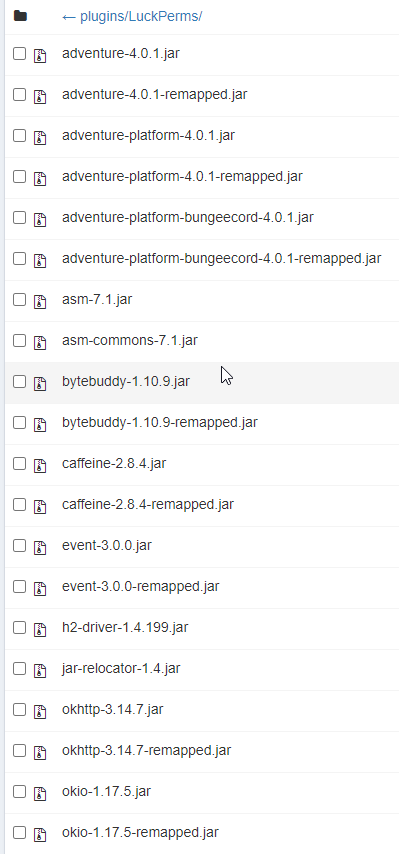
LuckPerms requires several libraries in order to operate. If you're getting a startup error such as NoClassDefFoundError, ClassNotFoundException or "Unable to load dependency...", stop your server, delete the /plugins/LuckPerms/libs/ directory and start it up again.
urban cloud
unborn python
ty
urban cloud
I feel like I'm missing something here. Do I really have to manually add all of the default player functions here or is there a prefab I can use or something.
Is verbose supposed to help me with this?
quaint idol
Verbose is a tool to help you find what nodes are needed
but yeah initial setup of permissions will take a while
unborn python
quaint idol
!verbose
It's not that, i cant even run luckperms once so there is no folder named LuckPerms yet
wintry cloudBOT
Hey !Float! Please don't tag helpful/staff members directly.
quaint idol
!latest
wintry cloudBOT
Latest version
5.2.44
unborn python
but yeah, i have the latest everything
could it be viaversion messing something up?
quaint idol
Yup you have latest LP
shouldn't be
to confirm, there is no Luckperms folder at all in your proxy file system?
(I don't know how bungee handles plugin storage)
quaint idol
Might not have refreshed ftp client or something
quaint idol
¯_(ツ)_/¯
unborn python
yeah no
still doesnt work
java.lang.NullPointerException
at me.lucko.luckperms.common.plugin.AbstractLuckPermsPlugin.disable(AbstractLuckPermsPlugin.java:228)
at me.lucko.luckperms.bungee.LPBungeeBootstrap.onDisable(LPBungeeBootstrap.java:166)
at net.md_5.bungee.BungeeCord.independentThreadStop(BungeeCord.java:469)
at net.md_5.bungee.BungeeCord.access$000(BungeeCord.java:102)
at net.md_5.bungee.BungeeCord$5.run(BungeeCord.java:409)```this if anything helps
quaint idol
that's just because of the startup error
daring stirrup
!paste full logs
wintry cloudBOT
Please use pastebin!
Seeing a paste of the problem makes everything so much easier! Use https://bytebin.lucko.me/ for easy pasting!
For console errors:
Pastebin any relevant segments of the console log. If it's a startup error, this includes the entire startup log!
Other errors:
Pastebin the entire LuckPerms config file (passwords removed) as well as any other relevant files!
unborn python
my full log is already up if u scroll up
ill psot it again 1s
Pastebin
Pastebin.com is the number one paste tool since 2002. Pastebin is a website where you can store text online for a set period of time.
daring stirrup
is that the old log?
or new log
did you restart after deleting the libs folder?
unborn python
as much as i can see its the same error
i stopped, deleted the lbis folder, started
daring stirrup
still need updated logs
unborn python
Pastebin
Pastebin.com is the number one paste tool since 2002. Pastebin is a website where you can store text online for a set period of time.
there
daring stirrup
can you screenshot the libs folder
 narrow sand
i have a user which should have wolrdedit.* on the hub server but not on the sv server
http://prntscr.com/vrk7en
but the user has it on both server
any error i make?

in the config from lp i set the hubserver to hub and the survivalserver to sv
prisma hinge
@narrow sand go to that server and screenshot /lp user <user> info please
narrow sand
the result is:
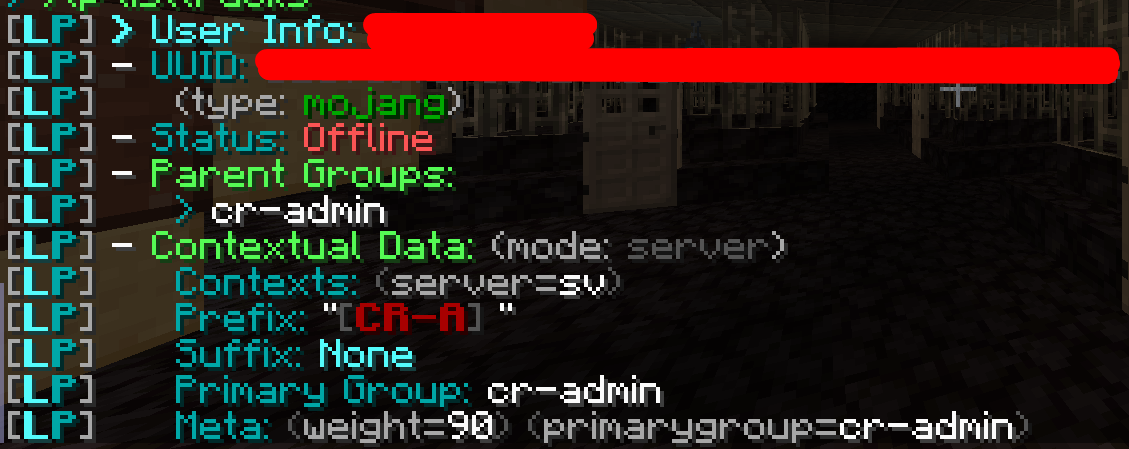 tardy glacier
Xd why hide username
narrow sand
privacy policy
what is miýsterious is, the group cr-admin should have moderator as parent

and it is configured as moderator
prisma hinge
I mean preferably it would be on an online user
But okay
I need you to send a (new) web editor session link please
narrow sand
i can send you an text from european laywers whch say that usernames are pseudo data which are personal indentificable data
in dm @prisma hinge ?
wintry cloudBOT
Hey levant_de! Please don't tag helpful/staff members directly.
narrow sand
oh xD
tardy glacier
!editosafety
wintry cloudBOT
Sorry! I do not understand the command !editosafety
Type !help for a list of commands.
prisma hinge
narrow sand
i can send you an text from european laywers whch say that usernames are pseudo ...
¿?¿?
prisma hinge
Yeah..
narrow sand
i can dm them to you
prisma hinge
Sigh, okay then
I mean... the perm is for hub and you screenshot for sv
Go to hub and screenshot user info please (preferably on an online user)
narrow sand
yeah the problem is that the user should have it on hub and not on sv
prisma hinge
... okay?
then deny the perm globally and set it to true for hub?
Or deny it for the contexts you want and to true for the others
narrow sand
thats weird wat i now see
i gave my alt the same group cr-admin
and he has the access like it should
did any cache exist?
i do that to my alt in case that the user on which that happens is not online now
prisma hinge
Well cache does exist but it is refreshed as it is needed "on demand"
narrow sand
any config error on my side?
prisma hinge
The only situation I found cached data to be a problem was when clearing recently online user data
But not much of a problem, more of a design thing but w/e
prisma hinge
narrow sand
any config error on my side?
¯\_(ツ)_/¯
narrow sand
okay
any way exist to delete the user completly from lp?
on the webeditor i found nothing
prisma hinge
On the right hand side of the username you'll find an × button
If you are up to date that is
!latest
wintry cloudBOT
Latest version
5.2.44
 narrow sand
fefo is the best
prisma hinge
😎
prisma hinge
prisma hinge
On the right hand side of the username you'll find an `×` button
Alternatively, you can run lp user <user> clear and (ideally) restart (to clean cache :d)
narrow sand
be back in a few moments with actual version
prisma hinge
narrow sand
i use 5.2.36 xD
Updated enough
narrow sand
okay
wintry cloudBOT
Latest version
5.2.44
narrow sand
so when i restart to clear cache i can update too xD
so, bungee and servers are now up to date
i now wait until the user ame back in a few hours to give the permissions back to her and test it
thanks in advance
narrow sand
another question
did parenting works over many levels or did i need to use tree for that?
as example:
user has 5 own permissions
helper has 7 own permissions has user as parent
supporter has 2 own permissions has helper as parent
mod has 1 own permission has supporter as parent
will mod then have 15 permissions or only his own 1 plus 2 from the helper?
narrow sand
it is only an example
we name it unbekannter for unknown user in case that he not has accept our privacy policie xD
prisma hinge
what kind of data do you collect for them to explicitly accept a privacy policy...
actually
I don't want to know
narrow sand
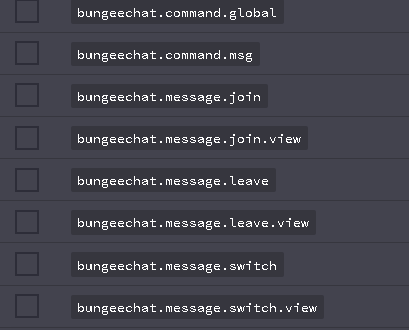
i ask in case that i need to give all groups that permissions that they can write in chat with bungeechat
our server is from european, so we need to do that in case that a username is privacy
shitty european laws
narrow sand
yeah, if it stands in the eu they need a privacy policy before they can add a username
prisma hinge
Which you "sign" when buying a license to use the game
prisma hinge
narrow sand
our server is from european, so we need to do that in case that a username is pr...
kinda pointless to do that if you ask me since the names are already out there but what do I know about europe other than a few countries ¯_(ツ)_/¯
narrow sand
with third party server accepting?
prisma hinge
nothing is preventing you from searching anyone's name on that site, is there?
narrow sand
yeah i know what you mean
but we save things like username in combination with data ingame like homes, transfer of in game money and other things and that needs to be accepted after gdpr law
prisma hinge
tsk
narrow sand
tsk?
prisma hinge
Urban Dictionary
The click of the tongue that most people use when irritated, pissed, or finds something/someone annoying or unamusing
narrow sand
thx
high raven
If it really were a big deal, I'm sure someone would be making a fuss. The public usernames are just that, public. Private usernames, which your lawyer may be referring to, are different
I'd very much like to see the entire document from the lawyer
narrow sand
https://www.itgovernance.eu/blog/en/the-gdpr-what-exactly-is-personal-data
[P]ersonal data’ means any information relating to an identified or identifiable natural person (‘data subject’).

Personal data is at the heart of the GDPR, but many people are unsure what it refers to. Read this guide for a definitive explanation.
so as example, bob plays minecraft
no one knows that bob`s minecraft name is 123
but we can identificate bob with his minecraftname 123 as a minecraft player and need to use his ip for things like networking
high raven
You're not sending his ip nor anything tying 123 to bob when you send the editor
Also that in no way addresses minecraft accounts
narrow sand
sure
i say in public that user x play on our server
quaint idol
Don't want to be the helper moderating the moderators, but shouldn't legal discussion like this move to either #general or DMs
prisma hinge
no u
tardy glacier
Xd bob x 123 ip address pog
high raven
We're talking about the editor :p
prisma hinge
Obviously
high raven
Also you're totally moderating the mods
quaint idol
The only user-related data contained in an editor session is the user's UUID and their last used username, both of which is public and any rando can find
for instance, 1 search on namemc found me your uuid https://i.imgur.com/XGiC3Kq.png



 prisma hinge
and literally anyone else's
tardy glacier
Namemc 
prisma hinge
As far as I know, all this GDPR thing is about holding "personal identifiable data", not necessarily sharing (which I find stupid for simply holding); but even if they don't sign that policy levant has, they still have their IP address and username anyhow so lol
The username part I find it bullshit tho lmao
tidal blade
There is 0 information stored with luckperms that can be used to identify a person. Only the uuid and usernames for the account. Which cannot be used to identify the person either. There is absolutely 0 way to identify who someone is through Minecraft unless you're a hacker and you trace the Public IP and manage to work out the Private IP address behind it which is super hard to do.
Minecraft/Spigot/Mojang/Bukkit only store the public IP which is public for a reason.
Without the Public IP, Username or Account UUID being stored, there is 0 way to store any information about that player, or for plugins to retrieve stored data.
narrow sand
i`m very carefully with the data and censore them one time more then one time less before i become post from any lawyer
high raven
You're too careful, your concerns are legitimately unfounded
prisma hinge
In any case, the chat logs would contain WAY more identifiable data than all uuid, username, essentials "homes" data (????????) and IP combined lol
narrow sand
the chat they also need to accept in the privacy policy
prisma hinge
but even if they don't sign that policy levant has, they still have their IP address and username anyhow so lol
inb4
you'd need to wipe logs hourly at that rate
¯_(ツ)_/¯
high raven
It's simply irrational
tidal blade
@narrow sand Honestly, you should be more worried about things like Google, Discord, Facebook, etcc.. Those are more commonily used to identify a person than Minecraft or any Multiplayer Server Plugins.
high raven
Seriously, we know
narrow sand
it was not about luckperms using the data omega
 livid sorrel
hi guys, im sorry for interrupting your conversation, but fo you maybe know if it is possible to add rank time for all players having that rank? by bulkupdate or sth?
narrow sand
it was in case i posted a screen with making lines over the username
quaint idol
the most data a editor session contains that could link to a user is their in-game name and their ranks
narrow sand
so no offense with lp or a plugin
tidal blade
@narrow sand Usernames are harmless By setting your discord name as levant_de we know that's your minecraft username,
prisma hinge
livid sorrel
hi guys, im sorry for interrupting your conversation, but fo you maybe know if i...
hmm you could easily do that on the web editor I suppose
okay how about this: sleepygrace - 127621d6-4973-464e-86ce-76ec8b446d07
I have literally no clue who that is, where they play, what their IP is, what their religion is, etc
literally nothing
livid sorrel
prisma hinge
hmm you could easily do that on the web editor I suppose
how? i didnt really see that feature
wintry cloudBOT
Hey Kryniowesegryderiusz <3! Please don't tag helpful/staff members directly.
narrow sand
i know what you mean
quaint idol
I want to bitch about being offtopic again but at the same time this is so entertaining 
prisma hinge
hell! for all I know I could have that data on my server and it's still unidentifiable lol
11 STAHP
tidal blade
The username, is the human readable equivilant of the UUID. Which is a Mojang only UUID. Nothing else is connected to the uuid. It's only a way for you to be authenticated with the Mojang servers.
quaint idol
sowwy fefo pls no ban
tidal blade
ban him
quaint idol

prisma hinge
livid sorrel
how? i didnt really see that feature
sec lol
narrow sand
so, it is late here
thanks for the help and the nice conversion to all ❤️
i go to bed
prisma hinge
👋nighty
narrow sand
thx
prisma hinge
@livid sorrel how many users are we talking about lol
livid sorrel
i want to extend rank time for all players that bought it after ex. week maintenance time
prisma hinge
well what I had in mind is basically manually, but the web editor has some nice filtering (searching), selecting and updating features, but again, it would be by hand
but I have something in mind.... give me a few minutes
quaint idol
and now, a message from our sponsors
prisma hinge
Bisect :D #host-a-server 👀
livid sorrel
eventually its possible to do by querry, but i was thinking about sth easier
quaint idol
Yeah obviously doing raw queries on the db is not great lol
livid sorrel
thats why i'm here
quaint idol
like it's doable but really not the best
prisma hinge
What is your storage method?
livid sorrel
mysql
prisma hinge
Good
Yeah what I had in mind is not possible through LP directly, but a DB query will do tbh (followed by an /lp sync//lp networksync)
basically a "manual" bulkupdate
which is a bit
yikes
make a backup first
just in case
/lp export backup
livid sorrel
in fact thats what i've said XD
quaint idol
I'd suggest being extra safe and doing one on another server as well
prisma hinge
I'll literally just pull the query from the strings in SqlStorage.java lol
quaint idol

prisma hinge
I want to be on the safe side xD
livid sorrel
XD Thats not that needed, I dont have problem with querries XD Just wondered if there is safer method
but as there isnt
wish me luck XD
prisma hinge
there isn't, no
quaint idol
Just make sure you have backups galore!
prisma hinge
🇱 🇵 🇪 🇽 🇵 🇴 🇷 🇹 🇧 🇦 🇨 🇰 🇺 🇵
quaint idol

quaint idol
Yeah I'd like to think I don't need to say that when people are about to do mass data changes, but you'd be amazed
prisma hinge
make sure to /lp networksync afterwards too
prisma hinge
basically, yeah
quaint idol
iirc yes, it fires off a resync request to all of your server as well as doing /lp sync
prisma hinge
is pog
livid sorrel
okay, thanks for all help 😄
prisma hinge
holy shit each day I appreciate more this piece of software
quaint idol
lol
prisma hinge
👋
quaint idol

prisma hinge
Aaaand they left
mighty yarrow
Sad
prisma hinge
xD
mighty yarrow
It's Christmas, Where's your Christmas spirit
Spongebob is the definition of Christmas
quaint idol
is november
prisma hinge
mighty yarrow
Spongebob is the definition of Christmas
aah pfffft totally
mighty yarrow
On the 1st of December, if the lp crew doesn't have Christmas themed pfps, imma cry
prisma hinge
11 be like GuyS thiS is OfF-TOPiC /s ily
prisma hinge
mighty yarrow
On the 1st of December, if the lp crew doesn't have Christmas themed pfps, imma ...
nu
you will not cri
quaint idol
prisma hinge
11 be like GuyS thiS is OfF-TOPiC /s ily
-_-
Yeah I've got a problem about being hardass about caps in chat as well on my server lol
(but I mean you aren't wrong this is very off topic)
prisma hinge
lol
daring stirrup
!usage
wintry cloudBOT
Here's a guide to help users understand and use LuckPerms for the first time.
Read more
LuckPerms wiki
daring stirrup
Yes
 craggy hazel
how do i make it so the rank appears next to users name?
pale pond
!chat get a chat formatter from the last link and make sure you have vault
wintry cloudBOT
LuckPerms does not perform any chat/tablist formatting of its own!
LuckPerms only acts as the source for prefixes / suffixes, it doesn't actually apply them. You need an appropriately configured chat/tablist formatting plugin for them to be displayed. If the values appear correctly when you run /lp user <user> info, LuckPerms is doing its job!
FAQ answer: Prefix isn't showing?
List of chat/tablist formatting plugins that work with LuckPerms
pale pond
!prefix then add a prefix using these commands
wintry cloudBOT
You can set prefixes, suffixes and other meta data in LuckPerms for players and groups. Note that LuckPerms does not manage chat. You need to use another plugin to show prefixes/suffixes in chat.
LuckPerms wiki
craggy hazel
wdym chat format?
pale pond
craggy hazel
also is timed ranks a think with luck perms?
its a plugin that converts lps information to make it work in chat
so it appears next to a users name
craggy hazel
ok
pale pond
or might need TAB if you meant like their username and in the tab menu
fresh saddle
I just got this error message
tardy glacier
!chat xd
wintry cloudBOT
LuckPerms does not perform any chat/tablist formatting of its own!
LuckPerms only acts as the source for prefixes / suffixes, it doesn't actually apply them. You need an appropriately configured chat/tablist formatting plugin for them to be displayed. If the values appear correctly when you run /lp user <user> info, LuckPerms is doing its job!
FAQ answer: Prefix isn't showing?
List of chat/tablist formatting plugins that work with LuckPerms
craggy hazel
is it possible to get rid of the <> on the end?
quick lagoon
!chat
wintry cloudBOT
LuckPerms does not perform any chat/tablist formatting of its own!
LuckPerms only acts as the source for prefixes / suffixes, it doesn't actually apply them. You need an appropriately configured chat/tablist formatting plugin for them to be displayed. If the values appear correctly when you run /lp user <user> info, LuckPerms is doing its job!
FAQ answer: Prefix isn't showing?
List of chat/tablist formatting plugins that work with LuckPerms
narrow sand
hi, will the day come that luckperms support vault?
tardy glacier
It does
narrow sand
ah okay, thanks for the info, i dont found luckperms on the vault list
i mean the list with compatible perm plugins
 grizzled tendon
Hey guys. Whenever someone joins my server, an error is thrown in the console. https://pastebin.com/zp2GCkYd
Any ideas? This is a fresh server (Just made today). Only has a few plugins (ViaVersion, Luckperms, DiscordSRV, and CoreProtect)
Pastebin
Pastebin.com is the number one paste tool since 2002. Pastebin is a website where you can store text online for a set period of time.
Running 1.16.4 (Paper build 296)
 frank ember
!downloads update to the latest version and see if the problem persists
wintry cloudBOT
You can download LuckPerms for Bukkit/Spigot, BungeeCord, Sponge, Nukkit and Velocity.
Additional downloads
grizzled tendon
I mean, I downloaded the latest version within the last 2 hours..
frank ember
!latest
wintry cloudBOT
Latest version
5.2.44
grizzled tendon
Alrighty
It appears that fixed it
Was that a known issue?
OH
That issue happens after I reload the server. My bad.
grizzled tendon
I've heard everyone say that, and I can agree, but why is it still a command then?
I know that's not luckperms, just curious if you know
tardy glacier
I guess for backwards compatibility ¯\_(ツ)_/¯
 south cairn
How do set a hex color prefix for groups? The color-code &#ffccbb isn't working
prisma hinge
That is 100% up to your chat plugin. LP just stores the raw data and it's your chat formatter that does the rest (make it colorful)
 atomic steppe
How do I make essentials kits only available in certain worlds? Someone told me to use luckperms context and told me to go here for help
prisma hinge
!contexts
wintry cloudBOT
You can set a permission or group on a per-world/per-server basis, through what we call "contexts".
Read more
LuckPerms wiki
atomic steppe
Oh ok so if I want a kit to only be avaible in my survival world i do key world and value survival right?
prisma hinge
correct
 dapper cedar
where's the support channel?
prisma hinge
dapper cedar
where's the support channel?
yes
atomic steppe
😑
 dense kite
right? kinda shocking
prisma hinge
atomic steppe
😑
I'm serious xD
dapper cedar
prisma hinge
yes
?
wintry cloudBOT
Hey Stexjy! Please don't tag helpful/staff members directly.
dapper cedar
where is it?
atomic steppe
I didnt even know they had a wiki
prisma hinge
I mean it's labeled in #welcome but this is the support channel alongside #support-1
atomic steppe
Is there any easy way to make everybody who spawns in a certain world automatically be equipped with somethin?
My spawn world is space based so I wanted it to equip with a glass block as the helmet
wintry cloudBOT
Essentials
Make sure you are using EssentialsX and Vault for prefixes. For any other issues with Essentials, you should seek support in either #general or the official EssentialsX support Discord.
EssentialsX Discord
proper pulsar
@dire hemlock What makes you think so?
 dire hemlock
I apologize. I am just realizing now that the last edit didnt save (the prefix wasnt set which is why i assumed that) but after doing /lp user <user> info I say that they were in fact default
Sorry for the annoyance!
 lethal heart
I just changed my luckperms storage method to mysql. WIll it automatically migrate my h2 storage files to mysql or do I have to manually do it?
wintry cloudBOT
If you wish to change your storage type (e.g. to YAML or MySQL) you may need to follow these instructions to ensure your groups and permissions are migrated to the new storage type.
Read more about the Storage types
LuckPerms wiki
prisma hinge
That's what you get for not asking beforehand. Thankfully, I did ask and that was in fact my very first question 😎
craggy hazel
none of my perms are working?
mighty yarrow
Instead of asking in multiple channels and providing no details, maybe like be patient and actually give details? 
craggy hazel
mighty yarrow
Instead of asking in multiple channels and providing no details, maybe like be p...
i didnt have details 🤣
mighty yarrow
What perms exactly, how do you know they aren't working, when did this start happening, which plugins, did you do anything different after they working fine or do they not work at all, what version of LP are you on etc.
You do have details, you just cba giving them
 unreal stone
Hello, is there a plugin that I can query the duration when I give a temporary authorization?
proper pulsar
Depends on what you want to do with that information and where do you want it
unreal stone
for players to know the duration of their special memberships remaining.
proper pulsar
So placeholders?
 brave dew
unreal stone
Hello, is there a plugin that I can query the duration when I give a temporary a...
brave dew
unreal stone
Hello, is there a plugin that I can query the duration when I give a temporary a...
its a placeholder
prisma hinge
Pretty sure brainstone just said that 🤣
jaunty current
Hello, is it possible to block a craft with luckperm?
tame hollow
with a plugin sure
jaunty current
Cause I have found a lot of pluggins but no one can deny a craft for one group and not for an other
tame hollow
if it's permission based you simply need to override the false value with true
 sick heron
Can someone help me setup a database?
Ptero panel
jaunty current
Hello, I have a spam message in server logs:
[15:37:25 WARN]: [LuckPerms] An exception was thrown by me.lucko.luckperms.bukkit.context.BukkitPlayerCalculator whilst calculating the context of subject CraftPlayer{name=o_Takeshi_o}
java.lang.ArrayIndexOutOfBoundsException: null
[15:37:25 WARN]: [LuckPerms] An exception was thrown by me.lucko.luckperms.bukkit.context.BukkitPlayerCalculator whilst calculating the context of subject CraftPlayer{name=Ainaryk}
java.lang.ArrayIndexOutOfBoundsException: null
quick lagoon
!paste full startup log
wintry cloudBOT
Please use pastebin!
Seeing a paste of the problem makes everything so much easier! Use https://bytebin.lucko.me/ for easy pasting!
For console errors:
Pastebin any relevant segments of the console log. If it's a startup error, this includes the entire startup log!
Other errors:
Pastebin the entire LuckPerms config file (passwords removed) as well as any other relevant files!
daring stirrup
set your storage method to h2
/lp export data
set it back to whatever you were using now
/lp import data
daring stirrup
yes
sick heron
Restart then do export data
Set it back to mysql
import data
Does it matter if the db was just created?
daring stirrup
No
sick heron
Alright i guess
1 s
Can the error be caused by HUB not connected to the db?
or would it show a different error
daring stirrup
???