#support-2
1 messages · Page 64 of 1
 slim terrace
slim terrace
slim terrace
Ok
 distant marsh
I have essentiallx and it keeps giving me 64 of everything and plus I cant kill specific things which one should I delete?
 prisma hinge
what
distant marsh
There’s files on the plugin
EssentialX
And everytime it gives me 64 stuff
And I cant kill specific
Stuff
 quick lagoon
!essentials
 wintry cloudBOT
Essentials
Make sure you are using EssentialsX and Vault for prefixes. For any other issues with Essentials, you should seek support in either #general or the official EssentialsX support Discord.
EssentialsX Discord
 zenith ice
is possible to do like when player have some permission for 3days, and i will addtemp it again, it will increase it to 6days?
 frank ember
Change temporary-add-behaviour to accumulate
or just add accumulate to the end of the addtemp command
 craggy slate
How to update "Luck Perms" without losing current data?
wintry cloudBOT
You can download LuckPerms for Bukkit/Spigot, BungeeCord, Sponge, Nukkit and Velocity.
Additional downloads
craggy slate
I wouldn't need to redo all the groups?
prisma hinge
No @craggy slate
If you don't delete the folder and only re-install .jar it will be fine
prisma hinge
How
craggy slate
and the tab
craggy slate
I put the old jar in .off
quick lagoon
what .off
prisma hinge
What's .off
craggy slate
With the .off the jar is deactivated, without the .off the jar is activated
It's like a security
quick lagoon
huh...?
craggy slate
Ah
quick lagoon
is it liike a settiing by your server host ?
craggy slate
it's a setting on multicraft
quick lagoon
well if you "off" luckperms then ofc luckperms wont work?
craggy slate
I took off the old one to make way for the new
quick lagoon
!paste full startup log
wintry cloudBOT
Please use pastebin!
Seeing a paste of the problem makes everything so much easier! Use https://bytebin.lucko.me/ for easy pasting!
For console errors:
Pastebin any relevant segments of the console log. If it's a startup error, this includes the entire startup log!
Other errors:
Pastebin the entire LuckPerms config file (passwords removed) as well as any other relevant files!
prisma hinge
s
 gilded badge
How can I change the weight after creating a user on their web? I see only "Weight: N/A" and I can't modify it.
 pale pond
add the perm node weight.NUMBER
 dense urchin
Hey Everyone, Luckperms has been wonderful, but I'm doing something wrong with prefixes and I'm not sure what it is, My mod group (Weight 6) has the prefix for guest group members (Weight 1), I'm not sure why, It's my understanding the higher the number, the higher priority with LuckPerms, If anyone can tell me what I'm doing wrong or help me in the right direction I'd appreciate it. Thanks for reading.
Here's the meta info incase someone is curious
dense urchin
Nevermind, I found the mistake, I didn't set the Mod group's prefix correctly, completely overlooked it.
 devout oxide
i need help. I am trying to use luckperms to make a permission to allow people to use the /tpa command(usiing essentialsX), but the commands are really confusing. I am running it on a minehut server, if that helps
pale pond
!usage might be able to teach the basics, is there a specific command or something youre having issues with?
wintry cloudBOT
Here's a guide to help users understand and use LuckPerms for the first time.
Read more
 LuckPerms wiki
 daring stirrup
!verbose
wintry cloudBOT
LuckPerms provides a verbose command to help you find out what permissions a command/plugin is checking.
Read more
LuckPerms wiki
 prime hull
is there a way for a specific server to just ignore if the contexts match or not?
 tidal blade
LP config, there are apply-global settings
make those false, and nothing will apply unless it has that server context.
prime hull
i mean the opposite so if you have a server context that is not the current server context it applies anyway
daring stirrup
Then just not set context if you want it to apply to servers that the context isnt set to?
prime hull
The owners have 2 LP DB servers one for proxy so anyone can have global proxy perms regardless of servers, the other one for individual perm servers.
So that's currently not a valid solution, if i want to replicate that sort of system using a single database
prisma hinge
Unsure if this would work but did you try not setting the server setting? Leaving it at global?
In LP config for those servers
prime hull
i think it just defaults to server=bungee
prisma hinge
No, the server context defined in proxies only exist on proxy LP, not on the backend servers
And checks made on a server do not take into account proxy contexts
prime hull
yeah i understand now don't worry, seems to work.
prisma hinge
oO
slim terrace
how i make it so when a new player joins it automatically gives them a role
daring stirrup
They get default automatically
quick lagoon
!default
wintry cloudBOT
LuckPerms provides a group that every player is added to upon joining the server, called default. You can use multiple methods to change the default group or change the name of it.
LuckPerms wiki
 hidden walrus
Can u tell me how do I use 'Argument based command permissions'?
I'm talking about luckperms.user.parent.set permission.
Cause I've benn doing everything as they want me to, but it still doesn't work. In my config Argument based command permissions is set to true, so that is not the problem.
prisma hinge
You don't need to enable arg based to give specific LP commands perms
you only want arg based if you want to fine tune with what arguments LP commands people can run
i.e. specific groups, tracks, users, etc
if you want someone to be able to lp user .. permission info on anyone, you give the luckperms.user.permission.info perm, no need for arg based
(as an example)
hidden walrus
but
you only want arg based if you want to fine tune with what arguments LP commands people can run
@prisma hinge I know and that is exactly what I want to achieve
wintry cloudBOT
Hey soswi! Please don't tag helpful/staff members directly.
quick lagoon
!argumentbased
wintry cloudBOT
Fine tune exactly what users with permission to use LuckPerms can do.
LuckPerms wiki
quick lagoon
read ^^ this and also rmb to enable iit in the config
!verbose i suggest you use this as well to see what perm are need
wintry cloudBOT
LuckPerms provides a verbose command to help you find out what permissions a command/plugin is checking.
Read more
LuckPerms wiki
quick lagoon
huh
prisma hinge
arg based requires a LOT of perms for even a single action, 4 or 5 at least lol
so yeah defo use verbose
quick lagoon
defo fefo fedo
prisma hinge
lol
hidden walrus
k thx
 normal bay
hey guys
i set the enable-op to false and this should disable the op command
but i have a plugin
this
when this plugins is not loaded /op is disabled but when the plugin is on server /op work again want to know how this plugin can make the /op still work ?
ping to notice and thank you
prisma hinge
sounds like a plugin I wouldn't like to have
normal bay
any replacement ?
prisma hinge
I mean it's kind of stupid to try hide your plugins tho.. but that's an #general discussion
everyone can do simple trial and error to figure out the perms and plugins you have
 mighty yarrow
!commands
wintry cloudBOT
Find all of the available LuckPerms commands on the wiki.
Read more
General commands
User commands
Group commands
Permission commands
Parent commands
Meta commands
Track commands
Log commands
LuckPerms wiki
 white stratus
I cant get luckperms to load on install and generate a config. I assume this is because its incompatible, but I have sponge on and working for sure and i thought that luckperms was backwards compatible. Any idea what version i should be using for a 1.12.2 FTB Revelation server?
pale pond
can you send startup logs?
white stratus
prisma hinge
your host is blocking a connection to repo.lucko.me
you'll want to talk with them about that
LP tries to download some dependencies but your host says no no
in the meantime, you can upload them manually
set up a small q&d local server on your computer, install LP, start the server, let it start, stop it and in your local server's LP folder there will be a folder named libs, upload that folder into your remote server's LP folder
white stratus
what is q&d sorry?
prisma hinge
quick and dirty lol
 also
white stratus
also
white stratus
oh ok i was like is this some kind of game mode
Do i also need to put sponge on that server?
prisma hinge
yeah
white stratus
how do i do that?
white stratus
mmk
white stratus
I dont plan on ever connecting to this server
So no issues there
omg this isnt what i need to download mods onto it is it
Or can i just add a mods folder >_>
white stratus
I figured it out. Do i delete the existed lib folder on my host?
I am pretty sure it isnt smart enough to ask me to overwrite
 blazing lily
im not sure what issue ur trying to fix
as far as i know, the port issue is the only thing stopping the server from starting
white stratus
Oh no scroll up, the whole reason for the creation of that server was to get around my host blocking a dependency file download
 tame hollow
Somethings running on that port already
this error usually happens when you've already started the MC server and try to start it again while already running
 rose belfry
ok so I have this issue with luckperms: https://mclo.gs/5bR8mxE
im running my server on 1.15.2
prisma hinge
!libsdir @rose belfry
wintry cloudBOT
LuckPerms dependencies
LuckPerms requires several libraries in order to operate. If you're getting a startup error such as NoClassDefFoundError, ClassNotFoundException or "Unable to load dependency...", stop your server, delete the /plugins/LuckPerms/libs/ directory and start it up again.
rose belfry
thanks
 true oak
!lib
wintry cloudBOT
Sorry! I do not understand the command !lib
Type !help for a list of commands.
true oak
!help
wintry cloudBOT
Available commands:
!advanced
!api
!argumentbased
!ask
!bulkupdate
!bungee
!cauldron
!colours
!commandequivalents
!commands
!config
!context
!cookbook
!default
!downloads
!editor
!editorsafety
!errors
!essentials
!extensions
!extracontexts
!faq
!formatting
!helpchat
!inheritance
!install
!libsdir
!locale
!meta
!migration
!notworking
!nowildcard
!pasteit
!permissions
!placeholders
!selfhosting
!stacking
!storage
!suggestions
!switchstorage
!sync
!tracks
!translations
!upgrade
!usage
!userinfo
!verbose
!weight
!whyluckperms
!wiki
true oak
!libsdir
wintry cloudBOT
LuckPerms dependencies
LuckPerms requires several libraries in order to operate. If you're getting a startup error such as NoClassDefFoundError, ClassNotFoundException or "Unable to load dependency...", stop your server, delete the /plugins/LuckPerms/libs/ directory and start it up again.
true oak
!install
wintry cloudBOT
You can install LuckPerms on Spigot/Paper, Sponge, BungeeCord/Waterfall, Velocity and others. Check the installation guide for more info on setting up LuckPerms.
Read more
LuckPerms wiki
 quaint idol
@rose belfry what error?
rose belfry
this one: https://hastebin.com/iwezojamuz.less
quaint idol
!update
wintry cloudBOT
You can download LuckPerms for Bukkit/Spigot, BungeeCord, Sponge, Nukkit and Velocity.
Additional downloads
quaint idol
And delete the libs folder again while you're doing that
prisma hinge
CUBE WORLD
 fallen carbon
nooo minecraft pe
daring stirrup
Dont cross post
wintry cloudBOT
Essentials
Make sure you are using EssentialsX and Vault for prefixes. For any other issues with Essentials, you should seek support in either #general or the official EssentialsX support Discord.
EssentialsX Discord
 inner falcon
Hi I have a vanilla spigot server do you know how to make it so that my players can only go between spectator and survival I'm pretty new to this plugi
tidal blade
Give them permission to only use those.
 keen kindle
hello, i have a problem with luckperms,
when I make a command, it displays nothing even though I'm op and on the console it works properly
tidal blade
"make a command" what do you mean by that
keen kindle
"make a command" what do you mean by that**/lp info**, /lp ... , ...
wintry cloudBOT
Hey Neozik_! Please don't tag helpful/staff members directly.
tidal blade
That's using a command not making a command... You need permission to use those commands.
!usage
wintry cloudBOT
Here's a guide to help users understand and use LuckPerms for the first time.
Read more
LuckPerms wiki
keen kindle
I already have this permission
keen kindle
no message
daring stirrup
You on Badlion Client?
keen kindle
no
tidal blade
Show me the output of /pl
keen kindle
tidal blade
Why do you have permissionsEx and luckperms installed at the same time?
An PermissionsExTabColours
Please Remove PermissionsEx and PermissionsExTabColours @keen kindle
keen kindle
i don't no , yes remove
keen kindle
i don't speak english very well i'm french i wanted to say "i don't know why they're installed i'm going to remove them"
Please Remove PermissionsEx and PermissionsExTabColours @keen kindle
it still doesn't work
tidal blade
Show me the output of pl again
keen kindle
daring stirrup
!paste full startup log
wintry cloudBOT
Please use pastebin!
Seeing a paste of the problem makes everything so much easier! Use https://bytebin.lucko.me/ for easy pasting!
For console errors:
Pastebin any relevant segments of the console log. If it's a startup error, this includes the entire startup log!
Other errors:
Pastebin the entire LuckPerms config file (passwords removed) as well as any other relevant files!
keen kindle
there is no error I just installed the plugin at the beginning it was working I did a reboot and since then I haven't touched anything to the config
tidal blade
can you do lp editor and send us the link
keen kindle

LuckPerms - A permissions plugin for Minecraft servers.
LuckPerms is a permissions plugin for Minecraft servers.
tidal blade
!paste your full console startup log
wintry cloudBOT
Please use pastebin!
Seeing a paste of the problem makes everything so much easier! Use https://bytebin.lucko.me/ for easy pasting!
For console errors:
Pastebin any relevant segments of the console log. If it's a startup error, this includes the entire startup log!
Other errors:
Pastebin the entire LuckPerms config file (passwords removed) as well as any other relevant files!
keen kindle
tidal blade
Surely some message in chat would come up when you do /lp info
daring stirrup
Try it in console
keen kindle
it works with the console but not in game
daring stirrup
Can you try it with just LuckPerms on the server?
tidal blade
Yeah, remove all plugins apart from Luckperms and try /lp info in-game
keen kindle
I can't delete all the other plugins
tidal blade
Just remove the .jar files for them
Then you can add them back after testing
All the data for the plugins will still be in their folders so you won't loose anything
keen kindle
yes
tidal blade
So, once you've removed them, try doing /lp info in-game and see what happens
keen kindle
it works
tidal blade
So, now add the plugins back one by one until it stops working again
Once it stops working again, you'll know which plugin is stopping it
keen kindle
okay:)
it's the ViaVersion plugin https://www.spigotmc.org/resources/viaversion.19254/

SpigotMC - High Performance Minecraft
tidal blade
Which version were you connecting on?
keen kindle
1.12.2
tidal blade
Hmm weird. should've worked, ah well. Just remove viaversion and don't add it back and it will work fine
keen kindle
so yes :/
thank you for your help! 🙂 prefix level I just have to change in the chat essentials config ?
tidal blade
!chat
wintry cloudBOT
LuckPerms does not perform any chat/tablist formatting of its own!
LuckPerms only acts as the source for prefixes / suffixes, it doesn't actually apply them. You need an appropriately configured chat/tablist formatting plugin for them to be displayed. If the values appear correctly when you run /lp user <user> info, LuckPerms is doing its job!
FAQ answer: Prefix isn't showing?
List of chat/tablist formatting plugins that work with LuckPerms
keen kindle
thank you very much for your help! 🙂
prisma hinge
hey @soft cosmos if you want to pull in pgjdbc-ng driver then you should only look into 4 first commits (ceee3404391837d261262798d04662414b05304f being the last one) of my pr - they simply replace the postgres driver, latter implement listen/notify
wintry cloudBOT
Hey mikroskeem! Please don't tag helpful/staff members directly.
prisma hinge
just thought that information could be helpful and make reviewing faster in any way :)
@wintry cloud 🔨
 soft cosmos
ah awesome, thanks!
btw, any particular reason why you removed the relocation & went with isolated classloader instead?
the relocation option is generally better -- I only use the isolated classloader when it's not viable (e.g. if there's natives used)
@prisma hinge ^
prisma hinge
netty tbh not sure at this point
made this PR quite long time ago, probably saw it being used with other drivers
oh yes
I suppose this is because of relocation does not support rewriting services yet (META-INF/services/com.impossibl.postgres.system.procs.ProcProvider and its contents should be rewritten as well).
it was under this comment
so that's why :p @soft cosmos
wintry cloudBOT
Hey mikroskeem! Please don't tag helpful/staff members directly.
soft cosmos
cool alright, thanks!
 lyric parcel
how can i give a prefix to a group with luckperms? cant seem to figure that out.
prisma hinge
!prefix
wintry cloudBOT
You can set prefixes, suffixes and other meta data in LuckPerms for players and groups. Note that LuckPerms does not manage chat. You need to use another plugin to show prefixes/suffixes in chat.
LuckPerms wiki
prisma hinge
!chat
wintry cloudBOT
LuckPerms does not perform any chat/tablist formatting of its own!
LuckPerms only acts as the source for prefixes / suffixes, it doesn't actually apply them. You need an appropriately configured chat/tablist formatting plugin for them to be displayed. If the values appear correctly when you run /lp user <user> info, LuckPerms is doing its job!
FAQ answer: Prefix isn't showing?
List of chat/tablist formatting plugins that work with LuckPerms
lyric parcel
bad eyesight
prisma hinge
lol
prisma hinge
it seems like the recent dev builds are a bit broken
How do
So*
with the .30 build, which I put on all my servers, one server is failing to connect to mysql, says malformed connection packet
surprising that others work just fine
tried updating to .31, (the very latest) same problem
 patent scarab
Hi I am having troubles with Luckperms. Whenever I try to add myself to a group it says "a user for MidWolfhunter could not be found"
What am I doing wrong?
I used /lp u MidWolfhunter parent add Owner
prisma hinge
@prisma hinge set the storage-method to mariadb
thanks
@patent scarab have you ever joined after installing LP?
it's at mysql currently but I do use mariadb, that's the problem?
patent scarab
Yes
prisma hinge
Govindas yes, it's an issue with a recent mariadb update
patent scarab
Ive restarted and joined plenty of times
prisma hinge
Wolfhunter screenshot /lp info please
And send an editor link generated while you are online
patent scarab
And send an editor link generated while you are online
@prisma hinge how exactly?
wintry cloudBOT
Hey MidWolfhunter! Please don't tag helpful/staff members directly.
patent scarab
Sorry
prisma hinge
Join the server, run /lp editor and share the URL in here
patent scarab
Ught
prisma hinge
?
patent scarab
https://drive.google.com/file/d/1m_MUanaF52K0reEBykx4H5xRLTouguXH/view?usp=drivesdk
I think this link will work

Google Docs
patent scarab
prisma hinge
Oooohh
I seeee
Stop the server, set allow-invalid-usernames: true in LP config and start it up again
patent scarab
Okay
prisma hinge
Seeing it's a Bukkit server and you're joining with Bedrock Edition, you'll have to do that + do the * at the beginning
prisma hinge
Yes, that's how geyser does it afaik
patent scarab
Okay now I'm having a problem formatting the chats. I tried asking for help in essentials discord, but they simply don't have helpful answers. I am trying to format groups in config, but once I restart server and set my group it does not take effect
It stays on default server format. What am I doing wrong?
daring stirrup
!chat
wintry cloudBOT
LuckPerms does not perform any chat/tablist formatting of its own!
LuckPerms only acts as the source for prefixes / suffixes, it doesn't actually apply them. You need an appropriately configured chat/tablist formatting plugin for them to be displayed. If the values appear correctly when you run /lp user <user> info, LuckPerms is doing its job!
FAQ answer: Prefix isn't showing?
List of chat/tablist formatting plugins that work with LuckPerms
patent scarab
How to remove paremt group?
wintry cloudBOT
Find all of the available LuckPerms commands on the wiki.
Read more
General commands
User commands
Group commands
Permission commands
Parent commands
Meta commands
Track commands
Log commands
LuckPerms wiki
daring stirrup
Oh remove
patent scarab
Yes how do I remove paremt group from player
prisma hinge
!commands parent section
patent scarab
Ok I mannaged to remove it but it still uses default chat format
prisma hinge
screenshot /lp user <user> meta info
patent scarab
wintry cloudBOT
LuckPerms allows you to set weights in order to determine the priority of certain nodes, like permissions and even prefixes. A higher weight number is a higher priority.
Read more
LuckPerms wiki
patent scarab
I only have Owner and test assigned to my parent groups
daring stirrup
Picture
prisma hinge
daring stirrup
You dont have prefix set
prisma hinge
you literally have test in there
patent scarab
Test and owner habe both the same chat format
I don't use prefix. I simply want to formst groups and assign players to the groups
prisma hinge
well LP doesn't take care of chat anyhow, and that is essentials config
!moss ask there 👇
wintry cloudBOT
Essentials
Make sure you are using EssentialsX and Vault for prefixes. For any other issues with Essentials, you should seek support in either #general or the official EssentialsX support Discord.
EssentialsX Discord
daring stirrup
What server software is that even
prisma hinge
paper with geyser
prisma hinge
I doubt it is
I'm no essentials support, but I'm pretty sure that the ones under group-format should have two extra spaces on their left
patent scarab
Like that?
prisma hinge
yes, and the group names themselves all lowercase too (so you can drop the first Owner)
patent scarab
I tired that too. But ill do it again
prisma hinge
after changing all that, /ess reload should do I think
daring stirrup
Might need to restart
patent scarab
I always restart
Let me join and see if ut works
Those spaces worked! Thank you!!!
prisma hinge
hmm, luckperms editor command just seemed to stop working for no reason, it literally does nothing and its perfect timing because the DNS provider is taking ages to get my panel back up so i cant even check console
tame hollow
Sounds like it's not an issue with LP then
prisma hinge
I've started getting this error recently, anyone has any idea?
This verification can be disabled using the option "disableSslHostnameVerification" but won't prevent man-in-the-middle attacks anymore
at me.lucko.luckperms.lib.mariadb.internal.util.exceptions.ExceptionFactory.createException(ExceptionFactory.java:73) ~[?:?]
at me.lucko.luckperms.lib.mariadb.internal.util.exceptions.ExceptionFactory.create(ExceptionFactory.java:179) ~[?:?]
at me.lucko.luckperms.lib.mariadb.internal.protocol.AbstractConnectProtocol.sslWrapper(AbstractConnectProtocol.java:659) ~[?:?]
at me.lucko.luckperms.lib.mariadb.internal.protocol.AbstractConnectProtocol.createConnection(AbstractConnectProtocol.java:532) ~[?:?]
at me.lucko.luckperms.lib.mariadb.internal.protocol.AbstractConnectProtocol.connectWithoutProxy(AbstractConnectProtocol.java:1380) ~[?:?]
... 16 more```somethign wrong with your SSL for your database
prisma hinge
was well working very recently.. I put days of work to get ssl truly right xD and now I have no idea what went wrong
MariaDB [(none)]> SHOW VARIABLES LIKE '%ssl%';
+---------------------+-----------------------------+
| Variable_name       | Value                       |
+---------------------+-----------------------------+
| have_openssl        | YES                         |
| have_ssl            | YES                         |
| ssl_ca              |                             |
| ssl_capath          |                             |
| ssl_cert            | /etc/mysql/fullchain.pem    |
| ssl_cipher          |                             |
| ssl_crl             |                             |
| ssl_crlpath         |                             |
| ssl_key             | /etc/mysql/privkey.pem      |
| version_ssl_library | OpenSSL 1.1.1f  31 Mar 2020 |
+---------------------+-----------------------------+
I've confirmed that the certificate isn't expired
weirdness is, it works well in some servers, in some do not
using the same settings.. xD
might be Java version related
those that it works is Java 14, those that it no work is Java 11
oh and it uses older version of luckperms, that must be it
since it updated connector thing
yup that fixed it
5.2.24 is safe version, 5.2.30 and 5.2.31 is broken
quick lagoon
ah
there was an sql driver update
@prisma hinge can you report it to github?
!bugreport
wintry cloudBOT
Suggestions and Bug Reports
If you would like to request a feature for LuckPerms, or report a bug, feel free to open an issue on GitHub!
Issue Tracker:
prisma hinge
done
 tawdry canyon
Good evening! I have a recurring bug between LuckPerm and DynamicBungeeAuth with UUID after triggering / Premium from DBA. it must probably communicate badly. I use BungeeCord and I followed the Bungee installation steps with LuckPerms info but it shows me that.
`>.... [22:55:41 WARN]: [LuckPerms] LuckPerms already has data for player 'The_LimeSlime' - but this data is stored under a different UUID.
.... [22:55:41 WARN]: [LuckPerms] 'The_LimeSlime' has previously used the unique ids [12f1b7a2-883d-35a9-a017-493b4c57e109] but is now connecting with '83c4357e-e3bc-4da3-b371-79b40695f7cd'
.... [22:55:41 WARN]: [LuckPerms] The UUID the player is connecting with now is Mojang-assigned (type 4). This implies that one of the other servers in your network is not authenticating correctly.
.... [22:55:41 WARN]: [LuckPerms] If you're using BungeeCord/Velocity, please ensure that IP-Forwarding is setup correctly on all of your backend servers!
.... [22:55:41 WARN]: [LuckPerms] See here for more info: https://github.com/lucko/LuckPerms/wiki/Network-Installation#pre-setup`
An idea ? Is this a bug on my part?
 proper pulsar
Reach out to their support
prisma hinge
I mean anything that messes up with UUIDs between proxy, pre login and post login... yeah that's bad
tawdry canyon
@proper pulsar Where ?
@prisma hinge So when I don't use the normal UUIDs, I have no worries and as soon as I activate the account in Premium, BIM, problem ...
wintry cloudBOT
Hey xxSkyNTxx! Please don't tag helpful/staff members directly.
proper pulsar
@tawdry canyon idk
tawdry canyon
Link ?
prisma hinge
So when I don't use the normal UUIDs, I have no worries and as soon as I activate the account in Premium, BIM, problem ...
that is literally messing up with the network's natural UUID generation
tawdry canyon
Completely impossible to use "/ server" or that the permission is well put in bungee ..
prisma hinge
because you have two UUID users, one with the "offline mode" UUID and the other with a random ("non offline mode") UUID, and only one of those is having those perms and not the other one
I mean anything that messes up with UUIDs between proxy, pre login and post login... yeah that's bad
that is literally messing up with the network's natural UUID generation
tawdry canyon
Logic
prisma hinge
LP indexes its users by UUIDs, so they have to be consistent across the entire network, doesn't matter whether it's all online mode or all offline mode, as long as its consistent
tawdry canyon
obviously
proper pulsar
Heck it can even be a messy mix as long as it's consitent
proper pulsar
!bungee
wintry cloudBOT
If you run a Bungeecord network, learn how to correctly setup LuckPerms on all server instances (including Bungee).
Also read:
Syncing data between servers
LuckPerms wiki
proper pulsar
@prisma hinge have a look at the bottom link
Elaborate
Can I see /lp info on a server where it doesn't work and on one where it does?
THen you clearly are not
Or the credentials are wrong
Check the logs
Yes
If the port is 3306, you can leave it out
prisma hinge
Bluestone
proper pulsar
Obligatory: https://www.youtube.com/watch?v=68ugkg9RePc

Are you interested in Eiffel 65 news? Subscribe to the channel: http://bit.ly/1jVW9Sz
★ Buy "Blue(Da Ba Dee)" On
Itunes: http://apple.co/1Kty2Ab
GooglePlay: http://bit.ly/1MXcG4w
★ Listen:
Spotify: http://spoti.fi/1XokAHa
Deezer: http://bit.ly/1jYzB3K
Blue (Da Ba Dee) is the...
tame hollow
nice to see some blue that isn't a bot
proper pulsar
lol
proper pulsar
!errors @prisma hinge
wintry cloudBOT
Here's a page with some common storage system errors.
LuckPerms wiki
proper pulsar
!switchstorage
wintry cloudBOT
If you wish to change your storage type (e.g. to YAML or MySQL) you may need to follow these instructions to ensure your groups and permissions are migrated to the new storage type.
Read more about the Storage types
LuckPerms wiki
prisma hinge
tl;dr
- Export
- Stop the server
- Change storage methods
- Start the server
- Import
proper pulsar
Well considering he already changed the storage type he first needs to change it back to the original
prisma hinge
lol tru
prisma hinge
Then
- Stop the server
- Change back to h2
- Start the server
- Refer to the previous message
tame hollow
!prefixes
wintry cloudBOT
You can set prefixes, suffixes and other meta data in LuckPerms for players and groups. Note that LuckPerms does not manage chat. You need to use another plugin to show prefixes/suffixes in chat.
LuckPerms wiki
tame hollow
!context
wintry cloudBOT
You can set a permission or group on a per-world/per-server basis, through what we call "contexts".
Read more
LuckPerms wiki
proper pulsar
Is
👏🏻
this
👏🏻
better
👏🏻
?
proper pulsar
!bulkedit
wintry cloudBOT
Quickly update a large amount of user and group permissions by using the bulkupdate command.
Read more
LuckPerms wiki
proper pulsar
That’s the command way
Needs to be done before migration though
Well you could change back to H2, run the commands, export everything again, wipe the MySQL database and just repeat the migration steps
Though from experience the webeditor method is the fastest at your current point
prisma hinge
there is LP for NukkitX
tbh I have no idea what it is lol
Nukkit is nuclear-powered server software for Minecraft Bedrock Edition
yea that
patent scarab
@prisma hinge Im on paper with GeyserMC plugin
prisma hinge
Isn't that a proxy
patent scarab
Does luckperms support temporarly ranks?
wintry cloudBOT
Find all of the available LuckPerms commands on the wiki.
Read more
General commands
User commands
Group commands
Permission commands
Parent commands
Meta commands
Track commands
Log commands
LuckPerms wiki
patent scarab
More spesific?
quick lagoon
LuckPerms - A permissions plugin for Minecraft servers.
LuckPerms is a permissions plugin for Minecraft servers.
patent scarab
Ight thank you. Does the duration count in seconds or hours or?
daring stirrup
Read the wiki
tame hollow
 patent scarab
Thank you
I saw that. Thank you so much for your help
So lets say a player has a rank called Dragon which they bought with real money. And they vote for the server to get rewards. According to my vote rewards I set to give the voter a Voter rank. But I only want default ranks to receive Voter rank and not other groups. How can I implement that using luckperms?
wintry cloudBOT
LuckPerms allows you to set weights in order to determine the priority of certain nodes, like permissions and even prefixes. A higher weight number is a higher priority.
Read more
LuckPerms wiki
patent scarab
Okay so that means if Dragon rank weighs 100 and voter rank only weighs 50, luckperms will display Dragon rank and not voter rank? Is that correct?
daring stirrup
Yes
quick lagoon
note that prefix has its own weights
patent scarab
Thank you. Is there a link to all permissions aswell? I will soon be setting up prmisisons for staff and guests
I dont use prefixes
quick lagoon
wdym by "all permissions", permissions for each plugin is defined by each plugins
daring stirrup
!default
wintry cloudBOT
LuckPerms provides a group that every player is added to upon joining the server, called default. You can use multiple methods to change the default group or change the name of it.
LuckPerms wiki
patent scarab
Thank you
Does luckperms also offer those text above a player's head? Or is that a different plugin?
wintry cloudBOT
LuckPerms does not perform any chat/tablist formatting of its own!
LuckPerms only acts as the source for prefixes / suffixes, it doesn't actually apply them. You need an appropriately configured chat/tablist formatting plugin for them to be displayed. If the values appear correctly when you run /lp user <user> info, LuckPerms is doing its job!
FAQ answer: Prefix isn't showing?
List of chat/tablist formatting plugins that work with LuckPerms
daring stirrup
That i think lists some that can do it
patent scarab
Thank you
 thorny yew
How can I set prefix to a specific player?
quick lagoon
!command
wintry cloudBOT
Find all of the available LuckPerms commands on the wiki.
Read more
General commands
User commands
Group commands
Permission commands
Parent commands
Meta commands
Track commands
Log commands
LuckPerms wiki
quick lagoon
LuckPerms - A permissions plugin for Minecraft servers.
LuckPerms is a permissions plugin for Minecraft servers.
thorny yew
and u can show only one prefix, that has the highest priority?
wintry cloudBOT
Display multiple prefixes/suffixes alongside a player's name.
LuckPerms wiki
thorny yew
i cant understand the difference between set/add - prefix/suffix, if i do set, it will remove any other prefixes ?
but only on that user / group?
thorny yew
what if there is a group with prefix, and you do a setprefix on user
what will happen
quick lagoon
depends on how you config stacking, by default just the one with the highest weight will show
prisma hinge
what if there is a group with prefix, and you do a setprefix on user
if you set on a user, it will only affect the user, not any parent groups
it won't clear the prefixes of the parent groups
thorny yew
ye , danke
proper pulsar
Well set will remove all others on the same group or user. It does not affect parent groups
Lol
Was too slow
thorny yew
😄 😄
prisma hinge
lol
 crisp beacon
Yo it's been a while since I've used LP on a server, currently on v5.2.32 (last version I used was v4.x) and customizing messages seems to have dissappeared completely? my old LuckpermsLang.yml doesn't work anymore, I did some digging and supposedly it's all in a new <lang>.properties file? I checked, and there was no way to change ingame messages/color formatting... Is there a new system that hasn't been documented?
prisma hinge
Well it isn't undocumented, there is a translations/locale page. You can customize the messages themselves, but the formatting is baked
!locale I think?
wintry cloudBOT
Learn how to change all the message from LuckPerms.
LuckPerms wiki
crisp beacon
Yikes, rip customization, guess I'll go back to v4
prisma hinge
You really shouldn't
Ever heard of "bugfixes"?
I mean if you think a few custom colors are worth bugs and stability issues
go for it
¯_(ツ)_/¯
crisp beacon
I never had any issues with the versions I used back in the day, which is why i'm wondering why completely remove formatting customization, forcing users to blatantly state "Hey! we're using luckperms!"
I understand moving to .properties files is easier for developers to make changes
prisma hinge
why is it a problem if they know what plugins you're using?
crisp beacon
but it's a huge hit to server owners in terms of useability if they want to customize messages to conform to a certain theme per-se
prisma hinge
well, you could at least use the latest v5.1 found on spigotmc, this new messages system was introduced on 5.2
and yes, there have been bugfixes since then
that's why I'm suggesting at least v5
crisp beacon
Yup, i figured that out, still sad 'bout the change tho.
i'll use 5.1.93 it's working nicely.
prisma hinge
Its open source man
I mean bukkit will eventually drop support for § color codes too (it has been discussed lately), they are dragging it for compatibility's sake, and that will be a great hit to "customization", forcing a (similar) messages system LP and many other plugins are using now. Vanilla no longer uses those color codes, they use json components :d
 pale cave
Someone can help me?
proper pulsar
!ask @pale cave and also don’t spam the same question in multiple channels!
wintry cloudBOT
Please ask your question!
Please ask the question you have. Don't ask to ask, or ask to DM someone. There are people here to help you, but we need to know what to help you with, so please just ask the question you want to in as much detail as possible!
Or, try here first:
Why shouldn't I ask to ask?
pale cave
._.
patent scarab
Is there a way to see how much time is left on a temp rank?
tame hollow
/LP user (user) info
 cosmic mauve
!wiki
wintry cloudBOT
Learn how to use LuckPerms and all of its features by reading the wiki on GitHub.
Read more
LuckPerms wiki
 grave orchid
who is pinged me?
 regal sigil
Hey, i'm trying to do a bulkupdate lp bulkupdate users update server survival "permission ~~ meta.griefdefender\%" "server != hub"
just wanna change that permission that all my users have that doesn't have a context saying server=hub to have a context saying server=survival
when i run it nothing changes, what could be wrong?
please ping if you answer 🙂
prisma hinge
It doesn't purposely make the server lag lol but it allows plugins to check perms for offline players on the main thread. i.e. risk of potential lag, since LP has to load the offline user's data from storage
proper pulsar
@regal sigil why the backslash?
regal sigil
it's in the meta itself 🙂
proper pulsar
Well you escaped the % itself
Try either meta.griefdefender\.% or meta.griefdefender\\.%
prisma hinge
prolly the latter
regal sigil
Oh lol, forgot about escaping 👀 Ty so much!
 slow wraith
Someone knows the permission node for minecraft:kill @e[type=end_crystal]? I gave minecraft.commnd.kill but it says "selector not allowed" 😦
quick lagoon
it may be just an invalid selector and not a permission issue
!verbose you can use this to check
wintry cloudBOT
LuckPerms provides a verbose command to help you find out what permissions a command/plugin is checking.
Read more
LuckPerms wiki
slow wraith
hm its working for me with all rights, but secondary account with normal player group gets this message, so i guess it is permissionproblem :I
i dont feel smarter now :/
proper pulsar
Hovering over the permissions in verbose is just advanced debug information. Not relevant for you
You only care about the actual permissions being checked
slow wraith
hm thats minecraft.command.kill
proper pulsar
There’s a good chance that there’s no permission if it’s Spigot
Because why would you lock such features behind permissions when you can lock them behind OP? 😂
slow wraith
oof ye paper :I not very funny for me right now 😄
 river summit
uhhh where can i find support?
river summit
hmm can someone help i've got my SQL database deleted somehow from only luckperms
idk what happened it just got deleted somehow
prisma hinge
how would it get deleted
river summit
i rly dont know
river summit
i got a plugin called GameModeInventories
no i dont have mysql
and after downloading this plugin i was messing with perms of this plugin and all of a sudden everything got deleted
prisma hinge
hmm can someone help i've got my SQL database deleted somehow from only luckperms
river summit
when i did /lp editor and saw everything literally was deleted and i only had default group
prisma hinge
yeah thats weird
river summit
but all other plugins are still the same
river summit
ping me if anyone got answer thanks
prisma hinge
ping pong
river summit
also im recieving an error every 3 seconds about SQLite
prisma hinge
truth
 brave dew
Hello, is there a way to add/remove a group to a player only when they're in a certain group.
Context: we want to remove the pvp rank from the player with the pvp rank once he gets killed, and add this to the player that killed him.
prisma hinge
nice man
 stuck furnace
Hi i have problem with tab on bungee when i update me rank (/lpb user nick parent add rank) on tab is old prefix i use (%luckperms_prefix%)
to update it on tab i must:
write /lp user nick info
or
relog
or connected to other server on bungee
stuck furnace
how can i repair this? :X
proper pulsar
@river summit that sounds like your hard drive is failing
@stuck furnace set the messaging-service in all servers to sql (mysql!)
stuck furnace
on bungee server too?
proper pulsar
Yes of course
proper pulsar
You’re welcome
 golden yarrow
https://paste.md-5.net/wasileyeyu.md server stopping after luckperms setup
prisma hinge
!faq read the last question
wintry cloudBOT
Check out some of our frequently asked questions.
Read more
LuckPerms wiki
prisma hinge
we need an !authme or something lol
 fierce spindle
Could someone help me build luckperms? I've been trying to build the official repo with no luck :P (on windows)
C:\Users\[user]\Desktop\LuckPerms-master>.\gradlew build
FAILURE: Build failed with an exception.

* What went wrong:
Could not create an instance of type org.gradle.initialization.DefaultSettings_Decorated.
> Could not initialize class org.codehaus.groovy.runtime.InvokerHelper
Did you try to google that error? @fierce spindle
And did you download it as a zip or did you check out the git repository?
fierce spindle
Did you try to google that error? @fierce spindle
I did, I couldn't find anything useful but I can check again
And did you download it as a zip or did you check out the git repository?
I downloaded it as a zip, as I'm using the windows command prompt for it all :P
(downloaded the github as a zip)
proper pulsar
Pretty sure it needs to be cloned
fierce spindle
I see, I'll try that. Honestly didn't think there was a difference haha.
Thanks :P
Ah, turns out gradle really hates JRE 15+, downgraded to JRE 11 and the git cloning method is working 
proper pulsar
👍🏻
fierce spindle
I was able to build the offical repo, but does anyone know how to get DoctorMacc's pull request to compile?(https://github.com/DoctorMacc/LuckPerms/tree/floodgateintegration) I already have all the files needed, but when I try and build, it has some sort of dependency error on floodgate/geyser's end.
proper pulsar
Bring that up in the PR
 jade ember
Hi guys, I was trying to start up my server with LuckPerms but the server ever shut down befere it's open. The log is attached here, could someone help me?
wintry cloudBOT
Please use https://bytebin.lucko.me to send files in the future. I have automatically uploaded undefined for you: https://bytebin.lucko.me/s6jwUGddEL
proper pulsar
In short the Nukkit repo needs to be moved to the bottom @fierce spindle
!faq @jade ember
wintry cloudBOT
Check out some of our frequently asked questions.
Read more
LuckPerms wiki
fierce spindle
I see, yeah I'll mention that in the pr :p
jade ember
thanks a lot brain ❤️
proper pulsar
You’re welcome
@fierce spindle I don’t know what it is but the Nukkit repo is just so terribly misconfigured
fierce spindle
weird ¯_(ツ)_/¯
proper pulsar
Yeah
fierce spindle
Were you saying the nukkit repo needs to be moved to the bottom of the 'build.gradle' in the LuckPerms folder? I moved it to look like the image attached and I still get the same failure haha :P
proper pulsar
There are multiple build.gradle files. Make sure it’s at the bottom of all
 cursive falcon
is there any generic permissions file for easy set up/ modification? like a generic multi user rank one i could just download somewhere
fierce spindle
There was only one nukkit repo that needed to be moved to the bottom of the repos list, and it was the one I already changed, the rest of the build.gradles either only had the nukkitx repo, or didn't have it at all.
I took a look at the page where it was trying to retrieve files from, but the folders didn't exist at all, 1.1.0 doesn't exist, only 1.0-SNAPSHOTS (Could not GET 'https://repo.opencollab.dev/maven-snapshots/org/geysermc/common/1.1.0/common-1.1.0.pom'. Received status code 409 from server: Conflict)
cursive falcon
man i havent ran a mc server in years and dont know where to start with this
any good tutorials?
pale pond
!usage try this out
wintry cloudBOT
Here's a guide to help users understand and use LuckPerms for the first time.
Read more
LuckPerms wiki
mighty yarrow
!verbose
wintry cloudBOT
LuckPerms provides a verbose command to help you find out what permissions a command/plugin is checking.
Read more
LuckPerms wiki
daring stirrup
How does LP get the patch version? (5.2.xx)
proper pulsar
It’s xx commits since the last tag
If luck tags a commit as 5.3 that will become 5.3.0. The commit after is 5.3.1 @daring stirrup
soft cosmos

GitHub
A permissions plugin for Minecraft servers. Contribute to lucko/LuckPerms development by creating an account on GitHub.
➜  /Users/luck/Dev/LuckPerms git:(master) git describe --tags
v5.2-36-gd1b53f65
 thick moss
Hey there!
I am struggeling. I switched to bungee network today. No I am at the step with giving me initial permission luckperm.
Allways I try to type in the command, Consol just tells me, that it is an unknown command 😕
lpb user NAME permission set luckperm.* true
daring stirrup
Where are you typing that command?
thick moss
Into the consol
daring stirrup
spigot or bungee console?
wintry cloudBOT
Please use pastebin!
Seeing a paste of the problem makes everything so much easier! Use https://bytebin.lucko.me/ for easy pasting!
For console errors:
Pastebin any relevant segments of the console log. If it's a startup error, this includes the entire startup log!
Other errors:
Pastebin the entire LuckPerms config file (passwords removed) as well as any other relevant files!
thick moss
daring stirrup
seems to work?
thick moss
Seems, but doesn't. If I want to use any command, I am not allowed to use.
wintry cloudBOT
To sync data between servers, you need to connect each LuckPerms plugin to the same database (for example MySQL) and set up a messaging service.
LuckPerms wiki
daring stirrup
!network
wintry cloudBOT
If you run a Bungeecord network, learn how to correctly setup LuckPerms on all server instances (including Bungee).
Also read:
Syncing data between servers
LuckPerms wiki
thick moss
F.e. just /lpb
daring stirrup
Screenshot /lp info and /lpb info
thick moss
The last two
thick moss
It works now, thank you! But still another question. I do not get the Prefix. I have got Vault and Essentials on the spigot server. But no Prefix is visible. Anything I missed?
 sharp estuary
@fierce spindle @proper pulsar Geyser moved repositories which is likely the issue. I'll update the PR today.
fierce spindle
That'd be great if you could! :D
Thank you ^^
proper pulsar
!chat @thick moss
wintry cloudBOT
LuckPerms does not perform any chat/tablist formatting of its own!
LuckPerms only acts as the source for prefixes / suffixes, it doesn't actually apply them. You need an appropriately configured chat/tablist formatting plugin for them to be displayed. If the values appear correctly when you run /lp user <user> info, LuckPerms is doing its job!
FAQ answer: Prefix isn't showing?
List of chat/tablist formatting plugins that work with LuckPerms
thick moss
Just as feedback. I wrote with the essentials guys. It is working now. Nobody knows why it happend and why it is working again. Nevertheless, it is working 🙈
proper pulsar
👍🏼
sharp estuary
@fierce spindle updated.
fierce spindle
Thanks for letting me know! (and for updating it too haha)
proper pulsar
@inland niche 👋🏼
 primal nexus
Woah a camo
fierce spindle
Yeah, even I'm surprised they caught on to my issue so fast lol
I didn't even know they were on this discord ;P
mighty yarrow
!usafe
wintry cloudBOT
Sorry! I do not understand the command !usafe
Type !help for a list of commands.
wintry cloudBOT
Here's a guide to help users understand and use LuckPerms for the first time.
Read more
LuckPerms wiki
mighty yarrow
I'm half asleep ignore this
mighty yarrow
sHut
tidal blade
Everyone can cleary see it
mighty yarrow
just close your eyes
prisma hinge
No u
mighty yarrow
Okay now what
prisma hinge
Now you wait
Till this chat gets flooded enough for us to not see it
Unless it gets pinned for everyone to see
mighty yarrow
That wouldn't happen, it's not useful info 
Can I just send like funny pics to flood it
prisma hinge
🙅
 prisma hinge
Wink wink
 lucid raven
how to addd ranks
daring stirrup
!usage
wintry cloudBOT
Here's a guide to help users understand and use LuckPerms for the first time.
Read more
LuckPerms wiki
 proud copper
Can you please tell me that how i give defaults permission to click signs, levers and buttons
wintry cloudBOT
Here's a guide to help users understand and use LuckPerms for the first time.
Read more
LuckPerms wiki
daring stirrup
I think there's already something for this on the wiki but I'm not sure. Maybe add a section on the faq page for if the server can't connect to the libs website (The website LP uses to download the depends)
wintry cloudBOT
Available commands:
!advanced
!api
!argumentbased
!ask
!bulkupdate
!bungee
!cauldron
!colours
!commandequivalents
!commands
!config
!context
!cookbook
!default
!downloads
!editor
!editorsafety
!errors
!essentials
!extensions
!extracontexts
!faq
!formatting
!helpchat
!inheritance
!install
!libsdir
!locale
!meta
!migration
!notworking
!nowildcard
!pasteit
!permissions
!placeholders
!selfhosting
!stacking
!storage
!suggestions
!switchstorage
!sync
!tracks
!translations
!upgrade
!usage
!userinfo
!verbose
!weight
!whyluckperms
!wiki
 high raven
¯\_(ツ)_/¯
daring stirrup
yes found it its on the installation page
Could be better tho, for on the FAQ which also has a screenshot of what it looks like if it can't connect
high raven
Go 4 it, just use high quality non-personalized screenshots and it should be accepted :)
Like a standard console/stacktrace in codeblock
daring stirrup
nvm no clue how I'm gonna get a stacktrace of the error
prisma hinge
easy
disconnect the computer from the internet
run server
👍
or tamper with any of the downloaded libs ;d
depends on which error exactly
daring stirrup
yeh tried that, but I didn't saw the error I was looking for lol (found it now 🤦 )
slow wraith
which command can i use to give a specific user a specific group? without that track stuff
daring stirrup
!commands parent
wintry cloudBOT
Find all of the available LuckPerms commands on the wiki.
Read more
General commands
User commands
Group commands
Permission commands
Parent commands
Meta commands
Track commands
Log commands
LuckPerms wiki
 scenic monolith
how do i leave a group?
quaint idol
please don't ask in multiple channels.
scenic monolith
oh ok sry
 knotty talon
!element
wintry cloudBOT
Sorry! I do not understand the command !element
Type !help for a list of commands.
daring stirrup
!latest
wintry cloudBOT
Latest version
5.2.36
tidal blade
!latest
wintry cloudBOT
Latest version
5.2.36
prisma hinge
!help
wintry cloudBOT
Available commands:
!advanced
!api
!argumentbased
!ask
!bulkupdate
!bungee
!cauldron
!colours
!commandequivalents
!commands
!config
!context
!cookbook
!default
!downloads
!editor
!editorsafety
!errors
!essentials
!extensions
!extracontexts
!faq
!formatting
!helpchat
!inheritance
!install
!libsdir
!locale
!meta
!migration
!notworking
!nowildcard
!pasteit
!permissions
!placeholders
!selfhosting
!stacking
!storage
!suggestions
!switchstorage
!sync
!tracks
!translations
!upgrade
!usage
!userinfo
!verbose
!weight
!whyluckperms
!wiki
mighty yarrow
!usage
wintry cloudBOT
Here's a guide to help users understand and use LuckPerms for the first time.
Read more
LuckPerms wiki
daring stirrup
!1.7
wintry cloudBOT
Sorry! I do not understand the command !17
Type !help for a list of commands.
daring stirrup
!legacy
wintry cloudBOT
Sorry! I do not understand the command !legacy
Type !help for a list of commands.
 restive hare
!download
wintry cloudBOT
You can download LuckPerms for Bukkit/Spigot, BungeeCord, Sponge, Nukkit and Velocity.
Additional downloads
 thorn arch
how to setup luckperms?
daring stirrup
answered in #support-1
quick lagoon
@thorn arch stop posting so many times
proper pulsar
The main phpMyAdmin screen
pale pond
how tf do you take mirrored screenshots
 fleet cosmos
:d
 formal olive
idk
fleet cosmos
Flipped
formal olive
@proper pulsar Are you here?
proper pulsar
Sorry, got distracted
Change your storage type to MariaDB @formal olive
That should fix the issue
(And restart after changing)
formal olive
it got fixed. But why was there this problem in the first place?
Maybe the programmer should check if there is anything to do with it
proper pulsar
Well there are slight differences between MySQL and MariaDB
That's why both of them are storage options
Using the wrong one can work, but there's no guarantee that it will
formal olive
But I always used MYSQL and it worked why now does it not work?
daring stirrup
Cuz mariadb changed something and broke if set to mysql
prisma hinge
formal olive
I realised. So this is not something from the plugin but from mariadb. Do you think they will fix it?
prisma hinge
oop found a bug in the translation args ordering ;0
tidal blade
"for checks matching enabled"
prisma hinge
!switchstorage
wintry cloudBOT
If you wish to change your storage type (e.g. to YAML or MySQL) you may need to follow these instructions to ensure your groups and permissions are migrated to the new storage type.
Read more about the Storage types
LuckPerms wiki
 sullen zodiac
Hello, I'm looking to find out if we can set a specific length of time for a rank or permission?
prisma hinge
!commands see Permission commands, more specifically the settemp command
wintry cloudBOT
Find all of the available LuckPerms commands on the wiki.
Read more
General commands
User commands
Group commands
Permission commands
Parent commands
Meta commands
Track commands
Log commands
LuckPerms wiki
prisma hinge
@sullen zodiac message above ;p
sullen zodiac
Thank you
Is it possible to migrate from Ultra Permission to LuckPerms?
On the site it says:
GroupManager
PermissionsEx
zPermissions
PowerfulPerms
bPermissions
PermissionsBukkit
@prisma hinge
wintry cloudBOT
Hey SkyNex! Please don't tag helpful/staff members directly.
prisma hinge
Is it possible to migrate from Ultra Permission to LuckPerms?
No since it's a (paid) closed source plugin w/ an (also paid) closed source API, we are unable to make a migration for it
sullen zodiac
All right, thanks anyway
daring stirrup
!extension
wintry cloudBOT
Sorry! I do not understand the command !extension
Type !help for a list of commands.
daring stirrup
!extensions
wintry cloudBOT
A list of all the Luckperms extensions.
Read more
LuckPerms wiki
daring stirrup
!paste latest.log
wintry cloudBOT
Please use pastebin!
Seeing a paste of the problem makes everything so much easier! Use https://bytebin.lucko.me/ for easy pasting!
For console errors:
Pastebin any relevant segments of the console log. If it's a startup error, this includes the entire startup log!
Other errors:
Pastebin the entire LuckPerms config file (passwords removed) as well as any other relevant files!
 surreal anvil
you must create an datatable in your database
prisma hinge
don't
no
LP will create the tables if they are not found, all it needs is an existing database to work with (+ perms obviously )
 full palm
It is already created and set, what do I do?
prisma hinge
is the database named luck?
full palm
yes
full palm
help :''v
proper pulsar
@full palm change your storage type in the LP config to MariaDB instead of MySQL and restart the server
full palm
okey
prisma hinge
Aaa yes
The search feature was causing some graphical bugs that were tricky to fix so I just disabled the animations altogether
buggy feature
no feature = no bug
 mighty yarrow
Street smarts
prisma hinge
@viscid rain 🤷
 viscid rain
the command ?
viscid rain
prisma hinge
mm stop the server, delete the plugins/LuckPerms/translations folder, update LP and start the server
!update
wintry cloudBOT
You can download LuckPerms for Bukkit/Spigot, BungeeCord, Sponge, Nukkit and Velocity.
Additional downloads
viscid rain
okey I do that
 simple minnow
Is this the correct way of applying server specific permissions in a global rank ?
Because it doesn't seem to work 😛
simple minnow
quick lagoon
have you synced all of luckperms to a common sql database
simple minnow
Yes
daring stirrup
Screenshot lp info and lpb info
prisma hinge
What does /lp check <user> worldedit.wand say?
simple minnow
daring stirrup
Wouldn't surprise me if it works but the tab complete says it doesnt
prisma hinge
nah, piston's tab thingy is good
daring stirrup
piston what?
viscid rain
it does not work @prisma hinge
wintry cloudBOT
Hey Istarengwa! Please don't tag helpful/staff members directly.
prisma hinge
Screenshot the F3 screen/menu please
viscid rain
this ?
wintry cloudBOT
You can download LuckPerms for Bukkit/Spigot, BungeeCord, Sponge, Nukkit and Velocity.
Additional downloads
prisma hinge
although.... .32 installs translations automatically tho
viscid rain
hhmmm indeed, I do all the updates all the time I missed the one ^^
tidal blade
Dw my test server is running 5.1.x so... I'm bad at keeping it updated haha
viscid rain
French translations are still not displayed :/
tidal blade
Did you change the locale in the config.yml
viscid rain
I can't find any information about the translations in the config file
prisma hinge
tidal blade
Did you change the locale in the config.yml
what
prisma hinge
viscid rain
French translations are still not displayed :/
well.. given that I can't reproduce it, all I can suggest is rename the french translation file (fr_FR.properties if I'm not mistaken) to en.properties ig 🤷 it will be taken as if it were the English one soooo yea
tidal blade
Thought there was a thing for it. Might of been over versuon.
viscid rain
Thanks Fefo, this technique works
prisma hinge
you need LP in the spigot/paper/sponge server too
bungee LP is not a replacement for the entire network
 storm heath
must i connect this vith mysql?
wintry cloudBOT
To sync data between servers, you need to connect each LuckPerms plugin to the same database (for example MySQL) and set up a messaging service.
LuckPerms wiki
 gleaming walrus
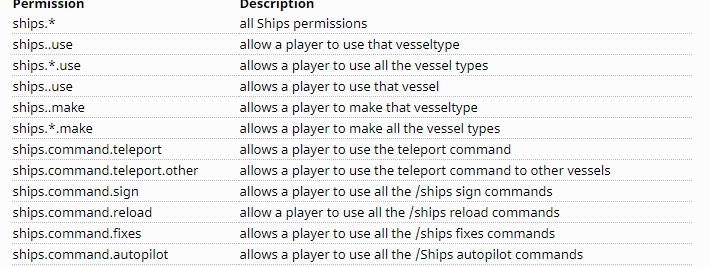
hey uh, im still a bit confused, I want to give my friend perms to use a plugin but when i did the lp user stuf he still doesnt have it?
high raven
hm, can you give a specific example?
gleaming walrus
do you know the ship plugin?
my friend wants to make a ship and i gave him permission using luck
but he still cant use it
high raven
i mean
very specific pls
which permission, which command did you run
and maybe a screenshot of the output
wintry cloudBOT
LuckPerms provides a verbose command to help you find out what permissions a command/plugin is checking.
Read more
LuckPerms wiki
gleaming walrus
gleaming walrus
how so?
high raven
i mean you could read either that wiki or the list on the page you linked which does not use those perms
 gleaming walrus
ok thanks
high raven
so ships.* will work, ShipsBukkit.* doesn't seem to exist
gleaming walrus
aah
prisma hinge
insanewho XD
 glad glacier
can you add context to premissions in the lpb, (like server=main) as I am trying it but not working rn
prisma hinge
Yes but not precisely like that... The "server" context on proxy corresponds to proxy itself
And for bungee LP, the server you are on is the "world" context
You can quickly check that by running lpb user <user> info
And seeing your current contexts
glad glacier
brilliant, ty, forgot it is world
daring stirrup
I'm tryna self host the editor and such, I've gotten it all working. But when I do /lp editor ingame it says there was an error loading the data on my editor site (the data gets send the own bytebin correctly)
wait
https://github.com/lucko/LuckPerms/wiki/Self-hosting-the-web-interfaces#step-3-configuring-the-static-pages-to-use-your-custom-bytebin-instance where are those files? (@ when replying)
quaint idol
do you have your own bytebin instance running @daring stirrup?
quaint idol
and have you configured the various web services to pull from the correct bytebin instance?
@daring stirrup
quaint idol
What about that step you linked though
daring stirrup
don't know where those files are
quaint idol
did you use the install script?
daring stirrup
ye
quaint idol
ok gimme a sec to pick at the install script to figure out where it saves the files
daring stirrup
wait
quaint idol
oh wait check /var/www/html/luckperms
that's what the selfhosting page says to move it to, could be wrong
daring stirrup
not a thing only thing in /var/www/html/ is a default nginx index
quaint idol
ok lemme dig through the install script, gimme a min
daring stirrup
dumb question, but do you need to start it somehow or not?
tame hollow
the wiki page is very outdated
sorry
updated info should be here: https://github.com/lucko/LuckPermsWeb
daring stirrup
all the pages work already just the editor isn't loading
tame hollow
console log error?
daring stirrup
browser or?
tame hollow
yeah
daring stirrup
 tame hollow
are you self hosting bytebin? probably an issue with that
go to the network tab and refresh
daring stirrup
ye
https://i.imgur.com/Dafz3LP.png still going to bytebin.lucko.me but I have no clue where to change that



 daring stirrup
rebuild by doing npm run build? (i have no experience with npm or anything like that
tame hollow
yep
daring stirrup
It's still trying to go to bytebin.lucko.me
daring stirrup
same thing, also tried diff browser
tame hollow
weird, you're sure you're using the newly built files after updating the config?
daring stirrup
After changing the config I only need to do npm run build right, or do I need to run any other commands
tame hollow
yeah just need to run the build script
but then you need to grab the files from /dist and put them wherever you're serving the app
unless you're serving straight from /dist then you can just leave it
daring stirrup
fixed... didn't know it was using the files from /opt/luckpermsweb/webfiles
Sorry for the trouble :d
tame hollow
did you run the install script?
daring stirrup
yea I had to move the files from the dist folder to the opt one
probably just gonna make it so nginx uses it straight from the dist folder
tame hollow
yeah that works
i don't know much about the installer, that's more @proper pulsar's territory
daring stirrup
got it all working now, didn't know that nginx used the files in /opt/luckpermsweb/webfiles/
proper pulsar
That's why the installer creates a nginx config for you 😛
tame hollow
the initial issue was that the LP Web wasn't using his custom domain for the bytebin, was defaulting to bytebin.lucko.me
daring stirrup
most likely also didn't know where it saved it cus im basically sleeping @ 4:45am
proper pulsar
It sets it up automatically
It add the config fully automatically to where it should be
It even enables the configuration
It's super hands off if you let it do it's job 😛 @daring stirrup
Like it even creates a full log of the whole thing
 stone plover
Hey there, I read the wiki and everything but I'm still a tad bit lost. For Bungeecord setup what do I download? Is the download for the proxy server different than for the individual servers?
It shows how to set it up but I'm confused on exactly which files I need
daring stirrup
!install
wintry cloudBOT
You can install LuckPerms on Spigot/Paper, Sponge, BungeeCord/Waterfall, Velocity and others. Check the installation guide for more info on setting up LuckPerms.
Read more
LuckPerms wiki
wintry cloudBOT
To sync data between servers, you need to connect each LuckPerms plugin to the same database (for example MySQL) and set up a messaging service.
LuckPerms wiki
daring stirrup
For bungeecord you download LuckPerms Bungee
stone plover
Pastebin
Pastebin.com is the number one paste tool since 2002. Pastebin is a website where you can store text online for a set period of time.