#support-2
1 messages · Page 11 of 1
 noble lodge
honestly i got a plugin to handle the fly perms but they require OP for that
but trying to use luckperms to downgrade that
 limber oracle
/lp verbose command me /fly should supply you with the necessary info.
noble lodge
 noble lodge
yeah but its not where exactly im going to
 sour gorge
That is exactly why i said run verbose on a user who is NOT OP
sour gorge
I hope you are not using /lp applyedit over and over and over
limber oracle
essentials.fly is the permission you want to grant.
sour gorge
I feel like we are going therw
noble lodge
well
sour gorge
If your editor gives you the applyedits command, run that ONCE
No more, close it after
Or it will reapply old edits, making you lose progress
This is why we all love the trusteditor thing now, it fixes this "issue" so you can reuse the same window
noble lodge
is it nessary to reload the plugin from the server itself after applied it?
sour gorge
No
Apply once, get a new /lp editor
Or use the trust function
Reloading luckperms using plugman for instance or just /reload breaks luckperms. In case we go there rn
noble lodge
got the issue after i already applied the fly command

without reloading it
and im not OP rn
noble lodge
same result
 sour gorge
^
You most likely dont have that permission
If you added it to default or another group, likely you are in another group
And that group probably also does not inherit from ehatever you added it to
noble lodge
i havent removed the default group yet
 sour gorge
Fair, so let us see a full pic of the default group and the permission in it
noble lodge
 sour gorge
Not what i meant
noble lodge
sorry
noble lodge
 sour gorge
Yea it is not applied
Hit add on the right side so the permission slides into the main area
Bottom right
noble lodge
 sour gorge
When its in the top, then you hit apply at the top right. You can remove the second one as its not needed
sour gorge
Now its in the default group and now you should be able to use /fly
noble lodge
 noble lodge
oh alright
sour gorge
Now try fly again

 sour gorge
So the issue was you had the permission in the bar where you type them in but didnt hit the add button
Lol
noble lodge
i think its more of me lack of understanding to click the right buttons
limber oracle
sour gorge
Thats fine, we all been there

noble lodge
okay
at least thank you for your patience with me
might try to apply more stuff with this then
sour gorge
Why not.
noble lodge
i havent even port-forwarded mine
 noble lodge

 prisma hinge
How do I rank a bedrock user?
 quaint idol
!geyser
 wintry cloudBOT
Using Geyser?
If you're having issues with permissions for bedrock players, or it's telling you that a bedrock player's name is invalid, try setting allow-invalid-usernames to true in the LuckPerms config.
prisma hinge
What do I have to do, that is, what commands?
limber oracle
Open your LuckPerms config. search for the allow-invalid-usernames: setting and set it to allow-invalid-usernames: true and, lastly, /lp reloadconfig to apply the changes in-game.
 grave frigate
Does it need a restart for perms to go through?
 dense kite
No
sour gorge
No
dense kite
Keep support in 1 channel please
grave frigate
Oh sorry!
 visual river
!displayname
wintry cloudBOT
Sorry! I do not understand the command displayname
Type !help for a list of commands
visual river
!defaultgroup
wintry cloudBOT
Sorry! I do not understand the command defaultgroup Did you mean default?
Type !help for a list of commands
visual river
what was the command to change default group and for wiki xd?
limber oracle
!default
wintry cloudBOT
LuckPerms provides a group that every player is added to upon joining the server, called default. You can use multiple methods to change the default group or change the name of it.
 LuckPerms wiki
 night idol
Hello, I would like to assign a rank to a player when he passes over a pressure plate. I tried with a command block with /lp user @p parent add [rank] and its dont work ...
sour gorge
night idol
Sorry
night idol
sour gorge
https://discord.com/channels/241667244927483904/241667244927483904/1120754637750...
Tu awser me ?
 edgy spire
luck perms isnt seeing mod commands, is there a config option i need to change?
visual river
limber oracle
!default
I set this to other displayname but in prefix still [default] why 9
?
limber oracle
visual river
I set this to other displayname but in prefix still [default] why 9
LuckPerms does not format the chat, your chat plugin is.
Make sure you don't have any conflicting plugins.
Other than that, provide more details. Screenshots, also, helpful.
visual river
limber oracle
LuckPerms does not format the chat, your chat plugin is.
No chat
Its other plugin using prefix
Check plugin
On the DC webhook $player (rank) finished Control $rank $player
limber oracle
No clue what any of this means.
visual river
And first is owner second default
limber oracle
What's your end goal here and what's the issue you're experiencing?
visual river
limber oracle
No clue what any of this means.
?
limber oracle
Don't ping me please. Turn off the ping on replies.
visual river
Check plugin get lp prefix on discord webhook when admin check someone
 copper dune
Is there a way to disable a group prefix temporary. I want to hide my [admin] prefix to go in an undercover mode and enable it later on again.
 inland gale
If you have LuckPerms.* permissions set on your user you can just jump groups
prisma hinge
Cant do /home while having permissions
limber oracle
prisma hinge
Cant do /home while having permissions
/lp verbose command <user> /home - replace <user> with a non op online player you'd like test permission for the command /home for.
Send a screenshot, if possible, including the permissions checks made when using the command.
prisma hinge
risky_gamer issued server command: /sethome
[Essentials] risky_gamer was denied access to command.
 limber oracle
Not what i asked for, please provide the full screenshot of the verbose command output.
prisma hinge
oh ok
[LP] Forcing risky_gamer to execute command home and reporting all checks made....
[11:41:27 INFO]: [Essentials] risky_gamer was denied access to command.
[11:41:27 INFO]: [LP] The command execution completed, but no permission checks were made.
[11:41:27 INFO]: [LP] This might be because the plugin runs commands in the background (async). You can still use verbose manually to detect checks made like this.
limber oracle
Can we get a plugins list screenshot please? (/pl output)
prisma hinge
 limber oracle
As expected, remove PowerRanks. Having 2 permissions plugins simultaneously causes conflicts.
prisma hinge
oh
limber oracle
Once you load your server without PoweraRanks, essentials.sethome defined in your LuckPerms group should be working as intended.
Remove PowerRanks, restart server, test, and let us know if that resolved it for you. 
prisma hinge
okay thanks
 steady field
why this is happening when i join the server?
 limber oracle
Updating to latest EssentialsX dev build may fix it, not sure.
steady field
limber oracle
Updating to latest EssentialsX dev build may fix it, not sure.
it does it only the first time i join
essentialsx dev builds are not unstable??
limber oracle
The name just doesn't do it justice. Fairly certain your issue has been fixed on one of the latest dev builds.
steady field
ok i will try it, thank you 🙂
 barren summit
How do you use Per-world permissions?
It's with Contexts but that seems confusing
Oh nvm I found the docs for it
visual river
visual river
Check plugin get lp prefix on discord webhook when admin check someone
can someone ?
from DarkLaw didn't get help
 void verge
!nw
wintry cloudBOT
Please tell us what's going on!
We really would absolutely love to help you out! However, telling us that it isn't working wastes everyone's time. Please, just describe the issue you're having clearly and with as much detail as possible, and send any relevant screenshots of whatever problems you're having.
For Console Errors:
visual river
visual river
can someone ?
?
limber oracle
visual river
?
Can you ask again?
If you describe the issue, yes. I can't read minds.
void verge
you still have not actually said what your issue is
 tardy glacier
!chat
wintry cloudBOT
LuckPerms does not perform any chat/tablist formatting of its own!
LuckPerms only acts as the source for prefixes / suffixes, it doesn't actually apply them. You need an appropriately configured chat/tablist formatting plugin for them to be displayed. If the values appear correctly when you run /lp user <user> info, LuckPerms is doing its job!
FAQ answer: Prefix isn't showing?
List of chat/tablist formatting plugins that work with LuckPerms
void verge
wintry cloud
see this
visual river
limber oracle
Can you ask again?
Check plugin using prefix when player starting check someone. Sending information about checking to discord. I have default name named "Gracz" but in the prefix from check plugin there is [default]
void verge
what...?
 solemn flame
Hey, I was wondering how to assign roles with ign commands.
I've only managed to assign roles via luckperms editor.
limber oracle
!commands parent section.
wintry cloudBOT
Find all of the available LuckPerms commands on the wiki.
Read more
General commands
User commands
Group commands
Permission commands
Parent commands
Meta commands
Track commands
Log commands
LuckPerms wiki
solemn flame
thank you
 north tangle
Impossible to set the plugin in fr_FR. Can someone help me? I followed the instructions in the documentation, but I just can't manage to do it 😦
 devout crater
i updated LuckPerms
and all of my permissions are gone is there any way to recover it please help
limber oracle
!paste Can you paste your startup logs after you've installed the latest jar? Any indication there?
wintry cloudBOT
Please use pastebin!
Seeing a paste of the problem makes everything so much easier! Use https://pastes.dev/ for easy pasting!
For console errors:
Pastebin any relevant segments of the console log. If it's a startup error, this includes the entire startup log!
Other errors:
Pastebin the entire LuckPerms config file (passwords removed) as well as any other relevant files!
limber oracle
You can only restore your database using a backup, /lp import.
limber oracle
Depends on the storage method you're using. If you're using flatfile, most likely H2, it should be inside your LuckPerms folder ending with .db
limber oracle
devout crater
https://paste.sparked.host/
What's this link for?
wintry cloudBOT
Latest version
5.4.89
limber oracle
Sick! 
solemn flame
So I am looking at the page, and I am not sure how to assign a member a group still.

LuckPerms - A permissions plugin for Minecraft servers.
LuckPerms is a permissions plugin for Minecraft servers. It allows server admins to control what features players can use by creating groups and assigning permissions.
I have figured out how to in-game do create group, prefix, and suffix
but still dont know how to assign group
limber oracle
 solemn flame
So I am trying to work with server signs
And I am unsure how to just make it so that when interacting with the sign you just get assigned the group
I know how do svs
Just not a general commmand for lp user <user> meta groupname
 brisk goblet
Hey how do I make it so that for specific groups that their username is a specific color, eg.:
User A is in group "yellow" his username is yellow
User B is in group "blue" his username is blue
and so on.
Thank you!
solemn flame

limber oracle
Either add &e after the prefix assigned to the yellow group, or manage your per-group chat format via your chat plugin.
sour gorge
Or abuse luckperms meta
brisk goblet
limber oracle
Either add **&e** after the prefix assigned to the yellow group, or manage your ...
That’s the thing I don’t want a prefix just the username color like vanilla minecraft teams.
sour gorge
You misunderstood him
limber oracle
solemn flame
And I am unsure how to just make it so that when interacting with the sign you j...
LuckPerms does not touch signs, or execute commands when a player interacts with one. You would have to use another plugin for that and make it run your LuckPerms parent command.
sour gorge
You can set only a color as prefix too
brisk goblet
sour gorge
You can set only a color as prefix too
Misread that sorry.
brisk goblet
Could you give an example?
sour gorge
You still need a chat plugin to apply that though.
sour gorge
Why would it not
solemn flame
Because I cannot figure it out to save my life, and I am finding other plugins in the config file mentioned that it works with, nothing about LP
dense kite
it doesn't need to support lp, it just needs to use permissions, and lp can work with it.
sour gorge
Why would it mention that in the config
solemn flame
Because they mentioned Pex
sour gorge
Server signs adds permissions
Luckperms handles permissions
It doesnt give a shit where those come from
So ye :)
solemn flame
Would you guys be able to help me with figuring out how to assign an user with a group if they interacted with sign? I only know how to give specific users the group
I see Idk Ive been going back and forth between svs guide and lp guide
limber oracle
The only thing related to LP, in this case, would be to use the right command that gets executed when players interact with your sign.
solemn flame
It's really like what key/term is it for /lp user ??? parent group add group
sour gorge
The command you want is something like /lp user %name% parent add group. However, server signs may have its own format such as 'onclick lp user.... bla bla bla'
sour gorge
You gotta find the format in ss
solemn flame
I'll try this. Thank you
sour gorge
It will tell you somewhere
%name% was just an example
If it states to support placeholder api and you have the expansion called 'player' installed, then you can use %player_name%
dense kite
https://github.com/serversigns/ServerSigns/wiki/Command-Reference:-Add#action
wiki is very well put together.
sour gorge
I believe server signs has its own selector so yea
solemn flame
Ok
So we might be onto something lol
Okay, so it is saying <user> and %player%
are not valid names
This is progress because before I had unknown commands
dense kite
Nobody above told you what it is, they gave you an example of something that would go there.
solemn flame
I might figure this out
solemn flame
._.
dense kite
Are you trolling me
limber oracle
Instead of trying to figure things out and play the guessing game, why don't you check the plugin's docs?
solemn flame
I feel berated lol. Thank you.
sour gorge
Hahaha this is great
 celest lance
So i am trying to use argument based permissions for promoting player.
All permissions are set correctly but I'm still getting the Message "You have no permission to use this command"
did I do something wrong here?
 sour gorge
you are missing the context permission
!verbose the command, youll see some context node is checked
wintry cloudBOT
LuckPerms provides a verbose command to help you find out what permissions a command/plugin is checking.
Read more
LuckPerms wiki
wintry cloudBOT
Please use https://pastes.dev to send files in the future. I have automatically uploaded 3.txt for you: https://pastes.dev/LMuDPewGLy

A paste containing 102 lines of plaintext.
 ruby lichen
Help'W'
 desert wraith
arianGTR188.aternos.me puerto32466
limber oracle
desert wraith
arianGTR188.aternos.me puerto32466
This is not the proper place to advertise your aternos server.
desert wraith
Jo
 sullen remnant
How do I make it so when a player is added to a group their gamemode changes to whatever is set for that group?
sullen remnant
ok
 fiery light
help me [19:03:55 WARN]: Unexpected exception while parsing console command "lp"
org.bukkit.command.CommandException: Cannot execute command 'lp' in plugin LuckPerms v5.4.94 - plugin is disabled.
at org.bukkit.command.PluginCommand.execute(PluginCommand.java:37) ~[paper-api-1.18.2-R0.1-SNAPSHOT.jar:?]
at org.bukkit.command.SimpleCommandMap.dispatch(SimpleCommandMap.java:159) ~[paper-api-1.18.2-R0.1-SNAPSHOT.jar:?]
at org.bukkit.craftbukkit.v1_18_R2.CraftServer.dispatchCommand(CraftServer.java:906) ~[paper-1.18.2.jar:git-Paper-386]
at org.bukkit.craftbukkit.v1_18_R2.CraftServer.dispatchServerCommand(CraftServer.java:869) ~[paper-1.18.2.jar:git-Paper-386]
at net.minecraft.server.dedicated.DedicatedServer.handleConsoleInputs(DedicatedServer.java:510) ~[paper-1.18.2.jar:git-Paper-386]
at net.minecraft.server.dedicated.DedicatedServer.tickChildren(DedicatedServer.java:484) ~[paper-1.18.2.jar:git-Paper-386]
at net.minecraft.server.MinecraftServer.tickServer(MinecraftServer.java:1456) ~[paper-1.18.2.jar:git-Paper-386]
at net.minecraft.server.MinecraftServer.runServer(MinecraftServer.java:1226) ~[paper-1.18.2.jar:git-Paper-386]
at net.minecraft.server.MinecraftServer.lambda$spin$0(MinecraftServer.java:316) ~[paper-1.18.2.jar:git-Paper-386]
at java.lang.Thread.run(Thread.java:833) ~[?:?]
@here
sour gorge
Cannot execute command 'lp' in plugin LuckPerms v5.4.94 - plugin is disabled.
fiery light
Pastebin
Pastebin.com is the number one paste tool since 2002. Pastebin is a website where you can store text online for a set period of time.
console
sour gorge
!libs
wintry cloudBOT
LuckPerms dependencies
LuckPerms requires several libraries in order to operate. If you're getting a startup error such as NoClassDefFoundError, ClassNotFoundException or "Unable to load dependency...", stop your server, delete the /plugins/LuckPerms/libs/ directory and start it up again.
sour gorge
Now that was totally worth it trying to tag thousands of users
fiery light
Pastebin
Pastebin.com is the number one paste tool since 2002. Pastebin is a website where you can store text online for a set period of time.
wintry cloudBOT
LuckPerms dependencies
LuckPerms requires several libraries in order to operate. If you're getting a startup error such as NoClassDefFoundError, ClassNotFoundException or "Unable to load dependency...", stop your server, delete the /plugins/LuckPerms/libs/ directory and start it up again.
sour gorge
No.
Read the embed
Make sure your server has access to the internet to download the dependencies
prisma hinge
so i made a command that changes the rank of a player to something but it wont set the player's rank to that
command /setrank <player> [<text>]: permission: op trigger: execute console command "{lp user arg-1 parent set arg-2}" send "&barg-1 rank has not been set to arg-2" to player
 whole mantle
prisma hinge
so i made a command that changes the rank of a player to something but it wont s...
whole mantle
prisma hinge
so i made a command that changes the rank of a player to something but it wont s...
try without the {}
prisma hinge
i did and wont work
whole mantle
idk skript and i dont think other people will really help because this isnt a luckperms issue
 near shard
I have two groups: VIP and Moderator. Both groups have a suffix set, but Moderator has a higher weight. However, in chat players who are added to both groups at once only see the VIP suffix. Does anyone know how to fix it so Moderator's suffix overtakes VIP's properly?

This is happening for multiple ranks too. For some reason, VIP's suffix is showing before other ranks that have a higher priority
dense kite
near shard
This is happening for multiple ranks too. For some reason, VIP's suffix is showi...
Show /lp user (some user this happens for) meta info
near shard
 dense kite
Okay, that’s how you have it configured. Lower weight is lower priority.
Weight of 4 is higher than weight of 2
near shard
that's super weird because it doesn't match the group weight
Well, now I know I'm not crazy- thanks for helping me out. I'll try and fix this
dense kite
Yeah, prefix and suffix weight doesn’t match the group weight. It has its own.
near shard
I reset the suffix at the correct weight and it's fixed. Thanks again
 desert carbon
dense kite
Okay, that’s how you have it configured. Lower weight is lower priority.
desert carbon
dense kite
Okay, that’s how you have it configured. Lower weight is lower priority.
well i got a problem that i got the default rank and other ranks like copper and iron
each one have its prefix but when i set a parent for a user as an copper or iron the prefix stays as the default one

 void verge
https://www.take-a-screenshot.org/ and show the whole thing, your pictures here cut off some stuff

How to take a screenshot on your smartphone, tablet, notebook or desktop computer
desert carbon
void verge
https://www.take-a-screenshot.org/ and show the whole thing, your pictures here ...
what you want to see?
i provided the group info and meta info for the default and copper ranks do you need more?
prisma hinge
hi I have a db error on MongoDB clusters, but can't seem to find the problem, any ideas? [org.mongodb.driver.cluster] Cluster description not yet available. Waiting for 30000 ms before timing out
here's the pastebin of the errors: https://pastebin.com/NK7ytARQ
Pastebin
Pastebin.com is the number one paste tool since 2002. Pastebin is a website where you can store text online for a set period of time.
 grave timber
Does anyone know why I can't use the promote command?
someone tell me how to change the position
 clear glacier
Is there any way to remove group 1 from all players?
prisma hinge
hi i have a problem using luckperms with tebex for bedrock players , when i use the normal cmd (lp user {uuid} parent add rankname) it says invalid username/uuid on the server console , it works for java players obviously but idk what to do for bedrock
 vapid loom
is there a way to send a message to all users in a group?
north tangle
could someone give me a mini tutorial on how to translate luckyperm it's been 1 week and despite the tutorial in the doc (https://luckperms.net/wiki/Locale-and-Translations) impossible to succeed in translating the language my default language of my launcher and french
limber oracle
vapid loom
is there a way to send a message to all users in a group?
Not LuckPerms related.
 floral isle
why isnt it working?


 floral isle
void verge
you got an answer in <#241667244927483904>
floral isle
void verge
you got an answer in <#241667244927483904>
idk where to turn the allow-invalid-username true
void verge
please actually read the whole thing
 trail swan
how to add someone to group
limber oracle
trail swan
how to add someone to group
!commands parent section
wintry cloudBOT
Find all of the available LuckPerms commands on the wiki.
Read more
General commands
User commands
Group commands
Permission commands
Parent commands
Meta commands
Track commands
Log commands
LuckPerms wiki
trail swan
can i connect lp with teams
void verge
vanilla scoreboard teams, no
trail swan
does it have any vanilla command detection?
 warped fjord
Is there somewhere on the website I can download the mod for Forge 1.18.2 and not 1.20?
 flat stone
warped fjord
Is there somewhere on the website I can download the mod for Forge 1.18.2 and no...
flat stone
warped fjord
Is there somewhere on the website I can download the mod for Forge 1.18.2 and no...

Modrinth
Download and browse 21 LuckPerms versions. 33.5k total downloads. Last updated Jun 14, 2023.
if 18 is there lol
warped fjord
Thanks, sorry for the selective blindness
flat stone
no worries xD
warped fjord
flat stone
if 18 is there lol
looks like there's a 1.18, ill hope that one works lol
flat stone
warped fjord
looks like there's a 1.18, ill hope that one works lol
has more 1.18's then the first link
warped fjord
flat stone
https://www.curseforge.com/minecraft/mc-mods/luckperms/files or here
thanks
warped fjord
Im trying to use the mods to give players the ability to use the vanilla /tp commands (preferably only to teleport to set coordinates, not players). Is there a simple explanation for you to do that, because the commands page is making me feel very stupid
quaint idol
The vanilla TP command just has a "can use the command" permission (minecraft.commmand.teleport), there's no way to restrict whether or not they can tp to arbitrary coords or players
warped fjord
thought so, thanks for the the point int he right direction
warped fjord
quaint idol
The vanilla TP command just has a "can use the command" permission (`minecraft.c...
so if I have created a group created what would i run to give them that permission?
quaint idol
!usage
bah bloody bot
LuckPerms - A permissions plugin for Minecraft servers.
LuckPerms is a permissions plugin for Minecraft servers. It allows server admins to control what features players can use by creating groups and assigning permissions.
warped fjord
i hope im not asking too many questions, but am i missing something what you're saying?

or i guess pointing me to
I made a group, gave that group a permission, and it just didn't work once i deopped myself
 spiral oxide
warped fjord
i hope im not asking too many questions, but am i missing something what you're ...
spiral oxide
warped fjord
i hope im not asking too many questions, but am i missing something what you're ...
do you use essentialsx?
 dawn shard
hi, when i use /lp editor only there is some kind of error i dont understand. https://pastes.dev/HcbhkuMAsH Would be nice if someone could help me ^^
A paste containing 26 lines of plaintext.
warped fjord
spiral oxide
do you use essentialsx?
no, just running luckperms, do i need to get that as well?
spiral oxide
no but if you used it the command would be different
dense kite
That’s not an essx command feedback, so it shouldn’t be that.
warped fjord
just to clarify, does that look like the correct way to give someone teleportation perms?
prisma hinge
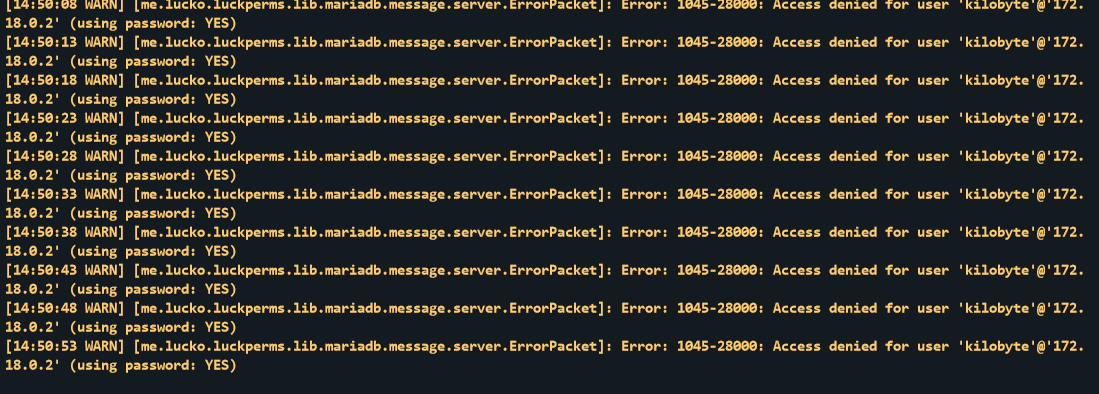
Anybody have any idea why when i try to use mariadb to connect to my mariadb database, it decides to try a diff ip than what i put in the config file? https://i.imgur.com/qQoj84Q.png
 dark salmon
hello. When using forge 1.18+ is there a preferred perms mod to use with LP?
void verge
LuckPerms is a permissions mod
dark salmon
i am coming from a pre-1.16 environment where i would always use sponge/LP so i am new to this since sponge is still on 1.16
 lusty ravine
I want to execute /lp user username run command (my command is from another plugin)
on which I get an error unknown command. How to use this command correctly on your wiki page, I did not find anything about this command
void verge
lusty ravine
I want to execute /lp user username run command (my command is from another plug...
there is nothing on the wiki because there is no "user run" command in the first place
dark salmon
i always used tab commands
north tangle
could someone give me a mini tutorial on how to translate luckyperm it's been 1 week and despite the tutorial in the doc (https://luckperms.net/wiki/Locale-and-Translations) impossible to succeed in translating the language my default language of my launcher and french
 clear wolf
Hi, I cant find the command for adding a player to a group, can someone pass it on please
limber oracle
clear wolf
Hi, I cant find the command for adding a player to a group, can someone pass it ...
!commands parent section
wintry cloudBOT
Find all of the available LuckPerms commands on the wiki.
Read more
General commands
User commands
Group commands
Permission commands
Parent commands
Meta commands
Track commands
Log commands
LuckPerms wiki
 robust flax
hello, i have a problem with the prefix and suffix, when i write the command for the admin suffix it do not update it on the tablist
limber oracle
robust flax
hello, i have a problem with the prefix and suffix, when i write the command for...
!tab
wintry cloudBOT
LuckPerms does not perform any chat/tablist formatting of its own!
LuckPerms only acts as the source for prefixes / suffixes, it doesn't actually apply them. You need an appropriately configured chat/tablist formatting plugin for them to be displayed. If the values appear correctly when you run /lp user <user> info, LuckPerms is doing its job!
FAQ answer: Prefix isn't showing?
List of chat/tablist formatting plugins that work with LuckPerms
 mint storm
Hello!
When I install LP, some plugins like dynmap and my custom join message plugin stop sending messages into chat. A dynmap supporter has told me this is because LP might add it's own chat channel, but dynmap only supports the default one. Is this true and if yes, how can I change it back that LP uses the default channel?
sour gorge
mint storm
Hello!
When I install LP, some plugins like dynmap and my custom join message pl...
Whoever told you that is an idiot. LP does not even touch the chat whatsoever. It is more likely that dynmap checks/wants the user to have a permission and as soon as you install LP, there's no permissions there.
!verbose could tell you that
wintry cloudBOT
LuckPerms provides a verbose command to help you find out what permissions a command/plugin is checking.
Read more
LuckPerms wiki
mint storm
I don't think you have to swear, but thank you. I will check that :)
okay turns out I disabled bukkit.broadcast.user on accident which caused the issues. Thank you :)
 sour temple
How can I delete the perm in the default parent from other parents?
 icy parrot
i normal do prefix and he does´nt work in tab pls help
 sly geyser
sour temple
How can I delete the perm in the default parent from other parents?
sly geyser
sour temple
How can I delete the perm in the default parent from other parents?
Remove default group from being a parent in those groups
 covert thicket
Hello friends, how can I do to remove all user permissions?, without affecting the groups with their permissions
sly geyser
covert thicket
Hello friends, how can I do to remove all user permissions?, without affecting t...
Select the user you wish to do this with and add * false to them
I think that should work but can’t fully confirm that
If it doesn’t make a group with * false and set them to that group and remove them from all other groups
sour temple
sly geyser
Remove default group from being a parent in those groups
No, actually I want to do the opposite. The authorisations of the default group have been given back to everyone. I want to remove the authorisations in the default group and leave only their own authorisations.
 frozen falcon
coming back to this eons later, it's still having the issue if i do the clear command as evident suggested below
is the only way to remove it all at this point to mess with the db?
just had a big brain moment but i exported the data with the built in command and cleared the database then re-imported and it worked
 ebon niche
hi there, i'm switching my servers from flat files to mysql. so i've exported all of my different servers luckperms files but if i change storage type and upload the file then it will override whats already in mysql right? how would i go about doing this so i can get all my different servers current flat file perms in the mysql db?
dense kite
ebon niche
hi there, i'm switching my servers from flat files to mysql. so i've exported al...
!switch
wintry cloudBOT
If you wish to change your storage type (e.g. to YAML or MySQL) you may need to follow these instructions to ensure your groups and permissions are migrated to the new storage type.
Read more about the Storage types
LuckPerms wiki
ebon niche
dense kite
!switch
i already followed these instructions, this doesn’t answer my question
sour gorge
No. It will not overwrite whats there unless you use the flag --replace. It will by default merge same-named groups together as well as same-named-permissions (to avoid unneeded duplicates)
 tranquil verge
default rank perms does not allow to use /back command
but if someone has owner and default
while owner has back perms to true
and default has them to false
why i can't do /back?

but for my case its mod rank
limber oracle
!weight Ensure you've defined proper weights.
wintry cloudBOT
LuckPerms allows you to set weights in order to determine the priority of certain nodes, like permissions and even prefixes. A higher weight number is a higher priority.
Read more
LuckPerms wiki
 ebon niche
sour gorge
No. It will not overwrite whats there unless you use the flag `--replace`. It wi...
ebon niche
sour gorge
No. It will not overwrite whats there unless you use the flag `--replace`. It wi...
this is what i was looking for. thanks!
ebon niche
is there a way to set a context for an entire rank? instead of each individual permission in that rank?
sour gorge
Yes, give the group in context x
 fleet prairie
I'm trying to add luck perms to my dedicated 1.19.2 server but it crashes every time I launch it after adding lucky perms to my mod folder. I'm on forge
The server is being ran off my p
C
ebon niche
sour gorge
Yes, give the group in context x
how do i do that?
sour gorge
lp user yada yada like always and add to the end 'server=name' or whatever context
literally the same syntax as permission cmd
ebon niche
sour gorge
lp user yada yada like always and add to the end 'server=name' or whatever conte...
so /lp user _Decypher parent add owner server=hub would give me the rank but only in the hub server correct?
 mighty spear
ebon niche
so `/lp user _Decypher parent add owner server=hub` would give me the rank but o...
mighty spear
ebon niche
so `/lp user _Decypher parent add owner server=hub` would give me the rank but o...
yes 🙂
ebon niche
mighty spear
yes 🙂
cheers thanks 🍻
 frail void
Is there a way to delete all the data related to a specific server in the database in a multi-server mode?
quaint idol
!bulk
wintry cloudBOT
Quickly update a large amount of user and group permissions by using the bulkupdate command.
Read more
LuckPerms wiki
frail void
quaint idol
!bulk
wintry cloudBOT
Please use https://pastes.dev to send files in the future. I have automatically uploaded message.txt for you: https://pastes.dev/vzjNl5PsBR
A paste containing 43 lines of plaintext.
 ivory mason
Hi everyone. I'd like to know how to ask if a offline player has a specific permission. Is that possible with LuckPerms?
 mild veldt
how can i promote a player with the api?
ivory mason
ivory mason
Hi everyone. I'd like to know how to ask if a offline player has a specific perm...
I think I found it: if(Data.PermsAPI.getUserManager().getUser(uuid).getCachedData().getPermissionData().checkPermission(permission).asBoolean()) return true; is that right?
limber oracle
For LuckPerms Dev API related questions, please use #luckperms-api. 😀
 molten locust
Hi was wondering what the command is to give a rank but if they already have a rank higher than that stop it from changing the rank i cant seem to find way round it
limber oracle
molten locust
Hi was wondering what the command is to give a rank but if they already have a r...
!commands parent section.
wintry cloudBOT
Find all of the available LuckPerms commands on the wiki.
Read more
General commands
User commands
Group commands
Permission commands
Parent commands
Meta commands
Track commands
Log commands
LuckPerms wiki
 arctic timber
how can I use luckperms placeholder inside of another luckperms placeholder???
When I use this
%luckperms_group_expiry_time_{luckperms_highest_inherited_group_by_weight}%
it parse to nothing
but
%luckperms_highest_inherited_group_by_weight%
does output the group name
sour gorge
Just slamming one placeholder inside another is not natively supported
arctic timber
then how can I show the remaining time of the highest group of a player?
plz tag me if someone have answer
sour gorge
You could easily use the javascript expansion and make that parse the first one and take that value and parse the second.
arctic timber
can you show me an eample?
sour gorge

GitHub
Adds javascript placeholders. Contribute to PlaceholderAPI/Javascript-Expansion development by creating an account on GitHub.
arctic timber
ah thanks
 gray vine
I have a problem, i have install luckperm (mod) on a server, i can create ranks and add perms but the perms don't work i have forge version "40.2.4" (1.18.2) and Luckperm version "5.4.26".
I have test with voicechat.speek.
Do someone now how to solve this problem?
sour gorge
Did you try verbose yet?
gray vine
sour gorge
Did you try verbose yet?
Did you talk to me?
wintry cloudBOT
LuckPerms provides a verbose command to help you find out what permissions a command/plugin is checking.
Read more
LuckPerms wiki
gray vine
yes, i use that but it's don't work.
sour gorge
Verbose will not fix it for you
You need to read the output - it shows you if any permissions are missing
 little fable
So having an issue regarding chat formatting, and i can't find any information on this scenario anywhere on the internet - prefixes aren't showing in chat, but show both in tab, and above players
limber oracle
!chat
wintry cloudBOT
LuckPerms does not perform any chat/tablist formatting of its own!
LuckPerms only acts as the source for prefixes / suffixes, it doesn't actually apply them. You need an appropriately configured chat/tablist formatting plugin for them to be displayed. If the values appear correctly when you run /lp user <user> info, LuckPerms is doing its job!
FAQ answer: Prefix isn't showing?
List of chat/tablist formatting plugins that work with LuckPerms
little fable
None of the usually-mentioned fixes are having any effect whatsoever, currently working with paper 1.19.2, and have tried CMI's chat formatting, VaultChatFormatter, and several others
sour gorge
Cmi is not bad
However, you have to set chat formatting to true in its config, then give the permission of chat formats to users or better, to groups, as stated in its config
little fable
Have done so, it had zero effect
sour gorge
So did you set the chat format?
little fable
Almost acts like either its formatting isn't firing, or if something else is overriding it, but there's nothing that should be overriding it
Yep
That's why I'm at a loss
Works everywhere other than chat
sour gorge
Can you post your plugins list
little fable
Whole thing, or just the ones that should be affecting it?
little fable
 sour gorge
Or copy out of console
little fable
What I'll say: this behavior was happening even before the rest were added, and that's why I asked if just the ones that should have been affecting it
sour gorge
Okay so, i see multiple chat plugins rn
little fable
They weren't present to begin with when it was originally failing, they got added later
Been running into this for 72 hours now
sour gorge
Cmi, lpc, towny chat - we can not debug this with 3 chat plugins installed
Make up your mind, pick one, delete the others
limber oracle
sour gorge
Cmi, lpc, towny chat - we can not debug this with 3 chat plugins installed
Forgot to mention VaultChatFormatter.
Our friend over here is making a chat plugin collection.
sour gorge
Ye
little fable
Vaultchatformatter just now got added in an effort to correct this <_<
Originally it was just CMI and nothing else, still wasn't working
limber oracle
Use 1 chat plugin at a time, instead of multiple.
little fable
Server owner copied the total plugins over and we hadn't gotten to disabling them yet since this wasn't working originally
limber oracle
Furthermore, we won't be able to assist you within your chat plugin's configuration and setup. If the prefix shows when using /lp user <user> info, LuckPerms is working fine.
little fable
Sadly that's about what I thought, but thought I'd ask here anyway to make sure it wasn't LP giving issues
sour gorge
We can use #general
But only if you haul ass since its midnight for me and i gotta get up in 7 hours lol
No pressure
limber oracle
No pressure, just don't use 4 chat plugins and CMI. Problem solved.
 limber oracle
 jolly wedge
Anyone?
jolly wedge
Anyone?
Do not cross post. You've already received a response on #support-1.
prisma hinge
What is permission node for every single command
like If i give a rank this node
it will have every single node
wait I found it
 ocean rivet
@here guys i set weight for my ranks and i use tab plugin but it do not show ranks currectly in tab
can someone help me pls
@tame hollow
wintry cloudBOT
Hey hajibangi! Please don't tag helpful/staff members directly.
ocean rivet
@everyone
sour gorge
Wow.
limber oracle
ocean rivet
@here guys i set weight for my ranks and i use tab plugin but it do not show ran...
LuckPerms weight does not determine tablist sorting. Your tab plugin does.
Furthermore, please don't ping the first person you see on the sidebar. It's fairly annoying aimlessly pinging Staff members.
ocean rivet
limber oracle
LuckPerms weight does not determine tablist sorting. Your tab plugin does.
Furt...
ok
prisma hinge
Does anyone know if I can make luckperms not give the default range and instead another range?
prisma hinge
right so a weird one
im using 1.7.10 luckperms but even when i set a group to someone it just says default?
 wanton portal
Why is it recommended against running Luckperms standalone on a spigot server and instead it is recommended to sync all the servers in a proxy together.
I intend to have different ranks on my Survival server, and the Minigame gamemodes like: Bedwars, Skywars, Duels, Arcade will have synced rank and Luckperms
If I appoint a developer to my Survival server, then they get access to all servers with synced Luckperms, whereas that can be prevented if I have a standalone LP on my Survival server
dense kite
wanton portal
If I appoint a developer to my Survival server, then they get access to all serv...
Because LuckPerms has methods to prevent this. Use a server context, and apply that to the group to the user.
That guide is pretty much a “starter” guide, and a lot of people are trying to make global groups. If you’re not a beginner, you can pretty well figure out how to configure LP to suit your needs.
wanton portal
dense kite
Because LuckPerms has methods to prevent this. Use a server context, and apply t...
I use contexts to give perms of a particular gamemode plugin only on the respective gamemode server.
For eg: Group vip - strikepractice.partylimit - context: server=duels. I assume that is unnecessary.
I also have Gadgets menu synced perms on all servers, but parkour gamemode u have to buy Gadgets menu cosmetics with coins.
I do not want global ranks, like I mentioned. So, will it be alright if I use isolated Luckperms for my survival gamemode? It will be less clutter, and also address the issue of survival developers being able to give themselves permissions on all servers.
 cobalt oyster

 limber oracle
!geyser
wintry cloudBOT
Using Geyser?
If you're having issues with permissions for bedrock players, or it's telling you that a bedrock player's name is invalid, try setting allow-invalid-usernames to true in the LuckPerms config.
prisma hinge
I get this error but only when i put in my own Database but the data of the Database must be corrext
 prisma hinge
 true garden
Sólo se puede utilizar /lp editor porque LuckPerms
Géiser Usuario no válido
 proud cliff
how do i remove commands that show up in the autocomplete tab (i only want specific commands to show)
 crisp quartz
how can I do to desynchronize the prefixes but not the ranges of a network?
limber oracle
crisp quartz
how can I do to desynchronize the prefixes but not the ranges of a network?
Use contexts?
crisp quartz
yea, I have a network with 3 servers and I want only 1 server to have a different prefix than the others, but to continue connected every time someone buys rank
 dense river
hey peeps
just got into the plugin, did a bit of config with the web editor
I just want a simple prefix from a group to be displayed, but only the "self" prefix of a user is displayed
here's my (default) config.yml and a screenshot showing that I'm inheriting the administrator group, that the group has prefixes but I don't
meta-formatting:
  prefix:
    format:
      - "highest"
    duplicates: first-only
    start-spacer: ""
    middle-spacer: " "
    end-spacer: ""
  suffix:
    format:
      - "highest"
    duplicates: first-only
    start-spacer: ""
    middle-spacer: " "
    end-spacer: ""
 crisp quartz
I have a network with 3 servers and I want only 1 server to have a different prefix than the others, but to continue connected every time someone buys rank
 finite prawn
guys i got this problem that made i cant join my server and keep kicking all players after i restart. i need help asap pls. all my players cant join
wintry cloudBOT
Please use https://pastes.dev to send files in the future. I have automatically uploaded message.txt for you: https://pastes.dev/WqorZK7OVc
A paste containing 39 lines of plaintext.
sour gorge
dense river
hey peeps
just got into the plugin, did a bit of config with the web editor
I ju...
The rule "highest" generally means "highest from anywhere". So that means if the user has a prefix which has a higher weight than any of the groups they inherit, then that is being picked.
dense river
sour gorge
The rule "highest" generally means "highest from anywhere". So that means if the...
I do understand that, but there are no other prefixes available for the player to be picker. Moreover, it is shown on the screenshot that I do not have any prefixes, although inheriting the "administrator" group
sour gorge
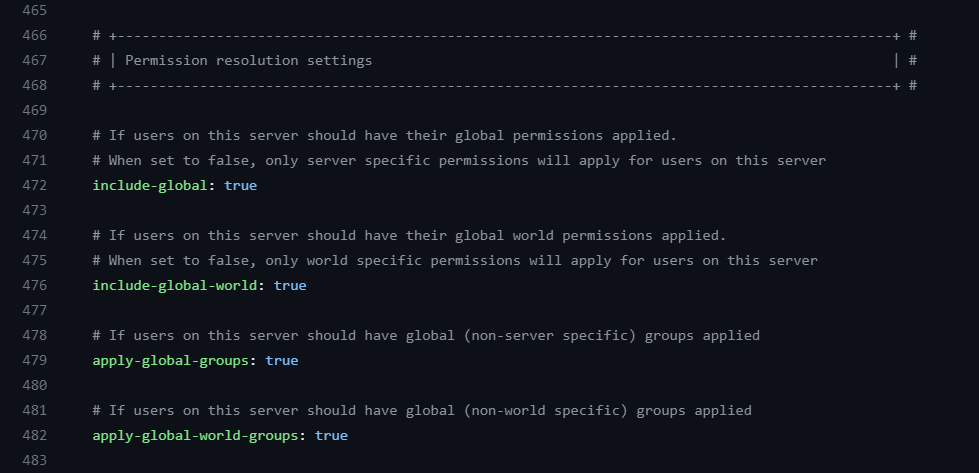
Did you change anything else in the config of luckperms?
Specifically, anything from here https://i.imgur.com/xa5EYQu.png
 dense river
nope, pretty much anything's default except that I exported luckperms to a DB
 sour gorge
Is it possible that you have two groups in your setup (not as you parent, just generally in luckperms) called "administrator" and "administrators"?
Or am I seeing things lol
dense river
omg you're maybe right
I'm checking that
I feel dumb, thank you very much for pointing it out 
sour gorge
Lmao
 west plank
How do I remove all players from a group?
west plank
Trying to follow along in the docs. Looks like if I do lp bulkupdate all delete "permission == group.premium" where the group I want to remove players from is called premium will do it, correct?
sour gorge
Consider replacing "all" with "users". "All" means itll also cut off inheritances of this group from other groups.
Also, take a backup first please
sour gorge
That does not grant that luckperms is causing it
 storm dock
Yes; however, it is likely
I have two threads in waiting state from luckperms worker 0 and 1 and one in timed_waiting state from Async chat thread. I'm not sure why these threads are in waiting state or what conditions they are waiting for.
I'm guessing this could be a memory leak from one of my plugins. I'm also guessing it's this one. In the end, the server crash is always due to the server running out of memory. The odd thing is though, the server runs fine for hours on end before randomly shutting down and crashing.
Yeah I'm finding more evidence for a memory allocation error
dense kite
Great, if you’re finding valid evidence, you should report it. Nothing we can do about it here.
sour gorge
I smell ajlb
storm dock
I don't have AJLB on my server
sour gorge
Then its something else
storm dock
for context, the plugins I'm using are: Luckperms, word-edit, world gaurd, and server essentials
sour gorge
Just keep in mind that luckperms does not run code without a reason. Its this big and has such a good reputation; if it caused crashes, that wouldnt be the case by pure logic. What is more likely to happen is that another plugin is enslaving luckperms to an extreme and overloading it.
storm dock
Yeah, I'm going to remove the other 2 plugins and see how it goes from there. I'm slightly suspicious of world guard.
Thanks for the advice btw.
finite prawn
guys i got this problem that made i cant join my server and keep kicking all players after i restart. i need help asap pls. all my players cant join
https://pastes.dev/WqorZK7OVc
A paste containing 39 lines of plaintext.
void verge
finite prawn
guys i got this problem that made i cant join my server and keep kicking all pla...
send a full log
 manic trail
Hello I have a problem with the plugin can I discuss it with someone
finite prawn
void verge
send a *full* log
wintry cloudBOT
Please use https://pastes.dev to send files in the future. I have automatically uploaded latest.log for you: https://pastes.dev/N1uOK7MOqk
A paste containing 15293 lines of log.
 marble pike
How do I make users see the luckperms prefix when talking in chat?
 half quarry
/lp user (player) parent addtemp (rank) 30d accumulate
 scarlet terrace
Thanks
 glossy swallow
hello im added luckperms on the my server but im start server and my server shotdown what should I do?
removing the plugin fixes it
void verge
finite prawn
your server has malware because you pirated plugins
finite prawn
void verge
your server has malware because you pirated plugins
i found it why its bc of shulkerpreview plugin i download
i got no pirated plugins i think
void verge
finite prawn
i got no pirated plugins i think
you do. these messages are from plugin pirating websites
 finite prawn
oh idk about that tbh. i got sum prem plugins from my friend. he said he bought it idk
sour gorge
Clearly he lied
finite prawn
i was wondering what is direct leak too but i never prest da link
 glacial pilot
Hi, one question, how do I get people who don't have the op to have some of the commands that only people with the op have?
 fringe oriole
Can luckperms "isolate" the permissions of a group, so that they can apply commands to themselves, but not to other players / entities?
For example:
Being able to change my own game mode, but not being able to change my friend's game mode.
void verge
luckperms handles permission checks
thats all it does
permissions are not always associated with a command, and commands are not always associated with a permission
 hexed fulcrum
Hey there. Someone broke in, in our server and was able to do luck perms stuff.. is there an option to have an extra security so not anyone can do stuff?
limber oracle
- online-mode=true
- be careful with what permission you grant and to whom
void verge
adding extra security to luckperms does not solve your issue
https://github.com/LuckPerms/LuckPerms/issues/2219#issuecomment-619105683 sums it up pretty well
void verge
!chat
wintry cloudBOT
LuckPerms does not perform any chat/tablist formatting of its own!
LuckPerms only acts as the source for prefixes / suffixes, it doesn't actually apply them. You need an appropriately configured chat/tablist formatting plugin for them to be displayed. If the values appear correctly when you run /lp user <user> info, LuckPerms is doing its job!
FAQ answer: Prefix isn't showing?
List of chat/tablist formatting plugins that work with LuckPerms
 main tree
I am moving from one server to a bungeecord. I have a new game mode coming, and i have the server that was running for a while with users with special commands that would only apply to that server.
If i move over that server(the one thats been running) to the sql server of my new bungee network and import the data, will it stay in the context of its own server? Or will I have lots of random commands assigned throughout. Is there a way I can do this properly?
example is I wouldnt want players to hack a unlocked menu on one server and go to the new server and have it unlocked already. because of a permission assigned to the user.
Any help is appreciated 🙂
quaint idol
No, our usual storage switching instructions do not set a context on permissions - if there's no contexts set right now, there won't be post-migration.
My recomendation would be to utilize our bulkupdate system to add contexts as needed to the appropriate permissions prior to switching over to the network database
!bulk
wintry cloudBOT
Quickly update a large amount of user and group permissions by using the bulkupdate command.
Read more
LuckPerms wiki
quaint idol
!switch (and for the reference, here's how we recommend migrating data to a new storage type)
wintry cloudBOT
If you wish to change your storage type (e.g. to YAML or MySQL) you may need to follow these instructions to ensure your groups and permissions are migrated to the new storage type.
Read more about the Storage types
LuckPerms wiki
main tree
bulk editing prob will be my best bet
I would be able to set a context to all my users permissions other than groups with bulk edit?
quaint idol
Yes you can, though keep in mind that group membership is also stored as permissions (in the form group.<groupname>). While bulk edits can be easily restricted to either users or groups, I don't remember if the filters are granular enough to also match only non-inheritance nodes.
main tree
Would you be able to provide me a example of what i would be needing to be typing? Sorry im just new to bulkupdate. Something like lp bulkupdate users update context "server == servname"
im assuming im way wrong lol
quaint idol
Check the page, there's a bunch of examples if you scroll down
oh also just a reminder,  bulkupdate is a potentially destructive action. Take a backup before running any bulkupdates, just in case
main tree
lp bulkupdate all update permission essentials.ban "permission == essentials.mute" "server == survival"
yeah im doing all this on a test servers
but how would i tell permission == to be all permissions
quaint idol
there was another example that was closer to what you wanted iirc
 amber imp
Is it possible to grant a specific permission to players if they already have a certain permission, such as "group.something," without removing the original permission?
quaint idol
/lp bulkupdate all update server global "server == factions"
Will change any server entries from "factions" to "global"
quaint idol
amber imp
Is it possible to grant a specific permission to players if they already have a ...
If you mean like giving a permission that only applies if they have another permission, no it's unfortunately not possible. Simple though it may seem, that leads to recursion which is a server killer. It sucks.
main tree
and this is saying all permissions that dont have a context already, set it to only run on factions server
correct?
amber imp
quaint idol
If you mean like giving a permission that only applies if they have another perm...
Okay, thanks for your time ❤️
main tree
That worked very well
now would i be able to bulk edit all the permissions that have a group assigned to a server back to no context?
 mossy oxide
Hello, I translate my text through a translator because I don't understand English 😦
Guys, I have a question, is it possible to somehow put two databases from two modes on one mode (For example: global) at once. I just have different modes and different donates
 twilit edge
Hello guys, I still can't fix this error, at the beginning it didn't happen and I had permissions created and everything, I don't know what will have happened we made many configurations and none works
 prisma hinge
twilit edge
Hello guys, I still can't fix this error, at the beginning it didn't happen and ...
prisma hinge
twilit edge
Hello guys, I still can't fix this error, at the beginning it didn't happen and ...
check console
and send it
 cerulean sand
twilit edge
Hello guys, I still can't fix this error, at the beginning it didn't happen and ...
cerulean sand
twilit edge
Hello guys, I still can't fix this error, at the beginning it didn't happen and ...
I have the same error
 lime plume
Im trying to get prefixes to work in game, but they wont.
Im playing on a fabric MMC1 modded server
prisma hinge
cerulean sand
I have the same error
show logs
 mossy dagger
I'm getting some MySQL database errors in the console of my 1.19.4 Bungeecord proxy serveer:
wintry cloudBOT
Please use https://pastes.dev to send files in the future. I have automatically uploaded message.txt for you: https://pastes.dev/4Y8nM4LM5i
A paste containing 49 lines of plaintext.
mossy dagger
Wow, that is one amazing bot.
limber oracle
!bedrock
wintry cloudBOT
Using Geyser?
If you're having issues with permissions for bedrock players, or it's telling you that a bedrock player's name is invalid, try setting allow-invalid-usernames to true in the LuckPerms config.
limber oracle
Try setting
allow-invalid-usernamesto true in the LuckPerms config.
I don't know from the top of my head. Search for it using CTRL + F in your text editor.

 runic spire
@lilac hazel heya, how do I set a permanent chatcolor for a specific rank?
wintry cloudBOT
Hey fireextravasate! Please don't tag helpful/staff members directly.
 digital ridge
Help for add waypoint ( journey map) in luckperm plss
 unkempt rose
Good evening, bedrock players are still able to use /minecraft:me w etc commands even though the pemissions bukkit.commandand minecraft.command are set to false
Need assistance when possible (please ping me)
 weak drum
um can someone help me with 2 things one i madea rank of owner for my self but when ever i try to give it to myself it says this person could not be found and 2nd how do u give a rank a mod command for like me a cobblemon command of /pokebreed?
and also for somereason no one can type in chat
cerulean sand
prisma hinge
show logs
I have fixed it
digital ridge
Lf comands waypoint journey map aternos
limber oracle
digital ridge
Lf comands waypoint journey map aternos
How's all that related to LuckPerms?
digital ridge
The button on my journey map isn't even showing, probably some code is missing
prisma hinge
digital ridge
The button on my journey map isn't even showing, probably some code is missing
This is luckperms support
limber oracle
Where is it not showing up?
prisma hinge
limber oracle
Where is it not showing up?
I have a prefix for default rank
look at goldgoose

his prefix is not showing
 wintry cloudBOT
LuckPerms does not perform any chat/tablist formatting of its own!
LuckPerms only acts as the source for prefixes / suffixes, it doesn't actually apply them. You need an appropriately configured chat/tablist formatting plugin for them to be displayed. If the values appear correctly when you run /lp user <user> info, LuckPerms is doing its job!
FAQ answer: Prefix isn't showing?
List of chat/tablist formatting plugins that work with LuckPerms
prisma hinge
limber oracle
You deleted all those messages, just to send them again and ping me? 😀
yeah because i forgot to respond
prisma hinge
wintry cloud
so how does this work
limber oracle
Don't respond with a ping please. Too late.. you did it again.
Configure your tab plugin in a way that it displays the proper prefix on the tablist.
And read the embed above.
prisma hinge
limber oracle
Don't respond with a ping please. Too late.. you did it again.
sorry
also chat is not working for it
 wintry cloudBOT
LuckPerms does not perform any chat/tablist formatting of its own!
LuckPerms only acts as the source for prefixes / suffixes, it doesn't actually apply them. You need an appropriately configured chat/tablist formatting plugin for them to be displayed. If the values appear correctly when you run /lp user <user> info, LuckPerms is doing its job!
FAQ answer: Prefix isn't showing?
List of chat/tablist formatting plugins that work with LuckPerms
limber oracle
Install and configure both a chat and a tab plugin.
prisma hinge
I do have that 2
limber oracle
That's a good start. 
prisma hinge
noice
limber oracle
(your chat plugin may depend on Vault, make sure you've installed it as well.)
prisma hinge
vault is installed
limber oracle
Noice.
prisma hinge
For the list of formatting plugins thta work
I have the tab and essentialxchat
so why dosent it work
limber oracle
If the prefix shows on /lp user <user> info command, it's not a LuckPerms issue.
Contact your chat/tablist support or check out the plugins' documentation.
prisma hinge
limber oracle
If the prefix shows on `/lp user <user> info` command, it's not a LuckPerms issu...
dosent show

Preffiso: niente
Prefx: none
limber oracle

Well, then it's time to set a prefix for your default group or directly to the player on screen.
Have you tried adding a prefix so far?
 limber oracle
Can i see your plugins list?
 limber oracle
!editorsafety Can i see your editor link please?
wintry cloudBOT
It is safe to send an editor link in public.
Any changes made in the editor have to be applied using the /lp applyedits command - impossible unless the person with the link is also connected to the server and with the required in-game permissions to use LuckPerms commands. It's effectively just as safe to share an editor link as it would be to share a screenshot of your permissions or a pastebin of a configuration file. The editor doesn't contain any sensitive data (except perhaps player names).
More Information:
Concerns about the proprietary nature of your permissions setup?
Please, don't be. We're here to help, not steal your permissions setup. Additionally, permissions can be tested by players simply joining your server and seeing what they can do.
prisma hinge
this?
limber oracle
No. Type /lp editor and give us the link here. It's safe to share.
prisma hinge
k
LuckPerms - A permissions plugin for Minecraft servers.
LuckPerms is a permissions plugin for Minecraft servers. It allows server admins to control what features players can use by creating groups and assigning permissions.
sour gorge
need a hint, dark?
prisma hinge
sour gorge
need a hint, dark?
yes pls
 timid trail
Hello @everyone, I have a problem, when I put a prefix in front of the name of the assigned role, the prefix appears twice, why?
wintry cloudBOT
Hey g0ldg00s3! Please don't tag helpful/staff members directly.
sour gorge
I bet my left arm that resetting your config will work because either it is ancient old or you changed stuff in it, misinterpreting the setting
limber oracle
sour gorge
need a hint, dark?

 echo heath
I am having a problem on my prison server where I have prefixes for my track ranks set to "prefix.1.%prison_rt% &r" and after doing so, whenever i /tp to anyone (op's included) it shows their prefix, and won't let me tp unless i hand type in their name without the prefix. Example: /tp [Builder] EllipticalGalaxy, or /tp %prison_rt% EllipticalGalaxy is what it shows, any ideas?? (I have TAB, LPC,EssentialsCHAT, & LP)
%prison_rt% is what it shows when I parent myself to Default
prisma hinge
sour gorge
I bet my left arm that resetting your config will work because either it is anci...
i only changed 1 thing
 full flume
Well don't dwaddle on the opportunity of a free arm, give it a go
prisma hinge
full flume
Well don't dwaddle on the opportunity of a free arm, give it a go
K lemme try
Oh wait no
I found what happend
In my config for the meta-formatting part
The track name of the default rank was misspelt
I fixed now
full flume
Almost had a free arm
prisma hinge
lol
void verge
echo heath
I am having a problem on my prison server where I have prefixes for my track ran...
not a lp issue. if you have essentials, you probably enabed the setting that adds prefixes to names
!moss
wintry cloudBOT
Essentials
Make sure you are using EssentialsX and Vault for prefixes. For any other issues with Essentials, you should seek support in either #general or the official EssentialsX support Discord.
EssentialsX Discord
 rapid pine
Hello! How do I know when a rank is activated, it disappears after 3 days and returns to the basic rank?
limber oracle
rapid pine
Hello! How do I know when a rank is activated, it disappears after 3 days and r...
Use /lp user <user> info to check if the rank has been applied. It shouldn't be removed by LuckPerms itself, unless you add it temporarily using the addtemp argument.
 bleak reef
Is there like a list for the ranks colors?
 upbeat quiver
Hi, I've been using LuckPerms for a year, but I just lost all my permissions data when I restarted the server. What should I do?🥲
 tender delta
upbeat quiver
Hi, I've been using LuckPerms for a year, but I just lost all my permissions dat...
tender delta
upbeat quiver
Hi, I've been using LuckPerms for a year, but I just lost all my permissions dat...
Load from a backup
limber oracle
upbeat quiver
Hi, I've been using LuckPerms for a year, but I just lost all my permissions dat...
You can restore from a backup, in case you have one.
By the way, how come all your permission data got removed all of a sudden? Are there any relevant logs?
upbeat quiver
Thank you very much, but I don't have an auto-saved backup, I don't know why, I never did anything to cause the data to be deleted, and when I rebooted, the data was lost🥲
prisma hinge
upbeat quiver
Thank you very much, but I don't have an auto-saved backup, I don't know why, I ...
similiar issue to mine
same time too
🤔
limber oracle
This why backups are essential on a daily basis.
upbeat quiver
😩
tender delta
How do you suggest backups, manually or automatically, and if automatically, how would I do this
limber oracle
It's never too late to start over instead of dwelling over the fact. Best of luck and make sure you take consistent backups from now on.
prisma hinge
limber oracle
This why backups are essential on a daily basis.
I do have a backup, but how can I avoid this
limber oracle
Scheduled off-site backups are the way to go.
prisma hinge
a data corruption, why would it happen
sour gorge
Ye
wintry cloudBOT
Sorry! I do not understand the command backups
Type !help for a list of commands
tender delta
!backup
wintry cloudBOT
Sorry! I do not understand the command backup Did you mean hack?
Type !help for a list of commands
tender delta
!help
wintry cloudBOT
Available commands
!advanced
!api
!argumentbased
!ask
!bedrock
!bulkupdate
!bungee
!bungeecheck
!cauldron
!colours
!commandequivalents
!commands
!config
!context
!cookbook
!default
!downloads
!editor
!editorsafety
!errors
!essentials
!extensions
!extracontexts
!faq
!forgepermissions
!formatting
!hack
!helpchat
!inheritance
!install
!libsdir
!locale
!meta
!migration
!notworking
!nowildcard
!offline
!pasteit
!permissions
!placeholders
!reload
!selfhosting
!spongeseven
!stacking
!storage
!suggestions
!switchstorage
!sync
!testingperms
!tracks
!translationprogress
!translations
!tutorial
!upgrade
!usage
!userinfo
!velocitycheck
!verbose
!version
!weight
!whyluckperms
!wiki
limber oracle
/lp export <file>
sour gorge
File name is optional
tender delta
!
storage
wintry cloudBOT
LuckPerms allows you to store data in a variety of storage types, read about the benefits and drawbacks of each type on the wiki.
Read more
LuckPerms wiki
sour gorge
A date will be filled
limber oracle
Rather have a said file name, so that the old backup gets overriden.
prisma hinge
tender delta
can backups occur whilst server is running
yes
tender delta
and how long do backups take
do they affect performance
with names backups will there be a dage too?
named* date*
sour gorge
Well, how would lp run a command if the server is offline
prisma hinge
tender delta
and how long do backups take
depends on the size
and they dont affect performance
limber oracle
Instead of just backing up your LuckPerms database, which is completely fine on its own, you may as well set up a scheduled server backup.
tender delta
limber oracle
Instead of just backing up your LuckPerms database, which is completely fine on ...
how would I do this
prisma hinge
tender delta
how would I do this
do you have a host
tender delta
yes
prisma hinge
which one
limber oracle
tender delta
how would I do this
No reason not to.
tender delta
bloom.host (minecraft.best)
limber oracle
Anyways, let's be on topic. You can move to #general for non LuckPerms related stuff.
tender delta
prisma hinge
same
oh sick
prisma hinge
tender delta
oh sick
 tender delta
Automatic backups
prisma hinge
it is automatic, every 6h
limber oracle
!ask
wintry cloudBOT
Please ask your question!
Please ask the question you have. Don't ask to ask, or ask to DM someone. There are people here to help you, but we need to know what to help you with, so please just ask the question you want to in as much detail as possible!
Or, try here first:
Why shouldn't I ask to ask?
limber oracle
What's handling the warp feature? Essentials?
Have you enabled per-warp-permissions in your Essentials config in order for it to check for additional permissions when warping?
!moss Let's move to the Essentials support server. This is not a LuckPerms concern.
wintry cloudBOT
Essentials
Make sure you are using EssentialsX and Vault for prefixes. For any other issues with Essentials, you should seek support in either #general or the official EssentialsX support Discord.
EssentialsX Discord
limber oracle
The feature and permissions you're looking for are Essentials related, not LuckPerms. Would be more ideal if we discussed about this on the appropriate discord server and channel.
So, click on the EssentialsX Discord link to join the Essentials support server and ask there.
I'll assist you further on there.
Yes, click on the link.
dense kite
you’re not wasting their time. They are happy to help 😄
 placid swallow
I have luckperms velocity and i cant use it on any server it doesnt even sync my info to the servers and there are no prefixes
 wanton zephyr
How to run luckPerms on Folia? I've tried everything, downloaded the latest version and compiled Luckperms, but nothing works.
 tame egret
Hello, does anyone know why the luckperms prefixes don't work on velocity?
tender delta
placid swallow
I have luckperms velocity and i cant use it on any server it doesnt even sync my...
/lpv
wanton zephyr
wanton zephyr
How to run luckPerms on Folia? I've tried everything, downloaded the latest vers...
EEEEEEEEEEEEE IM FOUND

 full zodiac
I have given sethome permission to default but it still doesnt allow why?
wanton zephyr
full zodiac
I have given sethome permission to default but it still doesnt allow why?
Ask the plugin developer. SkinsRestorer, for example, also by default has access to the /skin command even without permission
 vivid basalt
I have a small problem with Luckperms
I installed and configured Geyser and connected to the server with my bedrock account and tested all the permissions.
Everything works fine except one thing
I can't give a rank to a bedrock player
When I run the command :
/lp user .Zloopy_ping parent set friend
It sends me this
I've tried with and without the dot but it doesn't work

 radiant shadow
i know this isnt related to luckperms but,
is there a way in minecraft 1.19 to add a title when a specific item from a chest is taken?
tame egret
[09:05:21 WARN] [luckperms]: If you're using BungeeCord/Velocity, please ensure that IP-Forwarding is setup correctly on all of your backend servers!
pls help
vivid basalt
vivid basalt
I have a small problem with Luckperms
I installed and configured Geyser and conn...
Can someone help me please?- :')
sour gorge
Consider using the search bar
!geyser this was asked so many times that they made am embed for this
wintry cloudBOT
Using Geyser?
If you're having issues with permissions for bedrock players, or it's telling you that a bedrock player's name is invalid, try setting allow-invalid-usernames to true in the LuckPerms config.
twilit edge
hello, Does anybody know what is it due to? I'm not using database I'm using normal mode
 limber oracle
twilit edge
hello, Does anybody know what is it due to? I'm not using database I'm using nor...
limber oracle
twilit edge
hello, Does anybody know what is it due to? I'm not using database I'm using nor...
Check your logs. There should be indications there as to what went wrong on startup.
!paste Feel free to paste your latest.log.
wintry cloudBOT
Please use pastebin!
Seeing a paste of the problem makes everything so much easier! Use https://pastes.dev/ for easy pasting!
For console errors:
Pastebin any relevant segments of the console log. If it's a startup error, this includes the entire startup log!
Other errors:
Pastebin the entire LuckPerms config file (passwords removed) as well as any other relevant files!
twilit edge
A paste containing 21 lines of yaml.
void verge
that is not the whole log
 wooden forum
I need some help to make my Owner rank unable to get muted, timed out, kicked or banned. Please, my server is going to be made public very soon.
 vast glade
Hello, can you tell me, I have such a problem, I added the wand command to the privilege through Luckperms, but when the player writes the command, he writes that there are no rights to this command.
prisma hinge
vast glade
Hello, can you tell me, I have such a problem, I added the wand command to the p...
Don't crosspost, what permission are you giving
limber oracle
!tab
wintry cloudBOT
LuckPerms does not perform any chat/tablist formatting of its own!
LuckPerms only acts as the source for prefixes / suffixes, it doesn't actually apply them. You need an appropriately configured chat/tablist formatting plugin for them to be displayed. If the values appear correctly when you run /lp user <user> info, LuckPerms is doing its job!
FAQ answer: Prefix isn't showing?
List of chat/tablist formatting plugins that work with LuckPerms
limber oracle
Solely up to your tab plugin.
wooden forum
How do I change the color of a rank?
limber oracle
Edit the prefix permission node via the editor and change modify the color codes to your liking.
 whole spire
I imported over 2k users from pex, but in the web editor it always shows as 500. Is this expected?

 prisma hinge
whole spire
I imported over 2k users from pex, but in the web editor it always shows as 500....
prisma hinge
whole spire
I imported over 2k users from pex, but in the web editor it always shows as 500....
The web editor has a cap of 500 users. Your import is fine.
 manic adder
Hello. I have linked servers with bungeecord and one database with luckperms. I get this error every 3 hours on the servers, what can I do about it?
[14:43:15 WARN] [me.lucko.luckperms.lib.hikari.pool.PoolBase]: luckperms-hikari - Failed to validate connection me.lucko.luckperms.lib.mysql.cj.jdbc.ConnectionImpl@edb9e6a (No operations allowed after connection closed.). Possibly consider using a shorter maxLifetime value.
limber oracle
Possibly consider using a shorter maxLifetime value.
full zodiac
What is pex?
limber oracle
full zodiac
What is pex?
PermissionsEx. An outdated permissions management impementation.
 limber oracle
Unrelated to LuckPerms. Your Chat plugin does not support HEX color codes.
limber oracle
You can start off by checking your current chat plugin's supported color codes and format on its downloads page or wiki. Otherwide, switch to a different chat plugin that supports HEX color codes.
!chat Second links has few suggestions which may interest you.
wintry cloudBOT
LuckPerms does not perform any chat/tablist formatting of its own!
LuckPerms only acts as the source for prefixes / suffixes, it doesn't actually apply them. You need an appropriately configured chat/tablist formatting plugin for them to be displayed. If the values appear correctly when you run /lp user <user> info, LuckPerms is doing its job!
FAQ answer: Prefix isn't showing?
List of chat/tablist formatting plugins that work with LuckPerms
prisma hinge
thanks for the informations
whole spire
@prisma hinge If you are using EssentialsX for chat formatting, put an & before your hex codes and they’ll work.
prisma hinge
whole spire
<@456226577798135808> If you are using EssentialsX for chat formatting, put an &...
i used EssentialsX but not worked now iam using VentureChat
whole spire
EssentialsX works fine with hex colors if you do the change I said. But of course if VentureChat works that’s fine as well
 gloomy ice
Sorry if this is the wrong channel but iv hit a wall and i really cannot figure it out. I have attached an imagine to this for help. Default is the base rank etc, when i set someone to builder with the correct fly and gamemode permission node they dont have perms to it. What am i doing wrong im smashing my head off of a wall lol!
Image
the numbers are the weights of the ranks

 indigo fractal
How can I enable in LP that I can see which permissions are requested?
void verge
!verbose ?
wintry cloudBOT
LuckPerms provides a verbose command to help you find out what permissions a command/plugin is checking.
Read more
LuckPerms wiki
indigo fractal
Thanks!
limber oracle
You can use commands from console, or generate an editor session from console.
 flint hare
hello, good evening, does anyone know how to give permission for ordinary members to use /claim /trust in the GriefDefender plugin - Claim plugin Grief Prevention Protection?
manic trail
como se hace para que en un mundo sea siempre de dia
prisma hinge
Someone helped me before but i didn't understand. I have 1 server with 6k players. I am switching to a bungeecord instance with MySQL as my luckperms storage manager. I want the Baron rank to ONLY be visible in the "survival" server however i have over 1000 people with that rank. How can I achieve this?
limber oracle
prisma hinge
Someone helped me before but i didn't understand. I have 1 server with 6k player...
!bulk By performing a bulk edit.
wintry cloudBOT
Quickly update a large amount of user and group permissions by using the bulkupdate command.
Read more
LuckPerms wiki
 sleek bluff
!sync
wintry cloudBOT
To sync data between servers, you need to connect each LuckPerms plugin to the same database (for example MySQL) and set up a messaging service.
LuckPerms wiki
prisma hinge
limber oracle
!bulk By performing a bulk edit.
I tried it before and it messed alot of stuff up. perhaps i didnt use it correctly. could you write a command for me that would work. what i want is to only have the baron rank show on the server neosurvival.
limber oracle
prisma hinge
I tried it before and it messed alot of stuff up. perhaps i didnt use it correct...
You may have success with the following bulk edit. Essentially replacing all current entries of the group.baron permission node in the global context with the neosurvival context.
/lp bulkupdate all update server neosurvival "permission == group.baron" "server == global"
Make sure you take a backup, before you execute any bulk commands, just in case shit hits the fan. /lp export is your friend here.
prisma hinge
limber oracle
You may have success with the following bulk edit. Essentially replacing all cur...
Thanks I'll let you know if it works.
 gleaming spruce

 daring stirrup
dont çrosspost
 raven remnant
Does anyone know what this error means?
[00:34:20 WARN]: Failed to load via LuckPerms: net.luckperms.api.LuckPermsProvider
My luckperms has been setup just fine for nearly a year now, and I've only started getting this error recently
wintry cloudBOT
Please use pastebin!
Seeing a paste of the problem makes everything so much easier! Use https://pastes.dev/ for easy pasting!
For console errors:
Pastebin any relevant segments of the console log. If it's a startup error, this includes the entire startup log!
Other errors:
Pastebin the entire LuckPerms config file (passwords removed) as well as any other relevant files!
raven remnant
daring stirrup
send full log
A paste containing 2675 lines of plaintext.
daring stirrup
some plugin
raven remnant
daring stirrup
some plugin
Do you know which plugin might be intervening
daring stirrup
Nope
raven remnant
Alright ill look into it I appreciate the help
 somber bridge
Hello, I am trying to use contexts, but it seems that the prefix for a context based role does not apply.
I have two tracks and have assigned group membership of each separately, as well as of only a single track, and have the following set:
As I understand, the user is part of the member group across all servers (velocity proxy) but if they are connected to the 'hub' server, they should have the builder group.
I checked the config, and the server names are configured properly, I also have the appropriate permissions, but the prefixes aren't cooperating.
I've messed with the config regarding format (highest, highest_on_track_players, and duplicates: highest) which should give priority to the prefix that has the highest group weight, and while the permissions seem to be applifine, prefixes don't cooperate. Any ideas?
 somber bridge
Update: If the user has only the default role (weight zero) and a context limited role, they appear to not populate any context specific prefix.
mighty spear
somber bridge
Hello, I am trying to use contexts, but it seems that the prefix for a context b...
Would you mind sharing an editor link and the names of the groups/users involved?
Helps make it easier to understand exactly what's set up 🙂
somber bridge
mighty spear
Would you mind sharing an editor link and the names of the groups/users involved...
I'm not at the computer at the moment but I can describe it.
There is one relevant track, "players".
This consists of default, member, builder, with respective weights of 0, 10, 30.
Using an appropriate config setting, (highest) the prefix for the highest membership is applied, in the case a user has more than one parent in this track.
However if the user is assigned a parent with a server context, only permissions are applied, not the prefix.
mighty spear
Hmm that is weird. I assume in /lp user <user> info the prefix shows incorrectly there?
somber bridge
somber bridge
Hello, I am trying to use contexts, but it seems that the prefix for a context b...
Re this. The builder prefix is higher in weight as well as track, the permissions but not prefix apply.
mighty spear
And, I assume the prefix weights are also set in the right order?
somber bridge
mighty spear
And, I assume the prefix weights are also set in the right order?
Order? Each group has something like weight.20 and prefix.20.contentshere
(Following the format the GUI created when adding a group)
somber bridge
mighty spear
Hmm that is weird. I assume in `/lp user <user> info` the prefix shows incorrect...
Rather strange. Also if I remove the context, the correct prefix displays.
Which causes me to second guess myself to think perhaps my server name is incorrect, but
A. I double checked and tested on two servers
B. The permissions themselves are still applied.
 drowsy kettle
Hy staff,
I am using luckperm in the geyser server I can't give rank to the mobile player.
If u have this solution then ping me in solution
@mighty spear
wintry cloudBOT
Hey fiberowner! Please don't tag helpful/staff members directly.
limber oracle
!contexts Define per-world perms using world contexts.
wintry cloudBOT
You can set a permission or group on a per-world/per-server basis, through what we call "contexts".
Read more
LuckPerms wiki
 undone fiber
Hi, is there any way to bulkdelete custom set contexts from the contexts.json file. Ive set a static context such as "season = Season5" but when it comes do bulkupdate it doesnt really recognise it. Seems that the only ones that work are 'Server, permission, world'
Example im trying to do is "/lp bulkupdate users delete "permission == fly" "season == Season5""
somber bridge
More info. Viewing in game (non hub) server:
Prefix is as expected.

Viewing from in game on hub
I'm going to take a look at velocitab to see if that has any relevance.

Ohh, I think I just realized what's happening.
I'm running LP/LPV on both the backends and the proxy.
The backends recognize the contexts because the user is interacting with them directly.
However (I believe) the velocity proxy understands itself as server=velocity and isn't reading the server= context.
I was making the assumption that server contexts applied to LPV and related plugins, that's what I expected, but I don't think that's how it works/how it was developed.
For more additional (now relevant) context:
I am using Velocitab and HuskChat Velocity plugins to manage the tab list and chat. Both of these mods are relying on LPV, and understand the context to be server=velocity regardless of which backend server the user is connected to.
I'm sure there are cases where this makes sense, like applying certain premissions when users connect to specific proxies (in the case of multiple) but unfortunately this means that (backend) server contexts are useless when applying to any proxy based plugins.
somber bridge
mighty spear
Hmm that is weird. I assume in `/lp user <user> info` the prefix shows incorrect...
Replying here^
So a good followup question: Is it possible to pass a backend context to LuckPerms Velocity? I suppose this would be an additional (initially custom) context, backend=xyz. This seems like a good feature request, I'm not sure I know anywhere close to enough to implement it myself.
But I do know that these Velocity plugins do have a way to read the (backend) server a player is on, so I imagine that LPV could still implement this.
somber bridge
More info, because @naive swift was asking (possibly a separate issue?)
I found this open issue: https://github.com/LuckPerms/LuckPerms/issues/1668
I think I misunderstood the docs a bit. Per https://luckperms.net/wiki/Context
It seems that world is used to refer to both the dimension, as well as the backend in a rather ambiguous move....the docs are even inconsistent on the topic.
...and to make matters worse, the backend server doesn't realize that it's behind a proxy and still interprets the world= context as the level type. So basically the only way to get the expected behavior is to create two contexts, or as someone in issue 1668 mentioned, using a helper group.

The screenshot above shows me connected to hub with group builder in context world/hub. The backend server reads my world context to be "world" while the proxy sees the context as "hub". So this is highly inconsistent in implementation, no offense intended.
Contexts should be:
server deprecate due to ambiguity.
proxy: Name of the proxy server, if any, the user is connected to
backend: name of the backend server the user is connected to (through the proxy if applicable)
dimension: replace dimension-type, eg world, nether, etc
So here's my temporary (?) solution (subject to potential collision) for applying a context specific role to a user/group that will be read by both proxy plugins as well as backend servers. It's....a hack but should work. And TBF as long as people understand this, context will work fine, it's when you have proxy plugins that are pulling permissions or prefixes that it gets complicated. Otherwise context server: works fine for the backend server permissions.
 prisma hinge
raven remnant
Do you know which plugin might be intervening
prisma hinge
raven remnant
Do you know which plugin might be intervening
Could be your auction house plugin
raven remnant
prisma hinge
Could be your auction house plugin
Noted I’ll look into it I appreciate the help
undone fiber
Hi, is there any way to bulkdelete custom set contexts from the contexts.json file. Ive set a static context such as "season = Season5" but when it comes do bulkupdate it doesnt really recognise it. Seems that the only ones that work are 'Server, permission, world'
Example im trying to do is "/lp bulkupdate users delete "permission == fly" "season == Season5""
Damn no one responding to this


 median breach
How do i get luckperms to work on modded commands
quaint idol
If you're running on a modded platform like Forge, Fabric, the mods will need to support permissions. Forge has had permissions support for less than a year, so most mods still don't support permissions unfortunately.
If you're running a Forge-Bukkit hybrid, it would be up to the hybrid to support passing through the permission API, though most popular hybrid implementations target MC versions that predate the forge permissions API (it was introduced in 1.19.2 iirc) so permissions will never work in that case
 rich scroll
Hello good morning, I would like to ask for help with a problem, it is that my LP does not show me my prefix and suffix, I am in version 1.20.1, and I have LP version 5.4.98
sour gorge
Does it show up in /lp user <you> info?
rich scroll
The commands I'm using are in this order
/lp create group ancestral
/lp user TheSamer1 parent set ancestral
/lp group ancestral meta setprefix a
yes i show up
sour gorge
If it shows up in the info command, luckperms is doing its job
luckperms is a permission manager, not a chat or tablist plugin. it will never forcefully inject prefixes into your chat or elsewhere, that is why you need a chat plugin to display prefixes in chat, a tablist plugion to display prefixes in tablist... you get the idea
!chat has some plugin suggestions
wintry cloudBOT
LuckPerms does not perform any chat/tablist formatting of its own!
LuckPerms only acts as the source for prefixes / suffixes, it doesn't actually apply them. You need an appropriately configured chat/tablist formatting plugin for them to be displayed. If the values appear correctly when you run /lp user <user> info, LuckPerms is doing its job!
FAQ answer: Prefix isn't showing?
List of chat/tablist formatting plugins that work with LuckPerms
wintry cloudBOT
LuckPerms does not perform any chat/tablist formatting of its own!
LuckPerms only acts as the source for prefixes / suffixes, it doesn't actually apply them. You need an appropriately configured chat/tablist formatting plugin for them to be displayed. If the values appear correctly when you run /lp user <user> info, LuckPerms is doing its job!
FAQ answer: Prefix isn't showing?
List of chat/tablist formatting plugins that work with LuckPerms
sour gorge
vault is not a chat plugin
prisma hinge
My Prefix isnt working Please help

it shows my preifx here
but not in chat
I have a chat plugin installed
EssX chat
void verge
do you have vault
void verge
!moss
wintry cloudBOT
Essentials
Make sure you are using EssentialsX and Vault for prefixes. For any other issues with Essentials, you should seek support in either #general or the official EssentialsX support Discord.
EssentialsX Discord
prisma hinge
I have EssX and Vault
void verge
as you said, it shows correctly in the user info, so the issue is with essx, so you should ask them about it
prisma hinge
I have setup my default rank prefix but it shows this:
prefisso: niente
prefix: none

 sour gorge
You used to use meta stacking. Consider that might be why
prisma hinge
sour gorge
You used to use meta stacking. Consider that might be why
No tis is a different server
wait found the issue
sour gorge
the same thing happened before in esssentials discord
you need to stop instantly freaking out and taking a breath
prisma hinge
sour gorge
you need to stop instantly freaking out and taking a breath
wait no its not fixed
prisma hinge
sour gorge
you need to stop instantly freaking out and taking a breath
Its a problem with my tracks I think


 vocal blade
how to change the id of a group or clone one and give a new id?
quaint idol
/lp group <old name> rename <new name>
⚠️ This will not update any group.<oldname> nodes - any user/group who inherits <oldname> will not inherit <newname> unless you update the nodes - bulkupdate can be used for that if needed
!bulk
wintry cloudBOT
Quickly update a large amount of user and group permissions by using the bulkupdate command.
Read more
LuckPerms wiki
vocal blade
does that do display name or id?
rename doesnt really hint that the id changes
or im dumb, they are called names and not id's arent they
quaint idol
Correct
vocal blade
alright thank you
quaint idol
(displayname i.e. /lp group <> setdisplayname or whatever the command is allows you to set an alias for a group's name / "id", without requiring the inheritance nodes be updated, but there's only a handful of cases where you really need that)
 grim ridge
How do I display the LuckPerms groups online on the TAB scoreboard? I tried using the PlaceholderAPI placeholder earlier without success.
 fathom python
I run a server with around 30 existing donators.
Due to a series of events, we effectively had to rebuild most of our server from scratch.
Fortunately, we still have who should have what rank written down due to logs.
We haven't relaunched yet, so none of our users have logged onto the new server yet.
Thus, I keep getting [LP] A user for {user} could not be found. whenever I try to manually set a donator's rank via the console (lp user {user} parent set {rank}).
Is there a way around this or do I have to wait for them to join?
 mighty yarrow
You can use their UUID for those who haven't joined yet
fathom python
Ah, thanks.
prisma hinge
Can someone please help me? My member prefix isnt working

LuckPerms - A permissions plugin for Minecraft servers.
LuckPerms is a permissions plugin for Minecraft servers. It allows server admins to control what features players can use by creating groups and assigning permissions.
I believe it is something wrong with the Meta Stacking or Tracks
sour gorge
the default group is in none of your tracks
prisma hinge
sour gorge
the default group is in none of your tracks
then this happens though , in everyones name there is the member

I only want member in people who are member :/
sour gorge
First, you should never trust tablists, nametags, scoreboards or chats. They can add their very own overrides and falsify the infomration, making you look for issue that never even existed. So please, check /lp user <name> info. The prefixes there will be stacked as per defined in your config
 broken arch
Where do I get rid of the role display in chat?
 limber oracle
broken arch
Where do I get rid of the role display in chat?
limber oracle
broken arch
Where do I get rid of the role display in chat?
!chat
wintry cloudBOT
LuckPerms does not perform any chat/tablist formatting of its own!
LuckPerms only acts as the source for prefixes / suffixes, it doesn't actually apply them. You need an appropriately configured chat/tablist formatting plugin for them to be displayed. If the values appear correctly when you run /lp user <user> info, LuckPerms is doing its job!
FAQ answer: Prefix isn't showing?
List of chat/tablist formatting plugins that work with LuckPerms
prisma hinge
sour gorge
First, you should never trust tablists, nametags, scoreboards or chats. They can...
How do I remove from role in staff and paid track to not have member

this problem only started when meta stacking I set it up
sour gorge
So how do you not know how to fix that?
You know what tracks you set for stacking. It goes by the list in your config.
You have a track solely for the default group which has the member prefix. I assume you added that track "default" into your meta formatting. So that means it will always show, no matter what other groups someone has as it stacks any staff + default and ay paid + default
prisma hinge
sour gorge
So how do you not know how to fix that?
idk
prisma hinge
sour gorge
You have a track solely for the default group which has the member prefix. I ass...
OHHHH
so I need to remove it
but then where do I put media rank
broken arch
wintry cloud
Don't think I have any plugins that would display them
 sour gorge
Your choice. Again, the prefixes are stacked by the order in your config. you probably stack from track staff, then paid, then default. so if you have mod and default, obviously both will show
prisma hinge
sour gorge
Your choice. Again, the prefixes are stacked by the order in your config. you pr...
what wat would u reccomend then
what way*
like default first
or waht
sour gorge
Keep in mind that the stacking rules when set in the luckperms config in meta stacking, are global. that means you cannot have a 3 track stacking for one person and only stack 2 for another.
limber oracle
broken arch
Don't think I have any plugins that would display them
That's not your plugins list. Show a screenshot of the output of the /plugins command please.
broken arch
 sour gorge
Again, its your server, so its your choice
broken arch
I think it might be tablist, but i cant find anything in the config
sour gorge
If you want different amounts of stacking for different groups as mentioned above, you should go with placeholders rather than meta stacking in the luckperms config
limber oracle
TownyChat seems like a chat plugin to me. 😅
prisma hinge
sour gorge
If you want different amounts of stacking for different groups as mentioned abov...
So to fix this I gotta remove default track, or just rename it to something else
prisma hinge
sour gorge
Are you just throwing guesses? xD
I thought i had to rename something
wait no
prisma hinge
sour gorge
Why rename it? That makes no sense
Ok so: I gotta remove the default track from config and I gotta delete the track entirely?