#support-2
1 messages · Page 10 of 1
 sour gorge
You do not need to set luckperms permissions to false. They are set to "op only" out of the box. Also, more detailed permissions will override wildcards, even when inherited
That means luckperms.group.<anything....> in false will ALWAYS override luckperms.*
Either you remove the negative nodes from inherited groups or you have to set all perms you set to false in the lower group to true specifically in the top layer group
 hexed granite
luckperms.group.permission.set on administrator to true
Oh it's work
Thanks muahaha
You're my God of the day :')
 harsh fossil
hello I was just wondering if the web editor still works cuz when ever I try to get the link it says: "Running LuckPerms v5.4.79" Is there a reason for this?
 dense kite
You don’t have permissions to use commands.
 polar loom
Hello
I have a small question
I have a forge server on 1.19.2 and can't find an LP version fitting this as the version from the website is marked as 44.1.0 and + (which is 1.19.3) and the versions that are on modrinth and curseforge are still subject to the Capability missing for [insert UUID] issue
Is there places where i did not think about or did i have to compile myself ?
 wintry cloudBOT
Hey TayzlexBH! Please don't tag helpful/staff members directly.
polar loom
 split phoenix
Use old version
split phoenix
Use old version
my point is that 1.19.2-compatible versions are still subject to this issue (https://github.com/LuckPerms/LuckPerms/issues/3584) which make it useless

GitHub
Description When a player dies or runs /kill on themselves they get a missing capability error when respawning which then bugs them out until the server restarts or the players data is deleted. Rep...
dense kite
you have pinged them 3 times now, please stop
sour gorge
Jesus christ
 stuck coyote
By using 172.17.0.1 as your database address? You only have to change your MySQL bind-address to 0.0.0.0 and change your plugins config to use the IP 172.17.0.1 as your database IP
stuck coyote
yes
dense kite
yes
 astral sleet

sour gorge
okay show me your /plugins list, i know a heck lot so maybe i can spot it
 vale umbra
Fabric
sour gorge
Ah okay then, i was assuming bukkit
vale umbra
I should have prefaced with that sorry
sour gorge
Sadly, i can't help you much with that as i dont use fabric but i can help you look for a mod
vale umbra
Well I have a mod for nicknames and colour in chat
sour gorge
whats the name of it?
vale umbra
Well 😂
I think its essentialcommands
but lemme check
yeah its essentialcommands
use_permissions_api=false
maybe something like that needs to be set as true?
sour gorge
would you look at that https://placeholders.pb4.eu/user/mod-placeholders/#get-off-my-lawn-reserved

no idea
this is what i had in my head when you said fabric. saw this used before but cant tell you how <.<
vale umbra
hmm well I have like files in my FTP with bits I can edit, so presumably need to add the relevant terms in as the "answers"

presumably the yellow text can be subsituted for the placeholders
where applicable
sour gorge
im trying to find the wiki of this mod
sour gorge
usually they put into descriptions whether they are compatible with x or y but i dont see how using a permission api aka luckperms will help with prefixes in chat in any way
its just a simple config
i heard this mods name before for chat on fabric as well https://www.curseforge.com/minecraft/mc-mods/styled-chat
vale umbra
oooh
sour gorge
heres the github for it https://github.com/Patbox/StyledChat
GitHub
Style your chat as you want! (Server side, Fabric) - GitHub - Patbox/StyledChat: Style your chat as you want! (Server side, Fabric)
vale umbra
presumably just installing this mod would make it work?
also I appreciate your willingness to help!
sour gorge
youll have to find which version works for you
vale umbra
1.19.2
sour gorge
fabric is a sissy when it comes to that sometimes
vale umbra
Honestly I had no idea going into this, so its kinda confusing haha
sour gorge
 vale umbra
Im learning though
vale umbra
yeah im installing now 🙂 then ill do a restart
sour gorge
gotcha
sour gorge
 vale umbra
need to figure out how to link it with luckperms
 vale umbra
Yeah im using luckperms
ive got a default tag
&8[Trainer]
prefix*
but nobodies name shows it
sour gorge
what
vale umbra
just trying random stuff atm xD
sour gorge
okay so
let me skim over this
that chat mod is compatible with the fabric placeholder thingy, which is able to ask luckperms for the prefixes
have you ever worked with placeholders before at all?
vale umbra
no nothing like this xD
I tried the command ingame, using the placeholder, but it just reads the actual text %luckperms:prefix%
sour gorge
phew
vale umbra
rather than grabbing something
sour gorge
lets go one by one
first of all, did you download and install the mod placeholder api?
 sour gorge
yeah okay let me guide you on this one
for reference, this is the mods github page https://github.com/Patbox/TextPlaceholderAPI , here is the releases page https://github.com/Patbox/TextPlaceholderAPI/releases
GitHub
Placeholder API for Fabric. Contribute to Patbox/TextPlaceholderAPI development by creating an account on GitHub.
GitHub
Placeholder API for Fabric. Contribute to Patbox/TextPlaceholderAPI development by creating an account on GitHub.
thats not all though
placeholder api makes it possible to use placeholders in supported mods like your chat, BUT you must install the luckperms placeholder package. it does not come with that, you gotta get it separately
that would be this one https://ci.lucko.me/job/LuckPermsPlaceholders/
vale umbra
so download both and install?
sour gorge
yes, the placeholder api mod and the fabric luckperms placeholder hook (watch out, not the first download on that page!)
make sure you get the 1.19.2 version of the placeholder mod also, which also isnt the latest link
obviously i cant guarantee this will work but hey ho
seems fair enough lol. fabric has such great mods and stuff, people are really going nuts with modern mods but try to find a simple chat mod, youre f*cked
vale umbra
literally 😂
I want a mod where it does an annoucement every so often and I found nothing 😂
sour gorge
seems easy enough to do ngl
sour gorge
i believe the luckperms one is fine to get the latest
vale umbra
seems like the only option tbh
sour gorge
it was last updated https://i.imgur.com/IEmWERw.png
speak about modern
but hey if it works, it works. im not gonna question it lmao
vale umbra
fr
sour gorge
this one is interesting https://modrinth.com/mod/discord4fabric

bukkit has a similar plugin, i wrote an addon for that xD
vale umbra
oh u got the big brain?
sour gorge
not really, it took months xD
sour gorge
no worries, ill see this thru. i got time :P
worst case scenario we gang up on the dev and storm his discord
stuck coyote
Yes, ja ,genau, Oui, correct.
You
A: Change your database settings ( /etc/mysql/{whatever the correct config file is called}.cnf ) and change the bind-address parameter from 127.0.0.1 to 0.0.0.0
B: Change your luckperms database host address, in the luckperms config, to 172.17.0.1
sour gorge
stuck coyote
Yes, ja ,genau, Oui, correct.
You
A: Change your database settings ( /etc/mysql/...
im not sure if i should continue laughing or if i start feeling sorry for you xD
vale umbra
okay its installed
sour gorge
uwu does it work?
vale umbra
server is working, prefixes arent showing currently
 limber oracle
sour gorge
im not sure if i should continue laughing or if i start feeling sorry for you xD
limber oracle
sour gorge
im not sure if i should continue laughing or if i start feeling sorry for you xD
Yes.
stuck coyote
^ yes
sour gorge
vale umbra
server is working, prefixes arent showing currently
That seems fair. On non-fabric servers, you would have to open the chat mod/plugin config and add the placeholder to show the prefix into the config and then save and reload that chat plugin/mod
vale umbra
okay so
sour gorge
Hope that makes sense. So check the chat mods config, does it list like formats?
vale umbra
I can set someones name to use %luckperms:prefix% however they lose there actual name and also it doesnt colour the text
vale umbra

So I set that guys name to the prefix
but it doesnt show the colour firstly
but also it doesnt show automatically
so i need to figure out how to do that
vale umbra
Yeah I set his nickname
sour gorge
ah
vale umbra
so the prefix
sour gorge
Now that makes sense
vale umbra
is &8[Trainer]
sour gorge
yeah
vale umbra
&8 used to supposedly change the colour
sour gorge
oh wait
set his name to prefix and after the prefix add %player:name%

thats the chat format the config should list also
you want the prefix placeholder and then the players name, is like that on bukkit too
vale umbra
so im using styled chat to set the nicknames currently
sour gorge
yeah, you should define a chat format that goes for everyone
vale umbra
just as a heads up incase that changed anything
sour gorge
in the config
vale umbra
I was thinking @a display_name prefixplaceholder nameplaceholder
that should set the name of everyone? but not sure about new players
sour gorge
you dont wanna have to set names separately for every god forsaken player now do you?
vale umbra
No sir 😂
dense kite
yes, i do actually
sour gorge
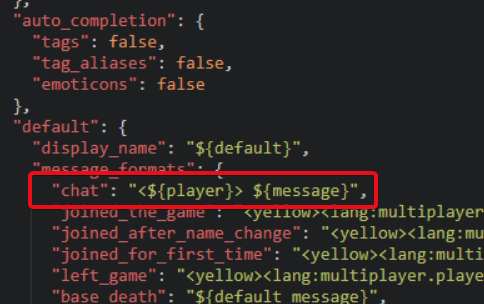
go into your mods folder
find the config of the chat mod

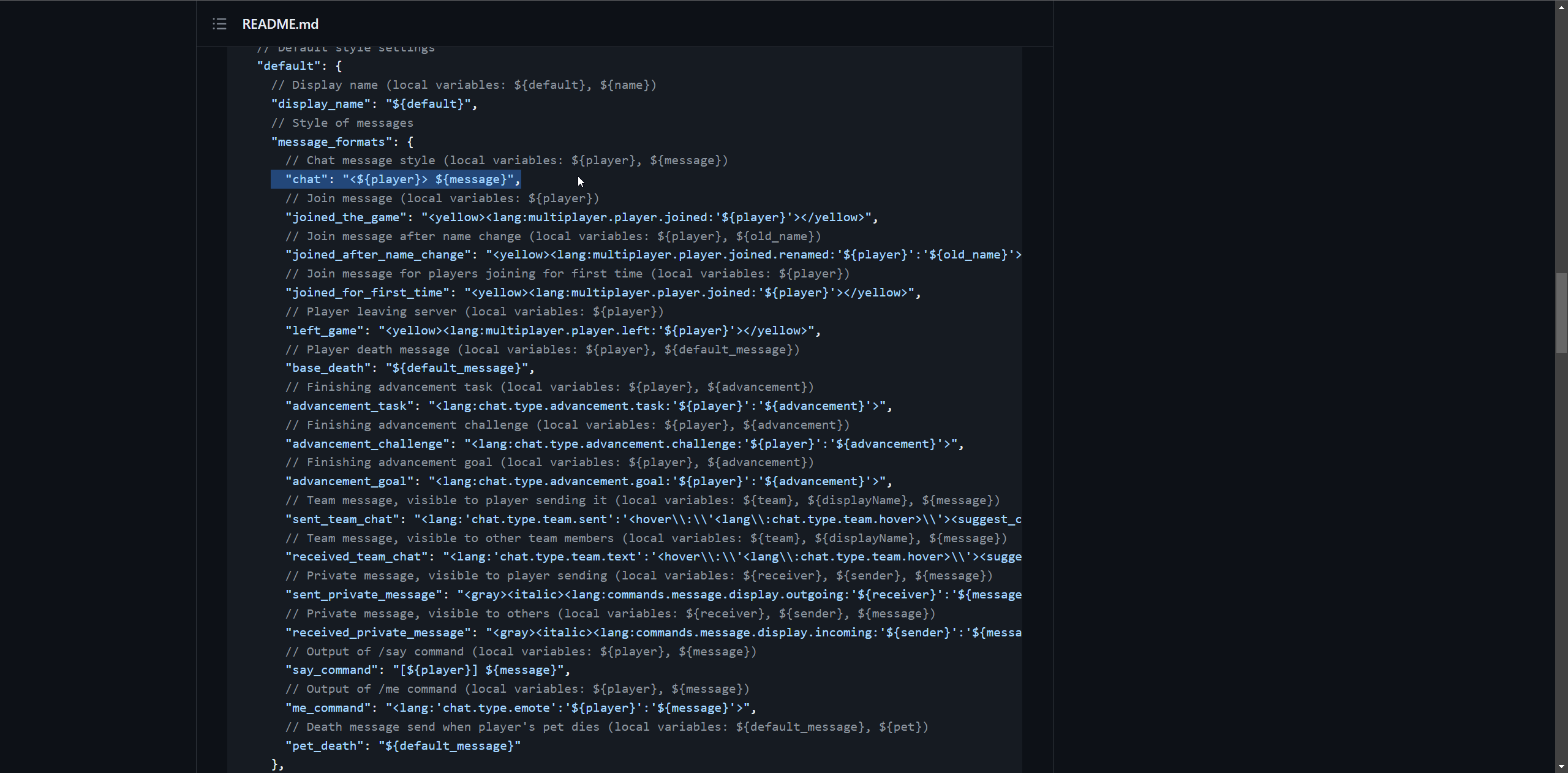
this is what will be shown
vale umbra
 sour gorge
now in that format, wherever you want the prefixy to be, add the luckperms prefix placveholder
 vale umbra
yeah sorry xD
sour gorge
hahaha no worries
tasted blood now, les goooo colorfullll
i know what that feels like
vale umbra
 vale umbra
okay it works, except for the color
 vale umbra
vale umbra
vale umbra
yeah lemme try
sour gorge

i guess this is all it can read
again, use fabric and get screwed at basics
Try <gray>[Trainer]<reset>
As prefix
In LP
vale umbra
ill try that ❤️
 dense kite
MiniMessage 
vale umbra
ITS WORKING
sour gorge
yea fuck that shit
dense kite
I love MiniMessage
sour gorge
WeeeEEEEee
dense kite
it's so easy
vale umbra
I will kiss you
dense kite
👀
sour gorge
hahahaha
youre the first person i did fabric mods for chat installation to getting it to work fully done without yeeting out in the middle lmao
thats a weird sentence
vale umbra
but you have already helped so much
dense kite
probably, yeah
vale umbra
modrinth sounds familiar
dense kite
modrinth seems to be taking over quite quickly
vale umbra
or curseforge
dense kite
Cf is 💩 though
vale umbra
idk, im new to all this 😂 it seems to have the downloads of some things 😂
sour gorge
so the only thing i can find is https://modrinth.com/mod/simplebroadcast

Modrinth
Create, schedule and announce broadcasts to all players on a server.

last update was 5 days ago
so chances are, the dev may or may not be working on this feature
sour gorge
it supports placeholder api for you
and pretty formatting
so exactly what you need to make it even sicker
vale umbra
only the sexiest broadcasts for my server 😎
vale umbra
Well I guess for Now I will leave the announcements
Ill implement it when they add it i suppose
I can just send the message myself or through console
vale umbra
lemme check about eta
also I would like to have a /discord command
but idk if I need a mod for that
also feel free to not help me further if u dont want too 😂
sour gorge
im kinda drunk and really enjoying our conversation so dw about that
consider https://modrinth.com/mod/discord4fabric ?
i wonder how much work it would be to adapt my plugin to the fabric api
i couldnt take plugin hooks with me but vanilla events i did extend with stuff. hmmmmmm
 tropic stirrup
discord4fabric ain't bad, I personally like BlockBot more
vale umbra
could you link that chris?
tropic stirrup
sure
sour gorge
but then i cant make up my mind. i wanna do shit but i will also complain about it. typical woman
and yes, im in fact female
shock.
😂 😂 😂
 tropic stirrup
https://github.com/QuiltServerTools/BlockBot
slight issue; their latest builds are pr/experimental ones
GitHub
A Minecraft - Discord chat linking mod. Contribute to QuiltServerTools/BlockBot development by creating an account on GitHub.
vale umbra
im using 1.19.2
tropic stirrup
sour gorge
https://modrinth.com/mod/blockbot
that's version 1.0, the GitHub one is newer
ahh
vale umbra
I mean i literally just need something to post a link of my discord in chat
tropic stirrup
vale umbra
I mean i literally just need something to post a link of my discord in chat
do you even need the discord <-> Minecraft chat link? cuz boy that'd be extremely over the top
vale umbra
😂
vale umbra
Idk what I want, I just know Zero has the power to get what I want 😂
vale umbra
limber oracle
Feel free to move your convo to <#308232296753004556> if not LuckPerms related y...
apologies ❤️ will move to general
 deep basalt
Does anyone ahve any default luckperms perms and ranks? I downloaded the latest one after purging my old one and it doesn't seem to have it this time
It used to be
Default - Member - Builder- Mod
Now the latest one is just default-premium
limber oracle
!ask
wintry cloudBOT
Please ask your question!
Please ask the question you have. Don't ask to ask, or ask to DM someone. There are people here to help you, but we need to know what to help you with, so please just ask the question you want to in as much detail as possible!
Or, try here first:
Why shouldn't I ask to ask?
 hallow folio
Hallo I have a problem with the permission, although they are taken, I don't have the rights
limber oracle
What permission(s) did you grant, and what makes you think you "don't have the right"?
 red socket
Hello, I wanted a help, what to do on a server that has a proxy, so that by giving a rank to a player in all game modes, she will receive that given rank?
hallow folio
Hi I have essentialsx and have tp and tp.ohters given me.. Now I can't use it anymore
But yesterday everything was okey what happened
wintry cloudBOT
LuckPerms provides a verbose command to help you find out what permissions a command/plugin is checking.
Read more
 LuckPerms wiki
hallow folio
LuckPerms wiki
hallow folio
Thank you, I'll read through... Was yesterday something...
limber oracle
essentials.tp should be the only permission required to run /tp. Not much else to think of "can't use it anymore".
What does the message look like when you try to type out /tp or whatever the command is you're tryna use.
limber oracle
Are you trying to access /tphere? 
What's the end goal here?
Or /tp <user1> <user2>?
hallow folio
That /tp <user1> <user2>
What I just don't understand, the perms are all there and right... But as of today they don't go anymore I have already inquired at essentialsx
limber oracle
Just grant essentials.tp as well as essentials.tp.others.
hallow folio
That's what I did... That's the problem
limber oracle
And what's the message you get in chat when trying to execute the command?
hallow folio
You don't have the permission
limber oracle
Send a screenshot of your plugins list (/pl) and the exact message when running /tp <user1> <user2>.
Sending the screenshot of something like /lp verbose command <user> /tp <user1> <user2> doesn't seem like a bad idea either.
Make sure you replace the <user1> and <user2> instances with valid player usernames on the server.
hallow folio
I'll send you tomorrow I'll have to work right away for the late shift
But thank you for your help
 timber wedge
help-me please
limber oracle
timber wedge
help-me please
Don't cross post please.
timber wedge
ok
 proud barn
Hello! i need help!!, i'm trying to use luckperm in my minecraft, but the commands doesn't work, it is in the mods foulder but i can't configure it, i can't do anything with it, please help!
sour gorge
Try to run /lp editor in your console. Does it spit out a link?
proud barn
nope, no console appears for me
sour gorge
Then go grab your log file and see why luckperms didnt load
proud barn
ok
 prisma hinge
i downloaded the oa voice chat plugin and im trying to allow everyone to use the command /oa accept pls help
limber oracle
!verbose /lp verbose command <user> /oa accept should tell you what perms are being checked when running that command.
wintry cloudBOT
LuckPerms provides a verbose command to help you find out what permissions a command/plugin is checking.
Read more
LuckPerms wiki
 tranquil verge
hello?
can i get support with bungeecord luckperms?
beacuse idk why
but the prefix that i made is not showing up
how i can make it work?
limber oracle
Where is it not showing up? Does /lp user <user> info, or /lpb, show the prefix? Are your proxy and backend servers synced?
 sour gorge
Sounds like you didnt install lp on your backend
limber oracle
!network
wintry cloudBOT
If you run a BungeeCord network, learn how to correctly setup LuckPerms on all server instances (including Bungee).
Also read:
Syncing data between servers
LuckPerms wiki
sour gorge
Ill assume your chat plugin is a spigot plugin, not on bungeecord
tranquil verge
so i need to add luckperms
sour gorge
And thats why prefixes dont show. Lpb does not cause syncing. It only handles permission checks made from proxy and proxy plugins
sour gorge
If you want to sync permissions, yes
limber oracle
tranquil verge
gotta check it out
limber oracle
Sounds good.
limber oracle
Correct.
tranquil verge
bruh my 10 Kb/s upload speed be like
limber oracle
Assuming you're running Bukkit based backend server(s).
tranquil verge
well
i have 2 bukkit and 1 bungeecord server
and i have them connected
so i need luckperms bungeecord in the bungeecord server
or normal luckperms?
just to make sure
limber oracle
LuckPerms Bungeecord on your Bungeecord proxy server, LuckPerms Bukkit on each of your backend (game-servers).
tranquil verge
ok thanks for telling me
limber oracle
If you've already configured your groups, userdata, etc. it's advised that you make an export of your current LuckPerms data so you don't lose it in the process of switching to a remote database for your Network configuration.
!switch Here's the relevant documentation. 
wintry cloudBOT
If you wish to change your storage type (e.g. to YAML or MySQL) you may need to follow these instructions to ensure your groups and permissions are migrated to the new storage type.
Read more about the Storage types
LuckPerms wiki
 limber oracle
I'm not going to fill in the database credentials for you.
tranquil verge
i filled
limber oracle
It's something you will have to figure out on your own.
tranquil verge
but idk what to put in minecraft
limber oracle
Yeah, that's it.
tranquil verge
gotta remove the image
tranquil verge
uff
limber oracle
!paste Doesn't seem like that whole things. Paste all the relevant segment related to error and any stack traces related.
wintry cloudBOT
Please use pastebin!
Seeing a paste of the problem makes everything so much easier! Use https://pastes.dev/ for easy pasting!
For console errors:
Pastebin any relevant segments of the console log. If it's a startup error, this includes the entire startup log!
Other errors:
Pastebin the entire LuckPerms config file (passwords removed) as well as any other relevant files!
 limber oracle
tranquil verge
u made my day
limber oracle
tranquil verge
u made my day
Glad to hear. 🤝
 alpine jolt
when I deop myself and set my role to admin on the lp website thingy I have it so admins can fly and it don't let me do that
limber oracle
What permission(s) have you assigned to the admin role to be able to access flight? What does "don't let me do that" mean? What type of message do you receive on chat?
alpine jolt
I put for the admin *
it says "you do not have permission to use that" and I was trying to do /warp
for member I have it assigned warp on lp
limber oracle
!editorsafety Can i see your editor link please?
wintry cloudBOT
It is safe to send an editor link in public.
Any changes made in the editor have to be applied using the /lp applyedits command - impossible unless the person with the link is also connected to the server and with the required in-game permissions to use LuckPerms commands. It's effectively just as safe to share an editor link as it would be to share a screenshot of your permissions or a pastebin of a configuration file. The editor doesn't contain any sensitive data (except perhaps player names).
More Information:
Concerns about the proprietary nature of your permissions setup?
Please, don't be. We're here to help, not steal your permissions setup. Additionally, permissions can be tested by players simply joining your server and seeing what they can do.
alpine jolt

LuckPerms - A permissions plugin for Minecraft servers.
LuckPerms is a permissions plugin for Minecraft servers. It allows server admins to control what features players can use by creating groups and assigning permissions.
is it dat
limber oracle
Alright, so set your group to admin (/lp user pezex_ parent set admin), and run /lp verbose command pezex_ /warp from either in-game or from console.
Make sure you deop yourself and send a screenshot of the output here.
 limber oracle
Based on your editor, we can tell that you're using EssentialsX. It's required a player has both essentials.warp and essentials.warp.list for the /warp command. Feel free to add the second perm to the default permissions list.
Well, it's working. You have the proper permissions and the command executed no problem.
alpine jolt
when I am not an op it dont wrk
limber oracle
Why did you op yourself? Told you to try without operator status.
Deop yourself, reproduce and report back.
alpine jolt
ye Admin works when I am not opped
ok i think it is working I am just delusional
ty for ur help
limber oracle
No worries. Now you know how to check for perms. Before we let you go, it's advised you refrain from using the wildcard (*).
!nwc
wintry cloudBOT
Wildcard issues
Some plugins are created in a way which results in odd behaviour when the root '*' wildcard is used.
More information:
alpine jolt
is there a command in lp editor called essentials.warps?
so I can do /warps
nvm I got it
still tryna figure this all out lol
this plugin is making me happy idk why lol it just pretty cool
limber oracle
essentials.warp and essentials.warp.list are the perms you want to use. Set those to true.
alpine jolt
aww frick I was an op when I did /warps OFC
I wish there was a /warps command so it could tell people what the warps are
limber oracle
EssentialsX already has that command which lists all available warps. Have you tried to run it?
alpine jolt
ye I can run it when I am a op but when I am not an op and am in Member rank it says I do not have perms
limber oracle
limber oracle
`essentials.warp` and `essentials.warp.list` are the perms you want to use. Set ...
Your default group lacks the second permission.
alpine jolt
I can not find essentials.warp.list
limber oracle
The editor does not suggest all available permissions. Don't blindly trust it.
alpine jolt
do it blindly u mean
limber oracle
Just set the essentials.warp.list perm which lets players list available warps.
limber oracle
Is this a question or a statement?
limber oracle
And why are you asking me instead of trying to execute the command?
alpine jolt
I ahve
limber oracle
And? Did it go through?
limber oracle
That's because you've only set a single home. You don't have any to list.
alpine jolt
I just did anoother /sethome and /homes just tps me to the new one
limber oracle
However, that's not LuckPerms related. It's on the EssentialsX side. Feel free to ask there in regards to the EssentialsX plugin.
alpine jolt
cuz it used to let me do /homes
alpine jolt
/homes wrk when I am op
limber oracle
/lp verbose command prezex_ /homes. You know the drill.
dense kite
limber oracle
However, that's not LuckPerms related. It's on the EssentialsX side. Feel free t...
.
alpine jolt
ok
 plain escarp
Whats "essentials"?
dense kite
plain escarp
I need it for luckperms????
dense kite
No
plain escarp
Oh, so whats it there for?\
 mighty spear
It adds extra commands to your server
/fly, /god, /home, etc, are all part of Essentials
plain escarp
But I put it in and I cuddent do any
I'm the owner
Do I need to instakll it for it to work?
limber oracle
What are you talking about?
plain escarp
Do i need ti install essential for it to work?
limber oracle
No, you don't need Essentials for LuckPerms to work.
plain escarp
Weird, I haven't beeen able to do any of those
limber oracle
Any of what?
plain escarp
Any of the commands.
mighty spear
Ok. What happens when you try to run them
plain escarp
it is "Unknown command. Type /help for help."
dense kite
you need to install EssentialsX for EssentialsX commands to work, but what does that have to do with LuckPerms? This is LuckPerms support.
dense kite
No
plain escarp
my bad
 blissful geyser
Ayudaaaa a


 proud barn
sour gorge
Then go grab your log file and see why luckperms didnt load
proud barn
sour gorge
Then go grab your log file and see why luckperms didnt load
hey uhh.. what is a log file?
sour gorge

LetMeGoogleThat.com
For all those people that find it more convenient to bother you with their question than to google it for themselves.
 tame hollow
Some things you really should know before starting a server...
proud barn
yeah
it says luckperm is not supported on the client, should i download other version of it?
limber oracle
!paste Paste your full logs.
wintry cloudBOT
Please use pastebin!
Seeing a paste of the problem makes everything so much easier! Use https://pastes.dev/ for easy pasting!
For console errors:
Pastebin any relevant segments of the console log. If it's a startup error, this includes the entire startup log!
Other errors:
Pastebin the entire LuckPerms config file (passwords removed) as well as any other relevant files!
tame hollow
or leave ig, lol
limber oracle
Uhh. 
dense kite
Well they did say client, which LP has nothing to do with anyways
limber oracle
dense kite
Well they did say client, which LP has nothing to do with anyways
Not sure if they know what they meant in the first place.. 

 placid canopy
Hey! I wrote an extension for the standalone app. This listening e.g. the NodeAddEvent. If I now do e.g. /lp user NAME group add GROUP, the event is unfortunately not triggered.
Can it be that the events are only triggered on the server/host on which the commands have been executed?
 zealous yacht
Hi, please could someone help me with luckperms?
I try to connect luckperms on bungeecord server to MariaDB
sour gorge
And?
zealous yacht
I can´t connect to server at the moment
it tells me that the server couldn't find the permission data
sour gorge
I assume it gives you an error as soon as you try to log into your server. Please be more specific, dont wait for people to pull it out of your nose. Provide a full latest.log please so we can have a look at all errors thrown by luckperms on startup
sour gorge
Well, I have a logs folder even on my bungee. If you don't, you'll have to find it
zealous yacht
but in my bungee I don´t have any latest.log
sour gorge
Your logs will have to go somewhere
zealous yacht
they're not really there
sour gorge
Alternatively, you can restart it and copy everything luckperms spits out but i doubt it will work because stuff gets pushed upwards too fast
We definitely need the messages from when luckperms loads, and all the failing messages
zealous yacht
wintry cloudBOT
Please use https://pastes.dev to send files in the future. I have automatically uploaded message.txt for you: https://pastes.dev/wuVUCvsMjg

A paste containing 191 lines of plaintext.
LuckPerms cannot connect to your MySQL server
Read More
Caused By
java.sql.SQLTransientConnectionException: luckperms-hikari - Connection is not available, request timed out after 5001ms.
https://pastes.dev/wuVUCvsMjg | Sent by Clippy
wintry cloudBOT
Here's a page with some common storage system errors.
LuckPerms wiki
sour gorge
Specifically, you should go over these points here https://luckperms.net/wiki/Storage-system-errors#luckperms-cannot-connect-to-my-mysql-server
LuckPerms - A permissions plugin for Minecraft servers.
LuckPerms is a permissions plugin for Minecraft servers. It allows server admins to control what features players can use by creating groups and assigning permissions.
zealous yacht
and here I have everything right here?
wintry cloudBOT
Please use https://pastes.dev to send files in the future. I have automatically uploaded message.txt for you: https://pastes.dev/8UwYvXzIrL
A paste containing 612 lines of plaintext.
zealous yacht
A paste containing 612 lines of plaintext.
I just removed IP, username and password
??
 winter forum
If I want to set up permissions for a specific user (adding them to a group) before they join the server for the first time, how can I do that? I have the username but it just says user cannot be found
 quaint idol
Replace their username with their UUID in commands. Username won't work until they join for the first time
winter forum
ah, thank you
quaint idol
(UUIDs can be found by looking up their username on namemc or similar sites)
quaint idol
oh important note, if you're running offline mode, those sites will be wrong.
hallow folio
@sterile birch
I found the problem.. my mysql makes problems
it can't keep up with the query
 sterile birch
hallow folio
<@230195766260400129>
I found the problem.. my mysql makes problems
sterile birch
hallow folio
<@230195766260400129>
I found the problem.. my mysql makes problems
Umm.. congrats? Not sure why I needed to know tho... 😛
hallow folio
lol sorry @limber oracle
wintry cloudBOT
Hey theoverlord1090! Please don't tag helpful/staff members directly.
limber oracle
hallow folio
lol sorry <@324536691794640906>
How can i help you?
limber oracle
You're not mean to add a coma there.
Simply /lp user <user> permission set <permission> <true/false> server=<server> server=<anotherserver>
 trail ether
hey i just downloaded a version of luckpersm (5.4.82), It seemed not to work, then it seems that version got deleted off modrinth(latest version now 5.4.66. just wondering if a new version did actually get released then deleted, and if I should expect a new one soon/not soon
 rugged yew
dont know if ur still having this problem but i got it fixed
its minecraft.command.checkspawns true
but the follow up for legendary and normal have to be
pixelmon.checkspawns.legendary
pixelmon.checkspawns.normal
 fair ore
because I get ´´error, this uuid/username is not valid´´
prisma hinge
Hello
 rustic snow
How to show luckperms prefix on players nametag
tranquil verge

im using waterfall
bungeecord version
when i removed bungeecord luckperms
it started working
i was using bungeecord tablist
and when i give perm tl.default
it just kicks user
and sends the message above
 ivory gorge
i have 102 whitelisted players but in luckperms its only showing me 46 users
 limber oracle
ivory gorge
i have 102 whitelisted players but in luckperms its only showing me 46 users
limber oracle
ivory gorge
i have 102 whitelisted players but in luckperms its only showing me 46 users
Users that only inherit the default group are not saved.
It's intended/normal behaviour. Nothing to worry about.
ivory gorge
is there any way i can add a user? i want him to have access to 1 command
limber oracle
You can open player specific editor sessions using /lp user <user> editor and work from there, or just use something like /lp user <user> permission in-game.
ivory gorge
okay thank you so much
ivory gorge
limber oracle
You can open player specific editor sessions using `/lp user <user> editor` and ...
@limber oracle i tried adding a bedrock user but its showing me an error
 limber oracle
ivory gorge
<@324536691794640906> i tried adding a bedrock user but its showing me an error
limber oracle
ivory gorge
<@324536691794640906> i tried adding a bedrock user but its showing me an error
!geyser
wintry cloudBOT
Using Geyser?
If you're having issues with permissions for bedrock players, or it's telling you that a bedrock player's name is invalid, try setting allow-invalid-usernames to true in the LuckPerms config.
ivory gorge
thanks!
 novel chasm
Can I do multilines with \n with VaultChatFormatter plugin?
limber oracle
novel chasm
Can I do multilines with \n with VaultChatFormatter plugin?
This is not VaultChatFormatter support.
limber oracle
No. This is not the right place for it i'm afraid.
novel chasm
Where can I ask then?
limber oracle
novel chasm
Where can I ask then?
No clue. Check the plugin's spigot page.
I suppose you could try your luck on #general.
 finite flicker
Question: What is the functional purpose of the primary-group if the group weight takes precedence and the prefix meta priority determines prefix priority?
 tidal blade
finite flicker
Question: What is the functional purpose of the primary-group if the group weigh...
tidal blade
finite flicker
Question: What is the functional purpose of the primary-group if the group weigh...
The primary group is the main group players are in. Other groups are just additional groups basically. The primary group, is the group that will take precedence and override other group permissions. So if an additional group has a permission as false, but the primary group has it as true, the primary group will win and the player will have the permission as true
finite flicker
tidal blade
The primary group is the main group players are in. Other groups are just additi...
Oh. Ok. And this by default is by weight, but can be changed. I think I get it now. Thank you.
 wary hinge
Hello there! I faced with unknown error using Standalone Luckperms in Docker. Earlier it works fine.
Error: java.lang.NoClassDefFoundError: io/netty/channel/unix/DomainSocketAddress - when trying connect to Postgresql database, database works fine
Thanks!

Doesn't work in both docker-compose (worked before) and HashiCorp Nomad Cluster
tame hollow
!latest
wintry cloudBOT
Latest version
5.4.84
tame hollow
wary hinge
Hello there! I faced with unknown error using Standalone Luckperms in Docker. Ea...
try the latest version, Luck just updated the psql driver
wary hinge
@tame hollow Latest tag downloads 5.4.79 from docker registry
wintry cloudBOT
Hey fania! Please don't tag helpful/staff members directly.
wary hinge
Sorry, now it called luckperms/luckperms instead of luckperms/rest-api, works, thank you!
 soft cosmos
wary hinge
Sorry, now it called luckperms/luckperms instead of luckperms/rest-api, works, t...
soft cosmos
wary hinge
Sorry, now it called luckperms/luckperms instead of luckperms/rest-api, works, t...
ah I forget I need to manually trigger the build for rest-api :D will do that now
GitHub
A REST API for LuckPerms. Contribute to LuckPerms/rest-api development by creating an account on GitHub.
 mossy dagger
Hey is there a way for me to move all of my groups and permissions from one server to another?
I spent a lot of time setting it up, but now I'm migrating to Bungeecord so I'm going to have LuckPerms in the Bungeecord proxy server... I just don't want to have to manually re-create each group and re-add each permission.
 quick zealot
mossy dagger
Hey is there a way for me to move all of my groups and permissions from one serv...
quick zealot
mossy dagger
Hey is there a way for me to move all of my groups and permissions from one serv...
I think you can download your luckperms file and just transfer it
mossy dagger
The .jar or something from the LuckPerms folder?
mossy dagger
Alright
quick zealot
but i'd recommend just transferring the whole LuckPerms folder
limber oracle
mossy dagger
I spent a lot of time setting it up, but now I'm migrating to Bungeecord so I'm ...
!switch
wintry cloudBOT
If you wish to change your storage type (e.g. to YAML or MySQL) you may need to follow these instructions to ensure your groups and permissions are migrated to the new storage type.
Read more about the Storage types
LuckPerms wiki
 golden bay
Hey, how i allow commands blocks to run luckperm commands ? Currently it doesn't work and I'm in a situation where I need to use a block command.
the error I have :
 limber oracle
prisma hinge
https://mclo.gs/wsPZCd4
limber oracle
prisma hinge
https://mclo.gs/wsPZCd4
!errors
wintry cloudBOT
Here's a page with some common storage system errors.
LuckPerms wiki
prisma hinge
Oh srry I messed the ip up
I use pterodactyl and I've put 127.18.0.1
Instead of
172.18.0.1
 rancid flicker
Hey all,
I've been on a learning curve with LuckPerms and using it with HuskHomes for 1.20.
I see talk about lucko/minecraft-command-premissions-fabric.
Does anyone know if thats coming to 1.20+? or is there another way to get minecraft commands added to Perms?
I want a friend to have the use of adding/removing people to the whitelist and to kick and ban but without them being an OP.
Any help with be great
ps, I am using LuckPerms-Fabric-5.4.83
dense kite
!geyser
wintry cloudBOT
Using Geyser?
If you're having issues with permissions for bedrock players, or it's telling you that a bedrock player's name is invalid, try setting allow-invalid-usernames to true in the LuckPerms config.
dense kite
Every one that you want to run commands for geyser players on.
 copper dune
How can i promote a player into a specific group from a track? I want to make sure, that the player will not just get into the next rank, but into a specific one from my created track. So is there something like /lp user <user> promote <track> <group>
 half scaffold
@copper dune Does the prefix work for you?
copper dune
half scaffold
<@451664732911304705> Does the prefix work for you?
wdym?
half scaffold
If the prefix you set up appears after before the playername?
For example [MEMBER] playername
@copper dune
copper dune
yes
half scaffold
copper dune
yes
Can I see how you setup it?
copper dune
you need a chat plugin like essentialsx
half scaffold
I've done that, but when I do it on the server, the prefix doesn't appear
sour gorge
if you use essentials, know that it needs vault as bridge to communicate prefixes with luckperms
no vault, no prefixes
half scaffold
I already have a vault but the prefix doesn't appear before the name
sour gorge
So then have you checked /lp user <you> info?
half scaffold
Not yet wait
 proven roost
Does anyone know why chat doesn't show Owner at the beginning of the name?
 limber oracle
!chat
wintry cloudBOT
LuckPerms does not perform any chat/tablist formatting of its own!
LuckPerms only acts as the source for prefixes / suffixes, it doesn't actually apply them. You need an appropriately configured chat/tablist formatting plugin for them to be displayed. If the values appear correctly when you run /lp user <user> info, LuckPerms is doing its job!
FAQ answer: Prefix isn't showing?
List of chat/tablist formatting plugins that work with LuckPerms
half scaffold
@limber oracle @sour gorge
 wintry cloudBOT
Hey Kez! Please don't tag helpful/staff members directly.
half scaffold
Help
half scaffold
Okeyy
sour gorge
^Your prefix shows fine in the preview, which means something is up with your chat
if you say you have vault, then do you have essentaisl AND essentials chat addon installed?
essentials alone does not come with chat.
proven roost
half scaffold
<@324536691794640906> <@905017828330045472>
hey, have you tried chatting to see if the owner is displayed at the beginning of the name?
copper dune
also it would be good if you show the chat config from essentials, but please dont push the whole config as it is without code brackets in here
half scaffold
proven roost
hey, have you tried chatting to see if the owner is displayed at the beginning o...
Yes but nothing happen
sour gorge
Show us /pl
proven roost
half scaffold
Yes but nothing happen
u are using 1.20?
half scaffold
proven roost
u are using 1.20?
Yes
proven roost
and you create group 'owner' and it doesn't show the beginning of the name?
half scaffold
proven roost
and you create group 'owner' and it doesn't show the beginning of the name?
Exactly
sour gorge
Wha... you realize he posted an image above, showing his groups, his prefix and everything being available in luckperms and just not showing in chat right
the issue is your chat as stuff shows up in the lp command. but hey, if you want to debate on that some more, knock yourself out i guess
prisma hinge
how can I change permissions from the editor to be accessible from a server
prisma hinge
prisma hinge
how can I change permissions from the editor to be accessible from a server
it doesnt work normally
mossy dagger
Heya, looking for help with this:
- I want to move all of my LuckPerms player data and groups from my old server to a new one.
- The old server is Paper, and the new server is Bungeecord.
- Can I simply download the
home/container/plugins/LuckPermsfolder from the old server and upload it to the new one?
Thanks!
limber oracle
!switch
wintry cloudBOT
If you wish to change your storage type (e.g. to YAML or MySQL) you may need to follow these instructions to ensure your groups and permissions are migrated to the new storage type.
Read more about the Storage types
LuckPerms wiki
 normal idol
is there any way to make a permission set command silent? i have a prision server and i dont want to see in the chat whenever someone rankup
? @limber oracle
wintry cloudBOT
Hey skigrex! Please don't tag helpful/staff members directly.
limber oracle
normal idol
? <@324536691794640906>
You've already been supplied with a response over at #support-1. No need to to post the same message across multiple channels.
normal idol
limber oracle
You've already been supplied with a response over at <#241667244927483904>. No n...
i didnt wrote on support 1 lmao
limber oracle
Whoops. You've been mistaken with another member. I blame the lack of coffee today.
 limber oracle
You can toggle notifications using /lp log notify off.
There's, also, a setting for permission logging inside the config.yml.
quaint idol
(that's on a per-player thing and will not work for console, there's no way to completely disable permission logging)
normal idol
limber oracle
You can toggle notifications using `/lp log notify off`.
yeah, but i just want to turn off that notification, i want to see the other ones
limber oracle
normal idol
yeah, but i just want to turn off that notification, i want to see the other one...
May want to set broadcast-received-log-entries: false in your LuckPerms config.
normal idol
limber oracle
May want to set `broadcast-received-log-entries: false` in your LuckPerms config...
i think im not explaining myself very well, whenever someone rankup, i give him a new group, so i want to disactivate the broadcast just for that notification, so i want to see all notification but to hide this one
limber oracle
Ah, right. There's a setting in the config that lets you use regex to filter such notifications.
log-notify-filtered-descriptions:
normal idol
limber oracle
Ah, right. There's a setting in the config that lets you use regex to filter suc...
thxx, this is was i was looking for
mossy dagger
limber oracle
!switch
I have to switch storage types? Does Bungeecord LP not work the same as Spigot/Paper LP?
quaint idol
All platform implementations work near-identically, but LP needs a remote DB and a messaging service for a network setup
!network
wintry cloudBOT
If you run a BungeeCord network, learn how to correctly setup LuckPerms on all server instances (including Bungee).
Also read:
Syncing data between servers
LuckPerms wiki
mossy dagger
quaint idol
All platform implementations work near-identically, but LP needs a remote DB and...
Ah, gotcha. So I'll need to set up a MySQL database?
limber oracle
Any remote database should work, MySQL included. So yes.
quaint idol
See the link above for more info
mossy dagger
Awesome, will do. Thank you! :)
 wild ivy
When I connect mysql for 2 servers but one of this haven't got bungeecord: true
will context server: staff_auth work?
or when using bungee ranks must spigots servers bungee to true?
 left radish
i need help i tryed doing /locate and it isnt working after i installed luckperm and essentials i couldnt do that after but before it was working
limber oracle
left radish
i need help i tryed doing /locate and it isnt working after i installed luckperm...
!verbose Run /lp verbose Zusano command /minecraft:locate and send a screenshot of the output here. You're most likely lacking the minecraft.command.locate permission.
wintry cloudBOT
LuckPerms provides a verbose command to help you find out what permissions a command/plugin is checking.
Read more
LuckPerms wiki
left radish
limber oracle
!verbose Run `/lp verbose Zusano command /minecraft:locate` and send a screensho...
cool seeing you here too
limber oracle
left radish
cool seeing you here too

So, did you try to run the command above? It will help us investigate for any missing/undefined permissions and see what permissions are being checked when using /locate.
left radish
limber oracle
So, did you try to run the command above? It will help us investigate for any mi...
give me a momment
left radish
limber oracle
So, did you try to run the command above? It will help us investigate for any mi...
should i type it in game
limber oracle
left radish
should i type it in game
In-game or via console.
left radish
limber oracle
In-game or via console.
 limber oracle
Need to zoom in. Can't really what commands you've executed.
left radish
limber oracle
Need to zoom in. Can't really what commands you've executed.
i dont know how to do that with my desktop
limber oracle
Did you run the verbose command from console?
left radish
limber oracle
Did you run the verbose command from console?
no on my in game
limber oracle
Doesn't seem like you used the proper syntax. What's the command you typed in?
left radish
limber oracle
Doesn't seem like you used the proper syntax. What's the command you typed in?
it told me this [22:35:50 INFO]: > verbose - <on|record|off|upload|command> [filter] [<me|player> <command>]
 daring stirrup
what command did you do?
left radish
limber oracle
!verbose Run `/lp verbose Zusano command /minecraft:locate` and send a screensho...
/lp verbose command /minecraft:locate
limber oracle
Forgot to add your username.
daring stirrup
/lp verbose <player name> command minecraft:locate
left radish
daring stirrup
`/lp verbose <player name> command minecraft:locate`
i see thanks
limber oracle
And i made a typo earlier. Whoops.
left radish
limber oracle
And i made a typo earlier. Whoops.
how dare you
limber oracle
Now run the command and send a screenshot of the output so we can see what's going on.
left radish
limber oracle
Now run the command and send a screenshot of the output so we can see what's goi...
[22:40:18 INFO]: > verbose - <on|record|off|upload|command> [filter] [<me|player> <command>]
itd telling me that
limber oracle
What command did you use? 
left radish
limber oracle
What command did you use? <a:think:752742159186395266>
/lp verbose <player name> command minecraft:locate i use this command on the console and i put in my name and it showed me that
daring stirrup
did you replace <player name> with your name?
left radish
daring stirrup
did you replace `<player name>` with your name?
yes
daring stirrup
copy the exact command you typed in console here
left radish
[22:39:40 INFO]: Zusano issued server command: /lp verbose Zusano command /minecraft:locate
/lp verbose zusano command /minecraft:locate
limber oracle
Change the order.
left radish
limber oracle
Change the order.
how
limber oracle
/lp verbose command zusano /minecraft:locate
daring stirrup
oh it's /lp verbose command zusano minecraft:locate
limber oracle
Kekw.
daring stirrup
i had to triple check the usage myself lol
limber oracle
No, it's not your fault. My initial message was just messed up.
left radish
now what
[22:45:02 INFO]: [LP] Forcing Zusano to execute command minecraft:locate and reporting all checks made....
[22:45:02 INFO]: [LP] VB > zusano - minecraft.command.locate - true
[22:45:02 INFO]: [LP] Command execution complete.
left radish
limber oracle
No, it's not your fault. My initial message was just messed up.
huh what do i do from here
limber oracle
You've got sufficient permissions to execute the locate command and proper access to it.
Thought you mentioned you couldn't use the command.
limber oracle
What makes you think that?
sour gorge
Opped
left radish
i am opped
sour gorge
!testingperms
wintry cloudBOT
How-to test permissions
Small list of things for you to make sure when testing permissions:
1. Don't test as op, your players/general staff will most likely not have op
2. Make sure you don't have any special permissions (e.g. * or the same permission you are testing) on your user (/lp user <user> permission info)
3. Make sure your parent groups are the ones the target audience you are testing will have (if you are testing mod perms, don't have owner as parent)
4. Use verbose to see exactly what's going on, what permissions are being checked
Also read:
limber oracle
But why can't you use the command? You're op and we just checked you've got the only permission required for it.
sour gorge
I think he means he cant when not opped and he opped himself for using verbose
left radish
sour gorge
I think he means he cant when not opped and he opped himself for using verbose
its keeps on giving me while i was opped i tryed using verbose and it came to that
left radish
sour gorge
That is like op without /op command
what do i do now
left radish
limber oracle
But why can't you use the command? You're op and we just checked you've got the ...
keeps telling me players not found
limber oracle
Feels like we're going in circles.
sour gorge
So are you saying youre trying to give this permission to a user who has never joined before
sour gorge
limber oracle
Feels like we're going in circles.
We are. Hes not clear on anything
left radish
limber oracle
Feels like we're going in circles.
i think its the essentials fault everytime when i delete it everythign would work again
limber oracle
No, it's not EssentialsX related. You're making me repeat myself cross servers.
left radish
limber oracle
No, it's not EssentialsX related. You're making me repeat myself cross servers.
how come it would work again if i did answer me that
sour gorge
You have * and minecraft.comand.locate set to true. You can use the command. You say you cant. Now you say user not found. Which friggin is it
limber oracle
Alright, so in order for us to comprehend the situation better, can you tell us the command you used that "did not work"? What is it that typed? What was the output in chat after using the command?
sour gorge
That message in red is not from LuckPerms
limber oracle
That's an EssentialsX message honestly. But what did you type?
left radish
sour gorge
That message in red is not from LuckPerms
wdym
sour gorge
For the love of god disable the ping please
left radish
limber oracle
That's an EssentialsX message honestly. But what did you type?
i did /locate structure mansion and it gave me the cordinates after that i click on the cordinates and it said player not found
left radish
i think when i downloaded essentialsx it said in my console it was outdated
limber oracle
EssentialsX overrides the main /tp command.
sour gorge
The issue isnt locate
 void verge
clicking it just runs /tp ... and since essentials overrides /tp, which doesnt accept coords, it doesnt teleport you when essx is installed
limber oracle
I'm gonna break my monitor
sour gorge
The issue is you click the msg amd it tries to tp you and you never said that
void verge
just type out the coords manually in /minecraft:tp
sour gorge
Gg on keeping everyone busy
limber oracle
We've got bamboozled.
sour gorge
This round of shots is on me
left radish
im not trying to watse yalls time its just that im new to everything please be patient
limber oracle
Epic, next time be more descriptive and explain the situation better. We can't read minds or guess what you're thinking/trying to do.
left radish
limber oracle
Epic, next time be more descriptive and explain the situation better. We can't r...
umm il ltry my best
limber oracle
left radish
umm il ltry my best
Okay. You know what to do know, right?
sour gorge

left radish
all i have to do is type the coordinates manually
limber oracle

limber oracle
Hype. 
limber oracle
Tip: You can use /minecraft:tp to use the vanilla teleport command instead of the EssentialsX's /tp.
left radish
limber oracle
Tip: You can use `/minecraft:tp` to use the vanilla teleport command instead of ...
i have to rememebr that
limber oracle
left radish
i have to rememebr that
Ok.
left radish
thank you all for your time i know it was hectic but yea
 scenic palm
I created and edited the commands on my server but when I went back to the luck page nothing but the commands were there so saved on the server but I can't edit
could you explain to me what this reaction means
quaint idol
Don't crosspost (i.e. post the same message in multiple channels). It won't speed up response time.
scenic palm
att
 fathom turtle
hi guys i have questions.
I am preparing a minecraft server.
I set permissions with Luckperms along with several plugins.
But essentials.keepinv doesn't work.

this is plugin list
 quaint idol
if you do /lp user <affected user> permission check essentials.keepinv in the world you expect keepinv to work in, does it return "true"?
fathom turtle
Yes, result will show True.
wintry cloudBOT
Essentials
Make sure you are using EssentialsX and Vault for prefixes. For any other issues with Essentials, you should seek support in either #general or the official EssentialsX support Discord.
EssentialsX Discord
fathom turtle
quaint idol
!moss
oh thank you guy
left radish
quaint idol
if you do `/lp user <affected user> permission check essentials.keepinv` in the ...
i have a question
wintry cloudBOT
Please ask your question!
Please ask the question you have. Don't ask to ask, or ask to DM someone. There are people here to help you, but we need to know what to help you with, so please just ask the question you want to in as much detail as possible!
Or, try here first:
Why shouldn't I ask to ask?
left radish
i have a plugin that i just downloaded and its showing red not green like the rest of them what does it mean
quaint idol
That means the plugin is disabled, almost always because there was a fatal error on startup. Check your logs.
left radish
quaint idol
That means the plugin is disabled, almost always because there was a fatal error...
yea once i check it what do i do
quaint idol
 depends on the error
tidal blade
Speak to the support team for that plugin
quaint idol
but also yeah, assuming the plugin isn't LP, talk to that plugin's support instead
(or you can try #general but your milage may vary)
left radish
it isnt lp
prisma hinge
May i ask for luckperms version 1.20 fabric, do vanilla commands work?

this is the group i have set up on the server, however, the minecraft vanilla commands do not work, the ledger one works

on top of that when setting permissions, all the minecraft vanilla commands do not display, only those from mods such as voice chat and ledger (and luckperms itself)
 tidal blade
prisma hinge
tidal blade
prisma hinge
ah, thank u 🙏
so i assume that jar file, add it into mods?
nvm, no need to reply, i'll try everything out and update here later ^.^
the latest one is not updated to 1.20 yet i believe

this is the one i had to downlload right?

aw well, i assume it's not updated yet, guess i'll wait ehhehe
 rancid flicker
prisma hinge
aw well, i assume it's not updated yet, guess i'll wait ehhehe
rancid flicker
prisma hinge
aw well, i assume it's not updated yet, guess i'll wait ehhehe
Everyone thinks this jar file will work.
I asked a couple times about using Minecraft Commands for 1.20 and if anyone knew if this is going to be updated or if there was another way but I never got an answer. If you ever find a way, I'd love to know too
quaint idol
Luck presumably intends on updating it but that it takes time and 1.20 hasn't been out for very long yet
prisma hinge
no worries :)) it is understandable , 1.20 is barely a week old
rancid flicker
I guessed it was end of life due to not being updated for the last year.
quaint idol
1.19 was a year ago, that's all. Once it's updated it doesn't really require any maintenance
wild ivy
wild ivy
When I connect mysql for 2 servers but one of this haven't got bungeecord: true ...
.

 sour gorge
You have to install the papi expansion of vault to use the placeholders belonging to that package
 timid gust
hi guys! please tell me how to make exactly such a prefix in the tab.
 sour gorge
Find symbols on the internet and see which ones work in mc chat.
timid gust
sour gorge
Find symbols on the internet and see which ones work in mc chat.
the symbols work, the whole nickname is colored. and I only need to color the symbol.
sorry for my english if something is wrong.
sour gorge
Then set a color code in front of it in the prefix?
timid gust
sour gorge
Then set a color code in front of it in the prefix?
the nickname will also be colored
sour gorge
Then add &r at the end so it "resets" any previous coloring.
timid gust
or I don't understand something
timid gust
sour gorge
Then add &r at the end so it "resets" any previous coloring.
second
sour gorge
This is really not a luckperms problem but more so you not knowing chat formatting
What
No, I'm telling you
Do something like &3MyPrefix&r
&r = no color
timid gust
sour gorge
&r = no color
and how to make a pass after the symbol? to leave a small gap
sour gorge
Add a space into the prefix or into your tablist formatting plugin
Also, please turn off the ping.
timid gust
ok
left radish
hey is there anything wrong with my plugins
wintry cloudBOT
Please use https://pastes.dev to send files in the future. I have automatically uploaded message.txt for you: https://pastes.dev/yDwyBmv9EA
A paste containing 181 lines of plaintext.
left radish
A paste containing 181 lines of plaintext.
 solemn flame
Hi, I am trying to setup Luckperms on my server, and I am struggling to figure out how to assign groups to users/create the group prefixes.
limber oracle
solemn flame
Hi, I am trying to setup Luckperms on my server, and I am struggling to figure o...
!usage
wintry cloudBOT
Here's a guide to help users understand and use LuckPerms for the first time.
Read more
LuckPerms wiki
limber oracle
!tut
wintry cloudBOT
YouTube Tutorial
If you would like a video tutorial for setting up LuckPerms, try:
https://www.youtube.com/watch?v=l4anE2wOLdc
solemn flame
I'll try tutorial
Thank you
Okay, while this tutorial is great, I still don't see the Youtuber show off their prefix of Owner
wintry cloudBOT
Hey caitisacat! Please don't tag helpful/staff members directly.
limber oracle
Deleting the message which pinged me, doesn't remove the notification. 😅
You didn't have to delete it anyways.
In order for your LuckPerms prefix to show somewhere other than within the LuckPerms commands, you need to use plugins to display it. Those being a chat plugin, one for the tablist and so on.
In other words, LuckPerms does not format the chat/tablist on its own.
solemn flame
Yeah, I know. 
oh
ok
You guys are like the only plugin out there lol
:,)
DarkLaw, is there no service for me to pay for someone to do this for me?
Because I seriously would I have been dealing with this plugin for a few days now
quaint idol
!chat
wintry cloudBOT
LuckPerms does not perform any chat/tablist formatting of its own!
LuckPerms only acts as the source for prefixes / suffixes, it doesn't actually apply them. You need an appropriately configured chat/tablist formatting plugin for them to be displayed. If the values appear correctly when you run /lp user <user> info, LuckPerms is doing its job!
FAQ answer: Prefix isn't showing?
List of chat/tablist formatting plugins that work with LuckPerms
limber oracle
solemn flame
DarkLaw, is there no service for me to pay for someone to do this for me?
No, we don't do commissions on this discord. There are better places to seek for developers/configurators to setup plugins such as LuckPerms for ya.
The HelpChat discord server offers channels where you can ask for someone to configure your server/plugins.
 orchid dagger
Is there like a way to do bulkupdate to give everyone a permission node? Trying to do a one-time thing to get everyone who has logged in (group default) to a different group
limber oracle
Bulk update does not add permissions, groups and there's no easy way of going about adding a group to all current players.
tidal blade
orchid dagger
Is there like a way to do bulkupdate to give everyone a permission node? Trying ...
There is one way you can do it, It's a little messy but it works.
Firstly, create a group that has the permission(s) that you are wanting to give to all CURRENT users. Then what you're wanting to do, is bulkupdate to remove default from everyone and all groups by replacing it with this new group. Then you're wanting to set default as a parent to this new group so the group gets all the permissions from the default group.
Doing this will essentially add the new permission to all the current users, but anyone who joins after the change will only just be added to the normal default group.
Unless what you're wanting to do, is simply just change everyone who is in default currently to a different group. Then that is easy to do.
orchid dagger
change everyone who is in default currently to a different group. Then that is easy to do
that
wait whats the difference?
/lp bulkupdate users update permission group.beginner "permission == group.default"
basically that is what I want to do
tidal blade
That's basically what I described 😛 That will just remove default from everyone and give them beginner
orchid dagger
The command I used didnt seem to work though
tidal blade
BUt anyone else who joins will be put in default
orchid dagger
good, thats what I want :)
mossy dagger
If you don't mind me asking, what's the feature for? I'm curious as to why you'd want to do that 🙃
orchid dagger
mossy dagger
If you don't mind me asking, what's the feature for? I'm curious as to why you'd...
So I have a starting group which is used really only for the first few seconds of playtime. Its just to help me differentiate when it's someones first time playing and hasnt yet joined the world. That way when they start, they get ranked up and rtp'd and also get a first home set.
I recently kinda made an oopsie which I patched by making default inherit from beginner temporarily. But that made it so that the thing thats supposed to rankup people to beginner didn't since they already had beginner. And now I want to remove beginner from default but thats going to leave the people who have already started as default
hopefully that makes some sense idk how to explain it better @mossy dagger
mossy dagger
Ah, I see! Makes sense. I like that rtp/home/rankup system btw :)
wild ivy
When I connect mysql for 2 servers but one of this haven't got bungeecord: true
will context server: staff_auth work?
or when using bungee ranks must spigots servers bungee to true?
(asked 13.06 btw xd)
sour gorge
Contexts are from LuckPerms for LuckPerms. It doesn't care about bungeecord settings in server software configs. Note that bungee context works a bit different than backend context
wild ivy
ok but this is not easy answer for questrion
wen one server won't connect to bunge luckperms using mysql will work on this server
 molten blaze
My ranks are doubled in chat, but not anywhere else, please help
 flint hill
my permissions are setup where the default rank has minecraft.* set to false to deny all vanilla commands, then a higher rank is given certain permissions like minecraft.tp or minecraft.gamemode. this works fine on my 1.19 servers, but on my 1.8 server i have a problem where some commands get blocked anyway (like /tp) but other commands are allowed (/tellraw, /gamemode). The servers are on the same network and use the same mysql database for permissions with the same server context
i dont think its a command conflict problem, like essentials, bc i disabled essentials commands (and essentials commands give a different permission error anyway)
if i remove the minecraft.* = false permission from the default rank then all commands start working again
wild ivy
flint hill
if i remove the minecraft.* = false permission from the default rank then all co...
there is * permission to all I think not minecraft.*
flint hill
minecraft.* should work for vanilla commands
and it does work on newer server versions
daring stirrup
are you using bukkit/spigot/paper/forks of paper
 obsidian pawn
Hi,
is there an API to download the latest Luckperms version (Bukkit)? I want to be able to update all of my used plugins with one script, but i can't find any information if this is even possible for luckperms or not.
Why? When updating to a new major minecraft version i dont want to check every plugin for updates or download them manually.
daring stirrup
yes

GitHub
A HTTP API which collects and serves various information about the project - GitHub - LuckPerms/metadata-api: A HTTP API which collects and serves various information about the project
obsidian pawn
daring stirrup
https://github.com/LuckPerms/metadata-api
thx so much.
 lavish basin
Hello ! Question, is there a way through luckperms to give permission to a role to pick signs with the nbt data to copy paste sign ? It's with /op by default and would like to give it other roles
tidal blade
lavish basin
Hello ! Question, is there a way through luckperms to give permission to a role ...
If you have a plugin that can supply those permissions then you can use LP to give the permissions
lavish basin
Alright so i guess not possible since we're using the mod version ty for the help
prisma hinge
hello
so
luckperms has stopped working suddenly

any thoughts?
or rather
its editor
since /lp is working
tidal blade
prisma hinge
Try restarting the server
flint hill
daring stirrup
are you using bukkit/spigot/paper/forks of paper
paper
 tawny arch
!chat
wintry cloudBOT
LuckPerms does not perform any chat/tablist formatting of its own!
LuckPerms only acts as the source for prefixes / suffixes, it doesn't actually apply them. You need an appropriately configured chat/tablist formatting plugin for them to be displayed. If the values appear correctly when you run /lp user <user> info, LuckPerms is doing its job!
FAQ answer: Prefix isn't showing?
List of chat/tablist formatting plugins that work with LuckPerms
tawny arch
!nw
wintry cloudBOT
Please tell us what's going on!
We really would absolutely love to help you out! However, telling us that it isn't working wastes everyone's time. Please, just describe the issue you're having clearly and with as much detail as possible, and send any relevant screenshots of whatever problems you're having.
For Console Errors:
tawny arch
so i'm moving from aternos and sadly i have a problem when i try to import my file to the server it shows this👇

I need help
tawny arch
never mind I got it I was stupid
 haughty plinth
how do i give someone a certian group for a certain amount of time
 subtle flower
wintry cloudBOT
subtle flower
wintry cloudBOT
Please use https://pastes.dev to send files in the future. I have automatically uploaded message.txt for you: https://pastes.dev/79cY5vwix8
A paste containing 41 lines of plaintext.
subtle flower
is it error or not ?
 rose zinc
subtle flower
is it error or not ?
rose zinc
subtle flower
is it error or not ?
Honestly what do you think
 long whale
I have a question, is it possible to prefix luckperms immediately with a hex colour?
 full flume
!chat
wintry cloudBOT
LuckPerms does not perform any chat/tablist formatting of its own!
LuckPerms only acts as the source for prefixes / suffixes, it doesn't actually apply them. You need an appropriately configured chat/tablist formatting plugin for them to be displayed. If the values appear correctly when you run /lp user <user> info, LuckPerms is doing its job!
FAQ answer: Prefix isn't showing?
List of chat/tablist formatting plugins that work with LuckPerms
 noble lodge
okay im trying to make this a bit short
rn im just struggling to make the webeditor compatible with the rest of my own server where being on my own desktopfolder
and i didnt even see any changes on the server while being live

was trying to give some specific perms for players who doesnt have any OP at all with the current plugins i got so far
sour gorge
Some permissions here are invalid. You know that right?
 sour gorge
Whats so odd about this message? There were no changes in the editor you applied.
I just dont understand the problem. Maybe elaborate?
noble lodge
honestly i where just only adding few perms for specific roles but they never made any changes at all while playing
on the webeditor that did
but not on the server
sour gorge
With "invalid" i meant "not correct". "LuckPerms" aint a permission, luckperms.* is.
noble lodge
well
sour gorge
Same goes for "bukkit". Not correct
noble lodge
using paper rn
noble lodge
alri
sour gorge
So youre saying some perms arent working right
noble lodge
not properly
noble lodge
i think it doesnt have a proper connection from my folders on my desktop to the editor on the browser
sure why not
sour gorge
If the connection was faulty, youd get bullshit http timeout messages. So
 sour gorge
I think youre thinking about it the wrong way
noble lodge
thats why i came here to figure out what i did wrong here cause it doesnt show any error at all
sour gorge
Regardless of whether your server is hosted at home or on a host, when you do /lp editor, luckperms opens a web session for you
Always
And you get a link you can click
noble lodge
i always get that
sour gorge
So its working, which means the permissions itself are incorrect most likely
Lets try this
Pick out a command that, according to your setup, people should be able to do. Then, use your console or an opped account and run the following comman on a person for whom that command fails, who is not op:
/lp verbose command <persons name> <command they cant do>
We will see what comes out. After that, we can go at the editor issue


 noble lodge
 sour gorge
Or whatever plugin you use that handles it, but the permission may look different, which is why you need to google their wiki